AI Summary
Building an app like ChatGPT takes far more than adding an AI chatbot. This guide covers product strategy, architecture, AI models, features, development costs, timelines, security, and scaling. Discover what it takes to turn an AI concept into a viable product.
Key Takeaways
- Building a ChatGPT-like app requires strategy beyond an AI API.
- Model selection, memory, RAG, tools, security, and UX shape success.
- Founders can validate demand faster by launching focused AI workflows.
- Enterprise adoption drives ChatGPT toward a $70 billion annualized run-rate.
- ChatGPT-like app development costs can range from $15,000 to $450,000+.
ChatGPT has more than 900 million weekly active users and over 50 million subscribers, so it is no surprise that business owners and startup founders are asking a bigger question:
“Could we build something like this for our own market?”
The opportunity looks even more interesting when you consider OpenAI’s annualized recurring revenue, which Reuters reported was nearing $70 billion in September 2026. But here is the catch: building a ChatGPT-style product is not just a matter of putting an AI model behind a chat window or creating a simple AI chatbot.
So, what actually goes into it? The chat screen is probably the easiest part. The harder work sits behind it, with model selection, conversation memory, prompt orchestration, file handling, APIs, and AI usage costs all affecting the product.
The bigger question is not “How can I build a ChatGPT clone?” but “What can my AI product do that customers will actually pay for?” Your answer should shape the first version, technology stack, AI architecture, feature set, development budget, and scaling strategy.
This guide takes you through a detailed ChatGPT-like app development process step by step, from defining the product and choosing the right AI approach to development, testing, launch, monetization, and long-term growth.
Quick Answer: How Do You Build An App Like ChatGPT?
To build an app like ChatGPT, start by defining a specific AI use case, select an appropriate foundation model, design the conversational architecture, build the frontend and backend, add memory and retrieval capabilities, implement safety controls, integrate billing and analytics, and then evaluate the system before scaling it.
Most startups should not train a foundation model from scratch for an initial product. A more practical approach is to build the application layer around an existing large language model and add your own workflows, proprietary data, retrieval, tools, memory, user experience, and business logic.
Training your own foundation model becomes relevant when you have a strong reason to control the model itself, such as specialized domain requirements, data sovereignty, inference economics at very high volume, or a need for model-level differentiation.
What Does “An App Like ChatGPT” Actually Mean?
The phrase “ChatGPT-like app” can describe very different products.
A simple AI chatbot may only accept text prompts and return generated responses. A more advanced product may support persistent conversations, file uploads, image understanding, web search, voice interaction, tool calling, knowledge retrieval, team workspaces, usage limits, and enterprise administration.
That distinction matters because the development cost is driven more by product scope and architecture than by the chat interface itself.
For example, an internal employee assistant might require:
- Secure company login
- Role-based permissions
- Private knowledge bases
- Document retrieval
- Conversation history
- Audit logs
- Admin controls
A consumer AI assistant could instead require:
- Social login
- Free and paid plans
- Streaming responses
- Voice input
- Mobile applications
- Usage credits
- Subscription billing
- Personal memory
A legal, financial, healthcare, or enterprise assistant would introduce additional requirements around privacy, access control, auditability, data handling, and domain-specific safeguards.
The first strategic decision, therefore, is not “Which AI model should we use?” It is “What job should the AI product perform better than existing alternatives?”
What You Should Build From Scratch Vs. Integrate While Building ChatGPT-Like App
One of the most important decisions in AI product development is determining what your team actually needs to own.
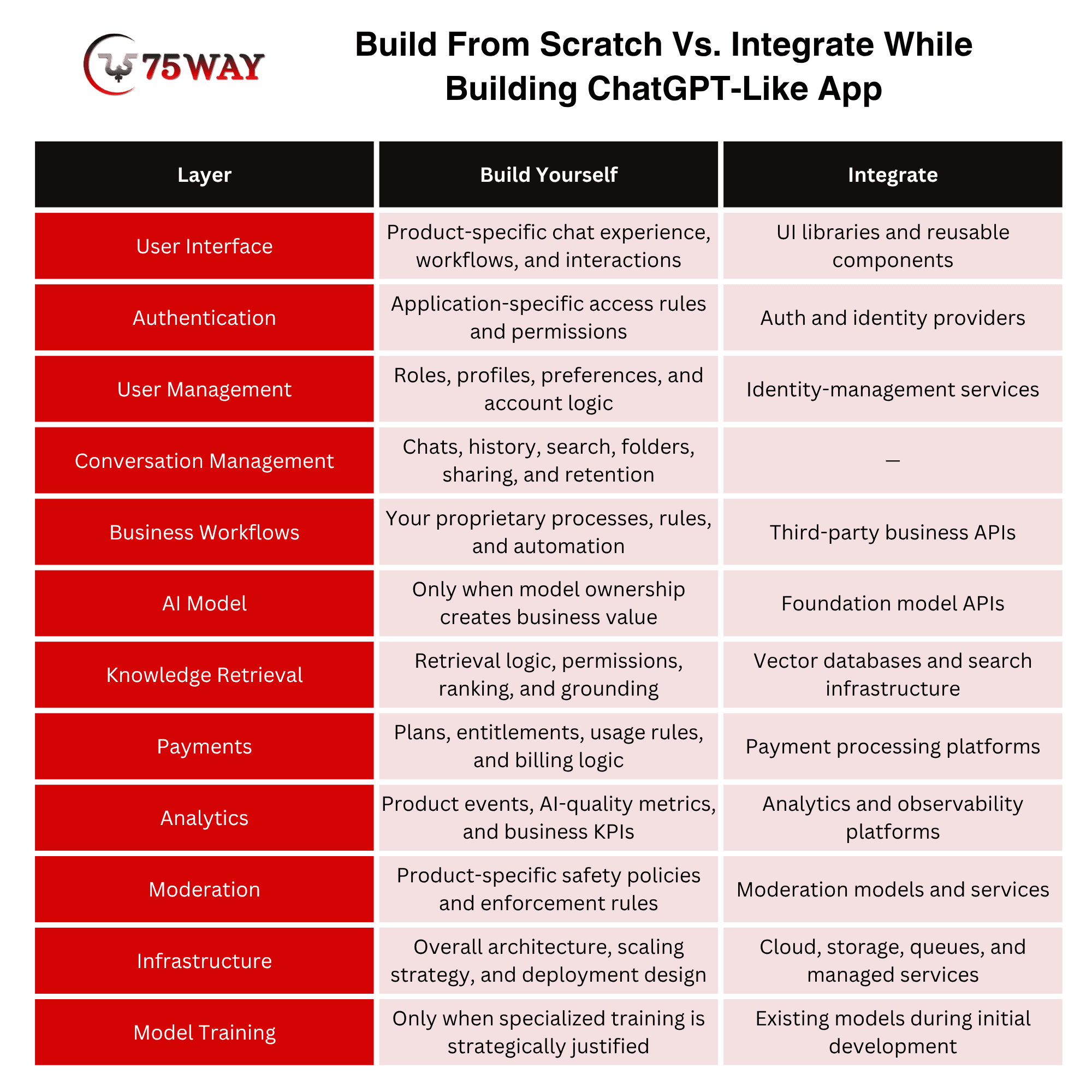
This approach prevents a common mistake: spending most of the budget recreating infrastructure that can already be consumed through APIs while underinvesting in the actual product differentiation.
For example, modern AI APIs can expose text generation, vision, tool calling, file search, and other capabilities, allowing development teams to focus on the application layer instead of rebuilding every model capability themselves.
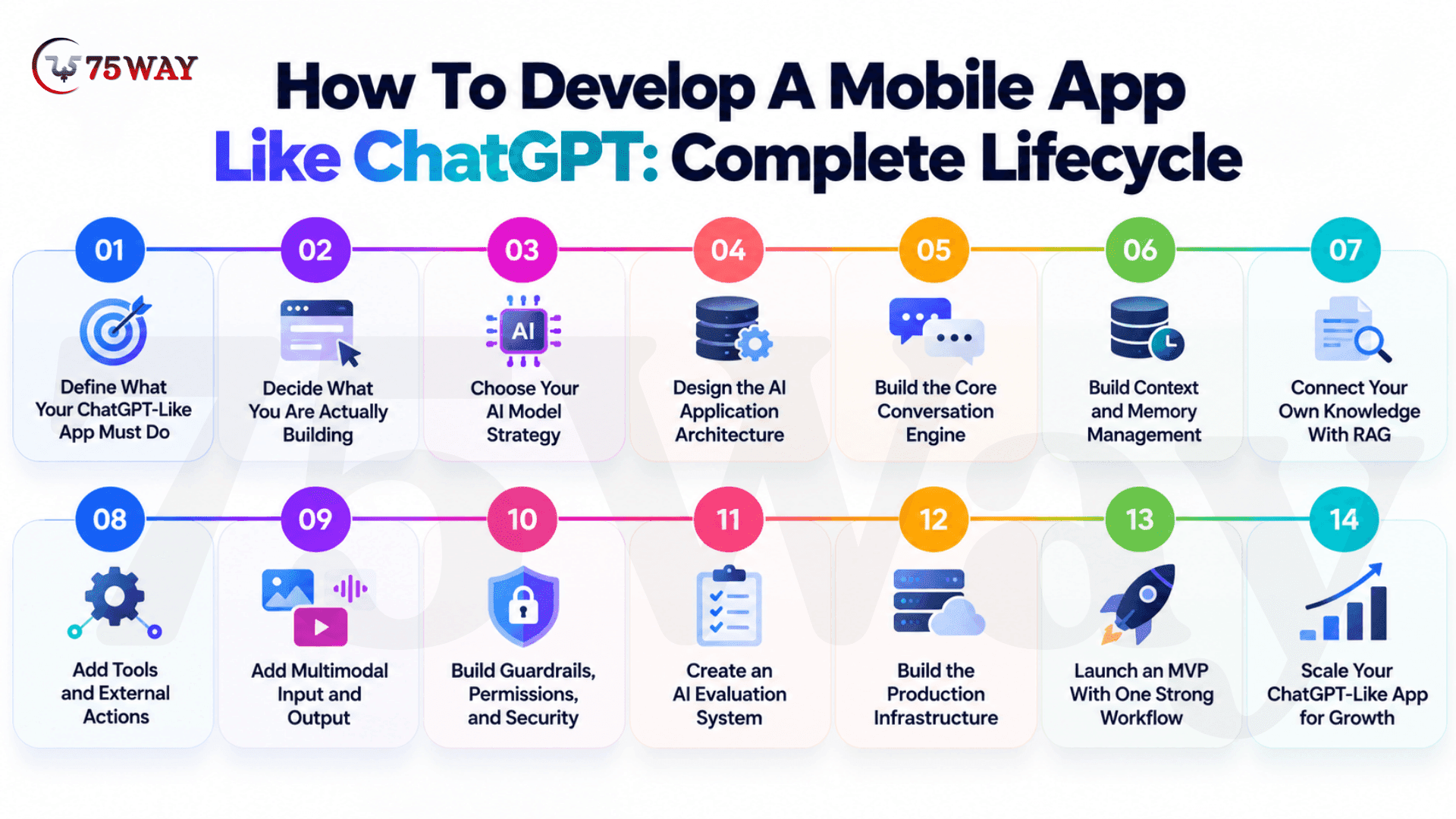
How To Develop A Mobile App Like ChatGPT: Complete Lifecycle
Your first ChatGPT-style app demo may take days, but a production-ready mobile product is a very different story. Users expect fast answers, useful context, smooth conversations, secure data, and reliable performance every time they open the app. The development journey covers the decisions that take an AI concept from validation through launch and long-term growth.
Step 1: Define What Your ChatGPT-Like App Must Do
The first mistake is treating “build an app like ChatGPT” as the product requirement. It tells your development team the interface you want, but not what the application needs to accomplish.
Start by defining the actual user journey:
Target users, primary problem, AI interaction, required data, actions, expected outcome.
For example, a legal research application may need users to upload contracts, ask questions about clauses, retrieve supporting documents, compare versions, and generate summaries. That immediately creates requirements for document processing, retrieval, access permissions, conversation history, citations, and structured outputs.
At this stage, define:
- Primary users and use cases
- Core AI workflows
- Required input types
- Expected response types
- External systems the AI must access
- Data privacy requirements
- Human approval requirements
- Monetization model
- Success metrics
The result should be a product requirements document that describes what the AI product must accomplish before deciding how to build it.
Step 2: Decide What You Are Actually Building
A ChatGPT-like application can mean very different things.
You might be building:
- A general-purpose AI chatbot
- A domain-specific AI assistant
- An enterprise knowledge assistant
- A multimodal AI workspace
- An AI agent that performs tasks
- A conversational interface for existing software
- A specialized AI application built around proprietary data
This decision determines almost everything that follows.
A simple conversational product may only require a model API, conversation management, authentication, billing, and a polished interface.
An enterprise AI platform may additionally require RAG, tenant isolation, role-based access, audit logs, integrations, tool calling, administrative controls, and detailed evaluation.
So before development begins, define the minimum product capability, rather than attempting to reproduce every capability associated with ChatGPT.
Step 3: Choose Your AI Model Strategy
Once the product requirements are clear, select the model strategy.
Do not choose a model simply because it is popular. Evaluate it against the workload your application actually needs.
Consider:
- Reasoning quality
- Response quality
- Context capacity
- Latency
- Multimodal support
- Tool calling
- Structured outputs
- Fine-tuning options
- Data handling requirements
- Availability
- Inference pricing
For most startups building an initial ChatGPT-like product, integrating an existing foundation model is more practical than training a foundation model from scratch.
You can establish a performance baseline with a capable model, then test smaller or cheaper models where they meet your quality requirements. This model-selection approach is also recommended in current agent-building guidance.
Your proprietary value can sit around the model:
Your UX + orchestration + context + data + retrieval + tools + business logic + evaluation
That is the layer you can progressively make harder to replace.
Step 4: Design the AI Application Architecture
Now translate the product requirements into a production architecture.
A basic ChatGPT-like request can follow:
User → Chat Interface → Application Backend → AI Orchestration → Model → Response → Chat Interface
A more capable application becomes:
User → Frontend → API Layer → Authentication → Conversation Service → Context Manager → AI Orchestrator → Model → Retrieval/Tools → Response Validation → Streaming → Storage
Each layer has a different responsibility.
Step 5: Build the Core Conversation Engine
The first functional version should establish the basic conversational loop before adding advanced AI capabilities.
The conversation service should manage:
- Conversation creation
- Message storage
- Conversation history
- Conversation titles
- Editing and regeneration
- Message feedback
- Conversation search
- Archiving and deletion
- Usage tracking
Streaming should also be considered at this stage. Instead of waiting for the complete response, the application can progressively deliver generated output to the interface, creating a more responsive experience.
This gives you the foundation on which memory, RAG, tools, and multimodal features can later operate.
Step 6: Build Context and Memory Management
A ChatGPT-like application cannot simply send the entire conversation to the model forever. As conversations grow, the system needs to decide what information deserves to remain in context.
A context-management layer can combine:
Recent messages, summarized history, user preferences, retrieved knowledge, current request, and tool results. You can then separate memory into different categories.
- Conversation Context: Information required to continue the current discussion.
- Persistent Preferences: Information intentionally retained between conversations, such as communication preferences.
- Workspace Context: Information associated with a company, project, account, or team.
- External Knowledge: Information retrieved from documents, databases, websites, or connected systems when required.
This distinction prevents your application from treating every piece of information as permanent memory.
Step 7: Connect Your Own Knowledge With RAG
If your application needs to answer questions using private or frequently changing information, connect it to external knowledge sources.
A typical RAG pipeline looks like data ingestion, parsing, chunking, embeddings, indexing, retrieval, reranking, context assembly, and model response.
For example, an enterprise assistant might search:
- Internal documentation
- Product manuals
- Contracts
- Policies
- Knowledge bases
- Support records
- Technical documentation
The important part is not simply adding a vector database. Your application also needs to determine who can retrieve which information.
That means retrieval may need to consider:
Query relevance, document permissions, tenant, freshness, and source quality
RAG is a grounding technique that retrieves relevant information and supplies it to the model rather than expecting the model to rely entirely on its pretrained knowledge.
Step 8: Add Tools and External Actions
Once the assistant can understand requests and retrieve information, decide whether it needs to do something rather than simply respond.
Examples include:
- Searching the web
- Querying a CRM
- Checking inventory
- Creating a support ticket
- Sending an email
- Updating a database
- Running calculations
- Generating a document
- Calling an internal API
The model should not receive unrestricted access to your production systems.
Instead, expose narrowly defined tools with validation, permissions, logging, and controlled execution. Modern AI platforms support function calling and other tool mechanisms specifically for connecting models with external systems.
Step 9: Add Multimodal Input and Output
Only after the core conversational architecture works should you add the input formats your product actually requires.
Depending on your use case, this may include: Images, PDFs, documents, audio, video, screenshots, voice, and structured files.
The implementation is different for each modality. A document assistant may need parsing and retrieval.
A voice assistant needs speech recognition, conversational processing, and speech generation.
An image-analysis application needs image understanding and potentially structured extraction.
So multimodality should be treated as an extension of the core AI workflow, not simply another checkbox in the feature list.
Step 10: Build Guardrails, Permissions, and Security
Security should be designed alongside the AI workflow rather than added after the application is complete.
Your request pipeline can include authentication, authorization, input controls, prompt/context construction, model/tool execution, output validation, and logging.
For enterprise applications, add:
- Role-based access control
- Tenant isolation
- Encryption
- Data retention controls
- Audit logs
- API-key protection
- Secrets management
- Rate limiting
- Abuse prevention
- Tool-level permissions
Tool access deserves particular attention. A model that can read data may not need permission to modify it, while an action such as sending an email or changing a database record may require explicit user approval.
Step 11: Create an AI Evaluation System
This is the stage many ChatGPT-like applications underestimate. A response that looks impressive in ten manual tests does not prove that the application works reliably.
Create an evaluation dataset containing realistic user requests, expected behaviors, difficult edge cases, unsafe requests, retrieval questions, and tool-use scenarios.
Then evaluate answer accuracy, relevance, instruction following, hallucination rate, retrieval quality, citation quality, tool-selection accuracy, tool execution errors, safety behavior, latency, token usage, and cost per request.
Evaluation should happen throughout development, especially when changing models, prompts, retrieval strategies, or orchestration logic. Current AI development guidance explicitly treats evaluation as a core part of moving generative AI applications toward production.
Step 12: Build the Production Infrastructure
Once the AI workflow performs reliably, prepare the application for real users.
This includes:
- Application Infrastructure: Frontend hosting, backend services, APIs, databases, object storage, queues, caching, and CDN.
- AI Infrastructure: Model APIs, retrieval services, embedding pipelines, model routing, prompt management, and tool infrastructure.
- Operational Infrastructure: Monitoring, logging, tracing, alerting, error handling, retries, rate limits, and usage controls.
- Business Infrastructure: Subscriptions, billing, usage limits, account management, administration, analytics, and customer support.
The architecture should be designed around expected traffic, latency requirements, data sensitivity, model usage, and failure recovery rather than around a fixed technology list.
Step 13: Launch an MVP With One Strong Workflow
Do not launch with every capability simply because the reference product has it.
A strong MVP might contain:
Authentication, chat, conversation history, one model, basic context management, one knowledge source, usage limits, feedback.
If your use case genuinely requires it, add one carefully controlled tool or integration.
The objective is to establish whether users repeatedly get value from the AI workflow before expanding the system.
Once usage data shows where users struggle or where they derive value, you can prioritize memory, RAG, agents, multimodality, integrations, or additional models based on evidence rather than assumptions.
Step 14: Scale Your ChatGPT-Like App for Growth
After launch, the development process becomes iterative.
Use production data and evaluation results to identify:
- Expensive requests
- Slow workflows
- Poor retrieval
- Weak model responses
- Unnecessary context
- Failed tool calls
- Common user corrections
- Features users repeatedly request
Then optimize the relevant layer.
You may route simple requests to smaller models, improve retrieval instead of changing the model, summarize long conversations, cache repeated operations, or introduce specialized tools for recurring workflows.
At scale, the goal is no longer simply to generate better responses. It is to balance quality, latency, reliability, security, and AI cost across the complete product.
That is what turns a ChatGPT-like prototype into a production AI application.
Why Invest In A ChatGPT-Style App Creation: Market Insights And Opportunities
The rise of ChatGPT has shown businesses that people are willing to interact with software through natural conversation. Now the opportunity is moving beyond general-purpose chat toward AI products designed for specific tasks, industries, and customer needs. Market demand, adoption trends, monetization opportunities, and development considerations all matter when assessing an investment in this space.
- ChatGPT reached 1 billion monthly active users in mid-2026, marking a record level of engagement.
- ChatGPT surpassed 900 million weekly active users in early 2026.
- ChatGPT is approaching an annualized revenue run rate of $70 billion, alongside more than 1 billion active users worldwide.
- ChatGPT is reportedly nearing a $1.4 trillion valuation target amid ongoing funding discussions.
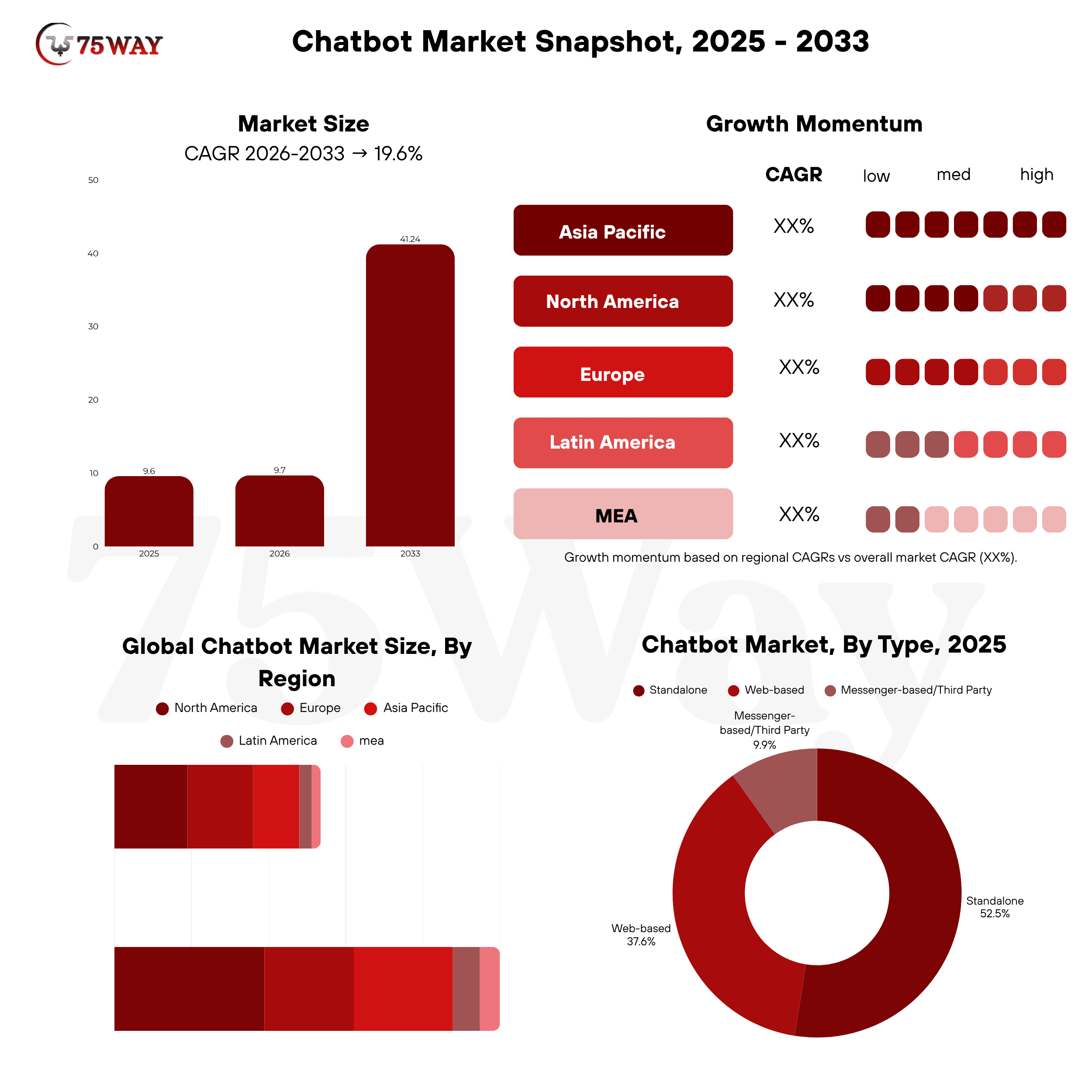
- The global chatbot market is projected to grow from $11.8 billion in 2026 to $41.2 billion by 2033, registering a 19.6% CAGR from 2026–2033.
- North America accounted for the largest regional share of the chatbot market at 31.3%.
- The solution segment dominated the chatbot market, capturing more than 61.8% of global revenue.
A Practical Architecture for ChatGPT-Like Application
What happens between the moment a user taps “Send” and the moment an AI response appears on screen? A lot more than most people realize, including authentication, API requests, model processing, context management, databases, security checks, and response delivery. A closer look at these connected components reveals how a reliable ChatGPT-like application actually works behind the interface.
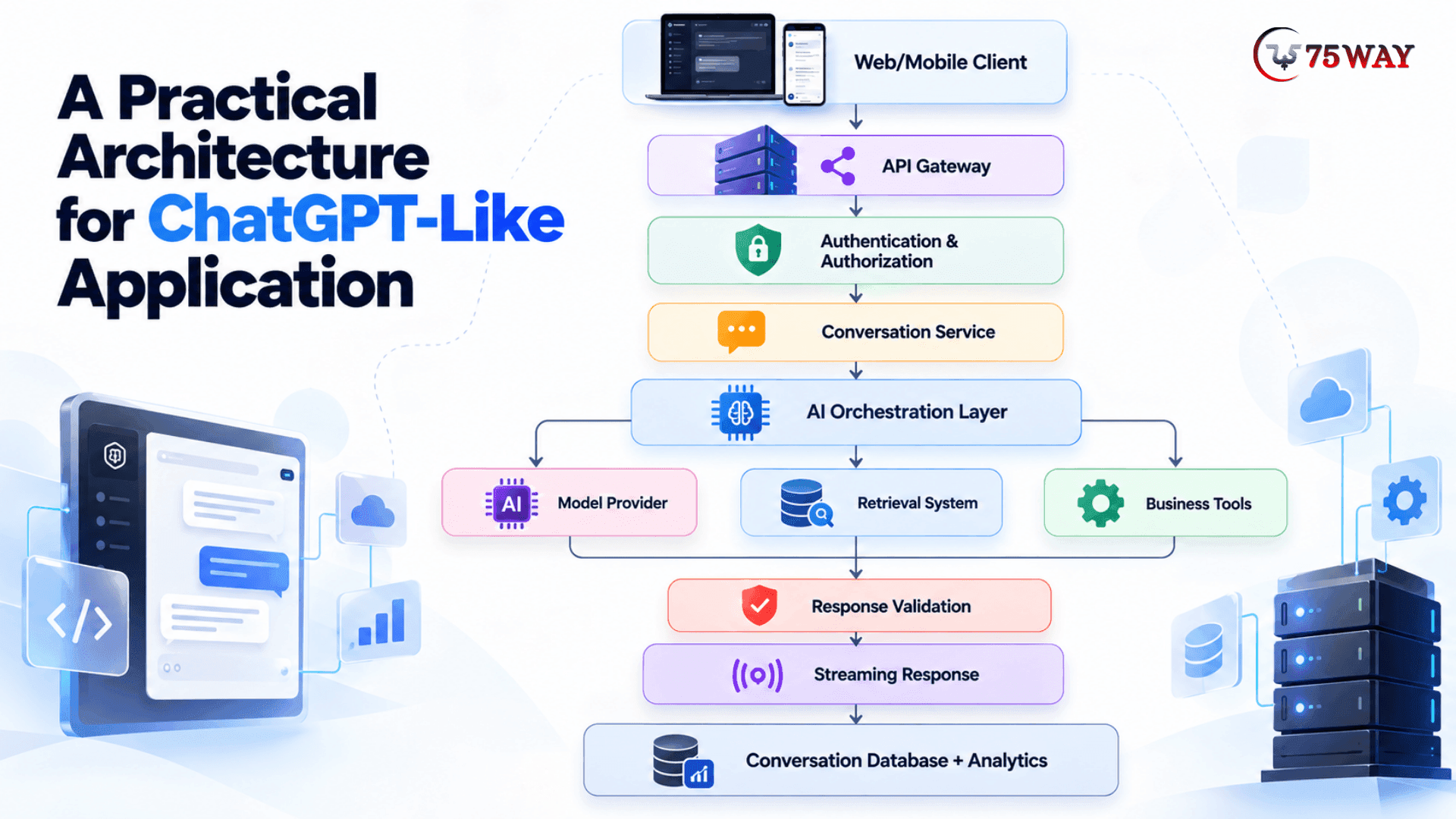
Supporting services can include:
Object Storage + Vector Search + Cache + Queue + Monitoring + Billing + Moderation
This architecture gives the application a separation between the user experience, business logic, AI provider, and proprietary data.
That separation also makes it easier to change models later.
Best Enterprise-Grade AI Infrastructure For Building ChatGPT-Like Apps
A ChatGPT-like app can work perfectly in a prototype and still struggle once hundreds or thousands of employees depend on it every day. Enterprise workloads bring heavier traffic, stricter security requirements, larger data volumes, and higher expectations for uptime and response speed. The infrastructure choices behind the application need to account for those demands from the very beginning.
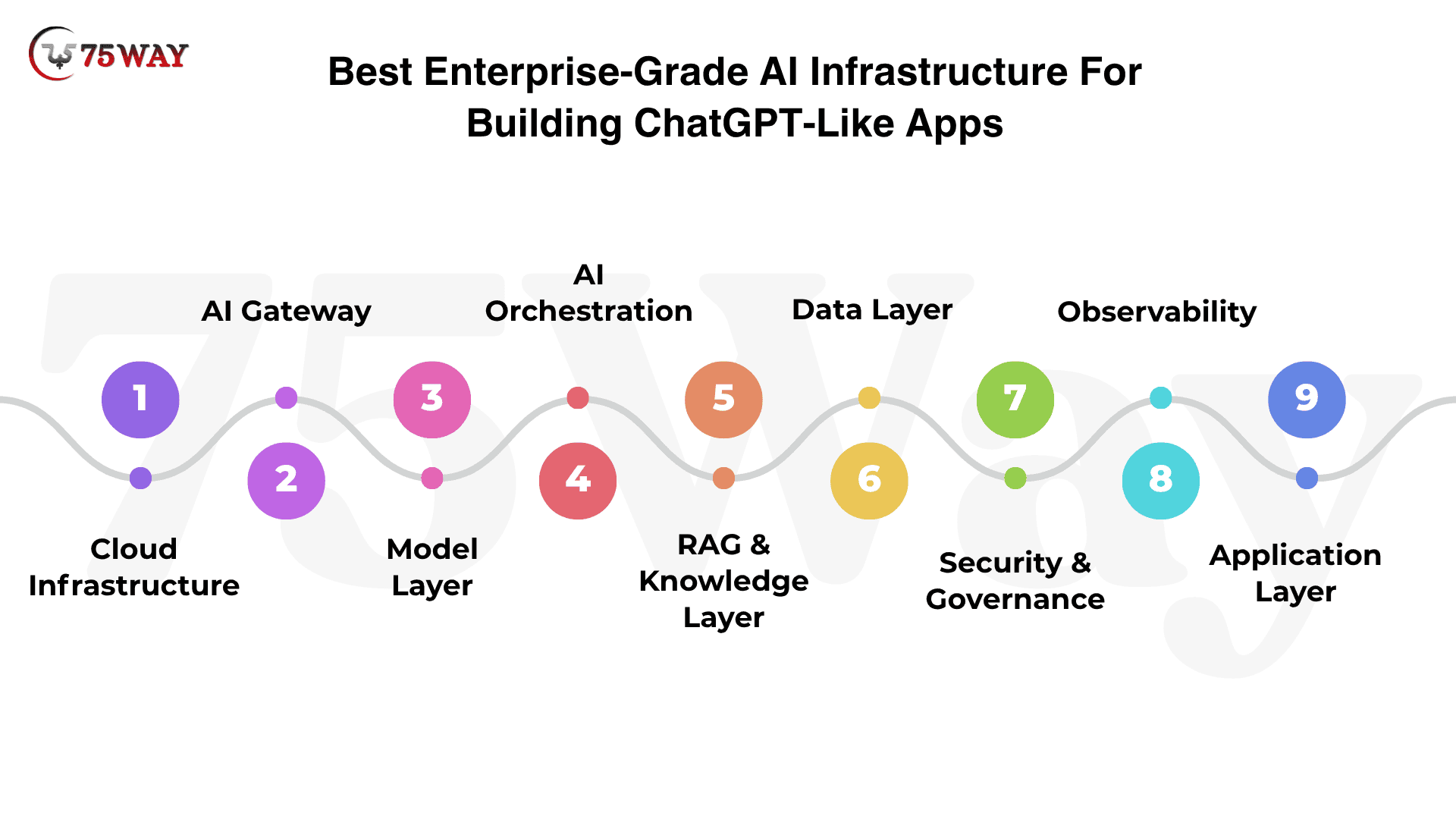
- Cloud Infrastructure: Provides the compute, networking, storage, databases, containers, queues, and autoscaling needed to run and scale the application.
- AI Gateway: Manages model access, routing, authentication, rate limits, usage controls, caching, and AI-related costs.
- Model Layer: Provides the foundation models responsible for text generation, reasoning, coding, summarization, and multimodal interactions.
- AI Orchestration: Coordinates prompts, context, memory, model selection, tool calling, workflows, and agent execution.
- RAG & Knowledge Layer: Connects enterprise data with document processing, embeddings, vector search, retrieval, reranking, and permission-aware responses.
- Data Layer: Stores users, conversations, uploaded files, preferences, tenant information, usage records, and application data.
- Security & Governance: Protects the platform through authentication, authorization, encryption, tenant isolation, secrets management, moderation, and audit controls.
- Observability: Tracks latency, errors, model performance, token usage, tool execution, user activity, and infrastructure costs.
- Application Layer: Delivers the user-facing chat experience, file uploads, conversation history, administration, billing, integrations, and business workflows.
Core Features Required For ChatGPT Clone App Development
A simple chatbot can answer questions, but a serious ChatGPT-like product needs far more capabilities behind the interface. Conversation history, AI model integration, personalization, security, multimodal support, and seamless interactions can shape the overall user experience. The essential features for a capable ChatGPT clone are explained through the requirements outlined next.
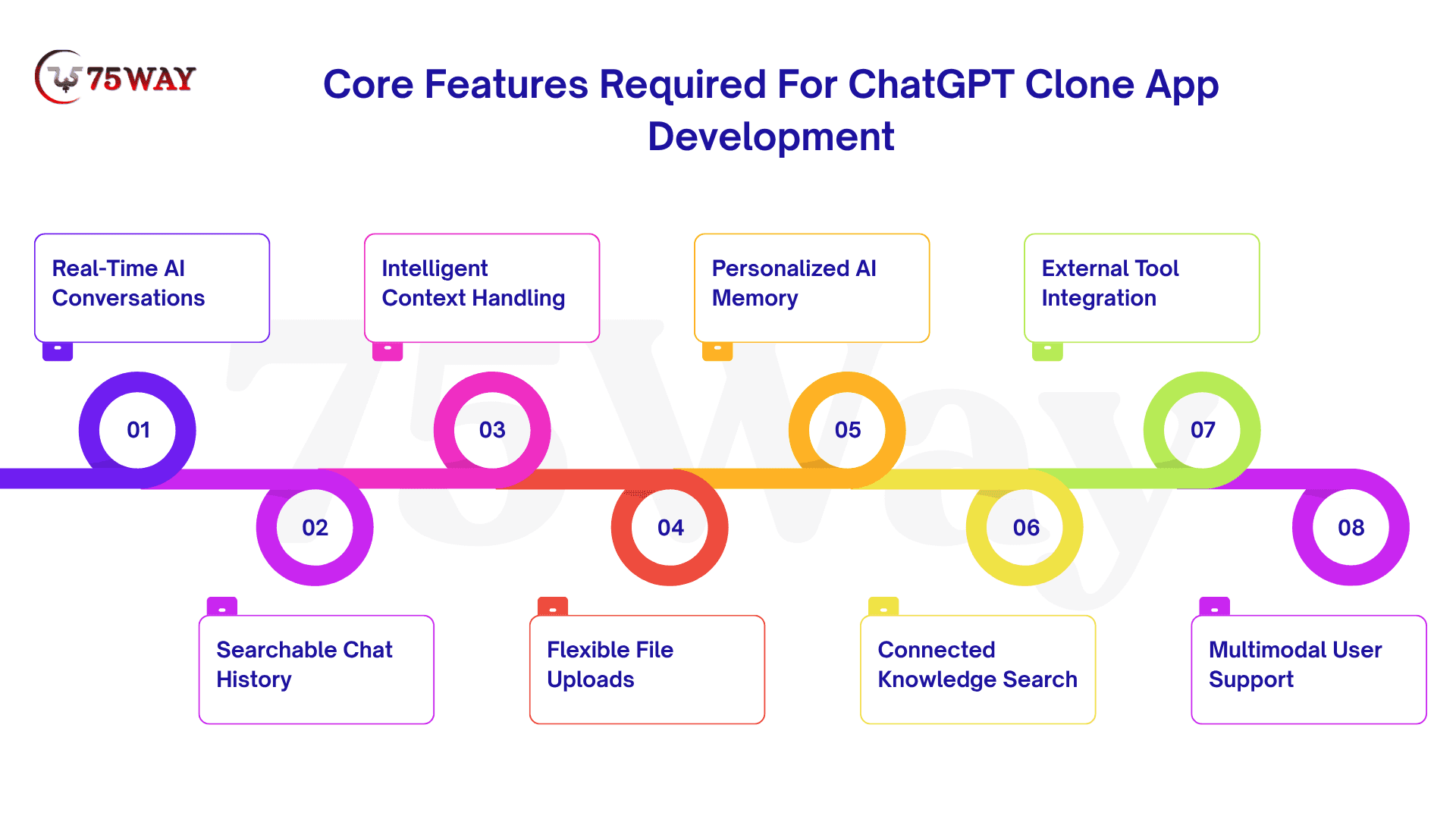
- Real-Time AI Conversations
Chat is the heart of the product, so users should get answers without waiting for the entire response to load. Streaming responses, message editing, regeneration, and follow-up questions make the interaction feel much closer to a real conversation.
- Searchable Chat History
People rarely use an AI assistant for just one conversation. Let users save, rename, search, and reopen old chats so useful answers and ongoing work are not buried after the conversation ends.
- Intelligent Context Handling
The AI needs to remember what matters from the current conversation before answering the next question. Good context handling also means deciding what information to leave out when a chat becomes too long, which helps control both response quality and model costs.
- Flexible File Uploads
Instead of asking users to copy an entire document into the chat, let them upload the file directly. The application can then extract and process its content, allowing users to ask questions about reports, PDFs, spreadsheets, images, and other business documents.
- Personalized AI Memory
Some applications need the assistant to remember useful details beyond a single chat. Memory can include preferences, recurring requirements, or project information, while giving users clear controls to see, change, or delete what the system remembers.
- Connected Knowledge Search
A general-purpose model may not know a company's latest information, internal documents, or private data. Connecting the application to a knowledge base through retrieval allows the AI to find relevant information first and use it when preparing the response.
- External Tool Integration
A useful AI assistant should be able to do more than write an answer when the business workflow requires an action. Tool integrations can let it search a database, check an order, create a support ticket, schedule something, or work with another application.
- Multimodal User Support
Text is only one way people interact with an AI product. Depending on the use case, users may need to send images, documents, audio, or voice messages and receive responses that work across these different formats.
Industry-Specific Use Cases For Building ChatGPT-Like Apps
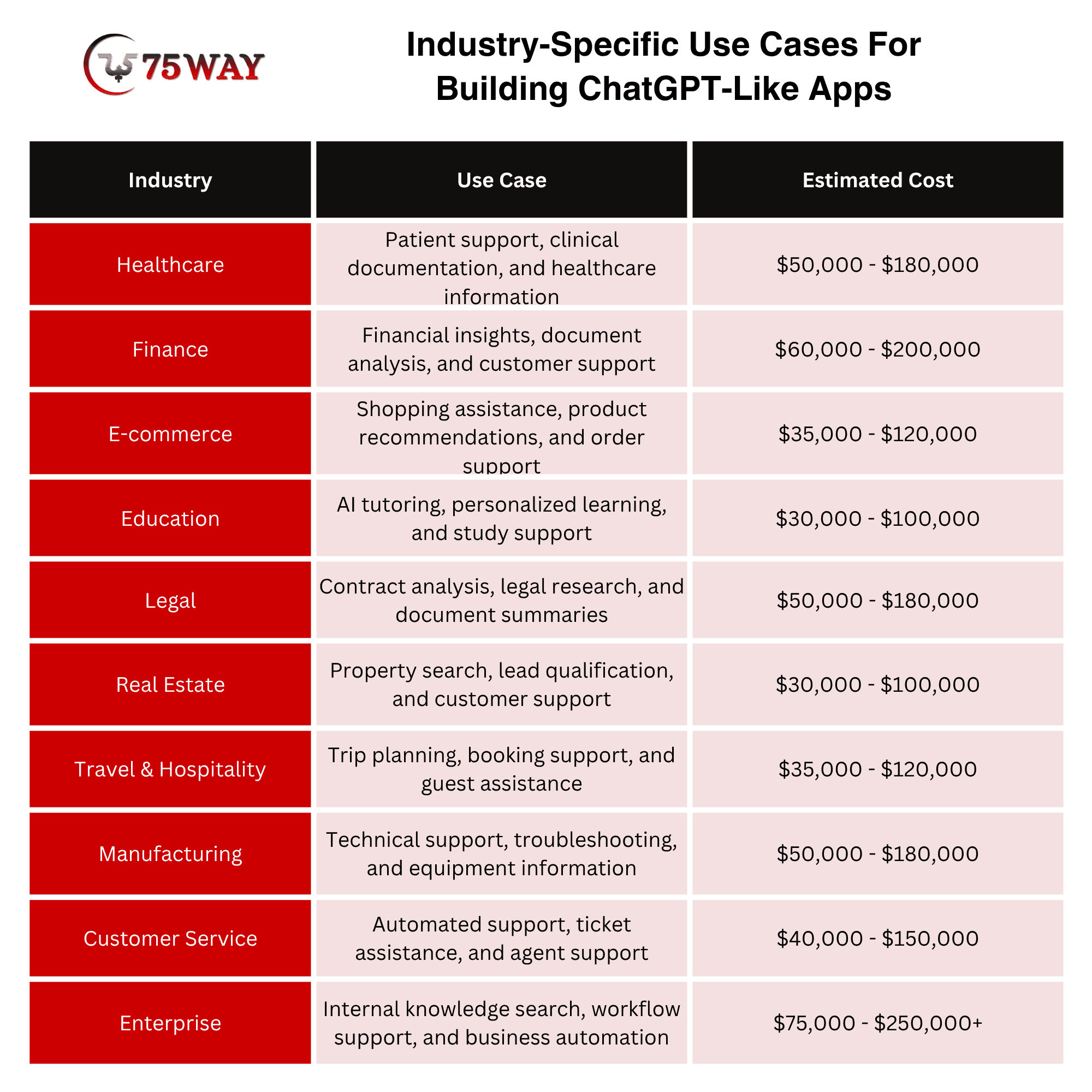
A general-purpose AI assistant can answer questions across almost any topic, but businesses often need something much more specific. A healthcare company may need clinical knowledge support, while a financial firm may need document analysis and research assistance. The key industry-specific applications are outlined below.
- Healthcare
A ChatGPT-like app can help patients get quick answers, assist clinicians with documentation, and simplify access to healthcare information. With secure data handling, conversational AI in healthcare can also support appointment workflows, patient communication, and internal medical knowledge search.
- Finance
Banking AI assistants like ChatGPT can help customers understand financial products, summarize documents, and get answers without navigating complex support channels. Financial teams can also use them for research, report analysis, compliance workflows, and internal knowledge retrieval.
- E-commerce
A conversational shopping assistant can understand what customers actually want instead of forcing them through filters and categories. It can recommend products, answer questions, compare options, track orders, and support customers throughout their buying journey.
- Education
AI tutors can adapt explanations to a learner’s questions, knowledge level, and preferred learning pace. Educational platforms can also use ChatGPT-like capabilities for study assistance, feedback, course navigation, and personalized learning support.
- Legal
Legal AI assistants can search large collections of contracts, policies, and case documents to surface relevant information faster. They can also summarize lengthy documents, identify important clauses, support legal research, and assist internal legal teams with routine workflows.
- Real Estate
A ChatGPT-like real estate assistant can understand buyer preferences and turn broad searches into more relevant property recommendations. It can also answer listing questions, qualify leads, schedule viewings, and help agents manage repetitive customer conversations.
- Travel & Hospitality
Travel assistants can turn a simple request such as “plan a three-day business trip” into a structured itinerary based on user preferences. Hotels, airlines, and travel platforms can also use AI travel assistants for booking support, guest questions, itinerary changes, and personalized recommendations.
- Manufacturing
Manufacturers can use AI assistants to make technical manuals, equipment documentation, and operational knowledge easier for employees to access. A well-connected system can also support troubleshooting, maintenance guidance, production queries, and technician workflows.
- Customer Service
A ChatGPT-like support system can handle common customer questions while giving human agents relevant information during more complex conversations. When connected with business systems, AI customer support agents can retrieve account details, summarize tickets, suggest responses, and trigger approved support actions.
- Enterprise
Enterprise AI assistants can bring scattered company knowledge into a conversational interface employees can actually use. They can search internal documents, analyze business information, assist with workflows, and connect employees with the right systems without requiring them to switch between multiple tools.
Should You Train Your Own AI Model To Create A Conversational AI Chatbot Like ChatGPT
For most startups, the answer should begin with another question, “What business problem requires ownership of the model itself?”
If the answer is unclear, building the foundation model is likely premature.
Using an existing model can provide:
- Faster launch
- Lower initial infrastructure requirements
- Access to mature capabilities
- Faster experimentation
- Easier model upgrades
Fine-tuning becomes relevant when you need to adapt a supported model to a specific dataset, style, format, or task. Current AI APIs provide dedicated fine-tuning workflows for supported models and datasets.
Consider Your Own Model When:
- You have substantial proprietary training data.
- Model behavior is a core competitive advantage.
- You require specialized domain performance.
- You need greater infrastructure control.
- Inference economics justify the investment.
- Data or deployment requirements make external APIs unsuitable.
- You have the ML engineering and infrastructure capability to operate it.
For many businesses, owning the product layer is more valuable than owning the foundation model.
How To Make Your ChatGPT-Like App Different
This is where many AI startups fail strategically. “Chat with AI” is a feature. It is rarely a defensible product by itself. Your differentiation could come from:
- Proprietary Knowledge: Your system understands information competitors cannot easily reproduce.
- Specialized Workflows: The assistant completes an industry-specific process instead of simply generating text.
- Integrations: Your AI can work with the tools customers already use.
- Vertical Expertise: The product is designed around one industry's terminology, workflow, compliance requirements, and operational needs.
- Better User Experience: The development can make complicated AI workflows understandable to nontechnical users.
- Business Context: The AI understands the customer's organization, role, permissions, projects, and goals.
A strong AI startup proposition sounds more like: “AI assistant that automates commercial property underwriting.” than: “A smarter chatbot.” The first describes a business outcome.
How To Build A ChatGPT-Like App For Enterprise Customers
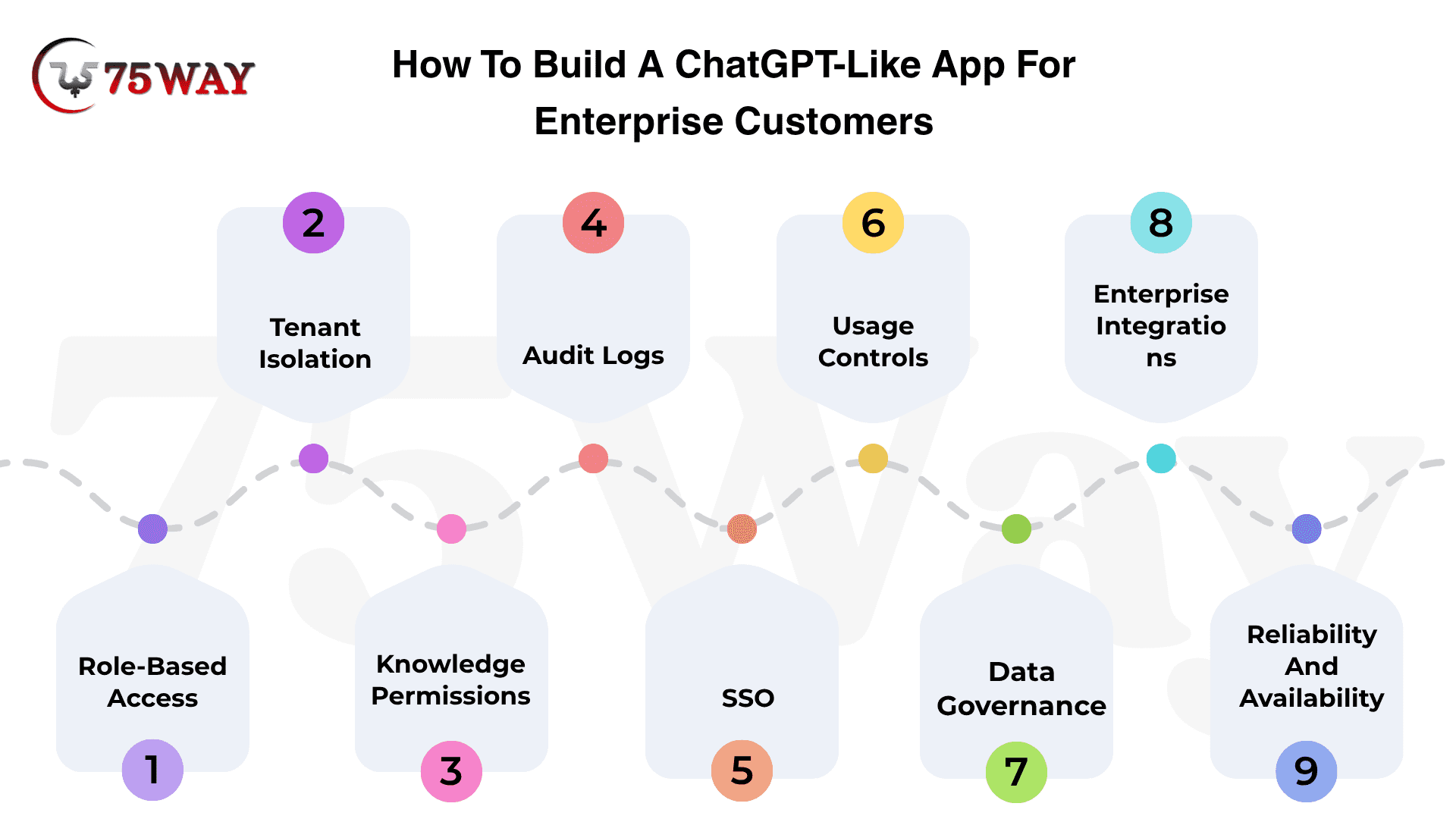
A private AI assistant sounds appealing until a business asks a few uncomfortable questions: Can it protect confidential data? Can administrators control access? Can it connect with existing systems? Can it deliver reliable answers at enterprise scale? Each question points to a critical part of the development process, which becomes easier to understand when the product is broken down stage by stage.
1. Role-Based Access
Not everyone inside a company should have the same AI experience. A salesperson may need customer insights, while a finance employee may work with sensitive financial data and an administrator may control models, integrations, and usage policies.
Build access around roles and responsibilities so the application can decide not only which information someone can view, but also which AI features, tools, and actions they are allowed to use.
2. Tenant Isolation
A multi-company AI platform has a simple rule that cannot be compromised: one customer's information should never become part of another customer's experience.
That means tenant identity needs to stay attached to conversations, files, retrieval requests, cached data, and tool calls throughout the system.
This becomes particularly important when you use shared infrastructure to reduce costs, because a performance optimization should never create a data-separation problem.
3. Knowledge Permissions
An enterprise knowledge base is rarely a single open library. Employees may have access to different folders, projects, departments, or confidential documents, so the AI needs to understand those boundaries before retrieving information.
Instead of searching everything and trying to hide sensitive content afterward, permission checks should happen during retrieval itself, ensuring that restricted information never reaches the model's context.
4. Audit Logs
Once your AI can access company information or perform actions, customers will eventually ask a very practical question: “What exactly happened?”
Your application should be able to show important events, such as who accessed a resource, changed a permission, triggered a tool, or modified an AI configuration.
Good audit logging gives enterprise teams something they can actually investigate when a response looks wrong, a sensitive document is accessed, or an automated action needs to be traced.
5. SSO
Employees already have company-managed identities, so asking them to create another account for an AI platform adds unnecessary friction for both users and IT teams.
With single sign-on, organizations can connect the application to their existing identity system and manage access from the same place they manage other business software. It also makes employee changes easier to handle, because access can follow the organization's existing onboarding and offboarding process.
6. Usage Controls
The cost of an AI product can change quickly when hundreds or thousands of employees start using it every day. One team might need a powerful reasoning model, another may only need a lightweight model, and a small group might require access to expensive agent workflows.
Give administrators control over models, features, users, and usage limits so they can decide where AI spending creates value instead of leaving every employee with unlimited access.
7. Data Governance
Enterprise customers will want a clear answer to a question that consumer users may never ask: “What happens to our data after we send it?”
Your architecture should account for conversations, uploaded files, retrieved information, generated responses, logs, and temporary processing data, with clear rules for storage, retention, access, and deletion.
These decisions should be made before deployment because changing how sensitive data flows through a mature AI system later can require significant architectural changes.
8. Enterprise Integrations
An AI assistant becomes much more useful when it can work with the systems employees already depend on.
Instead of asking a sales representative to copy CRM information into a chatbot, the assistant could retrieve the relevant account data directly and prepare the next action inside the existing workflow.
The important part is to connect these systems without giving the AI unnecessary authority, keeping each integration limited to the data and actions the workflow actually requires.
9. Reliability And Availability
Enterprise users quickly lose confidence when an assistant works perfectly one minute and fails without explanation the next. Your application needs a plan for model timeouts, provider outages, rate limits, failed integrations, retrieval problems, and unexpected AI outputs, with appropriate retries, fallbacks, and error handling.
Reliability should be measured across the entire AI workflow, because the best model in the world cannot rescue an application whose surrounding services keep breaking.
How Much Does It Cost To Build An App Like ChatGPT?
The cost depends heavily on what you mean by “like ChatGPT.” A lightweight AI chatbot and a multimodal enterprise AI platform can have dramatically different budgets. A practical planning range is:
1. Basic MVP ChatGPT-Like App Cost: $15,000 – $40,000
Estimated Time: 4–10 Weeks
- Simple chat interface with authentication
- Basic conversation history and user profiles
- OpenAI API integration with basic responses
2. Mid-Level ChatGPT-Like App Cost: $40,000 – $100,000
Estimated Time: 3–5 Months
- RAG integration for private knowledge
- User management and usage analytics
- Custom workflows with advanced AI capabilities
3. Enterprise-Grade ChatGPT-Like App Cost: $100,000 – $450,000+
Estimated Time: 5–10 Months
- Enterprise security with role-based access
- Advanced RAG, memory, and model orchestration
- Custom integrations with business systems
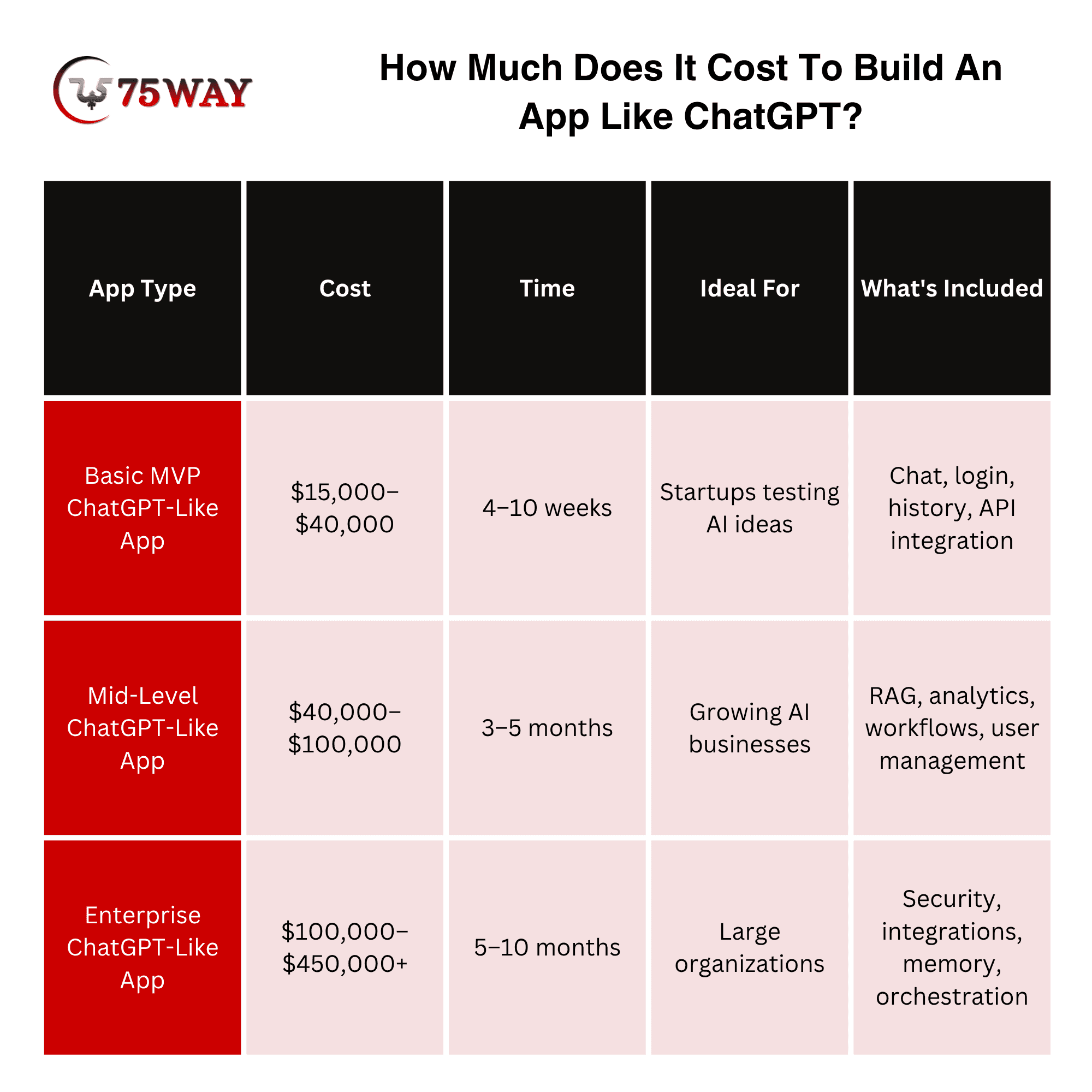
These are planning ranges, not fixed market prices. Actual cost depends on design complexity, development location, team composition, model usage, integrations, security requirements, infrastructure, testing, and post-launch support.
The biggest cost mistake is treating AI model usage as the entire budget. The total cost includes model inference, storage, vector search, databases, bandwidth, monitoring, moderation, third-party APIs, engineering, and customer support.
Monetization Models For ChatGPT-Like Application Development
A strong AI product can generate plenty of engagement without generating enough revenue to cover its operating costs. The right monetization model connects user value with sustainable income while keeping pricing practical for different customer segments. The key revenue approaches for ChatGPT-like applications are examined in the models that follow.
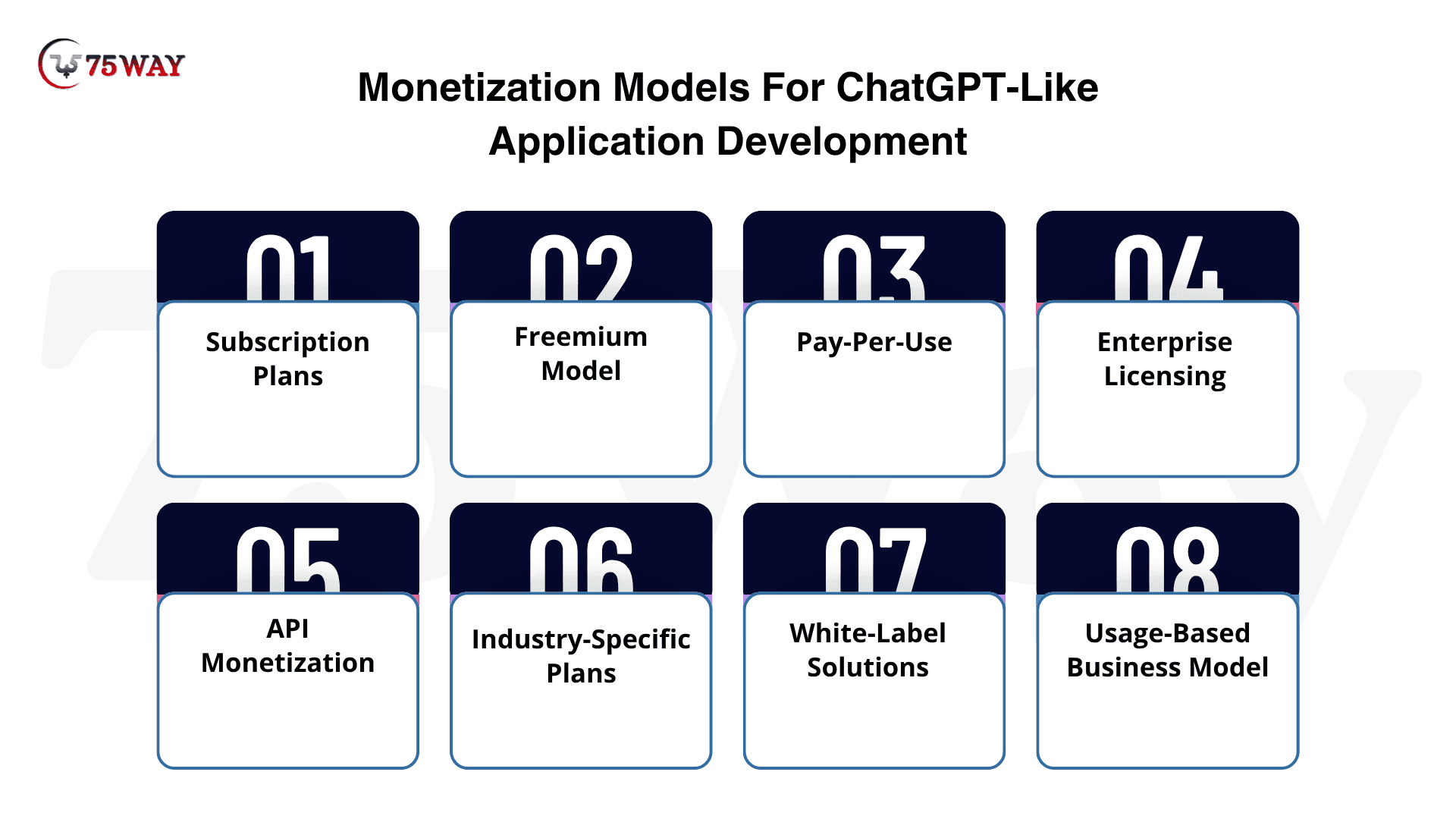
- Subscription Plans
Monthly or annual subscriptions can provide recurring revenue from users who need regular access to premium AI features. A well-positioned subscription app can potentially generate 20%–40% profit margins once user acquisition and AI costs are under control.
- Freemium Model
A free plan can attract users, while advanced features, higher limits, and premium models encourage upgrades. Profitability can reach 15%–30% as the application builds a strong base of paying users and manages free-user costs carefully.
- Pay-Per-Use
Usage-based pricing charges customers according to messages, tokens, document processing, or other AI consumption. Profit margins can range from 20%–50%, depending on pricing, model costs, and the volume of AI usage.
- Enterprise Licensing
Enterprise contracts can generate substantial revenue through customized deployments, integrations, security controls, and dedicated AI infrastructure. A successful enterprise application can achieve 25%–45% profit margins because larger contracts can spread development and infrastructure costs across higher-value accounts.
- API Monetization
API access creates revenue whenever developers or businesses use your AI capabilities within their own applications. Profit margins can potentially reach 30%–60% when API pricing remains comfortably above model inference and infrastructure expenses.
- Industry-Specific Plans
Specialized packages for healthcare, finance, education, legal services, and other industries can command higher prices for tailored workflows. Profit margins of around 25%–45% are possible when specialized features support higher customer pricing without high operational costs.
- White-Label Solutions
White-label licensing lets businesses use your ChatGPT-like platform under their own branding and customer experience. Potential profit margins can reach 30%–50% through setup fees, recurring licensing charges, and usage-based revenue.
- Usage-Based Business Model
A hybrid pricing structure can combine subscriptions with additional charges for resource-intensive features such as voice, document analysis, or advanced reasoning. Profit margins can potentially reach 20%–40% when premium usage is priced according to its actual AI and infrastructure costs.
Common Mistakes When Building A ChatGPT-Like App & Solutions
A polished AI chatbot does not guarantee a successful product, especially when technical decisions can affect cost, accuracy, security, and scalability. Several avoidable mistakes can also create poor user experiences or expensive rework after launch. The key mistakes developers encounter, along with practical ways to address them, are outlined next.
1. Building a Generic Chatbot
A general chatbot has difficulty competing with established platforms.
Better approach: Solve a specific business workflow.
2. Choosing The Model Before Defining The Product
The newest model is not automatically the right model.
Better approach: Define latency, quality, context, tool, privacy, and cost requirements first.
3. Treating RAG As A Checkbox
Adding a vector database does not automatically produce reliable retrieval.
Better Approach: Evaluate chunking, indexing, metadata, retrieval quality, permissions, reranking, and answer grounding.
4. Giving AI Excessive Tool Access
An agent with unrestricted permissions creates unnecessary risk.
Better Approach: Use scoped functions, authorization, validation, and human approval for sensitive actions.
5. Ignoring AI Costs
A successful product can become expensive if every request uses the most expensive model and unnecessarily large context.
Better Approach: Use model routing, caching, context management, and usage controls.
6. Treating Security As A Final Phase
AI applications handle prompts, files, business data, and potentially sensitive information.
Better Approach: design security into the architecture from the beginning.
7. Building Too Many Features In The MVP
Voice, image generation, agents, collaboration, marketplaces, plugins, and dozens of integrations can delay validation.
Better Approach: Identify the smallest AI workflow that proves customer demand.
How To Choose The Right ChatGPT-Like AI App Development Agency?
The agency you choose can determine whether your ChatGPT-like app becomes a usable product or an expensive AI interface that struggles under real-world usage. Look beyond portfolios and focus on how the team approaches model selection, context handling, RAG, integrations, security, and long-term operating costs.
A useful way to evaluate an agency is to discuss your actual workflow before discussing features or pricing. Ask how they would handle conversation context, private business data, model switching, hallucination risks, usage limits, monitoring, and unexpected AI costs; their answers can reveal whether they understand the product beyond the visible chat screen.
The right partner should also think beyond launch day, because AI applications require ongoing evaluation, model updates, infrastructure tuning, and feature improvements as usage grows. Compare agencies on their technical approach, communication, ownership of the codebase, post-launch support, and ability to turn your business requirements into a practical AI architecture.
How 75way Is The Right Choice To Create A ChatGPT-Like App
Building a ChatGPT-like application requires more than connecting a chatbot interface to an AI API. 75way Technologies can help turn your business idea into a complete AI product, covering conversation workflows, model integration, RAG, memory, APIs, security, and scalable backend infrastructure.
The development approach can be tailored around how your users will actually interact with the application. Whether you need document-based question answering, personalized AI responses, business automation, multimodal capabilities, or third-party integrations, the architecture can be planned around your specific product requirements rather than forcing a standard chatbot template.
Beyond development, 75way can support the product through testing, deployment, performance improvements, and future feature expansion. This gives your business a foundation that can accommodate changing AI models, growing usage, new workflows, and evolving customer expectations without rebuilding the entire application from scratch.
Final Remarks
To sum up, ChatGPT-like app development is not primarily about recreating a chat window. The commercial opportunity comes from combining foundation models with proprietary data, reliable retrieval, useful workflows, secure integrations, strong evaluation, and an experience built around a specific customer problem.
For most startups, the practical path is to build the differentiated application layer first, validate demand, measure AI quality and unit economics, and introduce deeper model ownership only when the business case supports it.
To turn your AI product idea into a scalable ChatGPT-like application, you can hire a skilled AI chatbot development firm and plan your MVP, architecture, and development roadmap.
Frequently Asked Questions (FAQs)
How Long Does It Take To Build An App Like ChatGPT?
A focused MVP may take around 8–14 weeks, while a sophisticated AI platform with RAG, agents, multimodal capabilities, enterprise security, and integrations can take several months.
Can I Build ChatGPT From Scratch?
You can build a ChatGPT-like application from scratch at the application level, but training a comparable foundation model is a substantially larger machine-learning and infrastructure project.
Do I Need To Train My Own AI Model?
Not necessarily. Many startups can launch using an existing foundation model and differentiate through proprietary data, retrieval, workflows, integrations, memory, user experience, and business logic.
What Technology Is Used To Build A ChatGPT-Like App?
A typical stack can include React or Next.js for the interface, Python, Node.js, Go, or another backend language, PostgreSQL, Redis, vector search, cloud infrastructure, and one or more AI model APIs.
How Does A ChatGPT-Like App Remember Conversations?
Conversation memory can be implemented through stored conversation history, summaries, user preferences, retrieval systems, or a combination of these approaches.
What Is RAG In An AI Chatbot?
Retrieval-Augmented Generation retrieves relevant information from a connected knowledge source and supplies that context to the AI before generating an answer.
Can an AI Chatbot Use Company Documents?
Yes. A chatbot can connect to company documents through a retrieval architecture, provided that document permissions, security, data handling, and access controls are properly implemented.
Can a ChatGPT-Like App Connect To Other Software?
Yes. Tool calling and APIs can connect an AI assistant with CRMs, databases, calendars, payment systems, internal applications, and other business software.