In 2026, mobile apps sit at the center of how people shop, communicate, learn, and interact with brands. For many businesses, the app is no longer just a product, but becomes the main connection point with customers.
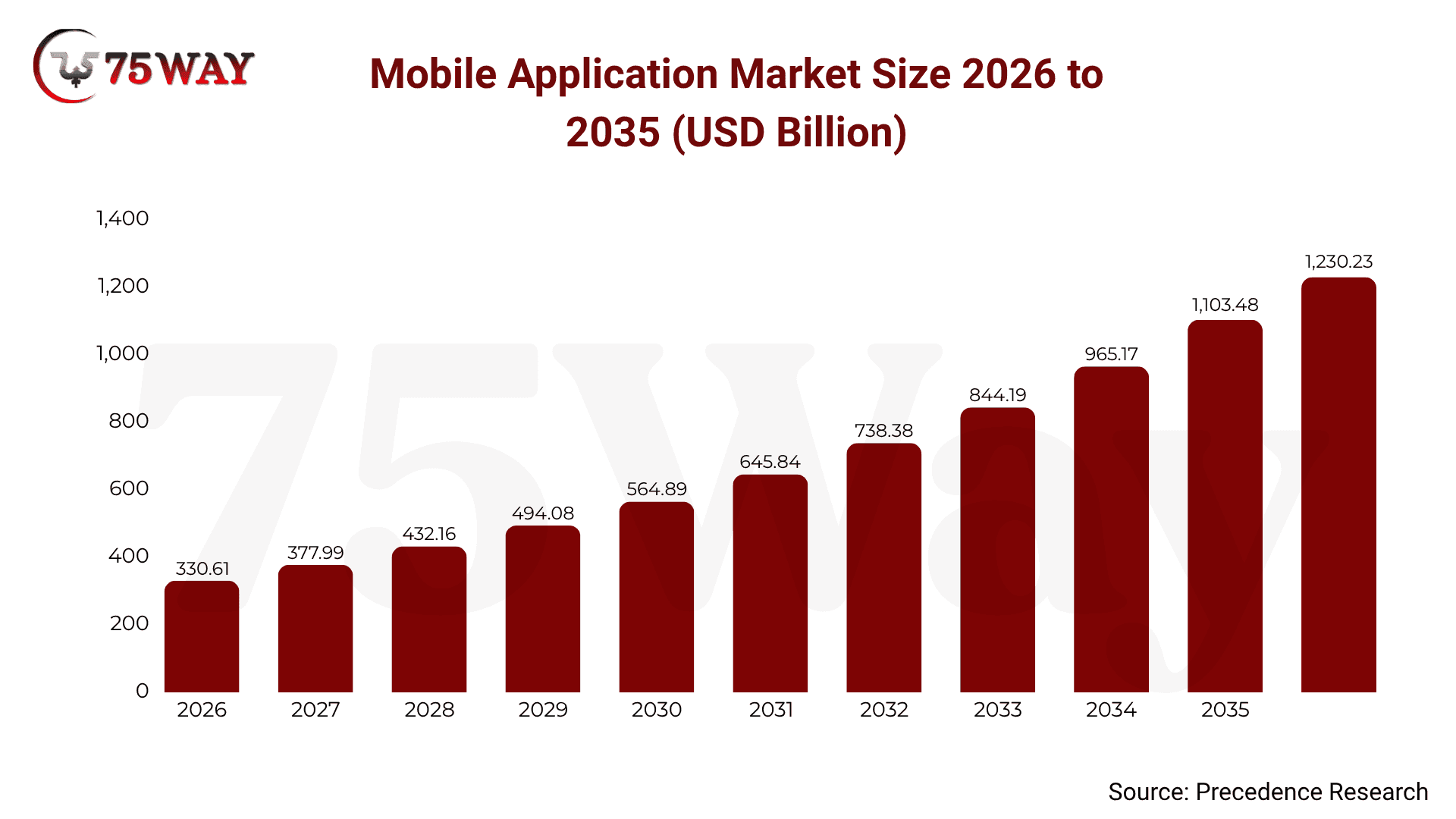
The global mobile application market is projected to cross $1,230.23 billion by 2035 at a CAGR of 14.04%. Even right now, it is already on a strong growth path, expected to reach $626 billion by 2030. This rise is closely linked to smartphone usage, artificial intelligence (AI)-based personalization, and rising expectations.
Because of this, mobile app development is no longer treated as an optional step. It has become a core business decision that influences growth, customer loyalty, and long-term success.
This guide walks through the complete process of building a mobile app in 2026 in a simple, practical way so you can make clearer decisions and move from idea to launch with confidence.
What is Mobile App Development?
Mobile app development is the structured process of planning, designing, building, and launching applications for smartphones, tablets, and other connected devices. These apps are typically created for platforms like iOS and Android, with a focus on delivering smooth and reliable user experiences that support both business goals and user needs.
It involves more than just writing code. A complete development process includes UI/UX design, backend systems, APIs, databases, and security layers working together as one system. Each part plays a role in making the app functional, fast, and user-friendly.
Also Read: How to Build an AI-Driven Anonymous Messaging App?
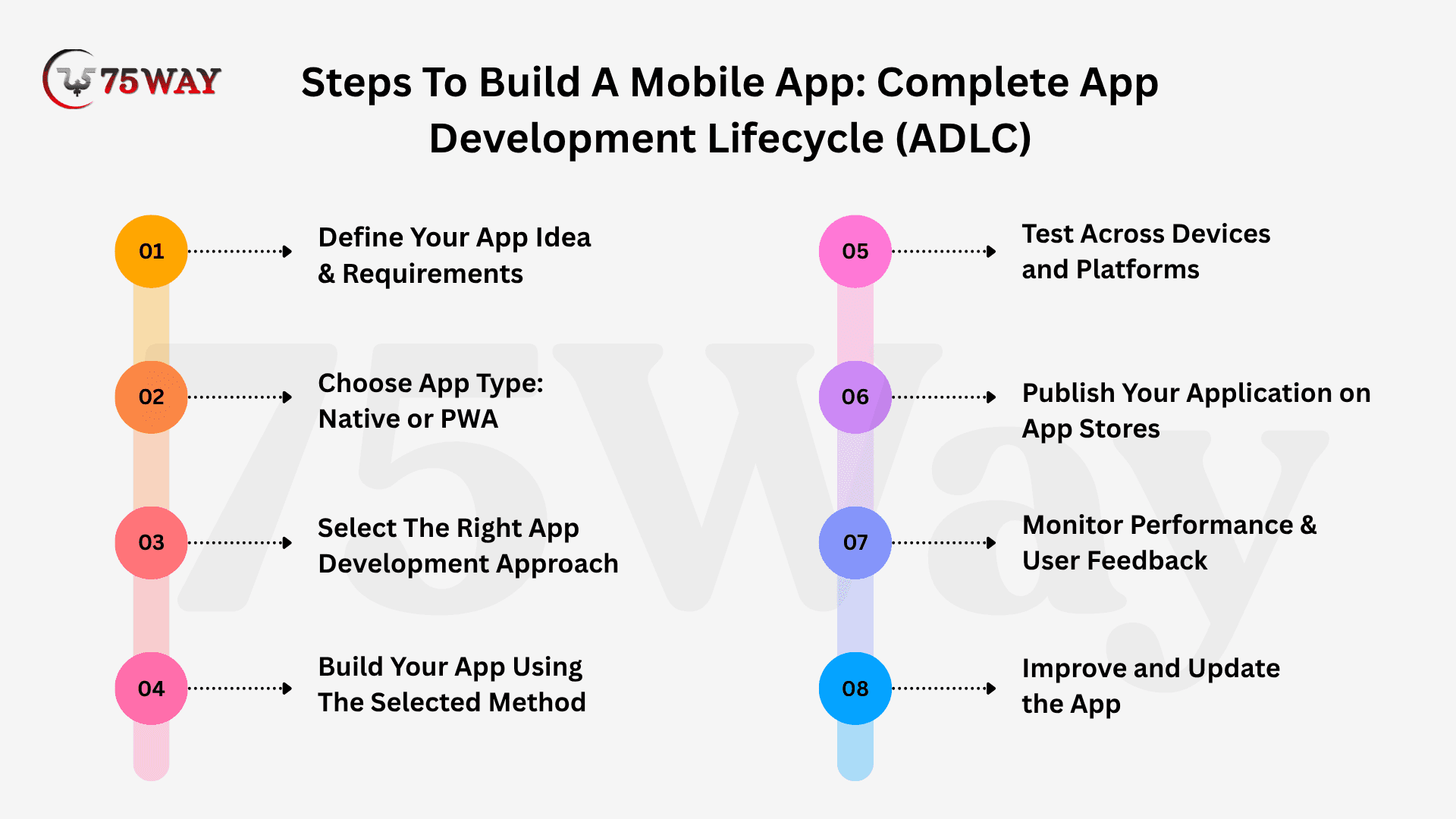
Steps To Build A Mobile App: Complete App Development Lifecycle (ADLC)
While developing a mobile app, you must know about the app development lifecycle (ADLC), which is a process to create an application from planning to launch. Term seems quite technical? But, we have elaborated a structured roadmap that defines the planning, build phase, launch, and deployment phase to reduce risk and provide long-term scalability.
Step 1: Define Your App Idea & Requirements
Before anything else, slow down and get clear on what your app is actually supposed to do. Ask yourself:
- What problem am I solving here?
- Who am I solving it for?
- And why would someone care?
Because if you skip this part, everything else becomes guesswork later. And that’s usually where most app projects fail.
1. Understand the Market and Competition
Now comes something most beginners ignore, and that’s a mistake. Your app idea might feel unique to you, but chances are, someone has already tried something similar. So instead of fearing it, study it. Open the App Store or Play Store and search for your idea. Look at similar apps. Read their reviews carefully. Because users are brutally honest there. You’ll quickly notice patterns:
- What people love?
- What frustrates them?
- What features are missing?
This is gold. This is literally your shortcut to building something better without guessing. And here’s a question worth asking: if users already have options, why would they switch to yours? That answer shapes everything.
2. Create UI/UX Design of App Before You Develop
Now this is where things start becoming visual, and honestly, more exciting. But don’t jump into coding yet. That’s where many people go wrong.
First, sketch UI/UX design of your app. It doesn’t need to be perfect. Even rough wireframes on paper or simple digital mockups are enough. Why? Because design is not just how it looks. It’s how it feels. People decide in seconds whether they’ll stay on an app or leave. Sometimes even less than that. So your UI/UX design should:
- Feel simple
- Look familiar
- Not confuse the user
If someone opens your app and has to “figure it out,” you’ve already lost them. Keep things clean. Keep things obvious. And remember, good design is not about adding more. It’s about removing everything unnecessary.
3. 3-Click Rule To Keep Navigation Simple
Here’s something powerful but often ignored. A user should be able to reach anything important in your app within three taps or clicks. That’s it. Not five. Not seven. Three.
Because people don’t have patience anymore. If they can’t find something quickly, they leave. Think about your own behavior, how often do you stay on confusing apps? Probably not much. So structure your app in a way that feels effortless:
- Clear menus
- Simple categories
- No hidden paths everywhere
And don’t overthink complexity. Simple almost always wins. If users have to think too much, they stop using your app. It’s that simple.
4. Build, Test, and Improve User Experience
Now comes the actual development part, but even here, the mindset matters more than the code. Your goal is not just to “build an app.” Your goal is to build an experience people enjoy using. So once the app is built:
- Test it like a real user
- Check how fast it loads
- See where people get stuck
- Fix small issues early
Because small friction points become big problems later. And don’t assume users will adapt to your app. It’s your job to adapt the app to them. Because the first version is never the final version. Not even close.
Step 2: Choose App Type: Native or PWA
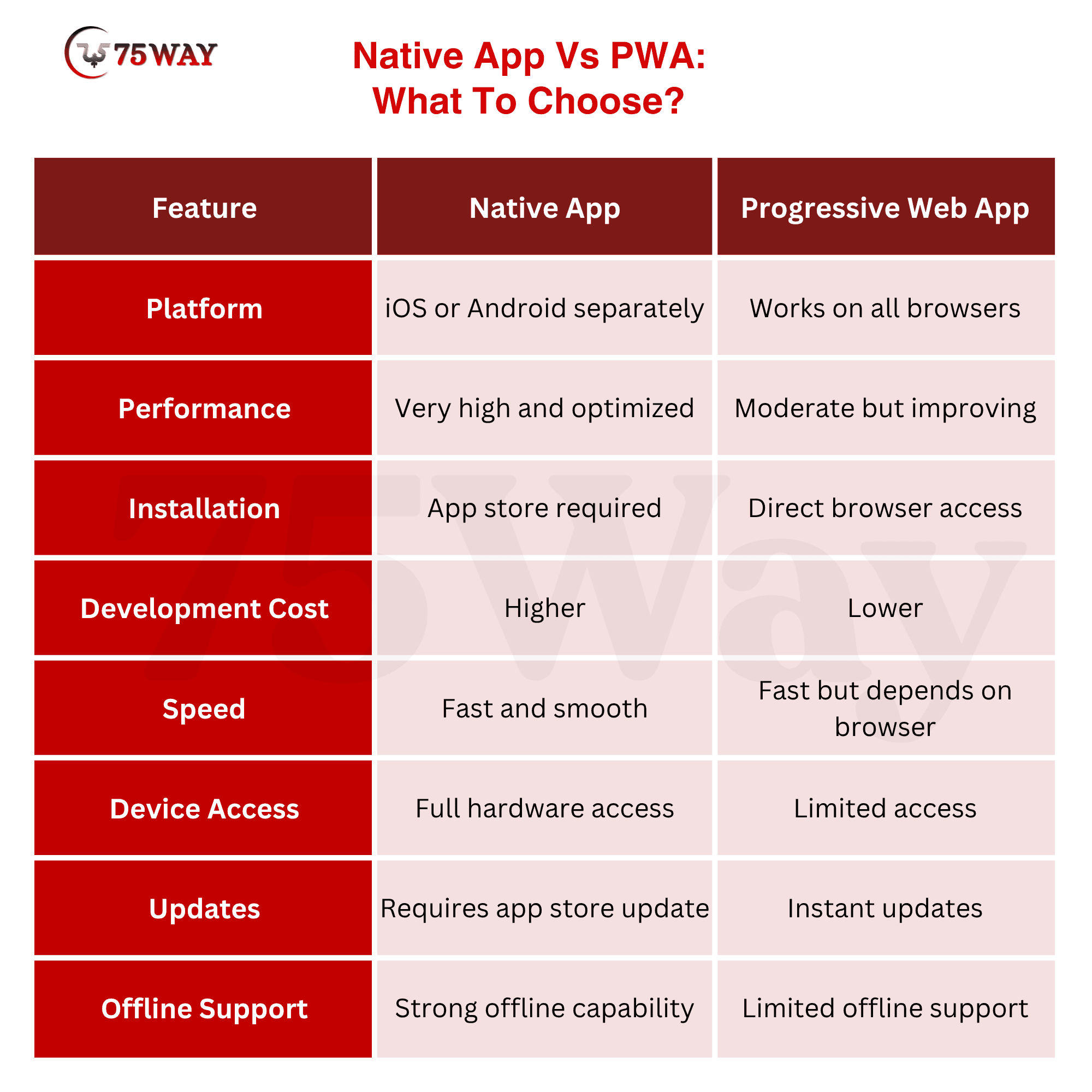
A Native app is built specifically for a single platform, like Android or iOS, using platform-specific languages and tools. This means it is installed directly from an app store and runs smoothly by fully using the device’s hardware and operating system capabilities.
Because it is designed for one platform at a time, a Native app delivers high performance, fast loading speed, and a very responsive user experience. It can access device features like camera, GPS, storage, and notifications more deeply, which makes it ideal for complex applications that need strong performance and rich functionality.
On the other hand, a progressive web app (PWA) is basically a website that behaves like a mobile app. It runs directly in a browser but can also be installed on a device without going through an app store. This makes it easier to develop and maintain since one version works across multiple devices.
PWAs are lightweight, fast to build, and cost-effective. They are ideal for businesses that want quick deployment and broad accessibility. However, they may not fully access advanced device features as native apps do, which can limit performance for highly complex applications.
Step 3: Select The Right App Development Approach
Once your idea is clear and you understand what you’re building, the next question becomes very real: how are you actually going to build this app? Instead of forcing one “correct” method, it’s better to understand the full landscape and then choose what actually fits your goal. Let’s break it down in a simple, real-world way.
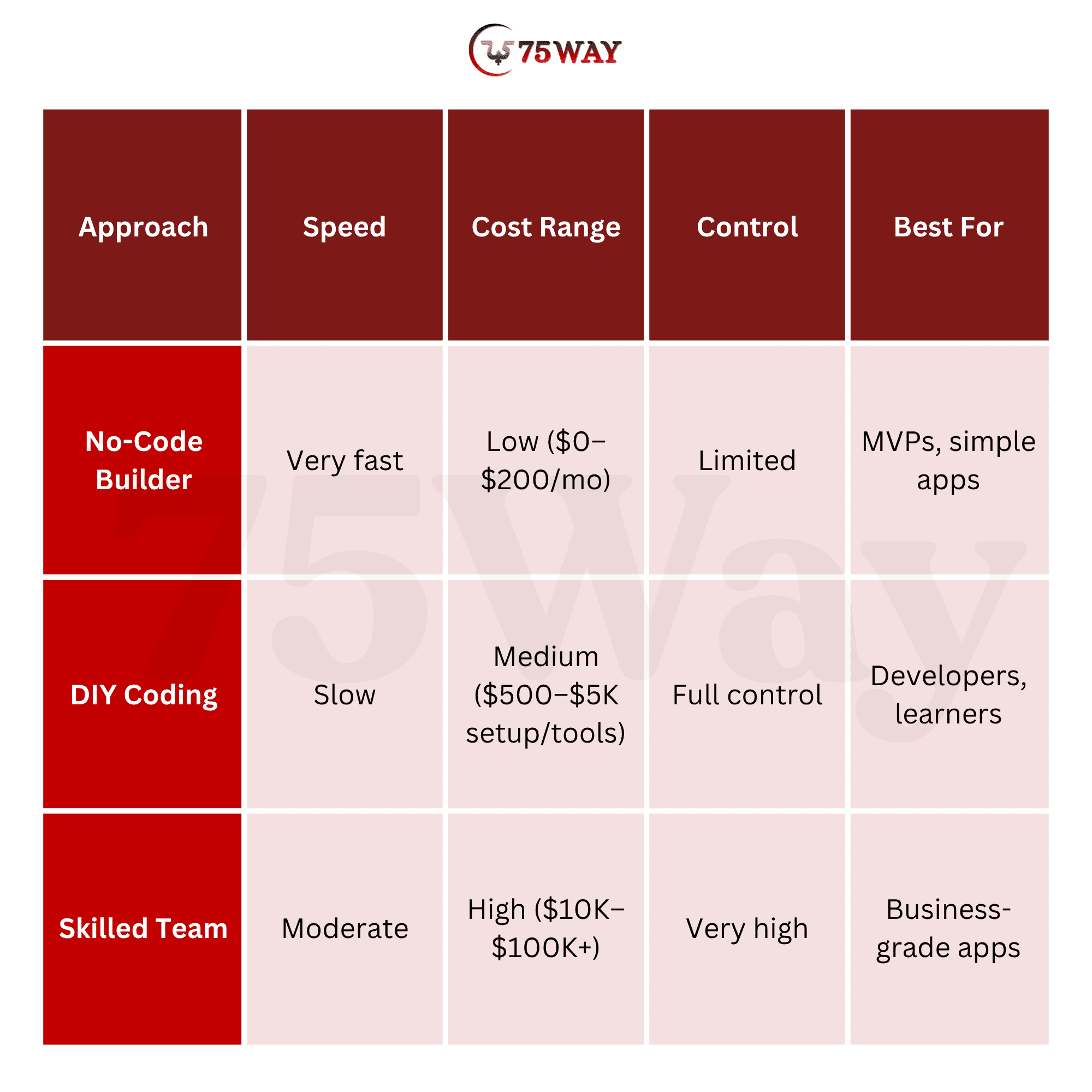
1. No-Code and Low-Code Approach
This is the fastest way to build an app today. No-code platforms such as Rocket allow you to create apps without writing traditional code. You simply drag elements, connect features, set logic visually, and your app starts taking shape. Low-code is similar, but it gives you a bit more flexibility by allowing some custom coding when needed.
This approach is widely used for MVPs (minimum viable products), internal tools, and early-stage startup ideas where speed matters more than perfection. It helps you test your idea in the real world quickly without spending months in development.
But there is a limitation. As your app becomes more complex, you may feel restricted by the platform. Advanced features, deep customization, and high scalability can become challenging over time. So this is best for quick launch and validation, not long-term heavy applications.
2. DIY Coding Approach (Build It Yourself)
This is the most hands-on method, where you or your technical co-founder builds the app from scratch. You use programming languages, frameworks, and development tools to create every part of the application yourself. The biggest advantage here is control. You decide everything: design structure, performance behavior, features, backend logic, everything.
But there’s another side to it. It takes time. A lot of time. You need strong technical knowledge, patience, and consistency. You’ll deal with bugs, updates, testing, optimization, and continuous improvements. This approach works well if:
- You are a developer yourself
- You want complete control over product architecture
- You are building something highly unique or complex
It’s powerful, but not the fastest route.
3. Hiring a Development Team
This is the most common choice for serious businesses and funded startups. Here, you work with a professional team that handles everything, from UI/UX design to backend development, testing, and deployment.
You bring the idea and business vision. They turn it into a working product. The biggest advantage is quality and scalability. A skilled team understands architecture, security, performance, and long-term product growth. It also saves your time and reduces technical pressure completely.
Yes, the cost is higher compared to DIY or no-code tools. But what you get in return is a production-ready, scalable, and stable application. This is usually the preferred route when the goal is not just to “build an app,” but to build a real business around it.
Step 4: Build Your App Using The Selected Method
Once you have selected the development approach, the next step is to actually start building your mobile application in a structured and disciplined way. This is the stage where your idea begins to take real shape, and every decision you make starts influencing the final product. Whether you choose no-code tools, DIY coding, or a professional development team, consistency and clarity are extremely important at this point.
If you are using a no-code or low-code platform, focus on building your core features first instead of trying to make everything perfect at once. Start with a basic version of your app that includes only essential functionality. This allows you to test your idea quickly, collect user feedback, and make improvements without wasting time on unnecessary complexity.
If you are coding the app yourself or working with a development team, ensure that the development process follows a clear structure with defined milestones. Break the project into modules such as frontend, backend, and database integration. Regular testing should be done during development to avoid major issues later. The goal at this stage is not just to build the app, but to build it in a stable, scalable, and user-friendly way that can grow over time.
Step 5: Test Across Devices and Platforms
Testing your mobile app across different devices and operating systems is a crucial step before launch. It helps you understand how your app performs in real conditions on Android and iOS devices. This stage ensures that users get a smooth, stable, and consistent experience regardless of the device they use. It also helps you catch hidden bugs, performance issues, and design inconsistencies early, before they affect real users.
- Device Compatibility: Ensures the app works smoothly across different screen sizes and hardware configurations without layout or functionality issues affecting user experience or performance.
- Performance Testing: Evaluates app speed, responsiveness, and stability under different usage conditions. It helps identify lag, crashes, and optimization opportunities before release.
- Bug Detection: Identifies errors in functionality, navigation, and logic. It ensures issues are fixed early to prevent a poor user experience after launch.
- UI Validation: Checks visual consistency, alignment, and design accuracy across devices. It ensures the interface looks clean, professional, and easy to use everywhere.
- User Experience: Focuses on how real users interact with the app. It helps improve flow, usability, and overall satisfaction before public release.
- Cross Platform: Ensures consistent behavior across Android and iOS systems. It verifies that features and performance remain stable regardless of operating system differences.
Step 6: Publish Your Application on App Stores
Once your app is fully tested and refined, the final step is publishing it on app stores so users can actually download and use it. This involves preparing all required assets such as app name, description, keywords, screenshots, and privacy details. You also need to ensure your app meets the guidelines of both Apple App Store and Google Play Store, as both platforms have strict review policies before approval.
At this stage, compliance becomes very important because even small mistakes in metadata or functionality can delay approval. After submission, the review process can take anywhere from a few hours to several days, depending on complexity.
The cost of publishing is also relatively straightforward:
- Google Play requires a one-time developer fee of around $25
- Apple App Store requires an annual developer fee of around $99.
Step 7: Monitor Performance & User Feedback
After your app goes live, the real work begins. Monitoring performance and understanding how users interact with your app is essential for long-term success. This stage helps you see what is actually happening inside your app, not what you assumed during development. By tracking usage patterns, crashes, engagement levels, and feedback, you can make informed decisions to improve the product continuously and keep users satisfied over time.
- Track user downloads and growth trends
- Analyze in-app user engagement patterns carefully
- Collect and review customer feedback regularly
- Monitor crashes and performance issues continuously
- Improve features based on real usage data
Step 8: Improve and Update the App
Regular improvement is essential to keep your mobile app relevant, useful, and competitive in a fast-changing digital environment. After launch, user expectations evolve quickly, and competitors continuously upgrade their offerings. That is why ongoing updates are not optional but necessary. Enhancing features, refining performance, and aligning with user behavior ensure your app stays valuable, engaging, and ahead of shifting market trends over time.
- Feature Expansion: Continuously introduce new capabilities based on user needs and market demand to keep your app fresh and competitive.
- Performance Tuning: Optimize backend systems and frontend responsiveness to ensure faster load times and consistent reliability across devices.
- Trend Adaptation: Align app functionality with evolving technology trends and user expectations to maintain long-term relevance and engagement.
Different Types and Platforms of Mobile Apps You Can Select
As you understand the process to create mobile apps. But most of the founders are not aware of what kind of platform they are building their applications on. Every platform differs based on purpose, technology stack, and audience focus. Let’s learn about different types of platforms for developing your mobile app.
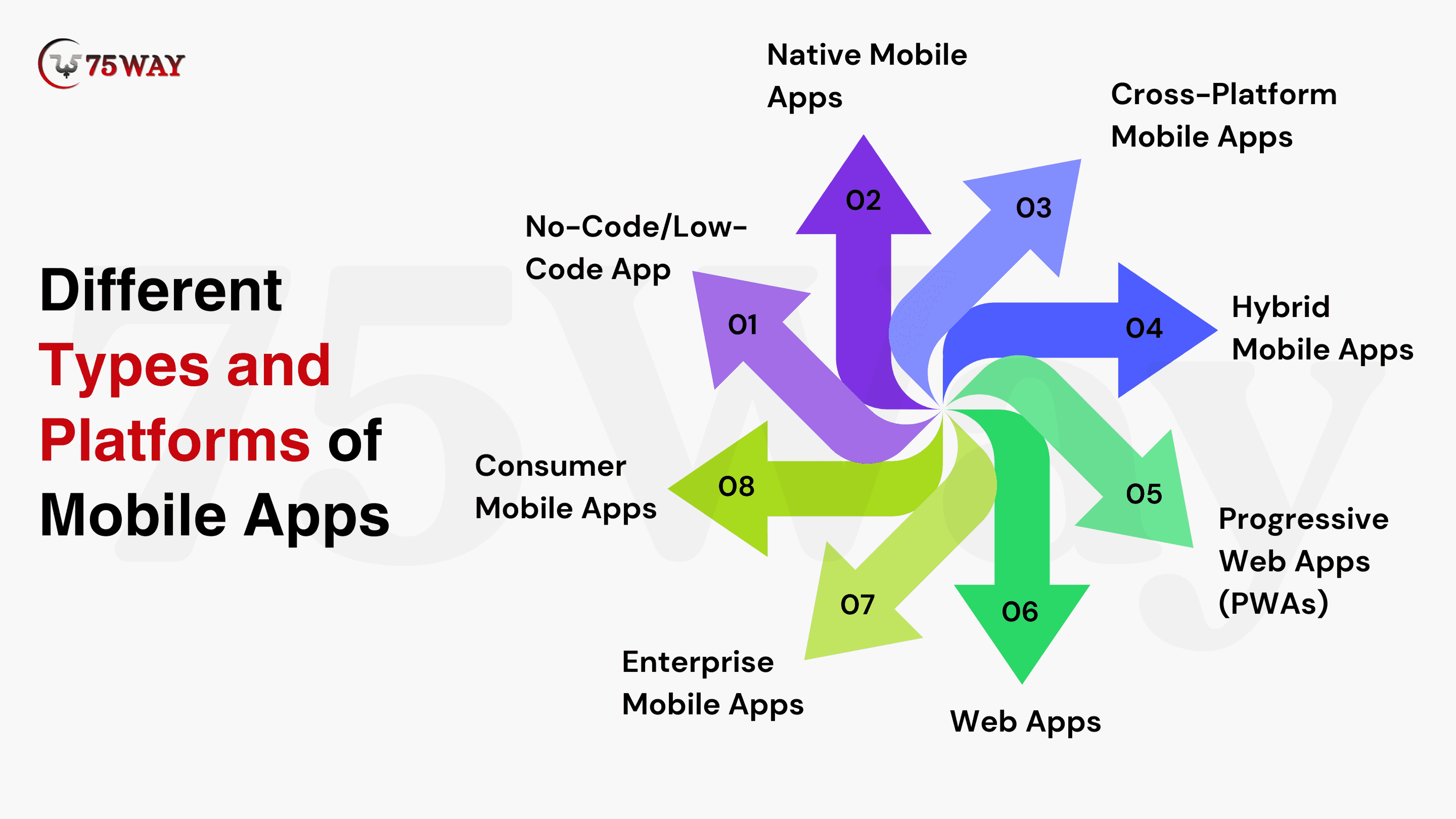
Native Mobile Apps: Native apps are created separately for iOS and Android using platform-specific languages. These apps provide strong performance, smooth user experience, and full access to device features. Hence, these apps are suitable for complex, high-usage applications such as fintech, healthcare, and gaming platforms.
Cross-Platform Mobile Apps: Cross-platform tools like Flutter and React Native are rising fast, even as 77–79% of apps remain rooted in native development with Kotlin or Swift. These apps rely on shared codebases to run on multiple operating systems. Their faster development timelines and lower costs are well-suited to startups and growing businesses seeking multi-platform reach.
Hybrid Mobile Apps: The hybrid app development combines web technologies with native wrappers. Faster deployment and cost control make this approach suitable for content-driven or service-based applications where time-to-market matters more than advanced customization.
Progressive Web Apps (PWAs): PWAs provide app-like functionality through web browsers. These apps offer offline access, quick loading, and minimal storage requirements to businesses that need broad accessibility without relying on app store installations.
Web Apps: Web apps run entirely within browsers and require no installation. These apps require minimal maintenance and suit informational platforms, dashboards, and transactional services with limited hardware dependencies.
Enterprise Mobile Apps: Enterprise app development offers internal operations, workforce management, and secure data access. Integration capability, scalability, and compliance-driven security standards remain essential for enterprise-grade mobile solutions.
Consumer Mobile Apps: These apps are valuable for usability, user engagement, and retention. Social networking, eCommerce, lifestyle, and entertainment applications fall under this category, as these apps prioritize user experience and frequent interaction.
No-Code/Low-Code App: These solutions are being adopted at a rapid pace. Around 70% of new enterprise apps now rely on them for some stages of development. No-code low-code app development enables faster creation through visual interfaces. For your MVP validation, internal tools, and rapid experimentation, you can launch these apps.
Quick Snapshot: How to Build an App Like SpicyChat AI From Scratch
Technology Stack To Create A Mobile Application
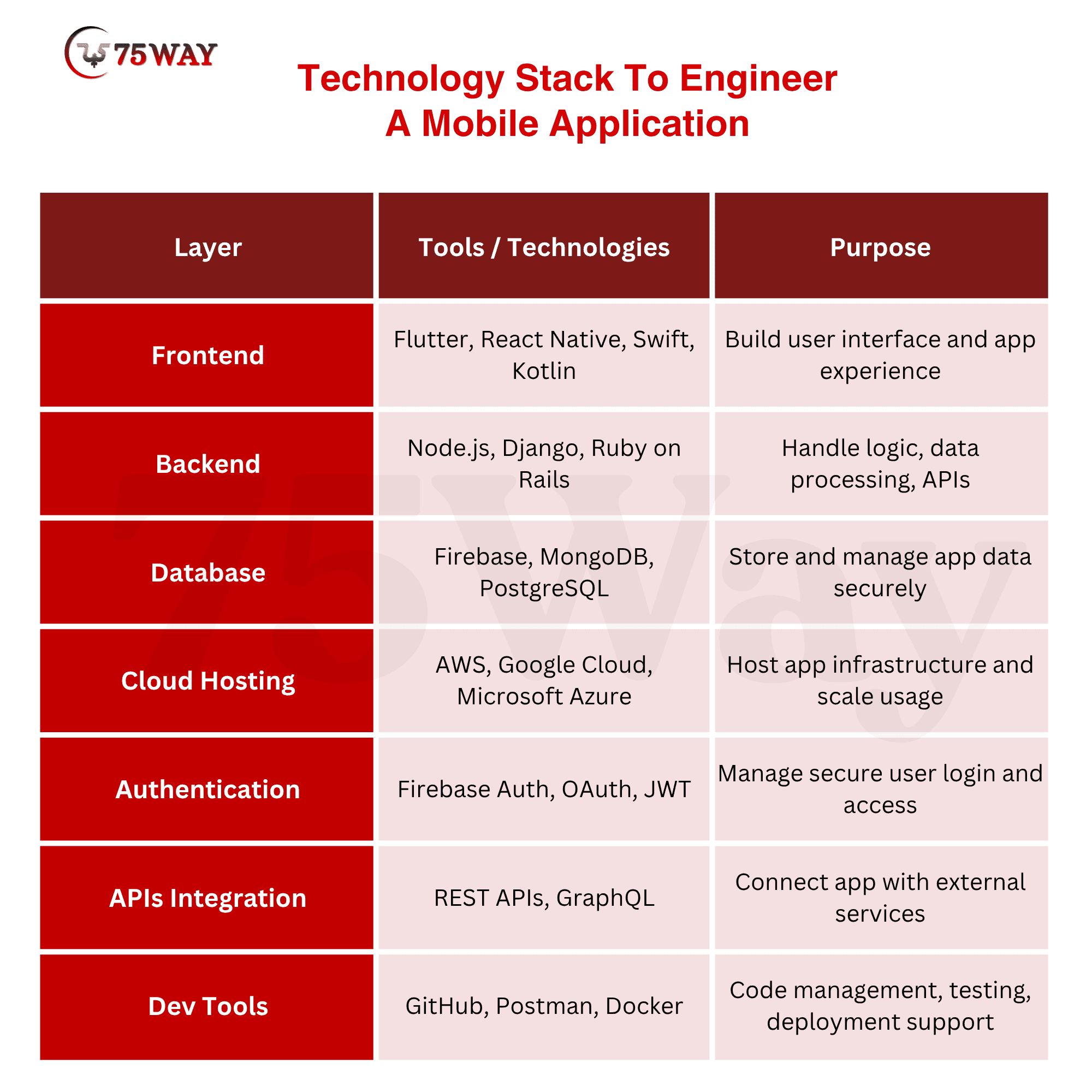
Choosing the right technology stack is one of the most important decisions in mobile app development because it directly impacts performance, scalability, and long-term maintenance. A tech stack is basically the combination of programming languages, frameworks, tools, and services used to build both the frontend and backend of your app. If you choose the wrong stack, you may face performance issues, slow development cycles, or expensive future upgrades.
Build An App That Fits Your Industry Requirements
Industry-focused mobile apps include features that match user behavior, regulatory standards, and business expectations. Businesses can launch custom mobile apps that address sector-specific challenges and user needs and enhance adoption, trust, and ROI.
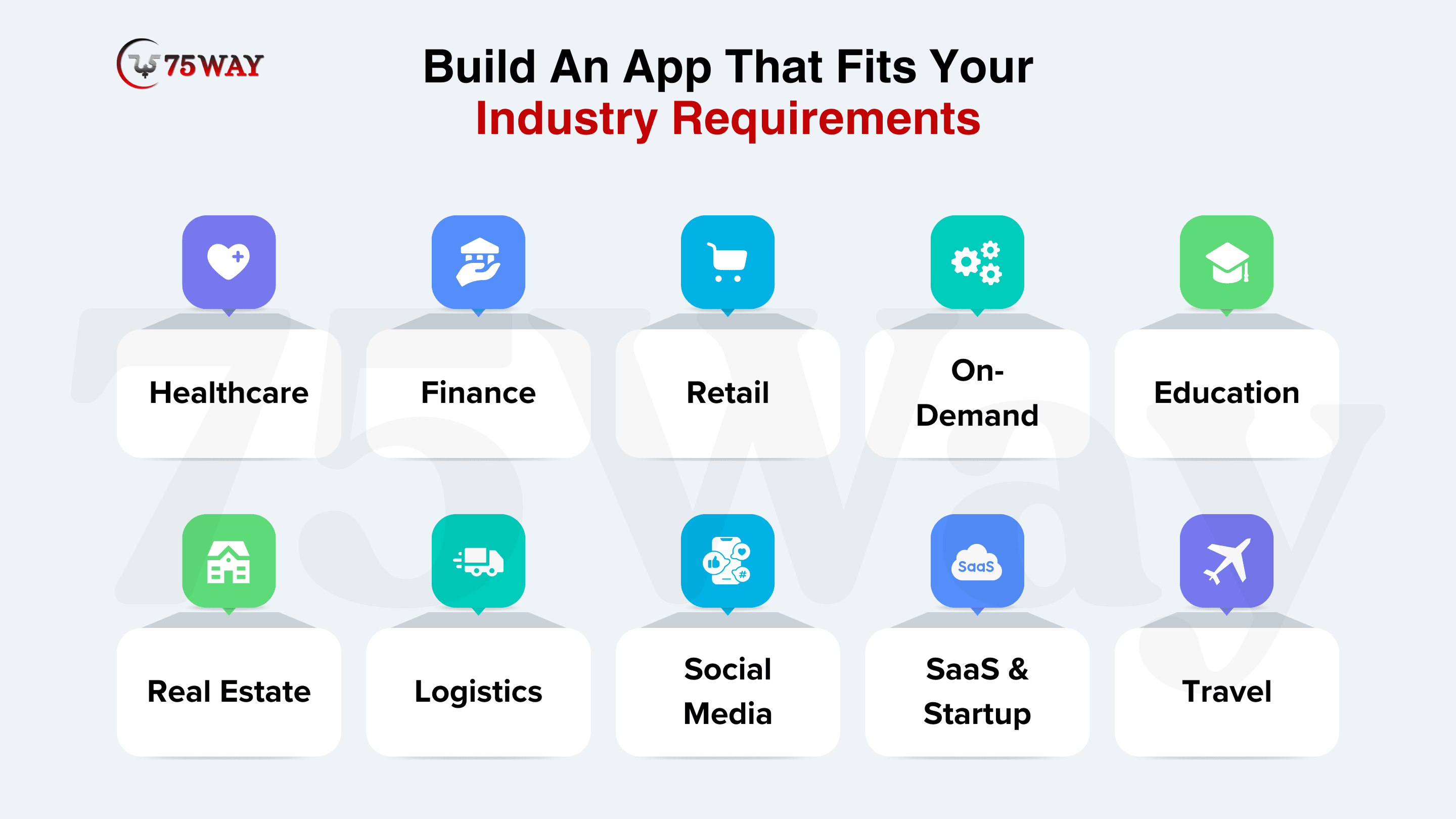
Healthcare: Healthcare app development solutions allow telemedicine, patient monitoring, scheduling, and EHR integration. These apps offer AI diagnostics, HIPAA compliance, and wearable connectivity to improve care delivery and adopt digital health trends in the US market.
Finance & Banking: You can build fintech apps for secure payments, investments, and fraud detection. AI-driven insights, blockchain security, and regulatory compliance in these apps improve trust and reliability in a highly regulated environment.
E-Commerce & Retail: Retail businesses can optimize mobile shopping, personalized offers, and loyalty programs with custom e-commerce app development. These apps integrate push notifications, user analytics, and customized recommendations to improve engagement and retention in a mobile-first consumer market.
On-Demand & Marketplace: Startups and growing businesses can create on-demand apps to launch quickly in the US market. These apps are ready-made solutions that align with your brand identity and requirements, and connect users to services through real-time tracking, payments, and review systems.
Education & eLearning: The educational aap development provides virtual classrooms, AI tutoring, and microlearning modules. AR features and adaptive learning paths increase engagement and enhance learning outcomes for diverse audiences.
Real Estate: Real estate founders and property dealers can create real estate apps that include listings, virtual tours, and CRM integration. These digital-first tools cater to modern buyers and enhance transparency and user convenience.
Logistics & Supply Chain: Logistics apps improve fleet management, inventory tracking, and warehouse automation. Optimized workflows reduce operational costs and increase efficiency across supply chains.
Social Media: Social media apps such as influencer and dating apps help you maximize user engagement, personalization, and AI-powered moderation. Their advanced features, like recommendations, content curation, and safety tools, enhance user experience.
SaaS & Startup: The SaaS development-based solutions include subscription management, analytics dashboards, and scalable product offerings. These cloud-based apps enable growth, flexibility, and rapid deployment for startups.
Read More: AI Automation vs AI Agents: A Complete Guide
Is It Profitable To Make An App in 2026?
Yes, creating an app can be beneficial in 2026. Businesses can invest in mobile app development to maximize ROI, business growth, and conversions by meeting market demand and user needs. Not only this, but the mobile apps also integrate revenue models like subscriptions, in-app purchases, advertising, and enterprise licensing to generate recurring income. However, strategic planning, continuous updates, user engagement, and data-driven decisions provide long-term growth and sustainable profitability.
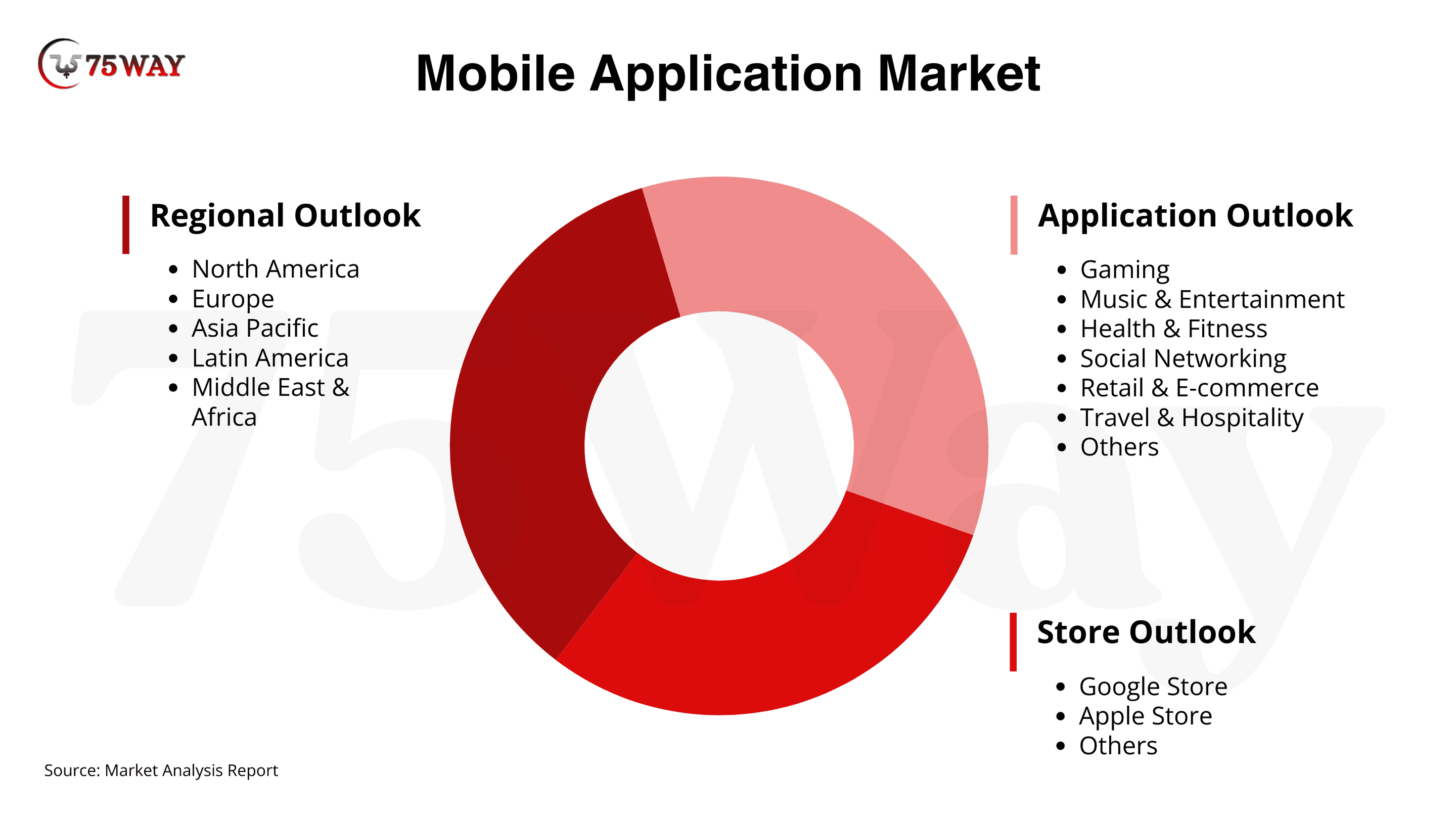
- The global mobile application market is set to grow rapidly, reaching USD 626.39 billion by 2030 with a 14.3% CAGR. Meanwhile, the U.S. market is expected to expand at a 14.1% CAGR by 2030, according to Grand View Research.
- Total revenue from mobile app development is projected to grow at a CAGR of 7.25% by 2029, reaching an estimated market value of $781.70 billion, according to Statista.
Get More Insights: How to Build an Astrology App Like Co-Star? A Strategic Guide 2026
How to Choose Between In-House Team, Hiring Agency, & No-Code
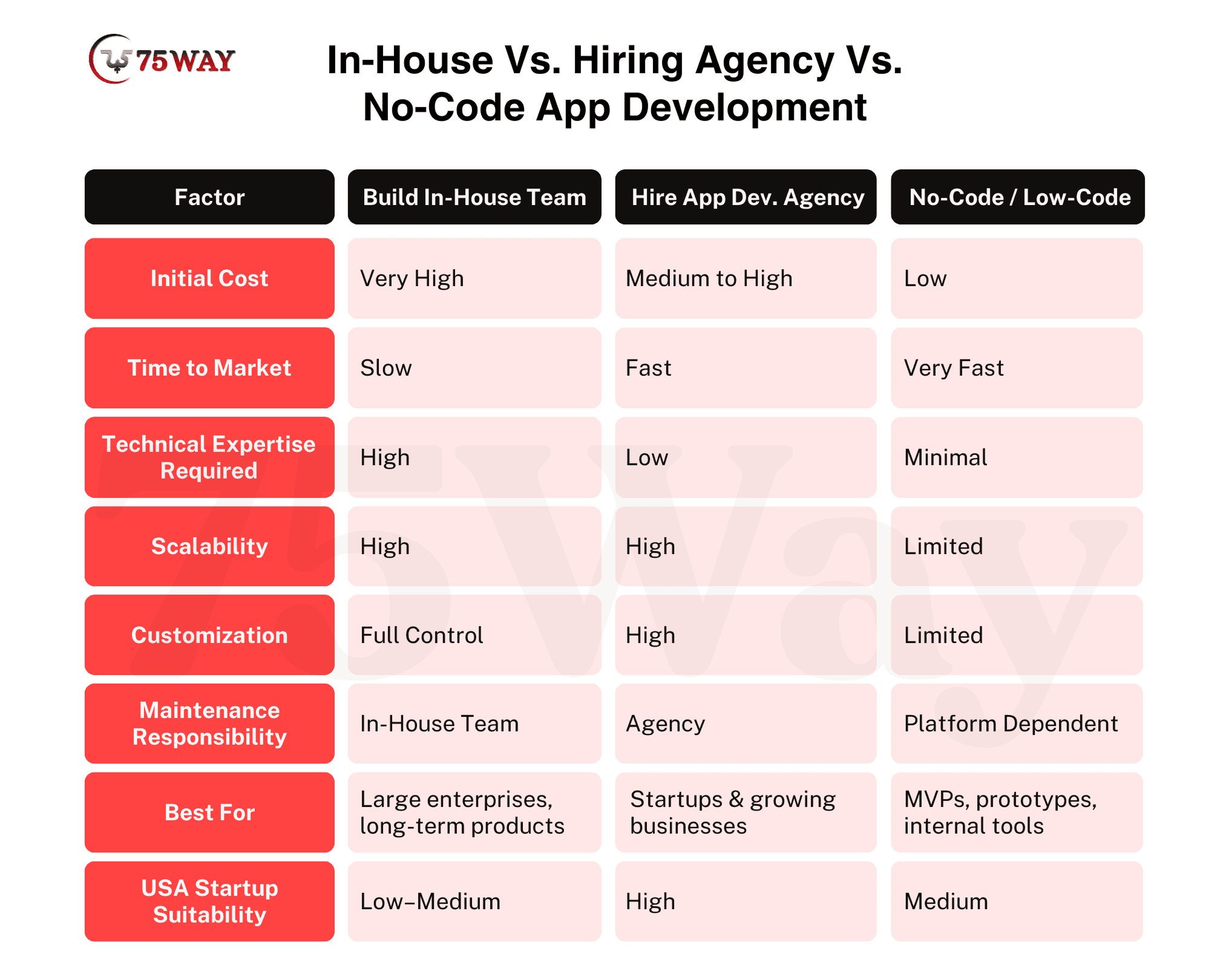
To develop a mobile app, every founder has numerous options: to hire an in-house team, an AI application development company, or no-code and low-code tools. These methods directly impact cost, speed, scalability, and long-term maintenance. Each approach provides unique advantages depending on business size, project complexity, and strategic goals. So, must have complete knowledge regarding all of these approaches.
Hire In-House Team: In-house app development teams offer complete control over every phase of the project, from planning to deployment and future updates. Enterprises gain long-term ownership, smoother coordination, and a culture aligned with internal processes. However, hiring a full team requires higher salaries, greater recruitment effort, and longer onboarding timelines. This approach suits companies with continuous development needs, complex platforms, or highly specialized projects requiring deep knowledge of the business ecosystem.
App Development Agency: Partnering with an app development agency brings specialized expertise, access to experienced developers, designers, and project managers, and faster delivery timelines. These app development companies help startups and mid-sized businesses reduce risk and cost while scaling features quickly. They provide structured workflows, prebuilt frameworks, and advanced technologies that accelerate time-to-market.
No-Code/Low-Code Apps: If you do not want to hire any team or a company, you can launch no-code and low-code apps. These apps help you launch quickly with rapid app creation and visual development tools. You do not need any programming or technical knowledge. These apps are ideal for MVPs, prototypes, or internal tools that validate concepts. This approach suits early-stage startups testing ideas or companies that need functional internal apps without long-term development overhead.
Learn More: How to Build a Self Driving Car Software: A Complete Roadmap
Mobile App Development Cost: A Complete Pricing Breakdown
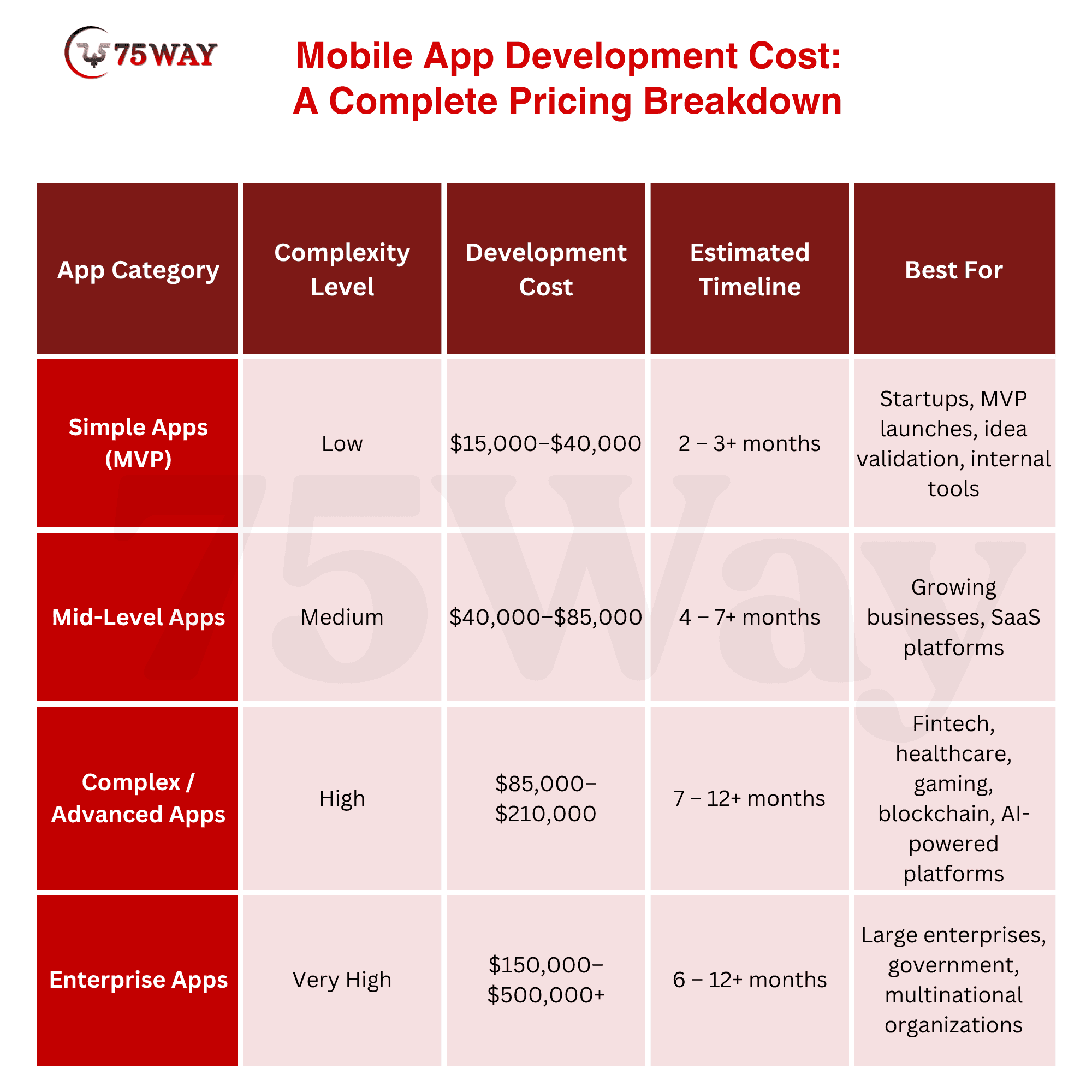
The app development cost and timeline vary depending on app complexity, feature set, and technology stack. Businesses must set realistic expectations to make informed investment decisions and meet the project goals with business objectives. Early planning of costs and duration helps optimize resources while maintaining quality and functionality.
- Simple/MVP App Cost : Low complexity apps include basic features, minimal integrations, and core functionality. Their development costs range from $15,000–$40,000, with timelines of 2–3 months.
- Mid-Level App Cost : Mid-level apps are able to balance functionality, design, and scalability. These apps cost between $40,000–$85,000, and development usually takes 4–7 months.
- Advanced App Cost : These apps include AI integration, blockchain features, real-time updates, and complex backends. The development costs for advanced apps typically range from $85,000–$210,000, with timelines of 7–12 months.
- Enterprise App Cost : Enterprise-level mobile apps handle large-scale operations, complex integrations, and advanced analytics. The cost to create an enterprise app lies between from $150,000–$500,000+, with development timelines of 6–12 months.
Several additional factors influence mobile app development costs beyond complexity and features. In addition to it, platform choice, design sophistication, third-party integrations, AI or machine learning requirements, backend infrastructure, and security measures all affect the budget. Ongoing maintenance, updates, testing, and regulatory compliance further increase development expenses, making accurate cost estimation essential for strategic planning.
Discover More: How to Build AI Agents From Scratch? Step-By-Step Guide
Latest Trends That Transform Mobile Apps in 2026
Many of you may have question, “What Is The Future of Mobile App Development In 2026 and beyond?” So, the simple answer is: innovation and latest tech trends in 2026 continue to redefine mobile experiences through artificial intelligence, connectivity, and immersive design. These emerging technologies in mobile app development enable personalization, real-time interaction, and intuitive interfaces to drive higher user retention and improve overall app value across industries.
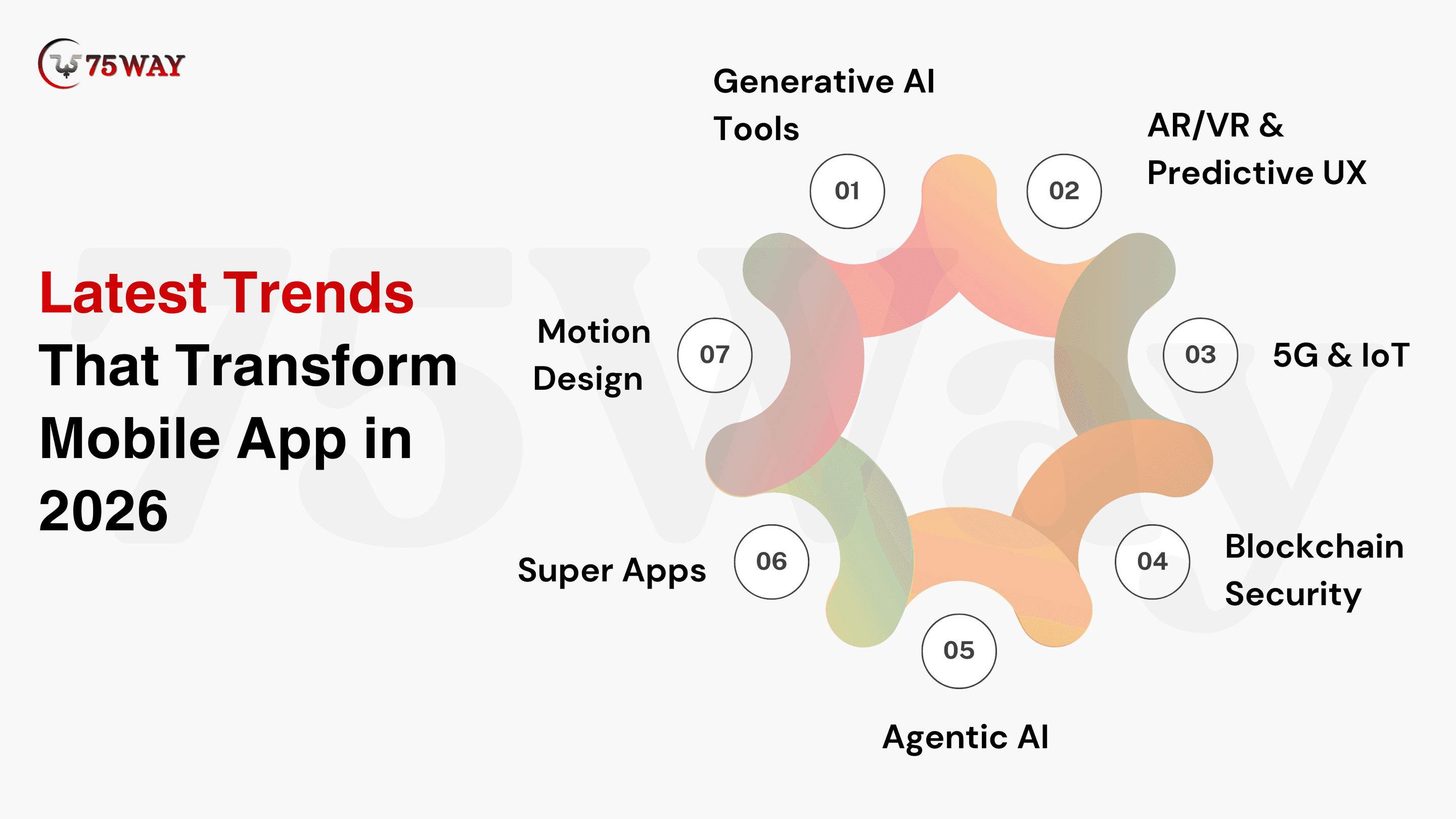
Generative AI Tools: Generative AI tools enable automated content creation, personalized recommendations, and predictive features in mobile apps. These generative AI development tools in app development accelerate growth, enhance user engagement, and deliver tailored experiences that adapt to individual behaviors and preferences.
AR/VR & Predictive UX: AR/VR and predictive UX integrate immersive visuals and anticipatory design in your mobile apps. They create engaging, interactive experiences that guide users’ actions, improve decision-making, and increase retention through visually rich, context-aware interfaces.
5G & IoT: The 5G mobile application market is expected to grow, reaching $221.9 billion by 2034. 5G connectivity powers mobile applications with low latency and high-speed data exchange. Several enterprises now build IoT apps to provide smooth remote control and device-to-device interaction and enable smart homes, logistics, and connected industries.
Blockchain Security: Blockchain enhances app security by providing immutable records, secure transactions, and decentralized data storage. The blockchain app development solutions offer transparency, build trust with users, and prevent tampering, fraud, or unauthorized access.
Agentic AI: Agentic AI enables apps to make autonomous decisions and perform tasks based on user data. Agentic AI solutions in apps reduce manual effort, streamline workflows, and render context-aware automation in real-time environments.
Super Apps: Super apps like Uber and Amazon integrate multiple services, such as payments, shopping, messaging, and entertainment, into a single platform. They improve convenience, user retention, and engagement by providing a unified, all-in-one mobile experience.
Motion Design: Motion design uses animations, transitions, and micro-interactions to make mobile apps visually appealing. It enhances usability, guides user attention, and creates emotional connections through interactive, responsive interface elements.
Know More: Top AI Trends Businesses Must Follow in 2026
Common Mistakes & How to Avoid Them While Building An App
App development failures often arise from misalignment between goals, user needs, and execution strategies. If you want to avoid critical errors, you require a strategic app development plan, validation, and continuous evaluation at each stage. Awareness of common pitfalls ensures better adoption, scalability, and long-term success.
Skipping Validation: Launching without validating the idea risks investing in an app that users do not need. Market research, user interviews, and MVP testing prevent costly missteps.
Feature Overload: Too many features overwhelm users and complicate maintenance. So, you must focus on core functionality to ensure usability, engagement, and a smooth onboarding experience.
Poor UI/UX: Weak design reduces adoption and retention. Intuitive interfaces, consistent branding, and accessibility improve user satisfaction and long-term loyalty.
Wrong Tech Stack: Incorrect technology choices hinder scalability and updates. You must select appropriate frameworks, databases, and platforms for higher performance, flexibility, and future-proof growth.
Ignoring Testing & Maintenance: Skipping testing or post-launch support leads to bugs and churn. Regular QA, updates, and user feedback integration maintain reliability and engagement
Learn More: How to Start a Taxi Business? Guide for Beginners
Final Remarks
To sum up, mobile app development in 2026 requires a precise strategy, thoughtful execution, and deep market understanding across the USA. Every stage from idea validation to post-launch optimization is essential to create a scalable, user-focused mobile application. However, technology choices, design quality, and continuous improvement drive engagement, retention, and competitive advantage. Businesses that prioritize user value and adapt quickly secure long-term growth. A strong mobile presence now ensures relevance, trust, and sustained success. To build and launch high-performing apps, you can hire dedicated app developers from a trusted mobile app development company in USA.
FAQs
Is Mobile App Development Still In Demand in 2026?
Yes, mobile app development remains highly in demand in 2026. Businesses continue to rely on apps to engage users, improve operations, and generate revenue. Emerging technologies like AI, AR/VR, 5G, and IoT drive innovation, while the shift toward personalized, immersive, and connected experiences ensures ongoing opportunities for developers, startups, and enterprises alike.
Can I Create A Mobile App By Myself?
Yes, you can develop a mobile app independently, especially with no-code or low-code platforms that reduce technical barriers. Individuals can build MVPs, simple utilities, or prototypes without extensive coding knowledge. However, complex apps that use AI, blockchain, or advanced integrations typically require professional expertise or collaboration with a development team to ensure performance, security, and scalability.
How To Develop A Basic Mobile App?
A basic mobile app involves a structured approach that turns an idea into a functional, user-friendly product. The process begins with planning, defining core features, and designing simple user interfaces. Clear goals and iteration help maintain focus and usability.
Define Core Features: Select the essential functionalities that solve a specific user problem, avoiding unnecessary complexity. Focus on simplicity to ensure usability and fast development.
Choose Development Method: You can select from no-code, low-code, or basic coding tools. No-code platforms speed up creation, while basic coding allows more customization.
Develop Custom App: Transform your UI/UX designs and features into a working application. Use selected tools or code to build the app’s frontend, backend, and integrations, ensuring all core functionalities operate smoothly before testing.
Design Simple UI/UX: Create intuitive screens and navigation. Minimal design with clear buttons and readable text improves user engagement and reduces friction.
Test on Real Devices: Validate the app on different devices and operating systems. Testing ensures performance, usability, and smooth interactions.
Launch & Collect Feedback: Publish on app stores or internal platforms. Gather user feedback to make improvements before adding advanced features.
Can I Create An App With No Coding?
Yes, you can develop an app without coding using no-code or low-code platforms. These tools allow building functional apps through visual interfaces, drag-and-drop components, and prebuilt templates. They enable rapid MVP creation, internal tools, or simple consumer apps without deep technical knowledge.
Drag-and-Drop Interfaces: Build app screens and workflows visually without writing code.
Prebuilt Templates: Use ready-made modules for forms, navigation, and common features.
Integrations: Connect APIs, databases, and third-party services with minimal configuration.
Rapid Testing: Preview and test the app instantly within the platform.
Limitations: Custom features or complex logic may require traditional development or hybrid approaches.
Can I Utilize AI to Build An App?
Yes, AI can assist in building an app by providing development, generating code snippets, designing UI/UX, and suggesting features based on user behavior. AI tools help both beginners and experienced developers create apps faster while reducing repetitive work and errors.
AI-Powered Code Generation: Automatically generates code for specific features, reducing manual programming effort.
Smart UI/UX Design: AI suggests layouts, color schemes, and user flows based on best practices.
Feature Recommendations: AI analyzes trends and user needs to propose relevant app functionalities.
Testing & Debugging: AI tools detect bugs, optimize performance, and simulate real-world usage scenarios.
Rapid Prototyping: AI accelerates the development of MVPs and prototypes to gather early user feedback and validate them.