Across the United States, a myriad number of startups and enterprises have adopted AI agents. And most of them are beyond single AI chatbots. Customer support automation, enterprise knowledge management, compliance monitoring, and multimodal AI workflows now demand systems that can think, delegate, and act collaboratively. This is where multi-agent systems come in. It is one of the top AI agent business ideas that founders can’t ignore in 2026.
Microsoft’s Azure AI Foundry, combined with the Azure AI Agent Service, enables businesses to design production-grade and compliant multi-agent architectures. These are something that most of the AI tools struggle to deliver. From SaaS startups in Silicon Valley to regulated enterprises in finance and healthcare, US organizations are adopting AI multi-agent development solutions to improve decision accuracy, reduce operational costs, and scale AI safely.
The most exciting part is that today, we will outline a step-by-step process for building a multi-agent system in Azure AI Foundry. We will define the difference between single AI agent and multi-agent system, architecture planning, agent orchestration, multimodal setup, testing, and deployment using an enterprise-ready approach that aligns with Microsoft’s platform design and US compliance expectations.
What Is a Multi-Agent System?
A multi-agent system (MAS) is an AI system in which multiple specialized agents are integrated to solve a problem. You do not need to rely on a single agentic AI model to handle everything. These agents have an orchestrator agent that acts as the manager or brain of a MAS that understands system-level objectives, rather than just scheduling tasks. It is a conductor that coordinates and assigns tasks to specific AI agents and synthesizes responses into a final outcome. Hence, it improves accuracy, reliability, and scalability, especially for complex business workflows. Each AI agent in MAS has:
- A defined responsibility
- Limited permissions
- Access to specific tools or data
- A communication path with other agents
Learn More: How to Start a Taxi Business? Guide for Beginners
Single Agent Vs Multi Agent System
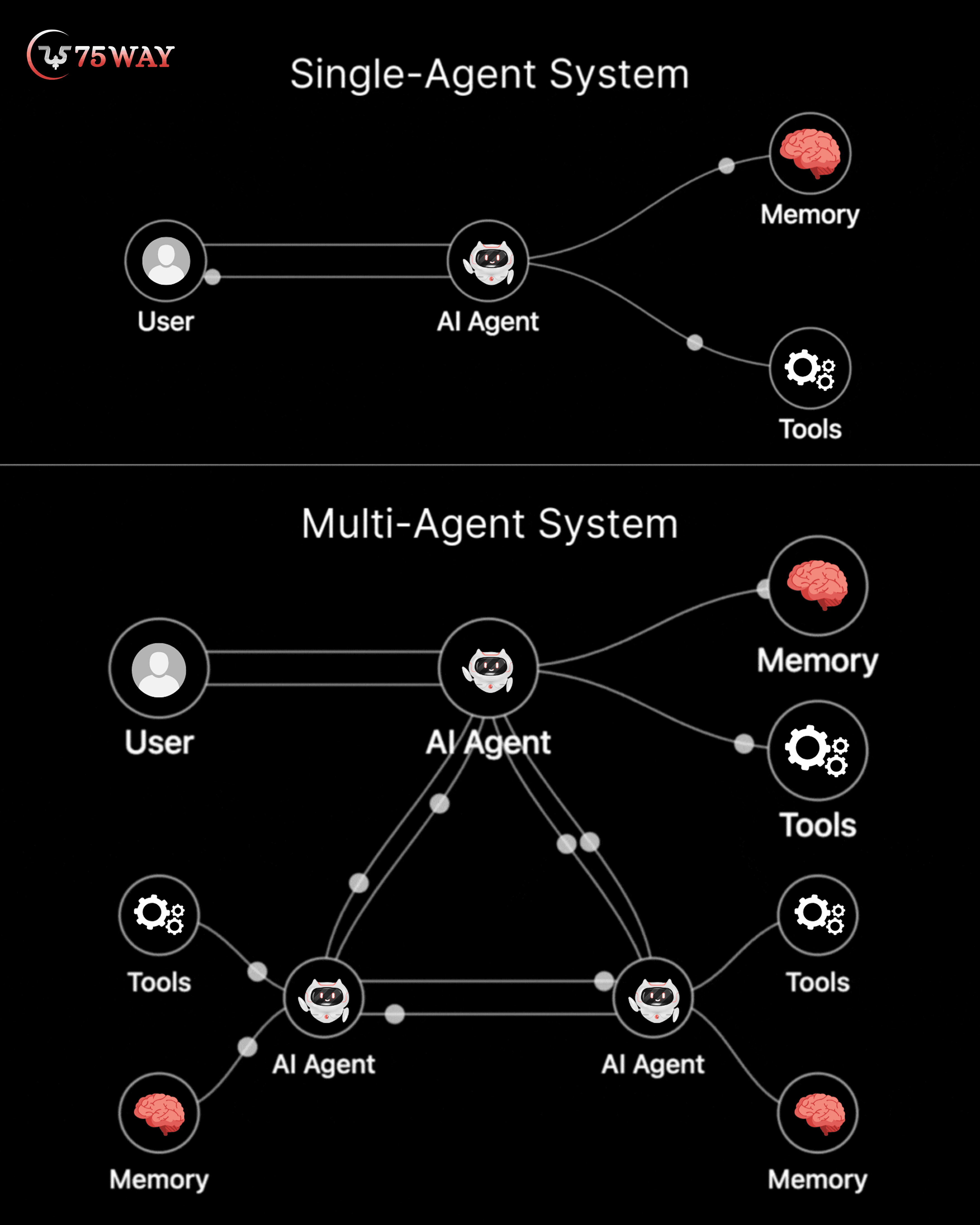
In a single-agent architecture, a single AI model handles every part of a workflow. It understands the query, retrieves information, reasons through the problem, validates compliance, and sometimes even executes actions. This approach works for simple use cases, but it breaks down in real-world business environments. As prompts grow longer, single-agent systems become harder to control and more prone to hallucinations. For US businesses, these agents lack reliability, and governance creates operational and compliance risks.
On the other hand, a multi-agent system (MAS) addresses these limitations by separating concerns across multiple specialized AI agents. Each agent operates within defined boundaries, such as retrieval, reasoning, compliance validation, or action execution. These AI agents have an orchestrator agent that coordinates the workflow to improve accuracy. They perform compliance checks before actions are taken, and allow systems to scale without increasing prompt complexity. Multi-agent architectures align better with security controls, audit requirements, and production scalability. Hence, they become the preferred choice for startups and organizations in the USA that are building AI systems for long-term, real-world use.
Explore More: AI Automation vs AI Agents: A Complete Guide
What Is Azure AI Foundry and Agent Service?
Azure AI Foundry is Microsoft’s unified platform for designing, orchestrating, evaluating, and deploying AI systems at enterprise scale. It is built specifically for organizations that want to move beyond experimentation and deploy production-ready AI solutions with governance, security, and observability built in. Rather than focusing on a single model or chatbot, Azure AI Foundry enables teams to design complete AI systems that integrate models, tools, data sources, and workflows in a controlled environment.
Within Azure AI Foundry, the Azure AI Agent Service provides the foundation for building multi-agent architectures. This service allows developers to create multiple autonomous agents that can reason independently, retrieve knowledge using RAG, call tools or APIs, and collaborate through an orchestrator. Each agent operates with clearly defined responsibilities and permissions, which improves reliability and reduces risk. Key capabilities include:
- Multi-Agent Task Coordination and Control
- Secure Tool and API Connectivity
- Knowledge-Grounded Response Generation (RAG)
- Text and Image Understanding Models
- Enterprise-Grade Security and Access Control
- Agent Monitoring, Metrics, and Evaluation
This makes Azure AI Foundry especially suitable for USA-based startups and enterprises that require compliance, scalability, and governance.
Read More: How to Build a Self Driving Car Software: A Complete Roadmap
Structured Process to Develop Multi-Agent System in Azure AI Foundry
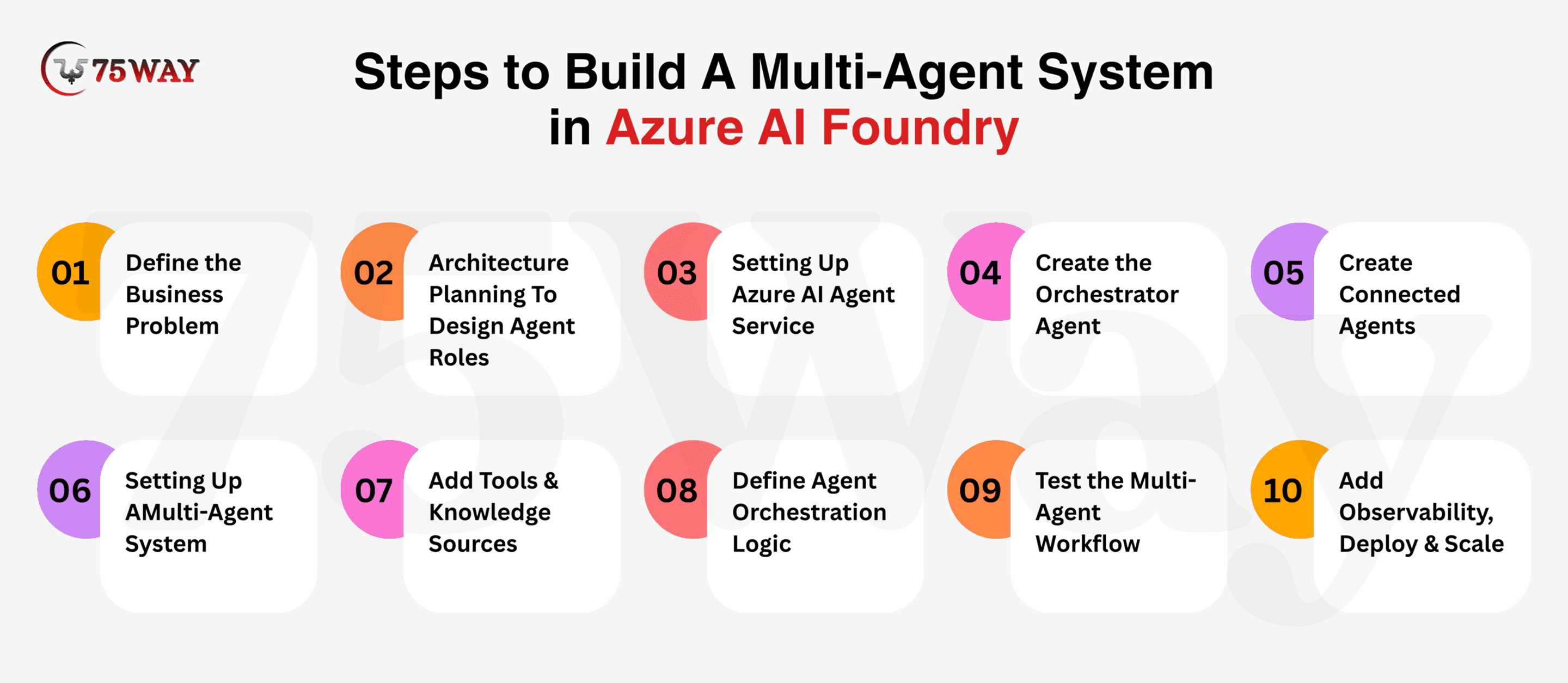
To build a multi-agent system in Azure AI Foundry, you need a structured approach that starts with business requirements and ends with production deployment. The following steps explain how to design agent roles, configure Azure AI Agent Service, enable multimodal capabilities, orchestrate workflows, and scale securely for real-world use.
Step 1: Define the Business Problem
Every successful multi-agent system begins with a real business workflow, not with models, prompts, or tools. US startups and enterprises often fail with AI projects because they start by choosing technology first. Then try to force business problems into it. Azure AI Foundry is designed to support end-to-end workflows for developing a multi-agent system, so the first step is to clearly understand the business outcome the AI system must deliver.
For example, consider a customer support workflow. When a customer submits a support request, the system must search internal documentation for accurate information, validate that the response complies with company policies or regulatory requirements, and then either respond to the customer or trigger an operational action, such as creating a ticket—one of the key enterprise search use cases in modern organizations.
Each of these steps requires different types of reasoning, access to different data sources, and different permission levels. When a workflow involves retrieval, reasoning, compliance validation, and action execution, a single agent becomes unreliable. Breaking the workflow into responsibility-driven tasks is the key signal that a multi-agent architecture is required.
Step 2: Architecture Planning To Design Agent Roles
The second stage to build an AI agent from scratch with multi-model capabilities in Azure AI Foundry is to plan a robust architecture. A reliable multi-agent system depends on clearly defined agent roles. Each agent must have a single responsibility and limited permissions. This separation prevents execution errors, hallucinations, and infinite task loops in production environments.
- Orchestrator Agent (Controller): The orchestrator agent manages the entire workflow by interpreting user intent and delegating tasks to specialized agents. It coordinates responses and synthesizes final outputs without directly executing actions.
- Knowledge Agent (RAG): The knowledge agent retrieves accurate information from indexed documents or enterprise data sources using retrieval-augmented generation. It ensures responses are grounded in verified, up-to-date knowledge.
- Reasoning Agent: This agent performs logical analysis, applies business rules, and evaluates conditions to generate decisions. It focuses only on reasoning, without accessing tools or executing actions.
- Compliance Agent: The compliance agent validates outputs against organizational policies, industry regulations, and security rules. This method ensures that responses and actions meet governance and regulatory requirements before execution.
- Action Agent: The action agent executes approved tasks such as calling APIs, triggering workflows, or updating systems. It operates only after receiving validated instructions from the orchestrator and compliance agents.
Step 3: Setting Up Azure AI Agent Service
Azure AI Agent Service acts as the foundation for building a controlled multi-agent environment within Azure AI Foundry. This stage focuses on preparing the workspace, region, and access model required for enterprise-grade agent collaboration. A valid Azure subscription connected to a United States region supports low latency, regulatory alignment, and enterprise trust expectations for American businesses.
- Create Azure Subscription (If Not Exists): An active Azure subscription represents the entry point for accessing Azure AI Foundry and its agent capabilities. This subscription connects billing, identity, and regional governance under one account, allowing organizations in the United States to operate AI workloads within approved enterprise and regulatory boundaries.
- Open Azure AI Foundry: Azure AI Foundry access appears inside the Azure portal once the subscription becomes active. The service can be accessed through the search panel, which opens a dedicated interface where AI projects, agent services, and evaluation tools are managed within a single, governed environment.
- Create A New Project/Workspace: A new project workspace is created inside Azure AI Foundry by selecting project creation options and assigning a name, region, and ownership settings. This workspace becomes the operational boundary where agents, tools, models, and evaluations are stored and managed together.
Select USA Region: A United States region is chosen during project or service configuration through the region selection field. This choice determines data processing location, supports domestic compliance expectations, and aligns system behavior with operational requirements for USA-based users and businesses.
Enable Azure AI Agent Service: It becomes available in the project workspace under service settings. Enabling this service makes agent-creation features available, supporting orchestrated collaboration, tool access control, and managed execution within the Azure AI Foundry environment.
Assign Roles & Permissions: Roles and permissions are assigned through Azure role-based access control settings linked to the project workspace. These settings define who can create agents, manage tools, or deploy workflows, ensuring accountability and controlled access across development and operational teams.
Step 4: Create the Orchestrator Agent
In a multi-agent system development in Azure AI Foundry, the orchestrator agent is responsible for coordinating the entire multi-agent workflow. It does not solve every problem itself. Instead, it decides which agent should handle which task, when to merge results, and how to return a final response.
Create Main Agent: System instructions act as the orchestrator’s constitution. Here, you define:
- What types of tasks can it handle directly
- When it must delegate to other agents
- How it should prioritize accuracy, compliance, or speed
For example, the orchestrator is instructed to never answer compliance-related questions directly and always delegate them to the Compliance Agent. This prevents risky outputs and improves enterprise trust.
Model Selection: Choose a reasoning-capable model (such as GPT-4 or GPT-4o) that can:
- Understand complex task requirements
- Decide between multiple agents
- Synthesize responses clearly
This model does coordination and reasoning, not heavy retrieval or action execution.
Tool Access Control: The orchestrator should have limited tool access. Its role is decision-making, not execution. Over-permissioning this agent increases risk and cost.
Task Delegation Logic: Here, you have to define rules such as:
- “If the query requires internal data → send to Knowledge Agent”
- “If an action is required → send to Action Agent”
- “If regulations apply → route to Compliance Agent first”
This logic ensures predictable, auditable behavior.
Step 5: Create Connected (Specialized) Agents
This stage establishes practical multi-agent intelligence by separating responsibilities. Each agent operates with a focused purpose, reducing cross-task interference and supporting controlled execution within enterprise environments.
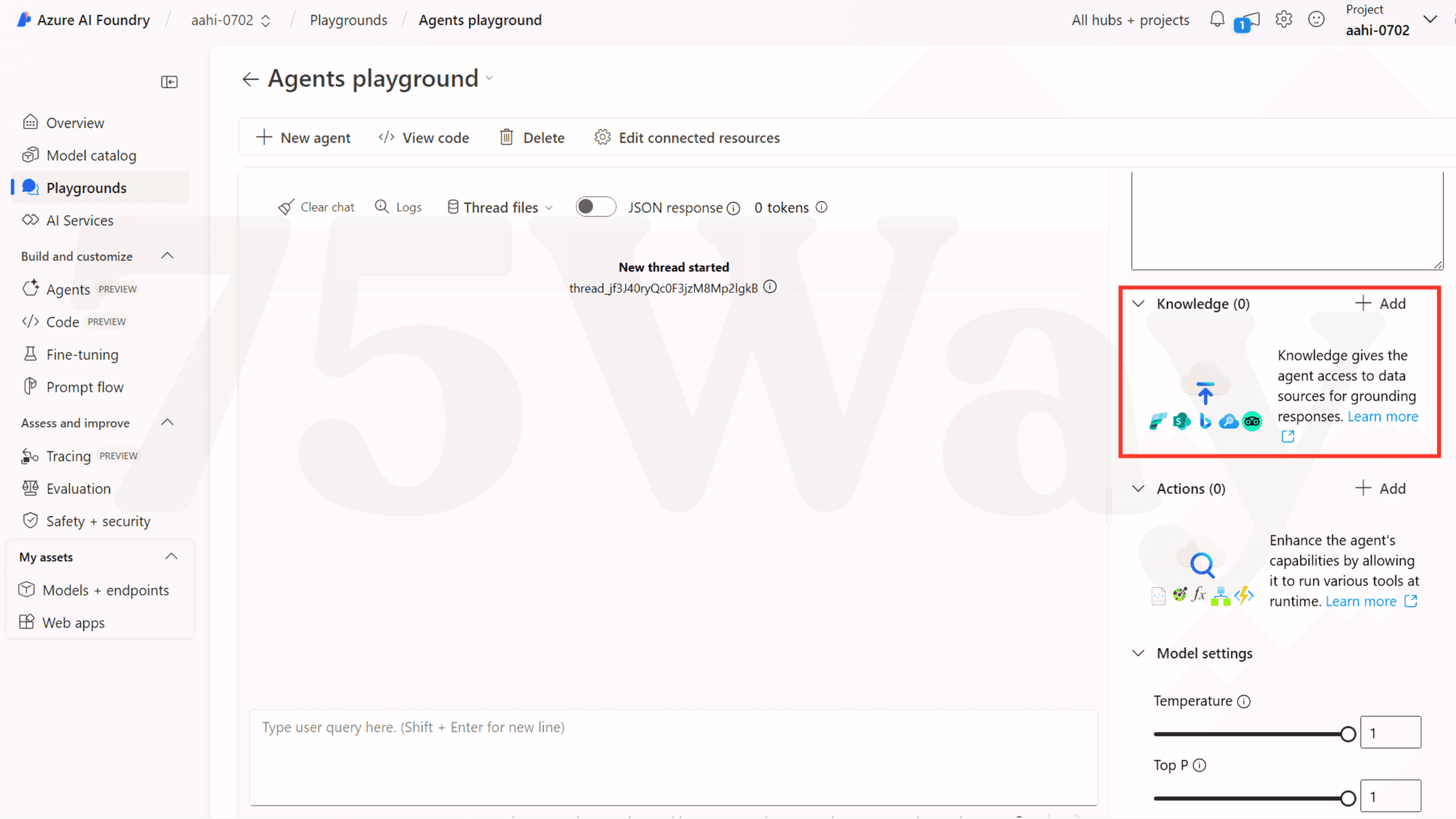
- Knowledge Agent: It focuses on information access through connected data sources such as Azure AI Search and indexed documents. Contextual retrieval supports grounded responses, enterprise memory usage, and domain accuracy without exposing operational or execution permissions.
- Compliance Agent: It validates outputs against internal policies, regulatory expectations, and enterprise rulesets. Risk evaluation occurs before responses or actions proceed, supporting audit readiness, governance alignment, and trust requirements common across USA-based regulated industries.
- Action Agent: This agent is added to handle execution tasks involving APIs, Azure Functions, and system operations. Isolated authority limits unintended behavior, ensuring business actions occur only after reasoning and compliance validation are complete within the orchestrated flow.
- Connect To Orchestrator: The orchestrator agent acts as the coordination layer, routing tasks to specialized agents and aggregating structured responses. Controlled message passing ensures predictable sequencing, awareness of dependencies, and stable workflow execution across complex enterprise scenarios.
- Restrict Permissions Per Agent: Permission boundaries define which tools are accessible, data scopes, and execution rights for each agent. Role-based access control supports enterprise security expectations, reduces exposure risk, and aligns with governance standards required for large-scale AI deployments in the USA.
Step 6: Setting Up A Multimodal, Multi-Agent System
This stage introduces multimodal intelligence through controlled capability configuration rather than platform changes. Text, image, and contextual inputs operate across agents based on assigned responsibilities, ensuring predictable reasoning paths and enterprise-safe output handling.
Select multimodal model (GPT-4o): Choose a model such as GPT-4o, which supports:
- Text input
- Image input
- Cross-modal reasoning
This allows the system to handle documents, screenshots, diagrams, or photos.
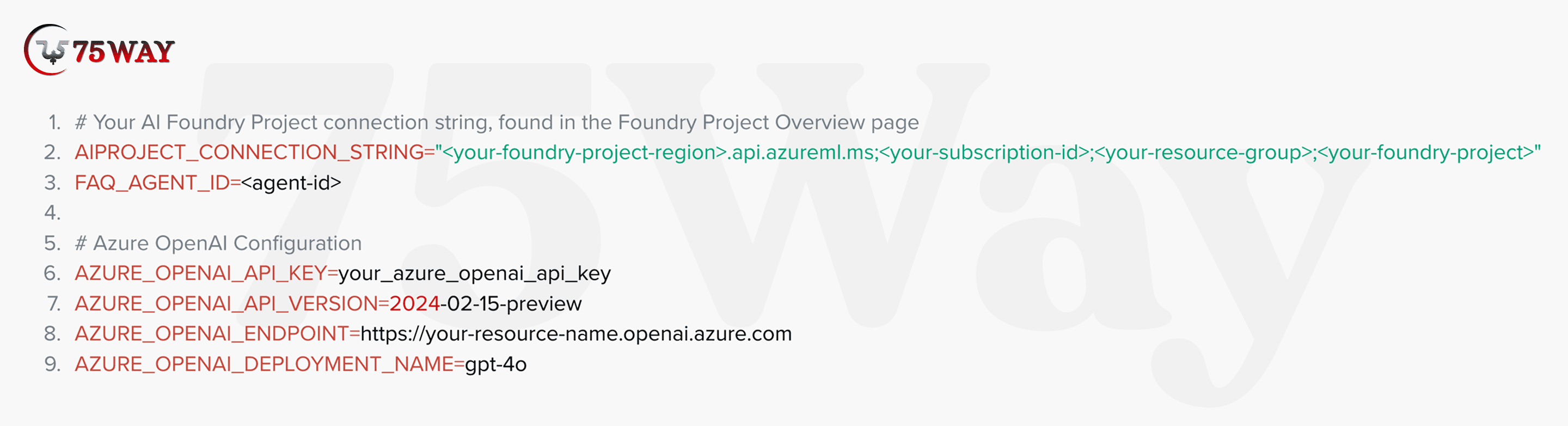
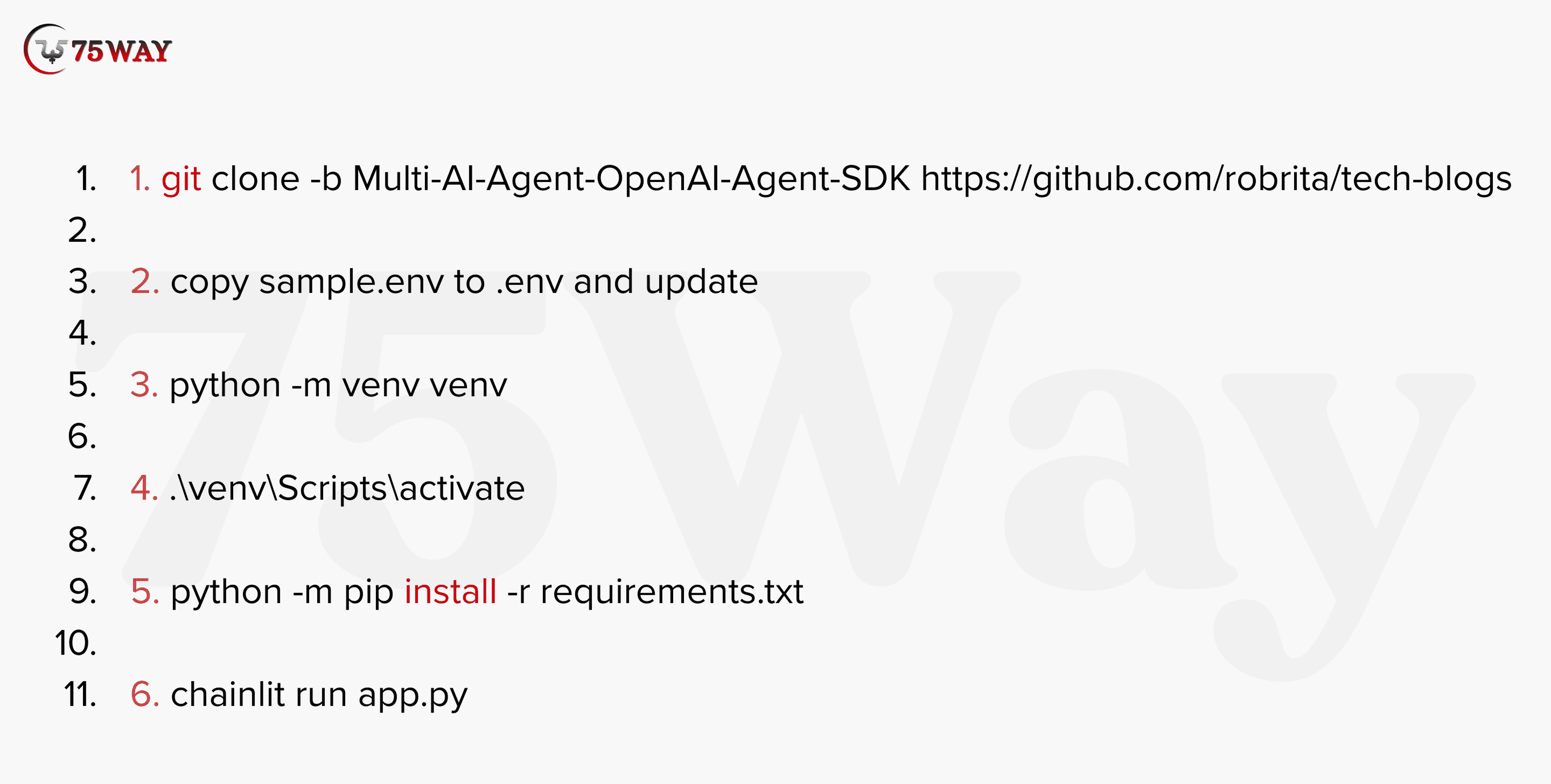
Enable Text & Image Input: Multimodal input access is configured at the individual agent level inside Azure AI Foundry. Text and image handling remains optional per agent, allowing precise control over cognitive scope, processing responsibility, and data exposure across the overall multi-agent system.
Best practice favors selective multimodal access based on functional need. Vision-capable agents receive image inputs for interpretation tasks, whereas reasoning, compliance, and orchestration agents remain text-focused to maintain predictable behavior and controlled resource usage across enterprise deployments.
Assign Modality Handling To Agents: To avoid confusion, assign each modality clearly:
- Vision Agent: Processes images and visual inputs
- Reasoning Agent: Interprets text and extracts insights
- Orchestrator Agent: Combines outputs into a final response
This division prevents overload and improves performance.
Step 7: Add Tools & Knowledge Sources (RAG)
This stage moves the system beyond conversational intelligence into operational value. Retrieval and action capabilities allow agents to access trusted enterprise data and interact with real business systems, which is essential for USA-based production use cases.
Azure AI Search: Azure AI Search connects agents with internal, organization-owned knowledge repositories. Indexed policies, knowledge bases, and product documentation remain accessible in real time, allowing responses grounded in approved data rather than public or outdated sources, supporting audit readiness and enterprise trust.
Document Indexing: Document preparation determines retrieval quality. Cleaned content removes noise, structured chunking preserves context, and metadata tagging enables precise filtering by department, version, or compliance scope. Strong indexing directly improves factual accuracy and reduces irrelevant responses across complex workflows.
APIs & Azure Functions: Action-oriented agents gain execution capability through API and Azure Function connections. CRM systems, internal services, and workflow automation platforms become callable endpoints, allowing the system to trigger updates, fetch live records, or complete operational tasks beyond conversational output.
Step 8: Define Agent Orchestration Logic
Orchestration logic is defined inside Azure AI Foundry by configuring the primary agent as the system coordinator. This logic determines request interpretation, agent selection, task boundaries, and response sequencing, allowing multiple agents to operate as a unified workflow rather than isolated components.
Within this structure, the orchestrator assigns scoped tasks, receives agent outputs, applies validation rules, and assembles a final response. Failure controls, retry limits, and safe fallbacks maintain stability, supporting enterprise-grade multi-agent deployments across regulated USA environments.
Step 9: Test the Multi-Agent Workflow
Testing is the crucial stage in building a multi-agent system in Azure AI Foundry to ensure that the developed system performs reliably under real-world conditions. Verification at this stage confirms task delegation, multimodal input handling, and end-to-end orchestration behavior before production deployment.
- Use Agent Playground: It provides a controlled environment to simulate workflow scenarios. Each agent can be tested individually and in combination, allowing teams to observe behavior, debug issues, and verify that task delegation aligns with business requirements and compliance rules.
- Test Agent Handoffs: This stage evaluates whether the tasks move seamlessly between the orchestrator and specialized agents. Each handoff is monitored to confirm correct sequencing, data integrity, and adherence to assigned responsibilities, reducing errors and maintaining a predictable workflow.
- Validate Multimodal Inputs: The multimodal input validation stage confirms that text, images, and other supported data types are correctly processed by designated agents. This ensures that visual and textual reasoning occur within the appropriate components, supporting accurate response synthesis in complex enterprise scenarios.
- Measure Latency & Cost: Performance metrics capture processing time and resource usage for each agent and the overall workflow. Measuring latency and cost helps organizations optimize deployments, manage budgets, and ensure that system responsiveness meets business and user expectations.
Step 10: Add Observability, Deploy & Scale
Observability allows tracking agent activity, requests, and responses across the multi-agent system. Logs capture decisions, actions, and errors for auditing, performance assessment, and internal review by business or compliance teams.
Logging: Structured logging records each agent’s interactions, including task assignments, data retrieval, and execution results. Logs provide traceability for governance, help identify anomalies, and support reporting to stakeholders or regulatory bodies.
Monitoring: System monitoring observes agent performance, response times, and resource utilization. Dashboards display real-time metrics, alert teams to deviations, and allow proactive management of workloads and dependencies across complex workflows.
Evaluation: Periodic evaluation compares agent outputs against expected results, business rules, and compliance requirements. Metrics support informed adjustments, model fine-tuning, and validation of multi-agent coordination before full-scale deployment.
Responsible AI: Responsible AI practices include bias checks, ethical rule alignment, and compliance with internal policies. Agents operate under defined constraints to maintain trust, accountability, and adherence to regulations for enterprise and customer interactions.
Production Deployment: This stage moves the multi-agent system from testing to live usage. Configurations, agent roles, and orchestrator logic are applied to production environments within selected regions, making the system operational for real workflows.
Scaling Strategies: You can adopt scaling strategies expand the system to handle more requests, additional agents, or increased data volume. Architectures support parallel execution, distributed resources, and modular agent addition without compromising workflow integrity.
Cost Optimization: Resource usage, agent activity, and tool connections are evaluated for cost impact. Optimization balances performance and budget, helping startups and enterprises maintain financial sustainability while maintaining system reliability.
Quick Snapshot: How to Build an App Like SpicyChat AI From Scratch
Why Businesses Prefer Multi-Agent Instead of Single Agents?
In 2026, USA-based businesses are increasingly adopting multi-agent systems due to their ability to address fundamental limitations of single-agent AI. By the end of 2025, around 79% of organizations adopt AI agents, with 66.4% favoring multi-agent systems over single-agent setups.
When a single AI agent is used to reason, retrieve knowledge, adhere to compliance, and execute actions, its accuracy drops. On the other hand, multi-agent architectures reduce this risk by isolating responsibilities. These agents had specific roles to execute tasks that enhance response consistency and decision quality.
Another key reason for adoption is scalability and governance. When workflows are complex, single-agent systems require long prompts. As a result, auditing and compliance adoption become difficult. On the contrary, multi-agent systems distribute workload across agents and enable role-based access control and audit-ready decisions to scale.
Thus, multi-agent systems align far better with US enterprise security standards and regulatory expectations. Hence, they become the preferred choice for startups and organizations building AI solutions meant for real-world production.
Explore More: How to Build IoT Apps in 2026: A Guide for Startups, Founders & Business Owners
Real-World Use Cases of Multi-Agent Systems
Multi-agent systems in Azure AI Foundry allow businesses to combine specialized agents for reasoning, retrieval, compliance, and action under a single orchestrator. Text and image inputs flow to responsible agents, while structured orchestration coordinates outputs, supports auditability, and enables enterprise-grade automation for customer support, knowledge management, sales, and compliance workflows.
Automate Customer Support: Multi-agent AI systems for customer support combine an orchestrator, reasoning, knowledge, and action agents to process inquiries, retrieve accurate internal information, validate policy compliance, and respond consistently. Businesses in the USA use this approach to handle high volumes of requests without compromising service quality or regulatory compliance.
Enterprise Knowledge Assistants: Knowledge agents connected to internal repositories support enterprise assistants that provide staff with context-aware insights. Compliance and orchestrator layers control access to sensitive data, allowing organizations to manage information flow securely across departments and maintain trust with internal and external stakeholders.
Smart Sales Operations: Multi-agent systems assist sales teams by analyzing customer behavior, retrieving product knowledge, and recommending actions. Action agents integrate with CRM systems to update pipelines, while reasoning agents evaluate offers, and orchestrators coordinate tasks, creating structured workflows that improve decision-making and operational accuracy.
Compliance & Risk Analysis: Compliance agents evaluate outputs against regulatory standards and internal policies. Multi-agent systems detect anomalies, log deviations, and route findings to orchestrators for aggregated reporting. Organizations operating in highly regulated industries in the USA gain audit-ready insights without increasing manual overhead.
Multimodal Workflow Automation: Text and image inputs are routed to specialized agents for reasoning, retrieval, and execution. Orchestrators combine outputs into unified responses, allowing enterprises to automate document analysis, visual inspection, and operational actions simultaneously, supporting complex, real-world business processes with trust and traceability.
Quick Read: Top AI Trends Businesses Must Follow in 2026
Best Practices for Building Reliable Multi-Agent Systems
Adopting multi-agent systems in Azure AI Foundry requires structured practices to maintain reliability, scalability, and governance. Agents must operate with defined responsibilities, predictable workflows, and integrated monitoring to support production-ready outcomes for enterprise and startup applications in the USA.
Prompt Design: Each agent receives instructions tailored to its specific role. Prompts remain concise and contextually grounded to reduce reasoning errors. Structured prompts allow knowledge agents, reasoning agents, and action agents to perform without overreach or ambiguity, preserving output consistency.
Agent Responsibility Boundaries: Responsibilities are assigned at the agent level. Knowledge agents handle data retrieval, reasoning agents make logical evaluations, compliance agents review outputs, and action agents execute operations. Clear boundaries prevent overlapping tasks, reduce errors, and support regulated enterprise workflows.
Failure Handling: Structured failure handling anticipates errors and implements fallback responses. Orchestrators track unsuccessful tasks, trigger retries within defined limits, and escalate unresolved issues. Logging captures every failure for review, improving system resilience and trustworthiness.
Avoiding Infinite Loops: Orchestration logic prevents cycles by enforcing task delegation limits and dependency checks. Agents communicate through the orchestrator, which monitors sequence integrity. This design avoids uncontrolled repetitions, preserves system stability, and maintains predictable enterprise-grade operations.
Performance Tuning: System metrics track latency, throughput, and resource utilization for each agent. Observations inform workload balancing, model selection, and capacity planning. Optimized performance supports responsiveness, predictable costs, and consistent behavior for production multi-agent deployments.
Read More: How AI Development Help US Companies Scale Faster
Conclusion
To summarize, the development of multi-agent systems in Azure AI Foundry focuses on designing collaborative intelligence rather than simply deploying multiple models. US startups and enterprises must separate responsibilities, enforce governance, and leverage Azure AI agents to achieve AI solutions that remain scalable, compliant, and production-ready.
If your goal is real business impact, not experimentation, multi-agent architecture represents the future of enterprise AI. Want to transform your workflows with a custom multi-agent system today? Hire a trusted AI agent development company that can design, implement, and deploy orchestrated, multimodal, and reliable AI systems tailored to your business needs.
FAQs
How Do You Build A Multi-Agent System In Azure AI Foundry?
The process of developing a multi-agent system begins by defining business workflows and identifying tasks that require specialized agents. Azure AI Foundry allows the creation of orchestrators, knowledge, reasoning, compliance, and action agents, followed by tool integration, multimodal configuration, orchestration logic, testing, and deployment.
Where Is Multimodal Support Enabled?
Multimodal support is configured at the individual agent level within Azure AI Foundry. Text and image inputs are assigned only to agents that require them. Vision agents handle images, reasoning agents handle text, and orchestrators synthesize responses for consistent multimodal intelligence.
Which Model Supports Multimodal Agents?
Models such as GPT-4o provide multimodal capabilities in Azure AI Foundry. These models allow agents to process text and image inputs simultaneously, enabling knowledge retrieval, reasoning, and action execution in a single, integrated workflow suitable for enterprise use.
Is Azure AI Foundry Suitable For Startups?
Yes, Azure AI Foundry suits startups aiming for production-ready AI systems with governance, compliance, and scalability. The platform supports modular agent design, multimodal workflows, and orchestration logic, allowing smaller teams to implement enterprise-grade multi-agent intelligence efficiently and safely.