Summary
AI agents help businesses automate repetitive tasks and improve operational efficiency. They can manage support, leads, scheduling, and document processing. Development costs vary based on complexity and integrations. Successful implementation requires proper planning, testing, and optimization. Businesses adopting AI agents gain productivity, scalability, and competitive advantages.
Quick Overview
- AI agents automate repetitive workflows, reducing manual effort and operational costs.
- Businesses can start small before expanding automation across departments.
- Development costs depend on complexity, integrations, customization, and compliance needs.
- Proper testing and human oversight ensure reliable AI agent performance.
- AI adoption improves productivity, customer experiences, and long-term business growth.
Let me be straight with you. Most people searching "how to build an AI agent" end up reading something written for software engineers, full of words like "LLM orchestration," "RAG pipelines," and "agentic frameworks."
You're a business owner. You don't need that.
You need to know: What is this thing? Can it help my business? How much does it cost? And how do I actually get one built? That's exactly what this guide covers. No jargon. No fluff. Just real answers.
First Things First: What Even Is an AI Agent?
Here's the simplest way to think about it: A regular chatbot answers questions. You ask something, and it replies. Done.
An AI agent actually does the work.
You give it a goal, say, "follow up with every new lead who fills out our contact form", and it figures out the steps, does them, and tells you when something needs your attention.
It reads emails. It updates your CRM. It sends replies. It books calls. It does all of this without you babysitting it every step of the way.
A chatbot answers a question. An AI agent completes a job. Same underlying technology — completely different category of output.
Think of it like this: a chatbot is a calculator. An AI agent is an employee.
A real example most people get immediately:
You run a law firm. Every day your team spends 2 hours answering the same questions from potential clients: "How much do you charge?", "Do you handle my type of case?", "What documents do I need?"
An AI agent handles all of that. Automatically. At 2 AM on a Sunday. Without you paying overtime. That's what building an AI agent for your business actually means.
Why US Businesses Are Building AI Agents Right Now (Not Later)
This isn't hype. The numbers are real. Gartner projects that 40% of small and mid-size businesses will deploy at least one AI agent by the end of 2026, up from roughly 8% at the start of 2025.
That's a massive jump in just one year. Why is it happening so fast? Three things changed at the same time:
1. The tools got way cheaper. AI model costs have dropped by over 90% since early 2024. What cost $50,000 to build two years ago costs $8,000 today.
2. You don't need a tech team anymore. No-code platforms now let non-technical business owners set up basic AI agents without writing a single line of code.
3. The AI actually works now. Early chatbots were frustrating and dumb. Today's AI agents, powered by models like GPT-4o and Claude, can handle real, nuanced business conversations without making you look bad in front of customers.
Companies that delay agentic workflows are finding themselves unable to compete on price, as their AI-native competitors are operating with 30–40% leaner overheads.
That last point is why the urgency is real. Your competitor might already be running leaner than you, not because they hired better people, but because they built an AI agent that handles the repetitive stuff.
What Can an AI Agent Actually Do for Your Business?
Before you decide to build or develop an AI agent, let's get specific. Here are the most common things US businesses are using AI agents for right now:
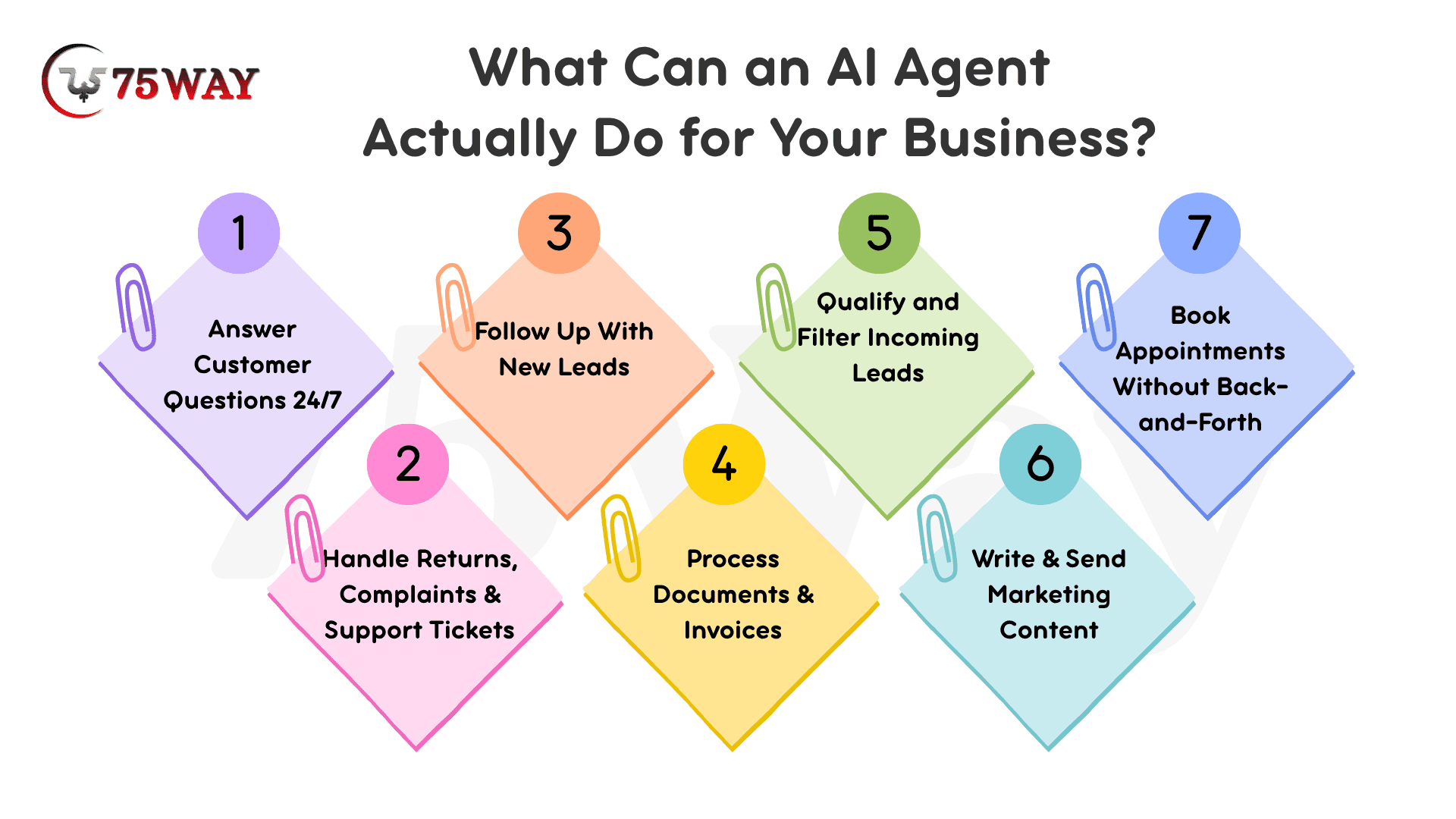
- Answer Customer Questions 24/7
Instead of paying someone to handle "What are your hours?", "Where's my order?", "Do you deliver to Texas?" An AI agent handles all of it. Around the clock. On your website, on WhatsApp, via email.
- Follow Up With New Leads
Someone fills out your contact form at 11 PM on Friday. Without an AI agent, they wait until Monday morning. With one, they get a personalized response within 60 seconds, qualified, tracked in your CRM, and ready for your sales team on Monday.
Most small businesses convert only 2–5% of inbound leads. The majority of leads are unqualified, tire-kicking, or not ready to purchase. An AI agent screens them first, so your team only talks to the real ones.
- Book Appointments Without the Back-and-Forth
"Are you free Tuesday?" "No, how about Wednesday?" "I can do 2 pm." This email tennis can take days. An AI agent reads your calendar, offers real available slots, and confirms the booking, all without a human involved.
- Handle Returns, Complaints & Support Tickets
For ecommerce brands, especially, returns and "where's my package" questions eat hours every day. An AI agent resolves these instantly, escalating to a real human only when it truly needs judgment.
- Process Documents & Invoices
A logistics company that built an AI agent integrated with their transportation management system and QuickBooks dropped load confirmation turnaround from 4 hours to under 20 minutes. That's not a marginal improvement; that's a different business.
- Write & Send Marketing Content
Weekly newsletters. Social media posts. Product descriptions. Email sequences. An AI agent connected to your content workflow can draft, review, and schedule all of it — saving your marketing team 10+ hours a week.
How Much Does It Cost to Build an AI Agent in the USA?
What’s the cost for AI agent development? This is the question everyone asks first, and the honest answer is: it depends on what you need. But here's a clear breakdown so you can figure out where your project fits:
Option 1: Off-the-Shelf Tools (No Building Required)
Cost: $20 – $500/month
If your needs are common, basic customer support, appointment scheduling, and simple lead capture, you don't need to build anything from scratch. Tools like Tidio, Intercom, Zendesk AI, and HubSpot's AI features are ready to go out of the box.
- Best for: Small businesses under $1M revenue, simple use cases, non-technical teams
- Ready in: 3–7 days
- Limitation: You get what the tool offers, no customization, no proprietary logic, no deep system integrations
Option 2: No-Code / Low-Code Agent Builders
Cost: $50 – $300/month + setup time
Platforms like Zapier, Make.com, n8n, and Voiceflow let you build custom workflows without coding. You connect the tools you already use (your CRM, email, and calendar) and set up rules for how the agent behaves.
- Best for: Business owners with some tech comfort, small teams who want control
- Ready in: 1–3 weeks
- Limitation: General no-code tools are built for basic text replies. They struggle with deep, reliable data synchronization, like pulling complex internal data, handling multi-language customers, or keeping database statuses consistent.
Option 3: Custom-Built AI Agent
Cost: $10,000 – $300,000+
This is when you hire an AI development company to build an agent specifically for your business, connected to your actual systems, trained on your actual data, and built around your actual workflows.
Here's how the cost breaks down by complexity:
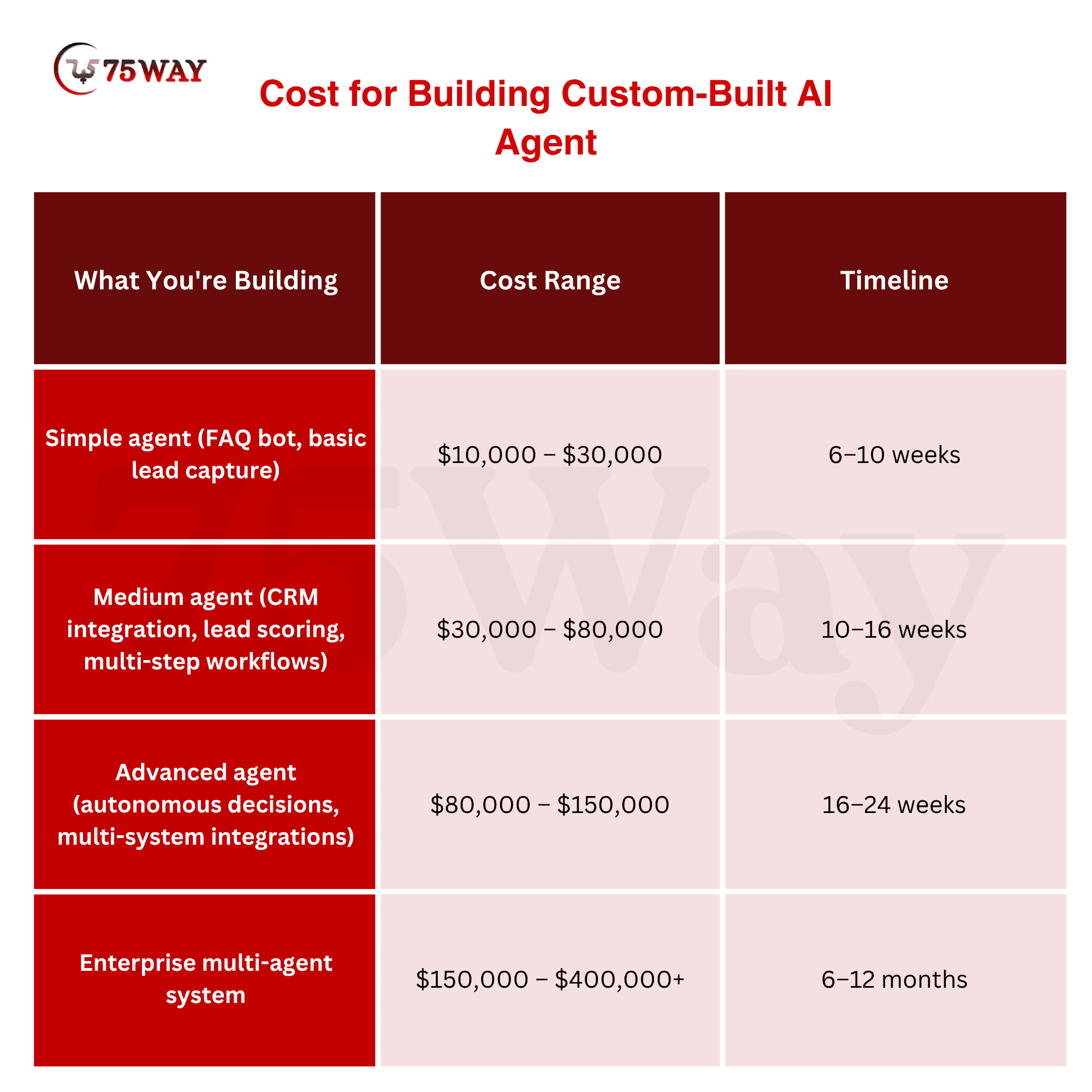
Engineering and development work consumes 40 to 60 percent of total project expenses, while maintenance activities and ongoing updates account for 15 to 25 percent of costs each year.
Best for: Businesses with specific workflows, proprietary data, compliance requirements (HIPAA, PCI-DSS), or a need for real competitive differentiation
What Does It Cost to Run an AI Agent Monthly?
Building the agent is not the only cost. Once it's live, you pay:
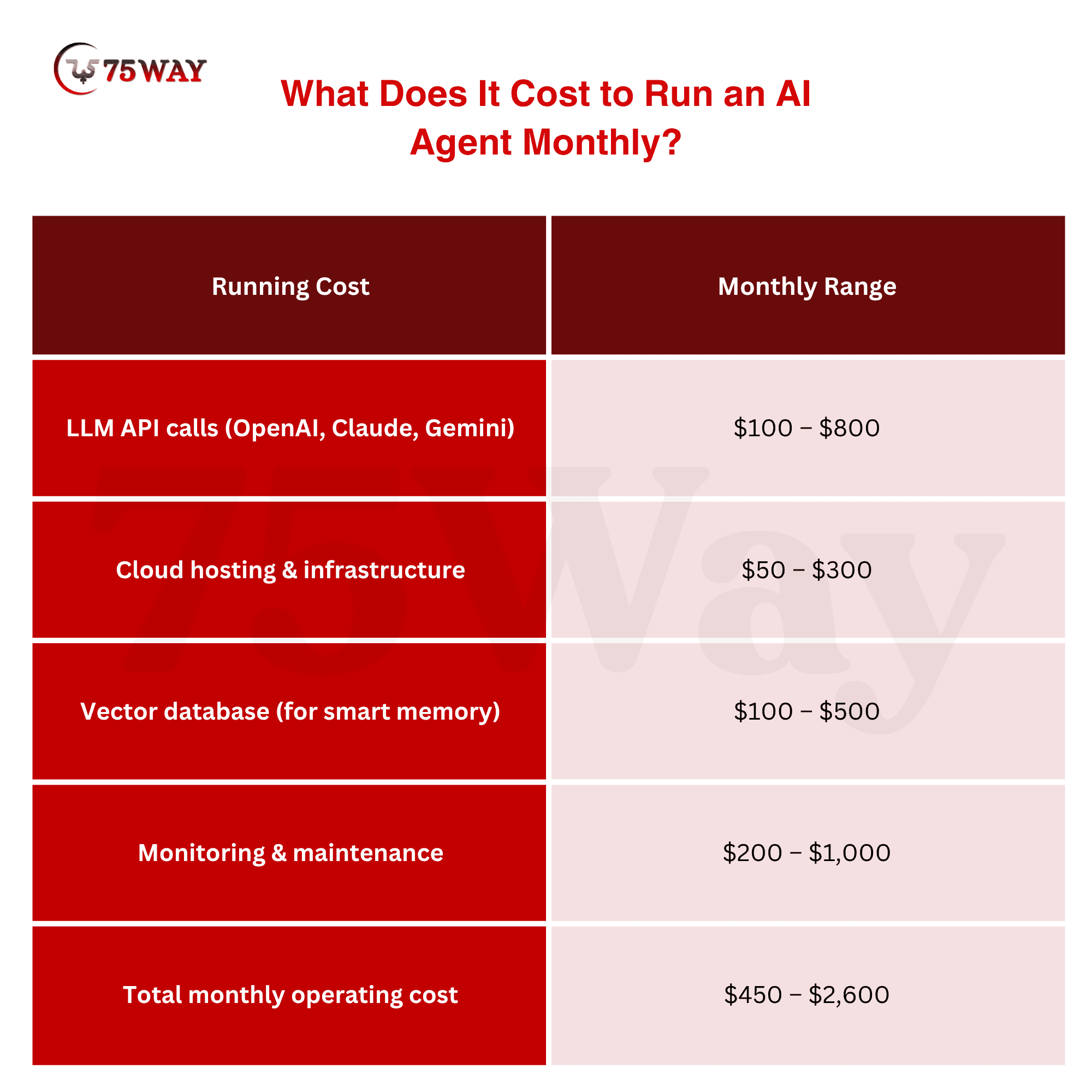
Most small businesses spend around $200 to $1,000 per month to keep their AI agent systems running smoothly.
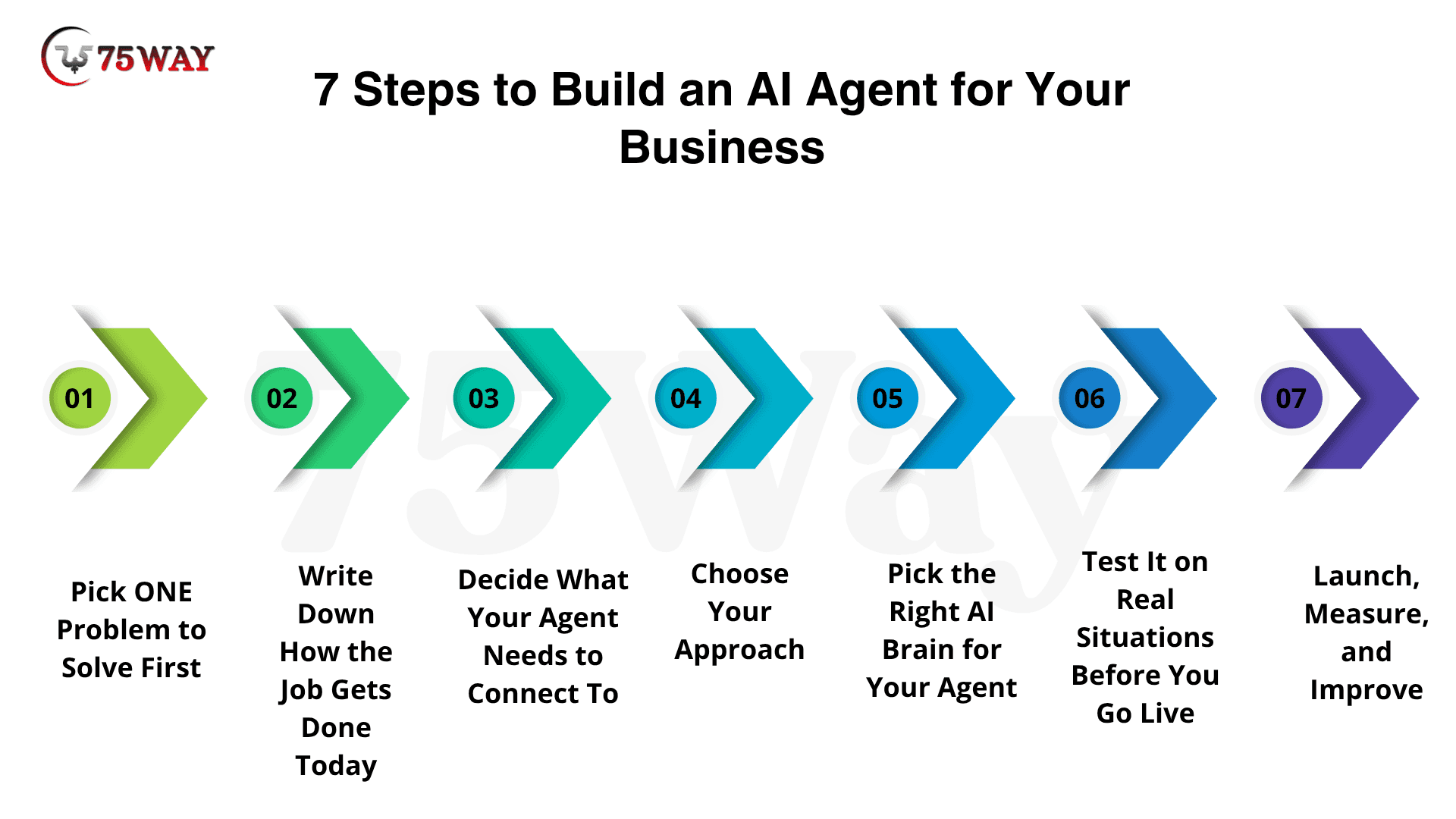
The 7 Steps to Build an AI Agent for Your Business
Whether you're working with a development company or building something yourself, every successful AI agent follows these same steps. Understanding them helps you make smarter decisions and ask better questions when you talk to vendors.
Step 1: Pick ONE Problem to Solve First
The biggest mistake businesses make when they decide to build an AI agent is trying to solve everything at once. "Automate our entire customer service operation" is not a starting point — it's a 12-month project.
Start with one specific, painful, repetitive problem.
Ask yourself: What does my team do more than 20 times a day that follows a mostly predictable pattern? That's your first AI agent. Start small, validate with real users, and grow capabilities over time.
Good first agents for US businesses:
- Answer the top 15 questions your support team gets every day
- Qualify new leads from your contact form within 60 seconds
- Schedule discovery calls without back-and-forth emails
- Process and categorize inbound invoices
- Respond to "where's my order" questions automatically
Step 2: Write Down How the Job Gets Done Today
Before anyone builds anything, you need to document the exact workflow your AI agent will handle. Take your "answer customer questions" use case. Walk through it:
- Where do questions come in? (Website chat, email, WhatsApp?)
- What are the 10 most common questions?
- What does a good answer look like for each?
- When does a human need to step in?
- What happens after the question is answered? (Does anything get logged? Does anyone get notified?)
A well-mapped workflow becomes the foundation of the agent architecture. Real business workflows are rarely perfect; data may be missing, documents may be unclear, and customers may ask unusual questions. The agent must know what to do when the workflow does not go as expected.
The more clearly you define this in plain language, the better your agent will work. Any development company that skips this step is a red flag.
Step 3: Decide What Your Agent Needs to Connect To
An AI agent that can't access your real business data is just a chatbot with better grammar.
Think about what systems your agent needs to read from and write to:
- Your CRM (HubSpot, Salesforce, Zoho), so it can log leads and look up customer history
- Your calendar (Google Calendar, Outlook), so it can check availability and book meetings
- Your order management system (Shopify, WooCommerce), so it can answer "where's my order"
- Your knowledge base, your FAQs, policies, and product documentation
- Your email/chat (Gmail, Outlook, WhatsApp Business), so it can send and receive messages
The standalone AI agent provides restricted benefits because it cannot communicate with your current systems. The process of connecting different systems increases both technological difficulties and financial expenses.
Every integration adds cost and timeline, but also multiplies the value the agent delivers.
Step 4: Choose Your Approach (Buy, Build Low-Code, or Build Custom)
Now that you know what your agent needs to do and what it needs to connect to, you can make an informed decision about which path to take:
- Buy off-the-shelf if: your use case is common, you don't need custom integrations, and you want something live in a week.
- Build with no-code tools if you have some technical comfort, a limited budget, and your workflows are relatively straightforward.
- Build a custom agent if: your business has specific workflows that no off-the-shelf tool handles, you need to connect to proprietary or industry-specific systems, or you're in a regulated industry (healthcare, finance, legal) with compliance requirements.
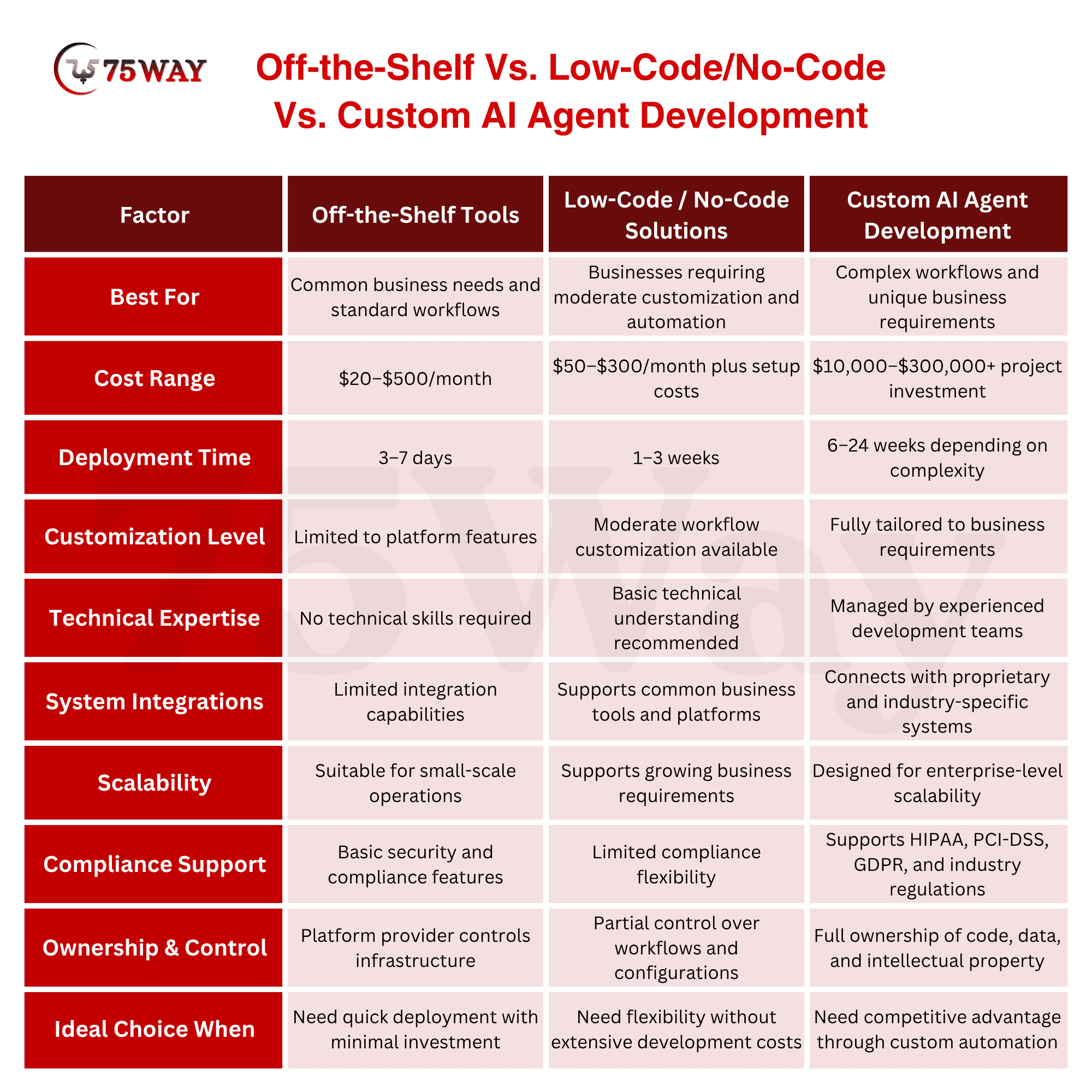
Here's a simple test: Can you find an existing tool that does exactly what you need, connected to your exact systems, today? If yes, buy it. If no, build it.
Step 5: Pick the Right AI Brain for Your Agent
You don't need to understand all the technical details here. But knowing a little about the AI models available helps you have smarter conversations with development partners.
The three most common AI models used in production business agents in 2026:
- GPT-4o (OpenAI): The most widely used. Strong at natural language, widely supported across frameworks and tools. Good general-purpose choice for most business agents.
- Claude (Anthropic): GPT-4o and Claude lead for complex, multi-step reasoning tasks. Claude is especially well-regarded for customer-facing agents because of its careful, professional tone and strong safety characteristics.
- Gemini (Google): Best choice if your business is heavily embedded in Google Workspace (Gmail, Calendar, Drive, Meet).
For most US small businesses, the model choice matters less than the quality of how the agent is designed and connected to your systems. Don't let a vendor sell you on a "special proprietary model", the major models are all competitive.
Step 6: Test It on Real Situations Before You Go Live
This is where most rushed builds fall apart. An AI agent that works perfectly in a demo often falls apart in the real world because:
- The demo used clean, simple test data
- Real customers phrase things unpredictably
- Edge cases nobody thought of come up constantly
Before you launch your AI agent to real customers, test it on:
- Your 20 most common real customer scenarios
- Your 5 most difficult edge cases
- Situations where something goes wrong (customer is angry, information is missing, request is unclear)
Once the agent is runnable, test it against both simple and intricate scenarios. Verify that each step produces the expected input and output. Edge-case testing is especially important for accuracy and reliability.
Also, make sure there is always a clear path to a human. Guardrails are critical at every stage, from input filtering and tool use to human-in-the-loop intervention, helping ensure agents operate safely and predictably in production.
Step 7: Launch, Measure, and Improve
Going live is not the end. It's the beginning of the most important phase, learning from real usage.
In the first 30 days after launch, track:
- What % of conversations does the agent resolve without human help?
- Where does it most often fail or escalate?
- Are customers satisfied with the responses? (Thumbs up/down feedback works well)
- How many hours per week is it saving your team?
A 2026 PwC AI Agent Survey found that 79% of US companies that deployed AI agents improved their processes after seeing how the agent actually performed in the real world.
The first version of your agent will not be perfect. That's fine. The goal in the first 90 days is to learn what it's doing well and what it's getting wrong, then improve from there.
Real Examples: How US Businesses Are Building AI Agents in 2026
A 12-Person Accounting Firm in Austin, Texas
Maria runs a 12-person accounting firm in Austin. Last September, she spent an entire Sunday triaging 340 emails that had accumulated over the weekend, client questions, vendor invoices, meeting requests, and newsletter subscriptions all jumbled together. By the time she finished sorting through them, six hours had evaporated.
Next Monday, she built her first AI agent using Zapier and ChatGPT. It now reads every incoming email, sorts it by type and urgency, drafts response suggestions for routine questions, and creates tasks for her team automatically.
Cost: under $100/month. Time saved: 6+ hours every week.
A Logistics Company Connecting AI to Their TMS System
A logistics company built an AI agent integrated with their transportation management system, email platform, and QuickBooks. Total Year 1 cost was $68,000, including integration, data migration, testing, and the first year of maintenance. Results after six months: load confirmation turnaround dropped from 4 hours to under 20 minutes.
This was a custom build, necessary because their TMS didn't have native integration with any off-the-shelf AI tool. Their carrier database required specific logic that no generic tool could handle.
ROI: significant operational efficiency gain within 6 months.
A Professional Services Firm Generating $600K in Extra Capacity
For a 30-person professional services firm billing $3 million annually, a 20% productivity gain from AI agents translates to roughly $600,000 in additional capacity per year. Even at a $60,000 integration cost, that's a 10x return in Year 1.
This is the math that explains why AI agent investment is accelerating so fast. It's not a technology bet. It's a straightforward business decision.
How to Find an AI Agent Development Company Near You in the USA
You've decided to build a custom AI agent. Now you need to find the right company to build it.
"AI agent company near me" is one of the fastest-growing searches in this category, and for good reason. When you're investing $20,000–$100,000 in something that will run core parts of your business, you want a team you can actually talk to.
Here's what to look for:
They Start With Your Business Problem, Not the Technology
Any AI development company worth hiring spends the first meeting asking about your business, your workflows, your customers, and your problems, not showing you demos of how powerful their AI stack is.
The technology is secondary. Your problem is primary.
1. They Can Show You Real Work They've Done
Ask to see a live product they built. Not a screenshot. Not a case study PDF. Something you can open on your phone or laptop and actually use.
If everything is "under NDA", every single project, that's a flag.
2. They Give You Full Ownership of What They Build
Your prompts, your training data, your model configuration, your code — all of it should be yours from day one.
You need full ownership of all customizations you pay to build. Any company that hedges on this in contract negotiations is not the right partner.
3. They Build a Discovery Phase Into the Process
A real development company doesn't jump straight to building. They spend 1–2 weeks mapping your workflows, documenting requirements, and getting alignment on scope before writing a single line of production code.
If a company quotes you a price in the first call without doing any discovery, walk away. They're guessing.
4. They're Honest About Ongoing Costs
Every time a connected software platform updates its API, someone needs to fix the integration. That cost is almost never discussed up front.
A trustworthy AI development partner gives you a full cost-of-ownership picture, not just the build cost.
Ask: "What will it cost to maintain and update this agent for the next 12 months?" If they can't answer clearly, they haven't thought it through.
5. Questions to Ask Every AI Agent Company Before Hiring
- Who will actually work on my project?
- Can I meet them?
- Show me something you've built that I can use right now.
- How does your discovery process work?
- Who owns the code, prompts, and data after we're done?
- What does post-launch maintenance cost per month?
- What happens when a connected system (my CRM, my email platform) updates its API?
- Can you share a case study from a business similar to mine?
5 Mistakes to Avoid When Building Your First AI Agent
Mistake 1: Trying to Automate Everything at Once
"Build us an agent that handles all of sales, support, and operations" is a project that will run over budget, over time, and under-deliver.
Start with one workflow. Prove it works. Then expand.
Mistake 2: Ignoring the Handoff to Humans
No AI agent handles 100% of situations perfectly. 5–15% of interactions will need a real human. If you don't design that handoff carefully, who gets notified, how fast, with what context, your customers will feel the gap.
Mistake 3: Skipping the Data Cleanup
An AI agent is only as good as the information it has access to. If your knowledge base is full of outdated pricing, broken links, and contradictory policies, your agent will confidently give wrong answers.
Clean your data before you build your agent. Not after.
Mistake 4: Treating It Like a One-Time Project
AI models degrade over time when real-world data changes. This is called model drift. For example, a customer service AI agent trained on your 2024 product catalog will give wrong answers after a 2026 catalog update.
Budget for quarterly reviews, updates, and improvements. It's not optional. It's how you protect the investment you've made.
Mistake 5: Choosing the Cheapest Option
The SMBs winning with AI in 2026 aren't the ones who spent the least. They're the ones who invested in integration that actually fits their operations.
A $5,000 agent that doesn't connect to your real systems, can't handle real customer questions, and breaks the first time your CRM updates its API costs more in the long run than a $40,000 agent that actually works.
Build vs. Hire: Should You DIY or Work With an AI Development Company?
This is a real question worth answering honestly.
Build it yourself (using no-code tools) if:
- Your use case is simple and common
- Budget is under $500/month
- You have time to learn the tools and set things up
- You don't need deep integrations with custom or industry-specific systems
- You're comfortable iterating on something that won't be perfect immediately
Hire an AI development company if:
- You need the agent to connect to specific business systems (your ERP, your TMS, your practice management software)
- You're in a regulated industry (healthcare, finance, legal) with compliance requirements
- You've already tried off-the-shelf tools, and they don't quite fit
- Your competitive advantage depends on something proprietary, not a tool your competitors can buy for $99/month
- You want it done right the first time, without spending 3 months figuring it out yourself
In a competitive market, a 4-month delay in deploying an AI agent is an opportunity cost. If an agent saves $50,000 a month in operating expenses, a 4-month faster launch via an agency is worth $200,000 in direct profit.
For most US businesses with a specific workflow problem and a clear ROI case, hiring the right development company is the faster and smarter path.
How 75way Helps US Businesses Build AI Agents?
At 75way Technologies, we build custom AI agents for businesses across the USA, from New York and Los Angeles to Chicago, Miami, Houston, and Austin.
We're not a generic software shop that "does AI." Every AI agent we build starts with a deep understanding of your specific business workflows, your existing systems, and the measurable outcome you're trying to achieve.
Here's how we work:
Week 1–2
Discovery: We spend the first two weeks mapping your workflows, documenting your use cases, and identifying exactly where an AI agent delivers the highest ROI for your specific business. No code written yet. Just clarity.
Week 3–4
Architecture: We design the agent's logic, select the right AI model, map the integrations to your existing systems, and define what "success" looks like in measurable terms.
Week 5–14
Build & Test: We build the agent, connect it to your real systems, test it against real scenarios from your business, and iterate until it performs reliably.
Launch & Beyond: We don't hand off and disappear. Every agent we deploy comes with monitoring, quarterly performance reviews, and ongoing support as your business evolves.
What we build AI agents for:
- Customer support automation (24/7, across web, email, WhatsApp)
- Lead qualification and follow-up
- Appointment scheduling and calendar management
- Document and invoice processing
- Sales outreach and CRM enrichment
- HR screening and onboarding workflows
- Healthcare patient intake (HIPAA-compliant)
- Ecommerce order management and returns handling
Our tech: We build with OpenAI GPT-4o, Anthropic Claude, and Google Gemini, connected to your systems through clean, maintained API integrations with full IP ownership transferred to you.
We work with US businesses directly, with project management in US time zones and senior engineers who stay on your project from kickoff to launch.
No sales pitch. We spend the first call understanding your business and telling you honestly whether a custom AI agent is the right move, and what it would actually cost.
Final Remarks
Here's what building an AI agent comes down to for US businesses in 2026: pick one specific, painful, repetitive workflow. Document how it works today. Find the right team or tool to build it. Test it in real situations. Launch it. Measure it. Improve it.
That's the whole playbook.
The businesses that are running leaner, responding faster, and converting more leads than their competitors are not doing anything exotic. They identified one workflow that was costing them time and money every single day, built an AI agent to handle it, and let the results show them what to automate next.
The technology works. The costs are manageable. The ROI is real. The only question is whether you start now or six months from now, when your competitors already did. You can partner with a reliable AI agent development company in USA.
Frequently Asked Questions (FAQs)
What Does It Mean To "Build An AI Agent" For A Business?
Building an AI agent means creating an autonomous software system that can complete specific business tasks on your behalf, without a human managing each step. This could mean answering customer questions, qualifying leads, scheduling appointments, processing documents, or running marketing workflows. Unlike a chatbot that only responds to questions, an AI agent takes real action inside your business systems.
How Much Does It Cost To Build A Custom AI Agent In The USA?
The cost to build a custom AI agent in the USA ranges from $10,000 for a simple single-task agent to $300,000 or more for a complex enterprise system. Most US small and mid-size businesses build their first AI agent for between $15,000 and $80,000. Off-the-shelf tools like Tidio, Intercom, and HubSpot AI cost $20–$500 per month and are the right starting point for common use cases that don't require custom integrations.
How Long Does It Take To Develop An AI Agent?
A simple AI agent using off-the-shelf tools can be live in 3–7 days. A custom-built agent with CRM and system integrations typically takes 6–16 weeks from discovery to launch. Complex multi-agent systems for enterprise workflows can take 3–6 months. Any company that quotes a firm timeline before completing a discovery phase is guessing; that's the first red flag to watch for.
Can I Build an AI Agent Without Coding Skills?
Yes. No-code platforms like Zapier, n8n, Make.com, and Voiceflow allow non-technical business owners to build functional AI agents without writing code. These tools work well for common workflows. For complex, proprietary, or compliance-sensitive use cases, you'll need a development partner — but you don't need to write code yourself.
What's The Difference Between Creating An AI Agent And Just Using ChatGPT?
ChatGPT is a conversation tool; you ask it something, and it responds. An AI agent is a system that operates inside your business workflows, connected to your real data and systems. It doesn't just answer questions; it takes action, updating your CRM, sending emails, booking calendar slots, and processing documents. The underlying AI model might be similar, but the architecture and business integration are completely different.
How Do I Find an AI Agent Development Company Near Me In The USA?
Start by searching for AI development companies that have specific experience in your industry and use case — not just generic software shops that have added "AI" to their website. Ask to see live products they've built. Check that they start with a discovery phase before any development. Confirm full IP ownership from day one. And get a full cost-of-ownership estimate, not just a build quote. Companies like 75way serve US clients nationally, with project management in US time zones, which matters for communication and accountability throughout the project.
What is the ROI of Building an AI Agent for a US Business?
ROI varies by use case. Customer support agents typically pay back within 3–6 months. Lead qualification agents pay back within 1–3 months (since faster response time directly increases conversion rates). Document and invoice processing agents pay back within 2–4 months. Over a 3-year horizon, well-built AI agents typically deliver 124%+ cumulative ROI as they improve from real-world usage and expand to cover more workflows.
What Should I Look For in an AI Agent Development Company in the USA?
Look for a company that starts with discovery (not coding), shows you live work they've built, gives you full IP ownership, is transparent about ongoing maintenance costs, and stays involved after launch. Red flags include: quoting a price in the first call with no discovery, keeping all work "under NDA" with nothing to show publicly, and treating post-launch support as an optional add-on.