AI Summary
AI-powered logistics app development solutions help businesses streamline deliveries and reduce operational costs. Choosing the right app type ensures faster implementation and better ROI. Features like route optimization and real-time tracking improve efficiency significantly. Development costs vary based on complexity and AI capabilities. Strategic planning maximizes long-term scalability and business growth.
Quick Overview
- AI route optimization reduces fuel costs and improves delivery efficiency.
- Real-time tracking enhances customer experience and operational visibility.
- Start with core features before adding advanced AI capabilities.
- Proper integrations prevent workflow disruptions and costly implementation challenges.
- Logistics apps deliver measurable ROI through automation and optimization
Here is what a typical day looks like for a mid-size logistics company in the USA that hasn't built a proper app yet:
The dispatcher is on the phone with three drivers at once. One driver missed a turn because the directions were wrong. A customer is calling because their package was supposed to arrive two hours ago, and nobody has updated them.
The office manager is updating a spreadsheet with delivery statuses manually, one by one. And somewhere in the background, a truck is burning fuel on a route that could have been 18 miles shorter.
Every single one of these problems has the same solution: a well-built logistics app with AI built into it.
This guide explains what that looks like, what it costs, and exactly how to build an AI-powered logistics app, with no technical jargon.
Why US Logistics Businesses Need an AI-Powered App in 2026
The logistics industry is under more pressure than it's ever been.
- Last-mile delivery now makes up 41% to 53% of total shipping costs, the most expensive part of the entire delivery chain
- Labor shortages and rising wages in the US have made manual operations costly, pushing automated logistics systems to help companies scale without increasing headcount
- Human routing is statistically 20% to 40% less efficient than algorithmic route planning, meaning if your dispatchers are still planning routes by hand, your trucks are burning extra fuel every single day
- The AI-powered logistics market is projected to reach $18.4 billion in 2026, accelerating toward $68.5 billion by 2034
- The global logistics automation market is projected to rise from $50.1 billion in 2026 to $148.7 billion by 2033, growing at a CAGR of 16.8%.
Here is the hard truth: your competitors, the ones growing their fleet without hiring more dispatchers, delivering on time even during peak season, and sending customers real-time updates without anyone lifting a finger, are not smarter than you. They built a better app.
The good news: you don't have to be a technology company to build one. You just need to understand what you're building and find the right team to build it.
Different Kinds of Logistics Apps You Can Build
Before you spend a dollar on development, you need to be clear about which type of logistics app fits your business. Building the wrong type is one of the most common and most expensive mistakes.
There are five main types of logistics apps, and each one serves a different purpose:
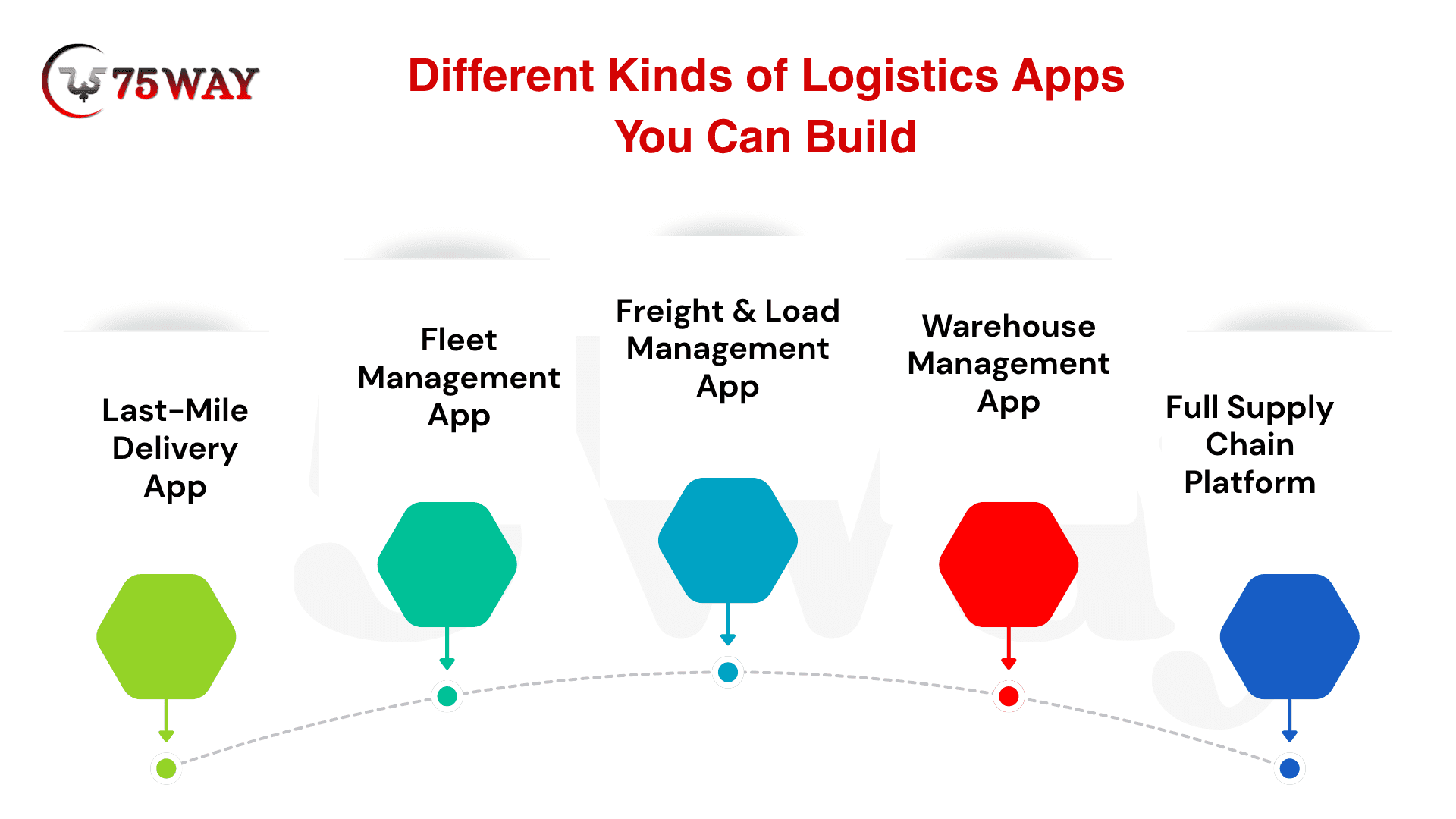
1. Last-Mile Delivery App
Best for: eCommerce brands, grocery delivery, food delivery, parcel delivery companies
This is the app your drivers use to complete deliveries, and the interface your customers use to track their orders. It typically includes a driver mobile app, a dispatcher web dashboard, real-time GPS tracking, and customer notifications.
Examples of companies that need this: A Shopify store that ships its own orders. A regional grocery chain is managing same-day delivery. A pharmacy doing home delivery.
2. Fleet Management App
Best for: Trucking companies, logistics carriers, vehicle rental companies
This app helps you manage your entire fleet, tracking where every truck is, how much fuel it's using, when it needs maintenance, and how your drivers are performing.
Who needs this: A trucking company with 20+ vehicles that's still tracking fleet status in spreadsheets.
3. Freight & Load Management App
Best for: 3PL companies, freight brokers, shippers
This app handles the matching of loads to carriers, freight quoting, load tracking, and documentation. Think of it as the back office of freight management, turned into software.
4. Warehouse Management App
Best for: Warehouses, fulfillment centers, distribution companies
This app manages everything inside the four walls — inventory tracking, picking and packing workflows, receiving, and shipping. AI in warehouse apps focuses on demand forecasting, picking optimization, and reducing errors.
5. Full Supply Chain Platform
Best for: Larger enterprises managing end-to-end logistics
This connects all of the above, fleet, warehouse, freight, and delivery, into one system with a single dashboard. This is the most complex and most expensive type to build.
For most small and mid-size US logistics businesses, the right starting point is a last-mile delivery app or a fleet management app.These deliver the fastest ROI and the clearest immediate impact on day-to-day operations.
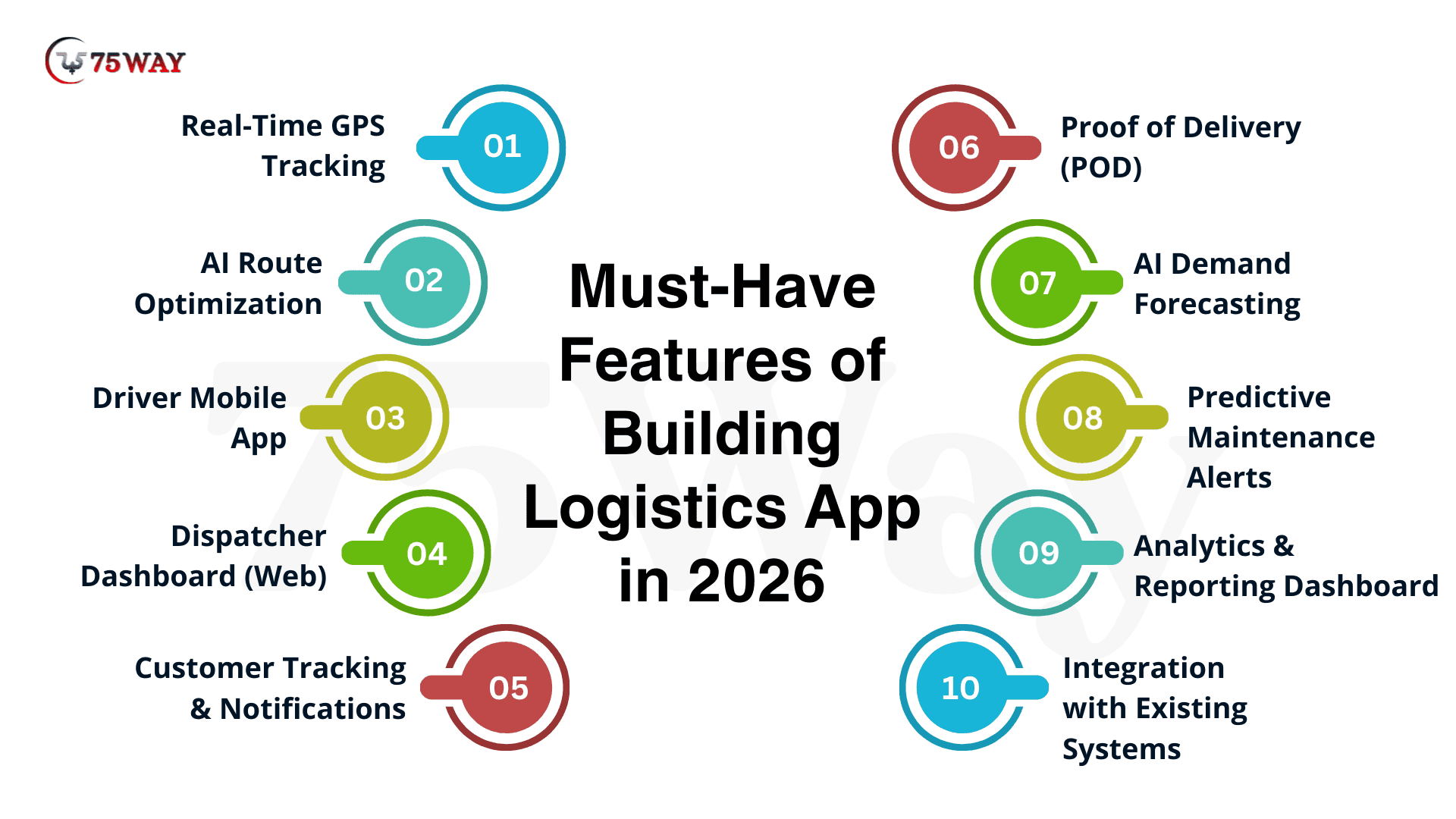
The Must-Have Features of Building Logistics App in 2026
Here is what every solid logistics app needs, and which features actually benefit from AI:
1. Real-Time GPS Tracking
This one is non-negotiable in 2026. Real-time tracking is now considered a baseline requirement by US enterprise customers, not an optional feature.
Your dispatcher should see every vehicle on a live map at any moment. Your customer should receive a live tracking link so they never have to call and ask, "Where's my delivery?"
What AI adds here: Standard GPS shows you where a truck is. AI tracking predicts where it will be, taking live traffic, weather, stop completion times, and driver patterns into account to give accurate ETAs, not just the current location.
Build cost: $5,000–$10,000 extra for real-time GPS with under 200ms latency tracking
2. AI Route Optimization
This is where logistics apps make or lose money. AI-driven routing systems can reduce fuel costs by up to 25% while improving delivery efficiency and ETA accuracy.
- Old way: a dispatcher plans routes the night before, based on a map and experience. If traffic changes during the day, they're scrambling.
- New way: the app recalculates the most efficient route every time a stop is completed, a new order comes in, or traffic changes. Companies report 10–15% fuel cost reductions and 15–20% faster deliveries by replacing static routing with real-time AI-driven planning.
A real example: An AI system detected a 12-minute traffic delay three miles ahead, recalculated fuel costs across seven alternative paths, checked warehouse dock availability, and rerouted the entire fleet, all in 1.3 seconds. No human could do that.
Build cost: AI route optimization adds roughly 20–30% to your total development cost, but it's almost always the feature with the fastest ROI.
3. Driver Mobile App
Your drivers need a simple, clean mobile app that tells them where to go, how to get there, how to confirm deliveries, and how to flag problems.
Driver apps reduce paperwork, improve accuracy, and support higher delivery volumes per shift. They also directly impact driver retention; nobody stays at a job where they're constantly lost, waiting on confusing phone instructions, or filling out paper forms at the end of every shift.
Key things the driver app must do:
- Show the day's route clearly, stops in order, with navigation
- Work offline (trucks go through areas with no signal; this is not an edge case)
- Allow photo capture for proof of delivery
- Let drivers flag issues, wrong address, damaged goods, customer not home
- Give turn-by-turn directions without requiring the driver to think
The offline point is critical. Logistics driver apps must function fully offline; connectivity dead zones on delivery routes are not edge cases, they are the operating environment. Any development company that doesn't plan for offline mode from day one is not a logistics app specialist.
4. Dispatcher Dashboard (Web)
This is the control center. Your dispatcher needs to see everything happening across the fleet in real time, without having to call drivers.
A good dispatcher dashboard shows:
- Live map with all vehicles and their current status
- Today's deliveries, completed, in progress, delayed, failed
- Alerts when something goes wrong, the driver hasn't moved in 30 minutes, the delivery is running late, or a customer has complained
- The ability to manually reassign stops or reroute a specific driver
What AI adds here: Instead of waiting for a problem to show up, an AI-powered dashboard alerts dispatchers before things go wrong, a delivery that's running behind schedule gets flagged 45 minutes before the window closes, not after.
5. Customer Tracking & Notifications
Customers in 2026 expect real-time delivery updates. A Metapack study published in early 2026 confirms that delivery is now a purchase decision criterion upfront, not just a post-order step. This means: delivery tracking is now part of why customers choose you in the first place.
Your app should automatically send customers:
- A confirmation when their order is picked up
- A live tracking link with a real ETA (not a 4-hour window)
- A notification when the driver is 15–20 minutes away
- A delivery confirmation with a proof of delivery photo
- An easy way to reschedule if they'll be home late
When customers receive timely notifications with a precise tracking link, they no longer call to ask "where's my delivery", and reducing that inbound support volume alone saves US logistics teams significant operational time.
6. Proof of Delivery (POD)
Every delivery needs to be confirmed. Your app should allow drivers to capture:
- A photo of the package at the door
- A customer signature (for high-value items)
- GPS-stamped confirmation of delivery location
- A note if the delivery was left with a neighbor or at a locker
What AI adds: AI-powered POD systems can automatically detect if a photo is valid (package is visible, location matches), flag suspicious deliveries, and even read handwritten signatures for disputes.
7. AI Demand Forecasting
This one applies more to warehouse and supply chain apps, but it's worth understanding even for last-mile delivery businesses.
AI-based demand forecasting analyzes social media trends, weather, and economic indicators to predict customer demand, with forecast accuracy improving by 20–50%.
In plain terms: instead of finding out you don't have enough drivers on the busiest Friday of the month after it's already happening, your app warns you a week in advance.
8. Predictive Maintenance Alerts
For fleet management apps specifically, this feature saves real money.
IoT sensors on your vehicles track engine health, tire pressure, braking patterns, and fuel consumption. The app flags a potential breakdown before the truck breaks down on I-95 in the middle of a delivery run.
One automated warehouse processes the same volume as a traditional facility with 40–50% fewer staff. Predictive maintenance is a key part of how companies achieve those efficiency gains without increasing breakdowns.
9. Analytics & Reporting Dashboard
You can't improve what you don't measure. Your logistics app should show you:
- On-time delivery rate
- Average cost per delivery
- Fuel cost per mile
- Driver performance by driver
- Route efficiency scores
- Failed delivery reasons
What AI adds: Instead of you pulling reports every Monday morning, an AI dashboard surfaces what matters: "Your North Dallas route is 22% less efficient than your South Dallas route. Here's why."
10. Integration with Your Existing Systems
This is the feature most people forget to plan for, and it becomes the most painful part of any logistics app build.
Your app needs to connect to:
- Your TMS (Transportation Management System), if you have one
- Your WMS (Warehouse Management System)
- Your ERP (SAP, Oracle, Microsoft Dynamics)
- Your accounting software (QuickBooks, NetSuite)
- Your eCommerce platform (Shopify, WooCommerce), if you're doing the last-mile for online orders
The first step is mapping your legacy infrastructure; engineers must build secure APIs to pull data from your existing TMS, WMS, and physical vehicle telematics (IoT devices). This is where most logistics app projects either go smoothly or go sideways, depending entirely on how well the development team understands enterprise integrations.
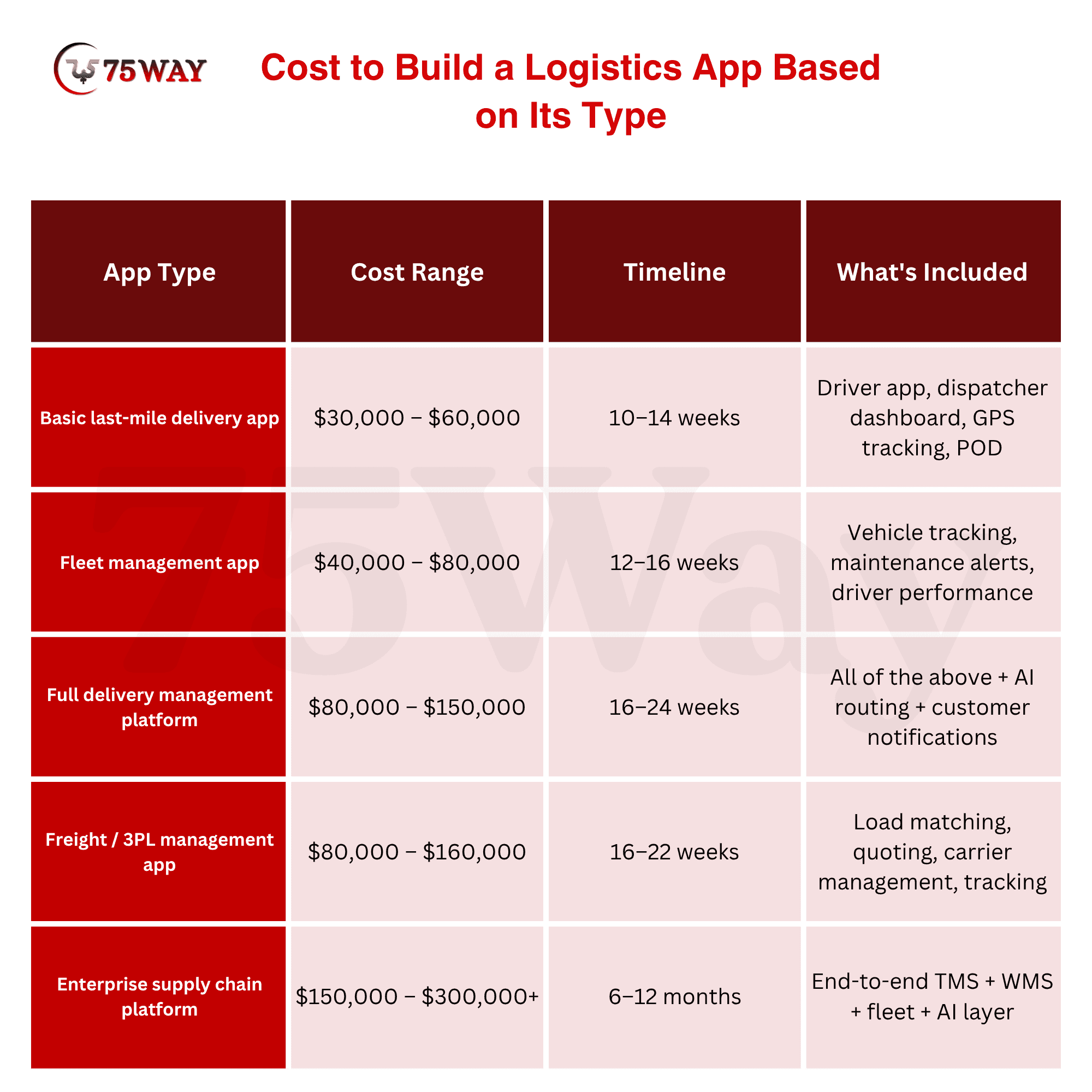
How Much Does It Cost to Build a Logistics App with AI in the USA?
Here's the honest answer: on-demand logistics app development typically ranges from $30,000 to $300,000, depending on features, tech stack, integrations, and scale.
Let's break that down so it makes sense:
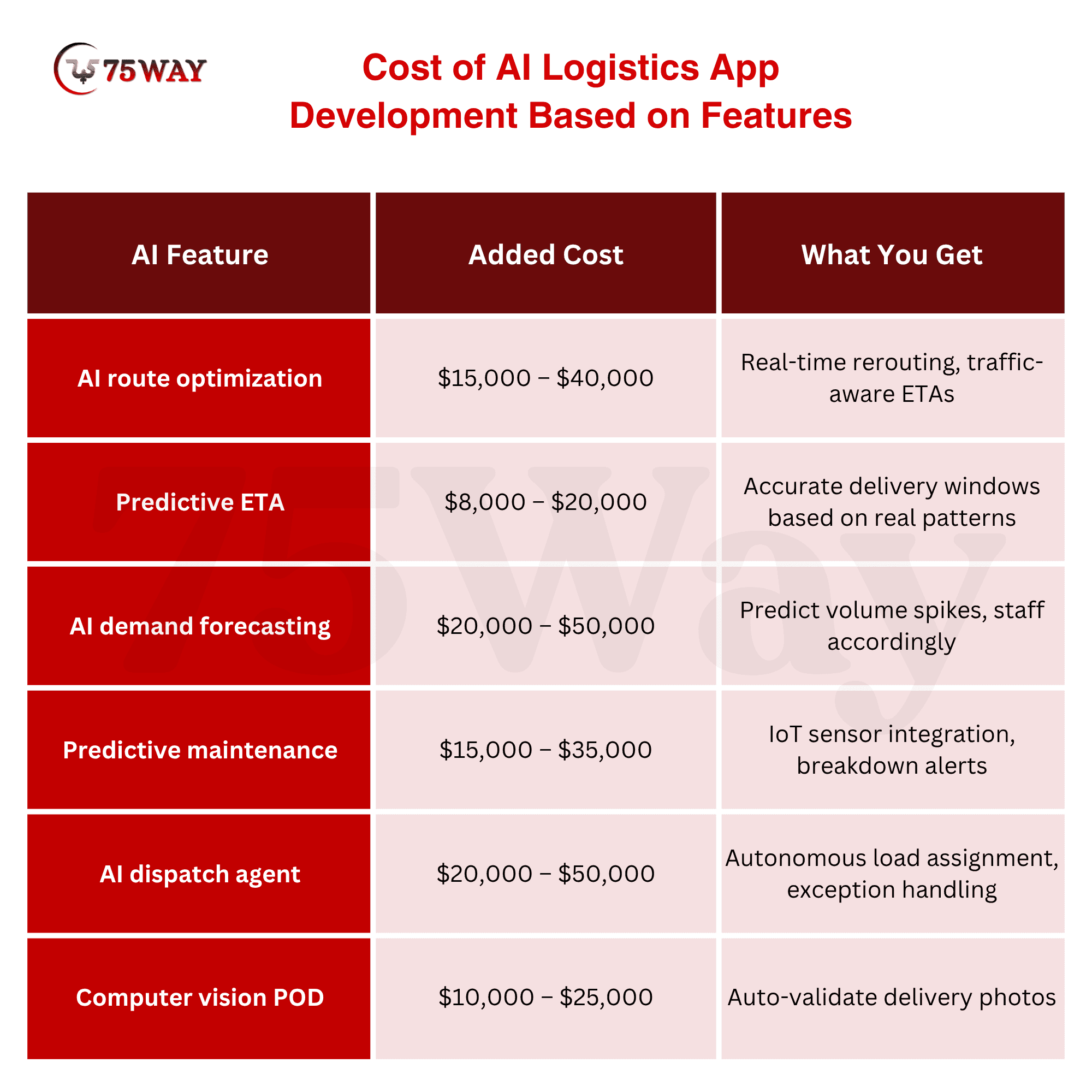
What AI Features Impact the Cost of AI Logistics App Development?
AI routing usually adds about 20% to 40% to development costs; the work goes beyond code, requiring data, testing cycles, and infrastructure that can handle real-time decisions. Here's the cost breakdown for specific AI features:
Cost to Build a Logistics App Based on Team Location (Hourly Rates 2026)
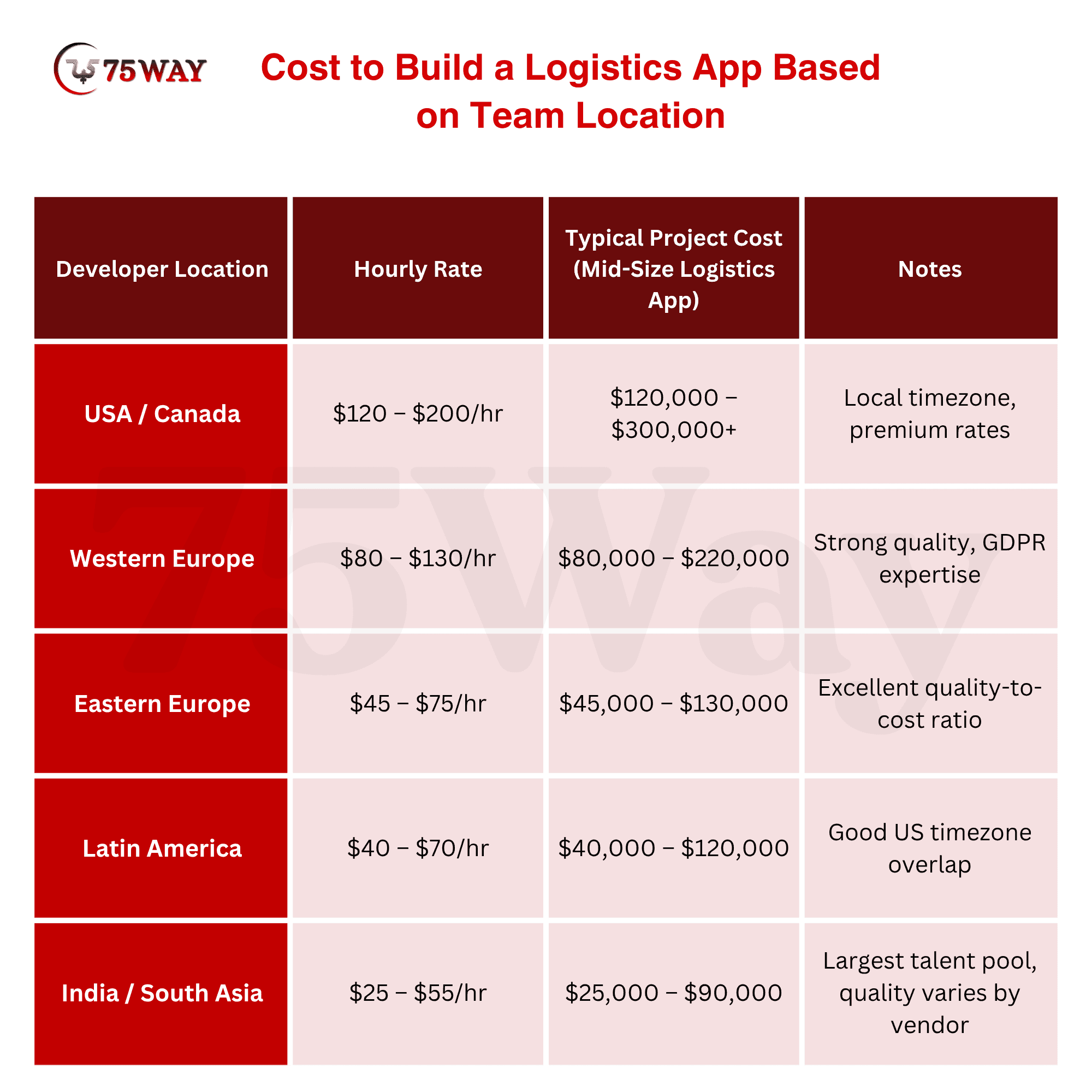
Important note: Logistics apps are not simple web apps. They require real expertise in real-time architecture, offline-first mobile development, GPS systems, and enterprise integrations. A team that has never built a logistics app before will cost you far more in delay and rework than a higher-rate team that has done it ten times.
Ongoing Costs of Logistics Application Creation After Launch
Building the app is not the only cost. Plan for:
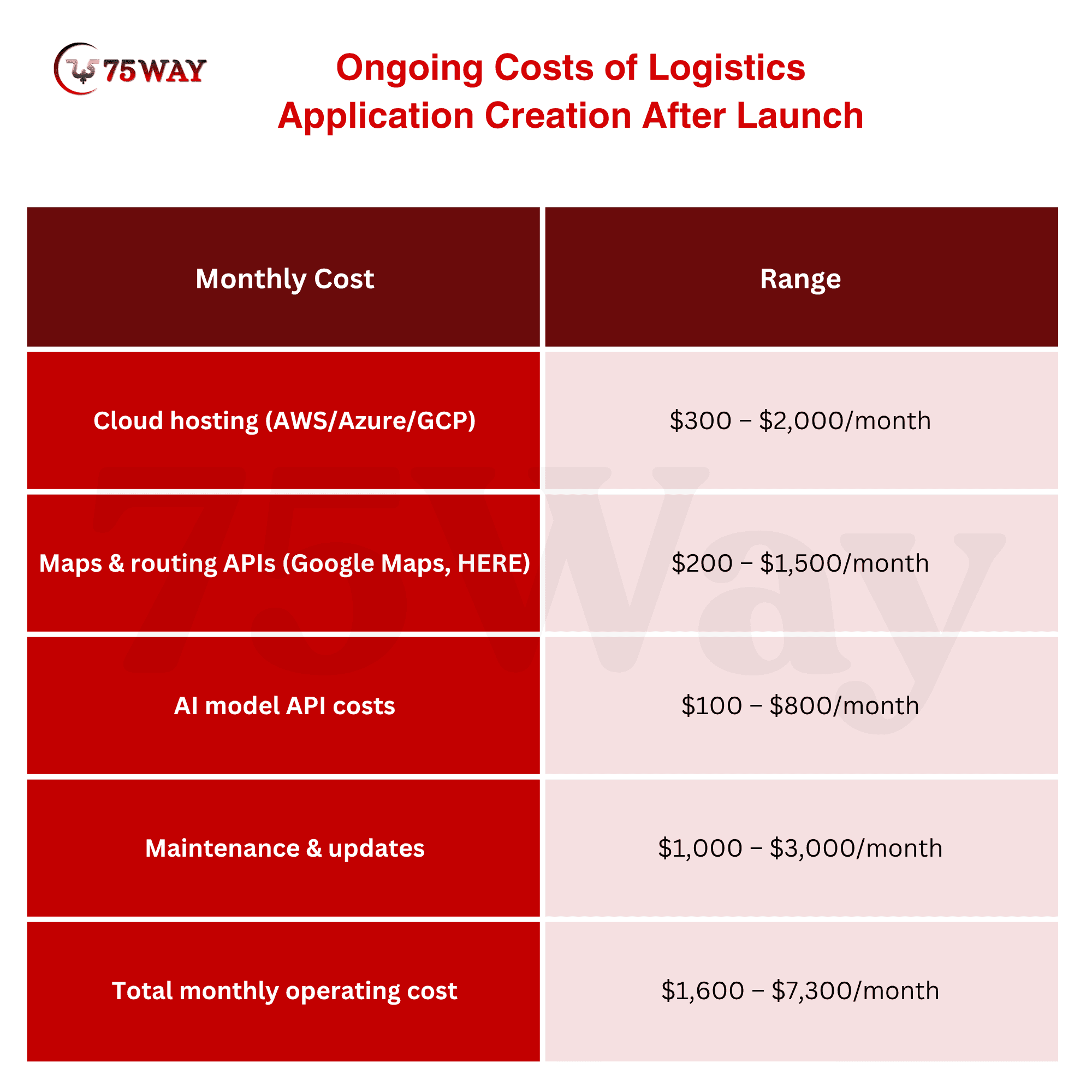
For most mid-size logistics businesses, total Year 1 cost (build + operate) runs between $80,000 and $200,000, with most of that being the initial development.
The 8-Step Process to Build Your Logistics App
This is how a professional logistics app actually gets built, from the first conversation to drivers using it on the road.
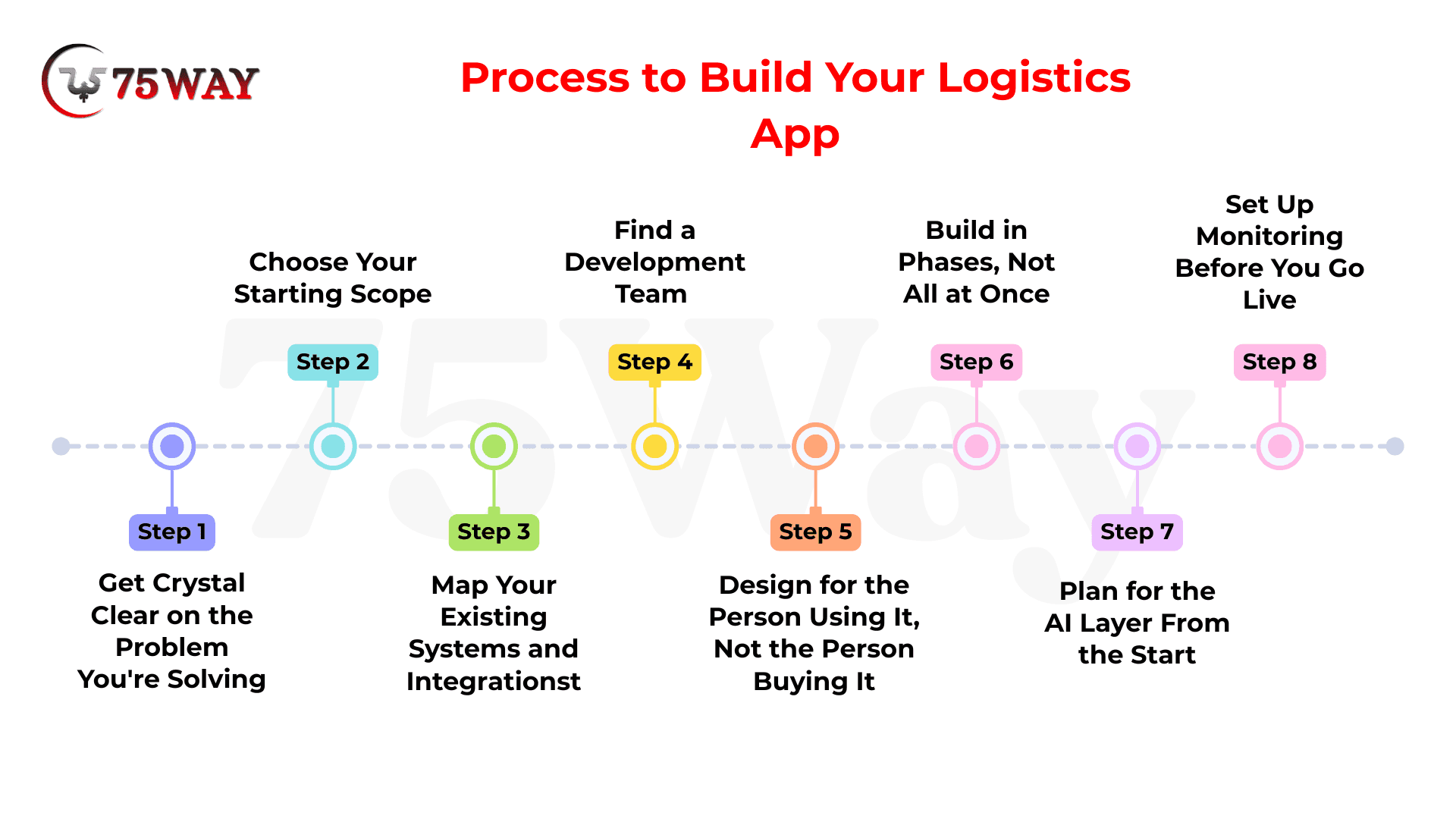
Step 1: Get Crystal Clear on the Problem You're Solving
Start by writing down your three biggest daily headaches. Not "build a logistics app." Specific problems.
Examples:
- "Our drivers call the office 15 times a day because they can't find addresses"
- "We have no idea where our trucks are without calling the drivers"
- "Customers keep calling us asking where their delivery is"
- "We're spending $4,000/month in extra fuel because our routes aren't optimized"
The clearer your problem statement, the better your app will be. Development companies that skip this step and jump straight to features build logistics apps that look good in demos and fail in the field.
Step 2: Choose Your Starting Scope (Don't Try to Build Everything)
Every feature costs money and adds time. The most successful logistics app builds start with the minimum set of features needed to solve the core problem. Then add more once the first version is working.
A good starting scope for a last-mile delivery app:
- Driver mobile app (iOS and Android)
- Dispatcher web dashboard
- Real-time GPS tracking
- Automated customer notifications
- Proof of delivery (photo capture)
That's it. Get this working. Prove it saves time and money. Then add AI routing, demand forecasting, and predictive maintenance in Phase 2.
Step 3: Map Your Existing Systems and Integrations
Before any design or code starts, document every system your logistics app needs to connect to:
- What TMS do you use (if any)?
- What's your warehouse management system?
- How do orders come in: from your own website, from a third-party marketplace, or from phone calls?
- What's your accounting system?
- What GPS hardware is on your trucks?
Most businesses fail not due to ineffective technology, but because they try to digitalize a broken logistics process rather than streamlining it first. Clean up your data and processes before you build your app, not after.
Step 4: Find a Development Team That Has Actually Built Logistics Apps
This is the most important decision you'll make in this entire process.
A general software development company that "has done logistics before" is not the same as a team that has shipped a production logistics app to real drivers in real operating conditions.
Ask every development team you consider:
- Show me a logistics app you built. Can I download it?
- Have you handled offline GPS tracking before?
- How do you handle the case where a driver loses signal mid-route?
- What's your experience with integrating TMS and WMS systems?
- Have you built AI routing features before?
If they can't answer these specifically, with examples, keep looking.
Step 5: Design for the Person Using It, Not the Person Buying It
Your dispatcher has 30 deliveries happening at once and no time to learn new software. Your driver is reading the app while stopped at a red light in bad weather. Your customer is checking their phone once and expecting instant clarity.
The interface should stay clean. Logistics users often work fast; they don't want clutter, they need simple screens, clear actions, and fewer clicks.
This sounds obvious. Most logistics apps ignore it. The apps that get adopted by drivers and dispatchers are the ones built with their actual workflow in mind, not the ones with the most features.
Before any development starts, build interactive prototypes and put them in front of actual dispatchers and drivers. What confuses them is what needs to change.
Step 6: Build in Phases, Not All at Once
A professional development team will break your logistics app into phases:
- Phase 1 (Weeks 1–2): Discovery Map your workflows in detail. Document every screen, every user action, every system integration. Define what success looks like in measurable terms (delivery time, fuel cost, dispatcher hours saved).
- Phase 2 (Weeks 3–5): Design Build screen-by-screen designs for the driver app, dispatcher dashboard, and customer tracking page. Get real user feedback before any code is written.
- Phase 3 (Weeks 6–16): Core Development Build the core features: real-time GPS, driver app, dispatcher dashboard, POD, customer notifications. This is the longest phase.
- Phase 4 (Weeks 14–18): Integration Connect to your TMS, ERP, accounting software, and any other existing systems.
- Phase 5 (Weeks 17–20): Testing Test in real operating conditions, rural roads, warehouse interiors, areas with poor signal. General-purpose mobile vendors build logistics apps that work on their office WiFi but fail in the actual operating environment: rural routes, warehouse interiors, dock areas, and suburban residential streets where signal drops mid-delivery.
- Phase 6 (Week 20+): Launch & Iterate Roll out to a small group first, one driver, one route. Fix what breaks. Then expand.
Step 7: Plan for the AI Layer From the Start
Here is a mistake that costs companies a lot of money: building the basic app first without planning where AI will fit later, then trying to bolt AI on top of it six months later.
AI features, especially route optimization, need your app to collect certain data from day one. If you're not capturing the right GPS signals, delivery timestamps, and traffic patterns from the beginning, you won't have the data you need to train and run AI models later.
Tell your development team upfront: "We want to add AI route optimization in Phase 2. What data do we need to collect in Phase 1 to make that possible?" Any experienced logistics app developer will know exactly how to answer this.
Step 8: Set Up Monitoring Before You Go Live
Before the first driver uses your app in the real world, set up monitoring systems that tell you:
- Is the app working? (Are there crashes or errors happening?)
- Are drivers actually using it? (Adoption rate)
- Are deliveries improving? (On-time rate, stops per hour)
- Are customers satisfied? (Tracking page open rate, support tickets)
Deployment is not the finish line for logistics apps; deployment is where the real learning begins. Deploy with comprehensive observability from day one, tracing every run end-to-end: what input it received, what it returned, how long each step took, and what it cost.
Real Cost Example: A 25-Truck Fleet in the USA
Let's make this concrete. Say you run a 25-truck delivery fleet in Dallas. Here's what a realistic logistics app build looks like for your business:
What you need:
- Driver app (iOS + Android), works offline
- Dispatcher dashboard (web)
- Real-time GPS tracking for all 25 trucks
- AI route optimization (Phase 2)
- Customer tracking portal with automated SMS/email notifications
- Proof of delivery (photo capture)
- Integration with your existing QuickBooks
Phase 1
Core App (Months 1–5): Driver app + dispatcher dashboard + GPS + POD + notifications + QuickBooks integration Cost: $65,000 – $85,000
Phase 2
AI Layer (Months 6–8): AI route optimization + predictive ETAs + dispatcher analytics dashboard Cost: $25,000 – $45,000
Total build cost: $90,000 – $130,000Monthly operating cost: $2,000 – $4,000
What you get back:
- AI reduces operational costs by 15–25% through dynamic rerouting → on a 25-truck fleet burning $80,000/month in fuel, that's $12,000–$20,000/month saved
- The dispatcher spends 60% less time on phones with drivers
- Customer support tickets about delivery status drop by 70%+
- Driver adoption increases because the app actually makes their job easier
Payback period: 6–12 months. After that, it's pure savings.
6 Mistakes to Avoid When Building a Logistics App
Mistake 1: Skipping the Offline Mode
Cell signal drops. It happens everywhere. A logistics app that only works with a live internet connection will fail in the real world. Offline mode is not a bonus feature — it's a basic requirement.
Mistake 2: Building for the Demo, Not the Driver
Apps that win awards and look beautiful in boardroom presentations often fail because the driver's screen is too complicated to read while navigating. The real user test is a driver using your app at 7 AM after a 45-minute commute. Design for that.
Mistake 3: Ignoring the Integration with Existing Systems
Your app will need to talk to your TMS, your WMS, and your accounting software. If you build the app first and figure out integrations later, you'll spend as much fixing broken integrations as you spent on the original build.
Mistake 4: Trying to Build Everything in Version 1
A full supply chain platform is a 9-month, $250,000 project. A last-mile delivery app that solves your three biggest daily problems is a 4-month, $60,000 project. Start with the second one. Prove ROI. Then build more.
Mistake 5: Choosing a Development Team Based on Price Alone
The logistics app category has very specific technical requirements: offline sync, real-time GPS architecture, enterprise API integrations, and compliance with DOT regulations. A team that quotes half the market rate but has never built a logistics app will get you partway there, then you'll be paying a second team to finish the job and fix what broke.
Mistake 6: Not Measuring Before and After
Before you launch your app, record your baseline: on-time delivery rate, fuel cost per mile, support tickets per week, dispatcher hours spent on manual coordination. After launch, track the same numbers. This is how you know the app is working, and how you justify Phase 2 investment to your leadership team.
How 75way Builds Logistics Apps for US Businesses?
At 75way Technologies, we build logistics apps for US businesses, from regional delivery companies in Texas to freight brokers in California to 3PL operations in the Midwest.
We're not a generic mobile app shop that has "done logistics before." Logistics app development has specific technical requirements that generalist teams routinely underestimate, and those are the places projects run over budget and over timeline.
What we bring to your logistics app build:
- Real logistics experience. We've built driver apps that work in dead zones, dispatcher dashboards that handle 500+ concurrent vehicle updates, and AI routing engines connected to live TMS integrations. We know what the real technical challenges are before you hit them.
- Discovery before development. We spend the first 2 weeks mapping your actual workflows, how your dispatchers work, how your drivers work, what your customers expect, and what systems everything needs to connect to. No code written until we're aligned on scope, timeline, and measurable success.
- Offline-first mobile development. Every driver app we build handles offline mode properly, queue-based sync, conflict resolution, and route continuation without signal. This is standard in our builds, not an upgrade.
- AI integration is built in. We plan the AI data architecture from Phase 1 so that when you're ready to add route optimization, demand forecasting, or predictive maintenance in Phase 2, the data is already there.
- Full integration capability. We've integrated with SAP, Oracle, Microsoft Dynamics, QuickBooks, NetSuite, Shopify, WooCommerce, and most major TMS platforms. We know the APIs, we know the gotchas, and we don't underestimate integration timelines.
- US-timezone project management. Your project manager is available during US business hours. You're not waiting 12 hours for answers on critical decisions.
What we build logistics apps on:
- Mobile: Flutter (iOS + Android from one codebase, strong offline support)
- Web: React.js / Next.js for dispatcher dashboards and customer portals
- Backend: Node.js or Python with microservices architecture
- Real-time: WebSockets for live GPS updates (not polling, which inflates infrastructure costs at scale)
- Cloud: AWS or Azure with auto-scaling for peak delivery periods
- AI/ML: Google Maps Platform Fleet Routing, HERE Fleet Management, custom ML models for demand forecasting
We'll spend 30 minutes understanding your operation and give you an honest scope, timeline, and cost estimate, no obligation, no sales pitch.
Final Remarks
Building a logistics app with AI is not as complicated as it sounds, but it does require getting a few things right: Start with the problem, not the features. Know which type of app fits your business. Plan your integrations before the first line of code. Choose a development team that has actually shipped logistics apps in real operating conditions. Build in phases, core first, AI second. And measure everything before and after so you can prove the ROI.
The logistics companies that are growing their revenue without growing their headcount, delivering on time during peak season, and keeping customers happy with real-time updates did not get there by accident. They built better software.
The technology to do this is available to any US logistics business in 2026, from a 5-truck regional carrier to a 500-vehicle 3PL operation. The question is whether you build it now, or in 12 months when your competitors already did. You can hire a trusted app development company to build your logistics app powered by AI.
Frequently Asked Questions (FAQs)
How Much Does It Cost To Build A Logistics App With AI in the USA?
Building a logistics app with AI in the USA typically costs between $30,000 for a basic last-mile delivery app and $300,000+ for a full enterprise supply chain platform. Most small and mid-size US logistics companies build their first app for $60,000–$130,000. AI features like route optimization add 20–40% to development cost but typically deliver the fastest ROI, often paying back within 6–12 months through fuel savings and efficiency gains.
How Long Does It Take To Build A Logistics App?
Most logistics app builds take 4–6 months from kickoff to launch. A basic last-mile delivery app (driver app + dispatcher dashboard + GPS) takes 10–14 weeks. A full fleet management platform with AI routing takes 16–24 weeks. Enterprise supply chain platforms take 6–12 months. These timelines assume a professional development team with logistics app experience and a well-defined scope from a thorough discovery phase.
What AI Features Should A Logistics App Have?
The highest-ROI AI features for logistics apps in 2026 are: AI route optimization (real-time rerouting based on traffic, weather, and delivery patterns), predictive ETA (accurate delivery windows, not static time slots), AI demand forecasting (predicting volume spikes so you can staff appropriately), and predictive maintenance (IoT-based fleet health monitoring that flags breakdowns before they happen). For most businesses, AI route optimization delivers the fastest return and is the best starting point.
Should I Build A Custom Logistics App Or Use An Off-The-Shelf Platform?
Off-the-shelf platforms like Onfleet, DispatchTrack, and Route4Me are excellent starting points for businesses with standard delivery workflows and budgets under $500/month. They can run in days and cover most common use cases. Build a custom app when: your operation has specific workflows no standard tool handles, you need deep integration with proprietary or industry-specific systems, you have compliance or branding requirements the platforms don't support, or you've outgrown what off-the-shelf tools can deliver.
What Is The Most Important Feature In A Logistics App?
For last-mile delivery companies, real-time GPS tracking with automated customer notifications is the single feature with the most immediate impact. It eliminates the majority of inbound "where's my delivery" calls overnight. For fleet management, AI route optimization delivers the highest financial ROI. For warehouses, demand forecasting has the biggest impact on operational efficiency. The right "most important feature" depends on your biggest daily pain point, which is why every good logistics app build starts with a discovery phase, not a feature list.
What's The Difference Between A Regular GPS App And An AI Logistics App?
A regular GPS app tells you the shortest route from Point A to Point B based on distance. An AI logistics app optimizes multi-stop routes in real time based on live traffic, weather, delivery windows, vehicle capacity, driver hours, and fuel costs and recalculates the entire day's route every time a stop is completed or a new order comes in. The difference in outcome is measurable: companies using AI routing typically see 10–25% lower fuel costs and 15–20% faster deliveries compared to static route planning.
Do I Need A Separate App For Drivers And Dispatchers?
Yes. Drivers need a simple, clean mobile app (iOS and Android) that works offline, shows their route clearly, and handles proof of delivery. Dispatchers need a web-based dashboard that shows the full fleet on a live map, highlights problems, and lets them make changes without calling drivers. These are two completely different user experiences, and building them well requires designing for each user's actual workflow, not one generic interface that tries to serve both.
How Do I Find A Logistics App Development Company In The USA?
Look for companies that can show you live logistics apps they have built, not screenshots, not case study PDFs, but apps you can download and use. Ask specifically about offline mode handling, real-time GPS architecture, and TMS/ERP integration experience. Any company that doesn't mention these unprompted probably hasn't built production logistics apps before. Also, confirm they include a discovery phase before development, full IP ownership for the client, and US-timezone project management for communication accountability.