AI Summary
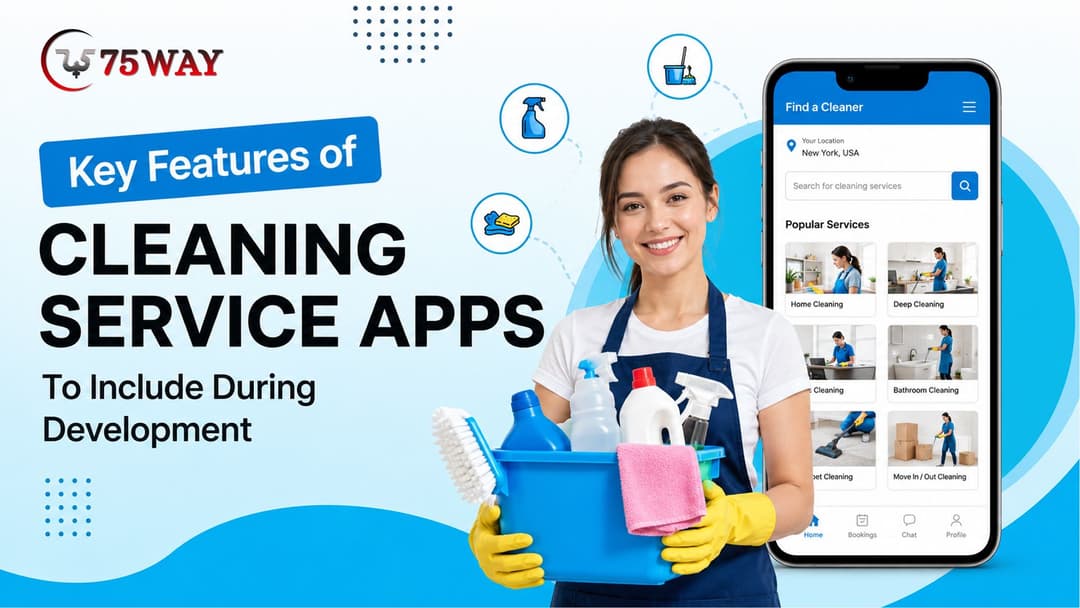
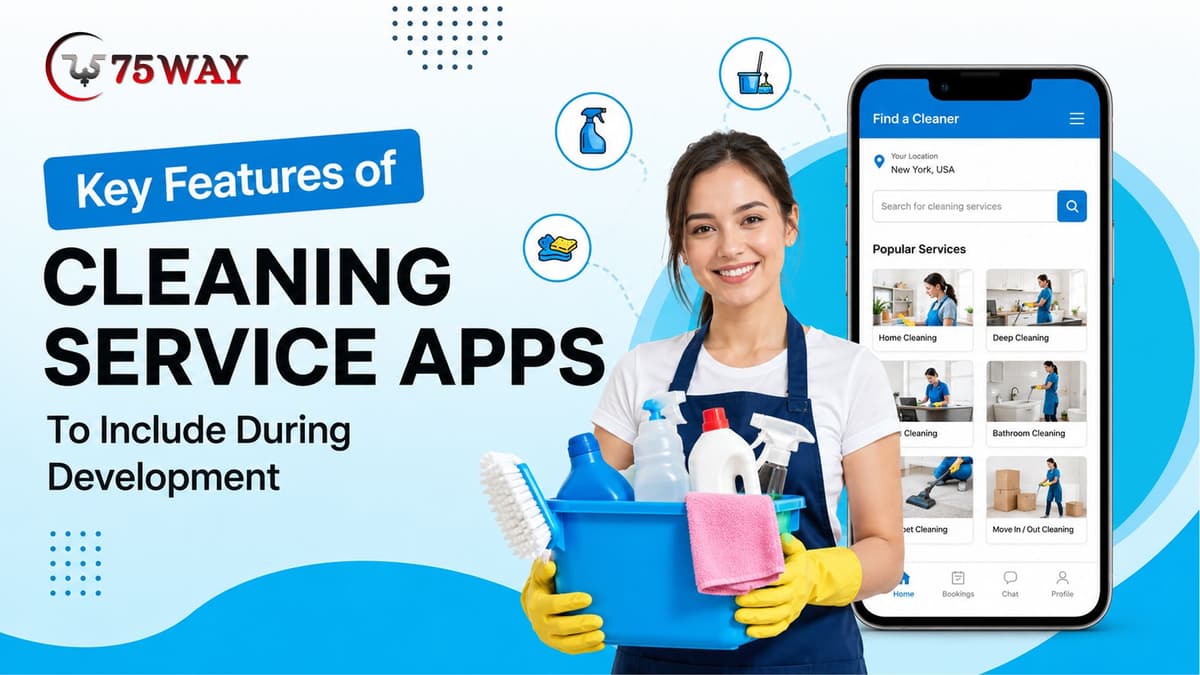
A successful cleaning service app development needs features that simplify service discovery, booking, scheduling, payments, cleaner management, and communication. This guide covers essential customer, cleaner, and admin features that can improve operations, service coordination, and the overall user experience.
Key Takeaways
- Include easy booking and scheduling to simplify how customers request cleaning services.
- Provide cleaner profiles and availability to help customers choose suitable service professionals.
- Add secure payments, invoices, and notifications for smoother transaction management.
- Use GPS tracking and real-time updates to improve service visibility and coordination.
- Build admin management tools for users, cleaners, bookings, payments, reviews, and service operations.
A cleaning app may look simple from the customer's side: choose a service, select a time, and make a booking. Behind that three-step experience of a cleaning app development solution, however, sits a complete service operation involving cleaners, schedules, locations, payments, customer requests, and business rules.
The difference between a basic booking app and a useful cleaning platform is how well those moving parts connect. A customer should receive accurate information, while cleaners should know exactly where to go and what work is expected before accepting a job.
For business owners, visibility matters just as much. They need to know which cleaners are available, which bookings are pending, what services are generating demand, where payments stand, and whether customers are satisfied with completed jobs.
This guide explains the key features to consider during cleaning service app development, showing what should be included across customer, cleaner, and admin interfaces to create a cleaning service app that works beyond the booking screen.
Essential Cleaning Service App Features For Successful Development
A cleaning service app should do more than accept bookings. It needs to make the entire customer journey, from finding the right service to receiving support after completion, feel straightforward, while giving cleaners and administrators enough control to keep daily operations organized.
The features below focus on the customer side of that journey, covering the moments where customers make decisions, provide information, pay for services, and stay connected with the assigned cleaner.
1. Cleaning Service Customer App Features To Include
Customers usually judge a cleaning platform by how quickly they can find a suitable service and complete a booking without confusion. A well-planned customer app should therefore combine clear service discovery with flexible scheduling, transparent pricing, communication, and visibility after the booking is confirmed.
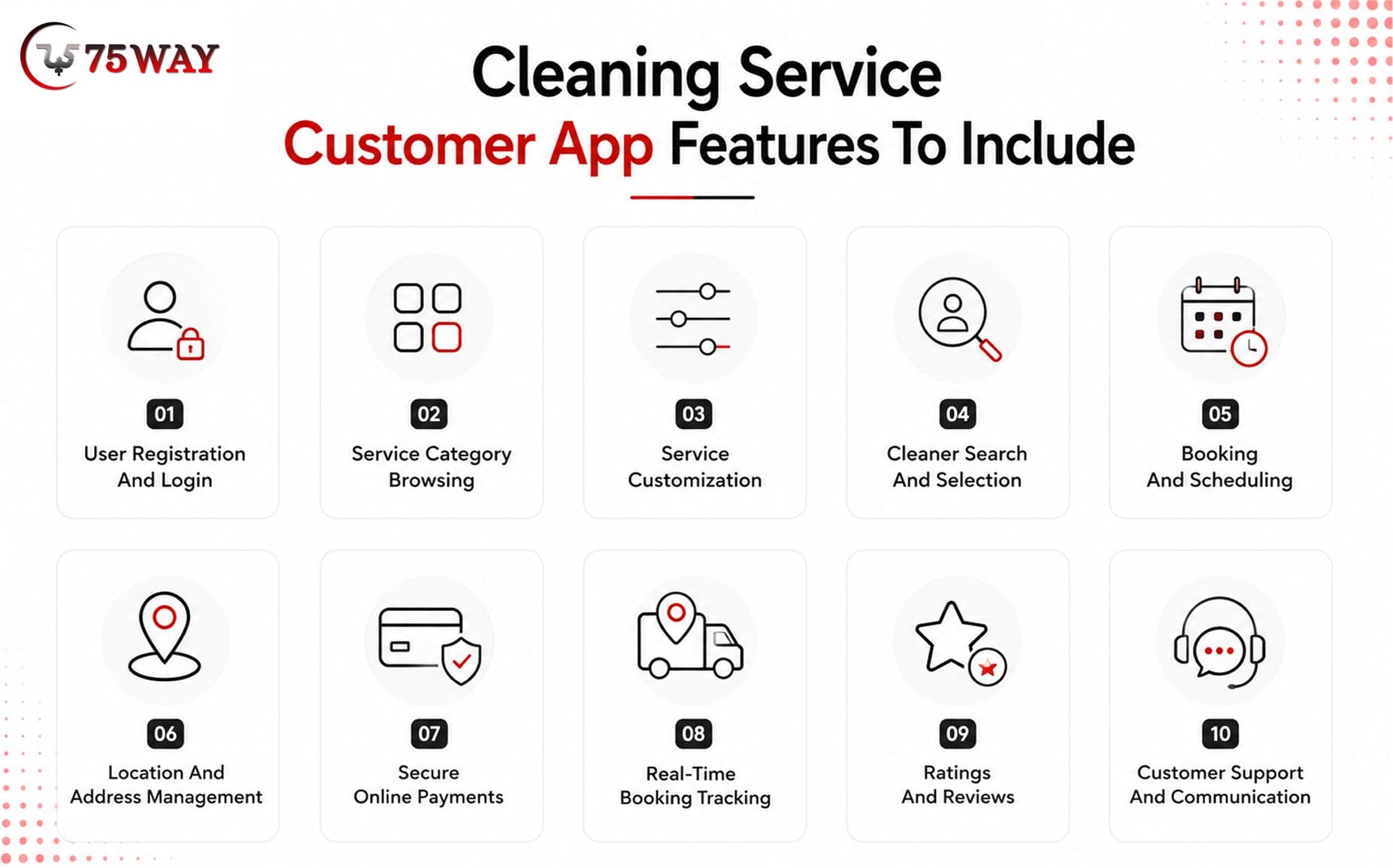
1. User Registration And Login
A quick sign-up process gives customers an easy starting point without asking for unnecessary information upfront. Email, mobile number, OTP, social login, and password recovery options can make account access more convenient while keeping authentication secure.
Once inside the account, customers should be able to manage their personal details, contact information, saved addresses, and security preferences. Keeping these details in one place also means they do not have to repeat the same information every time they book a cleaning service.
2. Service Category Browsing
Customers rarely arrive knowing exactly which cleaning package they need, so the service catalog should help them make that decision. Clear categories, straightforward descriptions, estimated duration, pricing, and package details can make the options easier to understand.
The browsing experience can also guide customers toward suitable services based on their property type or cleaning requirement. For example, someone looking for a move-out cleaning should quickly understand how it differs from routine home cleaning before proceeding to booking.
3. Service Customization
Every property has different cleaning requirements, which makes a one-size-fits-all booking less practical. Customers can specify details such as property size, number of rooms, cleaning preferences, and additional tasks to create a service that matches their situation.
Special instructions can be particularly useful for properties with specific access requirements or cleaning priorities. Giving customers these choices before confirmation can reduce misunderstandings and help cleaners arrive with a clearer idea of what the appointment involves.
4. Cleaner Search And Selection
Some customers may prefer choosing their cleaner instead of receiving an automatic assignment. Profiles can help them compare relevant information such as experience, skills, ratings, service areas, availability, and previous customer feedback.
A transparent selection experience also gives customers greater confidence before making a booking. Businesses can decide whether customers choose directly from available cleaners or whether the platform recommends suitable professionals based on availability and service requirements.
5. Booking And Scheduling
The booking screen should make the appointment feel almost effortless. Customers can select a date, choose an available time slot, review the requested service, check the total price, and confirm everything from one connected flow.
Recurring appointments can add further convenience for customers who need weekly, fortnightly, or monthly cleaning. Clear booking summaries and immediate confirmations also reduce uncertainty about what has been scheduled and when the cleaner is expected to arrive.
6. Location And Address Management
A cleaner cannot provide the service smoothly if the property location or access information is unclear. Customers should be able to save frequently used addresses, select locations through maps, edit existing details, and provide instructions that help cleaners reach the property.
For businesses operating across specific cities or service zones, location validation can prevent bookings from being placed outside the available coverage area. Customers can also add useful information such as entry instructions, parking details, or other property-access notes.
7. Secure Online Payments
Payment should feel like a natural part of booking rather than a separate process. Customers can select an available payment method, review the service price and applicable charges, complete the transaction securely, and receive confirmation once the payment succeeds.
A clear breakdown can show the service charge, additional services, discounts, taxes, or other applicable fees before the customer pays. Digital receipts and invoices then give customers an accessible record of completed transactions whenever they need it.
8. Real-Time Booking Tracking
The customer's need for information does not end after payment. Status updates can show whether the booking is confirmed, whether a cleaner has been assigned, when the cleaner is expected to arrive, and whether the service has been completed.
For suitable business models, location-based updates can provide additional visibility around cleaner arrival. These updates reduce the need for customers to repeatedly contact support simply to ask what is happening with their appointment.
9. Ratings And Reviews
The experience after a cleaning appointment can tell the business as much as the booking itself. Customers should have an easy way to rate the service, write feedback, and share their experience after the appointment has been completed.
Reviews can also help future customers make more informed choices when selecting cleaners. For the business, feedback can reveal recurring service issues, recognize strong performers, and provide useful information for maintaining service quality across the platform.
10. Customer Support And Communication
Questions and unexpected situations are bound to arise, whether a customer needs to change an appointment, contact a cleaner, report an issue, or clarify a service. In-app communication gives customers a direct place to handle these situations without moving between different channels.
Booking-linked conversations can keep relevant messages connected to the appointment they concern. A support-ticket system can take care of issues requiring administrative attention, while chat and notifications can handle quicker communication between customers, cleaners, and the platform.
Key Features Required In Cleaner Application
The cleaner module should help service professionals manage bookings, availability, customer information, navigation, payments, and daily workloads from one application. A practical interface can reduce administrative work and help cleaners respond quickly to assigned services.
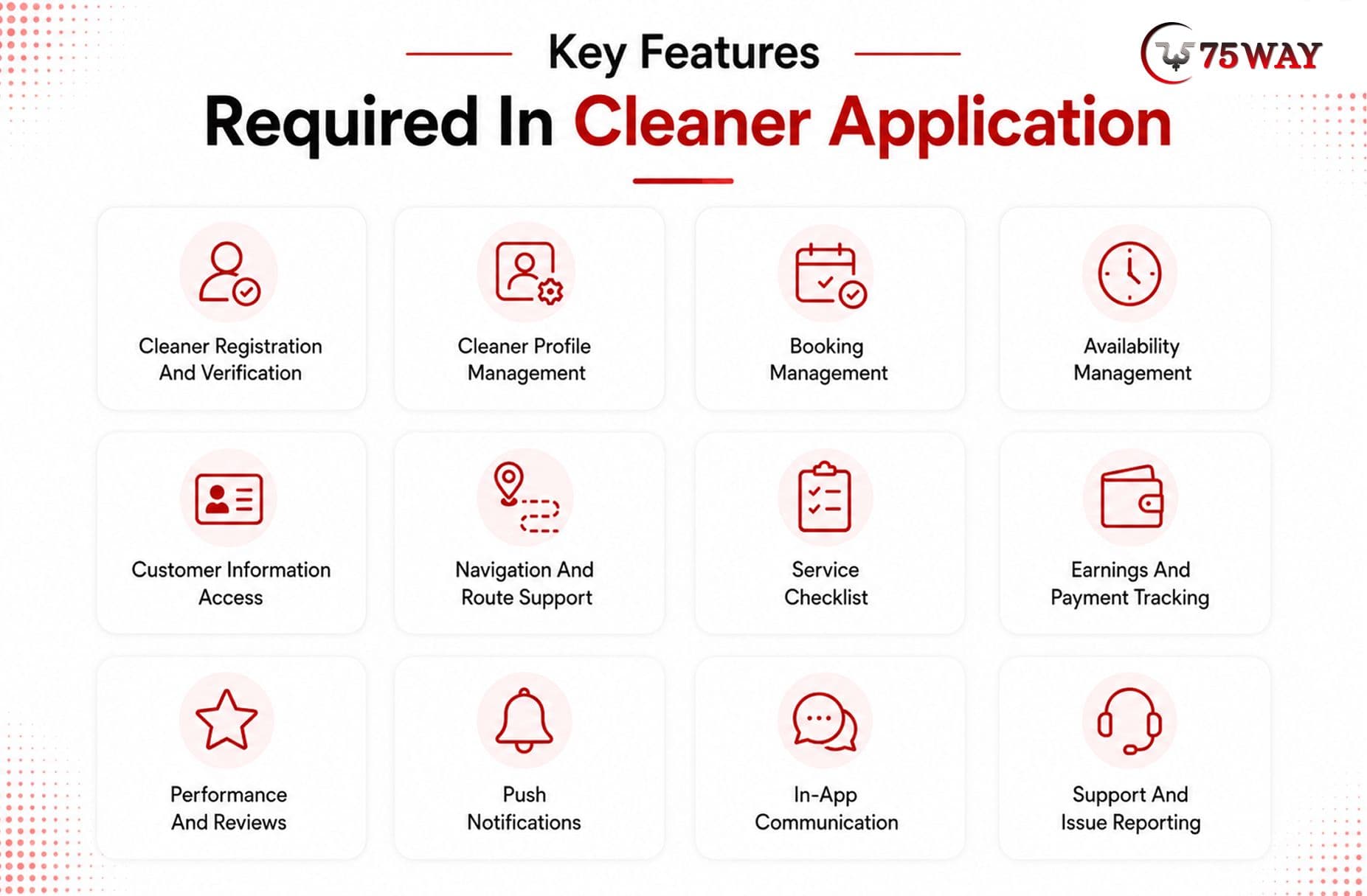
1. Cleaner Registration And Verification
Cleaners should be able to create professional profiles and submit required information during onboarding. Verification workflows help businesses confirm identity, qualifications, and other eligibility requirements before approving service providers.
- Personal Information Submission
- Identity Document Upload
- Background Verification Support
- Skill Information
- Admin Approval Workflow
2. Cleaner Profile Management
Cleaners should have control over relevant profile information displayed to customers. They can update professional details, service expertise, photographs, availability, and other information maintained by the platform.
- Professional Profile Editing
- Service Skill Selection
- Experience Information
- Profile Photo Management
- Availability Status Updates
3. Booking Management
Cleaners need a centralized view of assigned and upcoming appointments. They should be able to review booking information, accept eligible requests, update statuses, and manage their daily service schedule.
- Upcoming Booking Dashboard
- Booking Detail Access
- Booking Acceptance
- Cancellation Requests
- Service Status Updates
4. Availability Management
Cleaners can define when they are available for appointments. Availability controls help the platform match service requests with suitable professionals while reducing scheduling conflicts.
- Working Hours Configuration
- Available Date Selection
- Time Slot Management
- Unavailability Marking
- Recurring Availability Settings
5. Customer Information Access
Cleaners need relevant customer and property details before beginning a service. Access should be limited to information necessary for completing the assigned booking.
- Customer Contact Information
- Service Address Details
- Cleaning Requirements
- Access Instructions
- Booking History Context
6. Navigation And Route Support
Integrated maps can help cleaners reach customer locations efficiently. Route information becomes especially useful when professionals manage several appointments across different areas during one working day.
- GPS-Based Location Access
- Route Navigation
- Distance Information
- Estimated Arrival Time
- Location Sharing
7. Service Checklist
A digital checklist helps cleaners follow required cleaning procedures for different service categories. Businesses can customize checklists according to their quality standards and service packages.
- Task-Based Cleaning Checklist
- Service-Specific Instructions
- Task Completion Tracking
- Quality Requirement Visibility
- Completion Confirmation
8. Earnings And Payment Tracking
Cleaners should have clear visibility into completed services and earnings. The module can show payment status, commissions, deductions, bonuses, and available balances according to the platform's business model.
- Earnings Dashboard
- Completed Service Payments
- Commission Information
- Bonus Tracking
- Payout History
9. Performance And Reviews
Cleaners can monitor customer ratings and service feedback through their dashboards. Performance information helps professionals understand customer expectations and identify areas requiring improvement.
- Customer Rating Display
- Review History
- Service Performance Metrics
- Customer Feedback
- Performance Trends
10. Push Notifications
Notifications keep cleaners informed about new bookings, schedule changes, customer messages, cancellations, and other important events. Timely alerts can reduce missed appointments and communication gaps.
- New Booking Alerts
- Schedule Change Notifications
- Customer Message Alerts
- Cancellation Notifications
- Payment Update Alerts
11. In-App Communication
Cleaners may need to communicate with customers about access instructions, arrival timing, service requirements, or other booking-related matters. In-app messaging keeps relevant conversations connected to the service.
- Customer Chat
- Booking-Linked Conversations
- Message Notifications
- Image Sharing
- Communication History
12. Support And Issue Reporting
Cleaners should have a dedicated channel for reporting customer issues, booking problems, payment concerns, or technical difficulties. Support requests can then be tracked until resolution.
- Issue Submission
- Booking Dispute Reporting
- Payment Issue Reporting
- Technical Support Access
- Ticket Status Tracking
Admin Panel Features To Include In Cleaning Service App Development
A well-designed admin panel in a cleaning service app should provide visibility without overwhelming business teams with unnecessary controls. The following features cover the areas administrators typically need to manage as the platform grows.
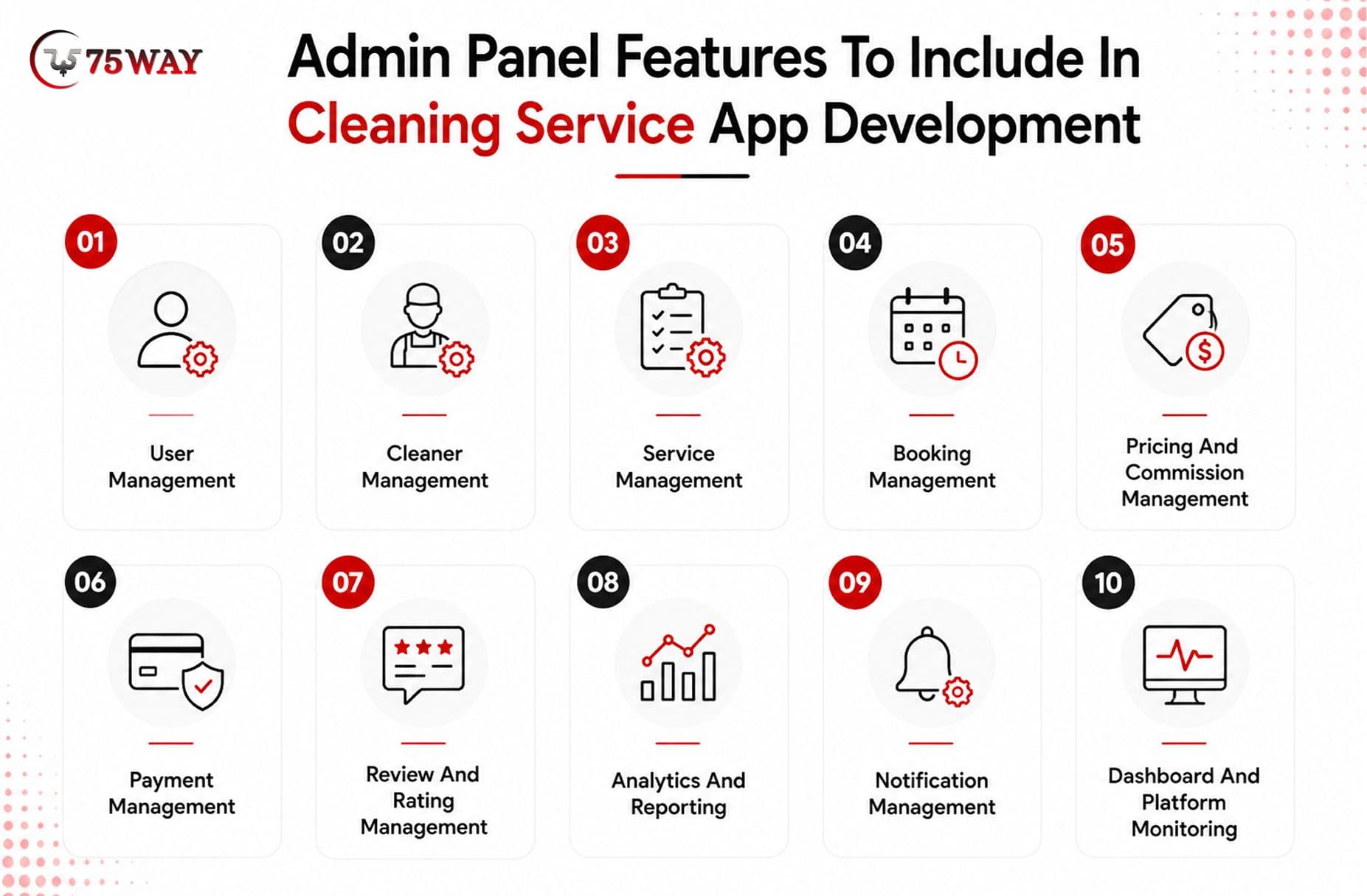
1. User Management
Customer accounts can change frequently as the platform grows, so administrators need a reliable way to review and manage them. The module can provide access to profiles, account status, activity history, and relevant account information from a centralized interface.
When problems arise, admins can investigate unusual activity, assist with access issues, restrict accounts when required, or take action against policy violations. This gives the business greater control over who can use the marketplace and how customer accounts are managed.
2. Cleaner Management
A cleaning marketplace depends heavily on the quality and reliability of its service providers. Admins can manage cleaner profiles, review submitted information, check verification status, monitor availability, and keep track of the services each professional is qualified to provide.
Performance information can provide another layer of oversight. Booking history, ratings, cancellations, service activity, and other relevant indicators can help administrators identify strong performers, address recurring problems, and decide when an account requires review or approval.
3. Service Management
The service catalog should remain flexible as the business adds new cleaning packages, changes pricing, or enters new markets. Admins can create and organize categories, update descriptions, adjust service duration, configure prices, and manage additional services from the same panel.
This also keeps the customer-facing catalog aligned with the business's current offerings. If a service changes or an add-on becomes unavailable, administrators can update the relevant information without rebuilding the customer application.
4. Booking Management
A booking rarely follows a perfectly predictable path. Customers may request changes, cleaners may become unavailable, appointments may need to be cancelled, or scheduling conflicts may appear. A centralized booking module gives administrators visibility into these situations before they become larger operational problems.
Admins can review booking details, update statuses, reschedule appointments, process cancellations, and intervene when customer or cleaner assistance is required. Keeping the complete booking history accessible also makes it easier to understand what happened when resolving disputes.
5. Pricing And Commission Management
Pricing can vary according to service type, location, demand, promotions, or business strategy. The admin panel can give authorized teams control over base prices, cleaner commissions, discounts, promotional offers, and other marketplace pricing rules.
For businesses using dynamic or location-based pricing, these controls can become particularly valuable as operations expand. Instead of changing prices manually across disconnected systems, teams can manage applicable pricing rules from a centralized environment.
6. Payment Management
Financial activity becomes increasingly difficult to track when bookings, refunds, commissions, and cleaner payouts are handled separately. A payment management module brings these transactions together so administrators can see what customers paid, what cleaners earned, and what the platform retained.
The same interface can support refund handling, payout tracking, commission monitoring, and payment issue resolution. This gives finance and operations teams a clearer picture of marketplace transactions while reducing the need to reconcile information manually across multiple systems.
7. Review And Rating Management
Customer feedback can reveal service problems that booking data alone may not show. Administrators can monitor reviews, examine rating patterns, identify recurring complaints, and understand where customers may be dissatisfied with a particular service or cleaner.
Moderation controls can also help maintain the quality of marketplace content. Where necessary, authorized admins can review reported feedback, investigate complaints, and remove content that violates platform policies without interfering with legitimate customer opinions.
8. Analytics And Reporting
Raw booking numbers tell only part of the story. Analytics can help administrators understand which services generate demand, where revenue is coming from, how customers behave, and how cleaners are performing across different periods or locations.
Reports can turn this information into something business teams can act on. Managers can compare booking performance, identify changes in demand, evaluate revenue trends, spot operational bottlenecks, and use the findings to make better decisions about staffing, pricing, and expansion.
9. Notification Management
Customers and cleaners need timely information at several points in the service journey. Administrators can manage notification templates and configure alerts for bookings, cancellations, reminders, promotions, cleaner assignments, and other important events.
Different user groups can receive different messages based on their role and the event involved. This helps businesses keep communication relevant while reducing the amount of manual messaging required from support and operations teams.
10. Dashboard And Platform Monitoring
The admin dashboard provides the quickest view of what is happening across the marketplace. Instead of opening individual modules to understand platform activity, administrators can see important indicators such as active bookings, user activity, cleaner availability, revenue, complaints, and operational alerts in one place.
A well-structured dashboard can also surface issues that deserve immediate attention. When unusual booking activity, service delays, payment problems, or other operational concerns appear, teams can investigate them sooner and take action before they significantly affect the customer experience.
Innovative Features Integrated in AI-Powered Cleaning Service Apps
AI can add another layer of intelligence to a cleaning service app, helping the platform make better recommendations, handle routine conversations, and support day-to-day operational decisions. The real value comes from applying AI where it can solve a specific problem rather than adding it simply because it is a popular technology.
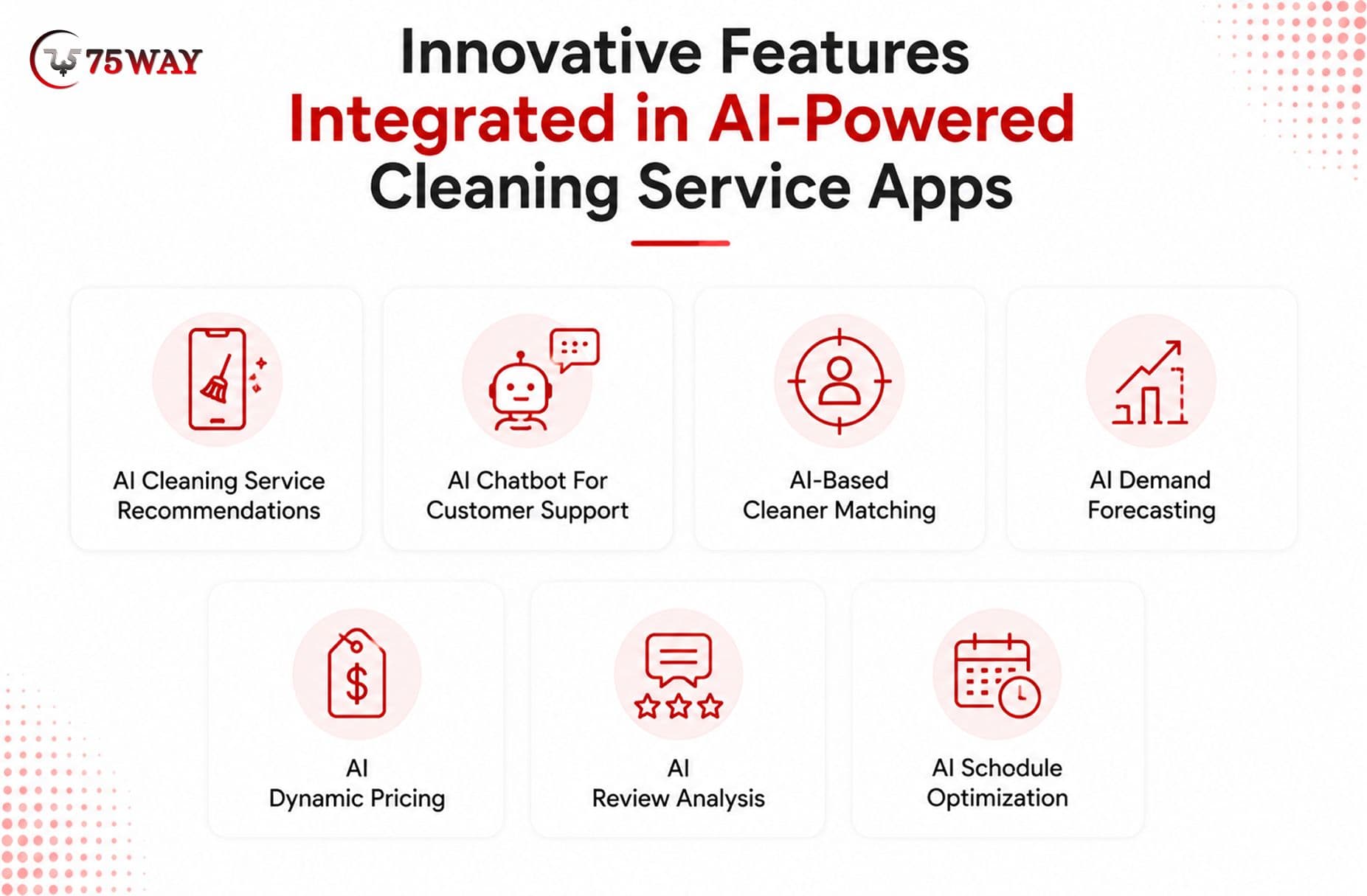
- AI Cleaning Service Recommendations: Personalized suggestions can help customers find cleaning packages that actually fit their property, preferences, and previous bookings. By analyzing service history, property details, and selected requirements, the app can surface relevant packages or useful add-ons instead of making customers browse the entire catalog.
- AI Chatbot For Customer Support: Routine questions about pricing, availability, cancellations, service areas, and booking policies do not always require a support agent. A conversational AI chatbot can handle these common requests using approved business information, while unfamiliar, sensitive, or complex situations can be passed to a human representative.
- AI-Based Cleaner Matching: Finding the right cleaner is not simply a matter of choosing whoever is available first. Matching models can consider location, skills, availability, ratings, service history, workload, and customer preferences to suggest a suitable professional for each appointment.
- AI Demand Forecasting: Booking patterns can reveal when particular services are likely to become busier. By studying historical bookings, locations, seasons, weekdays, and service categories, predictive models can help businesses anticipate demand and make better decisions around cleaner availability and operational capacity.
- AI Dynamic Pricing: Pricing can become more responsive when demand, availability, location, booking patterns, and other business factors are considered together. AI can suggest suitable price adjustments within predefined rules, giving businesses a data-backed starting point while keeping final pricing decisions under appropriate control.
- AI Review Analysis: Customer feedback often contains useful information that gets overlooked when reviews are read one by one. AI can analyze large volumes of comments to uncover recurring complaints, frequently praised services, cleaner-related patterns, and emerging quality issues that management teams may need to investigate.
- AI Schedule Optimization: A cleaner's day becomes harder to manage when appointments are scattered across distant locations or contain overlapping time requirements. AI can compare availability, travel distance, appointment duration, service priorities, and existing bookings to recommend schedules that make daily assignments more practical.
MVP Features Vs Advanced Features For Cleaning Apps
A cleaning service app does not need every possible feature at launch. Businesses can begin with an MVP that covers core booking and service workflows, then introduce advanced capabilities as customer demand, operational complexity, and business scale increase.
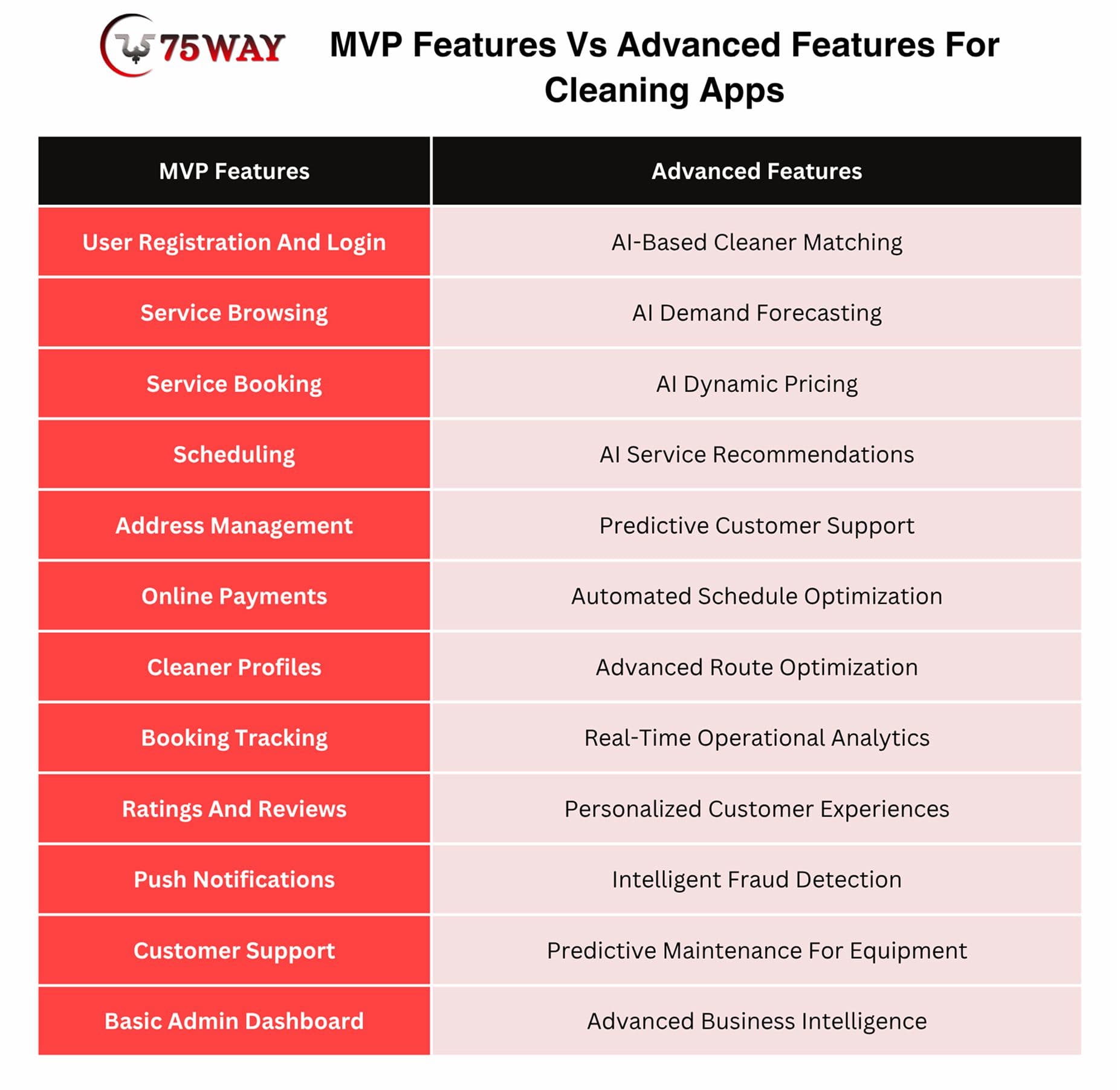
1. Start With Core Booking Features
The MVP should make it possible for customers to discover services, choose suitable options, select dates, provide locations, confirm bookings, and complete payments. These capabilities establish the basic marketplace workflow.
2. Build Essential Cleaner Tools
Cleaners need access to assigned bookings, customer requirements, schedules, locations, service instructions, and earnings. Providing these functions from the beginning ensures the operational side can support customer demand.
3. Include Fundamental Admin Controls
Administrators should have tools for managing customers, cleaners, services, bookings, payments, reviews, and basic reports. These controls help the business operate the platform without depending on manual database management.
4. Introduce Advanced AI Gradually
AI-powered recommendations, demand forecasting, intelligent matching, dynamic pricing, and automated support can be added after the core platform has sufficient usage data. This phased approach can reduce initial development costs while allowing businesses to validate which advanced capabilities deliver measurable value.
5. Prioritize Features By Business Goals
A residential cleaning marketplace may prioritize recurring bookings and cleaner scheduling, while a commercial cleaning platform may need contracts, workforce management, invoicing, and location-based operations. Feature priorities should therefore reflect the actual business model rather than copying every feature from established platforms.
How Cleaning App Features Improve Cleaning Service Operations
The right cleaning service app features can simplify coordination between customers, cleaners, and administrators. By connecting booking, scheduling, payments, communication, tracking, and analytics in one platform, businesses can reduce manual work while creating a smoother service experience.
- Faster Booking Management
Online service selection, scheduling, address management, and payment processing allow customers to complete bookings without phone calls or manual coordination. Automated confirmations can also reduce administrative follow-ups.
- Better Cleaner Allocation
Cleaner profiles, availability management, location information, and intelligent matching can help businesses assign suitable professionals to available jobs. This can reduce scheduling conflicts and improve workforce utilization.
- Reduced Manual Administration
Automated booking updates, notifications, payment records, invoices, and support workflows reduce repetitive administrative tasks. Admin teams can spend more time handling exceptions and improving service quality.
- Improved Customer Visibility
Booking tracking, cleaner information, arrival updates, notifications, and in-app communication give customers greater visibility throughout the service journey. Better information can reduce uncertainty and unnecessary support requests.
- Smoother Payment Management
Integrated payment processing allows customers to pay digitally while administrators can monitor transactions, refunds, commissions, and cleaner payouts from a centralized system.
- Stronger Service Quality
Ratings, reviews, service checklists, performance metrics, and customer feedback can help businesses identify service-quality issues. Managers can use these insights to improve training, cleaner allocation, and operational standards.
- Better Scheduling Decisions
Availability controls and scheduling tools help coordinate multiple appointments across cleaners and locations. Advanced scheduling and route optimization can further reduce unnecessary travel and improve daily workload planning.
- Data-Driven Business Decisions
Analytics can reveal booking trends, popular services, customer behavior, revenue patterns, cleaner performance, and high-demand locations. These insights can help businesses make better decisions about pricing, staffing, promotions, and expansion.
- More Personalized Customer Experiences
Customer profiles, booking history, preferences, reviews, and AI-powered recommendations can help businesses deliver more relevant service suggestions. Personalization can encourage repeat bookings and increase customer engagement.
- Easier Business Scaling
A centralized platform allows businesses to manage growing numbers of customers, cleaners, bookings, payments, and service categories without relying entirely on manual processes. This creates a stronger operational foundation for expansion into new locations or service markets.
How To Prioritize Features While Building Your Cleaning Service App
Feature prioritization should begin with the problems your cleaning business needs to solve, not with a long list of competitor features. Start with the functions required to complete a booking and deliver the service, then add capabilities that improve efficiency, customer experience, and scalability.
1. Identify Your Core Users
List the primary users who will interact with the application, such as customers, cleaners, dispatchers, managers, and administrators. Understanding each user's responsibilities helps determine which features are essential for the initial product.
2. Map The Customer Journey
Document the complete customer journey from registration and service discovery to booking, payment, cleaning completion, review, and repeat booking. Features that remove friction at important stages should receive higher priority.
3. Map The Cleaner Workflow
Consider how cleaners receive jobs, check customer requirements, navigate to properties, complete assigned tasks, update service status, and receive payments. Features supporting these daily activities should be included in the initial operational workflow.
4. Define Your Business Model
Your feature priorities will differ depending on whether you operate a local cleaning marketplace, subscription-based service, commercial cleaning platform, or multi-location business. The business model should determine which capabilities deserve development attention first.
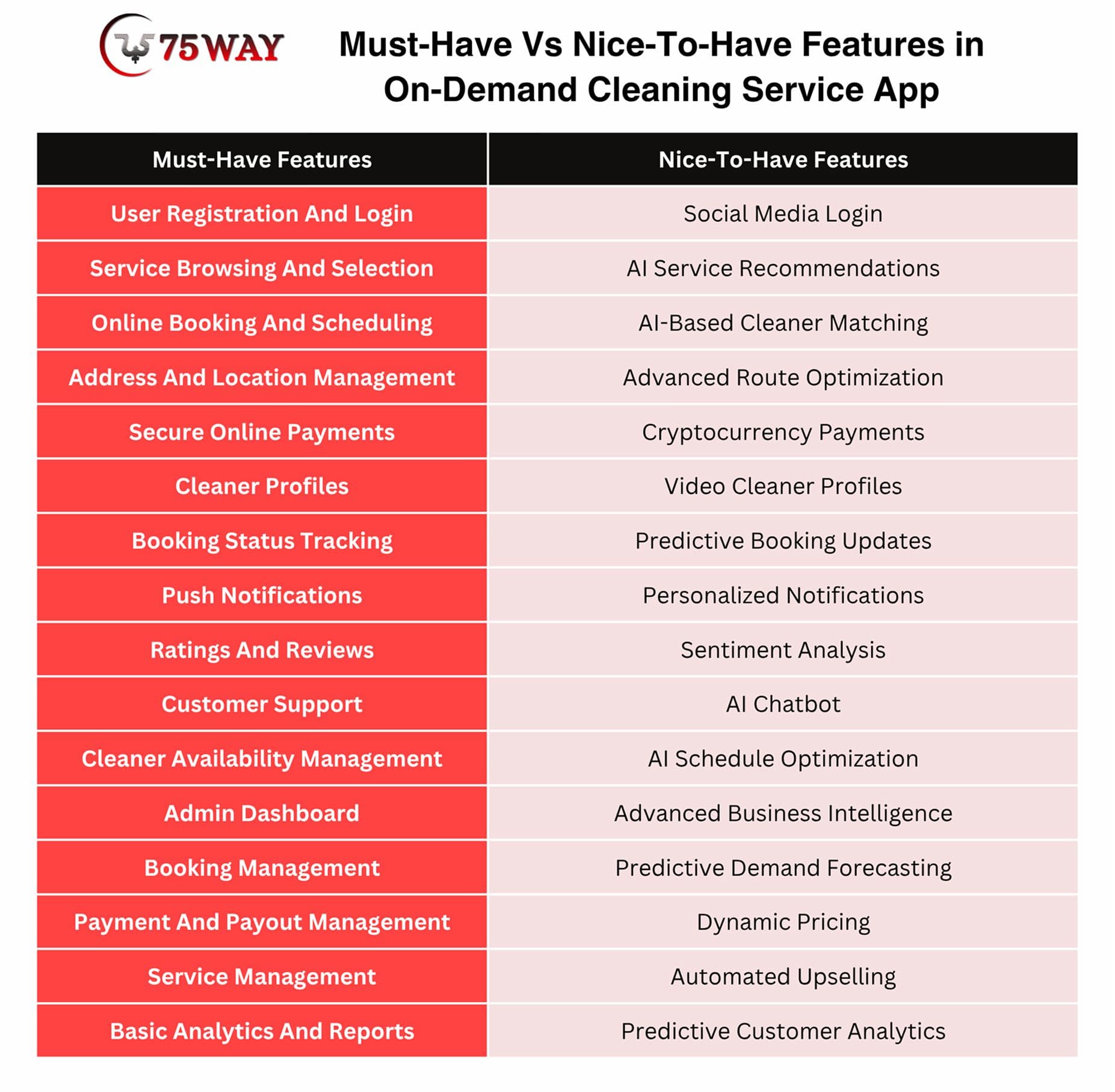
5. Separate Must-Have And Nice-To-Have Features
Create three groups: essential for launch, important for the next release, and optional advanced capabilities. Booking, payments, scheduling, profiles, and basic administration may belong in the first group, while advanced AI capabilities can come later.
6. Consider Development Complexity
Some features may appear valuable but require significant infrastructure or third-party integrations. Evaluate development effort alongside expected business value before adding complex capabilities to the MVP.
7. Prioritize Revenue-Impacting Features
Features that directly support bookings, repeat purchases, payments, subscriptions, upselling, or customer retention can receive higher priority. This approach helps ensure the initial application supports measurable business outcomes.
8. Consider Customer Feedback
After launching the MVP, monitor customer behavior, support requests, reviews, booking abandonment, and feature usage. Real-world feedback can reveal which capabilities deserve further investment.
9. Prioritize Operational Bottlenecks
If your biggest problem is cleaner scheduling, prioritize workforce and availability tools. If customer support consumes significant resources, prioritize communication and automated assistance. Feature decisions should address the most expensive operational problems first.
10. Build In Phases
A phased roadmap allows businesses to launch core functionality, measure performance, and progressively introduce advanced features. This approach can reduce initial development risk while keeping the product adaptable as requirements evolve.
How To Choose Features Based On Your Cleaning Business Model
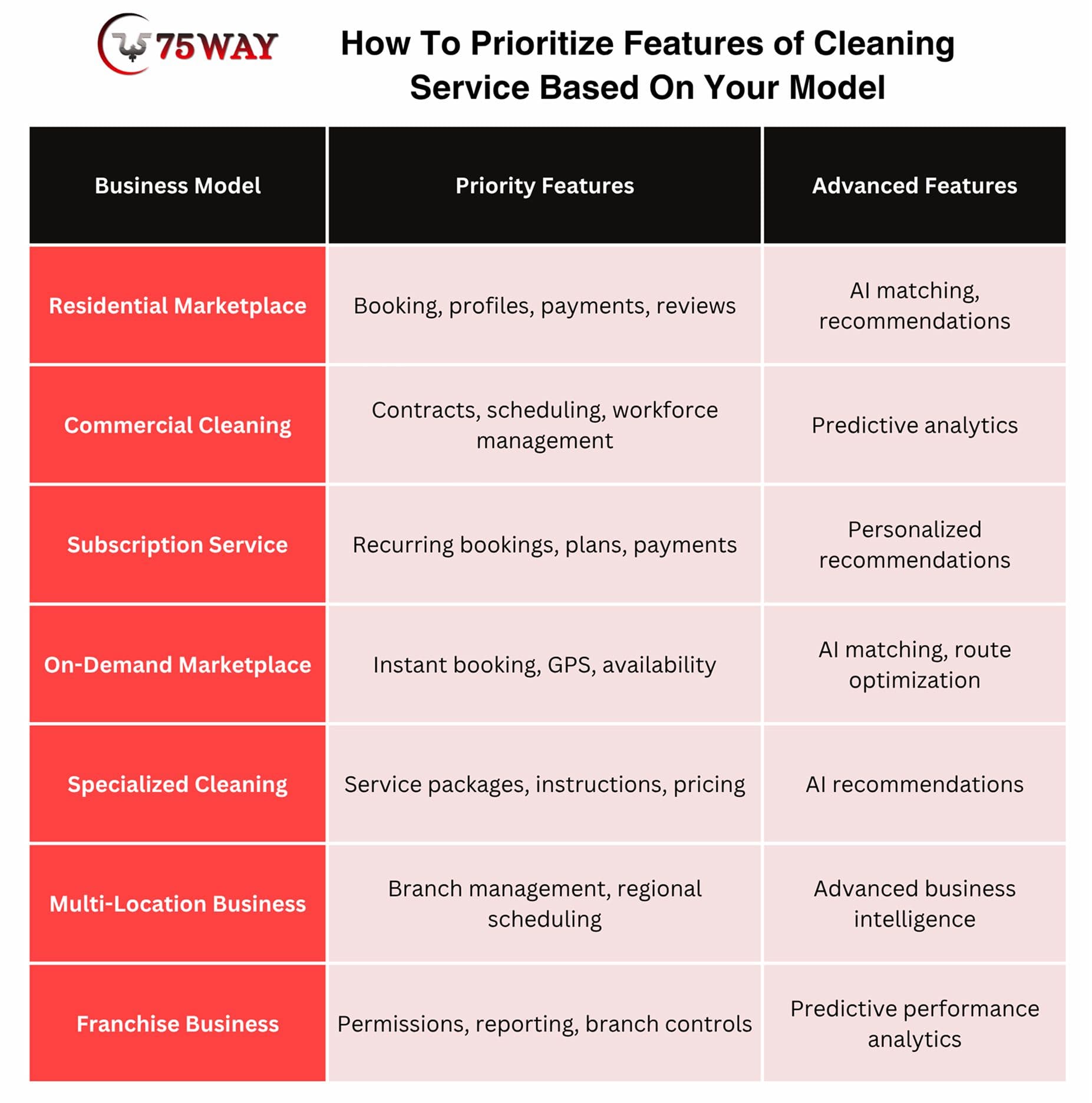
The right cleaning service app features depend on how your business earns revenue, who uses the platform, and how services are delivered. A residential marketplace may need different capabilities than a commercial cleaning company or subscription-based service.
- Residential Cleaning Marketplace
A residential marketplace connects customers with independent cleaners or cleaning teams. Prioritize service discovery, cleaner profiles, booking, scheduling, location management, payments, ratings, reviews, chat, and cleaner availability.
- Commercial Cleaning Platform
Commercial cleaning businesses often manage recurring contracts, offices, facilities, and larger service teams. Important features include recurring scheduling, workforce management, service checklists, invoices, contract management, attendance tracking, reporting, and multi-location support.
- Subscription-Based Cleaning Service
Subscription models require features that make recurring services easy to manage. Prioritize recurring bookings, subscription plans, automated payments, service preferences, renewal reminders, pause or cancellation controls, and customer account management.
- On-Demand Cleaning Marketplace
An on-demand model depends heavily on fast booking and cleaner availability. Focus on real-time availability, instant booking, GPS location, cleaner matching, booking tracking, notifications, digital payments, and automated customer communication.
- Specialized Cleaning Services
Businesses offering carpet cleaning, deep cleaning, move-out cleaning, sanitization, or other specialized services may need service-specific booking flows. Add customized service packages, property information, equipment requirements, duration estimates, and detailed cleaning instructions.
- Multi-Location Cleaning Business
Businesses operating across multiple cities or regions need stronger administrative capabilities. Useful features include location-based cleaner management, regional pricing, service-area controls, branch dashboards, localized availability, and location-specific analytics.
- Franchise Cleaning Business
A franchise model requires centralized oversight while allowing individual locations to manage daily operations. Consider franchise dashboards, branch-level reporting, centralized service management, permissions, financial tracking, lead distribution, and performance comparisons.
Final Thoughts
A successful cleaning service app should make every stage of service delivery easier, from discovering cleaning options and booking appointments to assigning cleaners, processing payments, tracking services, and collecting feedback.
You must prioritize essential customer, cleaner, and admin features before introducing advanced capabilities such as AI recommendations, intelligent matching, demand forecasting, and route optimization.
The right feature set also depends on the business model, target customers, service categories, and operating scale. A phased cleaning app development approach can help validate the MVP, control initial costs, and introduce advanced functionality as the platform grows. To build a feature-rich cleaning service app, you can connect with a reliable on-demand app development company to bring your idea to market.
Frequently Asked Questions (FAQs)
What Features Should A Cleaning Service App Have?
Essential features include registration, service browsing, booking, scheduling, payments, cleaner profiles, location management, notifications, ratings, reviews, communication, and administrative controls.
How Many Apps Are Needed For A Cleaning Service Platform?
A marketplace generally requires a customer app, cleaner app, and admin dashboard. Businesses can also develop separate interfaces or portals when operational requirements justify additional applications.
How Can Customers Book Cleaning Services Through The App?
Customers can browse available services, select their preferred package, provide property details, choose a date and time, confirm their location, review pricing, and complete payment through the application.
Can Cleaning Apps Support Recurring Bookings?
Yes, recurring booking functionality can allow customers to schedule cleaning services weekly, biweekly, monthly, or according to customized intervals.
Can Cleaners Manage Their Schedules Through The App?
Yes, cleaners can view assigned bookings, manage availability, receive notifications, access customer requirements, navigate to locations, update service status, and track earnings through their application.
How Can A Cleaning Service App Generate Revenue?
Common revenue models include booking commissions, customer service fees, cleaner subscriptions, featured listings, recurring-service plans, premium packages, cancellation charges, and promotional partnerships.