AI Summary
An astrology app needs more than attractive zodiac screens to stand out. Transit features turn planetary movements into personalized user experiences. Smart UI/UX makes complex astrological information easier to understand. Discover essential features, design decisions, and development considerations for building competitive astrology apps.
Key Takeaways
- Personalized transit readings connect planetary movements with individual natal charts.
- Interactive chart wheels simplify complex astrological data for users.
- Transit calendars help users understand planetary movements and timing.
- Accessible interfaces improve readability, navigation, and everyday app usability.
- AI-powered interpretations create more conversational and personalized astrology experiences
Mercury retrograde, a full moon, or Saturn entering a new zodiac sign can make astrology users curious about what's happening in the sky and what it means for them.
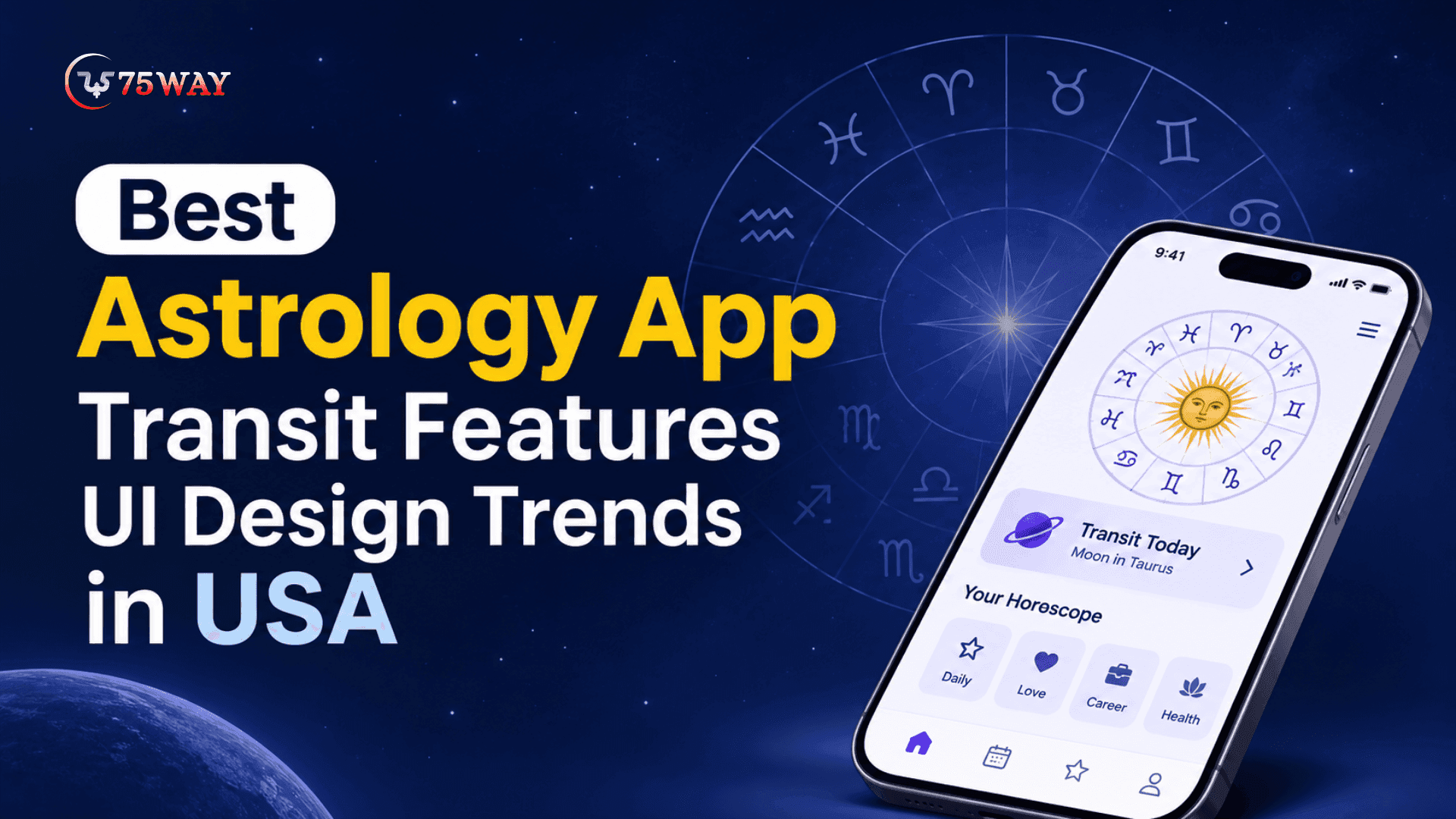
But if your app presents these updates through crowded charts and technical language, users may struggle to find the information they want. A better transit UI design can turn complex astrological details into an experience people actually enjoy using.
For businesses planning an astrology app in the USA, transit tracking can become a valuable feature for attracting and retaining users.
Interactive calendars, real-time planetary updates, birth chart comparisons, and personalized transit reports can give users more reasons to explore the app regularly. The key is presenting these features in a way that feels intuitive and visually appealing.
What does that experience look like in practice? Let's explore the best astrology app transit features UI design ideas in this guide, along with the interface elements that can make planetary information easier to understand and navigate.
What Are Astrology App Transit Features?
Astrological transits describe the movement of planets through the zodiac and their positions in relation to a person's natal chart. In astrology, these movements are interpreted as potential influences on different themes, such as relationships, career, personal development, and decision-making.
For example, when Saturn moves through a particular house in a user's birth chart, an astrology app may explain the traditional interpretation associated with responsibility, discipline, and long-term commitments.
A transit feature of an astrology app development solution connects three important elements:
- Current Planetary Positions: The present locations of planets across the zodiac.
- Natal Chart Information: The user's birth date, exact birth time, and birthplace, used to calculate their birth chart.
- Transit Interpretation: An explanation of how current planetary positions relate to natal planets, houses, and aspects.
The application processes the underlying astrological data and presents the results through charts, notifications, calendars, and personalized readings.
How Does Transit Tracking Work Inside an Astrology App?
A planetary transit may happen in the sky, but how does an astrology app translate it into a prediction on someone's screen? The process involves astronomical data, planetary position calculations, zodiac placements, and birth chart comparisons. Let's break down how these elements work together in an astrology app to deliver personalized transit updates.
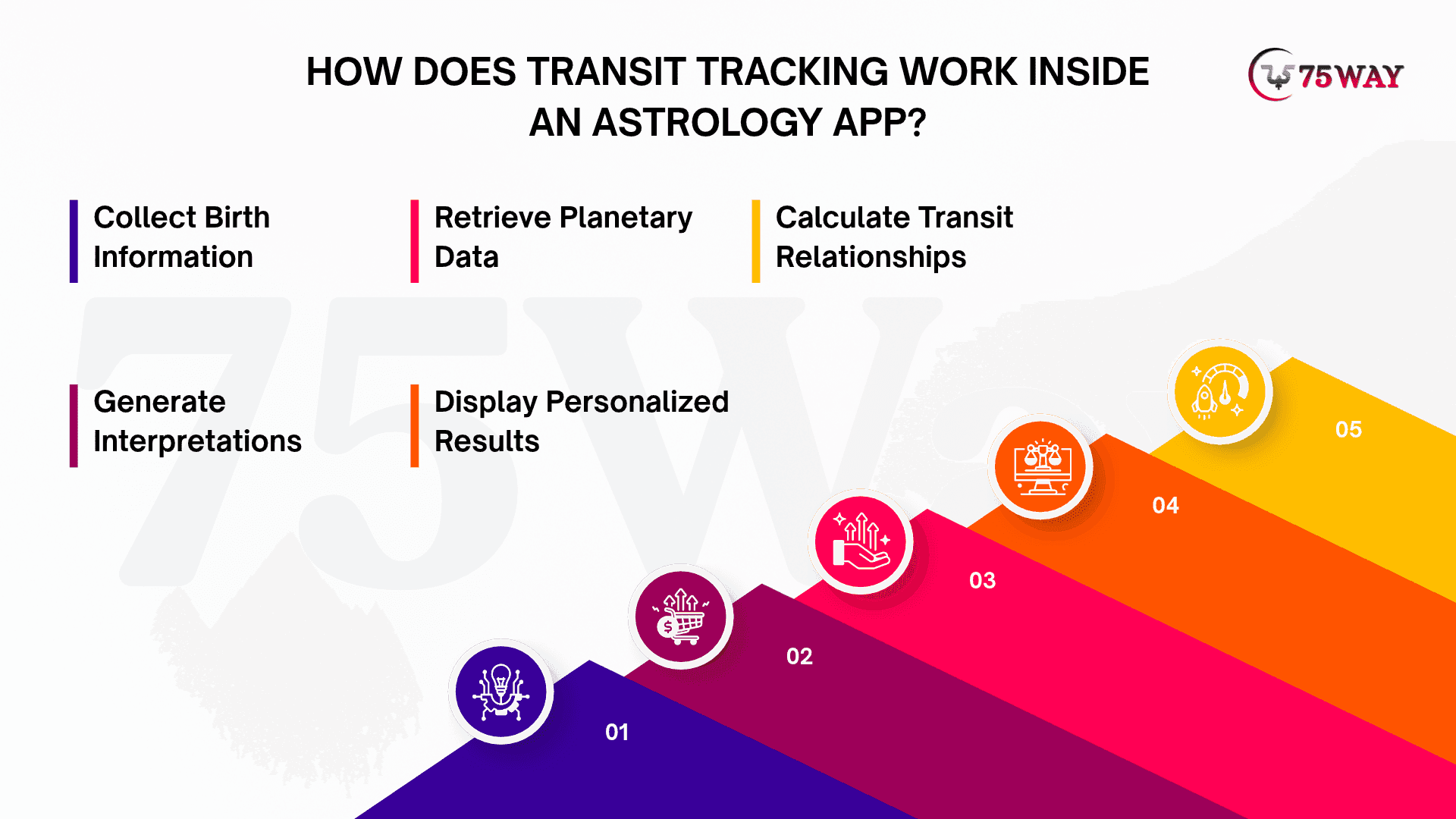
1. Collect Birth Information
The user enters their birth date, time, and location. The application uses this information to calculate the natal chart.
2. Retrieve Planetary Data
The system obtains current and future planetary positions from a reliable ephemeris or astrology calculation service.
3. Calculate Transit Relationships
The engine compares current planetary positions against natal planets, houses, and relevant aspects.
4. Generate Interpretations
An interpretation engine maps calculated relationships to relevant astrological explanations.
5. Display Personalized Results
The interface presents the information through transit cards, timelines, chart wheels, and notifications.
An astrology application development solution should separate astronomical calculations from astrological interpretations. Planetary positions are calculated using astronomical data, while their meanings are based on an astrological tradition. AI can help explain those meanings, but it should not replace the calculation engine.
Why Should Startups Invest in AI Astrology App Transit Features?
Astrology users often have questions about upcoming planetary movements, career changes, relationships, and personal growth. AI-powered transit features can help startups turn these interests into personalized app experiences rather than offering the same predictions to everyone. Here’s why startups should consider adding these capabilities to their astrology app strategy.
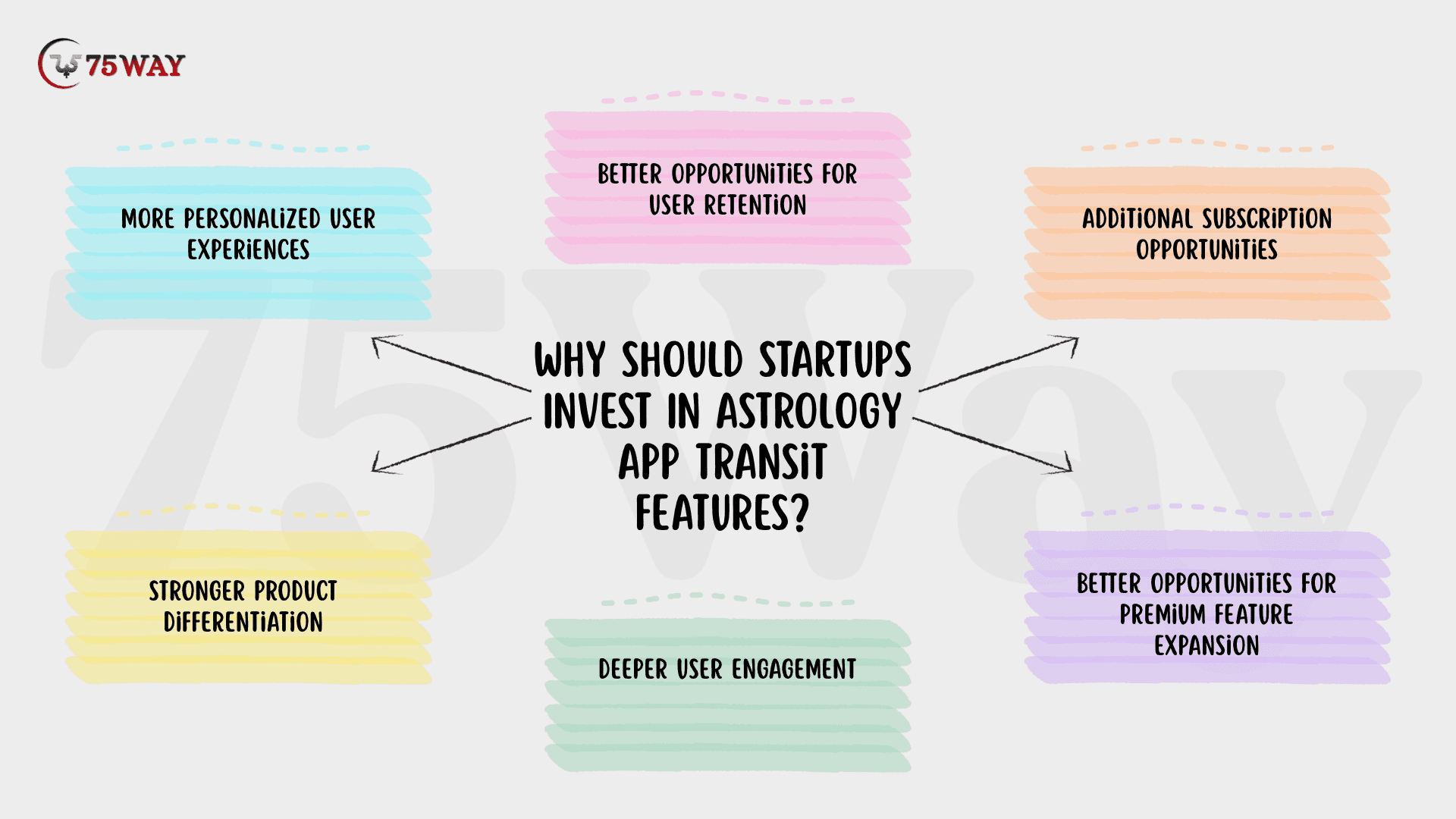
1. More Personalized User Experiences
Personalization is one of the strongest reasons to introduce transit functionality. Two users born under the same zodiac sign can have completely different natal charts because their birth times and locations differ.
A transit feature can account for these differences and display interpretations relevant to each user's chart.
For example, a user might receive a Saturn transit interpretation related to career responsibilities, while another user receives an explanation associated with relationships or personal values.
2. Better Opportunities for User Retention
Astrological transits change over time. Some planetary movements last for hours, while others remain relevant for months or years, depending on the planet and the type of transit.
This gives developers opportunities to create recurring experiences, including:
- Daily transit summaries.
- Weekly planetary forecasts.
- Monthly transit calendars.
- Upcoming retrograde alerts.
- Personalized planetary notifications.
These features can encourage users to return to the application for updated information rather than relying on a single daily horoscope.
3. Additional Subscription Opportunities
Transit interpretations can support several premium product offerings.
For instance, a startup can provide basic daily transit summaries for free while reserving detailed natal chart comparisons, extended forecasts, and personalized reports for paid subscribers.
However, premium functionality should provide meaningful additional value. Simply placing basic information behind a subscription screen may frustrate users.
4. Stronger Product Differentiation
The astrology app market includes horoscope platforms, birth chart calculators, compatibility applications, and spiritual wellness products.
A startup can differentiate its offering through a more complete transit experience, combining accurate calculations, understandable interpretations, and personalized visualizations.
The objective should not be to add every possible feature. It should be to solve a specific user problem better than competing products.
5. Deeper User Engagement
Transit tracking gives users more reasons to explore an astrology application beyond checking their daily horoscope. Interactive planetary charts, upcoming transit events, and detailed interpretations encourage users to discover different aspects of their birth charts.
For startups, these interactions create opportunities to understand user preferences and improve the product experience through relevant content, personalized recommendations, and useful features.
6. Better Opportunities For Premium Feature Expansion
Transit functionality creates room for introducing advanced astrology services as the application grows. Startups can expand their offerings with Saturn return analysis, relationship transit reports, planetary cycle tracking, and AI-powered astrology consultations.
These additions allow businesses to introduce higher-value subscription plans while giving existing users more reasons to explore premium functionality.
Best Astrology App UI/UX Design: Essential Features
A great astrology app should make users feel comfortable exploring their zodiac signs, planetary positions, and personalized readings from the moment they sign in. That experience depends not only on the features you offer but also on how easily users can access them. Here are the essential UI/UX design elements to consider when creating an astrology app.
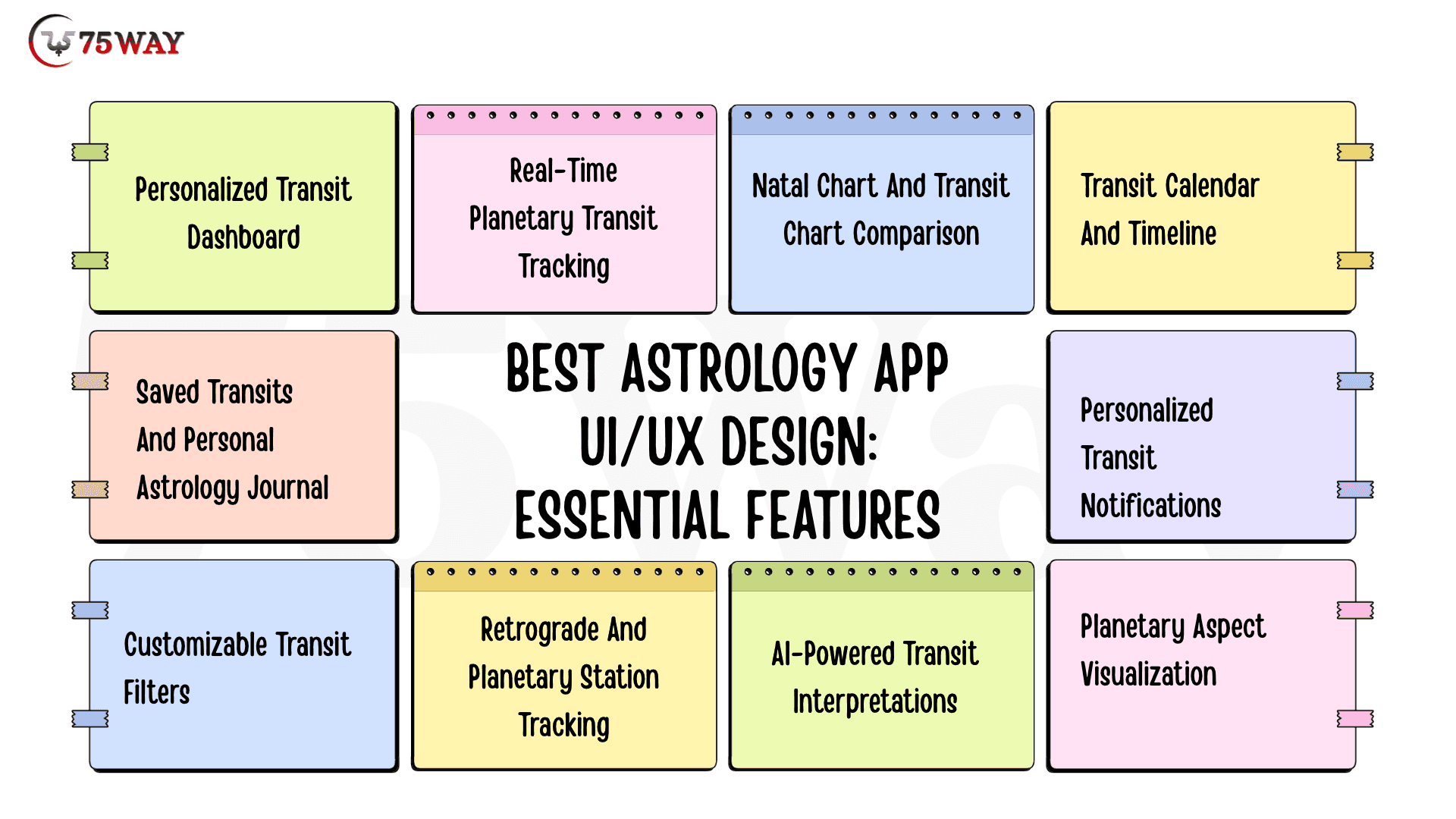
1. Personalized Transit Dashboard
The transit dashboard should be the starting point of the user's astrology experience. Instead of displaying multiple complicated charts immediately, it should summarize the most relevant planetary movements in a simple layout.
A well-designed dashboard can include:
- Today's major planetary transits
- Current planetary positions
- Important aspects involving natal planets
- Upcoming astrological events
- Personalized transit summaries
- Shortcuts to detailed interpretations
UI/UX Recommendation: Use separate information cards for each major transit. Display the planet names, zodiac signs, aspect types, and a short explanation. Provide a clear option to explore the full interpretation.
From a development perspective, the dashboard should prioritize relevant data rather than loading every available planetary calculation simultaneously.
2. Real-Time Planetary Transit Tracking
Planetary tracking allows users to explore where celestial bodies are currently positioned in the zodiac.
The feature should display the positions of relevant planets, including:
- Sun
- Moon
- Mercury
- Venus
- Mars
- Jupiter
- Saturn
- Uranus
- Neptune
- Pluto
Users should be able to explore planetary positions by zodiac sign, degree, and house where applicable.
For example, a transit card might display:
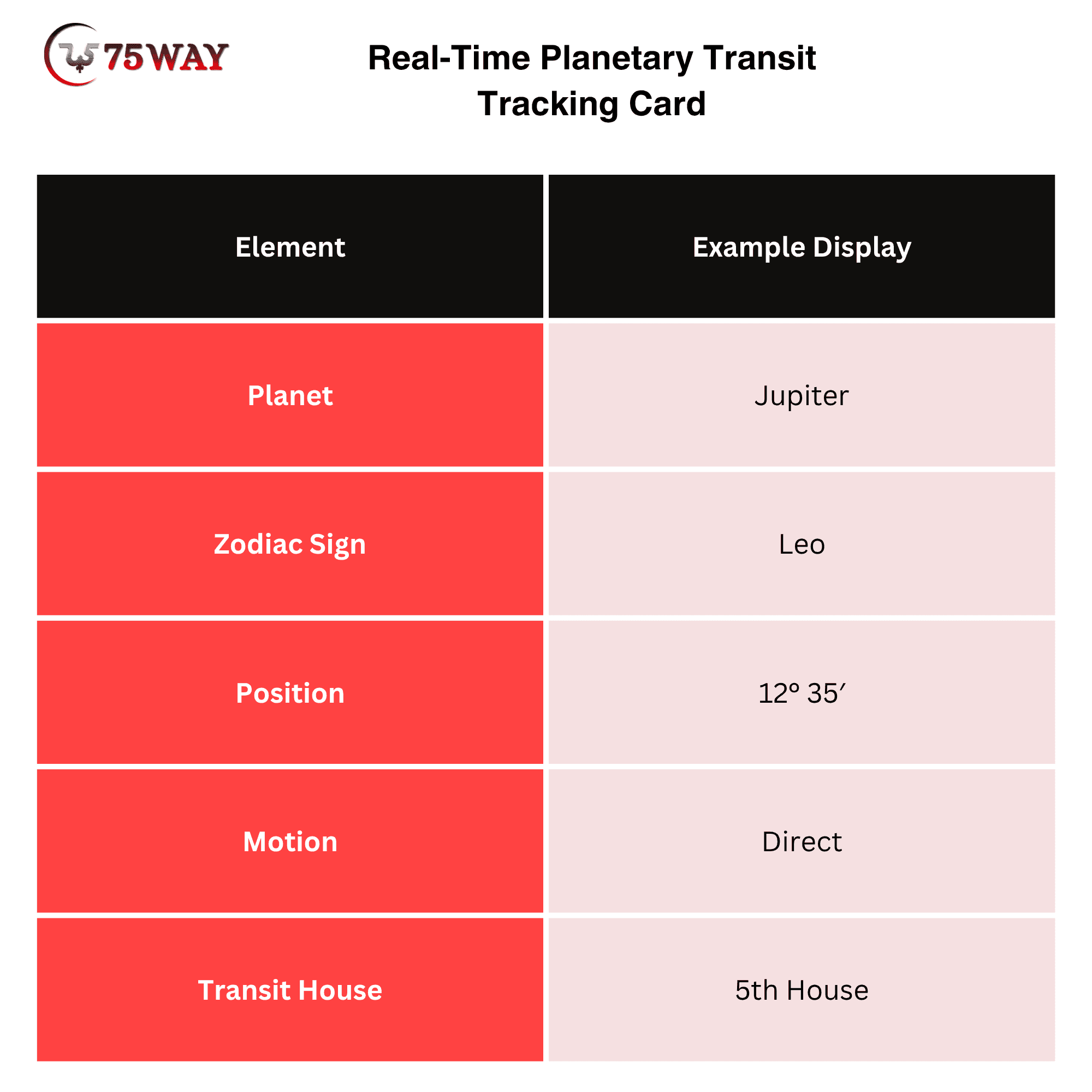
The values above are illustrative, not a current ephemeris reading.
UI/UX Recommendation: Use recognizable planetary symbols alongside readable labels. Include a clear visual distinction between direct and retrograde motion.
Avoid displaying astronomical terminology without explanations. A first-time user should understand what a planetary position represents without needing to study an astrology textbook.
3. Natal Chart And Transit Chart Comparison
A natal chart and transit chart comparison is particularly valuable for users interested in detailed astrological analysis.
The natal chart represents planetary positions at the user's birth, while the transit chart displays current planetary positions in relation to that birth chart.
An interactive dual-wheel interface can help users understand these relationships visually.
Essential functionality includes:
- Inner natal chart wheel
- Outer transit chart wheel
- Planetary symbols and zodiac placements
- House divisions
- Aspect connections
- Date selection
- Zoom and chart navigation
UI/UX Recommendation: Keep the natal chart and transit chart visually distinguishable. Use separate visual treatments for natal and transiting planets, with a legend explaining the symbols.
For smaller smartphone screens, offer a simplified chart view alongside the detailed wheel. Users should not have to zoom excessively to understand important information.
4. Transit Calendar And Timeline
A transit calendar helps users explore upcoming planetary movements and significant astrological events.
Rather than limiting the experience to today's horoscope, developers can provide a timeline that shows when different transits begin, become exact, and move beyond a selected orb.
Useful calendar elements include:
- Planetary ingress dates
- Retrograde periods
- Direct station dates
- Full and new moons
- Significant planetary aspects
- Upcoming personal transits
UI/UX Recommendation: Use a monthly calendar with event markers and an expandable event list. Add filters for planets, event categories, and personal transits.
A timeline view can also help users understand the duration of an event. For example, a slow-moving planetary transit should not appear as though it has the same duration as a short-lived lunar aspect.
5. Personalized Transit Notifications
Notifications help users discover important astrological events without opening the application repeatedly.
However, sending alerts for every planetary movement can create notification fatigue. The application should prioritize events that are relevant to an individual's natal chart and preferences.
Useful notification types include:
- Major personal planetary aspects
- Upcoming retrograde periods
- Important lunar events
- Exact transit dates
- Changes in selected planetary positions
- Weekly personalized transit summaries
UI/UX Recommendation: Allow users to control notification frequency, select preferred planets, and choose the types of events they want to follow.
From a technical perspective, notifications should be triggered through scheduled backend jobs or event-based processing. The application should avoid repeatedly recalculating unchanged data just to send an alert.
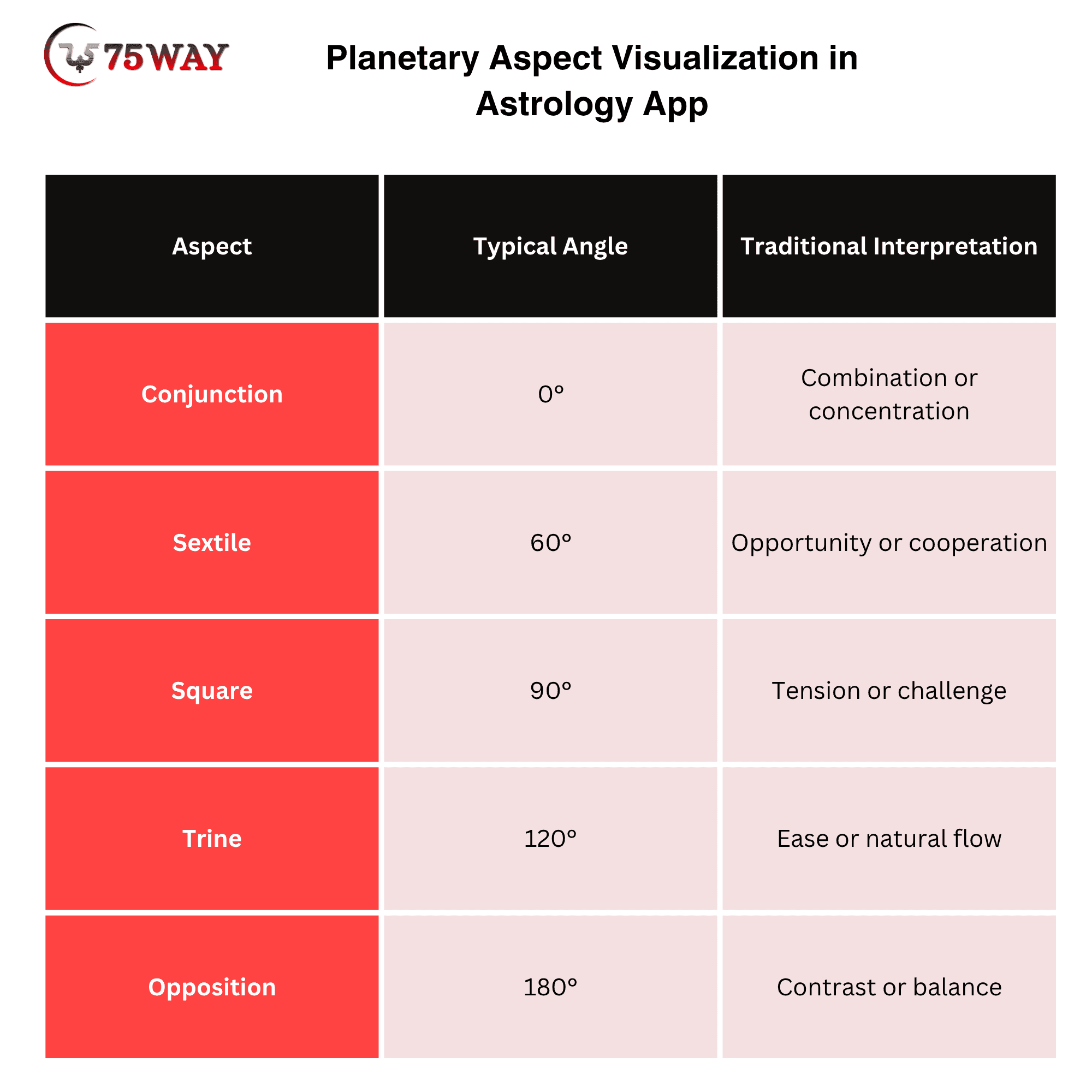
6. Planetary Aspect Visualization
Planetary aspects describe angular relationships between planets. They are an important part of transit interpretation because they help explain how current planetary positions relate to natal placements.
Common aspects include:
How To Design An Astrology App Transit Interface That Users Understand
Users shouldn't need an astrology degree to understand what Mercury entering a new sign or Saturn changing houses means. A well-designed transit interface can present planetary positions, dates, and interpretations through clear visuals and easy-to-follow information. Here are the design principles that can help make your astrology app more user-friendly.
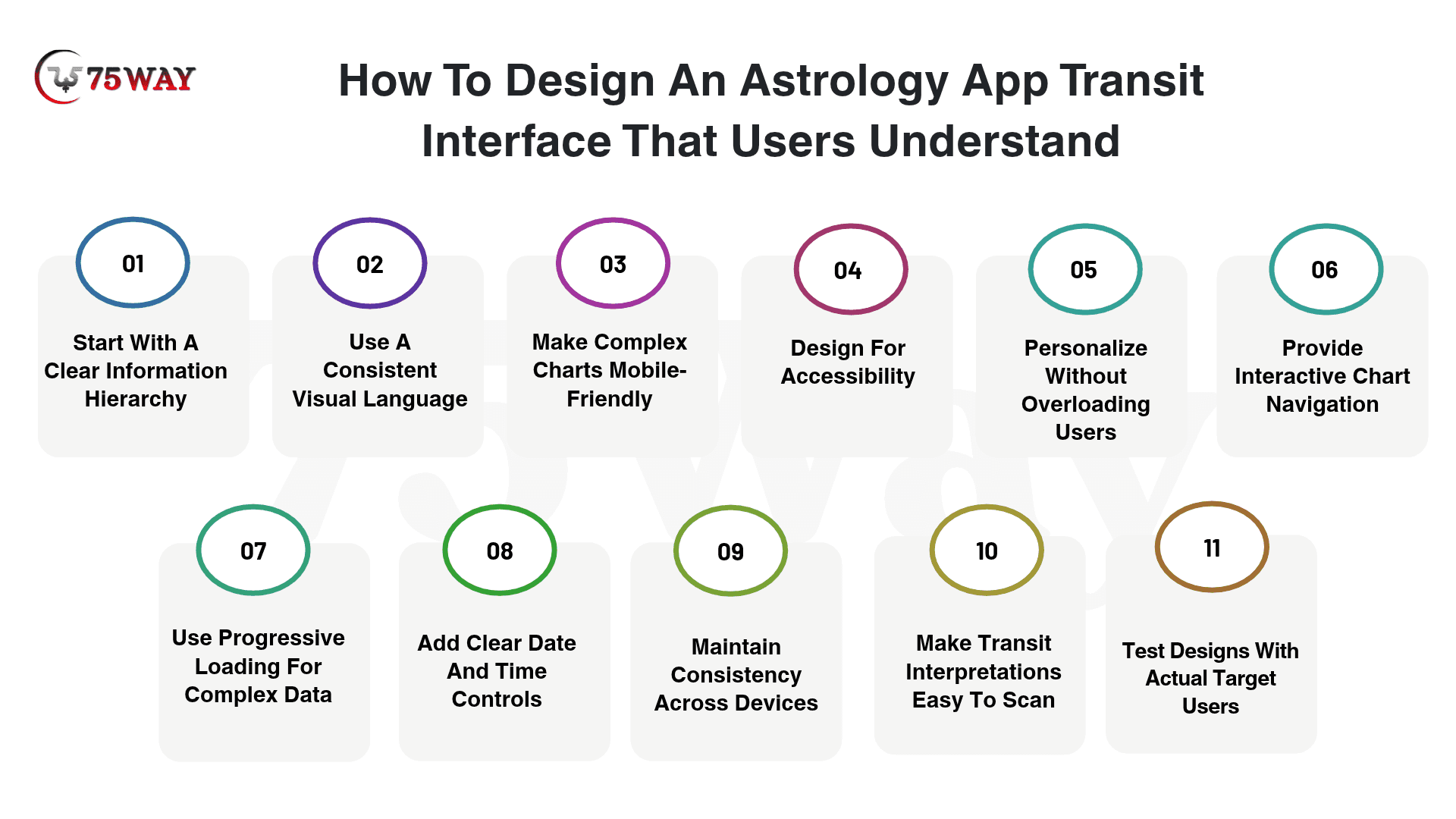
1. Start With A Clear Information Hierarchy
The dashboard should communicate the most important information first.
For example, the first screen might display today's major personal transit, followed by a short interpretation and a link to the detailed chart.
A recommended information hierarchy is:
- Current personal transit
- Short interpretation
- Planetary positions and aspects
- Upcoming transit events
- Detailed chart exploration
This arrangement reduces the effort required to find relevant information.
2. Use A Consistent Visual Language
Astrology applications contain many symbols, planetary names, zodiac signs, and chart elements. Without a consistent design system, the interface can become visually confusing.
Developers and designers should establish reusable components for:
- Planetary icons
- Zodiac symbols
- Aspect indicators
- Transit cards
- Chart legends
- Calendar events
- Navigation elements
A consistent visual language also makes it easier to expand the product when additional astrology features are introduced.
3. Make Complex Charts Mobile-Friendly
A dual-wheel transit chart can contain considerable information. Displaying every detail on a small smartphone screen can make the experience difficult.
A better approach is progressive disclosure: show essential information first and allow users to explore additional details when needed.
For example:
- Default View: Simplified transit chart.
- Expanded View: Planetary degrees and house placements.
- Detailed View: Aspect relationships and interpretations.
This gives beginners a comfortable starting point without restricting advanced users.
4. Design For Accessibility
Accessibility should be part of the initial design process rather than an improvement added before launch.
Important considerations include:
- Readable font sizes
- Sufficient text and background contrast
- Screen-reader-friendly labels
- Descriptive chart legends
- Clear navigation controls
- Text alternatives for important visual information
- Touch targets suitable for mobile interaction
Planetary aspects should not be identified through color alone. A combination of labels, symbols, and line styles makes charts easier to interpret.
5. Personalize Without Overloading Users
Personalization should make the experience more relevant, not introduce unnecessary settings.
Allow users to select preferred planets, notification categories, chart styles, and interpretation depth. Keep advanced configuration options separate from everyday dashboard controls.
A beginner should be able to understand the main transit experience without configuring dozens of preferences.
6. Provide Interactive Chart Navigation
Users should be able to explore planetary placements without leaving the transit chart. Interactive elements such as selectable planets, expandable aspect details, and zoom controls make chart exploration more engaging.
For example, selecting Venus in a transit chart could display its current zodiac position, natal aspects, and related interpretation.
7. Use Progressive Loading For Complex Data
Astrology charts may contain multiple planetary positions, aspects, and house divisions. Loading every element simultaneously can affect the interface's responsiveness, particularly on devices with limited resources.
Display essential chart information first, then load detailed calculations, visual elements, and extended interpretations when users request them.
8. Add Clear Date And Time Controls
Transit positions change over time, so users should be able to explore past, current, and upcoming planetary movements.
Include date selectors, timeline navigation, and clearly displayed time-zone settings. This is particularly important when users access the application from different US time zones.
9. Maintain Consistency Across Devices
Users may switch between smartphones, tablets, and web interfaces while exploring their astrology charts.
Use responsive layouts, consistent navigation patterns, and synchronized user preferences to maintain a familiar experience across devices.
10. Make Transit Interpretations Easy To Scan
Long astrological explanations can overwhelm users, especially when several planetary aspects appear together.
Organize interpretations into short summaries, key themes, detailed explanations, and related planetary information. Expandable content allows beginners to understand the basics while experienced users can explore additional details.
11. Test Designs With Actual Target Users
A design that looks attractive in Figma may not be intuitive when users interact with it.
Conduct usability testing with beginners and experienced astrology enthusiasts. Observe how easily they locate personal transits, understand chart symbols, navigate planetary timelines, and interpret the information presented.
Use their feedback to improve navigation, terminology, chart readability, and feature discoverability.
Recommended Astrology App Transit UI Screens
Before development begins, founders should identify the screens needed to support the complete transit experience. The following screen structure provides a practical starting point for a mobile astrology product.
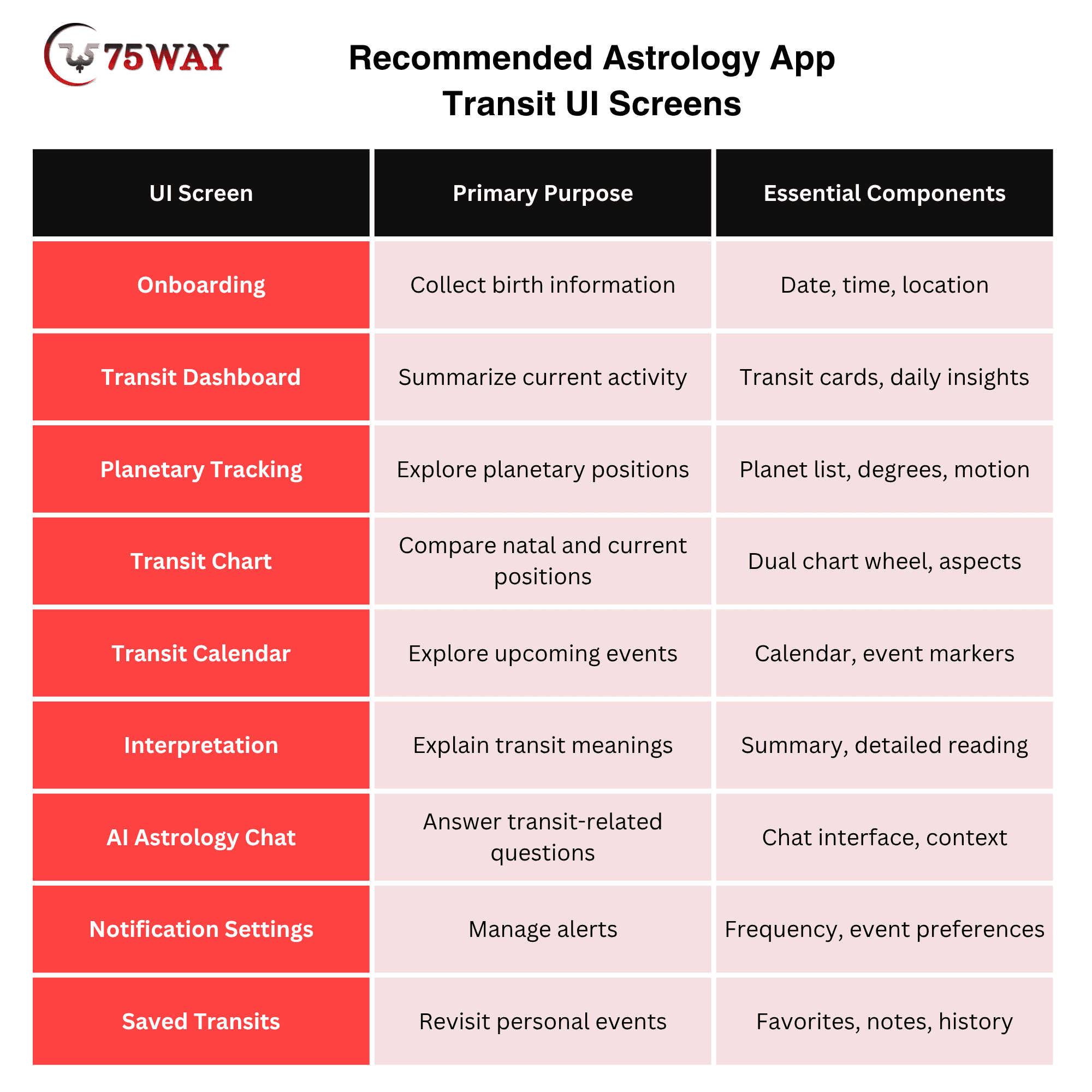
A useful design decision: Do not treat these screens as independent features. They should share the same underlying chart data, user preferences, and navigation structure.
For example, selecting a transit from the calendar should open its corresponding interpretation, while selecting a planet from the chart should lead to the same detailed transit information.
That continuity makes the application feel like one connected product rather than a collection of unrelated astrology tools.
Technology Behind Transit Features in UI/UX Design of Astrology App
This is where product planning becomes particularly important for startup founders.
A smooth transit tracking experience depends on much more than attractive charts and planetary icons. Behind the interface, technologies such as ephemeris databases, astrology APIs, backend systems, and data visualization tools work together to deliver accurate and readable updates. Understanding this architecture before development helps businesses avoid costly changes later.
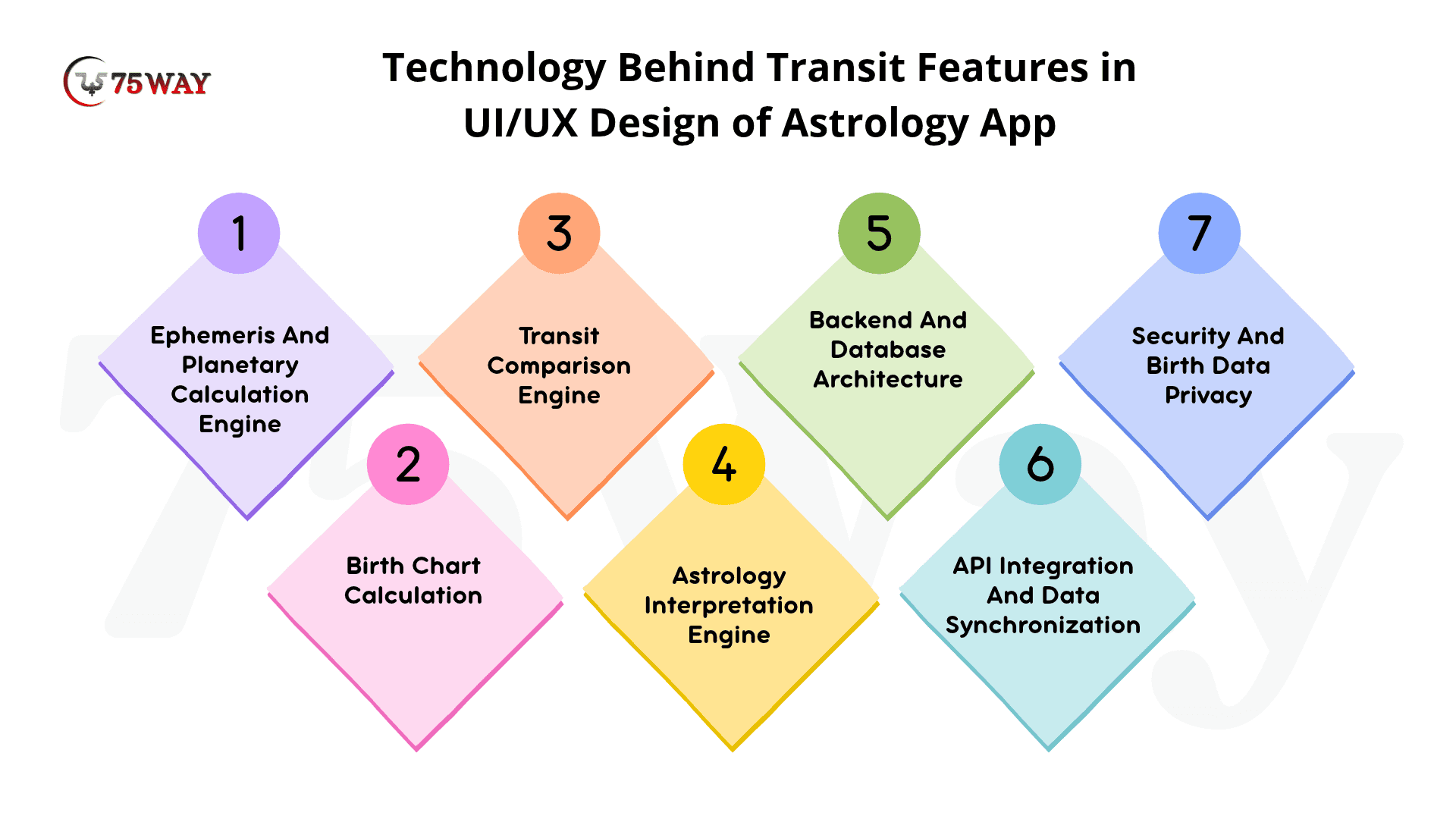
1. Ephemeris And Planetary Calculation Engine
An ephemeris provides the astronomical data required to calculate planetary positions at specific times.
An astrology application can use an established ephemeris library or a specialized astrology calculation service, depending on its requirements.
The calculation engine should support:
- Planetary longitudes.
- Zodiac sign placements.
- Planetary degrees.
- Retrograde and direct motion.
- Planetary speed.
- House calculations.
- Angular relationships.
Developers must also define the astrological conventions supported by the product, including tropical or sidereal zodiac settings, house systems, and calculation precision.
The application should not mix different calculation conventions without clearly explaining the selected settings.
2. Birth Chart Calculation
The birth chart calculation module uses a user's birth information to establish their natal planetary placements.
Three inputs are particularly important:
- Birth Date: Establishes the calendar date of birth.
- Birth Time: Helps determine the Ascendant, house cusps, and time-sensitive placements.
- Birth Location: Helps establish the geographical coordinates and local time context.
One commonly overlooked development issue is historical time-zone accuracy.
A user entering a birth date from several decades ago may have been born under a different daylight-saving-time rule than the one currently used in that location. The application should use reliable time-zone data for the actual birth date rather than simply applying today's offset.
When the birth time is unknown, the application should explain which chart calculations may be less reliable instead of presenting an exact Ascendant or house placement as certain.
3. Transit Comparison Engine
Once the natal chart and current planetary positions are available, the transit engine compares their angular relationships.
For example, a simplified aspect calculation can use:
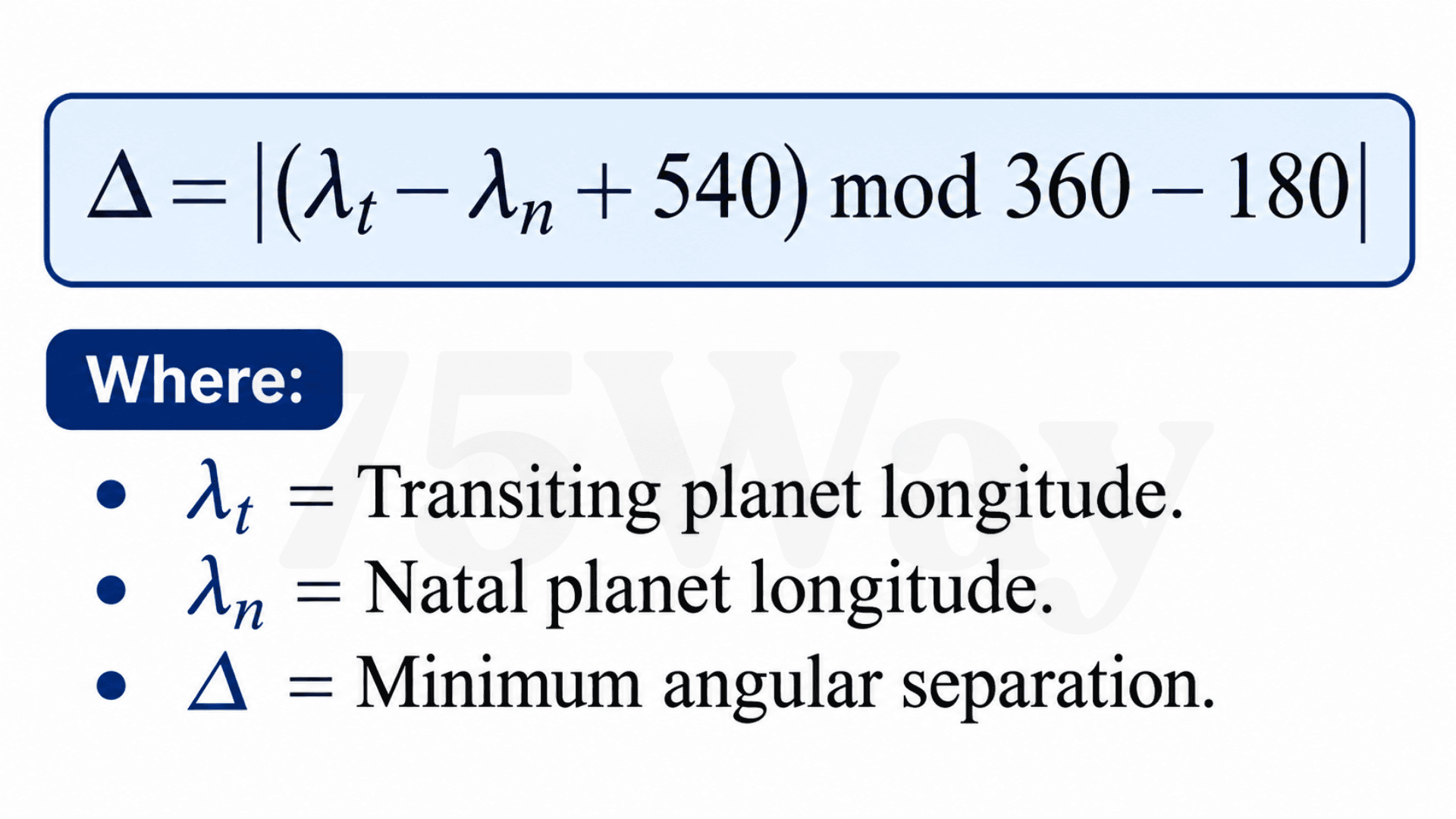
The system then compares this separation against the selected aspect angle.
For example, if the application supports a square aspect, it checks how close the angular separation is to 90 degrees.
The difference between the actual separation and the exact aspect angle helps determine the orb.
This calculation should be performed by the astrology engine, not by a generative AI model.
4. Astrology Interpretation Engine
The interpretation engine converts calculated transit information into meaningful explanations.
A rules-based system can map combinations of planets, aspects, houses, and signs to approved interpretation content.
For example:
- Transiting planet: Saturn.
- Natal planet: Venus.
- Aspect: Square.
- Orb: 1.5 degrees.
- Interpretation category: Relationships and values.
The system can retrieve the relevant interpretation and present it in the user's selected reading style.
An AI layer can then simplify the explanation, answer follow-up questions, and adapt the language to the user's experience level.
5. Backend And Database Architecture
The backend manages the information required to deliver the transit experience.
A typical architecture for an astrology app may include:
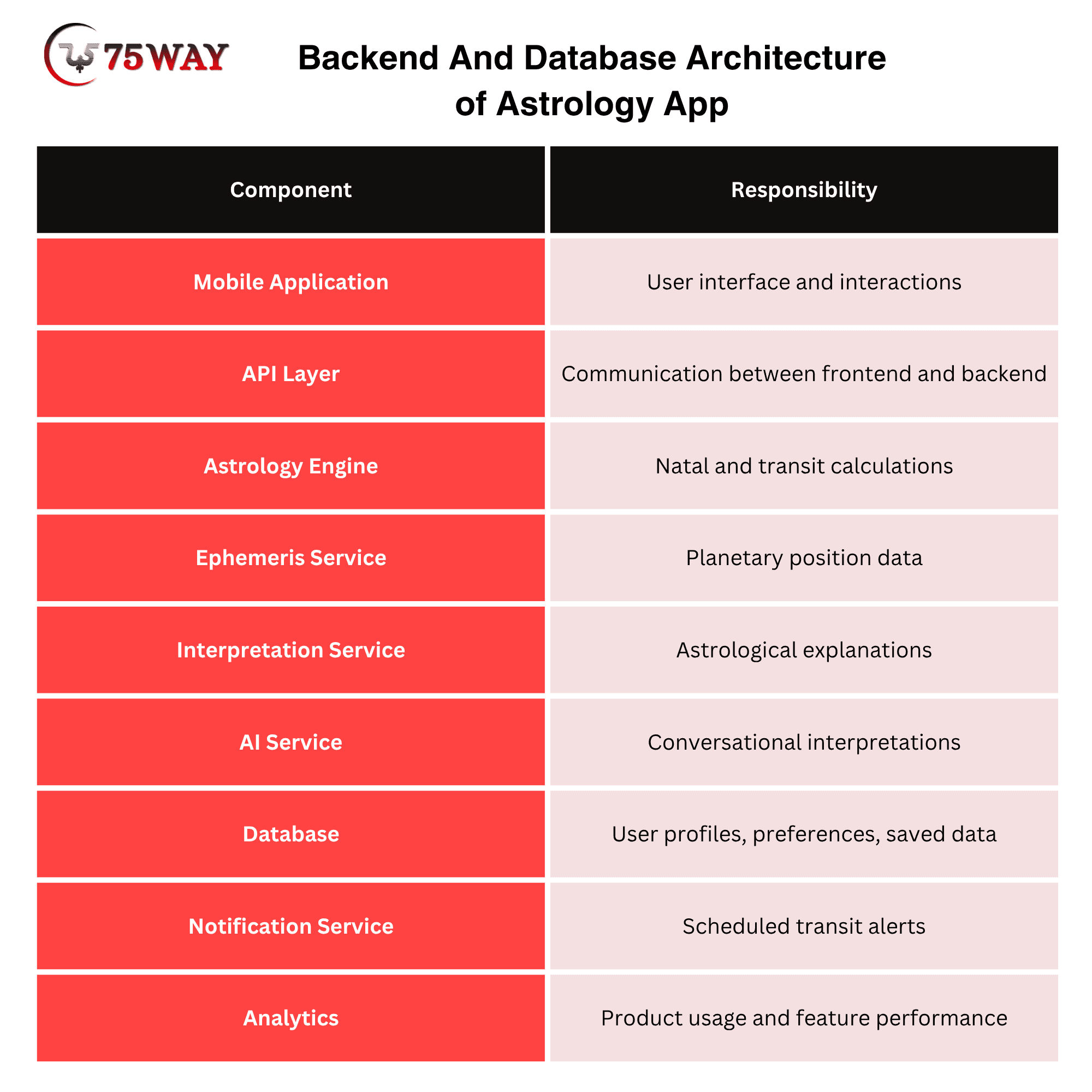
A modular architecture makes it easier to update the calculation engine, add new features, or integrate another AI provider without rebuilding the entire application.
6. API Integration And Data Synchronization
Astrology applications may rely on external services for planetary calculations, location information, AI functionality, or notifications.
However, founders should evaluate these services before selecting them.
Important evaluation criteria include:
- Calculation accuracy
- Supported planets and celestial bodies
- House system availability
- Time-zone support
- API response time
- Rate limits
- Pricing structure
- Documentation quality
- Data privacy and retention policies
Do not assume that every astrology API supports the same calculations. Test its outputs against a trusted reference implementation using identical birth details, time settings, zodiac conventions, and house systems.
7. Security And Birth Data Privacy
Birth dates, exact birth times, and birth locations are personal information. Users should understand how their information is collected, stored, processed, and used.
Development teams should consider:
- Encryption in transit and at rest
- Secure authentication
- Role-based backend access
- Data minimization
- Clear privacy notices
- User-controlled account deletion
- Appropriate data retention policies
- Secure third-party integrations.
For a US-facing application, businesses should also evaluate applicable state privacy requirements, including relevant provisions of the California Consumer Privacy Act, as amended.
A transparent privacy experience can help establish trust, particularly when an application requests detailed personal information during onboarding.
Astrology App Transit Features for Frontend And Backend Development Workflow
A successful transit experience requires coordination between product design, frontend development, backend engineering, and astrology specialists.
Here is a practical workflow founders can use when planning development.
Step 1: Define Product Requirements
Start by deciding who the application serves and which astrology experience it will provide.
The product team should identify:
- Target user segments.
- Astrology systems supported.
- Core transit functionality.
- Free and premium features.
- Supported mobile platforms.
- User privacy requirements.
The output should be a clear product requirements document (PRD).
Step 2: Create Wireframes And UI Designs
The design team translates the product requirements into screen layouts and interaction flows.
Start with low-fidelity wireframes before moving to high-fidelity designs.
Focus on dashboard navigation, transit chart interactions, calendar functionality, and interpretation layouts.
A reusable component library should be established early, so the interface remains consistent as development progresses.
Step 3: Develop The Astrology Calculation Engine
Backend developers implement or integrate the calculation system.
This includes natal chart generation, planetary position retrieval, transit comparison, house calculations, and aspect detection.
Create test cases using verified reference calculations. Include edge cases involving unknown birth times, daylight-saving transitions, location changes, and dates near planetary stations.
Step 4: Build Frontend And Backend Integrations
Frontend developers connect the designed screens to backend APIs.
The application should retrieve transit information, display personalized readings, update calendars, and save user preferences.
Developers should also implement appropriate loading states, empty states, error messages, and offline behavior.
Step 5: Integrate AI And Notifications
Once the calculation engine produces reliable structured results, developers can integrate AI interpretation functionality.
Notification workflows can then be connected to the transit event system.
Before launch, test whether alerts are relevant, timely, and controlled by user preferences.
Step 6: Test And Launch
The QA team should test the application across different devices, screen sizes, birth locations, and time-zone scenarios.
Important testing areas include:
- Calculation accuracy
- Chart rendering
- API performance
- Notification delivery
- Accessibility
- Data protection
- Subscription functionality
- App Store and Google Play requirements
After launch, monitor real user behavior and use feedback to prioritize product improvements.
Advanced Features That Can Make An Astrology App More Competitive
Once the essential transit functionality is established, startups can explore advanced capabilities that serve experienced astrology enthusiasts and users looking for deeper personalization. These features should be introduced according to actual product demand rather than added simply to make the feature list longer.
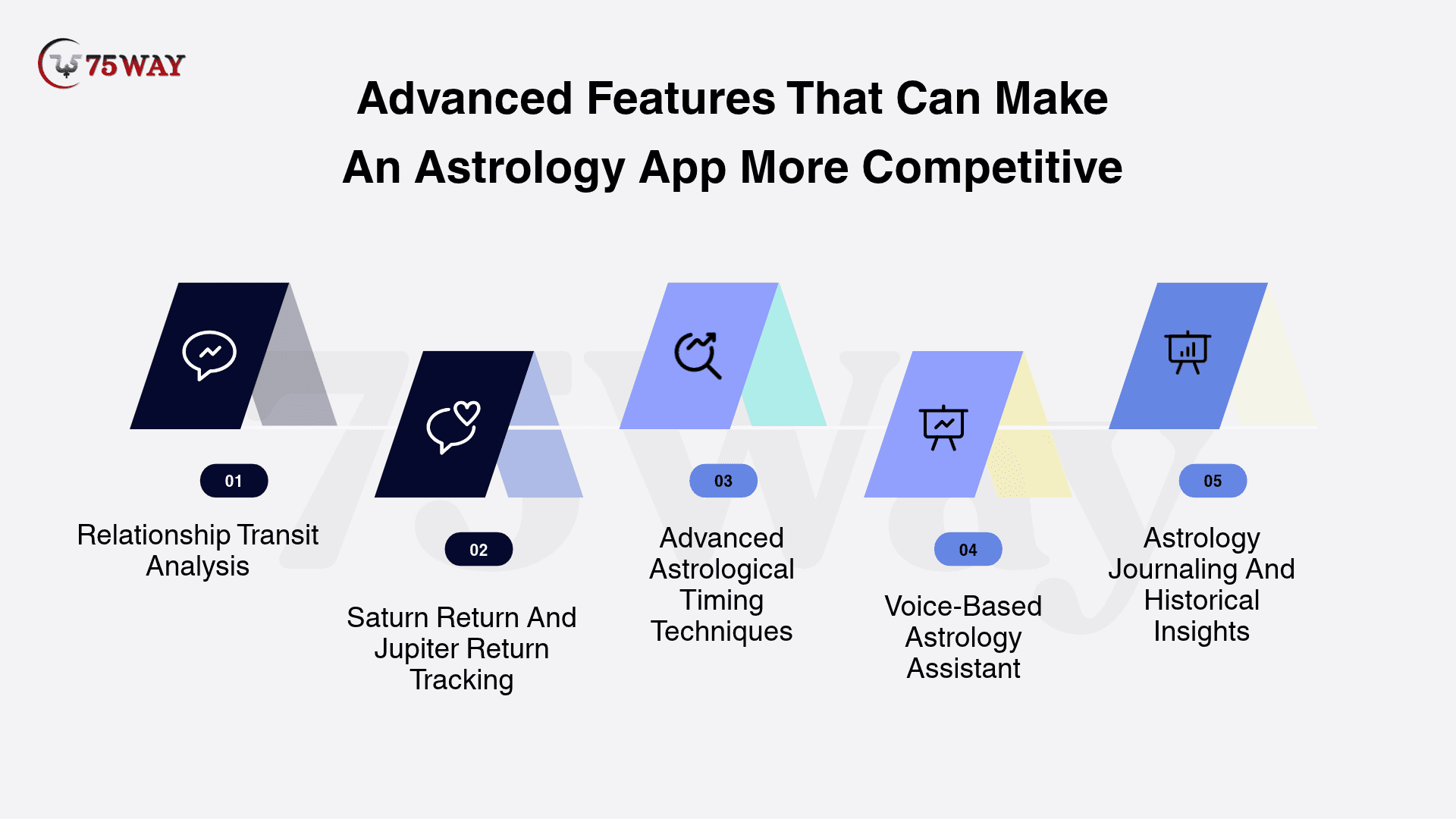
1. Relationship Transit Analysis
Relationship transit analysis combines personal transit information with compatibility-related chart calculations.
For example, an application can help users explore how current planetary movements relate to their natal Venus, Mars, seventh house, or a shared relationship chart.
Potential functionality includes:
- Transit-to-synastry comparisons
- Relationship chart activation
- Venus and Mars transit tracking
- Shared planetary event calendars
- Personalized relationship interpretations
From a design perspective, provide separate views for individual and relationship transits. Users should understand whose chart is being analyzed and which chart placements support the interpretation.
2. Saturn Return And Jupiter Return Tracking
Planetary returns are important features for users interested in long-term astrological cycles.
A Saturn return occurs when transiting Saturn returns to approximately its natal position, typically around every 29–30 years. Jupiter returns occur approximately every 12 years.
An application can provide:
- Return cycle timelines
- Upcoming exact dates
- Previous and upcoming return comparisons
- Relevant natal chart placements
- Personalized explanations
A timeline interface works particularly well because these events develop over extended periods rather than appearing as isolated daily updates.
3. Advanced Astrological Timing Techniques
Experienced users may expect more than conventional transit tracking.
Depending on the application's target audience and astrological tradition, developers can consider:
- Secondary progressions
- Solar return charts
- Solar arc directions
- Annual profections
- Lunar returns
- Planetary ingresses
- Eclipse contacts
These techniques require their own calculation rules and interpretation frameworks. They should not be treated as interchangeable with ordinary planetary transits.
4. Voice-Based Astrology Assistant
A voice-based assistant can make transit exploration more convenient, particularly for users who prefer conversational interactions.
For example, a user could ask, "What are my major transits this week?" The application could retrieve the relevant calculated data and generate a spoken explanation.
The experience may include voice input, spoken interpretations, follow-up questions, and text transcripts.
Developers should also provide a text alternative and allow users to control when microphone access is enabled.
5. Astrology Journaling And Historical Insights
Historical transit tracking allows users to revisit earlier planetary events and their saved interpretations.
A more advanced application can connect transit history with journal entries, helping users explore recurring astrological themes over time.
For example, users could filter their saved entries by planet, aspect, date range, or astrological house.
This creates a personal archive rather than another feed of automatically generated predictions.
Astrology App Design Examples: What Founders Can Learn From Existing Products
Studying existing astrology products can help founders understand different approaches to interface design, personalization, and content presentation.
However, copying a competitor's screens will not necessarily produce a better product. The more useful exercise is identifying what each product does well and where a new application could offer a better experience.
Here are four established products worth studying.
1. TimePassages
Its chart-focused approach offers a useful reference for businesses planning detailed transit functionality. Study how planetary information, chart interpretations, and advanced astrology features can be organized.
2. Co-Star
The distinctive minimal interface of Co-Star app provides an example of presenting astrology content through short, direct messages and recognizable visual elements.
3. CHANI
CHANI offers a reference for combining astrology interpretations with a cohesive visual identity and approachable editorial content.
4. The Pattern
Its text-led experience is useful to study when designing astrology products for users who prefer accessible explanations over complicated chart terminology.
What should founders take away from these examples?
A successful astrology product does not need to choose between advanced functionality and an approachable interface. The opportunity is to combine accurate calculations, clear visualizations, and accessible explanations in one connected experience.
AI-Based Vs. Traditional Astrology Transit Interpretations in Horoscope App Design
Traditional astrology interpretations rely on predefined rules and astrologer-written content, while AI-based interpretations offer more conversational and personalized explanations. Both approaches have distinct advantages for astrology app development.
The right choice depends on your target audience, product functionality, and personalization goals. Understanding their differences helps startups choose an interpretation model that supports their long-term product strategy. There are three common approaches, each offering different advantages.
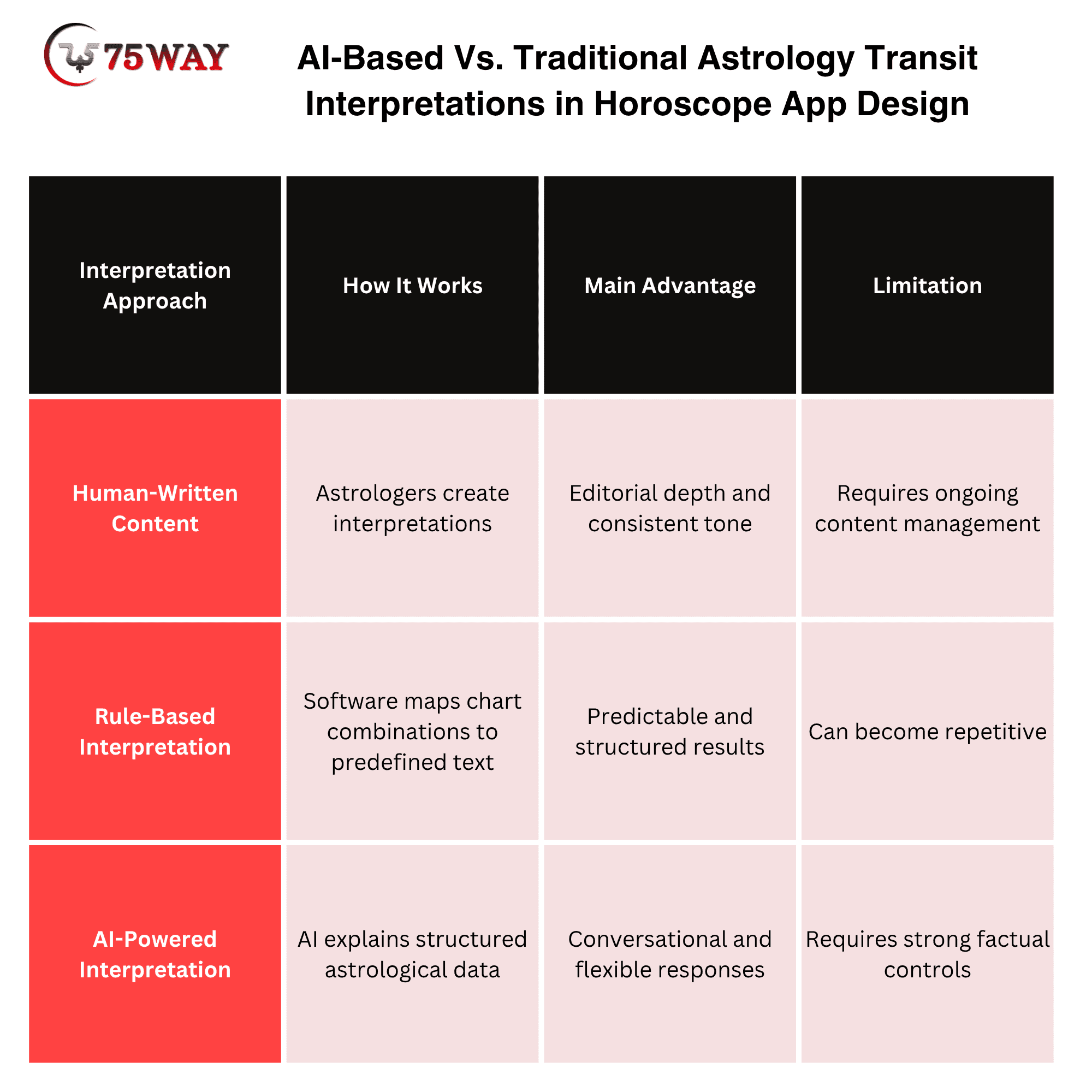
Which Approach Should A Startup Choose?
For an early-stage product, a hybrid model can be a practical starting point.
The calculation engine generates verified planetary positions and aspects. A curated interpretation library provides the underlying astrological meaning. An AI layer can then explain those interpretations in different reading styles.
For example, users could choose between:
- A short daily explanation.
- A detailed technical interpretation.
- A beginner-friendly reading.
- A conversational explanation.
The important consideration is consistency. Different users should not receive contradictory planetary positions or dates simply because they phrase their questions differently.
Developers should also test AI outputs for unsupported claims, repetitive interpretations, misleading certainty, and inappropriate advice.
How To Monetize Astrology App Transit Features
A transit feature can do more than keep users updated about planetary movements; it can also become a valuable source of app revenue. From paid transit reports and subscription plans to personalized consultations, several options allow businesses to monetize these experiences. Here's how you can build a revenue strategy around astrology app transit features.
1. Freemium Subscription Model
Offer basic daily transit summaries, selected planetary positions, and limited chart access for free.
Advanced features such as detailed transit reports, extended calendars, and additional chart calculations can be part of a paid subscription.
2. Premium Transit Reports
Allow users to purchase individual reports covering specific astrological events.
Examples include Saturn return reports, Jupiter return interpretations, and personalized monthly transit forecasts.
3. In-App Astrology Consultations
An application can connect users with qualified astrology practitioners for personalized consultations.
The business can earn revenue through booking fees or a clearly disclosed commission structure.
4. AI Astrology Subscription
A conversational astrology assistant can become a premium feature when it provides reliable, context-aware explanations and meaningful follow-up interactions.
Subscription limits, usage allowances, and the scope of AI functionality should be communicated clearly.
5. Specialized Chart Packages
Advanced users may be interested in additional chart types, relationship analysis, progressions, and other timing techniques.
These can be offered as separate purchases or included in higher subscription tiers.
A practical monetization recommendation: Start with a useful free transit experience, identify which advanced features users value, and introduce paid functionality based on actual usage and customer feedback.
Common Mistakes To Avoid When Designing Astrology App Transit Features
Astrology transit features need to balance detailed information with a simple, easy-to-follow interface. However, startups can overlook important design details, such as readable planetary charts, personalized interpretations, and clear transit timelines. Let's explore the mistakes that can affect usability and how to avoid them during astrology app development.
1. Prioritizing Visual Appearance Over Usability
An attractive dark interface with planetary symbols may look impressive, but it will not help users if the text is difficult to read.
Solution: Prioritize readable typography, accessible contrast, and clear navigation alongside visual identity.
2. Displaying Unexplained Astrological Terminology
Terms such as conjunction, orb, retrograde, and transit-to-natal can confuse beginners.
Solution: Provide short explanations through tooltips, expandable cards, and beginner-friendly descriptions.
3. Ignoring Birth Time And Time-Zone Accuracy
Incorrect birth information can affect Ascendant calculations, house placements, and personalized transit interpretations.
Solution: Use reliable location and historical time-zone data, and communicate uncertainty when the birth time is unknown.
4. Sending Too Many Notifications
Frequent notifications can make users disable alerts or uninstall the application.
Solution: Offer notification controls, quiet hours, and relevance-based event prioritization.
5. Depending Entirely On AI For Calculations
Generative AI can produce plausible but incorrect planetary positions or astrological dates.
Solution: Keep astronomical calculations within a deterministic calculation engine and use AI only for controlled interpretation and explanation.
6. Overcomplicating The First-Time Experience
Asking users to understand every chart setting during onboarding can discourage them from completing registration.
Solution: Introduce essential settings first and offer advanced configuration later.
7. Neglecting Data Privacy
Users may hesitate to provide exact birth details if the application does not explain how their information is handled.
Solution: Explain data usage, provide meaningful privacy controls, and implement secure data-handling practices.
Astrology App Development Roadmap: What Should Startups Build First?
Founders do not need to develop every advanced transit feature before releasing their first version.
A phased development roadmap helps businesses validate the product idea, control initial investment, and learn from actual users.
Phase 1: MVP
Build The Core Transit Experience
- Birth information onboarding
- Natal chart generation
- Current planetary positions
- Basic transit-to-natal comparisons
- Personalized transit dashboard
- Basic interpretations
Phase 2: Product Expansion
Improve Engagement And Personalization
- Transit calendar
- Retrograde tracking
- Planetary aspect visualization
- Custom notifications
- Saved transits and journaling
- Premium reports
Phase 3: Advanced Capabilities
Introduce Differentiating Features
- AI-powered interpretations
- Relationship transit analysis
- Advanced timing techniques
- Voice-based astrology assistant
- Personalized subscription experiences
Phase 4: Optimization
Improve Performance And Retention
- User behavior analysis
- Feature usability testing
- API optimization
- Personalization improvements
- Subscription conversion experiments
The roadmap should remain flexible. If users show greater interest in detailed transit charts than AI conversations, prioritize improving chart functionality before investing heavily in conversational features.
This approach reduces unnecessary development work and keeps the product aligned with user expectations.
How 75way Technologies Can Help Build An Astrology App
Turning an astrology app idea into a working product requires more than frontend development. Businesses need a team that understands product architecture, UI/UX design, backend engineering, third-party integrations, and mobile application development.
At 75way Technologies, the development process can be approached around the business objectives and functionality of the proposed astrology product.
Whether you are launching a new astrology startup or expanding an existing spiritual wellness platform, the development scope should reflect your target users and long-term product strategy.
The focus should be on building an application that combines reliable functionality with an experience users can understand and trust.
If you are planning an astrology application, start by defining its core transit experience, identifying your target audience, and selecting the features that will make your product commercially valuable.
Conclusion
The best astrology app transit features UI design approach goes beyond attractive planetary charts and daily horoscope cards. It brings together personalized transit calculations, interactive visualizations, understandable interpretations, and thoughtful user experiences.
For startups and business owners, the opportunity lies in making complex astrological information accessible without sacrificing the depth experienced users expect. Features such as transit calendars, natal chart comparisons, planetary aspect tracking, and AI-powered explanations can create a more complete product experience.
However, successful development starts with the right priorities. Build a reliable calculation engine, design around actual user needs, protect personal birth information, and introduce advanced functionality as the product grows.
If you are planning to build your own astrology application, you can partner with a trusted AI astrology app development company to turn your product idea into a scalable, user-focused mobile experience.
Frequently Asked Questions (FAQs)
What Makes Good Astrology App UI/UX Design?
Good astrology app UI/UX design combines readable typography, clear navigation, interactive chart visualizations, accessible color contrast, and understandable explanations. Users should be able to explore complex astrological information without feeling overwhelmed.
How Can AI Improve Astrology App Transit Features?
AI can simplify astrological terminology, generate conversational interpretations, answer follow-up questions, and personalize reading formats. It should use verified planetary calculations and structured chart information rather than independently generating astronomical data.
Which APIs Are Used For Astrology App Development?
Astrology applications can use ephemeris libraries, astrology calculation APIs, geolocation services, time-zone databases, AI APIs, and notification services. Selection depends on the application's calculation requirements, supported astrological systems, and technical architecture.
How Important Is Birth Time Accuracy For Transit Calculations?
Birth time accuracy is particularly important for calculating the Ascendant, house cusps, and time-sensitive natal placements. Applications should use reliable historical time-zone information and communicate limitations when users do not know their exact birth time.
Can Startups Launch An Astrology App With Basic Transit Features?
Yes. Startups can launch an MVP with birth chart generation, planetary tracking, basic transit comparisons, personalized interpretations, and a simple dashboard. Advanced functionality can be introduced after evaluating user feedback and product adoption.
What Is The Difference Between Natal Charts And Transit Charts?
A natal chart represents planetary positions at a person's birth, while a transit chart shows planetary positions at a selected later time. Comparing them helps users explore current planetary movements in relation to their birth chart.