AI Summary
A YouTube-like app combines video streaming, creator tools, discovery, engagement, and monetization. This guide explains how to build a YouTube-like app with the right features, scalable video infrastructure, AI capabilities, monetization strategy, cost, and development timeline.
Key Takeaways
- Build a YouTube-like app around a clear audience and business model.
- Plan video infrastructure, streaming, storage, search, and scalability from inception.
- Use AI for recommendations, search, moderation, personalization, and creator productivity.
- A YouTube-like app can cost $30,000–$400,000+ depending on scope.
- Global video streaming market may reach $416.8 billion by 2030.
Several startups and businesses launch a video platform expecting the first 100,000 users to be a milestone worth celebrating, only to discover that their infrastructure cannot handle the traffic. These are business and product problems long before they become coding problems.
Now imagine the opposite: what if viewers spent 30 minutes on your platform instead of opening YouTube? That question changes the entire video streaming app development conversation from “Can we build an app like YouTube?” to “What would make users choose ours?”
The answer could be a focused audience, exclusive content, creator-first monetization, stronger community features, or a viewing experience built around a specific market. Once that positioning is clear, decisions around YT clone development, AI recommendations, search, moderation, subscriptions, advertising, and creator tools become much more purposeful.
So, how do you build an app like YouTube, and what should you expect to invest in YouTube clone development? This guide covers the key features, technology requirements, development process, cost factors, and monetization opportunities you need to consider before turning the idea into a scalable video platform.
What Is A YouTube Clone?
A YouTube clone is a video platform that allows users to discover, watch, upload, organize, share, and interact with video content. Depending on the business model of YouTube, it can also allow creators to build channels, grow audiences, monetize content, host live streams, and analyze their performance. A typical YouTube-like app development solution contains four major experiences:
- Viewer experience: Discover and consume video content.
- Creator experience: Upload, manage, publish, and monetize content.
- Administration experience: Manage users, content, reports, payments, and platform operations.
- Business experience: Manage monetization, advertising, analytics, partnerships, and overall platform growth.
That distinction matters because each user type needs different functionality. A platform designed for professional education, for example, may need structured courses and subscriptions rather than an enormous public video feed.
A creator platform may prioritize analytics and monetization. An enterprise video platform may require private access, permissions, and integrations. So, before asking how to clone YouTube, ask a more important question:
What specific video problem is your platform going to solve?
Why Build Video Streaming App Like YouTube?
A YouTube-like platform can create a direct channel to viewers, creators, and advertisers without relying entirely on an existing marketplace. The real opportunity depends on the audience and business model you choose to serve. The key reasons worth considering are explained in detail below.
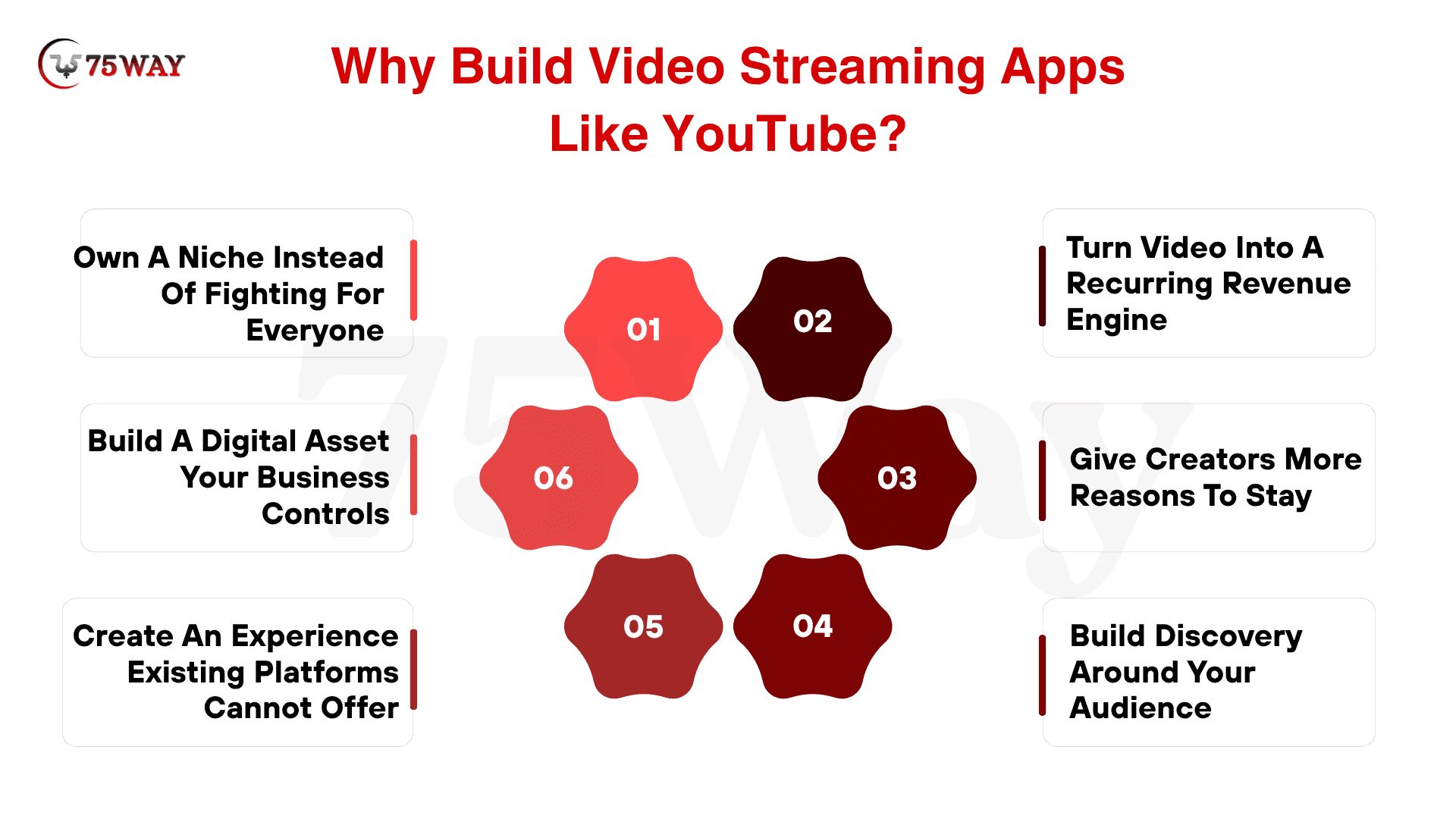
- Own A Niche Instead of Fighting For Everyone
A focused video app similar to YouTube can serve a clearly defined audience better than a general-purpose service. Whether you target professional education, fitness, sports, enterprise training, regional entertainment, or paid expert content, specialization gives your product a sharper identity.
Instead of competing for every viewer on the internet, you can build around a specific content need, community, or professional use case where relevance matters more than sheer platform size.
- Turn Video Into A Recurring Revenue Engine
Video can support several business models beyond advertising, including subscriptions, paid content, memberships, sponsorships, transactions, and creator revenue sharing.
That flexibility gives founders room to design monetization around their audience. A premium education platform might charge subscriptions, while a live-event platform could use pay-per-view, and a creator community could combine memberships with transactions.
- Give Creators More Reasons To Stay
Creators are not merely content suppliers; they can become the growth engine of a video platform. A differentiated platform can offer creator-focused analytics, monetization tools, AI-assisted publishing, audience insights, memberships, or specialized discovery.
YouTube itself continues investing heavily in creator monetization and brand partnerships, underscoring the commercial importance of the creator-platform relationship.
- Build Discovery Around Your Audience
A general platform has to serve countless interests. Your platform can make discovery much more specific. AI-powered recommendations, semantic search, personalized feeds, topic-based discovery, and voice search can help users find content that matches their intent instead of simply showing what is broadly popular.
For a niche platform, this can become a competitive advantage: better relevance can matter more than having the largest content library.
- Create An Experience Existing Platforms Cannot Offer
The strongest reason to build an app like YouTube is not to copy its interface; it is to create something YouTube was not designed specifically to deliver.
Imagine an education platform combining videos with assessments and certifications, a sports platform connecting live streams with community interaction, or an enterprise platform combining private video with employee analytics. Your competitive advantage comes from the experience surrounding the video.
- Build A Digital Asset Your Business Controls
Launching your own video platform gives you greater control over the product experience, customer journey, data architecture, monetization rules, and community.
That does not mean abandoning third-party platforms; they can remain valuable acquisition channels. But your own application can become the destination where your audience, creators, content, and revenue model come together.
Market Size & Revenue Insights in USA To Develop Clone of YouTube
Millions of people already spend hours watching online video, but capturing even a focused slice of that attention can create a valuable business opportunity. The challenge is turning viewers into revenue without damaging the experience that keeps them watching. The market data and monetization opportunities below reveal what that equation can look like.
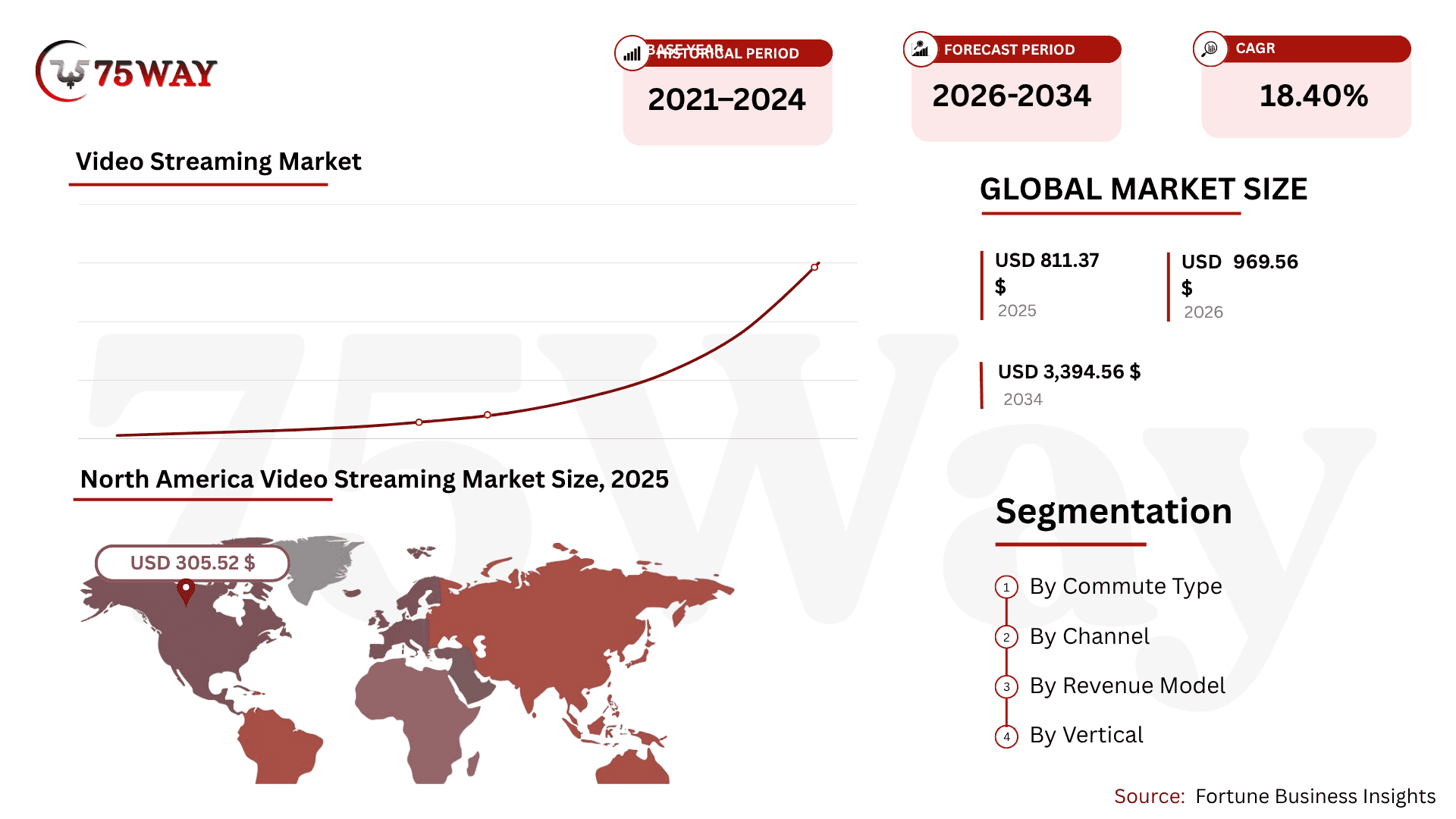
- The global video streaming market is projected to grow from $969.56 billion in 2026 to $3,394.56 billion by 2034, at a CAGR of 17.0%.
- North America dominated the global video streaming market with a 37.70% share.
- YouTube has more than 2.7 billion monthly active users worldwide.
- Approximately 14,000 videos are uploaded every minute, adding up to over 20 million videos daily.
- The YouTube Partner Program has paid creators more than $100 billion over the past four years.
- YouTube generated approximately $10.26 billion in global advertising revenue in Q3 2025.
- Global SVoD revenue is valued to reach $98.37 billion in 2026, with a projected 5.89% CAGR through 2030.
- The global SVoD market is forecast to reach $123.68 billion by 2030.
- The United States is expected to generate the highest SVoD revenue, reaching $35.21 billion in 2026.
- The number of global SVoD users is projected to reach 1.8 billion by 2030.
- Worldwide SVoD ARPU is expected to reach approximately $63.59 in 2026.
- OTT platforms accounted for 56.20% of revenue in 2025, while IPTV is projected to grow at a 13.1% CAGR from 2026 to 2031.
- Consumer services generated 75.75% of revenue, while enterprise streaming is forecast to expand at a 12.5% CAGR.
What Should You Decide Before Building YouTube Duplicate?
Before development begins, a YouTube duplicate app needs more than a feature list. Your audience, content structure, revenue strategy, differentiation, and launch market will shape the product architecture, user experience, operating costs, and growth path, so these decisions should be settled before development starts.
1. Define Who The Platform Is Really For
A platform built for casual viewers will look very different from one designed for educators, creators, businesses, sports communities, or professional audiences.
Identify who watches, who creates, and who pays. This helps determine the content experience, creator tools, discovery system, access controls, and monetization features your product actually needs.
2. Decide Where Your Content Comes From
Your content model determines how the platform grows.
- Will creators upload their own videos?
- Will businesses publish content?
- Will your company license or produce videos?
- Will content be free, private, subscription-based, or pay-per-view?
The answer affects storage requirements, moderation, publishing workflows, creator management, and even your acquisition strategy.
3. Choose How The Platform Will Make Money
Monetization should influence product planning from the beginning rather than becoming an afterthought.
Advertising requires audience scale and ad inventory. Subscriptions require recurring billing and access management. Creator memberships, paid videos, sponsorships, and transactions introduce their own revenue and payout workflows.
Choose the model that fits how your audience receives value, not simply the model that YouTube uses.
4. Identify Your Reason To Exist
This is perhaps the most important decision. If your answer is simply “We want YouTube-like apps with a different interface,” the product has little defensible value.
Instead, identify what your platform can do better: serve a neglected niche, offer better creator economics, provide specialized discovery, combine video with another workflow, or create a community around a specific interest. Your differentiation should become visible in the product roadmap.
5. Decide Where You Will Launch First
Your first market affects more than marketing. A US-first launch, for example, can influence payment providers, localization, infrastructure planning, privacy considerations, customer acquisition, support, and content operations.
A global launch introduces additional complexity across currencies, languages, regions, and regulations. Start with a market you can serve exceptionally well rather than trying to support every geography on day one.
YouTube-Like App Vs YouTube Clone: Key Difference
These terms are often used interchangeably, but there is an important difference. A YouTube clone generally refers to an application that reproduces the core functionality of YouTube, such as video uploading, channels, subscriptions, search, comments, playlists, and streaming.
On the other hand, YouTube-like app can use those concepts while creating a completely different product experience, audience, monetization model, and value proposition. For a business, the second approach is usually more strategic. Instead of asking:
“How can we copy YouTube?”
Ask:
“Which YouTube duplicate capabilities can help us solve a problem for our target audience?”
That shift can influence everything from your MVP to your technology architecture.
How To Build A YouTube Clone: A Comprehensive Process
A YouTube clone needs a clear reason for users to choose it over established platforms. That reason should guide your features, technology, budget, and development priorities. From the first product decision to launch, here’s how each stage comes together.
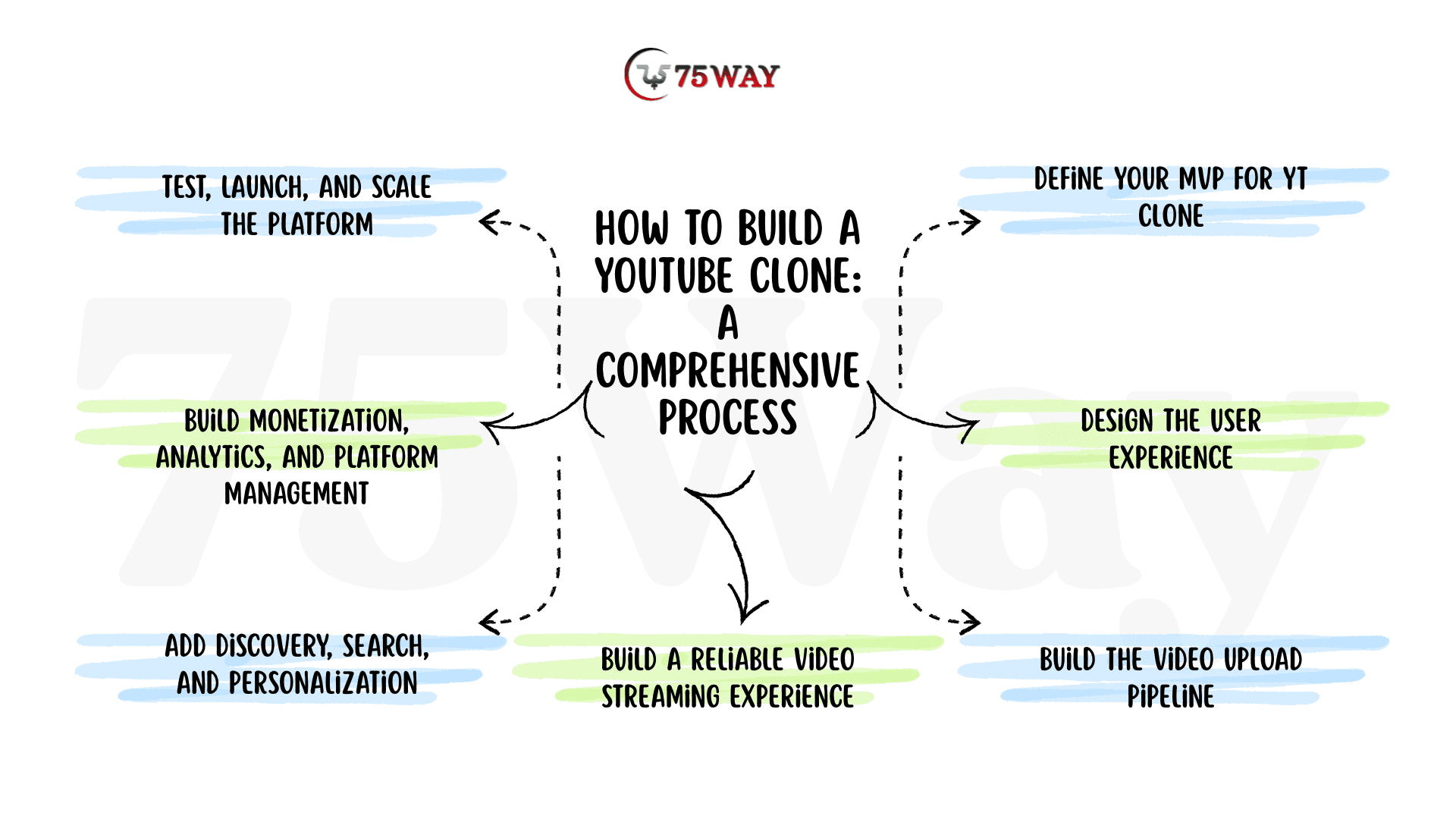
Step 1: Validate Your Video Platform Business Idea
A strong YouTube-like app starts with the problem, audience, and opportunity, rather than a long feature list. Before development begins, a clear understanding of why users and creators would choose your platform over established video services is essential.
- Define Your Primary Audience: Your primary audience could include students, sports fans, professionals, creators, businesses, or niche communities. This choice shapes the content, UX, pricing, monetization, and user-acquisition strategy.
- Identify Content Gap: Existing platforms may leave opportunities around underserved content, weak discovery, limited creator support, or specialized viewing experiences. Your product should address a gap that matters to a clearly defined audience.
- Understand Your Creators: Your content providers need a compelling reason to publish regularly. Better monetization, stronger analytics, AI tools, specialized audiences, or direct audience relationships can become meaningful incentives.
- Study Competitors: Competitor research should cover more than features and interface design. Their audience, content strategy, monetization, creator experience, discovery system, and weaknesses can reveal opportunities for differentiation.
- Validate Before Development: Before investing in advanced AI recommendations, live streaming, or complex monetization, test five basic assumptions:
Will people upload?Will people watch?Will they come back?Will creators keep publishing?Will someone pay?
The answers should determine what you build next.
Step 2: Define Your MVP For YT Clone Development
Your MVP should contain enough functionality to prove the core business model without attempting to recreate the entire YouTube ecosystem. The right scope depends on your audience, content model, and revenue strategy, so feature selection should follow the product goal rather than a standard checklist.
- Build Around The Core Experience: A basic YouTube-like MVP needs a smooth journey from account creation to content discovery, video watching, engagement, and creator interaction. The creator side should support channel creation, video uploading, processing, publishing, and basic performance tracking.
For example, an education platform may need structured lessons, subscriptions, and learner progress, while a creator platform may place greater importance on publishing tools, audience analytics, and channel management.
- Prioritize What Proves Demand: Every MVP feature should support an important business assumption. Search should help users discover content, subscriptions should encourage repeat viewing, and analytics should show whether creators are attracting and retaining audiences.
Features with little connection to the initial business objective can wait until real user behavior provides a reason to build them.
- Introduce Advanced Features Later: Live streaming, advanced recommendation models, AI video search, advertising technology, creator monetization, voice search, and real-time analytics can become valuable in later development phases.
The objective is not simply to launch with fewer features to reduce costs. The objective is to make every early feature contribute to validating the product, audience, or revenue model.
Step 3: Design The User Experience
A video platform succeeds partly on how quickly users move from opening the application to finding something worth watching. A strong viewer journey can follow:
Open → Discover → Watch → Engage → Follow → Return
Every screen should support that journey. Your home feed should answer: “What should I watch now?” For instance,
- Search should answer: “Can I find what I came here for?”
- Recommendations should answer: “What should I watch next?”
- The creator dashboard should answer: “How is my content performing?”
The experience should therefore be designed around user intent rather than simply reproducing YouTube's interface.
Step 4: Build The Video Upload Pipeline
This is one of the biggest differences between a standard application and a video platform. When a creator uploads a video, the system may need to handle the complete journey:
Upload → Validate → Store → Transcode → Generate Thumbnails → Extract Metadata → Moderate → Publish → Deliver Through CDN → Track Analytics
- Video Upload: The application receives the video and validates its format, size, permissions, and upload status. Large files may also require resumable uploads so an interrupted connection does not force the creator to start again.
- Storage: The original video is stored in cloud object storage, while processed versions can be stored separately according to delivery and retention requirements.
- Transcoding: The source video can be converted into multiple resolutions and streaming formats so viewers can receive an appropriate version based on their device and network conditions.
- Thumbnail Generation: The system generates preview images for home feeds, search results, recommendations, playlists, and creator pages.
- Metadata Processing: Store title, description, duration, creator, category, tags, language, upload date, visibility, and content status as structured metadata.
- Content Moderation: Automated checks can identify potentially problematic content and route uncertain cases to a human moderation workflow.
- CDN Distribution: Processed video can be delivered through a CDN to reduce latency and improve playback for users in different locations.
A reliable pipeline matters because a failed upload, delayed processing job, or unavailable video directly affects the creator and viewer experience.
Step 5: Build A Reliable Video Streaming Experience
Streaming is more complicated than storing an MP4 file and placing a play button on the screen. Your users may watch from phones, tablets, desktops, browsers, smart TVs, or connected devices, often with very different network conditions.
The platform therefore needs a delivery strategy that can adapt to changing bandwidth and device capabilities. Depending on your requirements, this can involve:
- Adaptive bitrate streaming
- Multiple video resolutions
- CDN delivery
- Caching
- Playback analytics
- Content protection
- Video quality controls
- Resume playback
- Captions and subtitles
The objective is straightforward: get the video playing quickly and keep the experience stable without unnecessary buffering.
Step 6: Add Discovery, Search, And Personalization
Once videos are available, the next challenge is helping users find the right content. A growing platform can quickly accumulate thousands or millions of videos, making effective discovery essential for both viewer engagement and creator visibility.
- Build A Strong Discovery Layer: Keyword search can handle basic queries, while categories, filters, trending content, subscriptions, watch history, and related videos can make discovery more useful.
The experience should help users move from “I know what I want” to “I found something better than I expected.”
- Start With Useful Data: Every interaction can teach the platform something. Searches, clicks, watch time, completion, skips, likes, shares, and subscriptions can reveal viewing preferences and help improve content ranking.
Over time, these signals can make recommendations increasingly relevant instead of showing the same popular videos to everyone.
- Introduce AI As The Platform Grows: AI can take discovery beyond traditional keyword matching through semantic search, personalized ranking, content similarity, natural-language queries, and conversational video discovery.
The strongest recommendation system is not necessarily the most complex one; it is the one that consistently helps users find content they value.
Step 7: Build Monetization, Analytics, And Platform Management
A YouTube-like application should be designed around its revenue model rather than adding monetization after launch. Depending on your business, you may use:
- Advertising
- Subscriptions
- Paid videos
- Creator memberships
- Sponsorships
- Transaction fees
- Premium content
Each model creates different technical requirements for payments, access control, revenue tracking, creator payouts, and reporting. At the same time, your platform needs analytics to understand whether the business is actually working.
Track The Metrics That Matter
- For viewers, monitor watch time, completion rate, retention, engagement, and return visits.
- For creators, monitor uploads, views, subscriber growth, engagement, and revenue.
- For the business, monitor conversion, churn, customer acquisition cost, revenue per user, and lifetime value.
- For the platform, monitor video processing time, playback failures, buffering, CDN performance, API response time, and infrastructure costs.
These measurements help determine which features deserve further investment.
Step 8: Test, Launch, And Scale The Platform
A successful launch depends on more than confirming that every button works. A YouTube-like platform has to handle different devices, network conditions, video sizes, traffic levels, and real viewing behavior without compromising the experience.
- Test Complete Experience: Functional testing should confirm that core workflows work as intended, while device and browser testing ensures the experience remains reliable across platforms. Video playback, uploads, processing, APIs, payments, security, moderation, and analytics also need real-world testing before launch.
Performance testing deserves particular attention because video platforms can experience sudden traffic spikes. Load testing can reveal whether your infrastructure can handle concurrent viewers, large uploads, increasing API requests, and heavy database activity before those conditions affect customers.
- Launch With A Controlled Audience: A limited launch with selected creators and viewers can reveal problems that internal testing rarely catches. Early users provide valuable evidence about what they watch, where they stop, what they search for, which creators publish regularly, and what brings them back.
Those behavioral patterns can guide product improvements before you spend heavily on customer acquisition.
- Scale Based On Real Demand: Growth can quickly increase pressure on video storage, transcoding, CDN delivery, databases, search, recommendations, and analytics. Each area should be optimized according to actual usage rather than assumptions about future traffic.
A sudden increase in video uploads, for instance, may require stronger transcoding capacity, while growing watch time may place greater pressure on CDN performance.
- Turn Launch Data Into Product Decisions: Real usage should determine the next development priorities. A feature with high adoption may deserve deeper investment, while an expensive capability with little usage may need to be redesigned or postponed.
The goal is not to build the largest platform from day one. It is to build a reliable product, learn from real users, and scale the technology as demand proves where investment matters most.
Ultimately, a successful YouTube-like app is more than a YouTube clone. It is a focused video business built around a validated audience, differentiated experience, sustainable monetization, reliable technology, and a roadmap shaped by real user behavior.
Key Features Required For YouTube Clone App Development
A YouTube-like app needs features that give viewers a reason to return and creators a reason to keep publishing. A complete YouTube-like platform can be structured around four core modules: User/Viewer, Creator, Admin, and Super Admin. The right feature set for each module also supports monetization and platform growth. The essential capabilities are covered below.
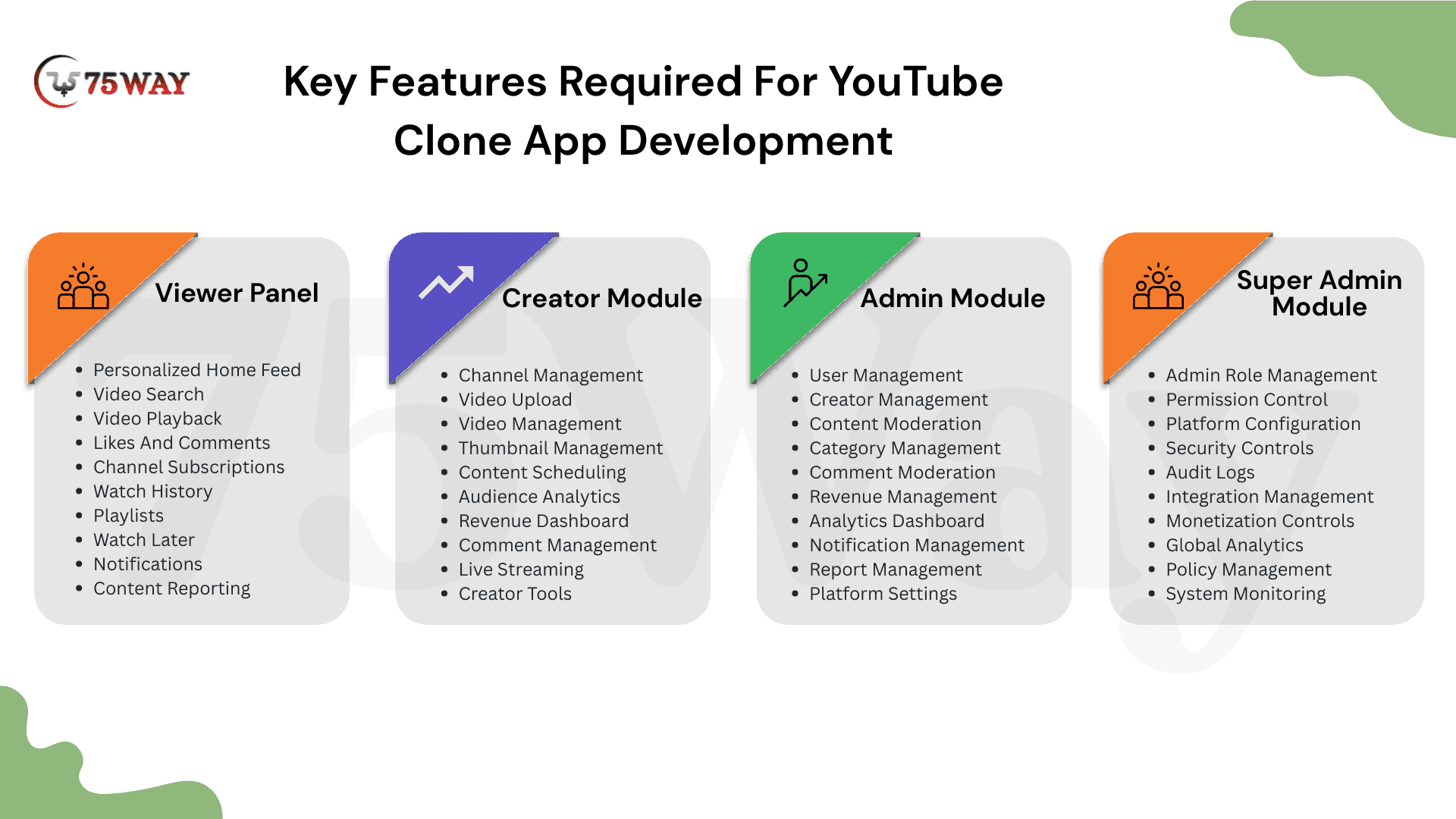
1. Viewer Panel
The viewer module shapes the everyday experience of people coming to watch and discover videos. Its features should make content easy to find and enjoyable to consume. A smooth experience also gives users reasons to return.
- Personalized Home Feed: The home screen shows videos based on interests, viewing activity, subscriptions, and popular content. Relevant recommendations can make every visit feel more personal.
- Video Search: Search helps users find videos, creators, topics, and channels through relevant keywords. Filters and sorting options can make larger content libraries easier to explore.
- Video Playback: The video player supports smooth streaming, quality selection, captions, playback speed, and fullscreen viewing. Reliable playback keeps attention focused on the content rather than technical issues.
- Likes And Comments: Viewers can react to videos and share their opinions through comments. These interactions create community activity while giving creators useful feedback about audience preferences.
- Channel Subscriptions: Users can follow channels that match their interests and receive updates about new uploads. Subscriptions also provide valuable signals for improving personalized content recommendations.
- Watch History: Previously watched videos remain available through the viewer's history. This makes unfinished or previously enjoyed content easier to find while supporting more relevant recommendations.
- Playlists: Users can collect videos into playlists around topics, interests, or specific occasions. Organized playlists make saved content easier to revisit and can encourage longer viewing sessions.
- Watch Later: Interesting videos can be saved for another time without interrupting the current browsing session. A personal queue gives viewers an easy way to manage content they discover.
- Notifications: Alerts can inform users about new uploads, creator activity, subscriptions, and important platform updates. Relevant notifications can encourage return visits without becoming an unnecessary distraction.
- Content Reporting: Viewers can report videos or comments that appear inappropriate or violate platform rules. These reports give moderation teams useful information for reviewing potentially problematic content.
2. Creator Module
The Creator Module gives publishers a dedicated space to build channels and manage their content. Its features should simplify publishing while revealing useful audience insights. A strong creator experience can support long-term platform growth.
- Channel Management: Creators can customize their channels with branding, descriptions, featured content, and other relevant details. A clear channel identity helps viewers understand what the creator offers.
- Video Upload: Upload videos directly through their dashboard and track processing progress. Resumable uploads can make large-file publishing more reliable when network connections become unstable.
- Video Management: Published videos can be edited, organized, scheduled, unpublished, or removed from the creator dashboard. Centralized controls make everyday content management much simpler.
- Thumbnail Management: Creators can upload or select thumbnails that represent their videos across discovery areas. Strong visual presentation can influence whether viewers decide to open a video.
- Content Scheduling: Videos can be prepared and scheduled for publication at specific dates and times. This capability helps creators maintain predictable publishing routines without requiring manual releases.
- Audience Analytics: Performance data can show views, watch time, retention, engagement, and subscriber activity. These insights help creators understand which topics and formats resonate with their audiences.
- Revenue Dashboard: Eligible creators can view earnings generated through supported monetization methods. Clear revenue reporting helps creators understand their financial performance and plan future content strategies.
- Comment Management: Creators can review, respond to, filter, and manage comments from one workspace. Better comment controls make it easier to maintain constructive conversations around their content.
- Live Streaming: Creators can broadcast events, classes, discussions, or entertainment directly to their audiences. Real-time interaction can create stronger community engagement around important moments and events.
- Creator Tools: Publishing tools can assist with captions, descriptions, translations, clips, and other repetitive content tasks. AI-powered capabilities can further reduce production effort for active creators.
3. Admin Module
The Admin Module gives the internal team control over everyday platform operations and content activity. Its features support moderation, user management, analytics, and revenue oversight. Centralized administration becomes increasingly important as usage grows.
- User Management: Review accounts, manage access, and investigate account-related issues. Centralized controls help teams maintain a healthier platform as the user base expands.
- Creator Management: Admins can review creator accounts, channels, publishing activity, and monetization eligibility. These controls help maintain creator quality while supporting platform policies.
- Content Moderation: Reported or flagged videos can be reviewed and handled through dedicated moderation workflows. Consistent review processes help maintain content standards across a growing library.
- Category Management: Administrators can create, organize, update, and remove content categories from the platform. A clear category structure makes discovery easier for viewers and creators alike.
- Comment Moderation: Admin teams can review reported comments and remove content that violates platform policies. Effective moderation helps reduce spam, abuse, and inappropriate conversations.
- Revenue Management: Platform teams can monitor subscriptions, advertising revenue, transactions, and creator earnings from one place. Financial visibility supports accurate reporting and better commercial decision-making.
- Analytics Dashboard: Administrators can track user growth, viewing activity, engagement, retention, content performance, and revenue. These insights help teams identify trends and make informed product decisions.
- Notification Management: Platform notifications, announcements, and important user messages can be created and managed centrally. Controlled communication helps keep users informed without overwhelming their notification feeds.
- Report Management: User-submitted reports can be reviewed, prioritized, and tracked until resolution. A centralized reporting workflow helps moderation teams avoid missed or unresolved cases.
- Platform Settings: Core application settings can be managed through the administrative environment. These controls may cover content rules, access policies, monetization preferences, integrations, and operational configurations.
4. Super Admin Module (for Platform Owner)
The Super Admin Module sits above routine administration and handles sensitive platform-wide controls. Its purpose is stronger governance rather than everyday content management. This separation can improve security, accountability, and operational control.
- Admin Role Management: Super admins can create administrator roles based on specific responsibilities and access requirements. Clear role structures prevent routine teams from receiving unnecessary platform privileges.
- Permission Control: Sensitive areas can receive individual access permissions based on administrator responsibilities. Granular controls reduce exposure to financial, security, and configuration information.
- Platform Configuration: High-level application settings can be controlled from the Super Admin environment. Centralized configuration makes important operational and business changes easier to oversee.
- Security Controls: Security-related settings can be monitored and adjusted at the highest administrative level. Strong controls help protect accounts, integrations, sensitive information, and critical platform operations.
- Audit Logs: Important administrative actions can be recorded with timestamps and responsible accounts. A clear activity trail helps businesses investigate changes and maintain stronger operational accountability.
- Integration Management: Connected services such as payments, cloud infrastructure, analytics, and communication tools can be monitored centrally. This oversight makes third-party service management easier across the platform.
- Monetization Controls: High-level settings for subscriptions, advertising, memberships, and other revenue models can be managed securely. Restricted access helps prevent unauthorized changes to important financial configurations.
- Global Analytics: Super admins can view broader information across users, creators, content, engagement, and revenue. This wider perspective supports strategic decisions beyond individual administrative tasks.
- Policy Management: Platform-wide rules for content, creators, users, access, and monetization can be maintained centrally. Clear policies give operational teams a consistent framework for handling platform activity.
- System Monitoring: Platform health, service performance, errors, and infrastructure activity can be monitored from one place. Early visibility helps technical teams address operational problems before they affect users.
Advanced Features To Develop YouTube Clone Script
If your product simply copies YouTube, it will be difficult to establish a strong competitive position. Instead, use technology to create a differentiated experience.
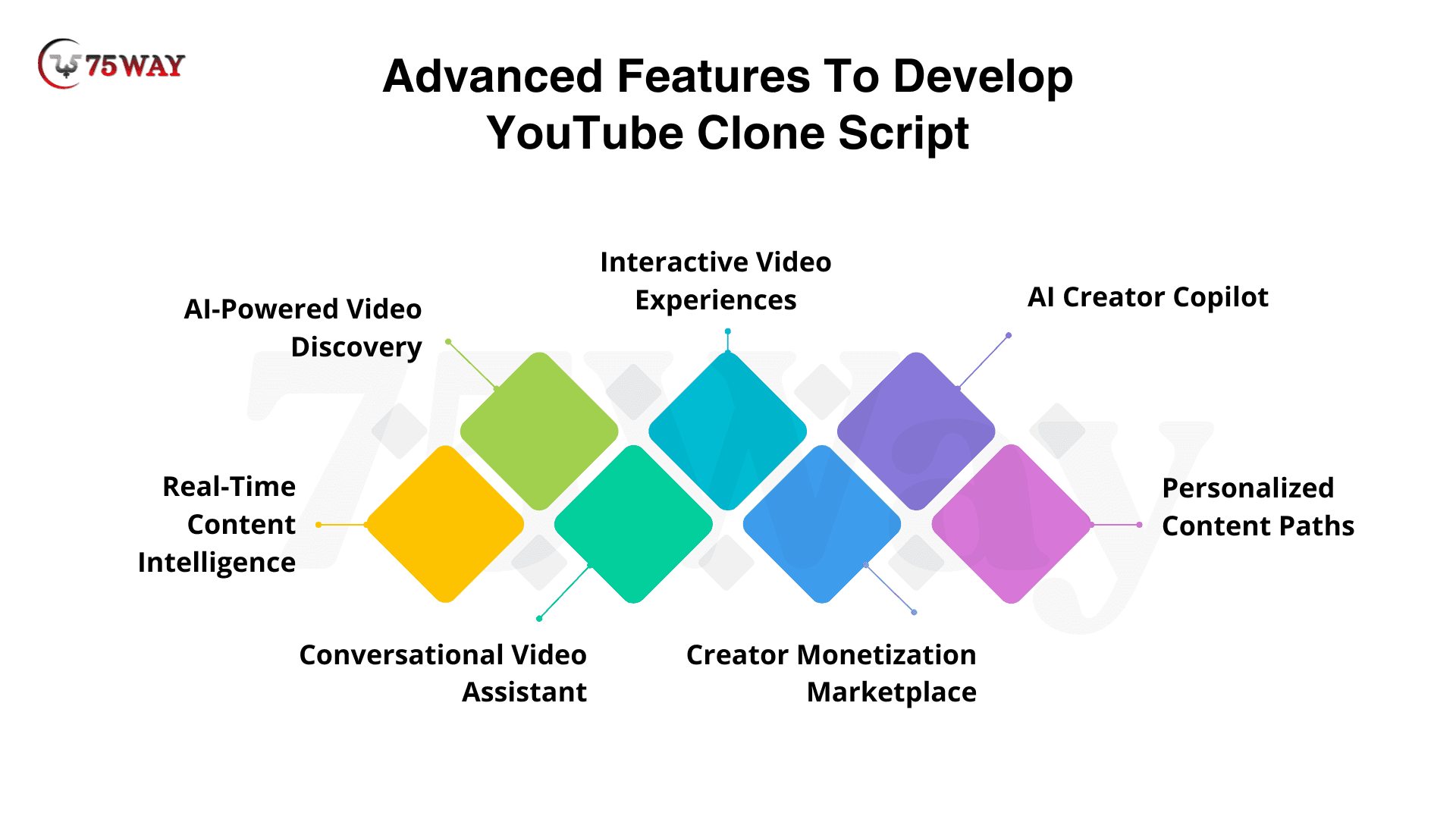
- AI-Powered Video Discovery: Natural-language search can help users describe what they want instead of relying on exact keywords. AI can understand intent, topics, and context to surface more relevant videos.
- Interactive Video Experiences: Interactive elements can turn passive watching into active participation through polls, quizzes, clickable moments, product links, or audience choices. This approach works particularly well for education, commerce, training, and live content.
- AI Creator Copilot: An AI assistant can support creators throughout the publishing journey, from generating titles and descriptions to creating captions, chapters, translations, and short clips. Less repetitive work gives creators more time to focus on original content.
- Personalized Content Paths: Instead of showing viewers another endless feed, the platform can create personalized journeys around their interests, goals, or viewing habits. A learner, for example, could automatically receive a logical sequence of lessons rather than unrelated recommendations.
- Creator Monetization Marketplace: A built-in marketplace can connect creators with brands looking for relevant audiences and authentic video partnerships. Matching can consider audience interests, engagement, content categories, and campaign requirements rather than relying only on follower counts.
- Conversational Video Assistant: A conversational AI layer can let viewers interact with the video library using natural language. Users could ask for summaries, find specific moments, compare related content, or discover videos without navigating multiple screens.
- Real-Time Content Intelligence:Advanced analytics can move beyond basic views and likes to reveal why content succeeds or loses attention. Creators can receive insights around audience retention, engagement patterns, content trends, and emerging viewer interests.
YouTube-Like App Architecture: How YT Clone Works?
A YouTube-like platform needs an architecture that can handle user accounts, content management, high-volume video processing, search, recommendations, payments, and large-scale video delivery. The architecture should also leave room for individual services to scale as usage increases.
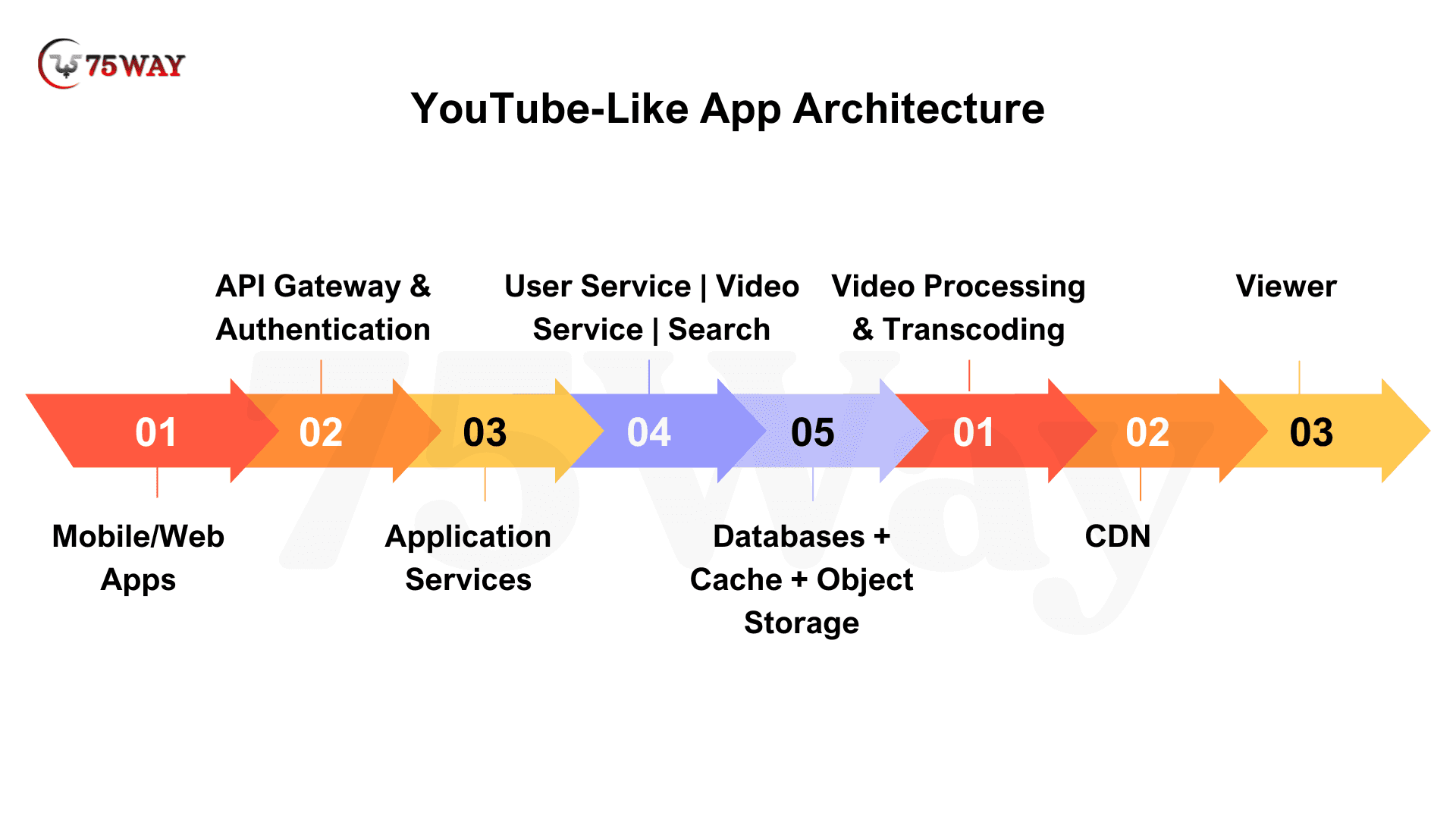
1. Mobile & Web Applications: The viewer and creator interfaces connect users with the platform through mobile applications and web browsers. These interfaces handle activities such as discovery, playback, uploading, engagement, and account management.
2. API Gateway & Authentication: The API layer manages communication between applications and backend services, while authentication controls access to user accounts and protected functionality.
3. Core Application Services: Separate services handle major platform operations such as users, videos, search, recommendations, payments, and notifications. This separation makes individual components easier to maintain and scale.
4. Data Layer: Databases store structured information such as users, channels, video metadata, subscriptions, and transactions. Caching can reduce repeated database requests, while object storage handles large video assets.
5. Video Processing Pipeline: Uploaded videos move through validation, storage, transcoding, thumbnail generation, metadata processing, and moderation before becoming ready for playback.
6. CDN Layer: Processed videos are distributed through a CDN so viewers can access content from infrastructure closer to their location. This layer is particularly important when the platform serves a large or geographically distributed audience.
7. Analytics & Monitoring: Usage data and system metrics provide visibility into viewer behavior, content performance, infrastructure health, and business performance. These insights can guide product improvements and scaling decisions.
Technology Stack Used To Develop YouTube-Like Apps
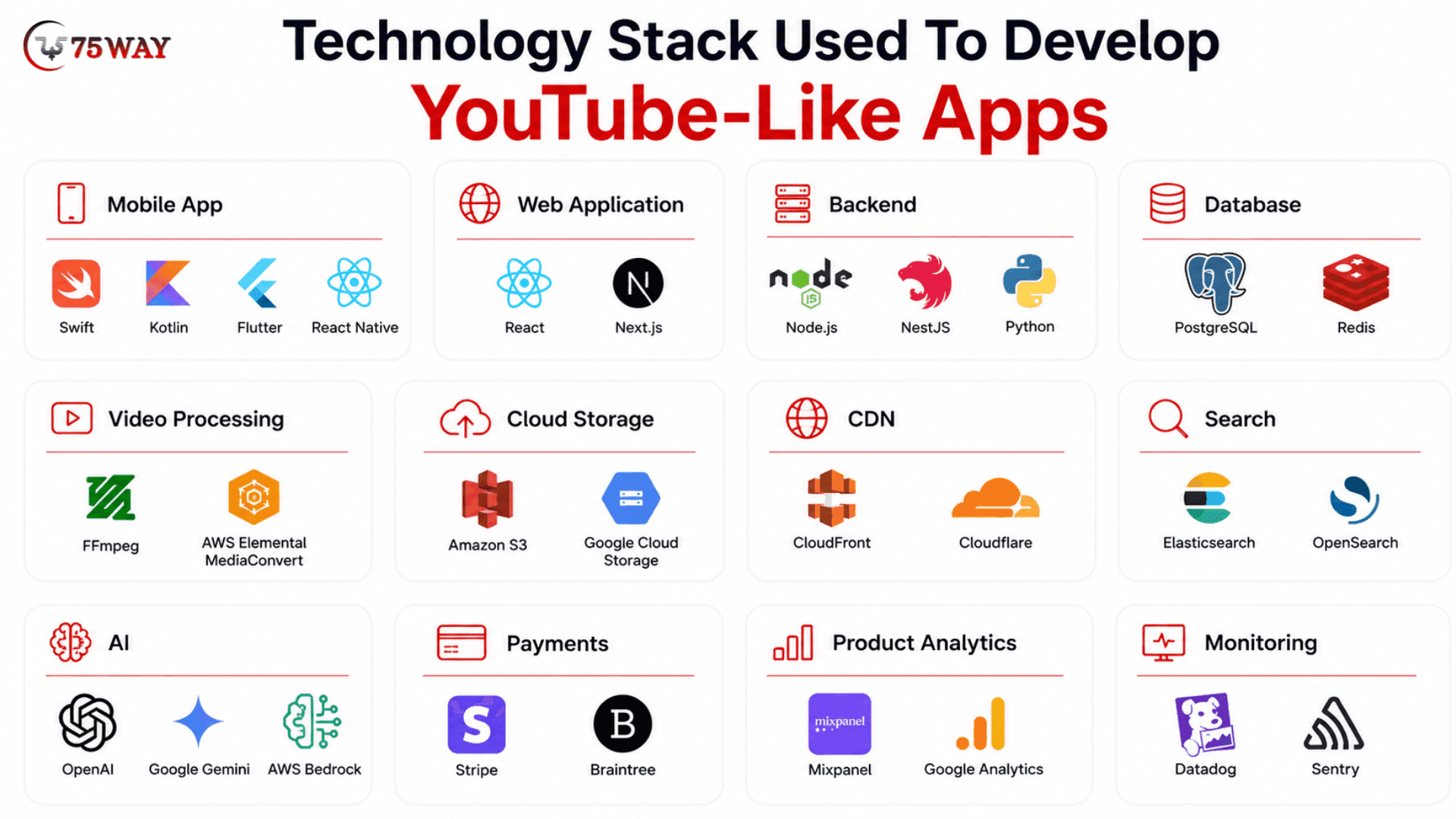
There is no universal technology stack for a YouTube-like app. A startup launching an MVP for a focused audience may need a very different setup from a platform expecting millions of video views, so the stack should match your product stage, audience, budget, and growth expectations.
- Mobile App
Your mobile strategy starts with a simple choice: native performance or faster cross-platform development. Swift is a strong choice for iOS and Kotlin for Android, while Flutter and React Native can help teams launch on both platforms with a shared development approach.
- Web Application
A web version gives viewers another way to discover and watch content while giving creators and administrators convenient browser-based workspaces. React works well for interactive interfaces, while Next.js can add routing, server-side rendering, and other capabilities useful for content-heavy applications.
- Backend
The backend connects the application's users, content, payments, recommendations, notifications, and other services. Node.js with NestJS can suit API-heavy platforms requiring a structured backend, while Python becomes particularly useful when AI, machine learning, recommendation systems, or data processing are central to the product.
- Database
A video platform still needs a reliable system for information that is not video itself. PostgreSQL can handle users, subscriptions, payments, channels, and video metadata, while Redis can speed up frequently requested information through caching.
- Video Processing
Video processing deserves its own technology layer because uploaded files cannot simply be stored and delivered as they arrive. FFmpeg gives development teams considerable control over encoding and conversion, while AWS Elemental MediaConvert offers a managed approach for processing video at scale.
- Cloud Storage
Video files can consume enormous amounts of storage as the platform grows. Amazon S3 or Google Cloud Storage can hold original videos, processed versions, thumbnails, and other media without placing those large files directly inside the application's primary database.
- CDN
A viewer in California should not have to retrieve every video directly from your application's central infrastructure. Amazon CloudFront and Cloudflare can distribute cached content closer to viewers, helping improve delivery performance as your audience becomes geographically distributed.
- Search
Basic database search may work when the library is small, but a growing video catalogue needs stronger discovery capabilities. Elasticsearch or OpenSearch can support keyword matching, filtering, autocomplete, relevance ranking, and more sophisticated search experiences.
- Artificial Intelligence
AI can sit across several parts of the platform rather than existing as a separate “artificial intelligence (AI) feature.” OpenAI, Google Gemini, and AWS Bedrock can support conversational search, summaries, metadata generation, translation, creator assistance, moderation workflows, and other intelligent experiences.
- Payment Gateway
A monetized video platform needs dependable payment infrastructure behind subscriptions, memberships, paid content, or other transactions. Stripe and Braintree can handle payment workflows, while the final choice should depend on your target geography, payment methods, pricing model, and integration requirements.
- Product Analytics
Knowing that a video received 10,000 views tells you very little by itself. Mixpanel can help analyze product behavior such as retention, funnels, and feature usage, while Google Analytics can provide broader website and acquisition insights.
- Monitoring
Video platforms involve many moving parts, so problems can occur outside the screen a user sees. Datadog can provide broader infrastructure and application monitoring, while Sentry can help development teams identify application errors and performance problems.
A startup does not need every technology mentioned above on day one. A focused MVP could begin with React or Next.js, Flutter or native mobile development, Node.js or Python, PostgreSQL, Redis, cloud object storage, FFmpeg or managed video processing, and a CDN, then introduce more specialized search, AI, analytics, and infrastructure as actual usage justifies them.
How To Choose The Right Video Infrastructure
Video infrastructure is one of the areas founders often underestimate when planning a YouTube-like app. The application itself may look straightforward, but storing, processing, and delivering large volumes of video can become a major operational expense as usage grows.
1. Understand The Full Cost
Your video infrastructure costs can come from storage, transcoding, bandwidth, CDN delivery, analytics, AI processing, and monitoring. Storage is only one part of the equation, and a platform with heavy viewing activity can spend significantly more on processing and delivery than founders initially expect.
2. Plan For More Than Original Videos
A single uploaded video may generate several additional assets during processing and delivery. Original files, multiple transcoded resolutions, thumbnails, backups, and regional copies can all contribute to your storage requirements.
Traffic also matters. A platform with thousands of videos but limited viewership may have modest delivery costs, while a smaller library with millions of video views can create substantial bandwidth and CDN usage.
3. Build Cost Controls Into The Architecture
Infrastructure decisions made early can have a significant impact on long-term operating costs. Storage lifecycle policies can move older content to lower-cost tiers, while CDN caching can reduce repeated transfers from the origin infrastructure.
Transcoding can also be optimized by generating only the resolutions and formats your audience actually needs. Retention policies can determine how long unused content, temporary processing files, and backups remain available.
4. Monitor Usage As You Grow
Real usage data should guide infrastructure decisions. Track storage growth, transcoding activity, bandwidth consumption, CDN traffic, video popularity, and processing failures to understand where your money is going.
A sudden increase in viewing, for example, may make CDN optimization more valuable than expanding storage capacity.
How To Make Money From Building Clone of YouTube: Monetization Strategies
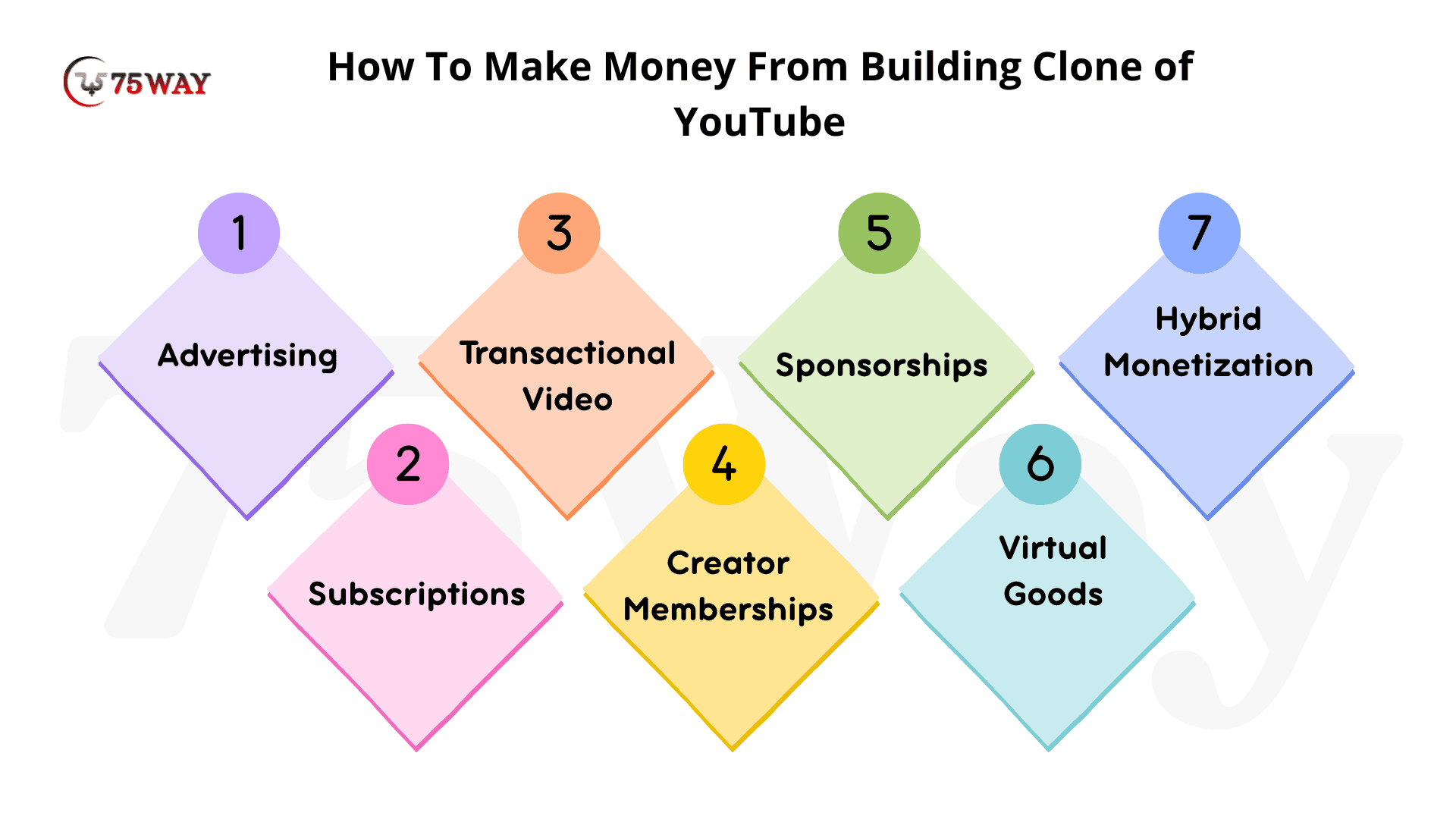
Monetization should be part of the product strategy from the beginning, not something added after the application is built. The right model depends on who watches, what content they value, how often they return, and whether creators or businesses are also paying customers. The major monetization options and where each fits are explored below.
1. Advertising: Turn Attention Into Revenue
Advertising works best when your platform can attract a substantial free audience and generate enough viewing activity to make ad inventory valuable. Revenue can come from video ads, display placements, sponsored recommendations, or other advertising arrangements.
For example, a platform generating 1 million monetized video views per month could potentially earn thousands of dollars from advertising, depending on audience geography, ad format, engagement, and advertiser demand.
2. Subscriptions: Create Predictable Recurring Revenue
A subscription model gives users ongoing access to premium videos, ad-free viewing, exclusive content, or specialized experiences. This approach can work particularly well for education, professional training, fitness, premium entertainment, and expert communities.
For example, 5,000 subscribers paying $15 per month would generate $75,000 in monthly recurring revenue, before payment fees, refunds, taxes, and other business costs.
3. Transactional Video: Charge For Individual Content
Not every customer wants another monthly subscription. Pay-per-view or one-time purchases can work well for courses, conferences, sporting events, workshops, premium programs, and individual pieces of exclusive content.
For instance, 2,000 customers purchasing a $49 online program would generate $98,000 in gross sales from that offering.
4. Creator Memberships: Let Audiences Support Creators
Creator memberships can allow viewers to pay monthly for exclusive videos, private communities, early access, premium discussions, or other benefits. The platform can retain a percentage while distributing the remaining revenue to eligible creators.
For example, 1,000 members paying $10 monthly would create $10,000 in monthly membership revenue before the platform's share and applicable fees.
5. Sponsorships: Connect Brands With Relevant Audiences
A focused video platform can become attractive to brands when it owns a clearly defined audience. Sponsorship opportunities can include creator partnerships, sponsored shows, branded content, events, or category-specific campaigns.
For example, a business-focused video platform could connect software companies with technology creators and negotiate sponsorship packages worth $5,000, $20,000, or more per campaign, depending on audience quality and reach.
6. Virtual Goods: Monetize Community Interaction
Virtual goods can give viewers another way to support creators during live streams or community experiences. Users might purchase digital badges, gifts, reactions, or other platform-specific items.
This model can work particularly well when the application has strong communities and frequent real-time interaction, rather than relying solely on passive video consumption.
7. Hybrid Monetization: Build Multiple Revenue Streams
A mature platform does not necessarily need to depend on one source of income. Advertising can support free users, subscriptions can serve premium customers, memberships can support creators, and transactions can monetize individual content.
For example, a platform with $50,000 in advertising revenue, $75,000 from subscriptions, and $25,000 from creator memberships could generate $150,000 in monthly gross revenue across three streams.
How To Build A Creator Monetization System For After YouTube Clones Development
For a creator, the most important question after publishing a successful video is simple: “How much did I actually earn?” Your platform needs to answer that clearly while handling the financial complexity behind every view, subscription, purchase, or membership.
1. Give Every Dollar A Trail
A creator's earnings should never feel like a black box. The system can connect each earning event with its source, creator share, platform commission, applicable deductions, refunds, and final payable amount.
2. Make Revenue Rules Flexible
A cooking creator, an online instructor, and a media company may not have the same commercial agreement. Your monetization engine should support different revenue percentages, content types, countries, subscription plans, and individual creator contracts.
3. Turn Earnings Into A Clear Story
A creator dashboard should explain more than a single balance figure. $8,450 earned becomes far more useful when the creator can see how much came from advertising, memberships, paid videos, refunds, and other revenue sources.
4. Make Payouts Predictable
Creators need confidence about when their money will arrive. The platform can define minimum payout thresholds, payment schedules, verification requirements, failed-payment handling, and payout status so creators always know what happens next.
5. Keep The Books Honest
Every financial event should leave a trace. A proper transaction history gives your finance team a reliable record for reconciliation while giving creators something concrete to reference when an earnings dispute occurs.
6. Prepare For More Revenue Streams
Your first monetization model might be advertising, but creators could eventually earn through memberships, paid videos, sponsorships, virtual goods, or subscriptions. A flexible system prevents every new revenue stream from requiring a major backend rebuild.
How Much Does It Cost To Build An App Like YouTube?
The average cost to build an app like YouTube can range from $30,000 to $400,000+, depending on the product scope, platforms, video infrastructure, AI capabilities, monetization model, and development team location. A focused MVP may stay near the lower end, while a full-scale platform with advanced recommendations, live streaming, monetization, and multi-platform support can move well beyond $400,000.
- Basic MVP: Core video upload, processing, playback, profiles, search, comments, and basic administration
Estimated Cost: $30,000–$60,000
- Mid-Level Platform: Custom UX, stronger discovery, notifications, analytics, subscriptions, moderation, and improved administration
Estimated Cost: $80,000–$150,000
- Advanced Platform: AI recommendations, monetization, advertising, advanced analytics, creator tools, and stronger content management
Estimated Cost: $150,000–$250,000+
- Full-Fledged Platform: AI-powered personalization, live streaming, monetization, advertising, advanced moderation, and iOS, Android, and Web support
Estimated Cost: $250,000–$400,000+
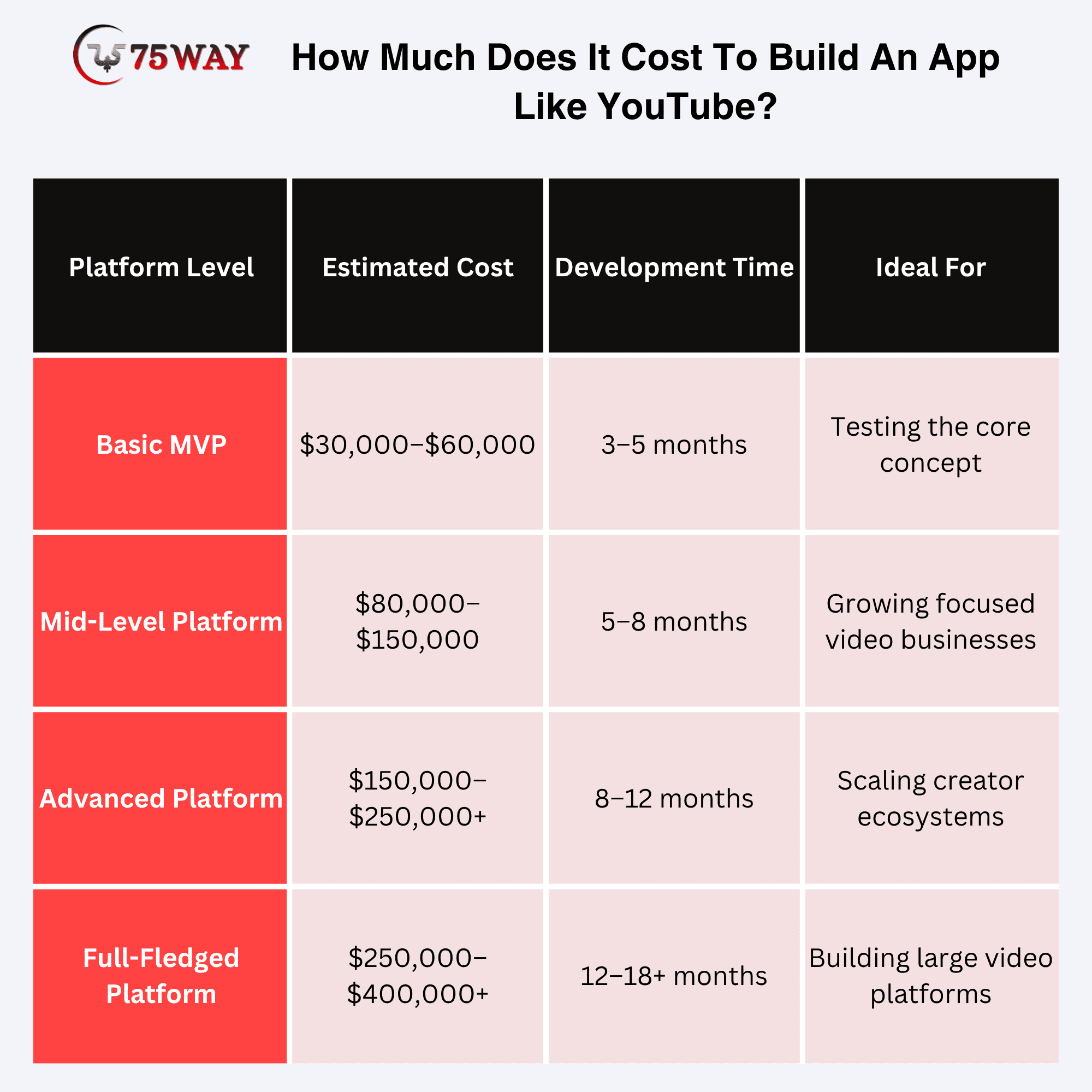
These are planning ranges rather than fixed quotes. Video processing, storage, streaming infrastructure, third-party services, platform count, and custom functionality can significantly change the final budget.
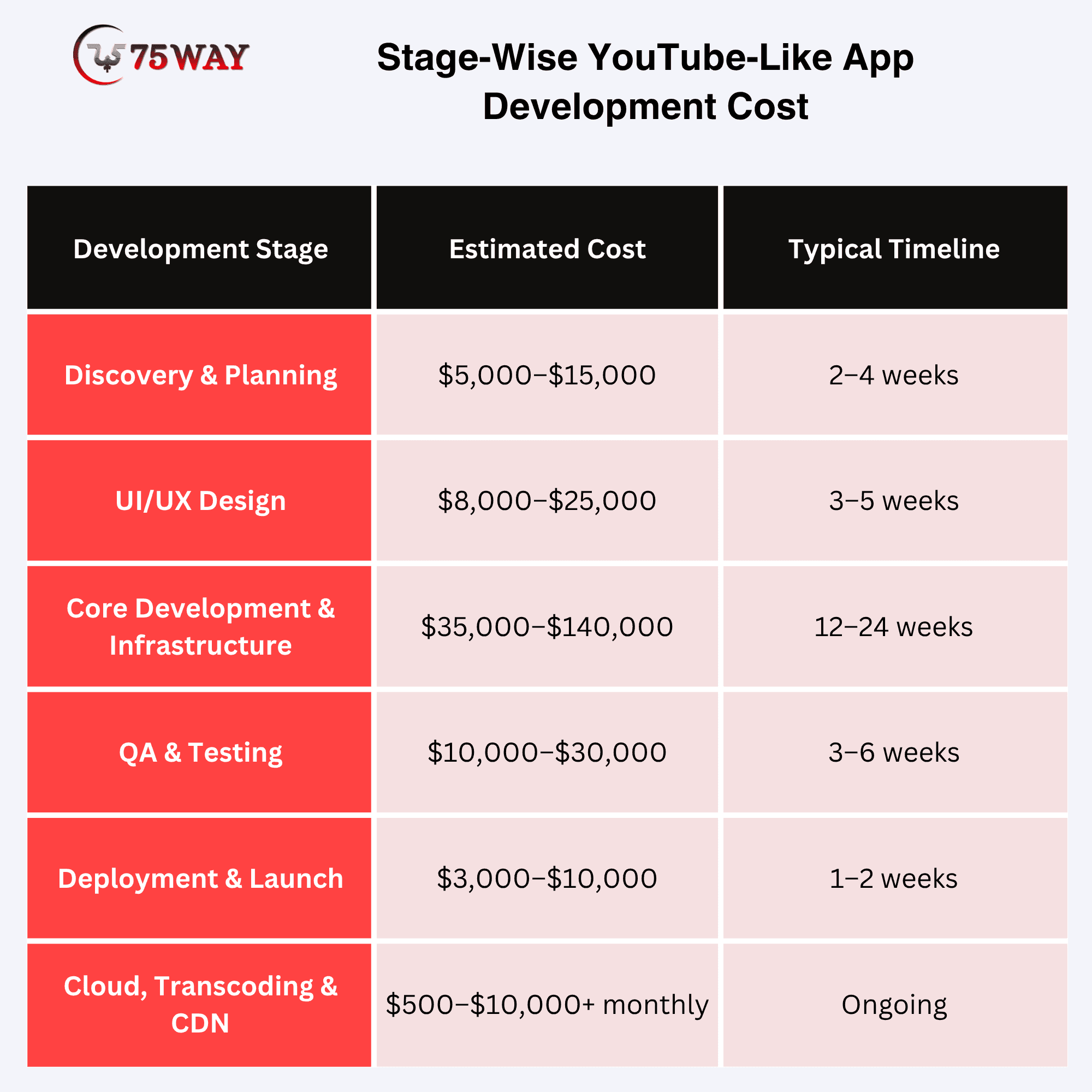
Stage-Wise YouTube-Like App Development Cost
1. Discovery And Planning
Estimated cost: $5,000–$15,000
This stage covers market research, competitor analysis, product requirements, user journeys, technical architecture, technology selection, and MVP planning. A clear discovery phase reduces the risk of investing in features that do not support the business model.
2. UI/UX Design
Estimated cost: $8,000–$25,000
The design phase covers wireframes, prototypes, visual design, navigation, video browsing, playback, creator workflows, and responsive experiences. A video platform needs particular attention to discovery and playback because these areas directly influence engagement.
3. Core Development And Infrastructure
Estimated cost: $35,000–$140,000+
This usually represents the largest portion of the budget. The work can include frontend and backend development, authentication, databases, APIs, creator functionality, and administrative systems.
The number of platforms also has a major impact. A Web-only MVP will generally require less development than a product launching simultaneously across iOS, Android, and Web.
4. QA And Testing
Estimated cost: $10,000–$30,000
Testing covers application functionality, video uploads and playback, security, performance, APIs, payments, device compatibility, and high-traffic scenarios. Video platforms require additional testing because large files, different network speeds, and concurrent viewers can expose problems that ordinary application testing may miss.
5. Deployment And Launch
Estimated cost: $3,000–$10,000
This stage covers production configuration, deployment, app-store preparation, environment setup, monitoring, and final release activities. Apple and Google also have their own developer-account fees, which are separate from development costs.
6. Cloud Hosting, Transcoding And CDN
Estimated cost: $500–$10,000+ per month
These are ongoing operational expenses rather than one-time development costs. Storage requirements, video-processing volume, bandwidth, number of viewers, video quality, retention policies, and geographic reach can all influence the monthly bill.
A platform with thousands of short videos will have very different infrastructure requirements from one delivering hours of high-resolution content to a large US audience.
Cost To Hire YouTube Clone App Developer Based On Location
Developer rates to build apps that are similar to YouTube can also change the overall project budget. These ranges are useful for initial planning, although the final cost depends more on team composition, expertise, scope, and project complexity than geography alone.
- USA & Canada: $120–$250/hour
- Western Europe: $70–$180/hour
- Latin America: $40–$95/hour
- Eastern Europe: $45–$90/hour
- South & Southeast Asia: $20–$65/hour
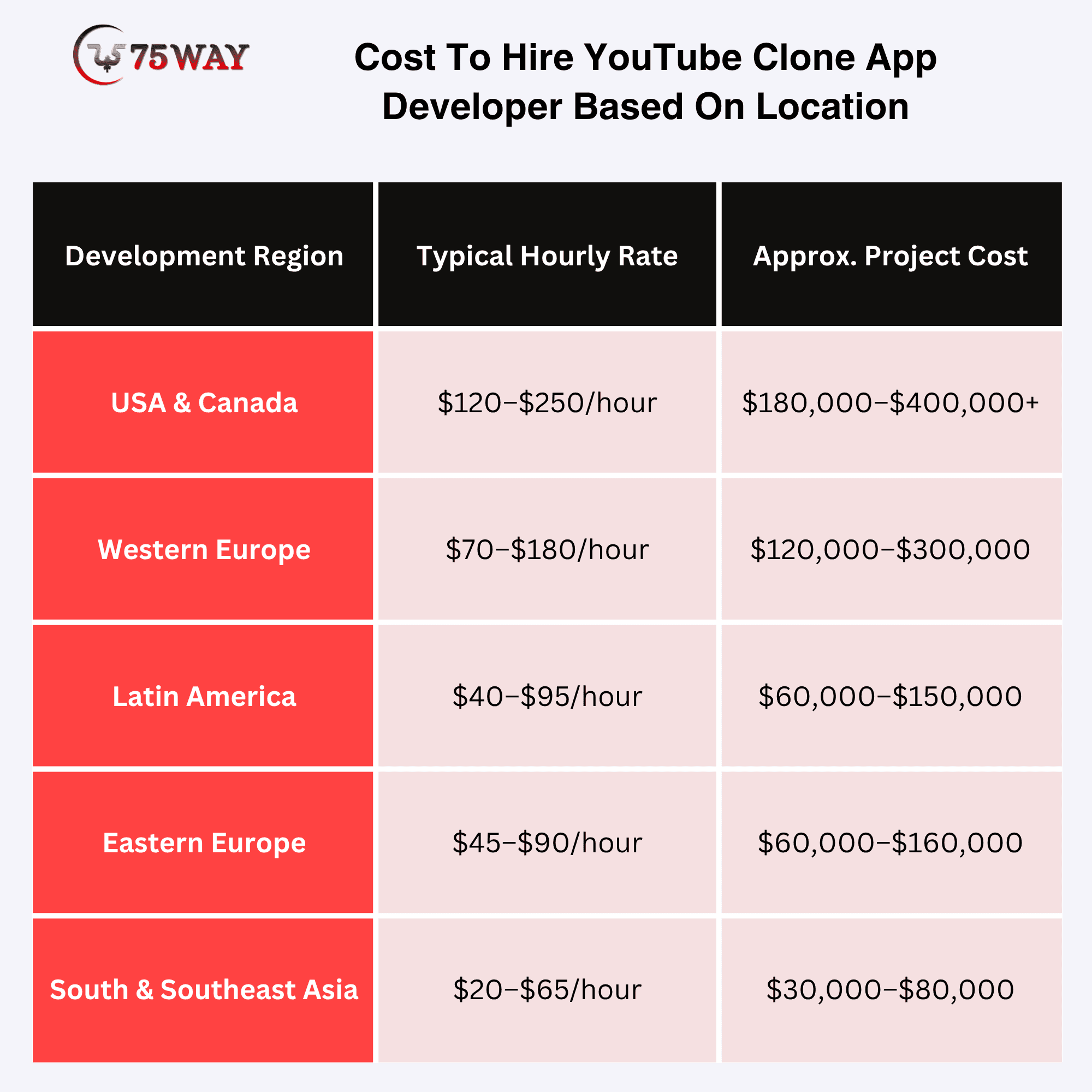
For a US-based business, the lowest development quote is not automatically the most economical choice. Architecture quality, video-streaming expertise, security practices, communication, maintenance, and the team's ability to scale the product can have a much greater impact on long-term cost.
Factors That Impact The Cost To Build A YouTube Clone
The final budget depends on more than the number of features. Video workload, product scope, platform choices, third-party services, AI requirements, and the scale you plan to support can all move the cost significantly.
- Platform Coverage: iOS, Android, Web, or all three can change the development effort considerably. Native apps require separate platform work, while cross-platform development may reduce the initial build scope.
- Video Infrastructure: Storage, transcoding, bandwidth, CDN delivery, and video processing can become major expenses as viewing activity increases. A platform with heavy video consumption needs more infrastructure than a small content library.
- Product Complexity: A focused video MVP needs fewer workflows than a full platform with live streaming, creator monetization, advertising, advanced search, and personalized feeds. More complex experiences also require additional testing and maintenance.
- AI Capabilities: Recommendation engines, conversational search, automatic captions, translation, moderation, summaries, and creator assistants introduce both development and usage costs. The impact depends on how deeply AI is integrated into the product.
- Creator Ecosystem: Creator dashboards, revenue sharing, analytics, memberships, payouts, content scheduling, and publishing tools add considerable backend complexity. Platforms built around professional creators usually require more investment than simple video-sharing apps.
- Monetization Model: Advertising, subscriptions, paid videos, memberships, and virtual goods each require different payment and financial workflows. Revenue sharing can further increase complexity when creators receive different percentages.
- User Experience: A straightforward interface costs less than a highly customized experience with personalized feeds, interactive video, advanced discovery, and multiple user journeys. UX research, prototyping, and usability testing also influence the budget.
- Security Requirements: Authentication, payment protection, account security, content access, privacy controls, and administrative permissions become increasingly important as the platform handles more users and financial activity. Stronger security requirements can increase development and testing work.
- Third-Party Services: Cloud storage, payment gateways, AI APIs, analytics tools, authentication services, video processing, and communication providers can speed development. Their integration effort and recurring usage charges should still be included in the overall budget.
- Development Team: Developer location, seniority, technical specialization, and experience with video platforms can affect hourly rates and project timelines. A team experienced in streaming and cloud architecture may also reduce costly technical rework.
- Scalability Requirements: A platform designed for a niche launch has different infrastructure needs from one expected to serve millions of viewers. Higher traffic expectations can require stronger databases, caching, CDN capacity, monitoring, and distributed services.
- Testing Requirements: Video playback, large uploads, network variations, device compatibility, concurrent users, payments, security, and content moderation all require dedicated testing. More platforms and workflows naturally increase QA effort.
- Maintenance & Growth: Development does not end at launch. Bug fixes, cloud costs, security updates, new features, infrastructure optimization, and third-party service charges continue throughout the product lifecycle.
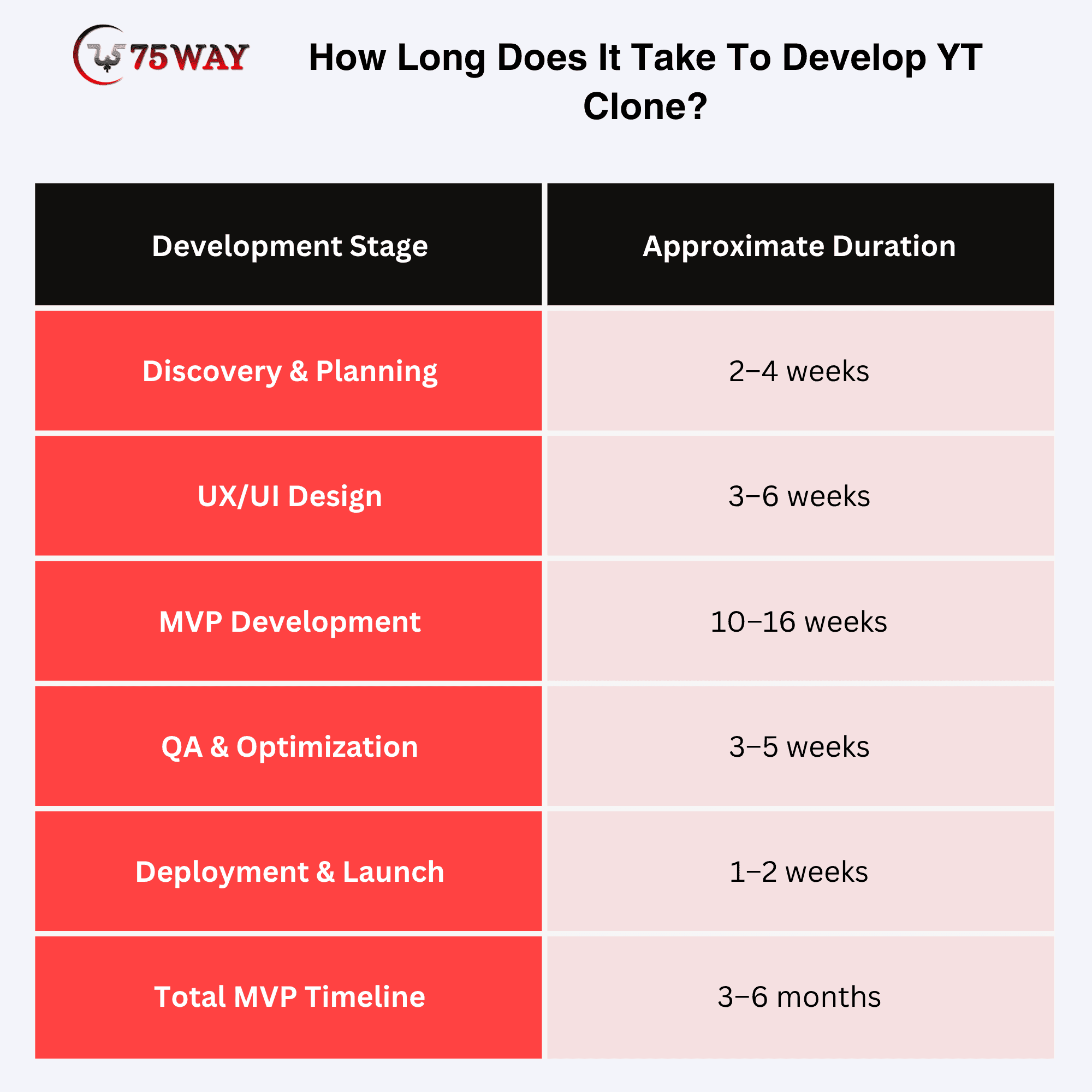
How Long Does It Take To Develop YT Clone?
A focused YouTube-like MVP can take around 3–6 months, while a feature-rich platform with AI, monetization, live streaming, and multi-platform support can take 6–12 months or longer. The timeline depends heavily on product scope, integrations, team size, and technical complexity.
Should You Build An MVP Or A Full YouTube Clone?
For most startups, an MVP is the smarter starting point. A focused first release can test whether viewers watch, creators publish, and the business model has enough traction before major infrastructure investment. As a startups, you do not need:
- 20 recommendation models
- A massive creator dashboard
- Complex advertising infrastructure
- Every possible social feature
- Multiple monetization models
- Global infrastructure
on day one. You need to prove your core value proposition.
A Practical Roadmap
Phase 1
Validate The Idea: Audience, problem, content opportunity, competitors, and revenue potential should be validated before serious development investment begins.
Phase 2
Build The MVP: Core capabilities such as uploading, playback, discovery, engagement, creator tools, and administration can establish the first usable product.
Phase 3
Measure Usage: Real user behavior around watch time, retention, uploads, engagement, subscriptions, and conversions should guide your next product decisions.
Phase 4
Add Personalization: Recommendations, semantic search, AI discovery, personalized feeds, and smarter content matching can improve the experience once sufficient usage data exists.
Phase 5
Introduce Monetization: Subscriptions, advertising, memberships, paid content, sponsorships, or transactions can be introduced according to your audience and content economics.
Phase 6
Scale The Platform: Infrastructure, CDN capacity, storage, security, moderation, analytics, and operational systems can expand as traffic and content volume increase.
Security Considerations For A YouTube Clone Development
A video platform can quickly become a valuable target because it brings together user accounts, creator content, payments, private information, and business data. Security should be part of the architecture from day one, with safeguards protecting everything from account access and video uploads to APIs, payments, and private content. Regular monitoring, backups, rate limiting, encryption, and audit trails can add another layer of protection as the platform grows.
- Copyright And Content Moderation
The moment users can upload their own videos, your platform also becomes responsible for handling what appears on it. Copyright complaints, spam, harassment, impersonation, fraud, dangerous content, and repeated policy violations need clear reporting and review processes rather than relying on technology alone.
AI can help identify and prioritize potentially problematic content, while human review and well-defined enforcement policies provide the judgment needed for difficult cases. For a US-facing platform, applicable copyright, privacy, content, and compliance obligations should be reviewed with qualified legal counsel based on your specific business model.
Technology can help identify and prioritize potentially problematic content, but your platform also needs clear policies, reporting mechanisms, review workflows, and enforcement processes.
For a US-facing platform, legal and compliance requirements should be reviewed with qualified counsel for your specific business model rather than treated as a generic development checklist.
Common Mistakes When Building Apps That Are Like YouTube & Solutions
A YouTube-like app can look straightforward from the outside, but several decisions made early can create expensive problems later. Avoiding these common mistakes helps you build around real user demand instead of simply reproducing familiar features.
Mistake 1: Copying YouTube Feature For Feature
A clone does not automatically become a competitive business. Your opportunity may come from serving a specific audience, solving an overlooked problem, offering a better workflow, or creating a different monetization experience.
Solution: Define your niche and competitive advantage before finalizing the feature roadmap. Build around what your audience needs rather than what YouTube already offers.
Mistake 2: Building Too Much Too Early
A huge first release can consume months of development before you know whether viewers or creators actually want the product. Advanced features can also increase infrastructure and maintenance costs unnecessarily.
Solution: Start with a focused MVP that proves your core value proposition. Use real usage data to decide which capabilities deserve the next investment.
Mistake 3: Underestimating Video Infrastructure
Video costs do not stop when someone uploads a file. Storage, transcoding, bandwidth, CDN delivery, backups, and repeated processing can become significant expenses as viewing activity grows.
Solution: Estimate your expected uploads, video sizes, viewing hours, traffic patterns, and geographic audience before choosing the infrastructure. Introduce storage tiers, lifecycle policies, CDN caching, and usage monitoring where appropriate.
Mistake 4: Treating AI As A Checkbox
Adding an AI label to a product does not make the experience intelligent. Poorly targeted AI can increase costs without creating meaningful value for viewers or creators.
Solution: Start with a specific problem AI can improve, such as semantic video search, personalized recommendations, automatic captions, content summaries, moderation assistance, or creator workflows. Measure whether the feature actually improves the user experience.
Mistake 5: Ignoring Creator Experience
Creators are the engine behind a user-generated video platform. Complicated uploads, weak analytics, poor publishing tools, or unclear earnings can make creators look elsewhere for a better home.
Solution: Treat the creator journey as a first-class product experience. Make uploading, publishing, managing content, understanding performance, and earning revenue straightforward from the beginning.
Mistake 6: Adding Monetization At The End
Revenue models can influence the architecture long before the first payment happens. Subscriptions, advertising, memberships, paid content, and creator revenue sharing all require different workflows.
Solution: Choose your likely monetization direction early and design the relevant payment, billing, entitlement, reporting, and revenue-sharing foundations into the architecture.
Mistake 7: Ignoring Analytics
A growing view count tells only part of the story. Without behavioral data, it becomes difficult to understand why viewers leave, which creators retain audiences, or which features encourage people to return.
Solution: Define important product events before launch and track metrics such as watch time, retention, completion, searches, uploads, engagement, subscriptions, and conversions. Use those findings to shape the roadmap.
Mistake 8: Forgetting Moderation
User-generated content can bring valuable communities and unexpected operational challenges at the same time. Copyright complaints, spam, harassment, fraud, impersonation, and harmful content require attention from the start.
Solution: Establish reporting, moderation, review, escalation, and enforcement workflows before opening the platform to large-scale uploads. Automation can assist with high volumes, while human review remains important for complex cases.
How To Make A YouTube-Style App Development Stand Out?
Trying to beat YouTube at being YouTube is rarely the strongest starting point. A better strategy is to own a specific use case and build features around the people who care most about it.
- For Education
Structured courses, assessments, certifications, instructor dashboards, and progress tracking can turn ordinary video consumption into a complete learning experience. The value comes from helping users move from watching a lesson to actually achieving an outcome.
- For Businesses
Private libraries, employee permissions, viewing analytics, and enterprise integrations can create a controlled environment for internal knowledge and training. Businesses can manage who watches what while keeping important video resources within their organization.
- For Creators
Better monetization, audience insights, advanced analytics, AI publishing assistance, and memberships can make the platform more attractive to creators. The opportunity lies in helping creators build sustainable businesses rather than simply giving them another place to upload videos.
- For Sports
Live events, highlights, team channels, real-time interaction, and premium access can make sports content more engaging than a standard video feed. Fans can follow teams, revisit key moments, and participate while events are happening.
- For OTT
Subscription management, premium libraries, multiple profiles, watchlists, and multi-device support can turn a video platform into a focused entertainment destination. A carefully designed content catalogue can matter more than having millions of unrelated videos.
- For Professional Communities
Expert profiles, paid content, communities, events, and knowledge discovery can connect audiences with people they trust. This model works particularly well when viewers are looking for expertise, networking, or practical knowledge rather than general entertainment.
How To Choose A YouTube-Like App Development Company?
The right development company should understand video streaming, creator ecosystems, monetization, and the infrastructure needed to support heavy traffic. Your choice can affect both launch quality and future scalability. The key factors for evaluating potential development partners are covered below.
- Video Development Experience: Look for a company that understands video storage, transcoding, streaming, CDN delivery, and playback. This experience can help avoid technical decisions that become expensive as your platform grows.
- Complete Development Team: Your project needs more than mobile developers. Look for a team that can handle UI/UX, frontend, backend, APIs, databases, cloud infrastructure, integrations, and administration.
- Clear MVP Planning: A good development partner should help you decide what belongs in the first version. A focused MVP can help validate your idea before you invest heavily in advanced features.
- Scalable Technology: Ask how the platform will handle increasing users, videos, and viewing traffic. The architecture should allow important components to grow without forcing you to rebuild the entire application.
- Practical AI Experience: AI can support recommendations, search, moderation, personalization, and creator tools. Your partner should know where AI genuinely improves the product and where traditional technology is the better choice.
- Strong Testing Process: Video applications need testing across devices, browsers, network speeds, video sizes, and traffic levels. Security, payment, upload, playback, and performance testing should also be part of the development process.
- Ongoing Technical Support: Your platform will need attention after launch as well. Ask whether the company provides maintenance, monitoring, security updates, performance improvements, bug fixes, and future development support.
- Understanding of Your Business: The strongest partner will understand more than your technical requirements. They should also understand your target audience, monetization strategy, competitive advantage, and long-term goals.
Why 75way Is Best Choice To Develop A Video Streaming App Like YouTube?
75way Technologies brings together AI integration, video streaming, app development, backend engineering, and cloud infrastructure under one team. With 150+ mobile app developers, we can build the core foundation of a YouTube-like platform, from video upload, processing, and playback to search, discovery, creator tools, and scalable content delivery.
For a platform designed to grow, 75way can also integrate AI recommendations, semantic search, personalization, content moderation, analytics, subscriptions, advertising, and monetization as the product evolves. Our approach focuses on building a video experience around your target audience and business model rather than simply copying YouTube feature by feature.
Depending on your business model, we can help develop:
- Video-sharing applications
- OTT platforms
- Creator platforms
- AI-powered video applications
- Streaming applications
- Live video platforms
- Subscription-based video products
- Industry-specific video platforms
- Voice-enabled video experiences
The objective is not to reproduce YouTube screen by screen.
A recent OTT video-streaming project gave us hands-on experience with the moving parts behind a modern content platform. We built video upload and delivery workflows, subscriptions, playback controls, real-time analytics, and integrations, helping the client achieve 42% higher engagement, 58% faster workflows, and 47% wider reach.
Our Recommended Approach For A New YouTube-Like Product
If we were starting a new platform from scratch, we would generally recommend this sequence:
- First: Define The Audience
Know exactly who the product is for.
- Second: Define The Business Model
Know how the platform will make money.
- Third: Build The Core Video Experience
Make uploading, processing, discovery, and playback reliable.
- Fourth: Launch The MVP
Get the product in front of real users.
- Fifth: Collect Behavioral Data
Measure what people watch, skip, search, save, share, and return to.
- Sixth: Introduce Personalization
Use those signals to improve discovery.
- Seventh: Add Monetization
Introduce the model that best fits your validated user behavior.
- Eighth: Scale Infrastructure
Optimize storage, CDN, processing, security, analytics, and operations as usage grows.
This approach is generally more practical than spending a large budget attempting to build a complete YouTube replacement before validating the market.
Final Thoughts
Building an app like YouTube is technically achievable, but building a successful YouTube-like business requires much more than cloning its features.
You need a clear audience, differentiated value proposition, scalable video architecture, reliable streaming, creator tools, intelligent discovery, moderation, analytics, monetization, and a roadmap that grows with real user demand.
For startups, the smartest route is usually to build a focused MVP, validate the core behavior, learn from users, and then introduce advanced capabilities such as AI recommendations, semantic search, live streaming, and creator monetization.
If your idea is for a niche video community, creator platform, OTT product, educational service, enterprise video solution, or AI-powered streaming experience, you can partner with an experienced app development firm.
Frequently Asked Questions
Can I Build An App Like YouTube with AI?
Yes. AI can support recommendations, semantic video search, captions, translations, moderation, video summaries, chapter generation, creator tools, voice search, and personalized discovery.
What Are Some Apps That Are Like YouTube?
There are multiple video platforms with different approaches to content publishing, streaming, creators, communities, and monetization. The most relevant reference depends on whether your goal is general video sharing, live streaming, premium content, OTT, education, or creator monetization.
Should I Build A YouTube Clone Or A Niche Video Platform?
For most startups, a niche platform can be more practical because it gives the business a clearer target audience and differentiation. A specialized product can focus its content, features, marketing, and monetization around a specific user problem.
How Can I Reduce The Cost Of Building a YouTube-Like App?
Start with an MVP, prioritize the core user journey, use managed infrastructure where appropriate, avoid unnecessary advanced features, and design the architecture so infrastructure can scale with usage rather than paying for maximum capacity from day one.
Can I Build A YouTube Clones For A Specific Industry?
Yes. Industry-specific video platforms can focus on education, healthcare, sports, fitness, professional training, enterprise learning, entertainment, or other specialized audiences. The feature set should be designed around the industry's users and business model.
What Should I Build First In A YouTube-Like App?
Start with the smallest product that can validate your core business assumption. For many startups, this means authentication, profiles, creator channels, video upload, processing, playback, discovery, engagement, subscriptions, analytics, and administration.