Summary
Want to know the best AI tools for graphic design? This guide explains key AI graphic design tools for startups, beginners, freelancers, creative agencies, and marketing firms. You will explore features, use cases, and benefits of AI image and video generation tools for startups and agencies. It highlights how businesses can use them for branding, UI creation, and content production.
Quick Overview
- AI graphic design tools boost creative production and reduce manual design efforts.
- Startups use AI tools for graphic design to build branding assets without expanding teams.
- Generative AI improves consistency across logos, UI, and marketing visuals.
- AI designing tools enhance collaboration among designers, developers, and marketers.
- AI video and image generation tools expand creative possibilities beyond traditional designs.
- Choosing the right AI graphic design tools improves scalability and branding quality.
Eager to generate powerful branding visuals, UI designs, and marketing creatives in just minutes instead of days. We bring ready-to-deploy solutions for you. If you are a startup owner, creative team manager, or graphic designer, this guide is for you. Because, in this guide, we will describe the top 10 AI graphic design tools that enable high-quality and intuitive visual production across branding, UI/UX design, and visuals for mobile apps, software, and AI solutions, social media content, and marketing campaigns.
The demand for visual content has exploded due to digital-first business models, social media marketing, and SaaS-driven branding strategies. As a result, companies must produce consistent creative assets at scale to maintain brand identity.
AI graphic design tools solve this challenge by automating key parts of the creative workflow. From generating images using text prompts to building complete UI wireframes and enhancing image quality, these tools are redefining how design teams operate. Startups can now launch faster, while agencies can handle more clients without increasing workload proportionally.
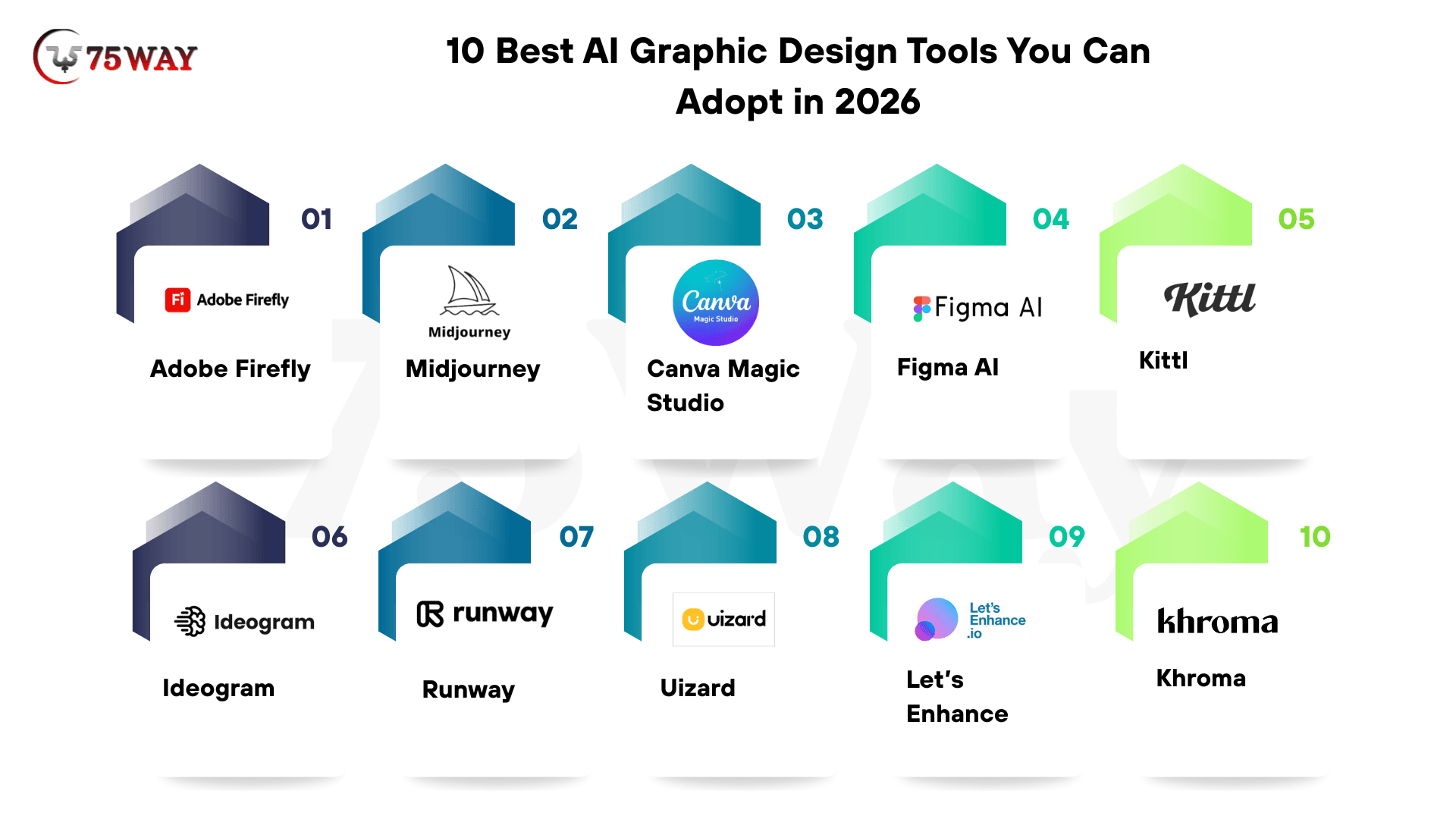
10 Best AI Graphic Design Tools You Can Adopt in 2026
This guide explores the 10 best AI tools for graphic design for startups and creative agencies, their features, use cases, advantages, and how they are reshaping the future of digital creativity.
1. Adobe Firefly
Starting with Adobe Firefly, this tool supports professional designers working inside the Adobe ecosystem. It helps generate high-quality visuals using text prompts and AI editing tools. It improves creative speed across Photoshop and Illustrator workflows. It is widely used in enterprise-grade design production environments.
Core Features of the Graphic Design Tool: Adobe Firefly
- Text-to-Image Generation: Create professional visuals from prompts with Adobe’s AI model inside the design workflow.
- Generative Fill Editing: Remove or replace image areas using smart contextual AI understanding.
- Style Customization Tools: Adjust lighting, tone, texture, and artistic direction for brand consistency.
- Adobe Ecosystem Integration: Connect seamlessly with Photoshop, Illustrator, and Adobe Express.
- Commercial Safety Output: Generate licensed, safe visuals for marketing and business use.
- Prompt Precision Control: Refine outputs using advanced prompt tuning for accurate design results.
Pricing of Adobe Firefly
Adobe Firefly offers limited free trial access with basic generative credits. Paid plans include:
- Standard Plan at $9.99/month
- Pro Plan at $19.99/month
- Pro Plus at $49.99/month
- Premium at $199.99/month
based on user needs and feature requirements. Free users receive restricted credits for testing AI features. Paid plans increase generative capacity, commercial usage rights, and speed of output generation.
Adobe Firefly improves creative efficiency through AI-powered design automation. It integrates deeply with Adobe tools to deliver professional-quality output. However, higher pricing makes it less accessible for beginners or small teams.
Best For: Adobe Firefly is best for professional designers, agencies, and enterprise creative teams. It is also ideal for branding and advertising production environments.
2. Midjourney
Midjourney is an AI tool that focuses on generating highly artistic visuals from text prompts. It is widely used for concept art and creative ideation. Designers use it to explore unique visual directions. It supports strong creative experimentation for branding and storytelling projects.
Key Features of Midjourney
- Generate Artistic Images: Produce high-detail visuals using an advanced AI prompt-based generation system.
- Control Creative Style: Adjust composition, tone, and artistic direction through detailed prompt inputs.
- Create Concept Art: Build early-stage visuals for branding, gaming, and storytelling workflows.
- Explore Visual Ideas: Experiment with multiple creative directions for faster ideation cycles.
- Enhance Image Detail: Generate realistic textures, lighting effects, and composition depth outputs.
- Community Prompt Sharing: Learn creative workflows from the active designer and artist community.
Pricing of Midjourney
Midjourney has no permanent free plan available. Free usage is not supported permanently. Paid tiers offer GPU time, faster rendering, and commercial rights depending on plan level. Paid plans include:
- Basic Plan at $10/month
- StandardPlan at $30/month
- ProPlan at $60/month
- Mega Plan at $120/month.
Midjourney produces high-quality artistic visuals with strong creative flexibility. It helps designers explore ideas quickly and visually. However, the absence of a free plan limits accessibility for beginners.
Best For: Midjourney is best for artists, branding studios, and creative agencies. It supports concept development and visual storytelling workflows. It is widely used for artistic inspiration and design exploration.
3. Canva Magic Studio
Canva Magic Studio integrates AI inside the Canva platform for fast content creation. It helps users generate marketing visuals without advanced design skills. It supports social media, ads, and presentation creation. It is widely used by startups and marketers for quick design production.
Major Features of Canva Magic Studio
- Generate AI Designs: Create social media posts and marketing visuals using text prompts.
- Resize Content Instantly: Adjust designs for multiple platforms using one-click automation.
- Apply Brand Kits: Maintain consistent branding across all marketing materials.
- Drag Drop Editing: Modify visuals easily using simple interface tools.
- Create Marketing Posts: Build ads, banners, and promotional content.
- Automate Layout Design: Generate structured layouts using AI-based design suggestions.
Pricing of Canva Magic Studio
Canva offers a free plan with limited AI features and templates. Free users access basic templates and limited Magic Studio tools. Paid plans unlock full AI design features, brand kits, and team collaboration tools.
Canva Pro starts at $14.99/month, and Canva Teams pricing varies depending on collaboration needs.
Canva simplifies design creation through AI-powered automation tools. It improves marketing productivity and speed. However, advanced AI features require paid subscription access.
Best For: Canva Magic Studio is best for startups, marketers, and non-designers. It supports fast, content-driven marketing without technical design skills. It is widely used for social media and branding workflows.
4. Figma AI
Starting with Figma AI, this tool enhances collaborative UI/UX design workflows using intelligent automation features. It helps product teams build interfaces faster through AI-powered suggestions and prototyping tools. Designers can collaborate in real time while improving design consistency. It is widely used in SaaS and product development environments.
Key Features of Figma AI
- Suggest UI Layouts: Generate interface structures for apps and websites using AI design intelligence.
- Build Wireframes Quickly: Convert ideas into structured wireframes using automated design assistance tools.
- Enable Real-Time Collaboration: Allow multiple designers to work together on shared design files.
- Automate Design Systems: Maintain consistent UI components across large product ecosystems efficiently.
- Speed Up Prototyping: Turn static designs into interactive prototypes within minutes using AI support.
- Improve Workflow Efficiency: Reduce manual design effort through intelligent layout recommendations and automation.
Pricing of Figma AI
Figma offers a free Starter plan with basic design tools and collaboration features. Free plan supports limited projects and basic collaboration. Paid plans include advanced AI features, design systems, and enterprise-level security controls.
- Professional plan starts at $16/month
- Organization plan at $55/month
- Enterprise plan at $90/month
Figma improves collaboration and speeds up interface design workflows significantly. It supports structured design systems for product teams. However, advanced features are available only in higher pricing tiers.
Best For: Figma AI is best for UI/UX designers, product teams, and SaaS companies. It supports collaborative interface design and rapid prototyping. It is ideal for scalable digital product development workflows.
5. Kittl
Kittl is one of the reliable AI image generation tools as it aims at branding, logo creation, and typography-based visuals. It simplifies professional design creation for startups and small businesses. Users can generate logos and brand assets quickly without advanced design skills. It is widely used for identity-focused creative work.
Core Features of Kittl
- Generate Logo Designs: Create professional logos using AI-powered branding and style suggestions.
- Design Typography Art: Build creative text-based visuals using advanced font styling tools.
- Use Ready Templates: Edit pre-built design templates for faster branding creation.
- Export Vector Files: Download scalable vector formats for professional printing and usage.
- Customize Brand Styles: Adjust colors, fonts, and layouts for consistent identity design.
- Simplify Editing Process: Modify designs easily using intuitive drag-and-drop interface tools.
Pricing of Kittl
Kittl offers a free plan with limited design access and templates. Free users access basic templates and limited exports. Paid plans offer premium templates, vector exports, and advanced branding tools.
- Pro Plan: ~$84/year
- Expert Plan: ~$210/year
- Max Plan: ~$412/year
Kittl simplifies branding and logo design for beginners and startups. It improves the speed of identity creation significantly. However, advanced export and branding features require paid plans.
Best For: Kittl is best for startups, brand designers, and small businesses. It supports fast logo creation and branding workflows. It is widely used for identity design and typography-based creative projects.
6. Ideogram
Ideogram, as one of the best AI image creation tools, specializes in generating images with accurate text rendering. It is widely used for posters, ads, and branding visuals. You can create text-rich images with strong clarity and control. It is ideal for marketing and typography-based creative work.
Premium Features of Ideogram
- Generate Text Images: Create visuals with accurate, readable text within AI-generated designs.
- Control Prompt Output: Adjust creativity and structure using detailed prompt instructions.
- Design Marketing Posters: Build ad creatives and promotional visuals quickly using AI tools.
- Enhance Typography Quality: Produce clean and readable font-based design outputs.
- Support Brand Visuals: Generate consistent branding materials for marketing campaigns.
- Improve Creative Accuracy: Maintain strong alignment between text and visual elements.
Pricing of Ideogram
Ideogram offers free limited generations with basic access. Paid plans include Basic, Plus, and Pro tiers, ranging approximately from $8 to $60/month. Free users receive limited image generations. Paid plans increase generation limits, speed, and commercial usage rights.
- Basic Plan:$9/month and 2,000 credits/month
- Standard Plan: $30/month and 8,000 credits/month
- Ultimate Plan:$50/month and 16,000 credits/month
- Creator Plan: $250/month and 100,000 credits/month
- Enterprise Plan: Custom Pricing
Ideogram excels at generating visuals that are text-accurate for marketing use. It improves ad design speed and clarity. However, free usage is limited and may restrict heavy users.
Best For: Ideogram is best for marketers, branding teams, and designers. It supports text-heavy visual creation and advertising workflows. It is widely used for posters, campaigns, and promotional content.
7. Runway
Among the widely used AI graphic design tools, Runway is known for video generation and motion design workflows. It helps creators produce cinematic content using text prompts and AI editing tools. It reduces dependency on traditional video production software. It is widely used in media, advertising, and content creation industries.
Major Features of Runway
- Generate Text Videos: Create videos from text prompts using AI-driven generation models.
- Edit Video Content: Modify clips using AI-based editing and enhancement tools.
- Remove Backgrounds: Eliminate video backgrounds without manual editing processes.
- Create Motion Graphics: Produce animated visuals for marketing and storytelling purposes.
- Enhance Video Quality: Improve resolution and clarity using AI upscaling tools.
- Support Creative Workflow: Enable fast production of cinematic-quality video content.
Pricing of Runway
Runway offers a free plan with limited credits and basic features. Free users access limited video generation credits. Paid plans provide higher limits, faster rendering, and advanced AI video tools.
- Standard plan starts at around $15/month
- Pro plan at $35/month
- Unlimited/Enterprise plans at a custom price.
Runway simplifies video creation using AI-powered automation tools. It improves production speed and creative flexibility. However, high-quality video generation requires paid credits and subscriptions.
Best For: Runway is best for video creators, agencies, and content marketers. It supports cinematic video generation and editing workflows. It is widely used for ads, social media, and digital storytelling.
8. Uizard
Uizard, as a trusted AI tool for image generation, converts sketches and wireframes into fully designed digital interfaces. It helps startups and product teams quickly transform ideas into functional prototypes. Users can build apps and web layouts without advanced design skills. It is widely used in early-stage product development.
Core Features of Uizard
- Convert Sketch UI: Turn hand-drawn sketches into digital interface designs instantly.
- Generate Wireframes: Create structured app and website layouts using AI assistance.
- Support Mobile Templates: Use ready-made templates for mobile and web applications.
- Enable Rapid Prototyping: Build functional prototypes quickly for testing and validation.
- Improve Design Speed: Reduce manual UI creation time using automation tools.
- Simplify Product Design: Help non-designers build professional interface layouts easily.
This AI graphic design tool speeds up UI design from idea to prototype using AI automation. It improves product development efficiency significantly. However, advanced collaboration features require paid plans.
Pricing of Uizard
Uizard offers a free plan with limited usage and basic features. Free users access basic templates and limited projects. Its pro plan starts around $12/month, with Business plans available for advanced teams. It offers advanced collaboration, AI features, and larger project limits.
Best For: Uizard is best for startup founders, product designers, and SaaS teams. It supports rapid UI prototyping and wireframe creation. It is widely used for early-stage product development workflows.
9. Let’s Enhance
Let’s Enhance improves image resolution and quality using advanced enhancement models. It helps marketers and ecommerce brands upgrade low-quality visuals into high-resolution outputs. Users can restore images without losing detail. It is widely used in product photography and digital marketing.
Key Features of Let’s Enhance AI
- Upscale Image Quality: Increase resolution without losing visual clarity using AI enhancement.
- Reduce Image Noise: Remove grain and distortion for cleaner visual output results.
- Enhance Color Accuracy: Improve brightness, contrast, and color balance automatically.
- Restore Old Photos: Repair damaged or low-quality images using AI restoration tools.
- Improve Product Images: Upgrade ecommerce visuals for better marketing performance.
- Automate Image Processing: Enhance multiple images quickly using batch processing tools.
Let’s Enhance improves image quality using AI-powered upscaling tools. It enhances marketing visuals effectively. However, free credits are limited for regular professional use.
Pricing of Let’s Enhance AI
Let’s Enhance offers a free plan with limited credits and basic processing. Free users receive limited enhancement credits. Paid plans start around $9/month, depending on image credits and usage requirements.
- Starter Plan: $9/month (annual) or $12/month (monthly)
- Pro Plan: $24/month (annual) or $32/month (monthly)
- Max Plan: $34/month (annual) or $45/month (monthly)
Best For: Let’s Enhance is best for ecommerce brands, photographers, and creative agencies. It supports high-quality image enhancement and restoration workflows. It is widely used for marketing and product visuals.
10. Khroma
Khroma is one of the leading AI graphic design tools that helps designers create personalized color palettes using machine learning. It learns user preferences and generates consistent color combinations for branding. Designers use it for UI, branding, and visual identity creation. It is widely used in brand design workflows.
Premium Features of Khroma
- Generate Color Palettes: Create personalized color combinations using AI learning models.
- Train Color Preferences: Learn user style choices to improve design recommendations.
- Ensure Brand Consistency: Maintain uniform color usage across all design materials.
- Explore Color Ideas: Discover new palette inspirations for creative design projects.
- Improve Visual Identity: Strengthen brand appearance using structured color systems.
- Support Design Workflow: Easily integrate color tools into UI and branding projects.
Khroma simplifies color selection using AI-driven personalization tools. It improves branding consistency and design efficiency. However, it focuses only on color systems and not full design workflows.
Pricing of Khroma
Khroma is mostly free with no mandatory paid plan currently. Users can access AI color generation tools without subscription requirements. Some features may evolve into premium offerings in future updates, but current usage remains free.
Best For: Khroma is best for brand designers, UI designers, and marketing teams. It supports color selection and brand identity creation. It is widely used for consistent visual design systems.
Note: Pricing of plans may vary for the given AI graphic design tools.
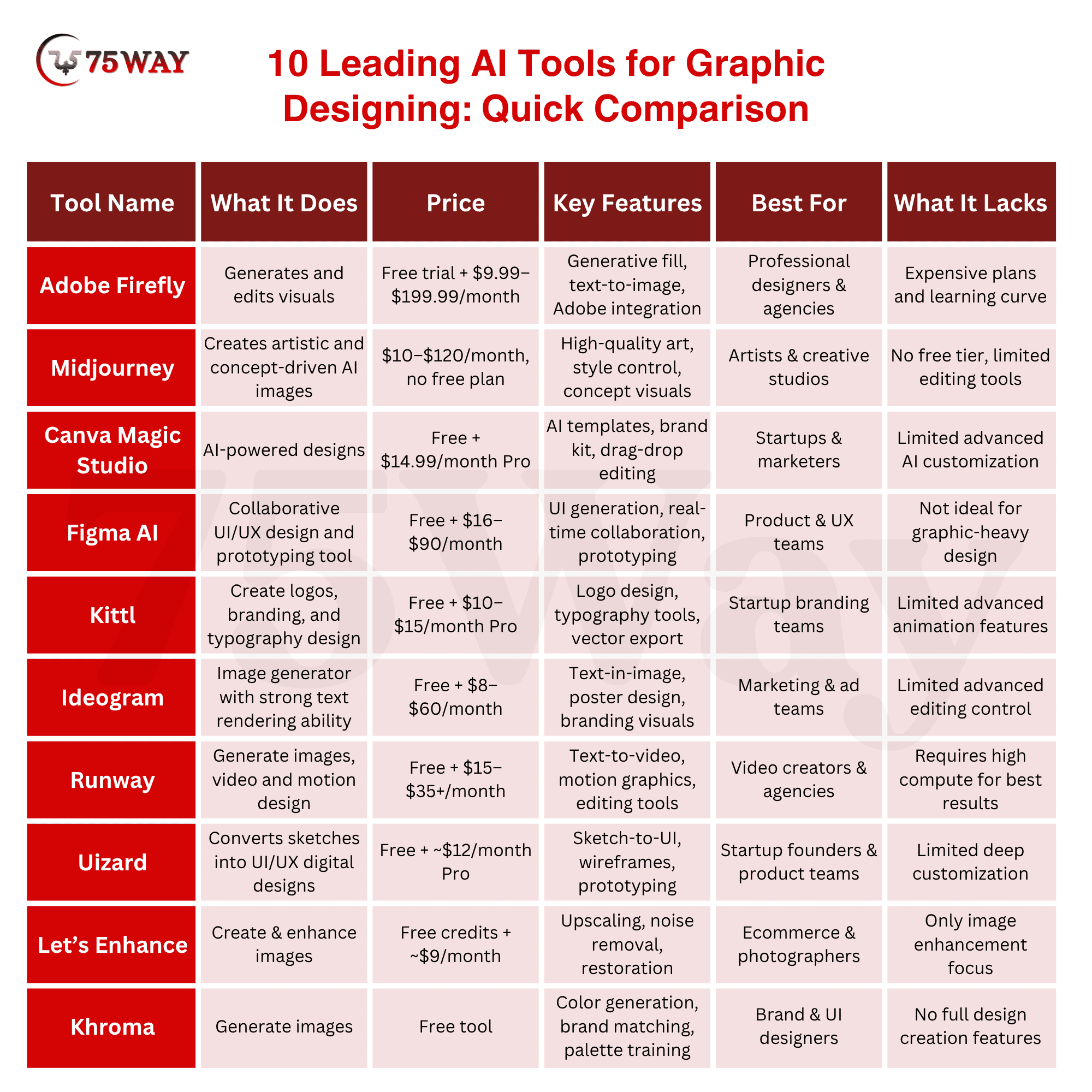
10 Leading AI Tools for Graphic Designing in 2026: Quick Comparison
If you are exploring leading AI graphic design tools in 2026, this comparison highlights the most advanced platforms used for creating visuals, branding assets, UI designs, and marketing content. These tools help automate design workflows and reduce manual effort across creative projects.
Some Additional AI-Powered UI/UX Design Tools in 2026
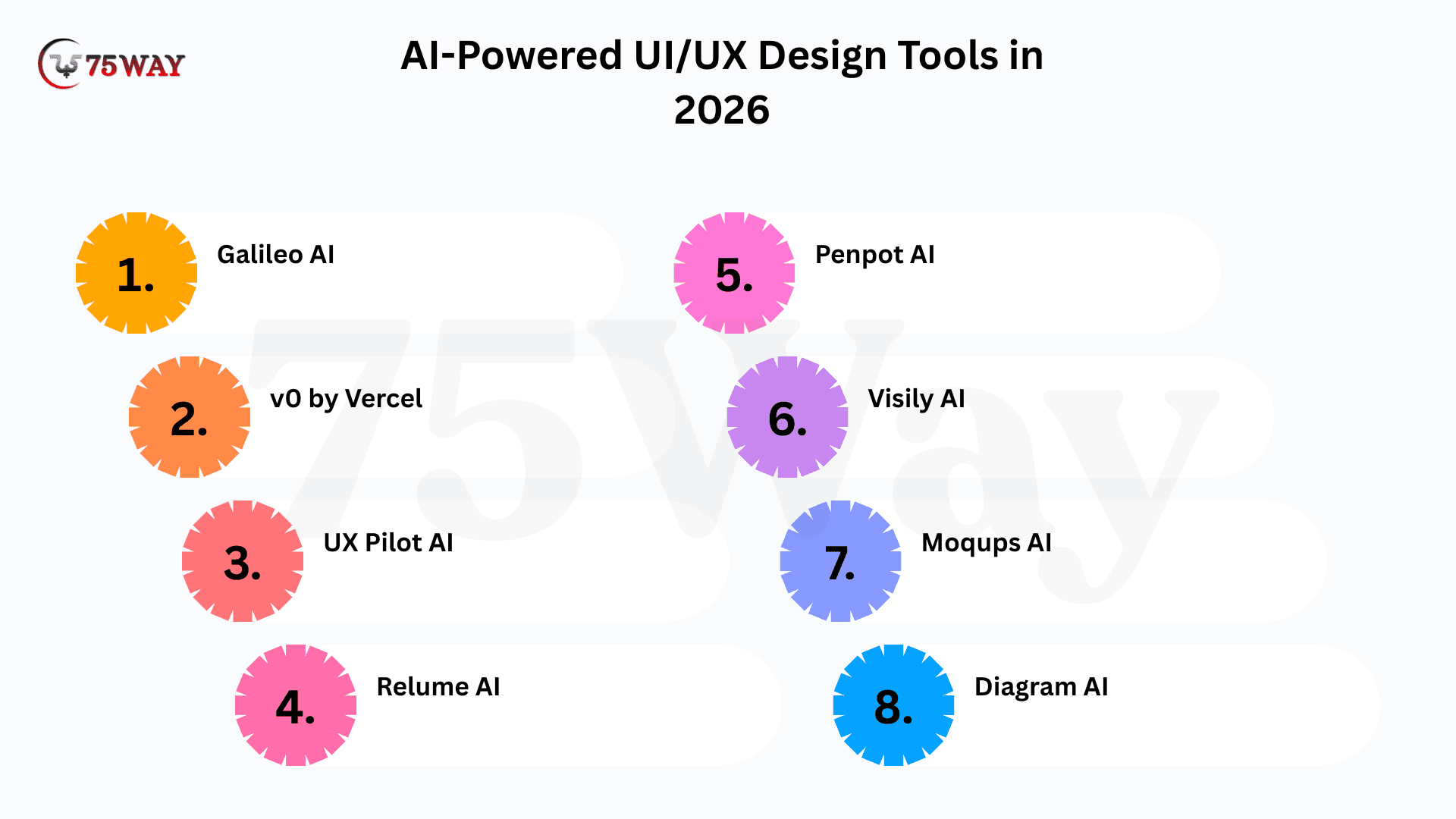
Still exploring more advanced AI-powered UI/UX design tools in 2026? Here are additional AI-powered UI/UX designing platforms that support faster prototyping, interface design, and automated workflow creation. These tools help startups, product teams, and designers build user-friendly digital experiences faster.
1. Galileo AI
Galileo AI, as one of the most used UI/UX design tools, converts simple text prompts into complete UI screens. It helps startups rapidly transform ideas into structured interface designs. Designers use it for fast prototyping and product visualization. It is widely used for MVP development workflows.
Key Features of Galileo AI
- Generate UI Screens: Create full interface layouts directly from text prompts quickly.
- Design Mobile UI: Build mobile-first app screens using AI-driven structure suggestions.
- Export Editable Files: Download UI designs for further customization in design tools.
- Support Product Ideas: Convert raw ideas into structured visual interface prototypes.
- Improve Design Speed: Reduce manual UI creation time using automation workflows.
- Enable Rapid Prototyping: Build early product screens for validation and testing.
Galileo AI speeds up UI creation using prompt-based design generation. It improves prototyping efficiency significantly. However, customization flexibility is limited compared to advanced design tools.
Pricing of Galileo AI
Galileo AI offers limited access during free usage or trial periods. Paid plans vary based on usage volume and professional requirements. Pricing is generally subscription-based for startups and teams.
Best For: Galileo AI is best for startup founders, product teams, and UI designers. It supports rapid UI creation and idea validation. It is widely used for early-stage digital product development.
2. v0 by Vercel
Starting with v0 by Vercel, this tool generates production-ready UI components using AI prompts. It helps developers convert ideas into React-based interfaces quickly. It reduces dependency on manual frontend design work. It is widely used in SaaS development environments.
Key Features of v0 by Vercel
- Generate React UI: Create frontend components directly from text prompts instantly.
- Export Tailwind Code: Produce production-ready code compatible with modern frameworks.
- Build Responsive UI: Generate layouts optimized for mobile and desktop devices.
- Integrate Developer Stack: Seamlessly connect with modern frontend development workflows.
- Speed Up Prototyping: Build interface ideas faster using AI-generated code outputs.
- Support UI Testing: Validate design components in real development environments.
v0 simplifies UI creation by converting prompts into functional frontend code. It improves development speed significantly. However, it requires technical understanding for best usage results.
Pricing of v0 by Vercel
v0 offers free access with limited usage credits. Paid plans are expected to scale based on usage and enterprise needs. Pricing varies depending on developer and team requirements. Free tier includes basic generation limits. Paid plans provide higher usage capacity, faster responses, and extended developer features.
Best For: v0 by Vercel is best for developers, SaaS founders, and frontend teams. It supports UI generation with real code output. It is widely used for production-ready interface development.
3. UX Pilot AI
UX Pilot AI converts UX research insights into structured wireframes and interface designs. It helps product teams turn user data into actionable design layouts. It reduces manual UX planning effort. It is widely used in product strategy workflows.
Core Features of UX Pilot AI
- Generate Wireframes: Convert user insights into structured UI wireframes automatically.
- Create User Flows: Build logical user journey maps using AI analysis tools.
- Support UX Research: Translate research findings into design-ready outputs.
- Improve Product Logic: Enhance interface structure based on user behavior data.
- Enable Fast Prototyping: Build early-stage UI designs quickly for validation.
- Assist Design Planning: Organize UX ideas into structured workflows.
UX Pilot AI improves UX planning using automated design structuring. It speeds up product research workflows significantly. However, it depends heavily on input quality for best outputs.
Pricing of UX Pilot AI
UX Pilot AI offers free trial access with limited usage. Paid plans vary depending on team size and enterprise requirements. Pricing is subscription-based for professional UX teams. Free version includes limited UX generation tools. Paid plans offer advanced workflows, collaboration features, and higher usage limits.
Best For: UX Pilot AI is best for UX researchers, product managers, and design teams. It supports structured UX planning and wireframing. It is widely used for product discovery and design validation.
4. Relume AI – Best for Website Structure Design
Among top UI/UX design platforms, Relume AI generates website structures, sitemaps, and wireframes using AI automation. It helps designers and agencies build website layouts quickly. It reduces manual planning time for web projects. It is widely used in web design workflows.
Premium Features of Relume AI
- Generate Sitemaps: Create structured website architecture using AI planning tools.
- Build Wireframes: Convert ideas into website layouts quickly and efficiently.
- Design Landing Pages: Generate marketing-focused landing page structures instantly.
- Export Webflow Ready: Integrate designs directly into Webflow development workflows.
- Improve Website Flow: Optimize user journey through structured layout suggestions.
- Support Team Collaboration: Allow multiple users to work on website planning.
This AI tool for graphic design simplifies website planning using AI-generated structure design. It improves web workflow efficiency significantly. However, it is limited to website-focused design use cases.
Pricing of Relume AI
Relume AI offers free access with limited features. Paid plans start with monthly subscriptions depending on team size and project requirements. Free plan includes basic sitemap tools. Paid plans provide full wireframe generation, exports, and collaboration features.
Best For: Relume AI is best for web designers, agencies, and marketing teams. It supports fast website structure creation. It is widely used for landing pages and web development planning.
5. Penpot AI
Starting with Penpot AI, this tool offers open-source UI/UX design capabilities with collaborative workflows. It supports both designers and developers in shared environments. It improves transparency in design systems. It is widely used in engineering-led product teams.
Key Features of Penpot AI
- Enable Open Source Design: Provide a free and transparent UI design environment.
- Support Collaboration: Allow teams to design together in real time.
- Create UI Components: Build reusable interface components for scalability.
- Export Developer Code: Generate design assets for frontend development use.
- Improve Workflow Transparency: Enable open design systems for teams.
- Support Cross-Platform Use: Work across browser-based environments.
Penpot AI provides open-source UI design flexibility with collaboration tools. It improves team transparency significantly. However, it may lack advanced AI features compared to commercial tools.
Pricing of Penpot AI
Penpot AI is free and open-source. It does not require mandatory paid plans. Optional enterprise hosting or cloud services may include pricing based on usage. Free version includes full design functionality. Paid options only apply to enterprise hosting or managed services.
Best For: Penpot AI is best for engineering teams, startups, and open-source projects. It supports collaborative UI design and development workflows. It is widely used for transparent product design systems.
6. Visily AI
Visily AI enables users to create UI designs without design expertise. It converts screenshots, sketches, and prompts into structured interfaces. It helps startups build UI quickly. It is widely used for MVP and prototype development.
Major Features of Visily AI
- Convert Screenshot UI: Turn existing screenshots into editable design interfaces.
- Generate Wireframes: Create structured UI layouts using AI automation tools.
- Support Sketch Input: Transform hand-drawn sketches into digital designs.
- Enable Drag & Drop Editing: Modify UI easily using simple interface controls.
- Provide Templates Library: Use ready-made design templates for faster workflows.
- Support Fast Prototyping: Build product mockups quickly for validation.
Visily AI simplifies UI design for beginners by automating tasks. It improves prototyping speed significantly. However, advanced customization options are limited.
Pricing of Visily AI
Visily AI offers a free plan with limited usage. Paid plans start with monthly subscriptions, depending on team collaboration and advanced features.
Best For: Visily AI is best for non-designers, startup founders, and product teams. It supports fast UI creation without technical skills. It is widely used for early-stage product design.
7. Moqups AI – Best for Wireframing and Flow Design
Moqups AI focuses on wireframing, flowcharts, and UI mockups. It helps teams visualize product structures early. It reduces complexity in design planning. It is widely used in product strategy workflows.
Core Features of Moqups AI
- Create Wireframes: Build structured interface layouts using simple tools.
- Design Flowcharts: Visualize user journeys and system workflows clearly.
- Support UI Mockups: Create early-stage product interface designs.
- Enable Real Time Collaboration: Work with teams on shared designs.
- Improve Planning Efficiency: Organize product ideas into structured flows.
- Simplify UX Mapping: Convert concepts into visual diagrams quickly.
Moqups AI improves UX planning using visual wireframing tools. It enhances collaboration significantly. However, it is not focused on advanced visual design creation.
Pricing of Moqups AI
Moqups AI offers free access with limited features. Paid plans are available on a subscription basis based on team size and usage. Free plan includes basic wireframing. Paid plans provide advanced collaboration and unlimited project features.
Best For: Moqups AI is best for product managers, UX teams, and planners. It supports structured UX mapping and wireframing. It is widely used for early product planning stages.
8. Diagram AI
One among the leading AI tools for graphic design, Diagram AI provides AI-powered plugins for design automation inside tools like Figma. It helps automate repetitive UI tasks. It improves designer productivity significantly. It is widely used in UI design teams.
Key Features of Diagram AI
- Automate UI Tasks: Reduce manual design work using AI plugins.
- Generate Layouts: Create interface structures automatically using AI assistance.
- Support Copy Generation: Produce UI text and content suggestions.
- Improve Design Workflow: Speed up repetitive design processes.
- Integrate with Figma: Work directly inside popular design platforms.
- Enhance Productivity: Reduce time spent on manual UI adjustments.
Diagram AI improves design efficiency using automation plugins. It reduces repetitive tasks significantly. However, it depends on existing design tools for full functionality.
Pricing of Diagram AI
Diagram AI offers free access with limited plugin features. Paid plans are available for advanced automation and team usage.
Best For: Diagram AI is best for UI designers, agencies, and Figma users. It supports design automation workflows. It is widely used for productivity enhancement in UI design.
AI UI/UX Design Tools Vs Traditional Graphic Design Workflow
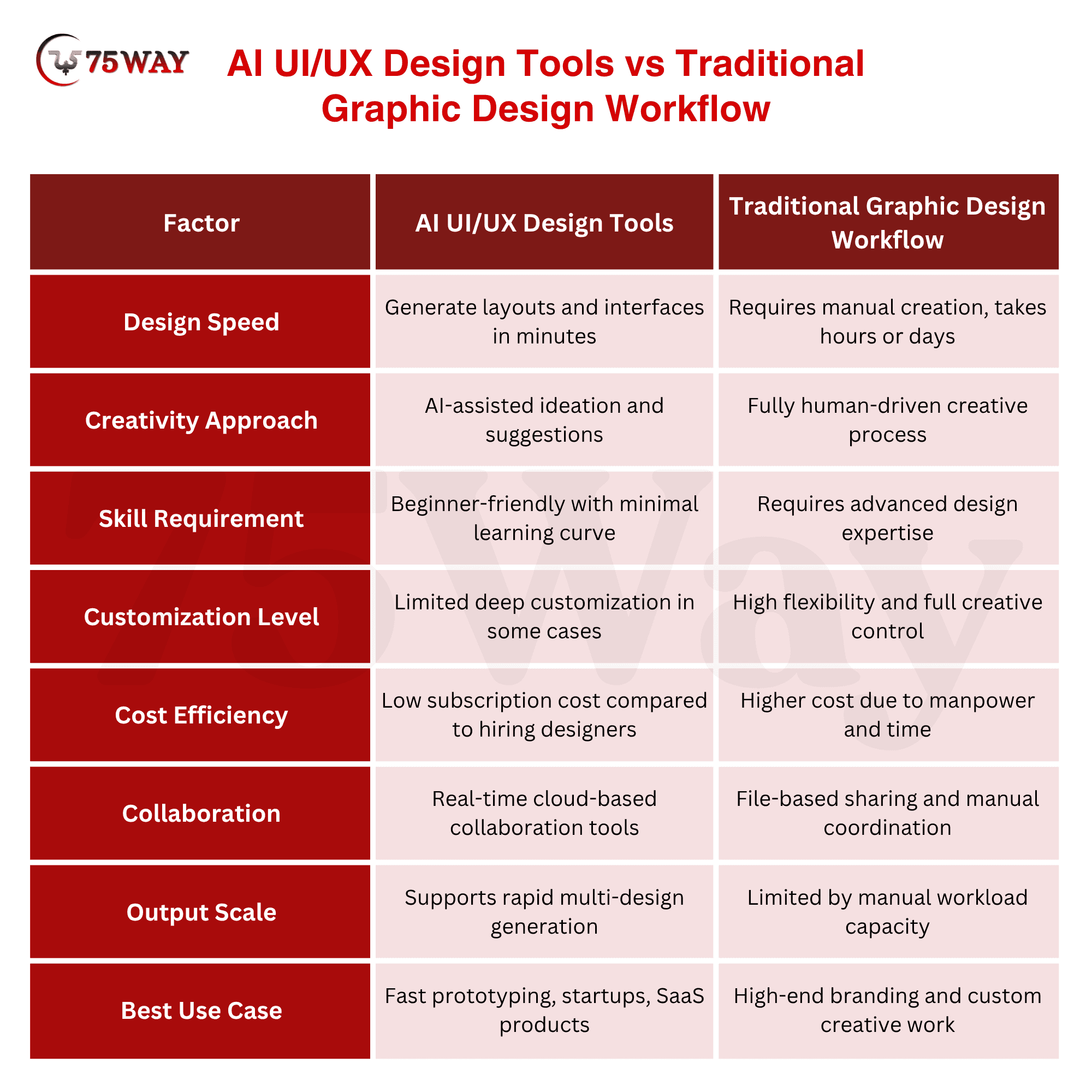
AI UI/UX design tools introduce automation into interface creation, allowing designers to generate layouts, wireframes, and visual components in minutes. These tools reduce dependency on manual sketching and repetitive design tasks. Startups and product teams use them to speed up prototyping, test ideas quickly, and maintain consistency across digital products.
Traditional graphic design workflows rely heavily on manual creativity, where designers build each element step by step using tools like Photoshop or Illustrator. This approach offers strong creative control but requires more time, effort, and technical skill. While traditional methods excel in originality, they often slow down production compared to AI-powered design systems.
Benefits of Using AI Graphic Design Tools
AI graphic design tools help startups, agencies, and designers create high-quality visuals faster with reduced manual effort. These tools streamline branding, UI creation, and marketing design workflows while improving consistency and productivity across digital projects.
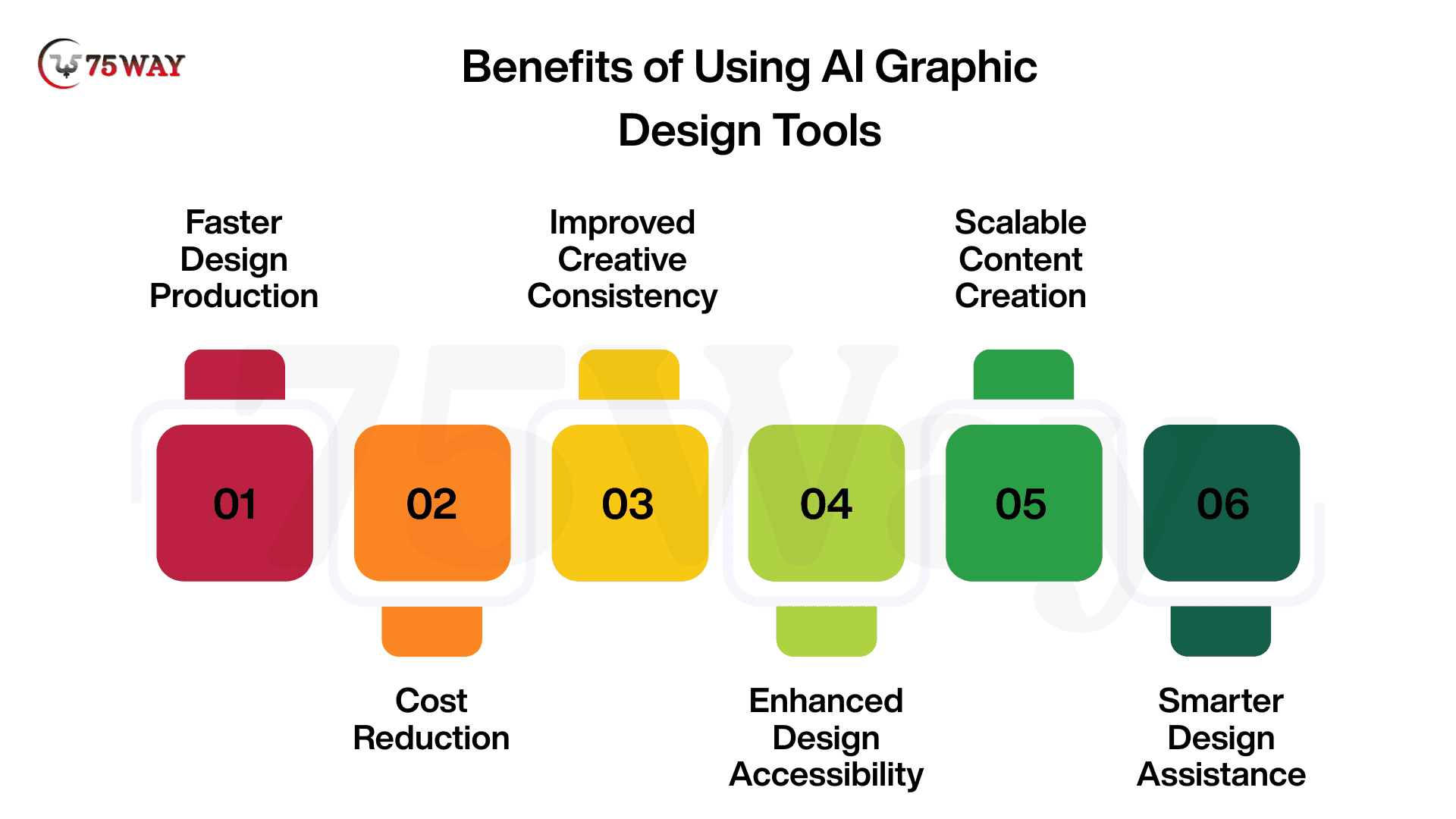
- Faster Design Production: AI tools for image generation generate visuals, layouts, and creatives within minutes, significantly reducing the time required for design execution cycles.
- Cost Reduction: Businesses minimize dependency on large design teams and expensive freelancers, lowering overall creative production costs.
- Improved Creative Consistency: AI-driven UI/UX design tools maintain uniform branding elements such as colors, typography, and layout structures across all design assets.
- Enhanced Design Accessibility: Non-designers can easily create professional-quality visuals without needing advanced technical design skills or training.
- Scalable Content Creation: Organizations can produce large volumes of marketing creatives, UI screens, and branding assets without increasing workload.
- Smarter Design Assistance: AI graphic design tools provide intelligent suggestions for layouts, styles, and improvements, helping designers make better creative decisions.
How to Choose the Right AI-Driven Graphic Design Tool?
Choosing the right AI-driven graphic design tool depends on your business goals, design requirements, and budget structure. Different tools serve different purposes, such as branding, UI design, or marketing content creation. Evaluating features, pricing, and scalability helps startups and agencies select the most suitable solution for long-term creative workflows.
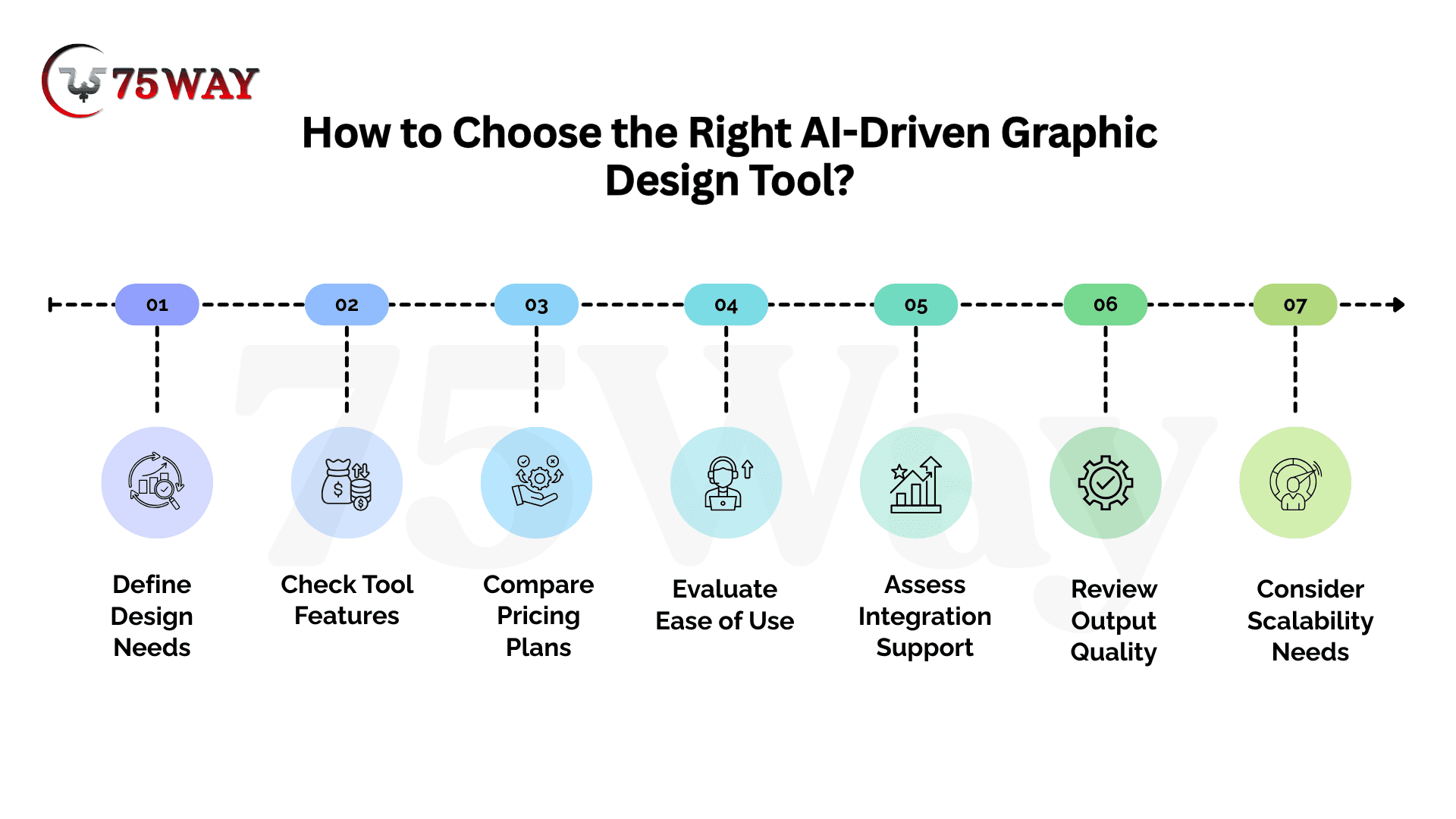
- Define Design Needs
Clarify whether branding, UI design, marketing creatives, or video content creation is required for your business goals. Proper identification prevents selecting unnecessary tools and improves workflow alignment across design and marketing teams.
- Check Tool Features
Evaluate capabilities such as image generation, wireframing, automation, and collaboration support before final selection. Strong feature alignment ensures smoother creative workflows and better output quality across multiple design projects.
- Compare Pricing Plans
Analyze subscription models, free tiers, and enterprise pricing structures carefully before choosing a platform. Balanced pricing evaluation helps startups avoid overspending while still accessing essential AI design functionalities.
- Evaluate Ease Use
User-friendly interfaces reduce learning time and improve adoption across design, marketing, and product teams. Simple navigation ensures faster execution of creative tasks without requiring advanced technical expertise.
- Assess Integration Support
Compatibility with tools like Figma, Adobe, or CRM platforms enhances workflow efficiency and reduces manual effort. Strong integration capabilities enable seamless data flow between design and business systems.
- Review Output Quality
Examine generated visuals for accuracy, branding consistency, and professional appeal before final decision-making. High-quality output ensures designs meet marketing standards and strengthen overall brand identity.
- Consider Scalability Needs
Choose platforms that support growing workloads, team collaboration, and advanced AI capabilities over time. Scalable tools ensure long-term usability without requiring frequent platform migration or restructuring.
Final Thoughts
To summarize, AI graphic design tools help startups, agencies, and enterprises build visual identities, UI systems, and marketing assets at scale. These platforms reduce production time, improve design consistency, and enable faster experimentation across branding and product development workflows. Businesses that adopt the right mix of AI tools gain a clear advantage in speed, cost efficiency, and creative output quality. At the same time, selecting the right tool depends on clear business goals, workflow needs, and scalability expectations. If you are looking to build user-centric digital products with modern design systems, partner with a trusted UI/UX design service provider to transform your ideas into conversion-focused experiences.
Frequently Asked Questions (FAQs)
What Industries Benefit Most From AI Design Tools?
Technology, e-commerce, healthcare, media, and SaaS industries benefit most from AI design tools. These sectors require continuous content production and rapid UI updates. AI tools help maintain scalability while reducing creative production time.
Can Beginners Use AI Graphic Design Platforms Effectively?
Most AI design platforms are built for beginners with simple interfaces and guided workflows. Users without design experience can still create professional visuals. Drag-and-drop features and prompts make learning extremely easy.
Do AI Image Generation Tools Replace Professional Designers?
AI tools assist designers but do not fully replace them. Human creativity, storytelling, and brand strategy remain essential for high-quality outcomes. Designers use AI to improve productivity and enhance creative possibilities.
Are AI-Generated Designs Safe For Commercial Use?
Many AI tools provide commercially safe outputs depending on their licensing terms. Platforms like Adobe Firefly include built-in commercial usage rights. Reviewing licensing policies before use ensures compliance with business requirements.
How Do AI Tools For Graphic Design Improve Marketing Performance?
AI tools help create consistent and engaging visuals faster for campaigns. Better design quality increases audience engagement across digital platforms. Faster content production also allows more frequent marketing execution.
What Skills Are Needed For AI Design Tools?
Basic understanding of design principles and creative thinking is helpful. Most tools do not require coding or advanced technical expertise. Learning prompt writing and tool navigation improves output quality significantly.
Can AI Tools Support Team Collaboration?
Many AI design platforms include real-time collaboration features for teams. Designers, marketers, and developers can work together on shared projects. This improves workflow coordination and reduces communication gaps.
Are AI Graphic Design Tools Cost-Effective?
AI tools are generally more affordable than hiring full-time design teams or freelancers. Subscription-based pricing makes them accessible for startups. Businesses reduce operational costs while maintaining consistent design output quality.