AI Summary
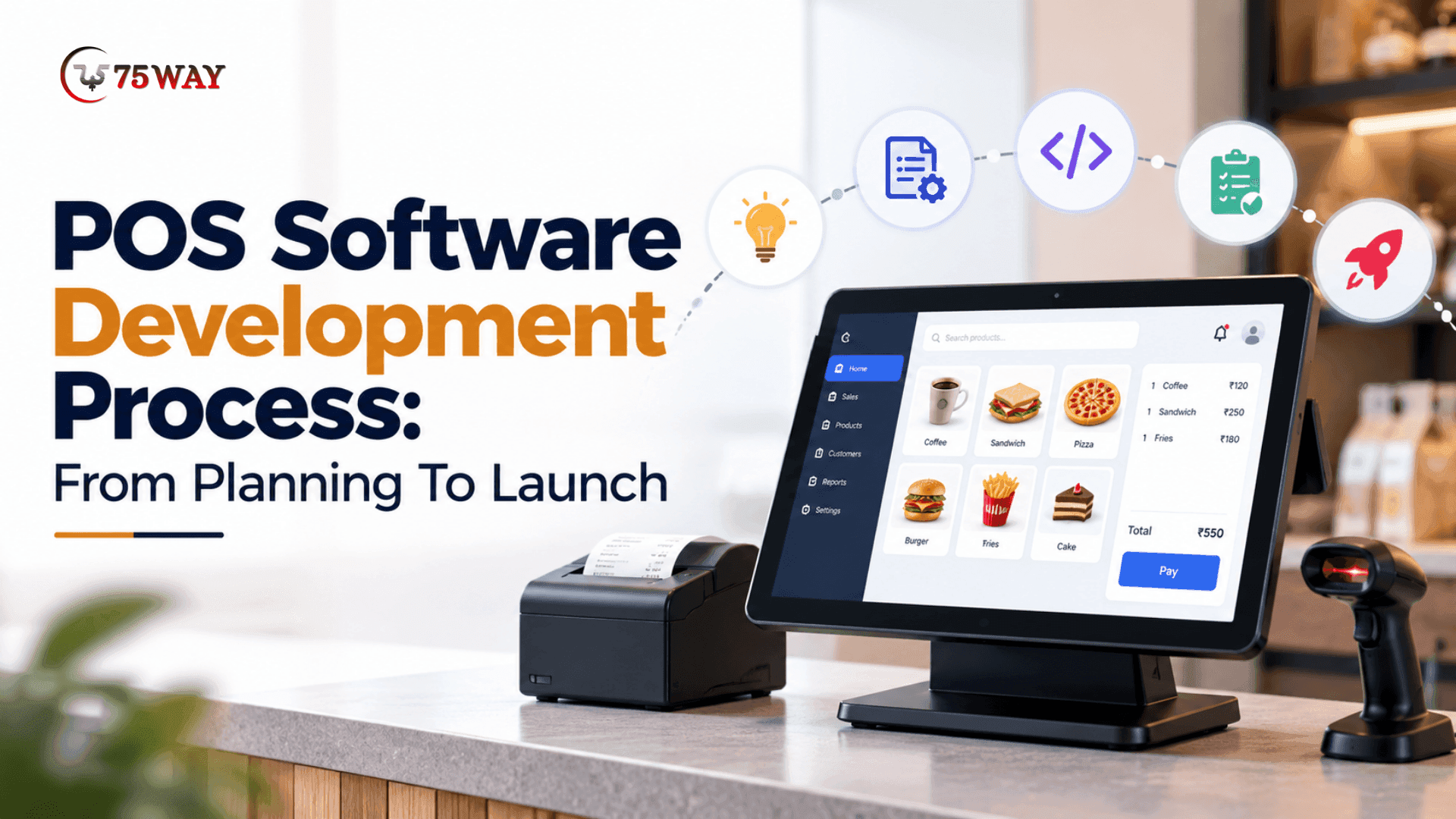
Building POS software requires more than processing payments. The right development process connects sales, inventory, customer data, and reporting in one system. Each stage influences usability, security, and business performance. This guide explains how to plan, develop, test, and launch POS software successfully.
Key Takeaways
- Define business requirements before starting the POS software development process.
- Select essential POS features based on daily operational needs.
- Choose a technology stack that supports integrations and scalability.
- Prioritize payment security, data protection, and rigorous software testing.
- Plan deployment, staff training, and ongoing improvements before launch.
A long checkout queue, a payment error, or an incorrect stock count can turn an ordinary business day into a frustrating experience. For retailers, restaurants, and growing businesses, POS software needs to keep transactions moving while giving staff accurate information when they need it.
Custom POS software development involves more than building a billing screen. It requires careful decisions about business requirements, user interface design, payment gateway integration, inventory management, security, and testing to ensure the system supports daily operations.
Each POS software development stage contributes to the final product, from defining the project scope to launching the software and maintaining it over time. Let’s explore the key stages of POS software development and how each one helps shape a reliable business solution.
What Is POS Software Development?
POS software development is the process of planning, designing, building, testing, and launching software that manages sales transactions and related business operations. Depending on the business model, a point-of-sale (POS) system can connect payment processing, inventory tracking, customer management, employee permissions, and financial reporting through one interface.
A POS solution may operate on desktop computers, tablets, mobile devices, dedicated terminals, or cloud-connected hardware. Its functionality depends on the intended users, transaction environment, payment requirements, and integrations with existing business systems.
Common types of POS software include:
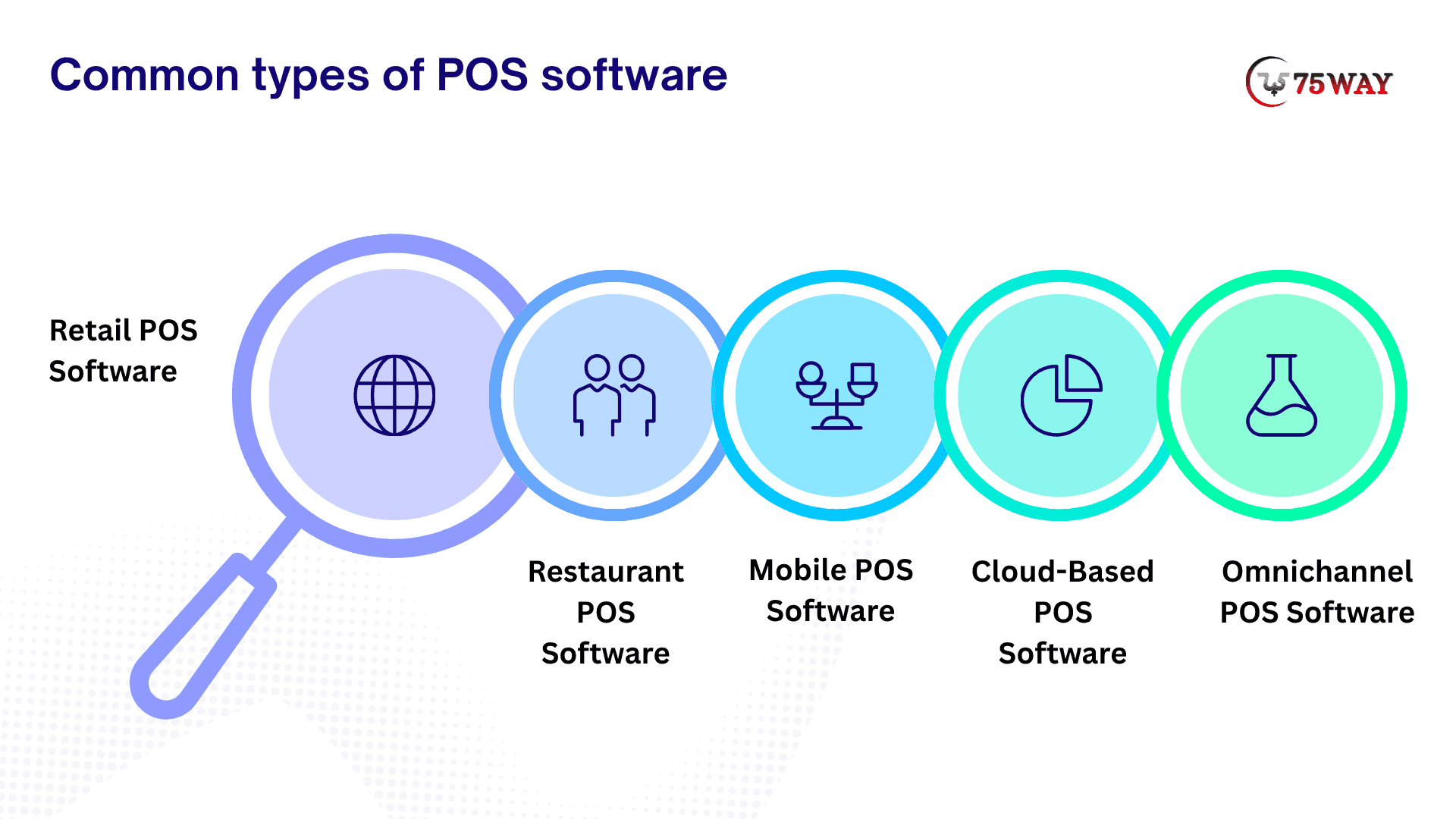
- Retail POS Software: Manages product sales, stock levels, returns, discounts, and customer purchases for physical or online retail operations.
- Restaurant POS Software: Supports menu management, table orders, kitchen coordination, billing, and restaurant-specific workflows.
- Mobile POS Software: Enables staff to accept orders or complete sales using portable devices.
- Cloud-Based POS Software: Stores and synchronizes business data through cloud infrastructure, allowing authorized users to access information across locations.
- Omnichannel POS Software: Connects in-store and online sales channels to help businesses coordinate inventory, orders, and customer records.
The right product type establishes the foundation for the development roadmap, technology decisions, and feature priorities.
POS Software Development Process: 8 Essential Steps
A structured development process helps businesses control project scope, prioritize high-value features, and reduce avoidable rework. Each stage should produce a clear outcome before the team moves forward.
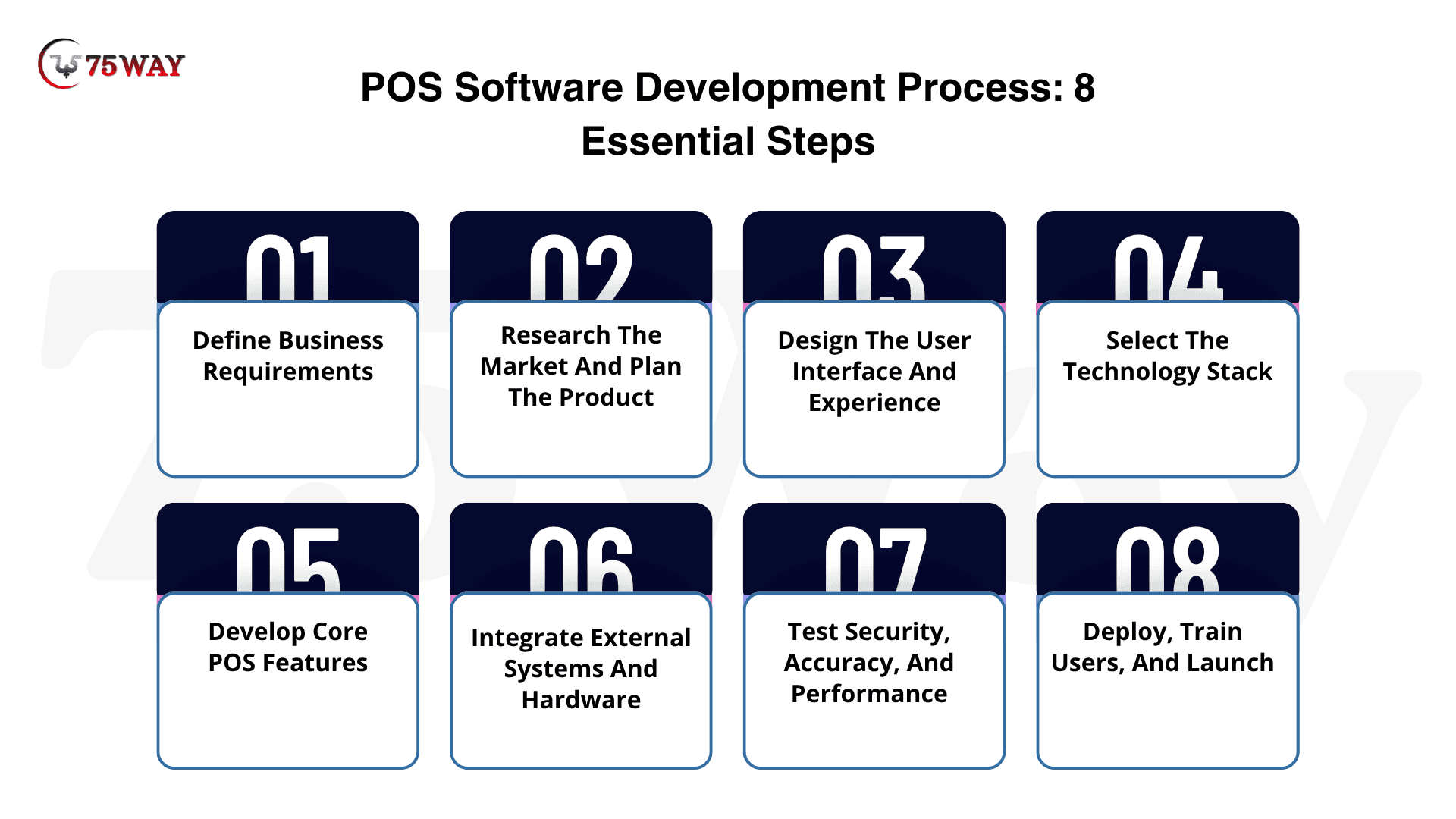
Step 1: Define Business Requirements
The first step is to identify the operational problems the POS software must solve. Requirements should come from the people who will use and manage the system, including cashiers, store managers, accountants, and business owners.
- Identify Target Users: Determine whether the software will serve retailers, restaurants, wholesalers, service providers, or multiple business categories.
- Map Daily Workflows: Document checkout, refunds, discounts, stock updates, purchase orders, and end-of-day reconciliation.
- Set Business Objectives: Establish measurable goals, such as reducing checkout delays, improving stock visibility, or consolidating reports across locations.
- Document Technical Requirements: Identify supported devices, operating systems, payment methods, data access rules, and third-party integrations.
- Define Project Scope: Separate essential launch features from enhancements that can be introduced in later releases.
Deliverable: A requirements document outlining the target users, business goals, workflows, technical needs, and initial project scope.
Step 2: Research The Market And Plan The Product
Market research helps validate whether the proposed POS system addresses a real need and offers a practical advantage over existing products. The team should evaluate competing solutions while concentrating on the target market's unmet requirements.
- Analyze Competitors: Review competing POS products, pricing models, core capabilities, limitations, and customer feedback.
- Validate User Needs: Interview prospective users and stakeholders to understand transaction challenges and missing capabilities.
- Choose A Revenue Model: Decide whether the product will use a subscription, a one-time licence, usage-based pricing, or a combination of revenue streams.
- Prioritize Features: Rank requirements by business value, development complexity, urgency, and user demand.
- Plan The Minimum Viable Product (MVP): Select the smallest useful feature set that can be tested with real users before a broader release.
Deliverable: A validated product concept, prioritized feature list, initial business model, and MVP roadmap.
Step 3: Design The User Interface And Experience
POS interfaces must support quick, accurate interactions in environments where staff may process frequent transactions. Clear navigation and accessible controls are especially important for touchscreen terminals and busy checkout counters.
- Create User Flows: Map the steps for product selection, checkout, payment, refunds, and receipt generation.
- Develop Wireframes: Arrange product search, cart controls, payment options, and transaction summaries before investing in detailed visual design.
- Build Interactive Prototypes: Let representative users test navigation and identify confusing steps early.
- Design Role-Based Interfaces: Present appropriate functions to cashiers, supervisors, administrators, and other authorized users.
- Test Usability: Evaluate readability, button placement, error messages, accessibility, and the number of actions required to complete common tasks.
Deliverable: Approved wireframes, interactive prototypes, and interface specifications for development.
Step 4: Select The Technology Stack to Create POS Software
The technology stack should reflect the POS product's device requirements, connectivity needs, expected transaction volume, security obligations, and integration landscape. A technology choice that works for a small single-store product may not suit a large multi-location platform.
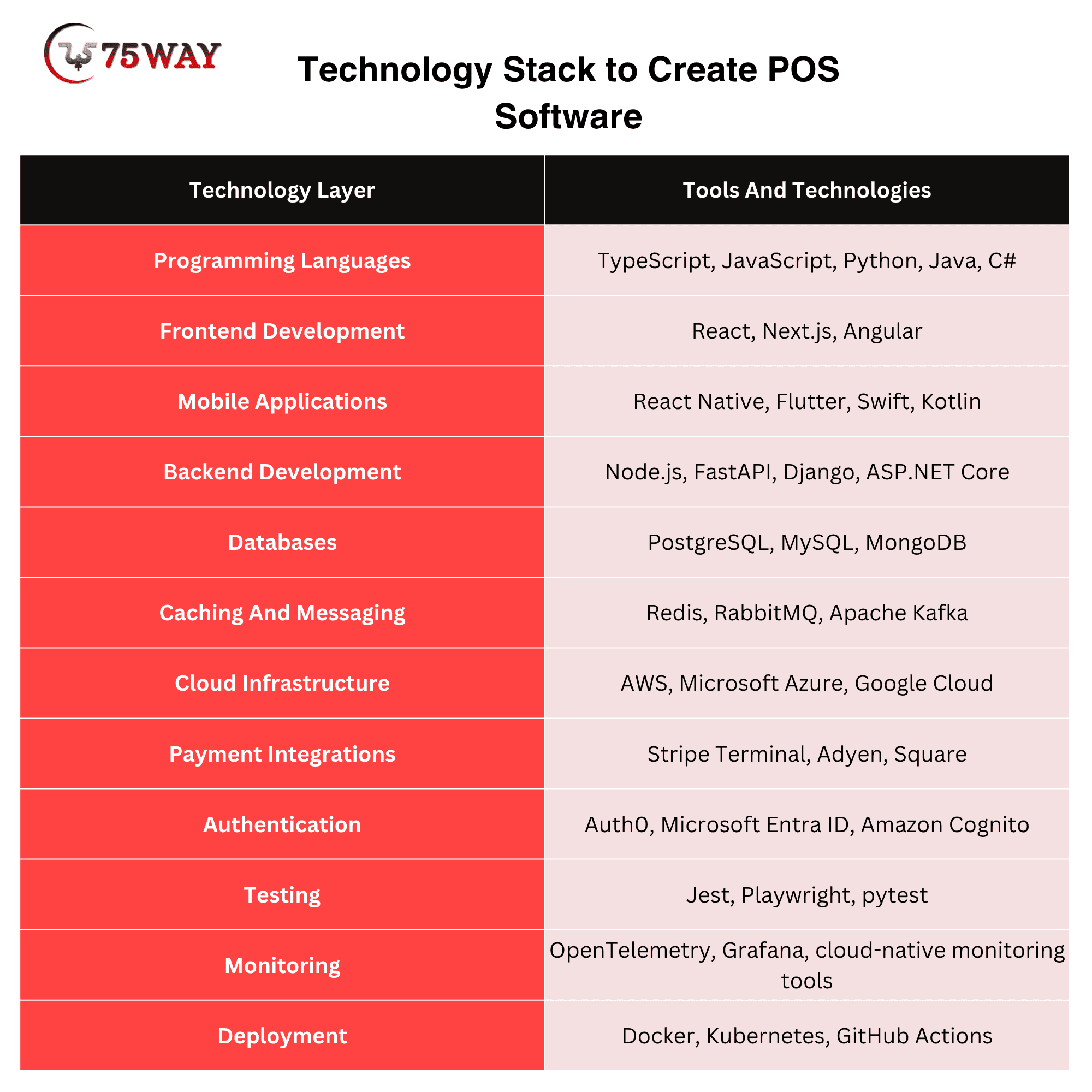
The final selection depends on supported hardware, provider availability, existing business systems, and the engineering team's expertise. Payment integrations also require confirmation of supported regions, devices, transaction types, and commercial agreements.
Deliverable: A documented architecture and technology plan covering the application, data storage, integrations, security, and deployment environment.
Step 5: Develop Core POS Features
Development usually begins with the transaction workflow and expands into supporting modules. Building in logical increments allows the team to validate critical operations before introducing more complex functionality.
- Product And Inventory Management: Maintain product catalogues, prices, stock levels, variants, and stock movement records.
- Checkout And Billing: Support barcode scanning, cart management, discounts, tax calculations, invoices, and receipts.
- Payment Processing: Integrate supported payment providers for card, digital wallet, and other required payment methods.
- Returns And Refunds: Apply refund policies, authorization rules, and transaction records to returned items and cancelled purchases.
- Employee And Role Management: Configure staff accounts, permissions, shift information, and approval requirements for sensitive actions.
- Sales Reporting: Provide summaries of sales, payment methods, refunds, taxes, and product performance.
- Customer Management: Store permitted customer details, purchase histories, and loyalty information where required.
- Offline Transaction Support: If the business needs offline operation, define which actions remain available during connectivity loss and how records are synchronized afterward.
Deliverable: A working POS application with the agreed core modules and defined transaction workflows.
Step 6: Integrate External Systems And Hardware
A POS platform often depends on systems outside the core application. Integration planning should begin early because third-party access, hardware compatibility, and provider approval can affect development timelines.
- Payment Gateways And Terminals: Connect the chosen payment provider and verify transaction authorization, refunds, settlement reporting, and error handling.
- Accounting Software: Transfer appropriate sales, tax, refund, and reconciliation data to accounting systems.
- E-Commerce Platforms: Synchronize products, orders, and inventory across online and physical sales channels.
- Receipt Printers And Barcode Scanners: Test supported devices, drivers, connection methods, and peripheral behaviour.
- Inventory And Supplier Systems: Connect purchasing, stock replenishment, and supplier records where these functions are required.
- Customer Relationship Management (CRM): Share permitted customer and sales information with authorized business applications.
Each integration should have defined data formats, permissions, failure-handling rules, and recovery procedures. Teams should also verify that the selected vendors provide the APIs and access needed for the intended use.
Deliverable: Tested integrations that exchange the required data and handle common failures appropriately.
Step 7: Test Security, Accuracy, And Performance
Testing determines whether the POS software can handle real transaction conditions without compromising data, payments, or operational continuity. Testing should begin during development rather than being postponed until the product is nearly ready to launch.
- Functional Testing: Verify checkout, discounts, taxes, receipts, refunds, stock adjustments, and user permissions.
- Payment Testing: Test approved payment flows, declined transactions, duplicate submissions, cancellations, and network interruptions using provider-approved test environments.
- Integration Testing: Confirm that inventory, accounting, e-commerce, and other connected systems exchange data correctly.
- Performance Testing: Measure response times and system behaviour under expected transaction volumes and peak workloads.
- Security Testing: Review access controls, encryption, secrets management, vulnerability exposure, and audit logging.
- Offline And Recovery Testing: Where offline operation is supported, test synchronization conflicts, interrupted connections, and recovery after system failures.
- User Acceptance Testing (UAT): Ask representative staff to complete realistic tasks and report problems before release.
For card payments, determine which PCI DSS requirements apply to the implementation and confirm responsibilities with the payment provider and qualified security professionals. Avoid storing sensitive authentication data unless explicitly permitted under applicable requirements.
Deliverable: Documented test results, resolved critical defects, and approval to proceed with deployment.
Step 8: Deploy, Train Users, And Launch
A successful launch requires more than publishing software. The deployment plan should account for business continuity, staff readiness, data migration, support, and a clear response to unexpected problems.
- Prepare The Production Environment: Configure hosting, monitoring, backups, access permissions, and operational alerts.
- Migrate And Verify Data: Transfer required product, inventory, customer, and historical records, then reconcile important totals.
- Train Employees: Demonstrate checkout, refunds, exception handling, reporting, and relevant administrative tasks.
- Run A Pilot: Release the system to a limited store, team, or user group before a wider rollout when practical.
- Monitor Launch Performance: Track transaction failures, synchronization errors, response times, and support requests.
- Establish Support Procedures: Assign responsibility for incident response, bug fixes, updates, and user assistance.
- Plan Future Releases: Use feedback and product analytics to prioritize improvements after launch.
Deliverable: A production-ready POS system with trained users, monitoring, support arrangements, and a post-launch improvement plan.
Essential Features To Include In POS Software Creation Procedure
The feature set should reflect the product's target industry and business requirements. A small retail checkout application may not need the same capabilities as a restaurant platform or a multi-store enterprise system.
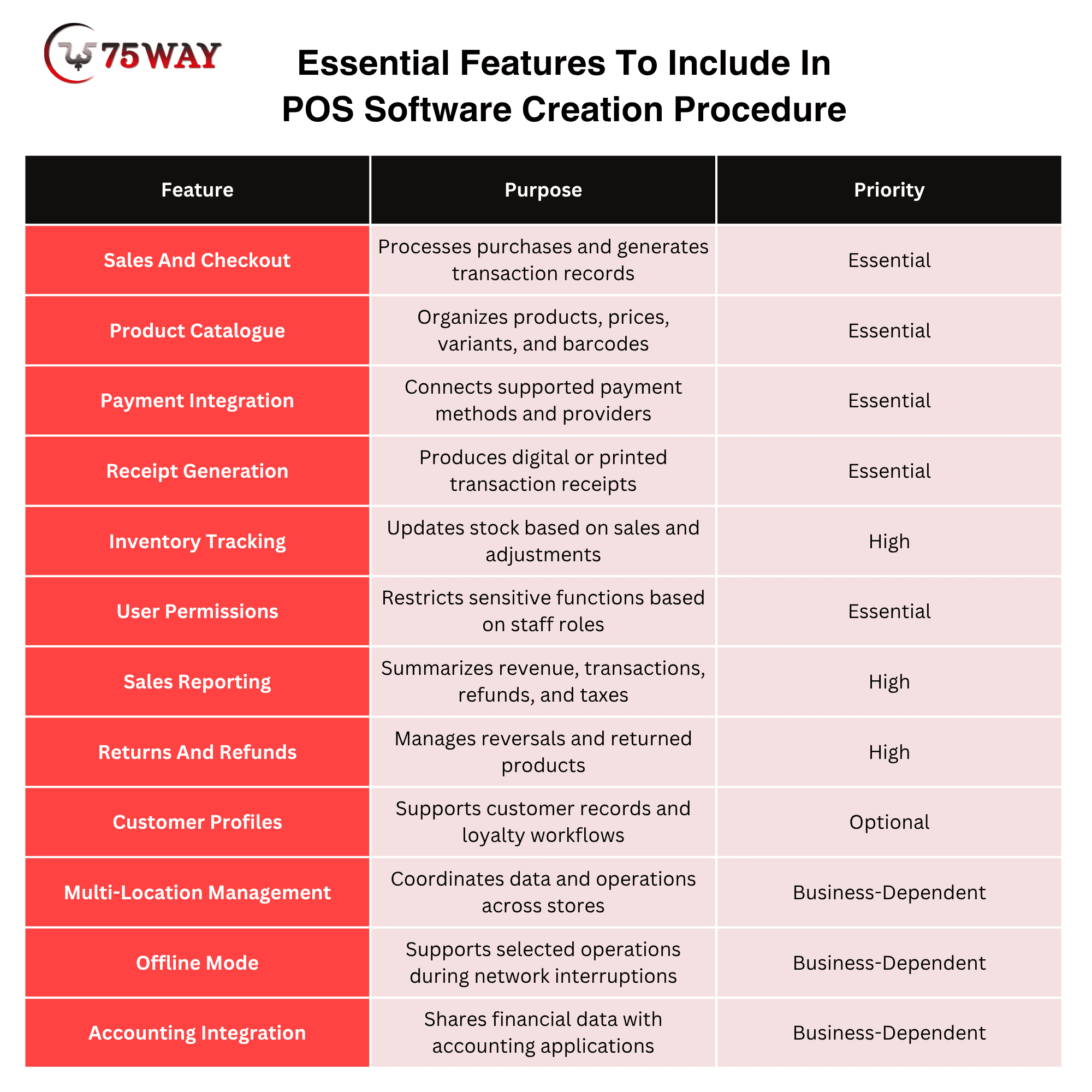
The minimum viable product should include the features required to complete and record sales safely. Advanced analytics, loyalty programs, and multi-location controls can follow when they support the product roadmap.
POS Software Launch Checklist
A structured launch checklist helps confirm that the POS software is ready for real transactions, staff operations, and business data management. Before deployment, review these essential areas to reduce avoidable disruptions.
- Verify Core Transactions: Test sales, discounts, tax calculations, refunds, cancellations, and receipt generation using realistic scenarios.
- Validate Payment Processing: Confirm payment authorization, declined transactions, duplicate submission handling, refunds, and settlement reconciliation.
- Check Hardware Compatibility: Verify barcode scanners, receipt printers, payment terminals, cash drawers, and supported devices.
- Validate Data Migration: Confirm that product catalogues, prices, stock levels, employee accounts, and required customer records have transferred accurately.
- Review Security Permissions: Check employee roles, administrator access, authentication controls, audit logs, and credential protection.
- Test Connectivity And Recovery: Verify network interruption handling, backup procedures, recovery processes, and offline functionality where supported.
- Complete User Acceptance Testing: Ask employees to perform routine tasks and confirm that the workflows meet operational requirements.
- Prepare Staff Training: Provide instructions for checkout, refunds, troubleshooting, reporting, and escalation procedures.
- Configure Monitoring And Alerts: Set up alerts for application failures, transaction errors, synchronization issues, and service interruptions.
- Confirm Rollback And Support Plans: Establish incident contacts, recovery steps, deployment rollback procedures, and responsibilities for urgent fixes.
What To Do After Launch POS Software: Post-Launch Strategies
Launching POS software is the beginning of its operational lifecycle. Post-launch activities help identify issues early, evaluate system performance, and guide improvements based on actual business needs.
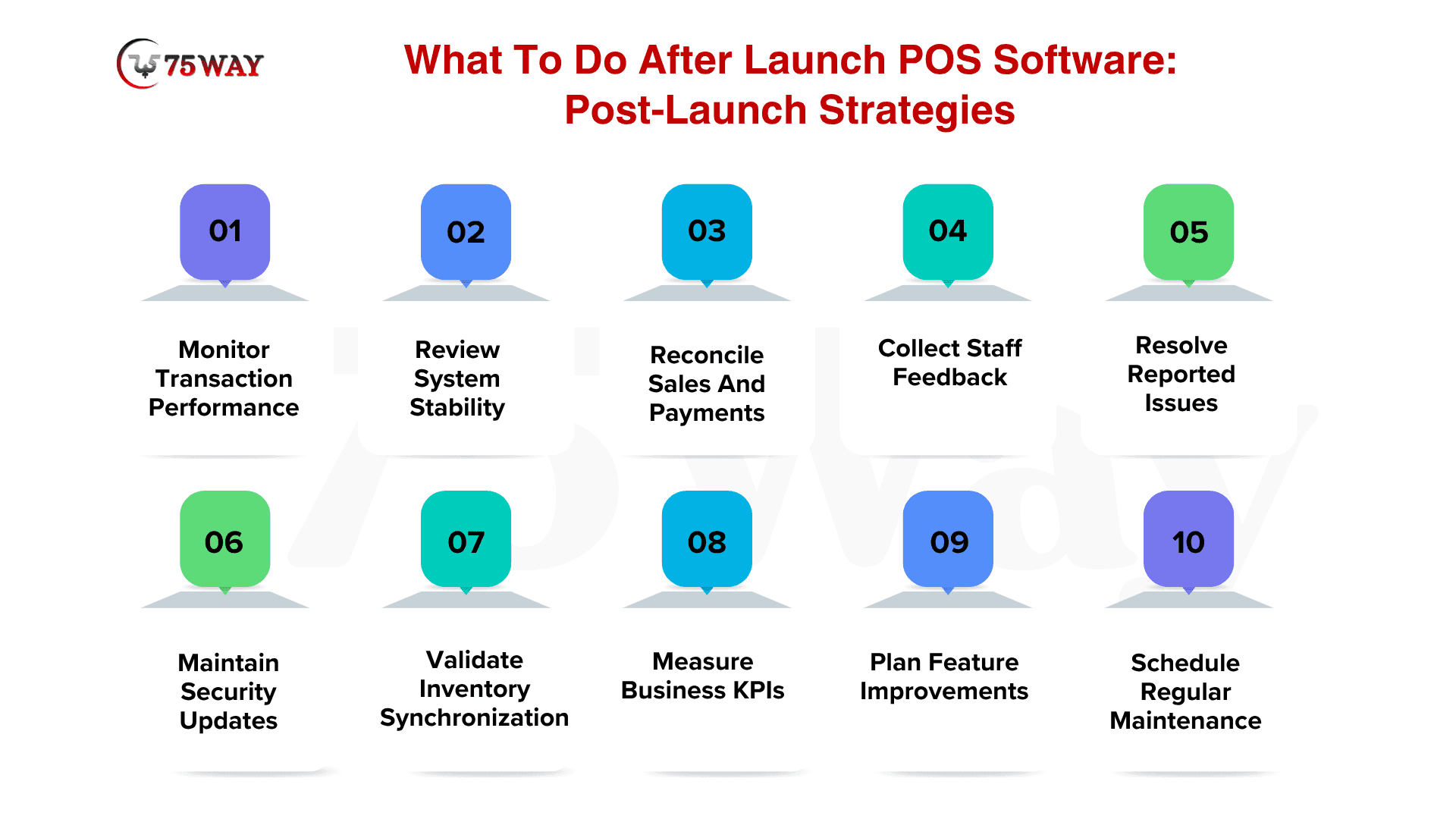
- Monitor Transaction Performance: Track checkout completion times, failed payments, processing delays, and transaction errors to identify operational bottlenecks.
- Review System Stability: Monitor uptime, application crashes, API failures, database performance, and connectivity problems during business hours.
- Reconcile Sales And Payments: Compare POS transaction records with payment provider settlements, refunds, tax records, and accounting entries.
- Collect Staff Feedback: Ask cashiers, supervisors, and managers about confusing workflows, missing capabilities, and recurring operational difficulties.
- Resolve Reported Issues: Prioritize defects according to business impact, security risk, transaction disruption, and the number of affected users.
- Maintain Security Updates: Apply relevant patches, review user permissions, rotate credentials where appropriate, and investigate suspicious activity.
- Validate Inventory Synchronization: Compare recorded stock movements with physical inventory and investigate discrepancies between connected systems.
- Measure Business KPIs: Evaluate transaction speed, system availability, inventory accuracy, user adoption, and support requests against established baselines.
- Plan Feature Improvements: Use verified usage patterns and user feedback to prioritize enhancements instead of expanding the product without clear requirements.
- Schedule Regular Maintenance: Maintain backups, test recovery procedures, review dependencies, and plan updates to support long-term reliability.
Conclusion
The POS software development process requires careful planning, practical architecture decisions, reliable integrations, and thorough testing before launch. Each stage prepares the system to handle real transactions and meet business requirements. Post-launch monitoring, staff feedback, and regular maintenance help maintain performance as operational needs evolve.
A clear development roadmap allows businesses to manage risks, prioritize essential workflows, and build a POS solution that supports long-term growth. Partner with an experienced POS software development team to turn your requirements into a launch-ready solution.
Frequently Asked Questions (FAQs)
What Are The Main Stages Of POS Software Development?
The main stages include requirement planning, workflow mapping, architecture design, UI/UX development, coding, integration, testing, deployment, and post-launch monitoring.
How Long Does The POS Software Development Process Take?
A basic POS application may take one to three months, while a more complex platform can require six to twelve months or longer. The timeline depends on features, integrations, hardware requirements, and testing.
What Should Businesses Do Before Launching POS Software?
Businesses should test transactions, validate payment processing, verify hardware compatibility, check migrated data, review security permissions, train employees, and prepare support and recovery plans.
Why Is Testing Important In POS Software Development?
Testing helps identify transaction errors, payment failures, security vulnerabilities, integration problems, and performance issues before they disrupt business operations.
Which Integrations Are Required For POS Software?
Depending on business requirements, integrations may include payment gateways, accounting applications, inventory platforms, e-commerce systems, barcode scanners, receipt printers, and customer relationship management tools.
What Should Businesses Monitor After POS Software Launch?
Businesses should monitor transaction failures, system uptime, payment reconciliation, inventory accuracy, application errors, employee feedback, and user adoption.
How Can Businesses Improve POS Software After Launch?
Businesses can improve their POS systems by analyzing performance data, collecting staff feedback, fixing recurring issues, updating security controls, and prioritizing enhancements based on operational needs.