AI Summary
A tenant management app development starts with choosing the right rental market and solving its everyday challenges. This guide explores app types, essential features, and practical development steps. It covers technology stacks, security, and revenue models. Discover how to plan costs from $8,000 to $180,000+ while creating a product built for growth.
Key Takeaways
- Choose a rental niche before defining features or development priorities.
- Tenant management app development costs range from $8,000–$180,000+.
- Landlord, finance-first, enterprise, and smart-building apps serve different rental needs.
- Prioritise rent collection, lease tracking, maintenance, permissions, and communication.
- Validate demand, design workflows, select technologies, test security, and launch iteratively.
A tenant pays rent late, but the payment reminder gets buried in an email thread. Someone reports a broken dishwasher by text, another calls the office about a lease clause, and a maintenance request sits unanswered because nobody realised it had come in.
For global as well as US property managers, keeping everything moving can become a full-time job before the actual business of growing a portfolio even begins.
That’s where a tenant management app development solution can make a real difference. Instead of digging through emails, spreadsheets, and payment records, landlords and property teams can manage rent collection, repair requests, lease documents, and tenant communication from one place.
If you’re planning to build a real estate app to manage properties for this market, there’s more to consider than putting these tools on a screen.
The right features, pricing strategy, and development budget can determine whether your app solves a genuine problem or becomes another tool landlords don’t want to use. Let’s explore how to build a tenant management app that makes sense for the rental market in 2027.
What Is Tenant Management App Development?
Tenant management app development is the process of building a platform that helps landlords, property managers, and tenants handle rental activities through a central digital platform.
Depending on its purpose, the application can support tenant screening, lease management, online rent collection, maintenance requests, financial reporting, document storage, and communication. Advanced products may also include smart access controls, automated accounting, and AI-assisted workflows.
For a business owner, however, the most important decision is not which features to include. It is identifying which rental management problem the application will solve better than existing alternatives.
Consider two potential customers. An independent landlord managing five rental units may need a simple way to collect rent and store lease documents.
A property management company overseeing 200 units may require staff permissions, tenant portals, vendor coordination, payment reconciliation, and portfolio-level reporting.
Both need tenant management software, but their budgets, workflows, and expectations differ significantly. Your development strategy should reflect those differences from the beginning.
Why Build a Tenant Management Application in the US Market?
A tenant management app can be a valuable business opportunity in the US, where property owners need simpler ways to manage growing rental portfolios.
When rent follow-ups, lease renewals, and repair requests compete for attention, even experienced property managers can lose hours to routine administration. Understanding these everyday frustrations helps explain why this app idea deserves serious consideration.
A well-designed tenant management application can bring these workflows together and create a more manageable experience for both tenants and property managers.
Several business opportunities are worth evaluating before development begins.
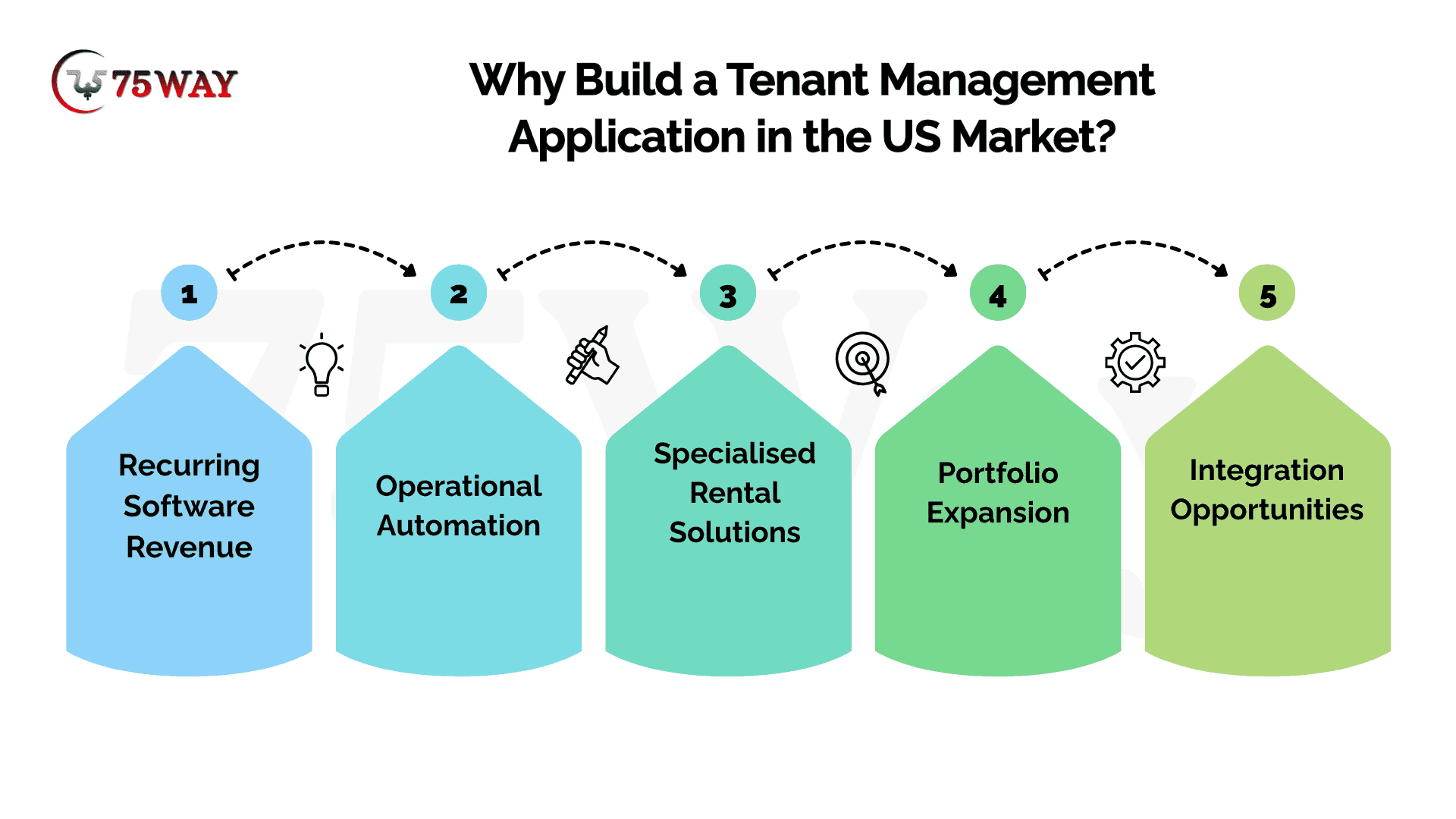
- Recurring Software Revenue: Subscription plans can generate ongoing income when customers continue receiving value from the platform.
- Operational Automation: Automated reminders, maintenance routing, and document tracking can reduce repetitive administrative work.
- Specialised Rental Solutions: Products designed for student housing, short-term rentals, or commercial properties can address needs that general-purpose tools may not fully satisfy.
- Portfolio Expansion: Per-unit pricing and tiered plans can accommodate customers as they manage additional properties.
- Integration Opportunities: Connections with payment providers, accounting platforms, screening services, and smart-building systems can expand the product's usefulness.
These opportunities do not automatically make an app profitable. Before investing, validate the target market, identify the competition, and determine whether prospective customers are willing to pay for your proposed solution.
Define Your Ideal Customer Profile Before Building Tenant Application
For a commercially viable product, start with a clearly defined ideal customer profile (ICP).
A practical starting ICP is a US-based property management company handling approximately 100–2,000 residential units, using a mix of spreadsheets, email, accounting tools, and maintenance systems. This is a proposed targeting hypothesis, not a claim about the average US property manager.
Such a company may experience duplicated data entry, delayed maintenance coordination, limited portfolio visibility, and difficulties tracking tenant communications. These are problems you should validate through interviews with prospective buyers before committing to development.
Ask prospective customers:
- Which rental management tasks consume the most staff time?
- Where do rent, lease, and maintenance records currently live?
- Which existing software tools are difficult or expensive to use?
- What would make switching platforms worthwhile?
- Who approves the purchase, and what budget can they allocate?
The answers will help you identify a paying market instead of building a large application around assumptions.
How to Develop a Tenant Management Mobile App: Strategic Roadmap
A successful tenant management mobile app begins with a simple question: what makes managing rental properties harder than it needs to be? For landlords, the answer might be late rent, endless maintenance follow-ups, or lease details buried in emails. A clear development process helps turn these everyday frustrations into useful app features, from the first idea to launch.
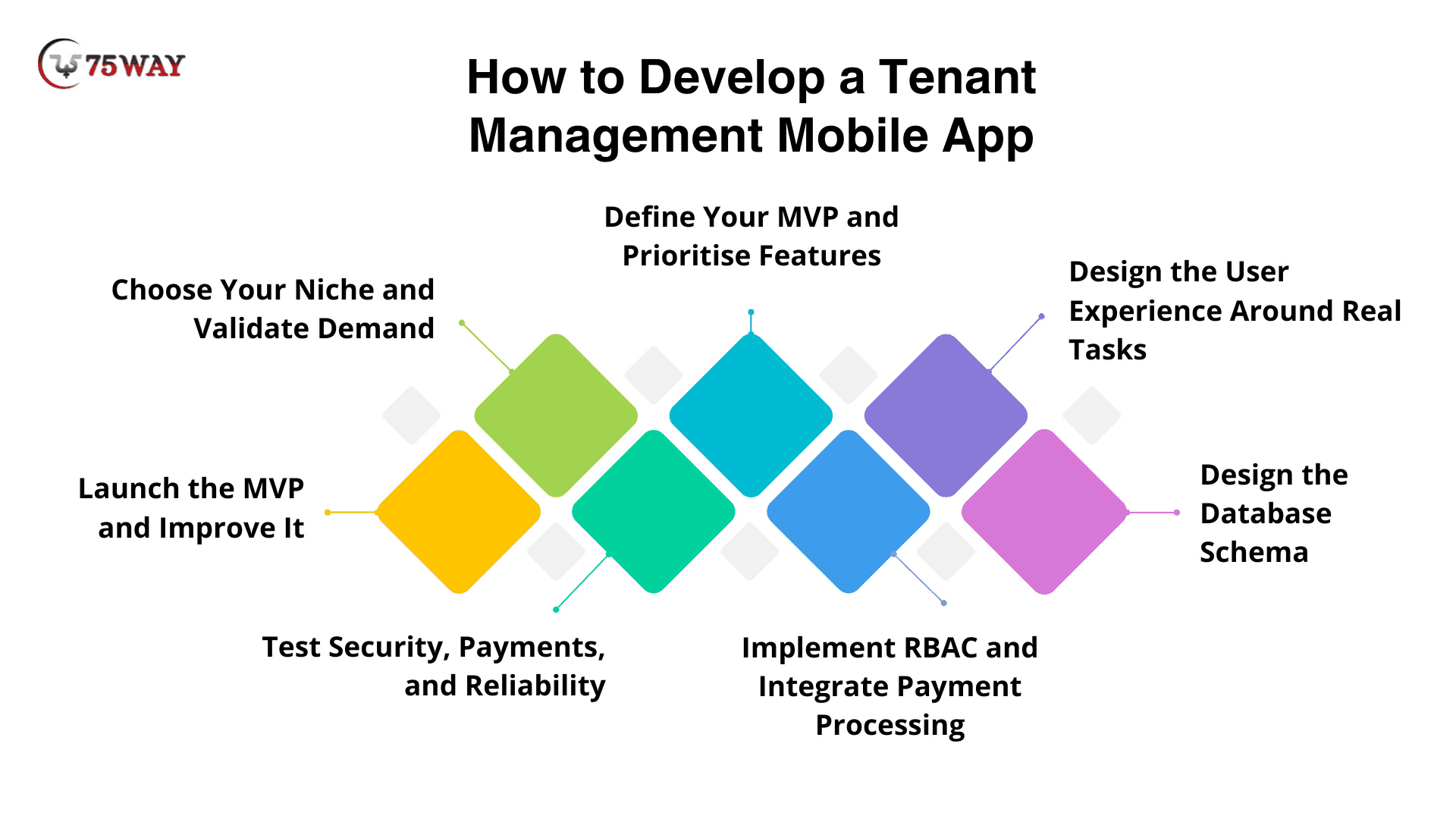
Step 1: Choose Your Niche and Validate Demand
Your first decision is who will pay for the app and what problem will convince them to use it. An independent landlord managing a handful of rental homes has different needs from a property management company handling hundreds of apartments.
Conversations with prospective customers can help you understand where current tools fall short. Ask how they collect rent, track lease renewals, assign repairs, communicate with tenants, and prepare financial reports. Pay attention to workarounds, too. A manager who still uses spreadsheets to track maintenance requests may have a problem worth solving.
Competitor research can reveal missing features, pricing gaps, and customer complaints, but an opportunity is only meaningful when your target users care about it.
What to do:
- Interview landlords and property managers from your intended customer segment.
- Compare competing platforms, their pricing, and their core features.
- Identify one costly or frustrating workflow your app can improve.
- Estimate what customers may be willing to pay for the solution.
Deliverable: A defined audience, a validated problem, competitor findings, and an initial product brief.
Step 2: Define Your MVP and Prioritize Features
The first version of your app should solve a real problem without carrying the cost of features nobody has asked for. For a small landlord, tenant records, lease storage, rent tracking, and maintenance requests may be enough to get started. A larger property management business may need online payments, staff permissions, and portfolio reporting from the beginning.
Your MVP scope should reflect what customer interviews have confirmed, not a long wish list of features borrowed from competitors.
A simple way to prioritize is to divide features into three groups:
- Essential: Features customers need to complete the app's main job.
- Important: Improvements that add value but aren't necessary for the first release.
- Later: Advanced features that require further validation, such as predictive maintenance or AI-assisted support.
Write acceptance criteria for essential features so the team knows what completion looks like. For example, a maintenance request should record the issue, identify the relevant unit, and show its current status.
Deliverable: A defined MVP, product requirements document, acceptance criteria, and prioritised backlog.
Step 3: Design the User Experience Around Real Tasks
A tenant who wants to report a broken air conditioner shouldn't have to search through several menus to find the right form. A landlord checking overdue rent shouldn't need to open individual tenant profiles one by one.
Start with the main tasks each user needs to complete. Map the journeys for landlords, tenants, administrators, and vendors where relevant. Then prepare wireframes and interactive prototypes to test the navigation before development begins.
Consider A Practical Example: a tenant submits a repair request, attaches a photo, and receives an acknowledgement. The property manager sees the request, assigns a vendor, and updates its status. Each person needs the right information at the right stage, without unnecessary steps.
Early prototype testing can uncover confusing labels, missing actions, and awkward workflows before they become expensive development changes.
Deliverable: User journeys, wireframes, interactive prototypes, and an interface design system.
Step 4: Design the Database Schema
The database needs to reflect how rental properties actually work, including changes in occupancy, lease renewals, payment histories, and maintenance assignments. A simple structure may work for a small landlord, but poor relationships between records can cause problems as the portfolio grows.
For a typical tenant management app, the core tables include:
- Users: Landlords, tenants, vendors, and authorised staff.
- Properties: Building details and ownership or management relationships.
- Units: Individual apartments or rentable spaces within each property.
- Leases: Rental agreements, occupants, start dates, and end dates.
- Payments: Transaction references, amounts, payment methods, and statuses.
- Maintenance Tickets: Repair requests, assigned vendors, updates, and completion records.
PostgreSQL is one suitable database option for managing these connected records. The relationships need careful planning: a property can contain several units, a unit can have different leases over time, and a tenant may move between properties.
One Important Design Decision: Keep a tenant's identity separate from their lease and unit assignment. That structure makes it easier to maintain historical records when someone moves out or signs a new lease.
Deliverable: A database schema, entity relationship diagram, API specifications, and data-access plan.
Step 5: Implement RBAC and Integrate Payment Processing
Security and payment handling deserve special attention because a mistake can expose private tenant information or create disputes over rent.
Role-based access control (RBAC) determines which records each user can access and which actions they can perform. Tenants should only see information they're authorised to access, while landlords and property managers should be limited to their assigned portfolios. Vendors generally need access only to the maintenance jobs assigned to them.
The technical implementation matters as much as the role definitions. OWASP recommends denying access by default and checking permissions on every request, rather than relying on hidden buttons or frontend restrictions alone.
Online rent collection requires a separate set of safeguards. Stripe or another suitable payment provider may support ACH bank transfers, card payments, and recurring payment arrangements, depending on the service and configuration.
Your development team should account for:
- Payment Authorization: Appropriate tenant consent for eligible bank debit arrangements.
- Webhook Verification: Validation of payment events before updating transaction records.
- Duplicate Event Protection: Safeguards against processing the same event more than once.
- Payment Reconciliation: A way to compare application records with provider transaction records.
- Failure Handling: Clear procedures for failed payments, refunds, retries, and disputes.
For ACH debits, Stripe's guidance highlights the need for customer authorisation and records that can substantiate it. The exact requirements depend on the payment arrangement and applicable rules.
Deliverable: Tested access permissions, payment integration, transaction-handling workflows, and documented safeguards.
Step 6: Test Security, Payments, and Reliability
A successful test isn't just a screen loading without errors. The app must also behave correctly when a payment fails, a tenant attempts to access another person's records, or a user loses access to their account.
A realistic QA process should cover these scenarios:
- Access Control: Attempts by tenants to access another tenant's lease, payment history, or maintenance records.
- Payment Processing: Successful and failed transactions, refunds, retries, and duplicate webhook events.
- Document Handling: Invalid uploads, unauthorised file access, and lease document permissions.
- Account Security: Login controls, expired sessions, password recovery, and permission changes.
- Mobile Usability: Navigation, form completion, and accessibility across supported devices.
- Backup Recovery: Restoration of stored data and recovery from service interruptions.
A particularly useful test involves changing a record ID in an API request. If a tenant can retrieve another tenant's information by changing that identifier, the app has an access-control vulnerability. OWASP specifically warns that object identifiers must never substitute for permission checks.
Critical security and payment defects should be resolved before launch. The team should also document the test results so future updates don't accidentally break permissions or payment workflows.
Deliverable: Test reports, resolved critical defects, and release-readiness approval.
Step 7: Launch the MVP and Improve It
The first release should help you learn whether customers will use the product in their everyday rental operations. A controlled pilot with a small group of landlords or property managers can reveal problems that internal testing may miss.
For example, users might complete rent collection without trouble but abandon the maintenance workflow because they cannot see whether a vendor has accepted a request. That feedback points to a specific improvement, rather than a vague instruction to make the app better.
Track metrics that connect product usage to business outcomes:
- Activation Rate: The percentage of new accounts that complete essential setup tasks.
- Payment Success Rate: The proportion of initiated payments that succeed, measured with a clearly defined method.
- Maintenance Resolution Time: The time between a request being submitted and its resolution.
- Customer Retention: The percentage of customers who continue using the service over a defined period.
- Support Volume: The number and type of issues customers report.
Customer interviews can help explain the numbers. The next release might include accounting integrations, lease renewal reminders, vendor management, or advanced portfolio reporting, but each addition should address a demonstrated need.
Deliverable: A launched MVP, feedback from early users, performance measurements, and a prioritised product roadmap.
Tenant Management App Ideas for Different Rental Businesses
A landlord managing three apartments needs a very different app from a company overseeing hundreds of rental homes. Some businesses struggle with rent collection, while others need better maintenance tracking, lease management, or communication across large portfolios. These 10 tenant management app ideas explore different rental business needs and the opportunities each one could offer.
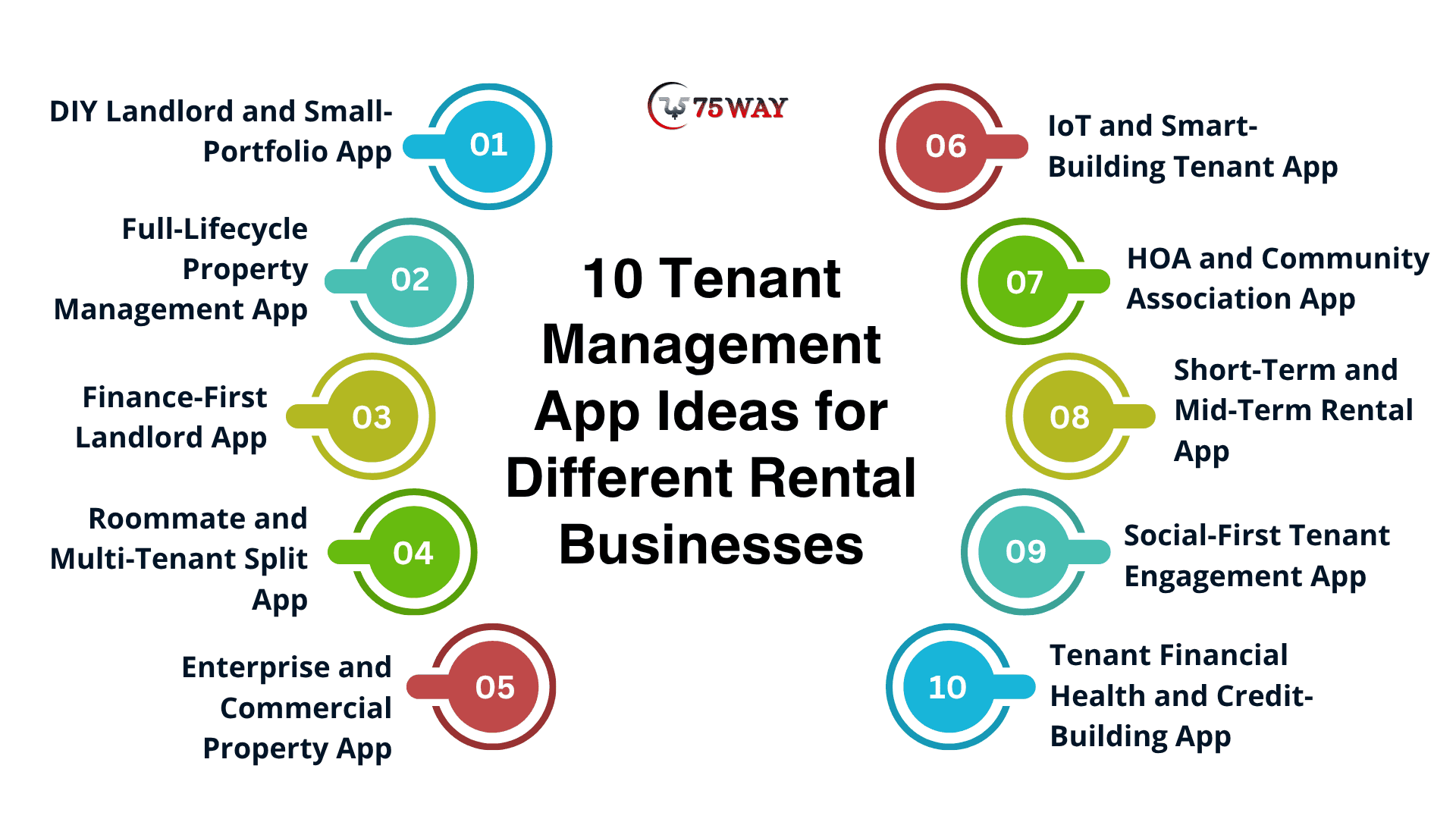
1. DIY Landlord and Small-Portfolio App
Target Audience: Independent landlords managing approximately 1–10 rental units.
Independent landlords generally need straightforward tools rather than complicated enterprise dashboards. Your application should make routine rental tasks easy to complete without requiring extensive training.
Essential features include:
- Digital rental applications and tenant information management.
- Screening integrations for relevant credit, background, and eviction checks.
- Online rent collection through supported ACH and card payment methods.
- Automated payment reminders and basic transaction history.
- Digital lease storage and electronic-signature integration.
- Simple maintenance requests and tenant messaging.
A freemium model or affordable subscription could suit this segment. However, a free plan should have a clear path to paid upgrades, such as additional units, automated reporting, or advanced integrations.
The main product advantage is simplicity. If landlords can complete common tasks faster than they can using spreadsheets and separate tools, the application has a stronger reason to earn repeat use.
Estimated Development Cost: $8,000–$35,000
Suitable For: Independent landlords, small rental owners
2. Full-Lifecycle Property Management App
Target Audience: Landlords and property managers handling approximately 15–200+ residential units.
As rental portfolios grow, managing every lease, payment, repair, and tenant interaction manually becomes harder. These customers often need a more complete operational system.
Consider building separate interfaces for property managers and residents. The management dashboard can handle leases, tenant records, work orders, and reporting, while the tenant portal provides access to payments, documents, and maintenance updates.
Useful features include:
- Property and unit management.
- Tenant and lease lifecycle tracking.
- Automated maintenance assignments and vendor coordination.
- Tenant ledgers and configurable accounting workflows.
- Late-fee calculations based on applicable rules and lease terms.
- AI-assisted rental listing descriptions and syndication integrations.
Products such as Buildium and TenantCloud provide established examples of the broader property management software category.
Your opportunity is not necessarily to reproduce their feature lists. It may be to serve a specific portfolio size, improve a difficult workflow, or deliver a more accessible experience for a particular customer group.
Estimated Development Cost: $35,000–$80,000
Suitable For: Property managers, growing rental portfolios
3. Finance-First Landlord App
Target Audience: Real estate investors and landlords who prioritise cash flow, expenses, and tax preparation.
Some landlords already have a preferred method for communicating with tenants. What they lack is a clear picture of rental income, property expenses, and financial performance.
A finance-focused app can address that gap through:
- Rental income and expense tracking.
- Property-level cash flow reporting.
- Receipt scanning and expense categorisation.
- Bank transaction imports and reconciliation.
- Tax-preparation reports, including relevant Schedule E information.
- Financial dashboards for individual properties and portfolios.
Baselane and Stessa are examples worth researching when evaluating this category.
A key product consideration is data accuracy. Imported transactions need categorisation rules, correction workflows, and clear reporting periods. Tax-related outputs should support review by the user or a qualified tax professional rather than promise that every calculation is automatically correct.
Estimated Development Cost: $20,000–$60,000
Suitable For: Rental investors, finance-focused landlords
4. Roommate and Multi-Tenant Split App
Target Audience: Student housing operators, shared rentals, and co-living businesses.
Shared housing introduces a different challenge: several occupants may contribute different amounts toward rent, utilities, and household expenses.
A dedicated application can make those responsibilities easier to track.
Consider including:
- Custom rent-splitting calculations.
- Individual payment records for each occupant.
- Shared utility and household expense ledgers.
- Separate communication and agreement records.
- Reminders for upcoming shared payments.
- Roommate move-in and move-out workflows.
For example, three roommates may have different rent obligations because their rooms differ in size. The app should support agreed payment allocations instead of assuming everyone owes an equal share.
This category needs careful transaction design. Recording individual contributions is not the same as collecting the full amount due, so the interface should make outstanding balances and payment status clear.
Estimated Development Cost: $15,000–$45,000
Suitable For: Student housing, co-living operators
5. Enterprise and Commercial Property App
Target Audience: Commercial property owners, multifamily operators, and large property management companies.
Enterprise customers may oversee numerous properties, lease structures, staff members, and external service providers. Their requirements can extend well beyond residential tenant communication.
Potential features include:
- Commercial lease abstraction and critical-date tracking.
- Multi-year rent escalation schedules.
- Common Area Maintenance (CAM) reconciliation workflows.
- Lead-to-lease CRM pipelines.
- Portfolio-wide reporting and role-based access.
- Integration with accounting, facilities, and access management systems.
The technical challenge is managing complex rules without making the interface overwhelming.
For this segment, plan for detailed permissions, audit histories, data migration, configurable workflows, and integration testing. Enterprise buyers may also expect service-level commitments, support processes, and documented security controls.
Estimated Development Cost: $80,000–$180,000+
Suitable For: Commercial landlords, enterprise operators
6. IoT and Smart-Building Tenant App
Target Audience: Modern apartment communities, luxury residential developments, and technology-focused property operators.
Smart-building applications connect the digital tenant experience with physical property systems.
Features may include:
- Bluetooth- or NFC-enabled digital access, where supported.
- Smart thermostat and lighting integrations.
- Leak detection and utility-monitoring alerts.
- Package locker notifications and collection workflows.
- Amenity access and booking.
- Maintenance alerts generated by connected devices.
SmartRent and Latch are useful examples to research in the smart-property and access technology space.
Hardware integration introduces additional complexity. Devices may use different communication protocols, vendors may impose API restrictions, and access systems must remain secure even when connectivity is interrupted.
Before including these capabilities, verify device compatibility, integration permissions, fail-safe behaviour, and the ongoing cost of supporting connected hardware.
Estimated Development Cost: $50,000–$150,000+
Suitable For: Smart apartments, connected communities
7. HOA and Community Association App
Target Audience: Homeowners associations (HOAs), condominium boards, and co-op communities.
Community associations manage shared facilities, resident communications, community rules, and governance activities. Their needs overlap with tenant management but extend beyond conventional rental operations.
A specialised application can offer:
- Amenity reservation calendars.
- Community announcements and resident directories.
- Digital voting and proxy submission workflows.
- Rule-violation reporting with photo attachments.
- Maintenance requests for shared facilities.
- Document access for association policies and meeting records.
AppFolio Property Manager and PayHOA are examples to review when exploring property and community association software.
If voting or governance functionality is included, the product must reflect the association's governing documents and applicable requirements. It should not assume that a generic voting workflow is valid for every community.
Estimated Development Cost: $25,000–$75,000
Suitable For: HOA boards, condominium associations
8. Short-Term and Mid-Term Rental App
Target Audience: Vacation rental managers, corporate housing providers, and operators serving travelling professionals or temporary residents.
Shorter stays create more frequent turnovers, tighter cleaning schedules, and greater coordination between bookings, inventory, and maintenance.
Useful capabilities include:
- Check-in and check-out inventory checklists.
- Furnished property condition records.
- Turnover cleaning and maintenance scheduling.
- Flexible lease and occupancy tracking.
- Calendar synchronisation with supported booking channels.
- Guest or tenant messaging and arrival instructions.
Integrations with platforms such as Airbnb and Vrbo may be valuable, subject to their current API access and integration requirements.
The product should distinguish between a booking, an occupancy period, and a rental agreement. This helps prevent scheduling conflicts and supports accurate availability records.
Estimated Development Cost: $25,000–$80,000
Suitable For: Vacation rentals, corporate housing
9. Social-First Tenant Engagement App
Target Audience: Large multifamily communities and student housing operators that want to improve resident engagement.
Not every tenant interaction concerns payments or repairs. Some property operators also want to help residents access community services and participate in building activities.
Possible features include:
- Community bulletin boards.
- Local service and neighbourhood directories.
- Resident event calendars and RSVP tools.
- Buy-and-sell listings for household items.
- Pet-sitting or other community service listings.
- Local business offers and resident benefits.
The commercial value depends on whether these features improve resident participation, satisfaction, or retention. Measure adoption before investing in a large social feature set.
Privacy settings and moderation tools are also important when residents can post information or communicate with one another.
Estimated Development Cost: $20,000–$60,000
Suitable For: Multifamily communities, student housing
10. Tenant Financial Health and Credit-Building App
Target Audience: Credit-conscious renters and landlords interested in supporting positive rental-payment habits.
Rental payment history can be useful to renters seeking to build a credit profile, depending on the reporting service and the relevant credit bureau's treatment of that information.
A specialised application could include:
- Rental-payment history tracking.
- Integration with eligible rent-reporting services.
- Payment reminders and financial activity summaries.
- Optional tools for managing payment schedules.
- Clear explanations of reporting eligibility and fees.
- Reward programmes tied to defined payment milestones.
Any rent-reporting or credit-building functionality must be evaluated against provider requirements, consumer reporting obligations, privacy rules, and applicable state and federal law.
Do not promise that rental reporting will automatically improve every renter's credit score. Results depend on the reporting arrangement and the individual's credit profile.
Estimated Development Cost: $30,000–$90,000+
Suitable For: Credit-conscious renters, rental providers
Key Features That Shape AI Tenant Management App Development
For property managers handling multiple buildings, small tasks can quickly pile up, from answering the same tenant questions to following up on recurring maintenance issues. AI features can help organise these tasks, identify patterns in property data, and give users faster access to useful information. Here are the key capabilities to consider when planning an AI-powered tenant management app.
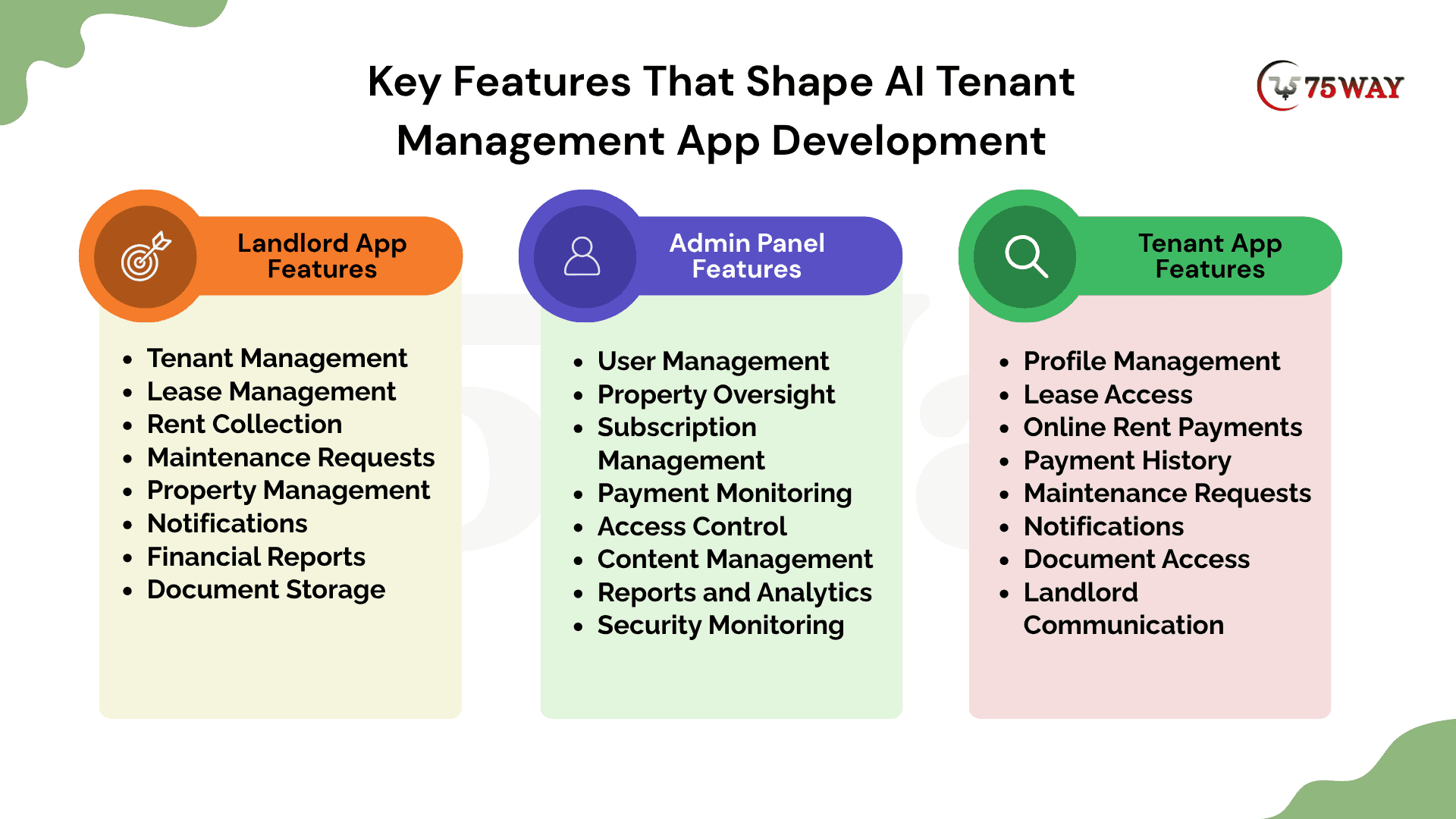
1. Landlord App Features
The landlord app gives property owners a central place to manage their rental properties and tenant relationships. It provides visibility into rent payments, lease agreements, maintenance requests, and property-related expenses without relying on scattered records. Landlords can use the app to monitor daily rental operations and make informed decisions about their portfolios.
Tenant Management
- Store tenant contact details and rental histories.
- Update occupancy records and authorised tenant information.
Lease Management
- Upload rental agreements and track important dates.
- Receive reminders before existing rental agreements expire.
Rent Collection
- Monitor monthly rent payments and outstanding balances.
- Review transactions processed through supported payment providers.
Maintenance Requests
- Review repair requests submitted by tenants.
- Assign vendors and monitor maintenance progress updates.
Property Management
- View property details and individual rental units.
- Monitor occupancy across all managed rental properties.
Alerts
- Receive alerts about overdue rent and renewals.
- Track maintenance updates and important tenant communications.
Financial Reports
- Review rental income and property-related expenses.
- Compare payment records across different rental properties.
Document Storage
- Store leases, receipts, and property-related documents.
- Retrieve authorised files whenever rental records are needed.
2. Admin Panel Features
The admin panel gives platform administrators oversight of users, properties, subscriptions, and overall application activity. It supports account administration, payment monitoring, access permissions, and platform-level reporting to help maintain reliable operations. Unlike the landlord and tenant apps, this central dashboard manages the platform itself rather than individual rental relationships.
User Management
- Create accounts for landlords, tenants, and vendors.
- Update user details and manage account access.
Property Oversight
- Monitor registered properties and associated rental units.
- Review property records and reported occupancy information.
Subscription Management
- Configure subscription plans, pricing, and billing cycles.
- Track active subscriptions, renewals, and expired plans.
Payment Monitoring
- Review transactions and their current processing statuses.
- Investigate reported payment issues and reconciliation discrepancies.
Access Control
- Assign administrative permissions according to staff responsibilities.
- Restrict sensitive platform information to authorised personnel.
Content Management
- Update platform announcements and help centre content.
- Publish important notices for registered platform users.
Reports and Analytics
- Monitor platform usage and subscription revenue trends.
- Review user activity and operational performance metrics.
Security Monitoring
- Review audit logs and suspicious account activity.
- Investigate access violations and reported security incidents.
3. Tenant App Features
The tenant app serves as the main point of contact between renters and property managers throughout the rental period. Tenants can access their rental information, manage rent payments, submit maintenance requests, and receive important updates from their landlords. This dedicated interface makes routine rental tasks easier to handle while keeping relevant information accessible.
Profile Management
- Update personal details and contact information securely.
- View authorised rental records and occupancy information.
Lease Access
- View rental agreements and lease expiration dates.
- Review renewal details and relevant lease conditions.
Online Rent Payments
- Pay rent through supported online payment methods.
- View payment confirmations and download available receipts.
Payment History
- Review previous transactions and their payment statuses.
- Check outstanding balances and upcoming rent obligations.
Maintenance Requests
- Submit repair requests with descriptions and photos.
- Track assigned vendors and maintenance completion updates.
Notifications
- Receive reminders about upcoming rent payment deadlines.
- Get updates about lease renewals and repairs.
Document Access
- View authorised leases, receipts, and rental notices.
- Download available documents for personal recordkeeping purposes.
Landlord Communication
- Send messages about repairs and rental concerns.
- Review landlord responses and important conversation updates.
How Much Does Tenant Management App Development Cost?
Tenant management app development can cost $8,000–$180,000+, depending on the product scope, number of platforms, integration requirements, and operational complexity.
1. Basic/MVP Tenant Management App: $8,000–$35,000
- Basic rent tracking and payment records
- Simple lease storage and tenant communication
- Essential maintenance requests and status updates
Timeline: 2–4 months
Ideal For: Independent landlords and small portfolios
2. Mid-Level Tenant Management App: $35,000–$80,000
- Online rent collection and automated reminders
- Separate landlord and tenant app interfaces
- Financial reporting and maintenance request management
Timeline: 4–7 months
Ideal For: Growing property management businesses
High-Complexity Tenant Management App: $80,000–$180,000+
- Advanced analytics across multiple rental properties
- Custom workflows and accounting system integrations
- Enterprise security and role-based access controls
Timeline: 7–12+ months
Ideal For: Large property management companies
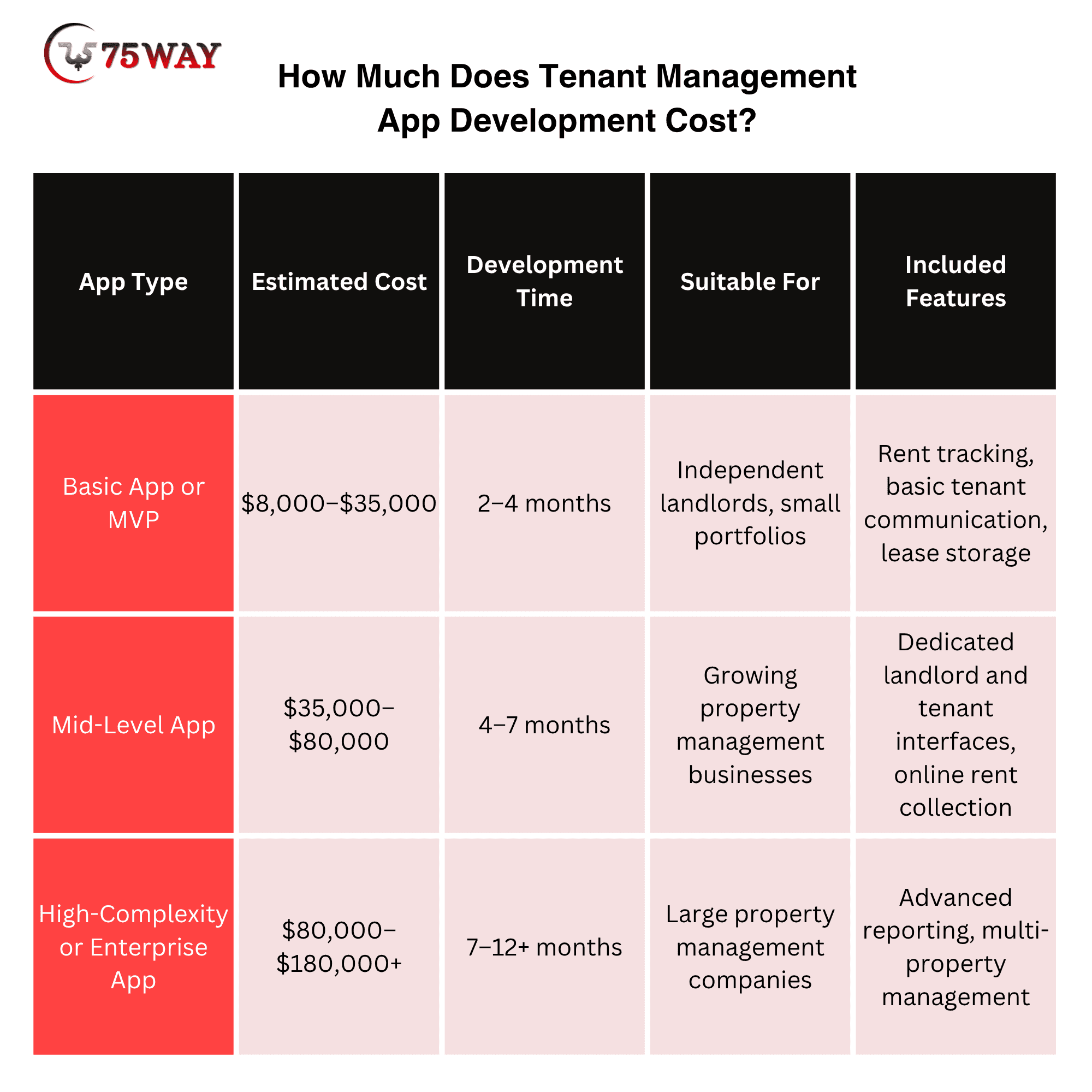
A project at the lower end may rely on managed services and existing components, while one at the higher end may require custom workflows, additional testing, or more extensive integrations.
What Drives The Tenant App Development Budget?
Your tenant management app budget can rise quickly when a simple rental tool expands to include AI features, payment gateways, accounting software, and separate dashboards for landlords and tenants. Each addition brings its own design, development, testing, and maintenance requirements. A closer look at these cost factors can help you plan a realistic budget before development begins.
- Product Complexity
Custom lease workflows, approval rules, reporting, and multiple user roles increase implementation and testing effort.
- Platform Coverage
A responsive web application usually requires less initial work than separate native iOS and Android applications.
- Third-Party Integrations
Payment processing, accounting systems, identity verification, messaging, and screening services add integration and maintenance work.
- Security And Compliance
Access controls, audit logs, security testing, privacy requirements, and data migration can materially affect the budget.
How to Control Your Development Budget
Start with the workflows that solve the primary customer problem. Use managed services where appropriate, avoid unnecessary custom infrastructure, and postpone advanced features until customer feedback supports the investment.
Request an itemised proposal covering deliverables, milestones, integrations, exclusions, testing, source-code ownership, and post-launch support. A lower initial quote is not necessarily the least expensive option if essential functionality is excluded.
Estimate Your Own Project Budget To Create Tenant Management App
Use this planning tool to create a preliminary budget based on your product scope. The figures are illustrative assumptions, not a substitute for a development proposal. For instance
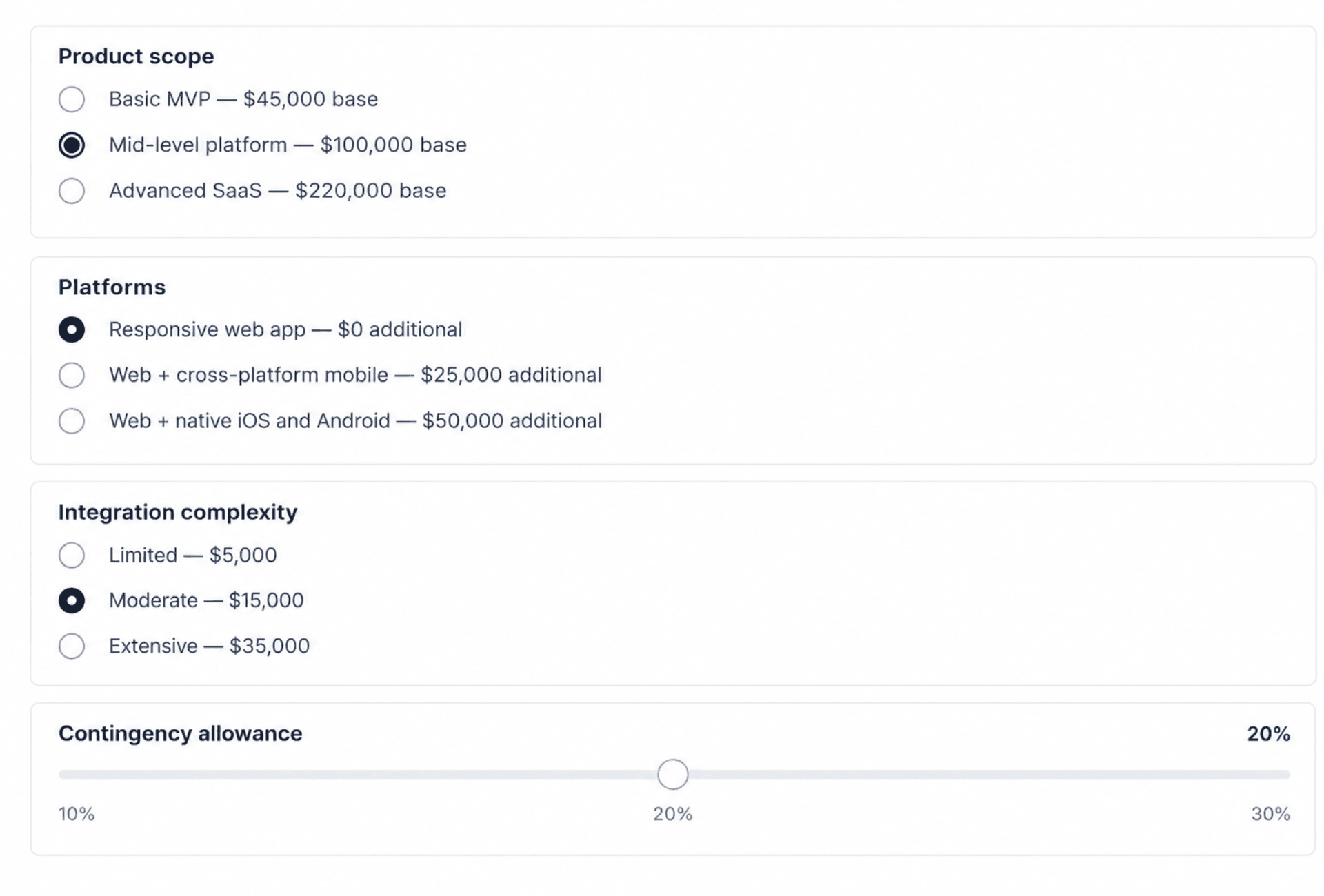
Get A Detailed Project Estimate
Budgeting Advice: Do not evaluate vendors on the initial quote alone. Ask for the proposed deliverables, acceptance criteria, payment milestones, source-code ownership, infrastructure charges, warranty terms, and ongoing maintenance costs.
Custom Tenant Application Architecture Decisions That Matter
A tenant management app may work smoothly with a few properties but struggle when hundreds of tenants submit payments, messages, and maintenance requests at once. The architecture behind the app determines how well it handles growing workloads, protects sensitive records, and connects with other systems. These key decisions can shape the app’s performance long after launch.
- Multi-Tenancy Model: If multiple property management companies use the same SaaS platform, each organisation's records must remain isolated. Enforce tenant and organisation boundaries in backend authorisation and database access policies.
- Transaction Integrity Model: Payment events can arrive more than once or out of order. Use idempotent processing, durable transaction records, reconciliation, and appropriate retry mechanisms to prevent duplicate business actions.
- Data Lifecycle: Establish retention, deletion, backup, export, and recovery procedures for personal information, lease documents, and financial records before the platform goes live.
These decisions are more consequential than choosing a framework simply because it is popular.
Recommended Technology Stack for Creating Tenant Management App
A tenant management app can start with a handful of rental properties and eventually serve thousands of tenants, landlords, and maintenance teams.
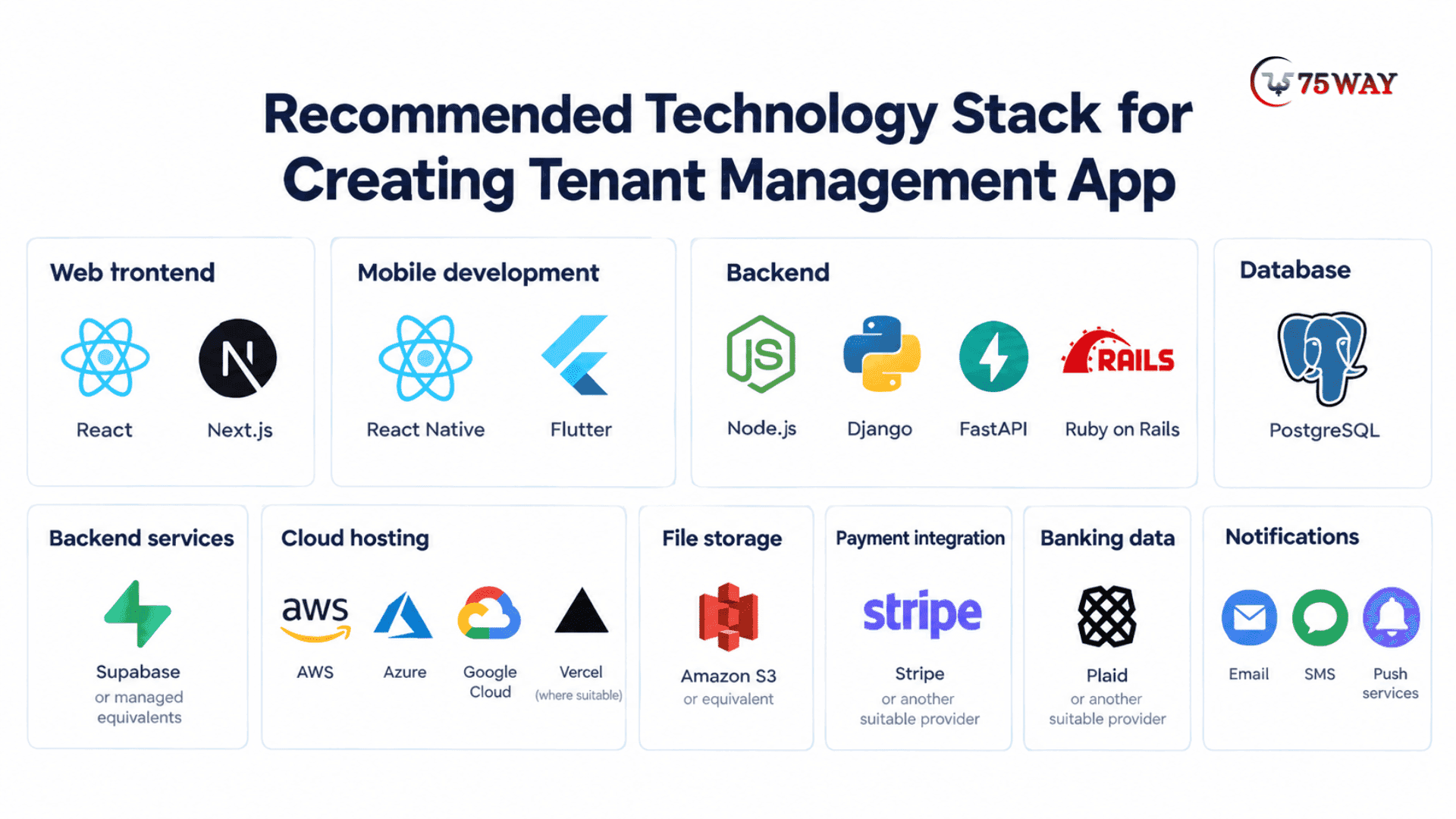
The technology behind it should be ready for that journey. React or Next.js can power landlord dashboards and tenant portals, while React Native or Flutter can support mobile apps. The right choices depend on your business goals, planned features, and expected growth.
Think about what happens when a tenant pays rent online, reports a leaking pipe, or receives a lease renewal reminder. Node.js, Django, or FastAPI can handle application logic and APIs, while PostgreSQL stores rental records, lease details, and transaction data.
Services such as Stripe can process supported payments, and email, SMS, or push notification tools can deliver timely updates. Each technology has a specific role in connecting these everyday tasks.
The real goal is to build a platform that works well today without creating expensive limitations tomorrow. AWS, Microsoft Azure, or Google Cloud can provide hosting infrastructure, while Amazon S3 can store lease documents and maintenance attachments.
Additional services, such as Plaid, may support authorised banking-data integrations where suitable. Your development team should assess security, performance, integration requirements, maintenance costs, and scalability before finalising the technology stack.
Who Should Build a Tenant Management App?
Not every business needs the same product. The intended customer should determine the initial feature set, pricing strategy, and development priorities. The strongest reason to build a tenant management app is a clear need that existing tools fail to address. Several types of businesses can turn these needs into an app opportunity, depending on their goals, resources, and customers.
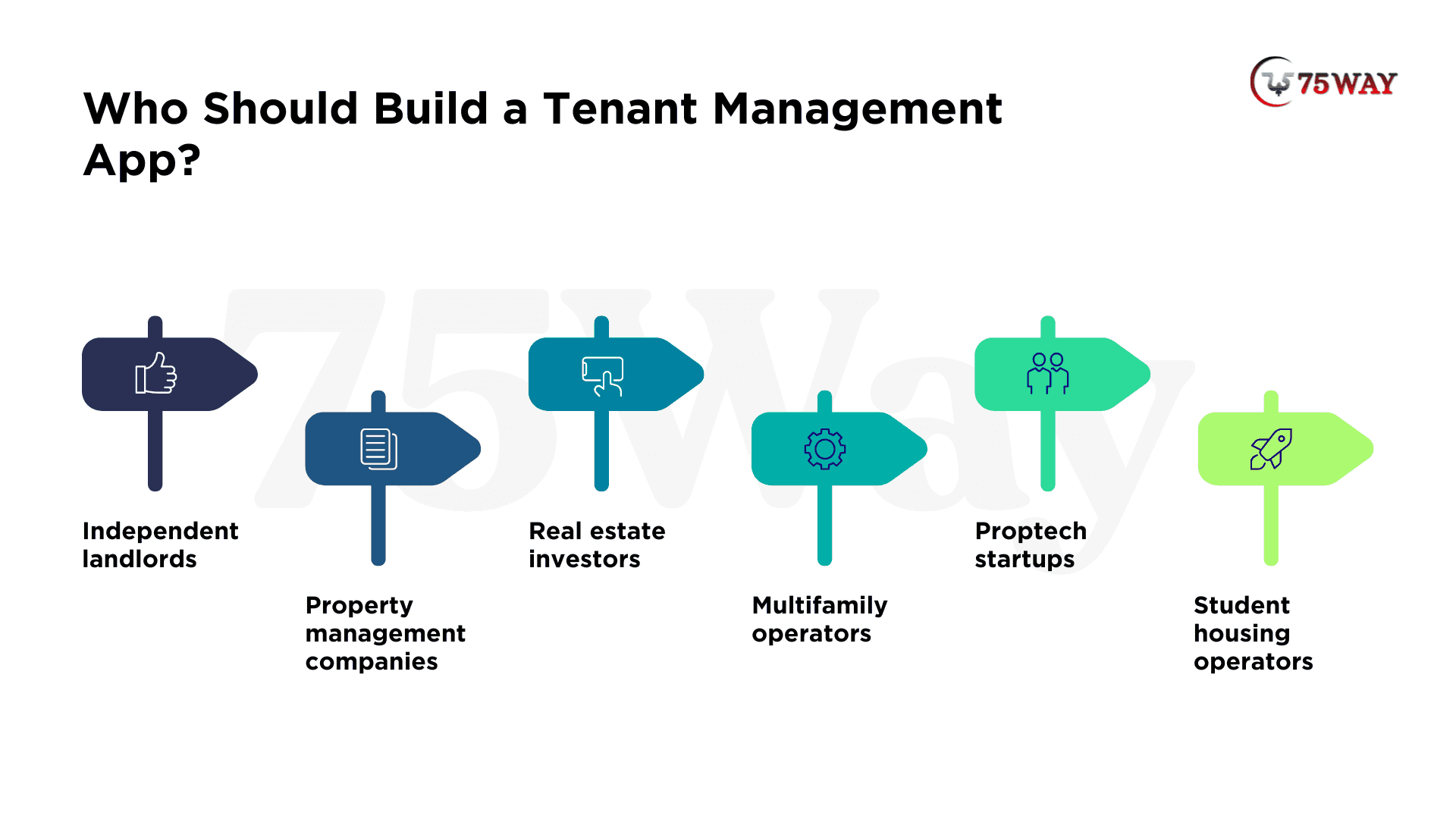
- Independent Landlords: A tenant management app helps landlords handle rent collection, lease records, and repair requests without relying on spreadsheets. A simple landlord and tenant portal keeps essential rental information accessible.
- Property Management Companies: A centralised platform helps teams coordinate staff, properties, tenants, and service vendors from one place. Multi-property management tools simplify daily operations and improve oversight across rental portfolios.
- Real Estate Investors: Investors can track rental income, expenses, occupancy, and portfolio performance through a single dashboard. Financial reports provide clearer insights into property returns and help guide investment decisions.
- Multifamily Operators: Multifamily operators can manage large tenant volumes, recurring payments, maintenance requests, and lease renewals through one platform. Scalable features and role-based access help teams manage responsibilities across multiple properties.
- Proptech Startups: A tenant management app gives proptech startups a foundation for launching a distinctive rental management service. Configurable features and subscription options support different customer needs and business models.
- Student Housing Operators: Student housing operators can coordinate room allocations, lease periods, rent payments, and maintenance requests for student residents. Dedicated tenant portals simplify communication among students, property managers, and housing staff.
Security and Compliance Considerations for AI-Powered Tenant App
Tenant management applications can handle personal information, lease records, payment histories, and, in some cases, consumer screening reports. Security and legal requirements should therefore be part of the product design.
1. Protect Personal and Financial Data
Use secure authentication, least-privilege permissions, encryption in transit and at rest, protected file storage, audit logs, and tested backup procedures.
For multi-customer SaaS platforms, enforce organisation-level data isolation in backend authorisation and database access policies. Hiding information in the interface is not sufficient protection.
2. Review Tenant Screening Requirements
If your application obtains or uses consumer reports for tenant screening, assess applicable Fair Credit Reporting Act requirements and related state and local rules.
Rental screening and eligibility workflows should be designed with appropriate legal review. Do not assume an automated score or recommendation can replace legally required procedures or a proper review of relevant decisions.
3. Consider Fair Housing Rules
The Fair Housing Act prohibits discrimination in housing based on protected characteristics. State and local requirements may provide additional protections.
If the application includes automated screening, recommendations, or leasing decisions, review how the system uses data and whether its workflows could create discriminatory outcomes.
4. Plan Payment and Privacy Controls
Choose a payment provider appropriate for the intended transaction flow. Avoid storing sensitive payment details unnecessarily, and establish clear procedures for failed payments, refunds, reconciliation, and incident response.
Privacy, data retention, and breach-notification obligations vary according to the information collected, the service provided, and the jurisdictions involved. Obtain qualified advice for the specific product and target markets.
Useful starting resources include the Federal Trade Commission's Fair Credit Reporting Act resources and the US Department of Housing and Urban Development's Fair Housing resources.
Tenant Management App Revenue Streams For Long-Term Growth
A tenant management app needs a revenue model that works beyond the initial launch buzz. Small landlords may prefer affordable monthly plans, while large property management companies may pay more for portfolio reporting, automation, and team access. Exploring the available revenue streams can help you build a business that earns recurring income and grows with customer needs.
1. Subscription-Based Pricing
Charge a monthly or annual fee for access to the application. This approach can suit landlord tools and property management SaaS products.
A free or entry-level tier may attract smaller landlords, while paid plans can unlock additional units, reporting, integrations, or staff accounts.
2. Per-Unit Pricing
Charge according to the number of rental units managed. This model can align pricing with portfolio size and make expansion easier to understand.
Make the pricing rules transparent, including any minimum fees or limits.
3. Tiered Plans
Offer separate plans for independent landlords, growing property managers, and larger operators. Each tier should solve a recognisable set of customer needs rather than create arbitrary restrictions.
4. Enterprise Licensing
Larger property operators may prefer negotiated contracts covering custom integrations, onboarding, support, and specific operational requirements.
Enterprise sales can involve longer evaluation cycles, security reviews, and more complex implementation commitments.
5. Setup and Integration Fees
Charge separately for data migration, onboarding, custom integrations, or staff training when these services require substantial work.
Before selecting a model, calculate infrastructure expenses, third-party fees, support costs, acquisition costs, and expected customer retention. Validate the pricing with prospective buyers instead of relying solely on competitor prices.
How to Differentiate Your Tenant Management App in the Market?
Entering an established market requires a compelling reason for customers to choose your product over their existing tools.
1. Solve One Difficult Problem Better
Instead of competing with every feature offered by established platforms, focus on a specific customer segment or operational bottleneck.
For example, you might specialise in maintenance coordination for multifamily operators or financial reporting for independent landlords.
2. Make Migration Easier
Switching software can involve tenant records, lease documents, balances, and historical transactions. A guided import process, validation reports, and clear error handling can make adoption less disruptive.
3. Automate Repetitive Work
Automate suitable tasks such as reminders, maintenance routing, lease-expiry alerts, and document organisation. Keep human oversight for sensitive decisions and exceptions that require judgement.
4. Integrate With Existing Tools
Customers may already rely on accounting systems, payment providers, or listing services. Useful integrations can reduce duplicated work and make your product easier to adopt.
5. Measure Customer Value
Track whether the product helps customers reduce administrative work, resolve maintenance requests faster, improve payment tracking, or retain users.
Use actual customer evidence to determine which features deserve further investment.
Final Remarks
Tenant management app development can create a valuable software business when the product addresses a specific rental management problem and gives customers a clear reason to adopt it. The right approach begins with market validation, a focused MVP, carefully selected technology, and reliable security and payment workflows.
With development budgets ranging from $8,000 to $180,000+, founders should align their investment with customer needs instead of building every possible feature at once. A focused launch, measurable customer feedback, and a sustainable revenue model provide a stronger foundation for growth.
If you want to build a tenant management app, hire a professional real estate app development team to discuss your target market, MVP requirements, technology stack, and project budget.
Frequently Asked Questions (FAQs)
How Much Does Tenant Management App Development Cost?
Tenant management app development may cost $8,000–$35,000 for a basic MVP, $35,000–$80,000 for a mid-level application, and $80,000–$180,000 or more for a complex enterprise product. These are illustrative estimates that depend on scope, integrations, platforms, and security requirements.
How Long Does It Take To Build A Tenant Management App?
A basic MVP may take approximately three to five months, while a more complex platform may require six to twelve months or longer. Actual timelines depend on team size, requirements, integrations, testing, and project complexity.
Can I Build A Tenant Management App Without Coding?
No-code and low-code tools can help you create prototypes and simpler applications. However, production systems handling payments, sensitive information, and multiple customer organisations require careful security, access control, reliability, and maintenance planning.
How Can A Tenant Management App Make Money?
Common models include monthly subscriptions, per-unit pricing, tiered plans, enterprise licensing, and paid onboarding. The best option depends on the customer segment, product value, support costs, and willingness to pay.
What Legal Requirements Should US Tenant Management Apps Consider?
Requirements depend on the app's features and the jurisdictions in which it operates. Relevant considerations may include fair housing, consumer reporting, payment security, privacy, and data-breach obligations. Obtain qualified legal advice before launching regulated workflows.
Should I Build A Custom App Or Use Existing Software?
Custom development may suit businesses that need specialised workflows, greater control, or a differentiated SaaS product. Existing software may be more practical when its features meet your requirements at a lower total cost.