AI Summary
AI agents for law firms reduce repetitive work and improve legal operations. The right approach for law firm AI agent development starts with high-value workflows and clear objectives. This guide covers development steps, technology stacks, security, costs, and ROI. Discover how to implement legal AI responsibly.
Key Takeaways
- Identify high-value legal workflows before investing in law AI agent development.
- Prepare reliable legal data sources to support accurate, traceable outputs.
- Choose an architecture that fits workflow complexity and integration requirements.
- Protect client confidentiality through permissions, oversight, testing, and governance.
- Measure time savings, output quality, operating costs, and business value.
A law firm can adopt AI automation and still struggle with overflowing inboxes, repetitive document reviews, delayed client intake, and hours spent updating matter records. The problem is not always a lack of technology. It is that many legal workflows still depend on people moving information between disconnected systems.
For managing partners, law firm owners, legal operations leaders, and legal technology founders, legal AI agents offer a way to automate parts of these processes without removing lawyers from decisions that require professional judgment.
However, building an AI agent for a law firm involves more than connecting a language model to legal documents. The system needs access to reliable information, clearly defined permissions, dependable integrations, and safeguards against inaccurate outputs and unauthorized actions.
This guide explains how to identify the right workflows, design the technology, integrate existing legal software, protect client information, evaluate development costs, and deploy an AI agent that solves a measurable business problem.
What Is an AI Agent for a Law Firm?
An AI agent for a law firm is a software system that can interpret a request, retrieve relevant information, use approved tools, and carry out a sequence of tasks toward a defined objective.
Consider a firm that receives dozens of contract review requests every week. Employees may need to download documents, identify the relevant clauses, compare them with internal guidelines, prepare a summary, and assign the work to an attorney.
An AI agent can handle parts of this process. It can extract contract details, retrieve the firm's approved clause playbook, flag deviations, and prepare a report for attorney review. The lawyer can then assess the findings and decide what action to take.
A legal AI agent typically combines the following components:
- Large Language Model: Interprets requests, extracts information, and generates structured responses.
- Knowledge Retrieval: Finds relevant information in authorized documents and knowledge sources.
- Workflow Orchestration: Manages the sequence of tasks, decisions, and exceptions.
- Software Integrations: Connects the agent to document management, practice management, email, and other applications.
- Security and Oversight: Enforces access permissions, approval requirements, monitoring, and audit logging.
These components must work together. A model that generates convincing text is not enough if it cannot access the correct matter records or distinguish an approved action from a prohibited one.
How AI Agents For Law Firms Automate Legal Workflows And Reduce Manual Work
Every hour spent sorting case files, chasing client details, or reviewing routine documents is an hour attorneys could spend on higher-value legal work. AI agents for law firms can automate selected tasks, move information between systems, and flag items that require human attention. The following examples explain how firms can use these agents to improve daily legal operations.
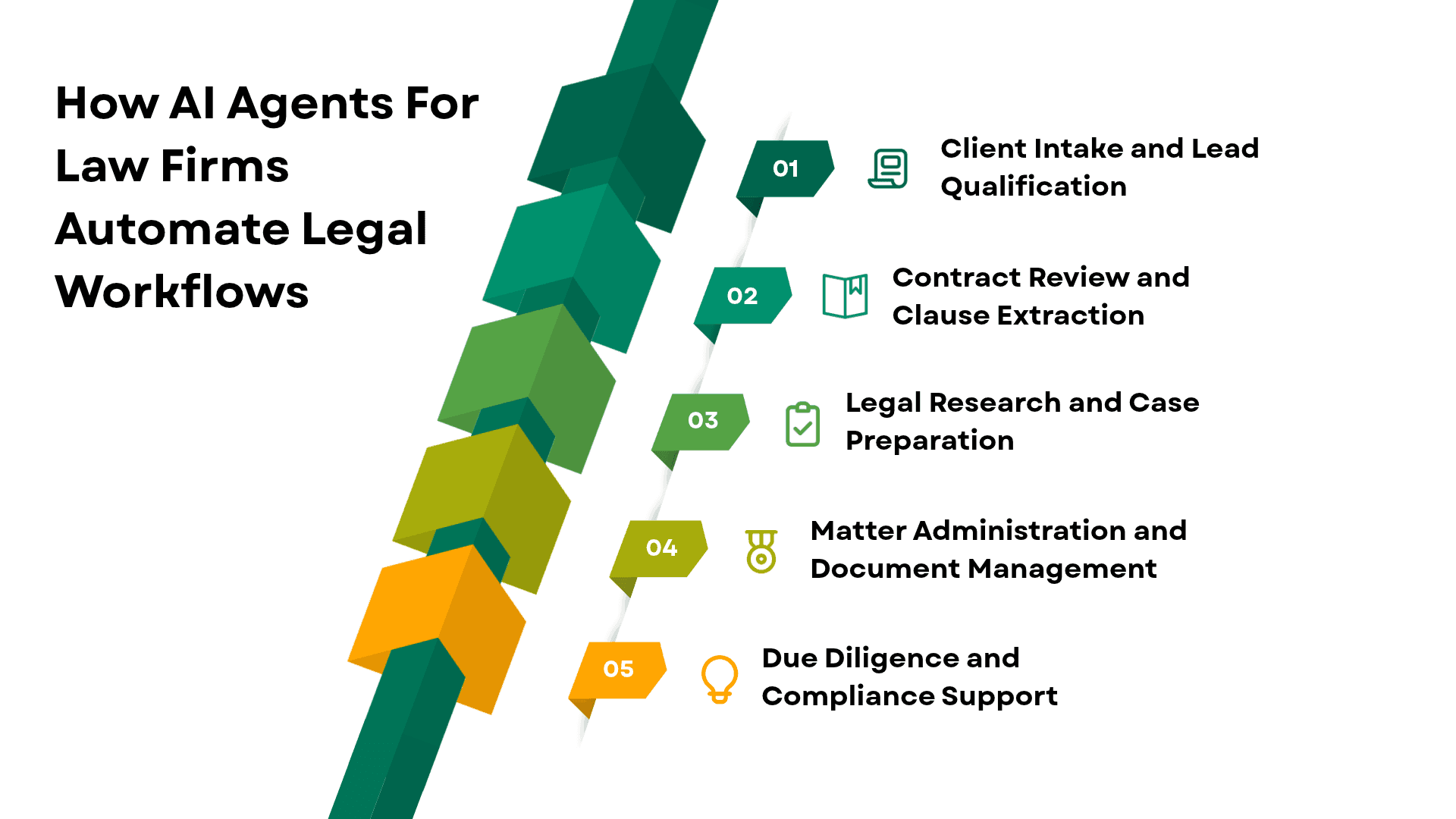
1. Client Intake and Lead Qualification
Client intake often begins with emails, website forms, phone notes, and uploaded documents. Staff members must gather missing details, identify the relevant practice area, and determine who should handle the inquiry.
An AI intake agent can collect information through an approved form, classify the inquiry, identify incomplete fields, and create a preliminary record in the firm's CRM or intake system.
For example, a personal injury firm could use an agent to organize information about an incident, its date, and the documents supplied by a prospective client. The agent could then route the inquiry to the appropriate intake team.
Conflict checks, decisions about accepting representation, and communications that could affect a prospective client's legal position require appropriate firm-approved procedures and human oversight.
2. Contract Review and Clause Extraction
Contract review is a promising starting point because many agreements contain recurring provisions that can be identified and compared against predefined criteria.
An AI agent can extract indemnification clauses, termination provisions, payment terms, renewal dates, and other specified information. It can compare those provisions with an approved playbook and flag language that requires closer attention.
The agent should identify the source text supporting each finding rather than merely labeling a clause as risky. This allows an attorney to inspect the original wording and decide whether the issue matters in context.
AI can accelerate initial review, but it should not independently approve contractual changes or make final legal risk decisions.
3. Legal Research and Case Preparation
Legal research can involve searching case law, locating statutes, reviewing judicial opinions, and preparing research notes. An agent can assist by retrieving relevant materials from authorized legal research sources and organizing them around a defined question.
It can also prepare a draft research memo that identifies the authorities considered, summarizes their relevance, and links conclusions to source passages.
The main risk is treating a plausible summary as verified law. An agent may overlook controlling authority, misinterpret a decision, or cite an outdated case. Lawyers must verify citations, current legal status, jurisdiction, and the legal propositions being asserted.
4. Matter Administration and Document Management
Law firms handle large collections of correspondence, pleadings, agreements, evidence, and internal notes. Classifying these materials and updating associated records can consume substantial staff time.
An agent can extract metadata, categorize incoming documents, identify missing information, summarize correspondence, and suggest follow-up tasks. It can also prepare draft calendar entries for authorized users to review.
Court deadlines deserve particular care. Deadline calculations may depend on jurisdiction-specific rules, service methods, holidays, and case circumstances. A system should not treat an extracted date as a verified filing deadline without the required checks.
5. Due Diligence and Compliance Support
During a transaction or internal compliance review, teams may need to compare large numbers of documents against a checklist.
An agent can identify missing records, extract relevant provisions, flag inconsistencies, and prepare an evidence summary. Reviewers can use the results to focus their attention on issues requiring further investigation.
The agent's findings should remain traceable to the source material. Its role is to support the review process, not independently certify legal compliance.
How to Develop an AI-Powered Law Agent for Legal Operations
A well-designed AI law agent can follow defined workflows, retrieve relevant information, organise case documents, and flag decisions that require human review. The development process starts with choosing the right use case and continues through data preparation, integration, testing, and deployment.
Step 1: Identify the Workflow Worth Automating
Begin by observing how the selected task is completed today. Speak with the attorneys, paralegals, intake staff, and operations managers who perform the work.
Document the information they receive, the decisions they make, the applications they use, and the points where delays or errors occur.
Suppose a law firm wants to automate contract review preparation. Before law firm AI agent development, it should measure the time spent opening documents, extracting clauses, preparing summaries, and correcting incomplete reports.
The firm should also identify which tasks require legal judgment and which follow repeatable rules.
Use this assessment to establish:
- The business problem the agent must solve.
- The tasks it may perform independently.
- The actions requiring human approval.
- The data and software it needs to access.
- The quality, security, and performance criteria for release.
The outcome should be a clearly scoped workflow, not an open-ended instruction to automate legal work.
Step 2: Prepare the Legal Data
An AI law agent cannot reliably retrieve information that is missing, outdated, inaccessible, or poorly organized.
Identify the knowledge sources required for the workflow. These may include approved contract templates, internal clause libraries, matter documents, research materials, firm policies, and licensed legal databases.
Check document quality, version history, metadata, and access permissions before making the material available to the agent.
For knowledge-intensive tasks, retrieval-augmented generation (RAG) can help the system retrieve relevant passages from approved sources before producing a response.
For example, a contract review agent could retrieve the relevant clause from an internal playbook and compare it with the wording in a submitted agreement. The resulting report could include both passages so that the reviewer can examine the difference.
RAG improves access to relevant information, but it does not guarantee that the information is correct or that the model will interpret it properly. Source verification and output evaluation remain necessary.
Step 3: Design the AI Law Agent Architecture
The architecture should reflect the workflow's complexity, data requirements, and risk level.
A practical implementation may include the following layers.
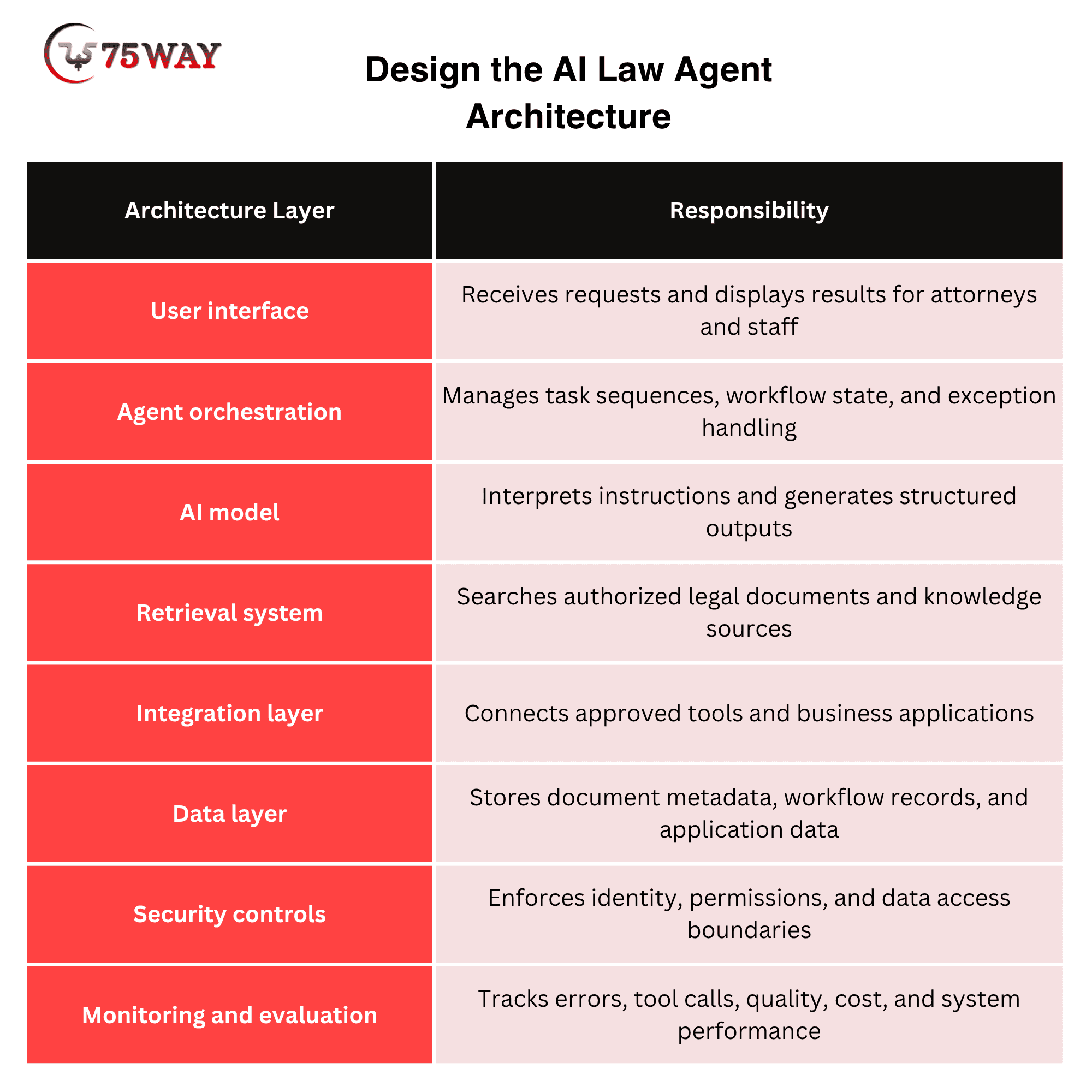
A single-agent architecture may be sufficient for a workflow involving a few tools and straightforward decisions. A multi-agent architecture may be useful when different responsibilities require separate permissions or specialized processing.
For instance, one component could extract contract clauses, another could compare them against the approved playbook, and a validation component could check whether the report contains the required source references.
However, adding more agents also increases coordination overhead and creates additional opportunities for errors. Start with the simplest architecture that meets the requirements, then introduce complexity only when testing supports it.
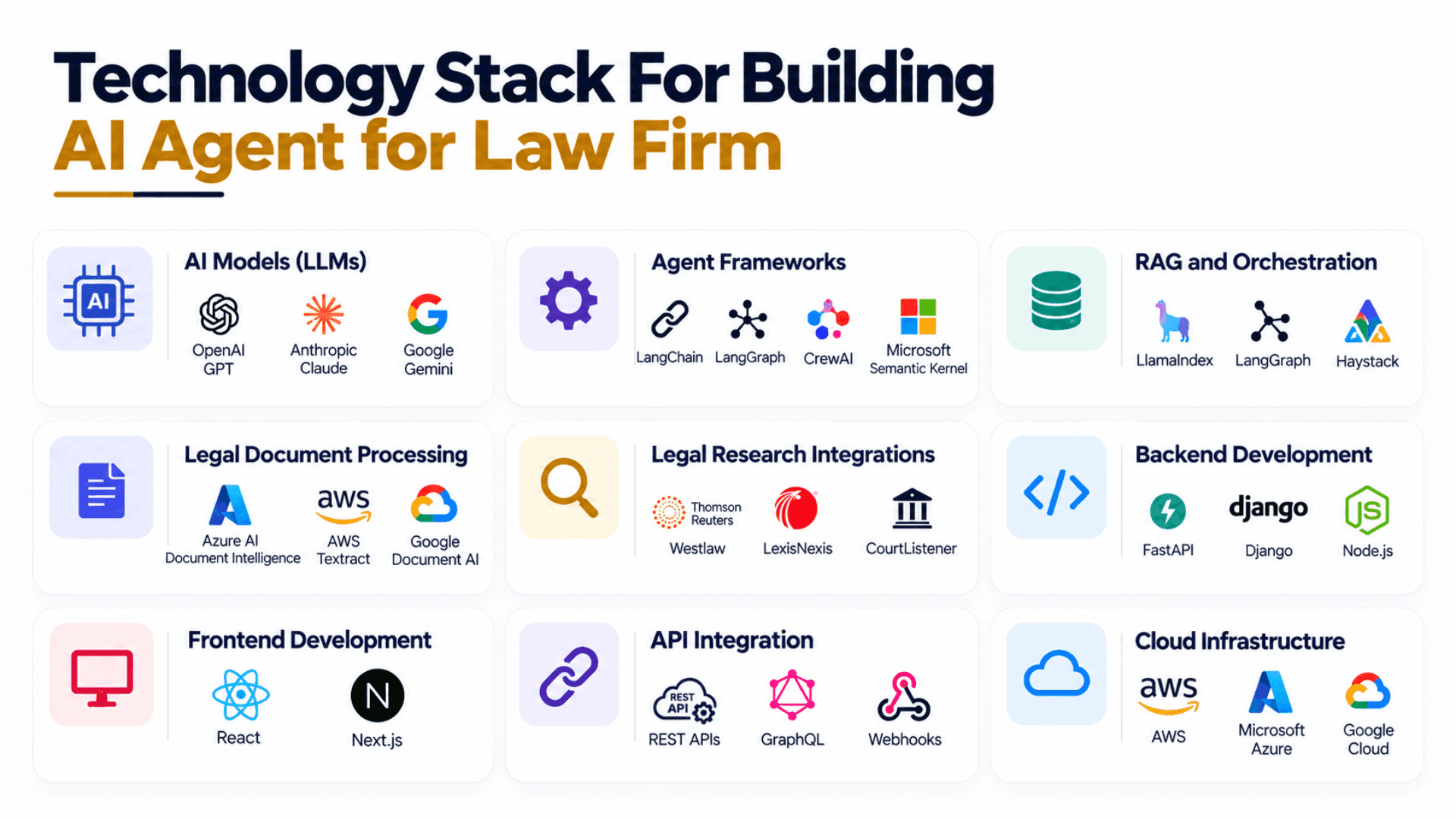
Step 4: Choose the Technology Stack For Building Agentic AI for Law Firm
Technology selection for creating an agentic AI solution for a law firm should follow the firm's requirements rather than current AI trends.
The development team should evaluate language models, orchestration frameworks, retrieval technologies, databases, integration methods, and hosting options against the intended workload.
- Programming Languages: Python, TypeScript, JavaScript
- AI Models (LLMs): OpenAI GPT, Anthropic Claude, Google Gemini
- Agent Frameworks: LangChain, LangGraph, CrewAI, Microsoft Semantic Kernel
- RAG and Orchestration: LlamaIndex, LangGraph, Haystack
- Vector Databases: Pinecone, Weaviate, Qdrant, Milvus
- Traditional Databases: PostgreSQL, MySQL, MongoDB
- Legal Document Processing: Azure AI Document Intelligence, AWS Textract, Google Document AI
- Legal Research Integrations: Westlaw, LexisNexis, CourtListener
- Practice Management Integrations: Clio, MyCase, PracticePanther
- Backend Development: FastAPI, Django, Node.js
- Frontend Development: React, Next.js
- API Integration: REST APIs, GraphQL, Webhooks
- Cloud Infrastructure: AWS, Microsoft Azure, Google Cloud
- Authentication and Access Control: Auth0, Microsoft Entra ID, Amazon Cognito
- Security and Secrets Management: AWS KMS, Azure Key Vault, HashiCorp Vault
- Workflow Automation: Temporal, n8n, Apache Airflow
- Monitoring and Observability: Langfuse, LangSmith, OpenTelemetry
- Testing and Evaluation: pytest, DeepEval, Ragas
- Deployment and Containers: Docker, Kubernetes
- CI/CD and Version Control: GitHub Actions, GitLab CI/CD, Git
A small firm with one document-heavy workflow may need a relatively straightforward application. A larger firm operating across several practice groups may require more sophisticated identity controls, data segregation, and monitoring.
The appropriate stack is the one that satisfies the requirements without introducing unnecessary complexity.
Step 5: Integrate Existing Law Firm Software
An AI agent becomes operationally useful when it can work with the systems employees already use.
Depending on the workflow, integrations may include practice management software, document management platforms, email, calendars, CRM systems, identity providers, and licensed legal research tools.
Use supported APIs wherever practical. Before development, confirm the availability of required endpoints, authentication methods, data permissions, rate limits, and write operations.
Consider a client intake agent. It may be allowed to read a submitted inquiry, identify missing fields, and create a preliminary lead record. That permission should not automatically allow it to accept a client, send legal advice, or access unrelated matter files.
Each integration should have its own defined permissions and error-handling rules. Failed requests, duplicate submissions, and incomplete records must be handled without silently corrupting the workflow.
Step 6: Build the Workflow and Human Approval Rules
Once the architecture and integrations are established, translate the process into explicit actions, conditions, and exceptions.
A contract review agent might follow this sequence:
- Receive a contract through an authorized upload or document repository.
- Confirm the user's permissions and the correct matter association.
- Extract the relevant clauses, dates, parties, and obligations.
- Retrieve the applicable clause playbook.
- Compare the extracted language against the defined review criteria.
- Prepare a report containing findings, source references, and uncertainties.
- Route the report to the assigned attorney.
- Record the attorney's review and save the approved output.
The system also needs rules for situations where the workflow cannot proceed.
- What happens if the document is unreadable?
- What if two versions conflict?
- What if the agent cannot retrieve the relevant playbook?
- What if the integration fails halfway through an update?
These scenarios should have defined responses, such as requesting clarification, retrying a permitted operation, or escalating the task to a staff member.
External actions with legal or commercial consequences should remain behind appropriate approval gates. A system should not infer permission to send an email, accept an engagement, or file a document merely because it can technically perform that action.
Step 7: Test the Agent Before Deployment
A successful demonstration is not evidence that an AI agent is ready for legal work. The system must be tested against realistic documents, difficult cases, and attempts to exceed its permissions.
Build an evaluation dataset using authorized and appropriately protected material. Have qualified reviewers establish the expected results and the criteria for acceptable performance.
Evaluate:
- Extraction accuracy for names, dates, clauses, and obligations.
- Whether findings are supported by the cited source material.
- Performance on scanned, incomplete, and inconsistently formatted documents.
- Behavior when instructions are ambiguous or information is missing.
- Duplicate actions and failed integrations.
- The agent's ability to stop and escalate when evidence is insufficient.
Testing should continue after deployment. Changes to models, prompts, document collections, and integrations can affect performance, so material updates require regression testing.
Step 8: Deploy Gradually and Monitor Results
Start with a controlled pilot involving a limited workflow and a defined group of users.
During the pilot, review consequential outputs, record corrections, and collect feedback from the people using the system. Compare the results with the baseline established before development.
Expand the deployment only when the results meet the firm's acceptance criteria. Continue monitoring errors, reviewing permissions, updating test cases, and training staff as the system evolves.
Security and Compliance Considerations for Creating Legal AI Agents
Client confidentiality and professional responsibility must influence the design from the beginning. They cannot be treated as a checklist to complete immediately before launch.
The American Bar Association's Formal Opinion 512, issued on July 29, 2024, discusses how existing professional obligations apply to lawyers using generative AI. These include competence, confidentiality, communication, supervision, candor toward tribunals, and reasonable fees. The applicable requirements depend on the relevant rules and circumstances.
1. Protect Confidential Client Information
Before selecting an AI provider, review how it processes and retains data, whether submitted information is used for model training, who can access it, and what contractual protections are available.
Use encryption, role-based access, matter-level permissions, and retention policies appropriate to the firm's obligations. Avoid sending unnecessary client information to external services.
A vendor's claim that its product is secure does not, by itself, establish that a particular configuration satisfies the firm's professional and contractual requirements.
2. Keep Lawyers Accountable for Legal Decisions
An AI agent can prepare a research summary or identify a contract deviation, but the responsible lawyer must be able to examine the underlying material and assess the result.
Define which outputs require attorney review and which actions are prohibited. Train staff to recognize limitations, verify important claims, and escalate uncertain results.
Automation does not transfer professional responsibility from the lawyer to the software provider.
3. Defend Against Prompt Injection and Unauthorized Actions
Legal documents and emails may contain instructions that conflict with the agent's intended task. These instructions must be treated as untrusted content, not as authority to change system rules or access additional data.
Use tool allowlists, strict permission checks, input validation, and approval requirements for consequential actions. Test whether the agent can be manipulated into exposing documents or performing operations outside its authorized role.
4. Maintain an Appropriate Audit Trail
Record relevant document identifiers, tool calls, workflow decisions, approvals, and final outputs. Logs should help the firm investigate errors and establish what happened during a task.
At the same time, avoid collecting unnecessary confidential information in logs. Restrict access and apply retention rules consistent with the firm's obligations.
The NIST AI Risk Management Framework and its Generative AI Profile provide additional resources for identifying, assessing, and managing AI risks. They are useful frameworks, not substitutes for legal advice or applicable requirements.
How Much Does It Cost to Build an AI Agent for a Law Firm?
There is no single reliable price for developing a legal AI agent without knowing the workflow, integrations, data requirements, and security expectations.
The cost to build an AI agent for a law firm typically ranges from $15,000 to $50,000 for a focused legal workflow agent, while a more advanced, multi-system solution can cost $50,000 to $150,000 or more.
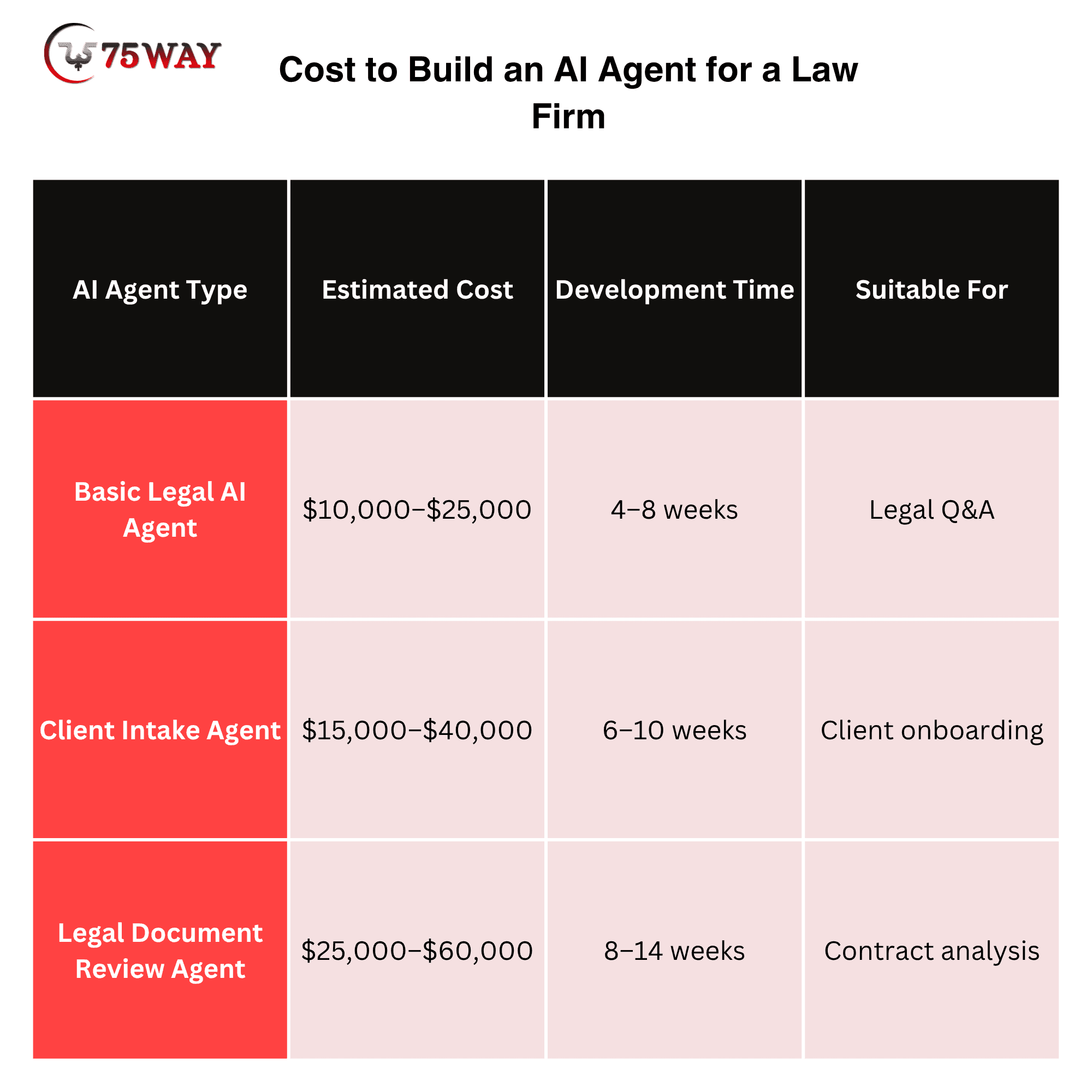
The budget should account for the full implementation, not just model usage. Three factors deserve particular attention.
- Legacy Systems: Older software may not provide suitable APIs, increasing integration effort.
- High-Risk Workflows: Tasks involving client communications, court deadlines, or sensitive documents require stronger safeguards and more extensive testing.
- Poorly Organized Data: Duplicate documents, inconsistent templates, and unclear permissions can add substantial preparation work.
How to Calculate the Business Value
Compare the current cost of performing a task with the cost of running and reviewing the automated workflow.
A useful starting point is:
Net Annual Benefit = Annual Labour Savings − Annual AI Operating Costs
For a complete business case, also include development and implementation costs, maintenance, quality-related rework, and any measurable change in revenue or outsourcing expenses.
For example, if an agent reduces the time needed to prepare a contract review report, the firm should count the net time saved after attorney review—not the time the model takes to generate the first draft.
Avoid assuming that every hour saved becomes additional revenue. The financial benefit depends on how the firm reallocates that capacity and whether the resulting work creates measurable value.
How to Choose A Reliable Partner For Building AI Agent for Law Services
The right development partner should understand legal workflows, enterprise software integration, AI evaluation, and the consequences of errors in professional services.
Before choosing a vendor, ask the team to demonstrate a complete workflow using appropriately protected test data.
Evaluate the following areas:
- Workflow Design: Can the team identify tasks suitable for automation and define clear approval boundaries?
- Technical Expertise: Can it explain the model, retrieval method, orchestration, and integration choices?
- Security: Can it demonstrate permission controls, data handling, logging, and incident response?
- Evaluation: Does it test source accuracy, edge cases, and unauthorized actions?
- Human Oversight: Can lawyers inspect, correct, and approve outputs?
- Ownership: Are data rights, source-code ownership, vendor dependencies, and exit arrangements documented?
- Ongoing Support: Who handles model changes, integration failures, monitoring, and maintenance?
Do not select a vendor solely because it demonstrates an impressive chatbot. Ask it to explain what happens when a document is incomplete, a source cannot be verified, or a tool call fails.
A capable partner should be able to describe the system's limitations as clearly as its features.
Common Mistakes to Avoid When Building Legal AI Agents
Several mistakes can undermine a project even when the underlying model is capable.
- Automating A Poorly Defined Process: AI will not fix unclear approval rules or inconsistent working practices. Map the existing workflow before development.
- Giving The Agent Excessive Access: Broad permissions increase the impact of mistakes and malicious instructions. Grant only the access needed for each task.
- Trusting Fluent Answers Without Verification: A well-written summary can still contain incorrect facts, unsupported conclusions, or invalid citations.
- Skipping Baseline Measurements: Without existing performance data, it is difficult to prove that the agent saves time or reduces costs.
- Ignoring Human Review: Automating document preparation does not mean that legal judgment can be removed from consequential decisions.
- Failing To Monitor Production Performance: Models, documents, and integrations change. Continued testing and monitoring are essential.
The goal is not to make the agent autonomous at all costs. It is to automate the appropriate steps while making errors easier to detect and consequential decisions easier to supervise.
What Results Should a Law Firm Expect From AI Automation?
The results depend on the workflow, the quality of the implementation, and how the firm measures success. No development approach can guarantee a particular percentage of time savings or a specific return on investment before the system has been evaluated.
A contract-focused firm might prioritize faster initial review and fewer manual extraction steps. A firm handling large volumes of inquiries might focus on intake completeness and response routing. A litigation practice may prioritize document classification and evidence organization.
In each case, define the intended improvement before the pilot begins.
Measure time saved after review, output quality, correction rates, operating costs, and security incidents. Gather feedback from the attorneys and staff who use the system, and investigate unexpected results instead of relying only on average performance figures.
An agent that generates documents quickly but requires extensive correction may deliver little value. An agent that saves time while introducing unacceptable legal or confidentiality risks is not a successful implementation.
The strongest result is a workflow that improves operational performance without compromising the firm's obligations to its clients.
How to Turn Legal AI Agent Development Into a Long-Term Advantage
A useful AI agent should solve a specific business problem today while leaving room for the firm to expand its capabilities later.
Once a pilot performs reliably, the firm can assess whether the same architecture supports additional workflows. A contract review implementation might eventually support obligation tracking or document classification. A client intake agent might connect with matter creation and follow-up processes.
Expansion should follow evidence from the pilot, not assumptions that every legal task benefits from automation.
Modular integrations, documented permissions, reusable evaluation tests, and clear ownership arrangements make it easier to adapt the system when the firm's needs change.
For legal technology startups, the same principle applies at the product level. A focused solution for a well-defined practice area may be easier to validate than a broad platform that claims to automate every aspect of legal work.
The competitive advantage comes from solving a real problem reliably, integrating with existing operations, and maintaining the trust of the people who depend on the system.
Conclusion
Building a law firm AI agent for a law firm requires a clear business objective, reliable legal data, a suitable technical architecture, secure software integrations, and meaningful human oversight. The development process should begin with a measurable workflow problem and continue through testing, controlled deployment, and ongoing evaluation.
For law firm owners and legal technology founders, the most practical approach is to start with a repeatable task, establish baseline performance, and verify that automation improves the complete workflow before expanding its scope.
Planning to automate legal workflows with AI? Work with an experienced AI agent development team or adopt a ready-made AI legal agent from AI marketplaces like 75AI Agent Store to assess your processes, identify suitable automation opportunities, and define the technical, security, and evaluation requirements for your AI agent.
Frequently Asked Questions (FAQs)
How Long Does It Take To Build An AI Agent For A Law Firm?
The timeline depends on workflow complexity, data readiness, integration requirements, and testing needs. A limited pilot may take less time than a production system connected to several legal applications. Define the scope and acceptance criteria before estimating the schedule.
Can an AI Law Agent Automate Legal Research?
Yes. An agent can retrieve information from authorized legal sources, summarize cases, and prepare draft research memos. Lawyers must verify citations, current legal status, jurisdiction, and relevance before relying on the findings.
Can AI Legal Agents Integrate With Existing Law Firm Software?
Yes, provided the required APIs or other approved integration methods are available. Common integrations include practice management systems, document repositories, email, calendars, and CRM platforms. Each connection needs appropriate permissions and error handling.
Are Law AI Agents Safe To Use With Confidential Client Documents?
They can be designed with safeguards such as encryption, restricted access, and appropriate data retention policies. However, safety depends on the provider, configuration, contractual terms, and applicable professional obligations. Firms should assess these factors before using confidential information.
Do Law Firms Need Human Review After AI Automation?
Human review remains important for legal judgments and consequential decisions. The required level of oversight depends on the workflow, potential harm, system reliability, and applicable professional requirements.
What Is The Difference Between A Legal Chatbot And An AI Agent?
A legal chatbot primarily responds to questions. An AI agent can also retrieve information from connected systems, execute approved tool calls, and manage multi-step workflows within defined permissions.
How Can A Law Firm Measure AI Agent ROI?
Measure time saved after human review, output accuracy, rework, operating costs, and workflow completion. Compare these results with the pre-implementation baseline and include development and maintenance expenses in the financial assessment.
Should A Law Firm Build A Custom AI Agent Or Buy An Existing Solution?
An existing product may suit firms with standard requirements and compatible workflows. Custom development may be appropriate when specialized integrations, unique processes, or tailored permissions are necessary. Compare total ownership costs, security, flexibility, and maintenance before deciding.