Summary
Explore a comprehensive process to build medical practice management software with a clear, step-by-step approach. It covers essential features, the development stage, costs, and common mistakes. Designed for founders and healthcare businesses, it focuses on creating scalable, compliant, and user-friendly solutions that improve operations, enhance patient experience, and drive long-term growth.
Quick Overview
- The medical PMS market is projected to reach $14.2 billion by 2034 globally.
- Average development cost ranges from $40,000 to $500,000+, depending on complexity.
- Proper PMS improves efficiency by centralizing scheduling, billing, and records management.
- AI integration reduces manual work and increases operational accuracy across systems.
- Cloud-based systems dominate with 96% adoption among modern healthcare providers.
Healthcare operations are under increasing pressure. Clinics and hospitals are expected to manage more patients, reduce administrative load, maintain compliance, and still deliver faster care experiences.
Yet many still rely on fragmented tools, manual processes, and disconnected systems that slow everything down. This is where medical practice management software (PMS) becomes a critical operational layer. These healthcare application development solutions are not just digital tools but systems that drive accuracy and scalability.
The real challenge is not understanding its importance. It is building it the right way so it performs reliably in real healthcare environments. So, what is medical PMS? How to build a scalable medical practice management software? This guide will walk you through all the development steps, including cost, to help you build a system that actually works in real clinical environments.
What is Medical Practice Management Software?
Medical practice management software is a centralized digital system that manages the administrative and operational functions of healthcare organizations. It typically supports:
- Patient scheduling and appointments
- Billing and payment processing
- Insurance claims management
- Patient records and documentation
- Staff and workflow coordination
At its core, it serves as the operational control system for a healthcare practice, ensuring smooth coordination among patients, doctors, and administrative teams.
Why Healthcare Businesses Are Building Medical PMS in 2026?
Healthcare is rapidly shifting from manual workflows to intelligent digital ecosystems. Key drivers behind PMS adoption include:
- Rising operational complexity in clinics and hospitals
- Increased demand for faster, digital-first patient experiences
- Need for strict compliance and secure data handling
- Revenue loss caused by manual billing and scheduling errors
- Growing adoption of AI-powered healthcare operations
Modern healthcare organizations are no longer asking whether they need such systems. They are focused on building ones that can scale and adapt.
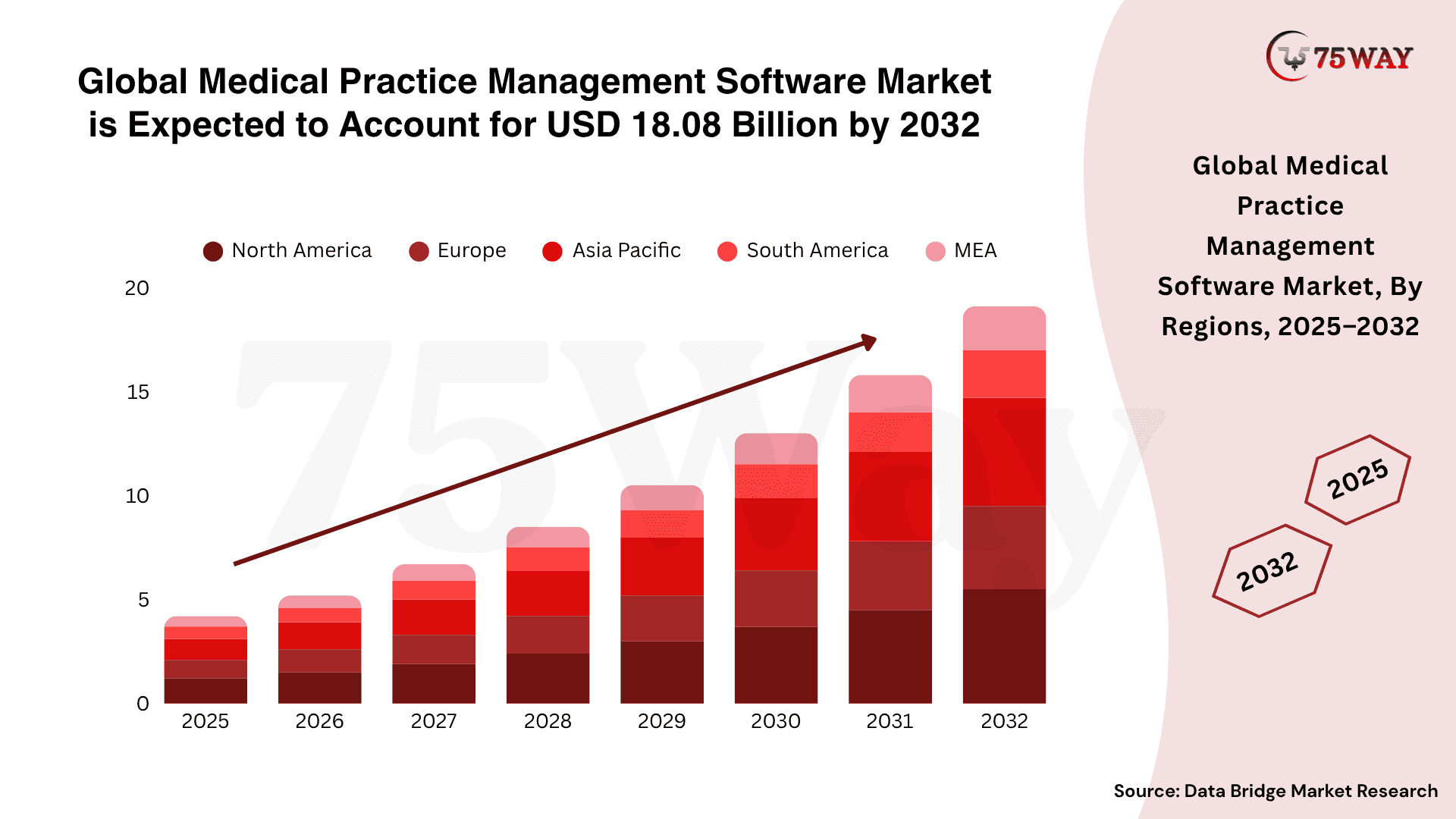
- The global medical practice management software market is projected to reach $18.08 billion by 2032, growing at a CAGR of 9.30%.
- North America accounts for nearly 44% of the total market share.
- Integrated solutions that combine billing, scheduling, and EHRs account for approximately 75% of the market.
Step-by-Step Process to Build Medical Practice Management Software
To create a medical practice management software requires a structured process from defining requirements to deployment. Each stage focuses on functionality, compliance, scalability, and user experience. The final system supports clinical workflows, improves operational efficiency, and adapts to evolving healthcare demands.
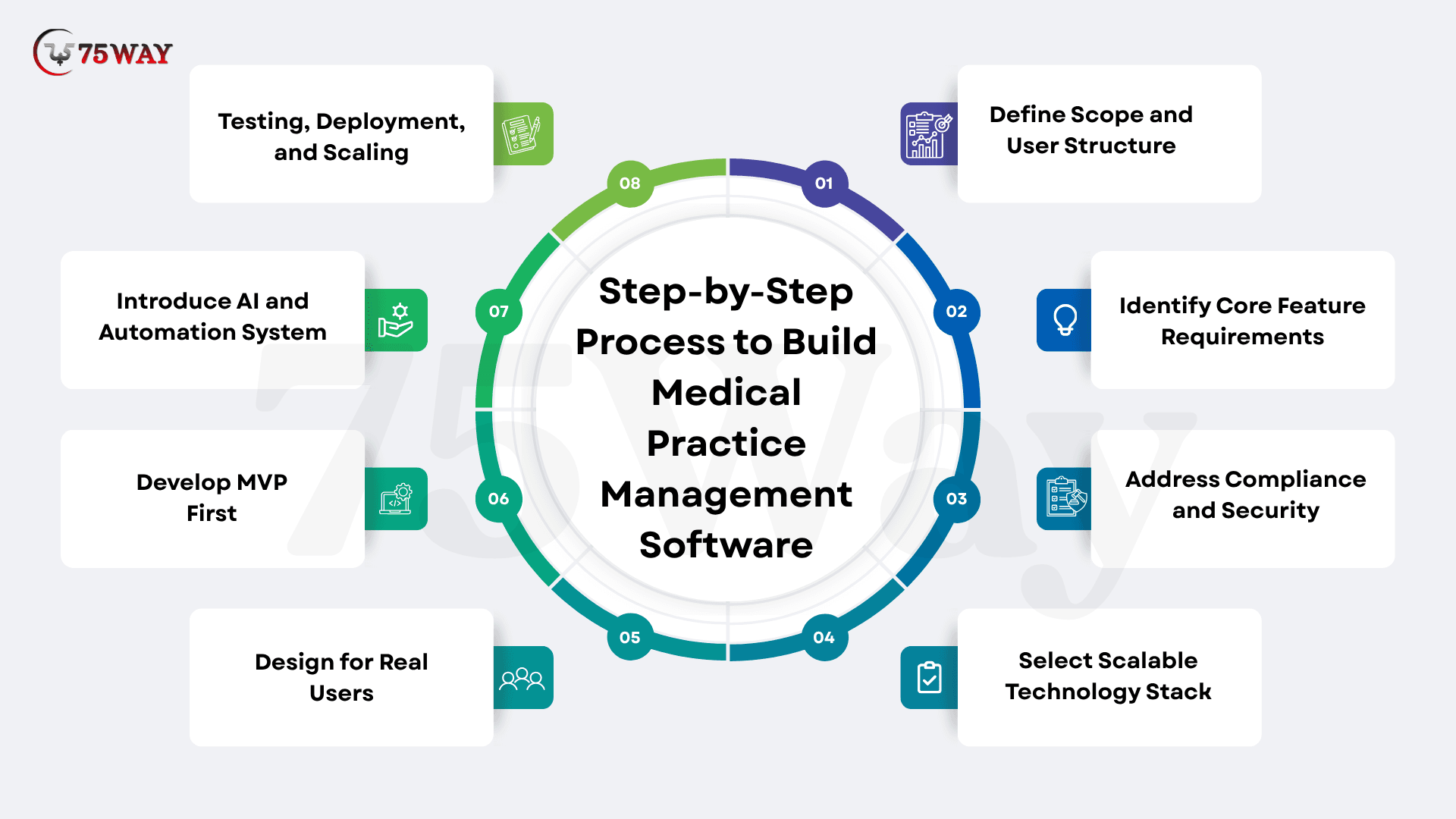
Step 1: Define Scope and User Structure
Every successful system starts with clarity on who it serves and what it solves. This stage establishes the foundation of the entire system by clearly defining objectives, target users, and the deployment model. The reason is to align the development with real healthcare workflows and operational expectations.
- Type of healthcare organization targeted
- SaaS platform vs dedicated internal system
- User roles such as doctors, staff, administrators, and patients
Without this clarity, systems tend to become overly complicated and underperform in real-world use.
Step 2: Identify Core Feature Requirements
The effectiveness of PMS depends on how well it solves daily operational challenges. Once you define the scope and user structure, the next step is to identify the core functions the system must deliver. These capabilities decide how effectively the software handles real, daily healthcare operations. Each feature should directly support workflow efficiency and reduce operational friction. Essential features include:
- Appointment and scheduling system
- Patient record management
- Billing and invoicing workflows
- Insurance claim handling
- Prescription and documentation tools
Advanced systems may also include:
- Automated reminders and follow-ups
- Predictive patient flow insights
- AI-assisted decision support
- Telehealth integration
Feature selection should always follow workflow needs, not trends.
Step 3: Address Compliance and Security Early
After defining the functional requirements, the focus naturally shifts to compliance and security planning. Healthcare systems deal with sensitive patient data, so protection and regulatory alignment cannot be delayed. This stage ensures security is built into the core architecture from the beginning, reducing risks and supporting safe, compliant system operations throughout development and deployment. Critical requirements include:
- End-to-end data encryption
- Secure authentication and role-based access
- Audit logs for system activity tracking
- Compliance with healthcare data protection standards
Step 4: Select a Scalable Technology Stack
Technology choices determine long-term system stability and scalability medical PMS systems. A modern stack enables seamless integration, faster development cycles, secure data handling, and a flexible architecture that supports continuous innovation across healthcare platforms, while ensuring reliability and future-ready digital transformation capabilities.
- Frontend: Build responsive interfaces with React or Next.js for fast rendering, reusable components, and a smooth user experience.
- Backend: Develop scalable APIs in Node.js or Python for real-time processing, efficient execution, and robust system reliability.
- Database: Manage data efficiently using PostgreSQL for structured records and MongoDB for flexible unstructured datasets for scalable performance.
- Cloud: Deploy infrastructure using AWS and Azure for secure hosting, monitoring, scalability, and efficient resource management across systems.
- AI Layer: Implement intelligent systems using Python-based machine learning and NLP models for healthcare decision-making.
Step 5: Design for Real Users
User experience design ensures healthcare software remains intuitive, efficient, and easy to navigate for all users. It simplifies workflows through clear layouts, structured access, and responsive design, improving task completion speed, reducing errors, and increasing consistent usage across healthcare environments. A strong system prioritizes:
- Clean and minimal dashboard design
- Role-based interfaces for different users
- Fast access to critical functions
- Mobile-friendly interaction design
A well-designed interface directly improves adoption across staff and patients.
Step 6: Develop an MVP First
Launching a full-featured healthcare system from day one increases risk, cost, and delays real-world validation. A minimum viable product or MVP development helps test core assumptions quickly, validate user needs, and refine product direction before investing in complex features and large-scale system expansion.
- Scheduling System: Build an appointment scheduling system to manage bookings, reduce conflicts, and ensure smooth coordination between patients and healthcare providers.
- Basic Patient Records: Develop essential patient record management to store medical history, update details, and enable quick access during consultations.
- Billing Functionality: Implement invoice generation, payment tracking, and transparent transaction management to improve financial workflow accuracy.
Early deployment of MVP enables direct user feedback, helping identify gaps, improve usability, and prioritize features based on real-world healthcare operations.
Step 7: Introduce AI and Automation System
AI in healthcare improves healthcare operations by reducing manual effort, increasing accuracy, and enabling faster decisions. It enhances efficiency by automating repetitive tasks, optimizing workflows, and delivering data-driven insights that improve patient management.
- AI Chat-Based Patient Assistance: AI chatbot systems support patients by answering queries instantly, guiding appointments, and improving communication efficiency across services.
- Smart Scheduling Optimization: Intelligent scheduling tools automatically allocate appointments based on availability, urgency, and resource optimization, reducing waiting times.
- Predictive Patient Demand Analysis: Predictive models analyze historical data to forecast patient inflow, helping hospitals plan staffing, beds, and resources.
- Automated Administrative Workflows: AI automates repetitive tasks such as documentation, reminders, and updates, reducing workload and improving operational accuracy.
Step 8: Testing, Deployment, and Scaling
Before going live, systems must be validated across multiple dimensions. After deployment, continuous monitoring, optimization, and scalable infrastructure management maintain stability and support growing healthcare demands. Key testing areas:
- Performance under high usage
- Security and data protection checks
- Usability testing with real users
Post-launch focus shifts to continuous monitoring, optimization, and infrastructure scaling.
Must-Have Features to Build Practice Management Software Medical
Modern medical practice management software systems must streamline operations, improve patient experience, ensure compliance, and automate workflows. It helps clinics reduce manual errors, boost efficiency, and scale seamlessly in a competitive digital ecosystem.
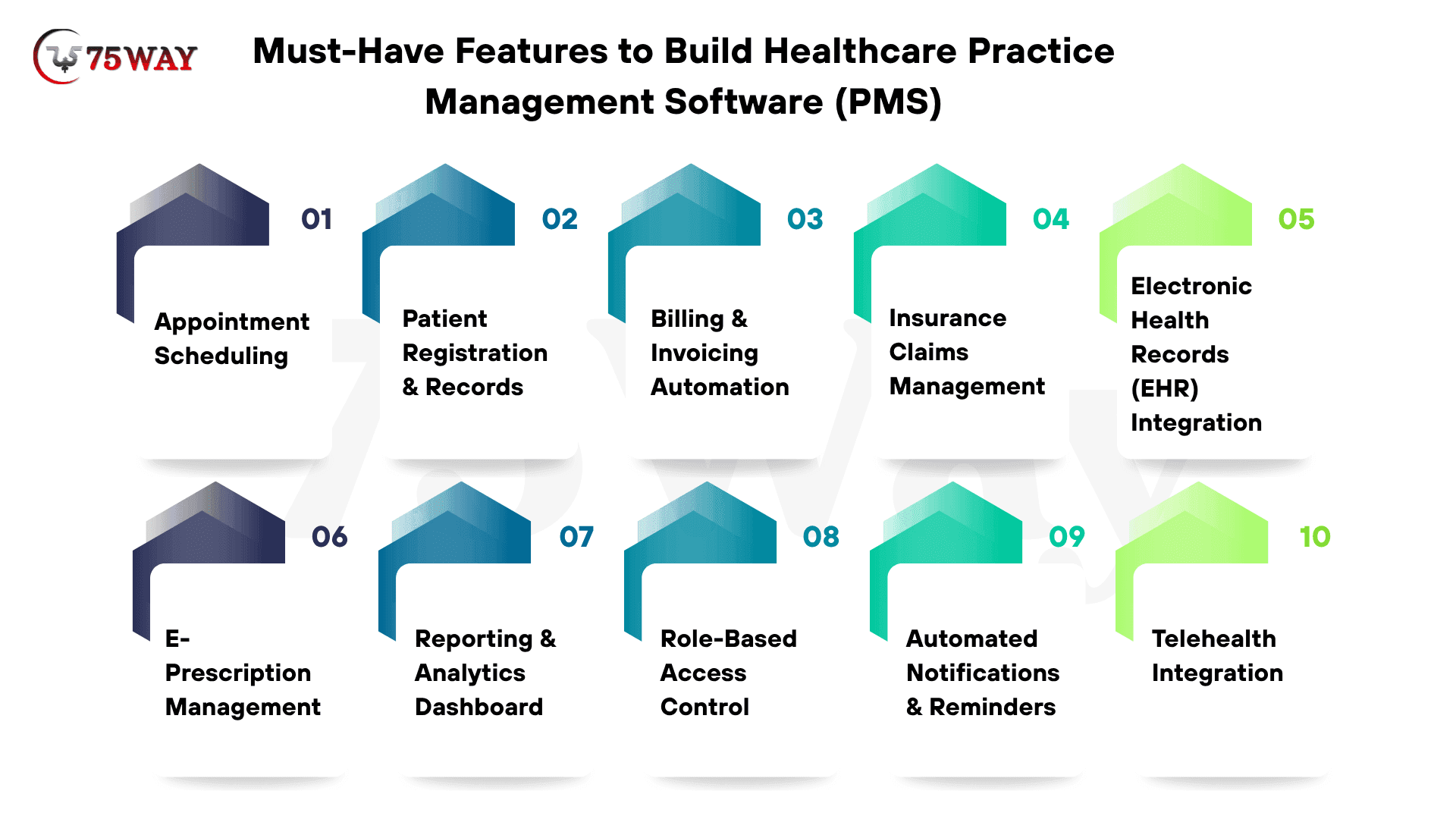
1. Appointment Scheduling
Enables real-time booking, rescheduling, and cancellations while syncing calendars to reduce no-shows and maximize clinic efficiency.
2. Patient Registration & Records
Centralizes patient data, medical history, and documents, ensuring quick access, accuracy, and better decision-making for healthcare providers.
3. Billing & Invoicing Automation
Automates billing processes, generates invoices, tracks payments, and minimizes human errors, improving revenue cycle management efficiency.
4. Insurance Claims Management
Simplifies claim submissions, tracks approvals, reduces denials, and accelerates reimbursements through automated workflows and validation checks.
5. Electronic Health Records (EHR) Integration
Seamlessly integrates with EHR systems to maintain patient records, improve interoperability, and enhance overall clinical efficiency.
6. E-Prescription Management
Allows doctors to generate, send, and manage prescriptions digitally, reducing paperwork and improving medication accuracy.
7. Reporting & Analytics Dashboard
Provides actionable insights on revenue, patient trends, and operations, helping businesses make data-driven decisions.
8. Role-Based Access Control
Ensures secure system access by assigning permissions based on roles, protecting sensitive patient data, and maintaining compliance standards.
9. Automated Notifications & Reminders
Sends appointment reminders, follow-ups, and alerts via SMS or email to enhance patient engagement and reduce missed visits.
10. Telehealth Integration
Enables virtual consultations, video calls, and remote care services, expanding accessibility and improving patient convenience.
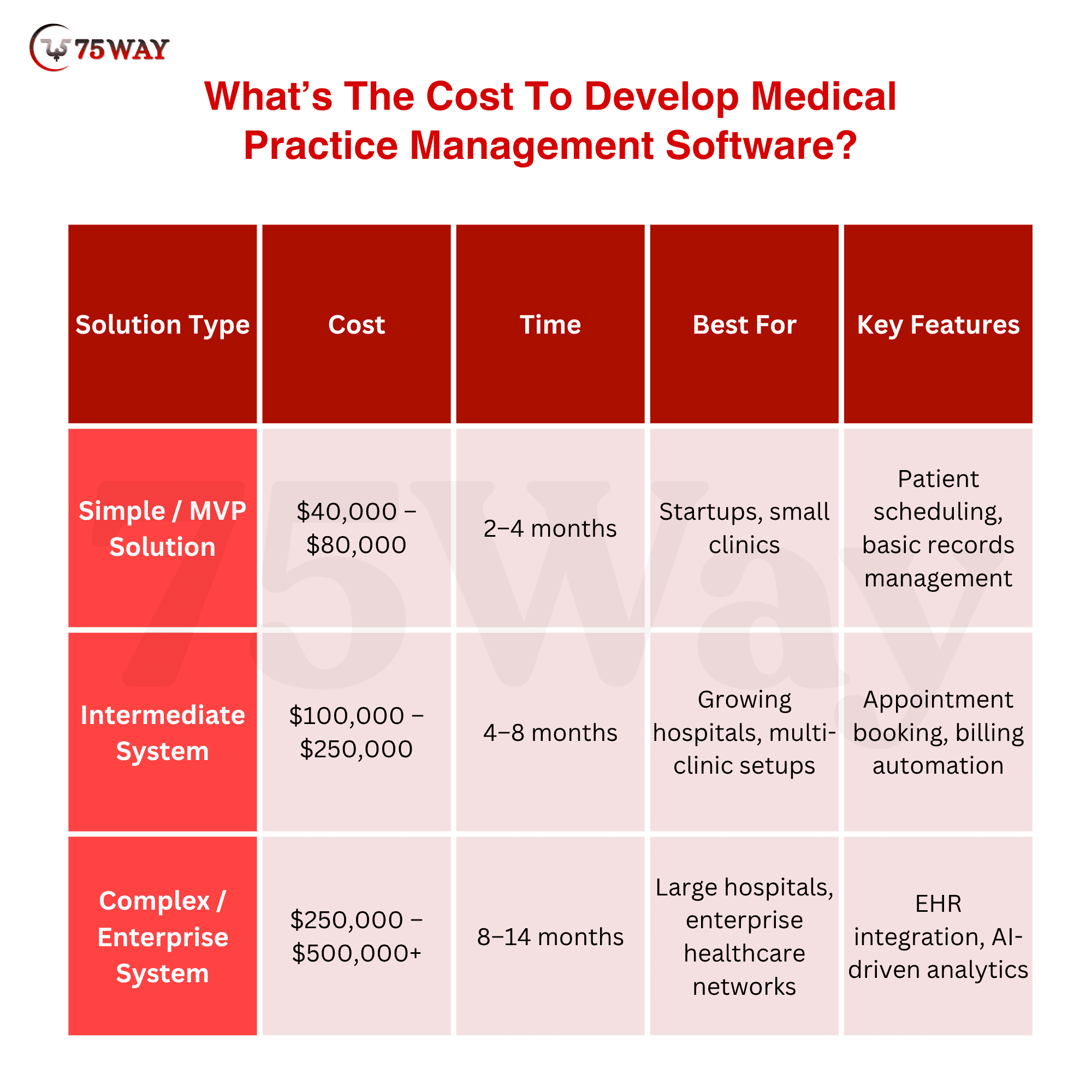
What’s The Cost To Develop Medical Practice Management Software?
The cost of medical practice management software development depends on features, complexity, integrations, compliance requirements, and scalability needs. On average, development costs range from $40,000 to $500,000+, depending on scope, technology stack, and level of customization. Basic systems with core modules such as scheduling, billing, and patient records cost less, while advanced platforms with AI, automation, and enterprise-grade security require a higher investment.
- Simple / MVP PMS Cost: $40,000 – $80,000
Develop a basic solution with core features to quickly launch and validate your concept.
- Intermediate PMS Cost: $100,000 – $250,000
Build a feature-rich system with integrations, improved performance, and scalability.
- Complex PMS Cost: $250,000 – $500,000+
Create a robust, high-end solution designed for large-scale operations and advanced functionality.
Other Factors Impacting Medical Practice Management Software Development Cost
Several factors influence medical practice management software development cost, including features, technology choices, compliance needs, scalability, and integrations.
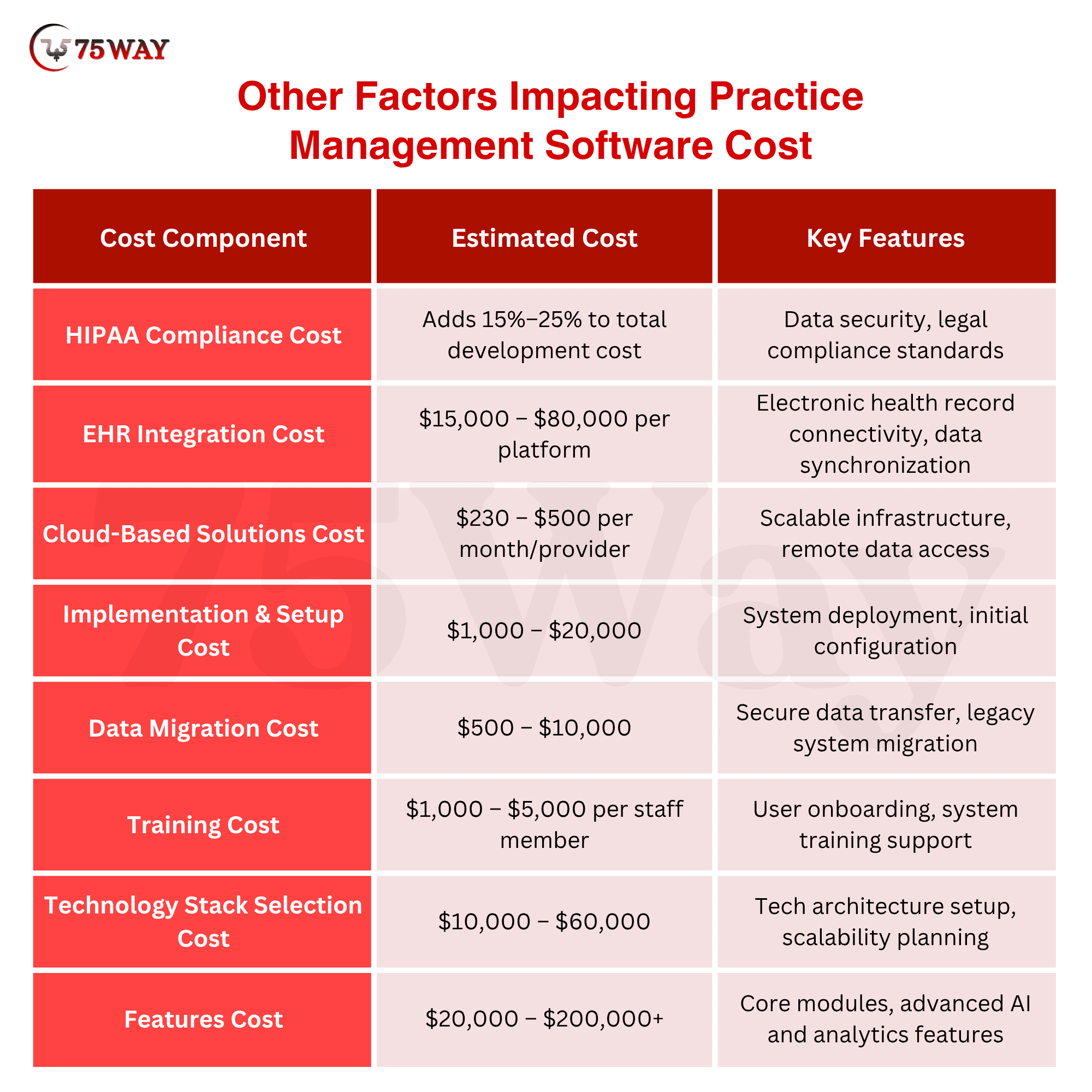
- HIPAA Compliance Cost: Adds 15%–25% to the total development cost
Ensures data security, privacy standards, and legal compliance for healthcare applications.
- EHR Integration Cost: $15,000–$80,000 per platform
Seamlessly connects with electronic health record systems for efficient data management.
- Cloud-Based Solutions Cost: $230–$500 per month/provider
Offers scalable, secure, and remote access to healthcare systems and data.
- Implementation & Setup Cost: $1,000–$20,000
Covers system configuration, deployment, and initial technical setup.
- Data Migration Cost: $500–$10,000
Transfers existing patient and operational data securely into the new system.
- Training Cost: $1,000–$5,000 per staff member
Equips staff with the knowledge to use the new system and tools.
- Technology Stack Selection Cost: $10,000–$60,000
Varies based on choosing scalable technologies like React, Node.js, Python, and cloud infrastructure, impacting development complexity and long-term maintenance.
- Features Cost: $20,000–$200,000+
Depends on the number and complexity of features like scheduling, billing, AI automation, analytics, and advanced healthcare modules.
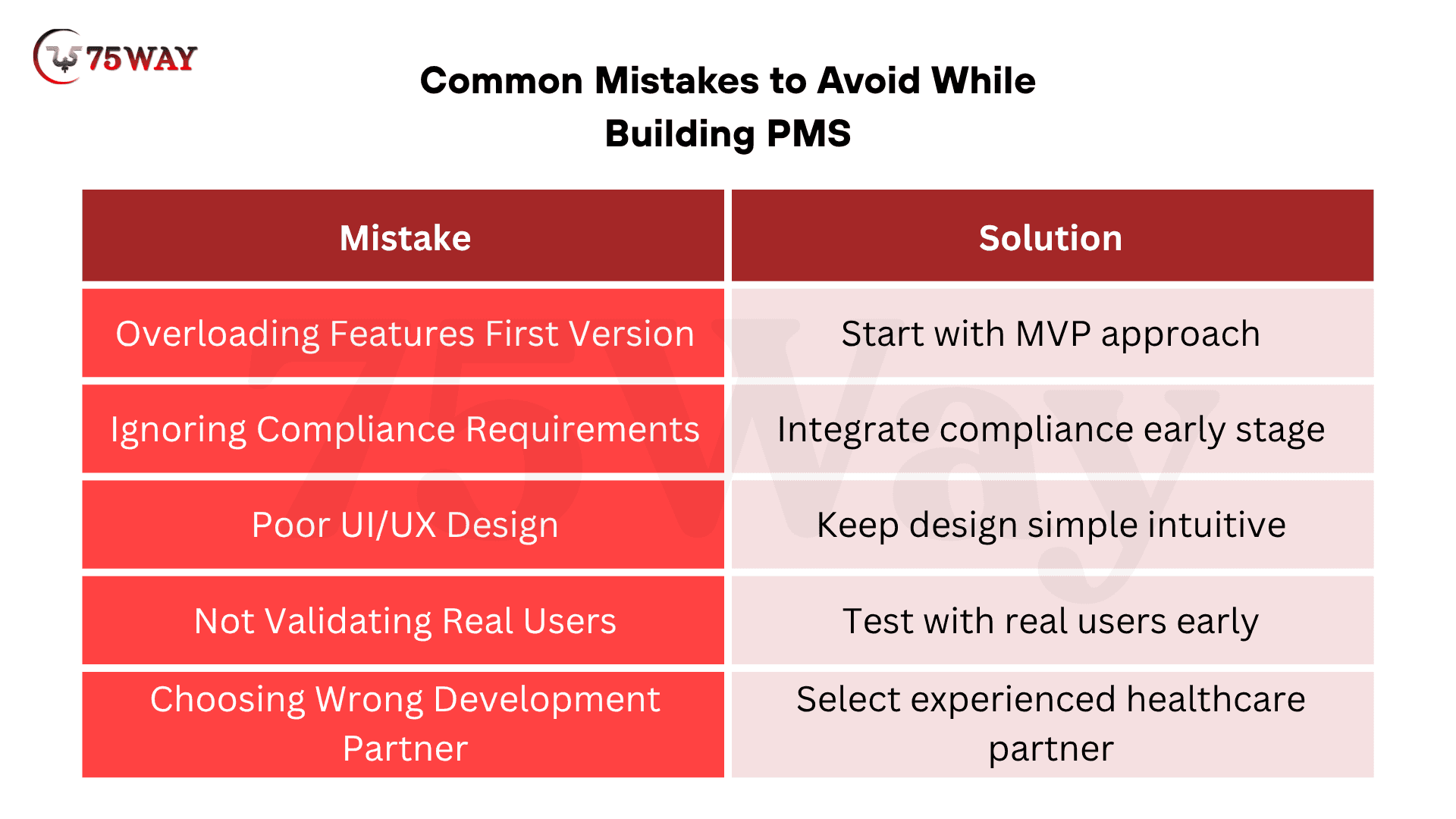
Common Mistakes to Avoid While Building Medical Practice Management Software Systems
Even the most promising practice management software medical ideas fail due to poor execution, lack of clarity, and strategic mistakes that impact usability, compliance, scalability, and overall product success in competitive markets.
1. Overloading Features in the First Version
Adding too many features initially increases complexity, delays launch timelines, confuses users, and reduces product focus.
- Solution: The smarter approach is to start with an MVP, focusing only on essential features that solve real problems.
2. Ignoring Compliance Requirements
Neglecting healthcare regulations risks legal penalties, data breaches, loss of trust, and can completely halt your software operations.
- Solution: Bring compliance into your process from day one by working closely with experts and implementing required standards early.
3. Poor UI/UX Design
Complicated interfaces frustrate users, slow workflows, increase training time, and ultimately reduce adoption rates across healthcare staff.
- Solution: Keep the design simple and intuitive so users can navigate easily without needing extensive training or support.
4. Not Validating with Real Users
Skipping real-user feedback leads to wrong assumptions, poor usability, and building features that don’t solve actual problems.
- Solution: Test your product with real users early, gather feedback, and refine features based on actual usage patterns.
5. Choosing the Wrong Development Partner
An inexperienced partner can cause delays, poor quality, scalability issues, and increased costs, affecting long-term product success.
- Solution: Choose a partner with proven healthcare expertise, strong technical capabilities, and a clear understanding of scalable product development.
How to Make Your PMS Stand Out?
If you want traction, your software must do more than “manage.” It should deliver higher value by improving decision-making, streamlining operations, and enhancing overall user experience. A solution that adapts to evolving healthcare needs and supports growth will consistently stand out in the market.
- AI-driven insights
- Seamless integrations
- Lightning-fast performance
- Custom workflows for clinics
- Scalable SaaS model
Final Thoughts
Building medical practice management software goes far beyond development. It’s about creating a system that improves efficiency, enhances patient experience, and drives consistent revenue growth. In a competitive healthcare landscape, businesses that focus on solving real operational challenges stand out and scale faster. The key is to combine the right technology, user-centric design, and compliance-ready architecture from the start. When your product delivers measurable value, adoption becomes easier, and growth follows naturally. If you’re planning to build a scalable PMS, partnering with the right healthcare solutions development company can accelerate your success and help you launch with confidence.
Frequently Asked Questions (FAQs)
Can Medical Practice Management Software Be Customized For Different Specialties?
Yes, modern PMS solutions are highly customizable for medical specialties such as dentistry, dermatology, or general practice. Custom workflows, templates, and integrations can be tailored to specific needs, improving usability, efficiency, and alignment with the unique operational requirements of different healthcare providers.
What Integrations Are Important For PMS Software?
Key integrations include electronic health records systems, payment gateways, insurance platforms, telehealth tools, and third-party APIs. These integrations ensure seamless data flow, reduce manual work, improve operational efficiency, and create a unified system that enhances both patient experience and administrative performance.
Is Cloud-Based PMS Better Than On-Premise Solutions?
Cloud-based PMS offers better scalability, remote accessibility, lower upfront costs, and automatic updates compared to on-premise systems. It allows healthcare providers to access data securely from anywhere, making it ideal for modern practices, especially those operating across multiple locations or offering telehealth services.
How Does PMS Software Improve Revenue Management?
PMS software automates billing, reduces errors, tracks payments, and speeds up insurance claims processing. This minimizes revenue leakage and improves cash flow. With better financial tracking and reporting, healthcare businesses can make informed decisions and optimize their overall revenue cycle efficiently.
What Role Does AI Play In Modern PMS Solutions?
AI enhances PMS systems by automating repetitive tasks, predicting patient trends, optimizing scheduling, and improving decision-making. It also powers chatbots, voice documentation, and analytics, helping healthcare providers save time, reduce errors, and deliver more personalized patient experiences.
Can Startups Build PMS Software Without Technical Expertise?
Yes, startups can build PMS solutions by partnering with experienced development companies. These partners handle technical complexities, architecture, and compliance requirements, allowing founders to focus on business strategy, user needs, and market growth without needing deep technical knowledge.