AI Summary
Elderly care app development requires more than useful features; it demands trust, accessibility, and reliable care coordination. This guide explores costs, essential capabilities, security, monetization, and development stages. Learn how to validate your idea before investing in development.
Key Takeaways
- Elderly care app development starts with validated customer needs, workflows, and business goals.
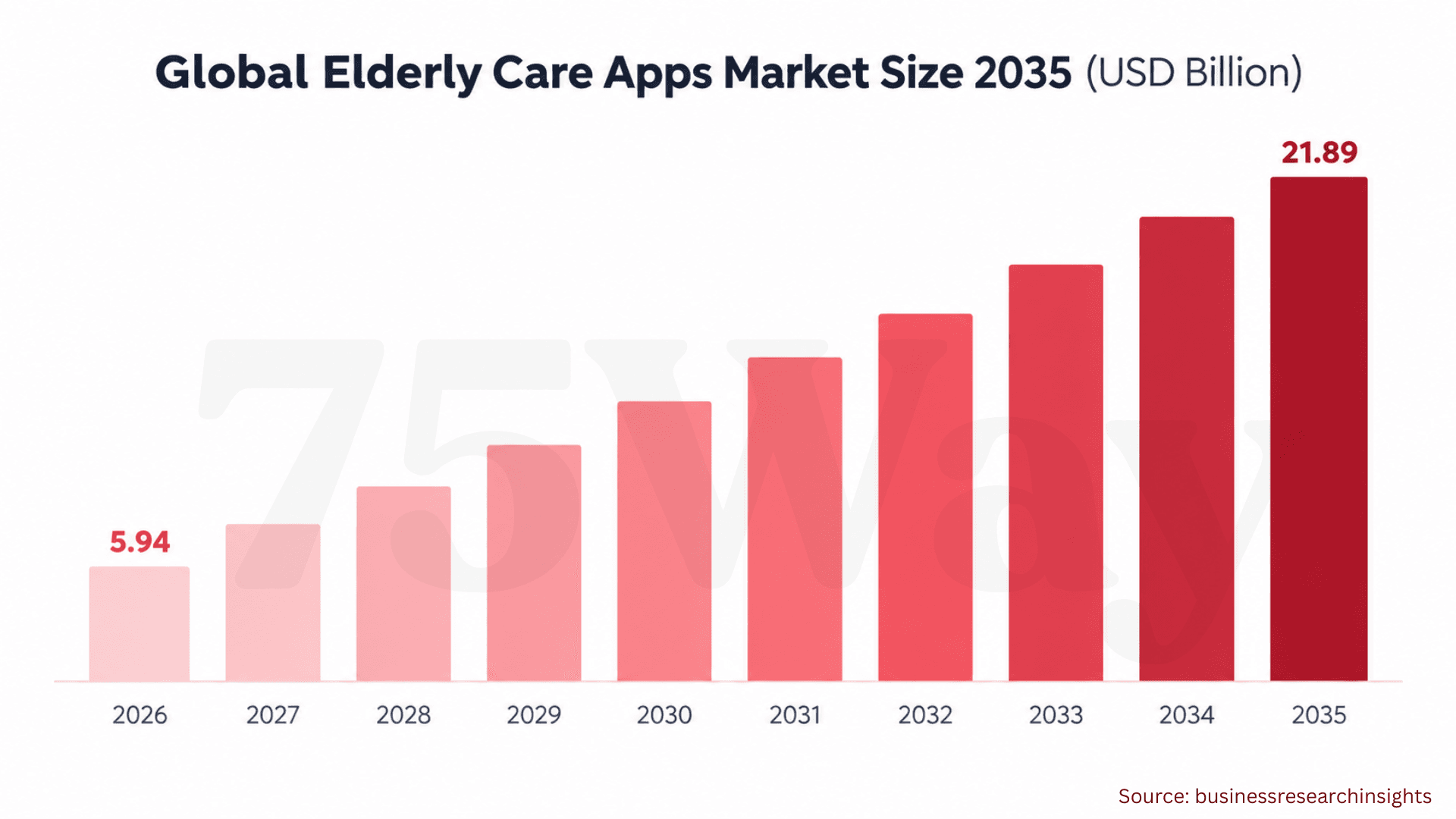
- The global elderly care apps market is projected to reach $21.89 billion by 2035.
- Elderly care app development costs range from $30,000 to $450,000+, depending on scope and complexity.
- Accessible interfaces, reliable notifications, and appropriate data safeguards support user trust.
- A focused MVP helps businesses validate demand before expanding product capabilities.
When your aging parent needs help with medications, doctor appointments, or daily activities, managing everything from a distance can quickly become stressful. For home care providers and healthcare entrepreneurs, an elderly care app development solution offers a way to connect seniors, families, and caregivers through one accessible platform.
But building an app for older adults requires more than adding reminders and emergency buttons. Seniors need simple navigation, readable text, dependable alerts, privacy protection, and features that support their independence without making technology harder to use.
If you are planning to enter the senior care technology market, your elderly health care app development choices will shape the experience for every person involved. The essential features, development stages, technology requirements, costs, and security considerations can help you plan an elderly care app that meets real care needs.
What Is Elderly Care App Development?
Elderly care app development is a process to design, create, and launch a digital solution that helps businesses solve specific challenges in senior care, from missed medication reminders and scattered family updates to complex caregiver scheduling. These apps bring relevant care activities into a single platform, giving older adults, families, and professional care teams a clearer way to manage daily responsibilities.
For example, a home care agency can use an app to assign caregiver visits, record completed tasks, and share authorized updates with families. A senior care startup might build a subscription-based app for appointment reminders, shared care schedules, and wellness check-ins. Each solution serves a different business need, so the target customer and intended outcome should shape the product from day one.
Elderly Care App Growth Opportunities In US And Global Markets
If you are planning to enter the elderly care technology market, the opportunity extends far beyond medication reminders and emergency alerts. Ageing populations, caregiver shortages, and demand for support at home are creating new needs for digital care solutions across markets. These growth areas show where an elderly care app could find demand in the US and globally.
- The global Elderly Care Apps Market is projected to increase from $5.94 billion in 2026 to $21.89 billion by 2035, registering a 13.92% CAGR.
- Another industry forecast estimates that the elderly care app market will reach $19.22 billion by 2035.
- More than 40% of seniors in developed regions now use smartphones.
- Over 150 million elderly people worldwide actively use apps for health monitoring, medication reminders, and social interaction.
- Approximately 25,000 elderly care apps are available on app stores, supporting daily activity management and chronic condition monitoring.
- In the U.S., more than 60 million seniors have downloaded at least one elderly care or health-monitoring app over the past three years.
- The U.S. population aged 65 and older is expected to reach 73 million by 2030.
- AgeWhale offers features such as automated pill tracking and alerts for changes in user behavior.
- More than 91% of home care agencies are using or planning to adopt AI for scheduling and family updates.
For founders entering the US market, the more useful question concerns the customer segment with the strongest need and willingness to pay.
Three opportunities deserve particular attention:
- Family Caregiving: Shared care schedules, appointment reminders, and authorized family updates.
- Professional Home Care: Caregiver assignments, visit records, task management, and agency reporting.
- Senior Living Operations: Resident services, staff coordination, activity management, and family communication.
A focused market entry strategy can help a business validate one of these opportunities before investing in a broader platform.
How to Develop Elderly Health Care Service Mobile App
An elderly health care service app must work for people who may have limited mobility, visual difficulties, or little experience with digital tools. Your development decisions need to balance simple navigation with useful functions such as appointment scheduling, medication reminders, remote consultations, and caregiver access. A clear development approach helps turn these needs into a practical, secure healthcare application.
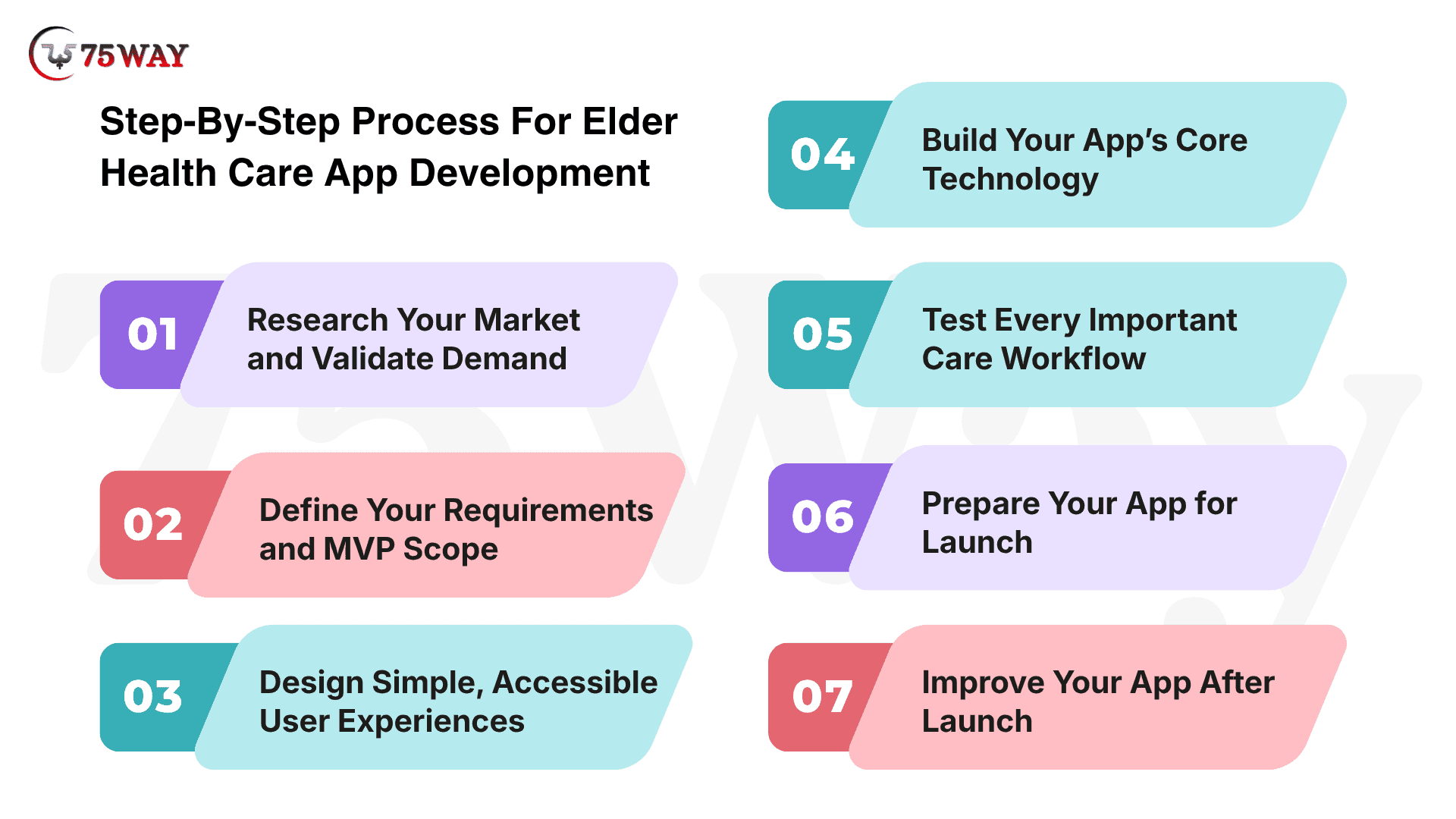
Step 1: Research Your Market and Validate Demand
When you are investing in development, take time to understand your intended users.
Are you building for family caregivers, home care agencies, or senior living providers?
Each group faces different challenges, and your app needs to address a problem they genuinely want solved.
You must talk to potential customers about their daily routines, frustrations, existing tools, and willingness to pay for a better solution. Your competitor research should also uncover missing features, pricing gaps, and common user complaints. By the end of this stage, you should have a clear target audience, a defined problem, and a realistic business opportunity.
Step 2: Define Your Requirements and MVP Scope
Once you understand your market, decide what your first version actually needs. You might want medication reminders, caregiver scheduling, family updates, appointment management, and health tracking from day one. However, launching every feature at once can increase costs before you know what users value most.
Start with the capabilities that address your main customer problem. Document user roles, permissions, essential workflows, accessibility needs, and integration requirements. Your development team can then estimate the budget and timeline against a defined scope rather than a growing wish list.
Step 3: Design Simple, Accessible User Experiences
Your app may offer valuable features, but users will struggle to benefit from them if navigation feels confusing. Older adults may need readable text, clear labels, larger touch targets, and straightforward instructions, while caregivers may prioritize quick access to schedules and updates.
Ask users to try a clickable prototype before development begins.
- Can they find a medication reminder without assistance?
- Can a caregiver update a visit without navigating several screens?
Their feedback will help you refine the interface early, when design changes are generally easier to accommodate.
Step 4: Build Your App’s Core Technology
With the requirements and design established, your development team can begin building the mobile or web interface, backend services, database, authentication, and administrative dashboard. The exact architecture will depend on your audience, expected usage, budget, and required integrations.
For your first release, prioritize the workflows that users need most. Build in appropriate permissions, secure data handling, error recovery, and clear notification behavior from the beginning. Regular demonstrations will also give you opportunities to review progress, raise concerns, and address scope changes before they become costly.
Step 5: Test Every Important Care Workflow
Before inviting real customers to use your app, check more than whether its screens open correctly. Test medication reminders, appointment updates, account permissions, caregiver assignments, and notifications across supported devices and operating conditions.
Pay particular attention to what happens when a network connection fails, a notification is delayed, or an emergency contact cannot be reached. If your app includes emergency alerts, test the complete escalation process and communicate its limitations clearly. Accessibility, security, and performance testing should also be part of your release criteria.
Step 6: Prepare Your App for Launch
A successful launch requires more than publishing your app to an app store. You also need production infrastructure, onboarding instructions, customer support procedures, privacy documentation, and a plan for handling technical issues after release.
Consider starting with a small pilot involving selected customers or care teams. Their real-world feedback can show whether your app fits existing routines, whether onboarding creates confusion, and which problems need attention before a broader launch. Use these findings to refine the product rather than rushing into expansion.
Step 7: Improve Your App After Launch
Your work does not end when the first users download your app. Operating system updates, changing security requirements, integration issues, and customer support requests all create ongoing maintenance responsibilities.
Review how people use the product and where they encounter difficulties. Are caregivers completing assigned tasks? Are families engaging with shared updates? Are users abandoning onboarding? Combine these findings with customer feedback and business results to prioritize improvements. New features should solve demonstrated problems, not simply make your feature list longer.
Popular Elderly Care App Types Businesses Can Develop
Elderly care does not look the same for every family, which creates room for different types of healthcare apps. Some seniors need help managing medications and appointments, while others benefit from remote monitoring, caregiver coordination, or access to medical professionals. The main app types offer different ways to address these needs and build a product around a specific audience.
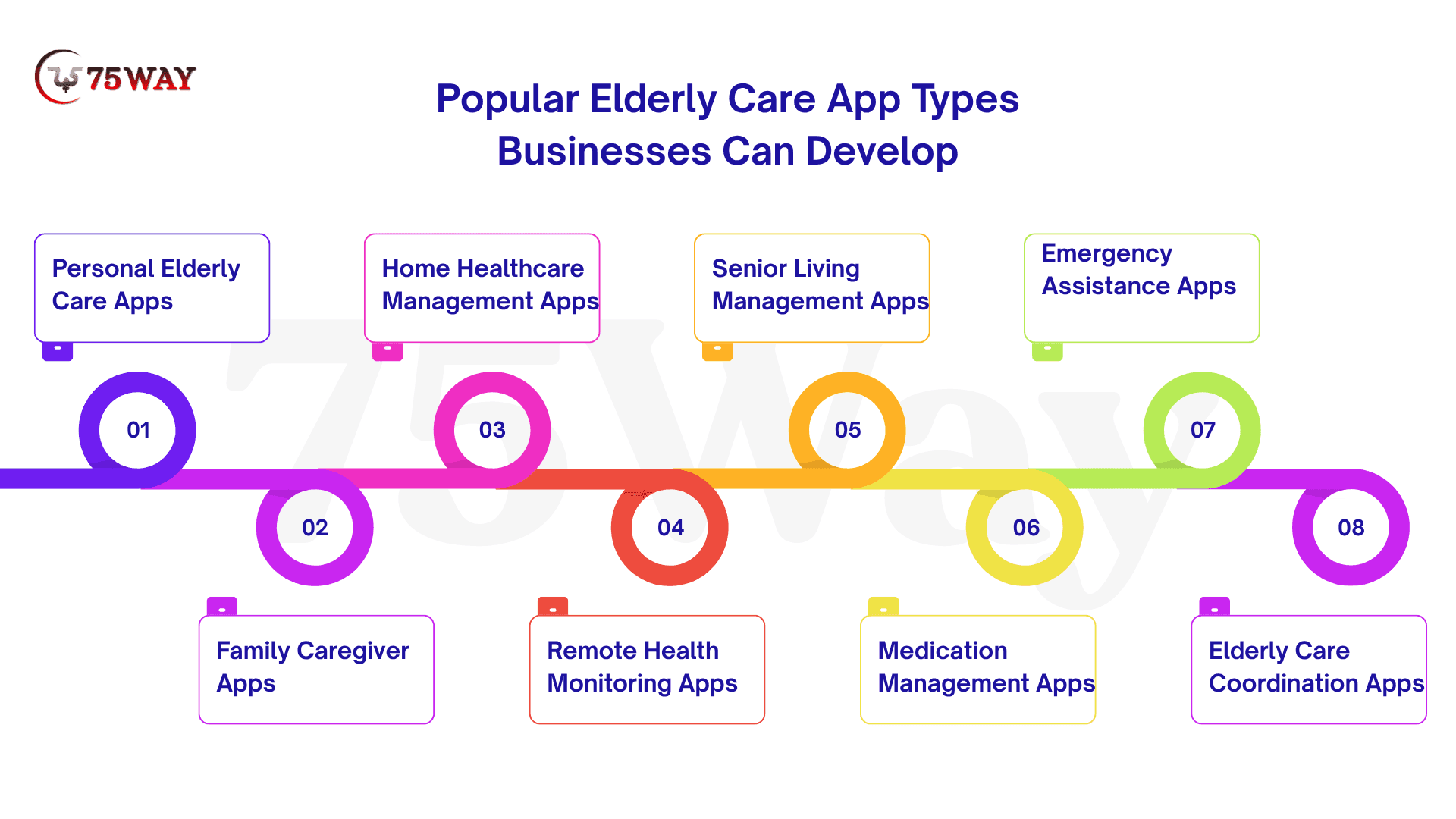
1. Personal Elderly Care Apps
Personal elderly care apps help older adults handle everyday routines with fewer complications. If your goal is to make daily life more manageable, you can include medication reminders, appointment alerts, wellness logs, and quick access to trusted contacts. The interface should feel straightforward, with readable text and simple navigation that older users can understand without frustration.
Estimated Cost: $20,000–$80,000+
Suitable For: Older adults managing everyday personal care
Main Features: Medication reminders, appointment alerts, daily schedules, emergency contacts, wellness logs, accessible navigation, personal profiles
2. Family Caregiver Apps
When several family members share responsibility for an older relative, keeping everyone informed can become difficult. Family caregiver apps give relatives one place to organize appointments, divide care tasks, share updates, and track medication schedules. For your business, shared access and clear permissions can make coordination easier without exposing private information to every family member.
Estimated Cost: $18,000–$90,000+
Suitable For: Families sharing elderly care responsibilities remotely
Main Features: Shared calendars, care task lists, medication alerts, family messaging, appointment tracking, permission-based updates, caregiver profiles
3. Home Healthcare Management Apps
Home care agencies often manage multiple clients, caregiver schedules, visit records, and last-minute changes at the same time. A home healthcare management app can bring these activities into one system, helping your team assign visits, document completed tasks, and access relevant client information. Features should reflect your agency's actual workflows rather than add unnecessary administrative steps.
Estimated Cost: $15,000–$180,000+
Suitable For: Home care agencies and professional providers
Main Features: Staff scheduling, caregiver assignments, visit records, client profiles, shift updates, service tracking, operational reports
4. Remote Health Monitoring Apps
Remote health monitoring apps help users record selected health measurements and share relevant information with authorized caregivers or healthcare professionals. Your app might connect with compatible devices to display readings and track changes over time. The development scope depends on the devices involved, the need for clinical oversight, and whether the product's intended use triggers additional regulatory requirements.
Estimated Cost: $15,000–$220,000
Suitable For: Remote monitoring providers and digital health startups
Main Features: Device connectivity, health readings, trend reports, threshold alerts, authorized data sharing, patient profiles, monitoring dashboards
5. Senior Living Management Apps
Senior living facilities coordinate resident services, staff activities, daily schedules, and family enquiries throughout the day. A dedicated app can help your organization manage resident records, communicate service updates, and organize activities without relying on disconnected tools. The final feature set should match your facility's size, operating procedures, and the access needs of staff, residents, and families.
Estimated Cost: $10,000–$200,000+
Suitable For: Senior living facilities and residential care operators
Main Features: Resident records, service requests, activity calendars, staff communication, family portals, facility announcements, administrative dashboards
6. Medication Management Apps
Medication routines can become difficult to track when an older adult takes several prescriptions or receives help from multiple caregivers. A medication management app can organize dose reminders, prescription details, refill dates, and medication logs in one accessible place. Your product should support the prescribed routine without replacing a pharmacist's or healthcare professional's advice.
Estimated Cost: $30,000–$100,000
Suitable For: Seniors, family caregivers, and medication support providers
Main Features: Dose reminders, medication lists, refill alerts, adherence logs, prescription details, caregiver notifications, schedule management
7. Emergency Assistance Apps
For older adults living independently, quick access to trusted contacts can provide an additional layer of support. Emergency assistance apps may include an SOS button, location sharing, and notifications to designated contacts. If your business plans to offer emergency escalation, the underlying service and response process must be clearly defined because an app alone cannot guarantee that help will arrive.
Estimated Cost: $10,000–$120,000+
Suitable For: Senior safety services and personal care providers
Main Features: SOS button, emergency contacts, location sharing, alert notifications, escalation workflows, incident logs, contact management
8. Elderly Care Coordination Platforms
Some care arrangements involve older adults, relatives, home care professionals, and healthcare providers who need to share selected information. A care coordination platform can bring tasks, appointments, care plans, and updates together while controlling access for each user group. If your business serves several providers or manages complex care arrangements, integrations and permission management will be important parts of the project.
Estimated Cost: $10,000–$300,000+
Suitable For: Multi-provider care networks and care coordination businesses
Main Features: Shared care plans, task assignments, appointment tracking, secure messaging, role-based access, care records, activity reports
Essential Features Used In Elder Health Care App Development
For seniors and their families, an elderly healthcare app is only useful when its tools solve real care challenges. Clear reminders, easy access to medical information, remote consultations, and quick ways to contact caregivers can make a meaningful difference in daily routines. The core features shape how well the app supports safety, accessibility, and communication.
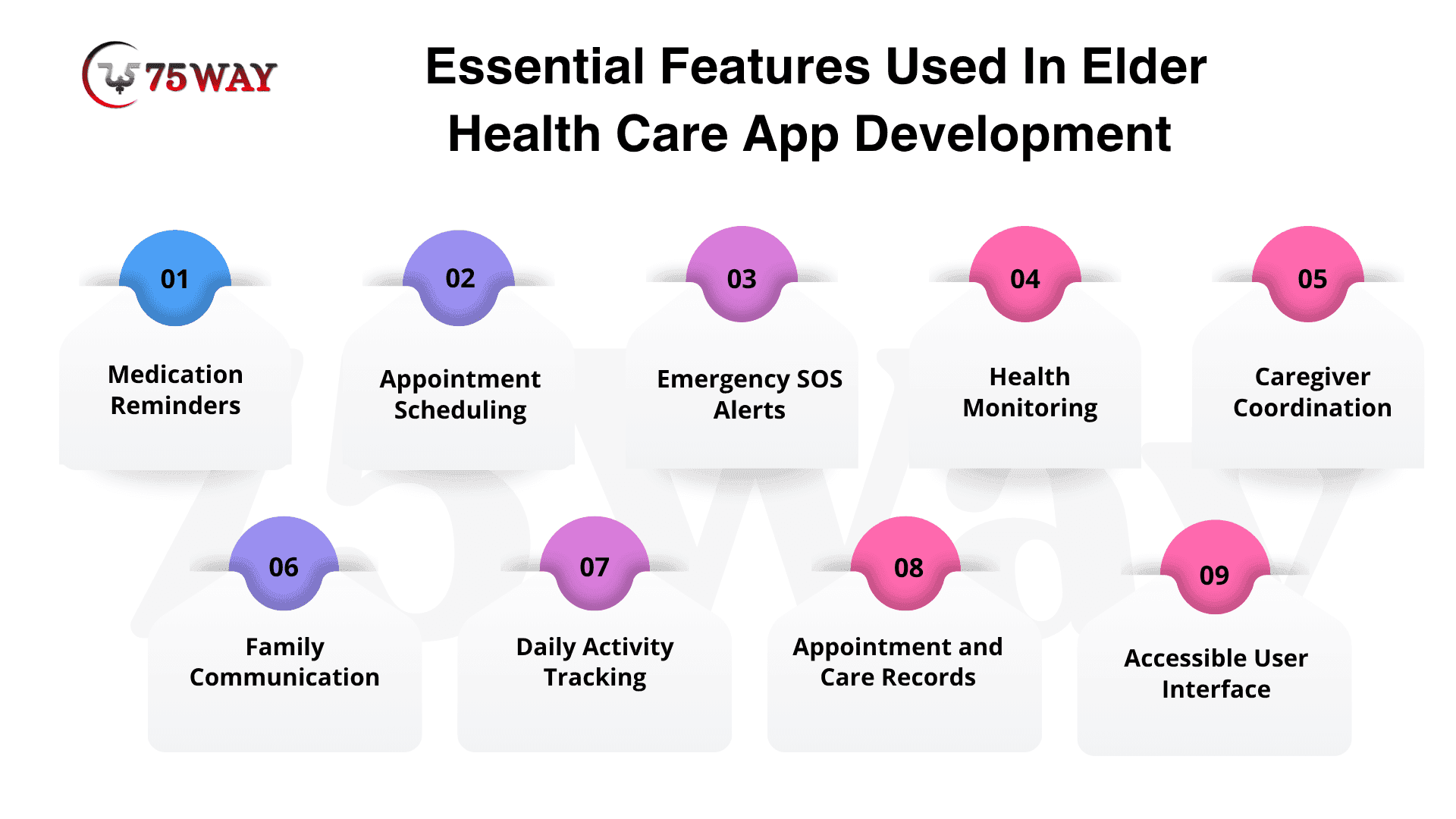
- Medication Reminders: Remembering multiple medications can be challenging, especially when prescriptions follow different schedules. Your app can send timely reminders, display dosage instructions entered by users or caregivers, and record whether a dose has been marked as taken.
- Appointment Scheduling: Missed medical appointments can disrupt care routines and create unnecessary stress for families. An appointment scheduling feature lets users organize upcoming visits, receive reminders, and share relevant dates with authorized caregivers.
- Emergency SOS Alerts: During an urgent situation, older adults may not have time to navigate several screens or search for a contact number. An SOS feature can help them alert designated contacts quickly, with optional location sharing where permissions and device capabilities allow.
- Health Monitoring: Families often want a clearer picture of an older relative’s health between appointments. Your app can let users record selected measurements, such as blood pressure or blood glucose, and review trends without presenting the information as a medical diagnosis.
- Caregiver Coordination: When multiple caregivers share responsibilities, missed updates can lead to confusion about who is handling each task. A coordination feature can assign duties, update care schedules, and show authorized users which tasks have been completed.
- Family Communication: Living in different cities can make it difficult for relatives to stay informed about everyday care. In-app messaging, shared updates, and permission-based access can help families communicate without relying entirely on scattered calls and chat messages.
- Daily Activity Tracking: Simple daily routines, including meals, hydration, movement, and personal care, can be important parts of an older adult’s support plan. Activity tracking lets users or caregivers record selected tasks and notice changes that may need further attention.
- Appointment and Care Records: Searching through paper notes and old messages can make important care information difficult to find. A digital record feature can organize appointments, care notes, and relevant documents in one place, with access limited to authorized users.
- Accessible User Interface: A feature-rich app is of little help when users struggle to read its text or understand its navigation. Large touch targets, adjustable text sizes, clear labels, strong contrast, and straightforward screens can make your app easier for people with different abilities to use.
- Caregiver Notifications: Caregivers need timely updates when a scheduled task changes or an important reminder requires attention. Customizable notifications can highlight relevant events while allowing users to control alert preferences and avoid unnecessary interruptions.
Which Features Should an MVP of Elderly Health Care App Development Include?
A minimum viable product (MVP) should address one validated customer problem with the smallest practical set of features.
For a family caregiving app, the initial release might include senior profiles, shared care schedules, medication reminders, caregiver permissions, and basic notifications. An agency-focused product might instead prioritize staff scheduling, visit records, client profiles, and an administrative dashboard.
The MVP scope should also include authentication, data protection, accessibility testing, error handling, and appropriate privacy controls. These requirements are part of a dependable product, not optional additions after the launch.
Advanced analytics, extensive wearable integrations, AI-powered recommendations, and complex enterprise reporting can remain outside the initial release unless customer research establishes a clear need.
What’s Elderly Care App Development Cost?
The estimated cost of elderly care mobile app development ranges from $30,000 to $450,000+, depending on product scope, platform requirements, integrations, security controls, and testing needs. These figures represent planning estimates rather than fixed market prices or vendor quotations.
1. Basic Elderly Care App Cost: $30,000–$90,000
A basic elderly care app suits startups and care providers with a focused product idea and limited initial requirements.
- Simple registration and senior profile management.
- Medication reminders and basic appointment scheduling.
- Caregiver access and standard push notifications.
Timeline: 3–5+ months
2. Mid-Level Elderly Care App Cost: $90,000–$200,000
A mid-level application supports multiple user roles and more advanced care coordination.
- Shared care plans for families and caregivers.
- Secure messaging with role-based access controls.
- Administrative dashboards, reports, and third-party integrations.
Timeline: 5–9+ months
3. Complex/Enterprise Elderly Care App Cost: $200,000–$450,000+
An enterprise platform may include multi-location administration, advanced analytics, wearable integrations, telehealth capabilities, and connections.
- Multi-location administration with centralized operational controls.
- Wearable integrations, telehealth, and healthcare system connectivity.
- Advanced analytics, enterprise security, and scalable infrastructure.
Timeline: 9–18+ months
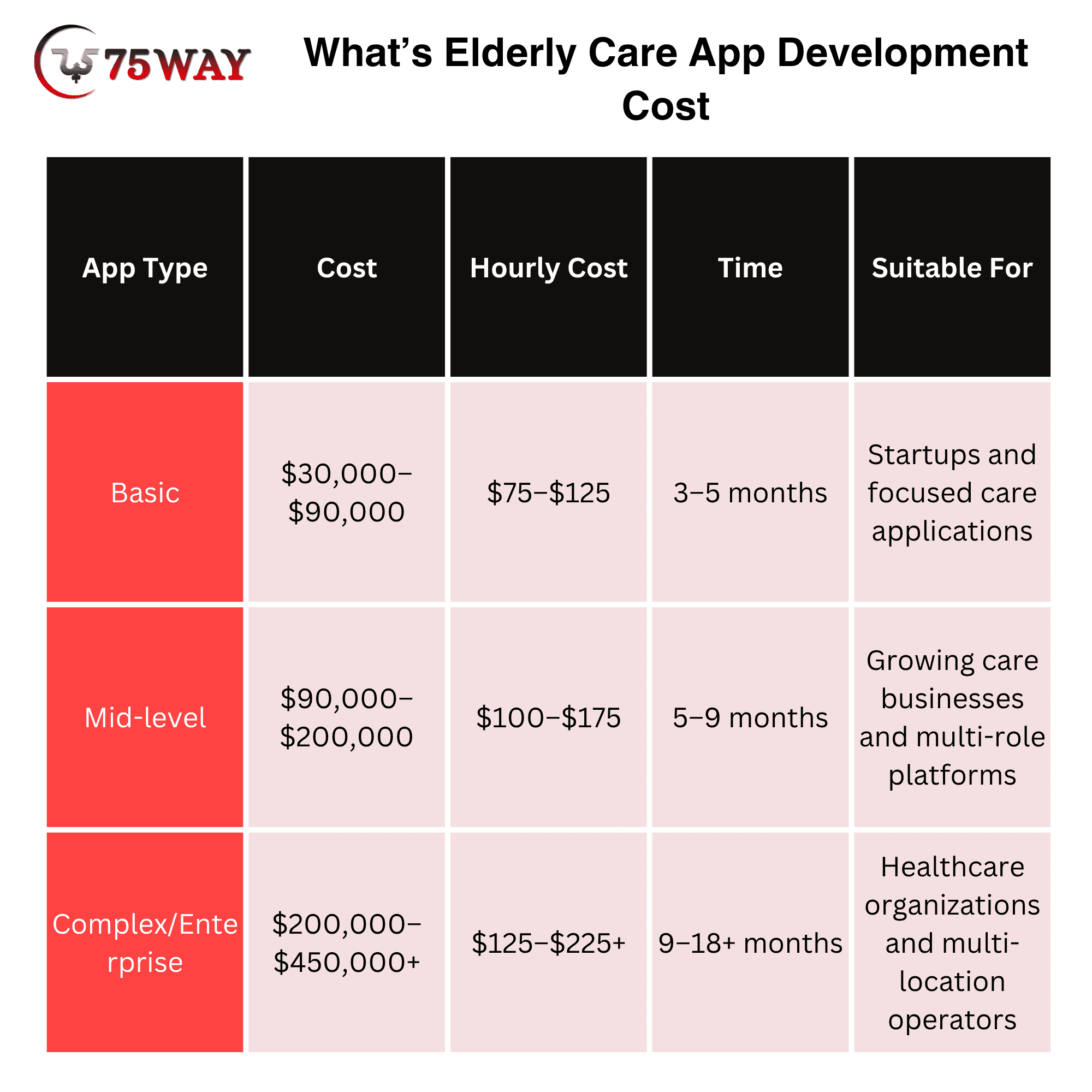
The hourly rates represent illustrative US-based development budget assumptions, not verified industry averages. Actual pricing varies by vendor, specialist expertise, engagement model, and project location.
Factors Affecting Elderly Care App Development Cost
- Platform Selection: Native iOS and Android applications, cross-platform development, and web-based administrative portals have different implementation and testing requirements.
- Feature Complexity: Basic reminders and scheduling require less development effort than real-time monitoring, sophisticated escalation workflows, or complex reporting.
- Third-Party Integrations: Wearables, payment providers, video services, and healthcare systems introduce additional integration, licensing, and testing considerations.
- Security And Privacy: Authentication, encryption, permission management, audit logs, and retention policies contribute to implementation and maintenance costs.
- Accessibility Requirements: Readable text, larger touch targets, clear navigation, and assistive technology support require thoughtful design and usability testing.
- Maintenance and Support: Hosting, software updates, customer assistance, security reviews, and third-party service fees create ongoing expenses after launch.
Technology Stack for Elderly Care Mobile App Development
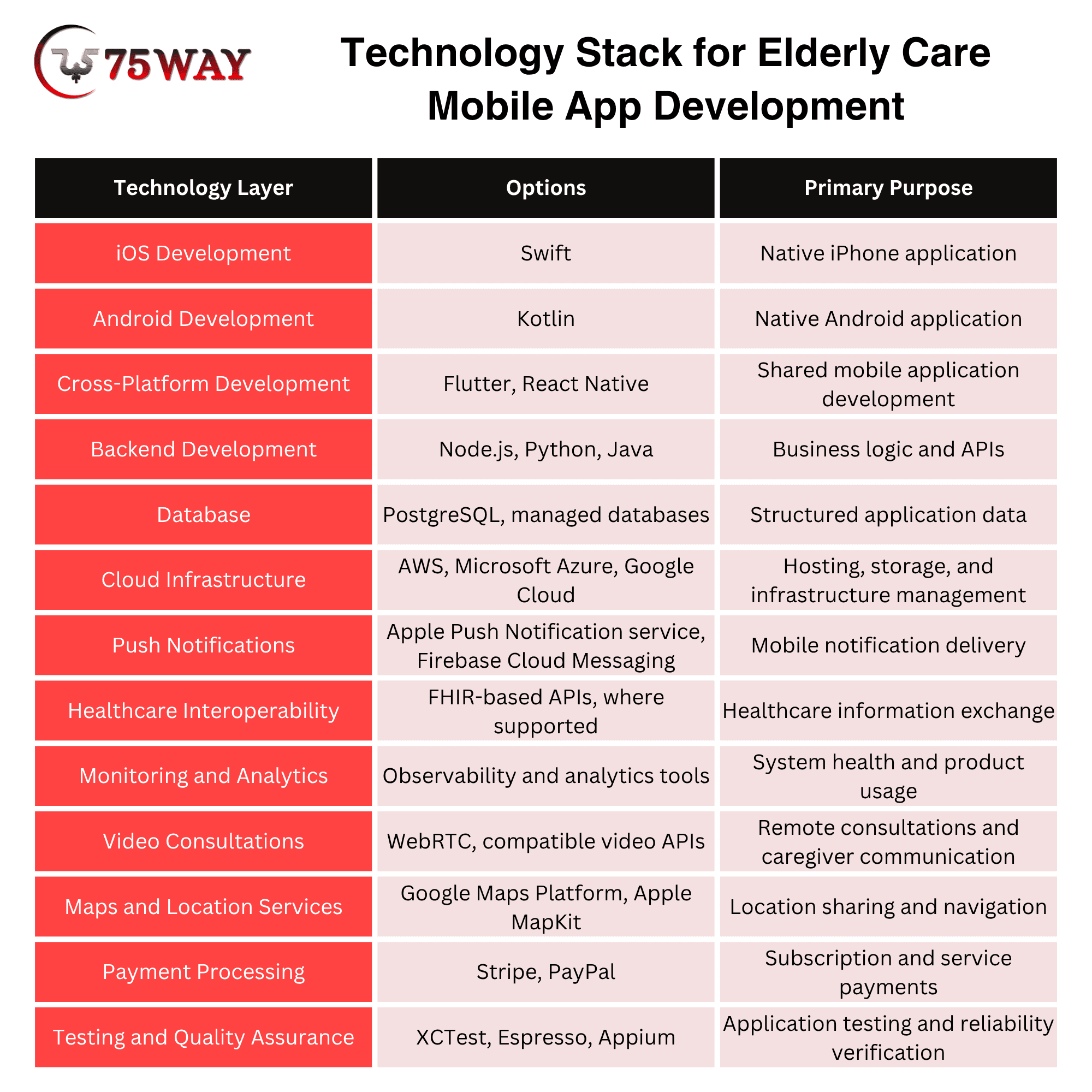
The technology stack behind your elderly care app determines how smoothly it runs, how securely it handles sensitive information, and how easily it can grow with your business.
For example, a family caregiving app may need simple scheduling and messaging, while a remote monitoring platform may require wearable integrations, real-time data processing, and healthcare system connectivity. The right choices depend on your app’s features, target users, budget, and long-term goals.
Flutter or React Native helps you launch on iOS and Android, while Node.js or Python powers essential app functions.
PostgreSQL organizes care records, AWS or Microsoft Azure supports secure cloud hosting, and Firebase Cloud Messaging delivers timely reminders.
For more advanced solutions, FHIR-based APIs connect compatible healthcare systems, while WebRTC brings virtual consultations directly to users.
Native Versus Cross-Platform Elderly Care Application Development
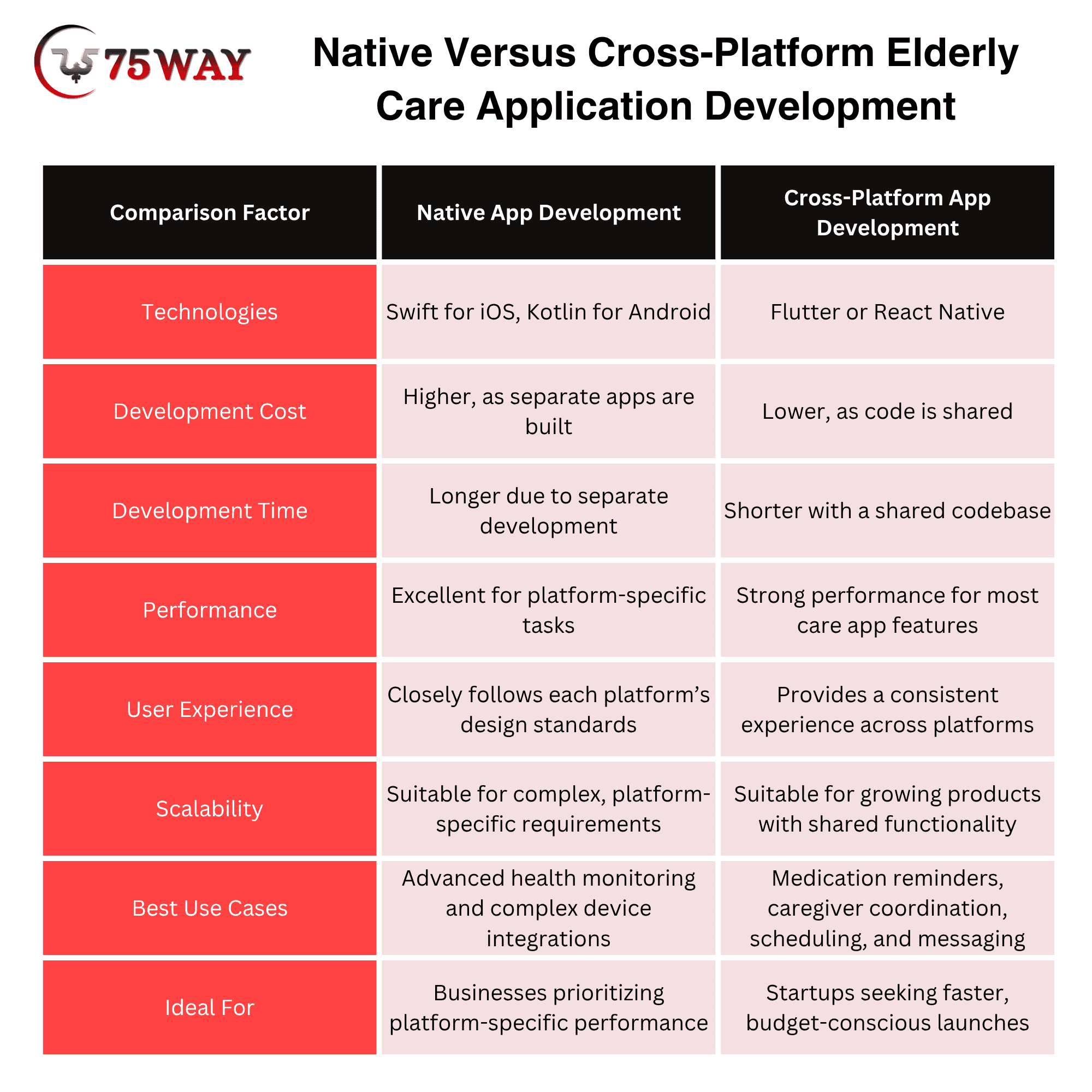
Native development may suit applications that depend on specialized operating system capabilities, device behavior, or highly tailored user experiences. Swift and Kotlin provide platform-specific development options.
Cross-platform frameworks such as Flutter and React Native can reduce duplicated interface development across iOS and Android. However, background processing, wearable integrations, accessibility, and platform-specific testing still require appropriate technical attention.
The final decision should reflect the product's requirements, the team's experience, and the cost of long-term maintenance. A technical proof of concept may be worthwhile when a critical integration or device capability presents uncertainty.
HIPAA Compliance And Security For Building Elder Health Care App
Privacy and security requirements deserve attention during product planning because elderly care applications may handle sensitive personal information or protected health information (PHI). The applicable obligations depend on the product's purpose, the information it processes, and its relationships with healthcare organizations and service providers.
HIPAA does not automatically apply to every app that collects health-related information. However, covered entities and business associates must meet applicable HIPAA requirements, and other federal or state laws may impose obligations on consumer-facing products.
Important Security Considerations
- Authentication & Access Control: Role-based permissions should restrict sensitive information to authorized users.
- Encryption: Appropriate encryption should protect data in transit and at rest.
- Audit Logging: Relevant access and administrative actions should have suitable records.
- Consent Management: Clear permissions should govern information sharing with family members and caregivers.
- Data Retention: Documented policies should cover retention, deletion, backups, and account closure.
- Third-Party Services: Vendor assessments should address security responsibilities, contractual obligations, and data handling.
- Incident Response: Documented procedures should cover investigation, containment, recovery, and legally required notifications.
The appropriate compliance approach requires an assessment of the actual product and its business relationships. Legal and security professionals should review the relevant obligations before launch.
Useful official resources include the US Department of Health and Human Services' HIPAA guidance and the Federal Trade Commission's health privacy resources.
Accessibility and User Experience of AI-Powered Elderly Care App Development Solutions
An elderly care app should feel easy to use from the moment someone opens it. Since older adults have different needs related to vision, hearing, dexterity, memory, and digital experience, your design decisions should come from real user feedback rather than assumptions about age.
Essential Accessibility Considerations
- Readable Typography: Use legible text and adjustable font sizes so users can read important information comfortably.
- Clear Visual Contrast: Make buttons, text, and alerts easy to distinguish, including for users with reduced vision.
- Simple Navigation: Keep menus predictable and labels familiar, helping users find important features without unnecessary steps.
- Accessible Controls: Provide adequately sized touch targets and enough spacing to reduce accidental taps.
- Clear Feedback: Display understandable confirmation messages so users know when an action has been completed successfully.
- Easy Error Recovery: Offer simple ways to correct mistakes without forcing users to restart a task.
- Assistive Technology Support: Ensure compatibility with screen readers and other accessibility tools used by people with different abilities.
Testing your app with older adults and caregivers can reveal usability issues that your development team might otherwise overlook. Accessibility standards, including the Web Content Accessibility Guidelines (WCAG) for web interfaces, can also guide design decisions and help create a more inclusive experience.
How to Monetize an Elderly Care App?
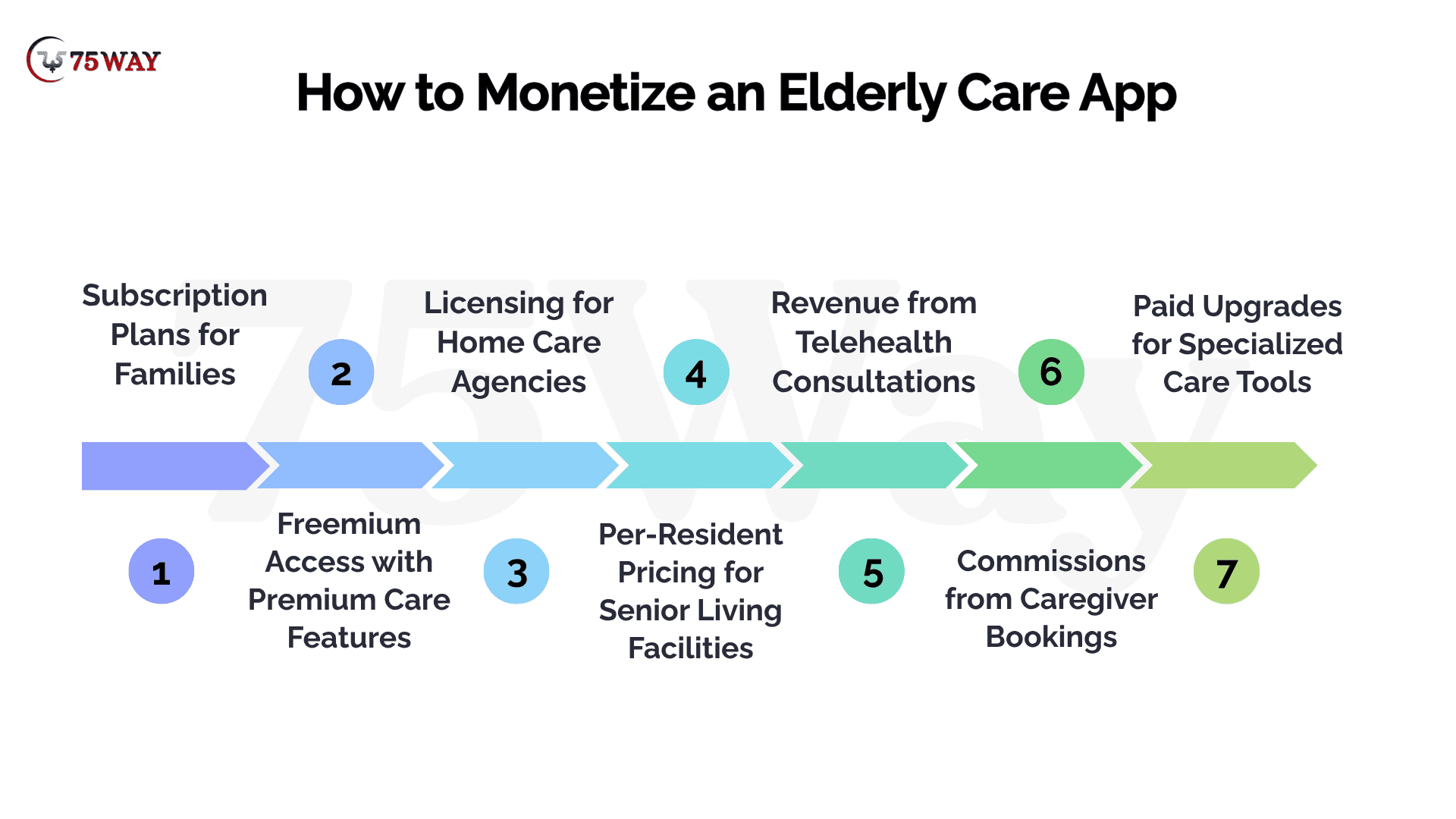
A useful elderly care app can serve seniors, family caregivers, home care agencies, and healthcare providers, giving businesses several possible revenue opportunities. These monetization approaches can help you choose a revenue strategy that fits your app’s audience and care services.
1. Subscription Plans for Families
Families may be willing to pay a monthly fee when your app makes caring for an older relative easier to manage. You can offer premium features such as shared care calendars, medication tracking, family updates, and multiple caregiver accounts. A subscription model creates recurring revenue while giving families ongoing access to useful care tools.
2. Freemium Access with Premium Care Features
Many families want to try an elderly care app before committing to a paid plan. Your free version could include basic reminders and care schedules, while paid upgrades unlock detailed care records, advanced notifications, and collaboration across multiple relatives. This approach gives users time to experience the benefits before deciding whether premium features are worth paying for.
3. Licensing for Home Care Agencies
Home care agencies need practical tools to coordinate caregiver visits, manage client information, and track completed tasks. You can license your app to these businesses through monthly or annual plans based on their operational needs. Agency licensing can provide recurring business revenue while helping providers organize their daily care operations.
4. Per-Resident Pricing for Senior Living Facilities
Senior living operators may prefer pricing that reflects the number of residents using your platform. Your app could support resident profiles, activity schedules, family communication, and service requests, with fees calculated per resident or through volume-based tiers. This model allows your revenue to grow as participating facilities expand their resident base.
5. Revenue from Telehealth Consultations
An elderly care app that connects users with qualified healthcare professionals can generate revenue through consultation fees or agreed platform charges. Families may value the convenience of arranging remote consultations without managing separate communication tools. Clinical services require appropriate professional partnerships, transparent fees, and compliance with applicable healthcare requirements.
6. Commissions from Caregiver Bookings
If your app connects families with home care professionals, you can earn a commission on eligible completed bookings. Families gain a convenient way to discover services, while caregivers can reach potential clients through your platform. Reliable provider verification, transparent booking terms, and clear cancellation policies are essential for maintaining trust.
7. Paid Upgrades for Specialized Care Tools
Some customers need more than basic reminders and shared schedules. You can offer paid upgrades for wearable-device connectivity, expanded care histories, advanced reporting, or additional caregiver access. This model lets families and providers choose features relevant to their needs without requiring every customer to purchase the most expensive plan.
👉 Choosing the Right Revenue Strategy
Customer interviews and pilot programs can help establish willingness to pay before the business commits to a pricing structure. Cost calculations should include customer acquisition, hosting, customer support, third-party services, and ongoing development.
A subscription model may suit families seeking recurring support, while agency software may justify per-client or per-seat pricing. Enterprise customers may expect implementation assistance, service agreements, administrative controls, and integration support.
The strongest pricing strategy reflects measurable customer value rather than the number of features included in the application.
How to Measure Success of Elderly Care App Creation Solution
Product performance should be evaluated against user outcomes and business goals rather than downloads alone. The right metrics depend on whether the application serves families, professional caregivers, or enterprise customers.
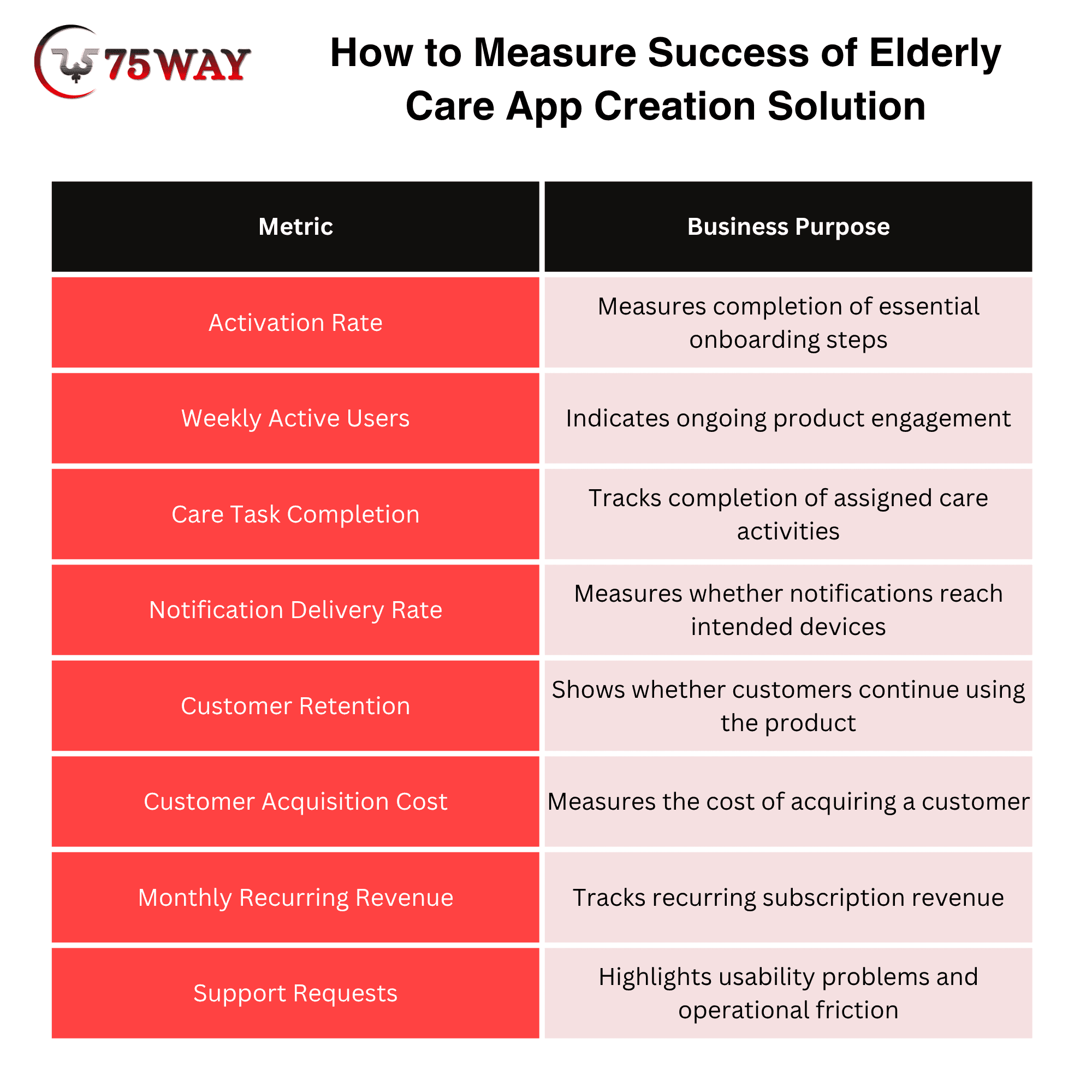
A family caregiving app may prioritize recurring usage and task completion, while an agency platform may focus on staff adoption, scheduling accuracy, and customer retention.
Safety-related metrics require additional care. A notification delivery record does not prove that a person received, understood, or acted on an alert.
How To Choose An Elderly Care App Development Company
Choosing an elderly care app development company is about more than comparing quotes or checking a portfolio. Your app may handle sensitive care information, connect families with caregivers, or support daily activities for older adults, so the development partner needs to understand both your business goals and your users’ real needs. Look for a team with relevant healthcare or caregiving experience, strong accessibility knowledge, and a clear approach to privacy and security.
Before making your decision, ask how the company will turn your idea into a practical product, estimate development costs, test essential workflows, and maintain the app after launch. A reliable partner should explain technical choices in plain language, identify potential risks early, and provide a realistic timeline instead of promising everything at once. The right team will help you build an app that works for your intended users and has room to grow with your business.
Final Remarks
Elderly care app development offers business opportunities across family caregiving, home healthcare, senior living, and remote monitoring. However, commercial success depends on a clearly defined customer problem, a realistic budget, accessible design, appropriate privacy safeguards, and a sustainable revenue model.
A focused MVP, a suitable technology stack, and a structured testing process can help businesses validate demand before committing to a larger platform. Long-term performance also depends on customer feedback, maintenance, and measurable improvements to the care experience.
Planning an elderly care app for the US and global markets? Contact a reliable on-demand app development development team to discuss your requirements, estimate the project cost, and build a practical roadmap from concept to launch.
Frequently Asked Questions (FAQs)
Does An Elderly Care App Need HIPAA Compliance?
HIPAA obligations depend on the organization's role, business relationships, and handling of protected health information. Other privacy and consumer protection laws may also apply, making a product-specific legal assessment important before launch.
Can A Startup Launch An Elderly Care App With An MVP?
A startup can begin with a focused MVP built around one validated customer problem. Early feedback and usage data can help establish demand before additional features and integrations receive further investment.
Which Technology Is Best For Elderly Care App Development?
Swift, Kotlin, Flutter, and React Native are possible mobile development options. Backend technologies, databases, and cloud services should match the product's requirements, integration needs, security obligations, and maintenance capabilities.
How Can An Elderly Care App Generate Revenue?
Revenue options include subscriptions, per-client pricing, per-seat licensing, enterprise contracts, and premium features. The appropriate model depends on customer willingness to pay, operating expenses, and the value delivered.
How Can An Elderly Care App Improve User Adoption?
Readable text, clear navigation, accessible controls, straightforward onboarding, and dependable notifications can support adoption. Usability testing with older adults and caregivers can reveal barriers before a wider launch.