AI Summary
AI-powered daycare app development helps childcare businesses simplify daily operations and improve communication with parents. The right features can reduce administrative workloads and support better decision-making. This guide covers AI integration, essential features, development costs, and security. It also explains how to plan, build, and launch a scalable daycare application.
Key Takeaways
- Daycare centers accounted for 66.67% of the childcare management software market revenue.
- Daycare app development costs can range from $20,000 to $300,000+.
- AI-powered daycare apps can simplify reporting, communication, and administrative tasks.
- Secure architecture and privacy controls protect sensitive information about children and families.
- Custom, white-label, and SaaS models serve different childcare business needs.
As a daycare owner, you have plenty to manage before the day even gets going, from checking attendance and coordinating staff to keeping parents updated. When youre juggling these tasks manually, it is harder to find time for the children and families who need your attention.
An AI-powered daycare app development solution can ease that pressure by helping with daily reports, parent messages, reminders, and routine administrative work. It can also highlight attendance patterns and staffing needs, giving you useful information while leaving important childcare decisions in your hands.
If you’re thinking about building a daycare app, the real question is which features will make your center’s day easier without adding unnecessary complexity. This guide walks you through the essential features, development process, costs, and key considerations for building an AI-powered daycare app for the US market.
Quick Answer: What Is AI-Powered Daycare App Development?
AI-powered daycare app development is about building smarter childcare solutions that make everyday tasks easier for daycare owners, teachers, and parents. These apps combine essential tools for attendance, billing, and parent communication with AI capabilities that can draft daily reports, answer routine questions, and turn operational data into useful insights.
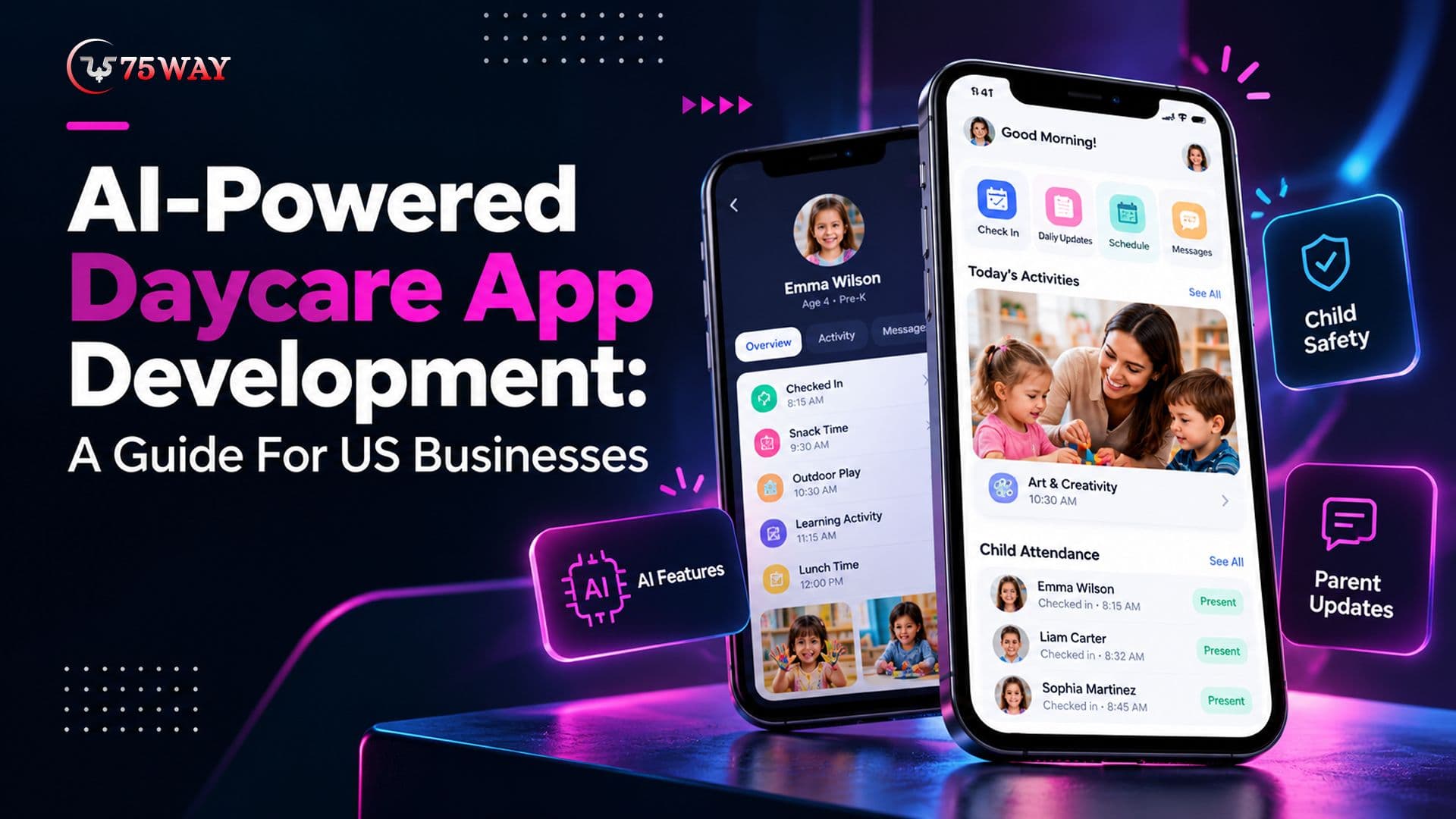
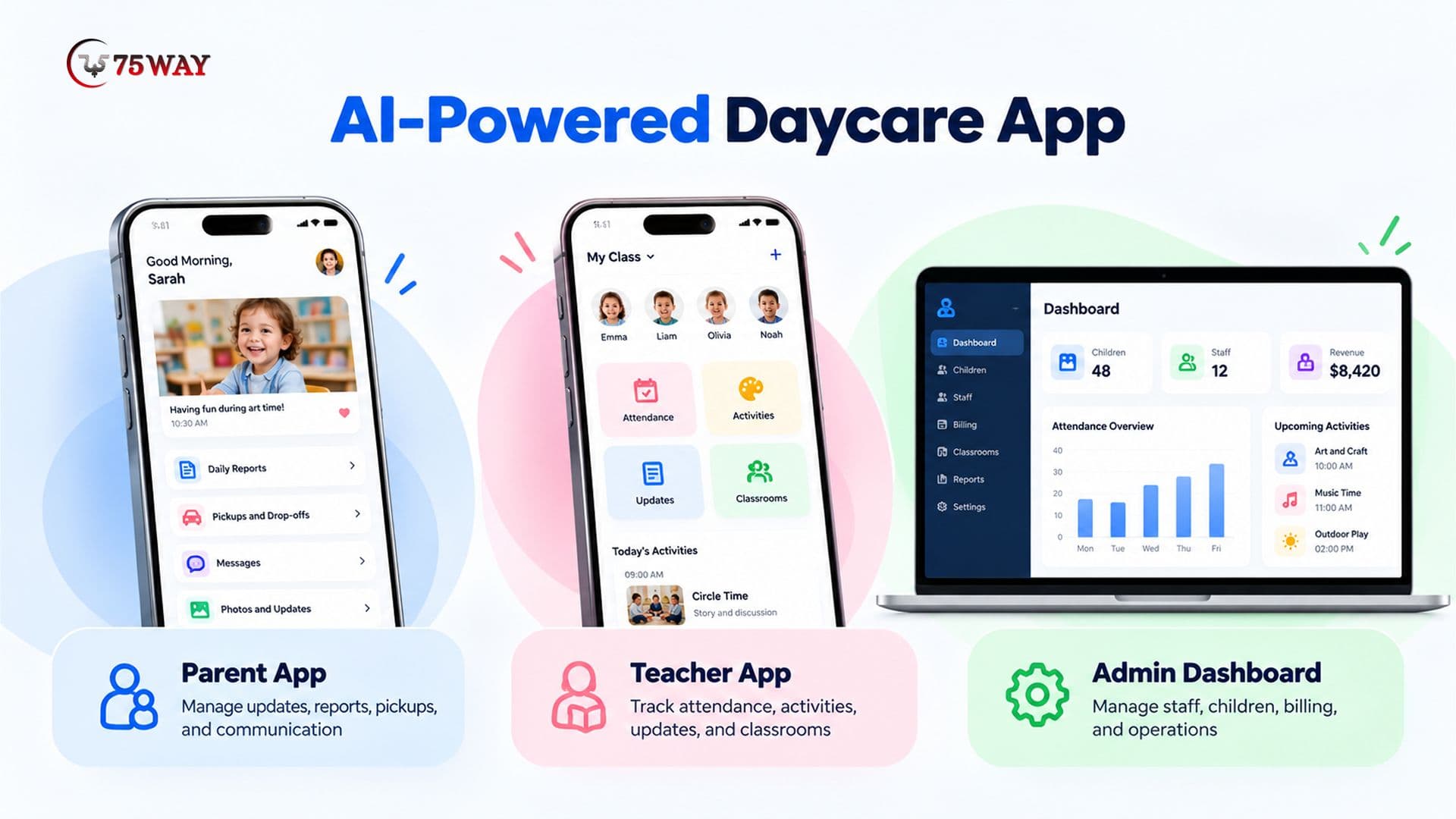
A typical daycare platform may include four connected interfaces:
- Parent App: Lets families receive updates, review daily reports, manage authorized pickups, and communicate with staff.
- Teacher App: Helps educators record attendance, document activities, share approved updates, and access classroom information.
- Admin Dashboard: Gives owners and directors control over enrollment, staff, billing, reporting, and permissions.
- AI Services: Support approved workflows through language models, predictive analytics, classification, or other suitable AI techniques.
Why USA Startups and Entrepreneurs Investing In Daycare Mobile App Development?
The business case starts with operational friction, not technology trends. A childcare director may receive repeated calls about schedules, meal updates, invoices, and pickup arrangements while also managing staff and enrollment. A founder building the best apps for daycare providers faces a related challenge: the product must solve enough of these problems to earn adoption and recurring revenue.
- Reduce Administrative Work
Digital attendance, enrollment forms, invoices, and staff schedules can reduce duplicate data entry. AI can add value by organizing unstructured information, drafting routine messages, or helping staff locate approved records.
- Improve Parent Communication
Parents need clear, timely information about their child's day. A dedicated app can centralize messages, approved photos, meal logs, activity summaries, and notifications rather than spreading information across email, texts, and paper notes.
- Give Directors Better Operational Visibility
A consolidated dashboard can show enrollment status, outstanding payments, staffing schedules, attendance patterns, and unresolved parent requests. Predictive features may help identify trends, but managers should review the evidence before making staffing or enrollment decisions.
- Create A Scalable Software Business
Founders can build a daycare management SaaS product and charge providers through monthly or annual subscriptions. Additional revenue may come from premium reporting, integrations, or organization-level plans, provided the features deliver genuine value.
The opportunity is strongest when the product solves a clearly defined problem for a specific buyer. A platform built for independent childcare centers may require different workflows and pricing from one designed for multi-location operators.
Quick Read:How to Build a House Cleaning App Like Pronto: A Guide 2026
Market Size & Growth Insights of Daycare App in USA & Worldwide
Daycare software is becoming a key part of how childcare centers run day-to-day operations, from tracking attendance to keeping parents informed. Here’s a closer look at the US and worldwide market outlook and what it could mean for businesses planning daycare apps.
- The U.S. child care market is projected to grow from $67.93 billion in 2026 to $99.23 billion by 2035, registering a 4.3% CAGR.
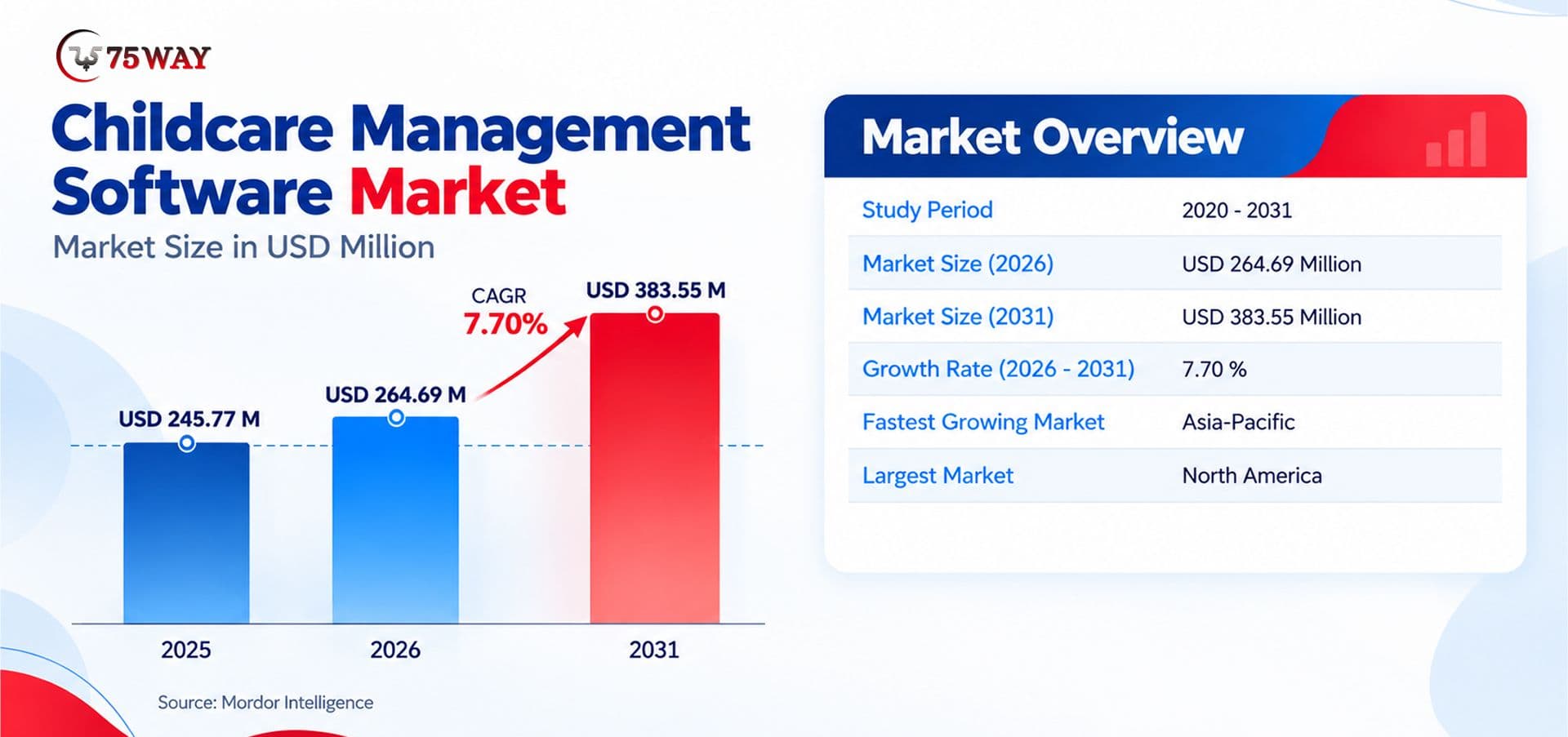
- Day-care centers accounted for 66.67% of childcare management software market revenue in 2025, while home-based providers are forecast to grow at a 7.97% CAGR through 2031.
- The global Childcare Management Software Market is expected to expand from $264.69 million in 2026 to $383.55 million by 2031, at a 7.70% CAGR.
- Embedded fintech modules are projected to grow at a 7.85% annual CAGR through 2031.
- North America accounted for 40.44% of the childcare management software market.
How To Develop An AI-Powered Daycare App: Strategic Roadmap
If you’re planning an AI-powered daycare app, the first challenge is deciding where AI can genuinely help, not just add technology for its own sake. Feature insights need careful planning, privacy safeguards, and human oversight. The steps below explain how to turn your idea into a practical daycare solution.
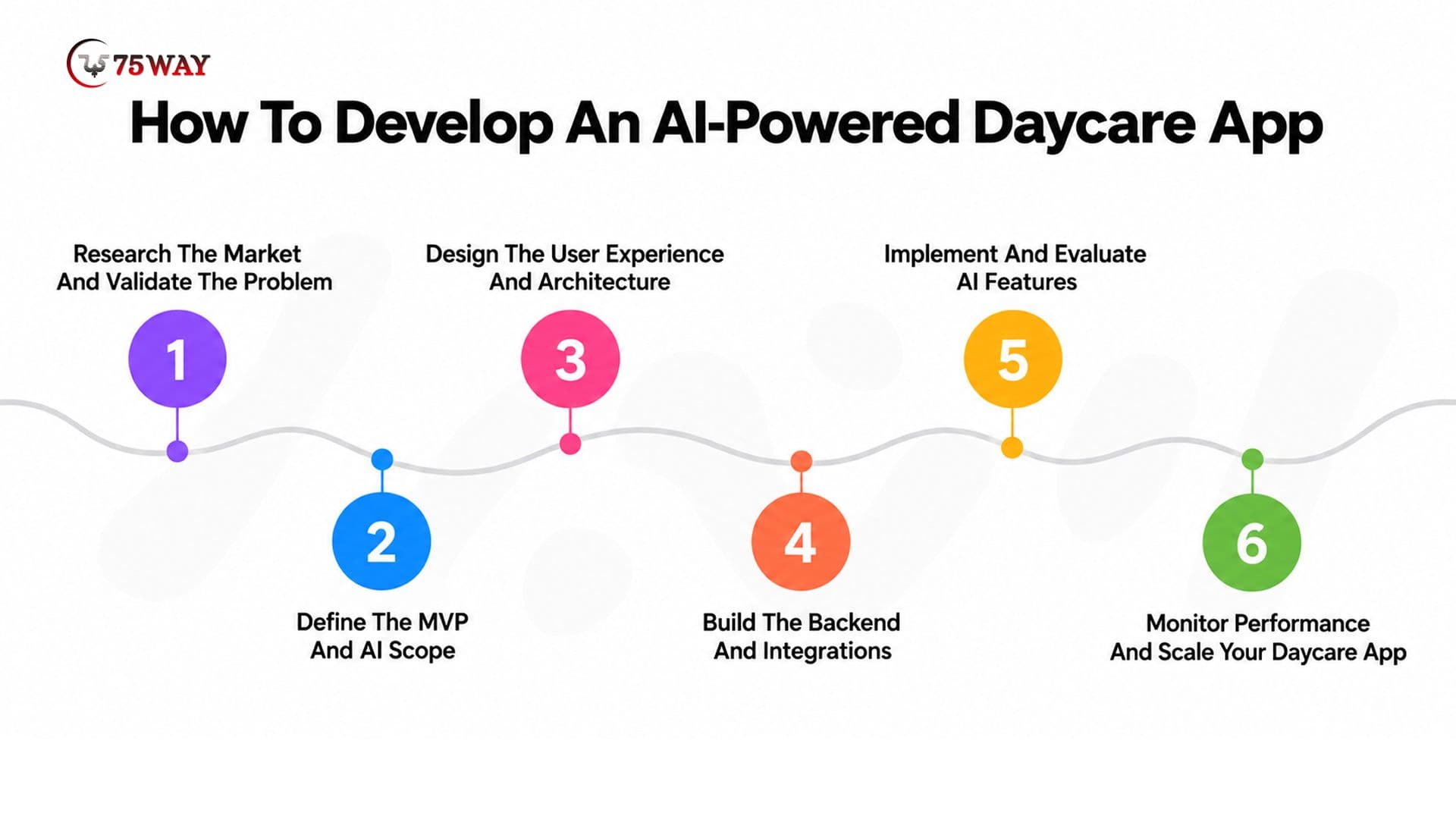
Step 1: Research The Market And Validate The Problem
Start with interviews involving daycare owners, directors, teachers, and parents. Ask how they currently manage attendance, enrollment, payments, parent communication, and reporting.
The goal is to identify repeated problems, existing workarounds, and gaps in current software. Competitor analysis can reveal common features, but customer interviews should determine which problems to prioritize.
A useful product brief should define:
- Primary customer segment and target market.
- Three to five high-priority operational problems.
- Core user journeys and business requirements.
- Existing tools that require integration.
- Success metrics, such as reduced data entry or faster response times.
Practical Decision: If providers mainly struggle with parent communication, a focused communication and reporting product may be a better starting point than a full enterprise management suite.
Step 2: Define The MVP And AI Scope
The minimum viable product (MVP) should include enough functionality to test whether the target customer will use and pay for the solution.
A typical first release might include parent and staff accounts, child profiles, attendance, daily reports, notifications, and an administrator dashboard. AI-assisted report drafting or policy search can follow when the underlying data and workflows are ready.
The product team should document expected AI inputs, outputs, failure cases, and human review requirements. A feature that cannot be evaluated reliably should not be treated as launch-ready.
Step 3: Design The User Experience And Architecture
The design team should map the parent, teacher, and administrator journeys separately. Teachers may need fast access to attendance and classroom logs, while parents need clear updates and directors need a broader operational view.
The architecture must support authentication, authorization, data storage, notifications, integrations, audit logging, and AI services. The team should also define how the app behaves during network interruptions and how users recover from failed actions.
Clickable prototypes can help validate navigation and workflows before engineers commit to production code. However, a convincing prototype does not prove that the underlying permissions, data flows, or business rules work correctly.
Step 4: Build The Backend And Integrations
The backend manages the application's business rules and connects its interfaces to databases and external services.
Common integrations include payment processors, email and push notification providers, calendar systems, accounting software, and identity services. Each integration requires clear handling for failures, retries, duplicate requests, and reconciliation.
For example, a payment confirmation should come from a verified payment event, not from an AI-generated response. Similarly, attendance records should follow explicit check-in rules and maintain a reliable audit history.
Step 5: Implement And Evaluate AI Features
The engineering team should choose the simplest approach that satisfies each requirement. Ordinary application logic may be sufficient for reminders, eligibility checks, and fixed business rules. A language model may be more appropriate for drafting text or interpreting natural-language questions.
A responsible implementation process includes:
- Define the task and acceptable output.
- Identify the minimum data needed.
- Select the model or conventional technique.
- Restrict access to authorized information.
- Test accuracy, privacy, latency, and cost.
- Add human review and fallback behavior.
- Monitor performance after deployment.
The team should test realistic failure cases, including incomplete notes, conflicting records, unsupported questions, incorrect translations, and unauthorized access attempts.
Step 6: Monitor Performance And Scale Your Daycare App
Quality assurance should cover more than whether the app opens and buttons work. The team must test role permissions, data isolation, payment handling, notification delivery, accessibility, device compatibility, load performance, and recovery procedures.
AI testing also needs a separate evaluation plan. Useful measures may include factual accuracy, unsupported claims, successful task completion, response latency, and cost per completed request.
A limited pilot with a small number of providers can expose workflow problems before a broader launch. Feedback should inform prioritized fixes rather than an uncontrolled feature expansion.
Read Too:MVP App Development Cost in USA: What Investors Actually Expect (2026)
Which AI Features Should A Daycare App Include?
Not every daycare app needs advanced AI at launch. A sensible roadmap begins with dependable core workflows, then adds AI where it can improve speed, accessibility, or decision support.
1. AI-Assisted Daily Reports
Teachers can enter approved observations about meals, naps, activities, and classroom participation. An AI service can turn those notes into a readable draft for parents.
The original notes should remain available for verification. The system must not invent meals, activities, developmental milestones, or health observations that the teacher did not record.
2. Parent Communication Assistant
A conversational assistant can answer routine questions about opening hours, tuition policies, required forms, and center procedures using approved information.
A retrieval-based system can search a controlled knowledge base before generating an answer. The application should clearly identify unanswered questions and route sensitive or uncertain requests to a staff member.
3. Enrollment And Administrative Document Processing
AI-assisted document processing can extract selected fields from enrollment forms and suggest entries for staff review. Conventional validation rules should check required fields, dates, and data formats before information reaches the main database.
The application should never treat extracted information as verified merely because an AI model produced it.
4. Attendance And Staffing Insights
Analytics can identify recurring attendance patterns, enrollment changes, or periods of higher administrative workload. More advanced models may estimate demand when sufficient, relevant historical data exists.
These forecasts should support human planning rather than automatically determine staffing levels or reduce supervision. Child safety and applicable staffing requirements take priority over model recommendations.
5. Searchable Knowledge And Policy Assistance
A daycare director may need to locate an authorized pickup policy, allergy procedure, emergency contact record, or enrollment requirement.
A permission-aware search assistant can retrieve relevant information from approved records. Access controls must apply before retrieval, not merely after the model generates a response.
6. Multilingual Communication Support
Language models can help translate routine parent messages and administrative information. Staff should review important translations, especially those concerning health, emergencies, consent, and child safety.
Translation should preserve the original message and make corrections traceable.
7. AI-Assisted Staff Training
A daycare platform can include professional development resources, policy quizzes, onboarding material, and learning recommendations for early childhood educators.
This feature addresses a different need from daily childcare management. Founders should include it when interviews with providers indicate that staff training belongs within the product, rather than adding it simply to increase the feature count.
A Practical AI Prioritization Framework
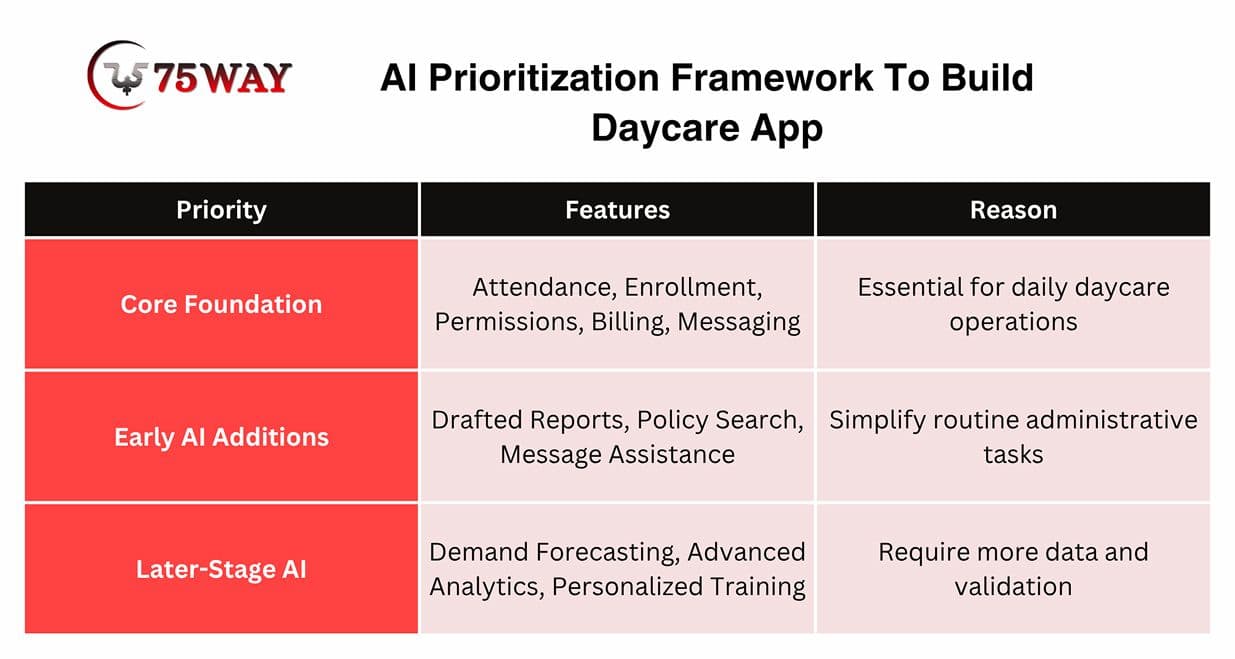
The right sequence depends on user research, available data, risk, and development budget. AI should follow a validated workflow, not replace it.
Discover More:AI Health Assistant App Development: Features, Benefits & Cost 2026
Daycare Management App Development Features Every Platform Needs
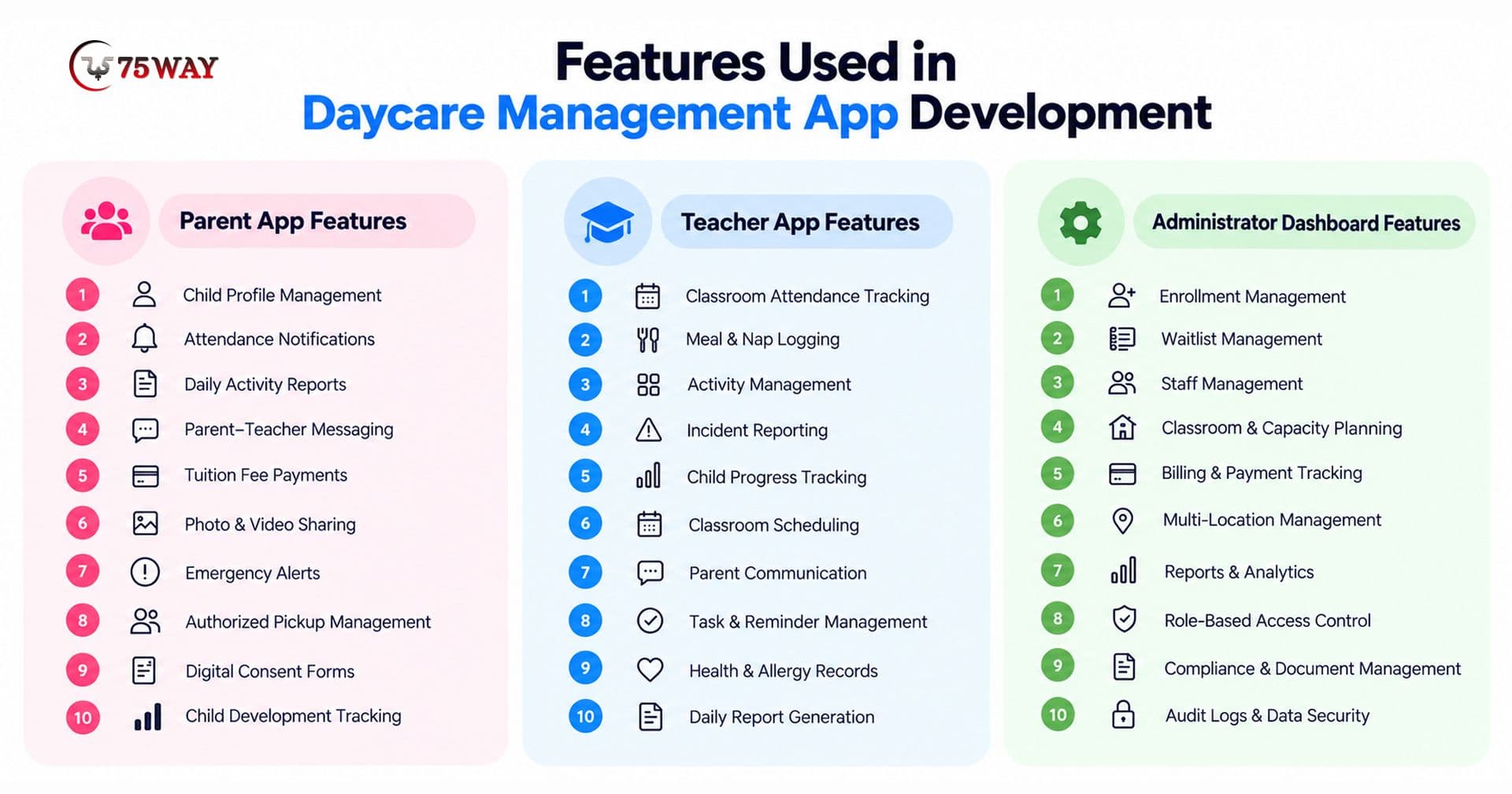
For daycare owners, the right app features can mean fewer hours spent on administrative tasks and more time focused on children. Parents also need convenient access to attendance records, billing details, daily reports, and important announcements. Here are the core capabilities to consider when developing a daycare management app that serves both sides.
1. Parent App Features
- Child profiles and authorized guardian access.
- Attendance check-in and check-out notifications.
- Daily reports, approved photos, and activity updates.
- Messaging, announcements, and emergency notifications.
- Tuition invoices, receipts, and payment history.
- Permission forms, consent records, and document access.
2. Teacher App Features
- Classroom rosters and attendance records.
- Meal, nap, and activity logs.
- Incident reporting and authorized staff notifications.
- Classroom messaging and task reminders.
- Access to relevant child information according to assigned permissions.
3. Administrator Panel Features
- Enrollment inquiries, waitlists, and registration.
- Staff accounts, role assignments, and scheduling.
- Tuition configuration, invoicing, and payment reconciliation.
- Reporting across classrooms and locations.
- Audit trails, consent management, and data retention controls.
Features That Deserve Special Attention
- Authorized Pickup Management: The application should verify approved pickup permissions, record relevant changes, and provide a dependable manual process when a device or network is unavailable.
- Incident Documentation: Staff should record factual observations and follow center procedures. AI may assist with formatting, but it should not independently determine fault, diagnose a child, or replace an incident review.
- Emergency Readiness: Critical contact information and emergency procedures need appropriate access controls and tested fallback arrangements. A chatbot should never become the sole route to urgent assistance.
Types of Daycare App Development Solutions For Different Business Needs
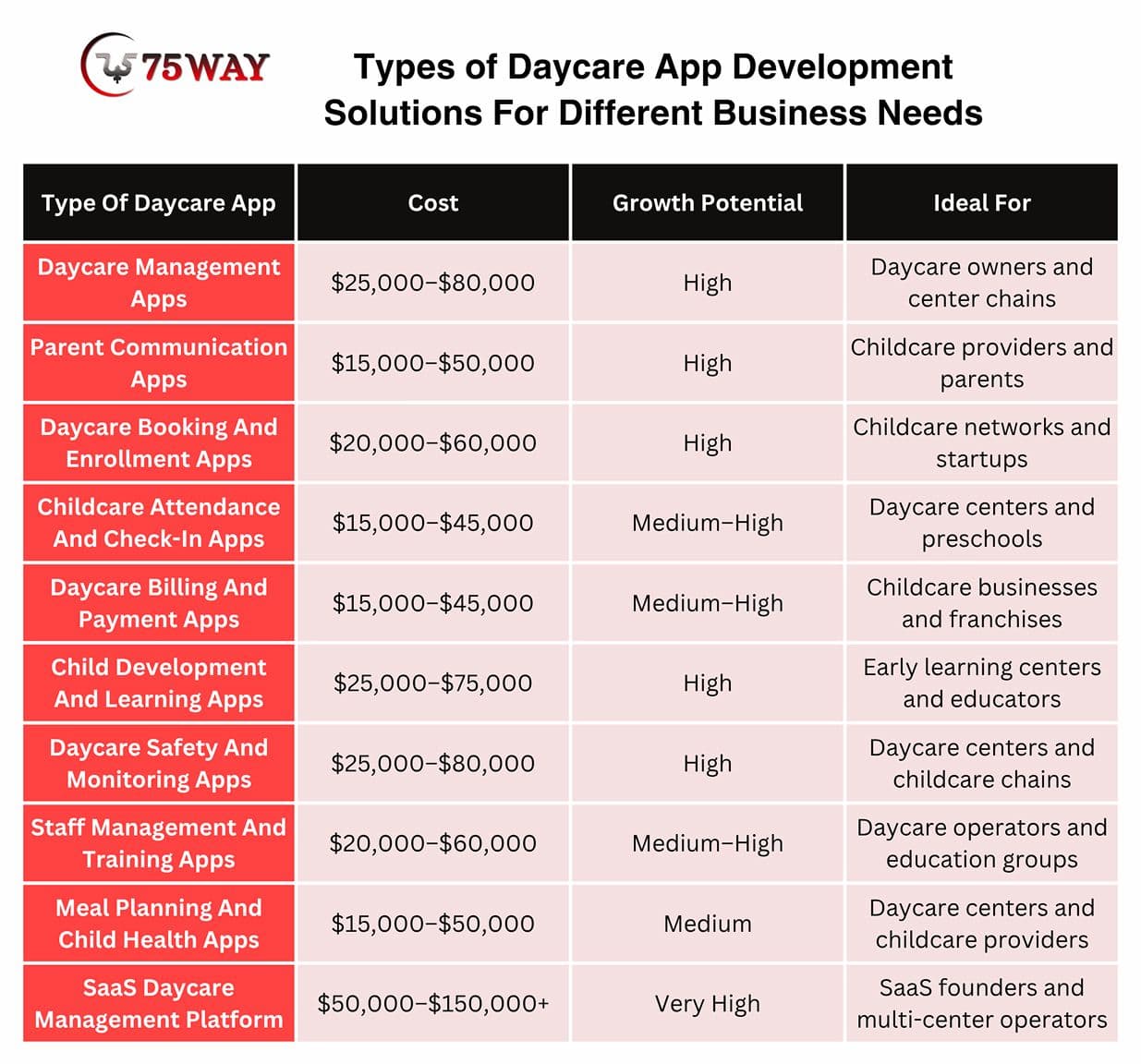
A daycare app for a small home-based provider will look very different from one designed for a multi-location childcare company. Some platforms focus on keeping parents informed, while others help providers manage enrollment, staff, billing, or daycare discovery. The options below can help you identify the app type that best fits your intended users and services.
1. Daycare Management Apps
Daycare management apps bring essential childcare operations into one place, giving owners more control over enrollment, classroom assignments, staff schedules, and daily administration. Instead of juggling spreadsheets and paper records, providers can manage important information through a centralized system.
These apps can also support reporting, document management, and coordination across multiple classrooms or locations. For daycare businesses, the right solution makes routine administration easier to manage and leaves staff with more time to focus on children.
2. Parent Communication Apps
Parents want to know how their children are spending the day, even when they cannot be there. Parent communication apps bridge that gap with daily reports, photos, announcements, direct messaging, meal updates, nap records, and summaries of classroom activities.
These solutions give families a clearer view of their child's daycare experience while helping staff share updates without relying on repeated phone calls. Features such as private messaging and scheduled notifications can also make communication more organized and accessible.
3. Daycare Booking And Enrollment Apps
Finding suitable childcare can involve multiple calls, center visits, registration forms, and waiting lists. Daycare booking and enrollment apps simplify this process by allowing parents to explore providers, check availability, request tours, submit applications, and track enrollment progress online.
For daycare operators, these apps can centralize inquiries, organize applications, and manage available spaces. Automated confirmations and enrollment notifications can help families understand the next steps while reducing manual follow-ups for administrative teams.
4. Childcare Attendance And Check-In Apps
Busy drop-off and pickup periods can create long queues and leave staff managing several tasks at once. Childcare attendance and check-in apps digitize these routines through electronic attendance records, digital check-ins, authorized pickup lists, and automated arrival or departure notifications.
Depending on the solution, centers can use QR codes, PINs, or other identity-verification methods to record attendance. These records help staff monitor who is present, verify authorized pickups, and maintain a reliable history of each child's arrival and departure.
5. Daycare Billing And Payment Apps
Tuition collection can become difficult when a daycare serves many families with different payment schedules, discounts, and outstanding balances. Daycare billing and payment apps help providers generate invoices, collect recurring fees, issue receipts, and send reminders about upcoming or overdue payments.
Parents can use these platforms to review charges, check payment histories, and pay through supported payment methods. For daycare businesses, automated billing records and financial reports can reduce manual calculations and make fee management easier to oversee.
6. Child Development And Learning Apps
Early childhood education involves more than classroom activities; caregivers also need to understand how children develop new skills over time. Child development and learning apps help educators record observations, track developmental milestones, share learning activities, and document progress in areas such as language, movement, and social interaction.
These apps can turn individual observations into organized progress reports that teachers and parents can review together. Age-appropriate learning resources may also support classroom planning, while documented milestones help caregivers identify areas where a child may benefit from additional attention.
7. Daycare Safety And Monitoring Apps
Child safety remains a central responsibility for every childcare provider, and digital tools can help staff manage important safety procedures. Daycare safety and monitoring apps may include emergency alerts, incident reports, authorized pickup verification, access controls, and secure camera access where appropriate.
These solutions can also maintain records of incidents and emergency communications, giving administrators a clearer view of safety-related events. Strong access permissions and secure data handling are essential, particularly when an app stores children's personal information, images, or sensitive incident details.
8. Staff Management And Training Apps
Daycare owners must coordinate staff availability, classroom coverage, required training, and documentation while keeping daily operations running. Staff management and training apps help organize schedules, assign tasks, track certifications, store training materials, and monitor professional development.
Some solutions also provide learning modules and progress records to help educators strengthen their childcare knowledge and practical skills. For providers, these tools can make staffing requirements easier to monitor and help ensure that training records and important documents remain accessible to authorized personnel.
9. Meal Planning And Child Health Apps
Tracking meals, allergies, dietary restrictions, medication records, and rest schedules can be challenging when information is scattered across paper forms or separate systems. Meal planning and child health apps let daycare staff record key details, document meals, track routines, and share updates with parents.
These apps help staff accommodate individual dietary needs and keep key care instructions available throughout the day. Because health-related information is sensitive, the platform should include restricted access, secure storage, accurate recordkeeping, and clear procedures for handling medication and health emergencies.
10. SaaS Daycare Management Platform
A SaaS daycare management platform serves multiple childcare organizations through a shared software solution. Each organization needs appropriate data separation, role-based permissions, configurable workflows, subscription management, and tenant-level administration.
This model can generate recurring revenue through subscription plans while allowing businesses to serve multiple customers from one platform. The development team must plan for scalability, account management, security, and ongoing product updates.
Technology Stack Required for Custom Daycare App development
A cost-effective technology stack for custom daycare app development should balance affordability, security, and future scalability. A daycare app doesn't need an expensive tech stack to work well.
For most startups and childcare businesses, Flutter is a practical option for building Android and iOS apps without developing two separate codebases. React can handle the admin dashboard, while Node.js can manage everyday tasks such as attendance, fee payments, parent messages, and staff records.
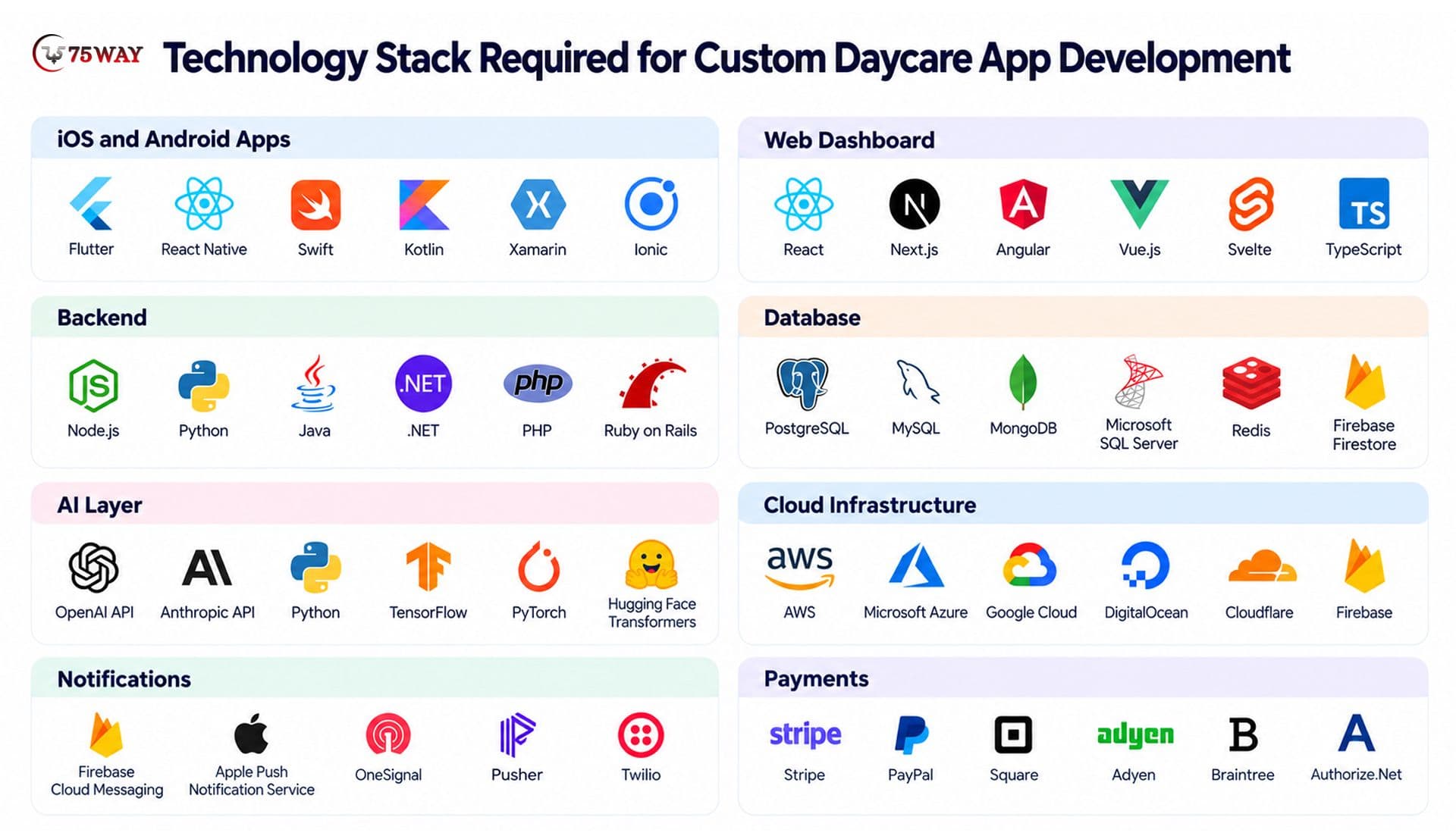
PostgreSQL is a sensible database choice for storing enrollment details, payment records, and other structured information. For hosting, services like AWS or Google Cloud let businesses start with the resources they need and scale as more daycare centers join. The best approach is to start with technologies that fit your budget and core features, then add AI tools and more advanced infrastructure when the business actually needs them.
How Should AI Connect To The Application?
A common architecture routes an approved request through the backend to an AI service. The service receives only the permitted context, generates a result, and returns it for validation before the application displays or stores it.
The model should not receive unrestricted access to the production database. Tools that allow an AI agent to retrieve records or initiate actions need explicit authorization, input validation, action limits, and audit logging.
The product team should also define what happens when the AI service is unavailable. Core functions such as authorized pickup verification, attendance recording, and emergency procedures must not depend on a generative model being available.
What’s Daycare App Development Cost: Complete Breakdown
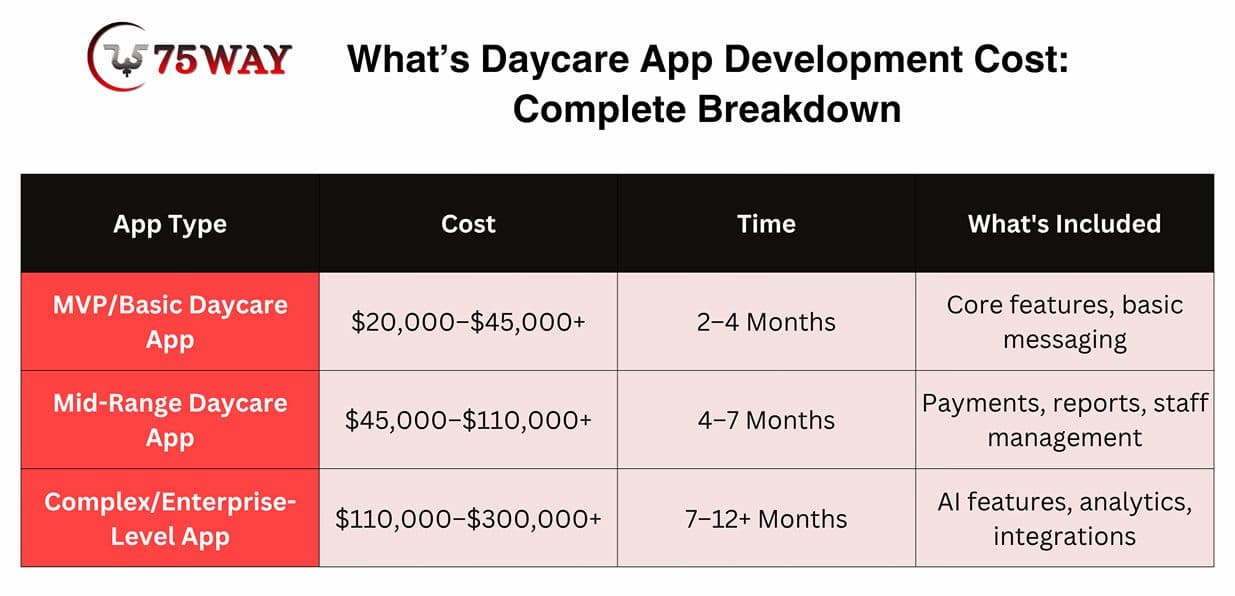
Daycare app development typically costs $20,000 to $300,000+, depending on the app’s features, AI integrations, number of user roles, platform requirements, and security needs. The cost breakdown explains the estimated development costs and the key factors that can affect your budget.
1. MVP/Basic Daycare App: $20,000–$45,000+
- Covers essential attendance, enrollment, and parent messaging.
- Includes basic billing, profiles, and admin dashboard.
Timeline: 2–4 months.
2. Mid-Range Daycare App: $45,000–$110,000+
- Adds staff scheduling, reports, and payment integrations.
- Supports multiple roles and advanced communication features.
Timeline: 4–7 months.
3. Complex/Enterprise-Level App: $110,000–$300,000+
- Includes AI features, advanced analytics, and integrations.
- Supports multiple centers with stronger access controls.
Timeline: 7–12+ months.
What’s Cost To Develop Daycare App By Stages
1. UI/UX Design: $5,000–$10,000+
- Covers wireframes, user journeys, and app interface design.
- Includes parent, staff, and administrator screens.
2. Front-End And Back-End Development: $15,000–$100,000+
- Covers database setup, APIs, and core features.
- Includes payment integration and business logic.
3. Testing And Quality Assurance: $3,000–$10,000
- Covers bug fixes, security checks, and compatibility testing.
- Includes functional testing across supported devices.
4. Deployment And Ongoing Maintenance: 15%–20% of initial build cost annually
- Covers hosting setup, updates, and performance monitoring.
- Includes security patches and ongoing technical support.
How Can You Control Development Costs?
The most reliable approach is to reduce uncertainty before committing to a large build.
- Validate the core use case with target customers.
- Launch essential workflows before adding advanced AI.
- Reuse proven components where they fit the requirements.
- Establish acceptance criteria for every major feature.
- Test the riskiest integrations and AI workflows early.
- Reserve a budget for maintenance, security updates, and unexpected issues.
A lower initial quote does not necessarily mean a lower total cost of ownership. Buyers should compare what each proposal includes, who owns the source code, how testing is handled, and what ongoing support will cost.
How Long Does Daycare Application Development Take?
The development timeline of daycare application depends on scope, team availability, integration complexity, and how quickly stakeholders make decisions. The estimates below are planning assumptions, not delivery commitments.
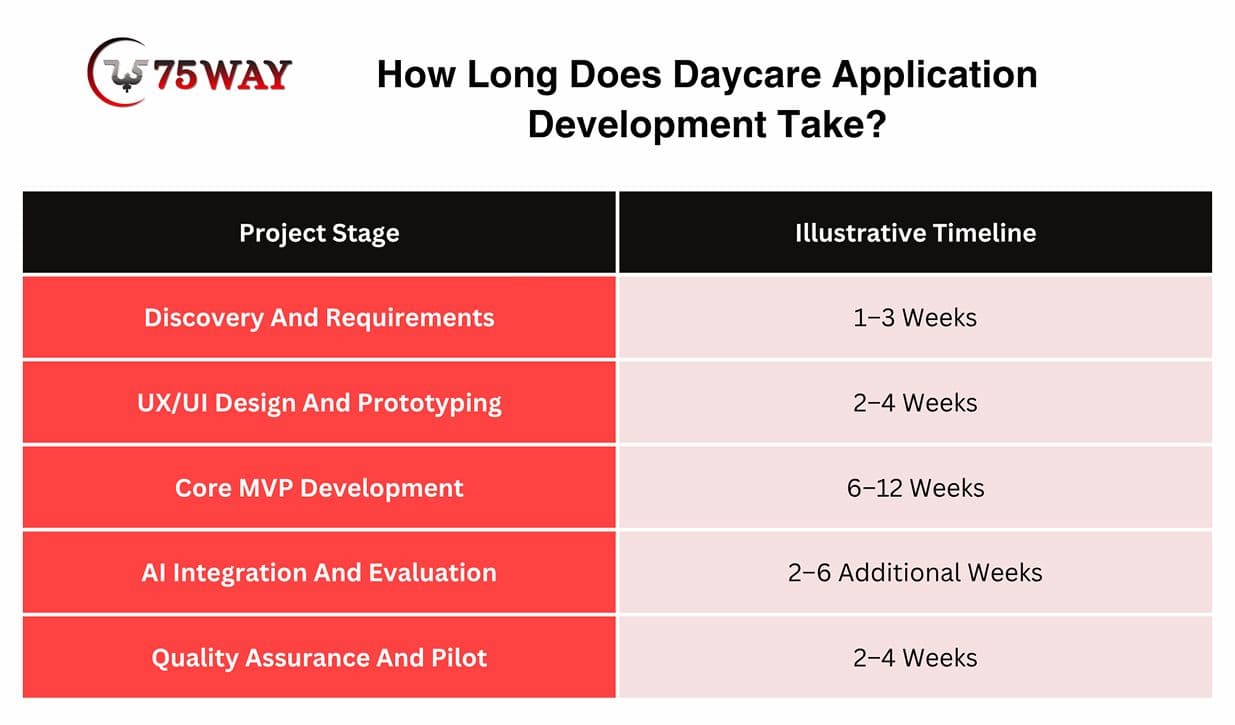
Some activities can run in parallel, so these periods should not simply be added together. A basic MVP may take approximately 3–5 months, while a complex multi-tenant platform with advanced AI and several integrations can require 6–12 months or longer.
The best timeline is one that accounts for testing, stakeholder reviews, security requirements, and launch readiness. A rushed release can create more expense when critical workflows fail in real childcare settings.
Privacy, Security, And Compliance Considerations To Build Daycare App
A daycare application handles information about young children and their families. That makes privacy and security central product requirements, not optional improvements for a later release.
1. Protect Children's Personal Information
Collect only the information needed for defined business purposes. Child profiles, guardian details, attendance histories, incident records, photographs, and health-related notes deserve appropriate access restrictions and protection.
Encryption in transit and at rest, secure authentication, least-privilege permissions, audit logging, and a documented incident-response process are important safeguards. The product team should also establish retention and deletion rules before collecting sensitive information.
2. Understand COPPA And Applicable US Requirements
The Children's Online Privacy Protection Act (COPPA) can apply to operators of websites and online services directed to children under 13, as well as certain general-audience services with actual knowledge that they collect personal information from children under 13. Its application depends on the product, audience, data practices, and operating model.
3. Federal Trade Commission
A daycare app designed for parents and authorized staff does not automatically fall into the same category as an app designed for children. However, the team should assess how child data is collected, who provides consent, which third parties receive information, and whether the product falls within applicable requirements.
State privacy laws, childcare licensing rules, contractual obligations, and other federal or state requirements may also apply. Legal counsel familiar with the intended launch states should review the product before release.
4. Treat AI Data Handling As A Separate Risk
AI features introduce additional questions about where data goes, how long it is retained, and whether it can be used for model training.
The development team should establish clear controls for:
- Sending only the minimum necessary information to AI providers.
- Reviewing vendor retention and training policies.
- Preventing cross-organization data exposure.
- Restricting AI access to authorized records.
- Maintaining human review for sensitive outputs.
- Logging relevant actions without unnecessarily duplicating sensitive data.
A crucial rule: AI-generated summaries should not become the authoritative record of a child's day without appropriate staff verification. The original observations and any necessary corrections should remain traceable.
5. Build For Failures And Emergencies
A reliable product needs a clear plan for network outages, unavailable third-party services, failed notifications, and lost devices. Staff should have an approved alternative for critical tasks, including identity checks and authorized pickup procedures.
No software feature can guarantee child safety. Product design should support trained staff and established childcare procedures rather than replace them.
How To Choose A Daycare App Development Company in 2027?
The right daycare app development company should understand both software engineering and the operational constraints of childcare businesses.
A polished proposal is not enough. Buyers should evaluate how the team handles requirements, sensitive data, AI limitations, testing, and long-term ownership.
1. Assess Product Discovery Skills
Ask how the company will validate the target audience, define the MVP, and prioritize features. A capable team should be able to explain why certain features belong in the first release and why others can wait.
2. Review Architecture And Security Decisions
Request an explanation of user roles, tenant isolation, database design, authentication, audit logs, backup procedures, and integrations. For AI features, ask how the team will control data access and evaluate output quality.
3. Examine Relevant Technical Evidence
Review comparable projects, working demonstrations, technical documentation, or code samples where available. If the company has not built a daycare platform before, it should say so and explain how its relevant software experience applies.
Do not accept unverified childcare experience, fabricated client results, or unsupported performance claims as proof of expertise.
4. Clarify Ownership And Commercial Terms
The contract should define source-code ownership, intellectual property, third-party licenses, hosting responsibilities, documentation, maintenance, and support. SaaS founders should also clarify whether they can export their data and move the product to another provider.
5. Evaluate Testing And Post-Launch Support
Ask who is responsible for regression testing, security updates, AI evaluation, bug fixes, monitoring, and production incidents. The proposal should distinguish initial delivery from ongoing operational costs.
What Should You Ask Before Signing A Contract?
- How will you validate the daycare workflows before development?
- Which features belong in the MVP, and why?
- How will the system protect child and guardian information?
- How will AI-generated information be checked?
- What happens if an AI service or integration fails?
- Who owns the source code and customer data?
- What is excluded from the quote?
- How will changes in scope affect cost and delivery?
- What support is available after launch?
Why Consider 75way Technologies for AI Daycare App Development?
75way Technologies offers AI product development, mobile applications, and custom software engineering services. Its published service portfolio includes AI integration, predictive model deployment, web and mobile development, and custom product development.
We build daycare apps around your business goals, whether you need a simple management tool or an AI-powered childcare platform. Our team of 150+ experts can help you plan the features, choose the right technology, and develop a solution that fits your budget, security needs, and growth plans.
For example, we built a daycare management app that brings attendance tracking, parent communication, billing, and staff coordination into one platform, helping childcare providers manage daily operations from a central dashboard.
Are Professional Development Apps Useful For Early Childhood Educators?
Professional development apps serve a related but distinct purpose. They help early childhood educators access training materials, complete courses, review classroom practices, and maintain learning records.
Businesses searching for the best professional development apps for early childhood educators may be looking for training tools rather than daycare management software. That difference matters when evaluating product scope and search intent.
A daycare platform can incorporate professional development features such as:
- Staff onboarding and policy acknowledgments.
- Training modules and course completion records.
- Knowledge checks and refresher assessments.
- Role-based learning recommendations.
- Administrative reporting on training progress.
AI can recommend relevant training based on job responsibilities or help staff navigate approved learning materials. However, the product should not claim that an educator is competent or compliant simply because an AI system generated a score.
Founders who want to target the professional development market should validate that demand separately. A dedicated training platform may require a different user experience, content strategy, pricing model, and competitive analysis from a daycare management application.
Conclusion
AI-powered daycare app development offers childcare businesses and technology founders a way to address administrative challenges, improve parent communication, and create new software products. The strongest solutions start with validated user needs, dependable core workflows, and carefully selected AI features, not unnecessary complexity.
A clear MVP, realistic budget, secure architecture, and thoughtful implementation plan can help businesses reduce development risk and make better product decisions. Privacy, human oversight, and reliable fallback procedures must remain central throughout the process.
If you are planning to create your daycare application, you can contact a reliable on-demand app development firm in USA.
Frequently Asked Questions (FAQs)
How Much Does It Cost To Develop A Daycare App?
A daycare app may cost approximately $20,000–$50,000 for a basic MVP, while advanced AI-enabled platforms can exceed $300,000. The final estimate depends on features, platforms, integrations, security requirements, and development scope.
How Long Does It Take To Build A Daycare App?
A basic MVP may take around 3–5 months, while a complex SaaS or marketplace product can require 6–12 months or longer. Discovery, integrations, testing, and regulatory requirements affect the timeline.
Should A Startup Choose Custom Or White-Label Daycare App Development?
Custom development offers greater control over functionality, architecture, and intellectual property. White-label development may shorten the launch process when an existing platform meets the requirements, but buyers should examine customization limits, licensing, ownership, and vendor dependency.
How Can A Daycare App Protect Children's Data?
A daycare app should use appropriate encryption, role-based access, secure authentication, audit logs, data minimization, and clear retention policies. The development team should also evaluate applicable privacy laws, third-party AI providers, consent requirements, and incident-response procedures.
Can AI Replace Daycare Teachers Or Administrators?
AI can assist with administrative tasks, communication, documentation, and reporting, but it should not replace childcare supervision or professional judgment. Staff must retain control over safety-sensitive decisions, sensitive records, and important parent communications.
What Should An MVP Include Before AI Integration?
A practical MVP should establish reliable user accounts, permissions, child profiles, attendance, parent communication, and an administrative dashboard. AI features should follow when the core workflows are stable, and the business case has been validated.