AI Summary
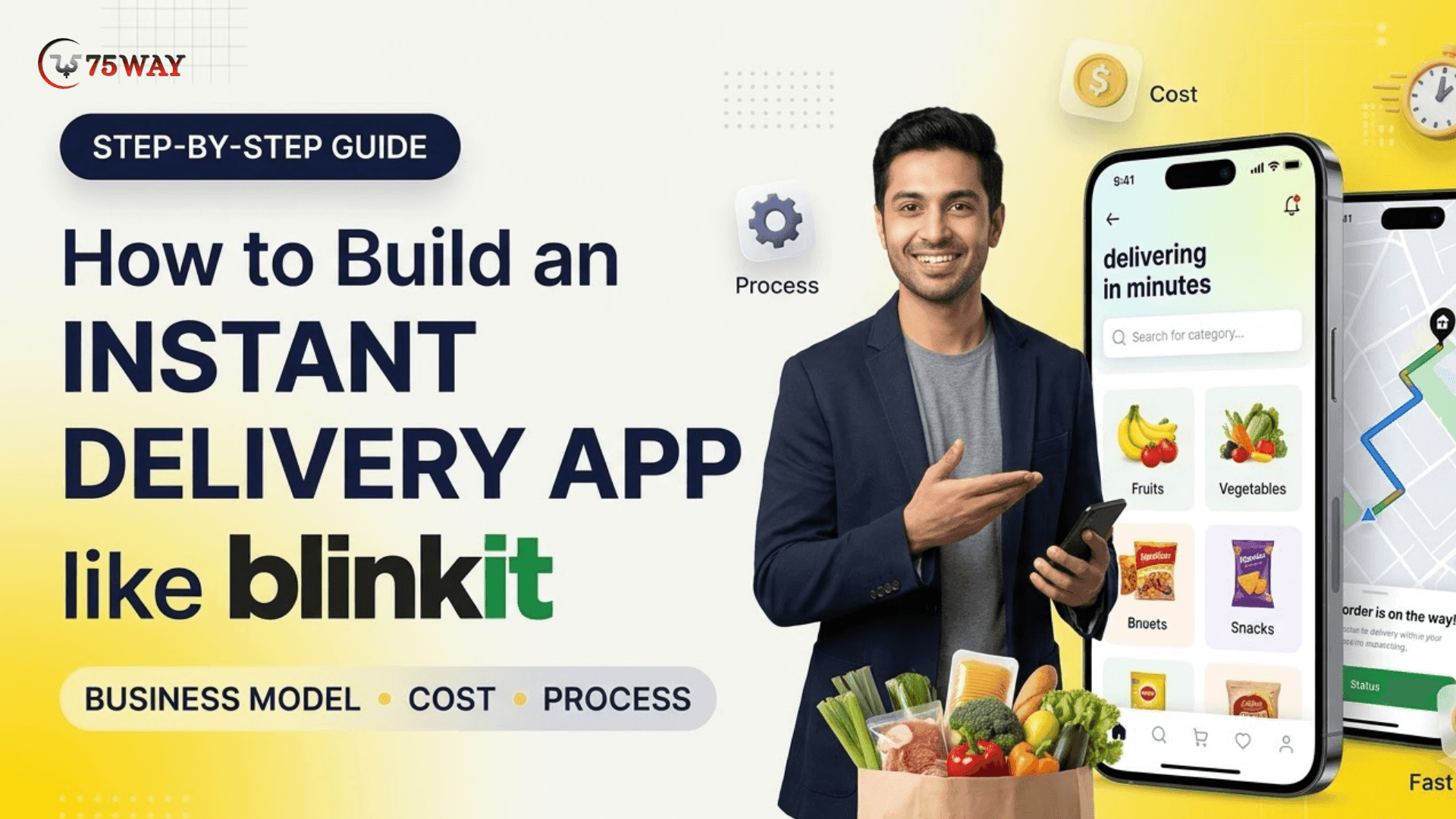
Building an app like Blinkit requires more than a grocery ordering interface. This guide covers the business model, key features, development process, and technology choices. Discover estimated costs, revenue opportunities, and practical steps to launch your quick-commerce business.
Key Takeaways
- Understand Blinkit’s quick-commerce business model, revenue streams, and operational strategy.
- Blinkit’s net order value grew 79.3% year-on-year to ₹20,940 crore.
- App development costs range from $5,000–$250,000+, depending on complexity.
- Explore essential features for customers, delivery partners, store managers, and administrators.
- Follow practical development steps, from market research through launch and optimization.
Did you know? Blinkit’s net order value (NOV) reached ₹20,940 crore ($2.22 billion) in Q2 FY27, up 79.3% year over year. That figure puts the quick-commerce model in the spotlight for entrepreneurs exploring faster grocery delivery in the US, where convenience is a major part of the customer experience.
But a grocery delivery app development solution like Blinkit alone will not make the business work. While building an app like Blinkit, you also need a plan for sourcing products, managing local inventory, coordinating delivery partners, handling refunds, and fulfilling orders within your promised time.
Before you start app development development, it helps to understand how the business will earn money and what technology it actually needs. This guide covers the business model, development process, essential features, and estimated cost of building an app like Blinkit.
What Is Blinkit Clone App Development?
Before understanding Blinkit clone app development, we should first look at Blinkit itself, the quick-commerce business behind the concept. Blinkit is an Indian instant-commerce platform that enables customers to order groceries, fresh produce, household essentials, and other daily-use products through an app for rapid delivery.
Building a grocery app similar to Blinkit means creating a platform that connects customers, inventory locations or partner stores, and delivery partners through a coordinated ordering and fulfillment system.
A Blinkit clone app does not mean copying Blinkit's branding or proprietary technology. Instead, it means building a similar quick-commerce solution with features such as product browsing, secure checkout, inventory management, order tracking, and delivery coordination, tailored to your business model and target market.
Albinder Dhindsa and Saurabh Kumar founded Blinkit in December 2013 as Grofers. The company later rebranded as Blinkit in 2021 and was acquired by Zomato in 2022. It is now a subsidiary of Eternal Limited, the parent company formerly known as Zomato Limited.
Blinkit's growth shows the scale a quick-commerce business can achieve, although its financial results also reflect substantial investment in inventory and fulfillment operations.
Quick Glance At Blinkit App
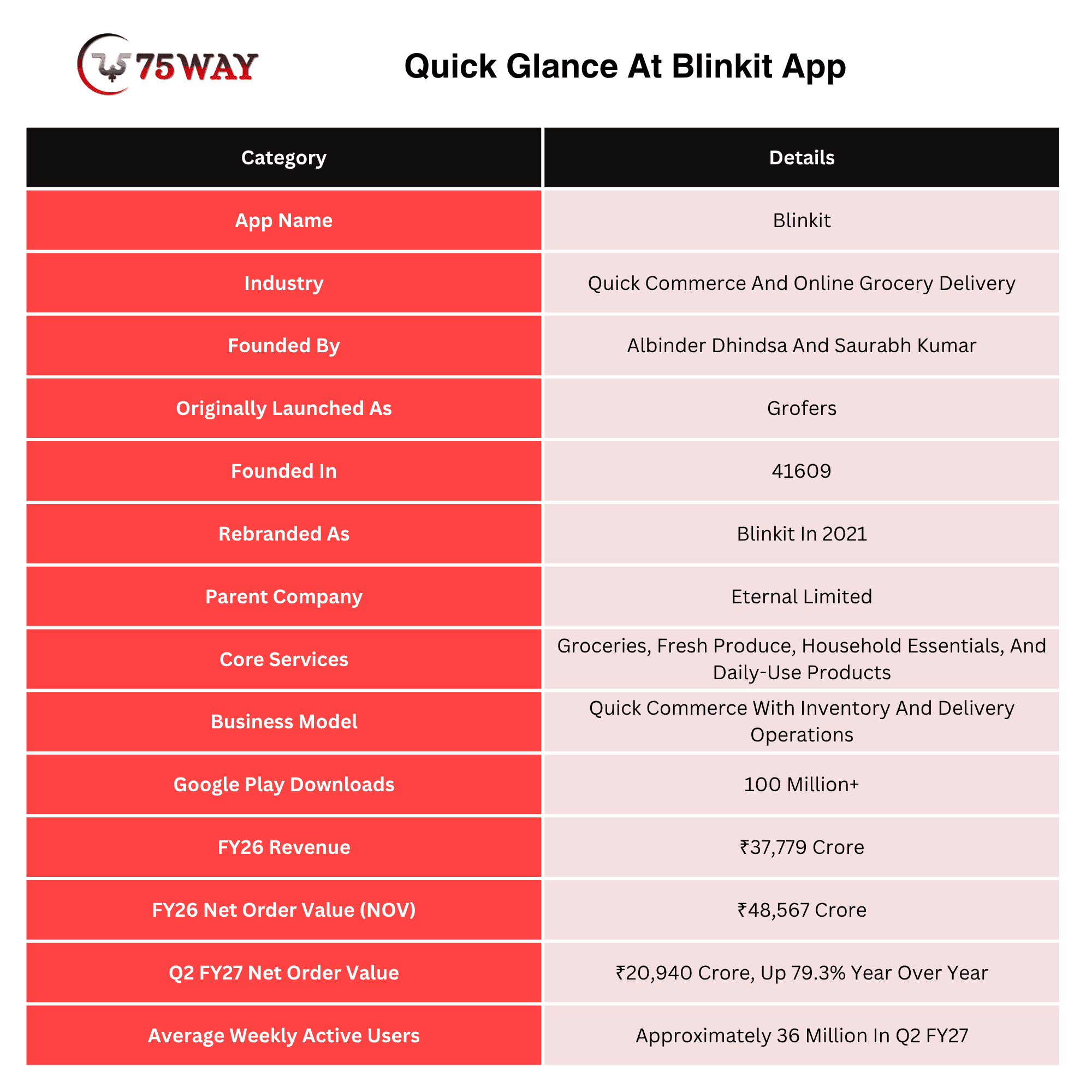
Why Businesses Are Investing In Blinkit Clone App Development?
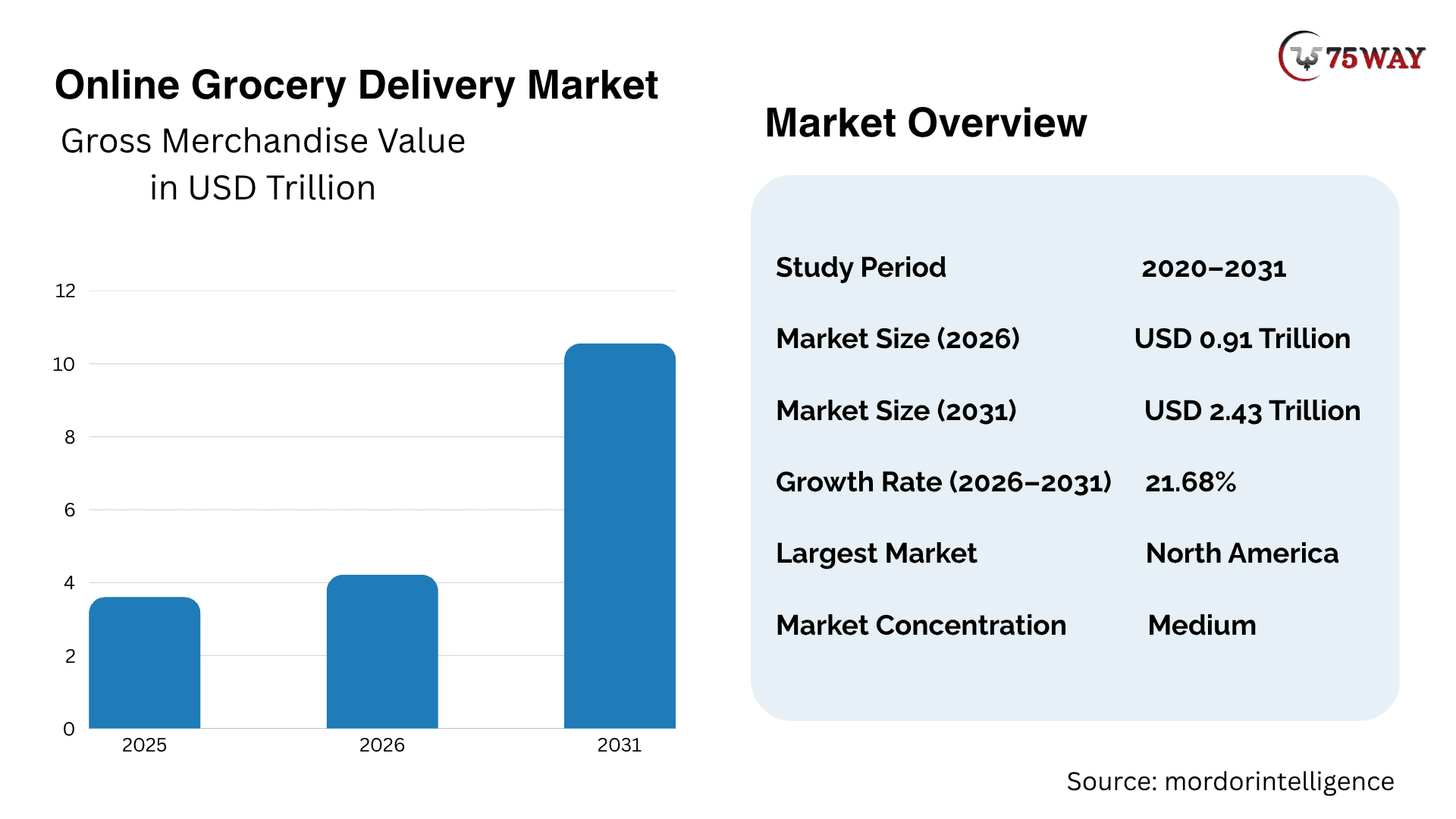
Quick-commerce apps like Blinkit address the need for convenient access to everyday products without requiring customers to visit physical stores. Entrepreneurs can explore this opportunity by targeting a specific neighborhood, customer group, or product category before expanding into additional markets.
- Convenience: Customers can order essential products from their phones instead of traveling to stores.
- Frequent Purchases: Groceries and household supplies can generate repeat orders throughout the month.
- Local Market Opportunities: Businesses can serve neighborhoods that lack convenient access to selected products.
- Multiple Revenue Streams: Platforms can earn through product margins, delivery fees, commissions, and advertising.
- Expansion Potential: Successful operations can expand into nearby service areas as demand and fulfillment capacity grow.
For businesses exploring an app like Blinkit, understanding market demand, customer expectations, and local competition is a practical starting point before investing in development.
- Net Order Value (NOV): Reached $2.22 billion (₹20,940 crore) in Q2 FY27, up 79.3% year-on-year and 22.2% quarter-on-quarter.
- Quick Commerce Revenue: Increased 94% YoY to approximately $2.03 billion (₹19,152 crore), driven by expansion and inventory-led accounting models.
- Dark Store Expansion: Surpassed 2,751 stores, with targets to exceed 3,500 stores by March 2027 and 5,000 stores by March 2028.
Blinkit's Business Model Explained: How Does It Work?
Blinkit’s business model is built around a simple promise: customers get everyday essentials delivered quickly, without a trip to the store. Behind that convenience is a system of dark stores, inventory management, delivery partners, and multiple revenue streams working together. Understanding how these pieces fit together can help you plan a similar quick-commerce business and choose the right model for your app.
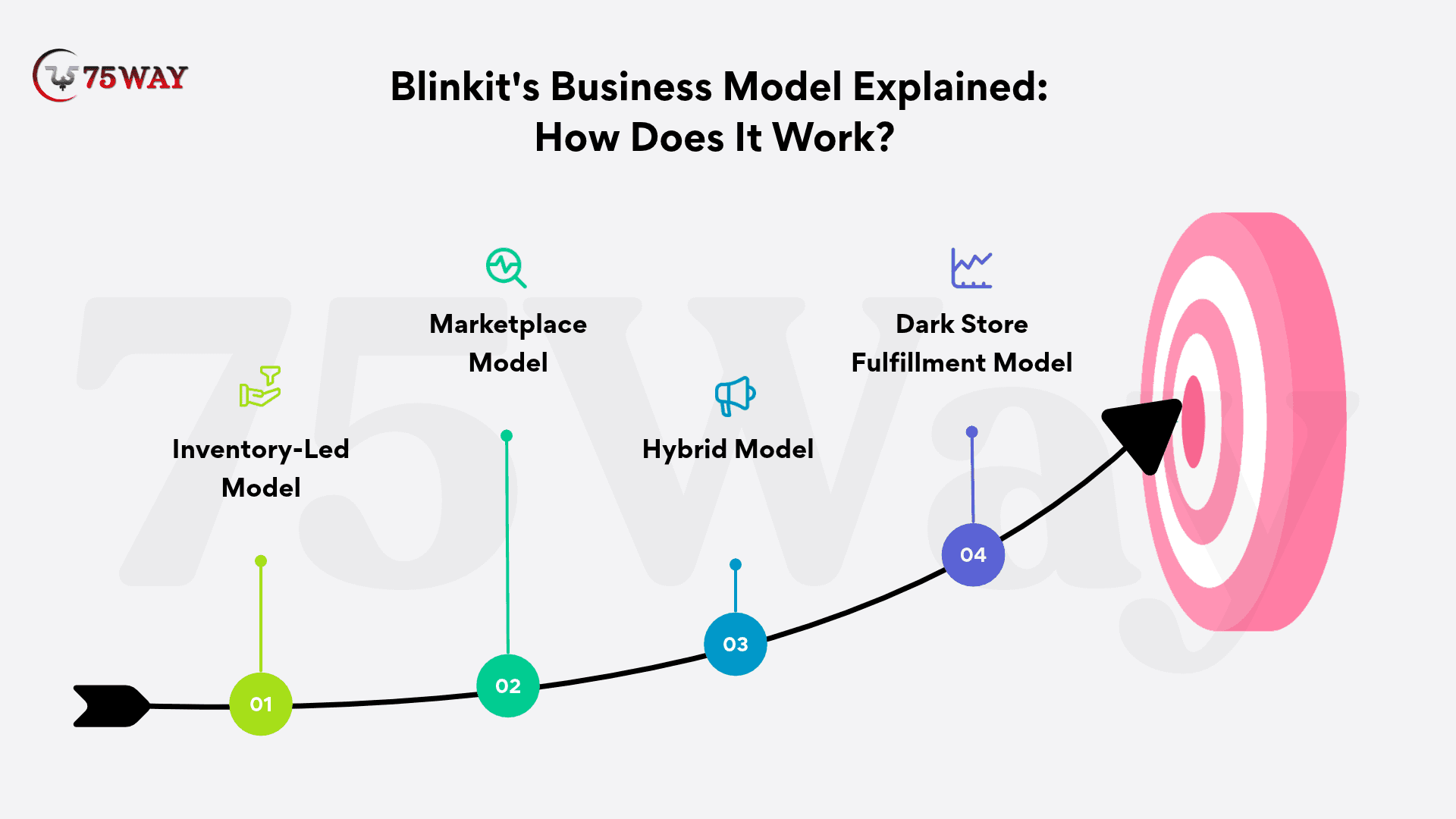
1. Inventory-Led Model
In an inventory-led model, the business purchases products from suppliers and manages the inventory through its own or leased fulfillment locations. This gives the operator greater control over product availability, pricing, and assortment, but requires working capital and careful stock management.
Revenue primarily comes from product sales, with margins depending on supplier agreements, product categories, and operating expenses. Unsold stock, spoilage, and inventory mismatches must be managed to protect profitability.
2. Marketplace Model
A marketplace model connects customers with independent grocery stores or other sellers. The sellers manage their inventory, while the platform facilitates product discovery, order placement, and potentially delivery.
The platform can earn commissions, delivery fees, and promotional revenue. This approach may reduce the need to purchase all inventory directly, although seller coordination, stock accuracy, and order fulfillment still require careful management.
3. Hybrid Model
A hybrid model combines owned inventory with products supplied by partner retailers. A business can stock frequently purchased items in its own fulfillment locations while listing additional products through approved sellers.
This approach can support a wider assortment without requiring the business to purchase every product upfront. However, inventory synchronization, pricing rules, delivery responsibilities, and seller settlements need to be clearly defined.
4. Dark Store Fulfillment Model
Dark stores are fulfillment locations designed primarily to prepare online orders rather than serve walk-in shoppers. Staff pick and pack products after an order arrives, and delivery partners collect the packed order for the final journey.
Locating these stores close to target customers can reduce delivery distances. The model requires suitable locations, reliable replenishment, accurate inventory records, trained staff, and enough local order volume to justify operating expenses.
How To Build An App Like Blinkit: A Comprehensive Process
A successful Blinkit-like app requires more than a user-friendly interface; it also needs a reliable fulfillment model and well-planned delivery operations. Each development stage builds on the previous one, helping you validate demand, define requirements, and prepare the platform for launch.
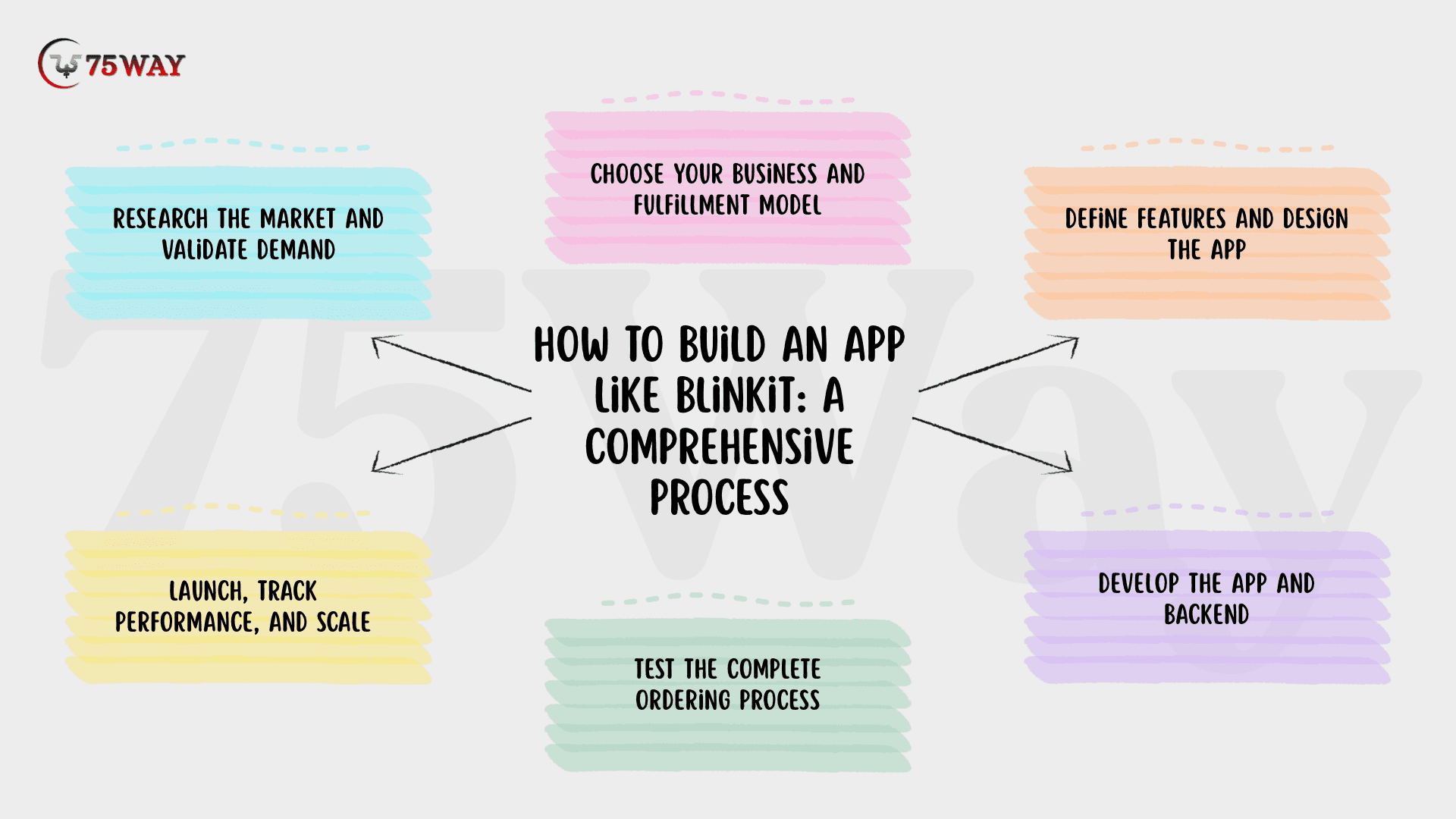
Step 1: Research The Market And Validate Demand
A clear understanding of your target market provides the foundation for your quick-commerce business. Identify potential customers, preferred product categories, existing competitors, and the neighborhoods you plan to serve. Interview prospective users to understand their urgent shopping needs and acceptable delivery fees.
Alongside customer research, evaluate local suppliers, potential store locations, and delivery availability. Estimate expected order volumes and consider a small pilot or landing page to test demand before committing to a larger technology investment.
Step 2: Choose Your Business And Fulfillment Model
With initial market insights in place, select an inventory-led, marketplace, or hybrid business model. This decision determines how products are sourced, who owns inventory, how vendors receive payments, and which responsibilities your business must manage.
Next, define your initial delivery area and fulfillment process. Set realistic delivery promises based on travel distances, stock availability, staffing capacity, and customer demand. These operational decisions will guide the features and workflows your app needs.
Step 3: Define Features And Design The App
Once your business model and fulfillment requirements are clear, map the main journeys for customers, store staff, delivery partners, and administrators. Create wireframes and prototypes covering product discovery, checkout, order preparation, delivery updates, and exception handling.
Prioritize the minimum viable product (MVP) around essential ordering and fulfillment functions. Advanced capabilities, such as personalized recommendations and demand forecasting, can follow once the core platform is tested and validated.
Step 4: Develop The App And Backend
With the requirements and designs approved, development can begin on the customer app, delivery partner app, backend services, database, and administrative dashboard. Integrate payment gateways, mapping services, notifications, and inventory systems according to your chosen business model.
Give special attention to order assignment and inventory synchronization, as errors can cause stock discrepancies, delayed deliveries, and customer complaints. A modular architecture also makes it easier to accommodate additional stores, users, and product categories as the business expands.
Step 5: Test The Complete Ordering Process
After development, test the entire customer journey, from registration and product search to payment, stock updates, order assignment, and delivery tracking. Verify cart calculations, refund handling, and order changes across supported devices and operating systems.
Security and performance testing should also cover poor connectivity, unexpected traffic, and failed transactions. Before a wider release, run a pilot with a limited customer group to identify technical problems and confirm that store teams and delivery partners can fulfill orders as planned.
Step 6: Launch, Track Performance, And Scale
Once testing confirms that the platform and fulfillment operations are ready, launch in a defined service area with a manageable product assortment and realistic delivery promises. Introduce the app through local marketing campaigns, referral offers, business partnerships, and customer acquisition channels suited to your audience.
After launch, monitor repeat orders, average order value, fulfillment times, cancellation rates, customer acquisition costs, and contribution margins. Use these results to improve the customer experience and operational processes before expanding into additional neighborhoods.
How Does An App Like Blinkit Make Money?
A quick-commerce app can use several revenue streams rather than relying on a single source. The right combination depends on whether the business owns inventory, operates as a marketplace, or uses a hybrid model.
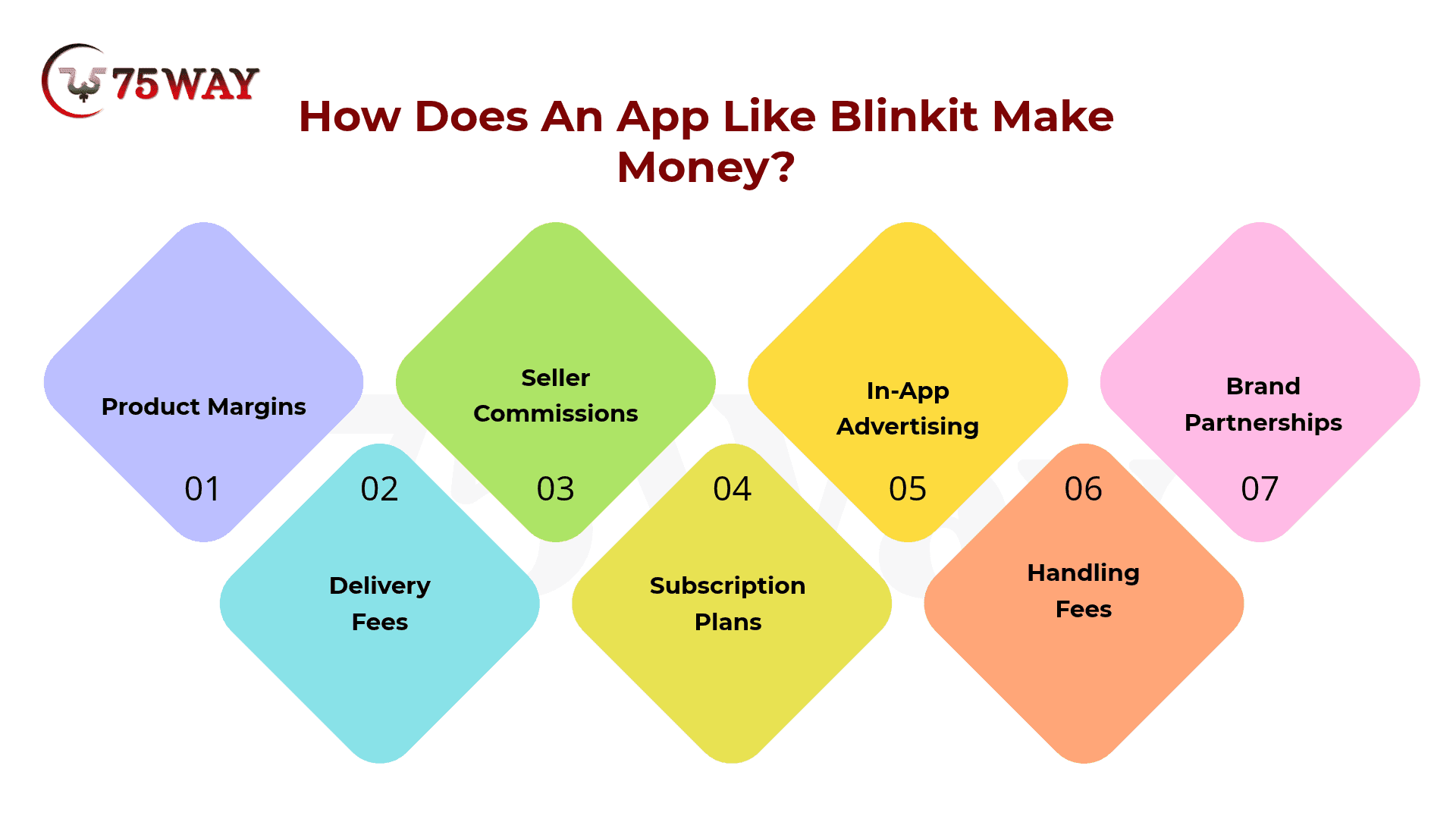
- Product Margins: Earn the difference between product selling prices and procurement costs when selling owned inventory.
- Delivery Fees: Charge customers for delivery, particularly for small orders or premium delivery options.
- Seller Commissions: Collect an agreed percentage from partner retailers for completed orders.
- Subscription Plans: Offer eligible customers paid plans with benefits such as delivery discounts or membership offers.
- In-App Advertising: Sell promotional placements to brands seeking visibility within relevant product categories.
- Handling Fees: Apply clearly disclosed service or handling charges where commercially appropriate and legally permitted.
- Brand Partnerships: Collaborate with manufacturers on product launches, sponsored collections, and seasonal promotions.
A practical revenue strategy should balance customer affordability with fulfillment costs. Excessive discounts may attract first-time users but can weaken margins if repeat purchasing does not improve.
Essential Features To Include While Building A Blinkit-Like App
A Blinkit-like app development needs to do more than let customers browse groceries and place orders. Accurate stock updates, quick checkout, live order tracking, and reliable delivery assignments all affect whether customers receive what they expect, when they expect it. The essential features below can help you plan an app that supports both the shopping experience and the operations behind it.
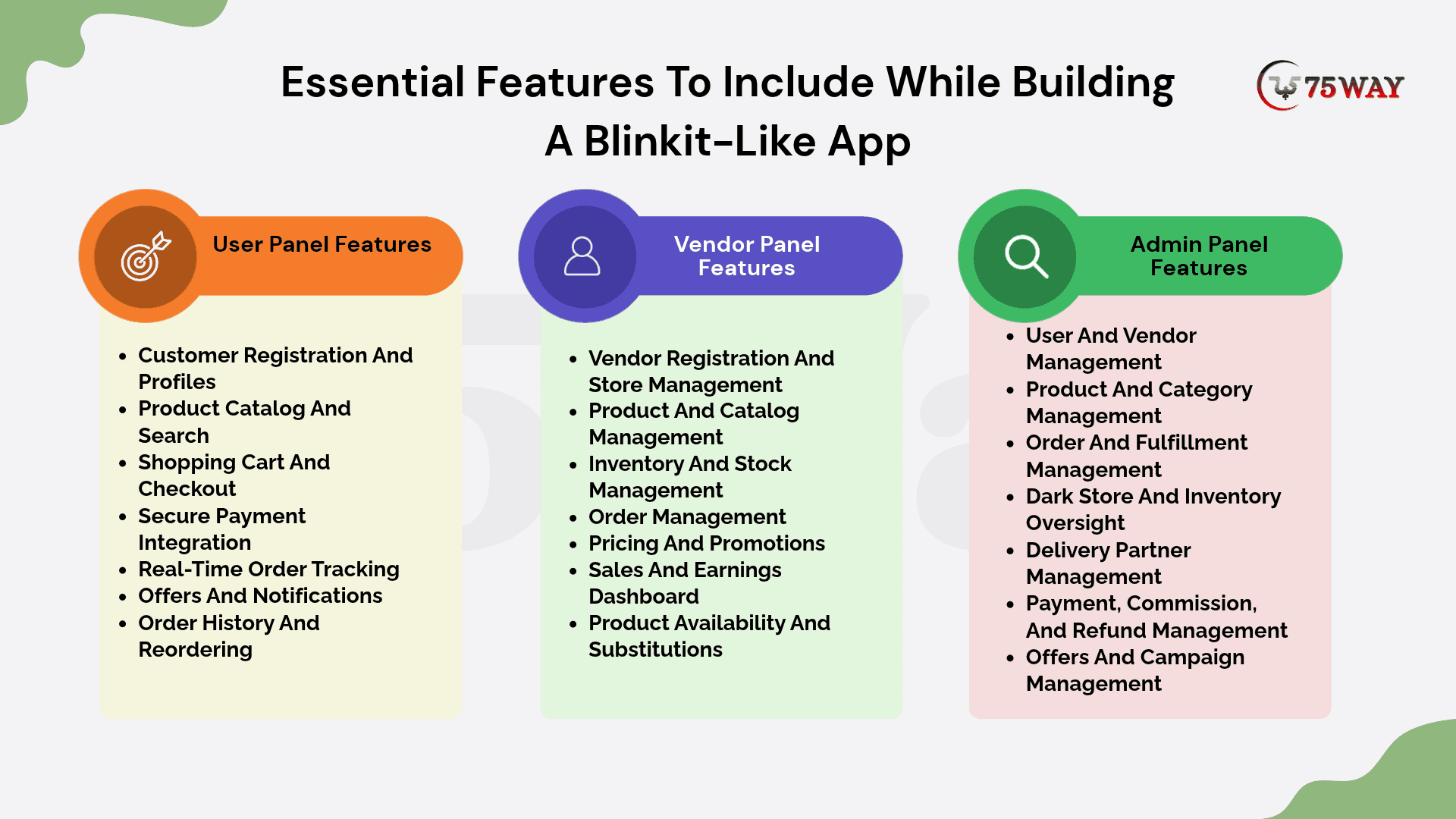
1. User Panel Features
The user panel allows customers to browse products, place orders, make payments, and track deliveries through a convenient shopping experience.
- Customer Registration And Profiles
Allow customers to register using their phone numbers, email addresses, or social login options. Customers should be able to manage delivery addresses, update profile details, and view previous orders.
- Product Catalog And Search
Organize groceries, beverages, personal care products, and household essentials into clear categories. Include keyword search, filters, product images, prices, ratings, and real-time availability to simplify product discovery.
- Shopping Cart And Checkout
Let customers add products, adjust quantities, apply discount codes, and review order totals. Display delivery fees, taxes, discounts, and the final payable amount before checkout.
- Secure Payment Integration
Integrate suitable payment methods, including credit cards, debit cards, digital wallets, and locally supported options. Provide payment confirmations, transaction status, and refund updates.
- Real-Time Order Tracking
Display order progress from confirmation and packing to dispatch and delivery. GPS-based tracking and estimated arrival times can help customers understand when their orders will arrive.
- Offers And Notifications
Notify customers about order updates, delivery status, discounts, and relevant promotions. Personalized offers and reorder reminders can encourage repeat purchases without overwhelming users.
- Order History And Reordering
Provide access to previous purchases, invoices, and order details. A quick reorder option lets customers buy frequently needed groceries without adding each item individually.
2. Vendor Panel Features
The vendor panel helps store owners and suppliers manage product listings, inventory, incoming orders, and fulfillment activities.
- Vendor Registration And Store Management
Allow vendors to register their businesses, submit required details, and manage store profiles. Admin approval can help verify vendors before their products become available to customers.
- Product And Catalog Management
Enable vendors to add products, upload images, edit descriptions, set prices, assign categories, and update product availability. Bulk upload tools can simplify catalog management for larger inventories.
- Inventory And Stock Management
Provide tools to update stock quantities, monitor low-stock products, and record incoming supplies. Automated stock adjustments after confirmed orders can reduce overselling and inventory discrepancies.
- Order Management
Let vendors view new orders, accept or reject requests, prepare items, and update picking and packing statuses. Clear order queues help staff prioritize orders and prepare them for dispatch.
- Pricing And Promotions
Allow vendors to manage product prices, schedule discounts, and participate in platform-wide promotions. Approval rules can help administrators maintain pricing policies and prevent unauthorized offers.
- Sales And Earnings Dashboard
Display sales totals, completed orders, canceled orders, commissions, and payment settlements. Vendors can use these reports to understand product performance and review their earnings.
- Product Availability And Substitutions
Let vendors mark unavailable items and suggest suitable replacements when permitted. Customers can approve substitutions before fulfillment, helping reduce cancellations and improve order completion.
3. Admin Panel Features
The admin panel gives business owners centralized control over customers, vendors, inventory operations, delivery activities, payments, and platform performance.
- User And Vendor Management
Allow administrators to review customer accounts, verify vendors, manage permissions, and investigate reported issues. Account restrictions and suspension controls can help enforce platform policies.
- Product And Category Management
Manage product categories, listings, pricing rules, and catalog standards across participating stores. Administrators can review product information and remove duplicate, misleading, or prohibited listings.
- Order And Fulfillment Management
Monitor orders across stores, track fulfillment progress, and investigate delays or cancellations. Admins should be able to coordinate order exceptions and resolve issues involving customers, vendors, and delivery partners.
- Dark Store And Inventory Oversight
Monitor stock levels, replenishment needs, and inventory discrepancies across dark stores or partner locations. Centralized reports can help administrators identify stock shortages and improve product availability.
- Delivery Partner Management
Register delivery partners, assign orders, monitor delivery statuses, and review service performance. The dashboard can also manage delivery zones, partner availability, and failed delivery cases.
- Payment, Commission, And Refund Management
Configure vendor commissions, review transactions, process eligible refunds, and monitor settlement records. Clear financial reports help administrators reconcile platform earnings with vendor payments and customer transactions.
- Offers And Campaign Management
Create promotional campaigns, manage discount codes, set eligibility rules, and define campaign periods. Performance reports can show which offers generate orders and encourage repeat purchases.
Technology Stack Used For Blinkit Clone App Development
The technology stack depends on the target platforms, feature complexity, integration requirements, and expected order volume. The following options are common starting points, not mandatory choices for every project.
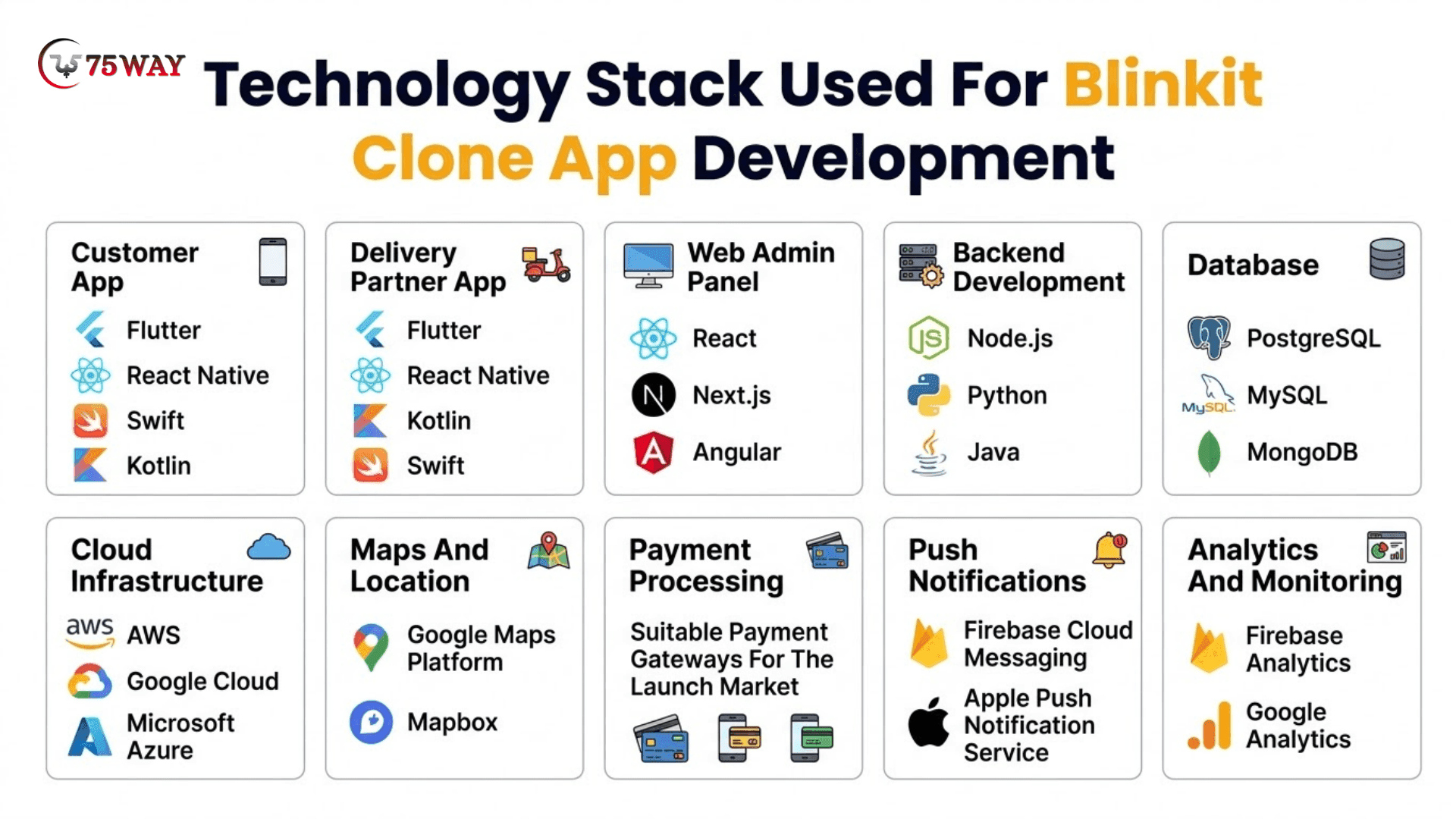
A cross-platform framework can reduce duplicated development work when launching on Android and iOS. Native development for a Blinkit-style app may be appropriate when the project needs platform-specific capabilities or highly customized performance.
The final selection should reflect the team's experience, security requirements, integration needs, and expected growth. Avoid choosing tools simply because they are popular; each technology should solve a defined product or operational requirement.
How Much Does It Cost To Build An App Like Blinkit?
The average cost to build an app like Blinkit ranges from $5,000 to $250,000+, depending on features, platforms, backend complexity, integrations, and operational scale. A basic MVP costs less because it focuses on essential ordering functions, while a full-scale platform requires more advanced inventory management, multiple applications, and support for larger operations.
1. Basic MVP Blinkit-Like App: $25,000–$90,000+
A basic MVP is suitable for startups that want to test local demand before investing in a larger quick-commerce platform.
- Features: Ordering, checkout, basic tracking, and simple admin controls.
- Timeline: 6-10+ Weeks
2. Mid-Range Blinkit-Like App: $90,000–$250,000+
A mid-range solution suits businesses preparing to serve a defined customer base with more complete delivery and inventory operations.
- Features: Cross-platform apps, live GPS, payments, and inventory management.
- Timeline: 3- 6+ months
3. Full-Scale Blinkit-Like App: $90,000–$250,000+
A full-scale platform is designed for businesses that need more advanced operations, multiple fulfillment locations, detailed reporting, and stronger scalability.
- Features: Multi-store operations, advanced analytics, automation, and scalable infrastructure.
- Timeline: 6-12+ Months

Additional Costs For Developing An App Like Blinkit That Affect Budget
Software development is only one part of launching a quick-commerce business. You should also account for operational expenses that continue after the app goes live.
- Cloud Hosting And Maintenance: Budget for servers, monitoring, bug fixes, security updates, and ongoing technical support.
- Store Setup And Inventory: Include rent, storage equipment, initial stock, packaging, and supplier arrangements where applicable.
- Delivery Operations: Account for delivery partner payments, dispatch management, insurance where required, and customer support.
- Marketing And Promotions: Allocate funds for customer acquisition, introductory offers, referral campaigns, and retention activities.
These expenses vary by city, product assortment, delivery radius, and operating model. Prepare a separate operating budget instead of assuming the app development estimate covers the entire business.
How To Choose The Right Development Budget for Blinkit-Like Application
Choose your investment level according to the business you want to validate and the operations you plan to support.
- Choose An MVP if you want to test demand in one neighborhood with a limited product catalog and basic delivery workflows.
- Choose A Mid-Range App if you need integrated payments, live tracking, better inventory control, and a more complete customer experience.
- Choose A Full-Scale Platform if you plan to operate across multiple locations with advanced automation, detailed analytics, and complex fulfillment workflows.
Before finalizing the budget, request a detailed estimate that separates design, app development, backend infrastructure, integrations, testing, deployment, and post-launch support. This makes it easier to compare proposals and identify features that can be postponed until the business gains traction.
How 75way Technologies Can Help You Build A Blinkit-Like App
75way Technologies can support businesses planning to develop a quick-commerce platform by helping translate their business requirements into a practical software solution. The right development approach begins with understanding the target market, fulfillment model, essential features, and expected growth.
A project can be planned around an MVP or a broader platform with customer ordering, inventory management, delivery tracking, payment integration, and administrative controls. The final scope should reflect the business's operational readiness, budget, and launch objectives.
Before development begins, discuss the required integrations, technical architecture, project milestones, testing process, and ongoing support arrangements. A clear scope helps businesses prioritize essential functionality while keeping future expansion in mind.
Conclusion
To summarize, building an app like Blinkit requires a clear business model, dependable technology, and a fulfillment strategy that supports fast, reliable deliveries. From customer ordering and inventory management to delivery tracking and revenue generation, every decision affects the platform's cost and long-term viability.
With estimated development costs ranging from $5,000 to $250,000+, businesses can begin with a basic MVP or invest in a more comprehensive quick-commerce solution. The best approach is to validate local demand, prioritize essential features, and expand operations as customer adoption and fulfillment capacity grow.
Ready to build an app like Blinkit? Discuss your requirements and estimate your development budget with a reliable on-demand delivery app development firm.
Frequently Asked Questions (FAQs)
How Much Does It Cost To Build An App Like Blinkit?
The estimated cost ranges from $5,000 to $250,000+, depending on the app's features, integrations, complexity, and scale. A basic MVP costs less than a full-scale platform with advanced inventory management and multi-store operations.
How Long Does It Take To Develop A Blinkit-Like App?
A basic MVP may take six to ten weeks, a mid-range app around three to six months, and a full-scale platform six to twelve months or longer. Actual timelines depend on project scope and operational requirements.
How Does An App Like Blinkit Generate Revenue?
A quick-commerce app can generate revenue through product margins, delivery fees, seller commissions, subscriptions, handling fees, advertising, and brand partnerships. The available revenue streams depend on the business model.
Can I Start A Blinkit-Like Business With An MVP?
Yes. An MVP can help you test demand in a limited service area with essential ordering and fulfillment features. As the business grows, you can expand the product catalog, delivery network, and add advanced functionality.
Which Technology Is Suitable For Building A Blinkit-Like App?
Flutter or React Native can support cross-platform mobile development, while Node.js, Python, or Java can be used for backend services. The best technology stack depends on your feature requirements, integrations, development team, and scalability needs.
Do I Need Dark Stores To Launch A Quick-Commerce App?
Not necessarily. You can begin with partner retailers or a hybrid fulfillment model, depending on local demand and delivery capabilities. Dark stores may offer greater inventory control, but they require investment in locations, stock, staffing, and operations.