AI Summary
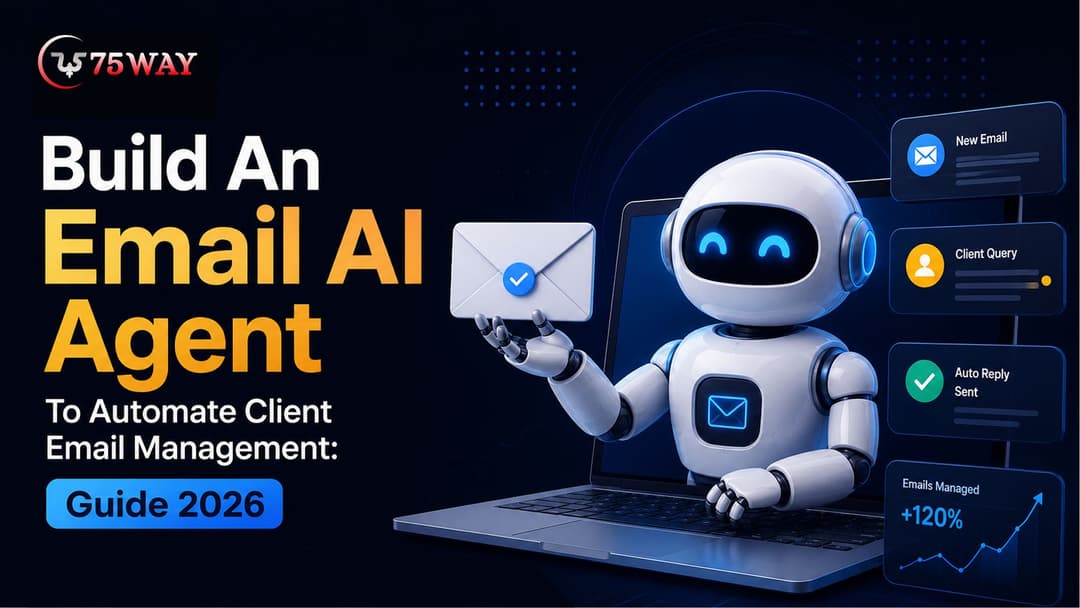
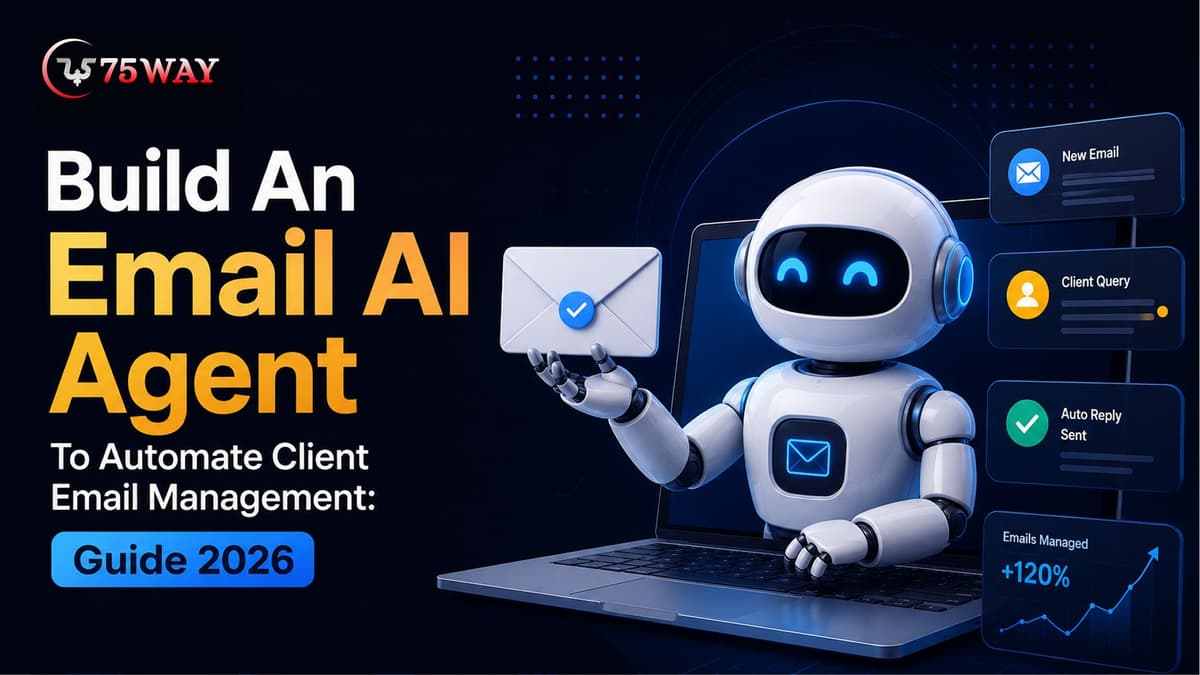
An email AI agent can turn repetitive client email management into an automated workflow that understands messages, prioritizes requests, drafts responses, and triggers approved actions. This guide covers features, architecture, integrations, development steps, technology, security, costs, use cases, and practical considerations for businesses.
Key Takeaways
- Email AI agents can classify, summarize, draft, prioritize, and manage client conversations.
- Gmail and Outlook integrations connect email AI agents with business inboxes.
- Human approval controls help businesses manage sensitive or high-risk email actions.
- Building an email AI agent requires AI models, APIs, workflows, security, and monitoring.
- Development costs depend on features, integrations, automation complexity, and deployment requirements.
What if your team opened the Gmail or Outlook inbox and already knew which emails mattered, what each sender needed, and which replies were ready to review? Seems imaginative? Well, it's not. This email automation is possible with an AI-powered agent for email.
An autonomous AI email agent is able to turn an overloaded inbox into a workflow that can understand, prioritize, and act. The difference between a useful agent and a glorified email filter is context.
A capable email AI automation system can look at previous conversations, customer information, company knowledge, deadlines, and other signals before deciding whether to draft a response, escalate the message, or take action.
That becomes especially valuable when email sits at the center of sales, customer support, recruitment, partnerships, or operations. Instead of adding another dashboard for employees to check, businesses can make email itself part of an automated workflow with an email AI agent development solution.
So, how do you build an AI email agent that can handle real business conversations without creating new risks? This guide walks through the product design, capabilities, AI workflow, integrations, technology stack, development stages, and investment involved.
What Is An Email AI Agent?
An email AI agent is more than an inbox filter that sorts messages into folders. It can read a client’s message, understand what the person wants, look at the conversation history, find relevant business information, and decide what should happen next.
For example, imagine a client emails,
“Can you send the updated quotation and confirm whether we can start next Monday?”
Instead of simply flagging the message, the agent can identify the two requests, check approved information, prepare a reply, attach the relevant quotation, and leave the final response ready for approval.
That makes an email AI agent useful for more than replying to emails. It can help sales teams qualify enquiries, support teams organize customer issues, account managers track follow-ups, and operations teams update connected systems. The important difference is that the agent can reason across the conversation and take defined actions, while sensitive decisions can still remain under human control.
Why Businesses Are Building AI Agents For Email Management?
Faster email handling can directly affect sales follow-ups, customer satisfaction, and team productivity. AI agents give businesses a way to manage routine conversations at scale without expecting employees to monitor every message manually. The key business benefits behind this investment are discussed below.
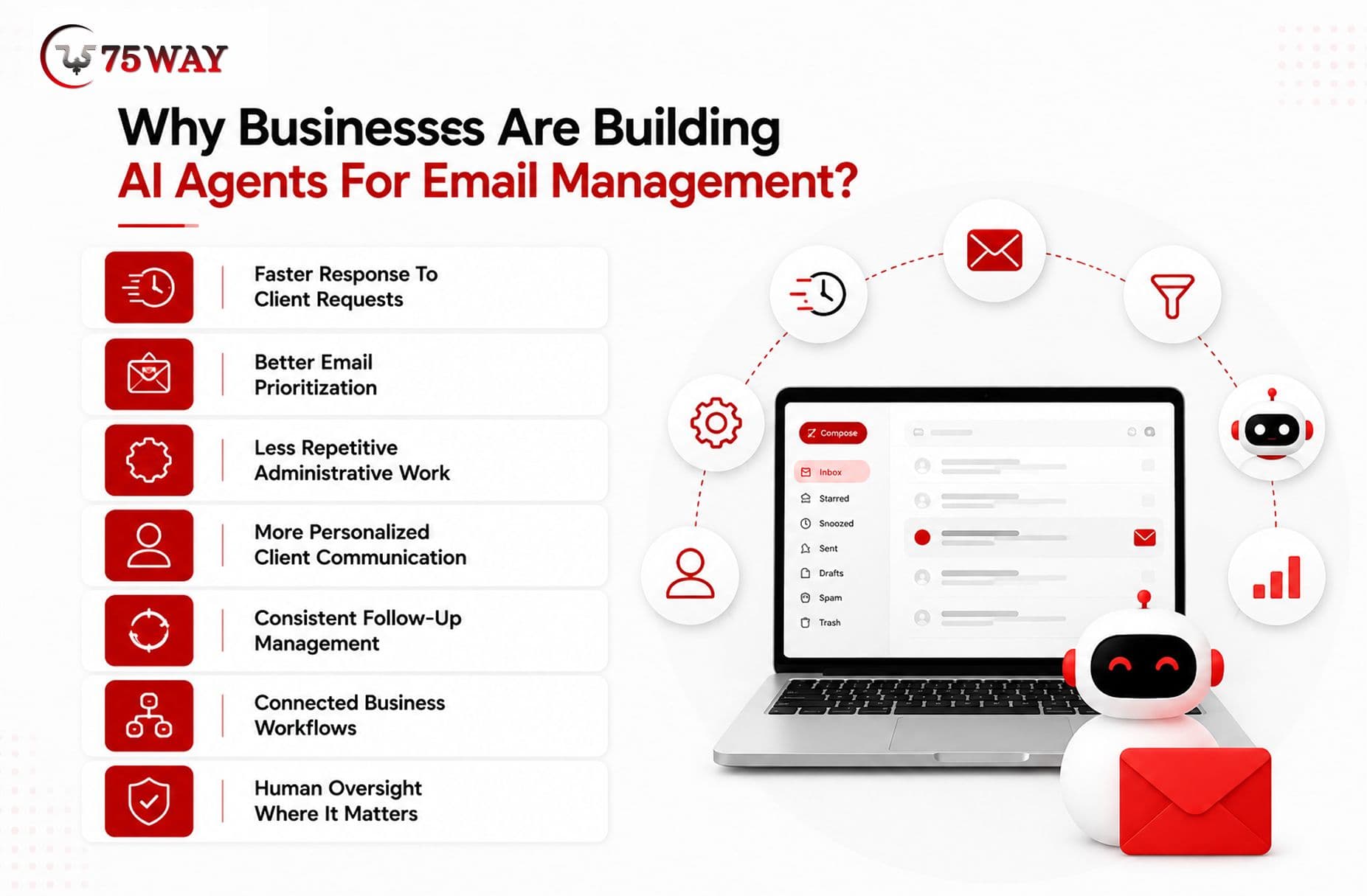
- Faster Response To Client Requests
An AI agent for email can identify common client requests and prepare responses without requiring employees to manually process every message. This can reduce the time spent searching through inboxes and drafting repetitive replies while helping teams maintain faster communication.
- Better Email Prioritization
Not every incoming email deserves the same level of attention. An AI email agent can analyze message content, sender information, conversation history, and defined business rules to distinguish urgent client issues from routine requests, newsletters, notifications, and low-priority conversations.
- Less Repetitive Administrative Work
Teams often spend significant time summarizing conversations, categorizing emails, finding customer information, forwarding messages, and creating follow-up reminders. An AI agent can handle many of these repetitive activities, allowing employees to focus on decisions and conversations that require human judgment.
- More Personalized Client Communication
Generic automated replies can make customer communication feel impersonal. An email AI agent can use approved business information, previous conversation context, customer records, and communication guidelines to create responses that are more relevant to each client's situation.
- Consistent Follow-Up Management
Important conversations can easily get buried when employees manage large inboxes. An AI agent for email can identify conversations requiring follow-up, create reminders, monitor response status, and notify employees when a client has not received the required next step.
- Connected Business Workflows
The biggest opportunity comes when email management is connected with other business systems. An AI email agent can work with CRM platforms, calendars, help desks, knowledge bases, project-management tools, and internal databases to turn email conversations into broader business workflows.
- Human Oversight Where It Matters
Automation does not have to mean giving an AI system unrestricted access to a mailbox. Businesses can define permission levels so the agent can automatically handle low-risk tasks while requiring employee approval before sending sensitive responses, making commitments, changing records, or performing other high-impact actions.
Business Benefits of Deploying An Agentic AI Solution for Email
An agentic AI solution for email can do more than sort incoming messages. When connected to business systems and clearly defined workflows, it can become a practical layer for handling routine communication, reducing manual work, and helping teams respond to clients with greater context.
- Automated Email Triage: The agent can examine incoming messages, identify their purpose, assign priority, and route conversations to the appropriate workflow or team member.
- Intelligent Response Drafting: Instead of using identical templates, the agent can create context-aware drafts based on the client's message, previous conversations, approved business information, and communication guidelines.
- Conversation Summarization: Long email threads can be condensed into useful summaries that highlight the client's request, previous actions, unresolved issues, and recommended next steps.
- Follow-Up Automation: The system can identify conversations that require action later and create reminders or trigger approved follow-up workflows based on defined business rules.
- Knowledge Retrieval: The agent can retrieve relevant information from connected knowledge bases, CRM records, documents, or internal systems before preparing a response.
- Lead Identification: Sales teams can use the agent to recognize potential prospects, extract relevant information, classify inquiries, and route promising conversations into appropriate sales workflows.
- Customer Support Assistance: An AI agent for email can identify common support requests, retrieve approved solutions, prepare responses, and escalate unusual or sensitive issues to human representatives.
- Inbox Organization: Messages can be categorized according to customer, department, intent, priority, project, or other business-specific criteria, making large inboxes easier to manage.
How Does An AI Email Agent Work?
An AI email agent typically combines email APIs, language models, business data, workflow logic, and controlled tools. Rather than simply generating text, it follows a sequence that allows it to understand an email, gather context, select an appropriate action, and execute that action within defined permissions.
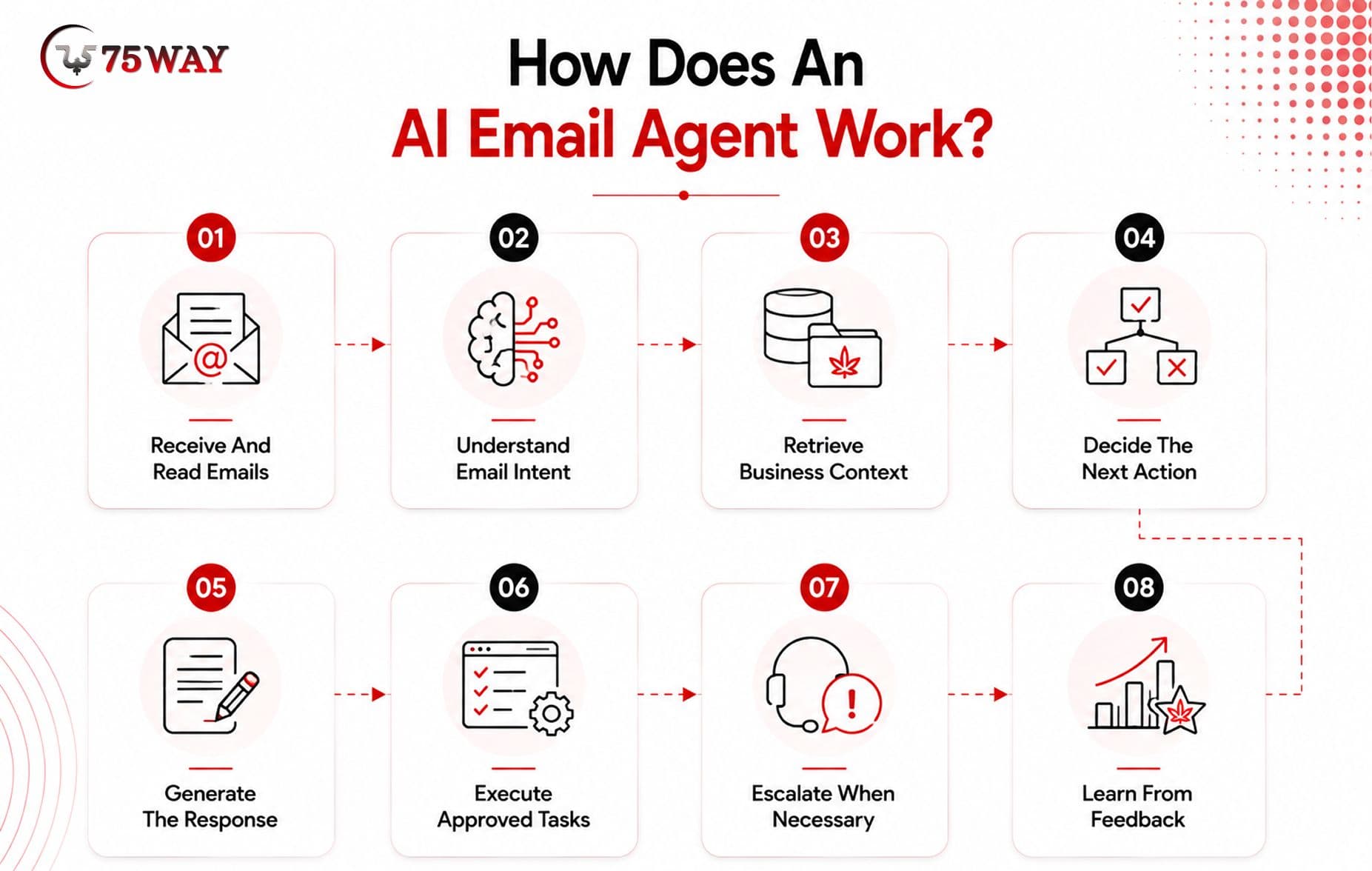
1. Receive And Read Emails
The agent connects to a supported mailbox through an email API and retrieves authorized messages, metadata, attachments, and relevant conversation history. Access permissions determine which emails and actions the system can handle.
2. Understand Email Intent
An AI model analyzes the message to identify its intent, urgency, entities, sentiment, requested action, and other relevant information. For example, a client email might represent a support issue, sales inquiry, meeting request, or billing question.
3. Retrieve Business Context
The agent searches approved sources such as CRM records, knowledge bases, customer profiles, calendars, documents, or previous conversations. This additional context helps the system understand the situation before deciding what should happen next.
4. Decide The Next Action
Workflow rules and agent logic determine whether the email should receive a draft response, be categorized, trigger a task, update a business system, receive a follow-up reminder, or move to human review.
5. Generate The Response
When a response is appropriate, the AI email automation platform creates a draft using the conversation context and approved business information. Organizations can apply tone, formatting, terminology, and communication policies to guide generated responses.
6. Execute Approved Tasks
Depending on configured permissions, the agent can create drafts, update CRM records, schedule follow-ups, categorize messages, or perform other connected actions. Higher-risk actions can require employee approval before execution.
7. Escalate When Necessary
The system can recognize situations that exceed its defined capabilities, such as sensitive complaints, unusual requests, complex negotiations, or uncertain information. These conversations can be routed to an appropriate employee.
8. Learn From Feedback
Performance data, corrections, approval patterns, and workflow outcomes can help teams improve prompts, rules, knowledge sources, and agent behavior. This creates a controlled improvement cycle rather than unrestricted autonomous learning.
Core Features Every Email AI Agent Development Solution Should Include
The right feature set depends on the business's email volume, workflows, systems, security requirements, and level of automation. A customer-support organization may need different capabilities from a sales team managing high-value client conversations.
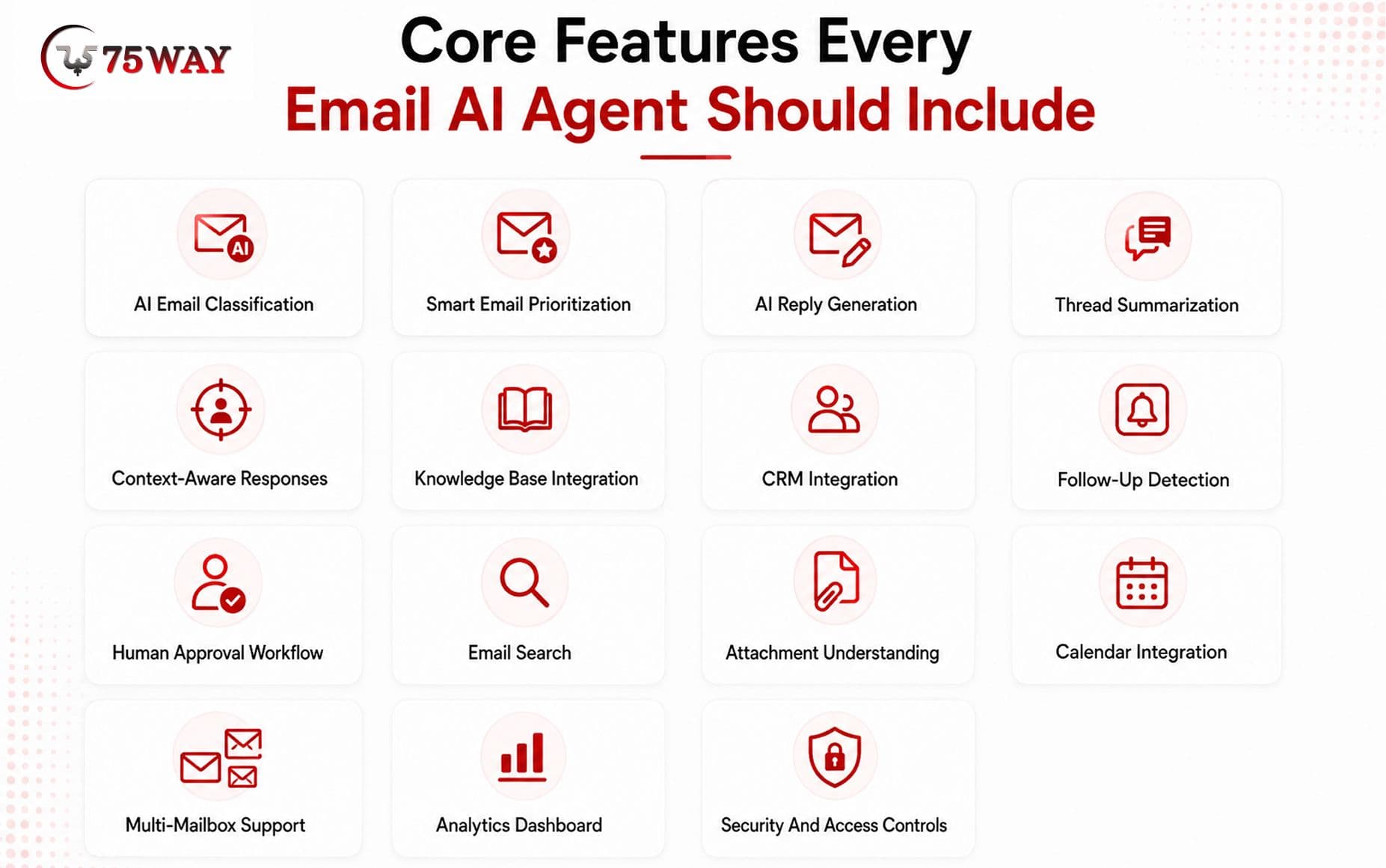
- AI Email Classification: Automatically identifies message categories, intent, urgency, and routing requirements based on business-defined criteria.
- Smart Email Prioritization: Ranks conversations according to factors such as urgency, customer importance, deadlines, keywords, intent, and business rules.
- AI Reply Generation: Produces personalized email drafts using conversation context, approved knowledge, and defined communication guidelines.
- Thread Summarization: Converts lengthy conversations into concise summaries containing key requests, decisions, unresolved issues, and recommended actions.
- Context-Aware Responses: Uses previous messages and relevant customer information to avoid generic responses that ignore the existing conversation.
- Knowledge Base Integration: Retrieves approved answers from company documentation, FAQs, policies, product information, and internal knowledge sources.
- CRM Integration: Connects email conversations with customer records, sales opportunities, support tickets, and other CRM information.
- Follow-Up Detection: Identifies messages requiring future action and creates reminders or triggers predefined follow-up workflows.
- Human Approval Workflow: Allows employees to review AI-generated drafts or proposed actions before anything sensitive is sent or executed.
- Email Search: Enables the agent to locate relevant conversations based on customer, topic, date, intent, project, or other supported criteria.
- Attachment Understanding: Depending on the chosen AI models and implementation, the system can extract useful information from supported documents and attachments.
- Calendar Integration: Can identify scheduling requests and connect with calendar systems to support approved meeting-related workflows.
- Multi-Mailbox Support: Businesses can configure separate workflows for different teams, departments, brands, or shared inboxes.
- Analytics Dashboard: Tracks metrics such as email volume, response time, automation rate, approval rate, escalation frequency, and agent performance.
- Security And Access Controls: Role-based permissions, authentication, audit logs, encryption, and controlled tool access help protect business and customer information.
How To Build An Email AI Agent For Client Email Management?
An email AI agent becomes useful when its development follows the actual journey of a client email from arrival to resolution. That means defining the workflow first, then connecting the right AI models, business data, tools, and approval rules around it. Here is how those pieces come together during development.
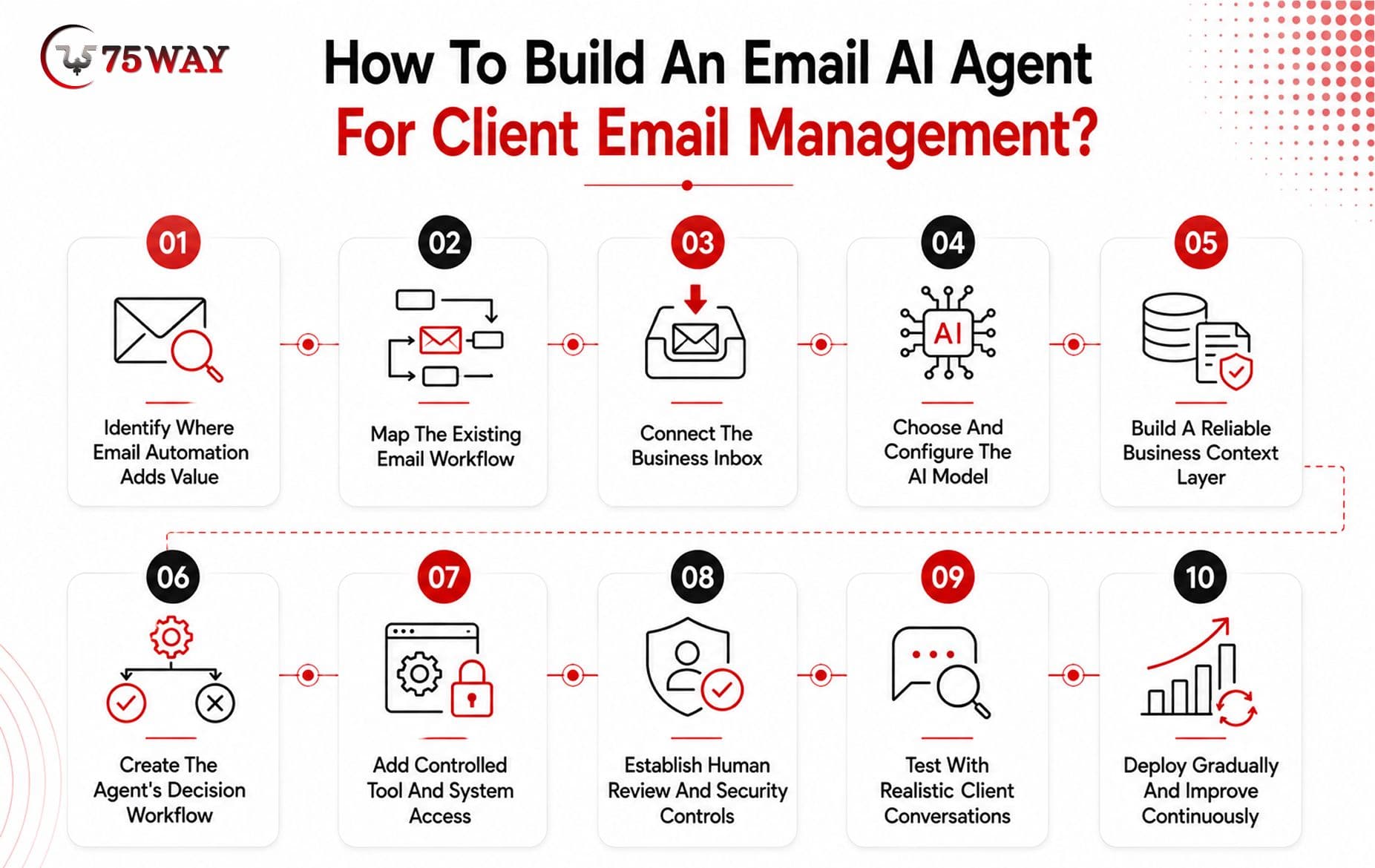
1. Identify Where Email Automation Adds Value
Start by examining how your team handles client emails today. Look for repetitive conversations that consume employee time, such as product enquiries, meeting requests, order updates, support questions, lead follow-ups, and status checks.
The aim is not to automate every message. Instead, identify email tasks where automation can provide a clear benefit without creating unnecessary risk.
2. Map The Existing Email Workflow
Once the priority use cases are clear, document what happens to each type of email after it arrives. This includes who handles the message, what information they check, which systems they use, and what action they take.
The workflow should also account for exceptions. An unclear customer request, missing account information, or sensitive complaint may need to reach a human rather than continue through an automated path.
3. Connect The Business Inbox
The next stage connects the agent with the organization's email environment through supported and authorized APIs. Access can be configured for activities such as reading incoming messages, retrieving conversation history, creating drafts, or sending approved responses.
Permissions should match the agent's responsibilities. If the system only needs to prepare drafts, giving it unrestricted sending access creates unnecessary risk.
4. Choose And Configure The AI Model
The language model determines how well the system can interpret messages, understand context, follow instructions, and generate useful responses.
Selection should consider the complexity of client conversations, expected email volume, response quality, processing speed, privacy requirements, and operating costs. A simple classification task may not require the same model capability as a complex customer response involving several business systems.
5. Build A Reliable Business Context Layer
Client emails rarely contain everything needed to answer a question. A customer asking about an order, contract, appointment, or account may require information stored elsewhere.
The agent can therefore connect with approved sources such as CRM records, knowledge bases, product documentation, order systems, calendars, or internal databases. Retrieval mechanisms can provide relevant information when needed instead of placing an entire business database into every interaction.
6. Create The Agent's Decision Workflow
Now define what the agent should do after understanding an incoming message.
A typical flow may involve identifying the customer's intent, retrieving relevant information, selecting an appropriate action, preparing a response, updating a connected system, and deciding whether human approval is required.
Clear conditions should also define what happens when the agent lacks enough information or has low confidence. A controlled escalation is preferable to an invented answer.
7. Add Controlled Tool And System Access
An effective AI agent for email often needs to do more than generate text. It may need to check a CRM record, create a support ticket, schedule a meeting, update a customer record, or prepare a follow-up task.
These capabilities can be provided through APIs and tool integrations. Each action should have defined permissions so the agent can perform only the operations necessary for its assigned workflow.
8. Establish Human Review And Security Controls
Not every client interaction should happen without employee oversight. Financial requests, contractual matters, sensitive complaints, unusual situations, or uncertain responses may require approval before anything is sent.
Security controls should operate alongside these approval rules. Authentication, authorization, encryption, audit logging, data access policies, and appropriate retention practices should be considered according to the organization's requirements.
9. Test With Realistic Client Conversations
Testing should go far beyond checking whether the agent can write a grammatically correct email. Use realistic conversations containing long threads, multiple requests, incomplete information, attachments, conflicting instructions, urgent messages, and unusual customer behaviour.
Evaluate whether the agent understands intent, retrieves the correct information, selects the right action, follows permissions, escalates appropriately, and produces a useful response.
10. Deploy Gradually And Improve Continuously
A controlled rollout allows the business to observe how the agent performs before expanding its responsibilities. One department, workflow, or category of emails can serve as the initial deployment area.
After launch, monitor response quality, automation rates, escalations, errors, processing time, customer feedback, and operating costs. These findings can guide improvements to workflows, prompts, knowledge sources, integrations, and model selection as the email AI agent takes on more client-management responsibilities.
Email AI Agent Architecture: What Powers The System?
An email AI agent typically combines an email interface, AI reasoning layer, business knowledge, workflow orchestration, external tools, and security controls. These components work together so the agent can understand a message, gather relevant context, decide what should happen, and complete approved actions.
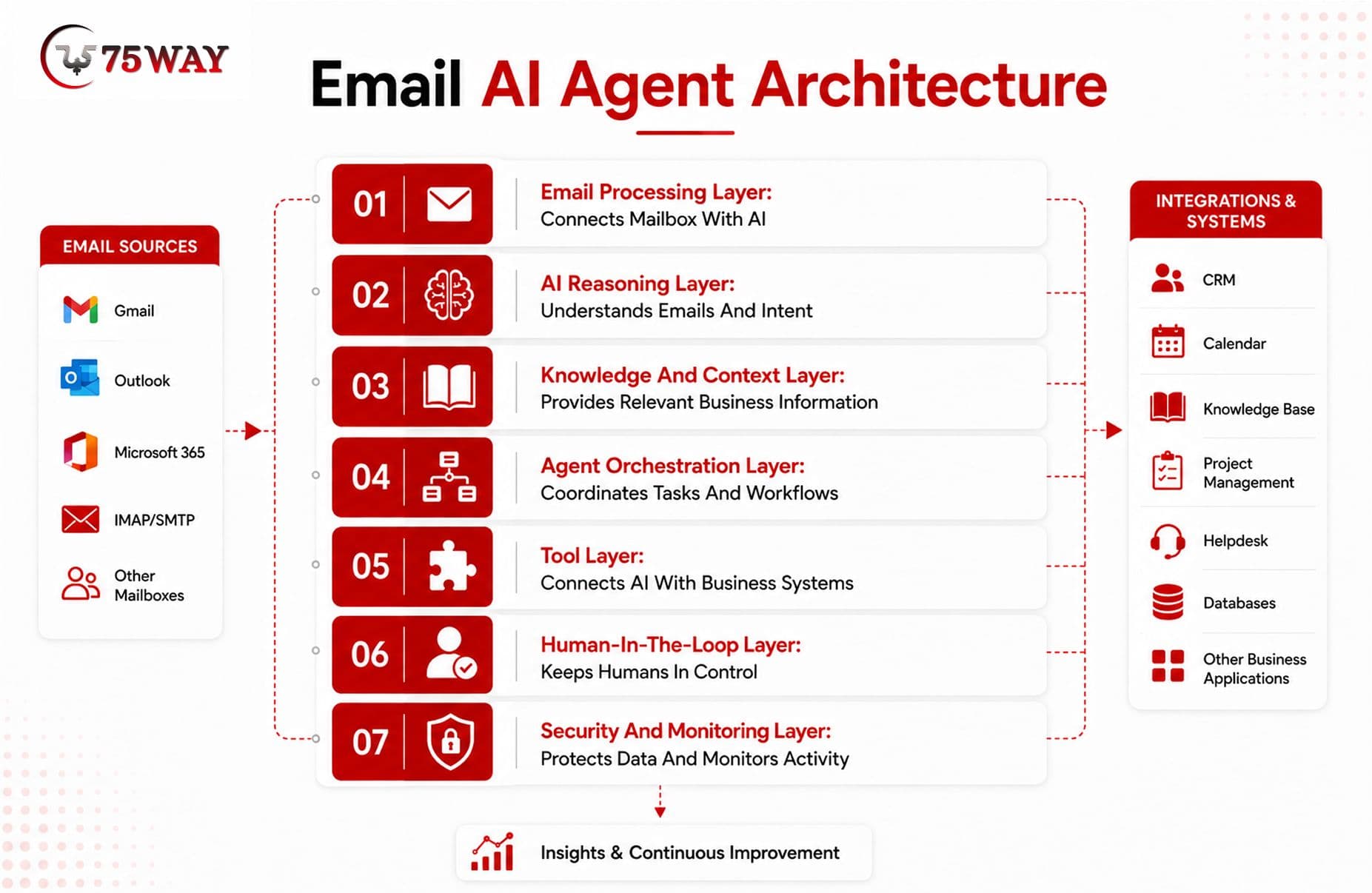
1. Email Processing Layer
This layer handles communication between the mailbox and the AI system. It retrieves incoming messages, identifies relevant threads, processes metadata, and passes authorized information to downstream components.
2. AI Reasoning Layer
The language model interprets what the client wants and determines what information or action may be required. Depending on the workflow, it can classify emails, summarize conversations, generate drafts, extract information, or select an available tool.
3. Knowledge And Context Layer
An agent needs access to reliable business information to provide useful responses. A retrieval layer can fetch relevant content from approved documents, CRM records, knowledge bases, databases, and previous interactions instead of relying only on the model's general knowledge.
4. Agent Orchestration Layer
This is responsible for coordinating the agent's workflow. It determines which tools to call, what sequence to follow, when to request additional information, and when to stop or escalate a conversation.
5. Tool Layer
Tools allow the agent to move beyond generating text. Depending on permissions, it can search a CRM, check a calendar, create a support ticket, update a customer record, prepare an email draft, or perform another predefined business action.
6. Human-In-The-Loop Layer
Human oversight provides an important control mechanism. Businesses can require approval for specific actions while allowing the agent to independently handle lower-risk tasks such as classification, summarization, and internal routing.
7. Security And Monitoring Layer
Authentication, authorization, encryption, audit logs, data controls, and monitoring help protect mailbox and customer information. Continuous monitoring also helps identify incorrect responses, failed tool calls, unusual behavior, and workflows that need improvement.
Gmail And Outlook Integration For An Email AI Agent
Connecting the agent with the company's existing email infrastructure is one of the most important development requirements. The integration determines what messages the system can access and which actions it can perform.
- Gmail Integration: Gmail provides APIs that developers can use to access mailbox data and implement actions such as reading messages, creating drafts, sending emails, managing labels, and working with conversation threads.
- Microsoft Outlook Integration: Microsoft Graph provides APIs for working with Outlook mailboxes, including reading, creating drafts, replying, forwarding, sending, searching, and managing messages.
- Mailbox Permissions: Access should follow the principle of least privilege. The agent should receive only the permissions required for its intended workflows instead of unrestricted mailbox access.
- Webhook Or Event Handling: Real-time or near-real-time workflows can use supported notification mechanisms to identify new messages or mailbox changes without repeatedly polling the inbox.
- Multi-Account Support: Businesses managing multiple departments, brands, or shared inboxes can design separate configurations and permissions for each mailbox.
- Email Thread Context: Maintaining conversation context helps the agent understand previous messages rather than treating every incoming email as an isolated request.
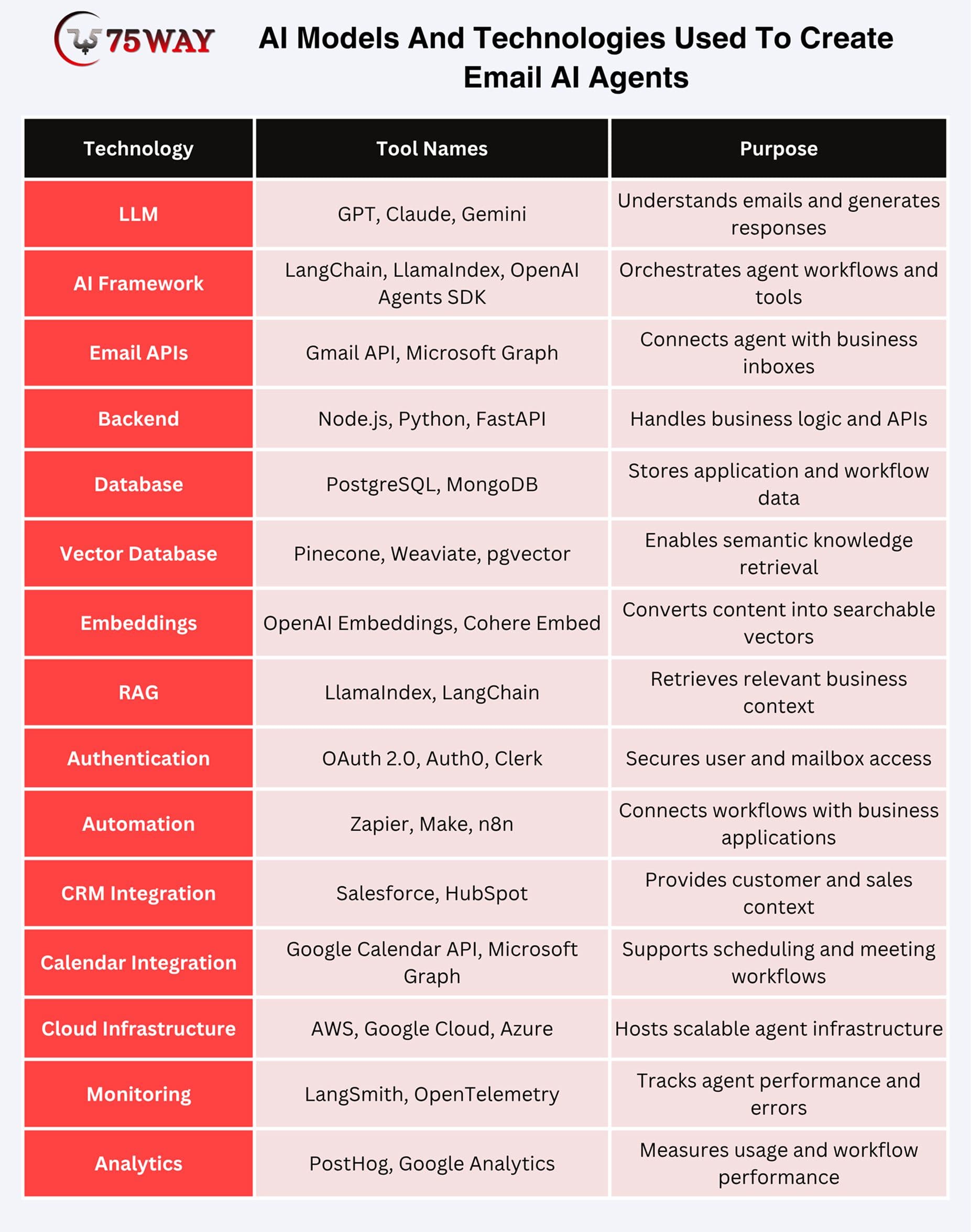
AI Models And Technologies Used To Create Email AI Agents
An email AI agent can combine several AI and software technologies rather than depending on a single model. The appropriate stack depends on the complexity of the workflows, data sensitivity, expected volume, and required response quality.
- Large Language Models
LLMs provide the core language understanding and generation capabilities needed to classify messages, summarize conversations, extract information, and prepare responses.
- Retrieval-Augmented Generation
RAG allows the agent to retrieve relevant information from approved business sources before generating an answer, helping ground responses in current company information.
- Embeddings
Embedding models can convert emails, documents, FAQs, and other information into representations that support semantic search and contextual retrieval.
- Agent Orchestration
An orchestration framework can coordinate reasoning, tool calls, retrieval, memory, approvals, and workflow execution.
- Natural Language Processing
NLP capabilities help identify intent, entities, sentiment, urgency, and other characteristics that influence email routing and automation.
- Classification Models
Dedicated classification approaches can handle repetitive tasks such as categorizing support, sales, billing, meeting, and general client emails.
- Optical Character Recognition
OCR can help extract text from supported scanned documents or image-based attachments when attachment processing is part of the approved workflow.
- Analytics And Evaluation
Evaluation systems can measure response accuracy, hallucination rates, escalation quality, tool-call success, latency, and automation performance.
How Businesses Can Use AI-Powered Email Agents: Real-World Use Cases
An AI email agent can handle far more than writing replies when it is connected to the workflows your business already depends on. Sales follow-ups, customer support, scheduling, lead qualification, and internal requests can all become potential automation opportunities. The most practical business use cases are explored below.
- Customer Support
Repeated questions can take up a surprising amount of a support team's day. An email AI agent can recognize common issues, find relevant information from approved knowledge sources, and prepare a response that fits the ongoing conversation. When a complaint is sensitive or requires human judgment, the message can be escalated instead of answered automatically.
- Sales Qualification
A promising lead may arrive in the inbox disguised as an ordinary enquiry. The agent can read the conversation, pick up buying signals, understand what the prospect is looking for, and extract useful details. Those insights can be passed to the CRM, while sales representatives receive a clearer picture of which conversations deserve attention first.
- Meeting Scheduling
“Are you free sometime next week?” can lead to several unnecessary emails before a meeting finally gets booked. An email AI agent can recognize the scheduling request, check an approved calendar, identify suitable slots, and prepare or send the appropriate response. Once permission is granted, the workflow can also create the calendar event and update the relevant records.
- Follow-Up Management
Important conversations are easy to lose when dozens of new emails arrive every day. The agent can recognize when a client is waiting for information, when an employee promised a follow-up, or when a conversation has gone unanswered. It can create reminders and prepare context-aware drafts, helping teams keep commitments from slipping through the cracks.
- Lead Nurturing
Not every prospect is ready to buy after the first conversation. The agent can keep track of ongoing discussions, recognize changes in engagement, and identify when another touchpoint may be appropriate. Using approved sales information and previous conversation context, it can prepare personalized follow-ups for representatives to review before sending.
- Email Summarization
Long email threads often force employees to become detectives before they can take action. A capable agent can condense the conversation into the important points, including what the client wants, what has already been decided, and what remains unresolved. This can make handoffs between sales, support, account management, and other teams much easier.
- Internal Email Management
The same technology can help with communication happening inside the company. Messages can be grouped by topic, important action items can be surfaced, and lengthy discussions can be summarized for employees who need the outcome rather than every message. That leaves teams with a clearer view of their responsibilities without manually sorting through every thread.
- Client Onboarding
New clients often receive a predictable stream of emails asking about documents, processes, timelines, account setup, and next steps. An email AI agent can handle approved questions, collect required information, and trigger internal tasks when employee involvement is needed. This keeps onboarding moving while giving new clients quicker access to relevant information.
How To Secure An AI Email Automation System For Client Email Management?
Security should be treated as a core architecture requirement rather than a feature added after development. An email AI agent can access client conversations, business information, attachments, and connected systems, so businesses need controls that limit access, protect data, and prevent unauthorized actions.
- Mailbox Permissions: Give the agent only the email permissions required for its assigned workflows. Separate read, draft, and send permissions wherever possible to reduce unnecessary access.
- Data Encryption: Protect email content and business information during transmission and storage using appropriate encryption mechanisms. Encryption should cover data moving between the agent, email providers, databases, and connected business systems.
- Role-Based Access: Define permissions according to employee roles and responsibilities. A sales employee, support representative, and administrator should not automatically receive identical access to email data or agent capabilities.
- Human Approval: Require employee approval before the agent performs sensitive actions such as sending high-risk communications, sharing confidential information, modifying important records, or making business commitments.
- Audit Logging: Maintain records of important agent activities, including accessed information, tool calls, generated drafts, approvals, executed actions, and escalations. These records can support troubleshooting, accountability, and security reviews.
- Prompt Injection Protection: Treat email content as untrusted input because external messages may contain instructions designed to manipulate the agent. The system should separate trusted business instructions from customer-provided content and restrict tool permissions.
- Sensitive Data Controls: Identify information that should not be exposed to the model or included in generated responses. Data filtering, access restrictions, and carefully designed retrieval workflows can reduce unnecessary exposure.
- Continuous Monitoring: Monitor unusual access patterns, failed authentication attempts, unexpected tool calls, inaccurate responses, and other anomalies. Regular evaluation helps identify problems before they become larger operational or security issues.
How Much Does It Cost To Build An AI Email Agent?
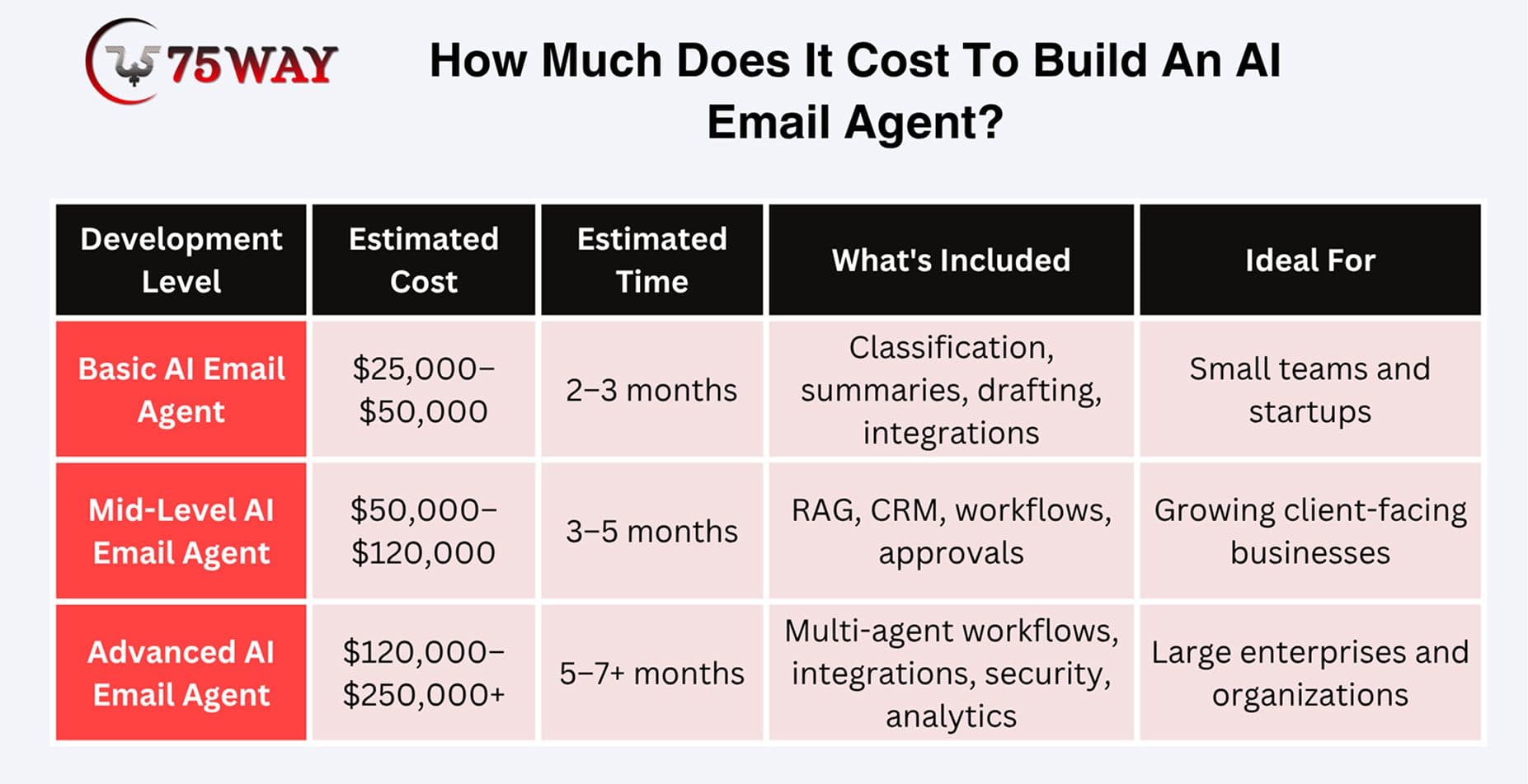
The cost to build an email AI agent can range from $25,000 to $250,000+, depending on automation complexity, AI capabilities, email integrations, business-system connections, security requirements, number of users, and deployment scale.
- Basic AI Email Agent: $25,000–$50,000
- Mid-Level AI Email Agent: $50,000–$120,000
- Advanced AI Email Agent: $120,000–$250,000+
Factors Affecting The Cost of AI Email Agent Development
- Development Complexity: More sophisticated reasoning, tool calling, workflow orchestration, and autonomous actions increase development effort.
- AI Model Usage: Model selection, context size, email volume, API usage, and response frequency influence ongoing AI infrastructure costs.
- Email Integrations: Gmail, Outlook, shared inboxes, multiple accounts, and mailbox synchronization requirements can affect integration complexity.
- Business Integrations: Connecting CRM, help desk, calendar, ERP, databases, and other systems requires additional APIs, authentication, testing, and maintenance.
- Security Requirements: Enterprise-grade authentication, permissions, encryption, audit logs, data controls, and compliance requirements can increase both development and infrastructure costs.
- Automation Level: An agent that only drafts responses costs less to build than one authorized to update systems, schedule meetings, send emails, and execute multi-step workflows independently.
- Custom Requirements: Industry-specific workflows, custom dashboards, proprietary knowledge bases, multi-tenant architecture, and advanced analytics can further increase the development budget.
How Long Does It Take To Build An Email AI Agent?
A basic email AI agent may take approximately 8–12 weeks, while a more sophisticated business-ready solution can require 4–7 months. Enterprise-grade implementations with multiple integrations, advanced security, complex workflows, and extensive testing may take longer.
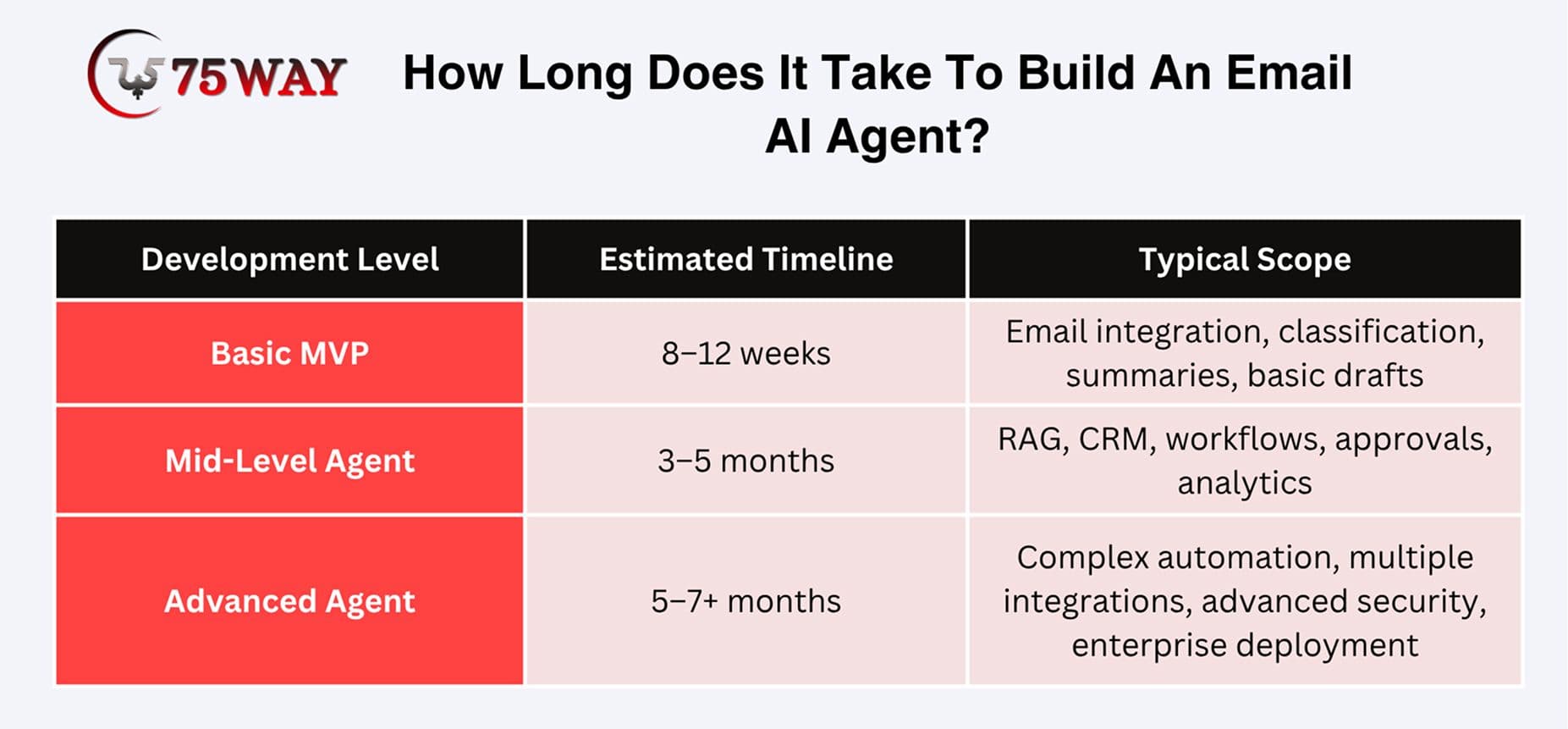
The timeline depends on the number of workflows, email providers, AI capabilities, integrations, user roles, security requirements, testing depth, and feedback cycles. A focused MVP can be launched earlier, while advanced automation can be introduced through subsequent releases.
Common Challenges When Building An Email AI Agent & Solutions
An email AI agent can handle a large share of routine client communication, but putting one into production comes with challenges that are easy to underestimate. The difficult part is not only generating natural-sounding replies. The system must also understand context, protect business data, use connected tools safely, and know when a person should take over. Here are the common challenges businesses should plan for, along with practical ways to address them.
1. Inaccurate Responses: A polished email can still contain the wrong information. This usually happens when the agent relies on incomplete context, outdated documents, or unreliable sources.
Solution: Connect the agent with approved business information and use retrieval mechanisms to provide relevant context. Response validation and human review can add another layer of protection for important communications.
2. Hallucinations: An AI agent may sometimes fill information gaps with an answer that sounds reasonable but has no factual basis. This becomes risky when clients expect accurate information about products, pricing, policies, orders, or contracts.
Solution: Restrict responses to trusted information wherever possible. Retrieval-based workflows, structured outputs, confidence checks, and escalation rules can help prevent unsupported claims from reaching customers.
3. Context Management: Client conversations can stretch across dozens of messages. Older information may no longer be relevant, while different people may provide conflicting details within the same thread.
Solution: Build a context-selection layer that identifies the most relevant messages, customer records, and business information before generating a response. The workflow should also distinguish current information from outdated conversation history.
4. Prompt Injection: An incoming email is not automatically trustworthy simply because it comes from a client. A message could contain instructions designed to manipulate the agent into revealing information or performing an action it should not perform.
Solution: Treat email content as untrusted input. Keep system instructions separate, validate tool requests, restrict permissions, and require approval for sensitive actions rather than allowing email text to control system behaviour directly.
5. Integration Reliability: The agent may depend on email APIs, CRM systems, calendars, databases, or other business applications. A failure in one connected service can interrupt an otherwise reliable workflow.
Solution: Add retries, timeouts, error handling, monitoring, and fallback paths. The agent should also know what to do when a connected system is temporarily unavailable instead of guessing or producing incomplete results.
6. Data Privacy: Client emails may contain personal details, financial information, contracts, confidential documents, or internal business discussions. Poorly designed access controls can expose information beyond what the agent actually needs.
Solution: Apply least-privilege access, encryption, authentication, authorization, appropriate retention policies, audit logging, and secure data-handling practices. Businesses should also define which information the agent is permitted to retrieve and use.
7. Human-AI Coordination: Some conversations require judgment that should not be delegated entirely to an automated system. Refund decisions, contractual commitments, sensitive complaints, and unusual client requests may need employee involvement.
Solution: Create clear approval levels. Routine, low-risk actions can follow automated workflows, while sensitive or uncertain situations can generate drafts, alerts, or escalation tasks for human review.
8. Measuring Agent Quality: A response that sounds professional is not necessarily a successful response. The real question is whether the agent understood the request, used the correct information, completed the required task, and produced the right outcome.
Solution: Test the system against representative client emails and track metrics such as response accuracy, task completion, escalation quality, latency, correction rates, and customer outcomes. Regular evaluation can reveal weaknesses that ordinary usage may not expose.
Why Prefer 75way To Create an AI-Powered Email AI Agent?
75way Technologies helps businesses plan and develop email AI agents around specific communication workflows rather than treating inbox automation as a simple chatbot project. The development approach can cover email integrations, AI models, knowledge retrieval, agent orchestration, CRM connectivity, workflow automation, approval systems, advanced analytics, and security controls.
The focus can remain on identifying which email tasks should actually be automated and which decisions should remain with employees. This helps businesses create an agent that supports sales, customer service, onboarding, follow-ups, and internal workflows while maintaining appropriate controls over sensitive client communication.
Final Thoughts
Client emails can quickly turn into a daily workload of sorting messages, finding information, writing replies, and remembering follow-ups. An email AI agent can take care of much of this routine work by understanding conversations, pulling information from connected systems, preparing responses, updating records, and flagging messages that need a person's attention.
The real value, however, comes from building the agent around your actual business processes rather than simply adding an AI model to the inbox. Reliable integrations, trusted business data, sensible permissions, human review, security controls, and regular testing all play a role in making the system dependable. To make your client inbox easier to manage, you can connect with a reliable AI agent development agency to build an email automation solution that fits the way your team already works.
Frequently Asked Questions (FAQs)
Can An Email AI Agent Work With Gmail And Outlook?
Yes, an email AI agent can integrate with Gmail and Outlook through their available APIs. The required permissions depend on whether the agent only reads emails or also drafts, sends, and manages messages.
Can An Email AI Agent Send Emails Without Human Approval?
Yes, businesses can allow autonomous sending for predefined low-risk workflows. Sensitive communications can instead require employee approval before the agent sends anything externally.
Can An Email AI Agent Understand Previous Client Conversations?
Yes, the agent can use email threads, customer records, and approved business information to understand previous interactions. This context allows responses to address the current request more appropriately.
Can An Email AI Agent Update A CRM Automatically?
Yes, connected CRM tools can allow the agent to create or update records based on information extracted from emails. Permissions and validation rules should control which changes it can make.
Can An Email AI Agent Handle Email Attachments?
Depending on the implementation, the agent can process supported documents or images attached to emails. Businesses should define which file types can be accessed and how extracted information is handled.
How Can Businesses Prevent An Email AI Agent From Making Incorrect Decisions?
Businesses can combine approved knowledge sources, structured workflows, validation rules, restricted permissions, monitoring, and human approval. Testing against realistic email scenarios is also important before expanding autonomous actions.