AI Summary
Library management system development involves far more than digitizing book records and checkouts. This guide explores requirements, prototyping, features, architecture, security, AI, costs, timelines, and deployment. It also explains practical decisions businesses should consider before building library software.
Key Takeaways
- Understand core requirements before developing a scalable library management system.
- Develop prototypes to validate workflows before investing heavily in development.
- Choose architecture, integrations, and security around real operational requirements.
- Library Management System market size will reach $2560.36 million by 2034.
- Development costs typically range from $10,000 to $250,000+.
A library can have a strong collection, loyal members, and busy daily operations, yet outdated software can still hold the entire business back. However, libraries of universities, educational institutes, schools, and local or public libraries often face slow searches, manual records, scattered data, and limited visibility, which can make routine management harder than it needs to be.
That is why library management system development has become a business decision rather than simply a technology upgrade. The right e-learning software can connect resources, members, circulation, payments, notifications, and reporting while giving management a clearer view of what is happening across the library.
So, how do you develop a library management system (LMS) that works for a real library? What’s the cost for development of online library management system? Which features, tech stack, and AI are required to build an LMS?
This practical guide explores what businesses and institutions should consider before developing a library management system, from core features and technology to software development costs, process, and long-term scalability.
What Is a Library Management System?
A library management system is software that centralizes the management of library resources, members, circulation, inventory, cataloging, reservations, payments, notifications, and reporting.
Instead of maintaining separate workflows for borrowing, returns, inventory, member records, and reporting, an LMS connects these processes through a centralized system.
Depending on the business model, the software can support public libraries, academic libraries, school libraries, university systems, corporate libraries, research institutions, private collections, digital libraries, and multi-branch library networks.
A modern platform can also provide separate experiences for patrons, librarians, administrators, and business operators.
For example, a patron can search for a resource and place a hold, while a librarian can manage circulation and inventory. An administrator can configure policies, monitor activity, and review reports from the same underlying platform.
Online Library Management System Market Size & Trends in USA & Worldwide
The library software market is changing as institutions look for simpler ways to manage collections, users, circulation, and digital resources from anywhere. That demand is opening opportunities for technology providers to build more scalable online platforms. The market outlook and opportunity areas shaping online library management systems are discussed below.
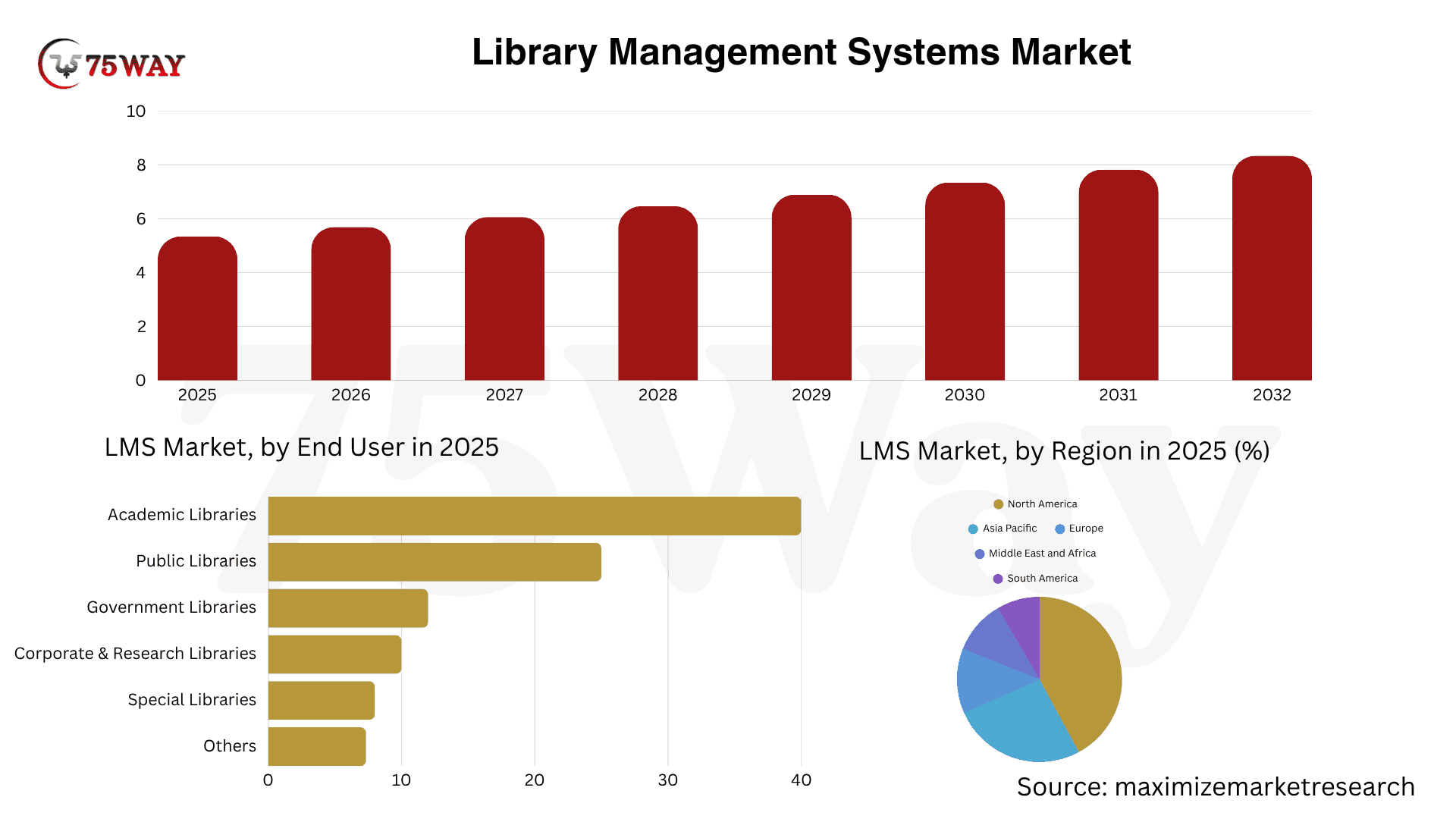
- The U.S. Library Management System market is projected to reach $2,560.36 million by 2034, growing at a 6.5% CAGR.
- Integrated Library Systems (ILS) dominated the market with a 55% share.
- The global library management software market is valued at $3.64 billion in 2026 and is expected to reach $4.26 billion by 2035, expanding at a 1.8% CAGR.
- The overall Library Management Systems market is forecast to grow at a 6.56% rate from 2026–2032, reaching nearly $8.33 billion.
- North America accounts for 34% of the global Catalog Management System market.
Why Invest in Custom Library Management System (LMS) Development?
A custom library management system becomes valuable when standard software cannot fully support an organization’s workflows, integrations, user experience, or growth plans. Instead of adapting operations around rigid software, businesses can build a platform around their actual requirements.
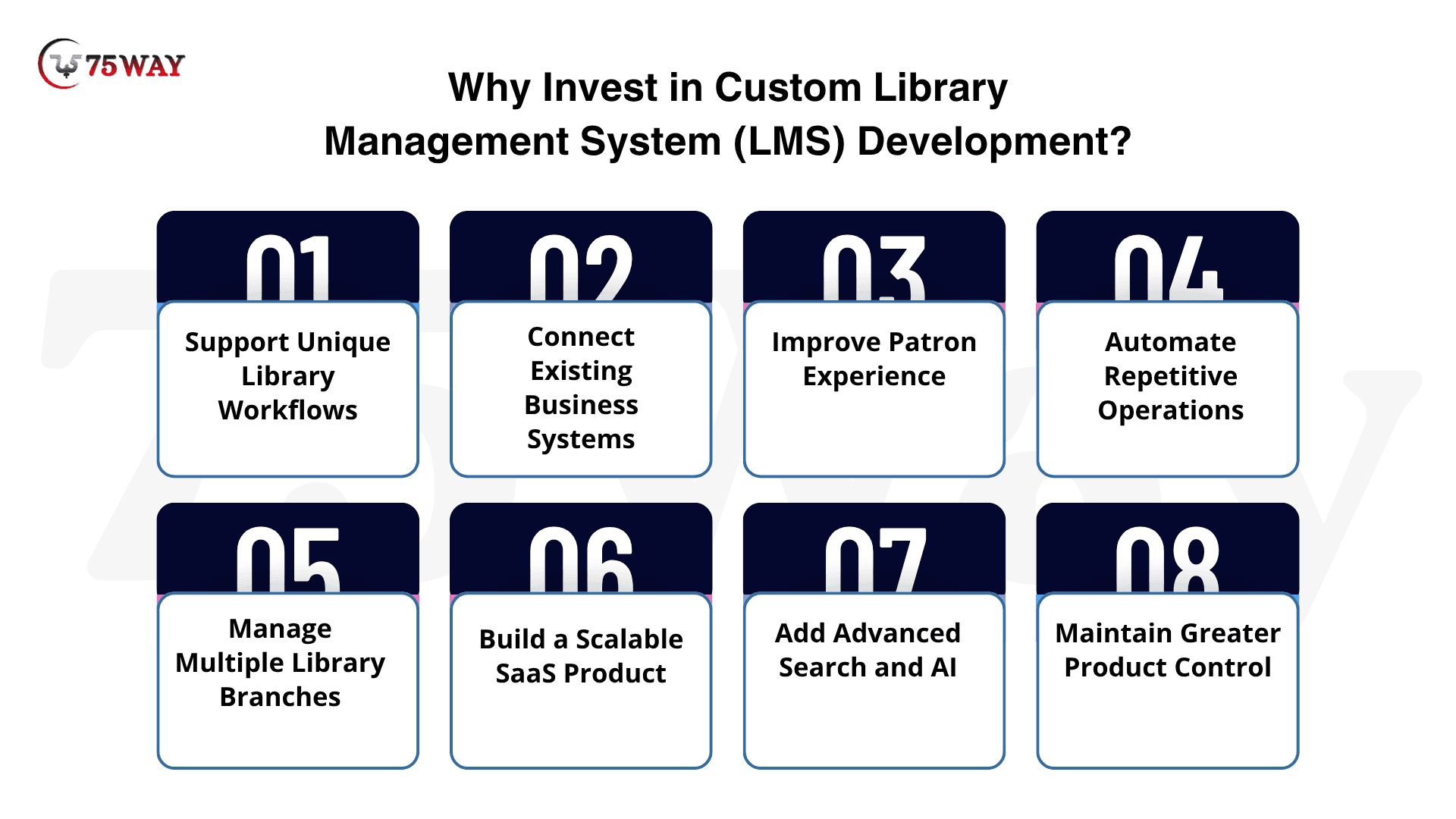
- Support Unique Library Workflows
Every library can have different circulation policies, membership structures, approval processes, branch operations, and resource-management requirements. Custom LMS development lets businesses configure these workflows around their specific operating model.
- Connect Existing Business Systems
Libraries often depend on multiple systems for identity management, payments, student information, RFID, communication, accounting, and digital resources. Custom software can connect these systems through APIs and automated data workflows.
- Improve Patron Experience
A custom LMS can provide a more intuitive experience across web and mobile interfaces. Features such as personalized dashboards, faster search, self-service renewals, reservations, notifications, and digital access can reduce friction for patrons.
- Automate Repetitive Operations
Manual data entry and repetitive administrative tasks can consume staff time. Custom automation can streamline circulation, inventory updates, overdue notifications, reservations, reporting, and other recurring workflows.
- Manage Multiple Library Branches
Organizations operating several branches can use centralized software while maintaining branch-specific inventory, staff permissions, policies, and reporting. This creates a unified operational view without eliminating local controls.
- Build a Scalable SaaS Product
For startups and software companies, custom LMS development can provide the foundation for a commercial SaaS platform. Multi-tenancy, subscription management, configurable workflows, APIs, and tenant-level permissions can be designed into the architecture from the beginning.
- Add Advanced Search and AI
Bespoke online library management software makes it possible to introduce capabilities such as semantic search, natural-language discovery, personalized recommendations, metadata assistance, and AI-powered staff tools when these features address genuine customer needs.
- Maintain Greater Product Control
With custom LMS software, businesses can control the product roadmap, source code, integrations, user experience, architecture, and future enhancements instead of depending entirely on a third-party vendor's development priorities.
How To Develop A Library Management System: From Ideal To Launch
A library management system can start with a simple idea: make everyday library operations easier to manage. The real development challenge begins when catalogues, members, circulation, payments, notifications, security, and reporting all need to work together. The development journey from initial planning to a functional library management system generally includes the following stages.
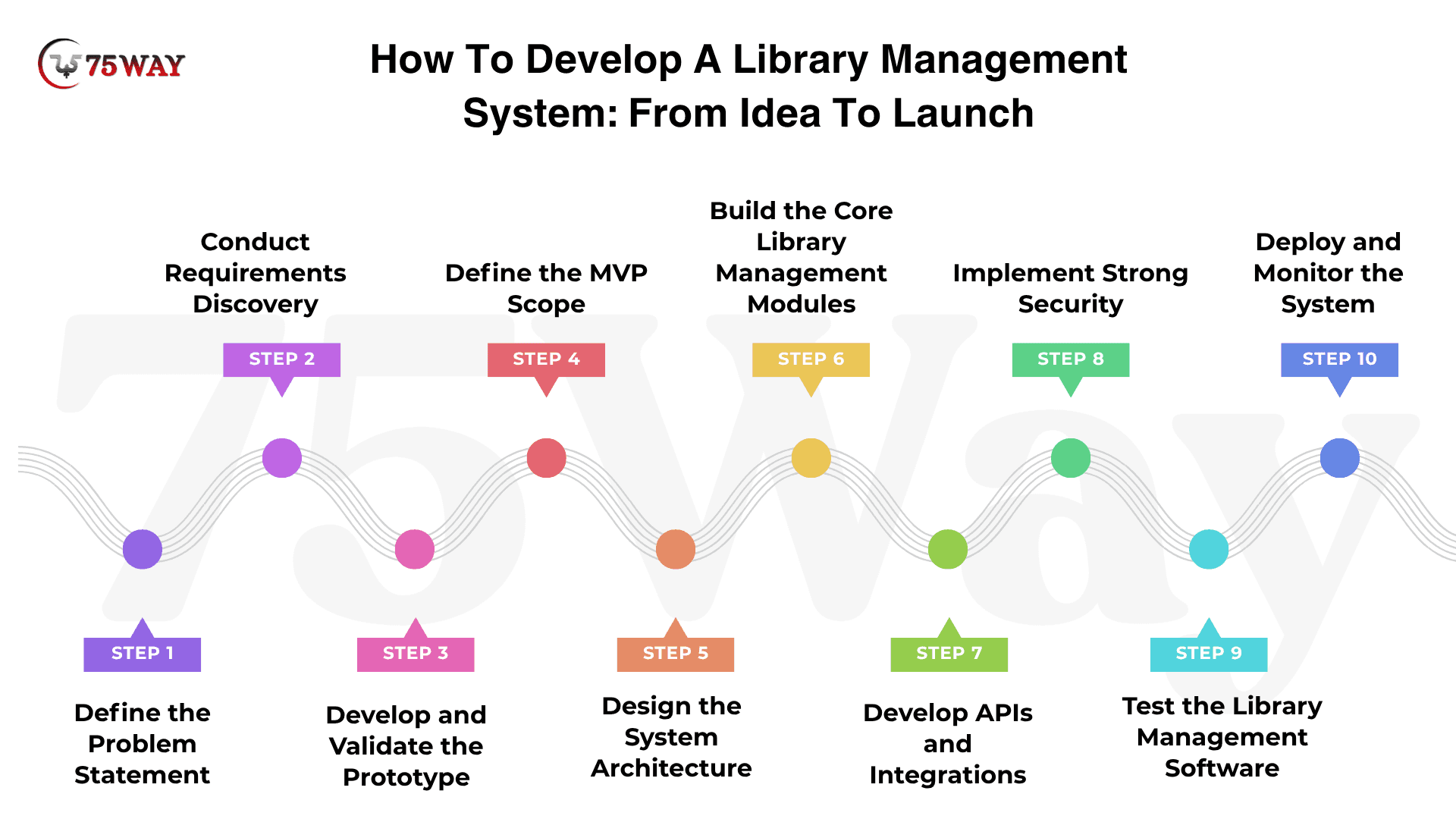
Stage 1: Develop a Problem Statement for a Library Management System
The first step is defining the actual problem the software needs to solve.
A strong problem statement should identify:
- Target users
- Current workflow
- Existing pain points
- Root causes
- Operational consequences
- Desired business outcome
For example:
Library staff currently manage circulation, inventory, and patron records through disconnected workflows, resulting in duplicate data entry, limited visibility, and delays. The proposed system will centralize these processes while providing patrons with faster discovery and self-service functionality.
This approach creates a foundation for product decisions.
Without a clear problem statement, teams can easily start adding features without knowing which problems those features are supposed to solve.
Stage 2: Conduct Requirements Discovery
Once you know what is going wrong, the next question is what the new system actually needs to handle. This is where you turn real library workflows into clear development requirements, so the team knows what to build and what the finished product needs to deliver.
- Functional Requirements
Functional requirements describe the jobs your LMS needs to get done in everyday use, whether that means registering a new patron, checking out a book, or generating a report. Mapping these workflows early helps prevent a common development problem.
- Non-Functional Requirements
Non-functional requirements focus on what users should experience while those workflows are running, including speed, security, availability, accessibility, scalability, and reliability. If you are building a SaaS product, this stage should also settle questions around multiple libraries and future growth before they become expensive architectural changes.
Stage 3: Develop Prototype for Library Management System
A prototype turns requirements into a visual and interactive representation of the product. However, the goal should not simply be creating attractive screens. The prototype should test whether the underlying workflows make sense.
Example Patron Workflow
Search → View Resource → Check Availability → Place Hold → Confirmation
Example Librarian Workflow
Login → Scan Item → Identify Patron → Apply Policy → Checkout → Update Status
Example Administrator Workflow
Dashboard → Manage Branches → Configure Policies → Manage Users → Review Reports
These workflows help product teams discover problems before full development begins.
So, should prototypes for a library management system be validated?
The prototype should reveal whether users can move through key workflows naturally, from searching and reserving resources to checking items out and managing accounts. It should also uncover confusing navigation, unnecessary steps, unclear information, accessibility gaps, and workflow issues before development turns those problems into expensive rework.
Stage 4: Define the MVP Scope of Library Software
In the next step, you canstart with the smallest feature set that solves core library problems while leaving room for future expansion. The MVP should validate real workflows before advanced functionality increases development complexity.
- Include patron registration, authentication, and role-based access.
- Enable catalog management and resource availability tracking.
- Support checkout, returns, renewals, and reservations.
- Provide notifications, basic reporting, and administrative controls.
- Keep architecture flexible for future integrations.
Stage 5: Design the Library Management System Architecture
Architecture determines how the system handles users, transactions, data, integrations, and future growth. A typical architecture can include several layers.
- Presentation Layer: Creates user-facing web and mobile interfaces for patrons, librarians, and administrators.
- Application Layer: Processes business logic, authentication, circulation, reservations, notifications, reporting, and API requests.
- Data Layer: Stores structured information about patrons, resources, transactions, branches, staff, and policies.
- Search Layer: Enables fast, relevant discovery across large collections using dedicated search technologies.
Stage 6: Build the Core Library Management Modules
After architecture and MVP scope are established, development moves into the core modules.
- Patron Management: Manages member registration, profiles, authentication, memberships, and account information.
- Catalog Management: Organizes books, resources, metadata, categories, authors, publishers, and availability.
- Search and Discovery: Helps users quickly find relevant books, resources, and available copies.
- Circulation Management: Handles checkouts, returns, renewals, due dates, fines, and borrowing policies.
- Reservation Management: Allows patrons to reserve unavailable books and manage reservation queues.
- Inventory Management: Tracks physical resources, copies, locations, availability, losses, and inventory changes.
- Staff Management: Manages librarian profiles, roles, permissions, schedules, and administrative responsibilities.
- Multi-Branch Management: Coordinates collections, users, policies, and operations across multiple library locations.
- Administration: Controls system settings, user roles, permissions, configurations, and operational policies.
Stage 7: Develop APIs and Integrations
Modern library software rarely operates alone. APIs allow the platform to communicate with external systems. Potential integrations include:
- Identity Systems: Enable secure authentication and centralized account management across connected platforms.
- Student Information Systems: Connect academic records, student profiles, enrollment data, and library accounts.
- Payment Gateways: Process fines, fees, memberships, and other library-related financial transactions.
- RFID Systems: Support automated identification, tracking, check-in, check-out, and inventory workflows.
- Barcode Systems: Enable quick item identification, scanning, circulation, and inventory management.
- Communication Services: Deliver automated reminders, alerts, notifications, and account updates through email and SMS.
- Analytics Platforms: Provide deeper insights into collection usage, patron activity, circulation, branches, and searches.
- Integration Architecture: Manages authentication, rate limits, retries, failures, synchronization, and data consistency.
Stage 8: Implement Strong Security Across Every System Layer
Library systems handle patron profiles, borrowing records, staff accounts, and payment information, making security a core product requirement rather than a final development task.
You must start with role-based access, secure authentication, encryption, audit logs, backups, and API protection. Regular vulnerability testing and monitoring can also help identify weaknesses before they become costly security incidents.
Stage 9: Test the Library Management Software
Testing should mirror what actually happens inside a busy library, not simply confirm that buttons work. Put the system through realistic borrowing, returns, reservations, searches, payments, and multi-user scenarios to uncover workflow conflicts, slow responses, broken integrations, and permission issues before librarians and patrons encounter them.
- Verify every core library workflow works.
- Observe how easily users complete tasks.
- Measure responsiveness during heavy simultaneous usage.
- Identify vulnerabilities across accounts, APIs, and data.
- Confirm connected systems exchange data correctly.
Stage 10: Deploy and Monitor the Library Management System
Deployment moves the tested system into real library operations, where actual users, devices, and integrations put it through its final practical test. A phased rollout can help teams identify issues without disrupting everyday services.
Monitoring then keeps an eye on uptime, performance, errors, security events, and user activity. These insights show where the system needs fixes or improvements as usage grows and library requirements change.
Core Features For Design And Development of Web-Based Library Management System
A library may look simple from the outside, but its software has to coordinate countless activities behind the scenes. Member records, staff operations, notifications, and administrative controls all need to work together without creating unnecessary friction. These capabilities form the foundation of a library management system that can support real-world operations and future growth.
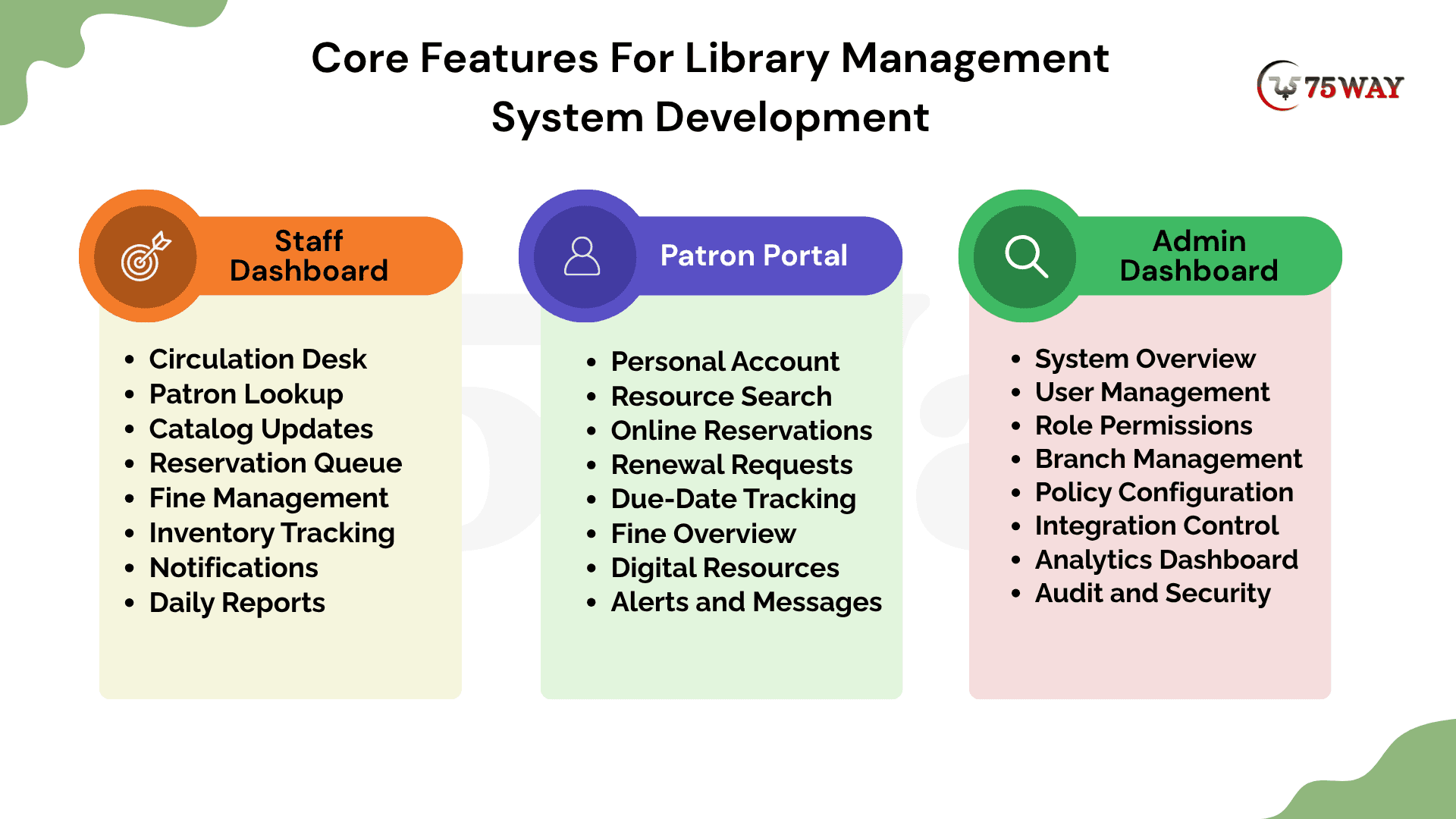
Module 1: Staff Dashboard Features
- Circulation Desk: Staff can see today’s checkouts, returns, renewals, and overdue items without switching between multiple screens. It keeps the busiest daily tasks within easy reach.
- Patron Lookup: A quick search lets librarians pull up member records, borrowing history, and account status. This saves time when someone needs help at the circulation desk.
- Catalog Updates: Staff can add new resources, correct catalog details, update availability, or remove outdated records. Changes become visible across the system without maintaining separate records.
- Reservation Queue: Librarians can view pending reservations and see which items are ready for pickup. The queue also helps staff handle high-demand resources without losing track of requests.
- Fine Management: Outstanding fines and payment status remain visible from the staff dashboard. Librarians can review charges, make adjustments where permitted, and update payment records.
- Inventory Tracking: Staff can check where individual copies are located and flag missing or damaged resources. This gives the team a clearer picture of what is actually available.
- Notifications: Upcoming due dates, overdue items, and reservation alerts can appear as actionable tasks. Staff can address exceptions instead of manually checking every member account.
- Daily Reports: Quick reports show circulation activity, overdue resources, reservations, and other daily figures. Managers can use these snapshots to understand what needs attention.
Module 2: Patron Portal Features
- Personal Account: Patrons can view their profile, membership details, borrowing history, and current loans in one place. They can also update permitted account information without contacting library staff.
- Resource Search: Users can search books and other resources by title, author, category, keyword, or other available filters. Results can show availability before they decide what to borrow.
- Online Reservations: A patron can place a hold on an unavailable resource instead of repeatedly checking its status. The portal can show their position or reservation progress when applicable.
- Renewal Requests: Eligible items can be renewed directly from the account area. The system can clearly show when a renewal is unavailable because of limits or existing reservations.
- Due-Date Tracking: Current loans display their return dates, making it easier for patrons to manage borrowed resources. Clear reminders can reduce forgotten returns and unexpected overdue charges.
- Fine Overview: Patrons can see outstanding fines and understand what generated each charge. If online payments are supported, the portal can take them through the available payment option.
- Digital Resources: Where the library offers digital materials, patrons can access eligible resources from their accounts. Permissions can determine what each member is allowed to view or download.
- Alerts and Messages: The portal can collect reservation updates, due-date reminders, and important account messages in one place. Patrons stay informed without depending entirely on staff communication.
Module 3: Admin Dashboard Features
- System Overview: Administrators get a broader view of users, resources, circulation, branches, and system activity. Key numbers can help them spot unusual changes without opening individual records.
- User Management: Admins can create, update, deactivate, and manage staff or patron accounts. Role-based permissions determine which areas each user can access.
- Role Permissions: Different employees may need very different levels of system access. Administrators can assign permissions according to responsibilities rather than giving everyone the same controls.
- Branch Management: Multi-branch libraries can manage locations, collections, staff, and operating settings from one dashboard. Administrators can also monitor activity across individual branches.
- Policy Configuration: Borrowing limits, renewal rules, fine settings, membership policies, and other operational rules can be configured centrally. This keeps system behavior aligned with the library’s actual policies.
- Integration Control: Administrators can manage connected services such as identity systems, payment gateways, RFID tools, and communication providers. Integration status and configuration details remain easier to monitor from one place.
- Analytics Dashboard: Visual reports can bring together circulation, membership, resource usage, reservations, and branch activity. These insights help administrators understand how the library is being used.
- Audit and Security: Important account, permission, and system changes can be recorded for later review. Administrators can use these logs to investigate unusual activity and maintain better control over sensitive operations.
AI Features for Development of Library Management System
The next generation of library software is not only about digitizing existing processes. It is about making those processes smarter. A thoughtful AI strategy can therefore add a new layer of intelligence to the entire library management ecosystem.
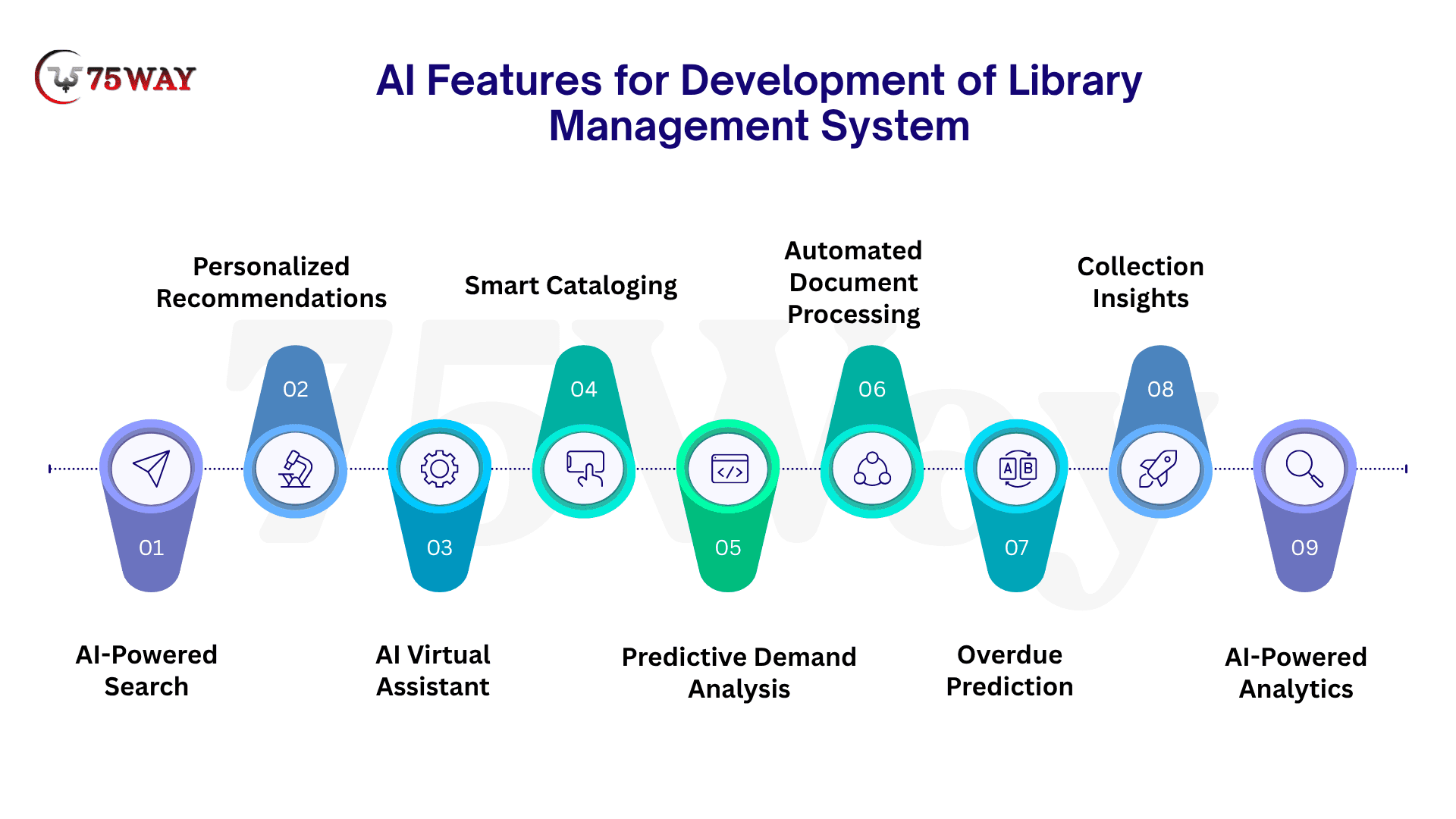
- AI-Powered Search: Understand natural-language queries instead of relying only on exact keywords. Patrons can search by topic, intent, or description and receive more relevant resources.
- Personalized Recommendations: Suggest books and resources based on borrowing history, interests, searches, and preferences. Recommendations can help patrons discover relevant content they might otherwise overlook.
- AI Virtual Assistant: Answer common questions about resources, borrowing rules, due dates, reservations, and library services. It can provide support around the clock while reducing repetitive staff queries.
- Smart Cataloging: Help librarians classify new resources, generate metadata, identify categories, and organize records. This can reduce manual cataloging work when large collections are added.
- Predictive Demand Analysis: Examine circulation and reservation patterns to identify resources that may see higher demand. Librarians can use these insights when planning acquisitions and collection allocation.
- Automated Document Processing: Extract relevant information from invoices, acquisition documents, forms, and other library records. Staff can review the extracted data instead of entering every detail manually.
- Overdue Prediction: Identify borrowing patterns that may indicate a higher likelihood of late returns. The system can trigger timely reminders before items become overdue.
- Collection Insights: Analyze usage patterns to highlight heavily used, rarely accessed, or potentially underrepresented resources. These insights can support more informed collection management decisions.
- AI-Powered Analytics: Convert large volumes of library activity into understandable trends and summaries. Administrators can explore patron behavior, circulation patterns, search activity, and branch performance more easily.
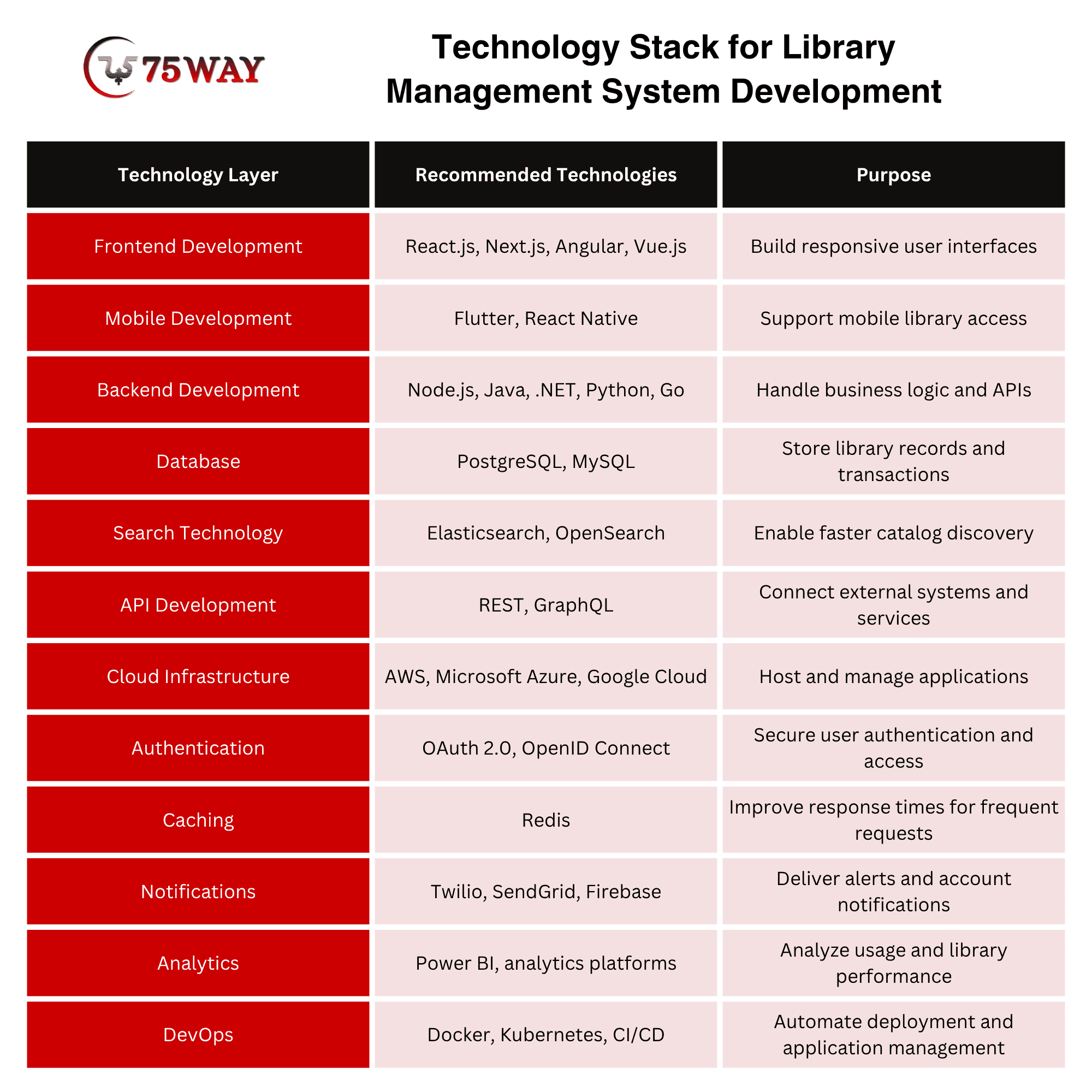
Technology Stack for Library Management System Development
The right technology stack gives a library management system the foundation needed for smooth circulation, catalog management, user access, integrations, and future growth. The final choices should depend on the system’s size, user volume, required integrations, and deployment model.
- Frontend Development: React.js, Next.js, Angular, or Vue.js can power responsive interfaces for patrons, librarians, and administrators.
- Mobile Development: Flutter or React Native can support mobile apps for searching resources, managing accounts, checking due dates, and receiving notifications.
- Backend Development: Node.js, Java, .NET, Python, or Go can handle authentication, circulation, reservations, notifications, reporting, and other business logic.
- Database: PostgreSQL or MySQL can store structured records covering patrons, books, copies, loans, reservations, branches, fines, staff, and library policies.
- Search Technology: Elasticsearch or OpenSearch can improve catalog discovery when libraries need advanced filtering, relevance-based results, and faster searches across large collections.
- API Development: REST or GraphQL APIs can connect the library management system with payment gateways, RFID systems, student information systems, identity providers, and communication services.
- Cloud Infrastructure: AWS, Microsoft Azure, or Google Cloud can provide hosting, storage, monitoring, backups, and infrastructure needed for growing library operations.
- Authentication: OAuth 2.0 and OpenID Connect can support secure login and integration with existing identity systems.
- Caching: Redis can store frequently requested information temporarily, helping reduce database load and improve response times.
- Notifications: Services such as Twilio, SendGrid, or Firebase can deliver SMS, email, and push notifications for due dates, reservations, and account updates.
- Analytics: Power BI or other analytics platforms can help administrators examine circulation, resource usage, patron activity, searches, and branch-level performance.
- DevOps: Docker, Kubernetes, and CI/CD tools can support repeatable deployments, environment management, monitoring, and ongoing application updates.
How Much Does It Cost To Develop a Library Management System?
The library management system development cost can range from $10,000 to $250,000+, depending on the product's scope and complexity. A basic MVP with core catalog, patron, circulation, and administration functionality will have a substantially different cost from an enterprise platform with multiple branches, mobile applications, AI, RFID, advanced analytics, integrations, and multi-tenant SaaS architecture.
1. Basic/Simple LMS Cost: $10,000–$25,000
- Features include user records, book management, search, checkouts, and notifications.
- Best for small libraries with straightforward operational requirements.
- Development focuses on essential workflows without complex integrations.
Estimated Timeline: 3-4 months
2. Mid-to-Advanced LMS Cost: $25,000–$50,000
- Features include barcode/RFID, automated fines, OPAC, payments, reservations, and multilingual support.
- Best for libraries needing broader automation and integrations.
- Development accommodates more workflows, integrations, and user requirements.
Estimated Timeline: 4-6 months
3. Enterprise/Multi-Platform LMS Cost: $50,000–$75,000+
- Features include multi-branch operations, advanced analytics, APIs, AI, and integrations.
- Best for organizations managing complex, distributed library operations.
- Development requires deeper customization, security, scalability, and testing.
Estimated Timeline: 6-9 months
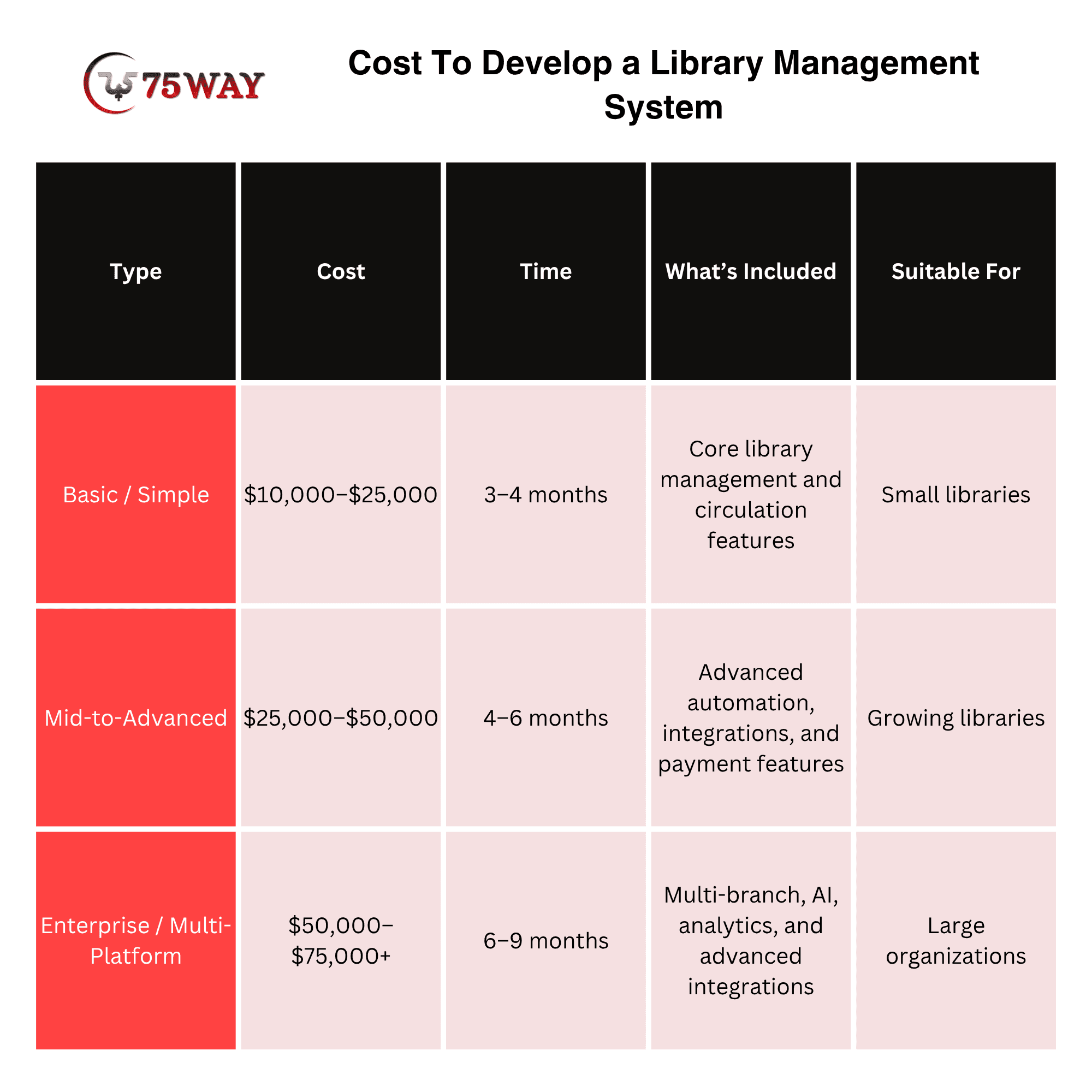
A reliable estimate should be created after requirements discovery rather than based only on the number of screens. However, at 75way, we provide cost-effective library management system development solutions. You can build an LMS ranging from $10,000 to $70,000+.
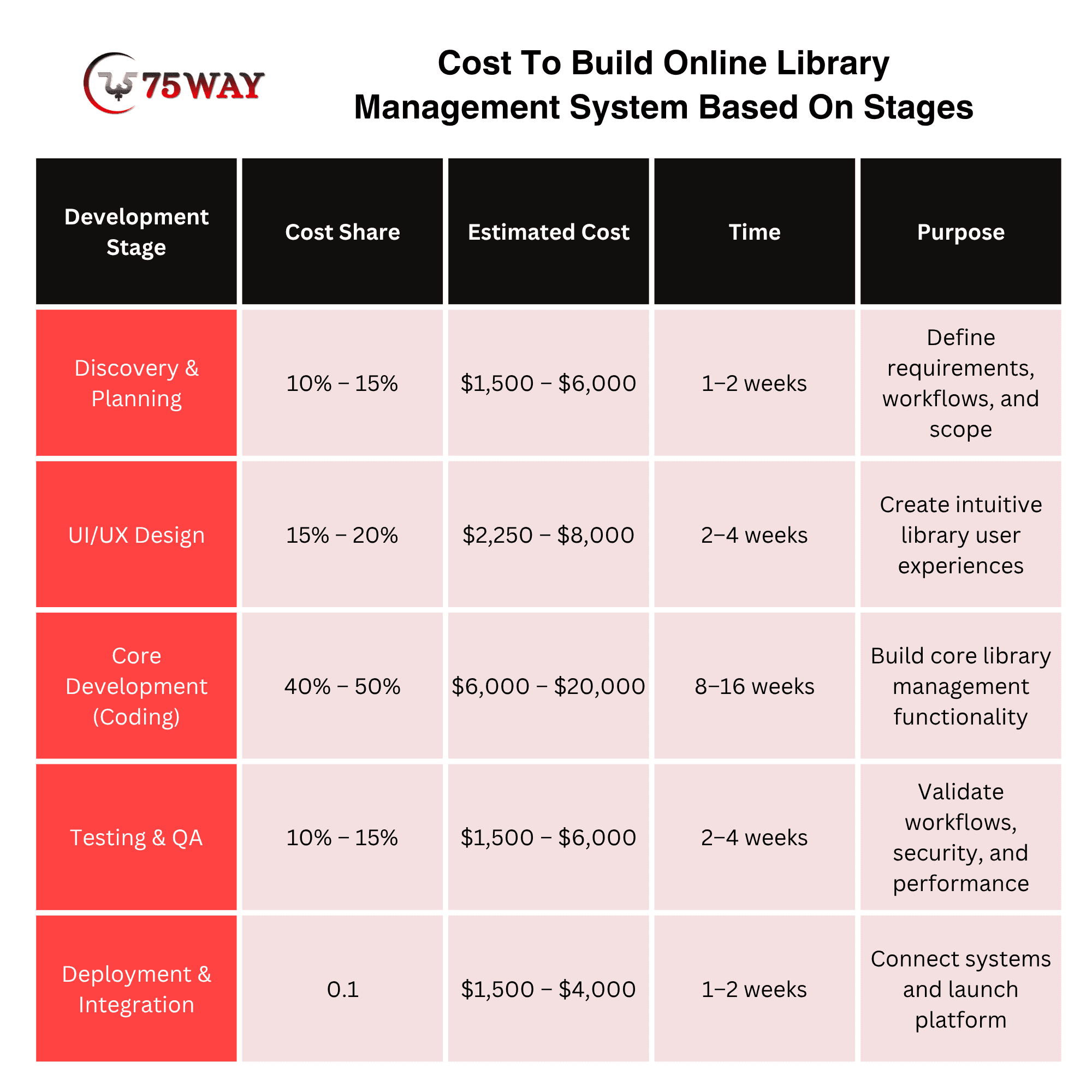
Cost To Build Online Library Management System Based On Stages
A library management platform can begin with a modest budget and expand significantly as its requirements become more advanced. Custom workflows, multiple user roles, AI capabilities, third-party integrations and scalability can all change the final investment. The stage-wise breakdown helps connect each development activity with the cost it can add to the project.
Custom Vs White-Label Library Management System: Key Differences
The difference between custom development and a white-label library management system is that custom development creates the LMS around your exact workflows, integrations, and requirements, while a white-label system provides an existing product that can be branded and configured within its available capabilities.
Custom development also gives you greater control over the product roadmap, architecture, data structure, and future integrations. A white-label option can reduce initial development work, but your library may need to work within the provider’s existing features, update cycles, and customization limits.
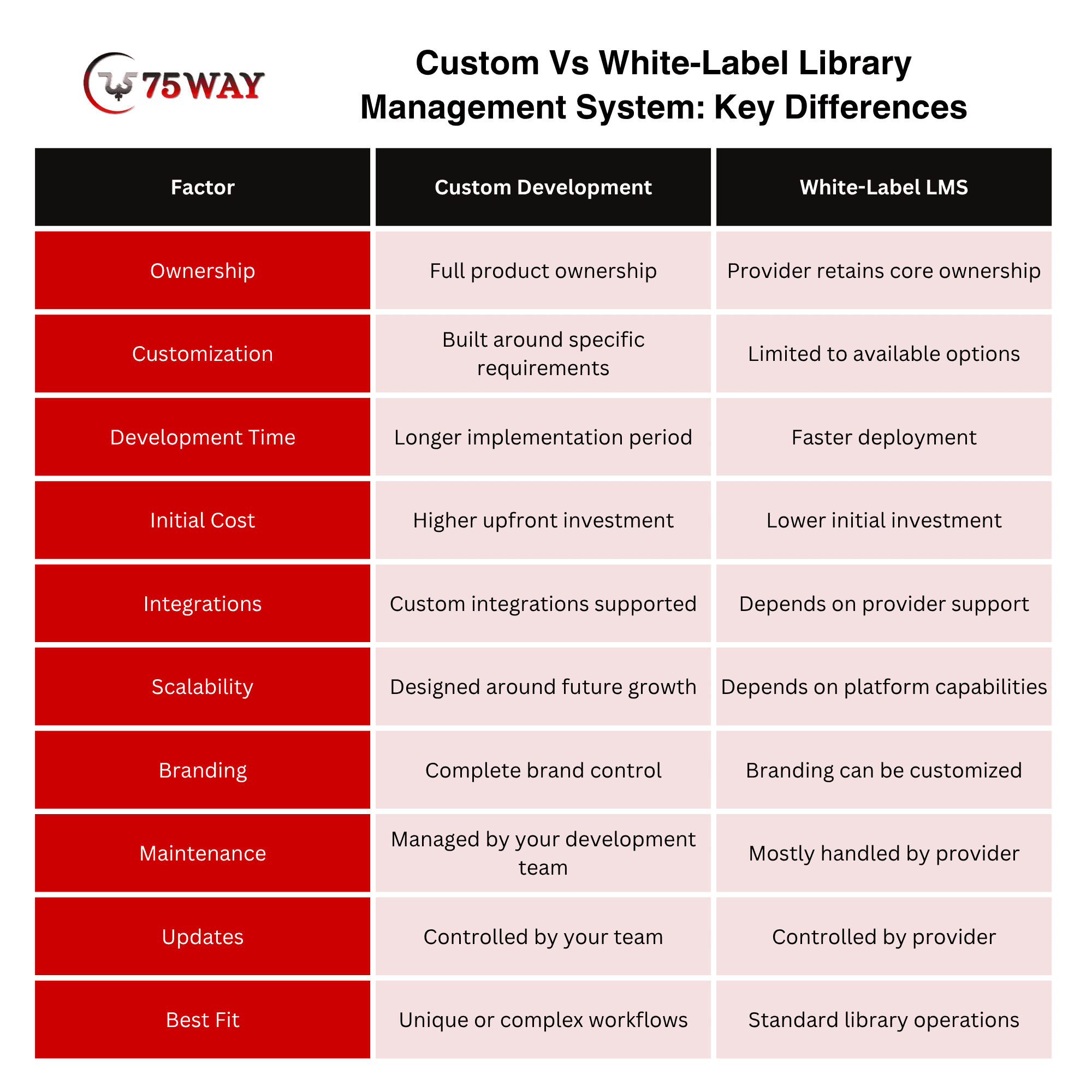
A library with conventional requirements may benefit from an established platform. A startup developing a commercial product, or an organization with specialized workflows and integration requirements, may have stronger reasons to develop custom software.
Common Mistakes in Library Management System Development & Solutions
Why do some library management projects become complicated, costly, or difficult to use after launch? Weak requirements, poor system planning, limited testing, outdated technology choices, and overlooked user needs can create problems that were avoidable from the beginning. A closer look at these development mistakes and their practical solutions can help prevent similar issues.
1. Building Features Without Understanding Workflows
Adding every commonly requested feature does not guarantee a useful system. Map how librarians, patrons, and administrators actually work first, then prioritize features around those workflows.
Solution: Interview real users, document daily processes, and validate requirements before development begins.
2. Treating Search as a Basic Function
A simple keyword box may struggle when collections become large, or searches become more specific. Poor discovery can quickly make a well-organized catalog feel difficult to use.
Solution: Plan filters, relevance, metadata, availability, and scalable search architecture from the beginning.
3. Ignoring Integration Requirements
Identity systems, payment providers, RFID equipment, student systems, and communication services may become essential later. Leaving integrations until the end can force expensive changes to the underlying architecture.
Solution: Identify required integrations during planning and design clear API boundaries early.
4. Giving Every User Broad Access
Staff members, administrators, and patrons do not need access to the same information or controls. Weak permission design can expose sensitive records or allow unintended system changes.
Solution: Define roles and permissions early, then test access rules across real user scenarios.
5. Designing Only for Current Usage
A system that works for one branch and a few hundred users may struggle after expansion. Growing collections, additional branches, higher traffic, and new integrations can expose architectural limitations.
Solution: Plan capacity, data growth, modular architecture, backups, and scaling requirements before launch.
6. Skipping Real-World Testing
Testing only individual features can miss problems that appear when several workflows interact. A reservation, overdue fine, renewal, notification, and payment may each work independently but fail when combined.
Solution: Test complete user journeys with realistic data, devices, integrations, and concurrent activity.
How To Choose a Library Management System Development Company
The right library management system development agency should understand more than software development; they should understand how libraries actually operate. Look for a team that can translate circulation, cataloging, patron services, integrations, and administrative requirements into a practical product.
- Library Workflow Expertise: Check their experience with circulation, cataloging, reservations, inventory, and patron workflows.
- LMS Development Portfolio: Review previous library platforms, dashboards, portals, and management systems they have delivered.
- Integration Capabilities: Confirm their experience integrating RFID, barcode, payment, identity, student, and communication systems.
- Post-Launch Support: Ask about maintenance, monitoring, bug fixes, upgrades, integrations, and ongoing LMS improvements.
Final Thoughts
To conclude, library management system development is ultimately a product-engineering project, not simply a software digitization exercise. The strongest platforms connect library operations, patron experiences, data, integrations, and automation through workflows designed around real requirements.
For businesses considering custom development, the practical starting point is a clearly defined problem statement. The right development strategy also depends on whether you are modernizing one library, building software for a library network, or launching a commercial SaaS product.
If you want to build a custom library management system, you can contact a reliable software development company and start with your requirements.
Frequently Asked Questions (FAQs)
How Long Does It Take To Develop Library Management Software?
A basic MVP can take several months, while enterprise software with multiple integrations, branches, advanced analytics, and complex workflows can require considerably longer.
Can A Library Management System Support Multiple Branches?
Yes. Multi-branch functionality can allow organizations to manage multiple locations while maintaining centralized administration, shared policies, branch-level inventory, and staff permissions.
Can RFID Be Integrated Into Library Management Software?
Yes. RFID systems can be integrated to support item identification, circulation, inventory management, and other automated workflows when compatible hardware and interfaces are available.
Can AI Be Added To A Library Management System?
Yes. AI can support semantic search, recommendations, natural-language discovery, metadata assistance, and internal staff-support workflows.
Should I Build Or Buy A Library Management System?
The decision depends on requirements. Standard workflows may fit an existing platform, while specialized operations, proprietary functionality, integrations, or SaaS ambitions can justify custom development.
Which Technologies Are Used For Library Management System Development?
Potential technologies include React, Next.js, Angular, Vue, Node.js, Java, .NET, Python, Go, PostgreSQL, MySQL, Elasticsearch, OpenSearch, and major cloud platforms. The appropriate stack depends on the product's requirements.
Can Library Management Software Be Developed As SaaS?
Yes. A SaaS architecture can serve multiple libraries from a centralized platform using tenant isolation, configurable workflows, subscription management, role-based access, APIs, and centralized administration.
How To Develop a Library Management System Program Using XML Schema?
- Define Data Structure: Identify books, members, authors, loans, reservations, and fines.
- Create XML Schema: Define elements, attributes, data types, and validation rules using XSD.
- Build XML Records: Structure library information according to the defined schema.
- Develop Core Functions: Add search, registration, checkout, returns, renewals, and reservation functionality.
- Validate and Test: Validate XML data against the XSD and test real library workflows.
- Deploy the System: Connect the application with required databases, interfaces, and library services before deployment.