AI Summary
AI customer support agents should do more than generate replies. They should investigate issues, take actions, and resolve tickets. This guide explains how to build one using AI, workflows, integrations, and guardrails. Learn the architecture, development process, essential features, and metrics.
Key Takeaways
- AI customer support agents resolve tickets by reasoning, acting, verifying, and escalating.
- Integrations let agents access data and perform real support actions.
- Agent architecture determines reliability, scalability, security, and resolution quality.
- Human escalation remains essential for complex, sensitive, or uncertain tickets.
- Testing resolution accuracy matters more than measuring chatbot response volume.
An AI customer support agent should do more than generate a polite response. It should understand the customer's intent, retrieve the right information, investigate the issue, take authorized actions, verify the outcome, and escalate the ticket when automation cannot safely complete the request.
That difference is what separates an AI chatbot from a customer support AI agent.
A chatbot may answer, “Here is how you can reset your password.” The AI agent development solutions can identify the customer's account, verify the relevant information, trigger the password-reset workflow, confirm completion, and update the ticket.
For businesses, that distinction matters because the goal of customer-support automation is not simply to increase the number of AI-generated replies. The real objective is to resolve more customer issues with fewer unnecessary handoffs while maintaining accuracy, security, and a good customer experience.
This guide explains how to build an AI customer support agent from the ground up, including its architecture, core components, workflows, integrations, development process, costs, testing strategy, security requirements, and performance metrics.
What Is an AI Customer Support Agent?
An AI customer support agent is an AI-powered software system that can understand customer requests, reason over available information, interact with business systems, perform predefined actions, and resolve or escalate support tickets.
Unlike a traditional chatbot that mainly generates conversational responses, an AI-powered customer support agent can participate in a complete support workflow.
For example:
Customer: “My order arrived damaged. Can you send a replacement?”
A basic chatbot might provide a return-policy link.
An AI support agent could:
- Identify the customer.
- Retrieve the order.
- Check the order status.
- Review the applicable replacement policy.
- Confirm whether the order qualifies.
- Create a replacement request.
- Update the support ticket.
- Notify the customer.
- Escalate the case if an exception requires human approval.
This is the fundamental shift from answering tickets to solving tickets.
How Does AI-Powered Customer Support Agent Work?
A customer message is only the starting point for an AI support agent. The system must understand what the customer needs, connect that request with relevant information and business rules, and decide what should happen next. Its working process shows how AI moves a support request from initial understanding toward a verified outcome.
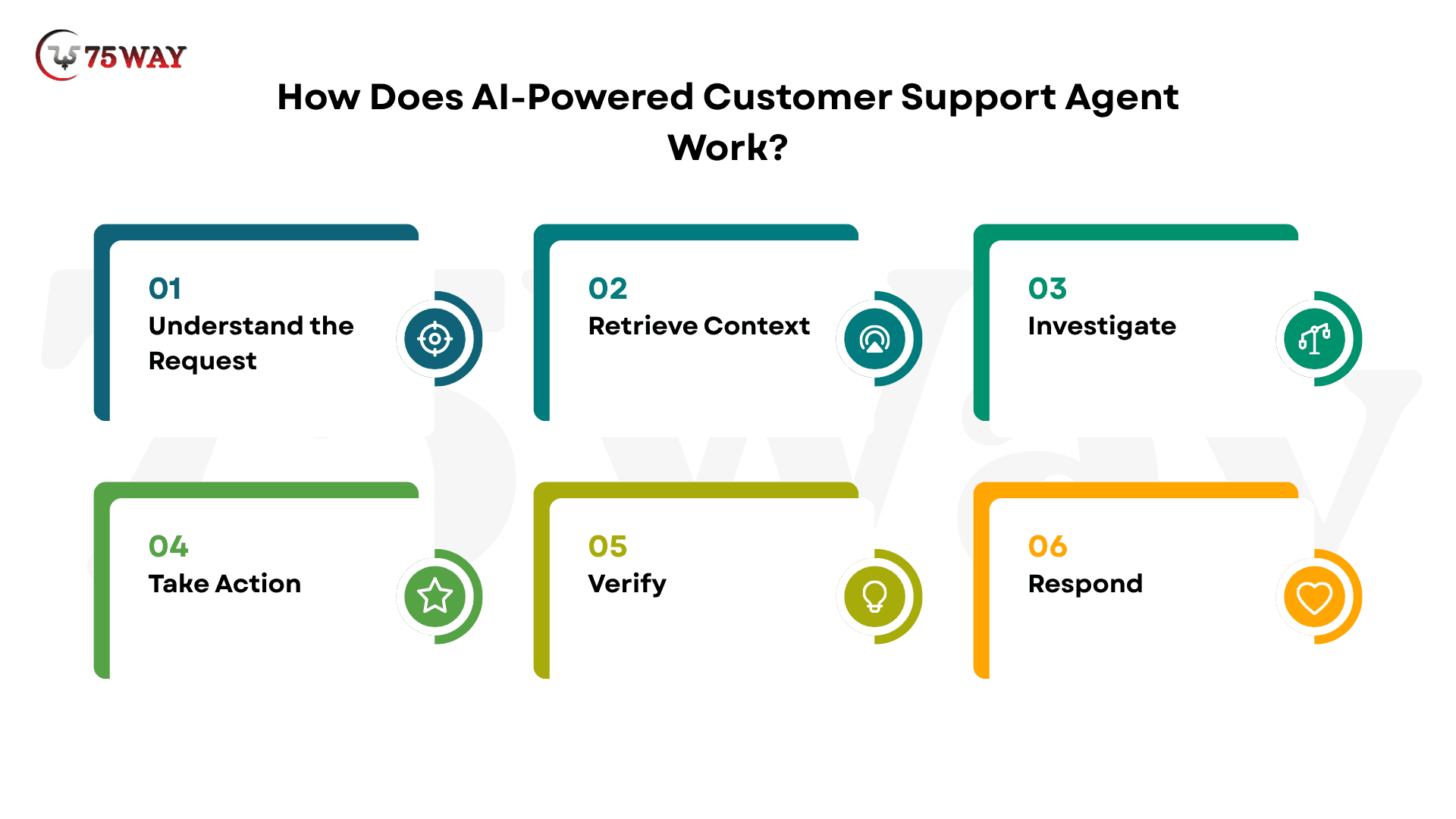
Step 1: Understand the Request
The agent first analyzes the customer's message to identify the intent, issue type, urgency, and desired outcome.
For example, when a customer asks, “Why was I charged twice for my subscription?”, the agent recognizes this as a potential duplicate billing issue and determines which support workflow should handle it.
Natural language processing and large language models help interpret different ways customers may describe the same problem.
Step 2: Retrieve Context
After identifying the request, the agent retrieves the information it is authorized to access and needs to investigate the issue.
For a billing complaint, this could include the customer's profile, subscription status, recent invoices, payment history, previous tickets, and relevant account activity.
Connecting the agent to reliable business systems ensures that its response is based on current customer-specific information rather than generic assumptions.
Step 3: Investigate
The agent then reasons across the retrieved information to determine what actually happened.
In a duplicate-charge scenario, it may compare transaction IDs, timestamps, invoice details, subscription events, and payment statuses to distinguish between a genuine duplicate charge, a normal renewal, a temporary authorization, two separate purchases, or another billing exception.
Business rules and confidence thresholds can help determine whether the agent is permitted to continue autonomously.
Step 4: Take Action
Once the agent understands the situation, it selects an appropriate tool or workflow and performs an authorized action.
Depending on the company's policies, this could mean explaining a valid charge, opening a billing investigation, initiating an approved refund, updating the ticket, or creating an escalation for a support specialist. Tool access and permissions should be tightly controlled so the agent can only perform actions appropriate to its role.
Step 5: Verify
Before claiming that an issue has been resolved, the agent verifies that the requested action actually succeeded.
For example, after initiating an approved refund, it can check the transaction or payment system for confirmation instead of immediately telling the customer that the refund was completed. This verification layer helps prevent inaccurate responses when an API fails, a transaction is rejected, or an external system has not yet updated.
Step 6: Respond
After verification, the agent communicates the outcome in clear, customer-friendly language. The response should explain what the agent found, what action was taken, and what the customer should expect next without exposing unnecessary internal information.
If the issue remains unresolved, the agent should clearly communicate the next step rather than presenting an uncertain answer as a confirmed resolution.
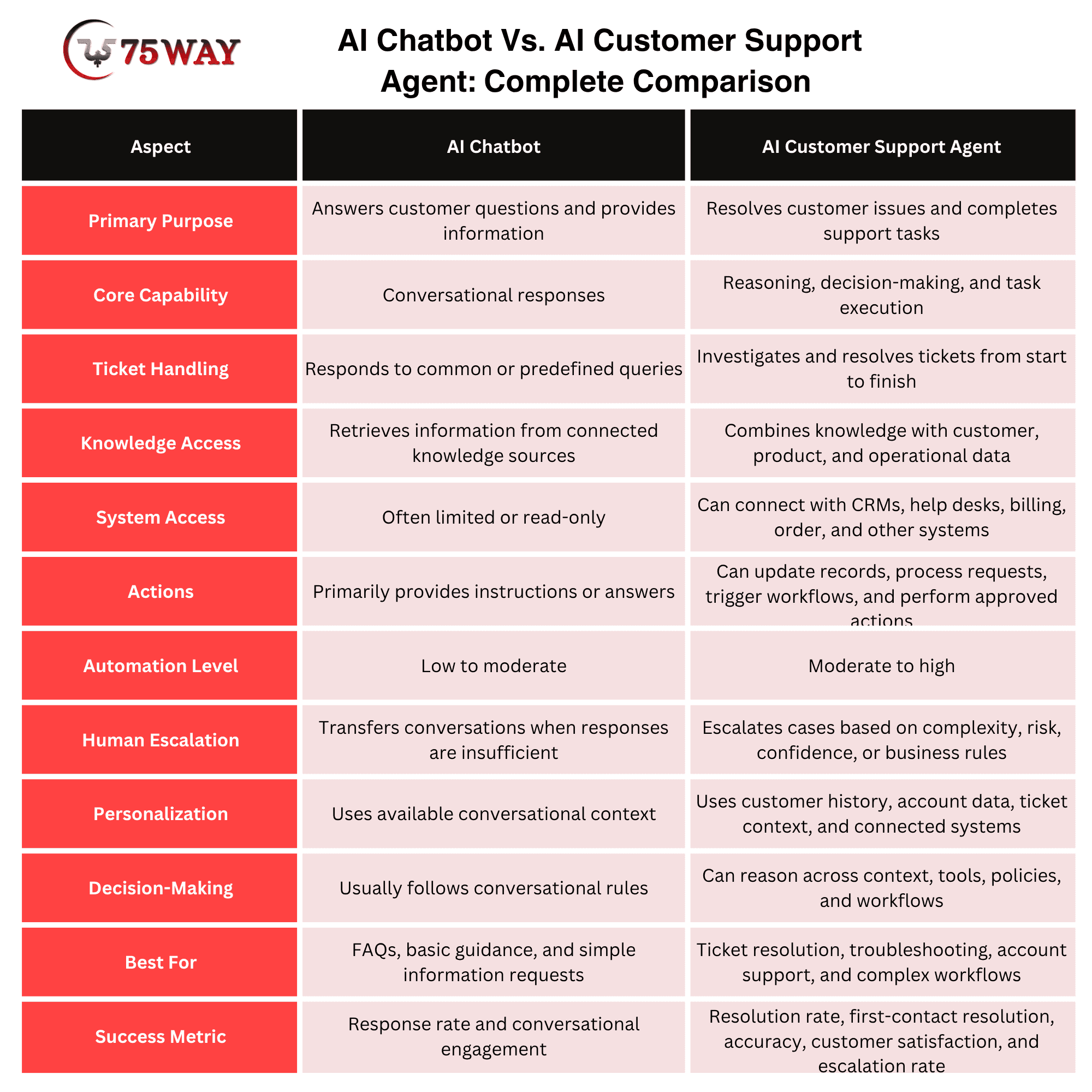
AI Chatbot Vs. AI Customer Support Agent: Complete Comparison
An AI chatbot mainly communicates with customers, while an AI customer support agent can understand issues, access systems, make decisions, perform actions, and resolve tickets with limited human intervention. A chatbot may answer questions from a predefined knowledge base, whereas an AI agent can investigate an order, check account information, update records, issue an eligible refund, or escalate a case when it cannot safely complete the request.
The key difference is action and autonomy. AI chatbots are primarily conversation-focused, making them useful for FAQs, basic guidance, and information retrieval. AI customer support agents combine conversational AI with tools, APIs, business rules, knowledge bases, and workflow automation to move a ticket from understanding the problem to taking the right action and confirming resolution.
Architecture Required to Build an AI Customer Support Agent
A production-grade AI customer support agent needs more than an LLM and a chat interface. Its architecture should connect customer channels, ticketing systems, knowledge sources, AI reasoning, business tools, security controls, and human support workflows so the agent can understand requests, retrieve accurate context, take authorized actions, verify outcomes, and escalate when necessary.
1. Customer Interaction Layer
This is the front-facing layer where customers communicate with the AI agent. It can support channels such as website chat, mobile apps, email, messaging platforms, or an existing customer service portal.
The layer captures incoming requests, maintains conversation context, authenticates users when required, and passes structured information to the agent orchestration layer.
2. Agent Orchestration Layer
The orchestration layer acts as the central control system for the AI customer support agent. It determines which model, knowledge source, workflow, or business tool should be used for a particular request.
It can manage conversation state, route tasks, enforce business rules, coordinate multiple tool calls, and determine when a request should move to a human agent.
3. LLM and Reasoning Layer
The large language model interprets customer language, analyzes context, determines the next step, and generates natural responses. Depending on the use case, the architecture may use one or multiple models for tasks such as intent classification, summarization, reasoning, extraction, or response generation.
The model should operate within defined instructions, permissions, and guardrails rather than having unrestricted control over business systems.
4. Knowledge and RAG Layer
The knowledge layer gives the agent access to approved business information, such as product documentation, policies, FAQs, troubleshooting guides, internal procedures, and support articles.
A retrieval-augmented generation (RAG) pipeline can retrieve relevant information at runtime and provide it to the model before it generates an answer. This helps the agent ground responses in current, company-specific information instead of relying solely on model knowledge.
5. Customer Context Layer
The agent also needs access to customer-specific information when the support workflow requires it.
This layer can connect authorized data from CRM platforms, customer profiles, subscription systems, order databases, previous tickets, and account records. Access should follow authentication, authorization, privacy, and data-minimization requirements.
6. Tool and API Integration Layer
This layer allows the agent to do things rather than simply say things. APIs connect AI agents with CRMs, ticketing, billing, orders, subscriptions, and inventory systems. Clearly defined permissions, inputs, outputs, and error handling keep every automated action controlled.
For example, when a customer reports a duplicate subscription charge, the agent could retrieve billing records, compare transactions, create a support case, or initiate an approved refund through the appropriate tool.
7. Workflow and Business Rules Layer
Not every support decision should be left entirely to an AI model. A workflow layer can define deterministic rules for sensitive or high-impact actions.
For example, a company could require additional verification before changing account information or impose specific conditions before issuing a refund. Combining AI reasoning with deterministic workflows provides greater control over business-critical processes.
8. Memory and Conversation State
The agent needs appropriate memory to understand the current conversation and, where permitted, relevant previous interactions.
Short-term conversation state helps maintain context during a ticket, while selected customer history can help prevent customers from repeatedly explaining the same problem. Memory should be scoped carefully so the system does not retain or expose unnecessary information.
9. Security and Guardrail Layer
Security should operate across the entire architecture rather than being added after development. Important controls can include authentication, authorization, role-based permissions, encryption, secret management, input validation, output filtering, audit logs, rate limits, and restrictions on sensitive tool calls.
Guardrails should also help prevent prompt injection, unauthorized actions, data leakage, and policy violations.
10. Human Escalation Layer
A reliable support agent needs a clear path to human assistance. The escalation layer transfers tickets when the agent lacks sufficient confidence, encounters an unsupported situation, detects a sensitive request, reaches an action limit, or follows a business rule requiring human approval.
The handoff should include the conversation, retrieved context, actions already attempted, and relevant reasoning or event logs so the human agent can continue without restarting the investigation.
11. Observability and Evaluation Layer
Production agents require continuous monitoring to determine whether they are actually resolving customer problems.
This layer can track metrics such as resolution rate, escalation rate, tool-call failures, response accuracy, customer satisfaction, latency, cost per resolution, and repeat-contact rate. Evaluation datasets and automated testing can also measure whether the agent selects the correct workflow and performs actions safely.
12. Data and Infrastructure Layer
The underlying infrastructure supports databases, vector stores, object storage, APIs, queues, caching, logging, monitoring, and cloud services.
The architecture should be designed around expected ticket volume, response-time requirements, availability, data residency needs, and future growth rather than optimizing only for the initial MVP.
Essential Features of an AI Customer Support Agent Development
A useful AI customer support agent should do more than chat with customers. It should understand what went wrong, find the right information, take the necessary action, and know when a human needs to step in.
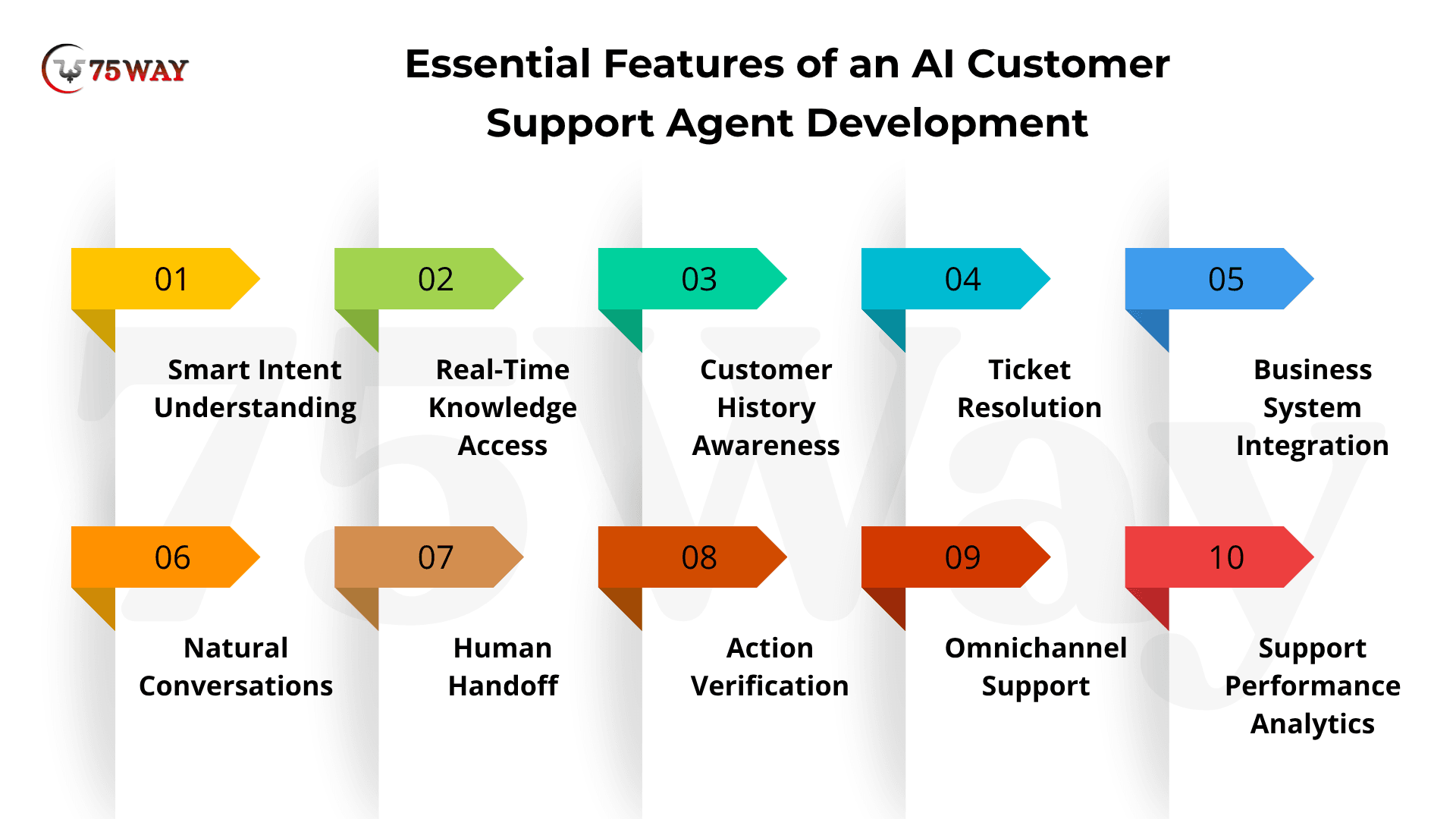
1. Smart Intent Understanding
Customers rarely explain problems in perfectly structured language. An AI customer service agent should understand what they actually mean, whether they are asking about a refund, reporting a technical issue, checking an order, or simply frustrated with a service.
2. Real-Time Knowledge Access
Customers expect accurate answers, not generic AI responses. Connecting the AI support assistant with your latest FAQs, product guides, policies, and internal documentation helps it find the right information and respond using your company's actual knowledge.
3. Customer History Awareness
Imagine a customer explaining the same problem to three different support agents. A good AI customer service assistant avoids that frustration by accessing relevant account details, previous tickets, purchases, subscriptions, and conversations, giving it the context needed to make each interaction more personal.
4. Ticket Resolution
This is where an AI virtual customer support agent becomes more than a chatbot. Instead of telling customers how to solve a problem, it can complete approved tasks itself, such as updating an account, processing an eligible refund, changing a subscription, or creating a service request.
5. Business System Integration
Your support agent should not operate in isolation. Integrating customer support AI automation with your CRM, help desk, billing platform, order management system, and other business tools allows it to retrieve information and take meaningful actions without forcing support teams to switch between multiple systems.
6. Natural Conversations
Nobody wants to feel like they are talking to a machine that forgets everything after every message. Context-aware conversations allow the AI support assistant software to remember what the customer has already said during an interaction, ask fewer repetitive questions, and keep the conversation moving naturally.
7. Human Handoff
AI does not need to handle every ticket. When a situation is too complex, sensitive, uncertain, or outside its permissions, the AI customer care agent should smoothly hand it to a human with the relevant conversation and ticket context already attached.
8. Action Verification
Saying “Your refund has been processed” when the payment system actually rejected it can quickly destroy customer trust. An AI agent should verify important actions through the connected system before confirming that something has been completed.
9. Omnichannel Support
Customers may start a conversation on your website, follow up through email, or contact your team through another support channel. An AI-powered customer service agent can help businesses provide support across these touchpoints while maintaining the relevant context of the customer's issue.
10. Support Performance Analytics
You need to know whether the autonomous AI customer support agent is genuinely reducing support workload, not simply sending more messages. Analytics can reveal resolution rates, escalations, response times, repeat contacts, customer satisfaction, failed actions, and other indicators that show where the agent is delivering value and where it needs improvement.
How to Build an Autonomous AI Customer Support Agent: Comprehensive Process
An autonomous AI customer support agent needs the ability to understand a ticket, decide what should happen next, and act across connected business systems. A simple chatbot may generate responses, but an autonomous agent must carry support tasks through defined workflows and escalate cases it cannot safely resolve. The following breakdown explains how to build this type of AI support solution.
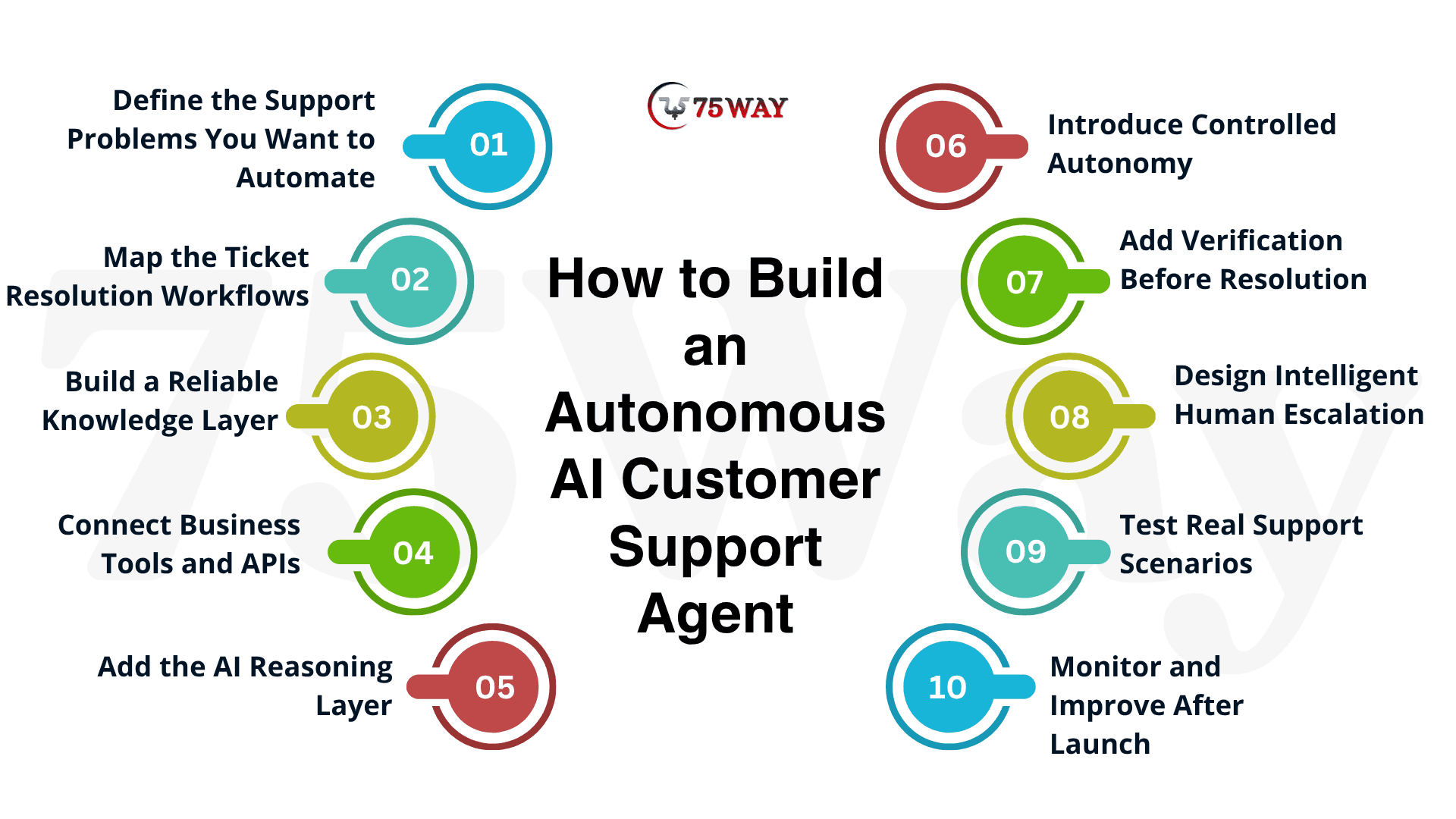
Stage 1: Define the Support Problems You Want to Automate
Start by identifying the tickets your autonomous AI customer support agent should actually handle. Review historical support conversations and group them by volume, complexity, resolution process, and business impact.
You can begin with predictable workflows such as order tracking, password assistance, subscription changes, billing questions, or refund requests rather than attempting to automate every support scenario at launch.
Stage 2: Map the Ticket Resolution Workflows
Next, document what happens when a customer raises each selected issue. Identify the information the agent needs, the systems it must access, the decisions it can make, and the actions required to close the ticket.
This workflow map gives your autonomous AI support assistant a clear path from understanding a problem to reaching a verified resolution.
Stage 3: Build a Reliable Knowledge Layer
Give the AI-powered customer service agent access to trustworthy business knowledge, including product documentation, FAQs, policies, troubleshooting instructions, pricing information, and internal support content.
A retrieval-augmented generation approach can help the agent find relevant information at runtime rather than depending entirely on what the underlying AI model already knows.
Stage 4: Connect Business Tools and APIs
AI customer service assistant cannot resolve many real-world tickets through conversation alone.
Connect it with the systems that contain customer and operational data, such as CRM, help desk, billing, order management, subscription, inventory, and account platforms. Each tool should have defined permissions so the agent can perform only approved actions.
Stage 5: Add the AI Reasoning Layer
The reasoning layer allows the autonomous AI customer care agent to determine what information it needs, which workflow applies, and which tool should be used next.
The model should work within clearly defined instructions and business rules, with the architecture controlling what actions it can perform rather than giving the model unrestricted system access.
Stage 6: Introduce Controlled Autonomy
An autonomous AI customer support agent should not receive unlimited authority on day one. Create different permission levels for different actions.
Low-risk tasks can be automated, while actions involving sensitive information, large refunds, account ownership, or unusual situations can require additional verification or human approval.
Stage 7: Add Verification Before Resolution
A customer ticket should not be marked as solved simply because the AI generated a convincing response.
Your customer support AI agent should verify that the action succeeded. If it initiates a refund, for example, the system should confirm the transaction status before telling the customer that the refund was completed.
Stage 8: Design Intelligent Human Escalation
Even a highly capable autonomous AI customer support agent will encounter situations it should not handle alone. Establish escalation rules based on confidence, risk, customer preference, business policy, and workflow complexity.
When handing off a ticket, pass along the conversation, customer context, information retrieved, and actions already attempted so the human agent can continue without starting over.
Stage 9: Test Real Support Scenarios
Before deployment, test the autonomous AI customer support agent against realistic tickets rather than only ideal examples.
You must include ambiguous requests, incomplete information, conflicting data, failed APIs, unexpected customer responses, malicious inputs, and cases requiring escalation. Measure whether the agent reaches the correct outcome, not merely whether its response sounds natural.
Step 10: Monitor and Improve After Launch
Launching an autonomous AI customer support agent is the beginning of optimization, not the end of development.
Monitor resolution rates, escalation rates, repeat contacts, customer satisfaction, tool failures, response latency, and cost per resolution. Use these insights to improve prompts, workflows, knowledge sources, tool permissions, and evaluation datasets over time.
Technologies Used to Develop an AI Customer Care Agent
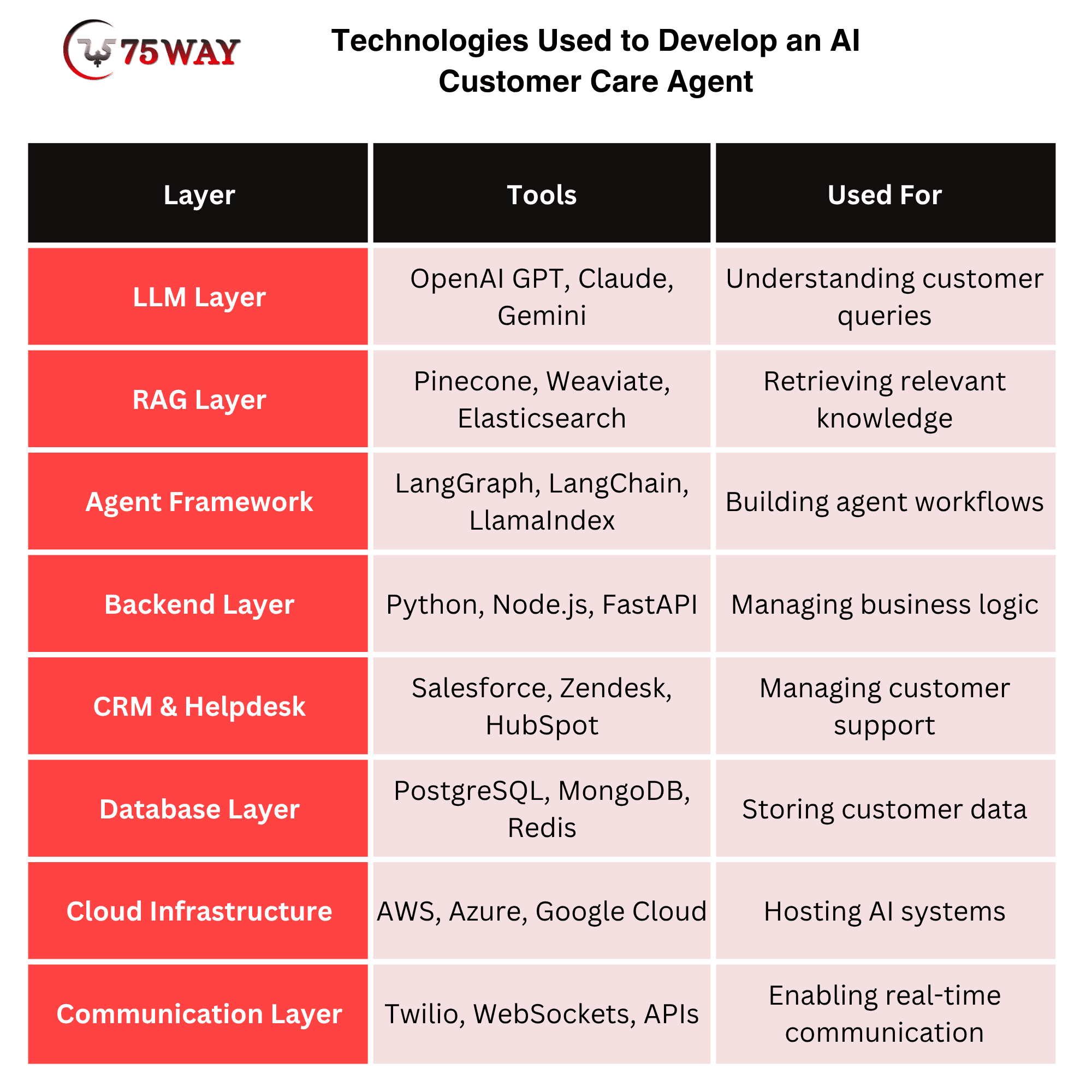
The technology behind an AI customer care agent determines how well it can understand customers, retrieve accurate information, and complete support tasks. Modern architectures commonly combine LLMs, knowledge retrieval, tool calling, backend APIs, databases, and orchestration frameworks to connect conversations with real business workflows. The technology stack becomes clearer when each layer is examined through its role in the support operation.
- Large Language Models (LLMs)
LLMs give an AI customer support agent the ability to understand customer messages, reason through problems, summarize conversations, and generate natural responses. Common options include OpenAI GPT models, Anthropic Claude, and Google Gemini, depending on the application's requirements.
- Retrieval-Augmented Generation (RAG)
RAG technology helps an AI customer support agent retrieve relevant information from company knowledge before generating an answer. Tools such as Pinecone, Weaviate, and Elasticsearch can support retrieval and vector search workflows for documentation, FAQs, and internal knowledge.
- AI Agent Frameworks
Agent frameworks provide the building blocks for creating workflows where an AI customer support agent can reason, select tools, maintain state, and complete multi-step tasks. Technologies such as LangGraph, LangChain, and LlamaIndex can help developers orchestrate these agent workflows.
- Backend Development Technologies
Backend technologies power the business logic, APIs, authentication, workflows, and integrations behind an AI customer support agent. Development teams commonly use Python, Node.js, Java, or FastAPI depending on the application's architecture and performance requirements.
- CRM and Help Desk APIs
CRM and help desk APIs allow an AI customer support agent to access customer records, ticket history, account information, and support workflows. Platforms such as Salesforce, Zendesk, HubSpot, and Intercom can be connected so the agent can work with existing support infrastructure.
- Databases and Data Storage
Databases store the customer, ticket, product, transaction, and application data an AI customer support agent may need during a support interaction. Technologies such as PostgreSQL, MySQL, MongoDB, and Redis can support structured data, application state, caching, and other operational requirements.
- Cloud and Infrastructure Technologies
Cloud infrastructure gives an AI customer support agent the computing, storage, networking, monitoring, and scalability needed for production workloads. Platforms such as AWS, Microsoft Azure, and Google Cloud can host the agent's backend, databases, APIs, observability tools, and supporting services.
- Communication and Real-Time Technologies
Real-time communication technologies allow an AI customer support agent to interact with customers through chat, messaging, voice, or other support channels. Technologies such as WebSockets, Twilio, and real-time messaging APIs can support responsive conversations and communication workflows.
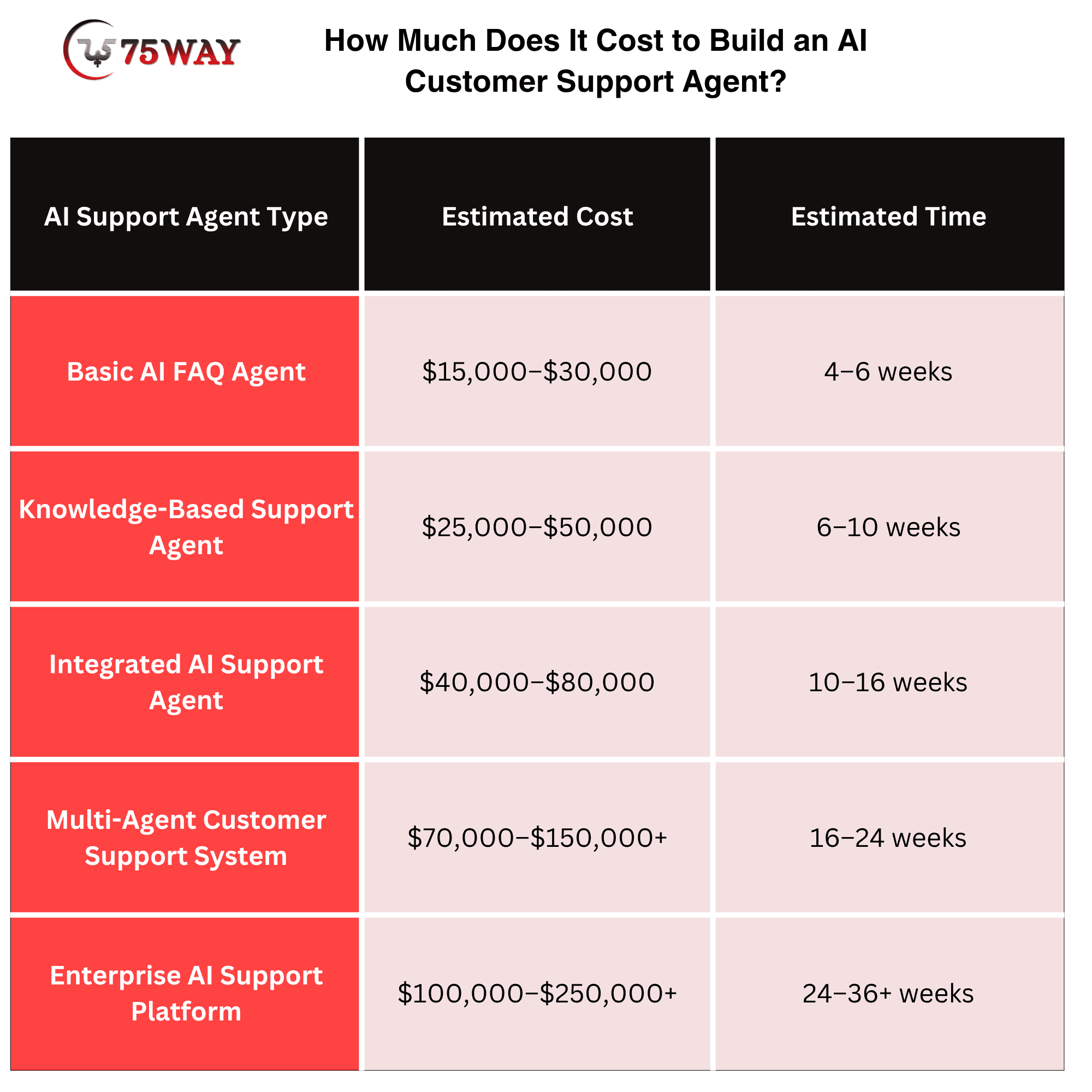
How Much Does It Cost to Build an AI Customer Support Agent?
The average cost to build an AI customer support agent ranges from $15,000 to $250,000+, depending on how much support work you expect the system to handle. The cost breakdown below shows where your investment can increase as the agent becomes more capable.
Cost To Develop AI Customer Service Assistant Based On Stages
- Discovery and Strategy: $3,000–$10,000
- UI/UX: $3,000–$12,000
- AI and Agent Development: $10,000–$40,000+
- Backend and Integrations: $15,000–$60,000+
- Testing and Evaluation: $5,000–$20,000
- Deployment: $2,000–$8,000+
The recurring AI model, cloud, database, monitoring, communication, and third-party API expenses should be budgeted separately from the initial development cost.
Ongoing & Hidden Cost Factors To Create a Virtual Customer Support Agent
The initial development budget is only part of what a business spends on an AI customer support agent. Costs can continue after launch as the system handles more conversations, connects with additional tools, and requires regular improvements. These ongoing expenses can have a noticeable impact on the total cost of running the agent over time.
- AI Model Usage Costs: LLM API calls, token consumption, model selection, and increasing conversation volumes can raise recurring AI expenses.
- Cloud Infrastructure Costs: Servers, databases, storage, networking, monitoring, and computing capacity contribute to ongoing infrastructure expenses.
- Knowledge Base Maintenance: Updating FAQs, product details, policies, and troubleshooting content keeps the virtual customer support agent accurate.
- Third-Party Integration Costs: CRM, help desk, payment, shipping, and communication APIs may involve subscription or usage-based charges.
- Security & Compliance Costs: Encryption, security testing, access controls, audits, and regulatory requirements can increase ongoing operational expenses.
- Monitoring & Analytics Costs: Performance monitoring, error tracking, conversation analytics, and reporting tools add recurring platform expenses.
- Maintenance & Upgrades: Bug fixes, model upgrades, workflow improvements, and changing business requirements require continuous development.
- Testing & Evaluation Costs: Regular testing for hallucinations, incorrect actions, broken workflows, and unusual customer scenarios requires dedicated resources.
- Voice & Communication Costs: Telephony, speech-to-text, text-to-speech, SMS, and messaging services can create additional usage-based expenses.
- Human Escalation Costs: Complex, sensitive, or unresolved tickets may require human intervention, adding operational support costs.
How to Measure Whether Your AI Support Agent Actually Solves Tickets
A ticket marked “closed” does not always mean the customer’s problem is solved. Businesses need to look beyond response speed and ticket volume to understand whether the AI actually completed the requested task and prevented the customer from coming back with the same issue. The key performance measures below provide a clearer picture of the agent’s real support impact.
- AI Resolution Rate: Measure the percentage of eligible tickets that the agent resolves without human intervention.
- First Contact Resolution: Track whether the customer's issue is resolved during the initial interaction.
- Escalation Rate: Monitor how frequently conversations require human assistance. A high escalation rate isn't automatically negative if the agent is correctly identifying complex cases.
- Action Success Rate: Measure whether actions requested by the agent actually succeed.
- Customer Satisfaction: Track CSAT and other relevant customer-experience signals.
- Average Resolution Time: Compare how long it takes to resolve tickets with and without automation.
- Reopen Rate: A ticket that is marked resolved but reopened shortly afterward may indicate that the original answer or action did not solve the customer's problem.
- Containment Rate: Measure how many eligible conversations remain within the automated support workflow without unnecessary human transfer.
The strongest measurement framework combines these metrics rather than relying on a single “automation rate.”
Final Takeaway
The most valuable AI customer support agent is not the one that produces the most responses. It is the one that resolves the right tickets accurately, takes appropriate actions, verifies outcomes, and knows when a human needs to take over.
Building that type of system requires more than an LLM. You need a reliable knowledge layer, business-system integrations, action-based workflows, authorization controls, evaluation, monitoring, and human escalation.
Start with your highest-volume support problems, automate low-risk workflows first, measure actual resolution outcomes, and expand the agent's capabilities as your data demonstrates that the automation is working.
To automate customer care service, you can partner with a prominent AI agent development firm or adopt a ready-made AI agent from marketplaces like 75AI Agent Store.
Frequently Asked Questions (FAQs)
Can An AI Customer Support Agent Learn From Past Tickets?
An agent can learn from historical tickets when curated data supports retrieval, evaluation, or improvement. Continuous monitoring helps identify recurring knowledge gaps and resolution opportunities.
What Data Is Needed To Train An AI Support Agent?
Useful data includes resolved tickets, knowledge articles, customer conversations, workflows, policies, and product documentation. Data should remain clean, structured, authorized, and regularly reviewed.
Can An AI Support Agent Work Across Multiple Channels?
Yes, one agent can support websites, mobile applications, email, and messaging channels through shared backend services. Centralized context helps maintain continuity across customer interactions.
How Does An AI Support Agent Handle Unclear Customer Requests?
The agent can ask targeted clarification questions before selecting workflows or accessing customer information. This prevents assumptions and reduces unnecessary actions caused by ambiguous requests.
Can Businesses Customize An AI Support Agent's Communication Style?
Businesses can define tone, terminology, response structure, and communication rules according to brand guidelines. These instructions help create customer interactions that feel natural and recognizable.
How Can An AI Support Agent Improve Over Time?
Performance data can reveal failed resolutions, frequent escalations, and recurring customer questions. Teams can use these insights to refine workflows, knowledge sources, prompts, and evaluation criteria.
Should Businesses Build Or Buy An AI Customer Support Agent?
The choice depends on existing systems, customization requirements, internal expertise, budget, and desired control. Custom development provides greater flexibility when standard solutions cannot accommodate unique workflows.
Can An AI Support Agent Support Multiple Languages?
Multilingual agents can understand and respond in supported languages using suitable language models and knowledge sources. Businesses should evaluate translation quality, terminology accuracy, and localized customer-service requirements carefully.