AI Summary
AI voice automation helps small and mid-sized businesses handle calls, answer customer questions, qualify leads, schedule appointments, route conversations, and complete routine tasks without requiring employees to answer every call. This guide covers AI voice agents, use cases, benefits, features, implementation, costs, integrations, and business considerations.
Key Takeaways
- AI voice automation can handle routine business calls without constant employee involvement.
- AI voice agents can answer questions, qualify leads, and schedule appointments.
- Businesses can provide phone support beyond traditional operating hours.
- Automated call handling can reduce repetitive workload for customer-facing employees.
- AI voice systems can connect with CRMs, calendars, helpdesks, and business software.
- Call transcripts and analytics can help businesses identify customer needs and opportunities
What does your business do with a customer who calls while everyone is busy? If the answer is voicemail, hold music, or “We’ll call you back,” there is a good chance some of those customers never make it to the next step.
For a small or mid-sized company, that gap can show up directly in missed sales, empty appointment slots, and overloaded employees.
The interesting part is that most of these calls do not require a senior employee to handle them. So, who will resolve queries 24/7? Yes, you guessed it right? It is AI voice automation.
AI voice agent development solutions increasingly handle tasks without forcing your team to abandon the work already in front of them. That makes voice AI automation a business decision, not just another technology project.
For U.S. owners, founders, and industry leaders, the real question is where it can remove friction without damaging the customer experience.
This guide explains where AI voice automation fits, what businesses can automate, what implementation involves, and how to evaluate the investment.
What Is AI Voice Automation For Small And Mid-Sized Businesses?
AI voice automation lets small and mid-sized businesses handle phone conversations, answer customer questions, book appointments, qualify leads, and complete routine tasks without depending on an employee for every call. Think of it as a virtual assistant in a team that can answer calls, understand what the caller wants, and take the next appropriate action.
Unlike traditional IVR systems that ask callers to press numbers through fixed menus, modern AI voice agents can understand natural conversations and respond accordingly. When connected with calendars, CRMs, booking platforms, and other business systems, they can schedule appointments, update customer records, qualify prospects, provide information, or transfer complex calls to the right employee.
How Does AI Voice Automation Work?
A typical AI voice automation workflow looks like:
Caller Speaks → AI Understands Intent → Retrieves Information → Applies Business Rules → Takes Action → Confirms Result → Escalates If Needed
For example, a customer might call a service business and say, “I need someone to come out tomorrow morning.”
The AI voice agent can identify the request, ask relevant questions, check the connected scheduling system, offer available times, collect customer details, create the appointment, and send confirmation.
If the caller asks something outside the agent's capabilities, the system can transfer the conversation to an employee.
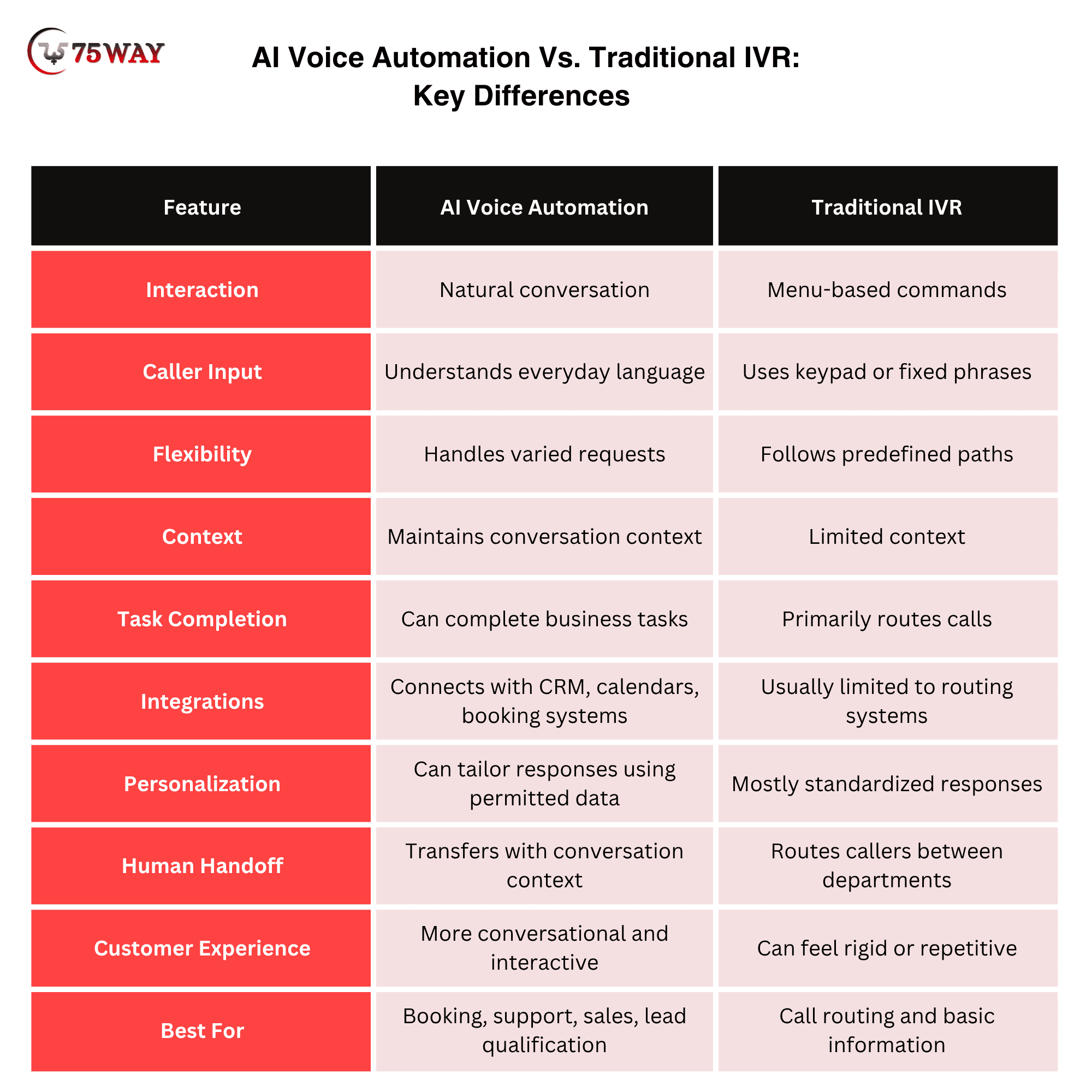
AI Voice Automation Vs. Traditional IVR: Key Differences Explained
AI voice automation offers a more conversational way to handle business calls, while traditional IVR mainly relies on fixed menus and keypad-based commands.
With an AI voice system, a caller can simply say, “I want to reschedule my appointment,” and the agent can understand the request, ask for relevant details, check availability, and continue the conversation without forcing the caller through multiple menu options.
Traditional IVR works well for straightforward routing, but it can become frustrating when callers have questions that do not fit predefined options. AI voice agents can understand different phrases, maintain conversational context, access connected business systems, and complete tasks such as booking appointments or qualifying leads.
This makes AI voice automation particularly useful for businesses handling frequent calls where faster, more flexible customer interactions can directly support operations.
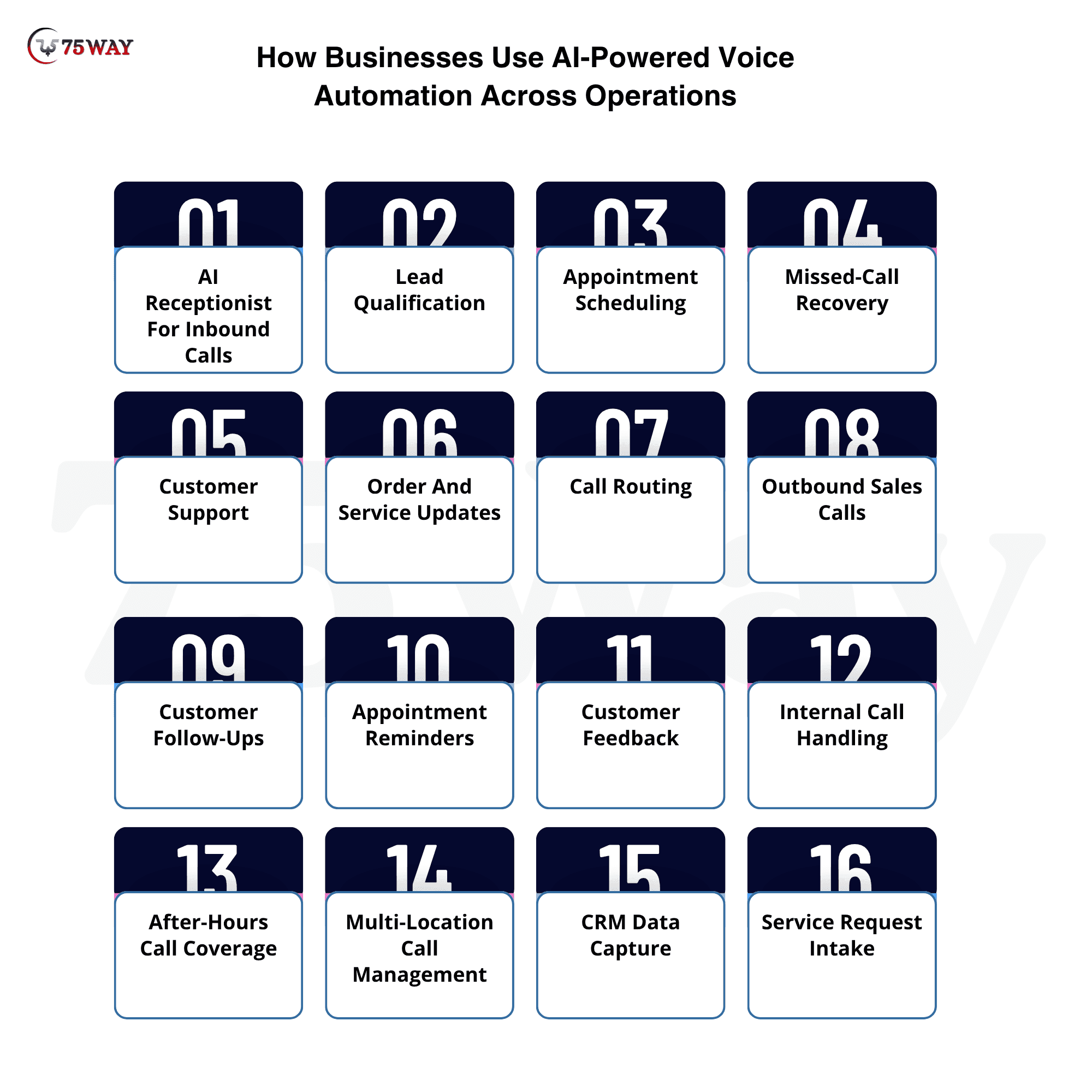
How Businesses Use AI-Powered Voice Automation Across Operations
AI voice automation can do more than answer incoming calls. For US SMBs, the strongest applications connect phone conversations with sales, customer service, scheduling, lead management, and internal workflows so calls can produce measurable business outcomes.
- AI Receptionist For Inbound Calls
An AI receptionist can answer calls, identify why someone is calling, provide basic business information, and route conversations based on the caller's needs. This gives smaller teams additional call coverage without requiring a dedicated receptionist for every shift. DialMyCalls provides AI-powered phone answering that can help businesses handle incoming calls, identify caller needs, provide basic information, and route conversations to the right person or department.
- Lead Qualification
An AI voice agent can ask prospects predefined qualifying questions, collect contact details, understand their requirements, and determine whether the inquiry meets the company's sales criteria.
Qualified leads can then be transferred to sales representatives or entered into the CRM for follow-up.
- Appointment Scheduling
Businesses can connect their AI voice agent with calendars or scheduling platforms to help callers find available times and book appointments conversationally.
This is useful for businesses such as dental practices, salons and spas, law firms, home-service companies, consulting firms, real estate businesses, and automotive service providers.
- Missed-Call Recovery
A missed call does not have to become a lost opportunity. AI voice automation can support callbacks or outbound workflows based on business rules, allowing companies to reconnect with people who attempted to reach them.
- Customer Support
AI voice agents can handle repetitive support questions involving business hours, order information, appointment status, service availability, account processes, and other approved information.
Complex issues can be transferred to employees with relevant conversation context.
- Order And Service Updates
Businesses can use voice automation to provide customers with updates about orders, appointments, deliveries, service requests, or other transactions when the required information is available through connected systems.
- Call Routing
Instead of forcing callers through long menu trees, an AI voice agent can understand the caller's request and route them toward the appropriate department or employee.
For example:
“I need help with my invoice.”
The system can recognize the billing intent and route the conversation accordingly.
- Outbound Sales Calls
AI voice automation can support selected outbound sales workflows, such as contacting qualified leads, confirming interest, collecting initial information, or scheduling conversations with human sales representatives.
Businesses should ensure outbound calling practices comply with applicable US federal and state requirements.
- Customer Follow-Ups
AI voice agents can conduct predefined follow-up workflows after purchases, appointments, service requests, or inquiries.
For example, a service business could follow up after completing a job and ask whether the customer needs additional assistance.
- Appointment Reminders
An AI voice agent can contact customers about upcoming appointments and provide options to confirm or request a change, depending on the connected scheduling system.
- Customer Feedback
Businesses can use automated calls to collect structured feedback after a transaction or service.
Responses can then be analyzed to identify recurring complaints, satisfaction patterns, or service issues requiring management attention.
- Internal Call Handling
AI voice automation can also support internal workflows by collecting information from employees, routing requests, or triggering predefined processes where appropriate.
- After-Hours Call Coverage
Customers often call outside standard business hours. An AI voice agent can provide approved information, capture requests, schedule callbacks, or perform other supported tasks instead of simply sending callers to voicemail.
- Multi-Location Call Management
Businesses with several locations can use centralized AI voice automation while applying location-specific information such as operating hours, services, staff availability, and appointment rules.
- Service Request Intake
Home-service and field-service businesses can use AI voice agents to collect information about a customer's issue before creating or routing a service request.
For example, the agent can ask about the service type, location, urgency, and preferred appointment window.
Why Is AI Voice Automation Relevant For US SMBs?
Small and mid-sized businesses often have limited staff handling sales, customer service, scheduling, and incoming calls simultaneously. A missed call can mean a missed lead, delayed customer response, or lost appointment opportunity.
AI voice automation can provide another layer of call coverage without requiring an employee to manually answer every routine conversation.
For example, a local service company could use an AI voice agent to answer calls after hours, collect job details, qualify the request, and schedule a callback. A healthcare-adjacent business may use automation for administrative scheduling while routing sensitive matters to appropriate staff.
The opportunity is not simply to replace phone calls with AI. It is to make business phone interactions more responsive, actionable, and connected to the systems employees already use.
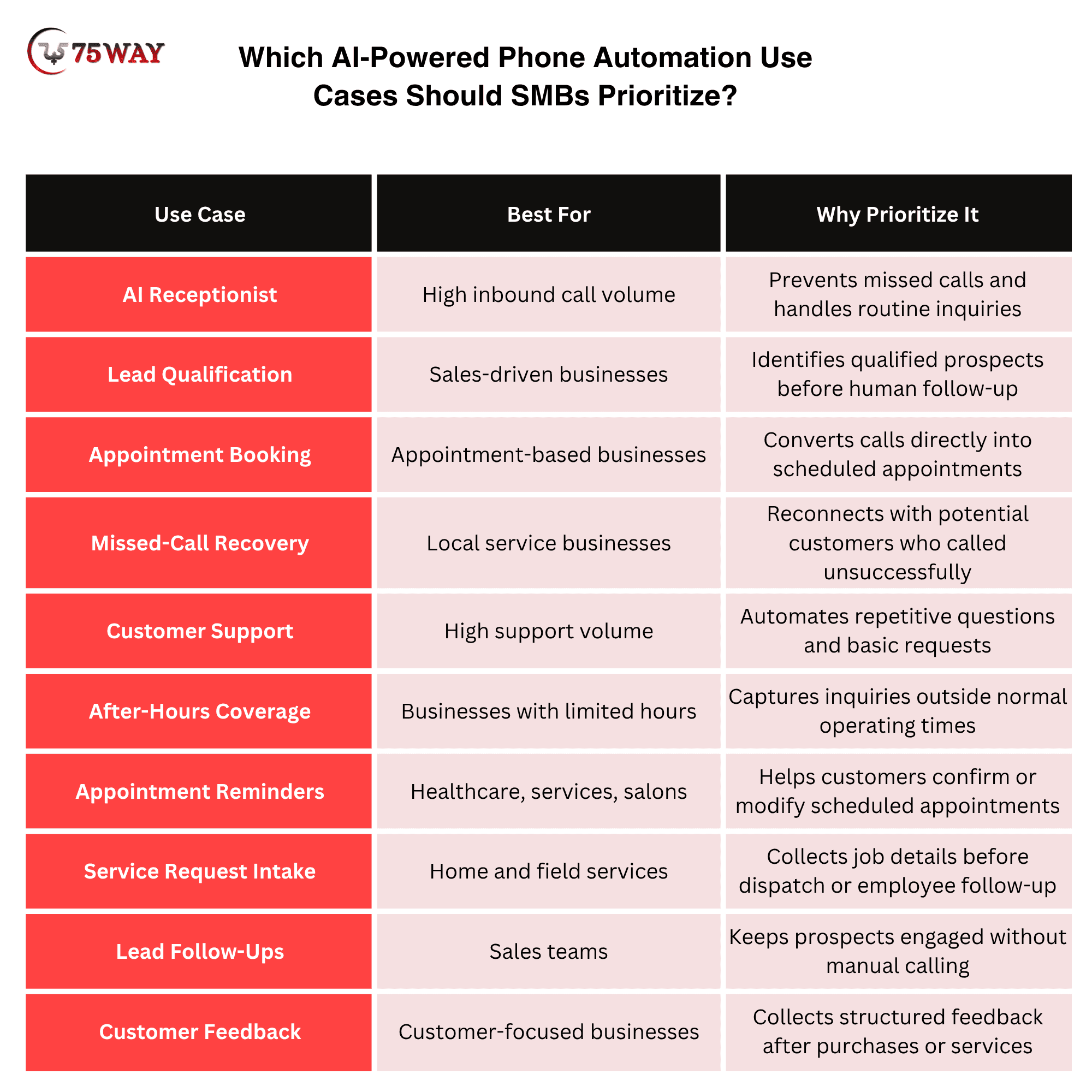
Which AI-Powered Phone Automation Use Cases Should SMBs Prioritize?
AI-powered phone automation is most valuable when it handles repetitive, high-volume calls that directly affect revenue or customer experience. SMBs should prioritize appointment booking, lead qualification, customer support, order or service inquiries, reminders, missed-call follow-ups, and call routing based on where their teams spend the most time.
Essential Features of AI-Powered Calling For Growing Businesses
For small and mid-sized businesses, choosing the right voice technology means focusing on capabilities that solve actual customer-service and operational problems. The strongest systems combine natural conversations with scheduling and human escalation rather than functioning as simple automated answering machines.
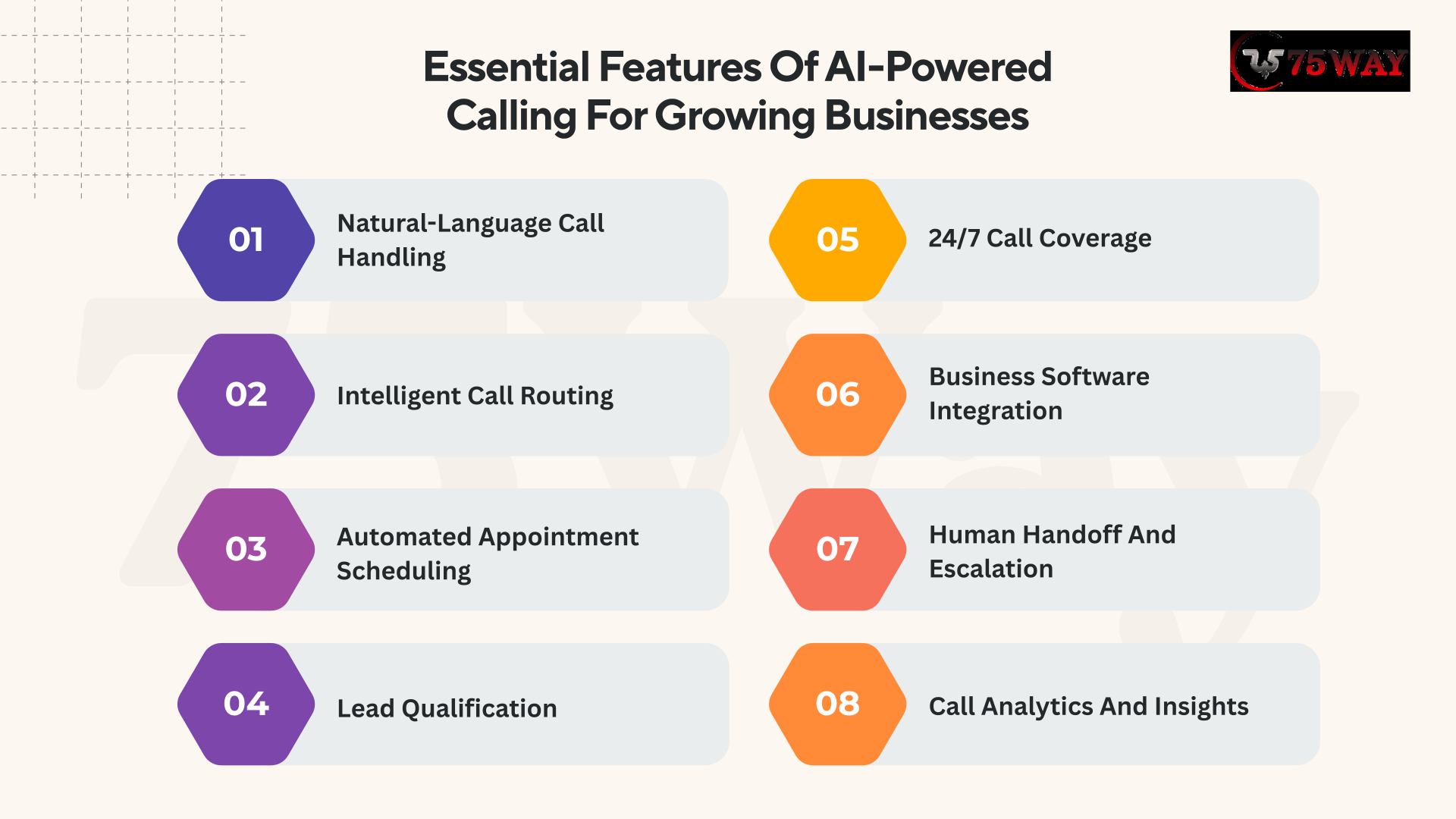
1. Natural-Language Call Handling
An intelligent voice agent can understand callers even when they use different words, sentence structures, accents, or conversational styles. Instead of requiring specific commands, the system interprets intent and responds naturally based on the business context.
2. Intelligent Call Routing
AI-powered call management can identify why someone is calling and direct the conversation to the appropriate department, employee, location, or workflow. This can reduce unnecessary transfers and help customers reach the right resource faster.
3. Automated Appointment Scheduling
A virtual phone assistant can connect with calendars and scheduling platforms to check availability, book appointments, confirm reservations, and handle eligible rescheduling requests. This is particularly useful for appointment-driven companies receiving frequent inbound calls.
4. Lead Qualification
Voice-based sales automation can ask prospects predefined questions, understand their requirements, collect contact information, and determine whether they meet specific qualification criteria. Qualified prospects can then be transferred to sales representatives or added to the CRM.
5. 24/7 Call Coverage
An automated phone agent can provide approved information and handle eligible requests outside regular business hours. This gives growing companies additional call coverage without requiring employees to remain available around the clock.
6. Business Software Integration
Connecting voice AI solutions with CRM, helpdesk, calendar, booking, payment, or other business platforms allows conversations to trigger real actions. The system can retrieve relevant information, update records, create tickets, and preserve customer context.
7. Human Handoff And Escalation
Automation should not attempt to handle every conversation independently. When callers have complex requests, complaints, sensitive issues, or questions outside the system's capabilities, the call can be transferred to an employee with relevant conversation context.
8. Call Analytics And Insights
Voice AI platforms can provide information about call volume, caller intent, transfers, abandoned conversations, frequently asked questions, and outcomes. These insights help business owners identify service gaps and determine which workflows deserve additional automation.
Feature Priorities in Smart Voice AI Assistant Development For Emerging Businesses
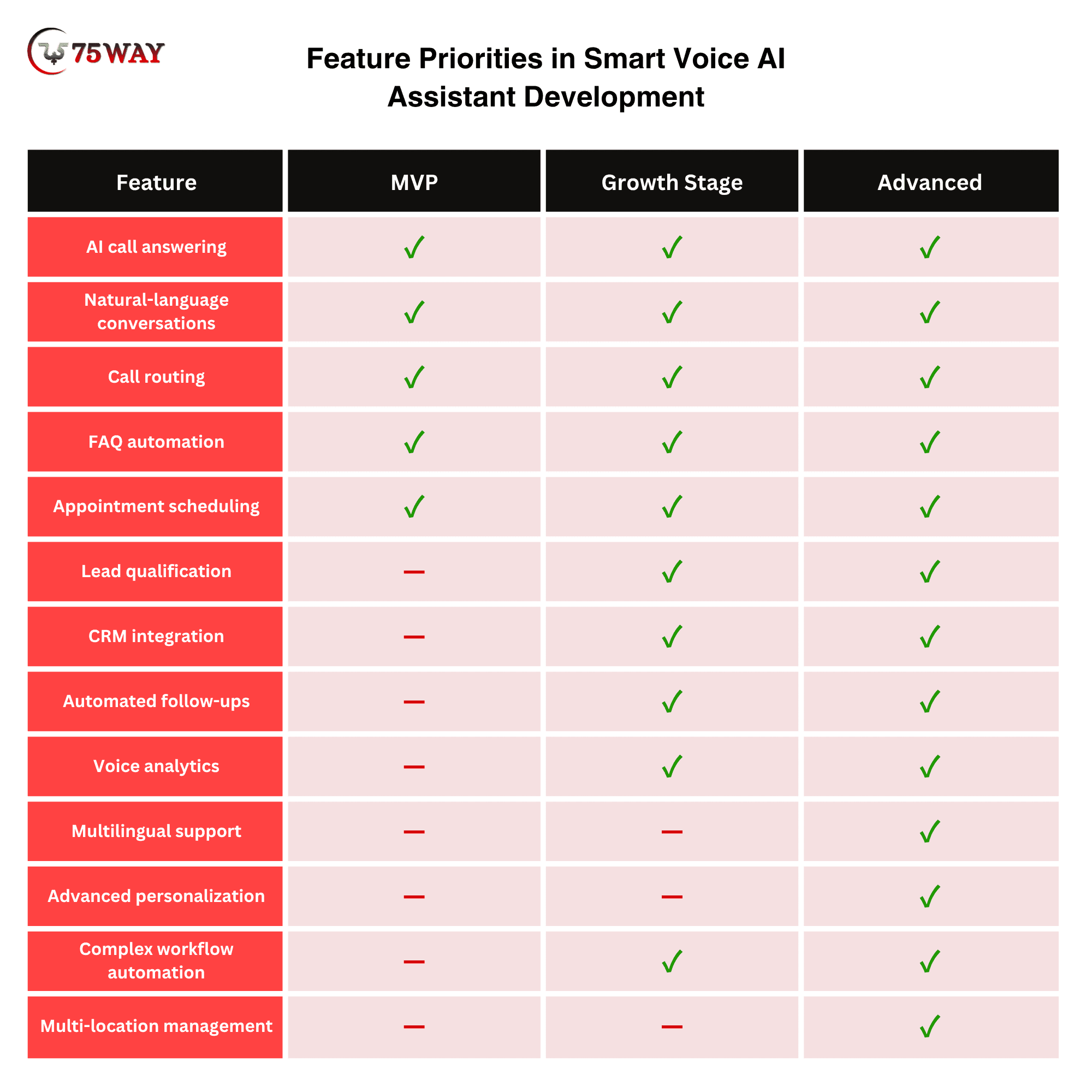
The best AI phone automation for small businesses does not need every feature at launch. Start with workflows that generate measurable value, validate performance, and then expand the voice agent into sales, customer support, scheduling, and other business processes.
How To Implement Conversational AI Voice Automation Without Disrupting Operations
Voice AI works best when it fits into your existing operations instead of forcing your team to change everything at once. A gradual rollout gives employees time to adjust, helps you spot problems early, and shows where automation can genuinely save time or improve customer service.
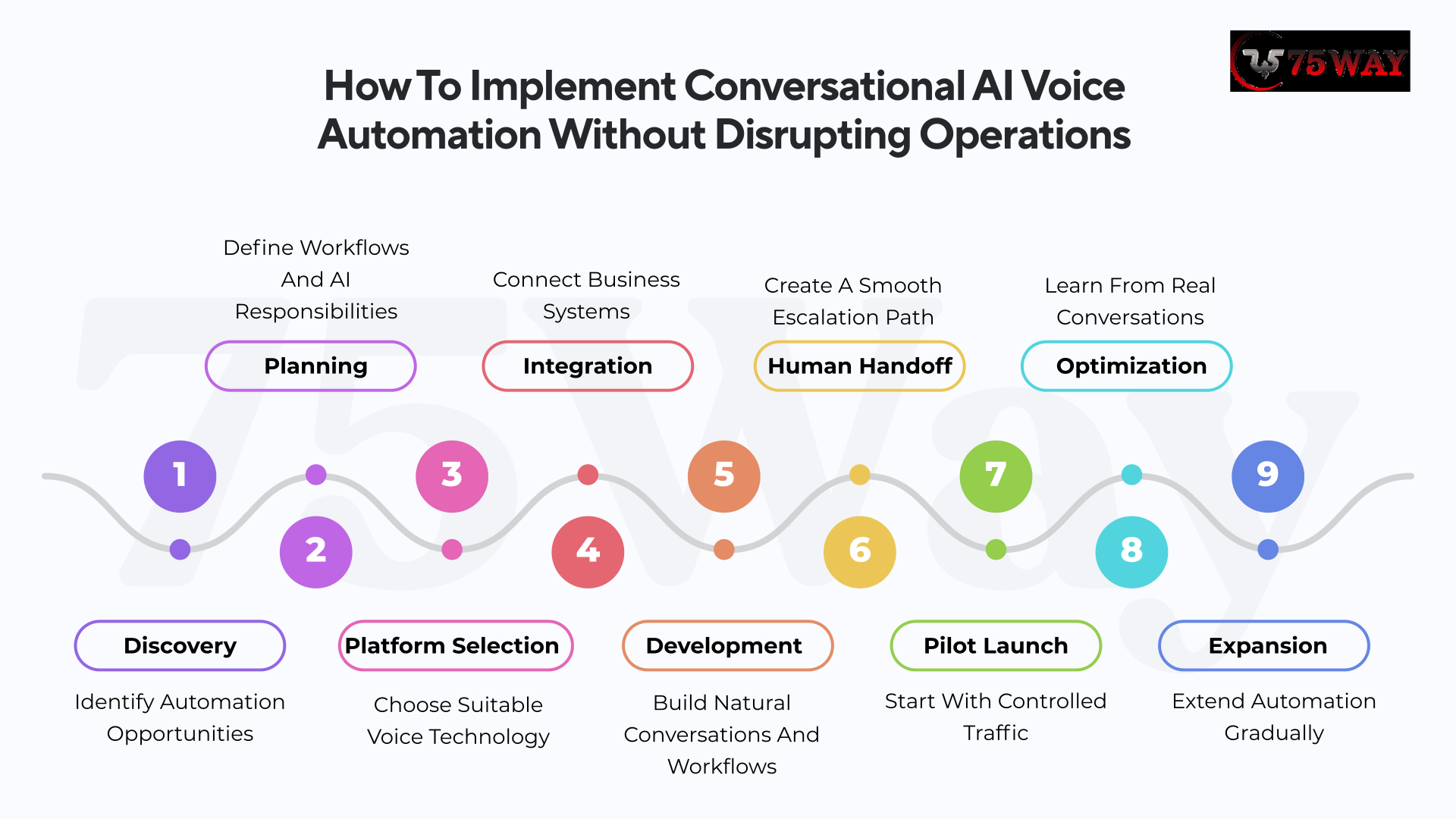
1. Discovery: Identify Automation Opportunities
The easiest starting point is usually the calls your employees answer dozens of times each week. Appointment requests, opening hours, pricing questions, service availability, order updates, and basic enquiries often follow familiar patterns.
A short review of call logs can reveal where the biggest opportunity lies. The priority should be a workload that takes meaningful staff time but does not require much human judgment.
2. Planning: Define Workflows And AI Responsibilities
Every business has conversations that need personal attention. Complaints, sensitive matters, unusual requests, payment disputes, and complicated customer situations may belong with your employees.
A clear boundary keeps the automated system from overstepping. Customers also get a smoother experience because they know when a real person will take over.
3. Platform Selection: Choose Suitable Voice Technology
A long list of features does not necessarily make one voice platform better for your business. Voice quality, response time, existing software compatibility, security, pricing, language support, and reporting capabilities deserve more attention.
The right choice should match your call volume and day-to-day requirements. Industry-specific obligations should also be checked before the system handles customer conversations.
4. Integration: Connect Business Systems
Your phone system should not become another disconnected tool for employees to manage. A CRM, calendar, booking platform, helpdesk, payment system, or customer database can provide useful information during a call.
The result is a workflow where a conversation can lead directly to a booking, record update, payment, or follow-up without creating extra work for employees.
5. Development: Build Natural Conversations And Workflows
Customers rarely speak like a prepared script. One person might say, “Can I get something Thursday morning?” while another asks, “What do you have open before lunch?” Both requests should lead to the same outcome.
Real customer phrases, common questions, and frequent misunderstandings should therefore shape the conversation design.
6. Human Handoff: Create A Smooth Escalation Path
A smooth handoff matters just as much as a successful automated conversation. Customers should have an easy route to an employee whenever the situation calls for personal assistance.
Useful context can make that handoff even better, allowing the employee to see the caller's reason for contacting the business and information already collected instead of asking the same questions again.
7. Pilot Launch: Start With Controlled Traffic
A polished demonstration rarely shows what happens when someone interrupts, changes their request, speaks in a noisy room, or asks something completely unexpected.
Those situations deserve serious testing before wider deployment. A limited department, location, or call type provides a safer way to understand how the system performs with real customers.
8. Optimization: Learn From Real Conversations
The first launch will reveal things that were difficult to predict during development. Call resolution, transfer rates, booking conversions, customer feedback, handling time, and missed-call recovery can show where the experience needs improvement.
Employee feedback matters too because staff members see operational problems that may not appear in automated reports.
9. Expansion: Extend Automation Gradually
The first version should be treated as a starting point rather than a finished product. Real conversations can reveal new questions, phrases, edge cases, and customer expectations that create opportunities for further automation.
Additional capabilities such as multilingual support, follow-up calls, personalization, and deeper reporting can be introduced when there is a clear business reason for them.
How Much Does AI Voice Automation Cost For SMBs?
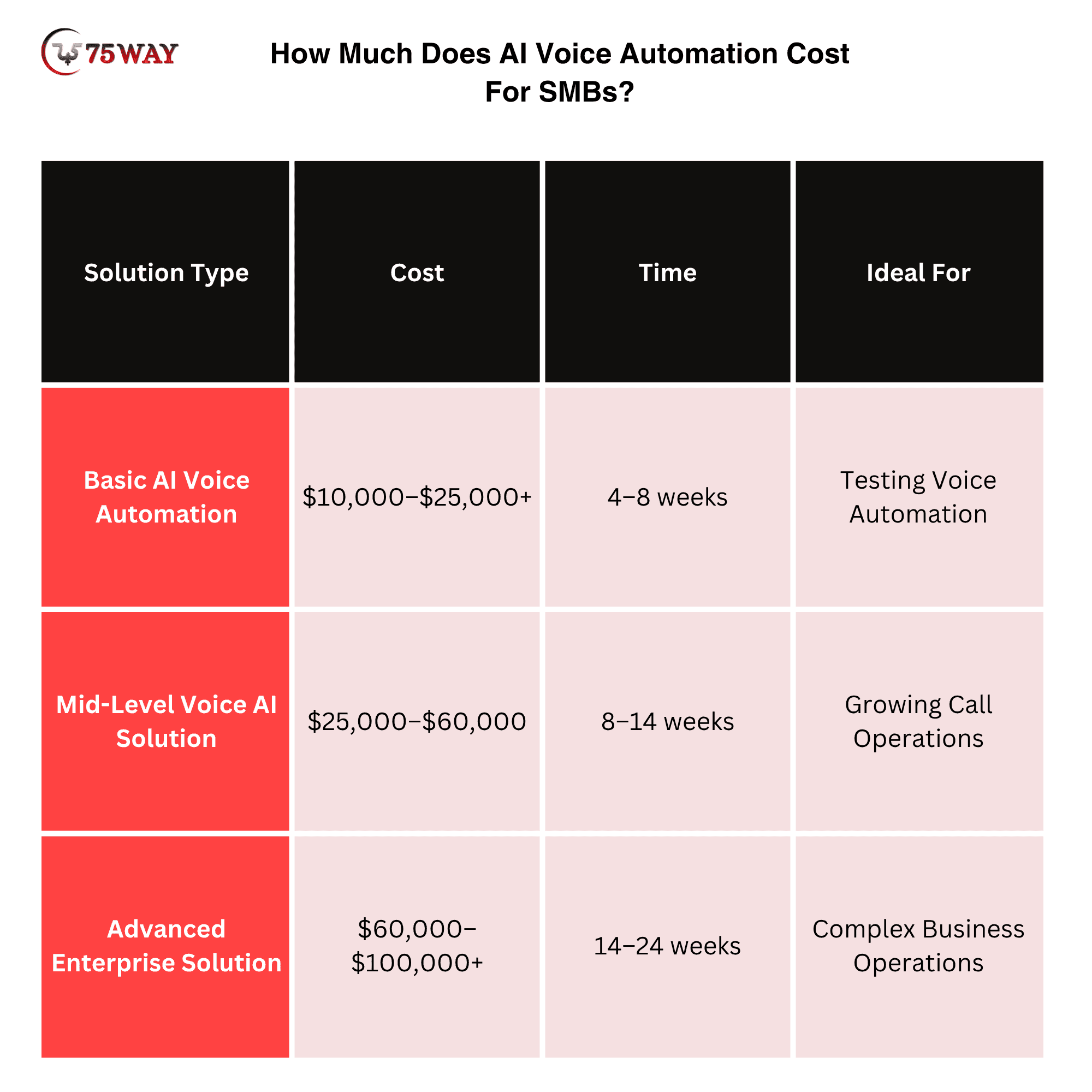
AI voice automation for small and mid-sized businesses typically costs $10,000–$100,000+ for custom development, while simpler implementations using existing platforms can start at a few hundred dollars per month. The actual investment depends on call volume, AI complexity, integrations, customization, voice capabilities, and ongoing usage.
1. Basic AI Voice Automation: $10,000–$25,000+
A basic implementation can handle common inbound calls, FAQs, simple call routing, lead capture, and basic appointment workflows.
It is suitable for businesses that want to test voice automation without developing a complex custom platform.
Typical features: AI receptionist, basic call handling, FAQs, call routing, simple CRM integration, and basic analytics.
2. Mid-Level Voice AI Solution: $25,000–$60,000
A mid-level system can support more sophisticated conversations and connect with several business applications.
It may include appointment scheduling, lead qualification, CRM integration, automated follow-ups, call summaries, analytics, and human handoff.
Ideal for: Growing businesses with significant call volumes and established sales or customer-service workflows.
3. Advanced Enterprise Solution: $60,000–$100,000+
An advanced AI voice agent platform can support complex workflows, multiple departments, multiple locations, multilingual conversations, advanced integrations, custom dashboards, personalization, and sophisticated analytics.
Ideal for: Larger mid-sized companies, multi-location businesses, franchises, and organizations with complex call operations.
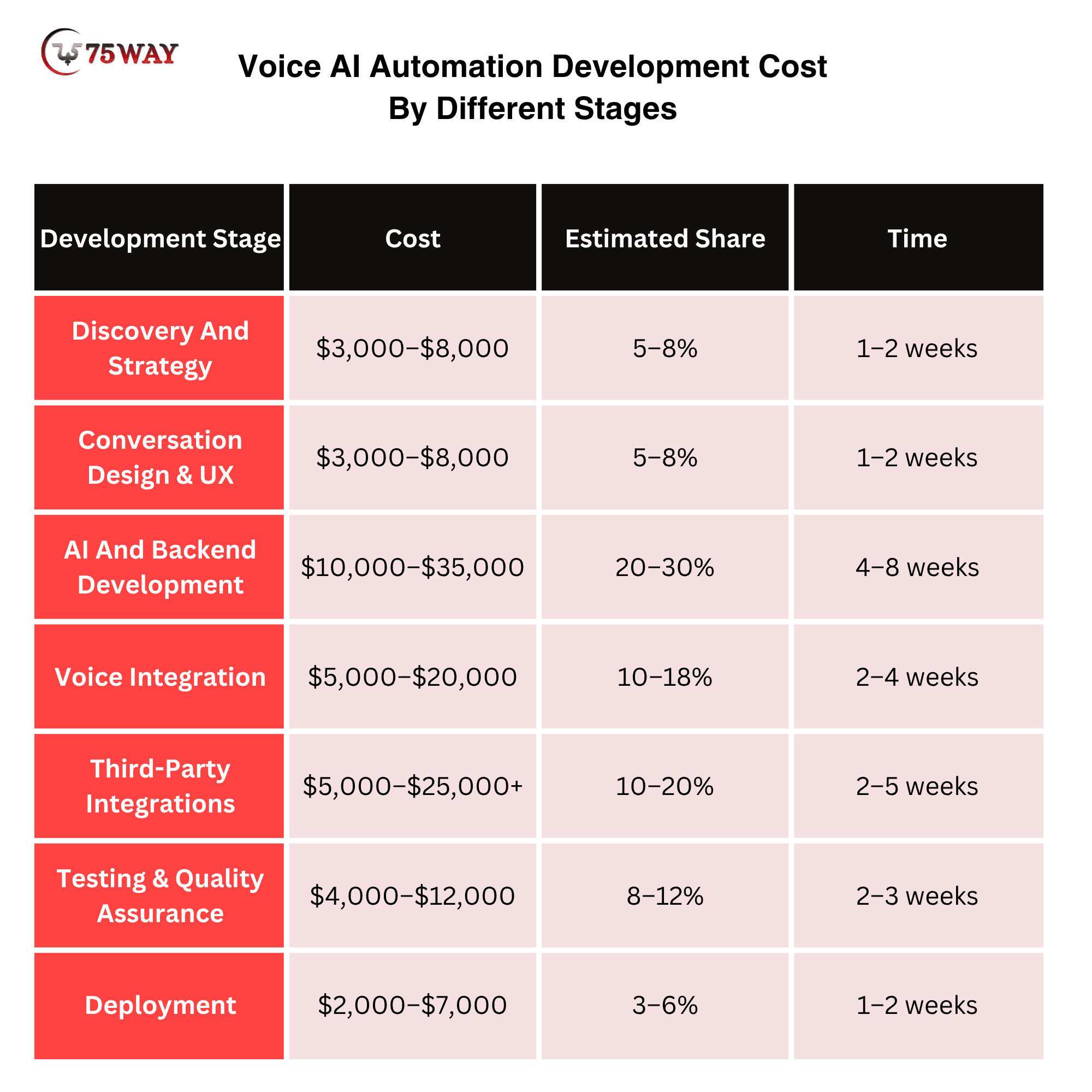
Voice AI Automation Development Cost By Different Stages
The total cost of voice AI automation depends on the development stage, project complexity, integrations, and level of customization required. The following breakdown shows how costs can vary across each stage of development.
- Discovery And Strategy: $3,000–$8,000
Business analysis, call-flow mapping, use-case identification, technical planning, and defining the AI agent's responsibilities.
- Conversation Design & UX: $3,000–$8,000
Conversation architecture, prompt design, escalation flows, voice experience, and caller journey planning.
- AI And Backend Development: $10,000–$35,000
AI integration, workflow logic, APIs, databases, authentication, business rules, and backend infrastructure.
- Voice Integration: $5,000–$20,000
Telephony integration, phone numbers, call routing, speech processing, transcription, and supporting voice infrastructure.
- Third-Party Integrations: $5,000–$25,000+
CRM, calendar, booking, helpdesk, payment, e-commerce, and other business-system integrations.
- Testing & Quality Assurance: $4,000–$12,000
Conversation testing, voice-quality testing, integration testing, performance checks, security validation, and edge-case testing.
- Deployment: $2,000–$7,000
Production configuration, cloud deployment, monitoring, phone-number setup, and launch support.
Ongoing Costs Of Artificial Intelligence Voice Automation
Development is only one part of the investment. Businesses should also budget for recurring expenses such as:
- AI Model Usage: Costs associated with processing conversations, generating responses, understanding caller intent, and completing AI-driven tasks.
- Voice Generation: Charges for converting AI-generated responses into natural-sounding speech during customer conversations.
- Speech-to-Text: Expenses for converting callers' spoken words into text that the AI system can process.
- Telephony Minutes: Usage charges based on the duration and volume of incoming or outgoing calls.
- Phone Numbers: Recurring fees for purchasing and maintaining business phone numbers used by the voice system.
- Cloud Infrastructure: Costs for hosting servers, databases, APIs, storage, security, and other backend resources.
- CRM or Software Subscriptions: Recurring fees for third-party CRM, scheduling, helpdesk, payment, or other connected business platforms.
- Monitoring: Costs associated with tracking system performance, call quality, errors, uptime, usage, and operational issues.
- Maintenance: Ongoing expenses for bug fixes, security updates, integrations, compatibility, and technical support.
- AI Workflow Improvements: Costs for refining prompts, conversation flows, business rules, knowledge sources, and automation based on real call performance.
These costs can vary significantly based on monthly call volume and average call duration.
Which Factors Determine The Final Cost?
- Call Volume: More calls and longer conversations increase recurring voice and AI processing costs.
- Integration Requirements: Connecting CRM, scheduling, payment, helpdesk, or custom software increases development complexity.
- Conversation Complexity: A simple FAQ agent costs less than an agent capable of multi-step reasoning and business transactions.
- Voice Features: Real-time conversations, multilingual support, advanced voice quality, call recording, and outbound calling can increase costs.
- Customization: Custom workflows, dashboards, business rules, and industry-specific functionality require additional development.
- Business Scale: Supporting multiple departments, locations, teams, or brands requires additional infrastructure and administration.
For most small and mid-sized businesses, the smartest approach is to begin with one high-value workflow, measure its performance, and expand the system once the business can demonstrate clear operational or revenue benefits.
How Does AI-Powered Voice Automation Improve ROI of Growing Businesses in the USA?
For small and mid-sized businesses, the business case for voice AI should go beyond reducing call-handling costs. The stronger opportunity is to capture missed opportunities, respond faster, automate repetitive work, improve customer experiences, and help employees focus on conversations that genuinely require human involvement.
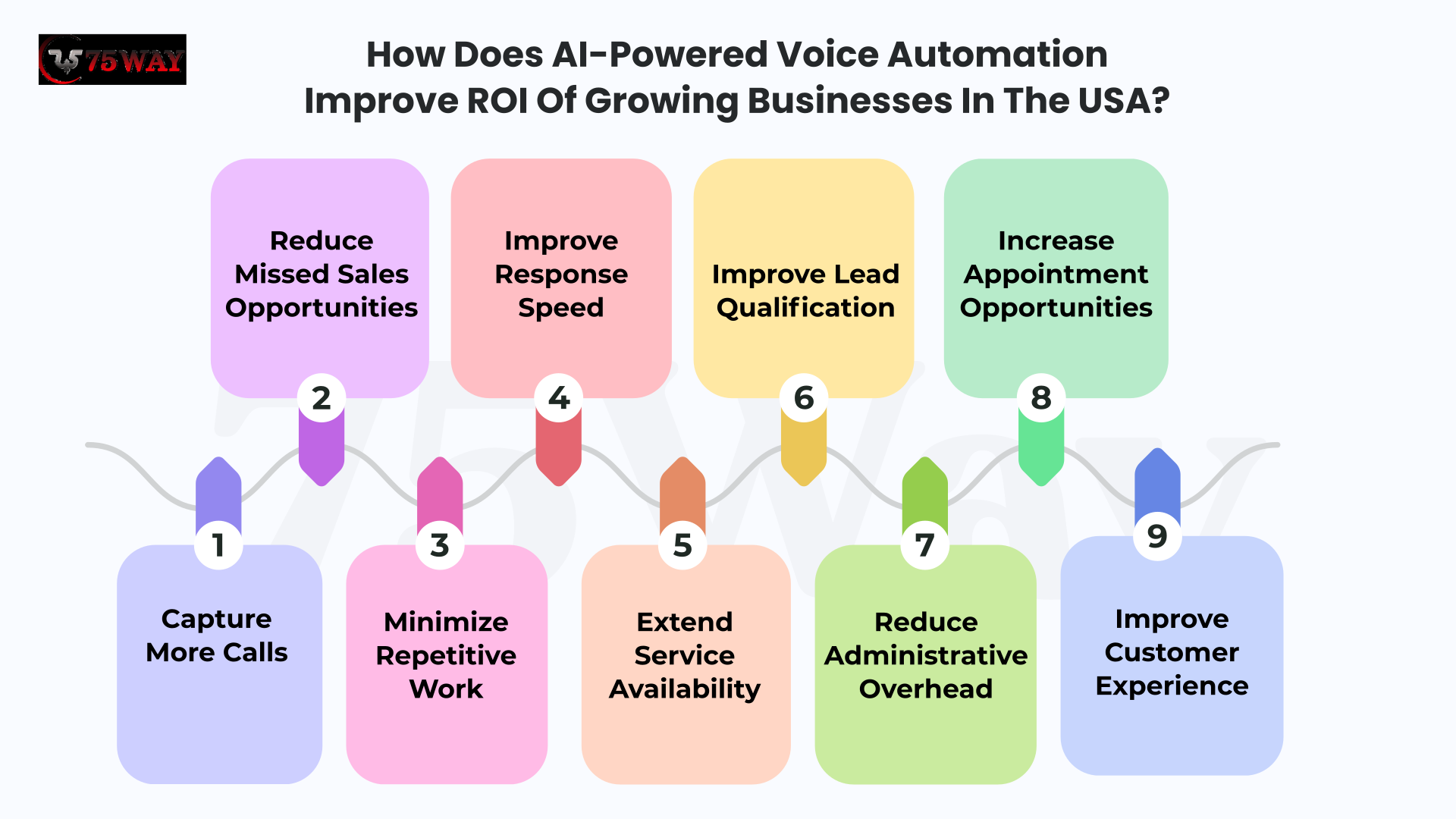
1. Capture More Calls
When employees are busy, after-hours, or unavailable, potential customers may reach voicemail or abandon the call. An automated voice agent can provide an immediate response and capture the caller's request.
This can create additional opportunities for businesses that depend heavily on inbound phone leads.
2. Reduce Missed Sales Opportunities
A prospect who cannot reach a business may call a competitor instead. AI-powered calling systems can answer qualifying questions, collect lead information, and schedule a conversation with sales staff when appropriate.
3. Minimize Repetitive Work
Employees often spend significant time answering the same questions, confirming appointments, collecting basic information, and routing calls.
Automating suitable conversations allows staff to spend more time on sales, customer relationships, and complex issues.
4. Improve Response Speed
Customers generally do not want to wait for a callback to ask a simple question or schedule an appointment.
An AI phone assistant can respond immediately, potentially shortening the time between customer intent and business action.
5. Extend Service Availability
A business does not need employees answering every call around the clock to provide additional coverage.
AI voice systems can handle approved requests outside standard working hours, helping companies capture inquiries that might otherwise wait until the next business day.
6. Improve Lead Qualification
Sales teams can spend less time manually screening every incoming lead when the AI agent collects predefined information first.
The sales representative can receive the relevant context before speaking with the prospect.
7. Reduce Administrative Overhead
When connected to CRM and business software, voice automation can reduce manual activities such as entering customer information, updating records, creating tickets, and documenting routine calls.
8. Increase Appointment Opportunities
For appointment-based businesses, an automated voice agent can help customers book, confirm, or reschedule appointments without waiting for staff.
The potential value becomes particularly significant when phone calls represent a major booking channel.
9. Improve Customer Experience
Faster answers, simpler booking, intelligent routing, and clear human escalation can create a smoother phone experience.
The goal is not to make every interaction automated. It is to remove unnecessary friction from routine interactions.
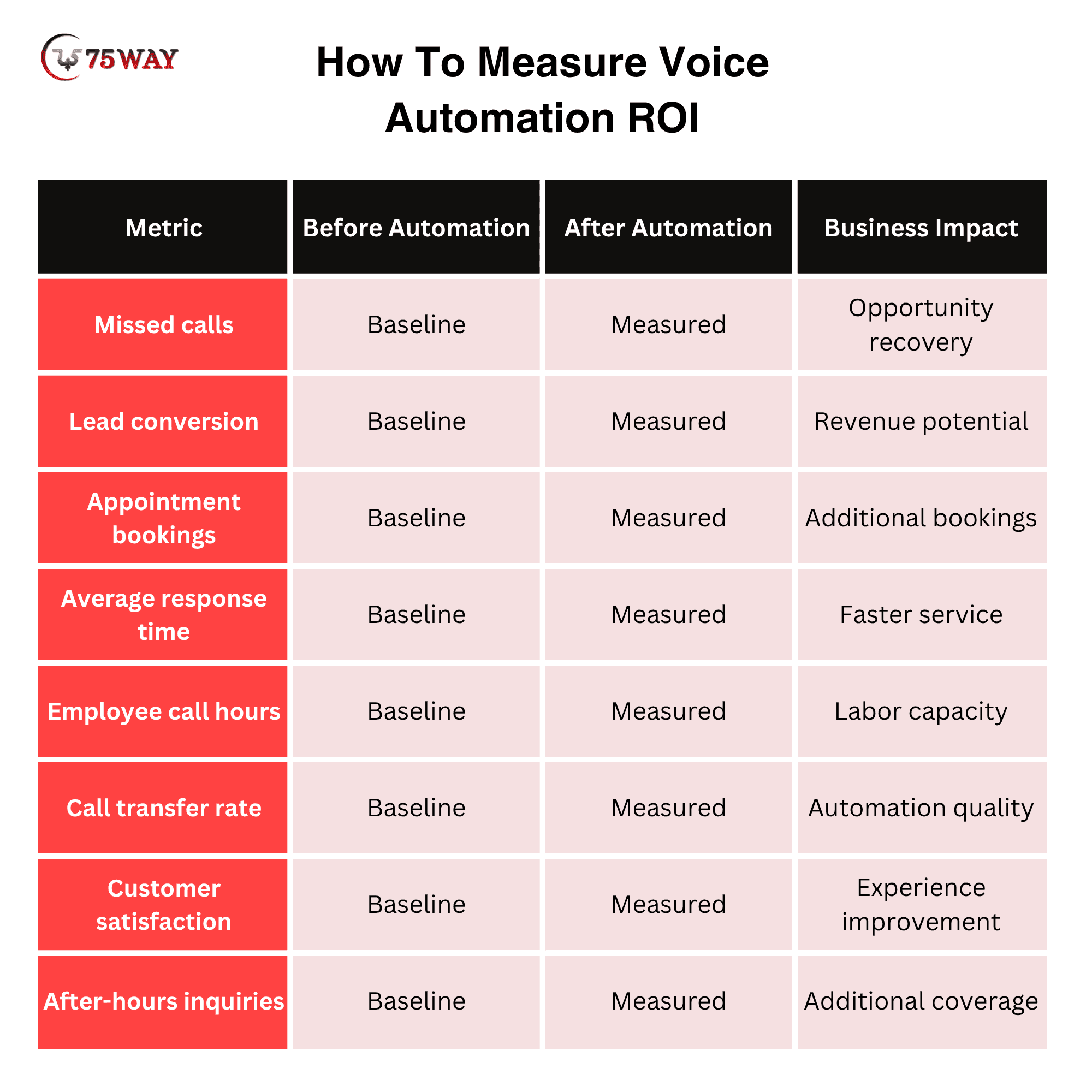
How To Measure Voice Automation ROI
Businesses should establish a baseline before implementation and compare performance after deployment.
A Simple ROI Framework
Businesses can evaluate the investment using:
Voice AI ROI = Additional Revenue + Operational Savings − Total Automation Costs
For example, if automation generates additional qualified leads, recovers missed appointments, and reduces repetitive employee call hours, those benefits can be compared against development, software, telephony, AI usage, and maintenance expenses.
However, ROI varies significantly by business model. A company receiving hundreds of calls every day may have a very different business case from a small business receiving only a few calls each week.
For that reason, AI voice automation ROI should be measured against actual call economics, not generic claims about how much money AI can save. The best implementation is one where the business can clearly connect automation to measurable improvements in revenue, productivity, service capacity, or customer experience.
AI Calling Automation Challenges Businesses Should Consider Before Adoption
AI voice technology can create meaningful business value, but successful implementation requires realistic expectations. Businesses should evaluate conversational accuracy, integration complexity, privacy, customer acceptance, compliance, and ongoing management before automating important phone workflows.
- Voice Recognition Accuracy: Background noise, accents, poor connections, interruptions, and unclear speech can affect how accurately an AI agent understands callers.
- Conversation Errors: AI systems can misunderstand unusual requests or ambiguous language, making strong knowledge sources, business rules, testing, and human escalation important.
- Integration Complexity: Connecting voice automation with CRM, scheduling, payment, helpdesk, or proprietary systems can require additional development and ongoing maintenance.
- Customer Acceptance: Some customers may prefer speaking with employees, particularly when discussing complicated, sensitive, or high-value matters, making accessible human assistance important.
- Privacy Requirements: Voice interactions can involve names, phone numbers, account information, payment-related details, and other customer data, requiring appropriate privacy and security controls.
- Regulatory Compliance: US businesses should consider applicable federal and state requirements governing automated calls, disclosures, consent, recording, outbound communication, and industry-specific data practices.
- AI Hallucinations: An AI agent can generate incorrect information when its knowledge and controls are poorly designed, so critical responses should rely on approved sources.
- Human Escalation: Businesses need clear conditions for transferring conversations to employees when requests become complex, sensitive, unusual, or outside the AI agent’s capabilities.
- Ongoing AI Costs: Recurring expenses can increase with call volume, conversation duration, speech processing, AI model usage, telephony, cloud infrastructure, and third-party services.
- Maintenance Requirements: Business information, employee schedules, pricing, policies, integrations, and workflows change over time, requiring regular updates to keep the system accurate.
- Measuring Business Impact: Track booking conversion, qualified leads, call resolution, transfer rates, customer satisfaction, response times, and employee workload to determine whether automation delivers measurable business value.
How Businesses Can Reduce These Risks
A phased implementation is usually safer than automating every phone workflow immediately.
Start with low-risk, high-volume conversations, such as FAQs, basic appointment requests, call routing, and lead capture. Monitor real interactions, identify failure patterns, improve the system, and gradually introduce more complex workflows.
Businesses should also maintain human oversight for situations involving sensitive information, complaints, complex decisions, exceptions, or requests that fall outside the AI agent's approved capabilities.
The objective is not to remove humans from the phone experience. It is to use intelligent call automation where it creates genuine value while keeping human expertise available where customers and employees need it most.
AI Voice Automation Trends Driving Growth In 2027
AI voice technology is moving beyond basic automated answering and toward systems that can understand context, connect with business software, and complete multi-step workflows. For US small and mid-sized businesses, these developments are creating new opportunities across sales, customer service, scheduling, and operations.
- More Natural Conversations
Voice AI is becoming better at handling interruptions, conversational language, context, and varied speaking styles, creating interactions that feel less like traditional automated phone systems.
- AI-Powered Outbound Calls
Businesses are increasingly exploring automated outbound workflows for lead follow-ups, appointment confirmations, customer surveys, and other predefined communication tasks.
- Multilingual Voice Agents
Businesses serving multilingual customer groups can use voice systems that support multiple languages, helping broaden access without requiring separate automated systems for every language.
- Real-Time Personalization
Voice agents can use permitted customer and business context to tailor conversations, such as recognizing returning customers or referencing relevant appointment information.
- Smarter Call Routing
Modern systems can analyze caller intent and context before routing conversations, helping businesses connect customers with the right department or employee.
- Voice AI With CRM
Deeper CRM integration allows voice conversations to trigger lead creation, customer updates, task generation, and follow-up workflows without requiring employees to enter information manually.
- Agentic Voice Workflows
Voice agents are increasingly being designed to complete multi-step tasks instead of simply answering questions, such as qualifying a lead, checking availability, booking an appointment, and sending confirmation.
- Advanced Call Analytics
Businesses can gain deeper insights from conversation data, including common customer questions, call outcomes, conversion opportunities, transfer patterns, and service issues.
- Omnichannel AI Assistants
Voice agents are increasingly being connected with websites, messaging platforms, email, and other channels, allowing businesses to create more connected customer journeys.
- Industry-Specific Voice AI
Instead of using generic phone automation, businesses can adopt specialized systems designed around workflows for industries such as healthcare, real estate, home services, automotive, legal services, and hospitality.
- Greater Human-AI Collaboration
The future is not necessarily fully automated calling. Businesses are increasingly using AI to handle routine interactions while employees manage complex conversations, exceptions, relationships, and high-value opportunities.
The biggest opportunity is not adopting every new voice technology feature. Small and mid-sized businesses should prioritize developments that solve specific operational problems and produce measurable outcomes.
A local service company may benefit most from lead qualification and appointment scheduling, while a professional services firm may prioritize inbound call handling, CRM integration, and intelligent routing.
The practical approach is to start with a focused workflow, establish performance benchmarks, and expand automation as the business gains confidence in the technology.
How To Choose The Right AI Voice Automation Partner in USA?
Choosing an AI voice automation company is an important decision because the technology becomes closely connected with customer conversations, business systems, and revenue-generating workflows. US SMBs should evaluate a development partner based on technical capabilities, industry understanding, security practices, integration experience, and long-term support.
1. Relevant Development Experience: Review whether the provider has experience building conversational AI, voice agents, call automation systems, CRM integrations, and workflow-based applications.
2. Industry Understanding: Choose a team that understands your customer journey, call types, operational processes, and industry-specific requirements rather than offering a generic voice bot.
3. Integration Capabilities: Confirm that the development team can connect the voice system with your CRM, calendar, helpdesk, booking platform, payment software, APIs, and existing business applications.
4. Conversation Design Expertise: Evaluate how the provider designs conversation flows, fallback responses, escalation rules, prompts, and business-specific knowledge rather than relying on basic scripts.
5. Security And Privacy: Ask how customer information, call recordings, transcripts, credentials, and connected business data will be protected throughout the system lifecycle.
6. Scalable Architecture: The solution should support increasing call volumes, additional locations, new workflows, and growing integration requirements without requiring a complete rebuild.
7. Human Handoff Strategy: Confirm that the system includes reliable escalation mechanisms for complex requests, complaints, sensitive situations, and conversations that require employee involvement.
Questions To Ask Before Hiring Voice AI Automation Developer
An AI automation developer may know how to build a voice bot, but that does not mean they can build one that works reliably inside your business. Before hiring, you need to uncover how they approach conversation quality, integrations, security, scalability, and real-world call handling. The questions below can help you assess whether a developer is equipped for your project.
- Which voice AI platforms and technologies do you work with?
- Can you integrate the system with our existing software?
- How will human escalation work?
- How will customer data be protected?
- Can the system support our expected call volume?
- How will conversation accuracy be tested?
- What analytics will we receive?
- What ongoing maintenance is included?
- Can we add new workflows later?
- How will usage-based AI and telephony costs be managed?
The right partner should be able to explain how the technology will solve your specific business problem, not simply demonstrate an impressive AI voice demo. A strong implementation combines conversational quality, reliable integrations, controlled automation, measurable KPIs, and a clear path for future expansion.
Why Choose 75way For AI Voice Automation Development?
75way Technologies helps small and mid-sized businesses automate calls with practical, scalable voice AI solutions. Our approach connects conversational automation with real business workflows, customer needs, and measurable growth objectives.
- Custom AI voice solutions designed around your business
- Seamless integrations with existing CRM and software
- Natural conversations with reliable human escalation
- Scalable architecture supporting growing call volumes
- Secure workflows protecting customer and business information
- Actionable analytics for better operational decision-making
- End-to-end development from strategy through deployment
- Ongoing optimization based on real-world call performance
Conclusion
AI voice automation is becoming a practical way for US small and mid-sized businesses to manage calls, capture opportunities, support customers, and automate repetitive phone workflows. The strongest results come from choosing focused use cases, connecting voice agents with existing business systems, maintaining clear human escalation, and measuring outcomes such as conversions, bookings, resolution rates, and customer satisfaction. Businesses do not need to automate every conversation at once; a focused rollout can establish value before expanding into more advanced workflows. With the right strategy, voice AI can become a scalable communication layer that supports both customer experience and business growth. To automate your business calls with voice AI, you can contact a veteran AI agent development company.
Frequently Asked Questions (FAQs)
How Natural Do AI Voice Conversations Sound?
Modern voice systems can produce conversational interactions with natural speech patterns, but performance depends on the selected technology, configuration, audio quality, and conversation design.
How Many Calls Can An AI Voice Agent Handle?
Call capacity depends on the underlying architecture, telephony provider, AI platform, concurrency limits, and business configuration. Scalable cloud infrastructure can support growing call volumes.
Does AI Voice Automation Require Employees To Monitor Every Call?
Employees generally do not need to monitor every routine interaction. Businesses can establish escalation rules so staff become involved when conversations require judgment or specialized assistance.
What Happens During A Phone Call If The Internet Connection Is Poor?
Poor connectivity can affect audio quality and response performance. Businesses should test network conditions, configure suitable fallback processes, and provide human escalation for disrupted conversations.
Can AI Voice Systems Remember Previous Customer Conversations?
Depending on the architecture and integrations, systems can use permitted customer records, previous interaction data, and conversation history to provide more contextual experiences.
How Do Customers Know They Are Speaking With AI?
Businesses should use appropriate disclosure practices and make the nature of automated interactions clear. Customers should also have a practical way to reach human assistance.
What Should Businesses Prepare Before Building A Voice AI Agent?
Businesses should document call types, FAQs, workflows, escalation conditions, software integrations, customer information requirements, compliance considerations, and measurable objectives before development begins.