AI Summary
Agriculture software development is turning farm data into practical decisions, from crop monitoring to resource planning and automation. This guide explores the agriculture custom software development process, costs, essential features, technologies, timelines, and business models. It also explains key factors shaping successful agriculture software projects.
Key Takeaways
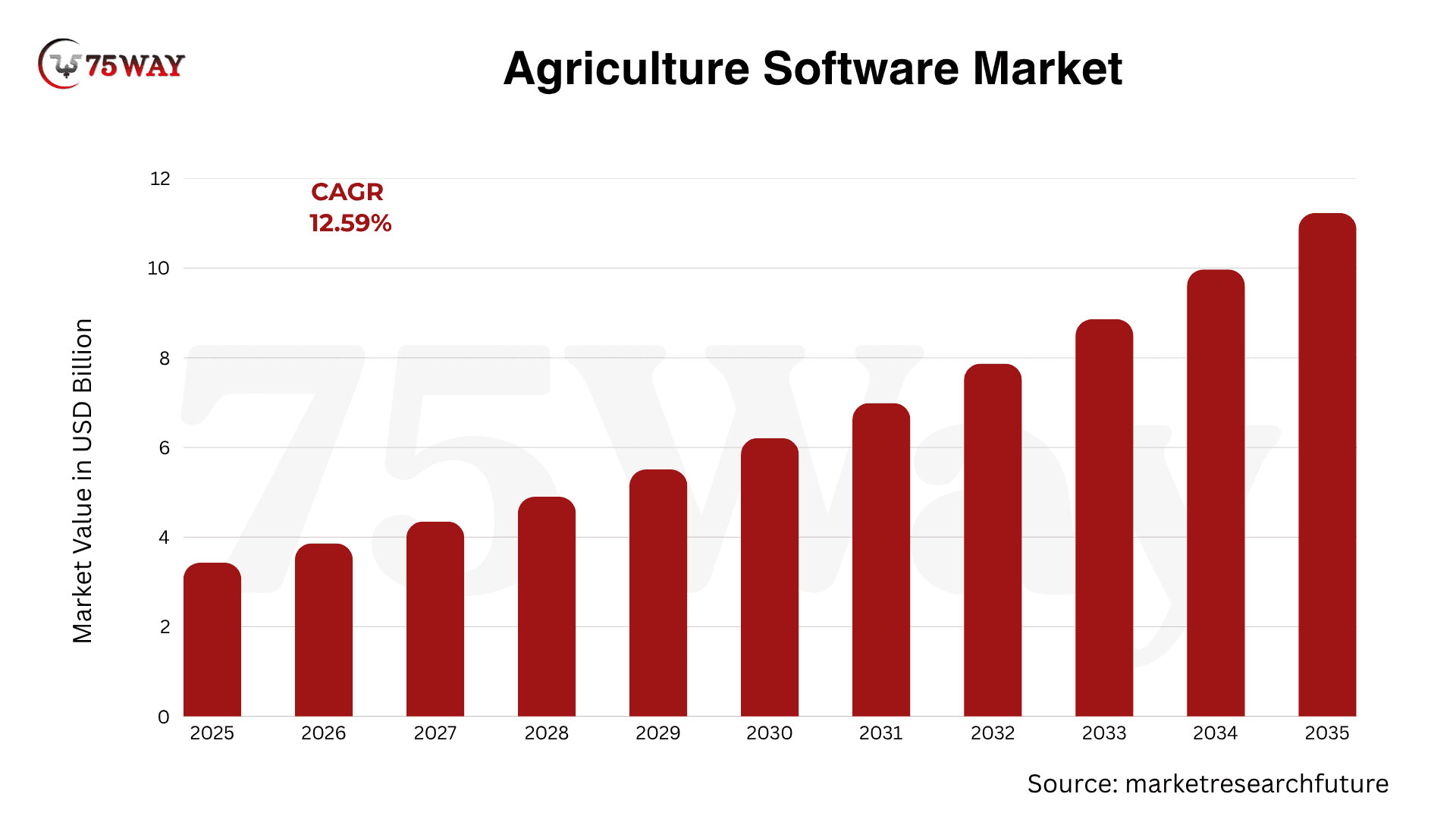
- Agriculture software is projected to grow from $3.435B to $11.25B by 2035.
- Developing agriculture software can cost $20,000–$350,000+, depending on project complexity.
- Modern agriculture platforms combine farm management, AI, IoT, analytics, and automation.
- Development costs depend on features, integrations, platforms, security, scalability, and technology.
- A clear development strategy helps businesses build practical, scalable agriculture software solutions.
An agriculture business may have plenty of data but still struggle to answer simple questions about crop performance, resource usage, field conditions, or operational costs. The right agriculture software can turn scattered information into a working digital system that helps teams monitor operations and make decisions with better visibility.
The opportunity is also expanding. According to Market Research Future, the agriculture software industry is projected to grow from $3.435 billion in 2025 to $11.25 billion by 2035, representing a projected CAGR of 12.59%.
FAO highlights digital tools as a way to improve farm management, market access, productivity, and resilience, while current smart-farming efforts are focusing on scalable agriculture software development solutions that connect technology with practical agricultural needs.
For businesses investing in building custom agriculture software, the technology itself is only one part of the decision. Product scope, users, workflows, integrations, data, infrastructure, and long-term scalability all need to fit together before the software reaches the field.
The complete agribusiness software solution development journey from planning to launch is explained in detail throughout this guide.
What Is Agriculture Software?
Agriculture software is a digital tool that helps farmers and agribusinesses manage farming activities, resources, data, and day-to-day operations from one connected platform. Instead of relying on spreadsheets, paperwork, and separate systems, businesses can bring tasks such as crop planning, field management, inventory, equipment, livestock, finances, and supply-chain activities together.
The software can also connect with GPS devices, sensors, drones, satellite imagery, weather data, and other technologies to give teams better visibility into farm conditions and resource usage. This makes it easier to monitor operations, identify potential issues, and make decisions using timely information.
However, agriculture software is not limited to one type of platform. Businesses can build solutions for farm management, precision agriculture, livestock operations, agricultural marketplaces, supply-chain management, or broader agribusiness processes based on their specific requirements.
Why Businesses Are Investing In Building Agribusiness Software Solutions
A profitable agricultural operation needs more than strong production. It also depends on knowing where resources, costs, data, and decisions stand at any given time. Agriculture software can help businesses turn scattered operational information into a more connected system for managing their work. The reasons behind growing investment in agricultural software are outlined here.
1. Better Resource Management
Agriculture software helps farmers track water, fertilizers, seeds, equipment, labor, and other resources across their operations. Better visibility into usage can reduce unnecessary consumption and make resource planning more practical.
2. Smarter Crop Planning
Crop planning becomes easier when farmers can organize field information, planting schedules, expected yields, and seasonal requirements in one system. Historical data can also support better planning for upcoming growing cycles.
3. Faster Operational Decisions
Real-time information from fields, weather sources, equipment, and connected devices can give farmers a clearer view of what is happening. This allows them to identify problems sooner and respond before small issues create larger operational setbacks.
4. Reduced Administrative Work
Farm operations generate plenty of records, from field activities and inventory to expenses and worker schedules. Agriculture software can automate routine data entry, reporting, alerts, and record management, giving farmers more time to focus on core agricultural activities.
5. Stronger Business Visibility
Agriculture software can bring operational and financial information together through dashboards and reports. Farmers and agribusiness owners can use this information to understand costs, monitor performance, compare results, and make more informed business decisions.
Market Size, Growth And Revenue Trends of Agronomy Software in The US
Before investing further, it is worth looking at the market opportunity behind agribusiness software. The broader agricultural software market is projected to reach $5.2 billion by 2030, growing at a 9.7% CAGR from 2024 to 2030, according to a 2026 Market Glass report. The market size, revenue outlook, and growth trends shaping this opportunity are discussed below.
- The U.S. farm management software market is projected to reach USD 4,381.6 million by 2033, expanding at a 19.3% CAGR.
- North America leads global adoption, holding approximately 32%–38% of the market, supported by advanced infrastructure and larger average farm sizes.
- The smart farming market is projected to surpass $20 billion by 2027, highlighting continued growth in agricultural technology adoption.
- Around 63% of surveyed agricultural producers report using farm management software in some capacity.
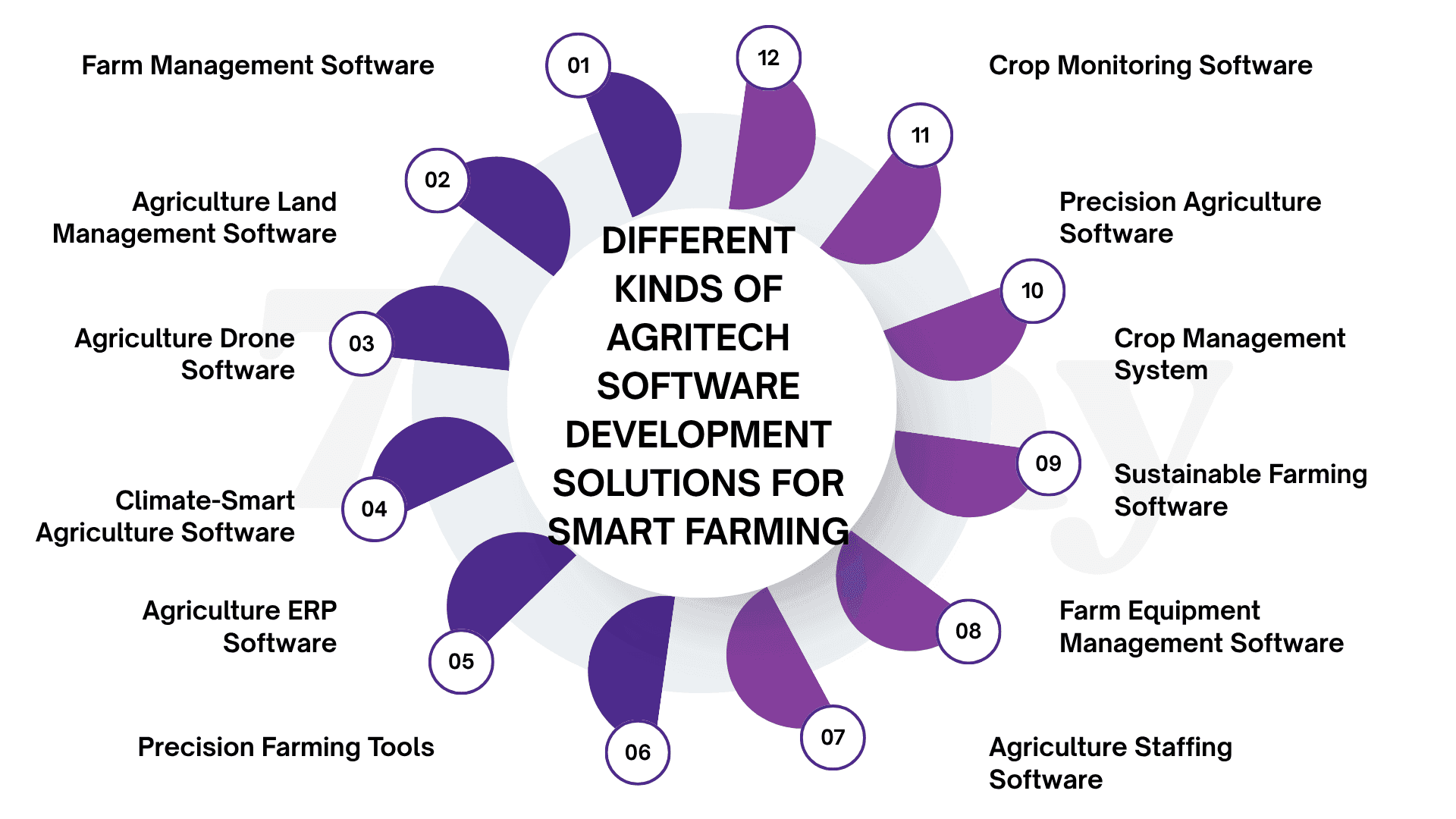
Different Kinds of Agritech Software Development Solutions for Smart Farming
Smart farming does not rely on one type of software because agricultural businesses deal with very different operational requirements. Some solutions focus on field data and crop decisions, while others connect machinery, sensors, farm teams, supply chains, or business operations. The main agritech software solutions businesses can develop are covered below.
How To Build Agriculture Software: A Comprehensive Process
Agriculture software development starts with understanding how agricultural businesses actually work. From field operations and data collection to connectivity and user workflows, every development decision should support a clear business need and a practical outcome.
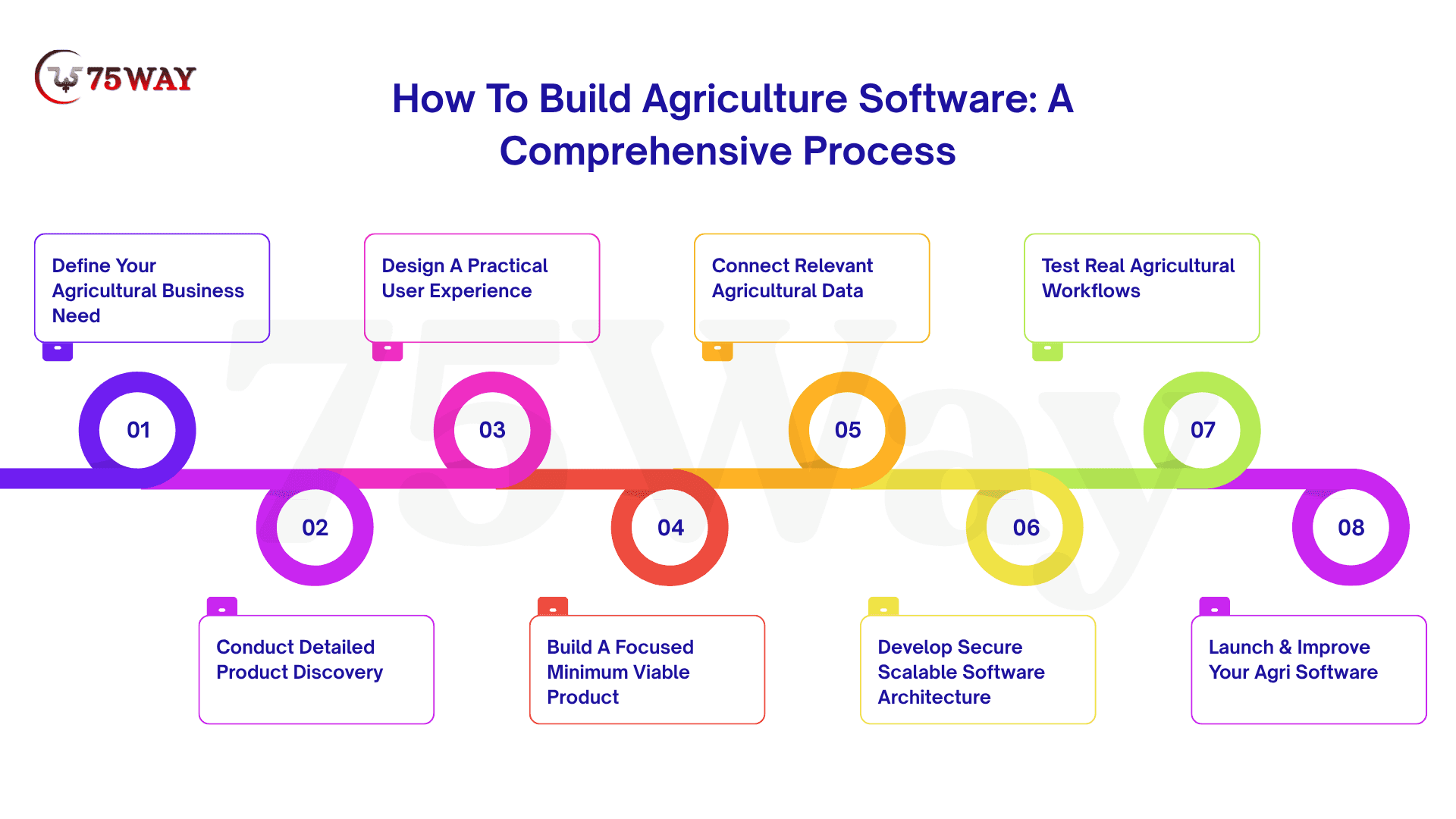
1. Define Your Agricultural Business Need
The first step is to identify the specific agricultural problem your software needs to solve. The target users might include farmers, agribusinesses, crop consultants, livestock operators, equipment providers, distributors, or agricultural managers.
A clear use case keeps development focused and prevents the product from becoming a collection of disconnected features. Document the current workflow, major pain points, users involved, information required, and business outcome you want the software to deliver.
Key areas to define:
- Target users and their responsibilities
- Current operational challenges
- Existing tools and processes
- Required data and information
- Expected business outcomes
2. Conduct Detailed Product Discovery
Product discovery turns an initial idea into a practical product plan. The development team studies user journeys, workflows, data requirements, integrations, technical limitations, security needs, and future growth expectations before development begins.
This stage can also determine the technology capabilities your product actually requires. Depending on the use case, the platform may need mobile applications, web dashboards, GIS mapping, IoT connectivity, AI capabilities, third-party integrations, or offline functionality.
Discovery should cover:
- User journey mapping
- Feature prioritization
- Data flow requirements
- Integration requirements
- Security considerations
- Scalability expectations
3. Design A Practical User Experience
Agricultural software needs to fit naturally into the environment where users work. Farmers and field teams may use mobile devices outdoors, work with limited connectivity, or need to record information while performing physical tasks.
Simple navigation, readable dashboards, clear forms, useful maps, and timely alerts can make the application easier to use. The interface should reduce unnecessary steps and allow users to complete important actions without navigating through complicated menus.
Important UX considerations:
- Mobile-first workflows
- Simple data entry
- Clear dashboards
- Location-based interfaces
- Offline access where required
- Accessible navigation
4. Build A Focused Minimum Viable Product
An MVP should solve one clearly defined problem instead of attempting to cover every agricultural workflow from the beginning. A crop-monitoring platform, for example, might initially include field profiles, sensor data, maps, alerts, and basic reporting.
A focused first release gives businesses an opportunity to observe real usage and collect feedback before expanding the product. New capabilities can then be introduced according to customer needs, adoption patterns, and business priorities.
A focused MVP may include:
- Core user accounts
- Primary workflow
- Essential dashboards
- Required integrations
- Basic reporting
- Notifications and alerts
5. Connect Relevant Agricultural Data
Agriculture software often becomes more valuable when information from different sources works together. Depending on the product, integrations may include weather services, GPS devices, satellite imagery, IoT sensors, farm machinery, mapping platforms, payment gateways, or external agricultural databases.
The integration strategy should focus on the data that genuinely supports the product's purpose. Reliable data pipelines, validation, synchronization, and error handling are particularly important when decisions depend on information arriving from multiple external sources.
Potential data sources include:
- Weather APIs
- GPS and mapping systems
- IoT sensors
- Satellite imagery
- Agricultural machinery
- External databases
- Payment and business systems
6. Develop Secure Scalable Agri Software Architecture
The underlying architecture should support the expected number of users, data volume, integrations, and future features. A scalable foundation becomes particularly important when agriculture software needs to handle information from multiple farms, locations, devices, or operational systems.
Security should also be considered throughout development rather than added near launch. Access controls, secure data transmission, authentication, backups, monitoring, and appropriate permissions can help protect operational and business information.
7. Test Real Agricultural Workflows
Agriculture software requires more than basic functional testing. The platform should be tested across user workflows, APIs, integrations, mobile devices, performance, security, data accuracy, and different operating conditions.
Connected agriculture products also need testing for real-world interruptions. Temporary connectivity loss, delayed sensor readings, duplicate information, unavailable APIs, inaccurate device inputs, and synchronization failures can all affect how reliably the platform performs.
Testing should cover:
- Functional workflows
- Mobile responsiveness
- API integrations
- Data accuracy
- Performance
- Security
- Connectivity interruptions
- Device compatibility
8. Launch & Improve Your Agri Software
The first launch is the beginning of product improvement, not the end of development. Usage patterns, customer feedback, support requests, feature adoption, and operational results can reveal where users experience friction or where additional capabilities could create value.
Regular product improvements can keep the software aligned with changing agricultural workflows and business requirements. A phased development approach also gives businesses more control over investment while allowing the platform to grow around validated customer needs.
Post-launch priorities include:
- User behavior monitoring
- Customer feedback
- Performance tracking
- Issue resolution
- Feature improvements
- Security updates
- Future integrations
Core Features To Consider For Custom Agriculture Software Development
Not every agriculture business needs the same software, and adding too many capabilities can make the product harder to use without adding meaningful value. A focused feature set should match the users, workflows, and commercial purpose defined during product planning. The core features worth considering for a custom agriculture software solution are covered below.
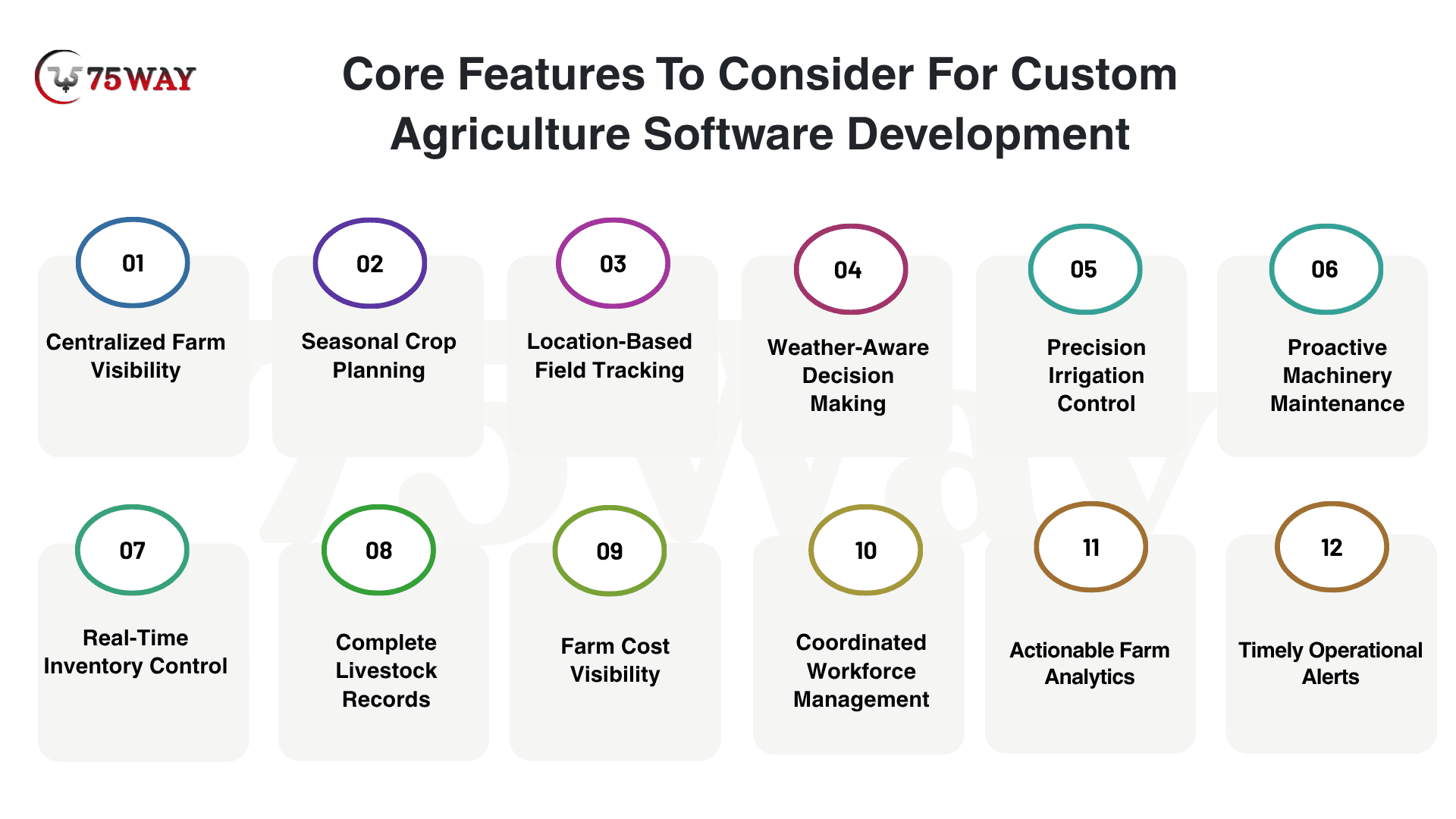
1. Centralized Farm Visibility
A single dashboard can bring crop activities, field conditions, equipment status, inventory levels, expenses, and pending work together. This gives farmers a quick understanding of what is happening across their operations without checking multiple systems.
The most useful dashboards keep important information easy to find rather than filling the screen with unnecessary data. Custom views can also give farm owners, managers, and field workers access to information that matches their individual responsibilities.
2. Seasonal Crop Planning
Every growing season comes with its own planting schedules, crop choices, field requirements, and expected harvest dates. A dedicated planning feature keeps these details organized, giving farmers a clearer roadmap from preparation through harvesting.
Historical records can add another layer of value to crop planning. Previous yields, field activities, input usage, and crop performance can provide useful context when farmers are preparing for the next growing cycle.
3. Location-Based Field Tracking
Large farms can involve numerous fields with different crops, activities, and requirements. Digital field mapping can organize boundaries, acreage, crop information, and field-specific records so managers can understand each area more clearly.
GPS integration can make field information even more practical for teams working across large properties. Location-based records can connect activities to the correct fields, making field inspections, task coordination, and operational tracking easier.
4. Weather-Aware Decision Making
Weather can influence almost every stage of agricultural operations, from planting and irrigation to spraying and harvesting. Weather integration brings forecasts and alerts into the same environment where farmers manage their daily activities.
Timely information gives teams more context before making weather-sensitive decisions. Location-specific updates can also help farmers prepare for changing conditions and adjust planned activities when necessary.
5. Precision Irrigation Control
Water requirements can vary significantly between crops, fields, and growing conditions. Irrigation management gives farmers a central place to organize watering schedules, monitor usage, and keep track of irrigation activities across their properties.
Connected sensors can provide additional information about soil moisture and field conditions. With this data available, farmers can make more informed decisions about when and where irrigation may be required.
6. Proactive Machinery Maintenance
Tractors, harvesters, pumps, and other machinery are essential to keeping agricultural operations moving. Equipment management can maintain service records, maintenance schedules, usage information, and current equipment status in one accessible location.
Planned maintenance becomes easier when managers have a clear record of upcoming service requirements. Better equipment visibility can also support preparation for busy farming periods, when machinery availability becomes particularly important.
7. Real-Time Inventory Control
Agricultural operations depend on timely access to seeds, fertilizers, pesticides, animal feed, spare parts, and other supplies. Inventory management keeps stock levels, purchases, consumption, and storage information organized within the platform.
Real-time stock visibility can make procurement decisions easier and reduce unexpected shortages. Alerts for low inventory can also give teams more time to reorder essential supplies before they affect scheduled activities.
8. Complete Livestock Records
Livestock operations generate extensive information about animal health, vaccinations, feeding, breeding, weight, treatments, and production. A dedicated livestock module keeps these records organized and accessible instead of relying on scattered paperwork or spreadsheets.
Individual animal histories can provide useful context for ongoing livestock management. Farmers can review health events, breeding information, treatments, and production records while maintaining a clearer picture of herd performance.
9. Farm Cost Visibility
Farm expenses can come from many areas, including labor, seeds, fertilizers, machinery, transportation, maintenance, and supplies. Financial tracking brings these costs into one system, making it easier to understand where money is being spent.
Connections between expenses and specific crops, fields, or activities can provide deeper financial insight. Farm owners can review spending patterns, monitor budgets, and identify areas where operational costs may require closer attention.
10. Coordinated Workforce Management
Agricultural businesses often have workers handling different tasks across fields, facilities, livestock areas, and equipment. Workforce management can organize schedules, responsibilities, assignments, and task progress within one platform.
Clear task visibility can reduce confusion during busy periods and make responsibilities easier to follow. Managers can see which activities are completed, which remain pending, and where additional support may be required.
11. Actionable Farm Analytics
Agriculture software can collect large amounts of information throughout the growing season, but raw data becomes more useful when it supports meaningful decisions. Analytics can turn operational records into insights around yields, crop performance, resource consumption, costs, and productivity.
Custom reports can help businesses compare fields, crops, seasons, or locations without manually compiling information from different sources. These comparisons can reveal patterns that support future planning and operational improvements.
12. Timely Operational Alerts
Farm activities often depend on the right action happening at the right time. Automated alerts can notify users about weather changes, irrigation schedules, maintenance requirements, inventory shortages, assigned tasks, livestock events, and other important updates.
Relevant notifications reduce the need for managers to constantly check the platform for changes. Different users can receive alerts based on their responsibilities, ensuring that important information reaches the people who need to act on it.
Innovative Features for AI-Powered Agricultural Software Development
The real opportunity with AI lies in making agricultural software respond intelligently to changing field and business conditions. Instead of leaving users to interpret every data point themselves, AI can help transform large volumes of agricultural information into timely, usable insights. The innovative capabilities worth building into an AI-powered solution for agriculture are outlined here.
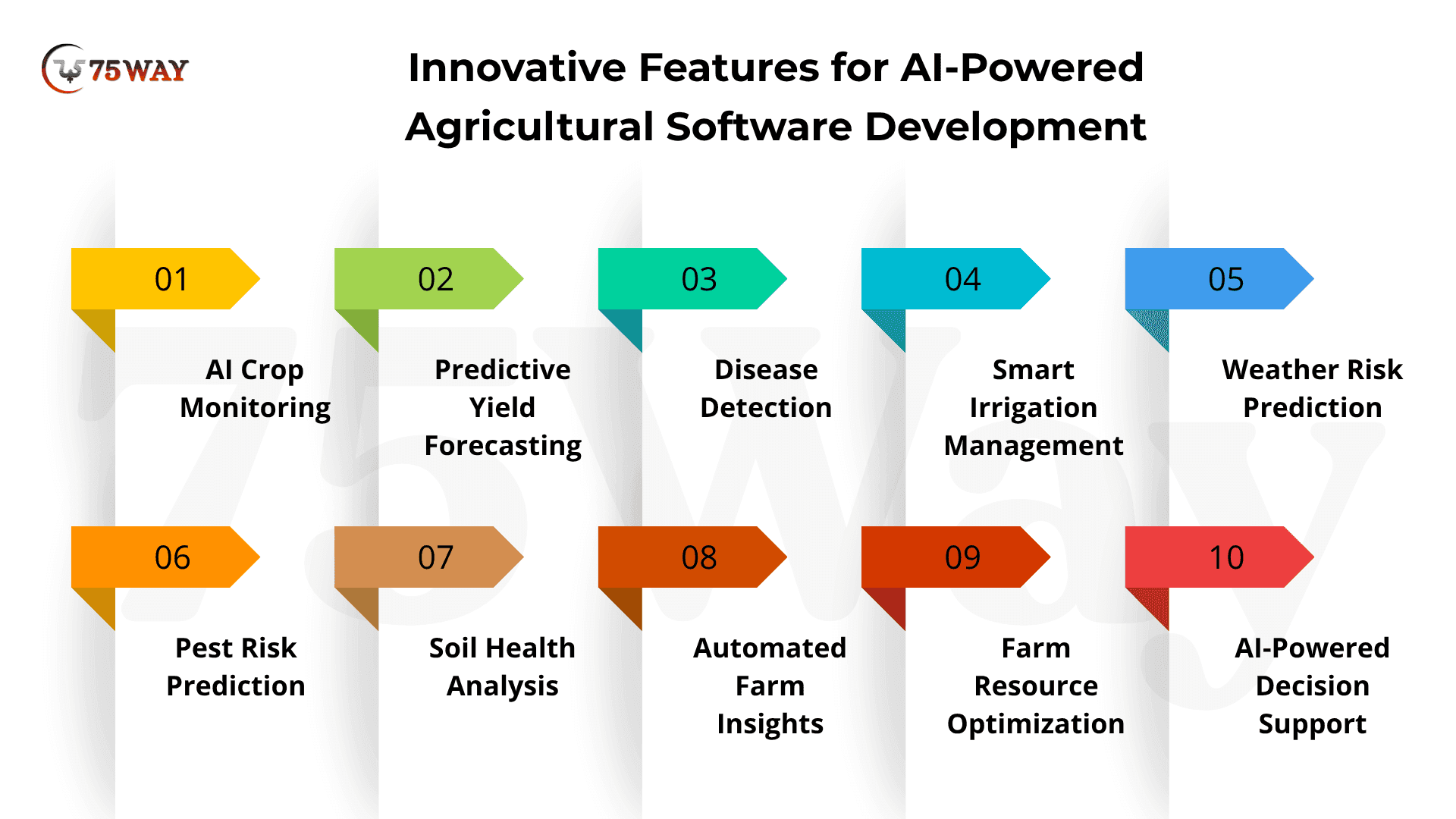
- AI Crop Monitoring: AI-powered crop monitoring analyzes field images, satellite data, and sensor inputs to identify crop health changes.
It can highlight stressed areas before visible damage spreads across the field. Farmers can use these insights to prioritize inspections and corrective actions.
- Predictive Yield Forecasting: Yield forecasting combines historical harvest data, weather conditions, crop characteristics, and field information to estimate expected production.
These predictions help growers plan harvesting, storage, labor, and sales activities. More informed forecasts can also reduce surprises during the selling season.
- Disease Detection: Computer vision can examine crop images to recognize visual patterns associated with diseases, pests, or nutrient deficiencies.
The software can flag suspicious areas and provide relevant information for further inspection. Early identification gives farmers more time to investigate problems before they affect larger field areas.
- Smart Irrigation Management: AI can combine soil moisture, weather forecasts, crop requirements, and irrigation history to recommend watering schedules.
The system can identify fields that may require attention based on changing environmental conditions. This helps farmers make irrigation decisions using field-specific information rather than fixed schedules.
- Weather Risk Prediction: AI-driven weather analysis can evaluate forecasts and historical conditions to identify potential agricultural risks.
Alerts can notify users about conditions such as heavy rainfall, extreme temperatures, or frost. Farmers can then adjust field activities according to anticipated weather conditions.
- Pest Risk Prediction: The software can analyze crop conditions, weather patterns, historical outbreaks, and field observations to identify potential pest risks.
Risk indicators can help farmers determine which areas deserve closer monitoring. This creates an opportunity to investigate emerging threats before widespread crop damage occurs.
- Soil Health Analysis: AI can process soil test results, sensor readings, crop history, and environmental information to identify changes in soil conditions.
The platform can present field-level insights about moisture, nutrients, and other relevant indicators. These insights help farmers understand differences between fields and make more informed management decisions.
- Automated Farm Insights: An AI agricultural platform can bring information from sensors, machinery, satellite imagery, weather services, and farm records into one dashboard.
Algorithms can identify notable patterns and convert large datasets into understandable insights. Farmers and managers can then focus their attention on issues that require investigation or action.
- Farm Resource Optimization: AI can analyze resource usage across fields, crops, equipment, labor, and production activities.
The software can identify unusual consumption patterns and areas where resources may require closer review. This gives farm managers better visibility into operational performance and resource allocation.
- AI-Powered Decision Support: Decision-support systems can combine multiple agricultural datasets to provide context-specific recommendations and risk indicators.
Users can explore the factors behind an insight instead of relying on unexplained automated outputs. This makes AI more useful as a decision-support layer within everyday farm management.
How IoT And Connected Agriculture Software Enables Precision Farming
IoT and connected agriculture software turn scattered field data into actionable visibility for farmers. Sensors can continuously capture soil moisture, temperature, humidity, crop conditions, equipment activity, and other field parameters, while connected software brings these readings into a centralized platform for monitoring and analysis.
Instead of treating an entire farm the same way, connected systems help farmers understand how conditions differ across fields and growing areas. IoT software for agriculture can combine sensor readings with satellite imagery, weather information, machinery data, and crop records to identify where irrigation, fertilization, scouting, or other interventions may require attention.
The real value comes from connecting data collection with timely decisions. Farmers can receive alerts, monitor field conditions remotely, track equipment, analyze trends, and adjust operations based on current information rather than relying only on manual observations. This creates a more responsive approach to precision farming while giving farm managers a clearer view of day-to-day operations.
Technology Stack Used In Custom Software Development For Agriculture Industry
A farm management app may look simple to users, but the technology behind it can involve mobile applications, cloud infrastructure, databases, APIs, GIS, IoT devices, and AI models working together. The technology stack should be selected around the product requirements rather than following a fixed combination of tools.
- Frontend
Web applications can use technologies such as React, Angular, or Vue, while mobile applications may use Flutter, React Native, Swift, or Kotlin depending on the required experience.
- Backend
Node.js, Python, Java, .NET, or similar backend technologies can support APIs, business logic, authentication, integrations, and data processing.
- Databases
PostgreSQL, MySQL, MongoDB, or other database technologies can be selected according to the application's data structure and scalability requirements.
- Cloud Infrastructure
AWS, Microsoft Azure, and Google Cloud can provide computing, storage, databases, monitoring, analytics, and other infrastructure services.
- AI And Machine Learning
Python-based machine-learning frameworks and cloud AI services can support crop analysis, recommendations, forecasting, image analysis, classification, and other intelligent functions.
- IoT
MQTT, device APIs, IoT cloud services, gateways, and sensor-specific protocols can help connect physical agricultural equipment with the software platform.
- GIS
Mapping platforms and GIS technologies can support field boundaries, location tracking, tractor GPS, spatial analysis, routes, and geographical visualization.
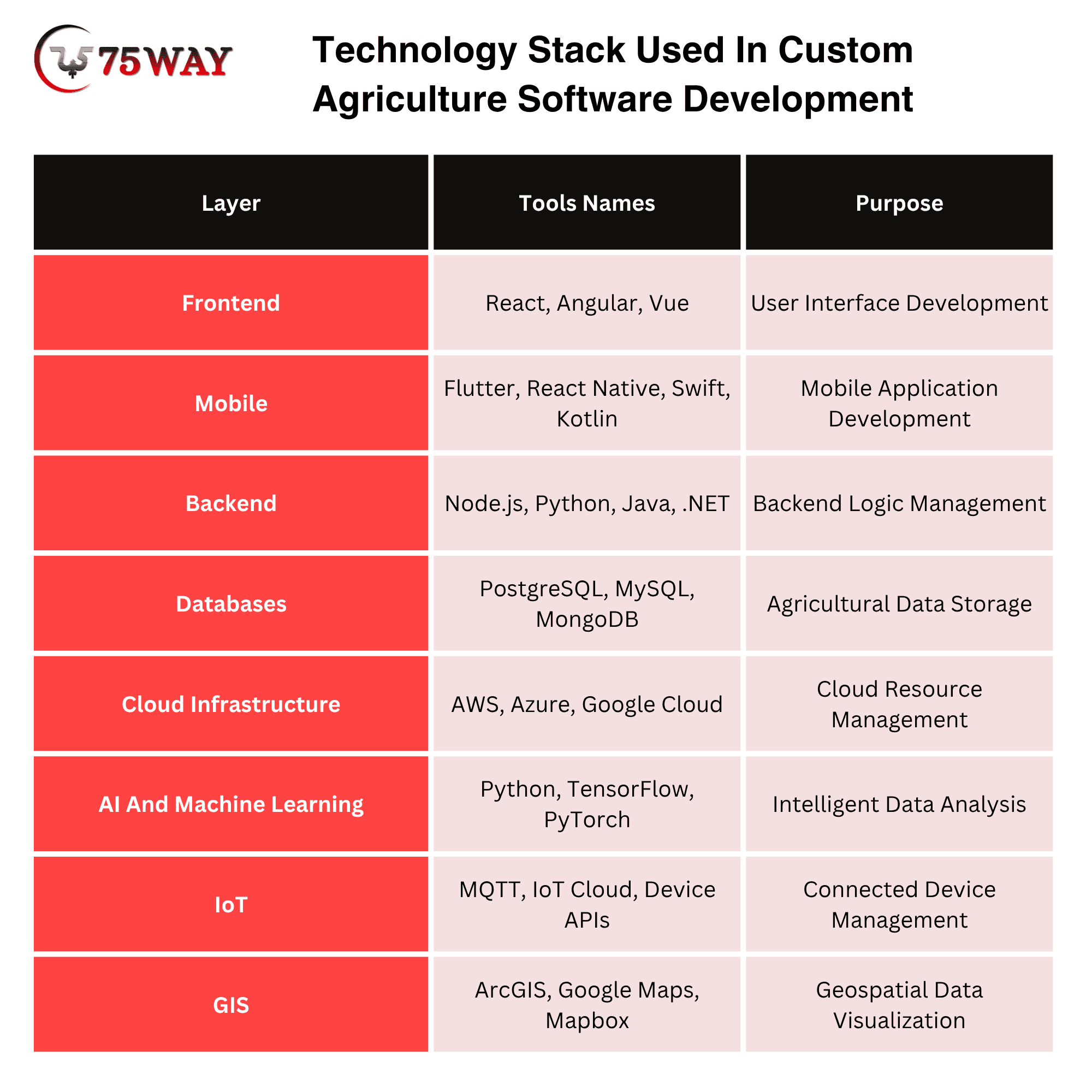
The final stack should depend on the expected data volume, device ecosystem, connectivity environment, development timeline, security requirements, and long-term product roadmap.
How Much Does Agriculture Software Development Cost?
The estimated cost to develop agriculture software can range from $20,000 to $350,000+, depending on the product's complexity, feature scope, integrations, platforms, AI requirements, security, and scalability.
1. MVP/Basic Agriculture Software Cost: $20,000–$50,000
- Core farm management and monitoring features included.
- Basic dashboards, user accounts, and reporting functionality.
- Limited integrations with essential agricultural services.
Estimated Time: 2–4 months
2. Mid-Level Agriculture Software Cost: $50,000–$120,000
- Advanced farm management and monitoring capabilities included.
- Multiple dashboards, workflows, integrations, and analytics features.
- Support for growing users, farms, and operations.
Estimated Time: 4–7 months
3. Advanced Agriculture Software Cost: $120,000–$250,000
- AI-powered insights, IoT connectivity, and predictive analytics.
- Advanced automation, mapping, reporting, and decision-support features.
- Scalable architecture supporting complex agricultural operations.
Estimated Time: 7–12 months
4. Enterprise Agriculture Software Cost: $250,000–$350,000+
- Comprehensive platforms supporting large agricultural organizations.
- Advanced security, automation, analytics, and multi-user capabilities.
- Extensive integrations across equipment, sensors, and business systems.
Estimated Time: 12–18+ months
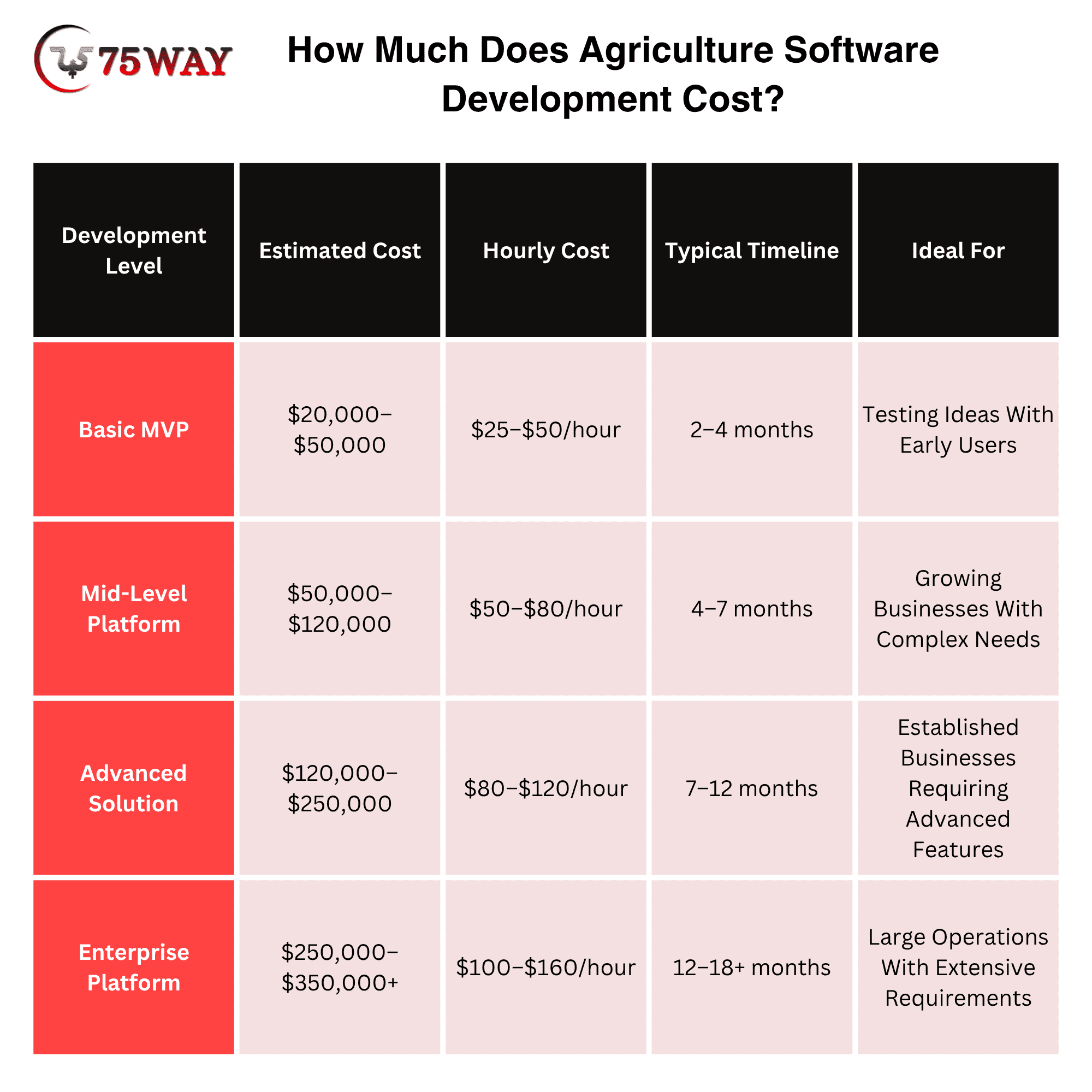
These prices to create agri software are planning estimates rather than fixed market prices. A simple farm management application with basic dashboards will require a very different investment from a platform combining IoT devices, GIS, AI, satellite imagery, multiple user roles, and enterprise integrations.
Major Factors Affecting Cost To Develop Agriculture Software Solutions
The biggest agriculture software expenses often appear after the basic app idea is already defined. A business may begin with field records and dashboards, then require real-time data, remote monitoring, AI-based insights, third-party systems, offline access, or complex administration. The details that can push your development budget higher or lower are outlined below.
- Number of Platforms: Building web, iOS, and Android applications increases development and testing requirements.
- Feature Complexity: Basic farm records require less engineering than advanced analytics, automation, or predictive functionality.
- IoT Integration: Connecting sensors and agricultural equipment adds device communication, data processing, monitoring, and testing requirements.
- AI Capabilities: AI-powered recommendations and predictive models can require additional data preparation, model development, infrastructure, and testing.
- GIS And Mapping: Interactive field maps, geographical boundaries, routes, satellite data, and location-based functionality add technical complexity.
- Third-Party Integrations: Weather, payment, machinery, mapping, satellite, accounting, and external agricultural APIs can increase integration work.
- Offline Functionality: Field users may need important workflows to work without reliable internet connectivity, requiring local storage and synchronization logic.
- Security Requirements: Agricultural platforms may contain operational, financial, personal, and business information that requires appropriate access controls and protection.
- Scalability: A platform supporting a small number of farms has different infrastructure requirements from one serving thousands of agricultural businesses.
How Much Time Is Required To Build Agriculture Software?
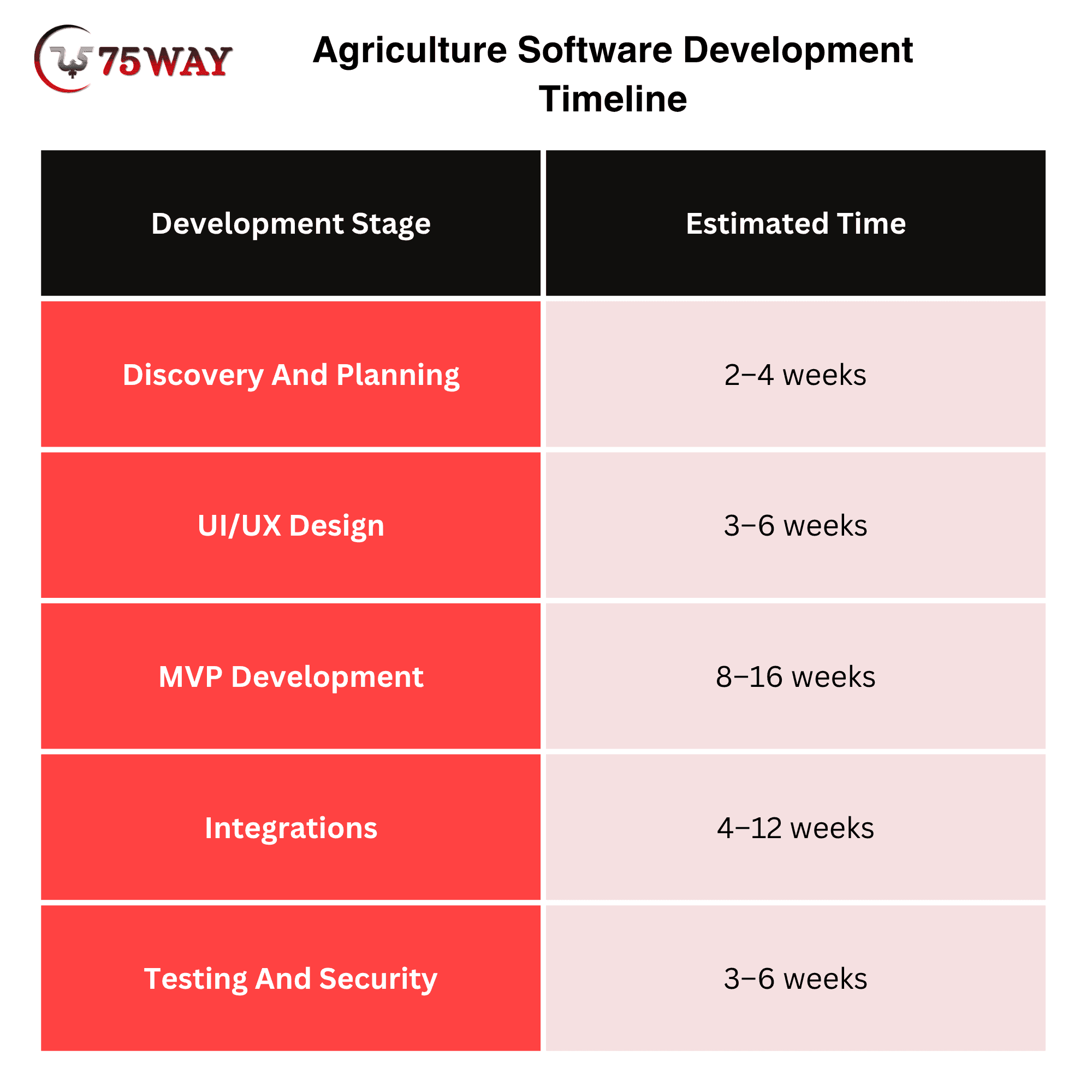
An agriculture software launch date depends on more than the time required to write code. Once the platform must handle real farm data, multiple user roles, connected devices, external systems, and field conditions, additional development and testing become necessary. The expected timeline for developing and launching agriculture software is outlined below.
Challenges in Agricultural Software Development And ERP Solutions
A disconnected inventory update can affect procurement, production planning, field operations, and financial records across an agricultural business. These dependencies make agriculture software harder to develop than a basic business application, particularly when an ERP must support multiple teams and locations. The key challenges developers need to address, along with practical solutions.
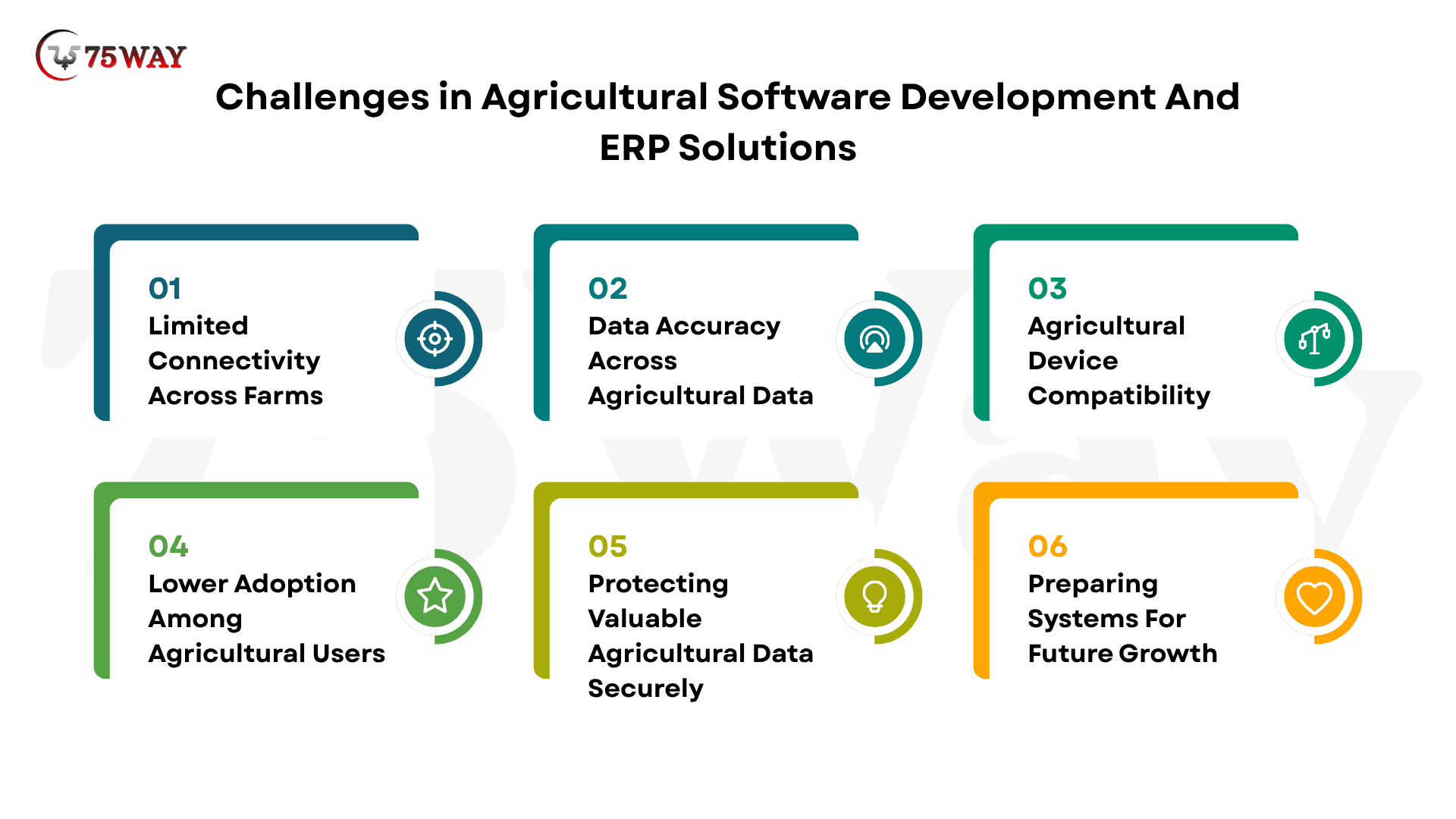
1. Limited Connectivity Across Farms
Some agricultural operations may have unreliable connectivity. Important workflows may therefore require offline capabilities and reliable synchronization.
Solution: Build offline-first features with local data storage and automatic synchronization when connectivity becomes available.
2. Data Accuracy Across Agricultural Data
Incorrect sensor readings, incomplete records, outdated weather information, or inconsistent data can affect the usefulness of recommendations and reports.
Solution: Implement data validation, sensor calibration, quality checks, and reliable data sources to improve information accuracy.
3. Agricultural Device Compatibility
Different farms may use different machinery, sensors, GPS equipment, and technology providers. Supporting multiple ecosystems can increase integration complexity.
Solution: Use standardized APIs, flexible integration layers, and device protocols to connect diverse agricultural technologies.
4. Lower Adoption Among Agricultural Users
A technically advanced product will struggle if users find it difficult to operate. Interfaces should match real workflows and minimize unnecessary data entry.
Solution: Design intuitive interfaces, role-based workflows, simple navigation, and streamlined data-entry processes around actual farming activities.
5. Protecting Valuable Agricultural Data Securely
Agricultural information can represent valuable operational and commercial data. Strong authentication, authorization, encryption, monitoring, and backup practices should be considered from the beginning.
Solution: Apply encryption, role-based access, secure authentication, continuous monitoring, and automated backups throughout the platform.
6. Preparing Systems For Future Growth
The system should be designed around expected data growth, user growth, connected devices, image storage, API traffic, and analytics requirements.
Solution: Use modular architecture, scalable cloud infrastructure, optimized databases, and flexible APIs to support future platform expansion.
How To Choose An Agriculture Software Development Company?
The agriculture software development partner should understand both software engineering and the operational context of agriculture. Before selecting a team, evaluate its experience with:
- Agriculture or related industry software
- Mobile and web applications
- IoT and connected devices
- GIS and mapping
- AI and data analytics
- Cloud infrastructure
- API integrations
- Data security
- Offline-first application design
- Long-term product maintenance
Ask potential partners to explain how they would approach your specific agricultural workflow instead of relying only on a portfolio of unrelated applications.
A useful proposal should also separate product scope, estimated development effort, integrations, infrastructure, testing, deployment, and ongoing support. This makes vendor comparisons more meaningful than comparing hourly rates alone.
What Is The Future of Agriculture Software Development?
Agriculture software is moving toward more connected and data-driven workflows. Sensors, satellite imagery, drones, machine learning, robotics, connected machinery, and cloud platforms are increasingly being considered together rather than as isolated technologies. USDA research continues to examine these technologies as part of precision and climate-smart agriculture.
The next generation of platforms will likely focus on converting large amounts of agricultural data into practical recommendations and automated workflows. The opportunity for software businesses is therefore not simply to collect more data, but to make that data useful at the right moment.
For founders, the strongest starting point is a clearly defined agricultural problem. Build around that problem, validate the workflow with users, and expand the platform as real usage reveals where additional technology can create value.
What Makes 75way A Leading Agriculture Software Development Company
75way Technologies develops agriculture software around real business workflows, combining modern technologies with practical industry requirements. Its development approach can support solutions such as farm management platforms, crop monitoring systems, IoT-enabled applications, analytics dashboards, and AI-powered agricultural tools.
The team focuses on scalable architecture, intuitive user experiences, secure data handling, and third-party integrations to create solutions that can grow with agricultural businesses. From initial planning and UI/UX design to development, testing, deployment, and ongoing improvements, 75way can support the complete agriculture software development lifecycle.
Final Thoughts
Agriculture software can turn scattered farm data into clearer decisions, connected workflows, and measurable operational improvements. The right solution can bring crop planning, field monitoring, equipment management, analytics, automation, and connected technologies into one platform.
Successful agri software development depends on choosing features around agricultural workflows rather than simply adding technology. Businesses should define users, validate the core use case, plan integrations early, and build architecture that grows with adoption.
A focused MVP can reduce early risk while creating a foundation for future capabilities, integrations, and intelligent automation as business needs evolve. To turn your agriculture software idea into a scalable digital solution, you can hire a trusted AI-powered software development company.
Frequently Asked Questions (FAQs)
What Type Of Businesses Can Use Agriculture Software?
Agriculture software can support farms, agribusinesses, crop consultants, producers, equipment companies, distributors, processors, and agricultural service providers across different operations.
Can Agriculture Software Work Without Constant Internet Access?
Yes, agriculture software can support offline workflows when designed with local data storage, synchronization, conflict handling, and reliable recovery mechanisms for field environments.
What Data Can Agriculture Software Collect?
Agriculture platforms can collect field records, sensor readings, weather information, equipment data, crop observations, location information, imagery, inventory records, and operational activities.
How Can Agriculture Software Improve Resource Planning?
Agriculture software can combine operational records and field information to help teams monitor resources, identify requirements, coordinate activities, and plan upcoming agricultural work.
Can Agriculture Software Integrate Existing Farm Equipment?
Yes, integrations can connect compatible machinery, GPS systems, sensors, and other equipment through available APIs, communication protocols, gateways, or technology-provider platforms where supported.
Should Agriculture Software Support Multiple Languages?
Multilingual support can be valuable when users operate across regions with different languages, but the required languages should depend on target markets and customer research.
What Should Businesses Validate Before Developing Agriculture Software?
Businesses should validate the target users, agricultural problem, workflow, data sources, willingness to adopt, integration requirements, operational constraints, and measurable business value before development begins.
How To Choose ERP Software For Agribusiness Agriculture?
The right ERP software matches farm operations, business goals, scalability, integrations, and budget requirements. Industry-specific features, mobile access, security, customization, and vendor support deserve careful evaluation. Long-term growth, workflow simplicity, and operational visibility should guide the final selection.