Summary
Mobile app development involves creating software for Android and iOS using native or hybrid approaches. Developers must optimize for limited device resources, ensure smooth UX, and consider cloud integration for processing and advanced features. Proper platform choice, design, and APIs enhance performance, functionality, and user satisfaction across devices.
Mobile application development refers to a procedure to design and building software for smartphones, tablets, and digital assistants, focusing mainly on Android and iOS operating systems.
These applications can be preloaded on devices, downloaded from various app stores, or accessed through mobile web browsers, with common programming and markup languages used, including Java, Swift, C#, and HTML5.
Mobile app development is experiencing rapid growth. Across sectors like retail, telecom, e-commerce, insurance, healthcare, and government, organizations strive to meet user demands for instant, convenient access to services and information.
Nowadays, mobile devices and the applications that enable them have become the preferred way for individuals and businesses to connect online. Organizations must create apps that satisfy the needs of their customers, partners, and employees to remain competitive.
However, mobile application development can appear challenging. After choosing an operating system, developers must navigate device limitations and overcome obstacles in app distribution. Following established guidelines and best practices can simplify this process.
Select the Right Platform
Many independent app development teams often decide to create their applications for Android first. The reason is that about 70% of smartphones worldwide run Android, and the Google Play Store has fewer restrictions compared to the Apple App Store.
In comparison, mobile apps built for iOS have a smaller range of devices to support, making optimization easier. Additionally, iOS applications generally experience higher user retention rates.
The choice of platform should reflect the app’s purpose and target audience. For example, if the application is intended for your organization’s employees, supporting the devices they use may require developing cross-platform apps that function on both Android and iOS.
If the mobile app is aimed at customers and most of them use iPhones, prioritizing iOS development becomes important. Other factors to consider include monetization approaches and expected user behavior, which can vary depending on regional and cultural differences.
Improve productivity and strengthen security by combining your chosen development platform with an effective device management solution.
Android and iOS App Development: Should You Choose Native or Hybrid?
Suppose you need to develop a mobile application for both Android and iOS. Which software development approach is most effective?
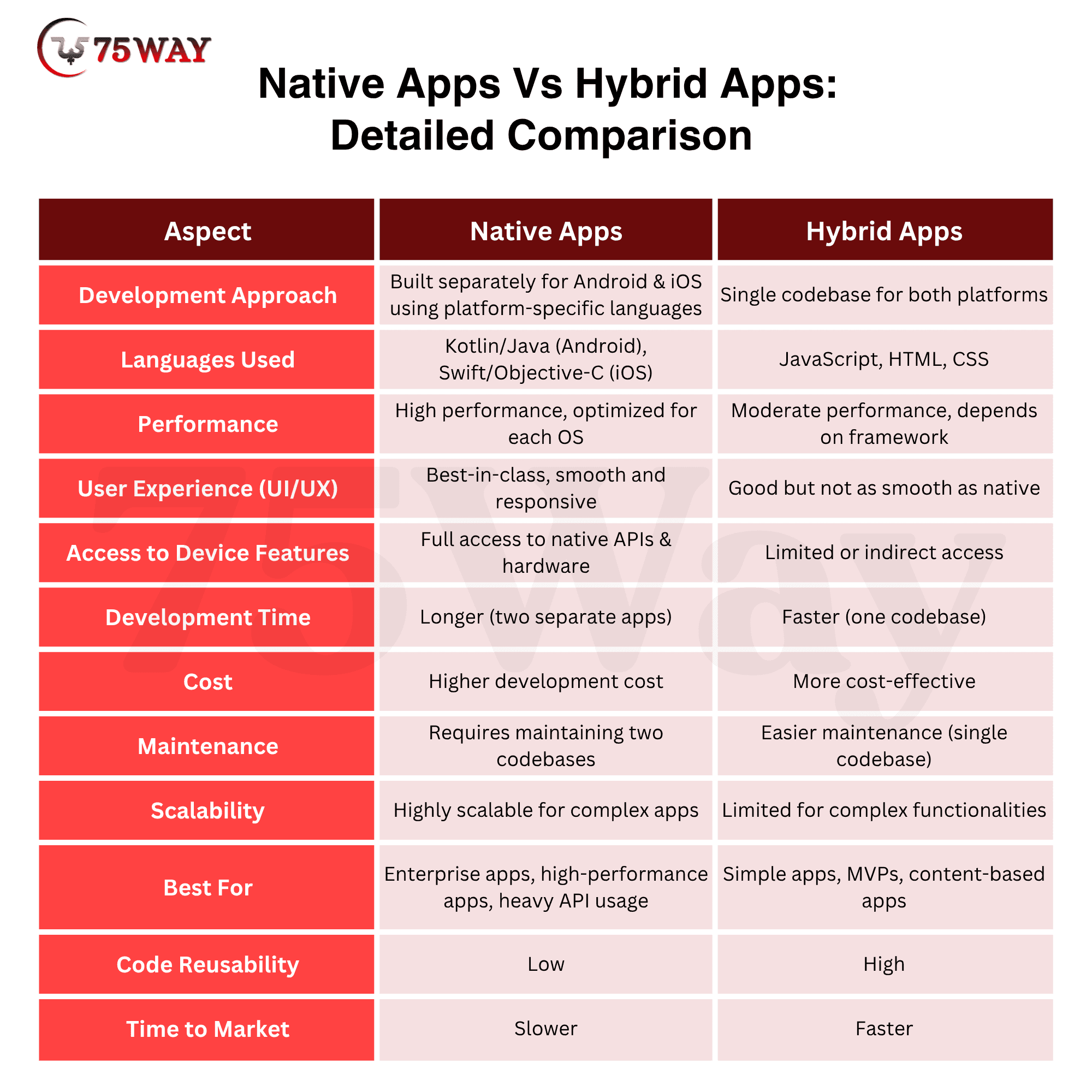
The first choice is to create two separate native applications. Leveraging native APIs and OS-specific programming languages allows you to build a high-performance app. Most enterprise applications, particularly those handling significant API traffic, benefit from native development.
If you plan to develop native apps sequentially, starting with Android is often a practical choice. Many independent developers begin with Android because it allows you to launch a full MVP, then adapt and optimize it for iOS after release.
Even then, you will need to debug and rewrite portions of code for the other native language and redesign the front-end interface, as the two operating systems operate differently, making direct cross-platform compatibility impossible.
So why not start entirely from scratch? Although you can’t directly translate code between languages, much of the back-end logic can be reused. Frameworks, libraries, and third-party extensions often work the same way on both platforms, reducing costly redevelopment. Prebuilt mobile cloud services can also help manage the web back end.
Alternatively, you could take a hybrid approach, writing code once for use on both platforms. Hybrid applications rely on a single codebase written in widely supported languages such as Java, JavaScript, HTML, or CSS. Since hybrid apps lack direct access to native APIs, this method is best suited for simple web-based applications or small mobile apps with three to four pages and limited functionality.
How to Build Apps for Mobile Platforms?
Whether you opt for native or hybrid mobile application development, one of the initial challenges is the limited resources available on mobile devices. Smartphones and tablets have significantly less processing power and memory compared to desktops or enterprise servers.
These limitations can be daunting, especially for developers accustomed to the virtually unrestricted resources available when building traditional web applications.
The constrained resources of mobile platforms mean you must tailor your app design goals accordingly.
During development, it is crucial to ensure that your mobile application is less resource-intensive than a standard desktop application.
Providing an excellent user experience is essential. This begins with recognizing that a mobile app’s interface should be simpler than a desktop interface. By prioritizing essential functions in a clear UX design, you can create a smoother user experience while minimizing resource usage.
Your mobile interface should be optimized for touch. Users need to navigate and input information efficiently, without relying on extensive typing.
Thankfully, these design principles align with user expectations. Mobile users typically want to complete tasks quickly, using only a few taps. They expect applications to be fast, convenient, and easy to use on their devices.
Offload Processing to the Cloud: How and Why
What if your mobile application demands more processing power than a standard mobile device can handle? One solution is to offload that processing to the cloud.
By effectively using APIs, your app can connect to cloud-based services and databases, enabling advanced functionality without overloading the device or slowing performance. You can also shift data storage and caching to a cloud server, keeping minimal data on the mobile device itself.
Enhance Your App with Advanced Cloud Capabilities
The cloud provides benefits that go beyond just improving performance. Linking your mobile application to robust cloud services can enhance functionality and overall usability.
Use APIs to incorporate new capabilities, such as advanced cloud-based services that elevate your mobile app. Examples include push notifications, AI-powered analytics such as Google Cloud AI, integration with Internet of Things (IoT) devices, and other innovative features.