AI Summary
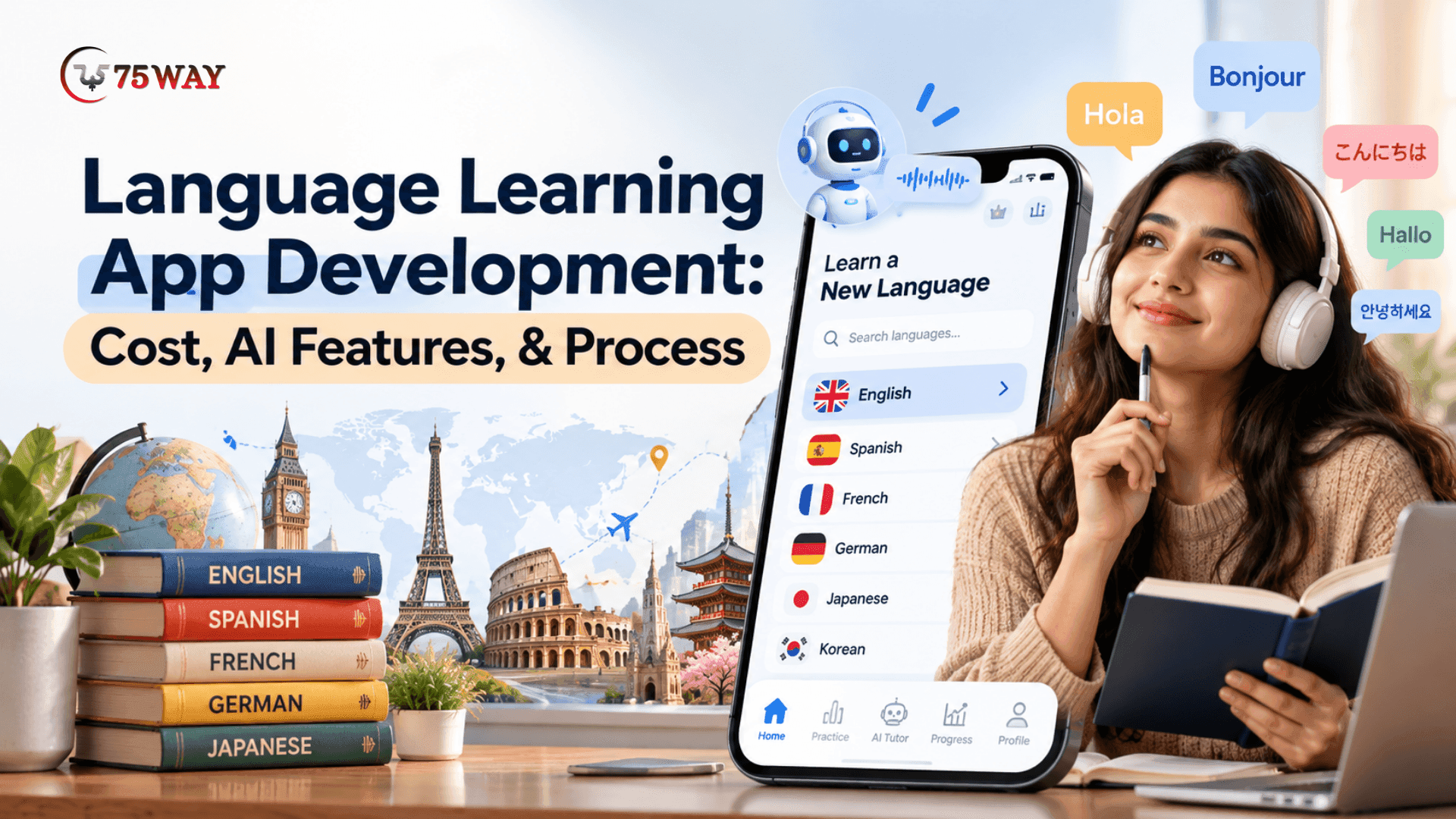
AI language learning apps create exciting opportunities for businesses to turn digital education into a scalable product. This guide explores language learning app development costs, essential features, AI-powered personalization, and revenue models. Discover the right technology and development approach.
Key Takeaways
- Language learning apps offer businesses opportunities to build scalable digital education products.
- Language learning applications may reach $24.37 billion globally by 2035.
- Language learning app development costs range from $15,000 to $300,000+.
- AI personalization, speech recognition, and feedback can improve learner engagement.
- Choose suitable technologies, monetization models, and scalable architecture before development.
Language learners no longer want to memorize endless vocabulary lists or follow the same lessons as everyone else. They expect language learning apps that adapt to their skill level, explain mistakes, and help them practise real conversations.
For startups and established edtech companies, AI language learning app development solutions can help shape a more distinctive product.
Yet, successful AI integration involves more than choosing a language model. The app must deliver useful learning feedback, support the languages your audience needs, maintain a smooth mobile experience, and balance personalization with operating costs.
A clear product strategy helps determine which AI features solve genuine learning problems and which add unnecessary complexity.
A well-planned educational app development process for building a foreign language learning app connects these decisions to measurable learning goals and commercial outcomes.
This guide covers the AI-powered language learning app development process, cost, core features, development stages, technology requirements, and practical monetization strategies.
What Is Language Learning App Development?
Language learning app development is the process of designing, building, testing, and launching a digital platform that helps users learn new languages through interactive lessons, vocabulary exercises, listening activities, speaking practice, and assessments.
A language learning mobile app can support beginners, advanced learners, students, professionals, and travelers. Depending on the business model, it may offer self-paced courses, live tutoring, AI conversation practice, certification preparation, or subscription-based learning programs.
Popular language learning platforms demonstrate different approaches to digital education. For example, Duolingo emphasizes gamified lessons, while Babbel focuses on structured courses and practical conversations.
For businesses, the objective is to create an app for learning languages that meets a specific audience's needs while offering a sustainable path to revenue and growth.
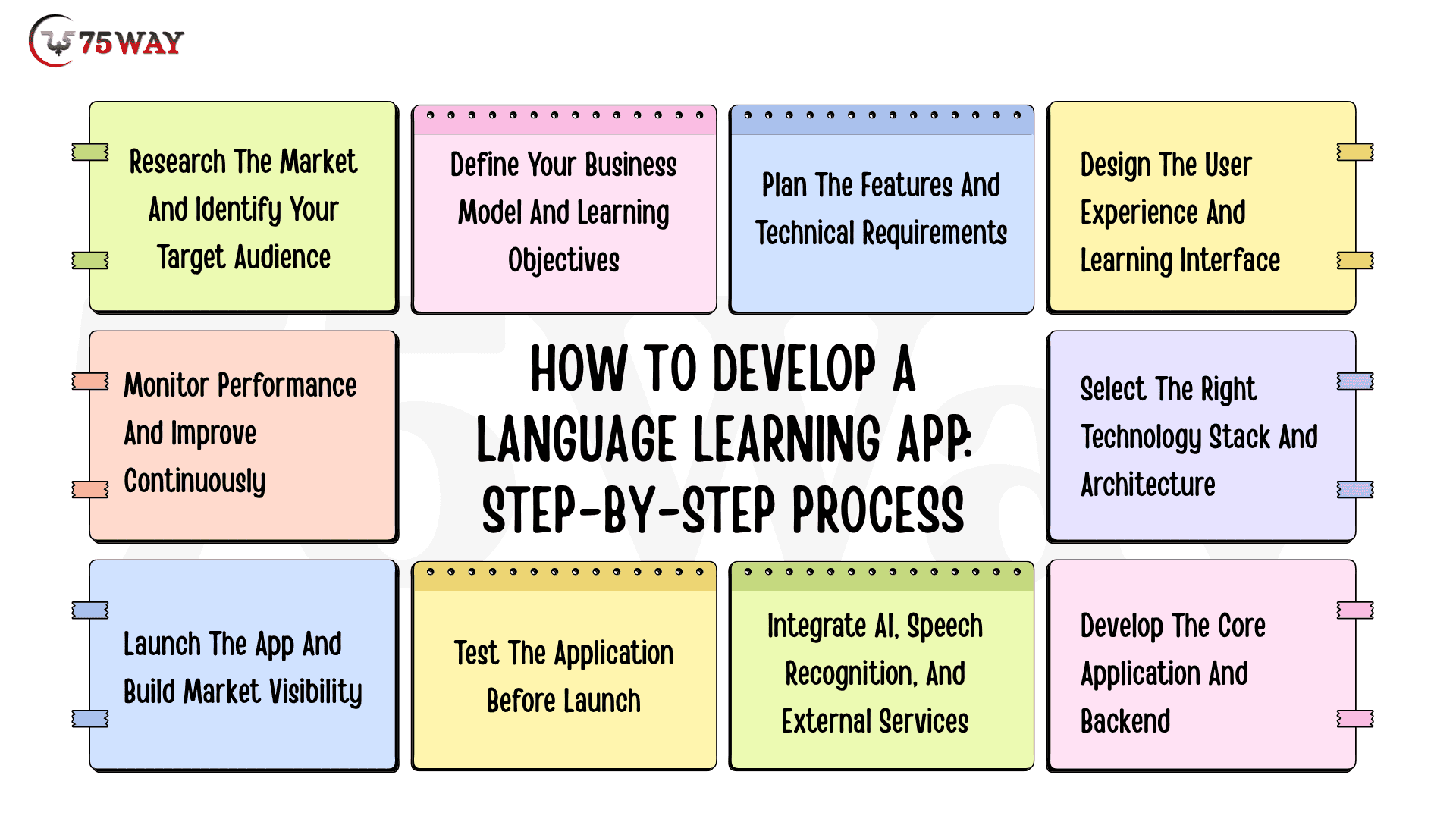
How to Develop a Language Learning App: Step-by-Step Process
A language learning app begins with one goal: helping users build real language skills through a convenient digital experience. Reaching that goal requires careful planning of the curriculum, app design, development, and quality testing. The given step-by-step process describes how to build a language learning app from concept to launch.
1. Research The Market And Identify Your Target Audience
The strongest language learning apps address a specific learner need rather than trying to serve everyone. Your market research should establish who will use the platform, which languages they want to learn, what prevents them from progressing, and how much they might pay for a better learning experience.
Potential audiences include:
- Students and exam candidates
- Working professionals
- Travelers and beginners
- Children and families
- Businesses and institutions
Competitor research should also examine lesson formats, pricing, reviews, retention features, and gaps in existing products. These findings will help define your app's unique value proposition before significant development spending begins.
2. Define Your Business Model And Learning Objectives
A clear product strategy connects the audience's needs with a viable revenue opportunity. A consumer language learning app may rely on subscriptions, while a tutoring marketplace may earn commissions from lessons and an enterprise platform may sell annual licenses to organizations.
At this stage, establish three essentials:
- Learning Objectives: Define the skills users should develop, such as vocabulary retention, pronunciation, reading comprehension, or conversational fluency.
- Revenue Model: Choose subscriptions, premium courses, tutoring fees, corporate licensing, or a suitable combination.
- Success Metrics: Identify measurable indicators, including lesson completion, learner retention, subscription conversion, and assessment improvement.
For example, a business targeting professionals may prioritize workplace scenarios and personalized speaking practice rather than children's games or general vocabulary exercises. These decisions determine which features deserve priority in the initial release.
3. Plan The Features And Technical Requirements
Once the product direction is clear, translate it into functional requirements for the learner experience and the supporting platform. The feature list should reflect actual learning needs, operational requirements, and the available development budget.
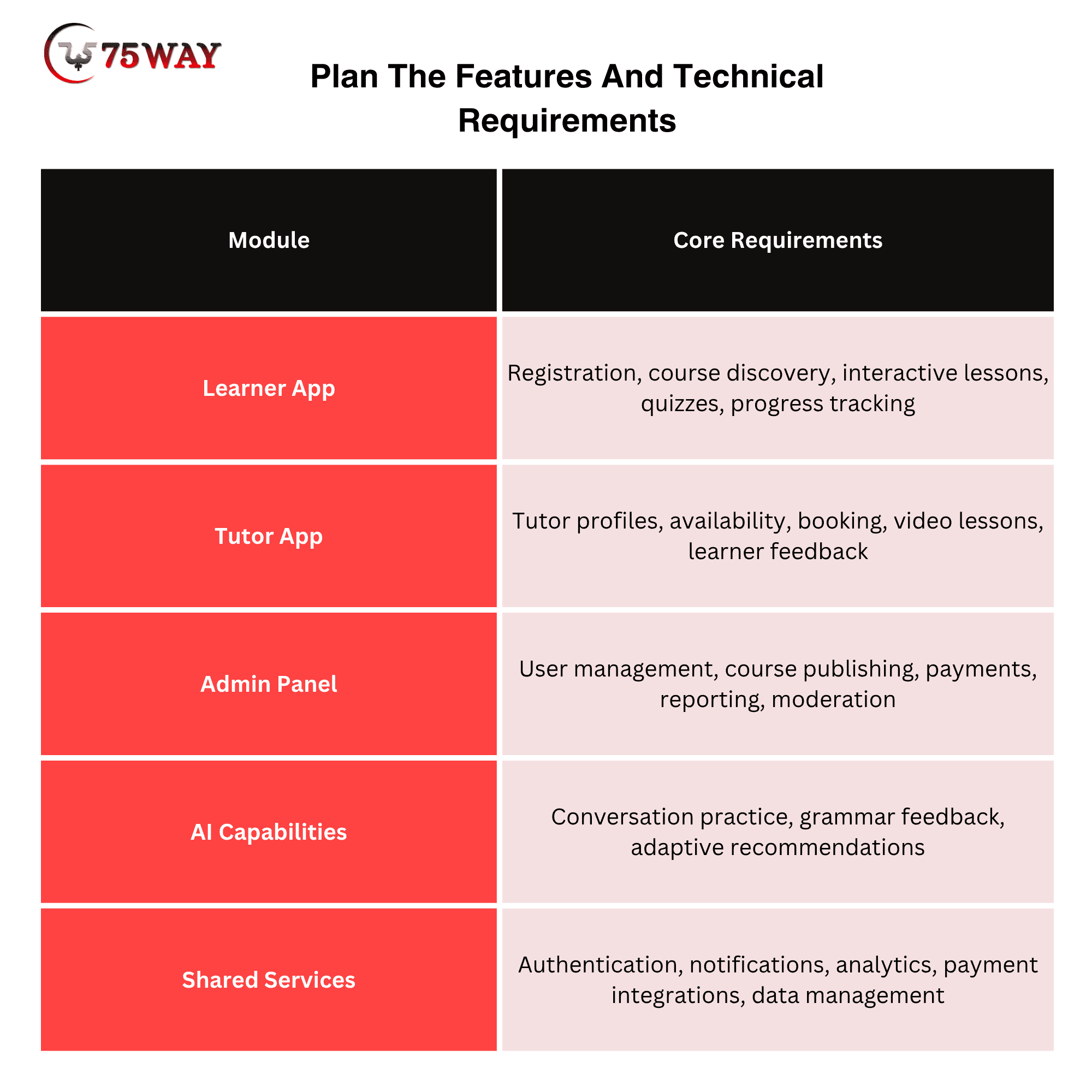
MVP versus Advanced features: The first release should support a complete learning journey, including onboarding, lessons, assessments, and saved progress. AI conversation partners, live tutoring, community features, and advanced analytics can be added according to validated demand.
A detailed requirements document should also cover accessibility, supported languages, privacy, expected traffic, offline access, and integration dependencies. This document becomes the foundation for design estimates and technical planning.
4. Design The User Experience And Learning Interface
The design should make language practice feel approachable while keeping lessons easy to navigate. Learners need clear instructions, readable text, accessible controls, and immediate visibility into their progress, regardless of their technical experience or language proficiency.
The visual direction should match the intended audience. Children's apps may benefit from colorful illustrations and simple interactions, whereas professional training products need a clean interface, structured dashboards, and workplace-oriented learning activities.
The design process typically includes:
- User Flows: Map registration, language selection, course discovery, lesson completion, and subscription management.
- Wireframes: Establish the placement of navigation, exercises, audio controls, feedback, and progress indicators.
- Interactive Prototypes: Test important journeys before committing to full development.
- Accessibility and Localization: Plan readable typography, captions, screen-reader support, translated interfaces, and regional formatting.
Early usability testing can reveal confusing screens and unnecessary steps before they become expensive development changes. Once the main flows are validated, the design team can prepare the interface specifications for implementation.
5. Select The Right Technology Stack And Architecture
Technology decisions should follow the product requirements rather than precede them. A basic self-paced learning app has different infrastructure needs from a platform that supports live classes, AI conversations, offline lessons, and thousands of simultaneous users.
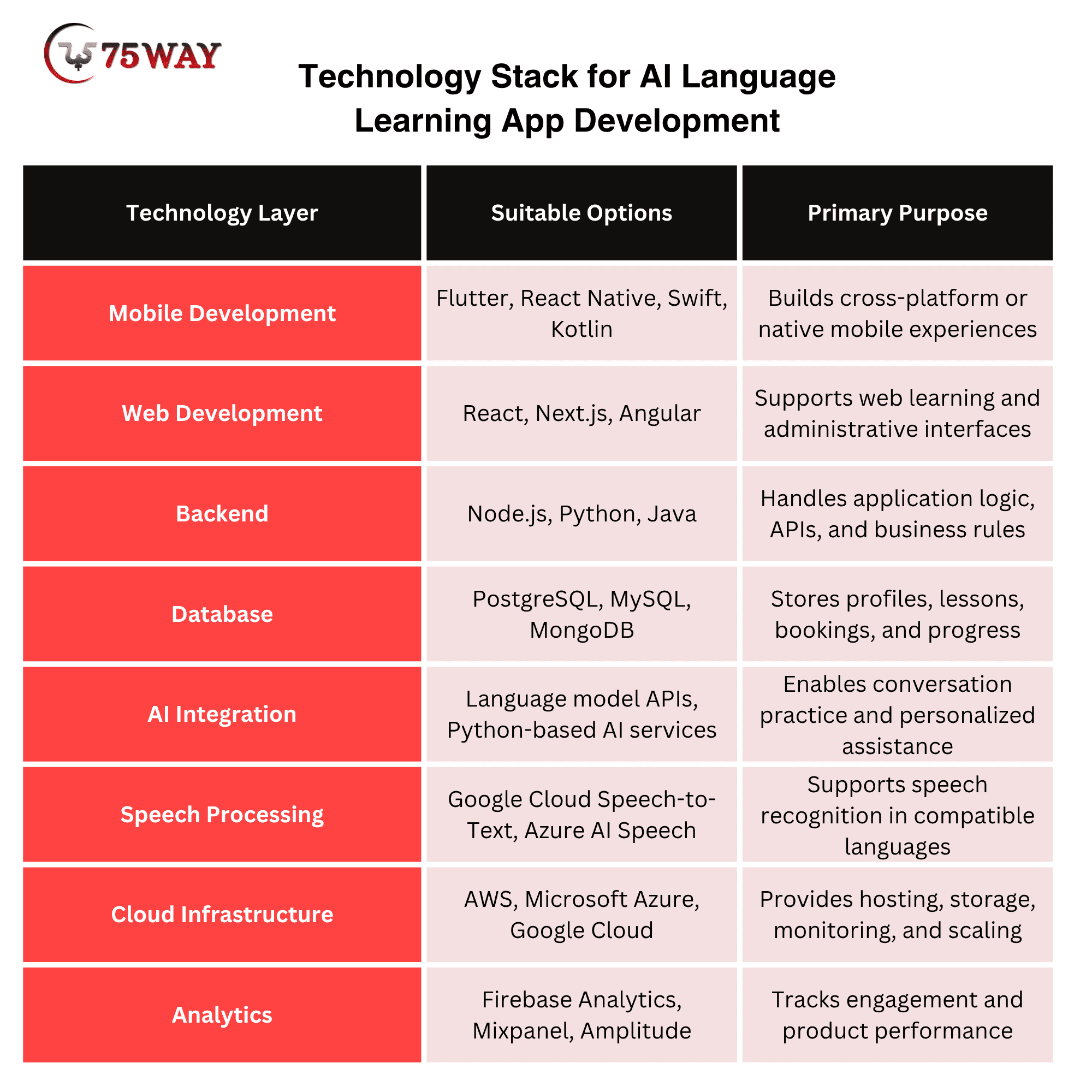
The final stack depends on the required integrations, engineering team's expertise, budget, and anticipated growth. A scalable architecture should separate major services where appropriate, protect user data, and allow additional languages or features without requiring a complete rebuild.
6. Develop The Core Application And Backend
The development phase turns approved designs and technical specifications into working software. Frontend developers build the learner interface, while backend developers implement authentication, course delivery, progress storage, payments, and other business logic.
The work should proceed in connected milestones:
- Account and Profile Management: Establish secure registration, sign-in, learner preferences, and account settings.
- Learning Management: Implement course catalogs, lesson content, quizzes, assessments, and progress tracking.
- Supporting Modules: Develop tutor booking, administrative tools, payments, and notifications when required.
- Backend Integration: Connect interfaces with APIs, databases, authentication services, and external providers.
- Incremental Validation: Test each completed workflow before expanding into more complex functionality.
A working end-to-end learning journey should be available early enough for meaningful feedback. This approach helps identify architectural gaps and usability problems before advanced capabilities increase the cost of making changes.
7. Integrate AI, Speech Recognition And External Services
Advanced capabilities should be introduced where they provide a measurable improvement to the learning experience. AI integration can help learners practice conversations, receive grammar explanations, and discover exercises suited to their proficiency, while speech recognition can support spoken responses.
Each integration requires a review of pricing, accuracy, latency, privacy, and ongoing service availability. AI-generated explanations and language assessments should also be tested for correctness, particularly for less widely supported languages.
8. Test The Application Before Launch
Testing must confirm that the app works reliably and provides a useful educational experience. A technically stable application can still disappoint users if lesson content is inaccurate, instructions are confusing, or feedback fails to match their responses.
The quality assurance process should include:
- Validate registration, course access, saved progress, bookings, payments, and notifications.
- Review translations, grammar explanations, quizzes, answer keys, and learning-level suitability.
- Check supported operating systems, screen sizes, connectivity conditions, and offline functionality.
- Review authentication, authorization, data handling, and payment workflows.
- Gather feedback from representative learners and tutors to identify confusing interactions.
A pilot release can provide valuable evidence about lesson completion, usability, and perceived learning value. Fixes from this phase should be completed before the wider launch.
9. Launch The App And Build Market Visibility
A launch plan should connect product availability with the channels your target audience already uses. Consumer apps may depend on app-store listings, educational content, creator partnerships, and referrals, while business-focused platforms may need direct outreach and institutional partnerships.
Launch preparations typically include:
- App Store Readiness: Prepare screenshots, descriptions, privacy disclosures, and appropriate store metadata.
- Content Marketing: Publish useful language-learning resources that address common learner questions.
- Acquisition Campaigns: Test relevant search, social, referral, and partnership channels.
- Support Readiness: Establish help resources, feedback channels, and a process for handling account or payment issues.
The initial launch should be treated as a learning phase rather than a final milestone. Early user behavior will show whether the positioning, onboarding, pricing, and learning experience match market expectations.
10. Monitor Performance And Improve Continuously
Post-launch optimization helps the app remain useful as learner expectations, technologies, and business priorities change. Product analytics should connect engagement with learning outcomes instead of treating downloads or registrations as the only measures of success.
- Lesson Completion Rate: Shows whether learners finish learning activities
- User Retention: Measures how often learners return
- Assessment Improvement: Indicates progress in targeted language skills
- Subscription Conversion: Measures the transition from free to paid access
- Churn Rate: Reveals when paying users stop subscribing
- Crash Rate and Load Time: Highlights technical reliability problems
- AI Feature Usage: Shows whether AI tools provide practical value
Regular reviews can guide improvements to onboarding, lesson difficulty, course content, pricing, and application performance. New features should be prioritized according to learner feedback, measured outcomes, and commercial value.
Market Size of Language Learning App in USA & Globally
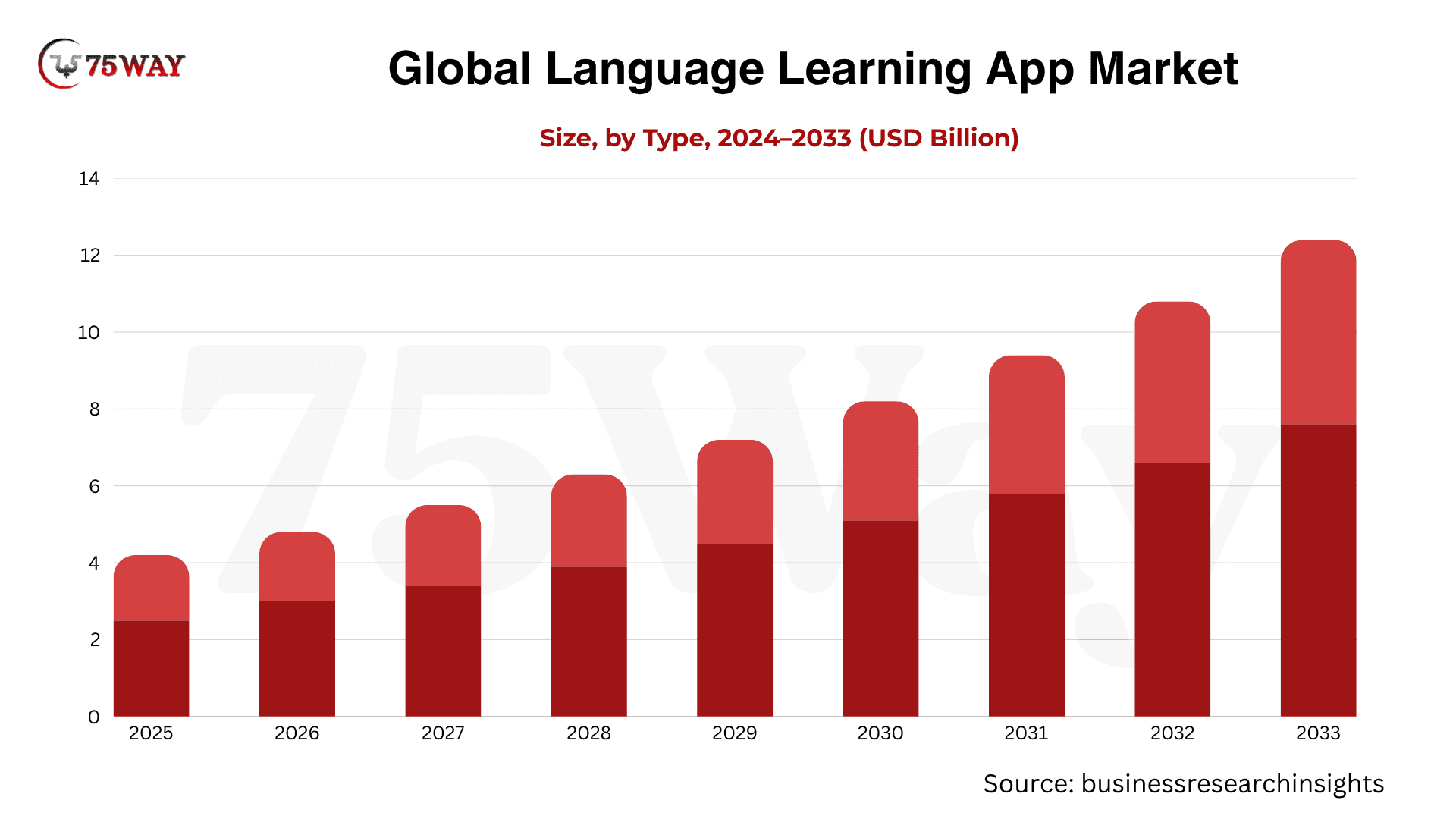
- The global Language Learning App Market is projected to grow from $4.21 billion in 2023 to $16.2 billion by 2033, registering a 14.40% CAGR.
- Another forecast estimates the global language learning application market will expand from $6.7 billion in 2026 to $24.37 billion by 2035, at a 15.43% CAGR.
- Online applications account for approximately 78% of the market, driven by mobile accessibility, AI-powered personalization, cloud-based delivery, regular content updates, and flexible learning options.
- North America accounts for approximately 34% of the market, according to another estimate.
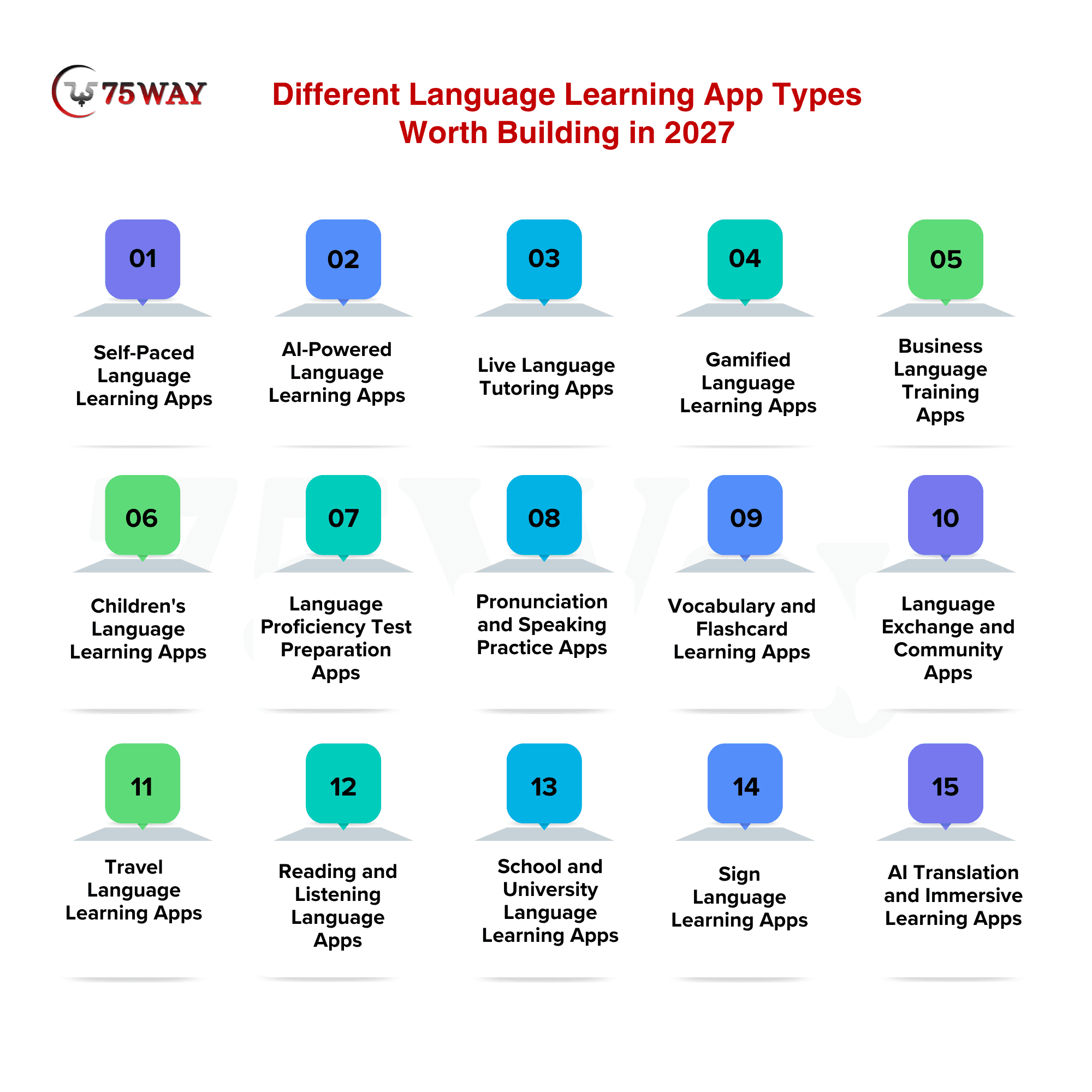
Different Language Learning App Types Worth Building in 2027
From busy professionals learning Spanish for work to students preparing for language proficiency exams, Americans have different reasons for learning a new language. Each audience creates an opportunity for language learning apps built around specific goals, learning habits, and budgets. Learning new language app types worth exploring in 2027 are outlined below to help you identify a promising product direction.
1. Self-Paced Language Learning Apps
Self-paced apps let learners study whenever their schedules allow, without fixed classes or instructor-led sessions. They combine vocabulary lessons, grammar exercises, listening activities, and quizzes into manageable learning sessions. Businesses can personalize course levels and introduce progress tracking to encourage regular practice. Subscription plans and premium courses can turn this flexible learning experience into a scalable digital product.
Estimated Cost: $15,000 to $60,000
Suitable For: Independent learners, beginners, and busy professionals
Benefits: Offers flexible learning schedules and supports independent skill development.
2. AI-Powered Language Learning Apps
AI-powered apps give learners opportunities to practice languages through simulated conversations and personalized exercises. They can use AI to explain grammar, suggest vocabulary, and generate practice scenarios based on individual proficiency. Speech and language processing tools may also provide feedback on spoken or written responses. Businesses can differentiate their products with interactive learning experiences while offering premium AI features through paid plans.
Estimated Cost: $50,000 to $200,000+
Suitable For: Tech-savvy learners seeking personalized practice
Benefits: Delivers adaptive lessons and interactive practice beyond traditional course formats.
3. Live Language Tutoring Apps
Live tutoring apps connect learners with language teachers through one-to-one sessions or virtual classrooms. Features may include tutor profiles, availability calendars, video calls, lesson bookings, and learning materials. You can introduce tutor verification, ratings, and payment management to build trust across the platform. Revenue can come from lesson commissions, tutor subscriptions, or packages purchased by learners.
Estimated Cost: $40,000 to $150,000+
Suitable For: Learners seeking guidance from qualified instructors
Benefits: Enables real-time instruction, personalized feedback, and direct learner-teacher interaction.
4. Gamified Language Learning Apps
Gamified apps turn language practice into an engaging experience through challenges, points, badges, streaks, and leaderboards. Learners can complete short activities, unlock levels, and track achievements as they progress. You can introduce daily missions, team competitions, and reward systems to encourage repeat usage. This format works particularly well when the product aims to make regular practice feel enjoyable rather than demanding.
Estimated Cost: $25,000 to $100,000
Suitable For: Casual learners, students, and younger audiences
Benefits: Encourages regular practice through rewards, challenges, and progress milestones.
5. Business Language Training Apps
Business language training apps help employees develop communication skills for meetings, presentations, negotiations, and international collaboration. They can include industry-specific vocabulary, business writing exercises, role-play scenarios, and professional conversation practice. Companies may assign courses based on job roles, proficiency levels, and training objectives. You can build business language training apps to earn revenue through corporate subscriptions, enterprise licensing, and customized training packages.
Estimated Cost: $40,000 to $150,000+
Suitable For: Employers, corporate teams, and international businesses
Benefits: Improves workplace communication and supports measurable employee language development.
6. Children's Language Learning Apps
Children's language learning apps introduce new languages through stories, colorful activities, songs, games, and age-appropriate exercises. Their interfaces should prioritize simple navigation, engaging visuals, and learning activities suitable for different developmental stages. You can incorporate parental dashboards, progress reports, and age-appropriate content controls. Subscription packages and family plans offer potential revenue opportunities for products designed around children's learning needs.
Estimated Cost: $25,000 to $120,000
Suitable For: Young children, parents, and primary schools
Benefits: Makes early language exposure enjoyable through interactive, age-appropriate educational activities.
7. Language Proficiency Test Preparation Apps
These apps help candidates prepare for language examinations through practice tests, timed exercises, vocabulary training, and assessment tools. You can organize content around specific examinations and provide score tracking to highlight areas needing improvement. Advanced language proficiency test preparation apps may include AI-assisted writing feedback, speaking simulations, and personalized study schedules. Paid mock tests, premium preparation courses, and subscription packages can support monetization.
Estimated Cost: $30,000 to $120,000
Suitable For: Students preparing for language proficiency examinations
Benefits: Helps candidates practice skills and prepare for proficiency assessments.
8. Pronunciation and Speaking Practice Apps
Pronunciation-focused apps help learners improve spoken language through listening exercises, speech recording, and pronunciation feedback. Users can repeat words, compare their speech with reference audio, and practice commonly used expressions. Speech recognition and audio analysis can make these exercises more interactive, although accuracy depends on the technology and language supported. Businesses can monetize advanced speaking exercises, personalized practice plans, and premium feedback tools.
Estimated Cost: $25,000 to $100,000+
Suitable For: Learners improving pronunciation and spoken fluency
Benefits: Builds speaking confidence through targeted pronunciation and listening practice.
9. Vocabulary and Flashcard Learning Apps
Vocabulary apps help users learn and retain words through flashcards, spaced repetition, quizzes, and contextual examples. Learners can create custom word lists or follow themed collections covering travel, education, business, and everyday communication. Progress tracking and revision reminders help users revisit words at appropriate intervals. Businesses can offer premium vocabulary packs, specialized courses, and advanced revision tools.
Estimated Cost: $15,000 to $50,000
Suitable For: Beginners, students, and vocabulary-focused independent learners
Benefits: Strengthens vocabulary retention through structured revision and repeated practice.
10. Language Exchange and Community Apps
Language exchange apps connect people who want to practice different languages with one another. They may include messaging, voice notes, audio calls, discussion groups, and partner-matching features based on language preferences. You must consider moderation, reporting tools, user verification, and privacy protections to maintain a safe community. Revenue options include premium memberships, enhanced matching, and paid conversation features.
Estimated Cost: $40,000 to $150,000+
Suitable For: Social learners seeking authentic conversational practice
Benefits: Creates real-world practice opportunities through peer interaction and community participation.
11. Travel Language Learning Apps
Travel-focused apps teach practical phrases for airports, hotels, restaurants, shopping, and emergency situations. They can include phrasebooks, downloadable audio, pronunciation support, and offline lessons for use without reliable internet access. Businesses can organize lessons by destination, travel scenario, and proficiency level to improve relevance. Monetization opportunities include premium language packs, travel subscriptions, and partnerships with travel service providers.
Estimated Cost: $15,000 to $60,000
Suitable For: Tourists, frequent travelers, and international visitors
Benefits: Helps travelers communicate essential needs across unfamiliar language environments.
12. Reading and Listening Language Apps
Reading and listening apps help users develop comprehension through articles, short stories, podcasts, dialogues, and narrated lessons. They can combine synchronized text, audio playback, translations, and vocabulary explanations within the same learning experience. Businesses may organize content by proficiency level, subject, or learner interest to support gradual progression. Premium content libraries and subscription access can provide recurring revenue.
Estimated Cost: $25,000 to $100,000
Suitable For: Readers, podcast listeners, and comprehension-focused learners
Benefits: Develops comprehension skills through contextual reading and listening activities.
13. School and University Language Learning Apps
Educational institutions can use language learning apps to supplement classroom instruction, assign homework, and monitor student progress. These platforms may include teacher dashboards, classroom management, assessments, assignment tracking, and shared learning resources. Integration with learning management systems can help institutions connect language practice with existing academic workflows. Businesses can generate revenue through institutional licensing, per-student pricing, or annual education contracts.
Estimated Cost: $50,000 to $200,000+
Suitable For: Schools, universities, language institutes, and educators
Benefits: Connects classroom teaching with measurable digital language practice.
14. Sign Language Learning Apps
Sign language apps help learners understand signs, gestures, facial expressions, and visual communication techniques. Lessons may combine video demonstrations, interactive quizzes, guided practice, and searchable sign dictionaries. Businesses should work with qualified sign language educators and Deaf community members to ensure linguistic accuracy and respectful representation. Premium courses, educational licenses, and structured certification preparation can create monetization opportunities.
Estimated Cost: $30,000 to $150,000+
Suitable For: Students, educators, families, and accessibility-focused organizations
Benefits: Expands access to sign language education and inclusive communication.
15. AI Translation and Immersive Learning Apps
These apps combine translation assistance with interactive language practice in realistic contexts. Learners can explore conversations, understand unfamiliar phrases, and practice responses using AI-generated scenarios. Businesses may add camera-based text translation, contextual explanations, and immersive exercises where supported by the chosen technology. Clear distinctions between translation assistance and actual language mastery help set realistic learner expectations.
Estimated Cost: $50,000 to $250,000+
Suitable For: Multilingual users, international professionals, and advanced learners
Benefits: Combines contextual translation with interactive practice for practical language use.
Must-Have Features For Language Learning Mobile App Development
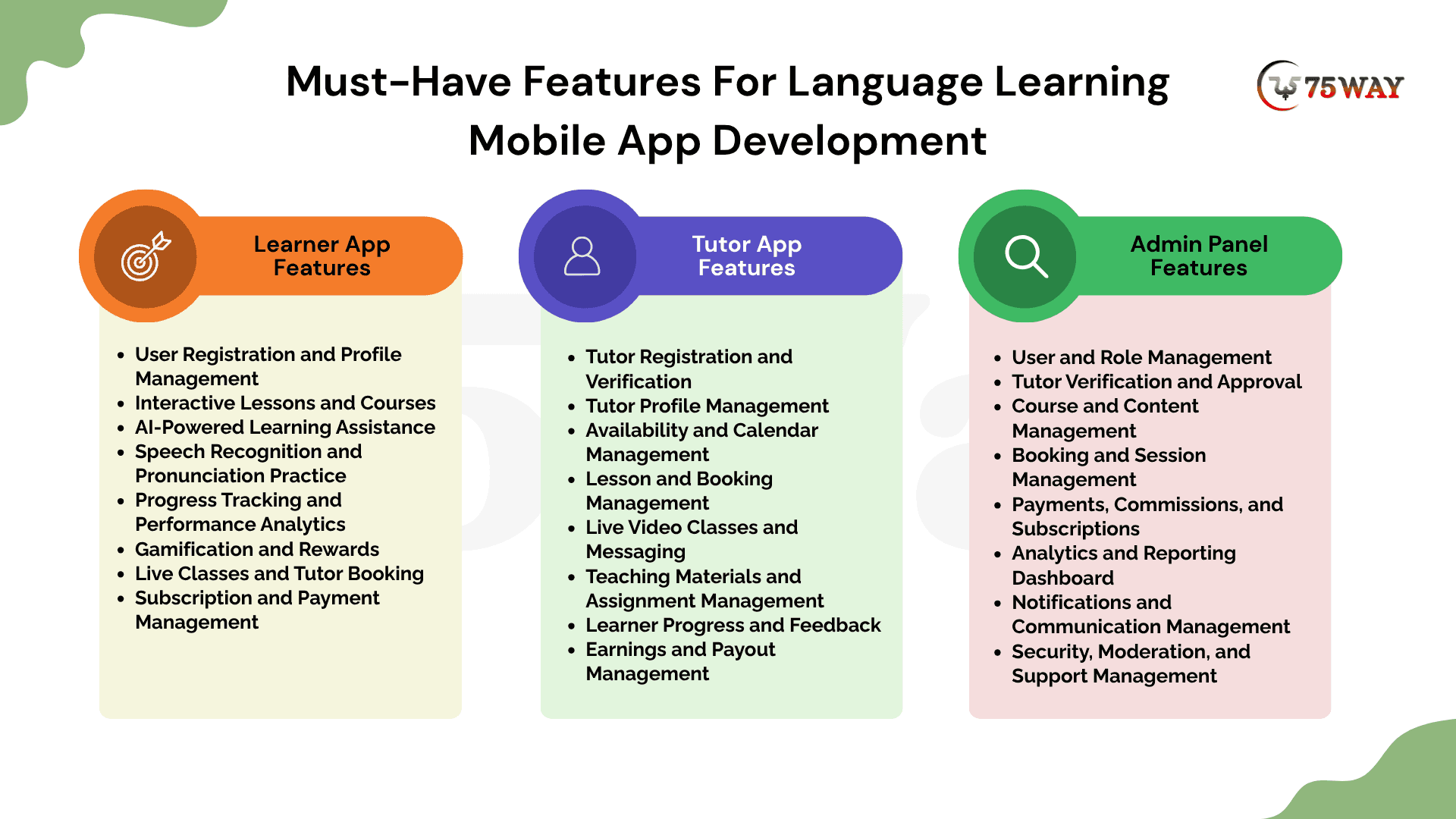
Language learning platforms work best when learners can practise independently, tutors can guide their progress, and administrators can manage the entire system. These needs call for distinct features. We explain essential features to include in the learner, tutor, and admin panels when developing a language learning app.
1. Learner App Features
The learner app should make language practice engaging, accessible, and personalized. These eight features help learners progress from basic vocabulary to confident communication.
- User Registration and Profile Management
Allow learners to create accounts using email, phone numbers, or social sign-in options. Profiles should capture preferred languages, proficiency levels, learning goals, and personal preferences to customize the learning experience.
- Interactive Lessons and Courses
Provide structured lessons covering vocabulary, grammar, reading, listening, and speaking. Organize content by proficiency level and topic so learners can follow a clear learning path and practice at their own pace.
- AI-Powered Learning Assistance
Integrate AI tools to explain grammar, suggest vocabulary, answer language-related questions, and generate practice exercises. Personalized assistance can help learners address knowledge gaps without depending entirely on scheduled tutoring sessions.
- Speech Recognition and Pronunciation Practice
Enable learners to record their speech and receive pronunciation feedback through supported speech recognition technologies. Include listening exercises, spoken responses, and repeat-after-me activities to help users develop speaking confidence.
- Progress Tracking and Performance Analytics
Display completed lessons, quiz scores, learning streaks, vocabulary retention, and proficiency milestones. Progress reports help learners identify strengths, recognize areas needing improvement, and adjust their study routines.
- Gamification and Rewards
Introduce points, badges, daily challenges, streaks, and achievement levels to make practice more engaging. Reward systems can encourage learners to return regularly and complete lessons as they work toward their language goals.
- Live Classes and Tutor Booking
Let learners browse tutor profiles, view available time slots, book sessions, and join live classes. Calendar synchronization, booking reminders, and lesson histories make it easier to manage instructor-led learning.
- Subscription and Payment Management
Offer free and premium plans, paid courses, or individual tutoring sessions through secure payment integrations. Learners should be able to view subscription details, manage renewals, access invoices, and cancel eligible plans.
2. Tutor App Features
The Tutor App enables instructors to manage lessons, communicate with learners, track progress, and receive payments. Its interface should reduce administrative work so tutors can focus on teaching.
- Tutor Registration and Verification
Allow tutors to create profiles with qualifications, language proficiency, teaching experience, and specialization. An approval workflow can help administrators verify credentials before instructors begin accepting bookings.
- Tutor Profile Management
Provide editable profiles featuring biographies, languages taught, teaching styles, hourly rates, and introduction videos. Detailed profiles help learners compare instructors and select tutors suited to their goals.
- Availability and Calendar Management
Let tutors set working hours, block unavailable dates, and manage recurring schedules. Calendar synchronization and automatic time-zone conversion help prevent scheduling conflicts for learners and instructors in different locations.
- Lesson and Booking Management
Provide a dashboard for reviewing upcoming sessions, accepting or declining requests, and managing rescheduling or cancellations. Booking notifications and lesson histories help tutors stay organized throughout their teaching schedules.
- Live Video Classes and Messaging
Integrate video conferencing, chat, and file sharing so tutors can deliver lessons remotely. Screen sharing, collaborative exercises, and session links can support explanations, speaking practice, and interactive learning activities.
- Teaching Materials and Assignment Management
Allow tutors to upload worksheets, audio recordings, vocabulary lists, and lesson notes. Assignment creation and resource sharing help instructors tailor activities to individual learners and reinforce concepts between sessions.
- Learner Progress and Feedback
Give tutors access to relevant learner assessments, completed exercises, lesson attendance, and learning goals. Tutors can record session notes, assign follow-up activities, and provide constructive feedback to guide future lessons.
- Earnings and Payout Management
Display completed sessions, earnings, commissions, pending payments, and payout history. Integrating a supported payment provider helps tutors understand their income and track transactions under the platform's payment policies.
3. Admin Panel Features
The admin panel gives learning languages app owners centralized control over operations, educational content, user accounts, monetization, and performance. These features help maintain platform quality as the business grows.
- User & Role Management
Manage learner and tutor accounts, update profile information, assign permissions, and handle account restrictions. Role-based access controls help protect sensitive information and limit administrative actions to authorized team members.
- Tutor Verification & Approval
Review tutor qualifications, submitted documents, teaching profiles, and verification status. Administrators can approve or reject applications, request additional information, and suspend accounts when policy violations require intervention.
- Course & Content Management
Create, edit, categorize, and publish courses, lessons, quizzes, and learning resources. Content management tools allow teams to organize languages and proficiency levels while updating educational materials without requiring frequent development changes.
- Booking & Session Management
Monitor lesson bookings, cancellations, rescheduling requests, and attendance records. Administrators can investigate scheduling disputes, enforce booking policies, and manage exceptional cases involving learners or tutors.
- Payments, Commissions, & Subscriptions
Track transactions, subscription plans, refunds, tutor commissions, and payout records. Configurable pricing rules help businesses manage revenue streams, while transaction reports support financial reconciliation and operational oversight.
- Analytics & Reporting Dashboard
Display metrics such as active learners, tutor activity, lesson completion, subscription revenue, and user retention. Reporting filters help administrators compare performance across languages, courses, time periods, and customer segments.
- Notifications & Communication Management
Create announcements, configure automated reminders, and manage email, push, or in-app notifications. Targeted communication can inform users about bookings, subscription renewals, new courses, and important account updates.
- Security, Moderation, and Support Management
Manage reported content, user complaints, support tickets, and suspicious account activity. Audit logs, permission controls, and appropriate data protection measures help administrators maintain platform security and respond to operational issues.
For an MVP, start with registration, core lessons, quizzes, progress tracking, and basic payment functionality if monetization is required. Add advanced AI features and live tutoring as your audience grows.
Advanced Features Required In AI Language Learning App Development
The custom AI language learning app can become far more engaging when it responds to how each learner speaks, learns, and improves. AI features can turn routine exercises into interactive practice while helping users identify weaknesses and receive tailored guidance. The AI-powered capabilities can help you plan an online language learning app that delivers greater personalization and practical learning support.
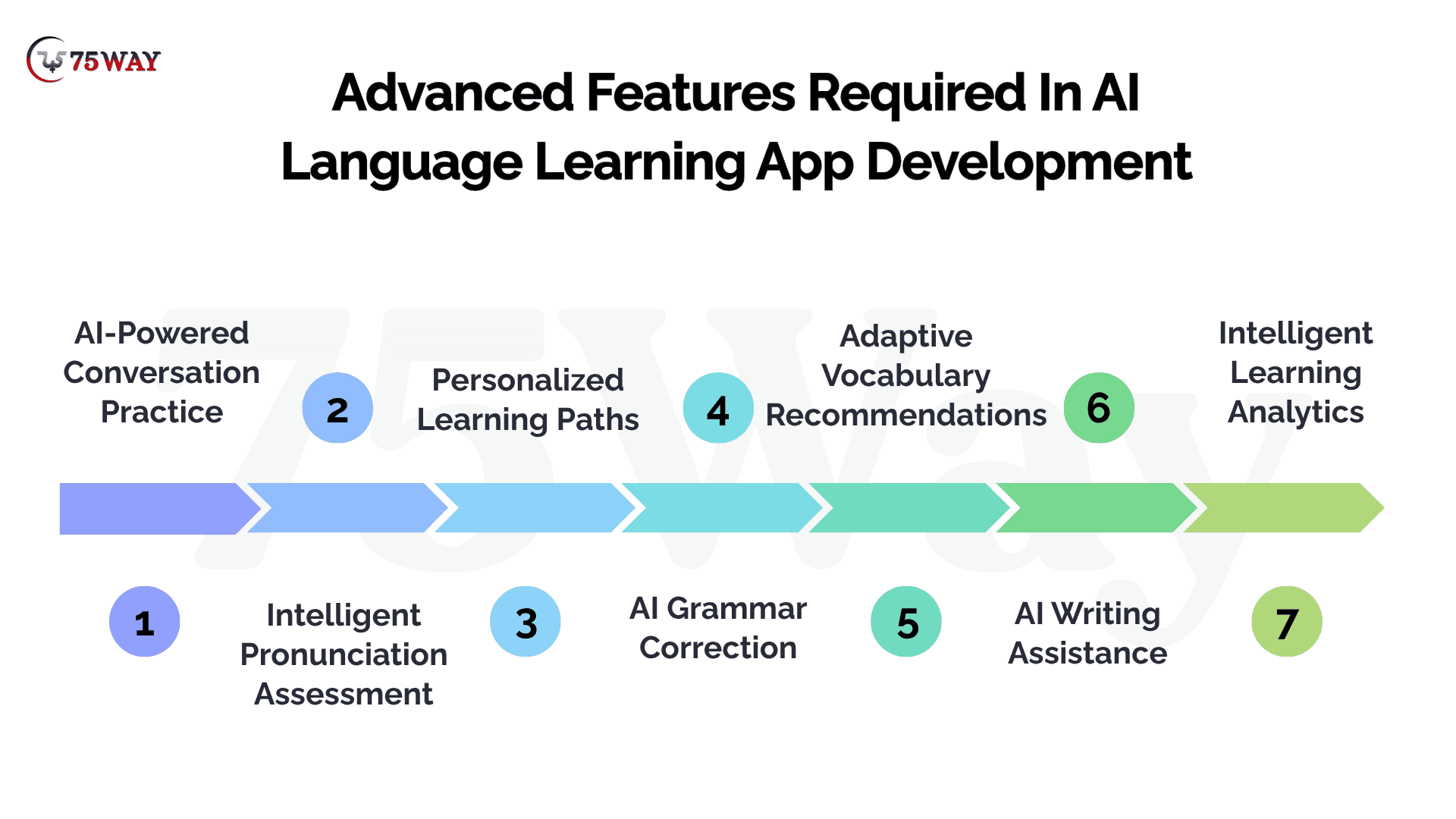
1. AI-Powered Conversation Practice
- Simulates real-life conversations for practical language practice.
- Adapts dialogue difficulty to learners' proficiency levels.
2. Intelligent Pronunciation Assessment
- Analyzes speech patterns to identify pronunciation errors.
- Provides targeted feedback for clearer spoken communication.
3. Personalized Learning Paths
- Recommends lessons based on individual learning performance.
- Adjusts content difficulty according to learner progress.
4. AI Grammar Correction
- Identifies grammatical errors in written learner responses.
- Suggests corrections with explanations and contextual examples.
5. Adaptive Vocabulary Recommendations
- Introduces relevant words based on learner proficiency.
- Revisits difficult vocabulary through spaced repetition techniques.
6. AI Writing Assistance
- Evaluates written responses for clarity and grammar.
- Recommends vocabulary improvements and sentence structure corrections.
7. Intelligent Learning Analytics
- Identifies skill gaps through assessment and activity data.
- Predicts learning difficulties to recommend targeted practice.
Best Practices for Language Learning App Development
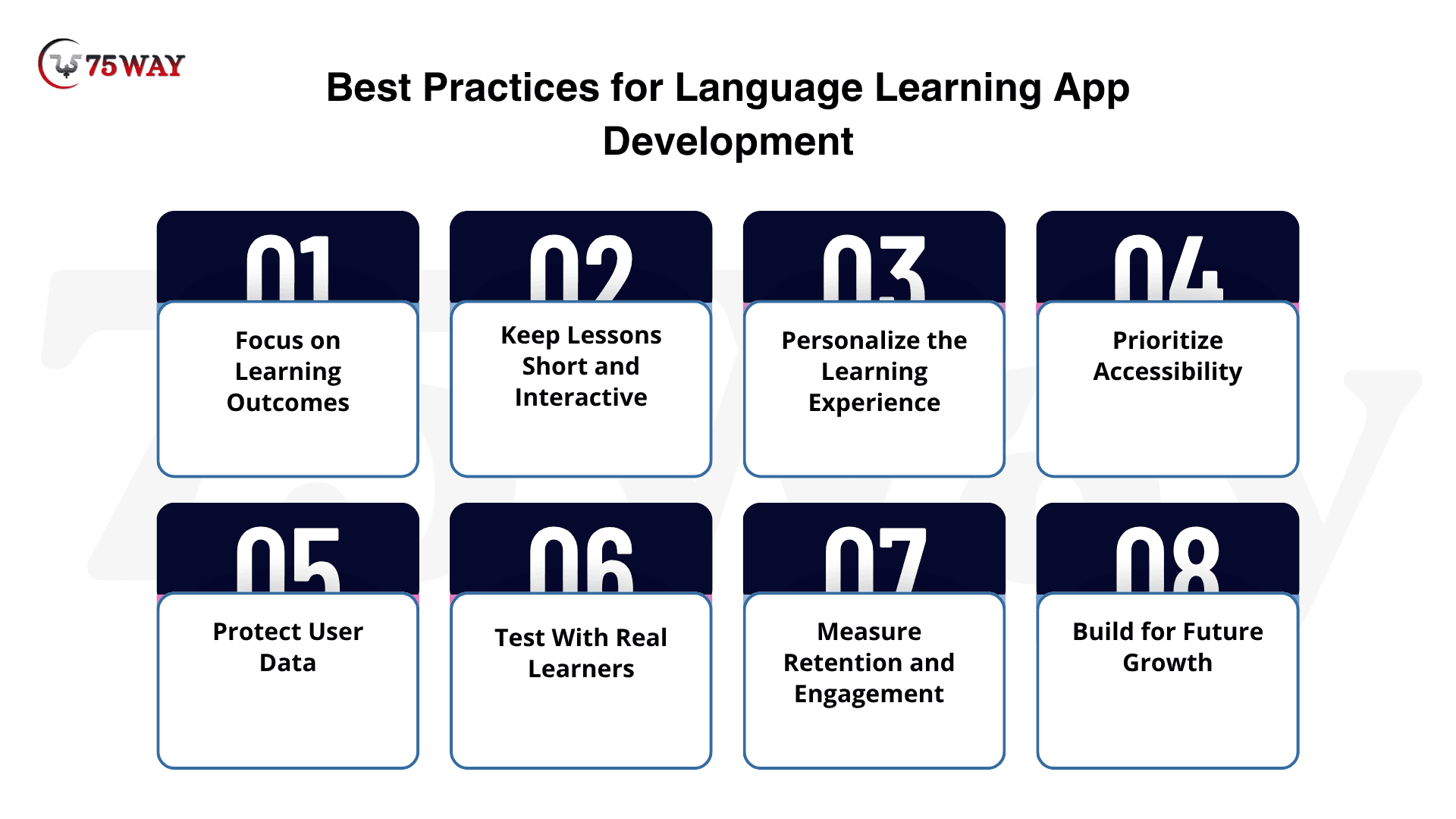
A learner who can finish every lesson but still struggles to order food in Spanish or hold a work conversation may not find much value in your app. Language learning app development should connect lessons with practical speaking, listening, reading, and writing goals. The best practices below focus on building an app that helps users apply what they learn beyond the screen.
1. Focus On Learning Outcomes
Design lessons around measurable goals, such as vocabulary retention, reading comprehension, and conversational confidence. Use assessments to help learners understand their progress.
2. Keep Lessons Short And Interactive
Break content into manageable sessions with exercises, audio, and immediate feedback. Short lessons can make it easier for users to fit practice into busy schedules.
3. Personalize The Learning Experience
Let users select goals, preferred learning styles, and proficiency levels. Use their performance and preferences to recommend appropriate lessons without making the interface unnecessarily complicated.
4. Prioritize Accessibility
Support readable text, captions, adjustable playback speed, clear navigation, and accessible controls. Consider different age groups, abilities, devices, and levels of digital literacy.
5. Protect User Data
Apply appropriate authentication, encryption, access controls, and secure payment practices. Establish clear privacy policies, especially when handling children's data, voice recordings, or AI conversation histories.
6. Test With Real Learners
Invite target users to test prototypes and early releases. Collect feedback about lesson difficulty, navigation, accuracy, and motivation before committing to expensive feature expansions.
7. Measure Retention And Engagement
Monitor daily and monthly active users, lesson completion, subscription conversion, and churn. Use these metrics to identify where learners lose interest and where product improvements may help.
8. Build For Future Growth
Design your backend and content management system to accommodate additional languages, courses, and users. A modular architecture makes it easier to expand the product as business needs evolve.
How Much Does AI Language Learning App Development Cost?
The cost of language learning app development typically ranges from $15,000 to $300,000+, depending on the app's complexity, feature set, platform selection, AI capabilities, and the development team's location.
1. MVP Language Learning App Cost: $15,000 to $50,000
Timeline: 3 to 4 months
Suitable For: Startups validating language learning business ideas
- Basic lessons, quizzes, registration, and progress tracking support learning.
- Single-language courses and simple content management reduce development complexity.
2. Mid-Tier Language Learning App Cost: $50,000 to $110,000
Timeline: 3 to 6 months
Suitable For: Growing businesses expanding digital learning offerings
- Multiple courses, gamification, and notifications encourage regular learner participation.
- Speech recognition and personalized exercises improve pronunciation and practice.
3. Advanced AI Learning App Cost: $110,000 to $200,000+
Timeline: 6 to 9 months
Suitable For: Businesses targeting personalized AI-powered language education
- AI conversations simulate practical dialogues for real-world speaking practice.
- Adaptive lessons and pronunciation analysis provide personalized learner feedback.
4. Full-Scale Enterprise App Cost: $100,000 to $300,000+
Timeline: 9 to 12+ months
Suitable For: Enterprises serving large multilingual learner communities
- Advanced analytics, integrations, and centralized administration support enterprise learning.
- Scalable infrastructure and multilingual content management accommodate growing organizations.
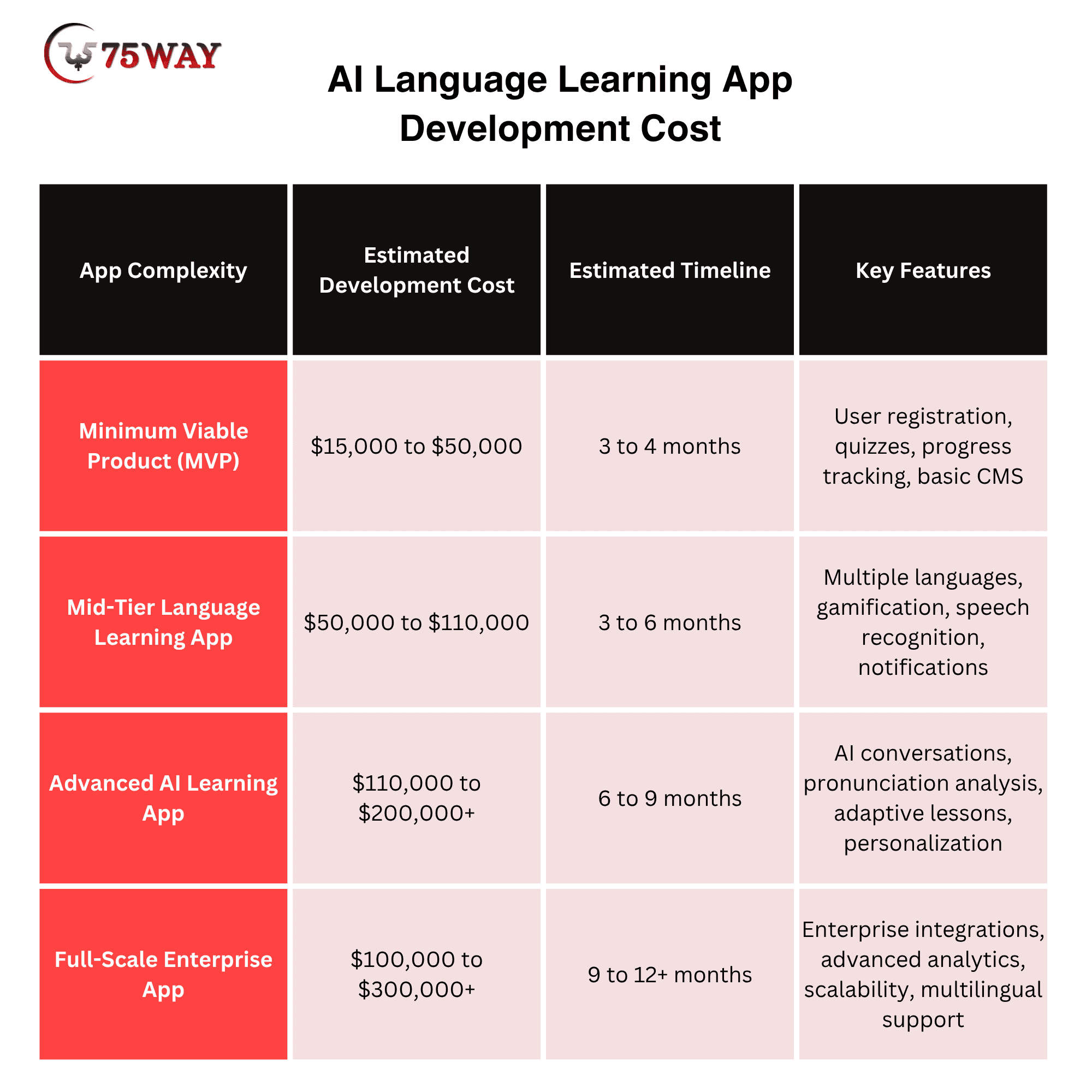
A basic language training app may suit a startup testing its idea, while an advanced platform may be better for businesses planning personalized learning experiences or large user bases.
Cost To Hire Language Learning App Developers Based On Location
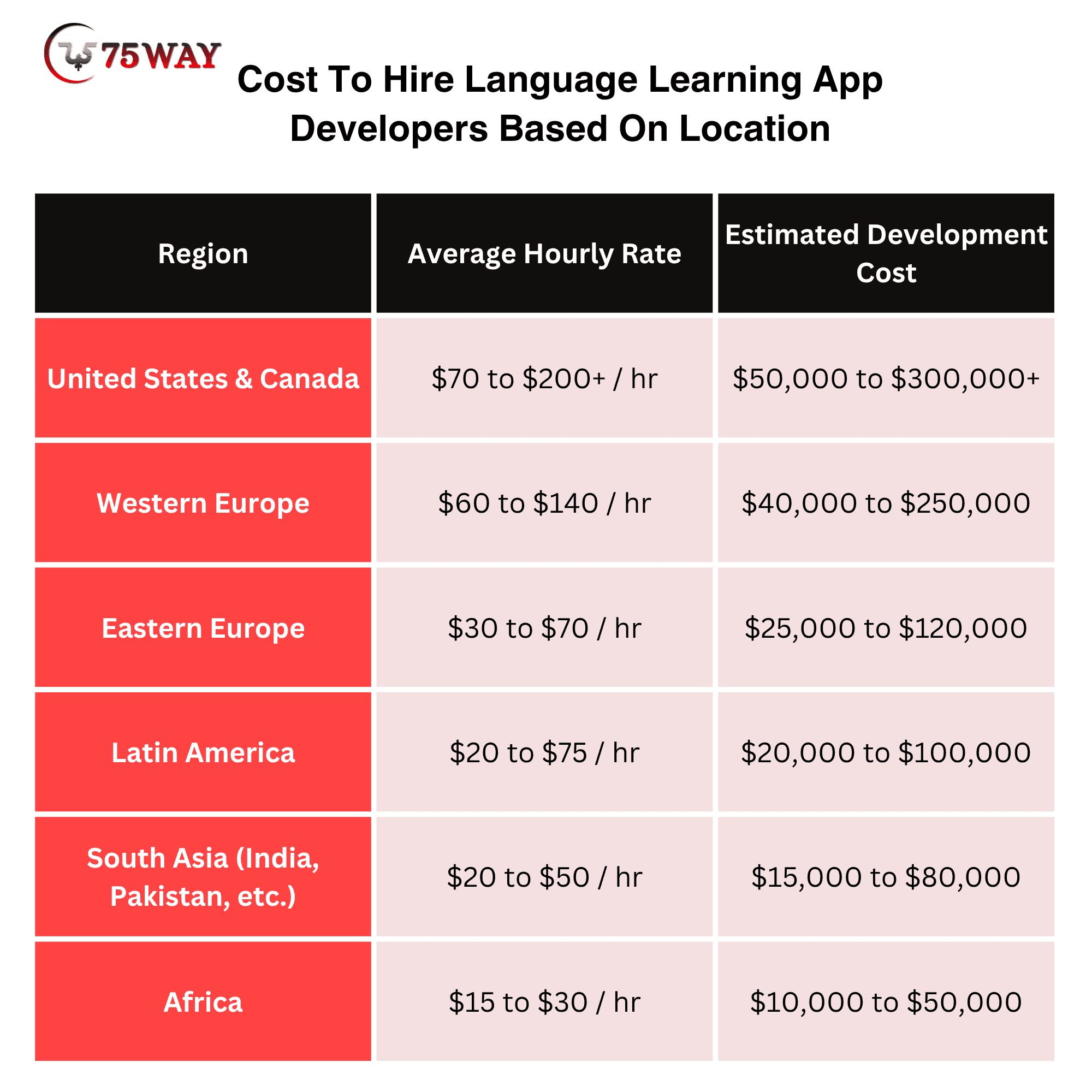
Hiring language learning app developers in the US, India, or Eastern Europe can lead to noticeably different budgets for the same language learning app. Regional salary levels, AI expertise, and experience with speech recognition or learning platforms all influence development rates.
- United States & Canada: $70 to $200+ / hr
- Western Europe: $60 to $140 / hr
- Eastern Europe: $30 to $70 / hr
- Latin America: $20 to $75 / hr
- South Asia (India, Pakistan, etc.): $20 to $50 / hr
- Africa: $15 to $30 / hr
Custom AI Language Learning App Development: Key Opportunities
A custom AI language learning app development allows businesses to create more interactive and personalized learning experiences. Instead of providing identical lessons to every user, an AI-enabled platform can adapt selected activities to individual needs.
Here are the main AI capabilities to consider.
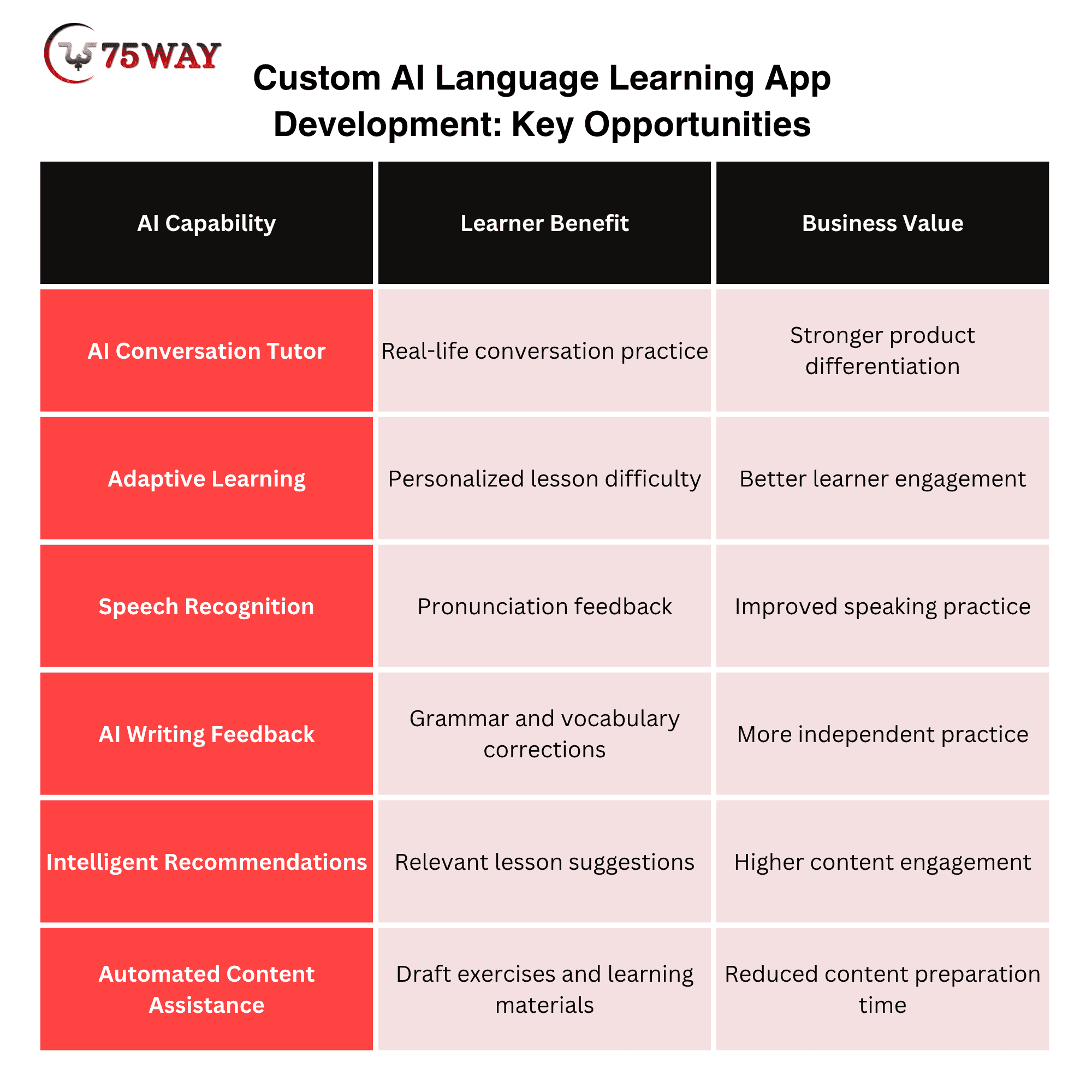
For businesses, the best approach is to introduce AI features that solve specific learning problems rather than adding technology without a clear purpose.
Profitable Revenue Models For Online Language Learning Apps
A language learning app can attract thousands of users yet struggle to generate revenue if its best learning tools are available without a clear upgrade path. Subscription plans, paid tutoring, and premium learning content give businesses different ways to turn learner engagement into income. The revenue models outlined below can help you choose a monetization strategy that fits your app and audience.
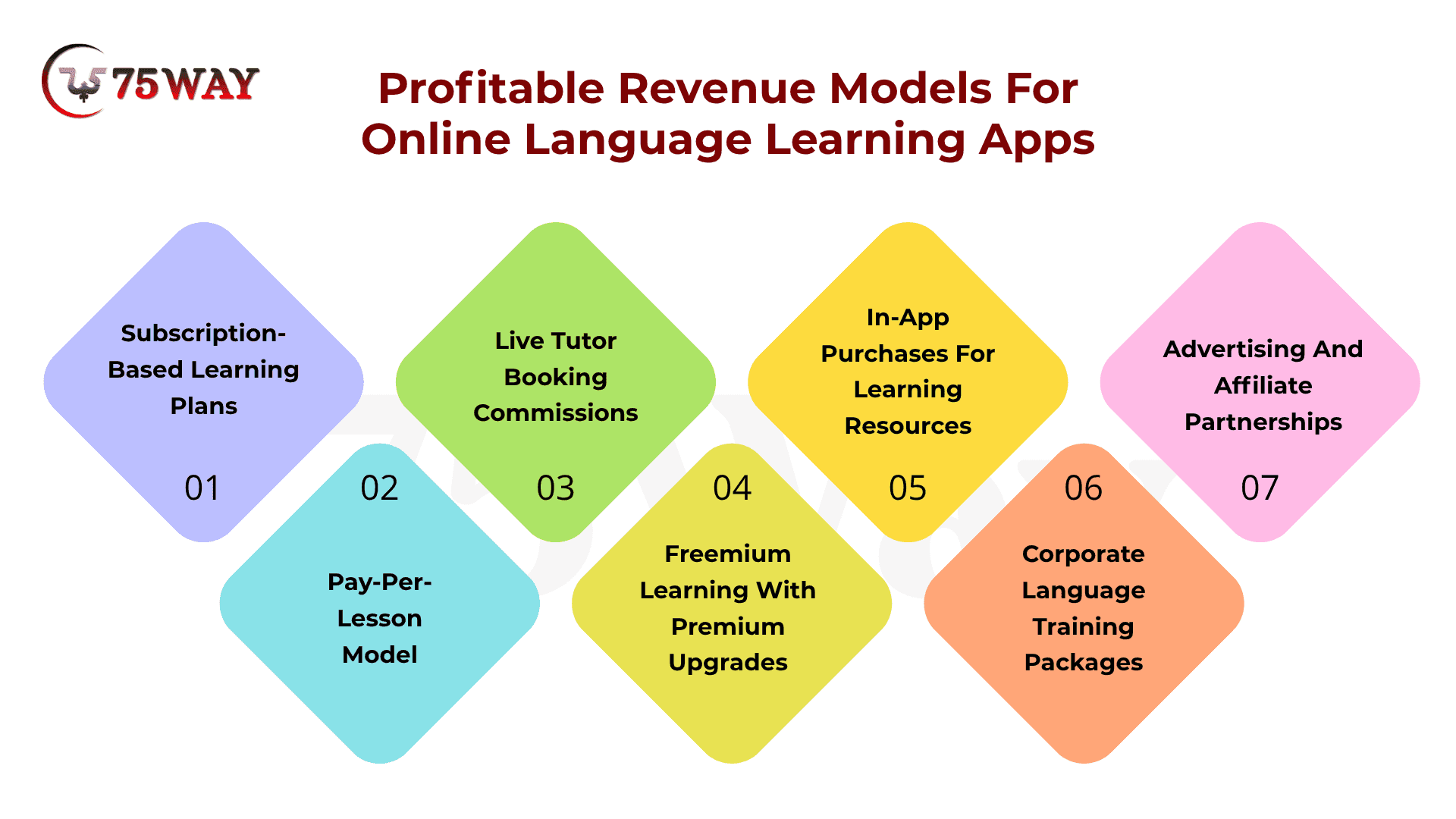
1. Subscription-Based Learning Plans
Learners pay weekly, monthly, or yearly fees to access structured courses, vocabulary exercises, grammar lessons, quizzes, and progress tracking. Tiered plans of a foreign language learning app can offer additional practice sessions, advanced courses, and personalized learning paths.
2. Pay-Per-Lesson Model
Learners purchase individual lessons instead of committing to a subscription. The languages app can charge for live language classes, expert-led grammar sessions, pronunciation coaching, or conversation practice with tutors, making this model suitable for learners with specific goals.
3. Live Tutor Booking Commissions
Learning new language apps connect learners with language tutors and earn a commission from each paid booking. Tutors set lesson prices, while the platform receives a percentage of completed sessions, including one-to-one speaking practice and exam preparation classes.
4. Freemium Learning With Premium Upgrades
Basic lessons, vocabulary games, and daily practice remain free, while advanced features require payment. Revenue comes from upgrades such as unlimited exercises, offline lessons, AI conversation practice, personalized feedback, and ad-free learning.
5. In-App Purchases For Learning Resources
Learners pay separately for digital resources that support specific language goals. These purchases can include exam preparation packs, business vocabulary courses, pronunciation modules, downloadable worksheets, specialized phrasebooks, and certificates for completed learning programs.
6. Corporate Language Training Packages
Businesses pay for employee language training through customized learning plans, team dashboards, and progress reports. Foreign language learning apps can charge per employee or offer company-wide licenses for workplace communication, customer service language skills, and cross-border collaboration.
7. Advertising And Affiliate Partnerships
Apps earn advertising revenue by displaying relevant ads in free learning experiences or partnering with education providers. Affiliate commissions can come from referrals to language proficiency exams, tutoring services, study-abroad programs, and approved language-learning resources.
How To Choose A Language Learning App Development Company
The right language learning app development agency should understand both mobile technology and what makes language learning engaging, practical, and measurable. Its experience with AI integration, audio processing, learner dashboards, and scalable architecture can directly affect your app’s capabilities. The selection criteria outlined below can help you compare companies based on their technical expertise, relevant portfolio, communication, and pricing.
1. Look For Relevant Learning Projects
A portfolio with language-learning apps can reveal how a team handles vocabulary drills, speaking exercises, grammar lessons, and course progression. A closer look at these projects can help you judge whether the team understands the way people actually learn languages.
2. Check How Lessons Become Interactive
A useful language app gives learners something to do, not just something to read. Examples of interactive features include matching words with pictures, listening and repeating phrases, arranging sentences, and practising everyday conversations. The development team should understand how these activities fit your learning approach.
3. Discuss Real Language Practice
Learners often struggle to speak confidently, even when they understand grammar. A development partner with experience in speech recognition, pronunciation feedback, or AI conversation tools can help address this gap. Your discussion should focus on how these features support speaking practice and provide useful feedback.
4. Understand The Course Management Setup
Your team may need to add new languages, revise lessons, upload audio, or organize courses by proficiency level. A well-planned content management system makes these tasks easier without requiring a developer for every small update. Ask the agency to demonstrate how course changes would work.
5. Explore Support After Launch
Learner feedback may reveal confusing exercises, audio playback problems, or lessons that need improvement. A dependable development partner should explain how bug fixes, app updates, and technical support will work after launch. Clear support arrangements also help your team improve the learning experience over time.
Conclusion
To sum up, language learning app development offers businesses a way to enter digital education with products designed around interactive lessons, personalized learning, and measurable progress. A successful launch starts with a clearly defined audience, a focused feature set, and a realistic budget.
AI language learning app development costs can range from $15,000 to $300,000+, depending on complexity and integrations. By selecting the right technology stack, monetization model, and development partner, businesses can create a platform that supports learners while meeting commercial objectives.
To build your language learning app, you can partner with a reliable educational app development company that plans your features, estimates your budget, and turns your idea into a scalable learning platform.
Frequently Asked Questions (FAQs)
Can Learners Access Language Learning Apps Offline?
Yes. Offline access can let learners download lessons, audio clips, vocabulary lists, and exercises for practice without an internet connection.
How Can A Language Learning App Protect Learner Data?
Data protection measures include encrypted communication, secure authentication, role-based access controls, and clear consent practices for storing voice recordings and learner information.
Can A Language Learning App Connect With An LMS?
Yes. Learning management system integrations can help educational institutions synchronize course content, learner progress, assessment results, and training records across platforms.
What Is The Difference Between A Language Learning App And An LMS?
A language learning app focuses on language practice and skill development, while an LMS manages broader educational activities, course delivery, assessments, and learner administration.
Who Owns The Source Code After App Development?
Source code ownership depends on the development agreement. Contracts should clearly define ownership rights, access to repositories, and responsibility for third-party licenses.
Can A Language Learning App Support Multiple Languages?
Yes. A language learning app can offer multiple language courses, localized interfaces, and learning materials for users with different language preferences.