AI Summary
Building an app like DoorDash requires more than a convenient ordering interface. This guide explores essential features, development steps, technology choices, and monetization models. You will also discover estimated costs, challenges, and growth opportunities. Use these insights to plan a competitive food delivery platform.
Key Takeaways
- DoorDash reported $4.45 billion in Q2 2026 revenue, alongside 970 million total orders.
- Building a DoorDash-like app may cost 280,000+, depending on complexity.
- Customer, restaurant, and driver apps form the core delivery platform.
- Real-time tracking, secure payments, and smart dispatch improve delivery experiences.
- Commission fees, delivery charges, and subscriptions create potential revenue streams.
Being a food business owner or restaurant founder, if you are entering the food delivery market, it sounds promising until you face the real challenges.
Attracting restaurants, retaining customers, managing drivers, and competing with established platforms all seem challenging. For startups in the US, building a food delivery app like DoorDash offers a potential path into this market, but the business model needs careful planning from day one.
A strong platform must serve three different audiences: customers who expect convenient ordering, restaurants that need reliable order management, and drivers who want clear delivery instructions. The right features, technology choices, and operational workflows can shape both the customer experience and long-term profitability.
Before investing in DoorDash clone app development, you need a clear roadmap. This guide covers how to make an app like DoorDash, including the development stages, core features, estimated costs, technology stack, and revenue opportunities to consider.
What Is DoorDash Clone App Development?
DoorDash clone app development is the process of building a food delivery platform inspired by DoorDash’s business model and core functionalities. It connects customers, restaurants, and delivery partners through dedicated apps or dashboards for ordering, payment processing, delivery tracking, and order management.
A DoorDash clone can include features such as restaurant discovery, digital menus, secure payments, real-time order tracking, delivery assignment, ratings, and promotional offers. Businesses can customize these capabilities to match their target market, branding, delivery model, and revenue strategy.
The goal is not to copy DoorDash’s proprietary technology or branding. It is to develop a similar food delivery solution with original design, customized features, and the flexibility to support your business requirements.
Business Opportunity Behind DoorDash-Like App Development Across USA & Global Markets
For entrepreneurs, food delivery is more than a convenience-driven service. It is a business opportunity shaped by customer expectations and restaurant demand. A DoorDash-like app can generate revenue through delivery fees, restaurant commissions, subscriptions, and other monetization models. The market insights outlined below highlight why this business model deserves closer attention in the US and global markets.
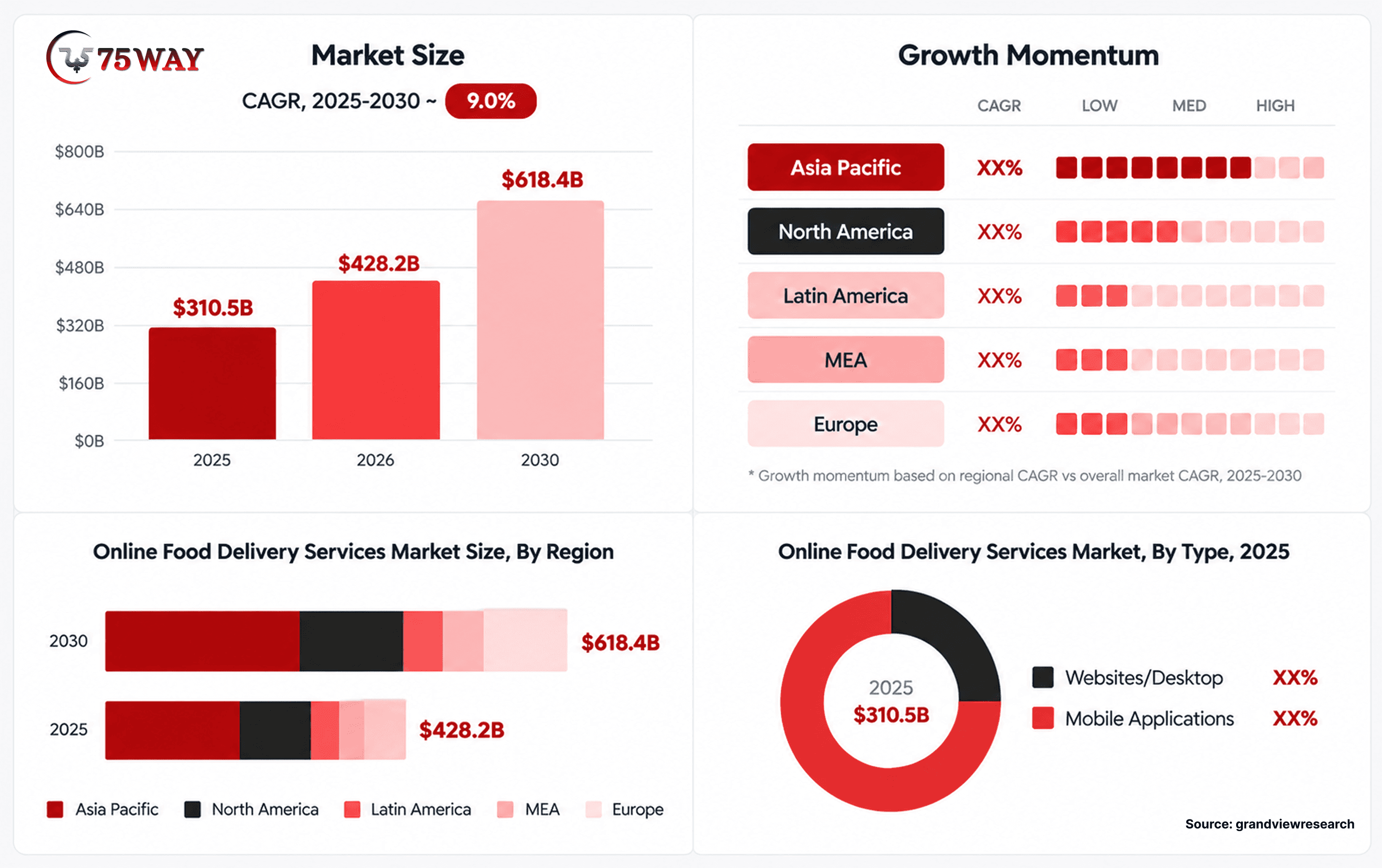
- Trailing 12-Month Revenue: Reached $15.89 billion, marking a 33.59% year-over-year increase.
- Q2 2026 Orders: Recorded 970 million total orders.
- U.S. Market Share: Captured approximately 65%–66% of the U.S. food delivery market.
- 2025 Annual Revenue: Generated $13.72 billion, representing 27.93% growth compared with 2024.
- Marketplace Gross Order Value (GOV): Reached $31.6 billion in Q1 2026, up 37% year-over-year.
- Online Food Delivery Market Revenue: Projected to reach $1.51 trillion in 2026 and $2.05 trillion by 2031.
- Q2 2026 Adjusted EBITDA: Totaled $914 million, with a 20.5% margin.
- Grocery Delivery ARPB: Average revenue per buyer is forecast to reach US$553.52 in 2026.
- Meal Delivery Buyers: The market is expected to reach 2.6 billion buyers by 2031.
You do not need to launch across multiple cities to build a competitive food delivery platform. A focused launch area, strong restaurant partnerships, reliable delivery operations, and a clear revenue model can provide a more practical starting point.
How Does an App Like DoorDash Work?
DoorDash operates as a multi-sided marketplace connecting customers, restaurants, delivery partners, and platform administrators. Each participant has different responsibilities, but all rely on shared order information.
- Customers: Discover restaurants, compare menus, place orders, make payments, and track deliveries.
- Restaurants: Manage menus, receive orders, update preparation times, and monitor sales.
- Delivery Partners: Accept delivery requests, navigate to pickup and drop-off locations, and manage earnings.
- Administrators: Oversee users, restaurant approvals, payments, commissions, customer support, and platform performance.
A typical order begins when a customer selects food and completes checkout. The restaurant receives the order and confirms its preparation time. The system assigns an available delivery partner, shares relevant order updates, and tracks the delivery until completion. Payment records, fees, and applicable payouts are then processed according to the platform's rules.
The backend must coordinate these activities in real time. Delayed notifications, inaccurate delivery estimates, or failed payment updates can affect the entire experience, even when each individual app looks polished.
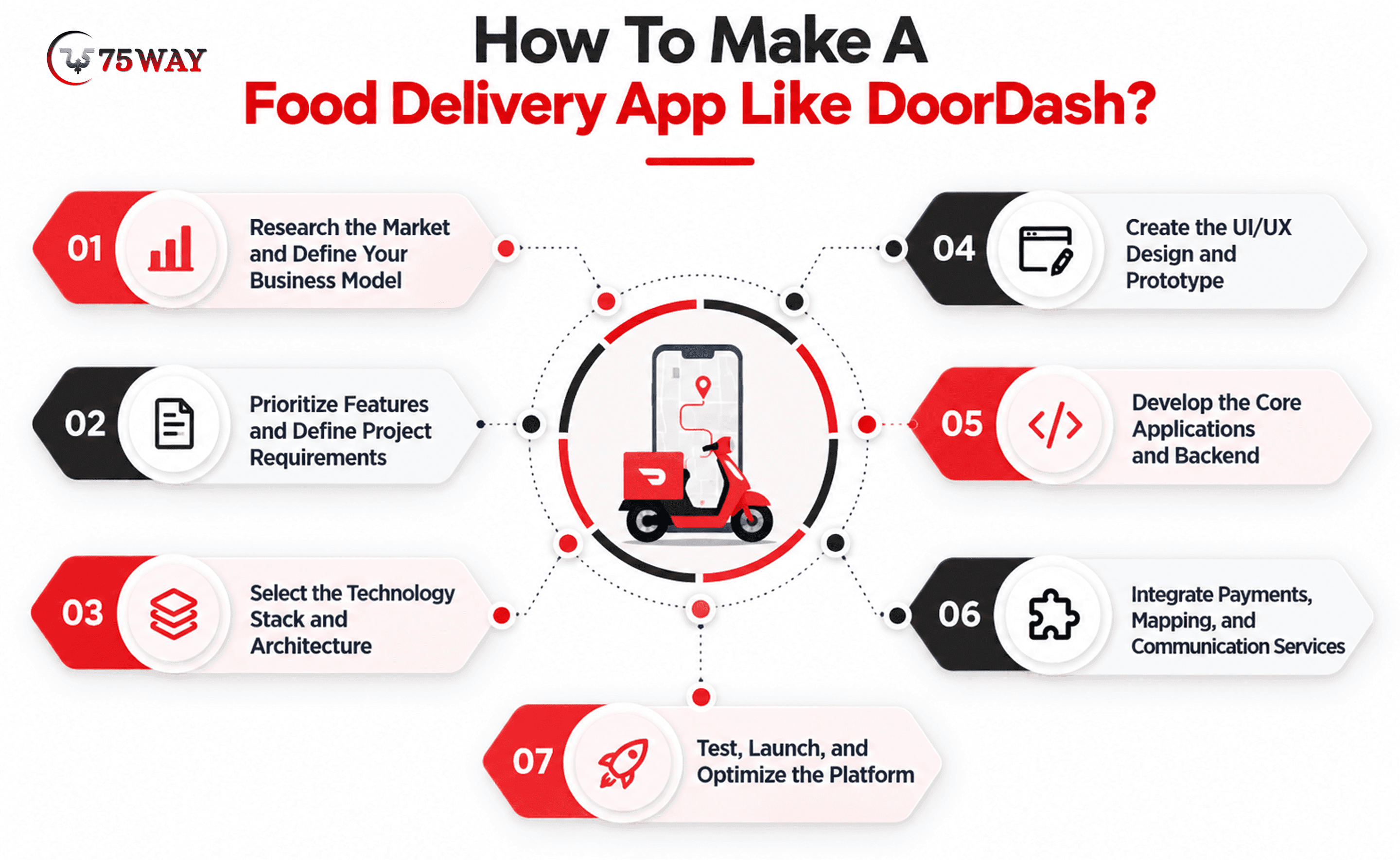
How To Make A Food Delivery App Like DoorDash?
A successful food delivery app requires clear business planning, the right technology, user-friendly interfaces, and reliable delivery operations. The following stages explain how to turn your idea into a functional platform.
Step 1: Research the Market and Define Your Business Model
Market research helps identify customer expectations, restaurant needs, and opportunities to differentiate your platform. A local delivery service requires a different approach from a multi-city marketplace serving restaurants, grocery stores, and convenience retailers.
- Identify Your Target Audience: Define the customers, restaurants, and delivery partners you want to serve.
- Analyze Competitors: Study competing apps, delivery fees, restaurant commissions, customer reviews, and service gaps.
- Select a Delivery Model: Decide whether to manage your own fleet, work with independent delivery partners, or support restaurant-managed deliveries.
- Choose Your Launch Market: Start with a defined geographic area where restaurant availability and delivery demand can support the business.
Step 2: Prioritize Features and Define Project Requirements
A clear feature plan helps control development costs and keeps the project focused on essential business needs. The initial version should support the complete ordering process before introducing advanced capabilities.
- Define MVP Features: Prioritize restaurant discovery, menus, checkout, payments, order management, and delivery tracking.
- Plan Platform Modules: Establish the requirements for customer, restaurant, delivery partner, and admin interfaces.
- Document Business Rules: Define commissions, cancellation policies, refunds, delivery charges, and promotional conditions.
- Prepare a Development Roadmap: Organize features by priority, estimated effort, budget, and launch requirements.
Step 3: Select the Technology Stack and Architecture To Build DoorDash-Like App
The technology stack determines how your app handles transactions, user interactions, location updates, and future growth. Select tools that suit your target devices, integration requirements, and development team's expertise.
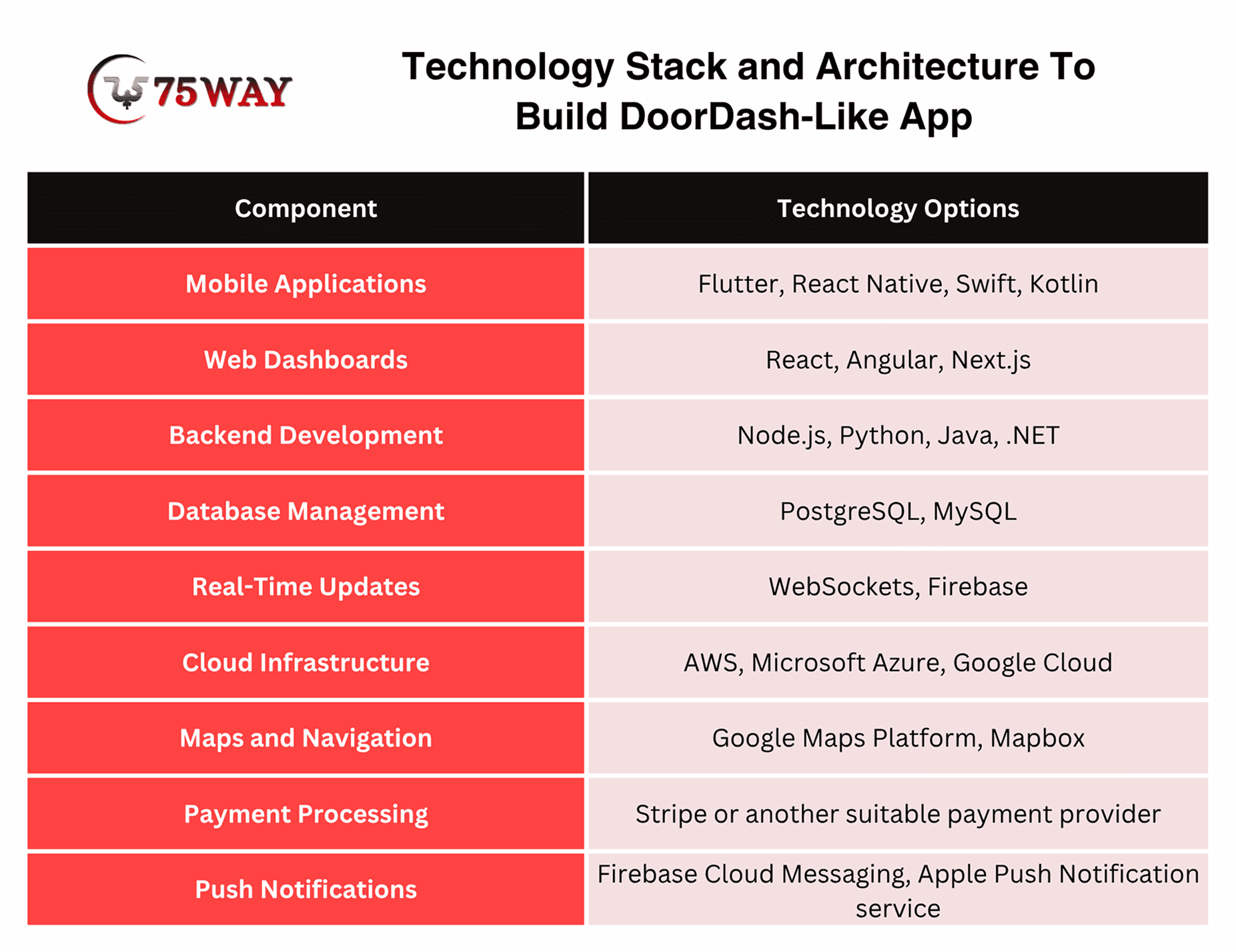
- Choose Development Frameworks: Select suitable technologies for mobile applications and web-based dashboards.
- Design Backend Architecture: Plan services for accounts, menus, orders, payments, delivery assignments, and reporting.
- Plan Data Management: Establish how customer information, order records, and transaction data will be stored and protected.
- Prepare for Scalability: Choose an architecture that can accommodate additional restaurants, users, and delivery locations as demand grows.
Step 4: Create the UI/UX Design and Prototype
A well-planned interface helps customers place orders, restaurant staff manage requests, and delivery partners complete assignments without unnecessary confusion. Prototypes allow the team to evaluate important workflows before full development begins.
- Design User Journeys: Map the steps customers, restaurant staff, delivery partners, and administrators follow to complete their tasks.
- Create Wireframes: Establish screen layouts for restaurant listings, menus, checkout, dashboards, and delivery tracking.
- Build Interactive Prototypes: Demonstrate essential workflows, including address selection, payment, order acceptance, and delivery updates.
- Conduct Usability Testing: Gather feedback on navigation, readability, accessibility, and checkout friction before finalizing the designs.
Step 5: Develop the Core Applications and Backend
Application development brings the approved designs and requirements together into a working food delivery platform. The customer app, restaurant dashboard, delivery partner app, and admin panel must exchange accurate information through shared backend services.
- Build the Customer App: Develop registration, restaurant discovery, menu browsing, cart management, checkout, and order tracking.
- Develop the Restaurant Dashboard: Enable menu updates, order processing, preparation status changes, and sales monitoring.
- Create the Delivery Partner App: Implement delivery requests, navigation, pickup confirmation, status updates, and earnings records.
- Develop Backend Services: Connect user accounts, order processing, payment records, delivery assignments, and notifications.
Step 6: Integrate Payments, Mapping, and Communication Services
Third-party integrations provide essential capabilities without requiring you to develop every supporting service from scratch. Careful configuration ensures that payment updates, location information, and order notifications reach the appropriate users.
- Integrate Payment Gateways: Support eligible payment methods and handle transaction confirmations, declines, and refunds.
- Connect Mapping Services: Enable address selection, route guidance, distance calculations, and delivery estimates.
- Configure Notifications: Send relevant updates for order confirmation, restaurant acceptance, pickup, delivery, and cancellations.
- Test Integration Reliability: Verify API responses, error handling, data synchronization, and service availability under different conditions.
Step 7: Test, Launch, and Optimize the Platform
Thorough testing helps identify functional, security, and performance issues before customers and business partners rely on the app. A controlled launch also provides practical feedback before expanding into additional markets.
- Perform Functional Testing: Verify registration, menu selection, checkout, order processing, refunds, and delivery status updates.
- Conduct Security Testing: Review authentication, access permissions, data protection, and payment-related workflows.
- Run Performance Tests: Evaluate response times and system behavior during simultaneous orders and periods of high demand.
- Launch a Pilot Version: Introduce the platform in a limited area and collect feedback from customers, restaurants, and delivery partners.
- Monitor Key Metrics: Track order completion, delivery times, cancellations, repeat purchases, customer complaints, and fulfillment costs.
- Improve Based on Feedback: Fix recurring issues, refine workflows, and introduce additional features as the business grows.
Major Features Required for Building a Delivery App Like DoorDash
Every successful food delivery experience depends on several features working together, from finding the right meal to receiving an order on time. For business owners, choosing these capabilities early helps define development priorities and avoid unnecessary complexity. The key features detailed below will help you understand what to include in your food delivery app.
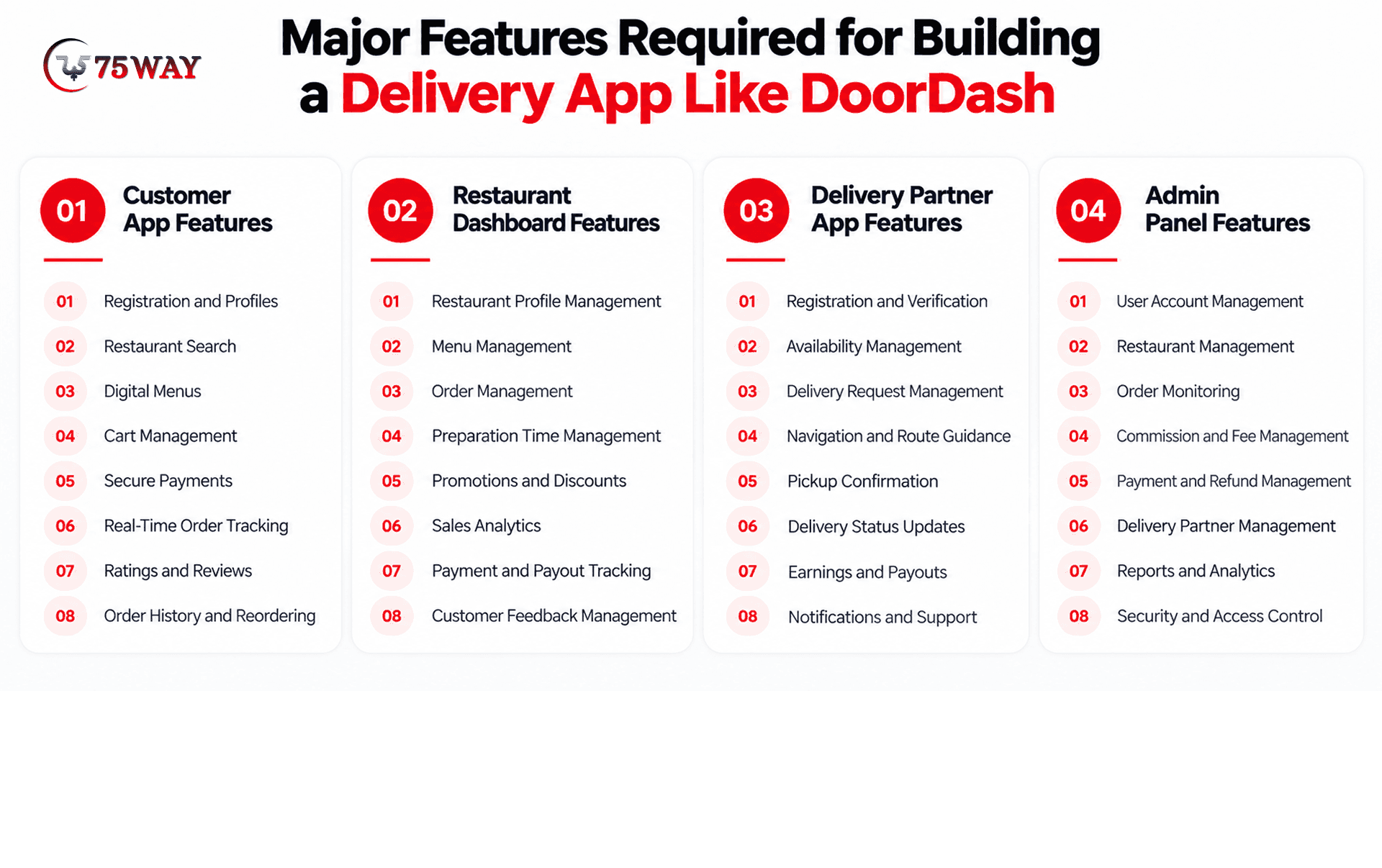
Module 1: Customer App Features
The customer app should make restaurant discovery, food ordering, payment, and delivery tracking simple.
- Registration and Profiles: Allow users to create accounts, manage personal details, save delivery addresses, and access order history.
- Restaurant Search: Help customers find restaurants by location, cuisine, ratings, delivery time, and availability.
- Digital Menus: Display food descriptions, prices, images, portion sizes, customization options, and dietary information.
- Cart Management: Let customers add items, adjust quantities, apply promo codes, and review order totals.
- Secure Payments: Support card payments, digital wallets, and other payment methods available through integrated providers.
- Real-Time Order Tracking: Show order progress, estimated arrival times, and delivery partner locations where supported.
- Ratings and Reviews: Allow customers to rate restaurants and delivery experiences and share feedback after completed orders.
- Order History and Reordering: Provide access to previous purchases, receipts, and convenient options for placing repeat orders.
Module 2: Restaurant Dashboard Features
The restaurant dashboard helps restaurant owners manage incoming orders, menus, customer requests, and sales performance.
- Restaurant Profile Management: Allow owners to update business details, operating hours, contact information, and restaurant descriptions.
- Menu Management: Enable restaurants to add dishes, edit prices, upload images, and manage item availability.
- Order Management: Let staff accept or reject orders, update preparation status, and handle cancellations according to platform rules.
- Preparation Time Management: Allow restaurants to set estimated preparation times and update delays to support delivery coordination.
- Promotions and Discounts: Provide tools for configuring approved deals, discount codes, and special menu offers.
- Sales Analytics: Display order volumes, revenue summaries, popular dishes, cancellation rates, and other useful performance metrics.
- Payment and Payout Tracking: Show commission deductions, transaction histories, settlement records, and expected restaurant payouts.
- Customer Feedback Management: Help restaurant teams review customer ratings, respond to feedback where supported, and identify service improvements.
Module 3: Delivery Partner App Features
The delivery partner app supports pickup and drop-off activities while providing the information needed to complete assignments.
- Registration and Verification: Collect partner details and required documents for account approval and identity verification.
- Availability Management: Let delivery partners go online or offline and manage when they are available for assignments.
- Delivery Request Management: Display available delivery requests with pickup locations, destinations, and relevant assignment information.
- Navigation and Route Guidance: Integrate mapping services to help partners navigate to restaurants and customer addresses.
- Pickup Confirmation: Allow delivery partners to confirm order collection and update the delivery status.
- Delivery Status Updates: Record key milestones, including arrival, pickup, en route status, and successful drop-off.
- Earnings and Payouts: Show completed deliveries, earnings summaries, adjustments, and payout information.
- Notifications and Support: Provide assignment alerts, delivery instructions, support access, and tools for reporting operational issues.
Module 4: Admin Panel Features
The admin panel gives platform owners centralized control over users, restaurants, transactions, and daily operations.
- User Account Management: Manage customer accounts, delivery partner profiles, permissions, account restrictions, and reported issues.
- Restaurant Management: Review restaurant applications, verify required details, approve listings, and manage platform participation.
- Order Monitoring: Track active orders, cancellations, delayed deliveries, failed assignments, and order-related disputes.
- Commission and Fee Management: Configure restaurant commissions, customer service fees, delivery charges, and applicable promotional rules.
- Payment and Refund Management: Monitor transactions, review refund requests, reconcile payment records, and manage authorized adjustments.
- Delivery Partner Management: Review partner activity, manage account status, monitor delivery performance, and investigate reported incidents.
- Reports and Analytics: Track order volume, revenue, average order value, customer retention, and marketplace performance.
- Security and Access Control: Configure administrator permissions, protect sensitive records, and maintain logs of important platform activities.
How Much Does It Cost To Build An App Like DoorDash?
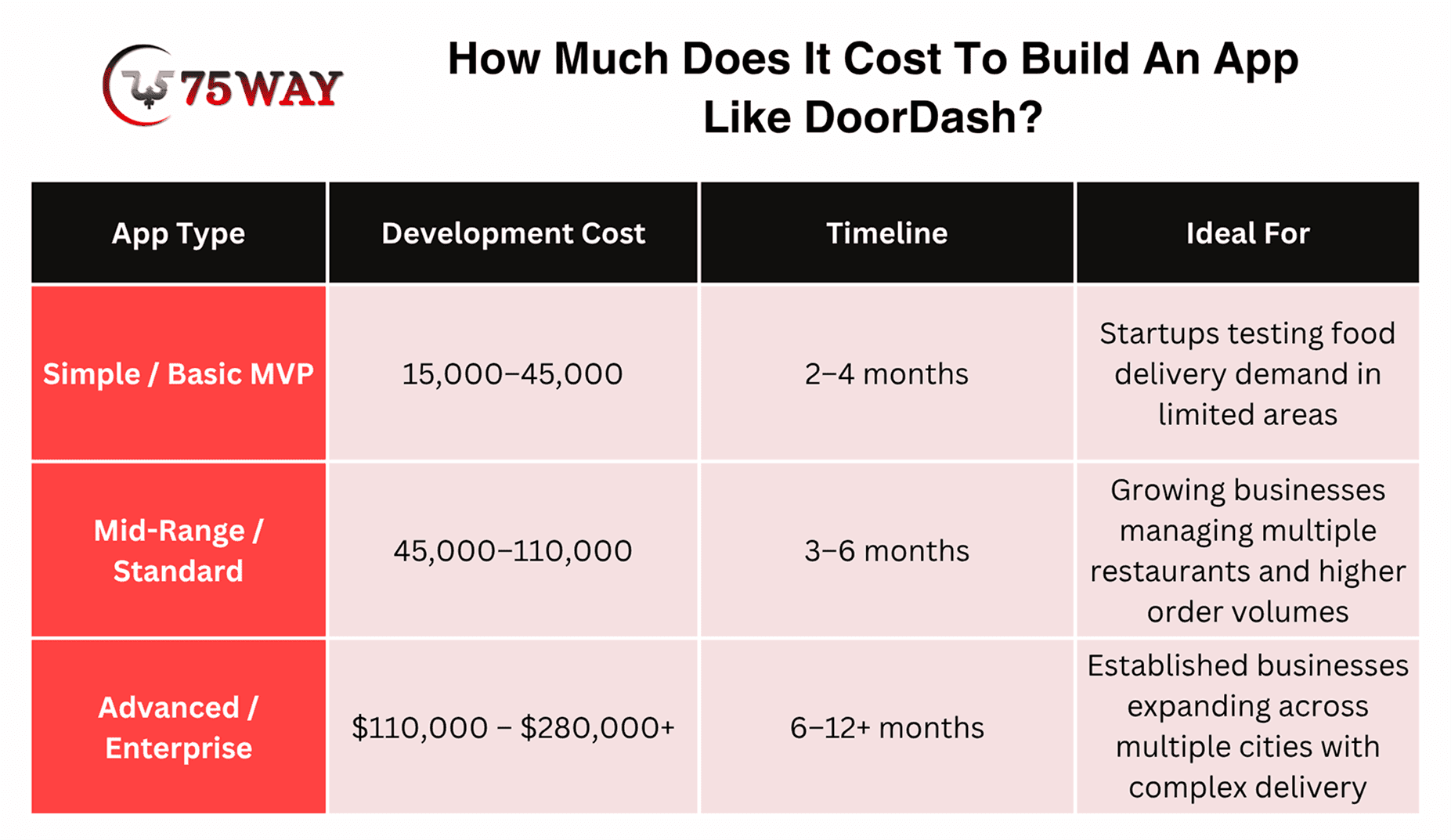
The estimated cost to build an app like DoorDash ranges from $15,000 to $280,000+, depending on the feature set, number of applications, delivery automation, integrations, and project complexity. A focused MVP costs less than a platform designed to support multiple cities and high order volumes.
1. Simple / Basic MVP DoorDash-Like App Cost: $15,000 – $45,000
This version includes essential ordering, payments, and restaurant management features. It suits startups testing food delivery demand within limited areas.
Timeline: 2–4 months
2. Mid-Range / Standard DoorDash-Like App Cost: $45,000 – $110,000
This version adds advanced tracking, promotions, and broader integrations. It supports growing businesses managing higher order volumes and multiple restaurants.
Timeline: 3–6 months
3. Advanced / Enterprise DoorDash-Like App Cost: $110,000 – $280,000+
This version supports automated dispatch, advanced analytics, and scalability. It suits businesses expanding across multiple cities and complex delivery networks.
Timeline: 6–12+ months
Factors That Affect DoorDash Clone App Development Cost
- Number of Applications: A platform with customer, restaurant, delivery partner, and admin interfaces requires more work than a simple ordering app for one restaurant.
- Feature Complexity: Live tracking, automated dispatch, loyalty programs, subscriptions, and personalized recommendations increase engineering and testing requirements.
- Third-Party Integrations: Payment gateways, maps, SMS, push notifications, and external restaurant systems may involve setup charges and ongoing usage fees.
- Design And Customization: Bespoke interfaces, complex workflows, accessibility requirements, and extensive branding can increase design and development time.
- Team Location And Expertise: Developer rates vary by region, seniority, and engagement model. The quoted price also depends on project management, quality assurance, and post-launch support.
- Maintenance And Operations: Hosting, monitoring, customer support, payment processing, partner onboarding, and ongoing software updates are separate from the initial development budget.
How To Manage Your App Development Budget
A phased approach can help you control initial spending while leaving room for growth.
- Start with one delivery area and a defined group of restaurant partners.
- Build the core ordering and fulfillment workflow before advanced personalization.
- Use established payment and mapping services rather than building these systems from scratch.
- Track ongoing service fees alongside development expenses.
- Add features based on customer feedback, order data, and operational needs.
The goal is not to launch the cheapest possible app. It is to invest in a reliable first version that can validate demand and support a sustainable business model.
How Does a DoorDash-Like App Make Money?
A food delivery platform can generate revenue through several channels. The right combination depends on customer expectations, restaurant agreements, delivery costs, and the level of service you provide.
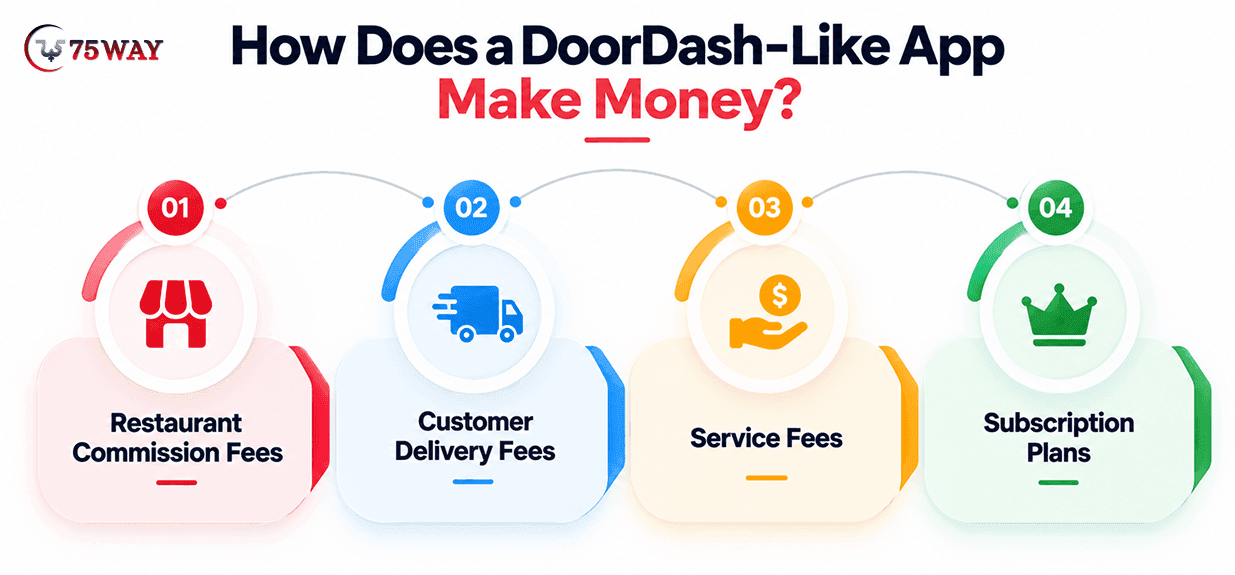
1. Restaurant Commission Fees
The platform charges participating restaurants a percentage of eligible order value. Commission rates should reflect the services provided, contractual terms, and the economics of each market.
2. Customer Delivery Fees
Customers may pay a delivery charge based on distance, order value, demand, or the delivery model. Clear fee disclosures help customers understand the total cost before checkout.
3. Service Fees
A separate service fee can help cover platform operations, payment processing, and customer support. Its structure should be transparent and comply with applicable regulations.
4. Subscription Plans
Paid memberships can offer benefits such as reduced delivery fees, eligible order discounts, or exclusive promotions. Subscription economics depend on repeat usage and the cost of providing those benefits.
5. Sponsored Listings and Advertising
Restaurants can pay for promotional placements, sponsored search results, or campaign visibility. Advertising controls should preserve relevant search results and clearly identify paid placements.
6. Delivery and Technology Services
A platform may earn revenue by providing delivery services to restaurants or licensing its ordering and logistics software to other businesses. These options can create additional income beyond consumer marketplace transactions.
Note: Revenue does not equal profit. Delivery partner payments, promotions, refunds, payment fees, customer support, marketing, and technology expenses all affect profitability.
Key Challenges of Developing A Food Delivery App Like DoorDash & Solutions
A food delivery app may attract users at launch, but keeping them satisfied becomes harder as orders, restaurants, and delivery zones expand. Issues such as late deliveries, inconsistent food quality, and rising operating costs can put pressure on the business. The key challenges and their solutions listed below explain how to address these problems during development and growth.
1. Managing Delivery Logistics
Traffic, restaurant preparation delays, incorrect addresses, and uneven driver availability can affect delivery times. Dispatch rules and realistic arrival estimates help the platform respond to these conditions.
Solution: Integrate mapping APIs, use smart delivery assignment, and provide real-time tracking. Flexible dispatch rules and accurate preparation estimates help reduce delays and improve delivery coordination.
2. Attracting Restaurants and Customers
Customers need a useful selection of restaurants, while restaurants need enough orders to justify joining. Launching in a focused area can help build local supply and demand before geographic expansion.
Solution: Start with a specific delivery area and partner with popular local restaurants. Introductory promotions, transparent commission structures, and referral programs can help attract customers and encourage restaurant participation.
3. Maintaining Order Accuracy
Unavailable dishes, incorrect customizations, and missed instructions can lead to refunds and poor reviews. Menu availability controls, order confirmation, and clear communication reduce avoidable mistakes.
Solution: Add real-time menu updates, item customization controls, and clear order summaries before checkout. Restaurant confirmation workflows and timely notifications help prevent mistakes and keep customers informed.
4. Protecting Payments and Customer Data
The platform handles personal details, delivery addresses, and transaction records. Secure authentication, access controls, encryption, careful vendor selection, and regular security testing should be part of the development plan.
Solution: Implement encryption, secure authentication, role-based access, and regular vulnerability testing. Use reputable payment providers and follow applicable data protection and payment security requirements to safeguard sensitive information.
5. Managing Operating Costs
High order volume does not automatically create healthy margins. Delivery incentives, discounts, support requests, and failed orders can erode revenue, so you need to monitor the cost of fulfilling each order.
Solution: Track delivery costs, commissions, refunds, promotional spending, and revenue per order. Optimize delivery routes, review discount performance, and adjust pricing or operational policies to improve contribution margins.
Best Practices For Building A Successful Food Delivery App
A sustainable platform needs a clear market position and a practical plan for improving its service after launch.
- Choose A Clear Niche: Focus on a particular location, cuisine, customer group, or delivery category that competitors underserve.
- Prioritize The Complete Order Journey: Make ordering, preparation, delivery assignment, tracking, and issue resolution work together.
- Build Strong Restaurant Relationships: Offer reliable order handling, transparent commissions, and useful sales insights.
- Make Fees Understandable: Display delivery charges, service fees, and other applicable costs before customers confirm payment.
- Measure Operational Performance: Track repeat orders, cancellations, delivery times, support tickets, and contribution margin per order.
- Expand Based on Evidence: Enter new areas when restaurant coverage, delivery capacity, and local demand support the expansion.
- Plan For Ongoing Maintenance: Reserve resources for security updates, integration changes, performance monitoring, and customer feedback.
Conclusion
Building an app like DoorDash requires more than replicating its ordering interface. You need connected customer, restaurant, delivery partner, and admin experiences, supported by reliable payment processing, delivery coordination, and a business model that can sustain operating costs.
With an estimated development budget of $15,000–$280,000+, the right starting point is a clearly defined MVP, a focused launch market, and a roadmap based on real customer and restaurant needs.
To build your food delivery platform, you can partner with a reliable on-demand app development team to discuss your requirements, budget, and launch strategy.
Frequently Asked Questions (FAQs)
How Long Does It Take To Build An App Like DoorDash?
A focused MVP may take around 3–5 months, depending on the scope and team. A more advanced platform with automated dispatch, multiple applications, and multi-city support may take 6–12 months or longer.
Can I Build A DoorDash-Like App With A Limited Budget?
Yes. You can start with a focused MVP that supports essential ordering, restaurant management, payments, and basic delivery coordination. Launching in one area and postponing advanced features can reduce initial development costs.
Do I Need Separate Apps For Customers, Restaurants, And Drivers?
Not necessarily. A customer mobile app, restaurant web dashboard, delivery partner app, and admin panel are common components. Some functions can initially use responsive web interfaces or manual workflows, depending on operational needs and budget.
What Is The Biggest Challenge In Food Delivery App Development?
Coordinating restaurant preparation, delivery partner availability, accurate order status, and customer communication is a major challenge. The business must also balance delivery reliability with the cost of fulfilling each order.
Can I Add Grocery Delivery To A DoorDash-Like App Later?
Yes. Grocery delivery can be introduced after the core platform is stable. However, product substitutions, inventory synchronization, variable-weight pricing, and different fulfillment workflows may require additional features and integrations.
Should I Choose Custom Development Or A Ready-Made Food Delivery Solution?
Custom development offers greater control over workflows, branding, integrations, and future features. A ready-made solution may reduce initial development time, but you should assess customization limits, ownership rights, scalability, security, and ongoing licensing fees before deciding.