AI Summary
Custom POS software development helps businesses build point-of-sale systems around their unique operational needs. This guide explores essential features, integrations, security, and development stages. It compares cost estimates and timelines. Learn how to plan a reliable POS investment.
Key Takeaways
- Custom POS software development supports tailored workflows, integrations, and requirements.
- The global POS software market may reach $38.8 billion by 2033.
- Custom POS development costs can range from $5,000 to $280,000+.
- Architecture, integrations, hardware, and security requirements influence development timelines and budgets.
- Careful planning, testing, and partner selection reduce implementation risks and costs.
A POS (point of sale) software that cannot keep up with your business can turn everyday transactions into operational problems. Inventory discrepancies, disconnected payment systems, slow checkout workflows, and limited reporting can make growth harder to manage. For startups, the challenge is different: building a point-of-sale product that merchants can trust without overspending on features they do not need yet.
Custom POS software development offers a way to design a system around specific business workflows, integration requirements, and growth plans. However, building from scratch is not always the best decision. The right approach depends on your current systems, transaction volume, operational complexity, and long-term product goals.
This guide explains when custom POS development makes business sense, which features and integrations matter, how the development process works, what affects costs, and how to reduce risks before launch.
What Is Custom POS Software Development?
Custom POS software development is the process of designing, building, integrating, and maintaining point-of-sale software around a business's specific requirements.
Unlike a standard POS product, a custom solution can support specialized checkout workflows, proprietary business rules, existing enterprise systems, and unique reporting requirements.
A point-of-sale system does more than record purchases. Depending on its scope, it can connect transaction processing, inventory, customer records, employee permissions, refunds, reporting, and multiple sales channels.
For example, a retailer operating several stores may need centralized product pricing, location-specific inventory, inter-store transfers, and consolidated sales reports.
A restaurant group may require table management, order routing, menu modifiers, kitchen displays, and integration with delivery platforms.
A startup launching a POS product may need tenant management, subscription billing, merchant onboarding, and configurable features for different customers. Custom development allows these requirements to be designed into the product rather than relying entirely on the limitations of an existing platform.
POS Software Development Market Growth & Revenue Potential in USA & Worldwide
If you are planning to invest in POS software development, market size and revenue potential matter as much as the product idea itself. Businesses need smarter ways to manage sales, payments, inventory, and customer data, creating opportunities for specialised POS solutions. The market growth trends and revenue figures given below highlight the commercial potential of this growing software market.
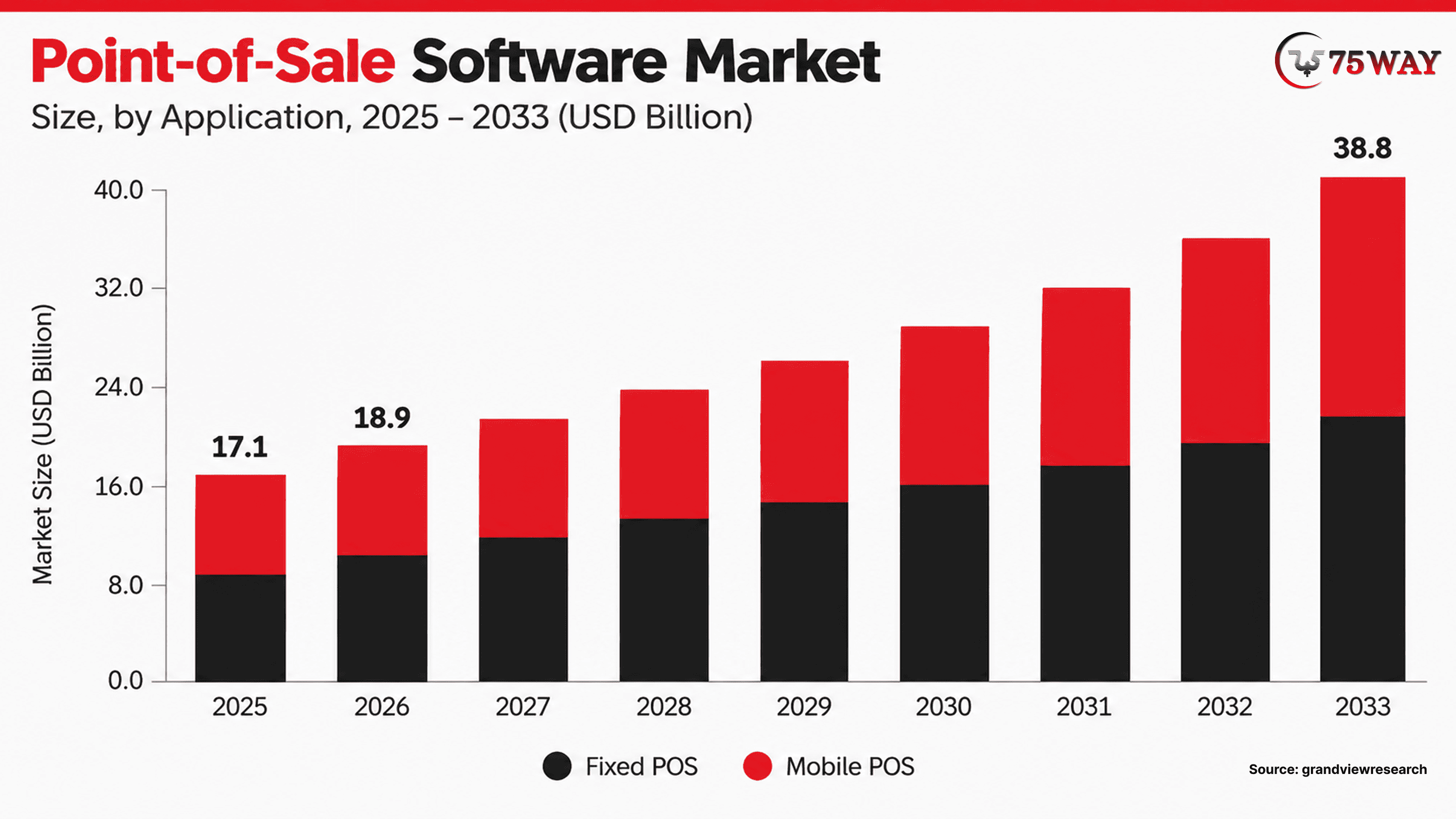
- The global Point-of-Sale (POS) software market is forecast to expand from $19.0 billion in 2026 to $38.8 billion by 2033, growing at a 10.8% CAGR.
- Fixed POS systems dominated the market, accounting for 50.7% of the total market share.
- The mobile POS segment is projected to record the fastest growth, with a 15.80% CAGR.
- The restaurant segment is expected to experience the highest growth rate, at a 15.4% CAGR.
- The U.S. POS software market is projected to grow at a 9.5% CAGR from 2026 to 2033, driven by increasing adoption of AI-enabled POS platforms.
When Should a Business Invest in a Custom POS System?
A custom POS system is worth considering when standard software creates measurable operational limitations or prevents a business from delivering its intended product.
1. Existing POS Software Cannot Support Your Workflows
Off-the-shelf systems generally offer predefined features and configuration options. These may be sufficient for a small retailer with standard checkout requirements, but businesses with unusual pricing rules, specialized inventory workflows, or complex approval processes may need more control.
Custom software can accommodate requirements such as product-specific discounts, industry-specific order handling, customized refund approvals, and specialized reporting. The business case becomes stronger when workarounds are frequent, expensive, or prone to errors.
2. Your Business Needs Better System Integration
Many businesses use separate applications for accounting, inventory, customer relationship management, eCommerce, workforce management, and fulfillment. When these systems exchange data poorly, employees may need to reconcile records manually.
A custom POS can provide a coordinated workflow across these applications. However, building a complete replacement for every existing system is rarely necessary. Integrating proven third-party tools may reduce development scope, cost, and maintenance responsibilities.
3. You Are Expanding Across Multiple Locations
Multi-location businesses need more than a checkout screen. They may require centralized product catalogs, location-specific stock, shared customer records, consolidated reporting, and controlled pricing permissions.
Custom development can define how these functions interact and what happens when two locations update the same information. It can also support different operational rules for company-owned stores, franchise locations, or regional business units.
4. You Are Launching a POS Product
Startups building a commercial POS platform have different requirements from retailers commissioning an internal system. They may need merchant onboarding, subscription plans, account isolation, configurable permissions, usage tracking, and administrative tools.
For these businesses, the software must support both the merchant's daily operations and the provider's business model. An MVP should validate the core merchant workflow before expanding into advanced analytics, loyalty programs, or additional industry modules.
5. Your Existing POS Requires Modernization
Replacing a legacy POS system immediately can introduce operational risk. A modernization project may instead update the application interface, improve APIs, migrate selected services, replace unsupported components, or introduce better monitoring.
The right strategy depends on the condition of the current system, available documentation, integration dependencies, and acceptable downtime. A technical assessment should determine whether incremental modernization or full replacement offers the better long-term outcome.
Custom POS Vs. Off-the-Shelf POS: Which Is Better?
A custom POS system is better for businesses with specialized workflows, complex integrations, or unique operational requirements, while an off-the-shelf POS is usually better for businesses that need standard features, faster implementation, and lower upfront costs.
The main difference is that custom POS software is built around your business requirements, whereas off-the-shelf software offers predefined features that can be configured within the vendor’s limitations.
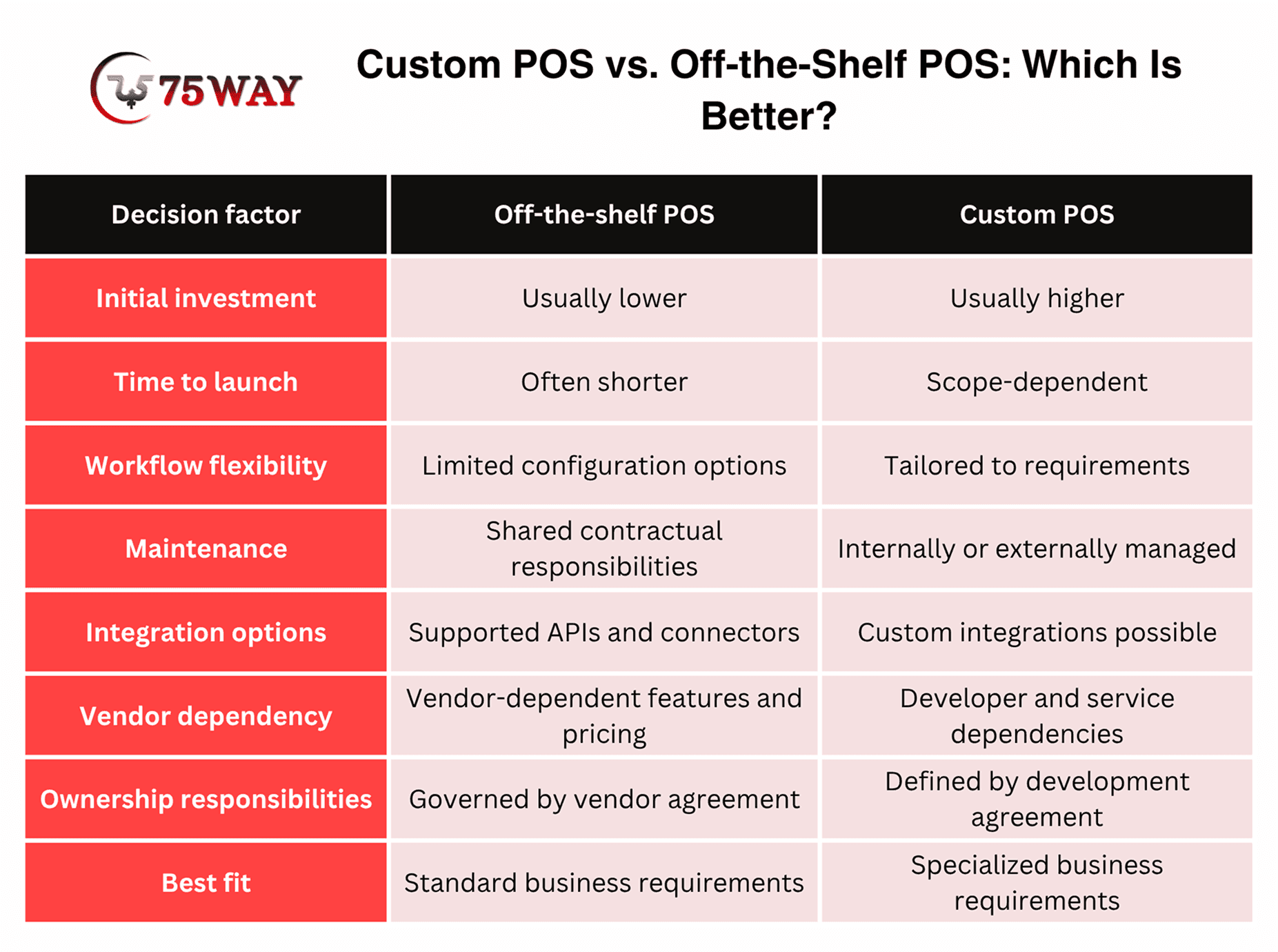
Custom software does not automatically eliminate recurring fees or vendor dependency. Payment processors, cloud infrastructure, software licenses, security services, and maintenance can all create ongoing costs.
Before commissioning a custom system, compare the total cost of ownership of both options over a realistic planning period. Include implementation, integrations, subscriptions, support, hardware replacement, training, and future upgrades.
If an existing POS platform meets most requirements and offers reliable integrations, configuring it may be the more practical decision. Custom development becomes more compelling when the business impact of its limitations exceeds the cost and responsibility of building a tailored solution.
How to Develop Custom POS Software: A Step-by-Step Process
POS software creation works best when each stage supports the next, from defining business needs to launching a reliable system. Whether you're building a new POS product or replacing an outdated platform, a clear development process helps you prioritize the right features, manage technical decisions, and prepare your team for launch.
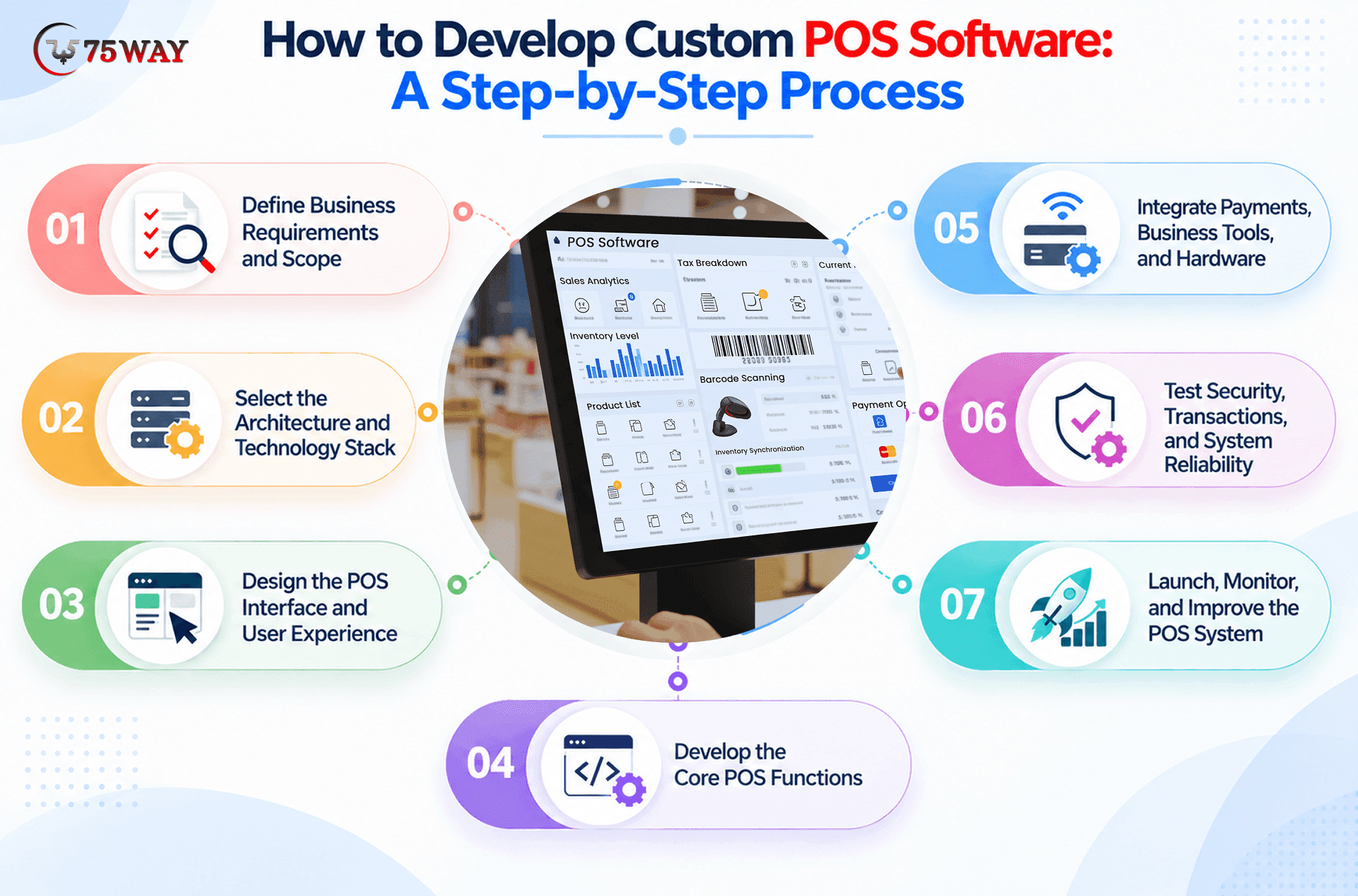
Step 1: Define Business Requirements and Scope
Every successful POS project starts with a clear understanding of the business problem. Before choosing technologies or designing screens, identify the workflows, users, and operational challenges the software needs to address.
Key areas to define include:
- Business Goals: The main objectives, such as faster checkout, better inventory visibility, or support for multiple locations.
- User Needs: The requirements of cashiers, managers, administrators, and other people who will use the system.
- Transaction Workflows: The steps involved in sales, refunds, discounts, returns, and end-of-day reconciliation.
- Project Scope: The essential features for the first release and the capabilities that can be added later.
Outcome: A documented set of requirements, workflows, priorities, and acceptance criteria that guides the remaining development stages.
Step 2: Select the Architecture and Technology Stack
Once the requirements are clear, the next decision is how the POS system will operate and connect with other business tools. The right architecture depends on transaction volume, connectivity, security needs, available infrastructure, and plans for expansion.
Important decisions include:
- Deployment Model: Cloud-based, on-premises, or hybrid infrastructure, depending on operational requirements.
- Application Platform: Web, desktop, mobile, or a combination of platforms suited to your users and devices.
- Data Management: A suitable database structure for transactions, inventory, customers, and reporting.
- Offline Support: A defined approach to local transaction handling, synchronization, and conflict resolution when connectivity is interrupted.
Outcome: A technical architecture and technology plan aligned with the project's requirements, budget, and expected growth.
Step 3: Design the POS Interface and User Experience
With the technical direction established, the focus moves to the screens and workflows employees will use throughout the day. A POS interface should make common tasks easy to find, reduce unnecessary steps, and remain practical during busy periods.
The design process should cover:
- Checkout Flow: A clear path from product selection to payment confirmation and receipt generation.
- Navigation: Easy access to sales, refunds, discounts, inventory, and other frequently used functions.
- Device Compatibility: Layouts suited to the selected terminals, tablets, touchscreens, and other supported devices.
- Usability Testing: Feedback from representative users before the interface moves into full development.
Outcome: Approved wireframes or interactive prototypes that give developers a clear design reference.
Step 4: Develop the Core POS Functions
After the interface and architecture are agreed upon, development begins with the core transaction workflow. This foundation connects the user interface with business rules, transaction records, inventory updates, and the data required for daily operations.
Core functions commonly include:
- Sales Processing: Product selection, pricing, discounts, taxes, and checkout calculations.
- Transaction Management: Sales records, refunds, returns, receipts, and transaction history.
- Inventory Updates: Stock adjustments triggered by completed sales, returns, and other defined events.
- User Permissions: Role-based access for cashiers, managers, and administrators.
- Error Handling: Clear responses to failed operations, interrupted requests, and incomplete transactions.
Outcome: A working POS foundation with the essential features needed for end-to-end transaction testing.
Step 5: Integrate Payments, Business Tools, and Hardware
Once the core functions are in place, integrations connect the POS system to the services and devices required for daily use. Their complexity depends on provider support, available APIs, hardware compatibility, and the business rules governing each connection.
The main integration areas include:
- Payment Services: Supported payment gateways, terminals, and transaction-status handling.
- Business Software: Accounting, e-commerce, customer relationship management, and inventory platforms.
- POS Hardware: Barcode scanners, receipt printers, cash drawers, and compatible payment devices.
- Data Synchronization: Reliable exchange of transaction, product, inventory, and customer data between connected systems.
Outcome: Tested integrations with documented data flows, error handling, and recovery procedures.
Step 6: Test Security, Transactions, and System Reliability
With the core features and integrations connected, the next stage checks whether the complete system performs as expected under real operating conditions. Testing should cover routine transactions as well as failures, interruptions, and security risks.
Essential checks include:
- Functional Testing: Sales, discounts, refunds, taxes, permissions, and reporting accuracy.
- Payment Testing: Successful payments, declined transactions, timeouts, duplicate requests, and reconciliation.
- Security Testing: Authentication, access controls, data protection, audit logs, and relevant compliance requirements.
- Integration Testing: Data accuracy and error handling across connected platforms and devices.
- Performance Testing: System behavior during peak transaction volumes and periods of heavy usage.
- Recovery Testing: Backup restoration, network interruptions, and recovery from service failures.
Payment security obligations, including applicable PCI DSS requirements, depend on the system design and payment environment. Your payment provider and qualified compliance professionals can help determine the relevant scope.
Outcome: Documented test results, resolved critical defects, and a system prepared for a controlled rollout.
Step 7: Launch, Monitor, and Improve the POS System
After testing and issue resolution, the system moves into deployment. A phased launch can help identify operational problems on a smaller scale before the software reaches every location or user.
A practical rollout includes:
- Pilot Deployment: Initial use at a selected location or by a limited group of employees.
- Staff Training: Clear guidance on checkout, refunds, troubleshooting, and daily closing procedures.
- Performance Monitoring: Tracking transaction failures, response times, payment discrepancies, and system availability.
- Support Planning: Defined ownership for incident response, maintenance, updates, and technical support.
- Future Enhancements: Prioritized improvements based on user feedback, performance data, and changing business needs.
Outcome: A rollout plan with monitoring, support responsibilities, and a prioritized roadmap for future improvements.
Essential Features of Point of Sale Software Development You Must Consider
The right POS system can help a business manage checkout, stock, staff, and sales data without relying on disconnected tools. Custom development makes it possible to choose capabilities that match your industry, workflows, and growth plans. The major features detailed below provide a practical starting point for planning a custom POS solution.
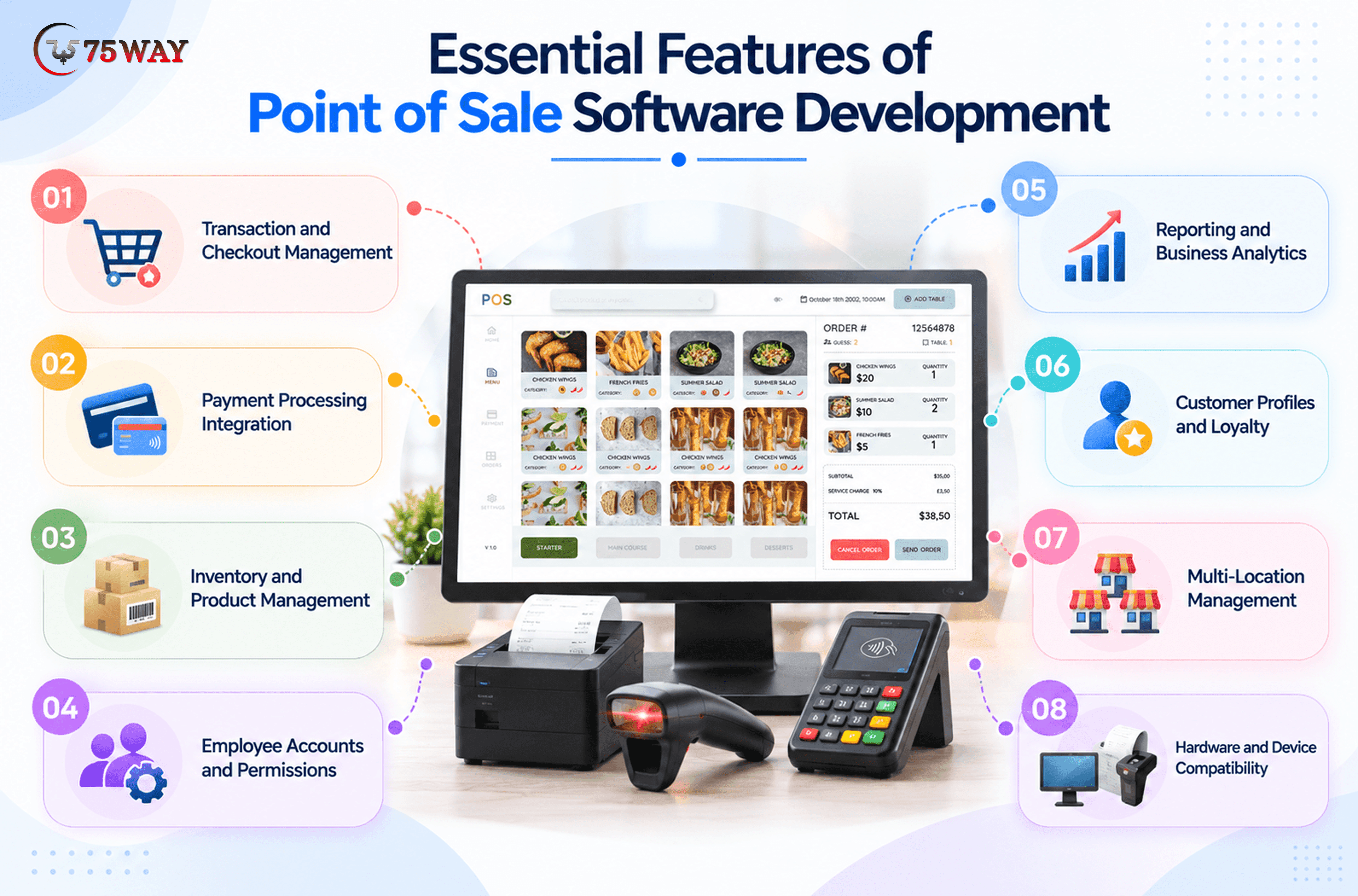
1. Transaction and Checkout Management
The transaction module handles cart creation, item pricing, discounts, taxes, payment status, receipts, voids, and refunds. It should maintain a clear transaction record so staff can investigate discrepancies and authorized users can review adjustments.
A critical design requirement is preventing a single sale from being recorded twice when a request times out or a terminal retries an operation. Transaction identifiers, idempotent processing, and reconciliation workflows help address this risk.
2. Payment Processing Integration
The POS should integrate with a payment provider that supports the intended business model, payment methods, devices, and operating regions. Requirements may include chip cards, contactless payments, mobile wallets, refunds, and transaction status updates.
The POS application should not be treated as a payment processor. Payment authorization, settlement, terminal communication, and reconciliation involve external services and provider-specific rules.
Choose the payment integration early because its SDKs, terminal certifications, supported hardware, and transaction lifecycle can influence the software architecture.
3. Inventory and Product Management
Inventory features manage product catalogs, SKUs, variants, prices, stock movements, adjustments, and replenishment thresholds. Retailers may also require purchase orders, supplier records, stock transfers, and support for weighted products.
The system must define when inventory changes occur and how concurrent sales are handled. For example, two checkout terminals should not independently sell the final available unit without an agreed stock-reservation or conflict-resolution strategy.
4. Employee Accounts and Permissions
Role-based access control limits what cashiers, supervisors, store managers, and administrators can view or change. Sensitive actions, including refunds, manual discounts, stock adjustments, and permission changes, should be governed by explicit rules.
Audit logs can record who performed an action, when it occurred, and what changed. These records help managers investigate discrepancies and review unusual activity.
5. Reporting and Business Analytics
Reporting should connect operational activity with decisions that managers need to make. Useful metrics include gross sales, net sales, average transaction value, refund rates, product performance, inventory turnover, and sales by location.
Metric definitions matter. For example, gross sales and net sales may differ because of discounts, returns, taxes, and other accounting rules. These definitions should be agreed upon before dashboards are built.
6. Customer Profiles and Loyalty
Customer management may include purchase history, loyalty balances, reward redemption, consent records, and customer preferences. These features can support retention programs and more personalized service.
Collect only the information needed for the intended purpose. Define retention rules, access permissions, and marketing consent requirements before using customer information across multiple systems.
7. Multi-Location Management
Businesses with multiple locations may need centralized administration, location-specific pricing, inventory transfers, regional reporting, and controlled access to local data.
The architecture should specify which information is shared globally and which remains location-specific. It should also define how changes propagate when a store temporarily loses connectivity.
8. Hardware and Device Compatibility
Hardware requirements may include barcode scanners, receipt printers, cash drawers, payment terminals, customer displays, and weighing scales. Mobile POS applications may also need device-specific capabilities.
Compatibility should be tested against the actual device models and connection methods that the business plans to use. A device that works in a demonstration environment may behave differently under production conditions or with another operating system version.
Security And Offline Reliability For Building Multi-Tenant Saas POS Software
Security and reliability should shape the architecture from the beginning. They are difficult to retrofit when the transaction model, integrations, and data flows have already been established.
1. Protect Payment and Customer Data
Minimize the sensitive data that the POS application collects or stores. Use secure communication, appropriate encryption, strong authentication, role-based permissions, secret management, and audit logging.
Where practical, use a payment provider's hosted components or validated terminal integrations to limit direct handling of cardholder data. Confirm the resulting PCI DSS responsibilities with qualified professionals; the exact scope depends on the implementation.
2. Design for Payment Failures
A payment request can time out after the provider has received it. Retrying blindly may create duplicate processing or uncertainty about whether the transaction succeeded.
Use unique transaction references, provider-supported idempotency mechanisms where available, clear transaction states, and reconciliation processes. When a result is uncertain, the system should verify the payment status before initiating another charge.
3. Define Offline Behavior Explicitly
A separated POS may still allow product lookup, cart creation, or selected administrative tasks. Payment acceptance is more complicated and depends on supported devices, provider rules, and risk controls.
Define which operations remain available, which require connectivity, and how queued transactions are synchronized. Test recovery after prolonged outages, repeated retries, and simultaneous updates from multiple devices.
4. Monitor and Recover
Monitor application availability, transaction errors, integration failures, unusual activity, and synchronization delays. Backups should be accompanied by tested restoration procedures, and incident response responsibilities should be assigned before launch.
The goal is not to promise zero downtime. It is to establish measurable reliability targets, detect failures quickly, and recover without losing transaction integrity.
Types of POS Software Development Solutions for Different Industries
A busy restaurant, a neighborhood grocery store, and a hotel rarely handle payments in the same way. Their software needs to reflect those differences, from managing kitchen orders to tracking stock across multiple outlets. If you're planning a new POS product or replacing an existing system, choosing an industry-specific solution gives you a clearer starting point. Here are diverse POS software development options worth considering.
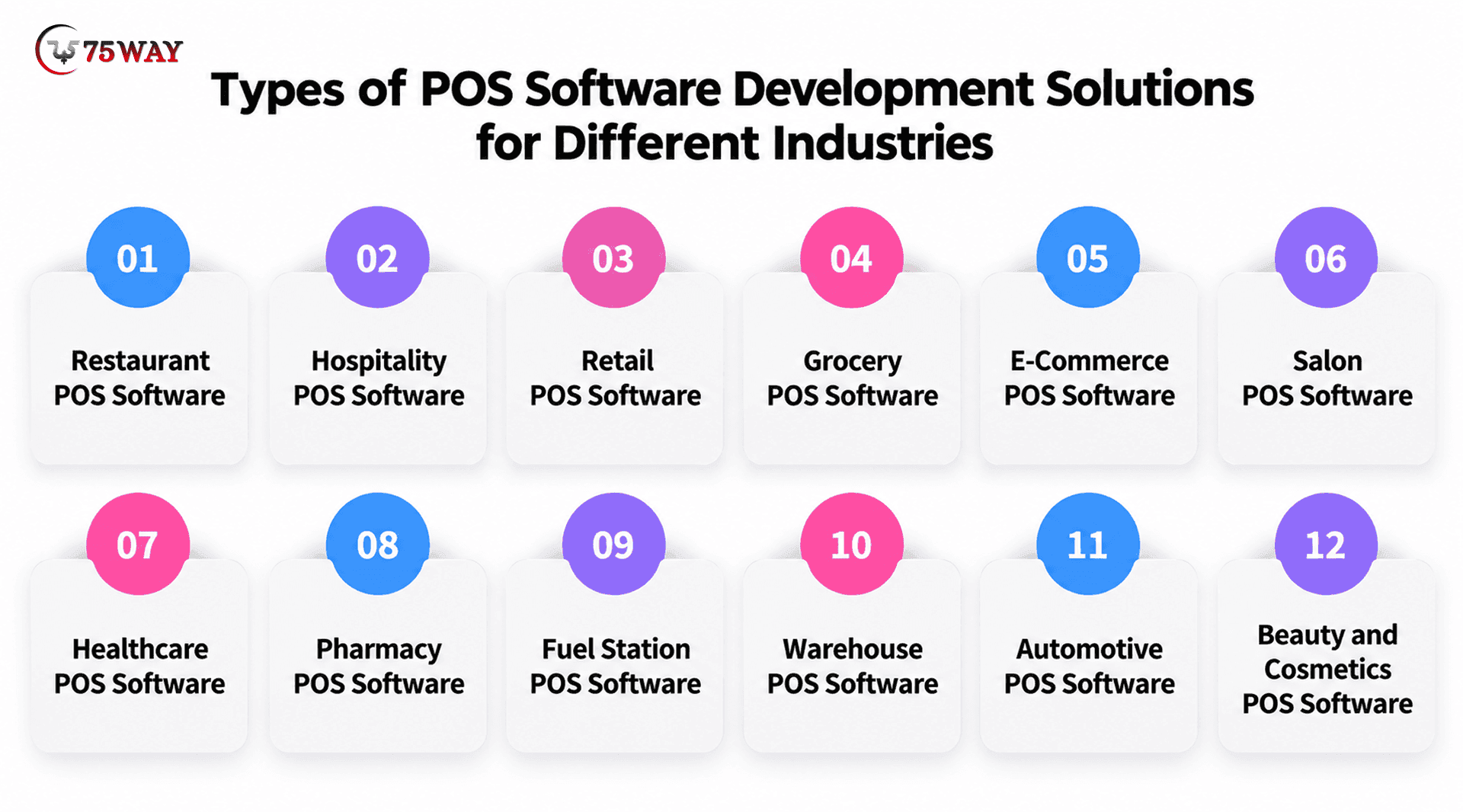
1. Restaurant POS Software Development
During a dinner rush, staff need to send orders to the kitchen without repeatedly checking with customers or entering the same details twice. When you create restaurant POS software, features such as table management, menu updates, split billing, and kitchen display integration can bring these tasks together. Your team can also manage takeaway and delivery orders alongside dine-in service. The exact setup depends on how your restaurant handles orders and payments.
2. Hospitality POS Software Development
A hotel guest might order breakfast, use the bar, and request room service before checking out. You can develop a hospitality POS software solution; room charge posting and integration with hotel management systems can help bring those purchases onto one guest account. Staff can review charges without piecing together records from separate departments. Resorts and hotels can then choose features that match their own services and billing arrangements.
3. Retail POS Software Development
A clothing shop needs different checkout options from an electronics retailer, particularly when returns, discounts, and product variations are involved. Custom retail POS software can support barcode scanning, exchanges, promotional pricing, and stock updates at the point of sale. For retailers with several branches, shared reporting can show which products sell well at each location. This makes the system more relevant to the way the store actually operates.
4. Grocery POS Software Development
Fresh produce, packaged food, and household essentials can all require different pricing and stock controls at checkout. Grocery POS software can connect weighing scales and barcode scanners while supporting expiry tracking and low-stock alerts. Cashiers can process everyday purchases without handling each product through a separate workflow. Larger stores may also need support for promotions and frequent price changes.
5. E-Commerce POS Software Development
Selling through a website and a physical store becomes complicated when each channel maintains separate stock records. An integrated ecommerce POS system can synchronize inventory, online orders, returns, and customer information across both channels. Your team can check product availability without switching between disconnected systems. Features such as in-store collection and online order returns can also support customers who shop through different channels.
6. Salon POS Software Development
A salon's working day revolves around appointments, service charges, staff schedules, and retail products. Salon POS software can bring appointment booking, customer histories, commission calculations, and payment collection into a shared system. Staff can check upcoming appointments while recording services and product sales. For a salon chain, multi-branch access can make it easier to manage schedules and performance across locations.
7. Healthcare POS Software Development
A clinic or medical supply store may need to collect service payments while keeping separate records for products and billing. A healthcare POS solution can support payment collection, receipts, inventory management, and connections with existing business systems. Access permissions become particularly important if the software handles sensitive patient-related information. The final feature set should reflect the facility's operations and applicable privacy requirements.
8. Pharmacy POS Software Development
A pharmacy must keep track of more than the number of products sold each day. A pharmacy POS system can record batch details, monitor expiry dates, and update stock after completed transactions. Where regulations and workflows require it, integrations can also support prescription-related checks and pharmacy management processes. These capabilities help staff maintain clearer sales and inventory records.
9. Fuel Station POS Software Development
Fuel station transactions may involve dispenser readings, card payments, cash collections, and convenience store purchases. A tailored POS system can connect compatible fuel dispensers with billing, shift reconciliation, and station-level reports. Managers can compare recorded transactions with fuel sales data during daily closing. Hardware compatibility and the station's existing equipment will influence the integration requirements.
10. Warehouse POS Software Development
Bulk orders and frequent stock movements can make checkout more complicated for warehouse retailers. Warehouse POS software can support barcode-based processing, bulk billing, stock transfers, and links to warehouse management systems. Staff can check availability and record sales without relying entirely on manual inventory updates. Businesses with several storage locations may also need centralized stock visibility.
11. Automotive POS Software Development
An auto parts retailer may need to identify the correct component before preparing a customer's bill. Automotive POS software can combine vehicle-based parts lookup, inventory records, supplier information, and sales processing. Service centers may also require labor billing and links to workshop management tools. These features depend on whether the business sells parts, repairs vehicles, or provides both services.
12. Beauty and Cosmetics POS Software Development
A cosmetics store may carry the same product in several shades, sizes, or packaging options. A beauty POS system can track these variations while managing promotions, loyalty rewards, and customer purchase histories. Sales reports can help store managers identify popular items and plan replenishment. For brands selling online and in stores, inventory synchronization can provide a clearer picture of available stock.
How Much Does Custom POS Software Development Cost?
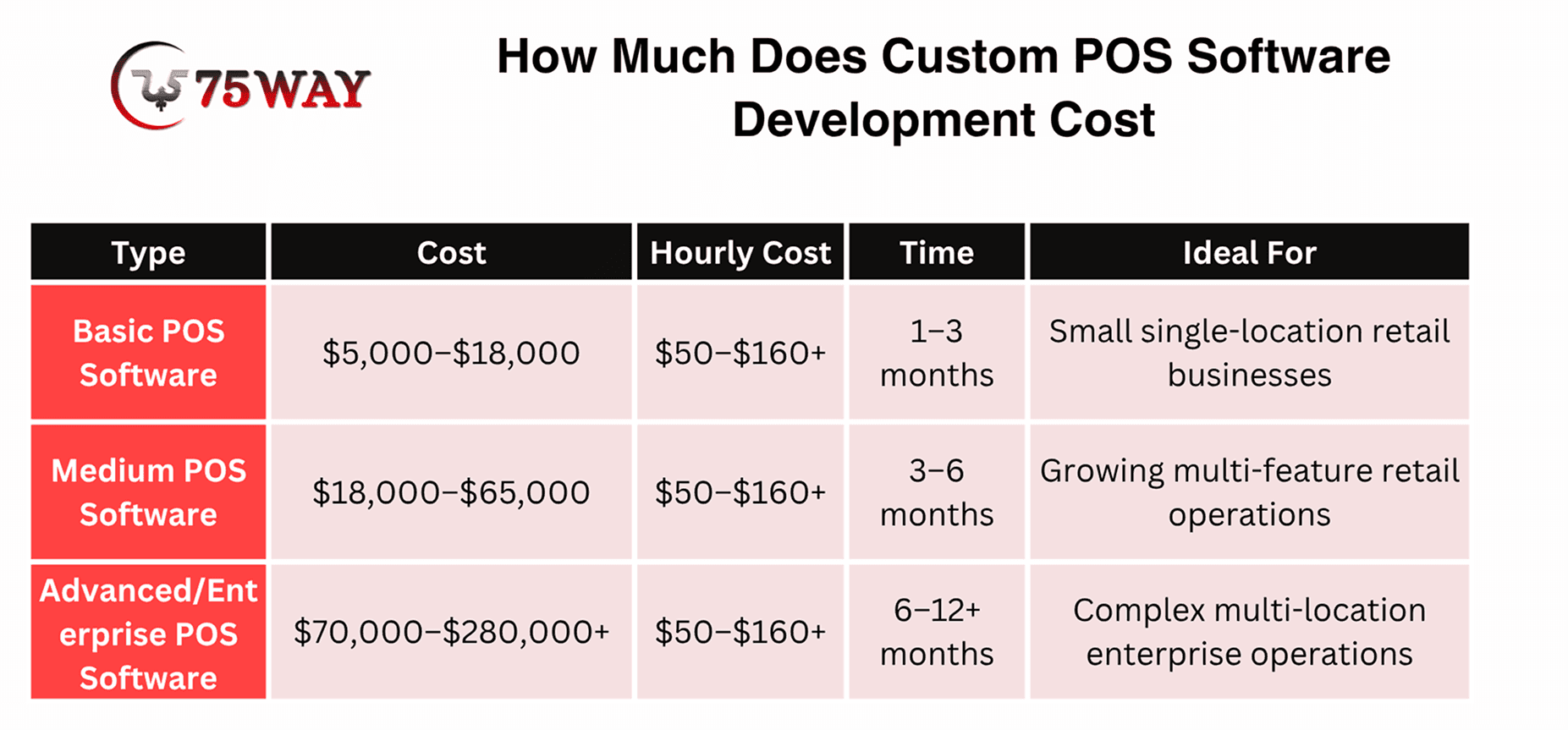
Custom POS software development typically costs $5,000–$280,000+, depending on the features, integrations, hardware requirements, security controls, and deployment complexity. A basic system may support checkout and reporting, while an enterprise platform may require multi-location synchronization, advanced analytics, and specialized hardware integration.
1. Basic POS Software Cost: $5,000–$18,000
A basic POS system typically includes essential checkout workflows, product management, payment integration, receipts, and basic sales reporting.
Features: Product catalog, shopping cart, checkout, payment integration, receipts, and basic reporting.
Timeline: 1–3 months
2. Medium POS Software Cost: $18,000–$65,000
A medium-complexity solution can support growing retail or restaurant operations that need more advanced workflows and connected business systems.
Features: Inventory management, customer records, CRM integration, employee permissions, advanced reporting, and selected third-party integrations.
Timeline: 3–6 months
3. Advanced/Enterprise POS Software Cost: $70,000–$280,000+
Enterprise POS platforms require more extensive architecture, integration, testing, and operational planning to support complex business environments.
Features: Multi-location synchronization, advanced analytics, centralized administration, custom hardware integration, granular permissions, and complex inventory workflows.
Timeline: 6–12 months
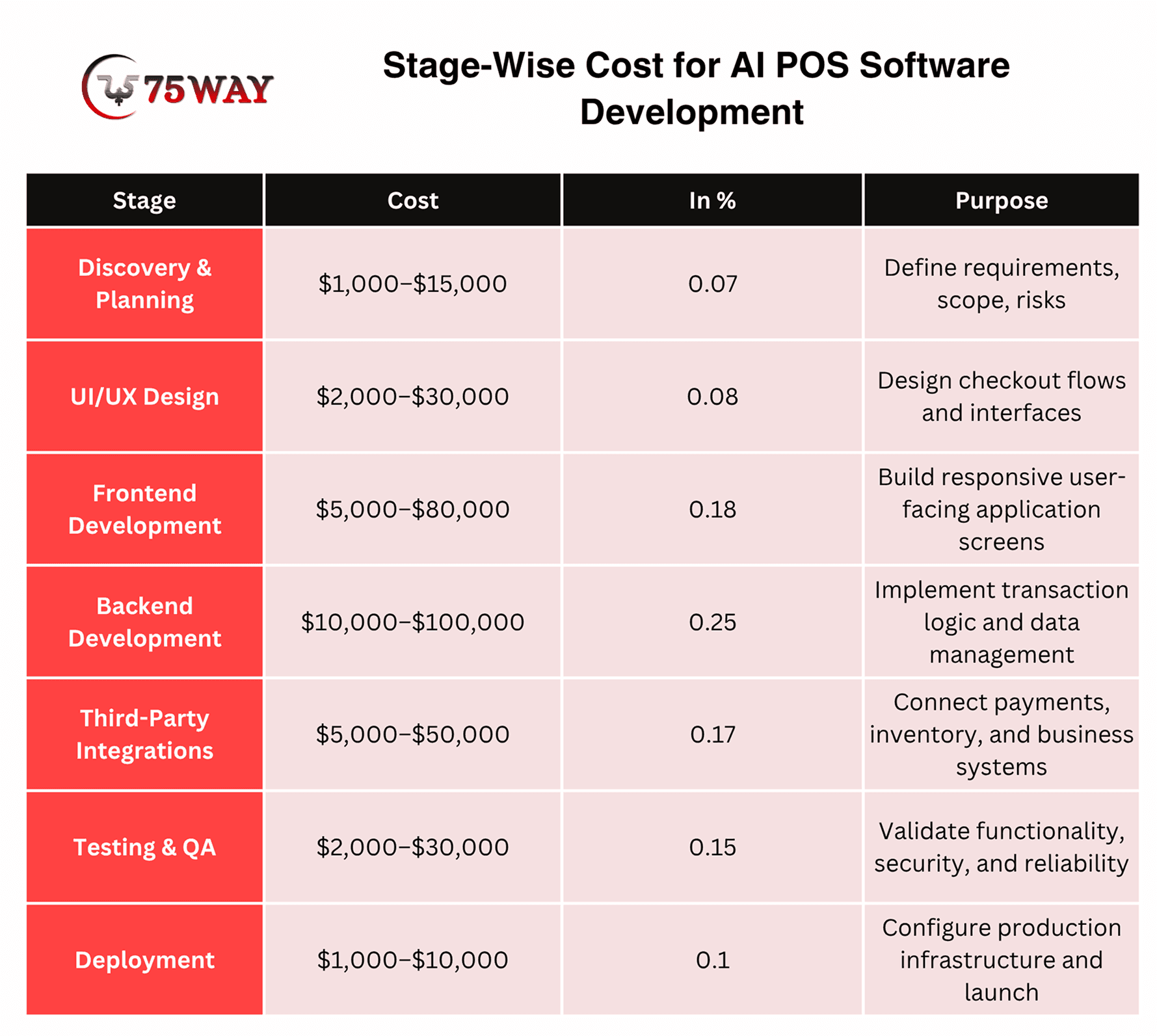
Stage-Wise Cost for AI POS Software Development
Development expenses are distributed across discovery, design, engineering, integrations, testing, and deployment. The following breakdown provides a practical starting point for budgeting a custom POS project.
- Discovery & Planning: $1,000 to $15,000
Project requirements, scope, priorities, and technical risks are identified before development begins.
- UI/UX Design: $2,000 to $30,000
Wireframes and interface designs establish clear navigation and practical checkout workflows.
- Frontend Development: $5,000 to $80,000
User-facing screens are built for the selected POS platforms and devices.
- Backend Development: $10,000 to $100,000
Transaction processing, database operations, and core business rules power the system.
- Third-Party Integrations: $5,000 to $50,000
Payment gateways, inventory platforms, and other business tools are connected to the POS.
- Testing & QA: $2,000 to $30,000
Functional, security, payment, and performance checks help uncover issues before launch.
- Deployment: $1,000 to $10,000
Production infrastructure is configured, the system is released, and operational readiness is verified.
What’s Cost To Hire A POS Developer Based on Location
The development team's location can significantly affect hourly rates, but the lowest rate does not always produce the lowest total project cost. Experience with payment integrations, architecture, security, and production support also matters.
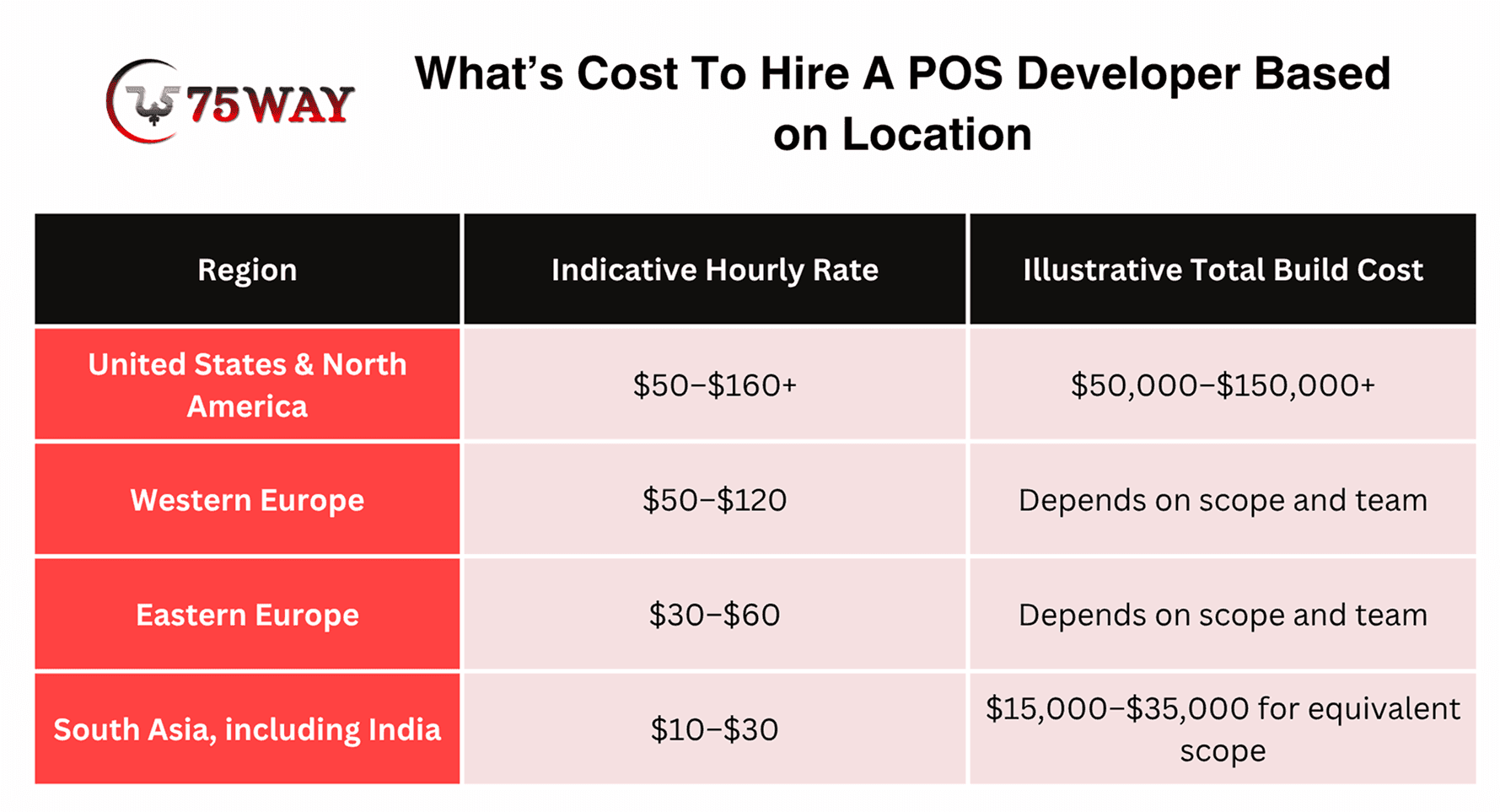
For US businesses, an offshore development team can reduce labor expenses when the team has relevant experience and clear delivery processes. However, project management, communication, integration quality, testing, and ongoing support should be evaluated alongside hourly rates.
Budgeting Recommendation: Request a scope-based estimate that separates one-time development expenses from recurring operating costs. This makes it easier to compare vendors and determine whether a custom POS system offers sufficient business value.
Data Storage Models for Customizable POS Software Development
The way your POS system stores data affects daily transactions, access across locations, and recovery when something goes wrong. The right setup depends on your business size, internet reliability, infrastructure, and how much control you need over your records.
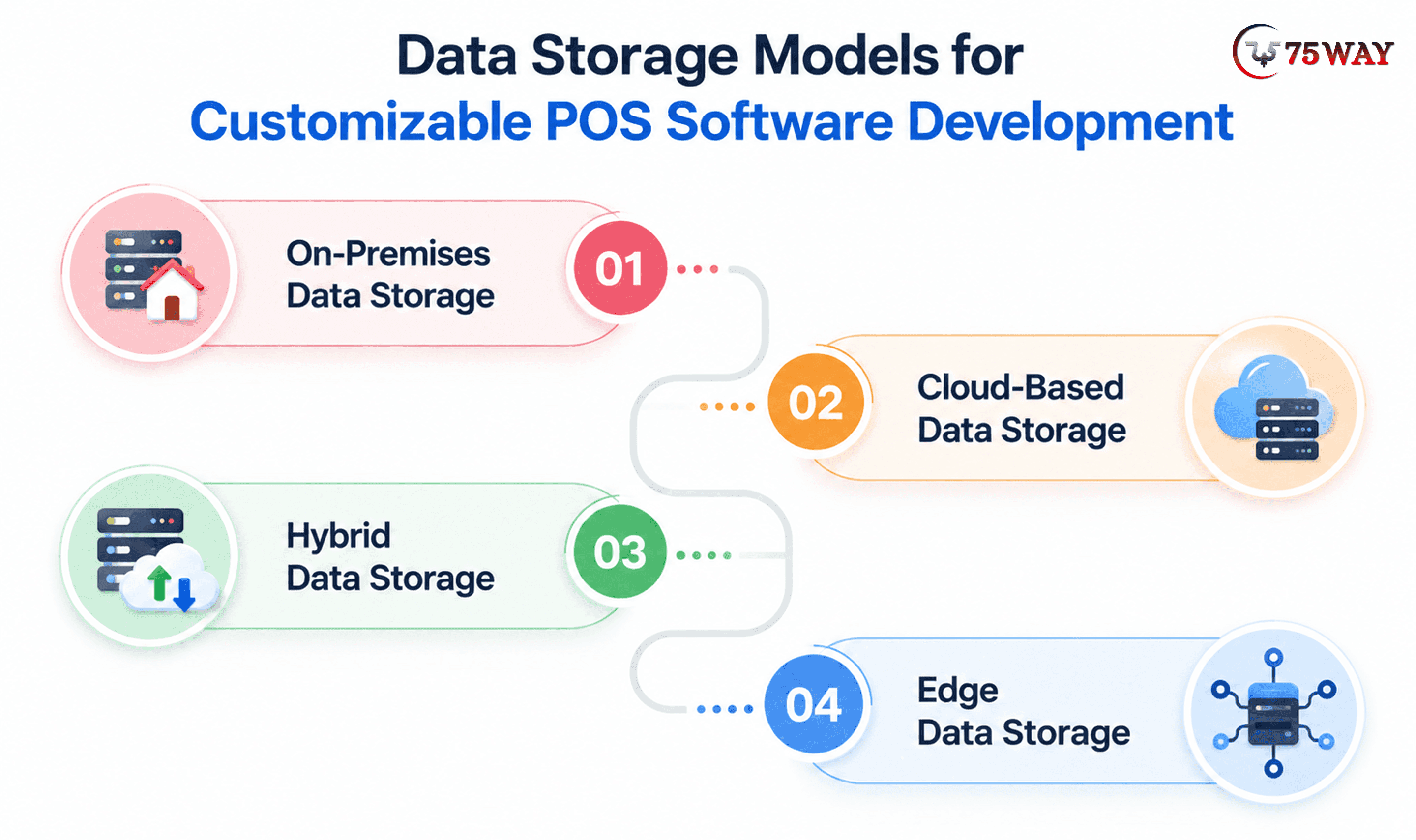
1. On-Premises Data Storage
With on-premises storage, sales records, inventory details, and other POS data reside on servers managed by your business.
This setup suits businesses that prefer keeping their infrastructure and data management in-house, although server maintenance, backups, and security updates require dedicated resources. A hardware failure or local network issue can disrupt operations if backup systems and recovery procedures are not in place.
2. Cloud-Based Data Storage
Cloud storage keeps POS data on remote servers, making it easier to access sales and inventory information across different locations.
For a retailer with several stores, centralized records can simplify reporting and help managers review business activity without relying on a single physical server. Internet access, provider reliability, subscription charges, and appropriate access controls all need consideration during implementation.
3. Hybrid Data Storage
A hybrid setup combines local storage with cloud services, allowing different parts of the POS system to use the approach that suits them best.
For example, a checkout terminal may temporarily save transaction data locally while the central system manages consolidated sales reports. The design needs clear synchronization rules so that offline transactions are reconciled correctly when the connection returns.
4. Edge Data Storage
Edge storage keeps selected data close to where transactions occur, such as on a POS terminal or a nearby local device.
This arrangement can reduce delays and help certain checkout functions continue during temporary connectivity problems. Local storage capacity, device security, and synchronization with the main database need careful planning to prevent missing or conflicting records.
Technology Stack Utilized To Create Custom Point of Sale System
The right technology stack depends on your POS features, supported devices, payment integrations, and plans for business growth. Each technology has a specific role in building a POS system that fits your operations.
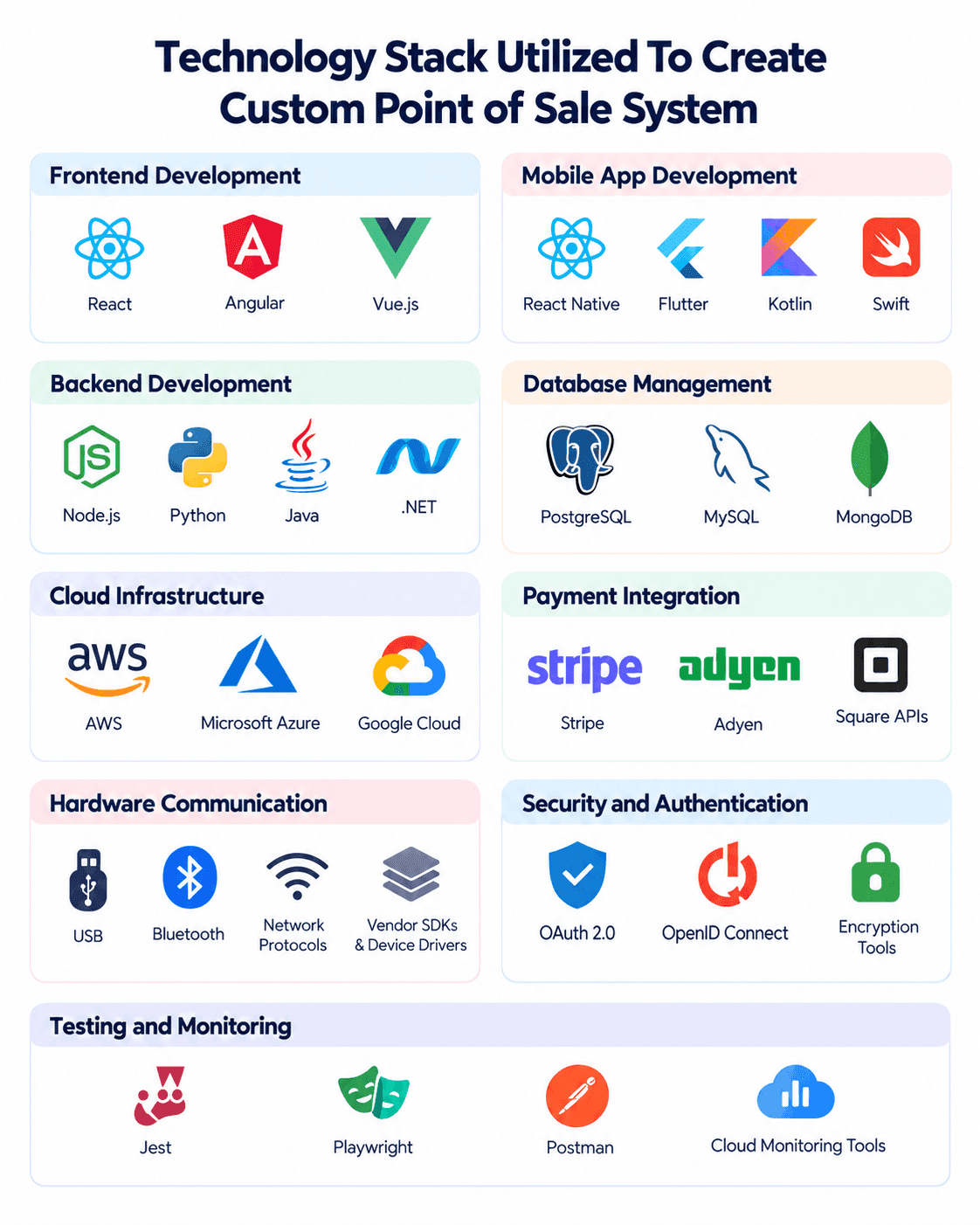
- Frontend Development: Technologies such as React, Angular, and Vue.js help create checkout screens, sales dashboards, and interfaces that staff can navigate easily.
- Backend Development: Node.js, Python, Java, and .NET support transaction processing, business logic, user permissions, and communication between the POS and connected systems.
- Database Management: PostgreSQL and MySQL suit structured records such as transactions, products, and inventory, while MongoDB may fit certain flexible data requirements.
- Mobile App Development: React Native and Flutter support cross-platform POS apps, while Kotlin and Swift are options for native Android and iOS applications.
- Cloud Infrastructure: Services such as AWS, Microsoft Azure, and Google Cloud provide hosting, backups, monitoring, and centralized access to POS data across locations.
- Payment Integration: Payment provider APIs and approved terminal SDKs connect the POS with supported payment methods, transaction processing, and refund workflows.
- Hardware Integration: Device drivers, vendor SDKs, USB, Bluetooth, and network protocols help connect barcode scanners, receipt printers, cash drawers, and other peripherals.
- Security and Authentication: Encryption, role-based access control, and authentication standards such as OAuth 2.0 help protect sensitive information and restrict access to authorized users.
- Testing and Monitoring: Tools such as Jest, Playwright, and Postman help validate application behavior, API connections, and checkout workflows, while monitoring tools flag operational issues after launch.
Your final stack should reflect how the POS will operate in real stores, including its hardware, payment provider, internet reliability, and data-sharing requirements. Offline checkout and transaction synchronization need particular attention when stores must continue selected operations during connectivity interruptions.
Common Custom POS Development Mistakes & Solutions
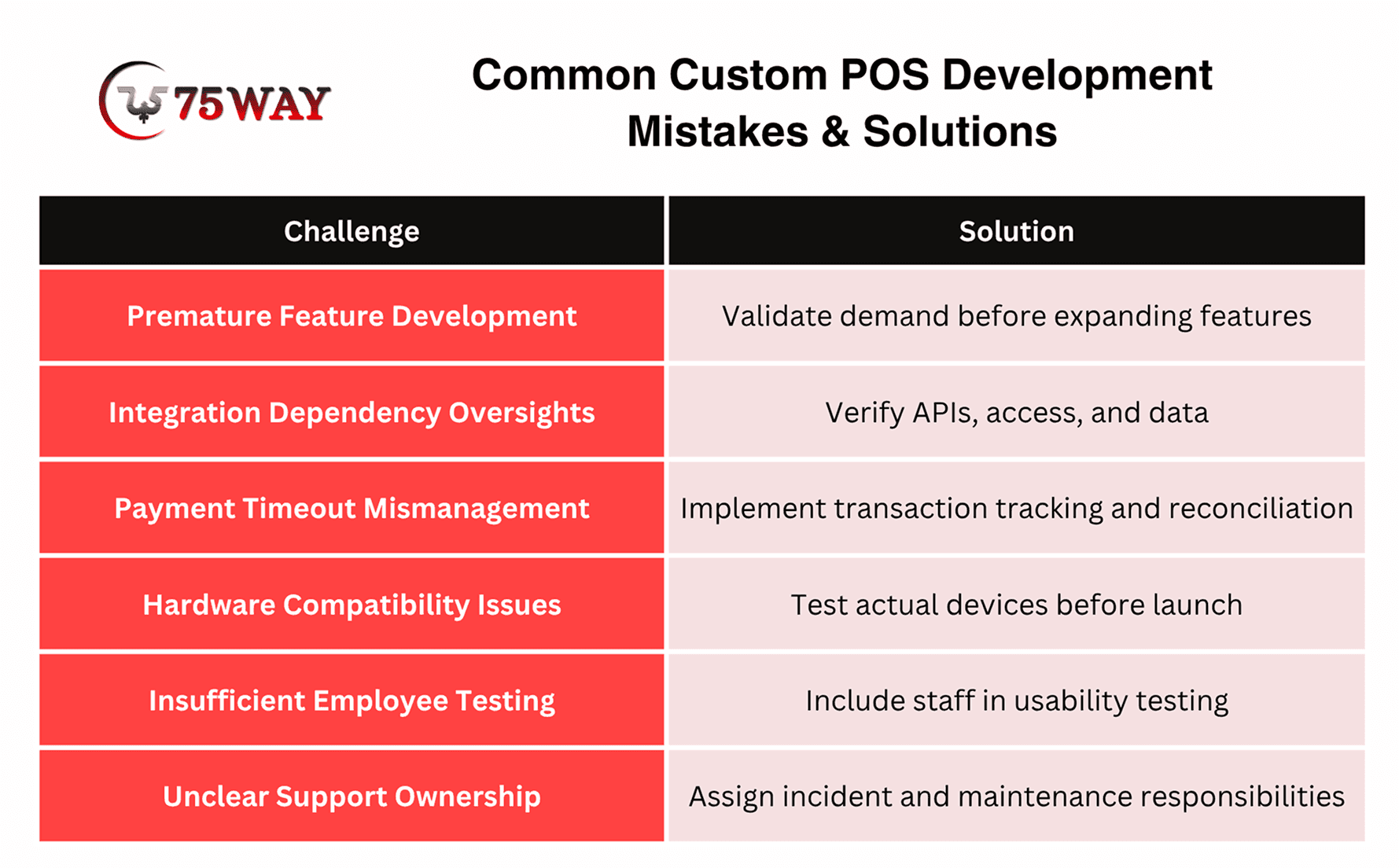
A POS system may work well during a demo but struggle once real transactions, busy checkout periods, and multiple users put it to the test. Problems with scalability, inventory syncing, payment processing, or data security can quickly affect daily operations. The common mistakes and recommended solutions listed below can help you plan a more reliable custom POS system.
- Building Too Many Features Before Validating Demand
A startup may spend months developing advanced analytics or loyalty features before confirming that merchants need them. Prioritize the core transaction workflow and validate it with target users.
- Underestimating Integration Dependencies
An existing API may lack required functionality, access may require a commercial agreement, or legacy records may contain inconsistent data. Validate these dependencies during discovery.
- Treating Payment Timeouts As Failed Transactions
This can lead to duplicate charges or mismatched records. Design transaction-state handling and reconciliation before launch.
- Ignoring Hardware Constraints
Device compatibility should be tested against actual models, operating systems, and connection methods rather than assumed from general product specifications.
- Skipping Employee Testing
Cashiers and managers use the software under real operating pressure. Include representative staff in usability testing and the pilot.
- Launching Without Support Ownership
Assign responsibility for incidents, provider escalations, security updates, backups, and future enhancements. A production POS system needs a defined operating model, not just a completed codebase.
How to Choose a Trusted POS Software Development Company?
The wrong POS software development partner can leave your business dealing with integration issues, unexpected costs, and a system that struggles to scale. A trusted AI POS software development company should offer relevant experience, transparent communication, strong security practices, and dependable long-term support. The important checks presented below can help you evaluate potential partners before making your decision.
- Industry-Specific POS Experience: Look for a development company that understands your business workflows, whether you operate a restaurant, retail store, pharmacy, or multi-location business.
- Payment Gateway and Hardware Expertise: Check its experience integrating payment terminals, barcode scanners, receipt printers, cash drawers, and other devices your POS system requires.
- Data Security and Payment Compliance: Ask how the team handles transaction security, access permissions, sensitive information, and applicable payment industry requirements.
- Clear Development Costs and Ownership Terms: Request a detailed estimate covering features, integrations, testing, maintenance, source code, and intellectual property rights.
- Post-Launch Support and Scalability: Confirm how the company manages software updates, technical issues, new integrations, and future expansion as your business grows.
Key Hardware and Offline Requirements For POS Development
A slow connection should not leave customers waiting at the checkout or prevent staff from recording sales. Custom POS software needs suitable hardware support and an offline mode that can handle essential transactions until connectivity returns. The main hardware and offline requirements listed below explain what to consider before developing your system.
- POS Terminal Compatibility: The software should support your chosen terminals, touchscreens, and operating systems to avoid hardware conflicts during checkout.
- Peripheral Device Integration: Barcode scanners, receipt printers, cash drawers, and weighing scales may require specific drivers or communication protocols to work correctly.
- Offline Checkout Support: Local data storage can help selected POS functions continue during internet outages, depending on payment and transaction requirements.
- Transaction Synchronization: Clear synchronization rules help prevent duplicate sales, missing records, and inventory discrepancies when devices reconnect to the central system.
- Payment Device Limitations: Offline card payments depend on the payment processor, terminal capabilities, and applicable transaction rules, so these requirements need confirmation before development.
Common POS System Integrations Your Business May Need
A POS system becomes more useful when it connects with the other tools your business relies on. Integrations with payment gateways, inventory platforms, accounting software, and customer management systems can reduce manual work and improve data flow. The common POS integrations outlined below can help you identify which connections your business may need.
- Payment Gateway: Customers expect a smooth checkout experience, whether they pay by card, mobile wallet, or another supported method. Payment integration helps your POS process transactions, handle refunds, and track payment statuses.
- Inventory Management: Stock discrepancies can lead to missed sales and unnecessary reordering. Connecting your POS with inventory software helps you track product availability and update stock levels as purchases happen.
- Accounting Software: Manual financial entries take time and leave room for errors. An accounting integration transfers sales, tax, refund, and expense data to your financial software, making daily bookkeeping easier to manage.
- CRM: Customer purchase history can tell you more about what people want and when they return. A CRM integration brings customer records into your POS workflow, supporting loyalty rewards, relevant offers, and more personalized service.
- E-commerce Platform: Managing separate online and in-store systems can create confusion around orders, prices, and stock availability. Connecting your e-commerce platform with your POS helps keep sales information aligned across both channels.
- ERP: Businesses with several departments often need sales data to reach teams beyond the checkout counter. ERP integration connects POS records with finance, procurement, inventory, and other core business operations.
- POS Hardware: A checkout counter may rely on barcode scanners, receipt printers, cash drawers, and customer displays. Hardware integration helps these devices communicate with your POS software and supports a smoother checkout process.
- Employee Management: Staff schedules, attendance records, and payroll details can become difficult to manage separately as your team grows. Connecting employee management software with your POS helps simplify time tracking and workforce administration.
How To Measure the Success of Your Custom POS System
A POS project should be evaluated against business outcomes, not simply the number of features delivered. Establish baseline measurements before development and agree on how each metric will be calculated.
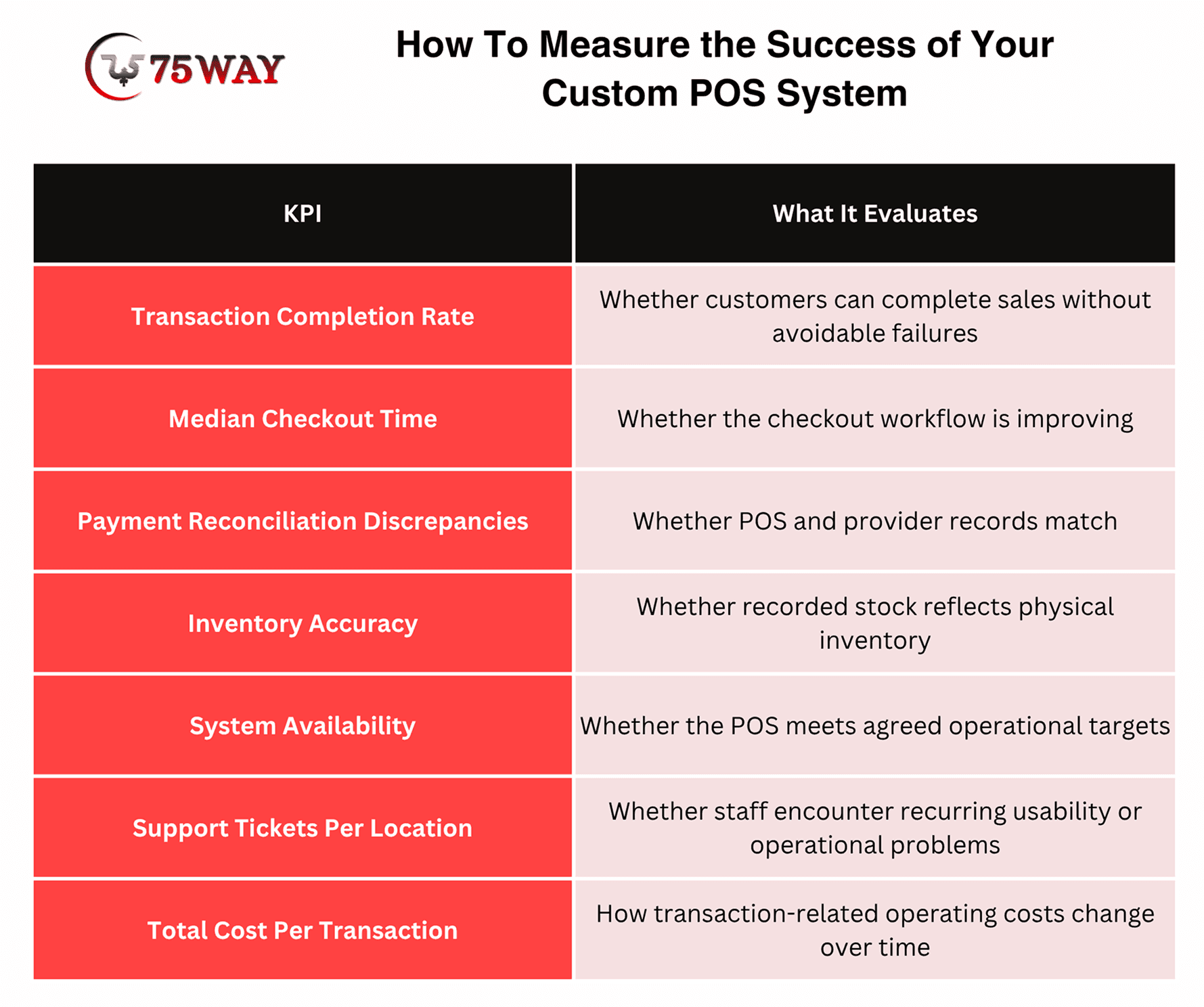
The right targets depend on the business, transaction volume, existing performance, and operational constraints. Set realistic targets before launch, then review the results after the pilot and at agreed intervals.
For example, a retailer replacing a legacy POS might prioritize reconciliation accuracy and system availability. A startup launching a commercial platform might focus on merchant onboarding, transaction success, retention, and support requirements. The metrics should reflect the reason the project was approved.
Final Thoughts
Custom POS software development can give businesses greater control over transaction workflows, integrations, reporting, and future product capabilities. However, the strongest business case comes from solving specific operational problems, not from building every possible feature.
Start with measurable requirements, validate payment and hardware dependencies early, design for transaction failures, and test the system with real users before a wider rollout. Compare the full cost of ownership against your existing solution, and choose a development partner who can explain both the technical decisions and their business implications.
If you are planning a new POS system or modernizing a legacy platform, you can contact a reliable POS software development company.
Frequently Asked Questions (FAQs)
How Much Does Custom POS Software Development Cost?
Custom POS software development can cost between $5,000 and $280,000+, depending on features, integrations, hardware requirements, and system complexity.
How Long Does It Take To Build a Custom POS System?
A basic POS system may take 1–3 months, while medium-complexity projects can require 3–6 months. Enterprise systems may take 6–12 months or longer.
Should I Build a Custom POS System or Buy an Existing Solution?
An existing POS solution suits businesses with standard requirements and limited initial budgets. Custom development is worth considering when your workflows, integrations, or business model require capabilities that ready-made products cannot adequately support.
Can a Custom POS System Work Without an Internet Connection?
Yes, a custom POS system can support selected offline functions through local data storage and transaction queues. Payment processing and synchronization capabilities during outages depend on the system architecture and payment provider.
How Do I Keep My Custom POS Software Secure?
Custom POS security requires data encryption, role-based access controls, secure authentication, and regular software updates. Routine security audits and transaction monitoring help identify vulnerabilities and protect sensitive customer and payment information.
Can Custom POS Software Support Multiple Business Locations?
Yes, custom POS software can connect multiple stores through a centralized system for inventory tracking, sales reporting, and user management. Access permissions and data synchronization rules can be configured to meet each location’s operational needs.