AI Summary
Church app development involves more than putting sermons and events on mobile. This guide explores essential features, church app development costs ($10,000 to $100,000+), technology choices, and practical stages from planning through launch. It also explains how to build a scalable experience for growing congregations.
Key Takeaways
- Church apps connect members with content, events, giving, groups, and communication.
- The global church app market could reach $33.3 billion by 2035.
- Church app development costs range from $10,000 to $100,000+.
- MVP planning helps prioritize essential features before advanced functionality and integrations.
- Custom development enables tailored workflows, integrations, branding, scalability, and greater product control.
“We sent the announcement, so why did only a few people show up?” That question captures a communication problem many churches face when important information is scattered across emails, texts, social media, printed bulletins, and separate platforms.
A church app development solution can create one reliable place where members can discover what is happening and take the next step without searching through multiple channels. For churches planning a custom app, the typical development investment can range from about $40,000 to $300,000+, although the actual budget depends heavily on integrations, workflows, security, platforms, and customization
The right approach is to first define what your congregation and church staff need the app to accomplish, then prioritize features, choose the technology architecture, design the member experience, develop and test the product, and continuously improve it after launch.
This guide explains how to create a church app, which features matter, how much church app development can cost, what the development process looks like, which technology decisions affect the budget, and how to choose between a custom app and an existing church-app platform.
What Is A Church App Development?
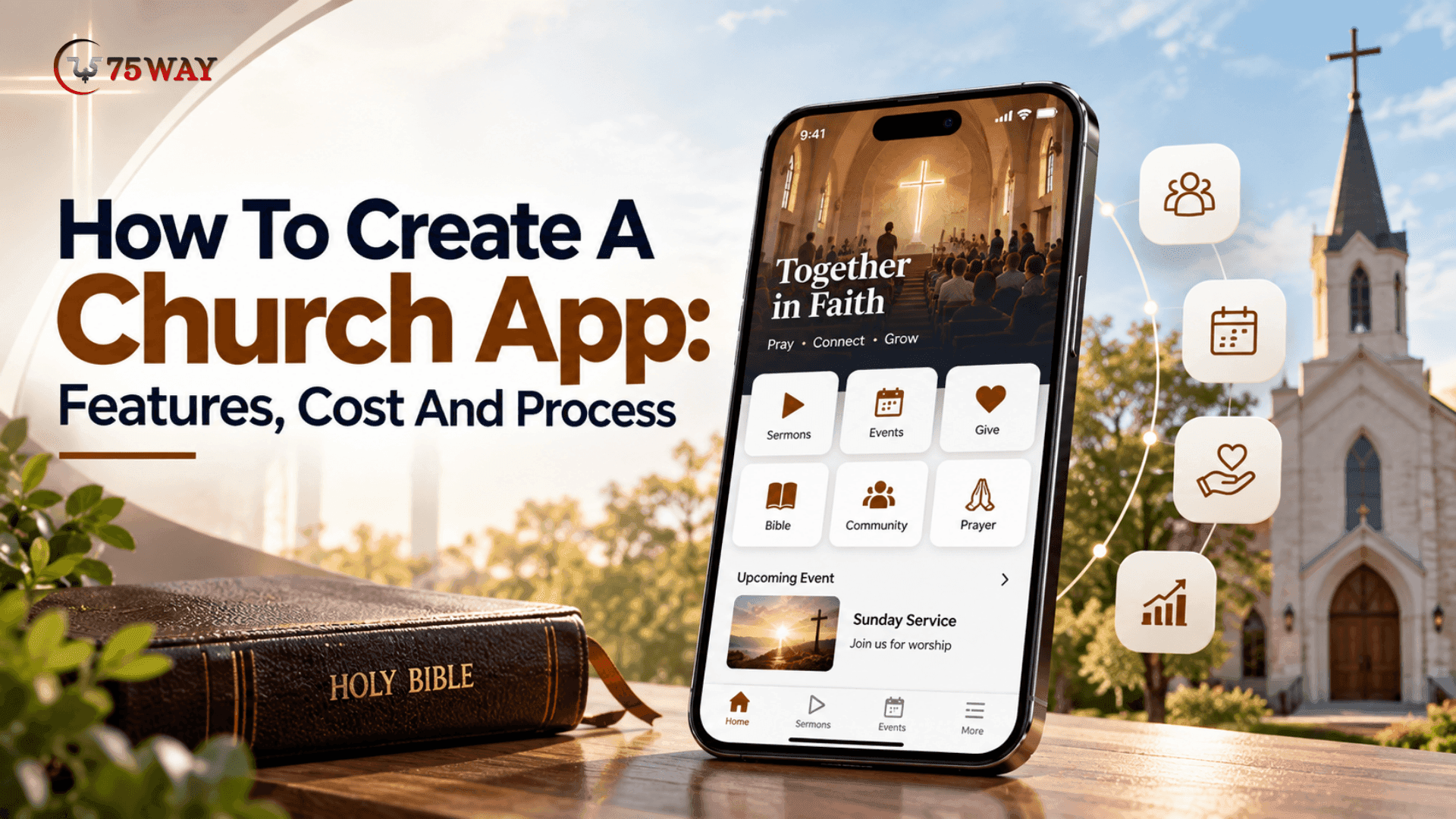
A church app is a mobile application that gives a congregation a digital way to access church content, participate in activities, communicate with other members, manage giving, register for events, and interact with church services.
For church administrators, the app can also connect with management systems that handle people, events, groups, volunteers, giving, check-ins, and other operational activities.
Modern church platforms demonstrate how broad this category has become. Planning Center's Church Center, for example, supports giving, groups, event registration, volunteer schedules, chat, prayer requests, and livestream participation.
A custom church app can go further by giving a church control over its:
- Brand identity
- Member experience
- Content structure
- Communication workflows
- Giving experience
- Ministry-specific functionality
- Third-party integrations
- Data and analytics
- User roles and permissions
The important distinction is that a church app should not simply replicate a website on a phone. It should make recurring church interactions easier from a mobile device.
Why Are Churches Building Mobile Apps?
Churches increasingly need digital experiences that support members outside Sunday services.
A mobile app can provide a central place for congregation members to discover events, access sermons, give donations, communicate with groups, receive updates, and participate in church activities.
For church leadership, the value can be broader than member engagement. A properly integrated application can reduce disconnected workflows between communication, registration, giving, volunteer management, and church administration.
Current church technology platforms already reflect this shift. Pushpay, for example, offers church apps incorporating giving, groups, messaging, volunteer scheduling, check-in, sermon content, and push notifications.
Market Size & Opportunities of Building Church Phone App
A church may have hundreds or thousands of members, but reaching them at the right moment is not always easy through traditional communication. Church phone apps create a direct digital touchpoint that can support engagement, donations, event participation, and access to church resources. The market outlook and opportunities show why this app category deserves closer attention.
- 67% of U.S. churches now use mobile apps, according to Pushpay data, reflecting a 2% year-over-year increase.
- The global church app market is projected to expand to approximately $33.3 billion by 2035, according to Market Research Future.
- The church management software market is seeing strong adoption, with approximately 20% of the global market share attributed to this segment.
- Cloud-based church software represents nearly 72% of deployments worldwide, highlighting the shift toward cloud-based solutions.
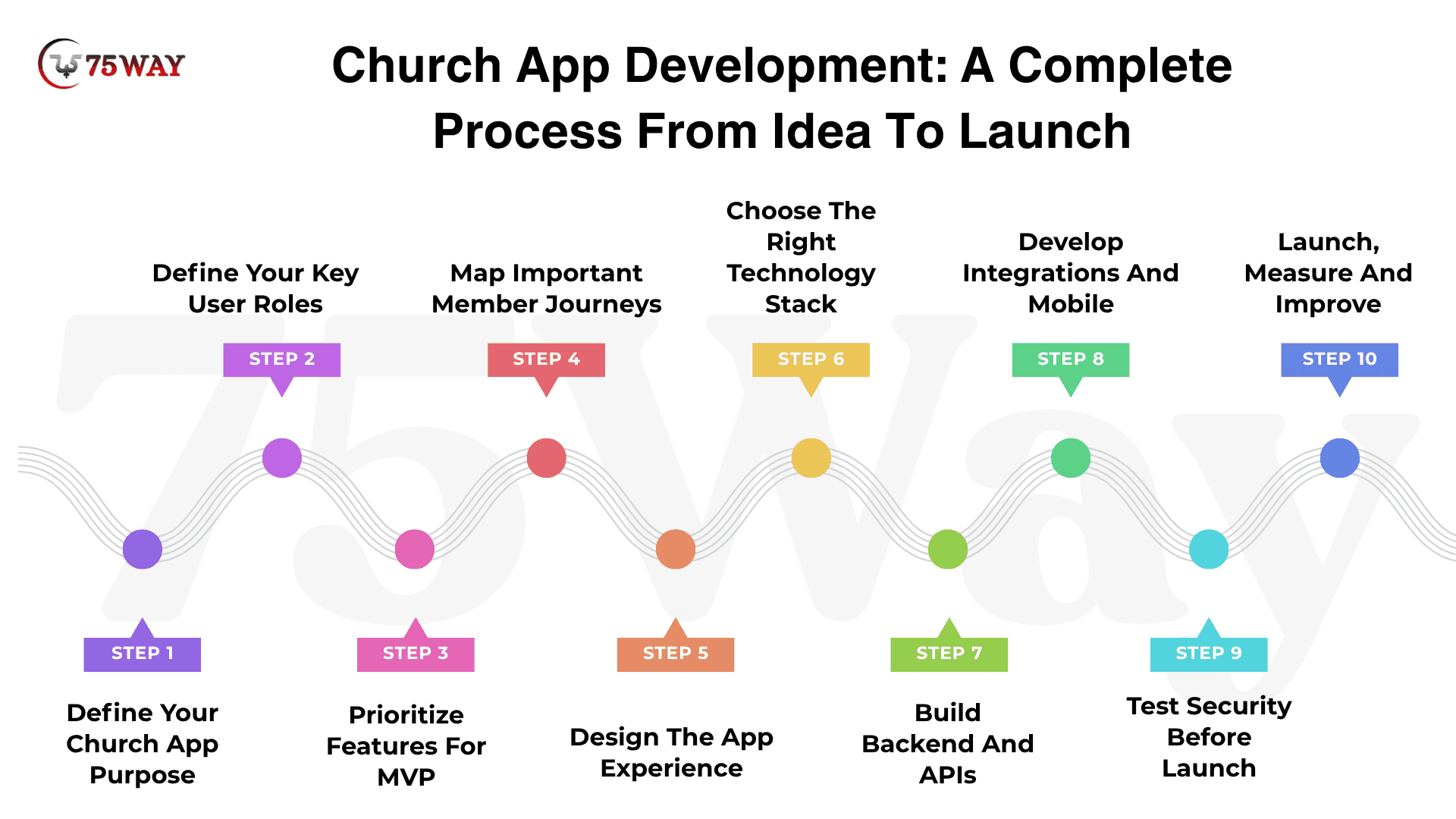
Church App Development: A Complete Process From Idea To Launch
An app does not go from a church leader’s idea to the member’s phone overnight. Every stage, from defining the purpose and shaping the experience to developing, testing, and launching the product, can affect its usability and long-term value. The complete church app development process shows what needs to happen at each stage before the app reaches your congregation.
Step 1: Define Your Church App Purpose
Start with the problem the app should solve rather than listing features you want to include. A clear purpose helps your team decide what belongs in the first release and what can wait.
Ask:
- Who will use the application?
- What do members currently struggle to access?
- Which tasks do church staff repeat manually?
- Which existing systems need to connect?
- What should users accomplish within two minutes?
- What should success look like after launch?
For example, “increase engagement” is too broad. A more practical objective could be:
Create one mobile experience where members can register for events, access sermons, give, communicate with groups, and manage volunteer participation.
That objective gives your development team a practical foundation for feature prioritization, UX decisions, and future updates.
Step 2: Define Your Key User Roles
A church app serves more than regular members. Visitors may need basic information, parents may need child check-in, volunteers may need assignments, while administrators require broader controls.
Typical roles include:
- Members
- Visitors
- Parents
- Volunteers
- Ministry leaders
- Pastors
- Administrators
- Super administrators
Each role should have clearly defined permissions. Mapping these responsibilities early also helps prevent unnecessary access to sensitive member information.
Step 3: Prioritize Features For MVP
Your first release does not need every feature your church may eventually want. Focus on the functions that solve immediate problems and give members a reason to return.
A practical MVP could include:
- User registration
- Church profile
- Sermons
- Events
- Giving
- Push notifications
- Member profiles
- Basic administration
Later releases can introduce groups, messaging, child check-in, volunteer scheduling, analytics, AI features, and advanced integrations.
This phased approach lets the church observe real adoption before committing additional development budget.
Step 4: Map Important Member Journeys
Before designing individual screens, map the actions users need to complete from beginning to end. This reveals unnecessary steps, missing information, and points where members could abandon a task.
For example:
New visitor → downloads app → explores church → registers for event → receives confirmation
Another journey could be:
Member → opens app → watches sermon → joins group → registers for event
For volunteers:
Volunteer → receives notification → views assignment → accepts → receives reminder
These journeys give designers and developers a clearer picture of how different features need to work together.
Step 5: Design The App Experience
The interface should make common church activities easy to find without overwhelming users with menus and unnecessary screens.
The design process may cover:
- Information architecture
- Wireframes
- User flows
- Visual design
- Interactive prototypes
- Accessibility
- Usability validation
The home screen should reflect your church’s actual priorities. A congregation focused heavily on events and groups may need a different navigation structure from one centered around sermons, giving, and livestreams.
Step 6: Choose The Right Technology Stack
Technology choices should follow the app’s requirements, expected scale, integrations, security needs, and development budget. There is no single technology stack that fits every church app.
- Mobile: Flutter or React Native
- Backend: Node.js, .NET, Java, or similar technologies
- Database: PostgreSQL, MySQL, or another suitable database
- Cloud: AWS, Azure, or Google Cloud
- Notifications: Firebase Cloud Messaging and Apple Push Notification service
- Analytics: Firebase Analytics, product analytics platforms, or custom reporting
- Payments: Established payment gateway
- Authentication: OAuth, secure email/password authentication, or passwordless options
The development team should also consider future integrations before finalizing the architecture.
Step 7: Build Backend And APIs
The backend connects the different parts of the church app and manages the data behind member-facing features. It may handle authentication, permissions, content, events, giving, groups, notifications, media, analytics, and third-party integrations.
Core backend components can include:
- Authentication and account management
- Role-based permissions
- Content management
- Event management
- Giving workflows
- Group management
- Notification services
- Media management
- Analytics
- API integrations
For a larger church app, backend architecture becomes particularly important because multiple features often depend on the same member data and business rules.
Step 8: Develop Integrations And Mobile
Once the core architecture and designs are ready, developers can build the member-facing application and connect it with the required services.
Third-party integrations may include:
- Church management systems
- Payment providers
- Livestream platforms
- Email services
- SMS providers
- Push notification services
- Analytics platforms
- Authentication providers
Integration planning should happen before development reaches this stage. External APIs, authentication requirements, data structures, and provider limitations can affect both architecture and development costs.
Step 9: Test Security Before Launch
Testing should cover much more than whether buttons and screens work. The team needs to verify how the application behaves across devices, networks, accounts, payments, permissions, and unexpected situations.
Test areas should include authentication, authorization, payment workflows, notifications, data privacy, API security, device compatibility, accessibility, network failures, performance, app crashes, account recovery, and edge cases.
Security deserves additional attention when the application handles member information, financial transactions, or children's ministry workflows.
Step 10: Launch, Measure And Improve
Before publishing the application, prepare the app-store listings, screenshots, privacy documentation, support process, analytics, crash monitoring, and production infrastructure. A soft launch can also help your team identify operational issues before making the app available to the entire congregation.
After launch, monitor what members actually do rather than relying only on download numbers.
A useful measurement path is:
Downloads → activation → recurring usage → feature adoption → retention
If many people download the app but few return, the issue may not be acquisition. It could indicate that the application lacks recurring value, has usability problems, or does not connect strongly enough with the activities members already care about.
Different Types of Church Apps You Can Build
Not every church needs the same kind of app, and copying another church’s product can leave you paying for features your members rarely use. A church focused on sermons, a growing congregation, or a large ministry may need completely different digital experiences. The main church app types you can build are explained here, along with what each one is designed to achieve.
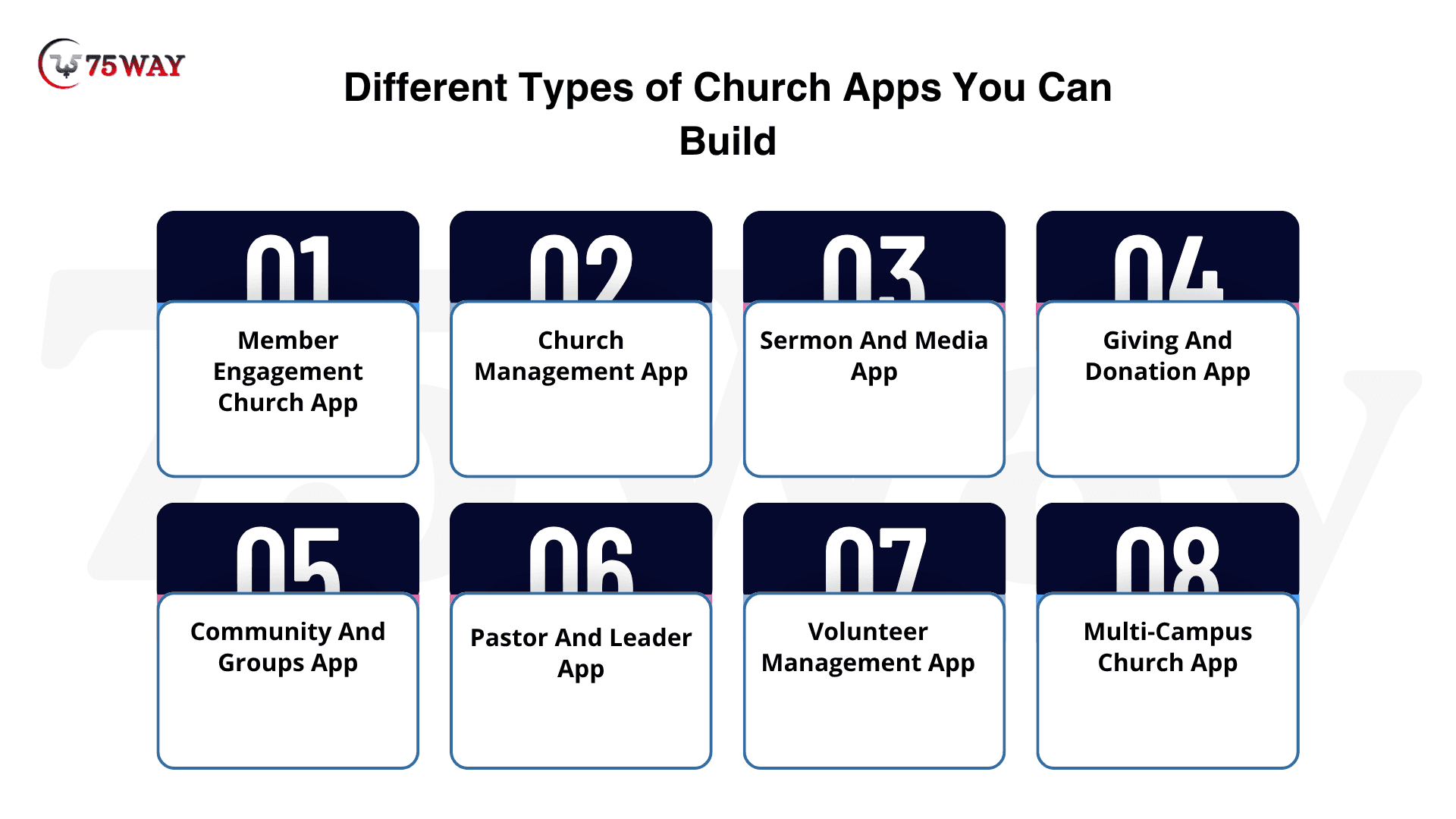
1. Member Engagement Church App
This type focuses on everyday member interactions, bringing sermons, events, announcements, groups, giving, prayer requests, and church information into one mobile experience.
Estimated Development Cost: $25,000–$60,000+
2. Church Management App
A church management app connects administrative workflows such as member records, events, volunteer scheduling, attendance, groups, and internal communication. It can also integrate with an existing ChMS instead of replacing it.
Estimated Development Cost: $50,000–$120,000+
3. Sermon And Media App
Designed around digital ministry, this app gives members access to live services, recorded sermons, podcasts, devotionals, worship content, and other media. Content organization and streaming integrations become major parts of the product.
Estimated Development Cost: $30,000–$80,000+
4. Giving And Donation App
A giving-focused app makes donations, recurring contributions, campaign giving, and transaction history accessible from mobile devices. Secure payment integration and donor account management are central requirements.
Estimated Development Cost: $25,000–$70,000+
5. Community And Groups App
This app focuses on helping members participate beyond weekly services. Features may include small groups, messaging, group events, prayer requests, announcements, and member directories.
Estimated Development Cost: $30,000–$80,000+
6. Pastor And Leader App
A pastor-focused application can bring sermon resources, member information, pastoral notes, prayer requests, schedules, and ministry communication into a private workspace for authorized leaders.
Estimated Development Cost: $25,000–$60,000+
7. Volunteer Management App
Volunteer apps help churches coordinate teams, assignments, schedules, availability, reminders, and confirmations. Leaders can manage participation while volunteers can view and respond to their assignments.
Estimated Development Cost: $25,000–$65,000+
8. Multi-Campus Church App
Large churches with multiple locations may need one application supporting different campuses, ministries, events, content, leadership structures, and communication channels while maintaining a unified member experience.
Estimated Development Cost: $80,000–$150,000+
Key Features To Include In Custom Church App Development
What would make your church app useful enough for members to open it more than once a week? The answer lies in features that solve everyday needs instead of simply filling the app with digital versions of existing church information. Here are the key features that can turn a custom church app development solution into a genuinely useful platform.
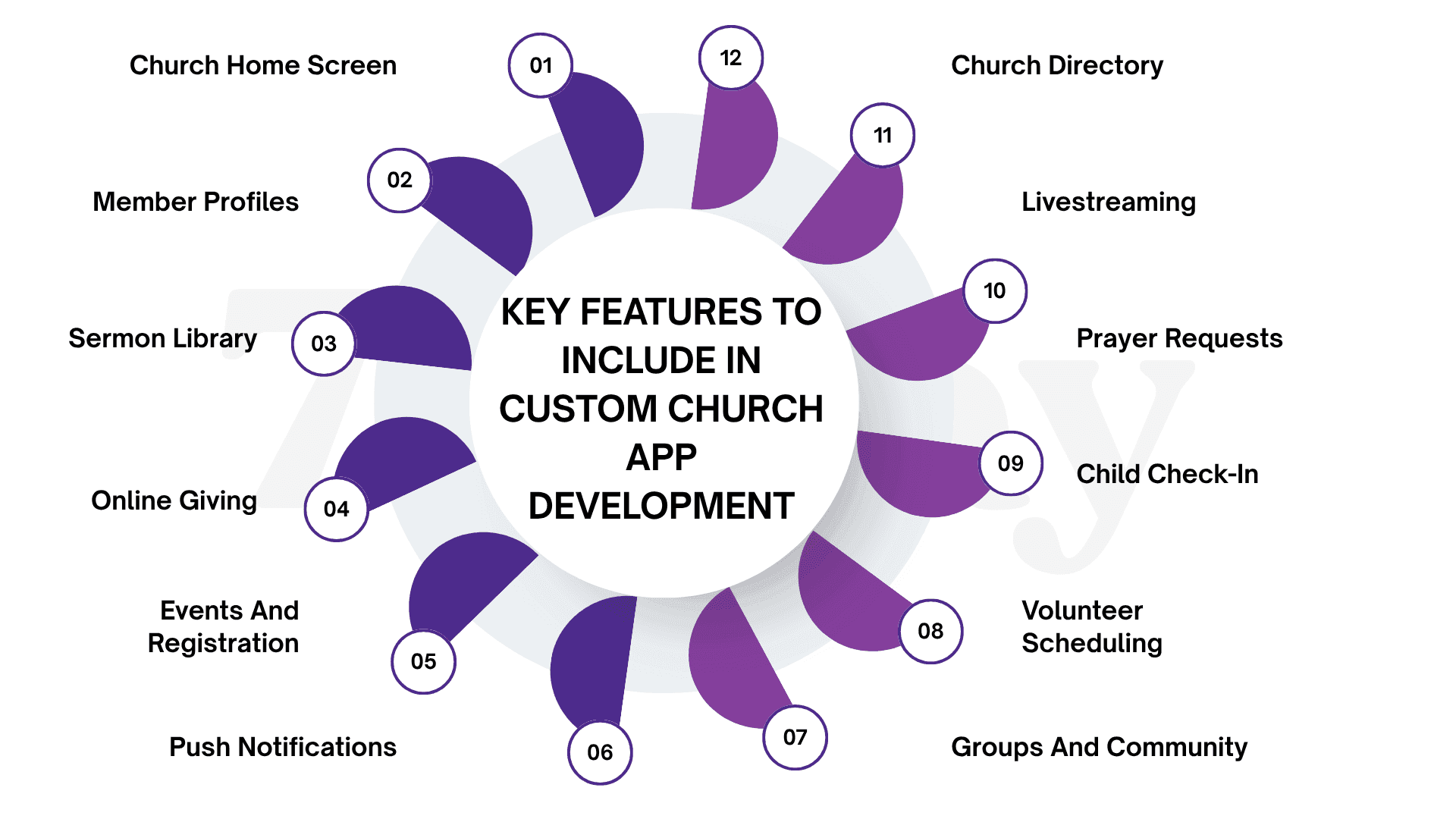
- Church Home Screen
Think of the home screen as the digital front door of your church. Someone opening the app should immediately see what matters today, whether that is Sunday service information, a new sermon, an upcoming event, a giving option, or a live broadcast.
Administrators should also be able to change featured content, announcements, and quick actions without waiting for a developer to update the app.
- Member Profiles
A member profile brings personal church information into one convenient place. Instead of asking members to manage details across different systems, the app can connect their contact information, family relationships, groups, event registrations, volunteer commitments, giving history, and communication preferences.
What each person sees should depend on their role and permissions, especially when the app contains family or other private information.
- Sermon Library
Sunday's message should not disappear once the service ends. A searchable sermon library lets members return to previous teachings, catch up on missed services, or explore an entire sermon series from their phones.
Videos, audio recordings, notes, speakers, dates, topics, and scripture references can all be organized so finding a specific message takes seconds rather than another search through social media or a website.
- Online Giving
Giving should feel like a natural part of the church experience rather than another process members have to figure out. The app can let users choose a fund, make a one-time contribution, schedule recurring donations, review previous giving activity, and access available statements.
A secure payment provider should handle the transaction layer, keeping the church app focused on the member experience instead of unnecessarily handling sensitive payment details.
- Events And Registration
From Sunday gatherings to youth programs and community outreach, churches often manage dozens of activities at the same time. An event module puts those opportunities in front of members while making registration easier for staff to manage.
Depending on the event, the workflow may include attendee details, capacity limits, payments, confirmations, reminders, waitlists, and check-in, turning a basic event listing into a complete registration experience.
- Push Notifications
Not every church announcement deserves an email that may never be opened.
Push notifications can put timely updates directly in front of members when a service time changes, an event reminder is due, a volunteer assignment is approaching, or a new sermon becomes available.
The important part is relevance: members should receive notifications that matter to them rather than getting every message sent by the church.
- Groups And Community
Church life often happens in smaller communities, and the app can make those connections easier to maintain throughout the week.
Members can discover groups, view meeting information, RSVP to activities, receive announcements, participate in conversations, and stay connected with their group leaders.
For administrators, group management can bring membership, attendance, communication, and event participation into a more organized workflow.
- Volunteer Scheduling
Coordinating volunteers becomes increasingly difficult as ministries and campuses grow.
A dedicated scheduling feature gives volunteers a clear view of their assignments while allowing ministry leaders to handle availability, role allocation, confirmations, reminders, and replacements.
Instead of sending another spreadsheet or chasing people through messages, the church can give everyone a shared view of who is serving, when they are serving, and what they are responsible for.
- Child Check-In
For families arriving on a busy Sunday morning, a lengthy check-in process can quickly become frustrating. A mobile check-in experience can help parents provide child information, verify their identity, receive classroom assignments, and complete arrival procedures with fewer manual steps.
Depending on the church's setup, QR codes, barcodes, guardian verification, attendance records, notifications, and controlled check-out can be incorporated while keeping children's information protected.
- Prayer Requests
Prayer requests are personal, so the feature should give churches flexibility over who receives them.
A member might submit a request privately to church leadership, while another request could be shared with an approved prayer group. The app can route, moderate, categorize, and manage those requests according to the church's policies rather than forcing every submission into one public feed.
- Livestreaming
Members who are traveling, sick, working, or simply unable to attend can still participate through livestreaming. Rather than developing an entire video infrastructure, the church app can connect with an existing streaming service and provide a dedicated place to watch live or recorded services.
Keeping live broadcasts and the sermon library within the same experience also makes it easier for members to move from watching today's service to exploring earlier messages.
- Church Directory
A digital directory can make it easier for members to find people they already know—or connect with others in their church community.
Depending on the church's privacy rules, profiles might display names, approved contact details, family connections, groups, or ministry involvement. Visibility should be controlled by permissions so that information intended only for members or specific groups does not become publicly accessible.
Advanced Features For Building Church Apps That Engage Communities
Your church app does not have to stop at events, sermons, and announcements when members expect more personalized digital experiences. Advanced functionality can make the platform more interactive while supporting deeper engagement and smarter administration behind the scenes. Here’s a closer look at the advanced features that can take a custom church app further.
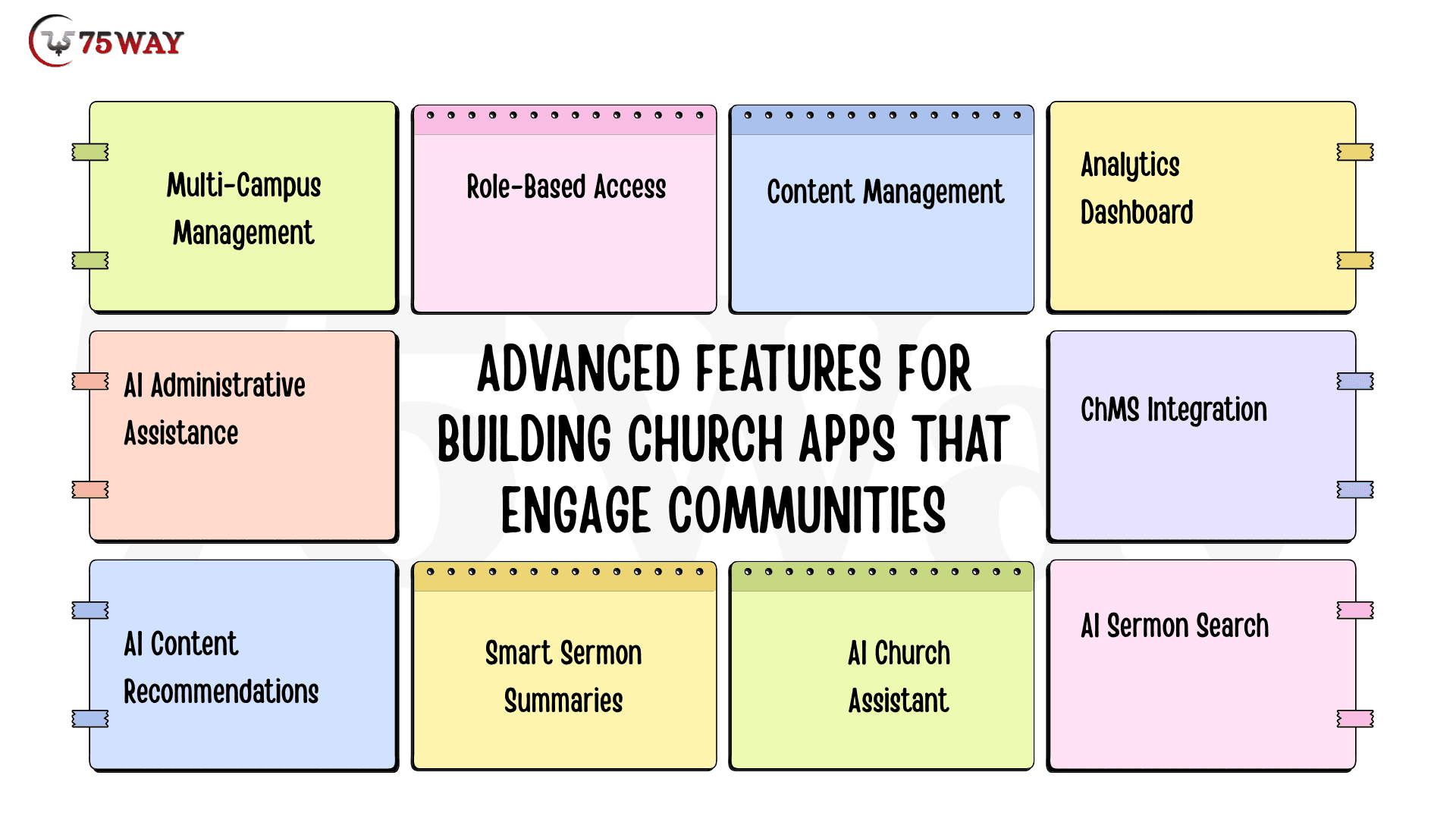
- Multi-Campus Management
A multi-campus setup gives leadership one place to oversee several locations without forcing every campus into the same digital experience. Each campus can manage its own services, events, announcements, ministries, and content while leadership retains centralized control over shared operations.
- Role-Based Access
Not everyone using the app needs access to the same information or administrative tools. Role-based permissions can create different experiences for super administrators, church administrators, pastors, ministry leaders, volunteers, members, and parents based on their responsibilities.
- Content Management
Church staff should not have to contact developers whenever they want to publish a sermon, change an announcement, or add an event. A built-in content management system lets authorized teams update sermons, pages, media, campaigns, announcements, and other information directly from an admin dashboard.
- Analytics Dashboard
An analytics dashboard helps church leaders understand what members actually do inside the app instead of relying on download numbers alone. Reports can cover active users, sermon views, event registrations, giving activity, notification engagement, group participation, and other metrics tied to the church’s goals.
- ChMS Integration
If a church already relies on a church management system, the app should work alongside it rather than creating another disconnected database. ChMS integration can synchronize relevant member, group, event, or volunteer information and reduce repetitive administrative work.
- AI Sermon Search
Members can search sermons using natural questions instead of remembering exact titles, speakers, or keywords. AI can identify relevant messages, passages, topics, and moments across the church’s sermon library to make content discovery faster.
- AI Church Assistant
An in-app AI assistant can answer common questions about service times, events, ministries, locations, groups, and church policies. Responses can be grounded in approved church information so members get relevant answers without searching through multiple pages.
- Smart Sermon Summaries
Long sermons can be automatically summarized into concise takeaways, key themes, scripture references, and discussion points. Members who missed a service can quickly understand its main message before deciding whether to watch or listen to the complete sermon.
- AI Content Recommendations
The app can recommend sermons, groups, events, or other resources based on a member’s stated interests and previous interactions. Personalized discovery can help users find relevant church content without requiring them to manually browse the entire app.
- AI Administrative Assistance
Church staff can use AI to summarize information, organize content, draft announcements, categorize prayer requests, or surface patterns from approved operational data. Human review should remain part of workflows where accuracy, privacy, or sensitive member information is involved.
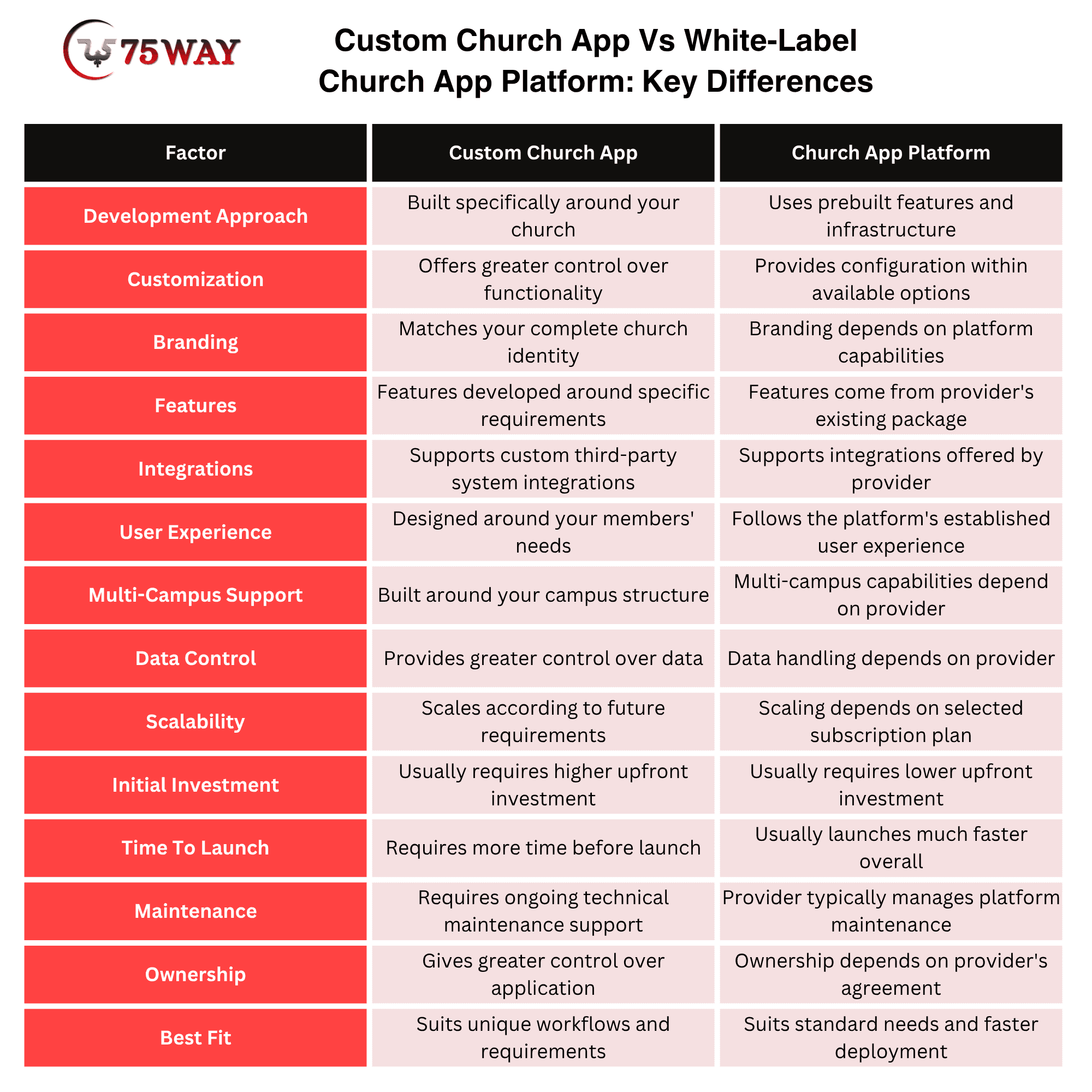
Custom Church App Vs White-Label Church App Platform: Key Differences
A custom church app is built specifically around your church’s workflows, branding, integrations, and long-term goals, while a church app platform provides prebuilt functionality that can be configured to fit your needs. The difference comes down to how much control, customization, ownership, and technical flexibility your organization requires.
Existing platforms such as Church Center and Pushpay already offer capabilities covering areas such as giving, groups, events, communication, volunteer management, and check-in, making them an alternative to developing everything from scratch.
When Should You Adopt White-Label Church App Development?
A ready-made solution can be suitable when you need:
- Faster deployment
- Standard church functionality
- Lower initial development effort
- Established integrations
- Less internal technical management
When Is Custom Church App Development Required?
Custom church app development becomes more relevant when you need:
- A unique member experience
- Proprietary workflows
- Custom integrations
- Specialized ministry features
- Multi-campus architecture
- Full product ownership
- Custom analytics
- Unique branding
- A platform that may eventually serve multiple churches
The decision should come from business and operational requirements, not from the assumption that custom software is automatically better.
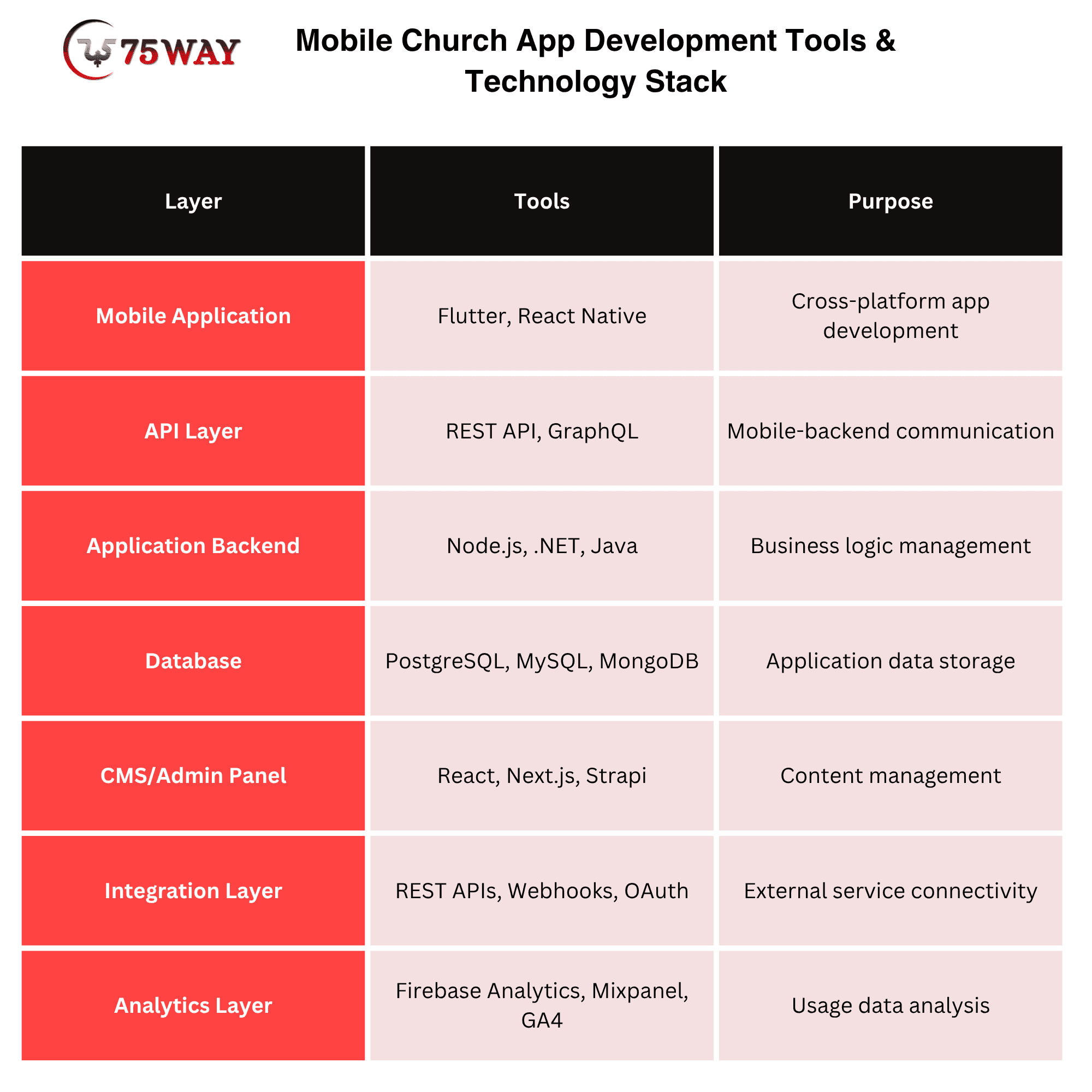
Mobile Church App Development Tools & Technology Stack
A scalable church application generally contains several connected layers, with each layer handling a specific part of the member and administrative experience.
- Mobile Application: The iOS and Android experience members interact with.
Tools: Flutter, React Native, Swift, Kotlin
- API Layer: Connects the mobile application with backend services.
Tools: REST API, GraphQL, API Gateway
- Application Backend: Handles business logic, authentication, permissions, workflows, and integrations.
Tools: Node.js, .NET, Java, Python
- Database: Stores application data such as users, events, groups, registrations, content metadata, and other records.
Tools: PostgreSQL, MySQL, MongoDB
- CMS/Admin Panel: Allows authorized staff to manage content and operational information.
Tools: React, Next.js, Strapi
- Integration Layer: Connects external services such as payment systems, ChMS platforms, media providers, and communication tools.
Tools: REST APIs, Webhooks, OAuth
- Analytics Layer: Collects and organizes behavioral data for reporting and product improvement.
Tools: Firebase Analytics, Mixpanel, GA4
A useful architecture should make it possible to add features later without rebuilding the entire application.
Security And Privacy Considerations For Church Mobile App Development
Security should be part of product architecture from the beginning. A church application may handle sensitive operational and personal information, including member profiles, family relationships, donation records, group participation, and children's check-in data.
Important considerations include:
- Secure authentication
- Role-based authorization
- Encryption in transit
- Encryption at rest where appropriate
- Secure API design
- Payment-provider tokenization
- Audit logging
- Data minimization
- Secure password recovery
- Session management
- Backup strategy
- Monitoring
- Vulnerability testing
- Appropriate data-retention policies
Do not treat security as a final QA checklist.
For a church application, the data model, permission model, integration architecture, and administrative workflows should be designed around security from day one.
How Much Does It Cost To Develop A Church App?
Two churches can request a “church app” and end up with completely different development budgets. A straightforward custom solution may start around $10,000, while a feature-rich platform can move beyond $100,000 as functionality and technical complexity grow. A closer look at the cost structure makes it easier to understand what you are actually paying for and where the biggest budget differences come from.
1. MVP Church App
A basic church app focuses on core features needed to launch quickly and validate member engagement.
Simple Church App Cost: $10,000 – $25,000
Estimated Time: 1 – 2 months
2. Mid-Level Church App
A mid-level app adds interactive features, community tools, and integrations for a growing congregation.
Mid-Level Church App Cost: $25,000 – $60,000
Estimated Time: 2 – 4 months
3. Advanced Church App
An advanced custom app includes intelligent features, deeper integrations, and scalable infrastructure for larger ministries.
Advanced Church App Cost: $60,000 – $100,000+
Estimated Time: 4 – 8 months
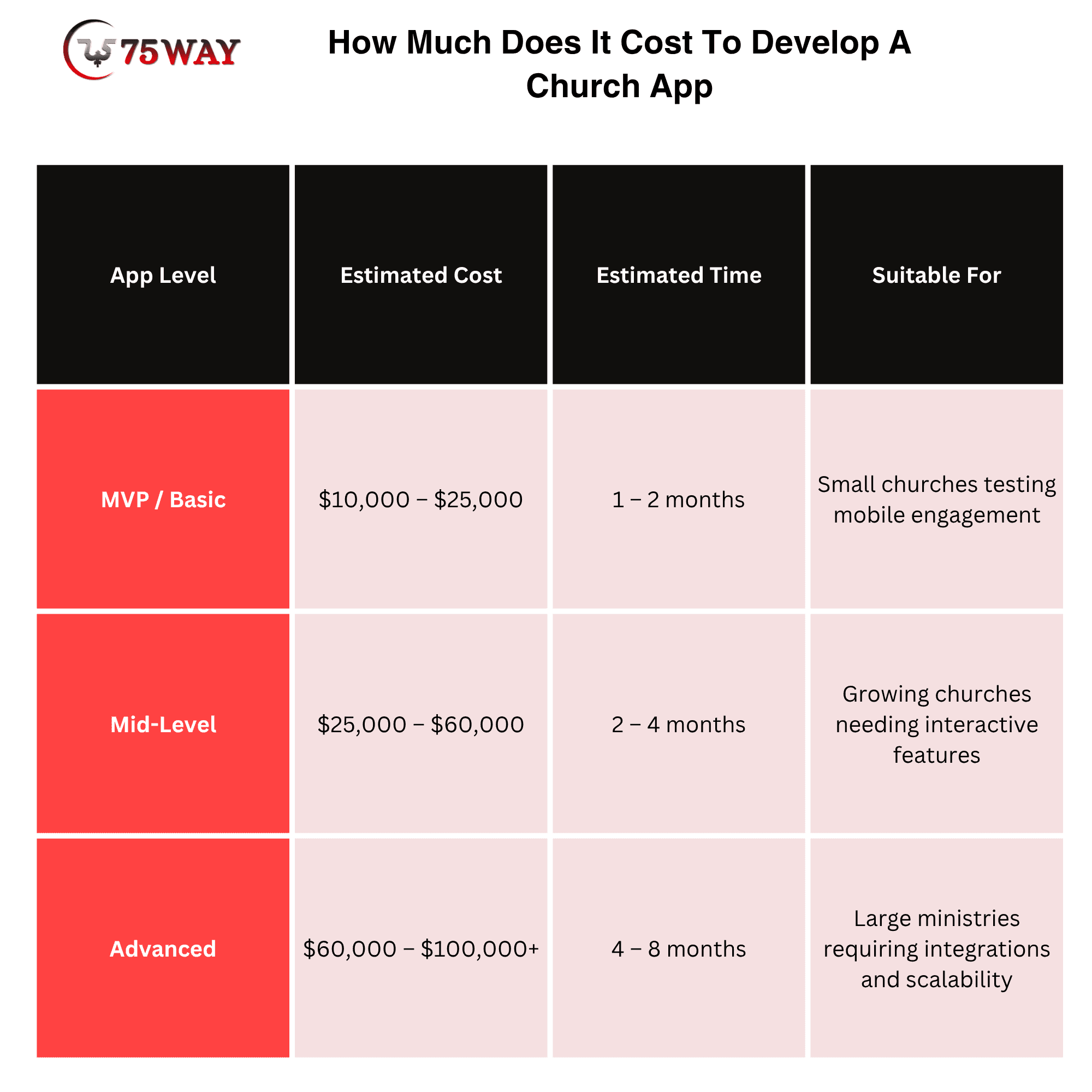
These are planning ranges, not fixed market prices. A discovery phase is necessary before treating a number as a development estimate.
Factors Affecting Church Mobile App Development Cost
The largest cost drivers usually include:
- Number of Platforms
Building for iOS, Android, and web increases development and testing requirements.
- Feature Complexity
A sermon library costs considerably less to build than real-time group messaging, child check-in, or complex volunteer workflows.
- Third-Party Integrations
Connecting the application with a ChMS, payment provider, livestream platform, CRM, analytics system, or authentication service adds engineering work.
- Backend Architecture
User accounts, permissions, notifications, content management, transactions, analytics, and synchronization require server-side infrastructure.
- Security Requirements
Giving, member information, authentication, and children's check-in require careful security design.
- UI/UX Requirements
A simple content application and a highly customized branded experience have different design workloads.
- Multi-Campus Support
Campus-level content, permissions, events, reporting, and administration can significantly expand the architecture.
- Maintenance and Updates
Launching the application is only the beginning. OS updates, security patches, monitoring, feature improvements, and infrastructure maintenance create continuing costs.
A practical way to estimate your budget
Instead of asking only:
“How much does a church app cost?”
ask:
“What workflows should the app replace, simplify, or connect?”
For example, a church that only needs sermons, events, giving, and notifications has a very different project from a multi-campus organization requiring member profiles, child check-in, volunteer scheduling, group messaging, centralized administration, analytics, and ChMS synchronization.
That distinction can prevent both overbuilding the MVP and underbudgeting the final product.
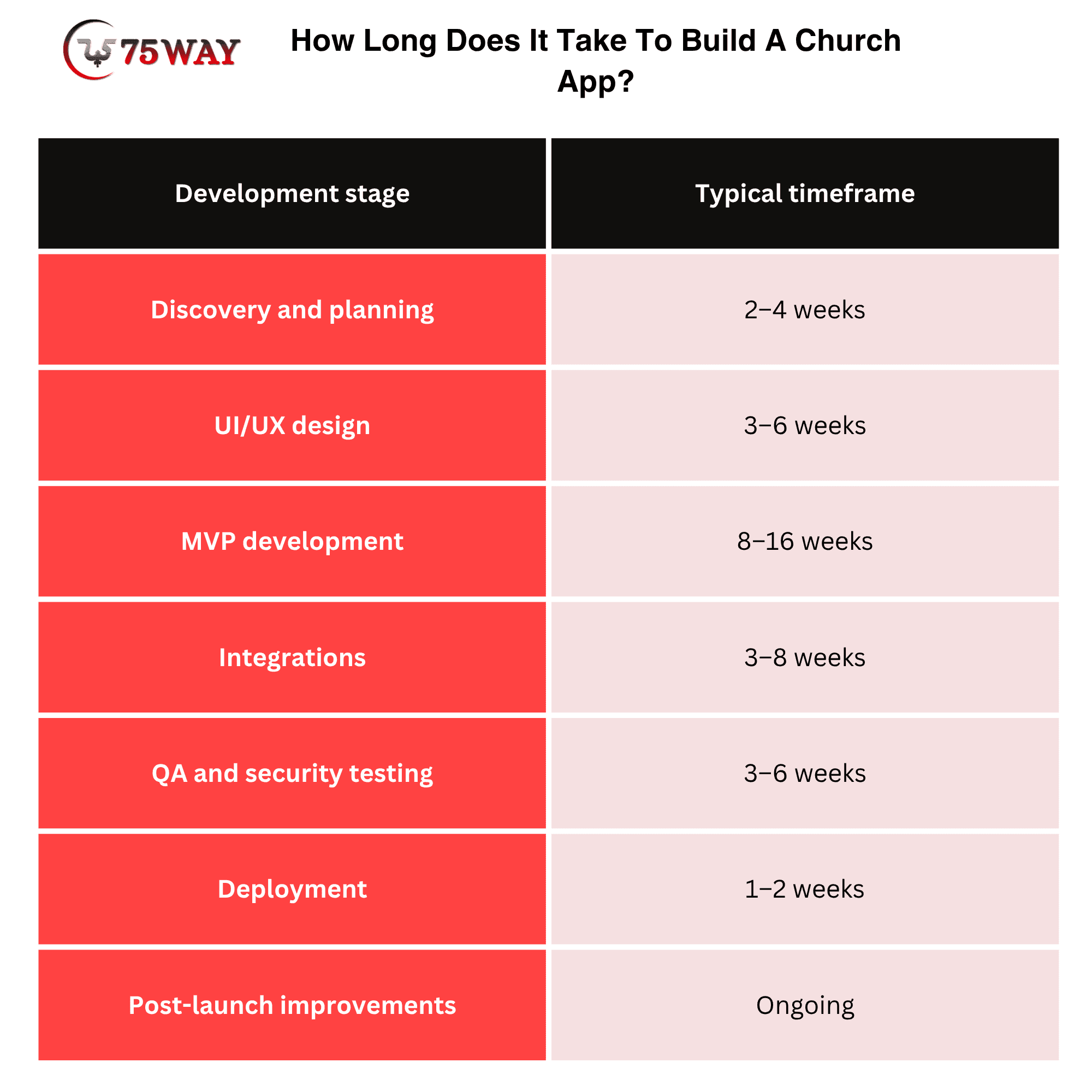
How Long Does It Take To Build A Church App?
A church app can take approximately 3 to 12+ months to develop depending on scope. A simple application containing content, events, giving, and notifications may require significantly less time than a multi-campus platform with complex administration, real-time messaging, ChMS integration, child check-in, analytics, and advanced workflows.
How To Choose A Church App Development Company
Choose a church app development company based on its experience with mobile products, understanding of member-focused workflows, technical capabilities, and ability to handle integrations. Review its previous projects, development process, technology expertise, security practices, communication approach, and post-launch support before making a decision.
Look beyond the quoted development cost and assess whether the team can understand your church’s goals and turn them into a practical product roadmap. Ask about ownership, scalability, testing, maintenance, timelines, third-party integrations, and how changes are handled after launch so you know what the partnership will involve.
Emerging Trends In Church Mobile App Development For 2027
Church mobile apps are moving beyond basic sermon access, announcements, and giving. Looking toward 2027, the strongest development themes are likely to center on AI-assisted ministry, personalized engagement, deeper integrations, multilingual experiences, digital giving, and technology that supports, not replaces, human relationships. Current church-technology research already points toward mobile apps, AI governance, multilingual tools, and more intentional digital engagement as areas churches are prioritizing.
1. AI-Powered Church Assistants
AI assistants can help members find sermons, locate Bible-study resources, discover events, answer common church questions, or navigate app content using natural-language queries. Churches will also need clear boundaries around AI-generated spiritual guidance, since recent research shows growing use of AI for prayer and Bible study alongside questions about authority and trust.
2. Personalized Member Experiences
Church apps are likely to become more personalized based on a member's interests, participation, campus, groups, and preferred content. Instead of showing every user the same home screen, apps can surface relevant sermons, events, volunteer opportunities, groups, and notifications.
3. Multilingual Church Experiences
Multiple-language support is becoming increasingly relevant for churches serving diverse congregations. Future apps may provide translated navigation, announcements, sermons, event information, and communication so members can interact with church resources in their preferred language. Church technology research already identifies multilingual tools as a future priority.
4. Smarter Digital Giving
Digital giving will continue expanding beyond basic card payments. Recurring donations, digital wallets, livestream giving, campaign-based contributions, and giving history can make financial participation easier within the church app. A 2026 Ministry Brands report found that 76% of surveyed churches offering digital giving provided digital-wallet options, while 55% offered automatic recurring donations.
5. Deeper ChMS Integrations
Rather than operating as isolated products, church apps will increasingly connect with church management systems. Member records, events, groups, volunteer schedules, giving information, and communication workflows can synchronize across systems when supported by appropriate integrations.
6. AI-Assisted Content Discovery
Large sermon libraries create a discovery problem for members. AI-powered search can help users ask questions in natural language and find relevant sermons, Bible studies, podcasts, or other church resources without knowing the exact title or speaker.
7. Privacy-Focused Personalization
As apps collect more behavioral and member information, privacy will become increasingly important. Future development will need stronger permission controls, transparent data practices, secure authentication, and careful handling of sensitive information, particularly around children, giving, and pastoral workflows.
8. Agentic Church App Experiences
Emerging AI agents may eventually help users complete multi-step tasks rather than simply answer questions. For example, an agent could help a member find an event, review available details, and begin the registration process, subject to appropriate permissions and confirmation.
9. Livestream And On-Demand Integration
Church apps will increasingly connect live worship with on-demand content. Members could move from a livestream to sermon notes, related messages, giving, event registration, or group discussions without leaving the app.
10. Digital Experiences Across Campuses
Multi-campus churches will need unified applications that still provide location-specific content. A single app can potentially present the appropriate campus events, leaders, services, groups, notifications, and resources based on the member's selected location.
11. AI Governance For Churches
As AI becomes more common inside church workflows, apps may include administrative controls defining where AI can be used and where human review is required. This trend is particularly relevant because Pushpay and Barna's 2026 research found that 64% of surveyed church leaders considered an AI policy important, while only 5% reported having one.
12. More Human-Centered App Design
The biggest trend may be less about adding technology and more about using it with purpose. Current church-technology research describes a movement from simply adopting digital tools toward aligning technology with authentic ministry and community connection.
Church App MVP: What Should You Build First?
If your budget is limited, start with the smallest product that solves a meaningful problem.
A practical MVP could include:
Member account + church profile + sermons + events + giving + push notifications + basic admin panel.
Then use actual usage data to determine what should come next.
Phase 2
- Groups
- Messaging
- Volunteer scheduling
- Prayer requests
- Livestream
- Member directory
Phase 3
- Child check-in
- Multi-campus management
- Advanced analytics
- AI-powered search
- Advanced ChMS integrations
- Personalized content
This phased approach can help control initial investment while leaving room for a broader product roadmap.
Final Remarks
Creating a church app is less about putting church information into a mobile interface and more about designing a connected digital experience for members, volunteers, ministry leaders, and administrators.
The most important decisions happen before development begins: defining the audience, identifying recurring workflows, selecting MVP features, understanding existing systems, planning integrations, establishing security requirements, and determining whether custom development is actually necessary.
Current church technology products show that the market has moved beyond basic sermon-and-calendar applications toward connected experiences covering giving, groups, communication, volunteering, check-in, events, and church management.
If you're planning a custom church app, start with your required workflows or partner with an on-demand app development company.
Frequently Asked Questions (FAQs)
How Much Does It Cost To Create A Church App?
A church app can cost roughly $40,000 to $300,000+ depending on features, integrations, platforms, security requirements, and organizational complexity.
Can A Church App Integrate With Church Management Software?
Yes. A custom app can integrate with a church management system through APIs or other supported integration methods, depending on the platform.
Can A Church App Support Online Donations?
Yes. Giving can be integrated through payment providers, allowing members to make one-time or recurring donations while keeping payment processing within the appropriate payment infrastructure.
Can A Church App Support Multiple Campuses?
Yes. A multi-campus architecture can provide centralized administration while separating campus-level content, events, permissions, reporting, and member experiences.
Can I Add AI To A Church App?
Yes. AI can support specific use cases such as sermon search, content discovery, internal knowledge assistance, automated summaries, and administrative workflows.
How Much Does It Cost To Maintain A Church App?
Maintenance depends on infrastructure, integrations, user volume, support requirements, security needs, and the frequency of product updates. It should be included in the budget from the beginning.
What Technology Is Best For Building A Church App?
There is no single technology that is best for every church. Flutter, React Native, native iOS/Android development, and different backend technologies can all be appropriate depending on requirements.