AI Summary
A custom parking app chatbot can streamline parking discovery, bookings, support, and payments. This guide explains the development process, essential features, integrations, and technology considerations. Custom chatbot development cost for parking app factors and estimated investment ranges are covered clearly.
Key Takeaways
- Custom chatbots for parking apps simplify parking searches, reservations, and customer support workflows.
- Development involves requirements, conversation design, AI architecture, deployment, and monitoring.
- Real-time APIs enable accurate parking availability, pricing, bookings, navigation, and personalized assistance.
- Businesses gain support automation, better user experiences, insights, and scalability.
- Development costs vary based on complexity, integrations, features, and ongoing requirements.
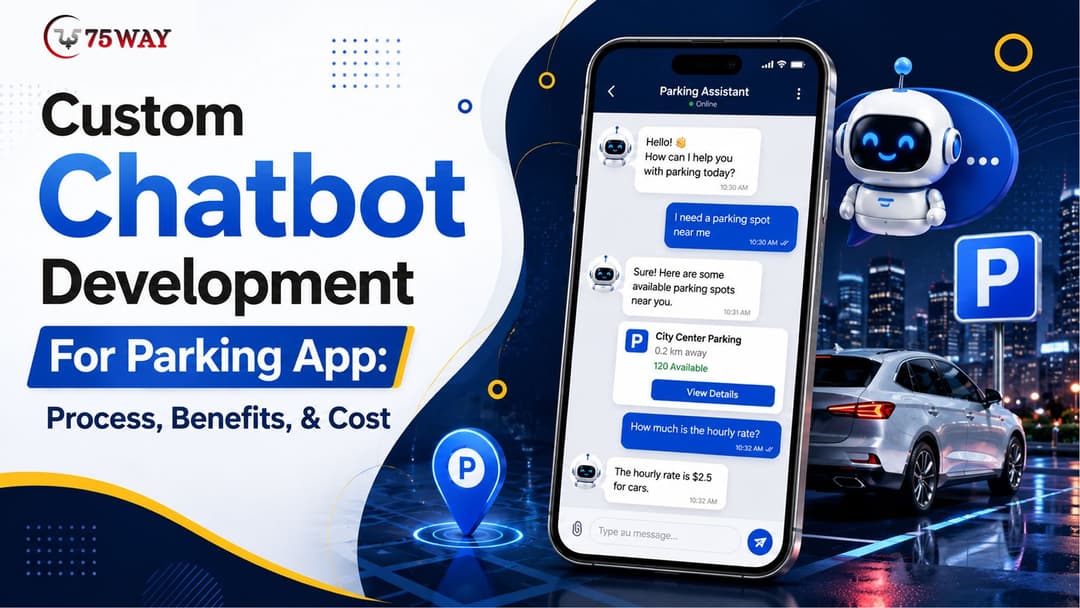
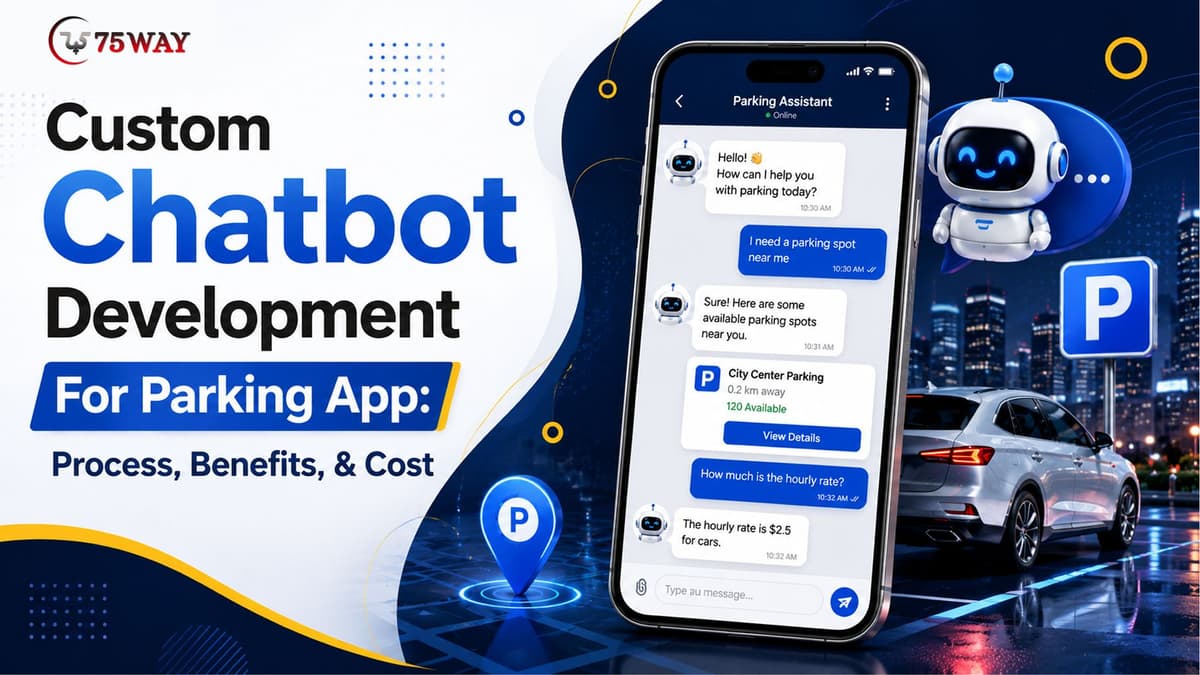
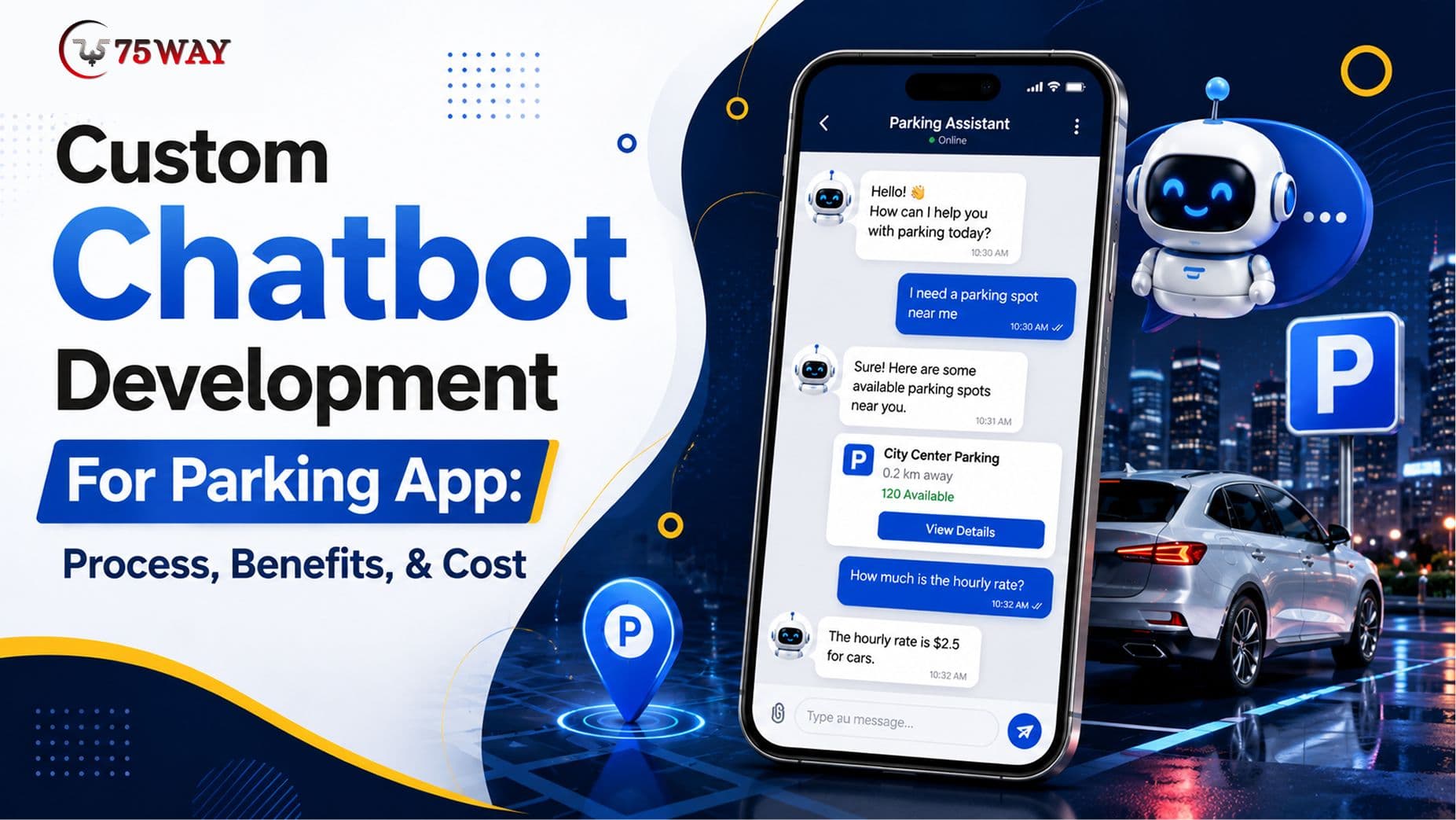
A custom chatbot for a parking app development solution can do far more than answer FAQs. It can help drivers find available parking, check rates, reserve spaces, manage bookings, process support requests, and guide users through payments or cancellations.
For parking operators and app businesses, the real value comes from connecting the chatbot to live parking data and business systems rather than deploying a basic scripted assistant. A well-designed parking app AI chatbot can become a conversational layer across parking discovery, reservations, payments, customer support, and operator workflows.
This guide explains how custom chatbot development for a parking app works, what features and integrations matter, how much development can cost, and when a custom solution makes more business sense than an off-the-shelf chatbot.
What Is A Custom Chatbot For A Parking App?
A custom parking-app chatbot is an AI-powered conversational interface built specifically around a parking platform's users, workflows, data, and business rules.
Instead of giving generic answers such as “You can book a parking space through our app,” the chatbot can respond to real user requests based on available data.
For example, a driver could ask:
“Find me covered parking near downtown Chicago for two hours under $20.”
The chatbot could understand the request, identify suitable parking facilities, check availability, present options, and direct the user toward booking.
Depending on the system architecture, it can also handle requests such as:
- Finding nearby parking facilities
- Checking real-time parking availability
- Comparing parking prices
- Recommending parking based on location or preferences
- Booking or reserving a parking space
- Modifying or cancelling reservations
- Providing directions to a parking facility
- Answering parking policy questions
- Explaining payment issues
- Retrieving booking information
- Handling parking-session questions
- Escalating complex issues to human support
- Supporting parking operators through administrative workflows
The important distinction is integration. A chatbot becomes substantially more useful when it can securely interact with the parking app's backend, booking engine, maps, payment infrastructure, user accounts, and parking inventory.
Why Build A Custom AI Chatbot Instead of Adding A Generic AI Assistant?
A generic chatbot can answer common questions, but parking applications involve transactional workflows and real-time information.
A driver does not only want to ask, “Where can I park?”
They may want to know:
- Is a space available right now?
- How much will it cost?
- Can I reserve it for 7:30 PM?
- Is overnight parking allowed?
- Can I extend my parking session?
- Why did my payment fail?
- Where exactly is the entrance?
- Can I cancel my reservation?
- What happens if I arrive late?
These questions require access to application-specific information.
A custom AI chatbot can therefore be designed around the actual parking ecosystem instead of forcing the business to redesign its processes around a generic conversational tool.
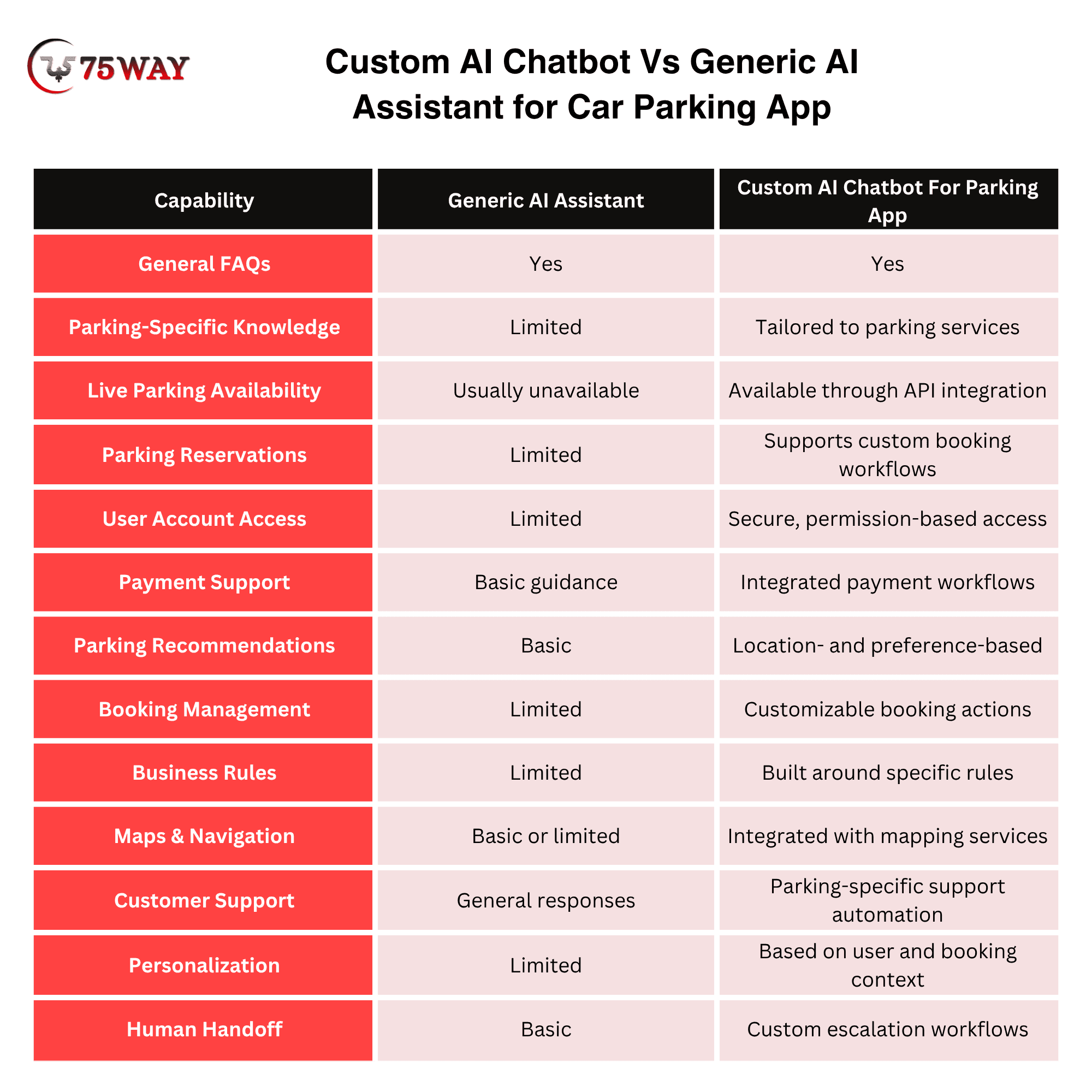
Custom AI Chatbot Vs Generic AI Assistant for Car Parking App
A custom AI chatbot is built specifically for parking workflows, while a generic AI assistant provides broad conversational support without deep parking-system integration.
A custom solution can connect with parking availability, booking systems, maps, pricing engines, user accounts, and payment workflows to handle parking-specific requests.
It understands business rules and can be designed around real customer journeys, such as finding a space, checking availability, reserving parking, modifying bookings, or resolving parking-related issues.
A generic AI assistant mainly answers general questions using predefined information or limited integrations, making it suitable for basic FAQs and customer conversations. It may not reliably access live parking data, execute reservations, retrieve account-specific information, or follow your operational rules.
For a parking app where the goal is to automate meaningful actions and improve booking experiences, custom AI chatbot development offers greater control, integration, personalization, and functionality than a generic assistant.
For a parking business that expects the chatbot to influence bookings, customer service, or operational workflows, customization is usually more valuable than simply embedding a conversational widget.
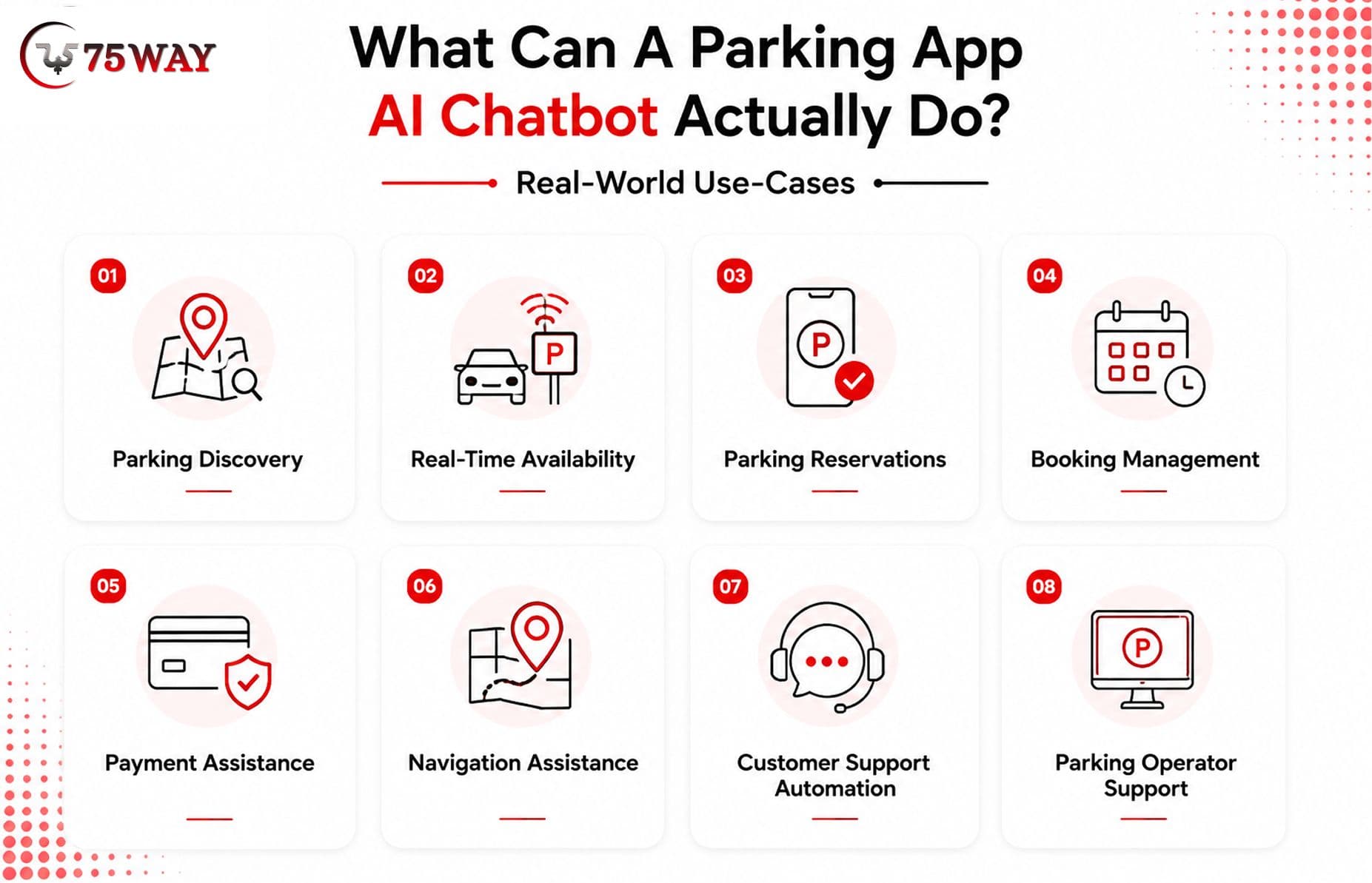
What Can A Parking App AI Chatbot Actually Do? Real-World Use-Cases
The strongest parking chatbots are not built around a long list of artificial “AI features.” They are built around real user and business problems. Here are the most practical use cases.
1. Parking Discovery
Users can describe what they need conversationally rather than navigating multiple filters.
For example:
“Find parking near the airport for three days.”
The chatbot can use location, duration, price, parking type, availability, and other business rules to return relevant options.
2. Real-Time Availability
If connected to the parking inventory system, the chatbot can retrieve current availability. This is particularly useful when parking supply changes frequently.
Instead of forcing users to search manually, the chatbot can answer questions such as:
“Are there any open spaces within half a mile?”
The answer should come from the application's current data rather than the language model's assumptions.
3. Parking Reservations
The chatbot can guide users through a reservation workflow. A typical conversation may involve:
User: “I need parking near the stadium tonight.”
Chatbot: “What time will you arrive?”
User: “6:30 PM.”
Chatbot: “I found three facilities with availability. The closest is $18 for the evening. Would you like to reserve it?”
The actual reservation should then be completed through the application's secure booking workflow.
4. Booking Management
After booking, users may need to modify their reservation. A chatbot can help with:
- Booking confirmation
- Reservation details
- Arrival time
- Extension requests
- Cancellation
- Refund status
- Parking instructions
- Receipt requests
Authentication and authorization are important here because the chatbot may be accessing user-specific information.
5. Payment Assistance
Payment-related questions are common in parking applications. The chatbot can explain:
- Accepted payment methods
- Failed payments
- Refund status
- Duplicate charges
- Receipts
- Parking fees
- Additional charges
The chatbot should not expose sensitive payment information. Instead, it should connect users with the appropriate secure payment or account workflow.
6. Navigation Assistance
Parking users are often already driving or approaching a destination. The chatbot can help answer:
“Where is the entrance?”
“How far is the parking garage from the venue?”
“Give me directions to my reserved parking location.”
Integration with mapping services can make these interactions more useful.
7. Customer Support Automation
A parking chatbot can handle repetitive support requests before involving a human agent. For example:
User: “I was charged, but my booking isn't showing.”
The chatbot can authenticate the user, retrieve the relevant booking information, check the payment status, and either resolve the issue or escalate it. This is considerably more valuable than a chatbot that simply responds with a generic help-center article.
8. Parking Operator Support
The chatbot does not necessarily have to serve only drivers.
For businesses operating multiple parking facilities, an internal assistant can help authorized staff retrieve operational information, understand alerts, or initiate approved workflows.
Access should be controlled through role-based permissions rather than treating the internal chatbot as an unrestricted database interface.
Key Features To Include While Building Custom Parking Chatbot
The feature set should depend on the parking business model, but several capabilities are particularly valuable. A parking chatbot becomes useful when it can answer the question a driver actually has at that moment: “Where can I park, and can I book it?” That means the bot needs to work with live parking data rather than simply repeat general FAQs. The features below show what a custom parking chatbot should be able to handle.
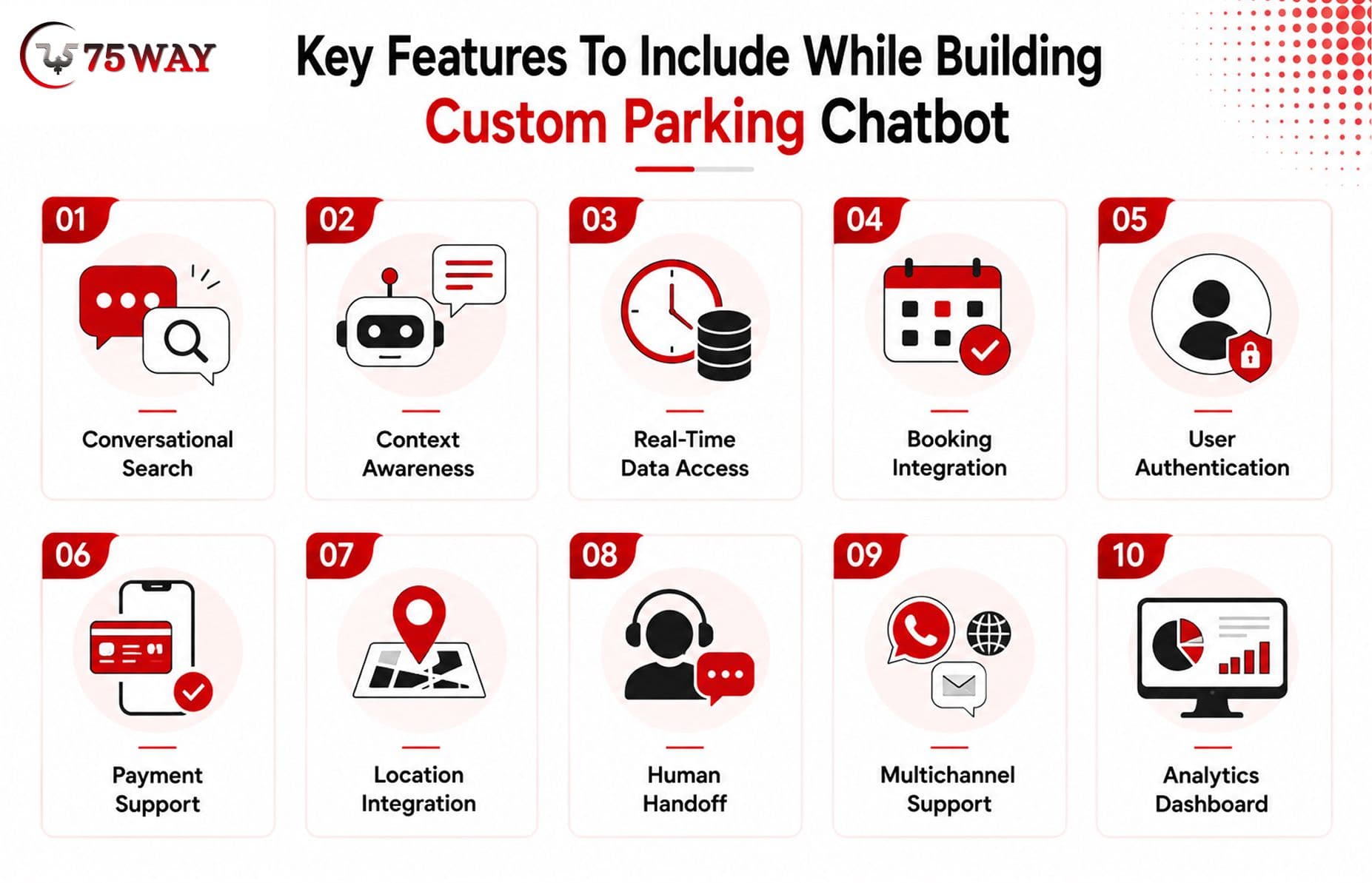
- Conversational Search: Users should be able to search using natural language instead of rigid commands.
- Context Awareness: The chatbot should remember relevant information during a conversation, such as location, arrival time, vehicle type, and parking duration.
- Real-Time Data Access: Availability, pricing, reservations, and other dynamic information should come from authoritative application systems.
- Booking Integration: The assistant should be capable of guiding or initiating booking workflows through secure APIs.
- User Authentication: Account-specific information requires appropriate authentication and authorization.
- Payment Support: The chatbot can assist with payment workflows without exposing sensitive financial information.
- Location Integration: Maps and location services can support nearby parking discovery and navigation.
- Human Handoff: When the chatbot cannot safely or accurately resolve an issue, it should transfer the conversation to a support representative with relevant context.
- Multichannel Support: Depending on the business, the chatbot can extend beyond the mobile app into web chat, messaging channels, or other customer touchpoints.
- Analytics Dashboard: Businesses should be able to understand what customers are asking, where conversations fail, which requests lead to bookings, and where human intervention is required.
How To Build Custom Chatbot For A Parking App: Complete Development Process
Custom chatbot development should begin with the business workflow, not the AI model. The reason is that drivers do not want to type a long message into a chatbot while searching for a parking spot. They want a quick answer and a way to act on it. Here’s how to approach the development of a custom chatbot that can actually help drivers complete parking-related tasks.
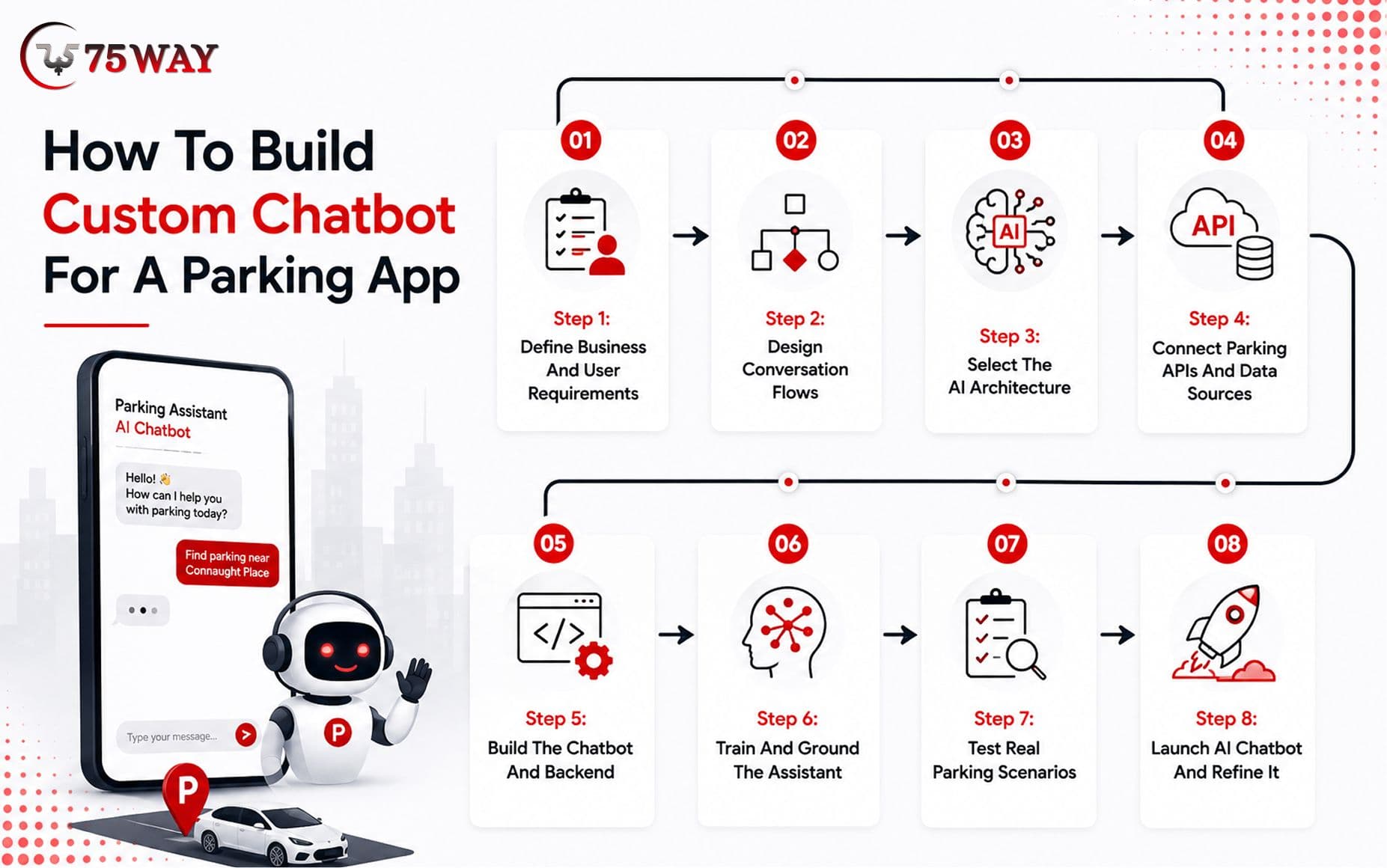
Step 1: Define Business And User Requirements
The first stage identifies who will use the chatbot and what they need it to accomplish.
For a parking app, this can include drivers, parking operators, customer-support teams, administrators, or facility managers.
The development team should document:
- Primary user journeys
- High-value chatbot use cases
- Booking workflows
- Customer-support scenarios
- Required integrations
- Security requirements
- Data sources
- Escalation rules
- Business objectives
- Success metrics
A useful question at this stage is:
What should the chatbot accomplish that the existing parking app experience does not accomplish well today?
That question prevents the project from becoming an expensive FAQ widget.
Step 2: Design Conversation Flows
Next, the team maps how users will interact with the assistant.
For example:
Parking Search → Location → Time → Availability → Price → Selection → Booking → Confirmation
A separate flow may cover:
Payment Problem → Authentication → Transaction Lookup → Resolution → Escalation
Conversation design matters because AI should not make every decision independently. Critical actions should follow predefined business rules and validated workflows.
Step 3: Select The AI Architecture
The technology architecture depends on the complexity of the chatbot. A basic assistant may rely on an LLM with a knowledge base. A transactional parking assistant may require:
LLM + retrieval + application APIs + business logic + authentication + monitoring
The model should handle language understanding and conversational interaction, while application services remain responsible for authoritative business operations.
This separation is important.
The language model should not invent parking availability, prices, booking status, or payment results.
Step 4: Connect Parking APIs And Data Sources
This is where a custom chatbot becomes different from a basic AI assistant.
The chatbot may need secure access to:
- Parking inventory APIs
- Booking APIs
- User-account services
- Payment systems
- Maps and location services
- Pricing engines
- Notification services
- Customer-support platforms
- Parking management systems
- Analytics systems
API integration should be designed with authentication, permissions, validation, logging, and failure handling from the beginning.
Step 5: Build The Chatbot And Backend
Developers then implement the conversational interface, backend services, integrations, business rules, and administrative controls.
The interface can be embedded directly inside the parking app or exposed through additional channels.
The backend manages the communication between the chatbot and business systems.
Step 6: Train And Ground The Assistant
For a custom chatbot, “training” does not necessarily mean training a new foundation model from scratch.
In many projects, the better approach is to ground the assistant using approved business knowledge and retrieval mechanisms.
Relevant sources may include:
- Parking policies
- Facility information
- FAQs
- Pricing rules
- Booking policies
- Cancellation policies
- Customer-support documentation
- Operating procedures
Dynamic information should generally be retrieved from live systems rather than stored as static chatbot knowledge.
Step 7: Test Real Parking Scenarios
Testing should go beyond checking whether the chatbot gives grammatically correct answers. Testing scenarios should include:
- No parking available
- Incorrect location
- Expired reservation
- Failed payment
- Cancelled booking
- Refund request
- Late arrival
- Booking extension
- Conflicting requests
- API downtime
- Unauthenticated user
- Unauthorized request
- Ambiguous questions
- Unsupported requests
The goal is not only to make the chatbot helpful. It must also know when not to act.
Step 8: Launch AI Chatbot and Refine It
Once the chatbot is deployed, ongoing monitoring helps identify performance gaps and improve the user experience.
Track key metrics such as conversation completion rate, booking conversions, escalation rate, failed intents, user satisfaction, average resolution time, support deflection, API failures, and incorrect or hallucinated responses.
Real-world conversations often reveal issues that controlled testing cannot identify.
Analyze these interactions regularly to improve conversation flows, update knowledge sources, refine AI responses, fix integration issues, and ensure the chatbot continues delivering accurate, useful, and parking-specific assistance as user needs evolve.
Technology Stack For A Custom Parking Chatbot
The technology stack depends on the app's existing architecture and chatbot requirements. A typical architecture may include:
- Mobile App: React Native, Flutter, Swift, Kotlin
- Frontend: React, Next.js
- Backend: Node.js, Python, Java, .NET
- AI Layer: LLM APIs or custom AI infrastructure
- Knowledge Retrieval: Vector database/search infrastructure
- Database: PostgreSQL, MySQL, MongoDB
- Cloud: AWS, Google Cloud, Microsoft Azure
- Maps: Google Maps Platform or alternative mapping APIs
- Payments: Stripe, Braintree, Adyen, or relevant payment provider
- Authentication: OAuth, JWT, identity providers
- Analytics: GA4, Mixpanel, Amplitude, custom analytics
- Support: CRM/help-desk integrations
The right stack is not necessarily the newest stack. For an existing parking application, the best architecture usually works with the current backend where practical instead of rebuilding everything simply to accommodate an AI chatbot.
Business Benefits of Integrating An AI Chatbot To A Parking App
For a parking business, a chatbot is valuable when it helps move a customer from “Where can I park?” to “My spot is booked” with fewer steps. That smoother interaction can reduce support workload while creating more opportunities for bookings, upsells, repeat usage, and better customer experiences. The key business benefits of adding AI chatbot capabilities to a parking app are outlined below.
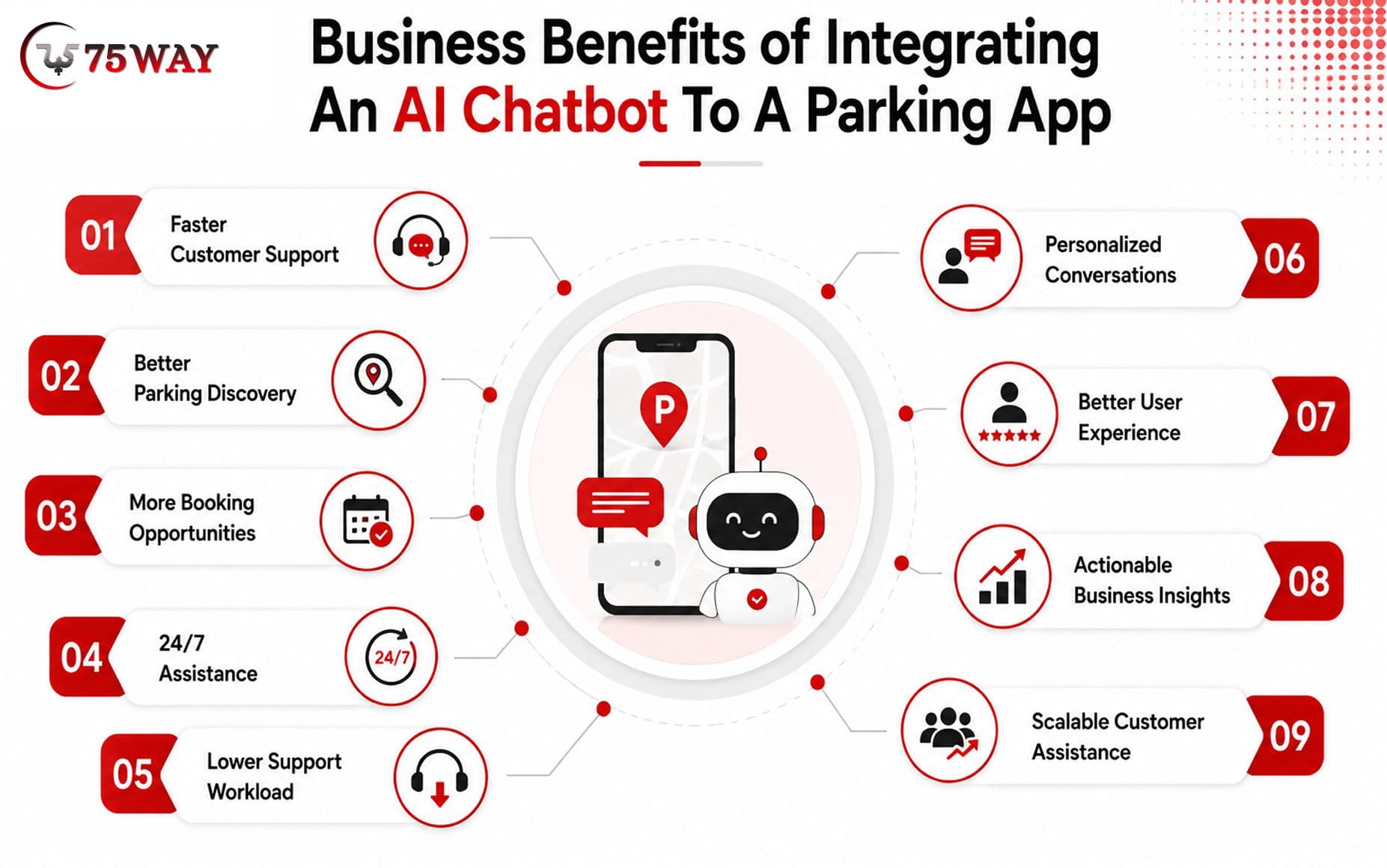
1. Faster Customer Support
The chatbot can answer repetitive questions instantly instead of requiring a support representative for every interaction.
2. Better Parking Discovery
Conversational search can make finding suitable parking easier for users who do not want to navigate multiple filters.
3. More Booking Opportunities
A chatbot can reduce friction between a user's parking question and a completed reservation.
4. 24/7 Assistance
Parking problems do not necessarily happen during business hours. An automated assistant can provide support around the clock.
5. Lower Support Workload
Automating repetitive questions allows customer-service teams to spend more time on complex cases.
6. Personalized Conversations
With appropriate permissions and data access, the chatbot can use relevant account and booking context to provide more useful responses.
7. Better User Experience
Users can describe what they need naturally rather than learning how the parking application's search interface works.
8. Actionable Business Insights
Conversation analytics can reveal recurring customer problems, confusing booking steps, pricing concerns, and support gaps.
9. Scalable Customer Assistance
As the number of users grows, a conversational AI assistant can handle many routine conversations without requiring the support team to grow at exactly the same rate.
How Much Does Custom Chatbot Development For A Parking App Cost?
The cost of developing a custom parking chatbot can range from approximately $20,000 to $100,000+, depending on the chatbot's complexity, integrations, security requirements, AI architecture, channels, and development team location.
A simple chatbot connected to a limited knowledge base will cost substantially less than an AI assistant capable of real-time parking discovery, booking, account access, payments, and operator workflows.
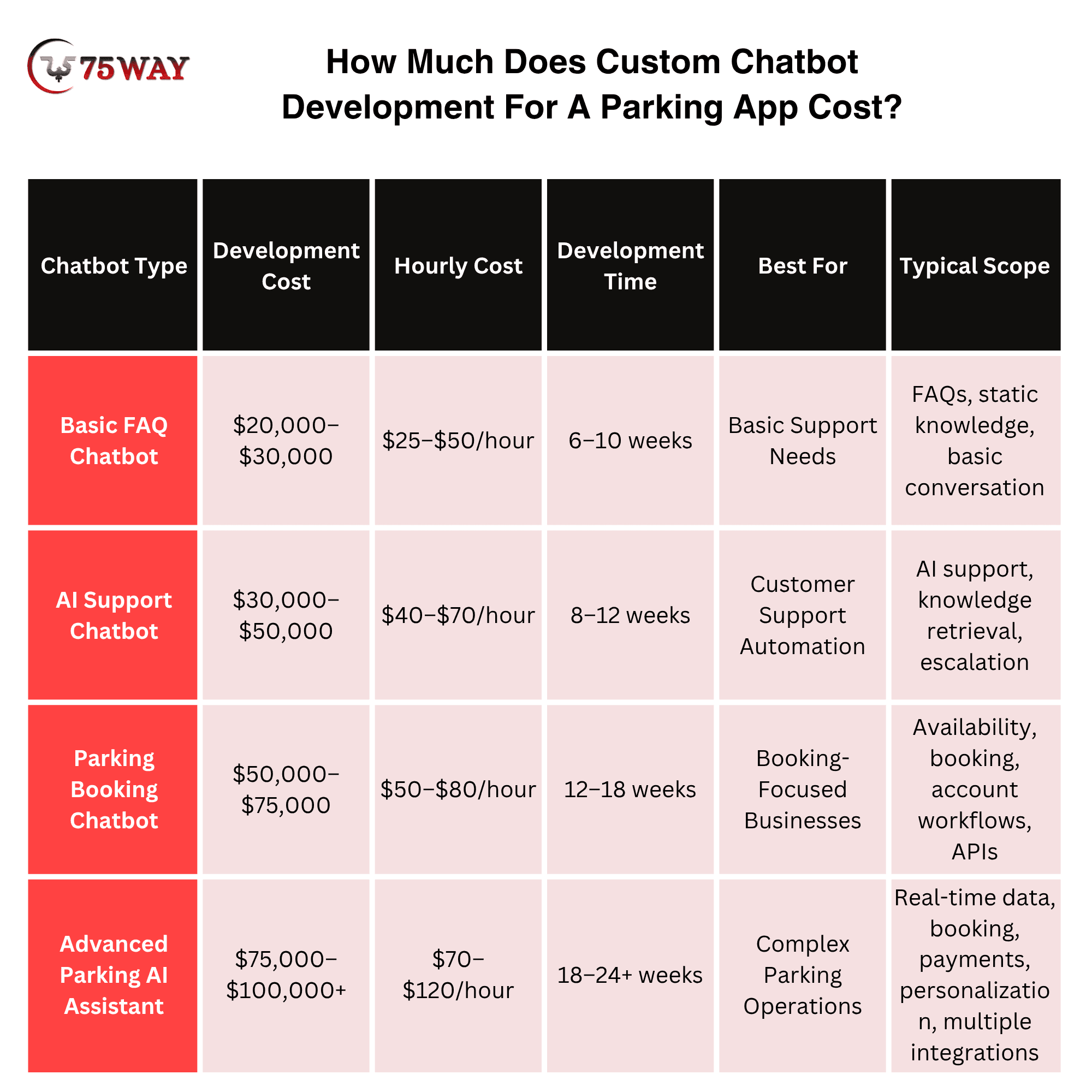
These are planning ranges, not fixed market prices. The final estimate should be based on the actual scope.
For example, an existing parking app with mature APIs may require considerably less development work than a legacy platform where availability, booking, payment, and user data are difficult to access.
What Factors Affect The Cost of Creating an AI-Powered Parking Chatbot?
Several factors can significantly change the final budget.
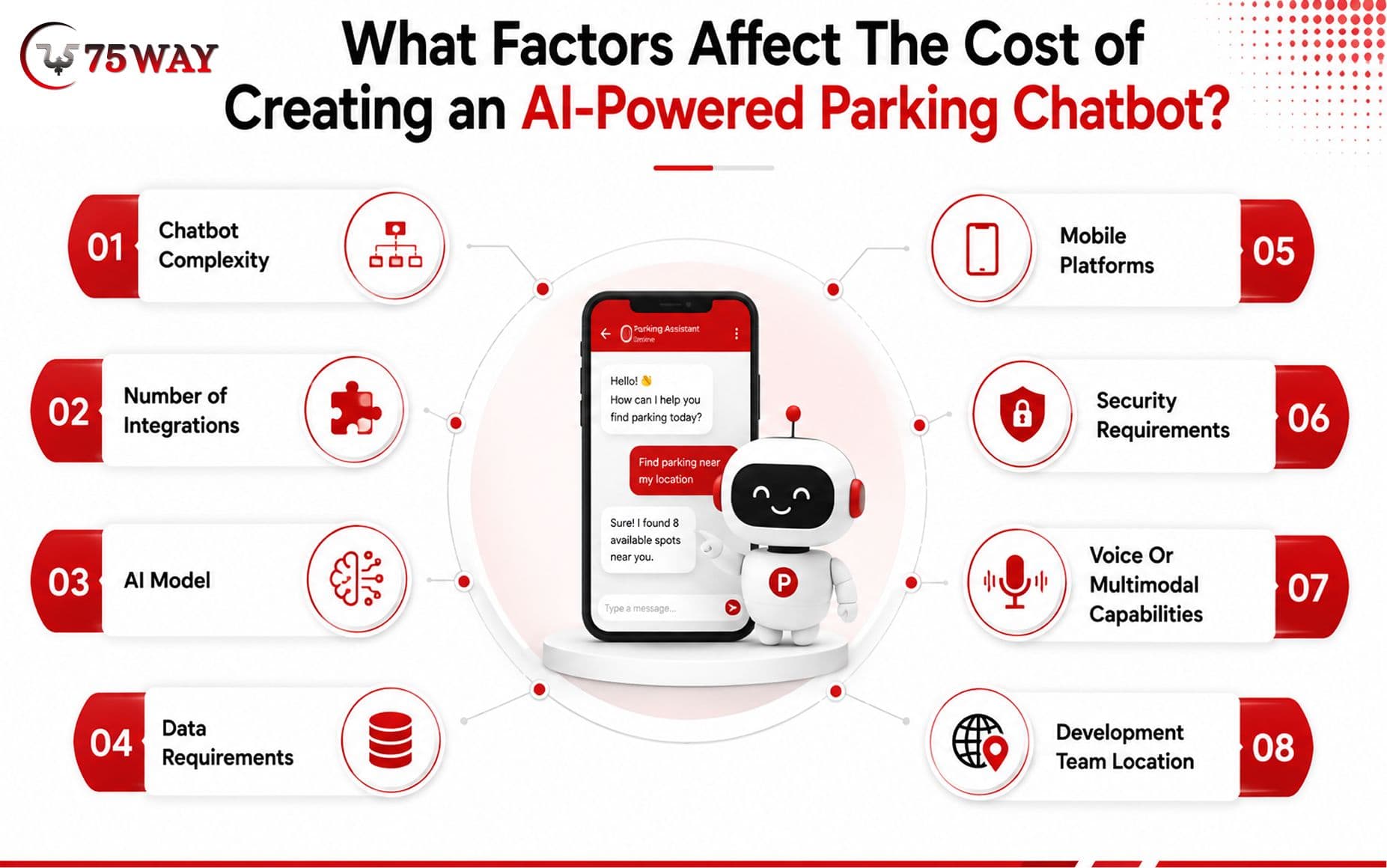
- Chatbot Complexity: A rule-based support assistant requires less development than a conversational AI agent capable of completing transactions.
- Number of Integrations: Every additional system introduces development, testing, authentication, monitoring, and maintenance requirements.
- AI Model: Model selection affects infrastructure, latency, capabilities, and ongoing usage costs.
- Data Requirements: A chatbot using a small knowledge base is simpler than one requiring multiple dynamic data sources.
- Mobile Platforms: Supporting iOS and Android may affect the implementation depending on the existing app architecture.
- Security Requirements: Account access, payments, personal information, and administrative workflows require stronger security controls.
- Voice Or Multimodal Capabilities: Adding voice, images, documents, or other interaction methods increases the scope.
- Development Team Location: Rates vary significantly between U.S.-based teams, offshore teams, and hybrid development models.
AI Chatbot Development Cost vs Ongoing AI Cost For Parking App
One mistake businesses make is treating chatbot development as a one-time expense.
There are usually two financial components:
Initial development: architecture, UI, backend development, AI integration, APIs, testing, deployment, and security.
Ongoing cost: model usage, cloud infrastructure, monitoring, maintenance, support, API usage, analytics, and future improvements.
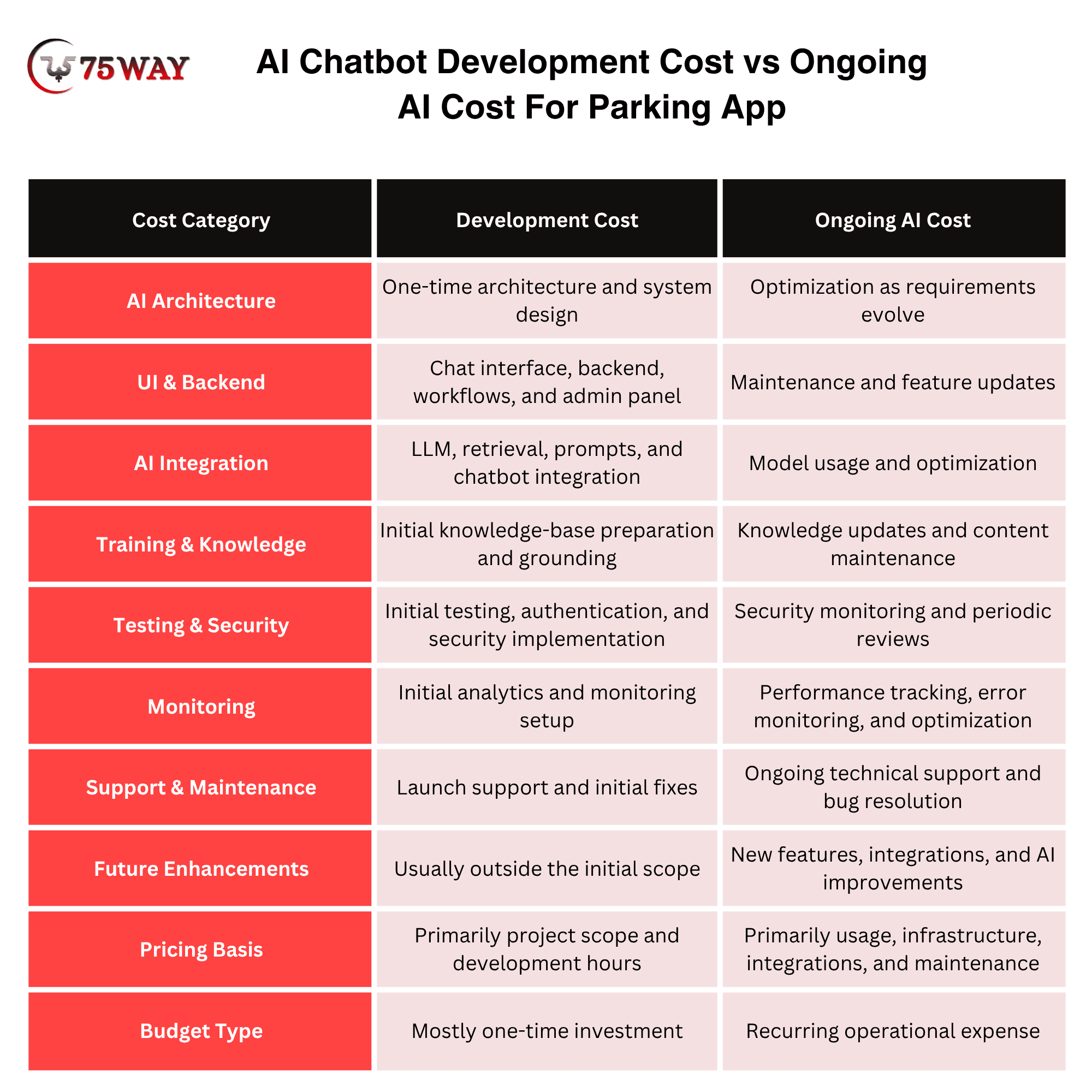
The monthly operating cost depends heavily on conversation volume, model choice, response length, retrieval architecture, infrastructure, and the number of integrated services.
For a serious parking business, the financial model should therefore consider total cost of ownership, not only the initial development quote.
How To Calculate The ROI of A Parking App Chatbot?
The chatbot should be evaluated against business outcomes rather than the number of AI features.
A simple ROI model can consider:
ROI = Additional Revenue + Support Cost Savings − Chatbot Operating Costs − Development Cost
For example, suppose a parking platform receives thousands of monthly support conversations.
If the chatbot resolves a meaningful percentage of routine requests while also assisting users during the booking journey, the business can measure both operational savings and additional booking revenue.
Useful KPIs include:
- Chatbot-assisted bookings
- Booking conversion rate
- Support tickets avoided
- Cost per resolved conversation
- Average support resolution time
- Customer satisfaction
- Escalation rate
- Failed conversation rate
- Repeat usage
- Revenue per chatbot-assisted user
This provides a much stronger business case than saying that the chatbot will “improve engagement.”
Offshore AI Chatbot Development Company Vs. In-House Team Vs. Freelancers
An offshore AI chatbot development company offers specialized expertise and scalable resources, an in-house team provides direct control, while freelancers typically offer lower costs and flexible engagement.
For a parking app, the right choice depends on development complexity, integration requirements, security needs, available technical talent, budget, and long-term support expectations.
An offshore company can bring developers, AI engineers, backend specialists, QA professionals, and project managers under one team, while an in-house setup requires the business to recruit and manage these capabilities internally.
Freelancers can work well for smaller, clearly defined chatbot projects, but complex parking solutions often require coordinated work across AI, APIs, mobile development, backend systems, security, and testing.
An in-house team may be suitable for businesses with established technical departments and long-term product ownership, whereas an offshore AI chatbot company can be a practical option for startups and businesses seeking specialized expertise without building an entire AI team internally.
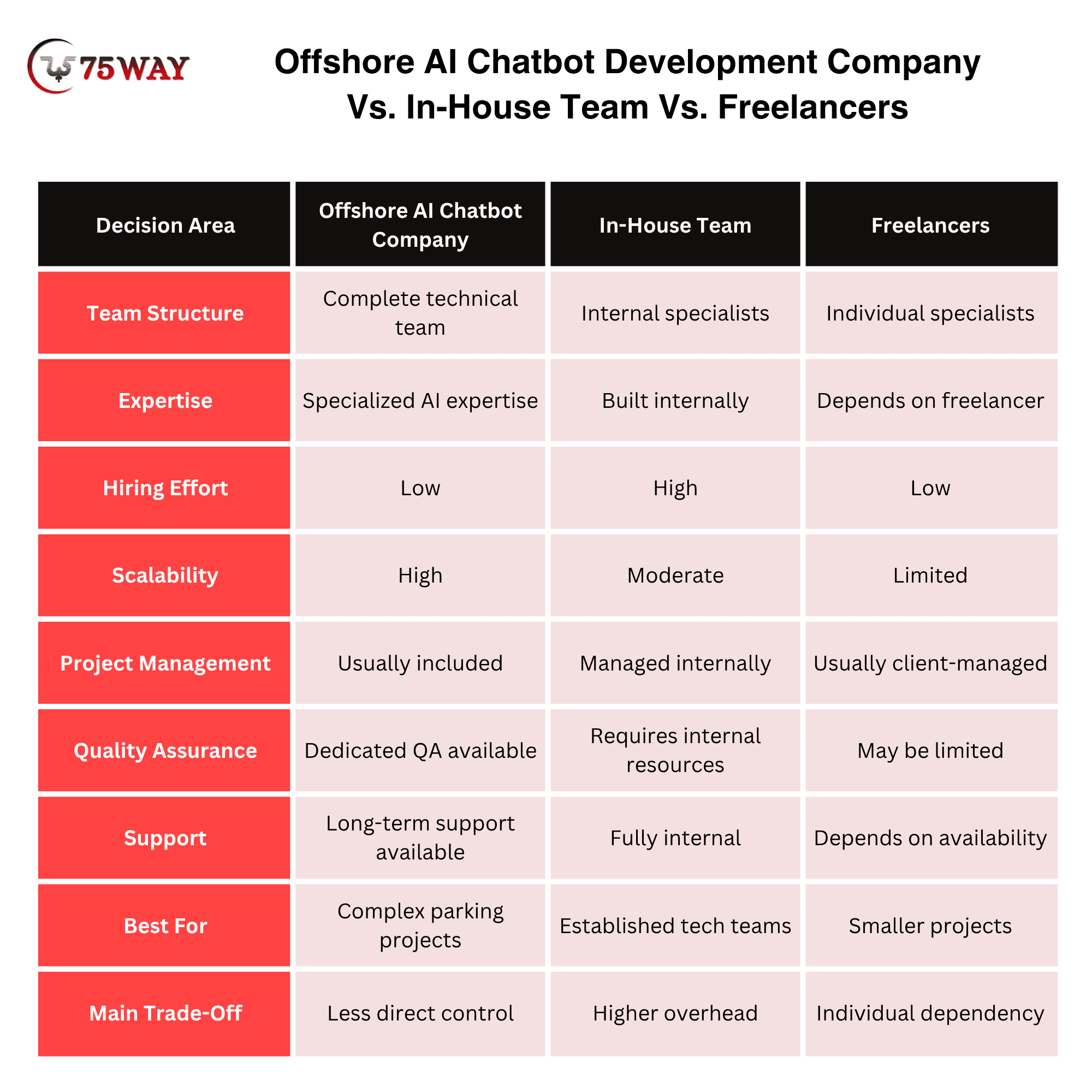
The decision should ultimately be based on total project requirements, not development cost alone.
Common Mistakes To Avoid When Building Conversational Chatbot in Parking Finder App & Solutions
A conversational chatbot can improve parking discovery and support, but poor planning can make it unreliable or expensive. The biggest mistakes involve weak use cases, inaccurate data, security gaps, poor integrations, and unclear success metrics. Avoiding these issues helps create a chatbot that delivers practical business value.
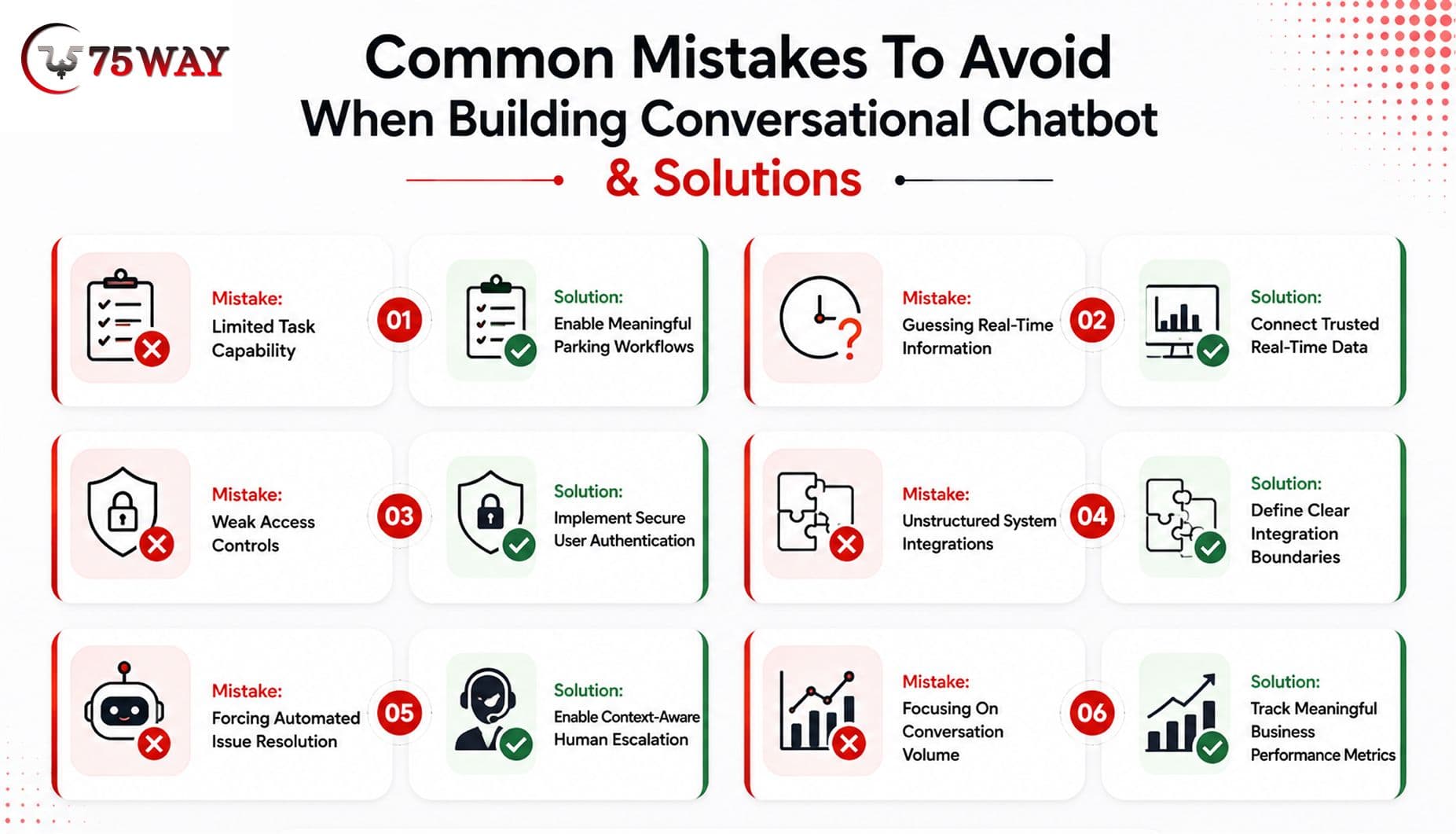
1. Building An FAQ Bot And Calling It AI
Mistake: A chatbot that only repeats information from help pages offers limited value.
Solution: Design it to handle meaningful parking tasks, such as finding spaces, checking availability, managing bookings, and resolving support requests.
2. Letting AI Invent Live Parking Information
Mistake: Allowing the chatbot to guess availability, pricing, booking status, or payment information can mislead users.
Solution: Connect the chatbot to trusted APIs and systems so dynamic information comes from authoritative sources.
3. Ignoring Authentication And Permissions
Mistake: Users could potentially access booking or account information without proper verification.
Solution: Implement authentication, authorization, and role-based access before allowing account-specific actions.
4. Adding Integrations Without Clear Architecture
Mistake: Connecting numerous systems without defining how they work together can create technical complexity.
Solution: Map each integration to a specific workflow and establish clear API, data, and business-logic boundaries.
5. Removing Human Support From Complex Issues
Mistake: Forcing the chatbot to handle every request can frustrate users when problems require human judgment.
Solution: Add intelligent escalation that transfers complex cases to support agents with relevant conversation context.
6. Measuring Conversations Instead Of Business Results
Mistake: A high conversation volume does not automatically indicate chatbot success.
Solution: Track meaningful KPIs such as booking conversions, resolution rates, support savings, customer satisfaction, escalation rates, and revenue impact.
How To Choose A Custom Chatbot Development Company For A Parking App
The development partner matters because a parking chatbot combines AI, mobile development, backend engineering, APIs, real-time systems, and security. Before selecting a company, ask:
- Does The Team Understand Parking Workflows?
A team should understand reservations, availability, pricing, payments, cancellations, navigation, and customer support rather than treating the project as a generic chatbot.
- Can They Integrate With Existing APIs?
Ask how they will connect the chatbot to your current booking, parking inventory, user, payment, and support systems.
- How Will They Prevent AI Hallucinations?
The provider should explain how dynamic data will be retrieved and how the system will prevent unsupported claims.
- How Is User Data Protected?
Ask about authentication, authorization, encryption, logging, data retention, and access controls.
- How Will Success Be Measured?
The provider should connect chatbot development to measurable business KPIs.
- Can They Support The Product After Launch?
AI systems require monitoring, model changes, prompt or workflow improvements, integration maintenance, and performance analysis.
Custom Chatbot Development For Parking App: When Is It Worth The Investment?
A custom chatbot is worth considering when your parking business has enough customer interactions, operational complexity, or booking volume to justify automation.
It can make sense for:
- Parking marketplace startups
- Parking reservation platforms
- Smart parking companies
- Parking garage operators
- Airport parking platforms
- University parking systems
- Commercial parking businesses
- Municipal parking platforms
- Mobility and transportation platforms
- Multi-location parking networks
It may not make sense to build a highly customized AI assistant if the parking app has very few users, minimal support demand, limited functionality, or no meaningful backend data to integrate.
The objective should be to solve a business problem, not simply add AI because competitors are doing it.
Custom Parking Chatbot Vs AI Agent: What's The Difference?
A chatbot primarily focuses on conversational interaction.
An AI agent can go further by interpreting a goal, deciding which tools or workflows are required, and taking permitted actions.
For example:
Chatbot: “Parking is available at Garage A.”
AI agent: “I found two garages near your destination. Garage A is $16, and Garage B is $19. Garage A has covered parking and spaces available until 10 PM. Would you like me to reserve it?”
With appropriate permissions and integrations, an agent could then initiate the reservation workflow.
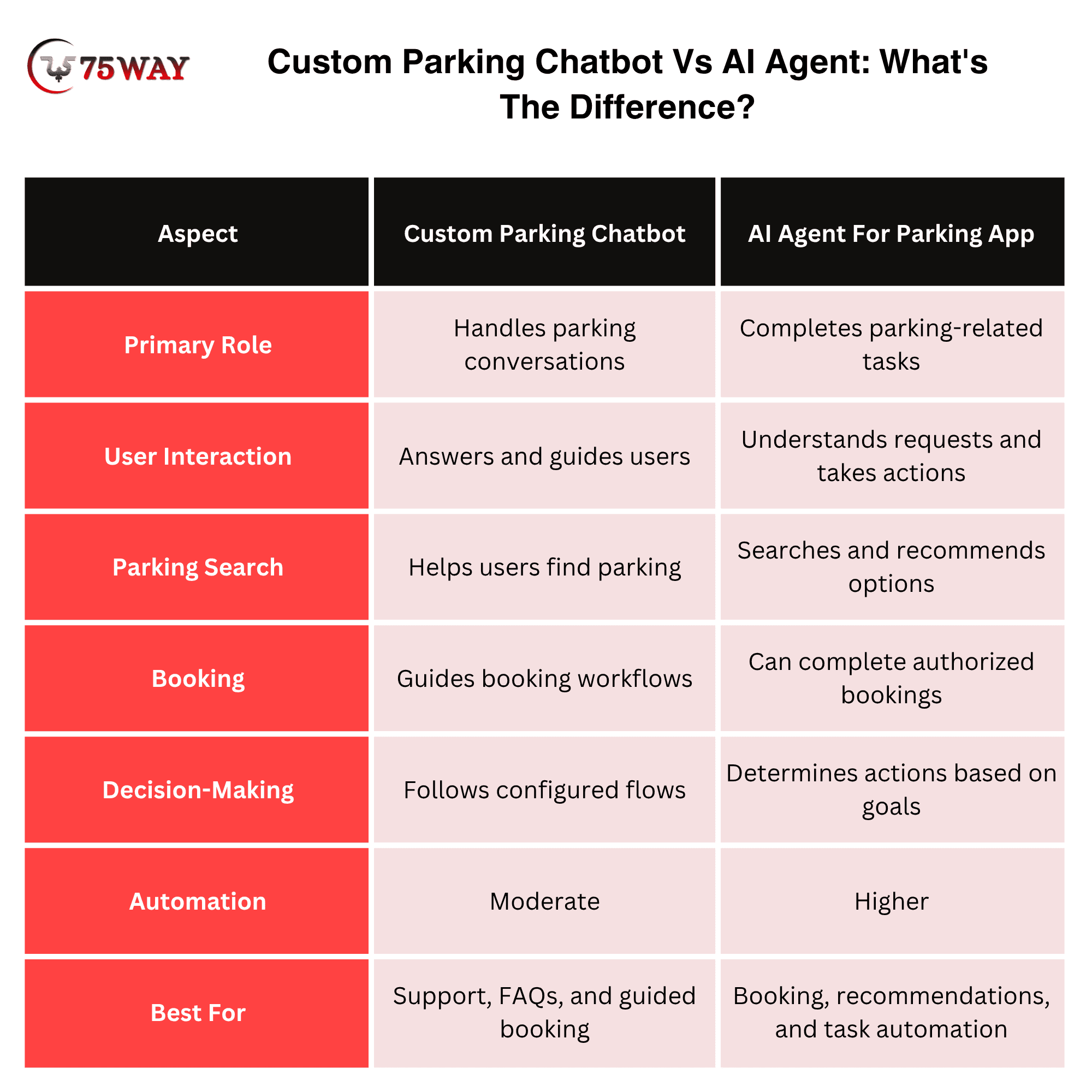
For parking businesses, this distinction matters because the commercial value increasingly comes from task completion, not simply question answering.
How Long Does It Take To Build A Custom Chatbot for AI-Powered Parking App?
A basic parking chatbot may take around 6–10 weeks, while an integrated AI parking assistant can take 12–24+ weeks, depending on the project scope. A typical timeline may include:
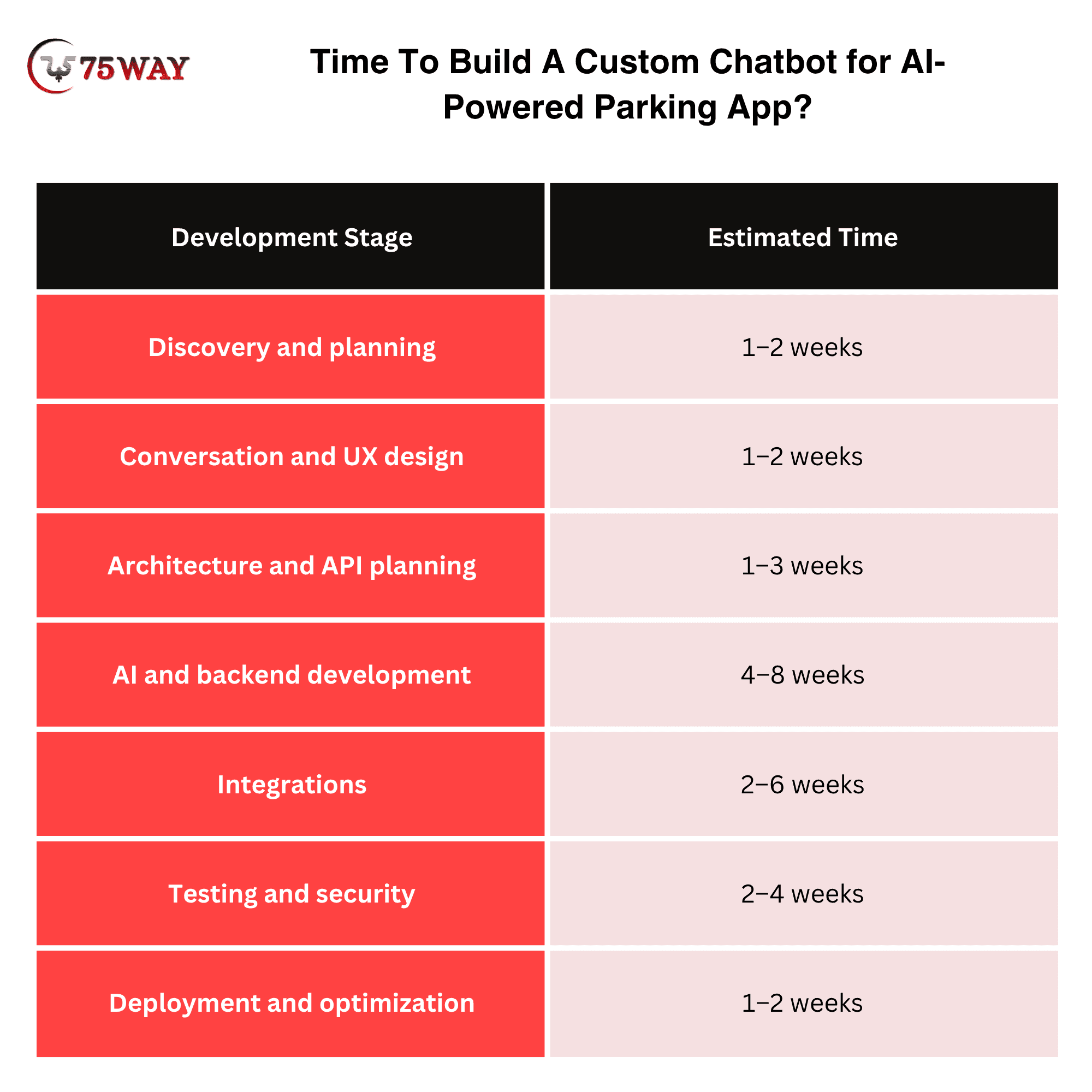
These stages can overlap.
The actual timeline depends heavily on whether the parking app already has usable APIs and whether the chatbot needs to perform transactions.
How To Make A Parking Chatbot More Useful With AI
AI should be used where it provides a meaningful advantage over conventional app functionality.
Good AI use cases include:
- Natural-language parking search: Understand complex parking requests.
- Recommendation: Match users with parking based on multiple preferences.
- Intent detection: Understand whether the user wants to book, cancel, navigate, report an issue, or ask a question.
- Conversation memory: Retain relevant context within a session.
- Support automation: Resolve repetitive issues without unnecessary human intervention.
- Knowledge retrieval: Provide answers based on approved business information.
- Agentic workflows: Execute authorized actions through application tools.
The best architecture is often hybrid:
AI for understanding + APIs for data + business logic for decisions + secure workflows for actions.
That approach gives the business more control than allowing the language model to operate without boundaries.
How 75way Is the Perfect Choice To Build Custom Parking Chatbots?
75way Technologies builds custom AI chatbots around your parking app’s actual workflows, helping users search for spaces, understand availability, manage bookings, and receive contextual support through conversational interactions.
Our AI developers can connect the chatbot with your existing parking APIs, booking systems, maps, databases, payment workflows, and customer-support tools. This allows the assistant to work with relevant application data instead of relying only on static responses.
From architecture and AI integration to testing, deployment, and optimization, 75way helps turn your parking chatbot idea into a scalable product feature designed around your users, technical environment, and business objectives.
Final Takeaway
Custom chatbot development for a parking app is most valuable when the chatbot becomes part of the parking workflow rather than another support widget.
The strongest implementations connect conversational AI with real-time parking availability, reservations, maps, customer accounts, payment workflows, support systems, and business rules. That combination can make parking discovery easier, reduce repetitive support work, and create additional opportunities to convert conversations into completed bookings.
For founders and parking operators, the right question is therefore not “How can we add an AI chatbot?” It is:
“Which parking workflows can conversational AI make easier, faster, or more valuable for our customers and business?”
That answer should determine the chatbot's architecture, integrations, development scope, and investment. To build a custom parking chatbot, you can partner with a reliable AI chatbot development firm to turn your parking workflows into intelligent, actionable conversations.
Frequently Asked Questions (FAQs)
How Much Does It Cost To Build A Chatbot For A Parking App?
A custom parking chatbot can cost roughly $20,000 to $100,000+, depending on AI complexity, integrations, booking workflows, security, and supported channels.
Can A Parking Chatbot Check Real-Time Parking Availability?
Yes. A chatbot can retrieve current availability when it is connected securely to the parking platform or parking-management system through appropriate APIs.
Can A Chatbot Book Parking Spaces?
Yes. A custom chatbot can guide users through parking reservations and initiate booking workflows when the application provides secure booking APIs and authorization.
Can A Parking Chatbot Integrate With Payment Systems?
Yes. It can support payment-related workflows through secure payment integrations, although sensitive financial information should not be exposed directly through the conversational layer.
Should A Parking Startup Build A Custom Chatbot?
A startup should consider customization when the chatbot addresses a meaningful customer-support, booking, or operational problem that generic tools cannot handle adequately.
Can The Chatbot Work Inside An Existing Parking App?
Yes. A custom chatbot can be integrated into an existing iOS, Android, Flutter, React Native, or web-based parking application, depending on its architecture.