AI Summary
Discover how childcare management app development works, from costs and core features to security, scalability, and business benefits. This guide explains development timelines, technology choices, monetization, compliance considerations, and practical planning strategies for founders building profitable childcare platforms.
Key Takeaways
- The U.S. child care market is projected to reach USD 147.2 million by 2033, growing at a 7.0% CAGR.
- Childcare management app development can cost $5,000–$250,000+, depending on complexity.
- Essential features streamline enrollment, attendance, billing, communication, staffing, reporting, and administration.
- Advanced capabilities improve scalability, automation, analytics, security, and overall business visibility.
- Development timelines depend on features, platforms, integrations, technology, testing, and customization.
A parent should not have to call a childcare center just to ask whether their child arrived safely, check an upcoming schedule, or confirm a payment. For childcare providers, those small requests can pile up across the day, taking staff away from the work that matters most.
The access gap shows how significant the childcare need remains worldwide. According to the World Bank, nearly 350 million children below primary-school-entry age need childcare but currently lack access, representing more than 40% of children in that age group. As childcare demand grows, digital systems, such as childcare apps and software solutions, can give providers a stronger way to manage operations and deliver the communication parents increasingly expect.
The goal of childcare management app development is not simply to digitize paperwork. A useful platform should connect the center, staff, children, and parents through practical workflows that make everyday management easier.
This guide covers the development process, essential features, technology choices, security considerations, costs, and other decisions involved in building one.
What Is A Childcare Management App?
A childcare management app is a platform that helps daycare centers, preschools, childcare businesses, and multi-location operators manage administrative, operational, financial, and parent-facing activities from a centralized system.
Modern childcare management application commonly covers:
- Child enrollment
- Digital registration
- Attendance
- Check-in and check-out
- Parent communication
- Staff management
- Classroom management
- Billing and payments
- Daily reports
- Child records
- Scheduling
- Document management
- Notifications
- Reporting and analytics
- Health and safety records
Current childcare application directories show that attendance tracking, billing and invoicing, communication, enrollment, parent portals, daily reports, payments, alerts, and data security are among the commonly valued capabilities in this category.
The important distinction for a new product is that a childcare management app is not simply a parent communication app. A commercially viable platform usually connects the operational workflows of owners, directors, teachers, staff, parents, and administrators.
Childcare Mobile App Market Size & Growth Insights in USA & Worldwide
The growing demand for childcare is creating more room for digital tools that help providers manage families, staff, schedules, and daily operations. The U.S. childcare market is projected to rise from $91.9 million in 2026 to $147.2 million by 2033, reflecting a 7.0% CAGR during the period. The market growth, emerging trends, and opportunities shaping childcare mobile apps are discussed below.
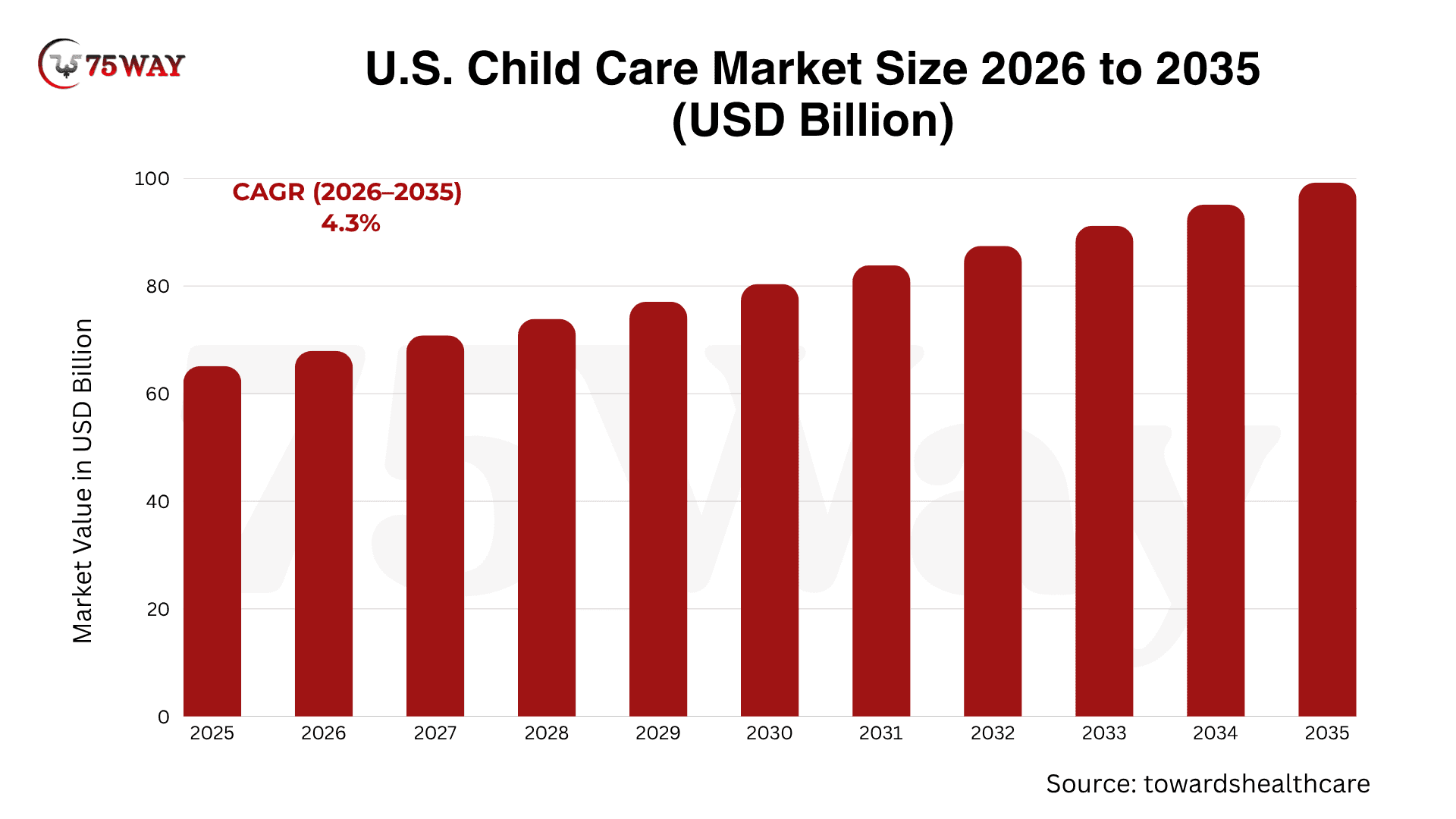
- The U.S. childcare market is projected to reach $99.23 billion by 2035, growing at a 4.3% CAGR.
- North America led the childcare market, accounting for a 42.4% share.
- Daycare centers captured 66.67% of childcare management software revenue in 2025, while home-based providers are forecast to grow at a 7.27% CAGR through 2031.
- Around 72% of childcare centers already use digital childcare management software or parent engagement apps.
- Childcare facilities using mobile parent communication apps report 34% higher parent satisfaction scores.
- Nearly 41% of parent inquiries and enrollment messages occur outside regular business hours, increasing the need for automated, app-based communication.
Why Businesses Are Investing In Childcare Management App Development?
Growth can become difficult for a childcare business when every new enrollment also means more paperwork, messages, attendance records, and administrative follow-ups. A management app can help providers handle a larger operation without relying on the same amount of manual coordination. The reasons businesses are turning to childcare management app are explained below.
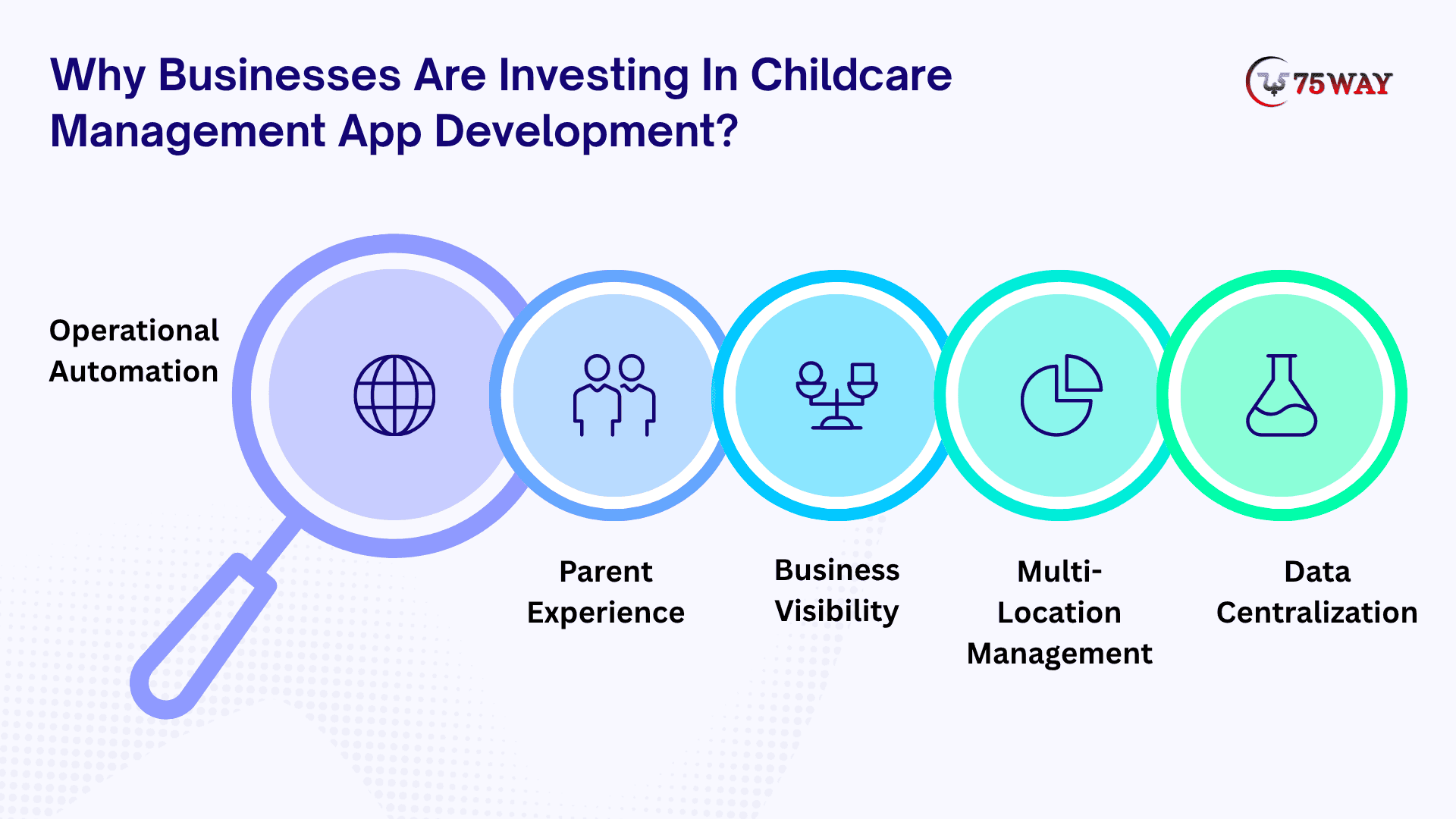
- Operational Automation
Automate repetitive administrative tasks such as attendance recording, reminders, invoices, notifications, and document collection.
- Parent Experience
Offer parents a centralized way to receive updates, communicate with staff, view information, make payments, and manage forms.
- Business Visibility
Give owners and directors dashboards showing enrollment, attendance, revenue, staffing, outstanding payments, and operational trends.
- Multi-Location Management
Allow childcare groups and franchise operators to manage multiple centers while maintaining location-level permissions and reporting.
- Data Centralization
Replace disconnected spreadsheets, paper records, messaging tools, payment systems, and isolated workflows with one platform.
Target Market For A Childcare Management Application Development Solution
Before starting development, define the exact ICP rather than building a generic platform for “childcare businesses.” A childcare management application can target several customer groups.
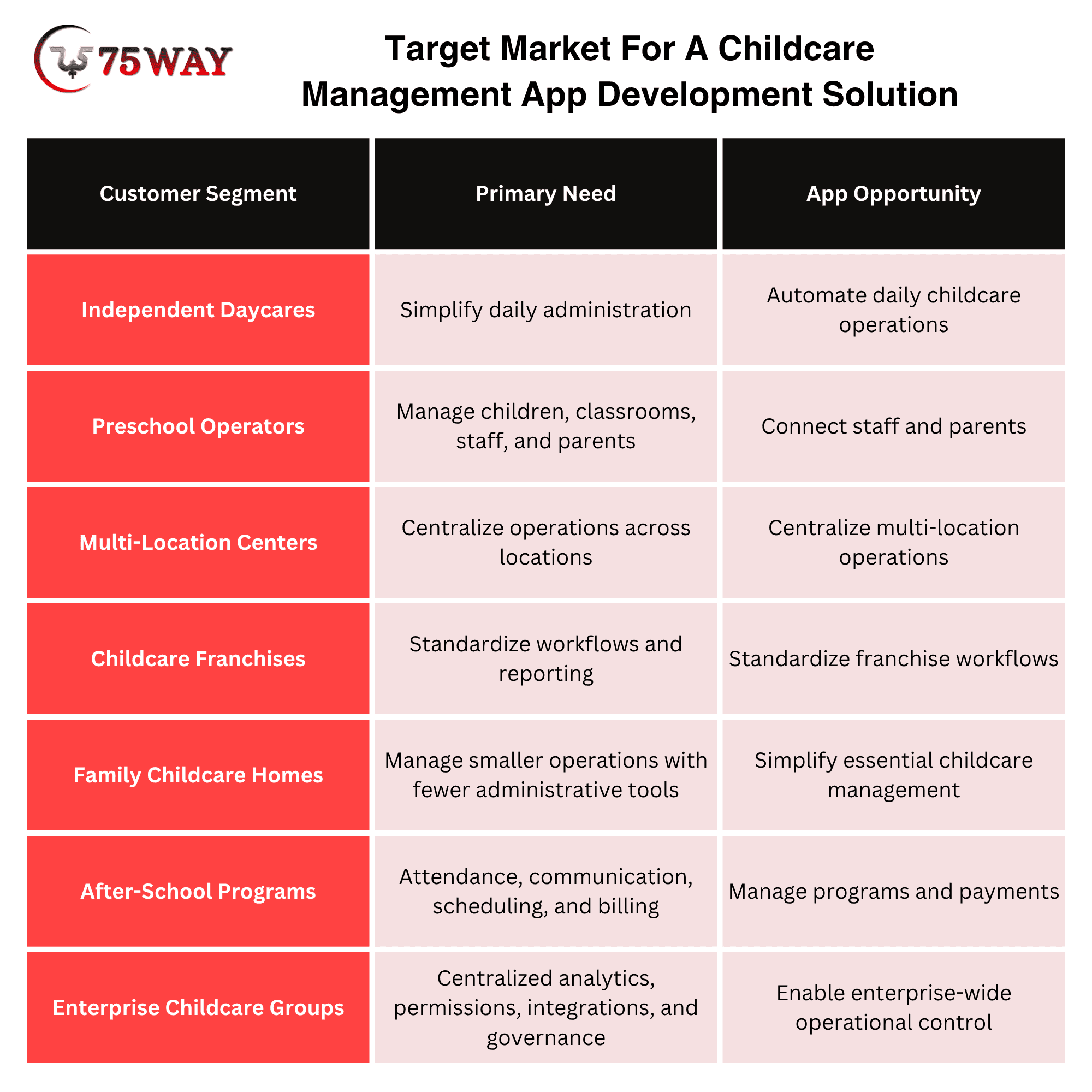
The product architecture should reflect the target market. A six-child family childcare business does not need the same complexity as a 20-location childcare organization.
Childcare.gov confirms that childcare settings and regulatory requirements vary across states and program types, including center-based and family childcare settings.
Must-Have Features For A Childcare Mobile App Development
A childcare app can have a polished interface and still become useless if it does not solve the everyday problems parents and staff face. The right functionality should make communication, child management, and center operations easier without creating another complicated system. The essential features worth including in a childcare mobile app are covered below.
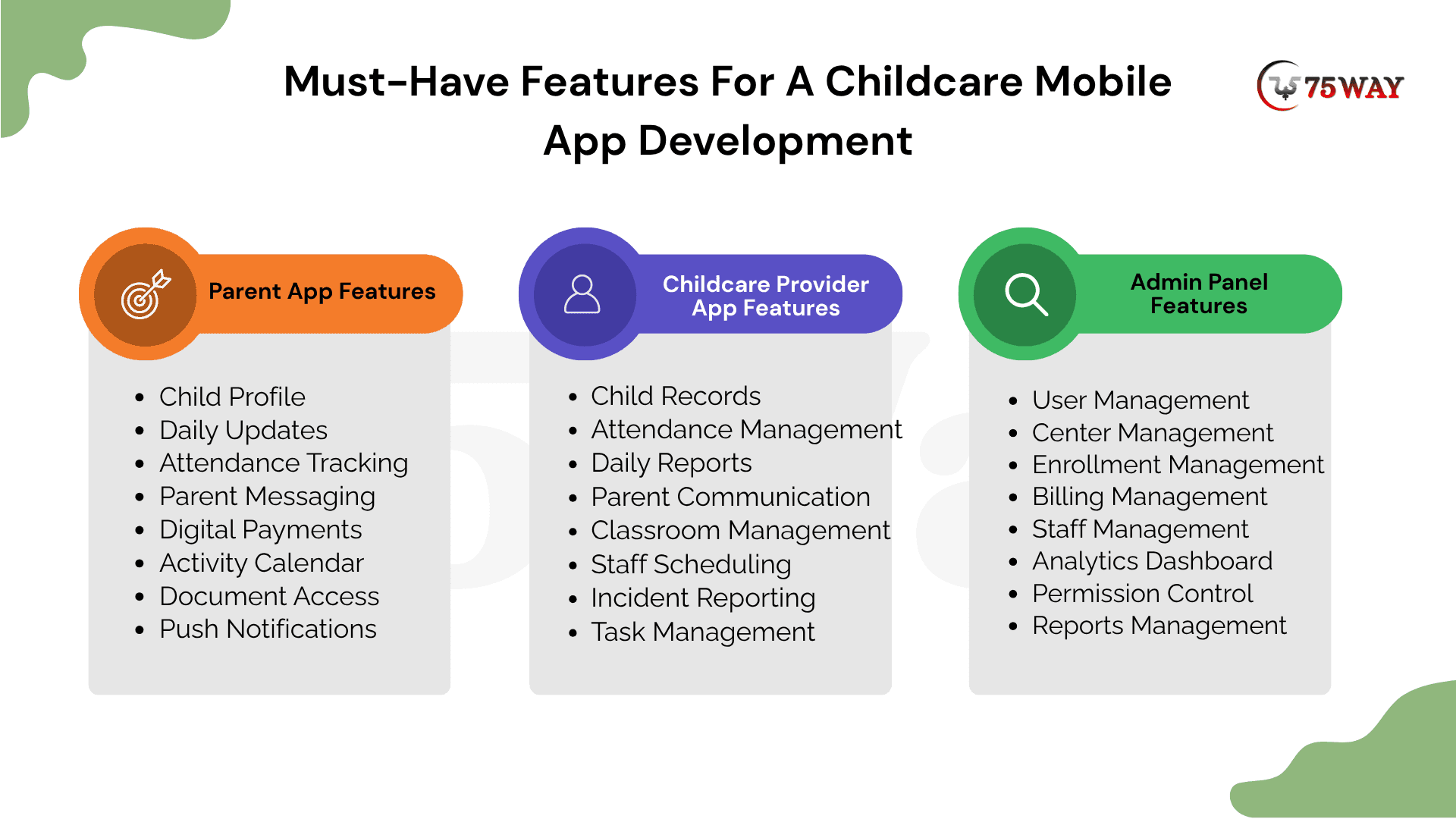
Module 1: Parent App Features
The parent app keeps families connected with their child’s daily activities, attendance, payments, documents, and childcare updates. It gives parents convenient access to essential information while supporting timely communication with childcare providers.
- Child Profile: Store child details, emergency contacts, allergies, medical information, authorized pickups, and important enrollment records securely.
- Daily Updates: View meals, naps, activities, mood, photos, and classroom notes to stay informed throughout each childcare day.
- Attendance Tracking: Check child arrival and pickup status, review attendance history, and receive timely notifications about attendance changes.
- Parent Messaging: Communicate directly with teachers, receive classroom announcements, share important information, and maintain organized conversations within one platform.
- Digital Payments: Pay tuition, review invoices, access receipts, manage payment methods, and receive reminders for upcoming or overdue payments.
- Activity Calendar: View classroom events, holidays, parent meetings, activities, and schedule changes through an organized calendar interface.
- Document Access: Upload required forms, review childcare documents, complete digital paperwork, and receive reminders about missing information.
- Push Notifications: Receive timely alerts about pickups, payments, classroom updates, emergencies, schedule changes, and important childcare announcements.
Module 2: Childcare Provider App Features
The childcare provider app helps teachers and staff manage daily classroom activities, child records, attendance, and parent communication. It streamlines routine responsibilities while keeping important childcare information accessible throughout daily operations.
- Child Records: Access authorized child information, review important notes, manage classroom records, and quickly reference individual care requirements.
- Attendance Management: Record check-ins, check-outs, absences, late arrivals, and early pickups while maintaining accurate attendance records.
- Daily Reports: Record meals, naps, activities, diaper changes, moods, photos, and observations throughout each child's daily routine.
- Parent Communication: Send individual messages, classroom announcements, updates, reminders, and relevant information directly to parents through secure channels.
- Classroom Management: Organize children, assign activities, manage classroom schedules, review capacity, and coordinate daily classroom responsibilities.
- Staff Scheduling: View assigned shifts, coordinate availability, manage classroom assignments, and access relevant schedules from one centralized application.
- Incident Reporting: Document incidents, record relevant details, attach supporting information, and notify authorized administrators according to established procedures.
- Task Management: Track assigned responsibilities, prioritize daily activities, record completion, and coordinate recurring childcare tasks among authorized staff.
Module 3: Admin App Features
The admin console provides owners and directors with centralized control over users, locations, enrollment, billing, staff, and business data. It brings operational information into one place while supporting permissions, reporting, analytics, and multi-location management.
- User Management: Create user accounts, assign roles, control permissions, deactivate access, and maintain accurate stakeholder information across locations.
- Center Management: Configure locations, classrooms, operating schedules, capacity limits, policies, and administrative settings from one centralized system.
- Enrollment Management: Review applications, manage waitlists, approve registrations, assign classrooms, track enrollment status, and organize required documentation.
- Billing Management: Configure tuition plans, monitor invoices, review payments, manage outstanding balances, and coordinate billing-related administrative workflows.
- Staff Management: Manage employee profiles, roles, schedules, certifications, training records, availability, and location-specific assignments through centralized controls.
- Analytics Dashboard: Monitor enrollment, attendance, revenue, staffing, capacity, payments, and operational trends through customizable administrative dashboards.
- Permission Control: Define role-based access, restrict sensitive information, manage authorization levels, and protect data across different user groups.
- Reports Management: Generate operational reports, export business data, compare locations, review trends, and support informed administrative decision-making.
Advanced Features For Building Custom Childcare Management Mobile App
A basic childcare app may handle attendance, updates, and payments, but growing centers often need the software to do much more behind the scenes. Smart features can help owners manage larger operations, personalize parent experiences, and gain deeper visibility into daily performance. The advanced functionality worth adding to a custom childcare management app is explored below.
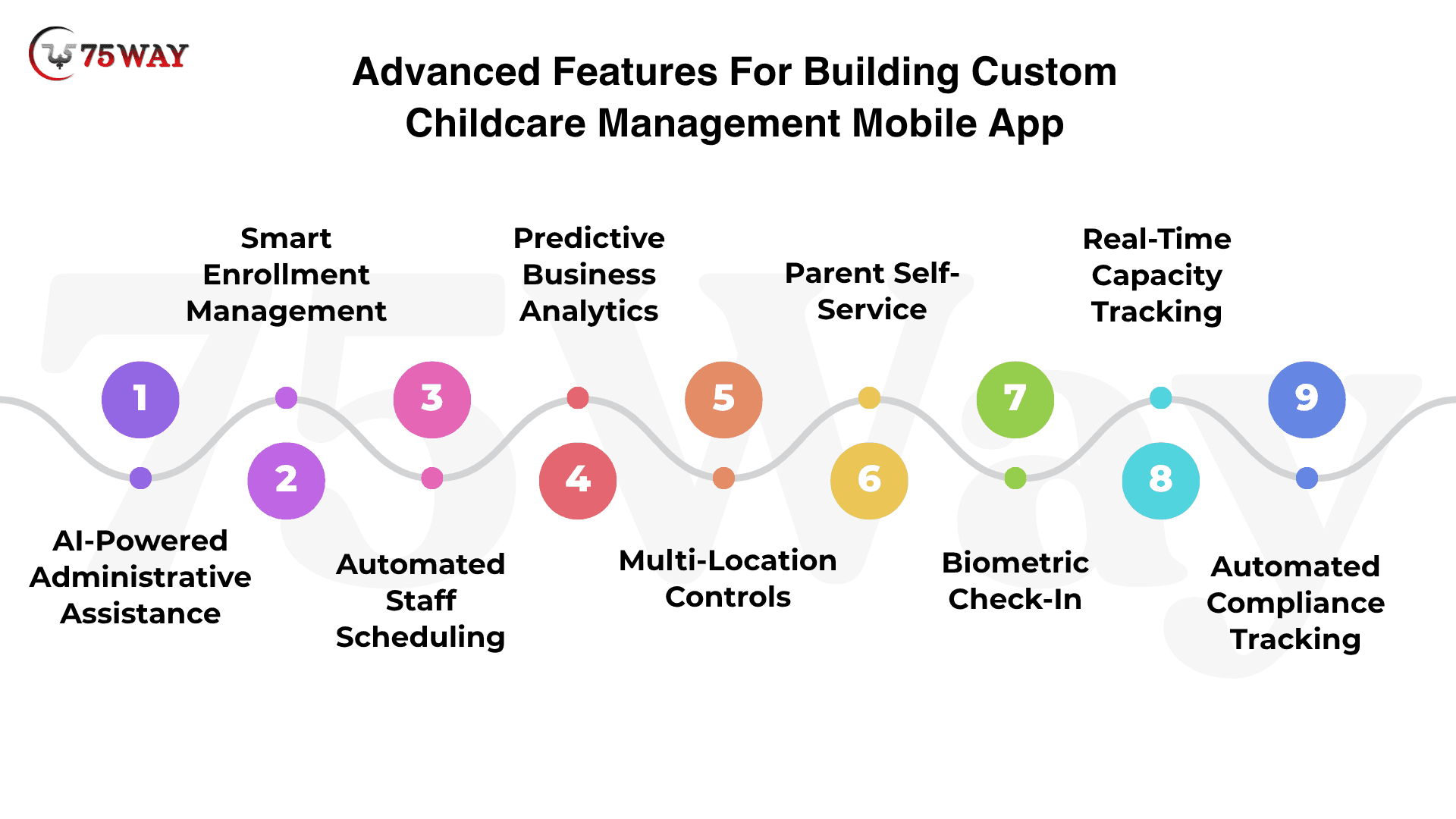
- AI-Powered Administrative Assistance
An AI-powered assistant can turn scattered childcare information into quick, useful answers for directors and administrators. Daily reports, attendance records, enrollment inquiries, and payment information can become easier to review without manually searching through multiple screens.
For example, a director could ask, “Which classrooms had the highest absences this month?” and receive a summarized answer from available data. AI can also help draft parent messages, summarize daily activities, classify inquiries, and flag unusual patterns for staff review.
- Smart Enrollment Management
A smart enrollment module can bring inquiries, tours, applications, waitlists, and approvals into one connected journey. Instead of tracking prospective families through spreadsheets and separate messages, directors can see exactly where each enrollment opportunity stands.
Automated reminders can highlight incomplete applications, upcoming tours, missing documents, and pending approvals. This visibility can help childcare operators follow up with families at the right time while keeping available classroom spaces easier to manage.
- Automated Staff Scheduling
Staff scheduling becomes easier when availability, classroom requirements, operating hours, and employee roles exist within the same system. Directors can view staffing needs alongside classroom assignments instead of building schedules manually from multiple spreadsheets.
Schedule changes can also reach the right employees through timely notifications. A connected scheduling workflow can help administrators identify staffing gaps, manage shift changes, and maintain a clearer view of daily workforce coverage.
- Predictive Business Analytics
Predictive analytics can turn everyday childcare data into business insights that are easier for owners to understand. Enrollment, attendance, revenue, payment activity, staffing, and classroom capacity can come together in dashboards that reveal important operational patterns.
Historical data can also help operators identify changing enrollment demand or recurring attendance trends. Multi-location owners can compare center-level performance, investigate unusual changes, and use current information when planning staffing, capacity, or growth.
- Multi-Location Controls
Multi-location controls can give childcare groups a single view of operations without removing individual center-level access. Owners can monitor locations from one dashboard, while directors can remain focused on their assigned center, classrooms, staff, and families.
Centralized permissions can also make expansion easier for growing childcare organizations. Standardized settings, reporting, billing controls, and user roles can provide a common operational foundation while allowing each location to manage its daily activities.
- Parent Self-Service
A parent self-service portal can remove many routine requests from the childcare staff’s workload. Families can update contact information, upload documents, manage authorized pickups, review invoices, make payments, and access important child-related information from their own accounts.
The experience can become especially valuable when parents need information outside regular operating hours. Fewer routine requests can reach the front office, while families gain a convenient way to complete common tasks without waiting for staff assistance.
- Biometric Check-In
Biometric check-in can create an additional identity-verification layer for authorized users during arrival and pickup workflows. Depending on the device and implementation, supported biometric authentication can help verify identity before an attendance action or restricted workflow takes place.
Privacy and consent considerations are particularly important when biometric technology enters a childcare environment. Any implementation should account for applicable requirements, secure handling of biometric information, device capabilities, and alternative check-in methods for families who do not use biometrics.
- Real-Time Capacity Tracking
Real-time capacity tracking can show directors how many children are currently present in each classroom and where available spaces exist. Attendance changes can automatically update occupancy information, giving administrators a clearer picture throughout the operating day.
Capacity information can also connect with enrollment and classroom assignment data. For multi-location organizations, this visibility can make it easier to understand available spaces across centers and identify locations approaching their operational limits.
- Automated Compliance Tracking
Automated compliance tracking can organize important records such as staff certifications, training documents, required forms, and renewal dates. Instead of relying on separate calendars or manual reminders, administrators can see which records require attention and when.
Because childcare requirements can vary by state, program type, and organization, configurable workflows are more practical than fixed compliance rules. Reminder systems and centralized records can support administrative organization while leaving regulatory interpretation to qualified professionals.
A Step-By-Step Process for Childcare App Development
The first version of a childcare app sets the foundation for everything that follows, from the parent experience to the way administrators manage daily operations. Poor planning early on can create unnecessary development work and expensive changes later. The development journey for turning a childcare app concept into a working product is covered below.
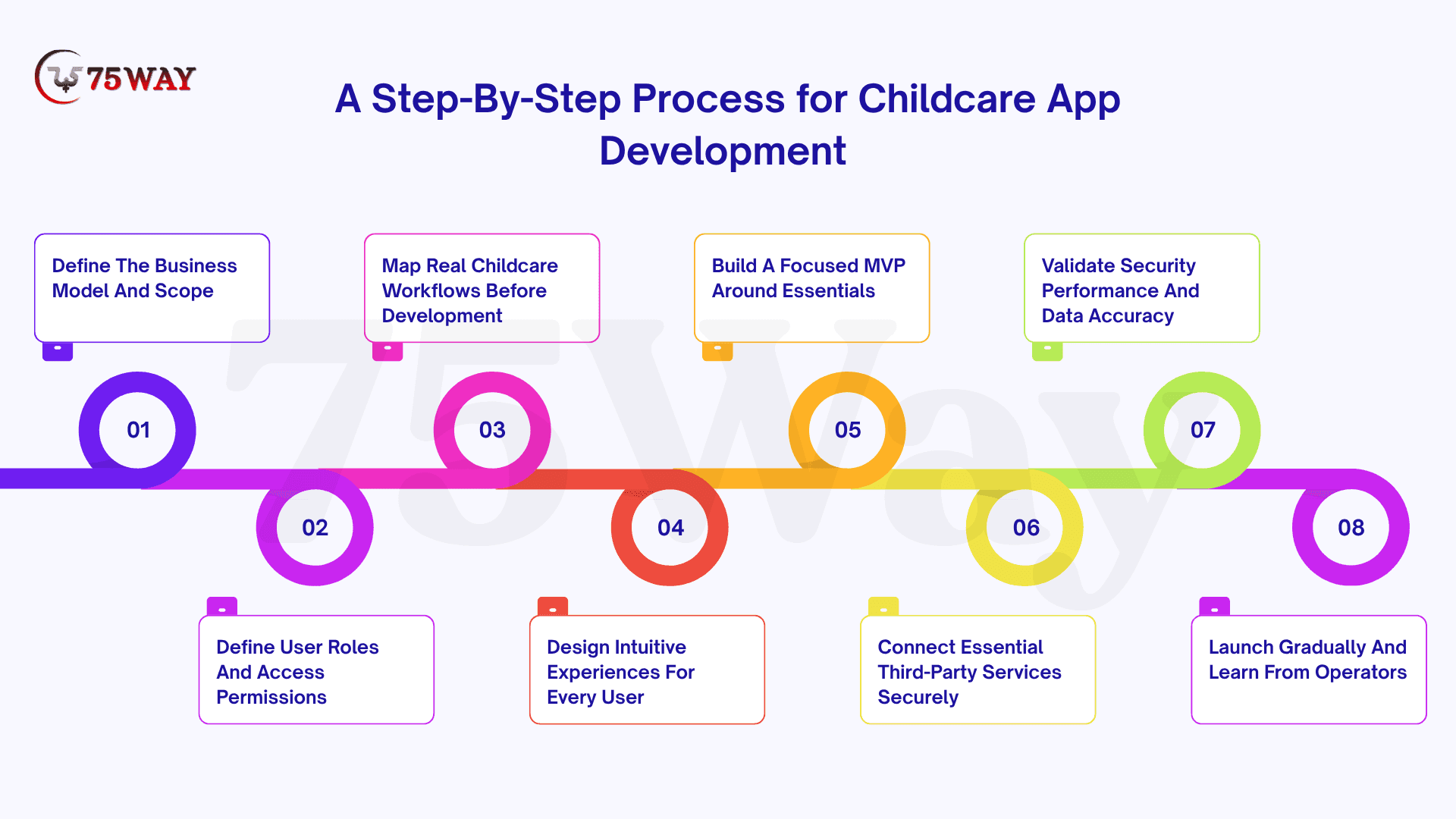
1. Define The Business Model And Scope
A childcare management app needs a clear commercial purpose before development begins. Decide whether the platform will support a single center, multiple locations, franchises, enterprise operators, B2B SaaS customers, or parent-facing services. This decision directly affects the product architecture, subscription model, user permissions, data isolation, integrations, and long-term scalability.
Key Considerations
- Target Users: Center owners, directors, staff, parents, or SaaS customers
- Revenue Model: Subscription, per-child pricing, location-based plans, or enterprise contracts
- Product Scope: Single-center operations or multi-location management
- Growth Plan: Features and architecture required for future expansion
A clearly defined scope also prevents early development from becoming overloaded with features that do not support the product’s primary business objective.
2. Define User Roles And Access Permissions
Different childcare users interact with the same platform in very different ways. An owner may need financial and organization-wide visibility, while teachers primarily need classroom, attendance, and child information. Parents require access to their own child’s records, communications, schedules, and payments.
A role-based permission structure keeps sensitive information separated and makes the application easier to manage as more centers and employees join the platform.
Typical Roles
- Owner Access: Organization-level oversight, billing, analytics, and configuration
- Director Access: Center operations, enrollment, staff, classrooms, and reporting
- Teacher Access: Attendance, activities, child records, and parent communication
- Parent Access: Child updates, messages, payments, schedules, and documents
The permission model should be designed early because changing access rules after deployment can create security, usability, and data-management complications.
3. Map Real Childcare Workflows Before Development
Software should reflect how childcare businesses actually operate, rather than forcing staff into unfamiliar processes. Start by documenting daily activities, identifying handoffs between users, and finding repetitive administrative tasks that the application can simplify.
For example, an enrollment journey could move through:
Inquiry → Tour → Application → Documents → Approval → Enrollment → Classroom Assignment
An attendance workflow may follow:
Check-In → Classroom Assignment → Daily Activity → Pickup → Check-Out → Attendance Record
Workflow Areas
- Enrollment Journey: Inquiry, applications, approvals, and placement
- Daily Operations: Attendance, activities, meals, naps, and pickups
- Communication Flow: Staff updates, parent messages, alerts, and announcements
- Billing Cycle: Invoices, payments, receipts, discounts, and overdue balances
Workflow mapping also helps development teams separate essential capabilities from features that can wait for later releases.
4. Design Intuitive Experiences For Every User
A childcare platform needs different experiences for busy directors, teachers working with children, administrators handling operations, and parents checking updates from their phones. User flows should therefore be designed around real tasks rather than simply placing numerous features inside menus.
Wireframes can establish the navigation structure first, followed by interface designs, interactive prototypes, responsive layouts, and reusable design components.
- Quick Actions: Frequently used tasks should remain easy to reach
- Clear Navigation: Role-specific menus should reduce unnecessary screens
- Mobile Usability: Parent and teacher workflows should work comfortably on smaller displays
- Accessible Interfaces: Text, controls, contrast, and interaction patterns should support diverse users
Prototype testing with representative users can expose confusing workflows before those problems become expensive engineering changes.
5. Build A Focused MVP Around Essentials
The first release should solve meaningful operational problems without attempting to reproduce every capability of a mature childcare platform. A focused MVP gives the business an opportunity to validate demand, understand user behavior, and identify which features deserve deeper investment.
A practical first version could include:
- User Access
- Child Profiles
- Parent Management
- Enrollment Management
- Attendance Tracking
- Parent Messaging
- Push Notifications
- Billing Payments
- Admin Dashboard
- Basic Reports
The exact MVP will vary according to the business model. A franchise platform, for example, may require multi-location controls earlier than a product designed for one independent daycare.
6. Connect Essential Third-Party Services Securely
External integrations can turn a basic childcare application into a connected operational platform. Payment processing, communications, calendars, accounting, identity services, and cloud storage may each require different APIs, authentication methods, webhooks, and data-handling approaches.
Integration requirements should be documented before development so the team understands technical dependencies and ongoing maintenance responsibilities.
Common Integrations
- Payments: Payment processors and recurring billing services
- Messaging: Email, SMS, and push notification providers
- Calendars: Scheduling and event-management platforms
- Accounting: Financial and bookkeeping software
- Storage: Secure cloud document and media storage
- Identity: Authentication and identity-management services
Third-party dependencies should also have fallback plans because an external API change or service outage can affect core childcare operations.
7. Validate Security Performance And Data Accuracy
Childcare applications handle sensitive information about children, parents, employees, payments, and center operations. Security should therefore be treated as a product requirement from the architecture stage, rather than as a final pre-launch checklist.
Testing should examine both technical controls and real user workflows across mobile and web environments.
Testing Areas
- Permission Testing: Verify that users access only authorized information
- API Testing: Validate endpoints, authentication, responses, and error handling
- Security Testing: Examine vulnerabilities, sessions, encryption, and access controls
- Performance Testing: Evaluate application behavior under realistic workloads
- Device Testing: Check supported mobile devices, browsers, and screen sizes
- Data Testing: Verify records, calculations, synchronization, and validation rules
Privacy and regulatory requirements should also be reviewed according to the product’s users, data practices, integrations, and operating jurisdictions. Requirements such as child-privacy obligations may differ depending on how the platform collects and processes information.
8. Launch Gradually And Learn From Operators
A controlled launch provides a valuable reality check before large-scale adoption. Instead of introducing the application to hundreds of centers immediately, begin with a manageable group of childcare operators who can use the product during real enrollment, attendance, communication, and billing activities.
Their experience can uncover problems that internal testing may not reveal.
Feedback Signals
- Workflow Gaps: Important operational tasks missing from the product
- Usability Issues: Screens or navigation that create unnecessary friction
- Permission Errors: Incorrect access between roles or locations
- Reporting Gaps: Information directors need but cannot retrieve
- Parent Adoption: Areas where families struggle to use the application
- Billing Problems: Payment, invoice, or account-management issues
Usage data, support requests, interviews, and operator feedback can then guide the next product cycle. This evidence-based approach helps prioritize improvements around actual childcare needs rather than assumptions made during initial planning.
Recommended Technology Stack for Tailored Childcare Application Development
Parents may only see a few taps on their screen, but each interaction can depend on databases, APIs, cloud infrastructure, security layers, and backend services working together. The right stack gives your childcare platform the foundation needed for reliable daily operations and future expansion. The technologies commonly used to build a tailored childcare application are explained below.
- Web Frontend: The web interface can be developed using React or Next.js for responsive, scalable experiences.
- Mobile: Flutter or React Native can support cross-platform mobile applications for parents and childcare staff.
- Backend: Node.js, NestJS, or Python can power APIs, business logic, and application services.
- Database: PostgreSQL can manage structured information such as children, parents, attendance, billing, and enrollment records.
- Cache: Redis can improve response times for frequently accessed application data and sessions.
- Cloud: AWS, Google Cloud, or Azure can provide scalable infrastructure, storage, databases, and deployment services.
- Notifications: Firebase Cloud Messaging can deliver timely push notifications to parents, teachers, and administrators.
- Payments: Stripe or an equivalent payment provider can support secure online payments, subscriptions, and billing workflows.
- Analytics: Mixpanel, GA4, or custom analytics can help teams understand user activity and application engagement.
- Authentication: OAuth 2.0 or OpenID Connect can support secure authentication and identity management.
- Infrastructure: Docker or Kubernetes, where justified, can support application deployment, scaling, and infrastructure management.
- AI Assistant: OpenAI API, Anthropic Claude, and Google Gemini can power conversational assistants, administrative queries, and content generation.
- AI Automation: OpenAI API and Google Gemini can support automated daily-report summaries, message drafts, and administrative workflows.
For an MVP, avoid introducing infrastructure that the product does not yet need. A modular architecture that can scale later is generally more practical than building enterprise infrastructure before product-market validation.
Childcare Management App Development Ideas Worth Exploring In 2027
Your childcare app can easily disappear among dozens of similar products if it gives parents no compelling reason to switch or return. A more focused concept can help providers target an overlooked need, create a distinct service offering, and build a clearer business model. The ideas with potential for childcare businesses in 2027 are covered below.
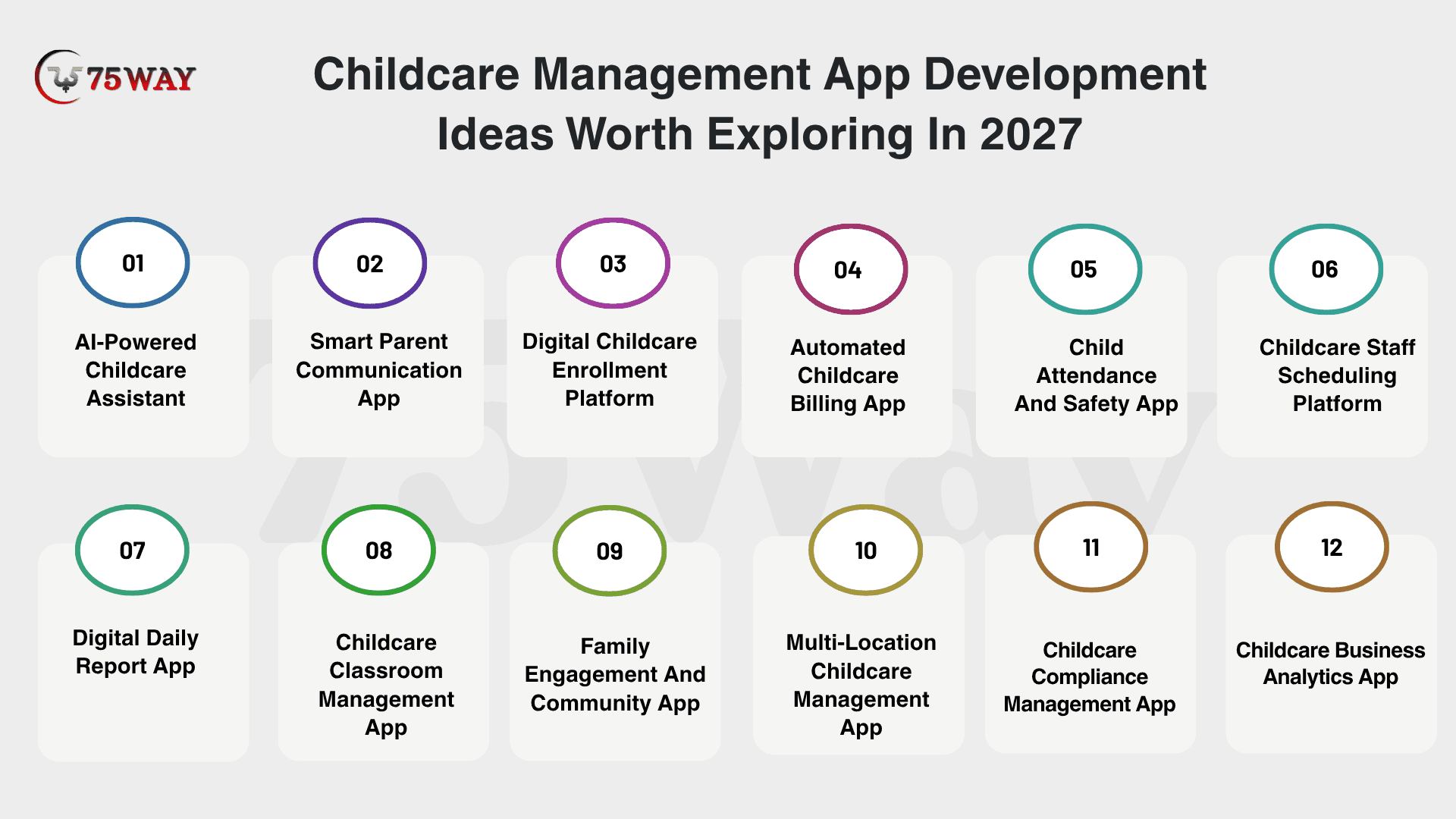
1. AI-Powered Childcare Assistant
An AI-powered childcare assistant can give directors and staff a faster way to find information, summarize records, and handle routine administrative questions. A simple conversational interface could provide answers about attendance, enrollment, classroom activity, schedules, and other information already available within the platform.
For example, a director could ask about attendance patterns or request a summary of recent classroom updates. AI-generated summaries, message drafts, and administrative suggestions could reduce repetitive work while keeping staff responsible for reviewing important information.
2. Smart Parent Communication App
Parents often receive updates through multiple channels, making important childcare information easy to miss. A dedicated communication app can bring messages, announcements, daily reports, photos, reminders, and teacher updates into one organized experience.
Personalized notifications can keep parents focused on information relevant to their child or classroom. Two-way messaging can also create more natural communication between families and childcare teams without relying on scattered communication tools.
3. Digital Childcare Enrollment Platform
Enrollment can involve inquiries, tours, applications, forms, document collection, approvals, and classroom placement. A digital enrollment platform can connect these stages into one workflow, giving families a clearer application experience while helping centers track prospective and enrolled children.
Automated reminders can highlight incomplete applications or missing documents before they become administrative bottlenecks. Directors can also gain better visibility into enrollment pipelines, available spaces, application status, and upcoming classroom capacity.
4. Automated Childcare Billing App
Billing becomes easier to manage when invoices, payment schedules, receipts, discounts, and outstanding balances are available through one platform. Parents can review charges and complete payments from their phones instead of depending on manual paperwork or repeated office visits.
Recurring billing and automated payment reminders can reduce routine administrative follow-ups for center teams. Financial dashboards can also give owners clearer visibility into collected payments, outstanding balances, and center-level revenue information.
5. Child Attendance And Safety App
A dedicated attendance and safety application can provide a clearer record of when children arrive, move between classrooms, and leave the center. Digital check-in and check-out workflows can replace paper-based attendance processes while creating easily accessible records.
Additional capabilities such as authorized pickup lists, guardian verification, attendance alerts, and incident records can strengthen operational visibility. Centers can also maintain a more complete activity history for individual children when important events need to be reviewed.
6. Childcare Staff Scheduling Platform
Staff scheduling can become complicated when centers manage classrooms, employee availability, ratios, absences, shifts, and changing enrollment levels. A scheduling platform can bring these details together so directors have a clearer view of daily staffing requirements.
Availability records and scheduling alerts can help teams respond to changes without rebuilding schedules manually. Multi-location organizations could also use centralized scheduling information to understand staffing needs across different centers.
7. Digital Daily Report App
Parents want meaningful insight into their child’s day, while teachers need a practical way to record activities without excessive administrative work. A daily-report app can capture meals, naps, activities, mood notes, milestones, photos, and other relevant updates.
Structured templates can make reporting faster and easier for classroom teams. Parents can receive organized updates throughout the day, creating more opportunities for conversations with their children after they return home.
8. Childcare Classroom Management App
Classroom management can become easier when child records, activities, attendance, schedules, and classroom notes are connected. Teachers can access relevant information from a role-specific dashboard rather than moving between disconnected systems.
Activity planning and classroom records can also provide directors with better operational visibility. For larger centers, separate classroom workspaces can help organize information according to age groups, programs, teachers, and enrollment assignments.
9. Family Engagement And Community App
Family engagement does not have to stop at daily updates and parent-teacher messages. A dedicated family engagement app can provide event calendars, activity invitations, surveys, newsletters, community announcements, and opportunities for parents to participate.
Interactive features can encourage families to respond rather than simply receive information. Feedback forms and quick polls can also give childcare operators useful insights into parent expectations and areas for service improvement.
10. Multi-Location Childcare Management App
Growing childcare organizations often need visibility across multiple centers without forcing every location into the same operational workflow. A multi-location platform can connect enrollment, attendance, staff management, billing, reporting, and user permissions across locations.
Centralized dashboards can help corporate teams review location-level information while allowing directors to manage their own centers. Location-based permissions can keep operational responsibilities separated while supporting organization-wide oversight.
11. Childcare Compliance Management App
Childcare operators manage numerous records, forms, staff requirements, training information, incidents, and operational documentation. A compliance-focused application can organize these records and provide reminders for important renewals, expirations, and required actions.
Document tracking and audit histories can make it easier for administrators to identify missing information before a review or internal audit. The exact compliance requirements should be configured according to the jurisdictions and childcare programs served by the platform.
12. Childcare Business Analytics App
Operational data can become valuable business intelligence when attendance, enrollment, staffing, billing, and parent engagement information are connected. An analytics application can transform these records into dashboards that help owners understand how their centers are performing.
Trend analysis can highlight enrollment changes, attendance patterns, revenue information, staffing utilization, and engagement activity. Predictive capabilities can later extend the platform with forecasting for capacity, enrollment demand, or operational planning.
How Childcare Centers Can Improve Family Engagement Through Mobile Apps
Childcare centers can strengthen family engagement through mobile apps by making communication, updates, payments, and participation easier for parents. These tools create more opportunities for meaningful interaction beyond drop-off and pickup. The following areas explain how mobile apps can build stronger family connections.
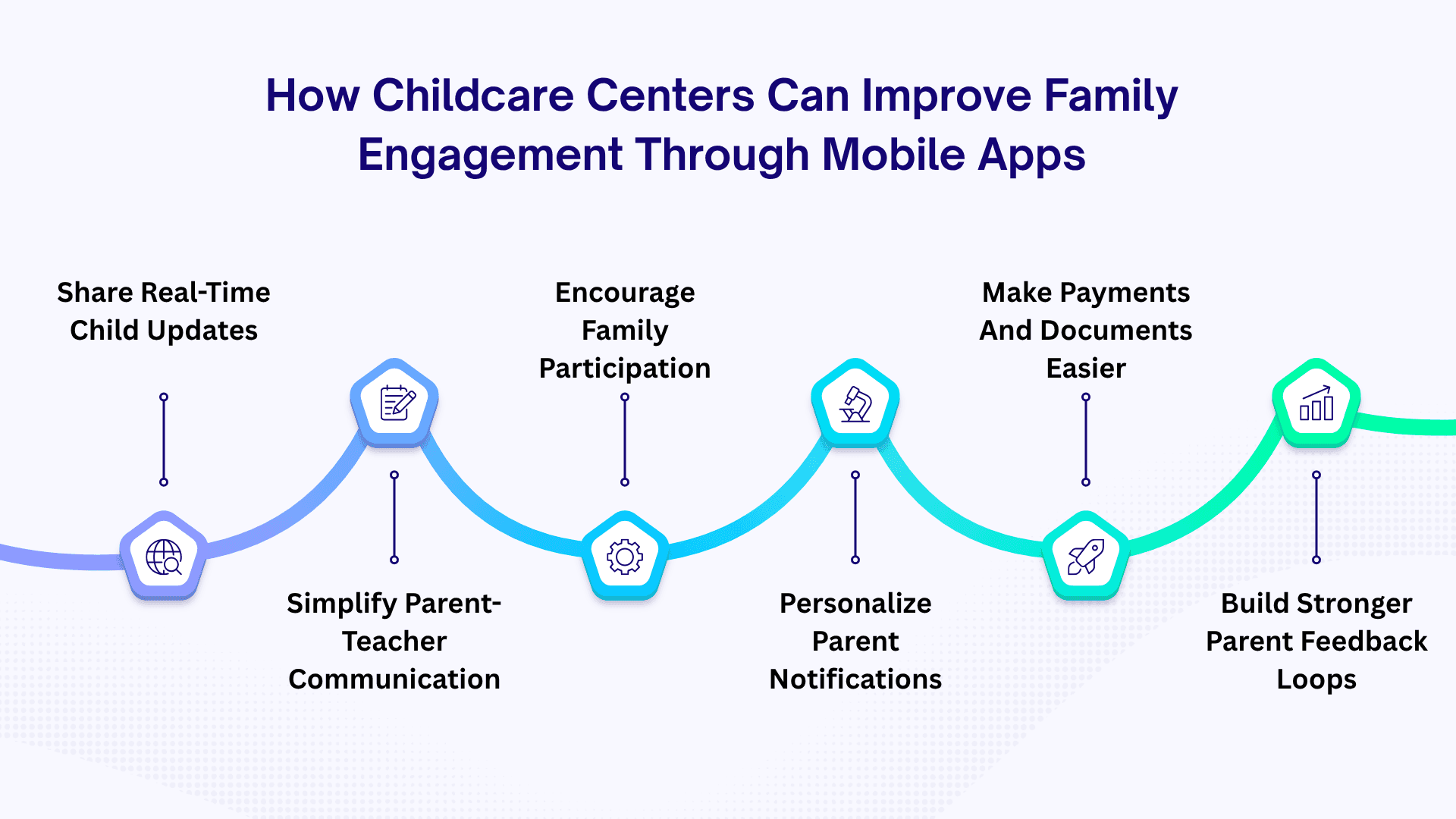
- Share Real-Time Child Updates
Parents no longer have to wait until pickup to discover how their child’s day went. Photos, meal updates, nap records, activities, and daily reports can give families a closer look at everyday experiences.
These timely updates create natural conversation points between parents and children at home.
- Simplify Parent-Teacher Communication
Quick communication becomes easier when parents and teachers have one dedicated channel for important conversations.
Messages, announcements, reminders, and individual updates can reach the right person without getting lost among unrelated chats. A clear communication trail also helps families stay informed without creating additional workload for staff.
- Encourage Family Participation
Family engagement becomes more meaningful when parents have simple ways to participate in center activities. Event calendars, RSVP options, classroom activities, and volunteer opportunities can turn occasional involvement into regular participation.
A mobile app can bring these opportunities directly to parents instead of relying only on printed notices or verbal reminders.
- Personalize Parent Notifications
Parents care most about information connected to their child, classroom, schedule, and responsibilities.
Personalized notifications can highlight attendance updates, upcoming events, payment reminders, announcements, and important classroom information. Relevant alerts reduce information overload while helping families stay connected with what matters most.
- Make Payments And Documents Easier
Administrative tasks can become another opportunity to improve the family experience when they are accessible from one place.
Parents can view invoices, complete payments, access forms, and manage required documents without repeated calls or visits to the center. This convenience saves time for families while reducing repetitive administrative work for childcare teams.
- Build Stronger Parent Feedback Loops
Family engagement should include listening, not just sending information. Surveys, feedback forms, quick polls, and communication history can help centers understand parent expectations and identify areas that need attention.
Regular feedback creates a two-way relationship where families feel heard, and centers gain useful insights for improving their services.
Security And Compliance Considerations For Building Childcare Mobile Apps
This is one area where generic app-development articles often fall short. A childcare platform can process information about children, parents, staff, health conditions, allergies, emergency contacts, payments, and attendance. Security therefore needs to be considered during architecture and product design, not added immediately before launch.
- COPPA: If the service falls within COPPA's scope, operators of online services directed to children under 13, or services with actual knowledge they collect personal information from children under 13, have specific obligations around parental notice, verifiable consent, parental rights, and reasonable security procedures.
Whether COPPA applies depends on the actual service, audience, data collection practices, and relationships involved.
- State Childcare Requirements: Childcare licensing requirements vary by state and territory.
Childcare.gov notes that states and territories establish licensing requirements and that these requirements can differ depending on the type of childcare program.
Therefore, avoid building a single hard-coded compliance workflow for every childcare operator. A better approach is to make relevant requirements configurable.
- HIPAA: Do not automatically label every childcare app as “HIPAA compliant.”
HIPAA applies to covered entities and business associates under defined circumstances. A software vendor may become a business associate when it creates, receives, maintains, or transmits protected health information on behalf of a covered entity.
If your childcare platform integrates with healthcare organizations or handles protected health information on behalf of a covered entity, the legal and contractual requirements should be assessed before implementation.
- Security Controls: A production childcare platform should protect sensitive data through encryption in transit and at rest, role-based access control, multi-factor authentication, secure passwords, session management, and API security.
Regular backups, audit logs, data retention and deletion workflows, rate limiting, vulnerability testing, monitoring, and security alerts can provide stronger operational protection.
How Much Does Childcare Management App Development Cost?
The budget planning for childcare management app development becomes easier when you know the expected range upfront. On average, the childcare app development cost ranges between $5,000 and $250,000+. A focused MVP may require a modest investment, while a larger platform with multiple roles can require a much larger budget. The details below break down the investment across different levels of childcare app development.
1. Simple Childcare App Cost: $5,000 – $25,000
- Core Features: Login, attendance, daily logs, messaging
- Platform Scope: Single iOS or web platform
Estimated Timeline: 2–4 months
2. Mid-Level Childcare App Cost: $25,000 – $90,000
- Core Features: Billing, notifications, media, admin dashboard
- Platform Scope: Cross-platform iOS and Android support
Estimated Timeline: 4–7 months
3. Advanced Childcare App Cost: $90,000 – $150,000+
- Core Features: AI, automation, analytics, advanced integrations
- Platform Scope: Scalable mobile, web, backend architecture
Estimated Timeline: 6–10 months
4. Enterprise Childcare App Cost: $150,000 – $250,000+
- Core Features: Multi-location controls, governance, custom integrations
- Platform Scope: Enterprise-grade infrastructure and security capabilities
Estimated Timeline: 9–15+ months
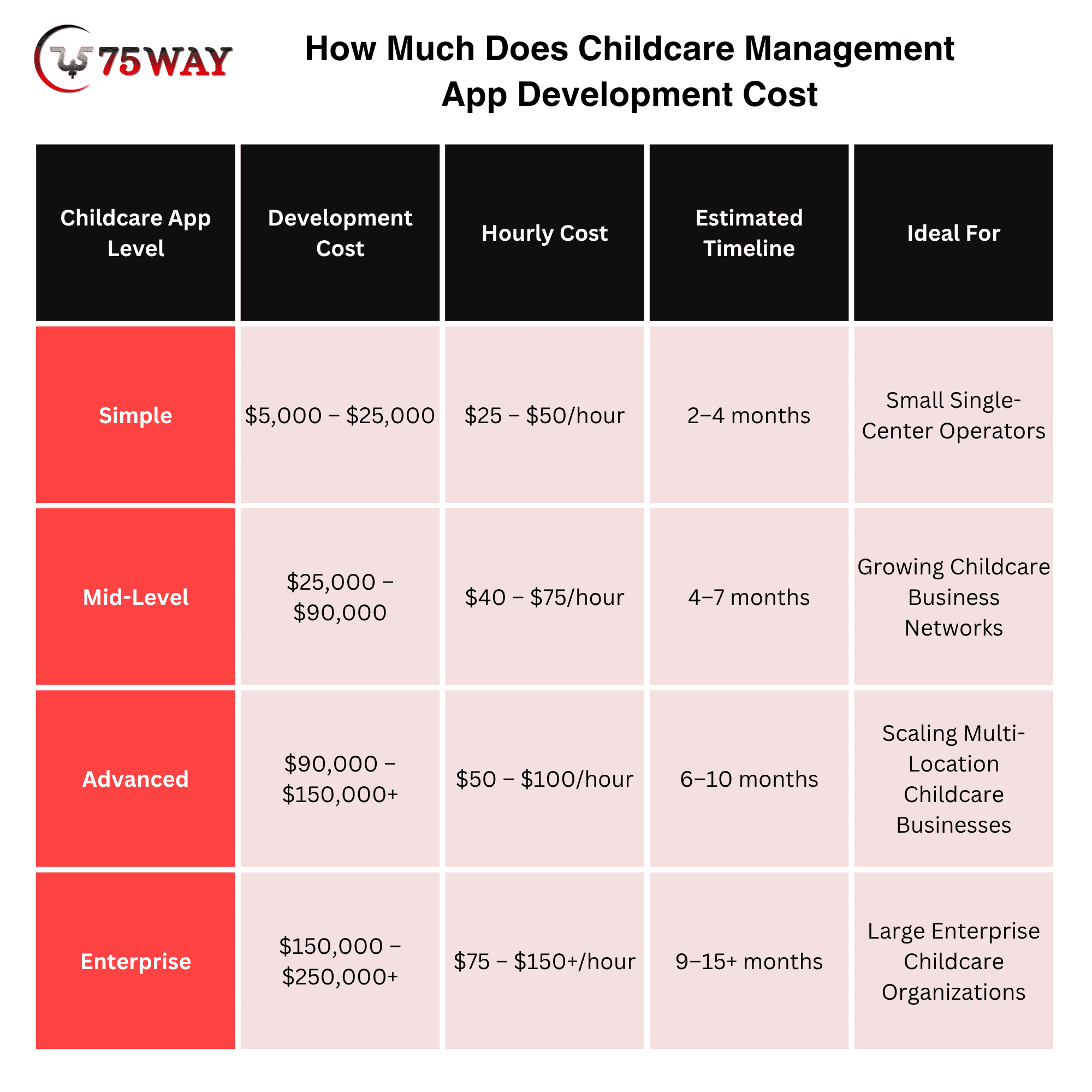
Note: These ranges should be treated as budgetary estimates for planning, not guaranteed quotations. The final cost to create a childcare management app depends on features, functionalities, integrations, AI models, and your business goals.
Childcare App Development Cost Based On Stages
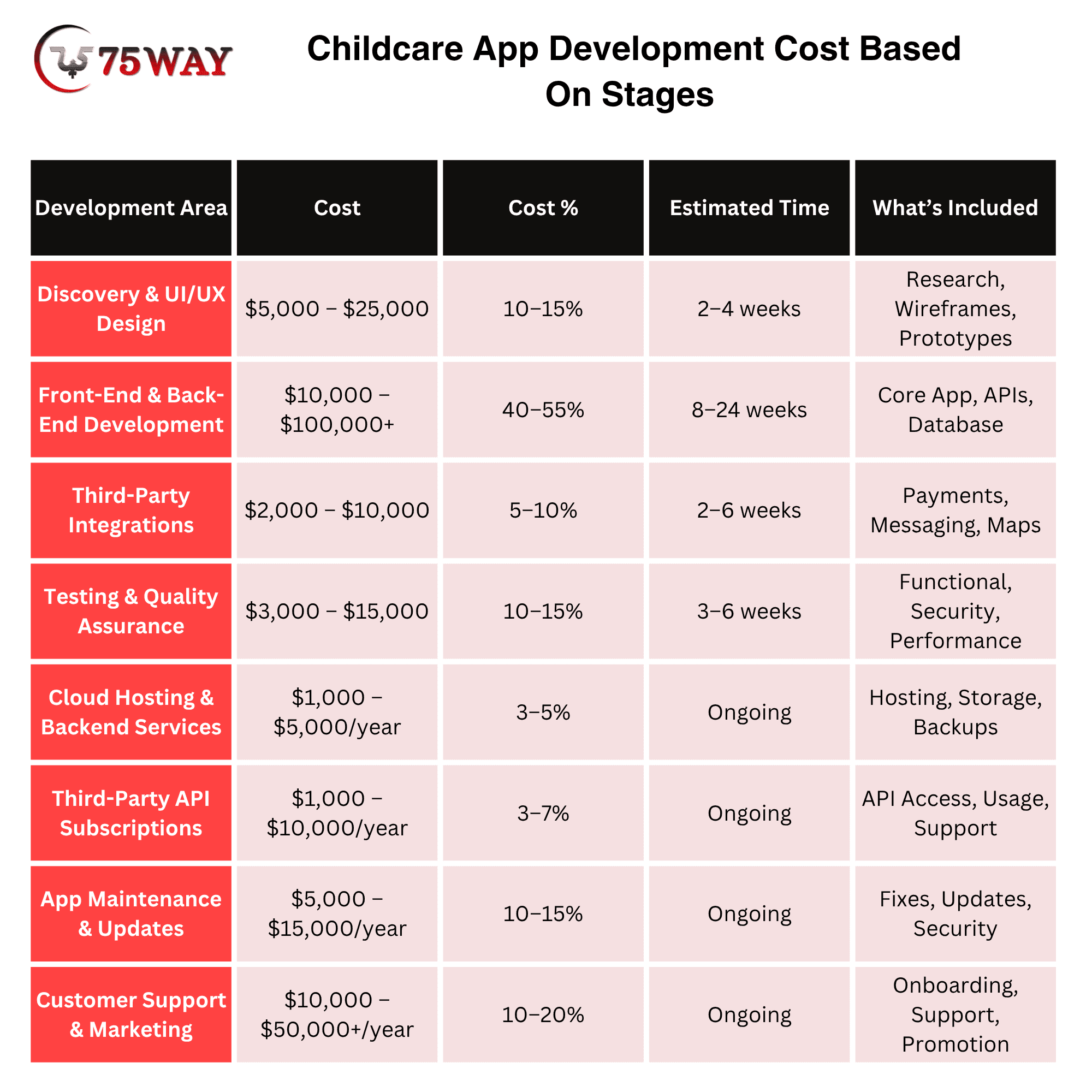
The total cost of a childcare management app becomes easier to understand when you look at where the development budget actually goes. A larger share usually comes from building the core product, while the surrounding work also adds to the investment. The breakdown below gives you a clearer view of stage-wise development costs.
1. Discovery and UI/UX Design: $5,000 – $25,000
- Wireframing user flows for parents, teachers, and administrators
- Creating visual designs, prototypes, and responsive interface layouts
2. Front-End & Back-End Development: $10,000 – $100,000+
- Building attendance, daily logs, messaging, billing, and core application functionality
- Developing secure APIs, databases, dashboards, and backend business logic
3. Third-Party Integrations: $2,000 – $10,000
- Connecting payment, SMS, notification, video, and mapping services
- Configuring APIs, authentication, webhooks, and data synchronization
4. Testing and Quality Assurance: $3,000 – $15,000
- Testing application functionality across iOS, Android, web, and supported browsers
- Identifying bugs, performance issues, security risks, and usability problems
5. Cloud Hosting and Backend Services: $1,000 – $5,000/year
- Hosting application servers, databases, media, and childcare records securely
- Scaling infrastructure according to users, storage, and application traffic
6. Third-Party API Subscriptions: $1,000 – $10,000/year
- Covering recurring costs for messaging, payments, maps, and communication services
- Varying expenses according to provider usage, transaction volume, and plans
7. App Maintenance and Updates: $5,000 – $15,000/year
- Handling security patches, operating-system updates, bug fixes, and compatibility improvements
- Supporting minor enhancements after the initial application launch
8. Customer Support and Marketing: $10,000 – $50,000+/year
- Supporting user onboarding, training, customer queries, and product adoption
- Covering promotional campaigns, acquisition activities, and ongoing customer engagement
Key Factors Influencing Cost To Build an AI-Powered Childcare App
The cost to build a childcare app can change significantly when the project moves beyond basic functionality and starts supporting more demanding business requirements. The development scope determines how much technology, customization, and engineering work goes into the final product. The details that can influence your total investment are outlined below.
- Number of Platforms
A web dashboard costs less than building separate native iOS and Android applications alongside a web platform.
- Number of User Roles
An app for administrators and parents is simpler than one supporting owners, directors, teachers, staff, parents, accountants, and super administrators.
- Integrations
Payment gateways, accounting software, calendars, communication providers, identity systems, and third-party APIs add development and testing requirements.
- Security Requirements
Childcare platforms handle sensitive information, making authentication, authorization, encryption, audit logging, backups, and access controls important architectural considerations.
- Custom Workflows
A standard enrollment workflow is cheaper than a platform supporting custom rules for multiple organizations and locations.
- AI Features
AI increases complexity when the system requires model integration, retrieval systems, permissions, monitoring, prompt management, human review, and data protection.
- Multi-Tenant Architecture
A SaaS product serving many independent childcare businesses needs a different architecture from an application built for one organization.
- Data Migration
Importing existing children, parents, attendance, billing, and document data can require custom migration scripts and validation.
How Much Time Does It Take To Develop A Childcare Management App?
A childcare management app can take 3–6 months for a mid-complexity build, while a simpler MVP may reach launch sooner and a larger platform can require considerably more time. The timeline depends on the product scope, number of user roles, integrations, customization, and testing requirements. The development timeline below gives you a clearer idea of how long each part of the project can take.
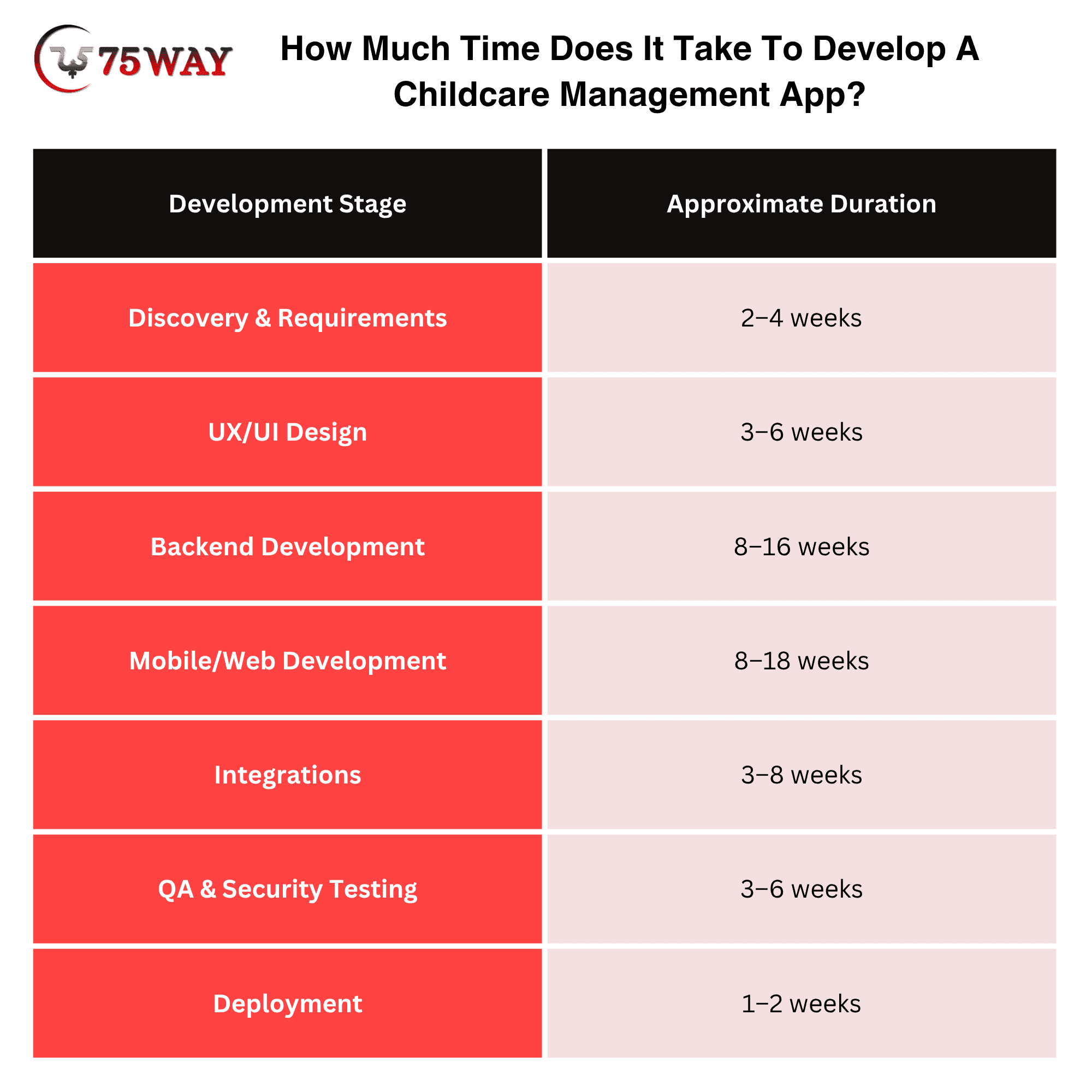
These activities can overlap, so the total project timeline is not simply the sum of every row. A focused MVP can often be delivered in 3–5 months, while an enterprise-grade platform can take 12 months or longer, depending on scope.
Revenue Models: How To Monetize A Childcare Management App
A free childcare app can attract users quickly, but turning that user base into reliable revenue requires a clear commercial strategy. Your earning potential can change considerably based on who pays, what they receive, and how the pricing model fits their needs. The key monetization opportunities for a childcare management app are outlined below.
- Per-Child Pricing
A provider can be charged based on the number of active children managed through the platform. This model works well when usage grows alongside enrollment because childcare businesses pay more as their operational needs increase.
For instance, a platform charging $5 per child per month could generate $2,500 in monthly recurring revenue from 500 active children. Larger centers can naturally contribute more revenue without requiring a separate pricing structure for every organization.
- Per-Location Pricing
A monthly fee can be assigned to each childcare center using the platform. This approach gives operators a predictable expense and can become particularly practical for businesses managing several locations.
A platform charging $199 per location monthly could generate $1,990 per month from 10 active locations. Additional locations can increase recurring revenue while keeping the pricing structure relatively straightforward.
- Tiered SaaS Plans
Tiered plans can package different capabilities for businesses with different operational requirements. A structure can gradually introduce advanced analytics, automation, integrations, and multi-location capabilities.
For example, a platform might offer plans at $99, $199, $399, and $799 per month, allowing customers to select functionality that matches their current size and requirements. This structure can also create a natural upgrade path as childcare businesses expand.
- Transaction Revenue
Payment processing can create an additional revenue stream when the platform handles tuition payments, invoices, or recurring charges. A commercially appropriate service fee or platform fee may be applied alongside the payment provider's applicable processing charges, subject to contractual and legal requirements.
For instance, a platform processing $100,000 in monthly childcare payments and retaining a 0.5% platform fee would generate $500 in monthly revenue from that transaction volume.
- Add-On Features
Optional modules allow customers to pay for specialized capabilities without forcing every subscriber into a higher-priced plan. Advanced analytics, AI assistants, payroll integrations, premium communications, advanced reporting, additional locations, and custom integrations can become separate revenue opportunities.
A center paying $199 monthly for its core subscription might add a $49 AI analytics module, increasing its monthly account value to $248. This approach also lets customers customize the platform according to their operational priorities.
- Custom Enterprise Solutions
Large childcare organizations may require dedicated infrastructure, custom workflows, advanced integrations, specialized permissions, and organization-wide reporting. Enterprise contracts can package these requirements into negotiated annual or monthly agreements rather than standard self-service plans.
A childcare group paying $30,000 annually for a customized platform would provide recurring contract revenue while covering capabilities designed around its operational requirements. Enterprise pricing can also include implementation, training, premium support, and custom development where appropriate.
Custom Vs White-Label Childcare App Development: What To Choose?
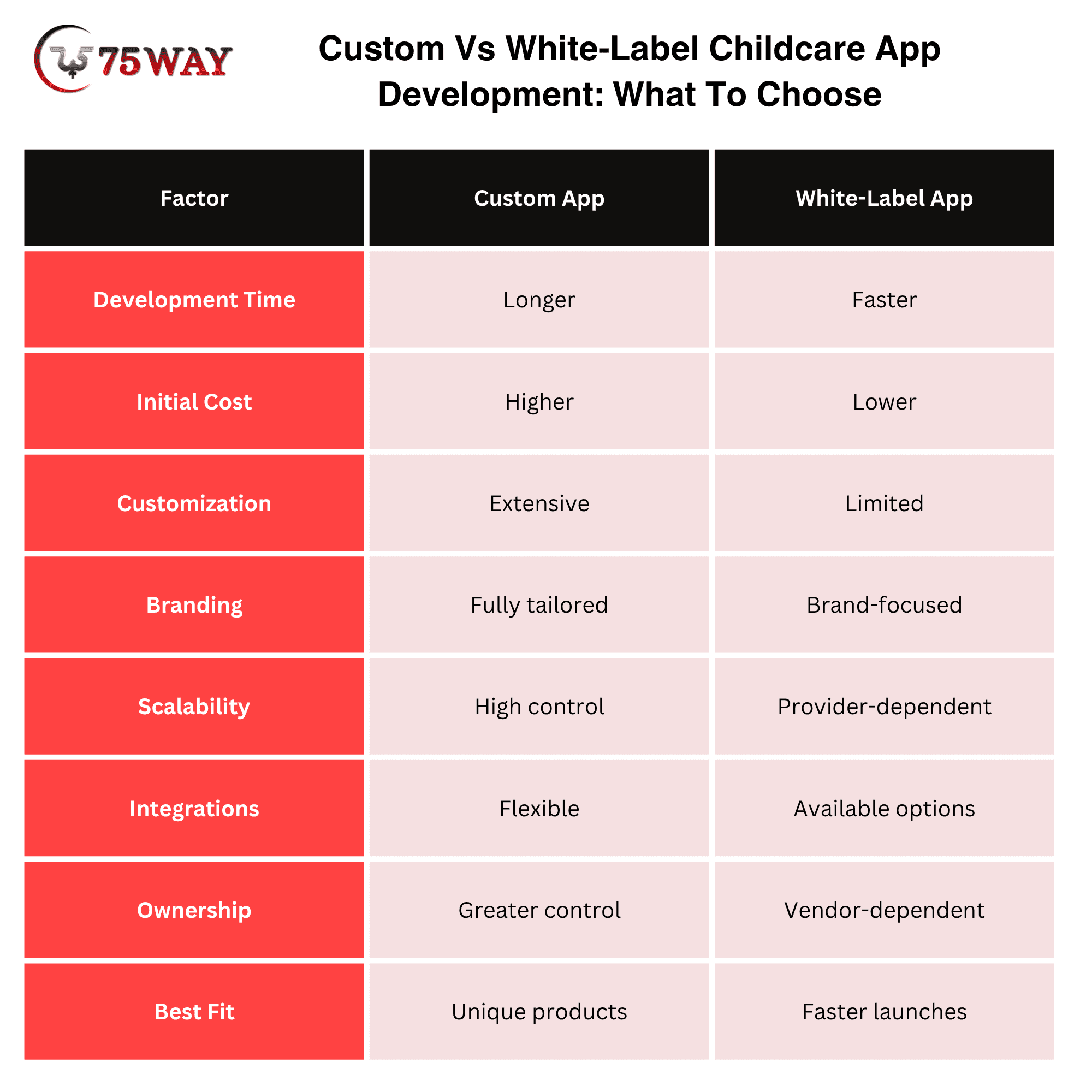
Custom childcare app development is generally suited to businesses that need unique workflows, deeper customization, and long-term product control, while white-label development fits businesses seeking faster deployment with a predefined foundation. The right choice depends on your budget, launch timeline, feature requirements, branding needs, and plans for future expansion.
A custom solution gives you control over the user experience, architecture, integrations, data structure, and feature roadmap. A white-label solution can reduce initial development effort by providing an existing platform that can be branded and configured for your business, although customization may be more limited.
How To Reduce Childcare App Development Costs?
You do not necessarily need to reduce the quality of the product to reduce the initial budget. Instead, control the scope.
- Start With One Customer Segment
Build for independent childcare centers before supporting every childcare model.
- Launch One Core Workflow
Enrollment, attendance, parent communication, or billing can become an initial product focus.
- Use Cross-Platform Development
Flutter or React Native can reduce the need to maintain entirely separate mobile codebases, depending on product requirements.
- Integrate Instead of Rebuilding
Use established payment, communication, authentication, analytics, and cloud services when they meet the product requirements.
- Delay Enterprise Features
Advanced SSO, complex multi-location governance, sophisticated AI, and custom enterprise integrations can be added when customer demand justifies them.
- Validate Before Scaling
A pilot with real childcare operators can identify which features customers actually use before significant development resources are committed.
What Should A Childcare App MVP Include?
For a startup, I would structure the first release around one complete operational loop rather than attempting to reproduce every feature offered by established childcare platforms. A practical MVP could include:
- Secure login
- Role-based access
- Child profiles
- Parent profiles
- Digital enrollment
- Attendance
- Check-in/check-out
- Parent communication
- Push notifications
- Basic billing
- Basic reporting
- Admin dashboard
After validating adoption, expand into staff scheduling, advanced analytics, multi-location management, integrations, automation, and AI.
This approach also makes the product easier to test with early customers.
What Is The ROI of A Childcare Management App?
ROI should not be measured only through “hours saved.” A childcare platform can influence several business metrics:
- Administrative Work
Measure time spent on enrollment, attendance, billing, communication, and reporting before and after implementation.
- Payment Collection
Track outstanding balances, payment delays, automated reminders, and collection time.
- Enrollment
Measure inquiries, tours, applications, conversion rates, and waitlist activity.
- Parent Engagement
Measure communication activity, application adoption, payment completion, and response rates.
- Staff Productivity
Measure time spent on administrative tasks compared with childcare and classroom responsibilities.
- Multi-Location Visibility
Measure how quickly owners can access location-level operational and financial information.
A strong SaaS product should therefore connect features to measurable business outcomes rather than presenting “automation” as an abstract benefit.
How To Make A Childcare Management App Scalable?
Scalability should be considered before the product has hundreds of customers. Important architectural decisions include:
- Multi-tenant database architecture
- Tenant isolation
- API-first design
- Modular services
- Horizontal scaling
- Cloud-based infrastructure
- Background job processing
- Caching
- Centralized logging
- Monitoring
- Automated backups
- Disaster recovery
- Secure file storage
- Versioned APIs
For a SaaS platform, the architecture should also allow one childcare business to customize its settings without changing the underlying application for every other customer.
How AI Can Improve Childcare Management Application?
A childcare management app becomes more valuable when it can do more than store records and display information. AI can help the platform respond to operational needs, reduce manual workload, and support a more responsive experience for staff and parents. The role of AI in improving childcare management applications is outlined below.
- AI Report Summaries
Convert structured teacher notes into concise parent-facing summaries.
- AI Administrative Assistant
Allow directors to ask questions such as: “Which classrooms had the highest absence rate this month?”
- Inquiry Classification
Categorize enrollment inquiries according to age group, location, requested schedule, and enrollment stage.
- Communication Assistance
Help staff draft clear parent messages while keeping humans responsible for final approval.
- Operational Insights
Identify patterns in attendance, enrollment, payment activity, or staffing data.
- Document Assistance
Extract structured information from uploaded forms where appropriate and with suitable privacy controls.
AI should not replace human oversight for sensitive childcare decisions.
How To Choose A Childcare App Development Company?
A childcare app dev can become expensive to fix when the development partner misunderstands your workflows, underestimates security requirements, or builds a product that cannot scale with your business. Relevant childcare experience, technical capability, transparent pricing, and post-launch support deserve careful attention before you sign a contract. The key areas to evaluate when choosing a children app development company are covered below.
1. Check Childcare Technology Experience
Look for experience developing childcare, daycare, preschool, education, or family-focused applications. Relevant project experience can indicate whether the team understands workflows such as enrollment, attendance, classroom management, billing, and parent communication.
2. Review Security And Privacy Expertise
Childcare platforms handle sensitive information, making security experience an important selection factor. Ask about encryption, role-based access, authentication, audit logs, secure APIs, backups, and applicable child-data privacy requirements.
3. Evaluate Technical Development Capabilities
The right team should have capabilities across mobile, web, backend, cloud infrastructure, APIs, databases, and third-party integrations. A technically capable partner can also recommend an architecture that supports future features, additional locations, and growing user volumes.
4. Examine Portfolio And Client Results
Review relevant case studies, product demos, client feedback, and published work before making a decision. Pay particular attention to evidence showing how the company handled complex workflows, integrations, scalability, or usability challenges.
5. Compare Support And Development Process
A childcare application requires ongoing maintenance after launch because operating systems, APIs, security requirements, and business needs change over time. Clarify the company's development process, communication approach, testing practices, post-launch support, maintenance terms, and ownership of the final product.
Final Thoughts
Childcare management app development is not simply a matter of putting attendance, messaging, and billing into a mobile application. The strongest products connect enrollment, daily operations, staff workflows, parent engagement, payments, reporting, security, and business intelligence into one operational ecosystem.
For a startup, the practical path is to validate a focused MVP with a clearly defined childcare customer segment, prove adoption, measure business outcomes, and then expand the platform based on actual customer demand.
For an established childcare operator, the decision should focus on workflow fit, scalability, integration requirements, security, data ownership, and total cost of ownership rather than feature count alone.
If you are planning a childcare management app, you can partner with a trusted on-demand app development agency to discuss your idea, features, architecture, timeline, and development cost.
Frequently Asked Questions (FAQs)
How Much Does It Cost To Build A Childcare Management App?
A childcare management app can cost approximately $40,000–$250,000+, depending on features, platforms, integrations, security requirements, and development complexity.
How Long Does It Take To Develop Childcare Management Software?
A focused MVP can take around three to five months, while a feature-rich enterprise platform may require 12 months or longer.
What Features Should A Childcare Management App Have?
Core features typically include enrollment, child profiles, attendance, check-in/check-out, parent communication, billing, notifications, staff management, document management, and reporting.
Can A Childcare Management App Support Multiple Locations?
Yes. A multi-tenant architecture can support multiple childcare centers while providing location-level permissions, dashboards, billing, reporting, and centralized administration.
Should A Childcare App Include Online Payments?
For many commercial childcare platforms, online payments are an important feature because billing and payment processing are core operational workflows.
Is HIPAA Compliance Required For A Childcare App?
Not automatically. HIPAA applies based on the entities involved and how protected health information is handled. A legal and compliance assessment is necessary when healthcare-related data or covered entities are involved.
Does COPPA Apply To Childcare Apps?
It can, depending on the service, audience, and collection of children's personal information. Applications within COPPA's scope have specific requirements concerning parental notice, verifiable consent, parental rights, and data security.
Can AI Be Added To Childcare Management Software?
Yes. AI can support reporting, administrative assistance, inquiry classification, communication drafting, analytics, and document workflows, provided appropriate privacy, security, and human-review controls are implemented.
How Can A Childcare App Generate Revenue?
Common models include per-child subscriptions, per-location subscriptions, tiered SaaS plans, enterprise contracts, transaction-based revenue, and paid add-on modules.
How To Run Childcare Operations Effectively Through A Mobile App?
A mobile app can centralize childcare operations, simplify daily tasks, and improve communication between staff and families. Automated attendance reduces manual work and errors. Digital billing keeps payments organized. Real-time updates give managers better operational visibility.
How To Choose A Mobile App For Childcare Business?
You can select a childcare mobile app based on your center’s operational needs, staff workflows, family communication, and growth plans. Look for essential features, simple navigation, strong security, integration options, scalability, reliable support, and flexible customization before selecting a platform.