AI Summary
AI image search tools are changing how people discover products, information, and visual content online. This guide explores 15 leading AI tools for image search and their capabilities. Compare features, platforms, and business applications. Find the right AI image search tool for smarter visual discovery in 2027.
Key Takeaways
- AI image search tools simplify visual discovery across products, content, and information.
- Google Lens leads broad searches, while specialized tools serve specific needs.
- Visual search creates new opportunities for ecommerce discovery and customer engagement.
- Businesses can integrate visual search into custom applications using APIs.
- Market growth signals rising demand for smarter visual discovery technologies.
Ever searched for an image you could clearly picture but could not describe with the right keywords? AI image search can bridge that gap by making visual discovery more flexible and helping users search based on descriptions, references, and image-based context.
For businesses, marketers, designers, and content teams, this can make everyday visual research far less frustrating. Whether the goal is finding creative inspiration, discovering similar images while building an app or platform, researching products, or building content, the right search tool can make a noticeable difference.
So, what makes one AI image search tool more useful than another? Which AI solutions for image search are actually worth knowing when speed, accuracy, visual matching, and practical usability matter?
This guide will highlight the best AI image search tools you should know, comparing their features, search capabilities, practical applications, strengths, and suitability for different types of users.
What Are AI Image Search Tools?
AI image search tools let users search, identify, compare, or discover information using an image instead of relying only on keywords.
You can upload a product photo, screenshot, object, artwork, location, or existing image and use computer vision to find visually similar results, identify objects, locate sources, or discover products.
The technology behind these tools varies. Some focus on visual similarity, while others combine computer vision with OCR, shopping databases, semantic search, image recognition, or generative AI.
For businesses, this matters because visual search can shorten the path between “I saw something I want” and “I found, compared, or bought it.”
Google, for example, says Google Lens handles more than 20 billion visual searches each month, with about 20% of Lens searches being shopping-related.
That makes AI image search more than a consumer convenience. It is becoming a discovery layer for ecommerce, marketing, content, product research, brand protection, and visual intelligence.
AI Image Search Statistics: Market Size, Users & Revenue Growth
The growing use of AI tools for visual discovery is changing how people search for information, products, and images online. As adoption increases, the business value and market opportunity surrounding AI image search are becoming easier to measure. The latest user growth, revenue figures, market data, and key statistics are explained below.
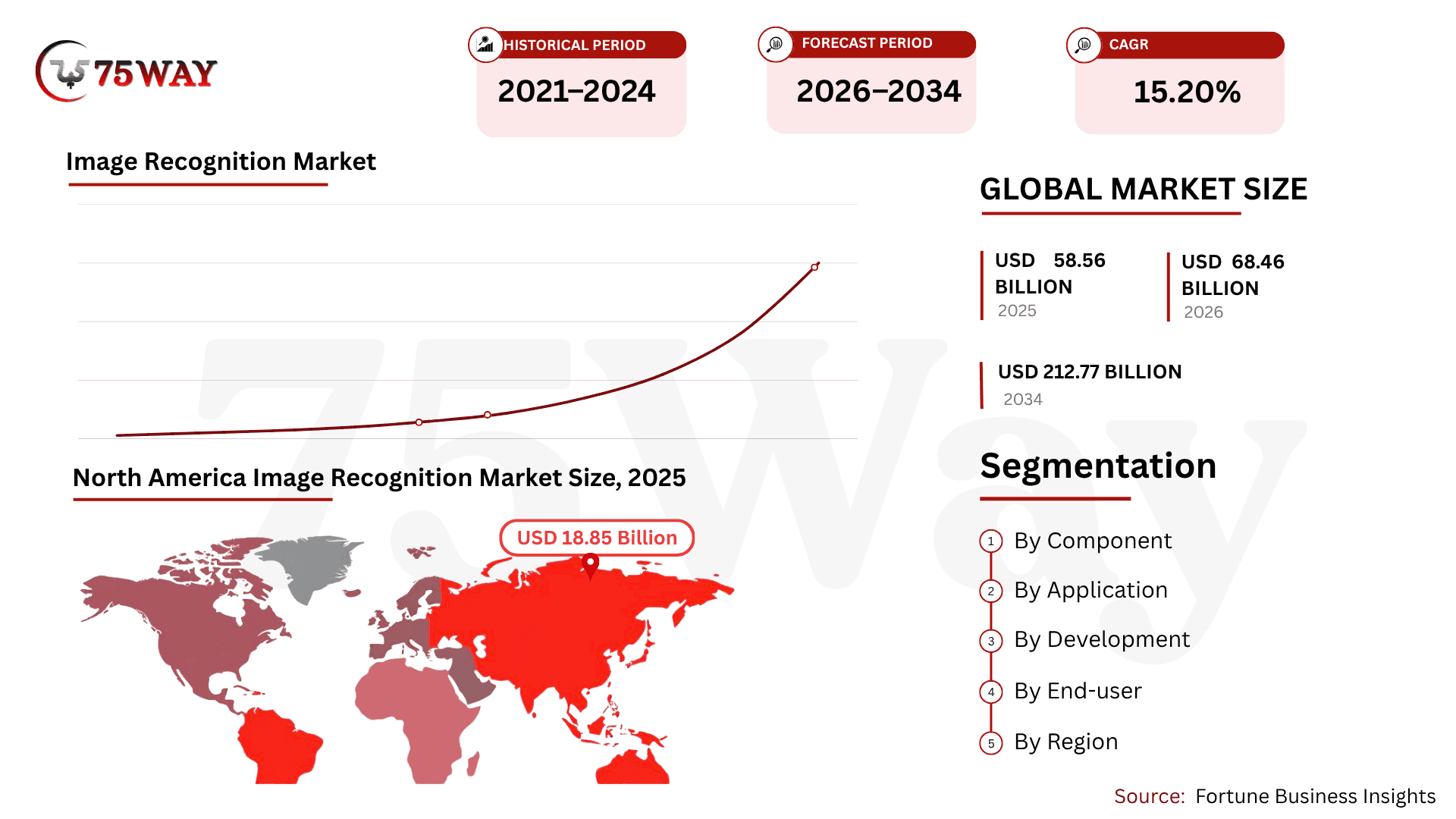
- The global AI image recognition market is projected to grow from $5.68 billion in 2026 to$11.07 billion by 2031, registering a 14.31% CAGR.
- Hardware held the largest market share in 2025, accounting for 45.12%, while the services segment is forecast to grow at a 14.67% CAGR through 2031.
- Retail and e-commerce represented 28.74% of the AI image recognition market’s revenue, making it a leading application sector.
- Healthcare is expected to be the fastest-growing end-user segment, expanding at a 15.05% CAGR.
- North America accounted for 27.35% of global AI image recognition market revenue.
- The U.S. image recognition market is projected to reach approximately $19.19 billion by 2032, supported by increasing adoption of AI-driven technologies.
- 88% of organizations now use AI in at least one business function, although only 5.5% qualify as AI high performers.
- More than 150 million people worldwide use AI image generators every month, collectively creating around 80 million AI-generated images daily.
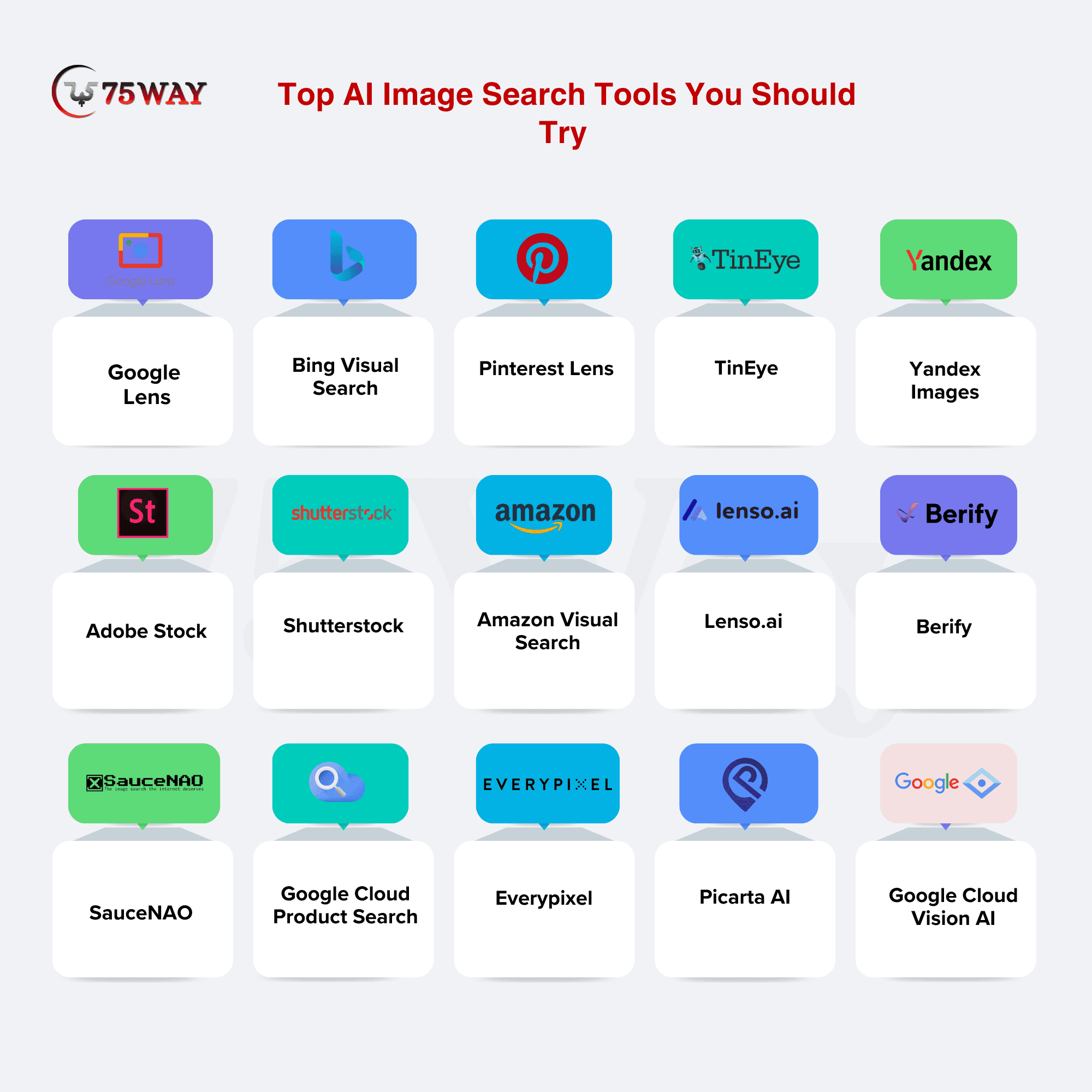
Top AI Image Search Tools You Should Try
There is no single “best” image search tool for every business. The right choice depends on whether you need product discovery, reverse image search, inspiration, copyright monitoring, stock assets, image verification, or a visual search capability inside your own application.
1. Google Lens
Google Lens is an AI-powered visual search tool that turns your camera or image into a starting point for discovery. Instead of typing what you see, you can point, snap, or upload an image to find products, identify objects, read text, explore places, and discover related information.
Its connection with Google Search makes the experience especially useful when users want to move from visual discovery to deeper research or shopping. Google says Lens is used for nearly 20 billion visual searches every month.
Active Users: 20+ Billion Monthly Visual Searches
Platform Availability: iOS, Android, Web
Known For: Visual Search and Discovery
How is Google Lens Helpful?
- Object Recognition: Identify products, plants, animals, landmarks, and other visual objects.
- Product Discovery: Find products and related shopping information from photographs.
- Text Recognition: Extract, translate, copy, and search text appearing inside images.
- Multimodal Search: Combine images and text to make visual queries more specific.
- Visual Matching: Find visually related information based on what appears in an image.
- AI Overviews: Provide AI-generated contextual information for supported Lens searches.
Google Lens is particularly interesting for businesses because it shows how an image can become the beginning of a broader search journey. Its combination of visual understanding, shopping information, and contextual search makes it a strong benchmark for companies exploring AI-powered discovery.
Best For: General visual search, product research, shopping discovery, mobile users, and everyday image identification.
2. Bing Visual Search
Bing Visual Search makes search more natural when users cannot find the right words to describe what they are looking for.
Instead of building a text query from scratch, users can upload or capture an image and explore related products, objects, information, and visually similar results. This makes it useful for both everyday discovery and image-led shopping research.
Active Users: Visual Search-Specific Users
Platform Availability: Web, Windows, Mobile
Known For: Image-Based Search
Key Features of Bing Visual Search
- Object Identification: Recognize objects and retrieve relevant information from uploaded images.
- Visual Shopping: Discover products and related shopping results through images.
- Similar Images: Explore visually related images based on an uploaded reference.
- Text Extraction: Read and work with text appearing within photographs.
- Visual Questions: Use images as context for follow-up searches and questions.
- Image Discovery: Turn visual references into broader Bing search experiences.
Bing Visual Search becomes especially valuable when a customer has a visual reference but lacks precise terminology. For businesses, that behavior can reveal how image-first search reduces the friction between inspiration, research, and product discovery.
Best For: Visual shopping, object identification, image research, Windows users, and alternative visual search.
3. Pinterest Lens
Pinterest Lens brings visual discovery into a platform built around inspiration, making it an especially relevant AI image search tool for people searching for styles rather than exact products.
Users can photograph something they like or use an existing image to discover visually related ideas, products, outfits, décor, and creative inspiration.
Active Users: 600M+ Monthly Active Users on Pinterest
Platform Availability: iOS, Android
Known For: Visual Inspiration
Key Use Cases of Pinterest Lens
- Camera Search: Use a smartphone camera to search Pinterest through visual inputs.
- Object Selection: Focus searches on individual objects within an image.
- Style Discovery: Find visually similar fashion, décor, lifestyle, and design ideas.
- Product Discovery: Explore products and shopping inspiration from visual references.
- Visual Recommendations: Discover related ideas based on selected visual elements.
- Creative Inspiration: Turn real-world visuals into personalized Pinterest discoveries.
Pinterest Lens is a strong example of visual search becoming part of the inspiration-to-purchase journey. For retailers and consumer brands, its value lies in connecting what shoppers see with the styles and products they may want next.
Best For: Fashion, home décor, lifestyle brands, retail inspiration, and visual merchandising.
4. TinEye
TinEye takes a more focused approach to image search by helping users discover where an image appears online. Rather than simply generating visually related inspiration, this AI image searching tool specializes in finding matching images, tracking modifications, identifying earlier appearances, and researching image usage. TinEye currently says its index contains more than 85.5 billion images.
Active Users: Not Publicly Disclosed
Platform Availability: Web, Browser Extensions, API
Known For: Reverse Image Search
Key Features of TinEye
- Reverse Image Search: Find matching versions of an uploaded image across websites.
- Image Tracking: Monitor where specific visual assets appear online.
- Modified Matches: Identify images that have been edited, resized, or cropped.
- Image History: Investigate earlier appearances and versions of an image.
- Stock Verification: Help determine whether an image appears within stock collections.
- Business Solutions: Support large-scale computer vision and image-search requirements.
For photographers, publishers, agencies, and brands, TinEye addresses a very different problem from discovery-focused tools. Its strength is helping businesses understand where visual assets appear and how those assets have been reused online.
Best For: Copyright monitoring, image verification, publishers, photographers, and brand protection.
5. Yandex Images
Yandex Images provides another route for discovering visually related content when conventional image searches do not produce enough useful results. Its image-search experience can help users explore related photographs and visual content across Yandex's search ecosystem. Standing among the best AI tools for image search, it works best as a complementary source when broader visual research is required.
Active Users: Image Search-Specific Users Not Publicly Disclosed
Platform Availability: Web
Known For: Visual Image Discovery
Key Features of Yandex Images
- Image Discovery: Search visual content using image-based or traditional queries.
- Visual Matching: Explore images that share visual characteristics with references.
- Related Results: Discover additional content connected to an image.
- Image Research: Support broader visual research across indexed content.
- Alternative Index: Provide another search source beyond major Western engines.
- Visual Exploration: Expand research when results from one search engine are limited.
Yandex Images can be useful when visual researchers want to compare results across multiple search ecosystems. Using more than one image-search engine can sometimes reveal different sources, matches, or visual references for the same query.
Best For: Cross-engine research, image discovery, visual research, and additional search coverage.
6. Adobe Stock Visual Search
Adobe Stock Visual Search is built for a different type of user: someone who already has a visual direction and wants to find a commercially usable asset. Users can upload an image to find similar options and refine discoveries using visual characteristics such as color, object position, size, layout, background blur, and brightness.
Active Users: Adobe Stock-Specific Users Not Publicly Disclosed
Platform Availability: Web, Creative Cloud
Known For: Creative Asset Discovery
Key Features of Adobe Stock Visual Search
- Reverse Image Search: Upload an image to discover visually similar stock assets.
- Color Matching: Find images using similar dominant colors and visual palettes.
- Object Selection: Refine searches around selected people or objects within images.
- Position Search: Search for assets based on object placement and composition.
- Creative Cloud Access: Search and license assets directly within supported workflows.
- Visual Filters: Refine results using layout, brightness, blur, and other characteristics.
Adobe Stock is especially useful when visual discovery needs to end with a usable creative asset. That makes it relevant for marketing teams, agencies, designers, and businesses producing commercial campaigns at scale.
Best For: Designers, agencies, marketers, creative teams, and commercial content production.
7. Shutterstock Search by Image
Shutterstock Search by Image helps users begin their stock-asset search with a visual reference rather than a keyword. Uploading an image can surface visually related stock content, giving creative teams a faster way to move from an existing visual idea toward commercially available assets.
Active Users: Search-by-Image Users Not Publicly Disclosed
Platform Availability: Web
Known For: Stock Image Discovery
Key Features of Shutterstock Search
- Search by Image: Upload a visual reference to discover related stock images.
- Visual Similarity: Find stock content resembling the submitted image.
- Image Filters: Narrow results according to specific creative requirements.
- Stock Discovery: Explore a large commercial library through visual references.
- Keyword Refinement: Combine visual search with traditional search terms.
- Commercial Licensing: Move from image discovery toward licensed creative assets.
For marketing and creative teams, Shutterstock becomes useful when inspiration already exists, but the exact asset still needs to be sourced. Its image-led workflow can reduce the time spent describing visual concepts through keywords.
Best For: Marketing teams, publishers, designers, advertising agencies, and content creators.
8. Amazon Visual Search
Amazon Visual Search focuses on one of the most commercially valuable applications of visual discovery: shopping. Instead of asking customers to remember a product's name or describe every detail, image-led discovery can help them move from something they see toward potentially relevant products in a marketplace.
Active Users: Visual Search-Specific Users Not Publicly Disclosed
Platform Availability: iOS, Android, Web
Known For: Visual Shopping
Key Features of Amazon Visual Search
- Product Discovery: Use images to discover potentially relevant products within shopping experiences.
- Shopping Search: Connect visual queries with ecommerce-oriented product results.
- Similar Products: Explore alternatives based on visual characteristics and product relevance.
- Mobile Discovery: Search for products using images while browsing on mobile devices.
- Product Identification: Move from physical or photographed products toward online listings.
- Purchase Journey: Connect visual discovery with product information and purchasing options.
Amazon's approach demonstrates why visual search matters to ecommerce businesses. When shoppers already know what something looks like but cannot describe it accurately, image-based discovery can become a valuable bridge between inspiration and product consideration.
Best For: Ecommerce businesses, retailers, marketplaces, product discovery, and visual merchandising.
9. Lenso.ai
Lenso.ai approaches reverse image search with specialized AI categories rather than treating every image query the same way. Users can search for similar images, duplicates, places, people, and related visual content, while advanced filters help narrow results by domains, dates, languages, image sizes, and other parameters.
Active Users: Not Publicly Disclosed
Platform Availability: Web, API
Known For: AI Reverse Image Search
Key Features of Lenso.ai
- Similar Image Search: Discover visually related images using AI-powered matching.
- Duplicate Detection: Find copies and closely matching versions of images.
- Place Search: Search for visually related locations using image references.
- Face Search: Find matching facial images across supported search results.
- Advanced Filters: Refine results by domains, dates, languages, sizes, and keywords.
- Search API: Integrate image and face search capabilities into custom applications.
Lenso.ai is more useful when a basic reverse search is not enough, and the user needs deeper visual investigation. Its category-based approach makes it relevant for researchers, creators, businesses, and developers building image-search workflows.
Best For: Reverse image research, copyright investigation, visual discovery, and image-search applications.
10. Berify
Berify is designed around a practical business problem: finding where your images and videos appear online. The platform combines its own index with image data from major search engines and says it searches more than 800 million images while serving more than 10,000 photographers and agencies.
Active Users: 10,000+ Photographers and Agencies
Platform Availability: Web
Known For: Image and Video Monitoring
Key Features of Berify
- Image Monitoring: Track where visual assets appear across online sources.
- Video Search: Search for reused video frames and visual content.
- Multi-Engine Search: Combine results from several major image-search engines.
- Copyright Protection: Identify potentially unauthorized uses of creative assets.
- Email Updates: Receive notifications when new image matches are discovered.
- Brand Monitoring: Help companies track product images, logos, and marketing materials.
Berify is particularly relevant for businesses whose visual assets have commercial value. Instead of simply finding an image, teams can use it to monitor how their photography, campaigns, product visuals, and other assets are being reused.
Best For: Photographers, creators, agencies, brands, publishers, and copyright monitoring.
11. SauceNAO
SauceNAO is a specialized reverse image search engine built around niche visual databases. It is particularly useful for tracing illustrations, anime artwork, manga, game imagery, and other digital content that may be difficult to identify through general-purpose search engines. Its searchable databases include sources such as Pixiv, Danbooru, ArtStation, Shutterstock, and other specialized repositories.
Active Users: Not Publicly Disclosed
Platform Availability: Web
Known For: Artwork Source Discovery
How Is SauceNAO Useful?
- Reverse Image Search: Search uploaded images across specialized visual databases.
- Artwork Discovery: Trace digital illustrations and related artwork sources.
- Pixiv Database: Search indexed images associated with Pixiv content.
- Anime Databases: Explore multiple repositories focused on anime-related visuals.
- Source Identification: Help identify likely sources behind uploaded artwork.
- Specialized Indexes: Search niche databases that broader engines may overlook.
SauceNAO demonstrates that visual search does not always need a massive general-purpose index. Specialized databases can be more useful when the searcher already knows the type of visual content they are investigating.
Best For: Digital artists, anime researchers, illustrators, artwork research, and niche visual discovery.
12. Google Cloud Vision Product Search
Google Cloud Vision Product Search is built for businesses that want to add visual product discovery to their own applications. Instead of sending customers to a public search engine, retailers can create product sets with reference images and let users search those catalogs using their own photos. The system returns ranked products that are visually and semantically similar.
Active Users: Customer Usage Not Publicly Disclosed
Platform Availability: Cloud API
Known For: Custom Product Visual Search
Key Features of Google Cloud Vision Product Search
- Product Matching: Match customer images against products within business catalogs.
- Visual Similarity: Return products that visually resemble submitted images.
- Semantic Matching: Combine visual and semantic signals for product discovery.
- Product Catalogs: Organize products into searchable sets with reference images.
- Multi-Detection: Detect and match multiple products within a single image.
- API Integration: Embed visual product search directly into custom software.
This is where AI image search becomes a software-development opportunity rather than simply a search utility. Retailers, marketplaces, and startups can use product-search APIs to build image-led discovery directly into their own customer journeys.
Best For: Retailers, ecommerce platforms, marketplaces, startups, and custom software products.
13. Everypixel
Everypixel brings multiple stock-image sources together through an AI-powered search experience. The platform says it searches across more than 50 leading stock agencies, giving creative teams a broader starting point when they need to locate visual assets without checking individual stock websites one by one.
Active Users: Not Publicly Disclosed
Platform Availability: Web
Known For: Multi-Source Stock Search
Key Features of Everypixel
- Multi-Source Search: Search visual assets across more than 50 stock agencies.
- AI-Powered Discovery: Use AI-assisted search to locate relevant visual content.
- Reverse Search: Upload an image to find visually related stock assets.
- Free Asset Filter: Separate free visual resources from paid collections.
- Paid Asset Filter: Focus searches on commercial stock resources.
- Broad Coverage: Explore multiple stock sources from a single search interface.
Everypixel can save creative teams from repeatedly searching individual stock libraries. Its biggest advantage is breadth: one visual search can open up possibilities across multiple commercial and free image sources.
Best For: Designers, marketers, agencies, content teams, and stock-image researchers.
14. Picarta AI
Picarta AI turns image search into a geographic investigation by estimating where a photograph was taken. Rather than looking for visually similar images, its AI analyzes clues such as architecture, landscapes, vegetation, and signage to predict a likely location, including city, country, GPS coordinates, and confidence scores.
Active Users: Not Publicly Disclosed
Platform Availability: Web
Known For: AI Image Geolocation
Key Features of Picarta AI
- Location Prediction: Estimate where a photograph was most likely captured.
- Geographic Analysis: Analyze visual clues that indicate geographical characteristics.
- GPS Estimation: Provide predicted coordinates for supported image searches.
- City Identification: Return likely city and country information from photographs.
- Visual Clue Analysis: Examine architecture, vegetation, landscapes, and visible signage.
- Confidence Scores: Show confidence information alongside predicted locations.
Picarta shows that AI image search can answer questions far beyond “Where can I find this image?” For travel, journalism, research, and location intelligence, the image itself can become the key source of geographic information.
Best For: Travel research, journalism, geographic analysis, location research, and visual investigations.
15. Google Cloud Vision AI
Google Cloud Vision AI is designed for organizations that want to build image understanding into software rather than simply search through existing images. Its APIs support capabilities such as image labeling, object detection, landmark recognition, OCR, content moderation, and web detection, giving developers building blocks for custom visual applications.
Active Users: Customer Usage Not Publicly Disclosed
Platform Availability: Cloud API
Known For: Enterprise Computer Vision
Key Features of Google Cloud Vision AI
- Image Classification: Categorize images based on detected visual characteristics and content.
- Object Detection: Identify and locate objects appearing within images.
- OCR: Extract text from photographs, documents, and other visual inputs.
- Landmark Detection: Recognize supported landmarks and geographic visual references.
- Content Moderation: Detect potentially unsafe or undesirable visual content.
- Developer APIs: Add computer-vision capabilities to applications through managed APIs.
For founders and technology leaders, Google Cloud Vision AI is less about searching for an image and more about creating an intelligent visual workflow. It can become part of ecommerce platforms, SaaS products, marketplaces, moderation systems, and other software where images need to be understood automatically.
Best For: Startups, SaaS companies, developers, enterprises, marketplaces, and custom applications.
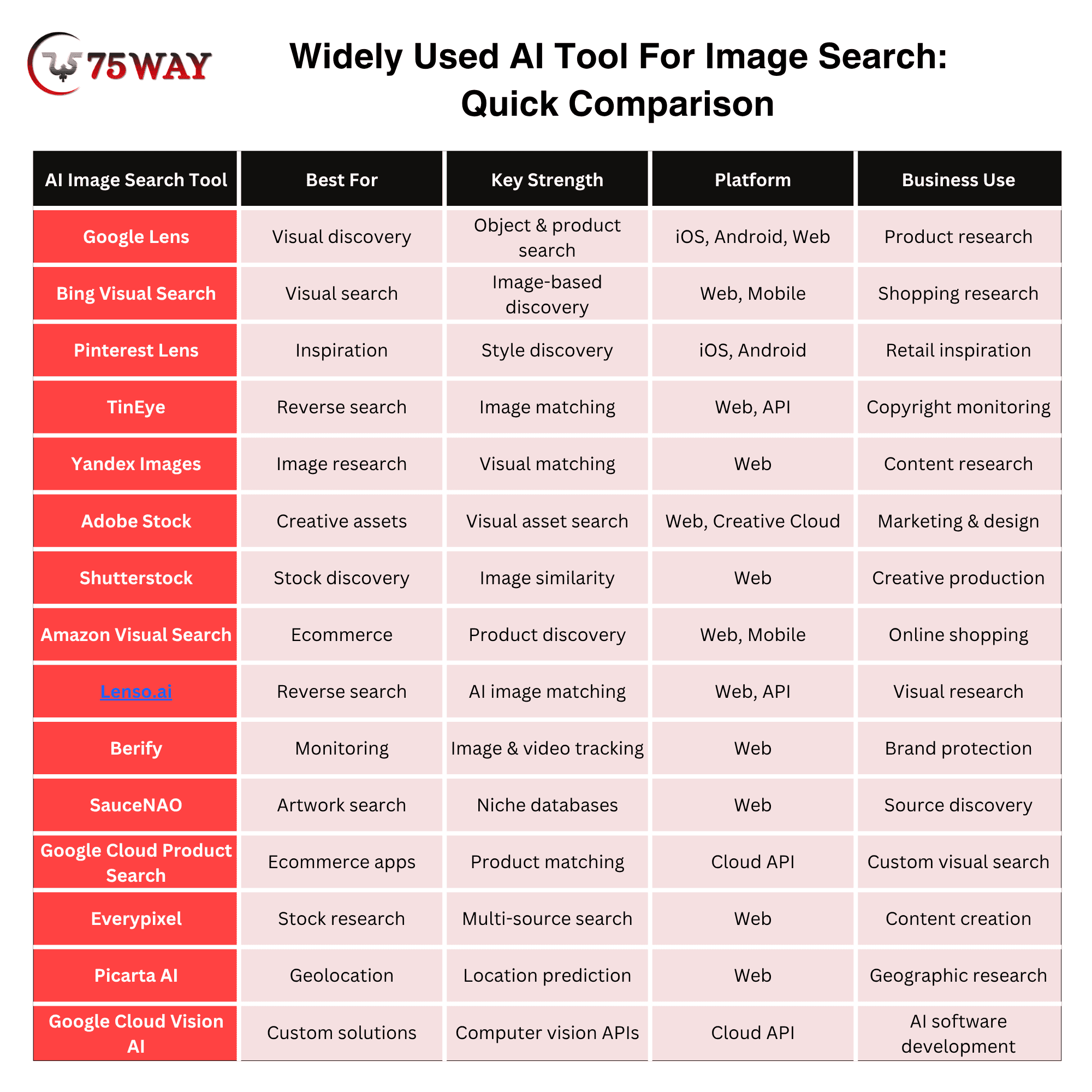
Widely Used AI Tool For Image Search: Quick Comparison
Not every AI image search tool becomes widely used simply because it has advanced technology behind it. User experience, familiarity, and the ability to deliver useful visual results can make certain platforms stand out in everyday use. The quick comparison below highlights widely used AI tools for image search and what makes them worth considering.
How to Choose the Best AI Image Search Tool for Your Business?
The best AI image search tool for your business is not necessarily the one with the longest feature list. Its real value comes from how well it fits your team’s daily workflow and the kind of visual work your business needs to handle. The right approach to choosing an AI image search tool is explained below.
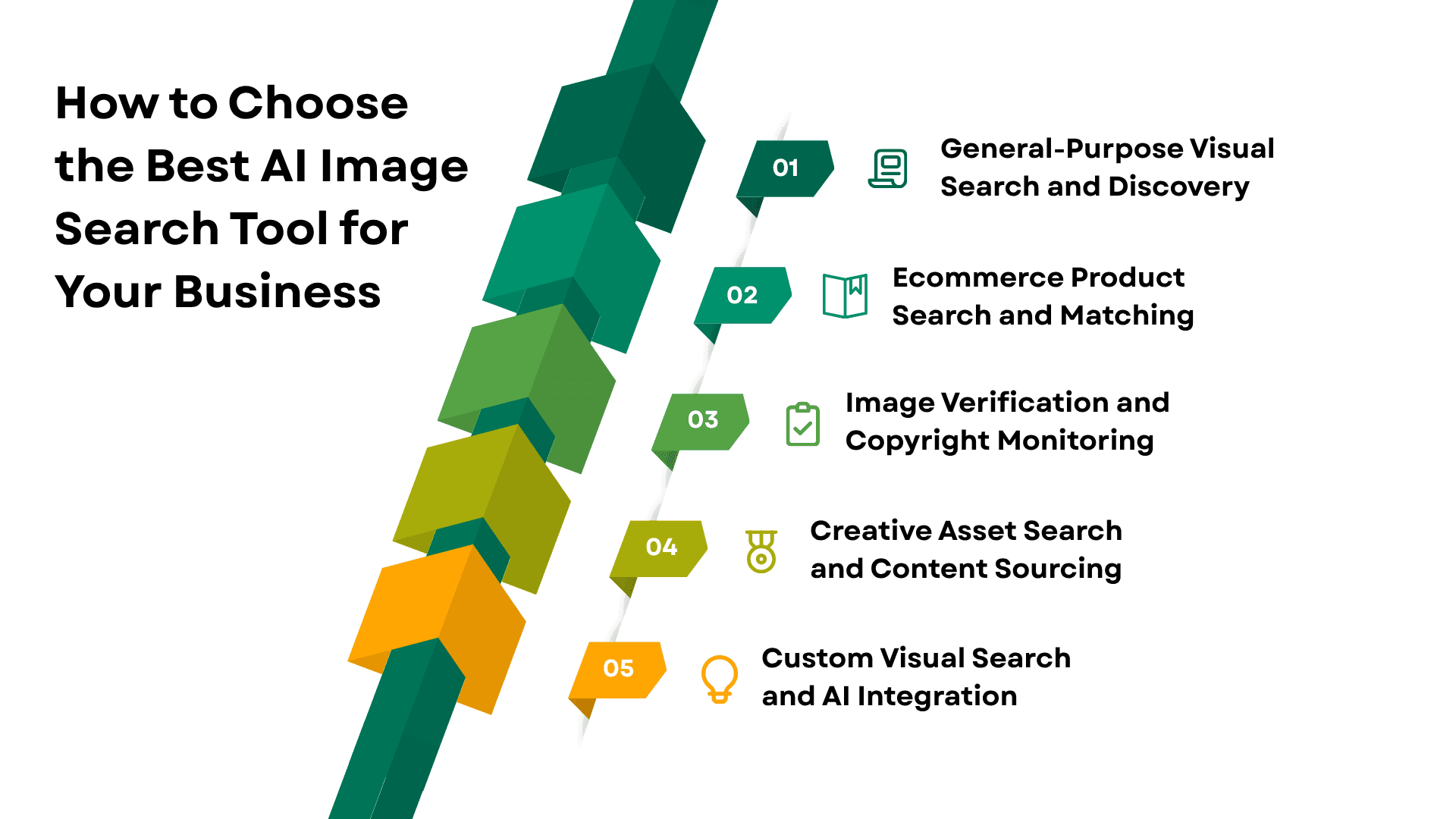
- General-Purpose Visual Search and Discovery
Google Lens and Bing Visual Search are strong options for businesses seeking broad visual search capabilities. They can identify products, objects, places, text, and related images, making them suitable for research, discovery, and everyday visual queries.
- Ecommerce Product Search and Matching
For ecommerce businesses, visual search becomes more valuable when it helps customers discover products from images. Google Lens, Pinterest Lens, Amazon Visual Search, and Google Cloud Vision Product Search are relevant options for product discovery and image-based shopping experiences.
The right choice depends on whether you need a ready-to-use consumer tool or an integrated solution that connects visual search with your own product catalog.
- Image Verification and Copyright Monitoring
Businesses that create or manage original visual assets may prioritize image tracking over general discovery. TinEye and Berify can help identify image matches and monitor where visual content appears online.
These tools can be particularly useful for photographers, publishers, agencies, and brands that need greater visibility into how their visual assets are being used.
- Creative Asset Search and Content Sourcing
For marketing and creative teams, the objective is often to find suitable visual assets rather than identify an existing image. Adobe Stock, Shutterstock, and Everypixel offer visual search capabilities designed around discovering stock images and related creative content.
These platforms can be useful when teams want to search visually while also considering factors such as licensing, style, composition, and asset availability.
- Custom Visual Search and AI Integration
Companies developing their own applications may need capabilities beyond what consumer image-search platforms provide. Google Cloud Vision Product Search can support product matching, while Google Cloud Vision AI provides broader image-analysis capabilities for custom software.
This approach gives businesses greater control over how visual search works within their website, mobile application, ecommerce platform, or enterprise system.
Key Factors for Selecting an AI Image Search Tool
Before making a decision, evaluate the tool against your business objectives rather than choosing solely based on popularity. Consider search accuracy, image-matching capabilities, integrations, scalability, platform compatibility, privacy, API availability, and total cost.
A clear understanding of your use case will help you select an AI image search solution that supports your current requirements while leaving room for future growth.
How Best AI Face Recognition Reverse Image Search Tools Are Changing Business
AI face recognition and reverse image search tools are making it easier for businesses to identify people, verify images, detect misuse, and uncover visual connections. As these capabilities become more advanced, businesses are finding new ways to strengthen security, research, marketing, and customer experiences in 2027.
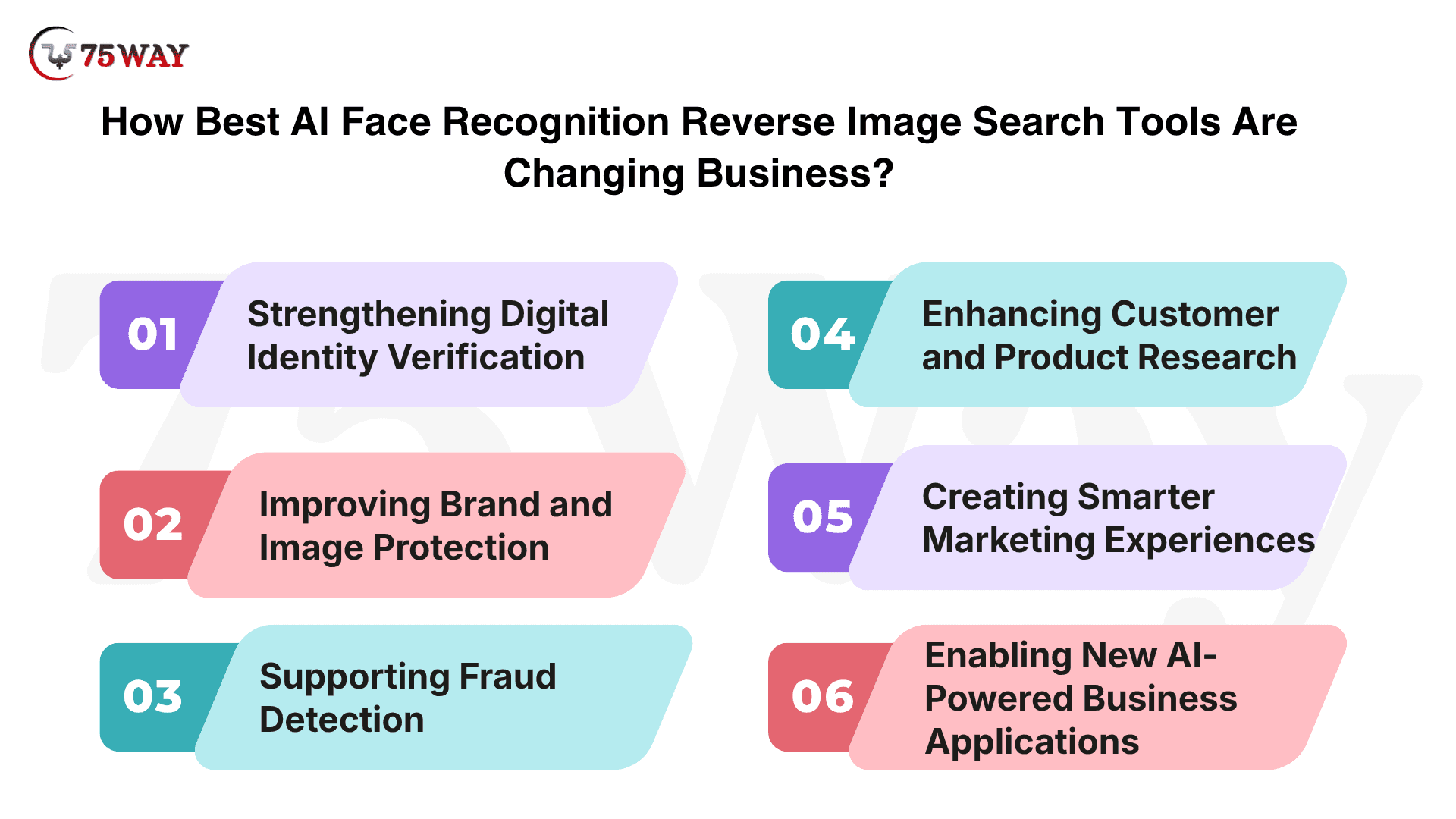
1. Strengthening Digital Identity Verification
AI-powered facial and reverse image search can help businesses investigate whether profile images, submitted photos, or online identities are genuine. This can support identity verification workflows and help organizations identify suspicious or duplicated visual information.
2. Improving Brand and Image Protection
Businesses invest heavily in branded photography, product images, and other visual assets. Reverse image search can help teams discover where these assets appear online, making it easier to identify unauthorized use and protect valuable digital content.
3. Supporting Fraud Detection
Fraudsters can reuse stolen photographs or manipulate existing images to create misleading profiles and listings. AI-powered image matching gives businesses another layer of visual analysis when investigating suspicious accounts, transactions, advertisements, or marketplace activity.
4. Enhancing Customer and Product Research
Visual search can reveal similar images, products, people, and online sources from a single photograph. Businesses can use these insights to understand customer preferences, research competitors, identify products, and discover new opportunities across visual platforms.
5. Creating Smarter Marketing Experiences
Visual discovery is becoming an important part of how customers find products and content. Businesses can use image-based search to create more personalized discovery journeys, recommend visually similar products, and connect customers with relevant content without relying entirely on text-based searches.
6. Enabling New AI-Powered Business Applications
The biggest opportunity may come from integrating visual intelligence directly into business software. Companies can combine facial analysis, reverse image matching, object recognition, and visual search APIs to develop applications for security, ecommerce, media, marketplaces, and other industries.
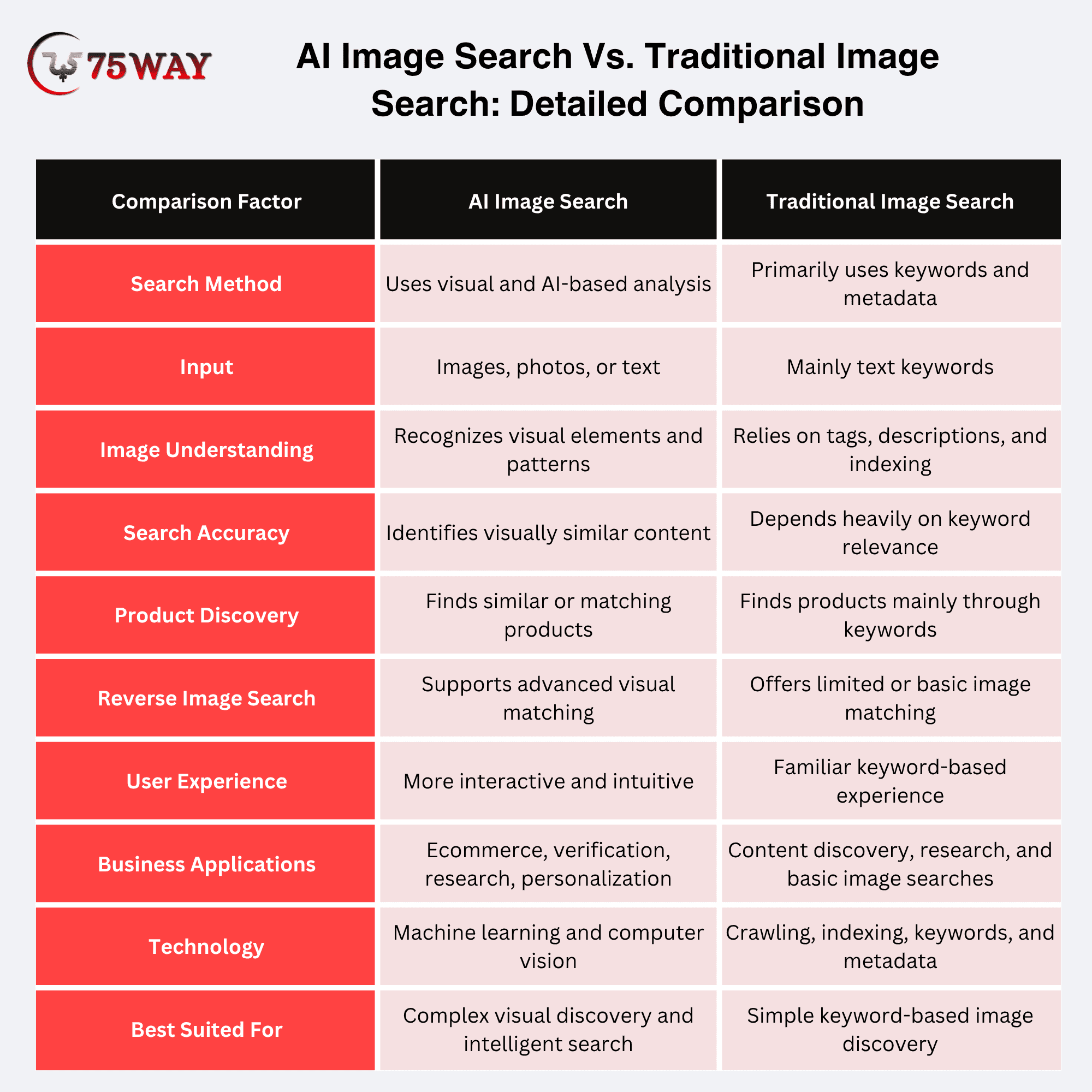
AI Image Search Vs. Traditional Image Search: Detailed Comparison
The difference between AI image search and traditional image search lies in how they understand and retrieve visual information.
Traditional image search mainly depends on text-based queries, keywords, metadata, filenames, and tags to find relevant images, while AI image search can analyze the visual content of an image to identify objects, patterns, products, faces, scenes, and similarities.
That difference matters when a customer does not know the right terminology.
Imagine someone sees a chair in a restaurant and wants a similar model for their office. They may not know whether to search for “mid-century upholstered dining chair,” “accent chair,” or another specific term.
With visual search, they can simply photograph the chair.
The system can then interpret visual characteristics and return relevant products, images, or information.
AI image search also makes visual discovery more intuitive because users can search using an image instead of describing what they want in words.
Traditional search remains useful for straightforward keyword-based queries, but AI-powered tools can provide deeper visual matching and support use cases such as product discovery, reverse image search, image verification, and personalized recommendations.
How Businesses Can Use AI Image Search to Generate Leads
AI image search can become a practical lead-generation channel when businesses connect visual discovery with products, services, and customer inquiries. The strongest opportunities appear in industries where customers naturally use images to communicate what they want.
- Ecommerce and Retail
Online shoppers often find products through social media, screenshots, or photographs rather than product names.
Retailers can use AI image search to match those images with products in their catalog, then direct shoppers toward product pages, related items, or inquiry forms.
- Real Estate
Property buyers frequently search for homes based on visual preferences such as architecture, interiors, layouts, or exterior design.
Real estate platforms can use image search to surface visually similar properties and capture leads through property inquiries, viewing requests, and agent consultations.
- Fashion and Apparel
Customers may see an outfit online without knowing its exact brand, style, or product name.
Fashion businesses can let shoppers search using images and discover similar clothing, accessories, or complete looks, creating opportunities for product recommendations and purchases.
- Furniture and Home Décor
A customer may have a picture of a sofa, dining table, rug, or room they want to recreate.
Furniture businesses can use visual matching to recommend similar products from their collections and encourage visitors to request prices, product details, or customized solutions.
- Automotive
Car buyers often begin with a photograph of a vehicle they like.
Dealerships and automotive marketplaces can use image recognition to identify vehicle models or find visually similar options, then connect interested buyers with pricing, availability, test drives, or financing inquiries.
- Travel and Hospitality
Travelers commonly save photographs of destinations, hotels, architecture, and attractions that inspire their trips.
Travel businesses can use visual search to identify similar destinations or experiences and guide users toward bookings, itinerary inquiries, and travel consultations.
- Manufacturing and B2B
Visual search can also support industrial buyers searching for components, machinery, equipment, or replacement parts.
Businesses can allow customers to upload an image and find matching products, specifications, or alternatives before submitting a quote request or contacting the sales team.
- Beauty and Cosmetics
Customers frequently discover makeup, hairstyles, skincare products, and beauty looks through images.
Beauty brands can use visual search to recommend similar products or looks and guide users toward product pages, consultations, samples, or purchases.
What Makes an AI-Powered Image Search Tool Good?
Do not evaluate these platforms simply by asking whether they “use AI.” The real difference comes from how accurately a tool understands images, how useful its results are, and whether those capabilities fit your business requirements. A better evaluation framework includes:
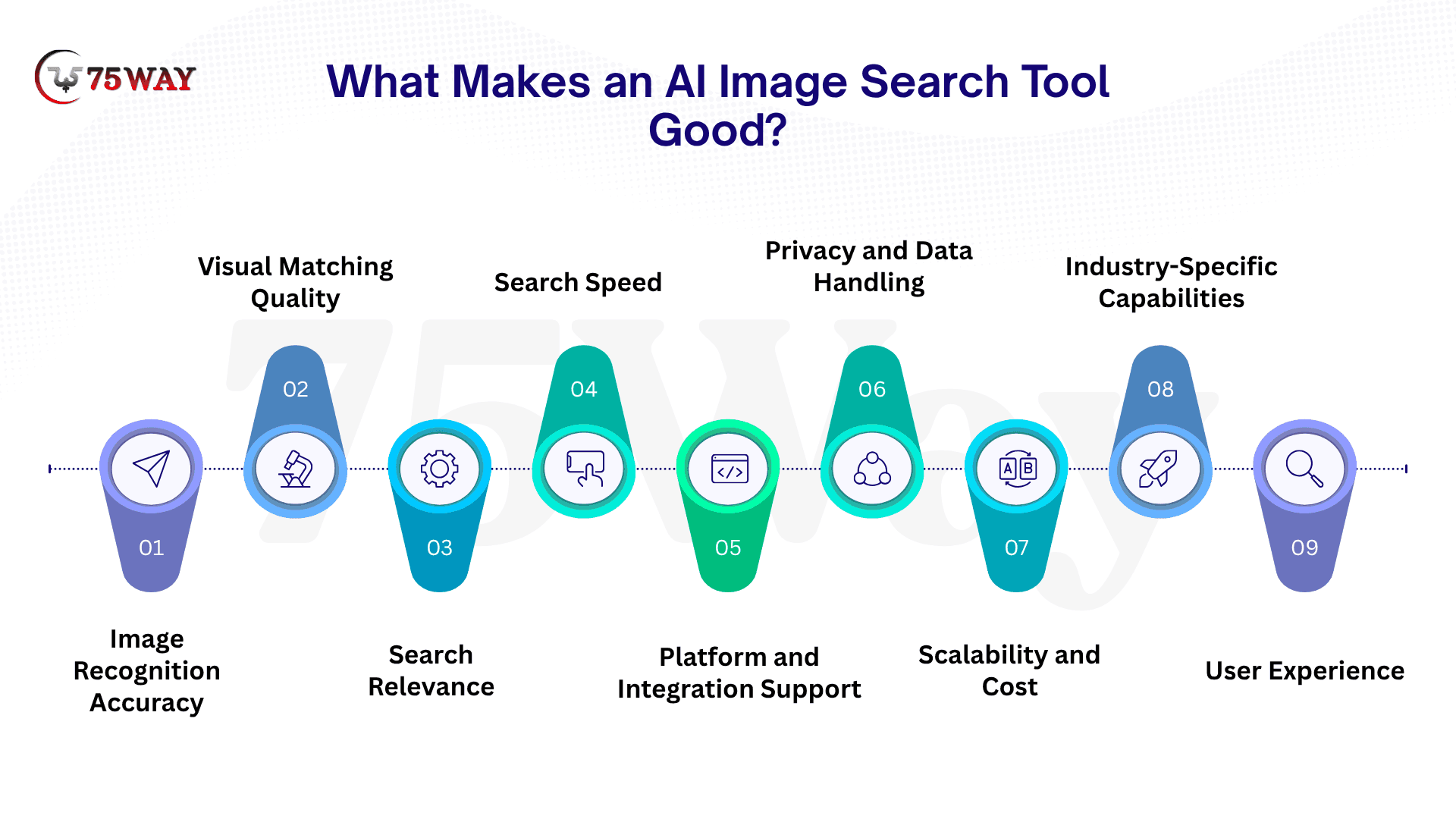
1. Image Recognition Accuracy
The tool should accurately identify objects, products, people, scenes, or other visual elements within an image. Better recognition generally leads to more relevant search results.
2. Visual Matching Quality
Strong tools can find images that are visually similar even when they are not exact duplicates. This is particularly valuable for product discovery, design research, and finding related visual content.
3. Search Relevance
Good image recognition is only part of the experience. Results should closely match the user's intent and provide useful options instead of returning loosely related images.
4. Search Speed
Users expect results quickly, particularly when visual search is part of an ecommerce website or mobile application. Faster processing can create a smoother search experience and reduce friction.
5. Platform and Integration Support
Consider whether the tool works across web and mobile platforms or provides APIs and integrations for your existing technology stack. This becomes especially important when building visual search into a business application.
6. Privacy and Data Handling
Businesses should understand how uploaded images are processed, stored, and used. Clear privacy practices are particularly important when searches involve personal, proprietary, or commercially sensitive images.
7. Scalability and Cost
A tool that works well for occasional searches may not be suitable for thousands or millions of queries. Businesses should evaluate pricing, usage limits, API capacity, and scalability before making a long-term decision.
8. Industry-Specific Capabilities
The best tool depends on the application. Ecommerce may prioritize product matching, while publishers may need reverse image search, and manufacturers may require visual identification of parts or equipment.
9. User Experience
Visual search should be simple enough for customers or employees to use without extensive instructions. Easy image uploads, intuitive search controls, useful filters, and clear results can make a significant difference to adoption.
What Should You Look for Before Choosing an AI Tool For Searching Image?
The right AI image search tool should make finding the right visual easier, not give your team another platform to figure out. A tool may look impressive at first, but its real usefulness becomes clear when you put it into everyday work. What you should ask before choosing an AI tool for image searching is explained below.
- Does it understand visual context accurately? Look beyond basic object recognition and check whether it understands products, patterns, scenes, and visual relationships.
- How relevant are the search results? A strong tool should return visually and contextually relevant results rather than loosely related images.
- Can it handle your image volume? Check processing limits, indexing capacity, API quotas, and scalability if you expect growing search activity.
- Does it support your required platforms? Confirm compatibility with web applications, mobile apps, APIs, cloud environments, or existing business systems.
- How does it handle user data? Review image storage, retention, processing, privacy controls, and compliance requirements before uploading proprietary or customer images.
- Can you customize the search experience? Look for options to combine visual similarity with keywords, product attributes, categories, filters, or business-specific data.
- What will the total cost be? Consider subscription fees, API usage, storage, processing, integrations, and infrastructure rather than comparing headline pricing alone.
- Does it fit your business use case? A tool built for reverse image search may not be suitable for ecommerce product matching, content discovery, or custom visual search.
- How easy is it for users? Uploading images, cropping objects, refining results, and navigating matches should require minimal effort.
- Can it grow with your business? Choose a platform that can support higher search volumes, larger image libraries, new integrations, and additional visual-search capabilities over time.
How to Build an AI Image Search Tool: Step-By-Step Process
Building an AI image search tool requires more than adding image upload functionality. A successful solution combines computer vision, machine learning, image processing, search infrastructure, and a user-friendly interface to understand visual inputs and return relevant results.
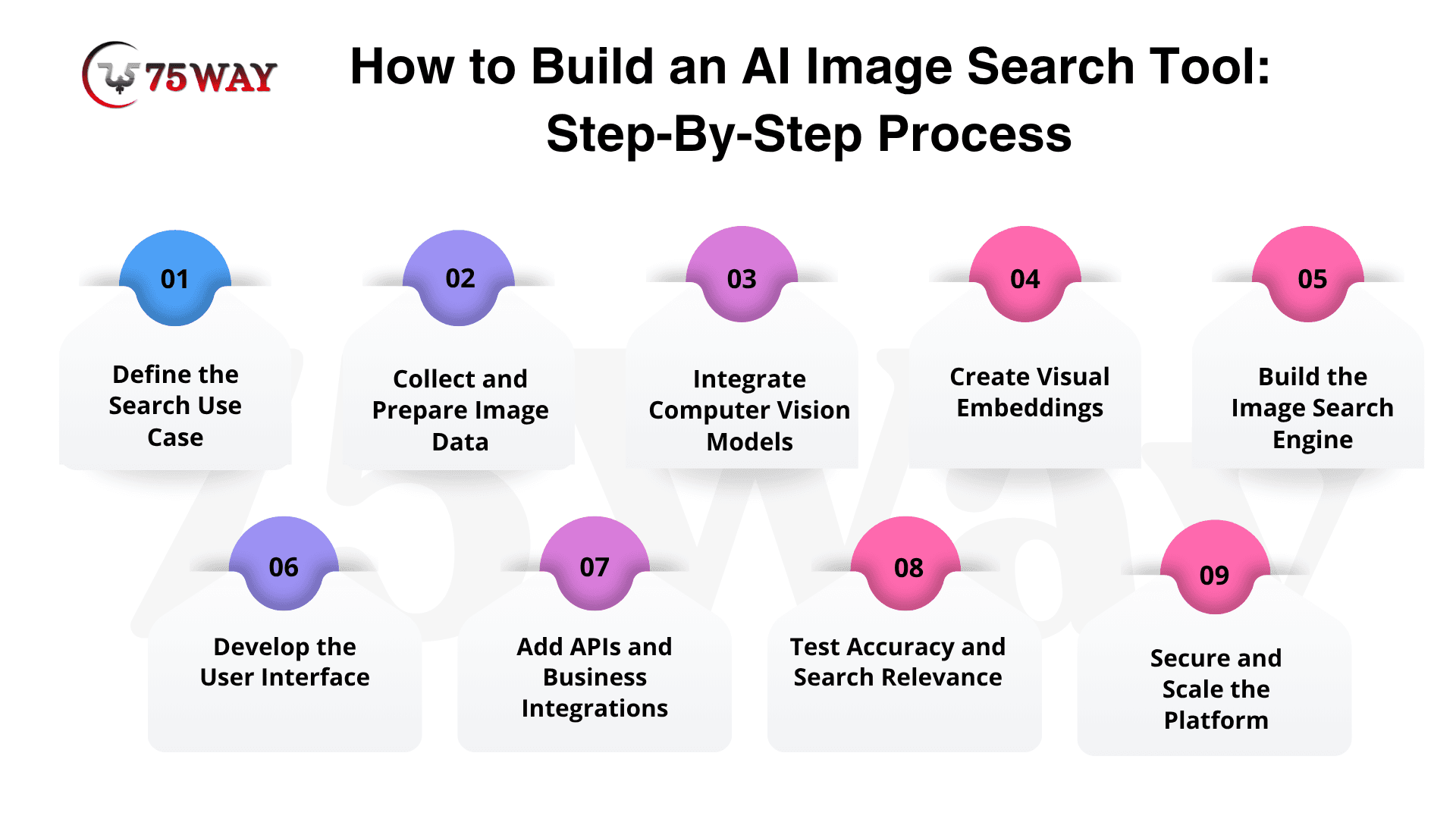
Step 1: Define the Search Use Case
Start by deciding what the tool needs to accomplish. Product discovery, reverse image search, visual similarity, image identification, geolocation, and content discovery require different models, datasets, and search workflows. A clear use case helps determine the right technology stack and development scope.
Step 2: Collect and Prepare Image Data
The quality of visual search depends heavily on the data used for training and indexing. Collect relevant images, product catalogs, metadata, labels, and attributes, then clean and organize the dataset. Images may also need resizing, normalization, deduplication, and annotation before they are processed.
Step 3: Integrate Computer Vision Models
Computer vision enables the application to understand what appears inside an image. Depending on the use case, developers can integrate object detection, image classification, OCR, facial recognition, or image embedding models. Pre-trained AI models can accelerate development while reducing the need to build every capability from scratch.
Step 4: Create Visual Embeddings
Visual embeddings convert images into numerical representations that capture their important characteristics. When a user uploads an image, the system generates its embedding and compares it with indexed images. This allows the application to identify visually similar products, objects, designs, or content.
Step 5: Build the Image Search Engine
The search layer stores and retrieves visual embeddings at scale. Vector databases and similarity-search technologies can compare a query image against thousands or millions of indexed images. Developers can combine visual similarity with metadata, keywords, categories, pricing, location, or other business-specific filters to improve result relevance.
Step 6: Develop the User Interface
The interface should make visual search straightforward. Users may need options to upload an image, capture a photo, crop a specific object, refine results, apply filters, and explore visually similar results. For ecommerce applications, product information, pricing, availability, and calls to action can be displayed alongside search results.
Step 7: Add APIs and Business Integrations
Businesses may want to connect visual search with existing websites, mobile applications, ecommerce platforms, catalogs, CRM systems, or internal databases. APIs allow the AI image search capability to become part of a broader digital product instead of operating as a standalone tool.
Step 8: Test Accuracy and Search Relevance
Before launch, test the system with different image qualities, angles, backgrounds, lighting conditions, and object types. Measure whether the results are visually relevant and useful for the intended users. Feedback from real users can help identify weak matches and improve the search experience.
Step 9: Secure and Scale the Platform
An AI image search tool should address image privacy, access controls, data retention, API security, and responsible data handling. The architecture should also support increasing image volumes and search requests without creating unnecessary performance or infrastructure costs.
How 75way Technologies Can Help You Build an AI Image Searching Tool?
75way Technologies helps businesses turn visual search concepts into practical AI-powered applications tailored to their specific goals.
Our AI image search app development services cover the complete product lifecycle, from defining the search workflow and selecting suitable computer vision models to developing image-matching capabilities, integrating vector search, building APIs, and creating intuitive web or mobile interfaces.
Whether you need reverse image search, product matching, visual discovery, or an industry-specific solution, we can build the technology around your users, data, and business requirements.
Our development approach also focuses on scalability, security, integration, and long-term product growth.
We can connect the solution with existing product catalogs, databases, ecommerce platforms, CRM systems, and other business applications while designing the architecture to handle increasing image volumes and search requests.
Final Thoughts
AI image search is becoming a valuable capability for businesses looking to improve visual discovery, product search, customer experiences, and digital engagement. From general-purpose platforms like Google Lens to specialized reverse image search tools and custom AI solutions, the right choice depends on your business objectives.
For businesses with specialized requirements, building a custom AI image search tool can provide greater control over functionality, data, user experience, and integrations. To build a powerful AI image search solution tailored to your business, you can connect with a trusted AI development firm to turn your idea into a scalable product.
Frequently Asked Questions (FAQs)
Can Businesses Build Their Own AI Image Search?
Yes. Businesses can use computer-vision APIs and product-search systems to build visual search into ecommerce websites, mobile applications, marketplaces, and SaaS platforms.
How Does AI Visual Search Help Ecommerce?
AI visual search allows shoppers to use product photos as search inputs, helping them discover matching or similar products without knowing the exact product name or keywords.
What Is The Difference Between Image Search And Reverse Image Search?
Image search generally helps users discover images related to a query, while reverse image search uses an existing image to find matching, related, or previously published versions of that image.
Can AI-Powered Image Search Tools Increase Conversions?
It can reduce friction in product discovery, especially when shoppers know what something looks like but cannot describe it accurately. Actual conversion impact depends on implementation, relevance, product catalog quality, and the overall customer journey.
Is AI Image Search Useful For Startups?
Yes. Startups can use visual search for ecommerce discovery, marketplace matching, content moderation, image verification, recommendation systems, and other product experiences.
What Is The Best Reverse Image Search Tool?
TinEye is a strong option for finding image matches, modified copies, higher-resolution versions, and where an image appears online. Berify is another option for broader multi-engine monitoring.