AI Summary
AI tax automation helps accounting firms reduce repetitive work and manage growing client demands. Intelligent tools simplify document processing, data entry, and tax calculations. This guide explores how AI automation improves everyday tax workflows.
Key Takeaways
- AI tax automation reduces repetitive data entry and document handling.
- Intelligent extraction helps accountants process invoices and tax records faster.
- Automated calculations reduce manual effort across routine tax preparation.
- AI-powered checks help identify missing information and potential discrepancies.
A client sends tax documents in a PDF, another shares scanned receipts, and a third calls because their expense records do not match. Meanwhile, your accounting team still has returns to prepare and deadlines to meet. These small tasks can consume hours that your firm could otherwise spend on client advice and financial planning.
AI tax automation helps reduce this workload by handling repetitive activities such as document extraction, data classification, transaction matching, and error detection. Instead of manually checking every record from scratch, accountants can review AI-generated results and focus on entries that need attention.
For accounting firms looking to improve their tax operations, understanding these applications is a practical first step. Here, we explore how AI tax automation works, the manual tasks it can reduce, and the benefits it can bring to everyday accounting processes.
Why Manual Tax Work Is Becoming Difficult For Accounting Firms
A tax return rarely begins with a neat collection of documents. One client might email a W-2, upload several 1099 forms, and send expense receipts through a separate portal. Another might provide incomplete information and require multiple follow-up calls before the accountant can begin preparing the return.
Multiply that situation across dozens or hundreds of clients, and the administrative workload becomes difficult to manage. Accountants spend considerable time locating files, checking figures, entering information, and following up on missing details.
Technology fragmentation adds another problem. A firm's tax preparation software, document storage platform, CRM, bookkeeping system, and communication tools may not share information smoothly.
A 2026 survey of 725 US accounting and bookkeeping professionals reported that respondents lost approximately five hours each week moving, re-entering, or reconciling information across applications.
This is where AI tax automation becomes useful. Rather than replacing the accounting process, it can reduce the amount of repetitive work required to move information from one stage to another.
How AI Tax Automation Reduces Manual Work In Accounting Firms
Your accounting team might spend hours entering figures, sorting receipts, and chasing clients for missing tax documents before actual tax preparation even begins. AI tax automation can take over much of this repetitive work, leaving accountants with more time for reviewing returns and advising clients. Here’s how it changes everyday tax operations inside accounting firms.
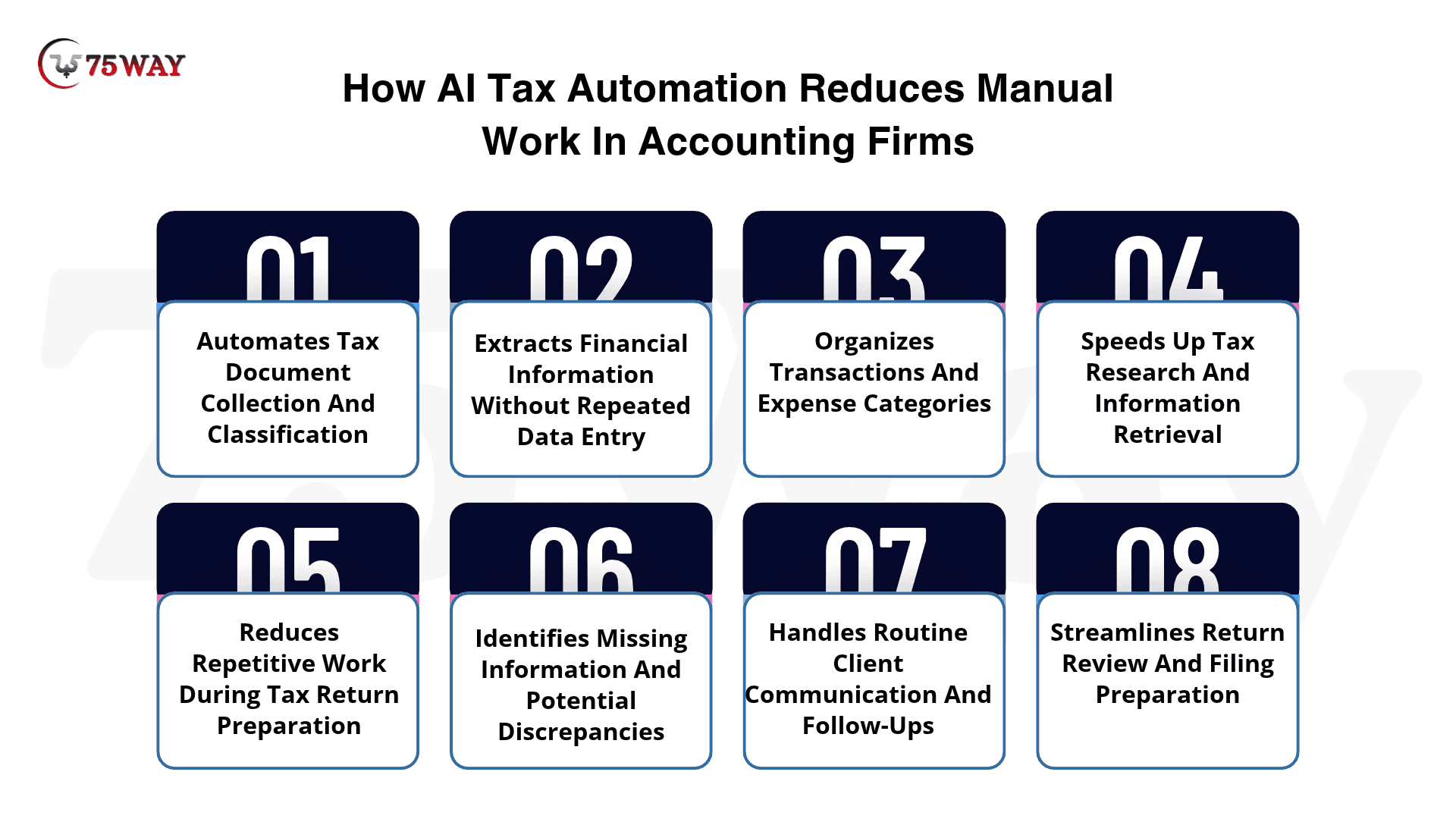
1. Automates Tax Document Collection And Classification
Tax professionals receive financial information in different formats, including PDFs, scanned receipts, spreadsheets, photographs, and digital statements. Sorting these files manually takes time, particularly when clients upload documents without clear names or categories.
AI-powered document processing can recognize document types and organize them into relevant groups. For example, an uploaded W-2 can be classified as wage information, while a 1099-INT can be routed to the interest income category.
This reduces the time staff spends opening, renaming, and sorting individual files. Accountants can also review documents through a more organized client record instead of searching through email attachments.
2. Extracts Financial Information Without Repeated Data Entry
A single tax return may require information from multiple forms and financial records. Manually transferring names, identification details, income figures, and withholding amounts into tax software creates unnecessary work and opportunities for transcription mistakes.
AI-powered optical character recognition (OCR) and intelligent document processing can identify relevant fields and extract their values from uploaded documents. The extracted information can then be transferred into connected systems or presented for accountant approval.
For example, a system can extract wage and withholding details from a W-2 and prepare them for entry into the client's tax record. Staff members still need to confirm that the extracted values match the original document, particularly when scans are unclear.
3. Organizes Transactions And Expense Categories
Bookkeeping records often contain transactions that need to be reviewed and assigned to appropriate categories. A business client may submit hundreds of bank transactions, credit card entries, and expense records before tax preparation begins.
AI models can examine transaction descriptions, amounts, historical patterns, and existing accounting categories to suggest classifications. Recurring software subscriptions, office supply purchases, and travel expenses may be easier to identify through this process.
Unusual or unclear transactions can be flagged for manual review instead of being assigned automatically. This gives accountants a shorter list of exceptions to investigate rather than requiring them to examine every routine entry individually.
4. Speeds Up Tax Research And Information Retrieval
Tax professionals frequently need to locate relevant provisions, compare tax rules, and review guidance before advising clients. Searching through lengthy publications and previous research notes can take considerable time.
AI-assisted research tools can summarize relevant material, locate potentially applicable tax provisions, and organize supporting information. Some systems also allow professionals to ask questions in natural language instead of searching through multiple documents manually.
However, a generated answer should never be treated as an authoritative tax conclusion. Accountants must verify the underlying sources, applicable tax year, calculations, and legal interpretation before using research in client advice.
5. Reduces Repetitive Work During Tax Return Preparation
Tax preparation involves collecting information from different sources and placing it into the appropriate sections of a return. AI-enabled software can assist by organizing extracted data, identifying missing fields, and preparing information for review.
For example, a system may identify that a client's wage information is available but a required supporting document has not been uploaded. It can flag the incomplete record before the return moves to the next stage.
The accountant can then focus on checking eligibility, reviewing deductions, evaluating tax treatment, and resolving unusual situations instead of spending as much time on administrative preparation.
6. Identifies Missing Information And Potential Discrepancies
A missing figure or inconsistent record can delay an entire tax return. These issues may involve differences between submitted documents, incomplete client responses, duplicate records, or unusual transaction amounts.
AI-powered validation tools can compare information across documents and highlight values that deserve closer attention. A system might flag different income figures appearing in two records or identify a required field that has not been completed.
Such alerts are not proof that a tax return contains an error. They give accountants a starting point for investigation and help prevent overlooked information from moving through the workflow.
7. Handles Routine Client Communication And Follow-Ups
Client communication can become a major administrative burden during tax season. Staff members repeatedly send reminders about missing receipts, unsigned forms, incomplete questionnaires, and upcoming deadlines.
AI assistants can draft personalized reminders, answer common questions using approved firm information, and route complex inquiries to the appropriate employee. Automated notifications can also tell clients when documents have been received or when additional information is required.
The firm should establish clear limits around automated responses. Questions involving tax positions, refund expectations, unusual deductions, or sensitive financial circumstances should reach a qualified professional.
8. Streamlines Return Review And Filing Preparation
The final stages of tax preparation involve checking records, reviewing calculations, confirming supporting documents, and preparing returns for filing. AI-assisted review tools can compare selected fields, flag unusual entries, and organize exceptions for the reviewing accountant.
Some platforms also help track return status, approval requirements, electronic signatures, and filing confirmations. This gives staff a clearer view of which returns are awaiting client information, professional review, or submission.
AI can help prepare a return for review, but the responsibility for approving and filing it remains with the authorized tax professional.
Key AI Technologies Working Behind AI Tax Automation Systems
Different AI technologies handle different parts of an accounting workflow. A firm does not necessarily need every technology; the right combination depends on its client base, existing software, and the tasks consuming the most staff time.
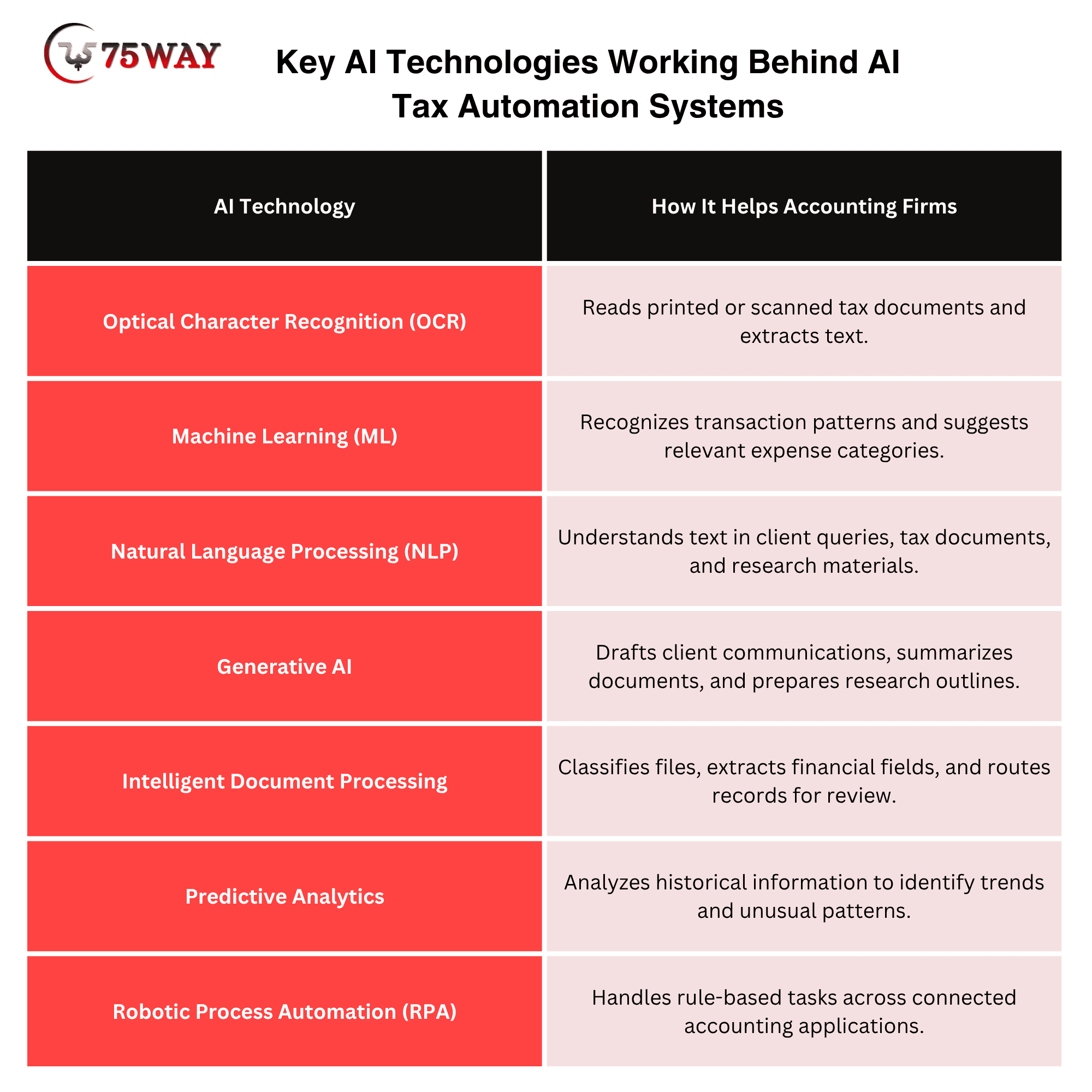
OCR and intelligent document processing are particularly useful when firms receive large volumes of paperwork. Generative AI can support research and communication, while machine learning can help identify patterns across financial records. RPA complements these capabilities by carrying out predictable actions between software systems.
Practical Applications of AI Tax Automation Across US Accounting Workflows
US accounting firms handle different tax requirements depending on whether they serve individuals, small businesses, corporations, or employers. Federal returns, state tax obligations, payroll records, and supporting documents create separate workloads for each client category. AI tax automation can help firms organize these activities and reduce repetitive work across their services.
Individual Income Tax Preparation
Individual tax preparation involves collecting and reviewing documents such as W-2s, 1099-NEC, 1099-INT, 1099-DIV, and Form 1098. Accountants also need information about deductions, tax credits, dependents, and other relevant financial details before preparing federal and applicable state income tax returns.
AI-powered tools can classify these documents, extract income and withholding details, and organize the information within a client's tax record. Missing forms or inconsistent figures can be flagged for review, giving tax professionals a clearer starting point for preparing Form 1040.
Small Business Tax Accounting
Small businesses often maintain financial records across bookkeeping platforms, bank statements, invoices, payment processors, and expense management tools. Preparing business tax information requires accountants to organize these records and determine which expenses and transactions need further examination.
AI can suggest transaction categories, extract figures from invoices, and identify unusual entries. For businesses operating as partnerships or S corporations, these workflows can also support the preparation of information required for Forms 1065 and 1120-S, respectively.
Corporate Tax Preparation
C corporations have additional reporting requirements involving financial statements, income records, deductions, credits, and supporting schedules. Accountants preparing Form 1120 may need to examine large volumes of financial information before completing the return.
AI document processing can organize corporate records, compare selected financial figures, and flag differences that deserve investigation. These capabilities can help tax teams prepare supporting information for review without relying entirely on manual document examination.
Payroll Tax Management
Payroll tax responsibilities involve employee wages, federal income tax withholding, Social Security and Medicare taxes, and employer contributions. Accounting firms handling payroll services must also keep track of reporting obligations and filing schedules.
AI automation can organize payroll records, identify missing employee information, and prepare reminders for recurring filings. It can support workflows involving Form 941 for quarterly federal employment tax reporting, Form 940 for annual federal unemployment tax reporting, and W-2 preparation. Final calculations and submissions should remain subject to appropriate professional review.
Tax Advisory And Client Support
Clients frequently approach CPAs with questions about estimated tax payments, business expenses, deductions, retirement contributions, and changes in their financial circumstances. Finding relevant IRS guidance and reviewing applicable tax rules can take time, particularly when the question involves several financial factors.
AI research assistants can help locate relevant IRS publications, organize supporting information, and prepare initial research summaries. However, personalized tax recommendations require a qualified professional to examine the client's circumstances and verify the applicable federal and state rules.
Business Benefits of AI Tax Automation For Accounting Firms
What if your firm could handle more tax engagements without asking accountants to work longer hours during filing season? AI tax automation offers a way to improve how your business manages routine tax operations. The benefits go beyond saved time, creating opportunities for better resource allocation, stronger client relationships, and business growth.
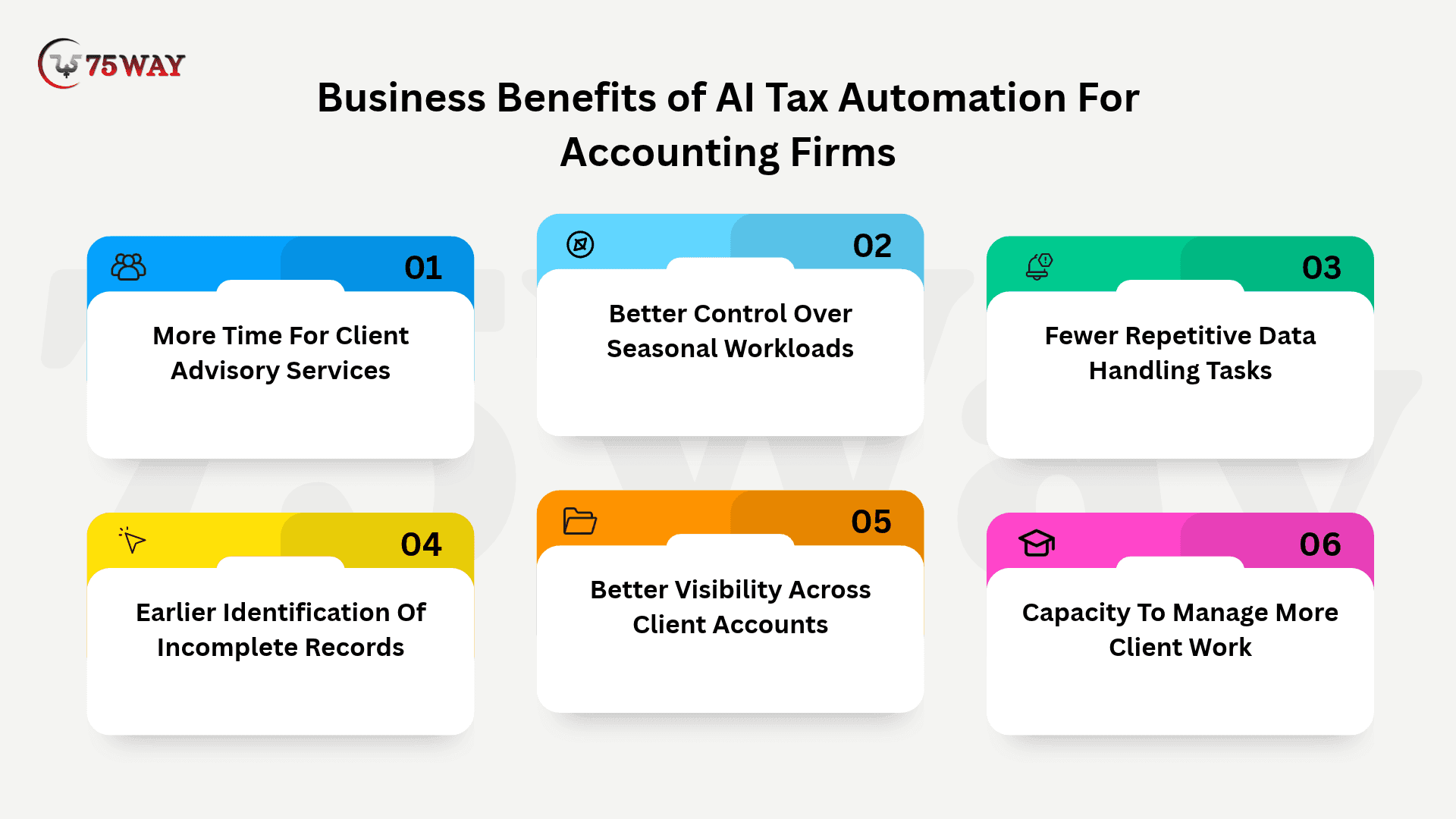
- More Time For Client Advisory Services
Routine document handling and data organization can take attention away from client discussions. When automation reduces this administrative load, accountants have more room to explain tax positions, discuss financial records, and identify planning opportunities.
- Better Control Over Seasonal Workloads
Tax season often brings a sudden increase in client submissions and follow-up requests. Automated document routing, status updates, and task reminders can help firms keep work moving without relying entirely on manual tracking.
- Fewer Repetitive Data Handling Tasks
Repeatedly entering the same information into different systems creates avoidable work. Connected automation can transfer approved information between applications, reducing duplicate entry and the need for repeated manual updates.
- Earlier Identification of Incomplete Records
A return can remain unfinished because a client has not submitted one supporting document or answered a required question. Automated checks can highlight these gaps earlier, giving staff more time to request the missing information.
- Better Visibility Across Client Accounts
Centralized workflow dashboards can show which returns are awaiting documents, which are under review, and which are ready for filing. Managers can use this information to assign work and identify bottlenecks across the team.
- Capacity To Manage More Client Work
When administrative tasks take less time, firms may be able to handle additional accounts with their existing staff capacity. Actual results depend on workflow design, integration quality, review requirements, and the complexity of each client's tax situation.
Challenges Firms Should Consider Before Adopting AI-Powered Tax Automation System
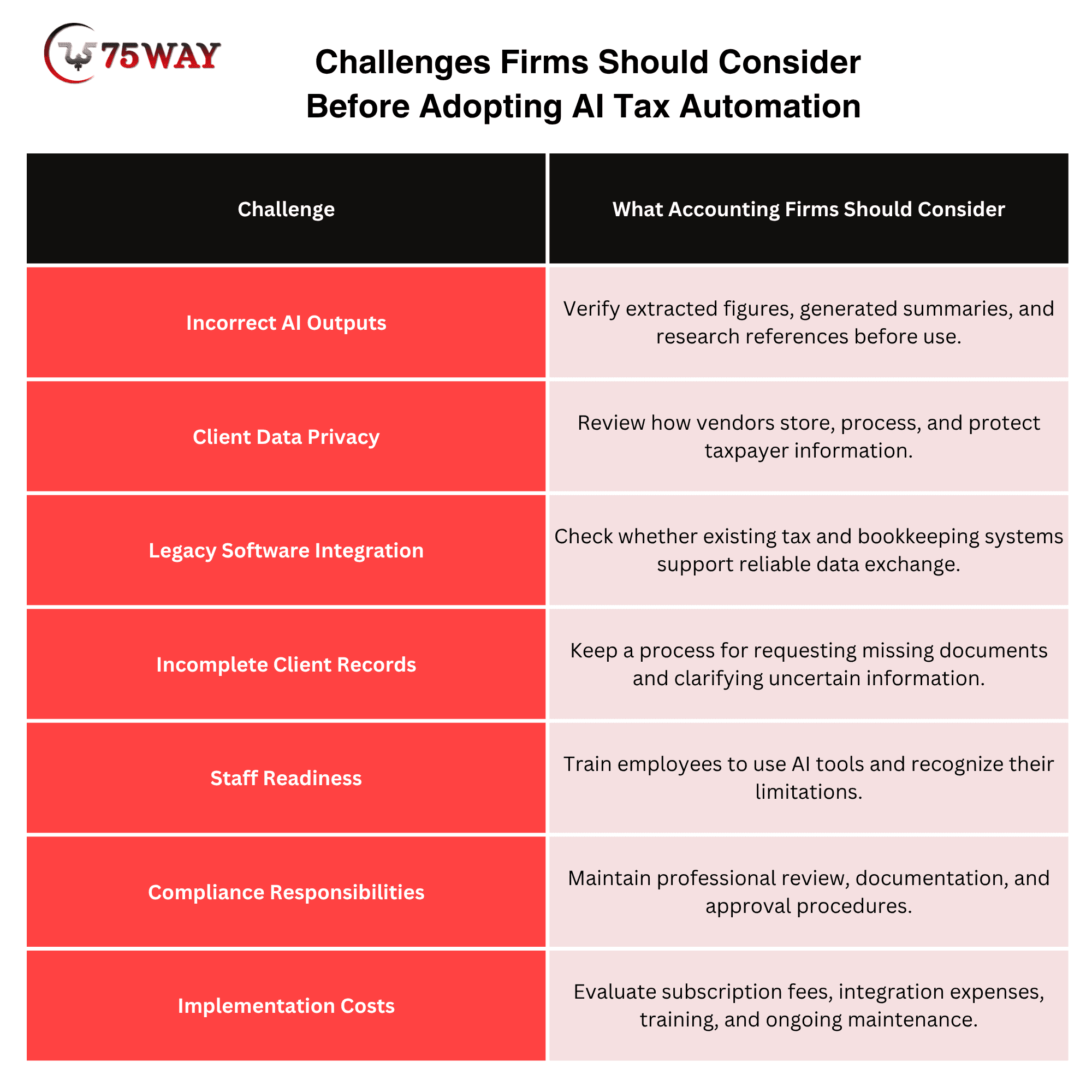
AI tax automation can create new problems when firms introduce it without considering data quality, confidentiality, and professional responsibilities. A practical implementation plan should account for these concerns from the beginning.
Protecting Confidential Taxpayer Information
Tax records contain sensitive details, including Social Security numbers, income information, banking records, and business financial data. Uploading these documents to an unapproved public AI tool can expose information that should remain confidential.
Accounting firms should use approved platforms with appropriate access controls, encryption, data retention policies, and contractual safeguards. They should also confirm whether a provider uses customer information to train its models and whether that use can be disabled.
The IRS advises tax professionals to maintain a written information security plan and recommends measures such as multifactor authentication, encryption, firewalls, backups, and employee security training.
Keeping Human Judgment In The Tax Preparation Process
An AI tool may extract the wrong amount, misunderstand a document, or produce an answer based on an outdated tax rule. Even a convincing explanation can contain an incorrect calculation or unsupported conclusion.
The IRS Office of Professional Responsibility's June 2026 guidance emphasizes that tax practitioners must verify AI-generated facts, citations, and calculations. Existing professional responsibilities, including due diligence and competence, continue to apply when AI is used.
For accounting firms, the practical approach is straightforward: AI can prepare, organize, compare, and flag information, but qualified professionals must review important outputs and remain responsible for tax work.
How To Implement AI Tax Automation In An Accounting Firm
Adoption of an AI tax automation tool is only one part of bringing this technology into your accounting firm. You also need to decide which tasks to automate, prepare financial data, connect existing systems, and train your accountants to review AI-generated results. These implementation considerations can determine whether the investment delivers real business value.
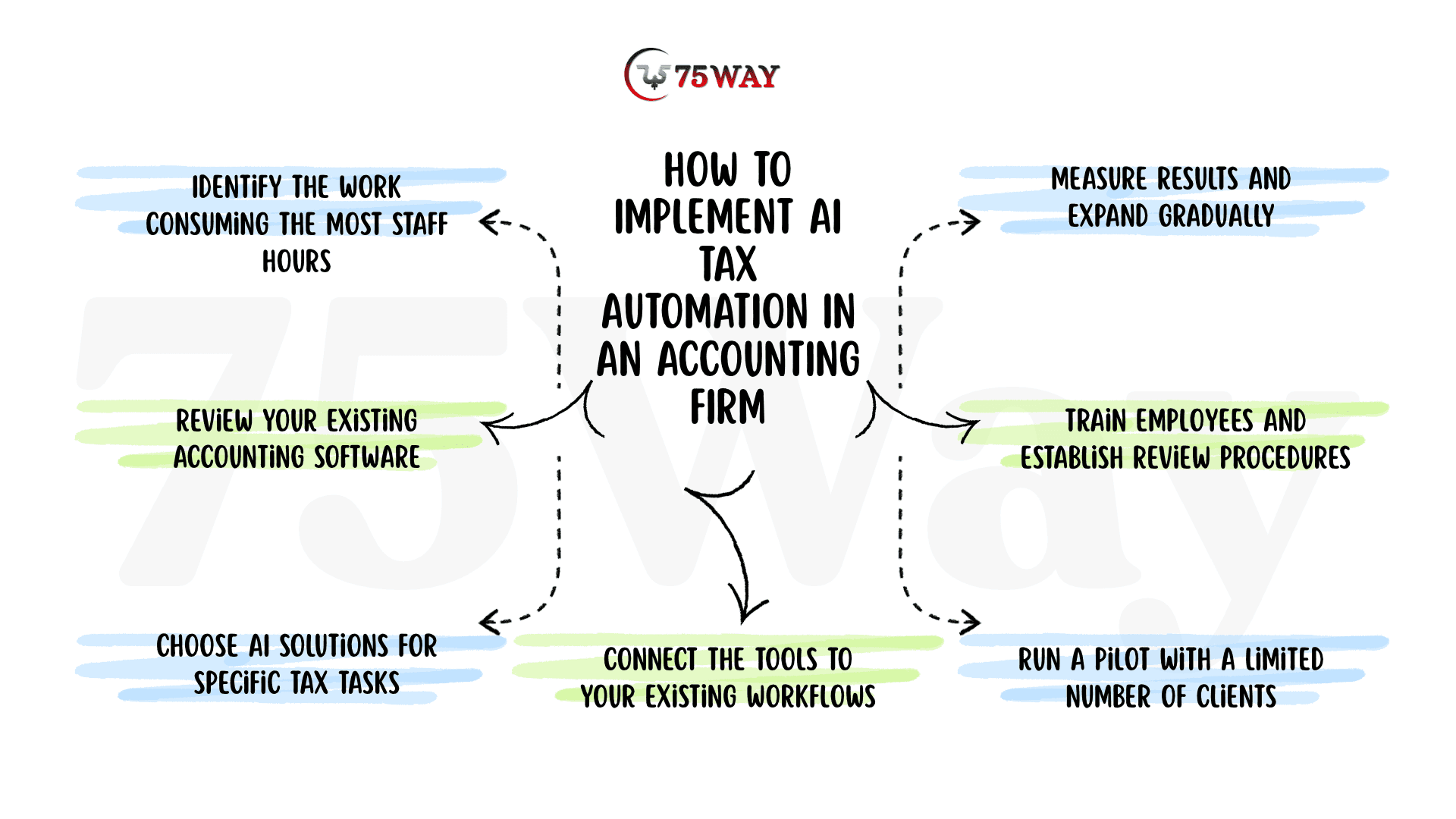
Step 1: Identify The Work Consuming The Most Staff Hours
Start with tasks that repeatedly slow down tax preparation, such as sorting documents, entering figures, requesting missing records, and updating client statuses. Discuss these activities with employees who handle them every day. Their feedback can reveal which processes are suitable for automation and which still require direct professional attention.
Step 2: Review Your Existing Accounting Software
Your current tax preparation, bookkeeping, CRM, document management, and communication platforms will influence the automation approach. Check which systems offer APIs, built-in AI features, or integrations with third-party applications. This assessment can prevent unnecessary software purchases and reduce problems caused by disconnected tools.
Step 3: Choose AI Solutions For Specific Tax Tasks
The required features should determine the solution you select. OCR and intelligent document processing may be suitable for extracting financial information, while AI research assistants can support information retrieval. Workflow automation platforms can handle routine task routing and reminders. Compare vendors based on security, accuracy, integration support, pricing, and review controls.
Step 4: Connect The Tools To Your Existing Workflows
Once the tools are selected, plan how information will move between client portals, document storage, accounting systems, and tax preparation software. Define which records can be transferred automatically and where employee approval is required. Reliable integration matters because disconnected automation can create another layer of manual work.
Step 5: Run A Pilot With A Limited Number Of Clients
A small pilot can show whether the system performs well with your firm's actual documents and processes. Test different file formats, incomplete submissions, duplicate records, and unusual transactions. Have experienced accountants compare the AI-generated results with the original records before expanding the system to additional client accounts.
Step 6: Train Employees And Establish Review Procedures
Staff members should understand how to use the tools, recognize inaccurate outputs, and handle sensitive client information. Document who can approve extracted data, research summaries, tax calculations, and client-facing communications. Clear responsibilities help prevent employees from treating AI-generated information as automatically correct.
Step 7: Measure Results And Expand Gradually
Compare processing times, document handling effort, correction rates, and outstanding client requests before and after implementation. Ask employees whether the tools are reducing their workload or creating additional review steps. Successful workflows can then be extended to more clients and services, while features that do not deliver practical value can be revised or discontinued.
US Tax Regulations And Data Security Requirements For AI Tax Automation
Accounting firms must assess more than productivity before adopting AI tax automation. Protecting taxpayer information, meeting federal and state requirements, and maintaining professional standards are equally important.
1. IRS Requirements For Protecting Taxpayer Information
IRS Publication 4557, Safeguarding Taxpayer Data, outlines security practices tax professionals should follow to protect sensitive client information.
AI-powered tax systems should support safeguards such as:
- Encryption for stored and transmitted taxpayer records.
- Multifactor authentication for account access.
- Role-based permissions for client information.
- Secure document storage and file sharing.
- Regular backups and recovery procedures.
- Employee training on phishing and data security.
- Vendor checks covering data retention and disclosure.
Firms should also maintain a Written Information Security Plan (WISP) that reflects their operations and applicable requirements.
2. IRC Sections 6713 And 7216: Protecting Tax Return Information
IRC Section 7216 generally restricts the unauthorized use or disclosure of tax return information. Section 6713 addresses penalties for certain prohibited disclosures.
These rules matter when firms use external AI platforms to process client documents. Before sharing taxpayer information, firms should check whether the intended use is permitted and whether client consent is required.
3. IRS Circular 230 And Professional Responsibility
AI-generated calculations and tax research do not replace an accountant's professional judgment. Tax practitioners remain responsible for meeting applicable standards when preparing returns, advising clients, and representing them before the IRS.
AI can support research and preliminary calculations, but professionals must verify its outputs before relying on them. The IRS Office of Professional Responsibility's June 2026 guidance also addresses responsible AI use in federal tax practice.
4. State-Level Tax And Privacy Considerations
Federal rules are not the only concern for accounting firms serving clients across multiple states. State tax laws, privacy requirements, and data breach notification rules may also apply.
For instance, firms handling California residents' personal information may need to comply with the California Consumer Privacy Act (CCPA), as amended by the California Privacy Rights Act (CPRA). Multistate firms should review requirements based on their clients, operations, and data practices.
How Accountants Can Measure The Results of Tax Automation System
Automation should be evaluated through changes in everyday work, not simply by counting how many AI features the firm has purchased. A tool may look impressive during a demonstration but still create extra work if employees have to correct its outputs or transfer information manually.
The following metrics can help firms understand whether their investment is delivering practical improvements.
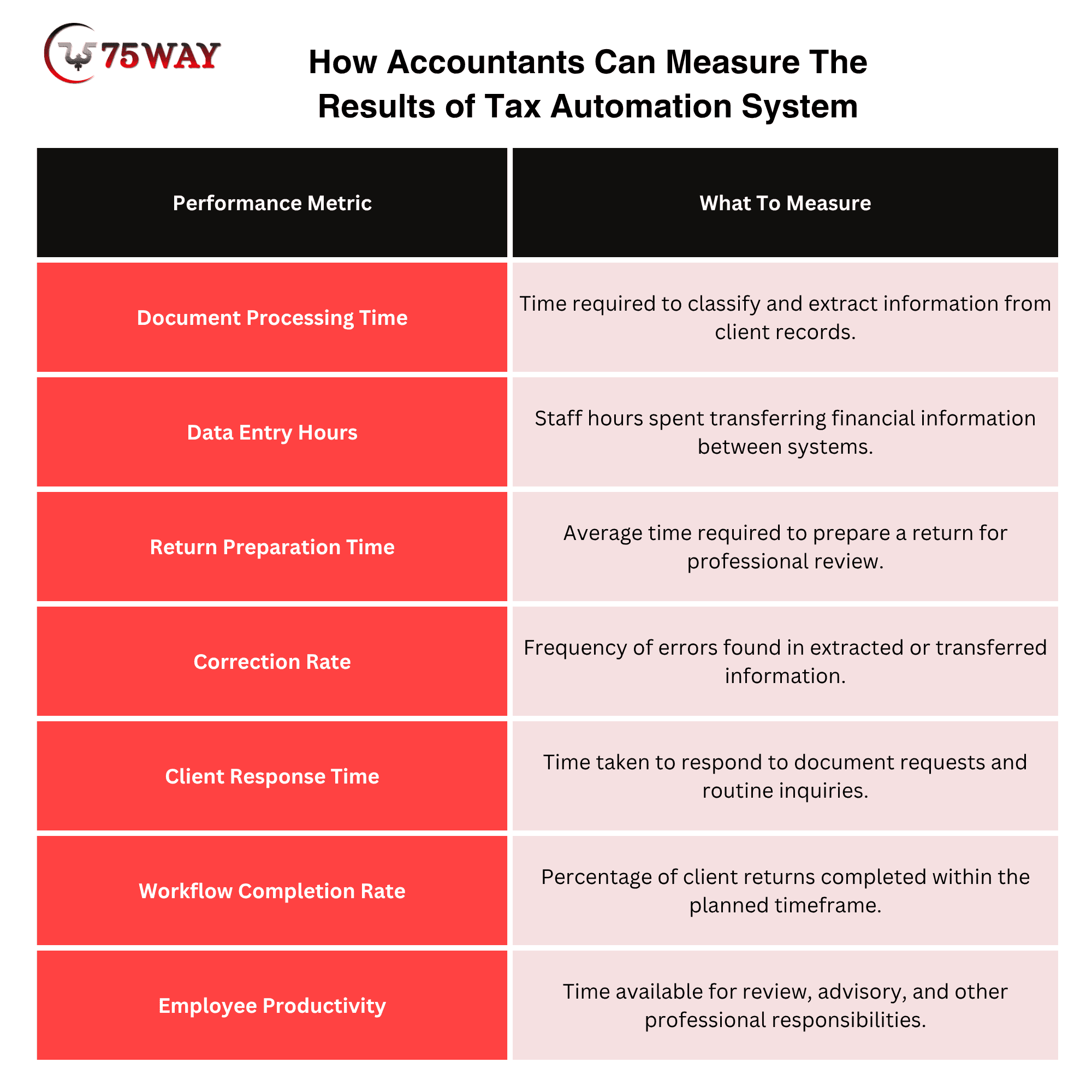
A useful starting point is to record these measurements before implementation. The same metrics can then be reviewed after the pilot and at regular intervals to identify improvements or unexpected problems.
How To Choose The Right AI Tax Automation Development Company In USA
AI tax automation company working with US accounting firms should understand the difference between building a general AI application and creating software that handles sensitive taxpayer information. The right partner should be able to translate tax workflows into practical software features while accounting for security, integrations, and professional review requirements.
Here are the areas worth evaluating before making a decision:
- US Tax Workflow Knowledge: Look for an understanding of Form 1040, Forms 1065, 1120, and 1120-S, payroll reporting, and federal and state tax processes.
- AI Development Experience: Evaluate the company's ability to implement OCR, intelligent document processing, machine learning, and AI-assisted tax research.
- Accounting Software Integrations: Ask whether the team can connect the solution with existing tax preparation, bookkeeping, payroll, CRM, and document management platforms.
- Taxpayer Data Protection: Discuss encryption, access controls, secure storage, vendor data policies, and applicable IRS safeguarding expectations.
- Human Review Mechanisms: Ensure accountants can verify extracted figures, correct AI-generated information, and approve important outputs before filing.
How 75way Technologies Can Help Build AI Tax Automation Solutions
Accounting firms have different operational requirements, so a tax automation platform should reflect the way their teams actually work. 75way Technologies can be approached for custom AI tax automation development covering requirements such as document processing, financial data extraction, workflow automation, and integrations with existing accounting systems.
A proposed solution can include features such as:
- AI-powered document classification and information extraction.
- Automated transaction categorization and data validation.
- Tax workflow management and client communication tools.
- Custom dashboards for accountants and administrators.
- Integration with existing accounting and financial applications.
- Role-based access and security controls.
The development scope should be based on the firm's existing technology, the volume of records it handles, and the level of automation it wants to introduce. A properly planned solution can help accounting teams reduce repetitive administrative work while retaining control over tax decisions and client deliverables.
Final Thoughts
AI tax automation gives accounting firms a practical way to reduce the administrative work that often takes attention away from clients. Document extraction, transaction categorization, automated follow-ups, and AI-assisted research can simplify everyday tax workflows.
However, accuracy, data protection, and professional review must remain central to every implementation. The right solution is not the one that automates the most tasks; it is the one that removes unnecessary work without compromising the quality of accounting services.
Looking to build an AI-powered tax automation solution? Connect with a reliable AI development studio to discuss your accounting firm's requirements and development roadmap.
Frequently Asked Questions (FAQs)
Can AI Automate The Entire Tax Preparation Process?
No. AI can support document processing, data organization, calculations, and preliminary checks, but complex tax decisions require professional judgment. Accountants must review the information and approve tax returns before filing.
Is AI Tax Automation Suitable For Small Accounting Firms?
Yes. Small accounting firms can use AI tools for document extraction, client reminders, bookkeeping assistance, and routine data organization. Starting with one repetitive task can help firms evaluate the benefits without changing their entire technology setup.
How Does AI Help Reduce Errors In Tax Preparation?
AI can compare information across documents, identify missing fields, flag inconsistent figures, and highlight unusual transactions. These checks help accountants identify potential problems, although professional verification remains necessary.
Is AI Tax Automation Secure For Handling Client Financial Records?
It can be secure when firms use properly configured systems with encryption, access controls, data protection policies, and approved vendor arrangements. Accounting firms should also review how providers store, process, and use confidential taxpayer information.
Can AI Tax Automation Integrate With Existing Accounting Software?
Yes. Depending on the available APIs and integration capabilities, AI solutions can connect with tax preparation platforms, bookkeeping software, CRMs, document management systems, and client portals.
What Tasks Should Accountants Avoid Delegating Entirely To AI?
Complex tax interpretations, final return approval, client-specific tax advice, eligibility decisions, and sensitive financial recommendations should remain under qualified professional supervision. AI can assist with research and organization, but it should not replace accountability.